ParemTech PTLEVEL20R PTLevel Wireless level monitor User Manual Instructions v2 copy

ParemTech PTLevel Wireless level monitor Instructions v2 copy

User Manual

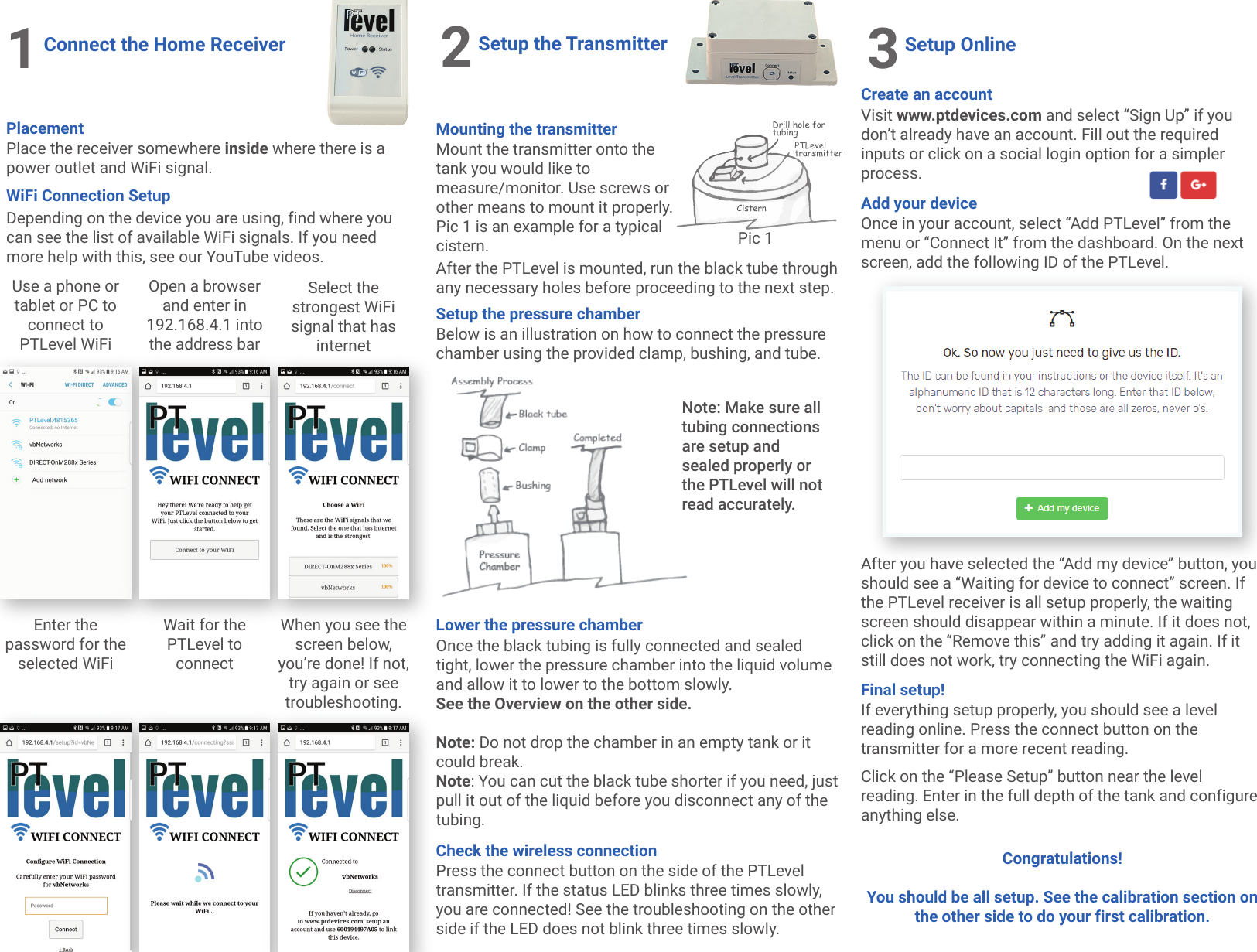
1Connect the Home ReceiverPlacementPlace the receiver somewhere inside where there is a power outlet and WiFi signal.Use a phone or tablet or PC to connect to PTLevel WiFiOpen a browser and enter in 192.168.4.1 into the address barSelect the strongest WiFi signal that has internetEnter the password for the selected WiFiWait for the PTLevel to connectWhen you see the screen below, you’re done! If not, try again or see troubleshooting.2Setup the TransmitterMount the transmitter onto the tank you would like to measure/monitor. Use screws or other means to mount it properly. Pic 1 is an example for a typical cistern.Mounting the transmitterPTLevel transmitterDrill hole for tubingCisternWiFi Connection SetupPic 1Setup the pressure chamberBelow is an illustration on how to connect the pressure chamber using the provided clamp, bushing, and tube.After the PTLevel is mounted, run the black tube through any necessary holes before proceeding to the next step.Depending on the device you are using, find where you can see the list of available WiFi signals. If you need more help with this, see our YouTube videos.Lower the pressure chamberOnce the black tubing is fully connected and sealed tight, lower the pressure chamber into the liquid volume and allow it to lower to the bottom slowly. See the Overview on the other side.Note: Do not drop the chamber in an empty tank or it could break.Note: You can cut the black tube shorter if you need, just pull it out of the liquid before you disconnect any of the tubing. Check the wireless connectionPress the connect button on the side of the PTLevel transmitter. If the status LED blinks three times slowly, you are connected! See the troubleshooting on the other side if the LED does not blink three times slowly.3Setup OnlineCreate an accountVisit www.ptdevices.com and select “Sign Up” if you don’t already have an account. Fill out the required inputs or click on a social login option for a simpler process.Final setup!If everything setup properly, you should see a level reading online. Press the connect button on the transmitter for a more recent reading.After you have selected the “Add my device” button, you should see a “Waiting for device to connect” screen. If the PTLevel receiver is all setup properly, the waiting screen should disappear within a minute. If it does not, click on the “Remove this” and try adding it again. If it still does not work, try connecting the WiFi again.Click on the “Please Setup” button near the level reading. Enter in the full depth of the tank and configure anything else. Congratulations! You should be all setup. See the calibration section on the other side to do your first calibration.Add your deviceOnce in your account, select “Add PTLevel” from the menu or “Connect It” from the dashboard. On the next screen, add the following ID of the PTLevel.Note: Make sure all tubing connections are setup and sealed properly or the PTLevel will not read accurately.
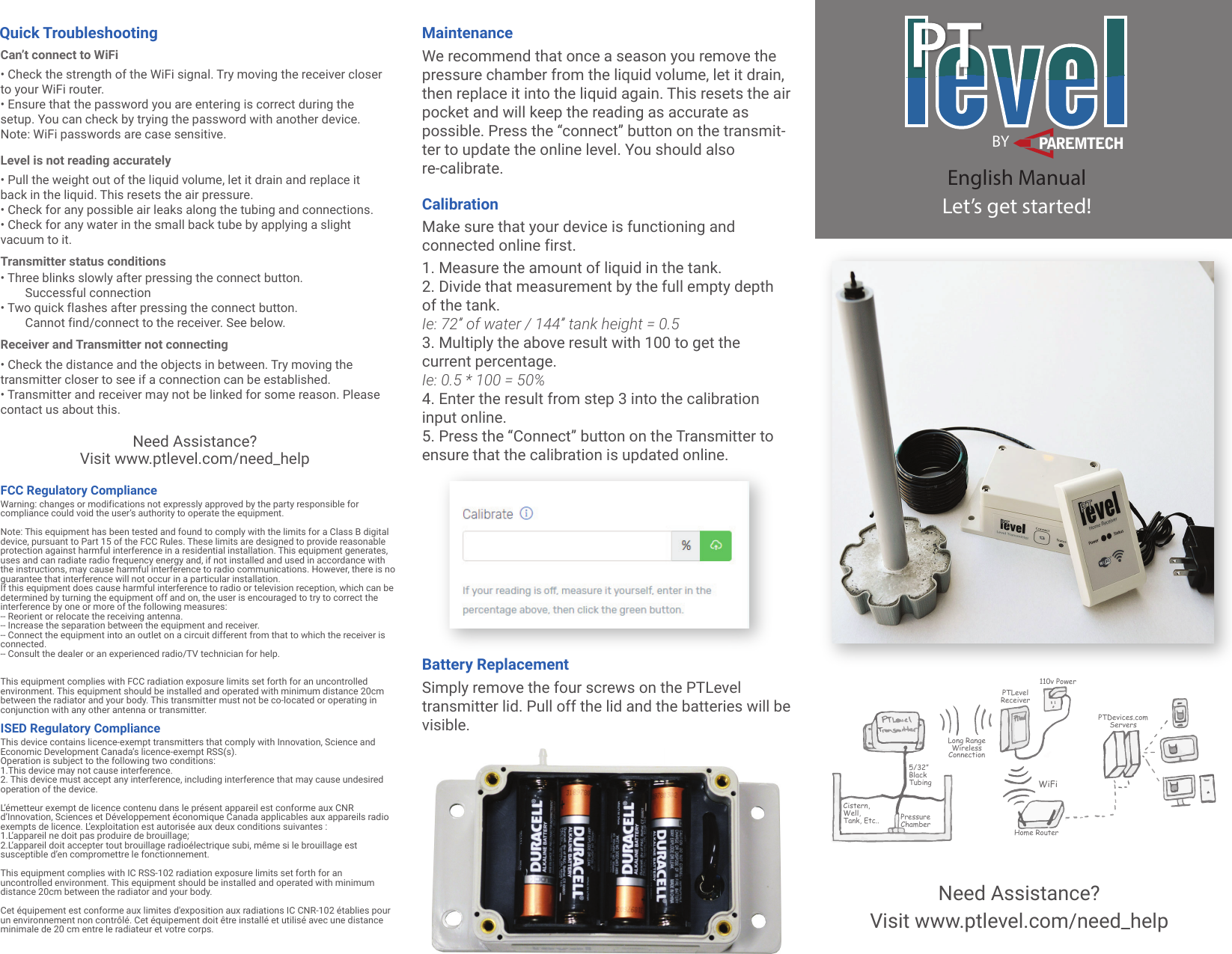
levelBYPAREMTECHEnglish ManualLet’s get started!PTDevices.comServers110v PowerPTLevelReceiverHome RouterWiFiLong Range Wireless Connection5/32”Black TubingPressureChamberCistern,Well,Tank, Etc..Quick Troubleshooting MaintenanceCalibrationCan’t connect to WiFi• Check the strength of the WiFi signal. Try moving the receiver closer to your WiFi router.• Ensure that the password you are entering is correct during the setup. You can check by trying the password with another device. Note: WiFi passwords are case sensitive.Level is not reading accurately• Pull the weight out of the liquid volume, let it drain and replace it back in the liquid. This resets the air pressure.• Check for any possible air leaks along the tubing and connections.• Check for any water in the small back tube by applying a slight vacuum to it.Transmitter status conditions• Three blinks slowly after pressing the connect button.        Successful connection• Two quick flashes after pressing the connect button.        Cannot find/connect to the receiver. See below.Receiver and Transmitter not connecting• Check the distance and the objects in between. Try moving the transmitter closer to see if a connection can be established.• Transmitter and receiver may not be linked for some reason. Please contact us about this.We recommend that once a season you remove the pressure chamber from the liquid volume, let it drain, then replace it into the liquid again. This resets the air pocket and will keep the reading as accurate as possible. Press the “connect” button on the transmit-ter to update the online level. You should also re-calibrate.1. Measure the amount of liquid in the tank.2. Divide that measurement by the full empty depth of the tank.Ie: 72” of water / 144” tank height = 0.53. Multiply the above result with 100 to get the current percentage.Ie: 0.5 * 100 = 50%4. Enter the result from step 3 into the calibration input online.5. Press the “Connect” button on the Transmitter to ensure that the calibration is updated online.Make sure that your device is functioning and connected online first.Battery ReplacementSimply remove the four screws on the PTLevel transmitter lid. Pull off the lid and the batteries will be visible.Need Assistance?Visit www.ptlevel.com/need_helpNeed Assistance?Visit www.ptlevel.com/need_helpFCC Regulatory ComplianceWarning: changes or modifications not expressly approved by the party responsible for compliance could void the user’s authority to operate the equipment.Note: This equipment has been tested and found to comply with the limits for a Class B digital device, pursuant to Part 15 of the FCC Rules. These limits are designed to provide reasonable protection against harmful interference in a residential installation. This equipment generates, uses and can radiate radio frequency energy and, if not installed and used in accordance with the instructions, may cause harmful interference to radio communications. However, there is no guarantee that interference will not occur in a particular installation.If this equipment does cause harmful interference to radio or television reception, which can be determined by turning the equipment off and on, the user is encouraged to try to correct the interference by one or more of the following measures:-- Reorient or relocate the receiving antenna.-- Increase the separation between the equipment and receiver.-- Connect the equipment into an outlet on a circuit different from that to which the receiver is connected.-- Consult the dealer or an experienced radio/TV technician for help.This equipment complies with FCC radiation exposure limits set forth for an uncontrolled environment. This equipment should be installed and operated with minimum distance 20cm between the radiator and your body. This transmitter must not be co-located or operating in conjunction with any other antenna or transmitter.ISED Regulatory ComplianceThis device contains licence-exempt transmitters that comply with Innovation, Science and Economic Development Canada’s licence-exempt RSS(s).Operation is subject to the following two conditions:1.This device may not cause interference.2. This device must accept any interference, including interference that may cause undesired operation of the device.L’émetteur exempt de licence contenu dans le présent appareil est conforme aux CNR d’Innovation, Sciences et Développement économique Canada applicables aux appareils radio exempts de licence. L’exploitation est autorisée aux deux conditions suivantes :1.L’appareil ne doit pas produire de brouillage;2.L’appareil doit accepter tout brouillage radioélectrique subi, même si le brouillage est susceptible d’en compromettre le fonctionnement.This equipment complies with IC RSS-102 radiation exposure limits set forth for an uncontrolled environment. This equipment should be installed and operated with minimum distance 20cm between the radiator and your body.Cet équipement est conforme aux limites d'exposition aux radiations IC CNR-102 établies pour un environnement non contrôlé. Cet équipement doit être installé et utilisé avec une distance minimale de 20 cm entre le radiateur et votre corps.

Navigation menu