Parente Fireworks Srl FIREMASTER4KT Firemaster IV Base Station User Manual 3

Parente Fireworks Srl Firemaster IV Base Station 3

Users Manual V

FIREMASTER IV "MillenniumThree"  radio shooting system         User’s manual 3. "FIRE" FUNCTION 3.1 FOREWORD  All functions just described have been used with the key switch selector of the Base Unit  TX5000 in position "TEST-SAFE". In this operating mode it is TOTALLY INHIBITED the transmission of a particular code regarded by all Remote Units as a FIRE COMMAND. All Remote Units have thus the batteries powering the lines, PHYSICALLY DISCONNECTED. In this way all test operations can be carried-out with the maximum safety degree and, even if a severe failure should occur to one or more Units, IT NEVER WILL BE POSSIBLE TO HAVE A PREMATURE OR UNDUE FIRING OF ANY SQUIB CONNECTED TO THE SYSTEM. When otherwise the show MUST BE FIRED, the fire code must be always sent along with the data relative to the lines to be activated. Only in this way, all Remote Units involved in firing one or more lines, will provide to connect accordingly the LINE BATTERIES to the lines to be fired. This connection is made during a time interval reduced to the minimum indispensable to provide the line activation and to transfer the energy quantum for firing. After this interval the batteries are DISCONNECTED again bringing back all Units to a SAFE CONDITION. Only during a "timed" sequence, because the allotted time between shots is too short to connect and dis-connect the batteries, the FIRE VOLTAGE is maintained along the whole sequence duration and for all Units involved in that sequence.   48
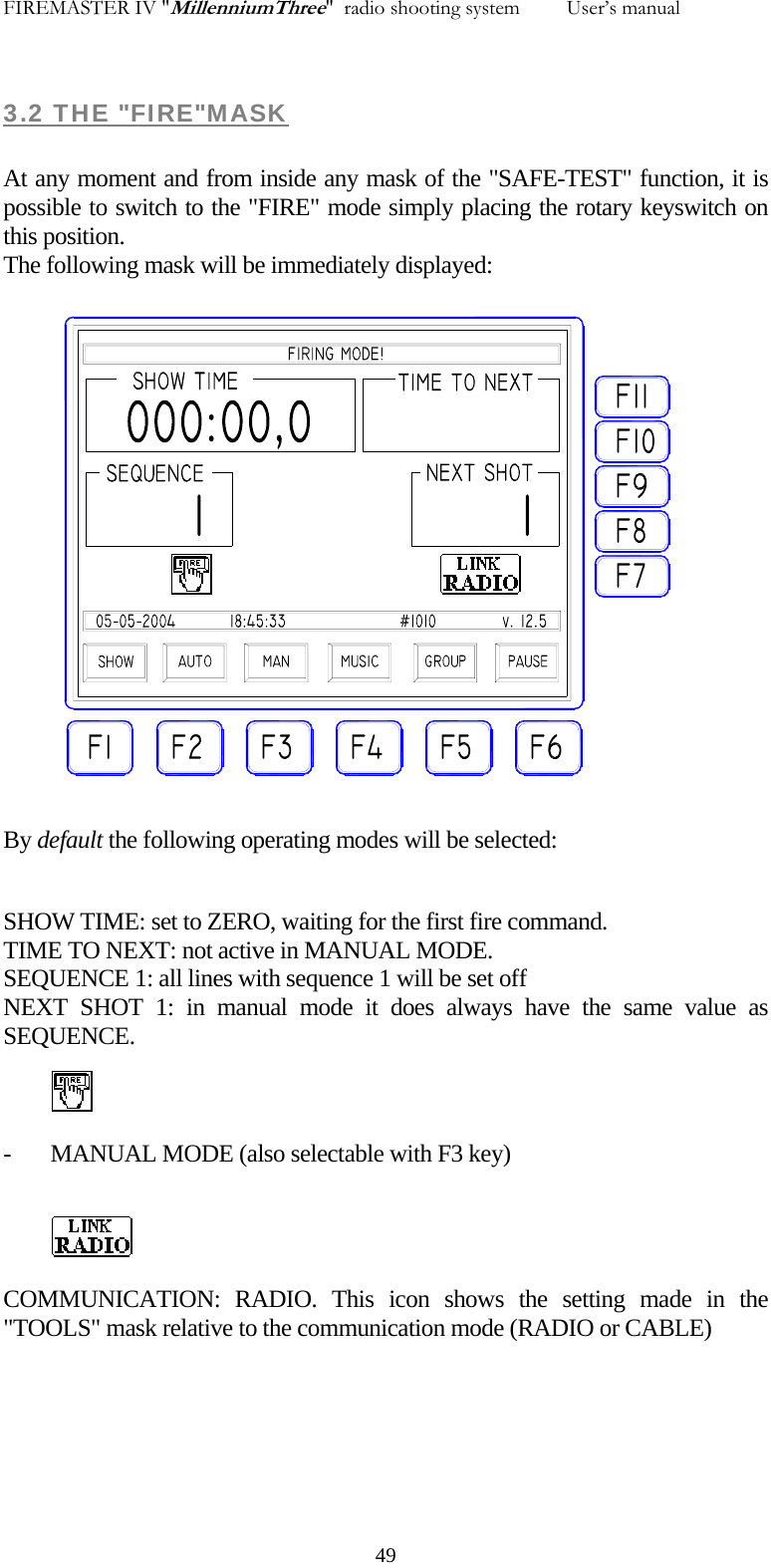
FIREMASTER IV "MillenniumThree"  radio shooting system         User’s manual 3.2 THE "FIRE"MASK  At any moment and from inside any mask of the "SAFE-TEST" function, it is possible to switch to the "FIRE" mode simply placing the rotary keyswitch on this position. The following mask will be immediately displayed:  By default the following operating modes will be selected:  SHOW TIME: set to ZERO, waiting for the first fire command. TIME TO NEXT: not active in MANUAL MODE. SEQUENCE 1: all lines with sequence 1 will be set off NEXT SHOT 1: in manual mode it does always have the same value as  SEQUENCE.  - MANUAL MODE (also selectable with F3 key)   COMMUNICATION: RADIO. This icon shows the setting made in the "TOOLS" mask relative to the communication mode (RADIO or CABLE)    49
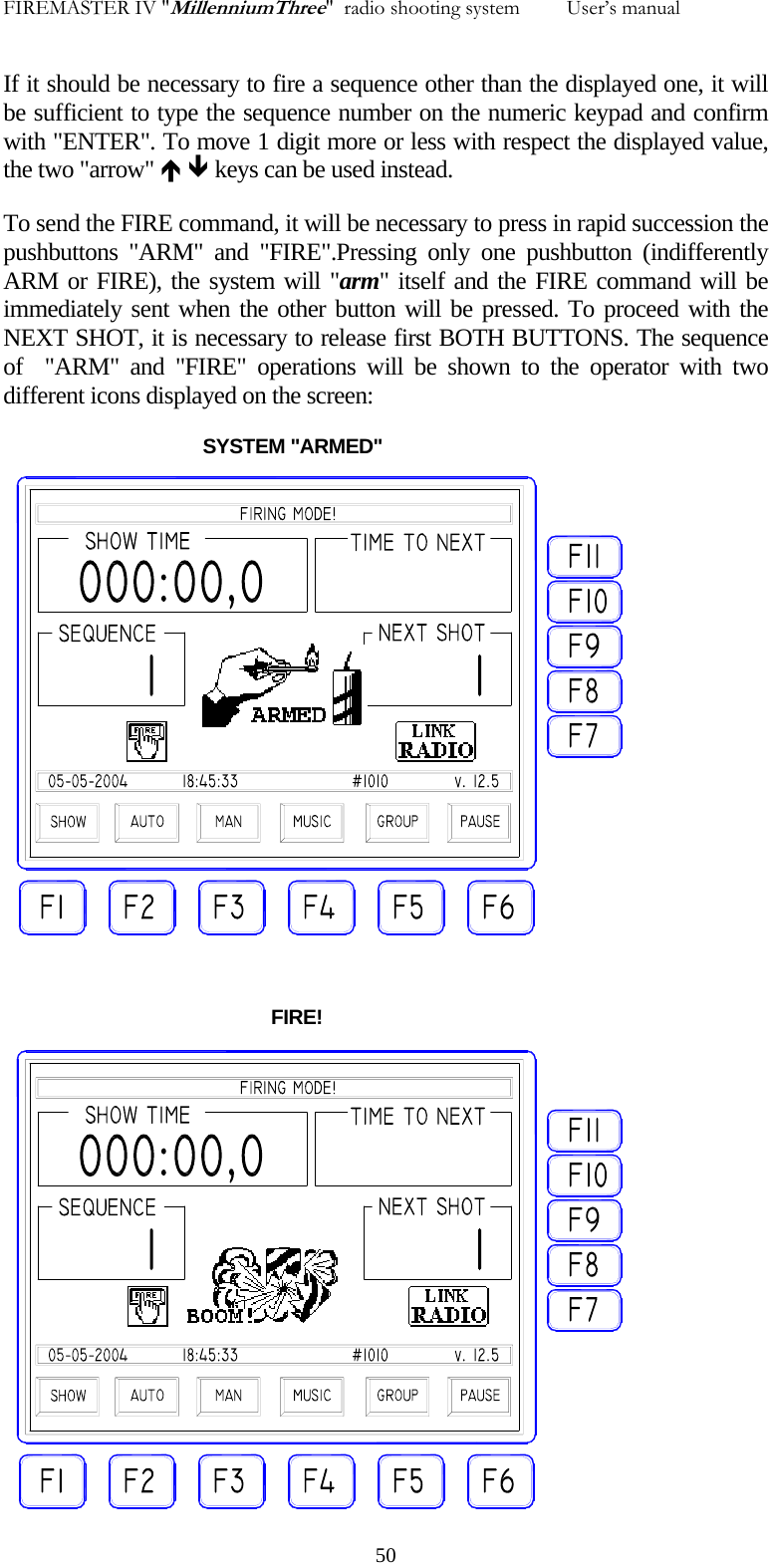
FIREMASTER IV "MillenniumThree"  radio shooting system         User’s manual If it should be necessary to fire a sequence other than the displayed one, it will be sufficient to type the sequence number on the numeric keypad and confirm with "ENTER". To move 1 digit more or less with respect the displayed value, the two "arrow" Ï Ð keys can be used instead. To send the FIRE command, it will be necessary to press in rapid succession the pushbuttons "ARM" and "FIRE".Pressing only one pushbutton (indifferently ARM or FIRE), the system will "arm" itself and the FIRE command will be immediately sent when the other button will be pressed. To proceed with the NEXT SHOT, it is necessary to release first BOTH BUTTONS. The sequence of  "ARM" and "FIRE" operations will be shown to the operator with two different icons displayed on the screen:                                       SYSTEM "ARMED"                                                      FIRE!   50
FIREMASTER IV "MillenniumThree"  radio shooting system         User’s manual  3.3 FIRING OPTIONS  The  SYSTEM FIREMASTER IV can operate in different modes in order to match any show characteristics. The different firing modes can be selected by the operator inside the "FIRE" mask and immediately before the show begins. Also in this case, it will be useful to remind as TWO WELL DISTINCT USING MODES OF THE FIREMASTER IV SYSTEM exist: a) PROGRAM CREATED  AND "LOADED" MANUALLY in the Remote Units using the functions already listed in chapter "2.0 - TESTING". b) PROGRAM CREATED WITH EXTERNAL SOFTWARE AND "LOADED" FROM A PC by the serial communication port RS-232. When one mode is selected, the other is automatically EXCLUDED!  In case a), the system will only operate in "MANUAL" or "MUSIC" mode only" In case b), the "SHOW" MODE can be used.  It is theoretically possible to fire in MANUAL MODE a show created externally  and loaded in the memory of the base Unit TX5000 from a PC. Not to mention the poor interest in such an operation, ALL THE INFORMATIONS RELATIVE TO THE TIMING OF THE FIRING SEQUENCES, WILL BE LOST! It is highly suggested to AVOID operating with "mixed" modes: this could lead to unexpected and catastrophic results for the show performance!   51
FIREMASTER IV "MillenniumThree"  radio shooting system         User’s manual  3.3.1 MANUAL MODE  This mode has been described at the beginning of the chapter and quoted as an example. This operating mode is selected using key F3 "MAN". Should be also active the "SHOW" mode, the latter must be cancelled using the key F1 "SHOW" (used as  toggle). All the AUTOMATIC TIMING functions will be made NOT ACTIVE and the operator will be free to manage the show times following his fantasy or the voice commands coming from the show director to the headset. The "SHOW TIME" indicator can be used just as REFERENCE: it starts to count the time (in minutes, seconds and tenths) immediately after the first shot and stops if the show is momentarily halted  turning the key switch to the "SAFE-TEST" position. The time count will start again switching back to "FIRE" mode and sending a new FIRE command: finally the counter will display the total show duration without taking into account for eventual pauses decided by the operator. The time is RESET only when the base Unit TX5000 is switched OFF. The time count can be also paused in "FIRE" mode, using the toggle key  F6 "PAUSE". When the time count is halted in this mode, the indication "Paused!"  is displayed on the screen. When the System is in “pause” mode, the timer can be reset using the F7 key.  Remember as in MANUAL MODE, the SYSTEM will always shoot the SEQUENCE numbers in linear progression. The operator, after each shoot, must INCREASE manually the SEQUENCE number by typing the value on the keyboard or using the “ARROW UP” key. Of course the operator is free to jump RANDOMLY at any SEQUENCE number simply by typing the value on the numeric keypad. Pressing once the “AUTO INCREMENT” key, the indication “AUTO INCREMENT” message will appear on the “NEXT SHOOT” window and the SEQUENCE VALUE will be AUTOMATICALLY INCREMENTED BY ONE after each FIRING and upon releasing BOTH ARM and FIRE buttons.  3.3.2 "MUSIC" MODE   In this mode the built-in pyromusical synchronizer is activated. The operating mode is similar to the MANUAL one with one exception: the "ARM" and "FIRE" buttons will be "pressed" automatically each time the system decoder will recognize a valid FIRE command in form of an AUDIO CODE coming from the EXTERNAL sound system. If it will be provided in advance to record as many audio sync signals as the shows sequences and these signals are correctly placed with respect the musical base, then the whole show   52
FIREMASTER IV "MillenniumThree"  radio shooting system         User’s manual will proceed in a complete automatic mode and the fireworks effects will remain perfectly synchronized with the music. As a matter of precaution  the "ARM" AND "FIRE" KEYS WILL REMAIN ACTIVE: should a sync tone, for any reason, be lost , the operator can enter manually at any time a FIRE command filling the gap. Always remember to select the “AUTO INCREMENT” option when working in “MUSIC” mode, otherwise the System will continue to fire the SEQUENCE #1 for all the successive FIRE commands coming from the synchronizer and the show will not proceed as needed.    53
FIREMASTER IV "MillenniumThree"  radio shooting system         User’s manual 3.3.3 MANUAL "SHOW" MODE   This option allows to fire MANUALLY a show created on a PC and previously downloaded to the memory of the TX5000 Base Unit. When the FIRE mask is entered for the first time using the keyswitch, the “SHOW TIME” and “TIME TO NEXT” counters will be automatically set to zero. Both counters will start to count with the first FIRE command. The timers can be momentarily stopped using the F6 key “PAUSE” or turning back to “SAFE” the keyswitch: in both cases the show will pause and it can be resumed at any moment with a new FIRE command or pressing the F6 key again (“toggle” action). While in “PAUSE” mode, the time counter can be RESET to ZERO using the F7 key. The show will start pressing the ARM and FIRE buttons as usually: The SHOW TIME counter will start to count UP the show time elapsed from the first shoot, while the TIME TO NEXT counter will count DOWN the remaining time to the next shoot. Being set in MANUAL MODE, the TIME COUNTERS will have NO EFFECT on the show progression, i.e.: when the TIME TO NEXT counter reaches the ZERO count, an acoustic signal will be simply generated in order to alert the shooter to proceed with the NEXT FIRE COMMAND. In MANUAL SHOW mode, it is always the shooter to decide the exact moment to fire the next shoot and the TIMER indications are given merely as an aid to follow the original timing (if required). Practically: the START TIME data will be IGNORED and the show will proceed as required by the operator, shooting A SEQUENCE AT THE TIME using the ARM and FIRE buttons. In this mode, the CUE number will be always shot (it will be displayed in the “SEQUENCE” box), while the SEQUENCE indication (displayed in the “NEXT SHOOT” box) represents the group of all physical addresses to be fired simultaneously  at that exact moment of the show. This feature allows to FIRE THE SAME SEQUENCE more than once: this possibility is useful when an automatic SEQUENCER is connected to a line instead of single ignitor.    54
FIREMASTER IV "MillenniumThree"  radio shooting system         User’s manual  3.3.4 PYROMUSICAL "SHOW" MODE    55 This shooting mode is identical to the MANUAL one previously described at paragraph 3.3.3. The difference is only represented by the way to issue the FIRE command: while in MANUAL SHOW mode the operator proceeds manually with the ARM and FIRE buttons to advance each time the show to the next sequence, in PYROMUSICAL SHOW  mode, the operator has no control over the show advancement: the EQUIVALENT action of the FIRE and ARM buttons will be automatically executed whenever a valid AUDIO SYNCHRONIZATION TONE (coming from the external AUDIO system) is recognized by the TX5000 Base Unit. Once again the TIME data will be ignored and the show will be timed in perfect synchronism with the music. Always remember to select the “AUTO INCREMENT” option when working in “MUSIC” mode, otherwise the System will continue to fire the SEQUENCE #1 for all the successive FIRE commands coming from the synchronizer and the show will not proceed as needed.  3.3.5 AUTOMATIC "SHOW" MODE   This operating mode DOES use the time references to FIRE AUTOMATICALLY the CUES in the given sequence. For each line of program the operator must have previously (see chapter 2.4.1) specified the following parameters: CUE: this is a linearly-increasing number representing the succession of item to FIRE during the show. SEQuence: this is the sequence number to be fired in correspondance to a specific CUE. A sequence can have any value (but usually an increasing value starting from 1 is given). A SEQUENCE can be indifferently: A SINGLE LINE, SEVERAL LINES firing together at the same moment, a FAST TIMED SUCCESSION of shoots spaced apart by less than one second. ADDRESS: this is the PHYSICAL address of the line to be fired. GRoup: this parameter is usually set by default to “0” If the show characteristics should require to REMOVE from the show one or more lines at the last minute,
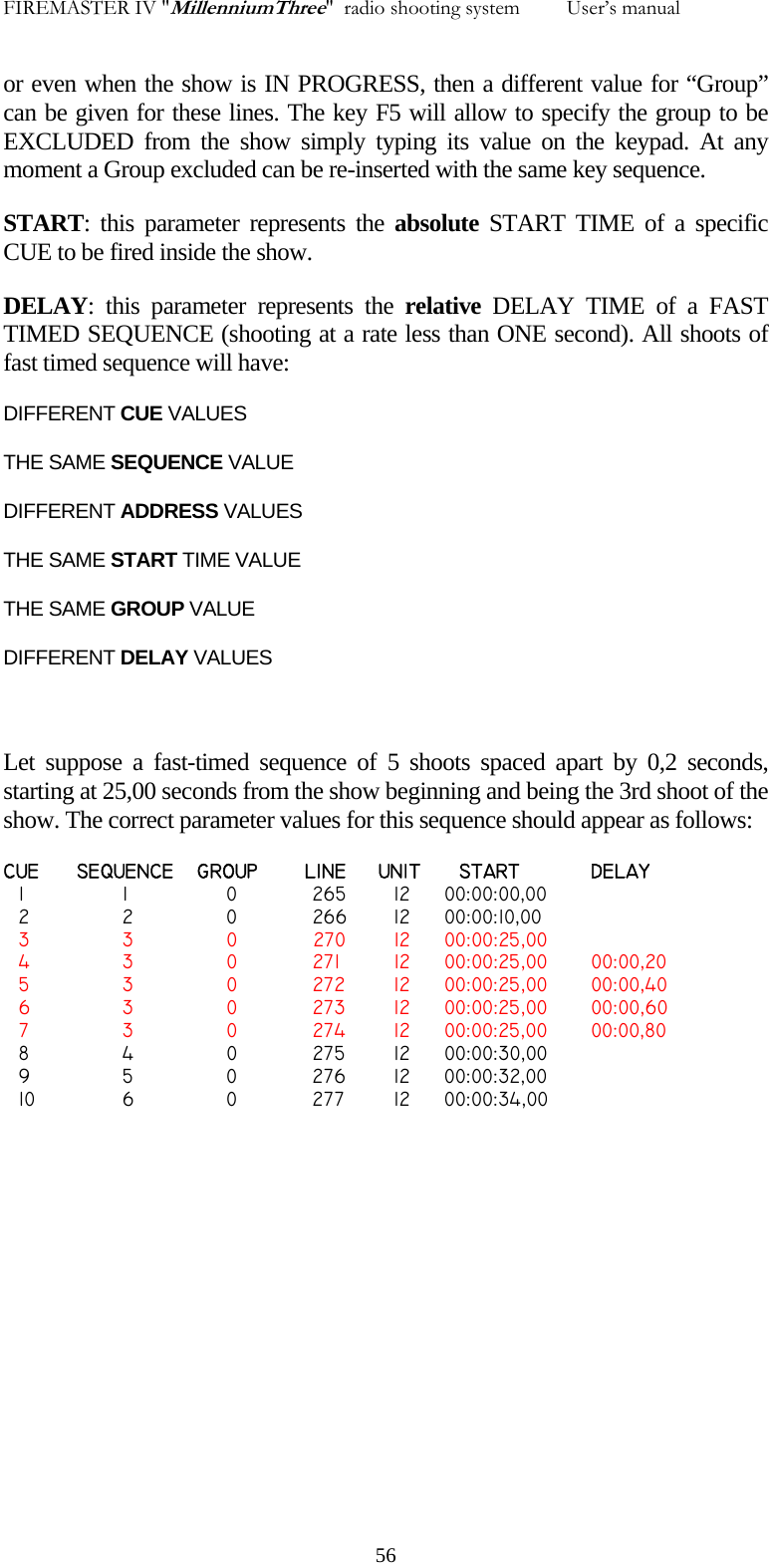
FIREMASTER IV "MillenniumThree"  radio shooting system         User’s manual or even when the show is IN PROGRESS, then a different value for “Group” can be given for these lines. The key F5 will allow to specify the group to be EXCLUDED from the show simply typing its value on the keypad. At any moment a Group excluded can be re-inserted with the same key sequence. START: this parameter represents the absolute START TIME of a specific CUE to be fired inside the show. DELAY: this parameter represents the relative DELAY TIME of a FAST TIMED SEQUENCE (shooting at a rate less than ONE second). All shoots of fast timed sequence will have: DIFFERENT CUE VALUES THE SAME SEQUENCE VALUE DIFFERENT ADDRESS VALUES THE SAME START TIME VALUE THE SAME GROUP VALUE DIFFERENT DELAY VALUES  Let suppose a fast-timed sequence of 5 shoots spaced apart by 0,2 seconds, starting at 25,00 seconds from the show beginning and being the 3rd shoot of the show. The correct parameter values for this sequence should appear as follows: CUE  SEQUENCE   GROUP   LINE   UNIT    START  DELAY   1        1            0    265     12  00:00:00,00   2        2            0    266     12  00:00:10,00   3        3            0          270     12  00:00:25,00   4        3            0    271     12  00:00:25,00  00:00,20   5        3            0    272     12  00:00:25,00  00:00,40   6        3            0    273     12  00:00:25,00  00:00,60   7        3            0    274     12  00:00:25,00  00:00,80   8        4            0    275     12  00:00:30,00   9        5            0    276     12  00:00:32,00   10        6            0    277     12  00:00:34,00     56
FIREMASTER IV "MillenniumThree"  radio shooting system         User’s manual When the show is created on the PC (both using a commercial show management program and an Excel worksheet or even typing directly the data using the NOTEPAD utility), the user must exercise the maximum care in order to avoid any incongruent value. E.g.: it will not possible to specify a CUE value LESS THAN another one having a START TIME of higher value. In this case the System will shoot the sequences following the START TIME data and disregarding any eventual CUE indication not coherent with these values.   57
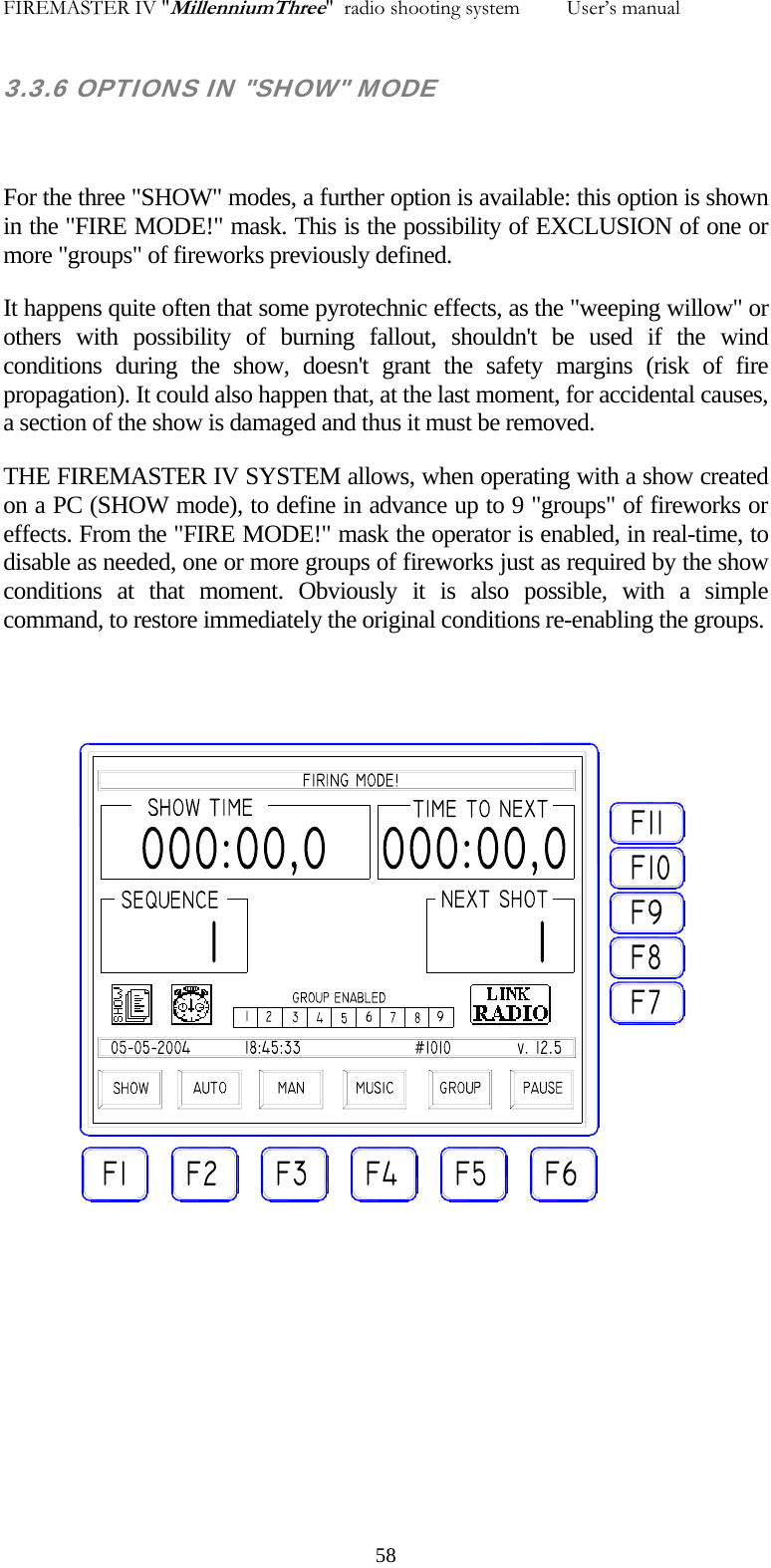
FIREMASTER IV "MillenniumThree"  radio shooting system         User’s manual 3.3.6 OPTIONS IN "SHOW" MODE  For the three "SHOW" modes, a further option is available: this option is shown in the "FIRE MODE!" mask. This is the possibility of EXCLUSION of one or more "groups" of fireworks previously defined. It happens quite often that some pyrotechnic effects, as the "weeping willow" or others with possibility of burning fallout, shouldn't be used if the wind conditions during the show, doesn't grant the safety margins (risk of fire propagation). It could also happen that, at the last moment, for accidental causes, a section of the show is damaged and thus it must be removed. THE FIREMASTER IV SYSTEM allows, when operating with a show created on a PC (SHOW mode), to define in advance up to 9 "groups" of fireworks or effects. From the "FIRE MODE!" mask the operator is enabled, in real-time, to disable as needed, one or more groups of fireworks just as required by the show conditions at that moment. Obviously it is also possible, with a simple command, to restore immediately the original conditions re-enabling the groups.    58
FIREMASTER IV "MillenniumThree"  radio shooting system         User’s manual 3.3.7 OPERATION NOTES WHEN IN "FIRE MODE!" When the keyswitch is turned on the "FIRE" position, the transmitter of the Base Unit TX5000, immediately starts to send automatically a special code ("watch dog"). This code is sent at regular intervals of about 5 seconds: the "TX R.F." green LED will flash shortly each time. This signal is received at the same time by ALL REMOTE UNITS being active and is used to notify as the TX2000 transmitter is ACTIVE and in FIRE mode. All remote Units will use this signal only during the execution of a TIMED SEQUENCE. During the execution of these "rapid" sequences in fact the Base Unit TX5000 sends just the FIRST SHOT of the sequence, while all successive shots are controlled automatically following the time parameters stored inside each Remote Unit. In these conditions the Base Unit could have no longer control over the execution of timed sequences of some length: this is clearly in contrast with the safety rules. In fact: should the Base Unit be suddenly damaged while a long timed sequence is running, there will be no way to stop the show (and since it is in theory possible to build a whole show with a single timed sequence, one can easily understand as this situation could be extremely dangerous!). The watch dog signal has been introduced in order to overcome this unlucky possibility: In fact: should the Base Unit stop for any reason (failure, destruction, power fail, etc.) to operate, the watch dog signal will also immediately cease. All the Remote Units are programmed in such a way to STOP IMMEDIATELY ANY FIRE ACTIVITY when at least two successive watch dog signals are lost. This function grants, when the operator's has no longer control over the show, that any timed  sequence will be automatically interrupted within 10 seconds maximum (2 watch dog cycles). The operator shouldn't be afraid seeing, when the keyswitch is in FIRE position, the "TX R.F." LED flashing even if no command has been issued! (on the contrary: he should be afraid if NOT!) The operator can at any moment abort any timed sequence IMMEDIATELY simply switching the key on the "TEST-SAFE" position. In this case the Base Unit TX5000 will send A SPECIFIC "TURN-OFF" CODE that is received immediately and recognized by ALL Remote Units.     59

Navigation menu