RG 68X576703_RevA_HIRES_10_11 Orion Star A213 A223 A323
User Manual: Pdf Orion Star-A213-A223-A323
Open the PDF directly: View PDF  .
.
Page Count: 52
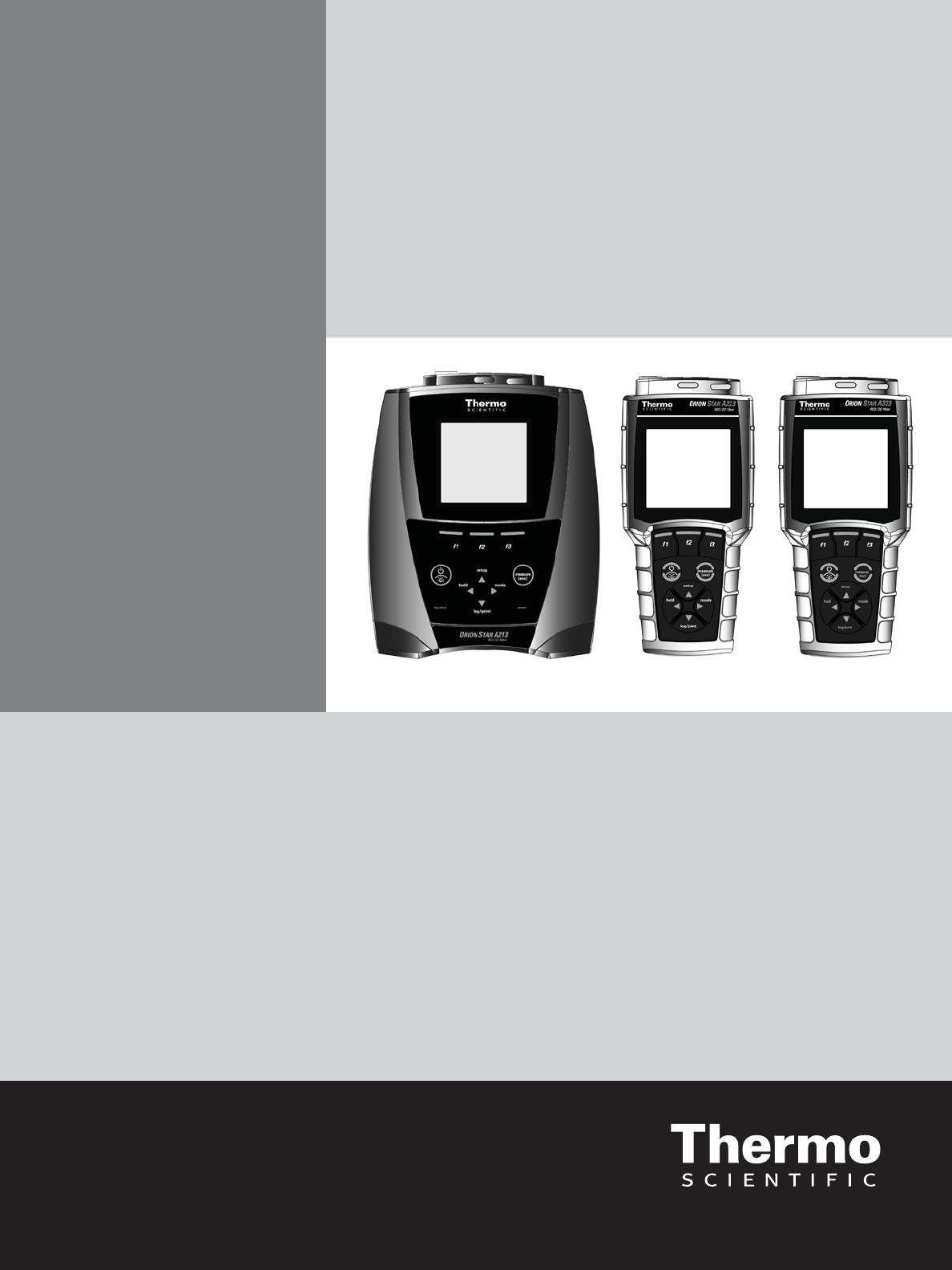
Thermo Scientific Orion Star A213 Benchtop and
Star A223 and Star A323 Portable RDO/DO Meters
Reference Guide
For Sales & Service Contact
2650 E. 40th Ave. • Denver, CO 80205
Phone 303-320-4764 • Fax 303-322-7242
1-800-833-7958
www.geotechenv.com
Ross and the COIL trade dress are trademarks of Thermo Fisher Scientific, Inc. and
its subsidiaries.
AQUAfast, AQUASensors, BOD AutoEZ, ionplus, KNIpHE, LogR, No Cal, ORION, perpHect,
PerpHecT, pHISA, pHuture, Pure Water, Sage, ROSS, ROSS Ultra, Sure-Flow, Titrator PLUS, and
TURBO2 are registered trademarks of Thermo Fisher Scientific, Inc. and its subsidiaries.
A+, All in One, Aplus, AUTO-BAR, AUTO-CAL, Auto-ID, AUTO-READ, AUTO-STIR,
Auto-Test, AutoTration, CISA, digital LogR, DuraProbe, EZ Startup, ISEasy,
Low Maintenance Triode, Minimum Stir Requirement, MSR, NISS, Optimum Results, Orion Dual
Star, Orion Star, SAOB, SMART AVERAGING, SMART STABILITY, Star LogR, Star Navigator 21,
Stat Face, Triode are trademarks of Thermo Fisher Scientific, Inc. and its subsidiaries.
Guaranteed Success and The Technical Edge are service marks of Thermo Fisher Scientific, Inc.
and its subsidiaries.
© 2011 Thermo Fisher Scientific Inc. All rights reserved. All trademarks are the property of
Thermo Fisher Scientific, Inc. and its subsidiaries.
The specifications, descriptions, drawings, ordering information and part numbers within this
document are subject to change without notice.
This publication supersedes all previous publications on this subject.
Thermo Scientific Orion Star A213 Benchtop and Star A223 and Star A323 Portable
RDO/DO Meters
Chapter 1 Introduction ..........................................................1
Chapter 2 Meter Overview.......................................................3
Meter Connections and Inputs.......................................... 3
Power Source....................................3
Electrodes and Other Connections....................4
Connecting Electrode Arm to the Benchtop Meter........5
Meter Display ........................................................ 6
Meter Keypad......................................................... 7
Meter Maintenance ................................................... 8
Chapter 3 Meter Setup ..........................................................9
Navigating the Setup Menu ............................................ 9
Setup Menu Overview................................................. 9
DO/RDO Channel Menu...........................10
Settings Menu...................................12
View Log Menu..................................13
Diagnostics Menu................................13
Chapter 4 RDO/DO Calibration ..................................................15
Air Dissolved Oxygen Calibration...................................... 15
Water Dissolved Oxygen Calibration................................... 16
Manual Dissolved Oxygen Calibration.................................. 17
Set Zero Dissolved Oxygen Calibration................................. 18
Chapter 5 Temperature Calibration ..............................................19
Chapter 6 Measurement........................................................21
Chapter 7 Methods ............................................................23
Saving the Current Meter Settings as a New Method..................... 23
Loading an Existing Method........................................... 23
Editing, Copying or Deleting an Existing Method......................... 24
Chapter 8 Data Storage and Retrieval . . . . . . . . . . . . . . . . . . . . . . . . . . . . . . . . . . . . . . . . . . . . 25
Data Storage Settings ................................................ 25
Read Type Selection..............................25
Computer and Printer Export Settings.................26
Data Log Settings................................26
Viewing the Calibration Log and Data Log .............................. 27
Viewing the Calibration Log.........................27
Viewing the Data Log..............................27
Exporting the Data Log to a Computer or Printer ......................... 28
Clearing the Data Log................................................. 29
Interfacing a Printer.................................................. 29
Interfacing a Computer ............................................... 30
Chapter 9 Customer Services ...................................................31
Meter Errors and Recommended Actions ............................... 31
Meter Self Test and Checkout ......................................... 32
Meter Self Test..................................32
Electrode Stability Test............................................... 33
Meter Factory Reset ................................................. 33
Meter User Reset .................................................... 34
About Meter......................................................... 34
Assistance . . . . . . . . . . . . . . . . . . . . . . . . . . . . . . . . . . . . . . . . . . . . . . . . . . . . . . . . . . 34
Warranty and Registration ............................................ 34
Ordering Information ................................................. 35
Chapter 10 Meter Compliance....................................................39
Notice of Compliance................................................. 39
WEEE Compliance ................................................... 39
Declaration of Conformity............................................. 40
Meter Specifications................................................. 41
Appendix 1 Advanced Meter Features .............................................45
Dissolved Oxygen Barometric Pressure Compensation .................. 45
Dissolved Oxygen Salinity Correction.................................. 45
This page intentionally left blank.

1
Thermo Scientific Orion Star A213 Benchtop and Star A223 and Star A323 Portable RDO/DO Meter Reference Guide
Chapter 1 Introduction
Thank you for your purchase of the Orion Star A213 benchtop RDO/DO meter, Star A223 portable RDO/DO meter or Star
A323 portable RDO/DO meter. These meters are capable of measuring dissolved oxygen and temperature in °C or °F.
The Orion Star A213 benchtop RDO/DO meters feature
t %JTTPMWFEPYZHFOSBOHFPGUPNH-PSUPTBUVSBUJPOVTJOHBO3%0PQUJDBMEJTTPMWFE
PYZHFOQSPCFXJUIBSFTPMVUJPOPGPSNH-BOEPSTBUVSBUJPO
t %JTTPMWFEPYZHFOSBOHFPGUPNH-PSUPTBUVSBUJPOVTJOHBQPMBSPHSBQIJDEJTTPMWFE
PYZHFOQSPCFXJUIBSFTPMVUJPOPGPSNH-BOEPSTBUVSBUJPO
t "6503&"%DPOUJOVPVTXJUIIPMEPQUJPOBOEUJNFENFBTVSFNFOUNPEFT
t QPJOUEBUBMPH
t NBOVBMSFBEZ"6503&"%BOEUJNFEEBUBMPHHJOHGVODUJPOT
t *1SBUFEEVTUBOETQMBTISFTJTUBOUIPVTJOH
The Orion Star A223 portable RDO/DO meters feature
t %JTTPMWFEPYZHFOSBOHFPGUPNH-PSUPTBUVSBUJPOVTJOHBO3%0PQUJDBMEJTTPMWFE
PYZHFOQSPCFXJUIBSFTPMVUJPOPGPSNH-BOEPSTBUVSBUJPO
t %JTTPMWFEPYZHFOSBOHFPGUPNH-PSUPTBUVSBUJPOVTJOHBQPMBSPHSBQIJDEJTTPMWFE
PYZHFOQSPCFXJUIBSFTPMVUJPOPGPSNH-BOEPSTBUVSBUJPO
t "6503&"%BOEDPOUJOVPVTXJUIIPMEPQUJPONFBTVSFNFOUNPEFT
t QPJOUEBUBMPH
t NBOVBMBOEBVUPNBUJDXJUI"6503&"%EBUBMPHHJOHGVODUJPOT
t *1SBUFEEVTUQSPPGBOEXBUFSQSPPGIPVTJOH
The Orion Star A323 portable RDO/DO meters feature
t %JTTPMWFEPYZHFOSBOHFPGUPNH-PSUPTBUVSBUJPOVTJOHBO3%0PQUJDBMEJTTPMWFE
PYZHFOQSPCFXJUIBSFTPMVUJPOPGPSNH-BOEPSTBUVSBUJPO
t %JTTPMWFEPYZHFOSBOHFPGUPNH-PSUPTBUVSBUJPOVTJOHBQPMBSPHSBQIJDEJTTPMWFE
PYZHFOQSPCFXJUIBSFTPMVUJPOPGPSNH-BOEPSTBUVSBUJPO
t "6503&"%DPOUJOVPVTXJUIIPMEPQUJPOBOEUJNFENFBTVSFNFOUNPEFT
t QPJOUEBUBMPH
t NBOVBMSFBEZ"6503&"%BOEUJNFEEBUBMPHHJOHGVODUJPOT
t *1SBUFEEVTUQSPPGBOEXBUFSQSPPGIPVTJOH
Please read this reference guide thoroughly. Any use outside of these instructions may invalidate your warranty and
cause permanent damage to the meter.
2Thermo Scientific Orion Star A213 Benchtop and Star A223 and Star A323 Portable RDO/DO Meter Reference Guide
This page intentionally left blank.
3
Thermo Scientific Orion Star A213 Benchtop and Star A223 and Star A323 Portable RDO/DO Meter Reference Guide
Chapter 2 Meter Overview
Meter Connections and Inputs
Power Source
1PXFSBEBQUFSJODMVEFEXJUICFODIUPQNFUFSTTPMETFQBSBUFMZGPSQPSUBCMFNFUFST
a. Select the appropriate wall socket plug plate.
b. Slide off the clear plastic cover from the plug plate.
c. Slide the plug plate into the groove on the back of the power adapter.
d. Connect the power adapter to the meter and power outlet.
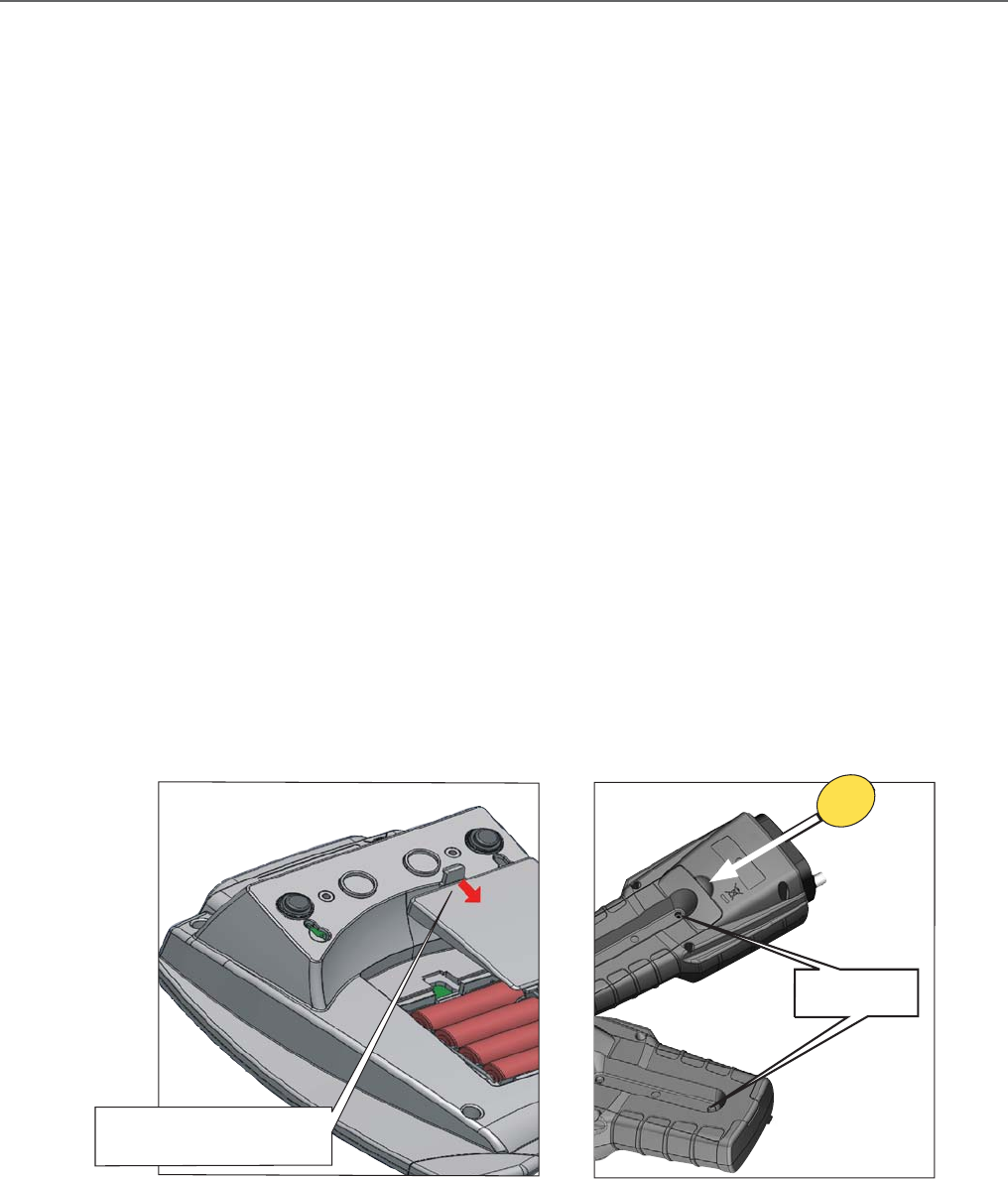
#BUUFSJFTJODMVEFEXJUIQPSUBCMFNFUFSTTPMETFQBSBUFMZGPSCFODIUPQNFUFST
a. Select four AA alkaline batteries.
b. Confirm that the meter is powered off.
c. Remove the battery compartment cover.
i. Benchtop meters – push down on the battery compartment tab and lift the battery cover up.
ii. Portable meters – loosen the screws holding the battery cover, release the top portion of the
CBUUFSZDPWFSGSPNUIFNFUFSVTFBDPJOPSZPVSmOHFSBOESFMFBTFUIFCPUUPNQPSUJPOPGUIF
battery cover.
d. Orientate the batteries as shown in the battery compartment housing and insert batteries.
e. Replace the battery compartment cover. For portable meters – replace the screws.
Push down on tab and lift the
battery cover
Orion Star A Series Benchtop
Remove screws
Orion Star A Series Portable
4Thermo Scientific Orion Star A213 Benchtop and Star A223 and Star A323 Portable RDO/DO Meter Reference Guide
Electrodes and Other Connections
1. Prepare the RDO optical dissolved oxygen probe or polarographic dissolved oxygen probe and any other applicable
electrodes according to the directions in the electrode user guide.
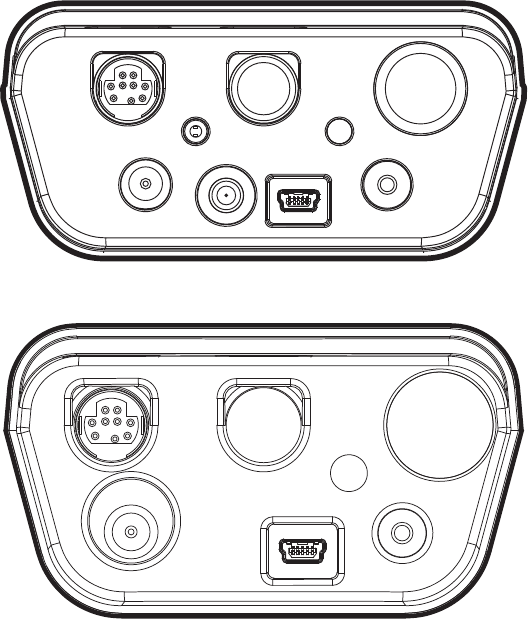
2. Connect the appropriate items as labeled on the meter and as shown in the figure below:
t (SPVOEo*OQVUGPSBHSPVOEXJSFXJUIBTUBOEBSEQJOUJQDPOOFDUPSOrion Star A213 benchtop meters only.
t %03%0o*OQVUGPS3%0PQUJDBMEJTTPMWFEPYZHFOQSPCFPSQPMBSPHSBQIJDEJTTPMWFEPYZHFOQSPCFXJUI
QJO.JOJ%*/DPOOFDUPS
t 1PXFSo*OQVUGPSUIFQPXFSBEBQUFS
t 4UJSSFSo*OQVUGPSUIFTUJSSFSQSPCF$BU/POrion Star A213 benchtop meters only.
t 64#o*OQVUGPSUIF64#DBCMFVTFEUPDPOOFDUUIFNFUFSUPBQSJOUFSPSDPNQVUFS
t 34o*OQVUGPSUIF34DBCMFVTFEUPDPOOFDUUIFNFUFSUPBQSJOUFSPSDPNQVUFS
Ground Ref.
DO/RDO ATC/CON BNC
Power Stirrer USB RS232
DO/
RDO
ATC/
COND
POWER
USB
REF
BNC
RS232
Star A213 Meter Back Panel
Star A223 and Star A323 Meter Back Panel
5
Thermo Scientific Orion Star A213 Benchtop and Star A223 and Star A323 Portable RDO/DO Meter Reference Guide
Connecting Electrode Arm to an Orion Star A Series Benchtop Meter
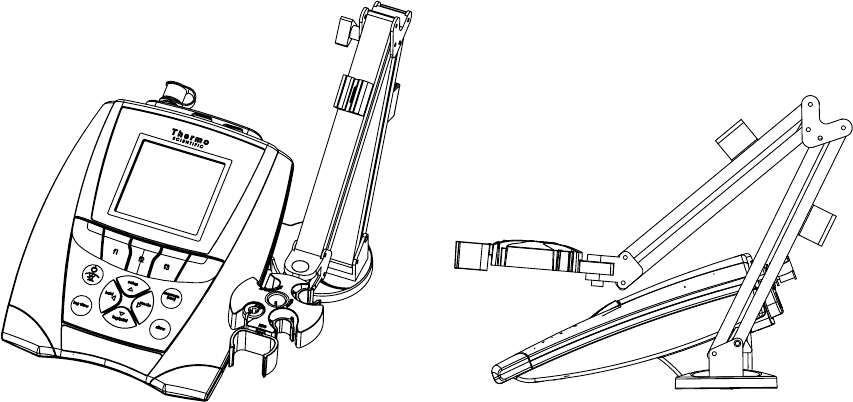
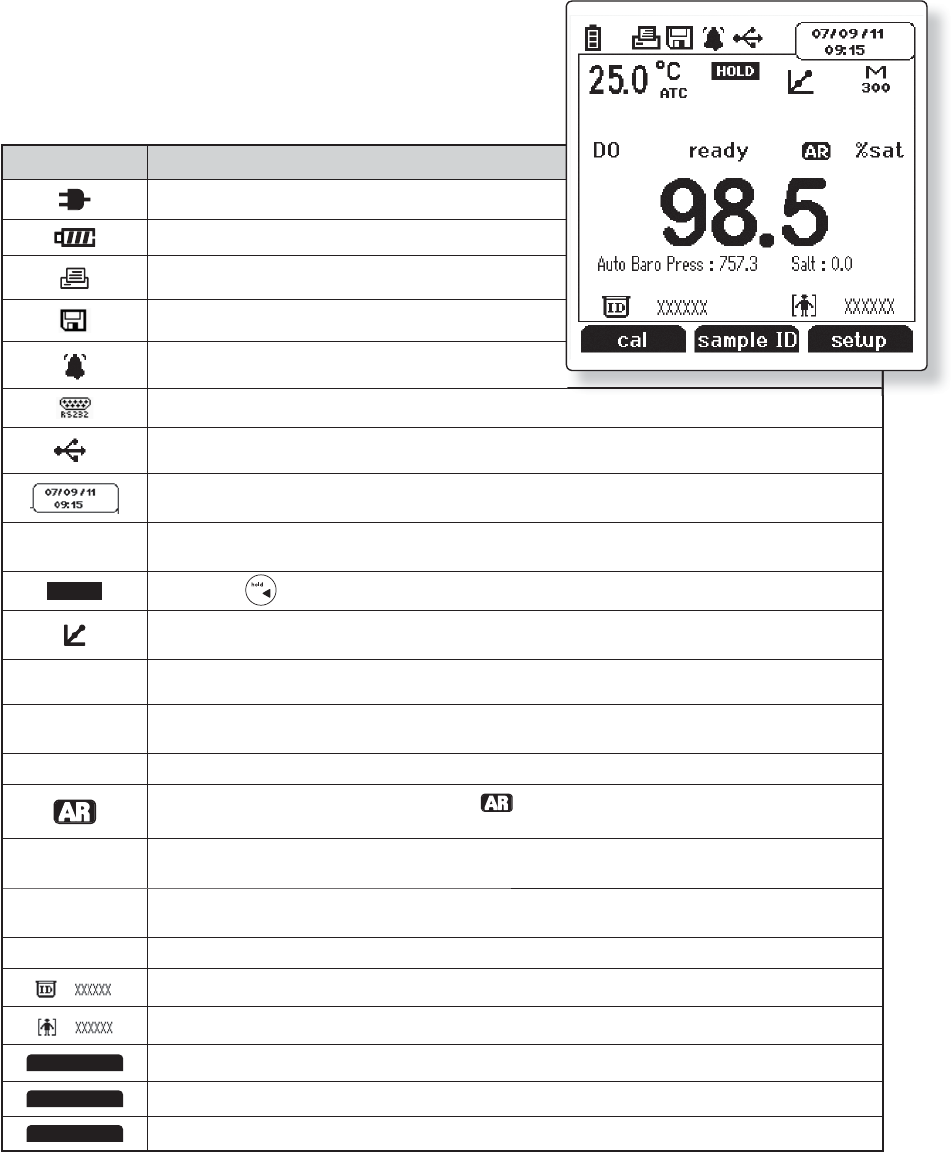
Orion Star A series benchtop meters include an electrode arm that can be attached to either side of the meter.
6OQBDLUIFFMFDUSPEFBSNBOECBTF
2. Choose the side of the meter to attach the arm.
6TFBDMFBOTVSGBDFBOEUVSOUIFNFUFSPWFS
3FMFBTFUIFFYJTUJOHTDSFXGSPNUIFCBDLPGUIFNFUFS
"MJHOUIFFMFDUSPEFBSNCBTFXJUIUIFDJSDMFTBUUIFCPUUPNPGUIFNFUFS5IFNFUBMQPTUPOUIFFMFDUSPEFBSNCBTF
should be on the same side as the meter display.
5BLFUIFTDSFXUIBUXBTSFNPWFEBOEVTFJUUPTFDVSFUIFFMFDUSPEFBSNCBTFUPUIFNFUFS
5VSOUIFNFUFSPWFS
8. Place the hole at the bottom of the electrode arm onto the metal post on the electrode arm base.
6Thermo Scientific Orion Star A213 Benchtop and Star A223 and Star A323 Portable RDO/DO Meter Reference Guide
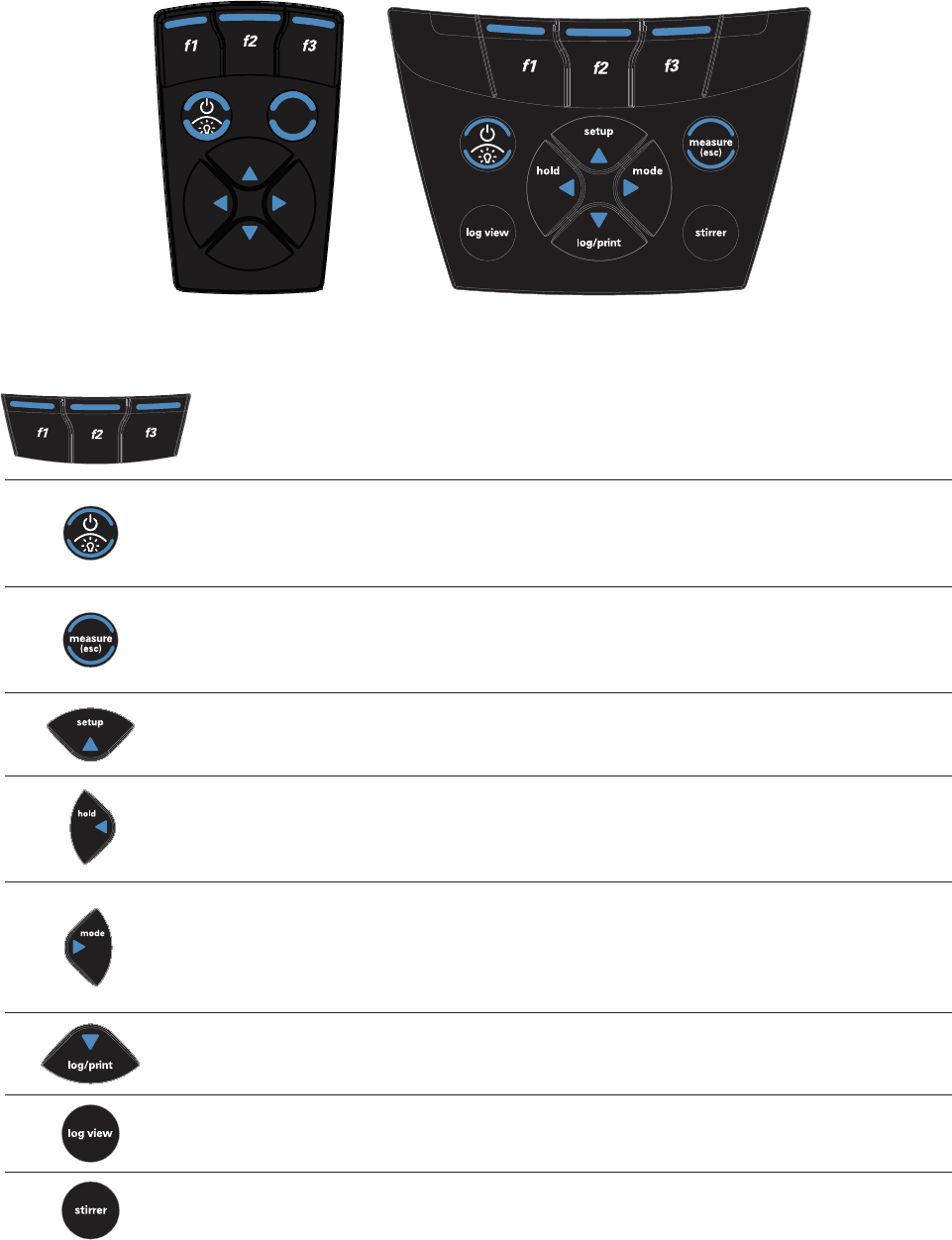
Meter Display
Display Icon Description
Shown when the meter is running on AC power.
Shown when the meter has batteries installed.
*OEJDBUFTEBUBJTCFJOHTFOUUPBDPNQVUFSPSQSJOUFS
*OEJDBUFTEBUBJTCFJOHTFOUUPUIFEBUBMPH
Shown when an alarm is set and the alarm value is reached.
*OEJDBUFTUIFNFUFSJTTFUUPCFJOUFSGBDFEXJUIBQSJOUFSPSDPNQVUFSWJBUIF34QPSU
*OEJDBUFTUIFNFUFSJTTFUUPCFJOUFSGBDFEXJUIBQSJOUFSPSDPNQVUFSWJBUIF64#QPSU
Displays the time and date entered in the setup menu.
25.0˚C
ATC
Displays the current temperature based on the temperature probe reading or entered temperature value. Shows the
PSJHJOPGUIFUFNQFSBUVSFBT."/FOUFSFEUFNQFSBUVSFPS"5$UFNQFSBUVSFQSPCF
HOLD Shown when is pressed and the displayed measurement is frozen.
*OEJDBUFTBDBMJCSBUJPOXBTTVDDFTTGVMMZDPNQMFUFE*DPOXJMMCMJOLXIFOUIFDBMJCSBUJPOBMBSNJTTFUBOEUIF
alarm value is reached.
M
100 *OEJDBUFTBNFUIPEJTJOVTFBOEUIFOVNCFSPGUIFNFUIPECFJOHVTFE
DO *OEJDBUFTUIFUZQFPGNFBTVSFNFOUBOETIPXTUIFUZQFPG%0QSPCFDPOOFDUFEUPUIFNFUFSBT
RDO3%0PQUJDBMPSDOQPMBSPHSBQIJD
ready Specifies the stability of the electrode as stabilizing or ready.
4IPXOXIFOUIFNFUFSJTJO"6503&"%NPEF5IF icon will blink while the reading is stabilizing and stop
blinking when the reading is stable and the measurement is locked on the display.
98.5 %sat %JTQMBZTUIFNFBTVSFNFOUWBMVFCBTFEPOUIFMBTUTBWFEDBMJCSBUJPOBOEDVSSFOUFMFDUSPEFSFBEJOH6OJUTBSF
shown to the right of the value.
Auto Baro Press
: 757.3 Shows the barometric pressure measured by the meter (Auto) or entered by operator (Man.) and used to correct
dissolved oxygen measurements.
Salt: 0.0 Displays the salinity correction factor used to correct dissolved oxygen measurements.
4IPXTUIFPQFSBUPSBTTJHOFETBNQMF*%OVNCFSOrion Star A213 and Star A323 meters only.
4IPXTUIFPQFSBUPSBTTJHOFEVTFS*%OVNCFSOrion Star A213 and Star A323 meters only.
cal Displays the action that will be performed when f1 is pressed.
sample ID Displays the action that will be performed when f2 is pressed.
channel Displays the action that will be performed when f3 is pressed.
7
Thermo Scientific Orion Star A213 Benchtop and Star A223 and Star A323 Portable RDO/DO Meter Reference Guide
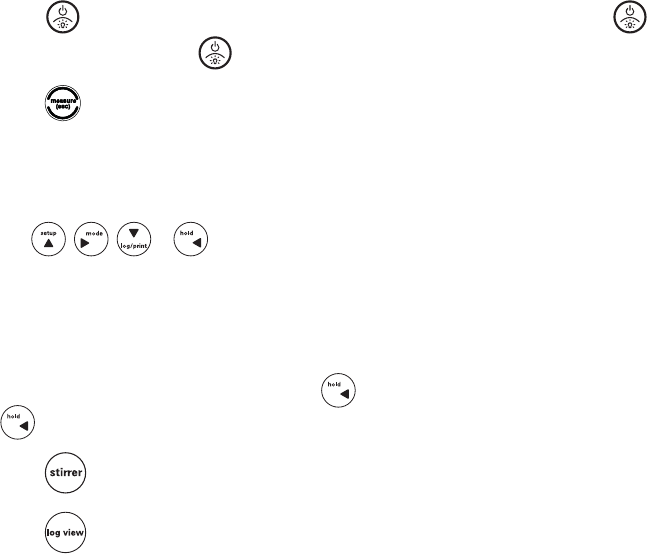
Meter Keypad
Press the f1, f2 and f3 function keys to perform the action shown above each key on the display.
Press to turn the meter on.
When the meter is on, press and quickly release to turn the display backlight on or off or hold down to
turn the meter off.
*OUIFNFBTVSFNFOUNPEFQSFTTUPUBLFBNFBTVSFNFOU
*OUIFTFUVQDBMJCSBUJPOBOEPUIFSNFOVTQSFTTUPFTDBQFUIFDVSSFOUNFOVBOESFUVSOUPUIF
measurement mode.
*OUIFNFBTVSFNFOUNPEFQSFTTUPFOUFSUIFTFUVQNFOV
*OUIFTFUVQDBMJCSBUJPOBOEPUIFSNFOVTQSFTTUPTDSPMMVQUISPVHIBMJTUPGPQUJPOT
*OUIFDPOUJOVPVTNFBTVSFNFOUNPEFQSFTTUPIPMEGSFF[FUIFEJTQMBZFENFBTVSFNFOUBOEQSFTT
BHBJOUPSFMFBTFVOGSFF[FUIFNFBTVSFNFOU
*OUIFTFUVQDBMJCSBUJPOBOEPUIFSNFOVTQSFTTUPTDSPMMMFGUUISPVHIBMJTUPGPQUJPOT
*OUIFNFBTVSFNFOUNPEFQSFTTUPDIBOHFUIFEJTQMBZFENFBTVSFNFOUNPEF0QUJPOTBSFTBU
EJTTPMWFEPYZHFOJOQFSDFOUTBUVSBUJPONH-EJTTPMWFEPYZHFOJONJMMJHSBNTQFSMJUFSPS
¡$QSPCFNFNCSBOFUFNQFSBUVSF
*OUIFTFUVQDBMJCSBUJPOBOEPUIFSNFOVTQSFTTUPTDSPMMSJHIUUISPVHIBMJTUPGPQUJPOT
*OUIFNFBTVSFNFOUNPEFQSFTTUPMPHPSQSJOUBNFBTVSFNFOU
*OUIFTFUVQDBMJCSBUJPOBOEPUIFSNFOVTQSFTTUPTDSPMMEPXOUISPVHIBMJTUPGPQUJPOT
Press to view the data log and calibration log. Orion Star A213 benchtop meters only.
Press to start or stop the stirrer probe. Orion Star A213 benchtop meters only.
log/print
mode
setup
hold
measure
(esc)
Orion Star A200
and A300 Series
Portable Keypad
Orion Star A200 Series
Benchtop Keypad
8Thermo Scientific Orion Star A213 Benchtop and Star A223 and Star A323 Portable RDO/DO Meter Reference Guide
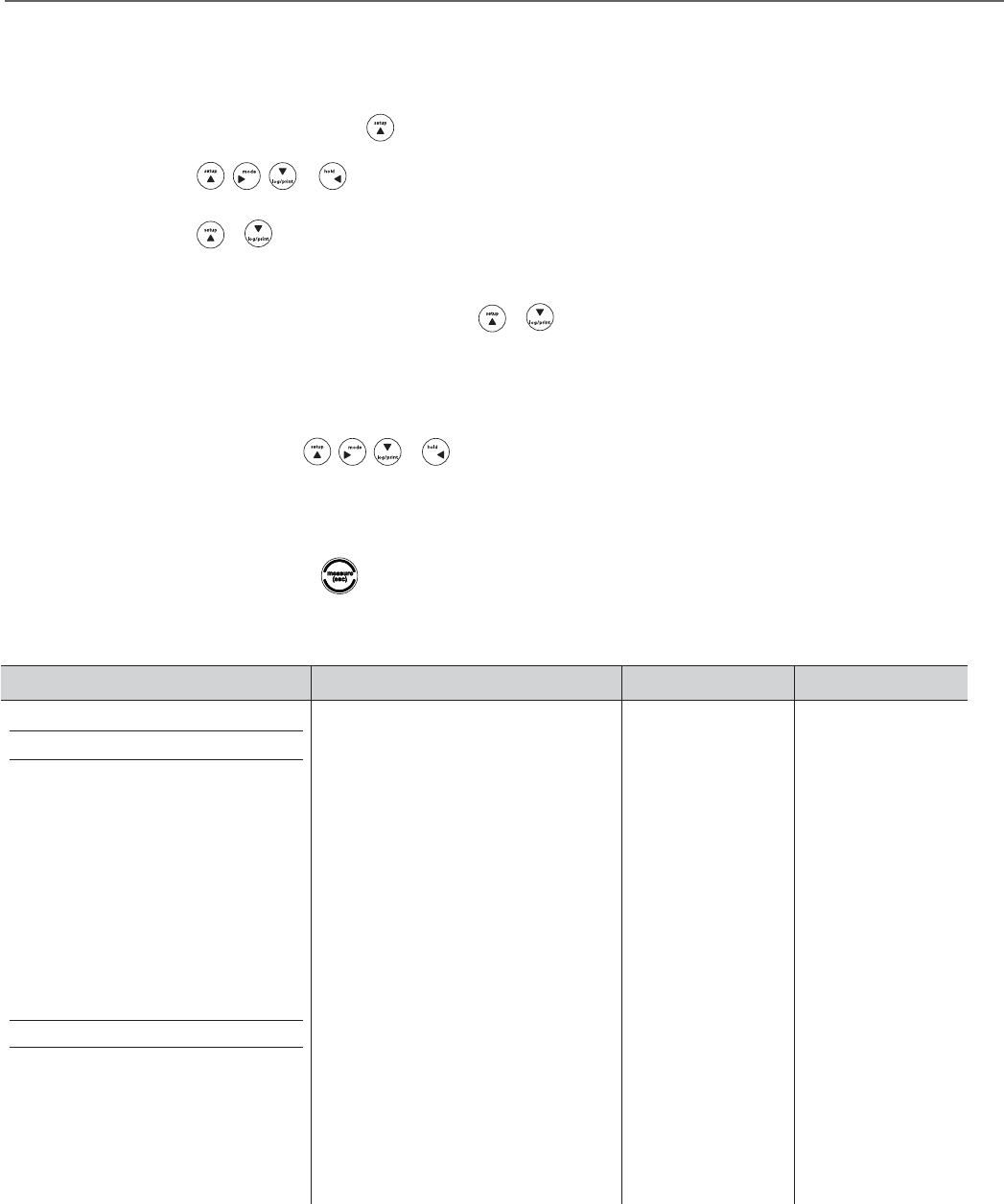
1. Press to power the meter on. When the meter is on, press and quickly release to turn the backlight
on or off or press and hold for about three seconds to power the meter off.
2. Press to exit any meter function and return to the measurement mode.
3. The f1, f2, and f3GVODUJPOLFZTQFSGPSNBWBSJFUZPGNFUFSPQFSBUJPOT5IFNFOVTQFDJmDPQFSBUJPOJTTIPXO
above each key on the display. For example, press f1 in the measurement mode to start a calibration.
5IF , , or LFZTBSFVTFEBTOBWJHBUJPOLFZTVQSJHIUEPXOMFGUXIFOTFMFDUJOHGSPNBmYFE
MJTUPSHSJEPGNFUFSPQUJPOT*OUIFNFBTVSFNFOUNPEFUIFTFLFZTBSFVTFEUPBDDFTTUIFTFUVQNFOVDIBOHF
UIFNFBTVSFNFOUNPEFNBOVBMMZMPHPSQSJOUBNFBTVSFNFOUBOEIPMEGSFF[FBEJTQMBZFENFBTVSFNFOUJOUIF
continuous measurement mode.
*OUIFDPOUJOVPVTNFBTVSFNFOUNPEFXIFO JTQSFTTFEBOEUIFNFBTVSFNFOUJTCFJOHIFMEGSP[FOPOMZUIF
LFZXJMMCFGVODUJPOBMVOUJMUIFNFBTVSFNFOUJTSFMFBTFEVOGSP[FO
1SFTT UPUVSOPOPSPGGUIFTUJSSFSQSPCF$BU/POrion Star A213 benchtop meters only.
1SFTT to access the calibration log and data log. Orion Star A213 benchtop meters only.
Meter Maintenance
'PSSPVUJOFNFUFSNBJOUFOBODFEVTUBOEXJQFUIFNFUFSXJUIBEBNQDMPUI*GOFDFTTBSZXBSNXBUFSPSBNJME
XBUFSCBTFEEFUFSHFOUDBOCFVTFE.FUFSNBJOUFOBODFDBOCFQFSGPSNFEPOBEBJMZXFFLMZPSNPOUIMZCBTJTBT
SFRVJSFECZUIFFOWJSPONFOUJOXIJDIUIFNFUFSJTPQFSBUFE*NNFEJBUFMZSFNPWFBOZTQJMMFETVCTUBODFGSPNUIF
meter using the proper cleaning procedure for the type of spill.
9
Thermo Scientific Orion Star A213 Benchtop and Star A223 and Star A323 Portable RDO/DO Meter Reference Guide
Chapter 3 Meter Setup
Navigating the Setup Menu
*OUIFNFBTVSFNFOUNPEFQSFTT to enter the main setup menu.
2. Press , , or to scroll through the main setup menu options. Press f3 (select) to
select a main setup menu option.
3. Press or to scroll through setup submenu options. Press f3 (select) to select a setup submenu option.
1FSGPSNUIFBQQSPQSJBUFBDUJPOTUPTFUUIFEFTJSFEQBSBNFUFSJOUIFTFUVQTVCNFOVT
a. To select a value from a list of options, press or to highlight the desired value and press
f3 (select) to set the value.
b. To enter a numeric value, use the numeric entry screen.
i. Select the value to be entered by pressing f3 (select) or f3 (edit). The numeric entry screen will popup on the display.
ii. Press , , or to highlight a number, decimal place or negative sign; press
f3 (enter) to select the highlighted item and repeat until the desired value is shown on the top of the numeric
entry screen.
iii. Press f2 (done) to save the value and exit the numeric entry screen.
1SFTTf1 (back) and then to return to the measurement mode at any time.
Setup Menu Overview
DO/RDO Channel Settings Log View Diagnostics
Method (Star A213 and Star A323 meters only)
Mode & Settings
t.FBTVSF.PEF
t.FBTVSF6OJU
t3FTPMVUJPO
t3FBE5ZQF
t#BSP1SFTT
t4BMJOJUZ$PSSFDU
t4UBCJMJUZ(Star A213 and Star A323 meters only)
t"WFSBHJOH(Star A213 and Star A323 meters only)
t-JNJU"MBSN
t$BM%VF"MBSN
t3%0$BQ-JGF(RDO only)
Temperature
t.BOVBM5FNQ7BMVF
t5FNQFSBUVSF6OJU
t5FNQFSBUVSFCalibration
t&YQPSU%BUB
t%BUB-PH
t%BUF5JNF
t-BOHVBHF
t,FZ1SFTT#FFQ
t"MBSN#FFQ
t4UJSSFS(Star A213 meters only)
t$POUSBTU
t"VUP4IVU0GG
t6TFS*%(Star A213 and Star A323 meters only)
t4BNQMF*%(Star A213 and Star A323 meters only)
t%BUB-PH
t$BMJCSBUJPO-PH
t'BDUPSZ3FTFU
t6TFS3FTFU
t4FMG5FTU
t4UBCJMJUZ5FTU
t"CPVU.FUFS
10 Thermo Scientific Orion Star A213 Benchtop and Star A223 and Star A323 Portable RDO/DO Meter Reference Guide
DO/RDO Channel Menu
The DO/RDO Channel setup menu is used to review and change parameters relating to dissolved oxygen measurements
and calibrations.
Main Setup Menu 2nd Level 3rd Level Menu Options Menu Description
DO/RDO Channel
Method List of Methods
Menu allows the current meter settings to be saved as a new method,
an existing method to be run on the meter, or an existing method to be
viewed, edited, copied, deleted or printed.
Star A213 and Star A323 meters only.
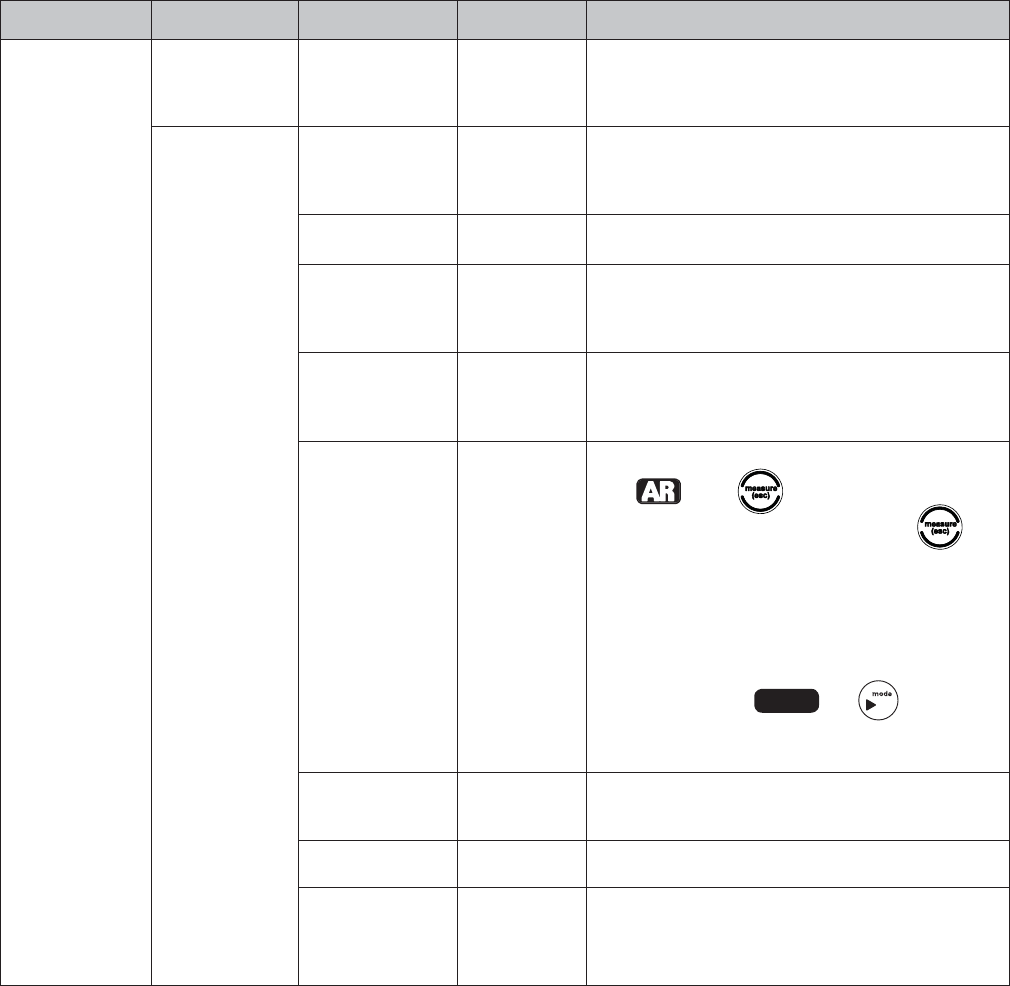
Mode and Settings
Measure Mode
t%0
t3%0
t"VUP
Menu used to select the type of DO probe used. The meter accepts
and automatically recognizes Orion RDO optical DO probes and Orion
QPMBSPHSBQIJD%0QSPCFT6TFUIJTNFOVJGBEJGGFSFOUQSPCFJTVTFEPS
the probe type needs to be verified.
.FBTVSF6OJU tNH-
tTBU Menu used to select the displayed measurement units.
3FTPMVUJPONH-NPEF
t1 Decimal Place
t2 Decimal Places
Menu used to select the resolution for the displayed measurement values.
3FTPMVUJPOTBUNPEF
t1 Decimal Place
1
t2 Decimal Places
Menu used to select the resolution for the displayed measurement values.
Read Type
t"VUP
t$POUJOVPVT
t5JNFE
(Star A213 and Star
A323 meters only)
Menu used to select how the meter will take measurements.
Auto o1SFTT to take a measurement. When the
measurement is stable, it is locked on the display until is
pressed again.
Continuous – The measurement is constantly updated on the
display and stabilizing or ready is shown to indicate the
measurement stability.
Timed – Measurements are taken at a set time interval. To enter
the time interval, highlight t5JNFEpress to highlight the
IPVST))NJOVUFT..PSTFDPOET44QSFTTf3 (edit) and use
the numeric entry screen to change the values.
Baro Press tAutomatic
tManual
Menu used to select automatic or manual barometric pressure
DPNQFOTBUJPOGPSEJTTPMWFEPYZHFONFBTVSFNFOUT6TFUIFOVNFSJD
entry screen to enter a manual value.
Salinity Correct tManual Menu used to set manual salinity correction for dissolved oxygen
NFBTVSFNFOUT6TFUIFOVNFSJDFOUSZTDSFFOUPFOUFSBNBOVBMWBMVF
Stability
t4NBSU4UBCJMJUZ
t'BTU
t.FEJVN
t4MPX
Menu used to select how the stability of the displayed measurement
values is indicated. Smart Stability automatically compensates for
measurement conditions and optimizes the meter response time.
Star A213 and Star A323 meters only.
11
Thermo Scientific Orion Star A213 Benchtop and Star A223 and Star A323 Portable RDO/DO Meter Reference Guide
DO/RDO Channel Menu (cont.)
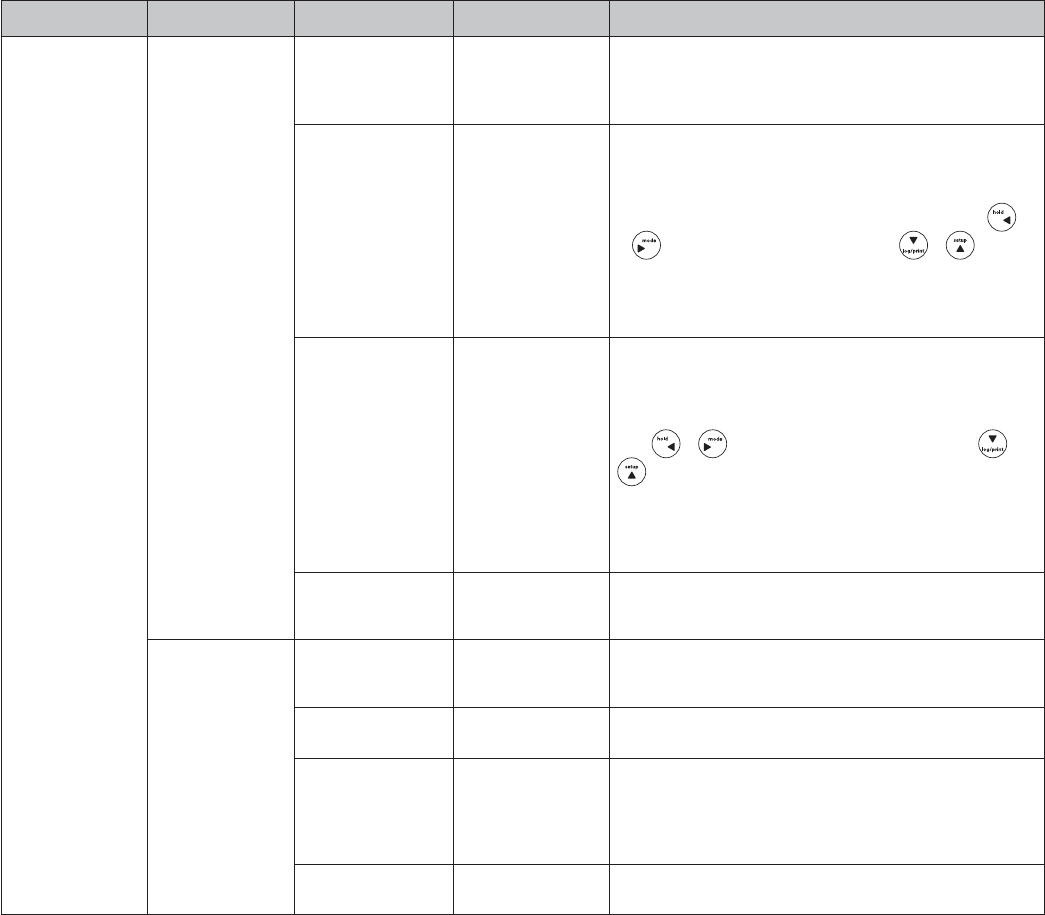
Main Setup Menu 2nd Level 3rd Level Menu Options Menu Description
DO/RDO Channel
(cont.)
Mode and Settings
DPOU
Averaging t0GG
t"VUPNBUJD4NBSU
Menu used to turn the averaging function on or off. Automatic Smart
automatically compensates for measurement conditions and optimizes
the meter response time.
Star A213 and Star A323 meters only.
-JNJU"MBSN
t-JNJU"MBSN
On
Off
t"MBSN4FUUJOHT
-PX
)JHI
)JHI-PX
t)JHI-JNJU
t-PX-JNJU
Menu used to turn the limit alarm on or off and to set the limit alarm
parameters. The limit alarm is triggered if the measurement goes above
a high value and/or below a low value set by the operator. Press
or to change the setting on each line, press or to select
another line and use the numeric entry screen to enter limit values.
Star A213 and Star A323 meters only.
Cal Due Alarm
t$BM%VF"MBSN
On
Off
t$BM%VF-JNJU
Menu used to turn the calibration due alarm on or off and to set the
calibration due alarm time. The calibration due alarm is triggered if a
set amount of time has passed without a calibration being performed.
Press or to change the setting on the top line, press or
to select another line and use the numeric entry screen to enter the
calibration due value in hours.
Star A213 and Star A323 meters only.
Star A223 meters have the cal due option with a fixed value of 12 hours.
3%0$BQ-JGF
3%0NPEF
$BQ-JGF
4FSJBM/VNCFS
Menu used to display the RDO optical cap life as days remaining and
the RDO optical cap serial number.
Temperature .BOVBM5FNQ7BMVF Default value or last
entered value
Menu used to set the temperature value that will be used for all
NFBTVSFNFOUTBOEDBMJCSBUJPOT6TFUIFOVNFSJDFOUSZTDSFFOUPFOUFS
the temperature.
5FNQFSBUVSF6OJU t$FMTJVT
t'BISFOIFJU Menu used to select the temperature units.
Temperature Calibration
t4PMVUJPO5FNQFSBUVSF
t.FNCSBOF
Temperature
t4PM.FN
Temperature
Menu allows the solution temperature measured by a DO probe,
membrane temperature measured by a DO probe or a combination of
these to be adjusted by the operator.
5FNQFSBUVSF*OQVU t%01SPCF
t.BOVBM Menu used to select the source of the temperature measurement.

12 Thermo Scientific Orion Star A213 Benchtop and Star A223 and Star A323 Portable RDO/DO Meter Reference Guide
Settings Menu
The Settings setup menu is used to review and change parameters relating to the general operation of the meter.
Main Setup Menu 2nd Level Menu Options Menu Description
Settings
&YQPSU%BUB
t1SJOUJOH
t0O
t0GG
t$PNN4FUVQ
t34
t64#
t%BUB'PSNBU
t1SJOUFS
t1$$47
t$PNN$POGJH
t
t
t
t
t
t
Menu used to turn data exporting on or off, set the meter to be interfaced using the
34PS64#QPSUTFUUIFFYQPSUFEEBUBGPSNBUGPSBQSJOUFSTUSJOHPGUFYUPS1$
DPNNBEFMJNJUFEUFYUBOETFUUIFCBVESBUF
%BUB-PH t0GG
t0O Menu used to turn on or off the data log feature.
Date / Time t%BUF
t%%..::
t..%%::
t5JNF
t)PVS$MPDL
t)PVS$MPDL
Menu used to set the date format as day/month/year or month/day/year; enter
UIFEBUFWBMVFTTFUUIFUJNFGPSNBUBTIPVSPSIPVSDMPDLBOEFOUFSUIFUJNF
WBMVFT6TFUIFOVNFSJDFOUSZTDSFFOUPFOUFSUIFWBMVFT
-BOHVBHF t&OHMJTI
t4QBOJTI
t(FSNBO
t'SFODI
t*UBMJBO
t$IJOFTF
Menu used to set the language for all displayed meter prompts.
,FZ1SFTT#FFQ t0GG
t0O Menu used to turn on or off the beep sound made every time a meter key is pressed.
Alarm Beep t0GG
t0O Menu used to turn on or off the beep sound made when an alarm value is reached.

13
Thermo Scientific Orion Star A213 Benchtop and Star A223 and Star A323 Portable RDO/DO Meter Reference Guide
Settings Menu (cont.)
Main Setup Menu 2nd Level Menu Options Menu Description
Settings (cont.)
Stirrer t4QFFE
t4QFFE
t4QFFE
t4QFFE
t4QFFE
Menu used to turn the stirrer probe on or off and to set the stirrer probe speed.
Star A213 meters only.
Contrast t-FWFM
t-FWFM
t-FWFM
t-FWFM
t-FWFM
t-FWFM
Menu used to set the display contrast.
Auto Shut Off t0GG
t0O
Menu used to turn on or off the meter automatic shutoff feature, which turns the
NFUFSPGGXIFOOPLFZTBSFQSFTTFEGPSNJOVUFT
6TFS*% Default value or last
entered value
.FOVVTFEUPTFUUIFVTFS*%6TFUIFBMQIBOVNFSJDFOUSZTDSFFOUPFOUFSUIFVTFS*%
Star A213 and Star A323 meters only.
4BNQMF*% t0GG
t.BOVBM
t"VUP*ODSFNFOUBM
.FOVVTFEUPUVSOUIFTBNQMF*%PGGPSPO8IFOTBNQMF*%JTTFUUPNBOVBMPSBVUP
JODSFNFOUBMFOUFSUIFTBNQMF*%JOUIFNFBTVSFNFOUNPEFCZQSFTTJOHf2 (sample
ID) and using the alphanumeric entry screen.
Star A213 and Star A323 meters only.
View Log Menu
5IF7JFX-PHTFUVQNFOVJTVTFEUPBDDFTTJOGPSNBUJPOTUPSFEJOUIFEBUBMPHBOEDBMJCSBUJPOMPH3FGFSUPUIF%BUB
Storage and Retrieval chapter for detailed information on using this setup menu.
Diagnostics Menu
5IF%JBHOPTUJDTTFUVQNFOVJTVTFEUPQFSGPSNUIFNFUFSTFMGUFTUSFTFUUIFNFUFSUPUIFGBDUPSZEFGBVMUTFUUJOHTBOE
display meter information including serial number and software revision. Refer to the Customer Services chapter for
detailed information on using this setup menu.
14 Thermo Scientific Orion Star A213 Benchtop and Star A223 and Star A323 Portable RDO/DO Meter Reference Guide
This page intentionally left blank.

15
Thermo Scientific Orion Star A213 Benchtop and Star A223 and Star A323 Portable RDO/DO Meter Reference Guide
Chapter 4 RDO/DO Calibration
1PMBSPHSBQIJD%0QSPCFTPOMZ"QPMBSPHSBQIJD%0QSPCFNVTUCFQPMBSJ[FE5IFQSPCFJTDPOUJOVPVTMZQPMBSJ[FEXIFO
JUJTDPOOFDUFEUPUIFNFUFS*GUIFQSPCFJTOPUDPOOFDUFEUPUIFNFUFSDPOOFDUUIFQSPCFUPUIFNFUFSDPOOFDUUIF
NFUFSUPBQPXFSTPVSDFBOEXBJUUPNJOVUFTGPSQPMBSJ[BUJPO
5IF0SJPO4UBS"BOE4UBS"NFUFSTDBOQFSGPSNBDBMJCSBUJPOVTJOHXBUFSTBUVSBUFEBJS"JSBJSTBUVSBUFE
XBUFS8BUFS8JOLMFSUJUSBUJPO.BOVBMPS[FSPQPJOUDBMJCSBUJPO4FU;FSP4UFQCZTUFQJOTUSVDUJPOTBOEQSPNQUT
BSFEJTQMBZFEPOUIFNFUFSUPBTTJTUPQFSBUPSTXJUIUIFDBMJCSBUJPONFOVT5IFNFUFSDBOTBWFVQUPDBMJCSBUJPOTJO
the log and calibration data can be exported from the meter to a printer or computer.
Air Dissolved Oxygen Calibration
"OBJSDBMJCSBUJPOJTQFSGPSNFEJOXBUFSTBUVSBUFEBJSVTJOHUIFDBMJCSBUJPOTMFFWFJODMVEFEXJUIUIF%0QSPCF
5IJTJTUIFTJNQMFTUBOENPTUBDDVSBUFDBMJCSBUJPO%VFUPUIFJOIFSFOUEJGGFSFODFTCFUXFFOXBUFSTBUVSBUFEBJS
BOEBJSTBUVSBUFEXBUFSTBUVSBUJPOXJMMCFEJTQMBZFEXIFOUIFDBMJCSBUJPOSFBEJOHJTTUBCMFXIFOVTJOHB
polarographic DO probe. The highest possible accuracy is reached when calibration temperature is the same as the
measuring temperature. Moisten the sponge or absorbent cloth in the calibration sleeve with distilled water and insert
the probe into the sleeve without touching the water saturated material. For BOD measurements, this calibration can
be performed in a BOD bottle.
Note: In most calibration screens, press f1 (esc) to return to the measurement mode without saving the calibration.
*OUIFNFBTVSFNFOUNPEFQSFTTf1 (cal).
2. Press or to highlight Air and press f3 (select).
3JOTFUIF3%0PQUJDBM%0QSPCFPSQPMBSPHSBQIJD%0QSPCFXJUIEJTUJMMFEXBUFSCMPUESZXJUIBMJOUGSFFUJTTVFBOEQMBDF
JOUPUIFQSFQBSFEDBMJCSBUJPOTMFFWFPS#0%CPUUMF"MMPXUIFQSPCFBOEXBUFSTBUVSBUFEBJSUPSFBDIFRVJMJCSJVN
8IFOUIFQSPCFBOEXBUFSTBUVSBUFEBJSBSFSFBEZQSFTTf3 (start).
8BJUGPSUIFEJTTPMWFEPYZHFOSFBEJOHPOUIFNFUFSUPTUBCJMJ[FBOETUPQnBTIJOH0ODFUIFSFBEJOHJTTUBCMFUIF
meter will display Reading is stable. Accept Auto Calibration Value and 100.0% if using an RDO optical DO probe or
102.3 % if using a polarographic DO probe.
1SFTTf3 (cal done) to export the data to the calibration log or press f2 (print) to export the data to the calibration
log and a printer or computer. The meter will proceed to the measurement mode.

16 Thermo Scientific Orion Star A213 Benchtop and Star A223 and Star A323 Portable RDO/DO Meter Reference Guide
Water Dissolved Oxygen Calibration
"XBUFSDBMJCSBUJPOJTQFSGPSNFEVTJOHXBUFSUIBUJTTBUVSBUFEXJUIBJS#VCCMFBJSJOUPBXBUFSTBNQMFBOE
gently stir the sample to prevent the buildup of air bubbles on the dissolved oxygen probe membrane.
Note: In most calibration screens, press f1 (esc) to return to the measurement mode without saving the calibration.
*OUIFNFBTVSFNFOUNPEFQSFTTf1 (cal).
2. Press or to highlight Water and press f3 (select).
3JOTFUIF%0QSPCFBOEBOZPUIFSFMFDUSPEFTJOVTFXJUIEJTUJMMFEXBUFSCMPUESZXJUIBMJOUGSFFUJTTVFBOEQMBDF
JOUPUIFQSFQBSFEBJSTBUVSBUFEXBUFS"MMPXUIF%0QSPCFBOEBJSTBUVSBUFEXBUFSUPSFBDIFRVJMJCSJVN
8IFOUIF%0QSPCFBOEBJSTBUVSBUFEXBUFSBSFSFBEZQSFTTf3 (start).
8BJUGPSUIFEJTTPMWFEPYZHFOSFBEJOHPOUIFNFUFSUPTUBCJMJ[FBOETUPQnBTIJOH0ODFUIFSFBEJOHJTTUBCMFUIF
meter will display Reading is stable. Accept Auto Calibration Value and 100 %.
1SFTTf3 (cal done) to export the data to the calibration log or press f2 (print) to export the data to the
calibration log and a printer or computer. The meter will automatically proceed to the measurement mode.
17
Thermo Scientific Orion Star A213 Benchtop and Star A223 and Star A323 Portable RDO/DO Meter Reference Guide
Manual Dissolved Oxygen Calibration
A manual calibration is performed using a water sample with a known concentration of dissolved oxygen. This
method can be used to calibrate the DO probe to the value achieved by a Winkler titration. A manual calibration
involves performing a Winkler titration and using that sample as a calibration standard. The oxygen level result
from the titration is entered in a manual calibration as the dissolved oxygen value. This correlates the meter input
to the Winkler titration. This method is inherently less accurate, due to the possibility of titration errors.
Note: In most calibration screens, press f1 (esc) to return to the measurement mode without saving the calibration.
*OUIFNFBTVSFNFOUNPEFQSFTTf1 (cal).
2. Press or to highlight Manual and press f3 (select).
3JOTFUIF%0QSPCFBOEBOZPUIFSFMFDUSPEFTJOVTFXJUIEJTUJMMFEXBUFSCMPUESZXJUIBMJOUGSFFUJTTVFBOE
place into the prepared water sample with a known dissolved oxygen concentration. Allow the DO probe and
water sample to reach equilibrium.
8IFOUIF%0QSPCFBOEXBUFSTBNQMFBSFSFBEZQSFTTf3 (start).
8BJUGPSUIFEJTTPMWFEPYZHFOSFBEJOHPOUIFNFUFSUPTUBCJMJ[FBOETUPQnBTIJOH1FSGPSNPOFPGUIFGPMMPXJOHBDUJPOT
a. Press f2 (accept)UPBDDFQUUIFEJTQMBZFEEJTTPMWFEPYZHFOWBMVFJONH-NJMMJHSBNTQFSMJUFS
b. Press f3 (edit) to access the numeric entry screen and edit the dissolved oxygen value.
i. Press , , or to highlight a number or decimal point, press f3 (enter) to select
UIFIJHIMJHIUFEJUFNBOESFQFBUVOUJMUIFEJTTPMWFEPYZHFOWBMVFJONH-JTTIPXO
ii. Press f2 (done) to exit the numeric entry screen.
iii. P r es s f2 (accept) to accept the entered dissolved oxygen value.
1SFTTf3 (cal done) to export the data to the calibration log or press f2 (print) to export the data to the
calibration log and a printer or computer. The meter will automatically proceed to the measurement mode.

18 Thermo Scientific Orion Star A213 Benchtop and Star A223 and Star A323 Portable RDO/DO Meter Reference Guide
Set Zero Dissolved Oxygen Calibration
"[FSPQPJOUDBMJCSBUJPOJTQFSGPSNFEJOBOPYZHFOGSFFTPMVUJPO;FSPUIFQSPCFXIFOVTJOHBOFXNFNCSBOF
VTJOHGSFTIFMFDUSPMZUFTPMVUJPOPSXIFONFBTVSJOHEJTTPMWFEPYZHFOMFWFMTCFMPXTBUVSBUJPOPSNH-
"[FSPQPJOUDBMJCSBUJPOJTOPUHFOFSBMMZSFRVJSFEVOMFTTNFBTVSFNFOUTXJMMCFUBLFOCFMPXTBUVSBUJPOPS
NH-1FSGPSNBOBJSPSXBUFSDBMJCSBUJPOCFGPSFQFSGPSNJOHB[FSPQPJOUDBMJCSBUJPO
Note: In most calibration screens, press f1 (esc) to return to the measurement mode without saving the calibration.
*OUIFNFBTVSFNFOUNPEFQSFTTf1 (cal).
2. Press or to highlight Set Zero and press f3 (select).
3. Rinse the RDO optical DO probe or polarographic DO probe and any other electrodes in use with distilled
XBUFSCMPUESZXJUIBMJOUGSFFUJTTVFBOEQMBDFJOUPUIFQSFQBSFE[FSPPYZHFOTUBOEBSE"MMPXUIFQSPCF
and standard to reach equilibrium.
8IFOUIFQSPCFBOE[FSPPYZHFOTUBOEBSEBSFSFBEZQSFTT f3 (start).
8BJUGPSUIFEJTTPMWFEPYZHFOSFBEJOHPOUIFNFUFSUPTUBCJMJ[FBOETUPQnBTIJOH0ODFUIFSFBEJOHJT
stable, the meter will display Reading is stable. Accept Auto Calibration Value and 0.00.
1SFTTf3 (cal done) to export the data to the calibration log or press f2 (print) to export the data to the
calibration log and a printer or computer. The meter will proceed to the measurement mode.
19
Thermo Scientific Orion Star A213 Benchtop and Star A223 and Star A323 Portable RDO/DO Meter Reference Guide
Chapter 5 Temperature Calibration
5IFNFUFS"5$UFNQFSBUVSFEJTQMBZIBTBSFMBUJWFBDDVSBDZPG¡$"5$QSPCFTCPUITFQBSBUFBOEUIPTFCVJMUJOUP
FMFDUSPEFTIBWFWBSZJOHUFNQFSBUVSFBDDVSBDJFTVTVBMMZ¡$UP¡$6TFUIJTGVODUJPOPOMZJGJUJTOFDFTTBSZ
to calibrate the temperature readings taken by the ATC probe. Since the temperature offset calculated during the
calibration is applied to all future temperature measurements, recalibrate if a different ATC probe is used.
Temperature calibration is for the calibration of the solution temperature measured by a DO probe, the membrane
UFNQFSBUVSFNFBTVSFECZB%0QSPCFPSBDPNCJOBUJPOPGUIFTF*GNBOVBMUFNQFSBUVSFDPNQFOTBUJPOJTCFJOHVTFE
BOEUIFEJTQMBZTIPXT."/BTUIFUFNQFSBUVSFTPVSDFJDPOTFUUIFNBOVBMUFNQFSBUVSFWBMVFVTJOHUIF.BOVBM
5FNQ7BMVFNFOV5IFUFNQFSBUVSFDBMJCSBUJPONFOVJTOPUBDDFTTJCMFVOMFTTBO"5$QSPCFJTDPOOFDUFEUPUIFNFUFS
*OUIFNFBTVSFNFOUNPEFQSFTT .
2. Press , , or to highlight DO/RDO Channel and press f3 (select).
3. Press or to highlight Temperature and press f3 (select).
1SFTT or to highlight Temperature Calibration and press f3 (select).
1SFTT or to highlight Solution Temperature, Membrane Temperature or Sol & Mem Temperature to
identify the temperature source that will be calibrated and press f3 (select).
1MBDFUIF%0QSPCFBOEUIFSNPNFUFSTJOUPBTPMVUJPOXJUIBLOPXOTUBCMFUFNQFSBUVSF*UJTSFDPNNFOEFEUIBUUXP/*45
traceable thermometers be used to measure and verify the temperature of the solution.
8BJUGPSUIFUFNQFSBUVSFSFBEJOHTPGUIF%0QSPCFBOEUIFSNPNFUFSTUPTUBCJMJ[FVTVBMMZUXPUPmWFNJOVUFT
8. Press f3 (edit) to access the numeric entry screen and edit the temperature value.
a. Press , , or to highlight a number, decimal point or negative sign; press f3 (enter)
to select the highlighted item and repeat until the temperature value read by the thermometers is
shown on the display.
b. Press f2 (done) to exit the numeric entry screen.
5IFNFUFSXJMMEJTQMBZUIFFOUFSFEUFNQFSBUVSFWBMVFPOUIFReference Temp line, the original temperature read
by the DO probe on the ATC line and the temperature offset value that will be applied to all future temperature
readings on the Offset line. Press f2 (accept) to proceed with the displayed temperature data, save and end the
calibration and export the data to the calibration log.
1SFTT f1 (meas) to proceed to the measurement mode or press f2 (print) to proceed to the measurement mode
and export the data to a printer or computer. The meter will automatically proceed to the measurement mode.
20 Thermo Scientific Orion Star A213 Benchtop and Star A223 and Star A323 Portable RDO/DO Meter Reference Guide
This page intentionally left blank.
21
Thermo Scientific Orion Star A213 Benchtop and Star A223 and Star A323 Portable RDO/DO Meter Reference Guide
Chapter 6 Measurement
5IF0SJPO4UBS4UBS"4UBS"BOE4UBS"NFUFSTBSFDBQBCMFPGTIPXJOH%0TBUEJTTPMWFEPYZHFOJO
QFSDFOUTBUVSBUJPO%0NH-EJTTPMWFEPYZHFOJONJMMJHSBNTQFSMJUFSPS%0¡$QSPCFNFNCSBOFUFNQFSBUVSF
measurements on the display.
Press while taking a measurement in the continuous measurement mode to freeze the display and press
a second time to unfreeze the display and continue the measurement. Press while taking a measurement to
manually export the measurement to the data log, if the data log is enabled in the setup menu.
1. Rinse the RDO optical dissolved oxygen probe or polarographic dissolved oxygen probe and any other electrodes in
VTFXJUIEJTUJMMFEXBUFSCMPUESZXJUIBMJOUGSFFUJTTVFBOEQMBDFJOUPUIFTBNQMF
2. Star A213 meters onlyo*GUIFTUJSSFSQSPCFJTJOVTFBOEUIFNFUFSJTJODPOUJOVPVTPSUJNFENPEFQSFTT
UPUVSOPOUIFTUJSSFSQSPCF*GUIFTUJSSFSQSPCFJTJOVTFBOEUIFNFUFSJTJO"6503&"%NPEFUIFTUJSSFSQSPCF
will start stirring when is pressed and stop stirring when the reading stabilizes.
3. Start the measurement and wait for it to stabilize.
B *GUIFNFUFSJTJO"6503&"%NPEFEFGBVMUTFUUJOHQSFTT to start the measurement. When
the JDPOTUPQTnBTIJOHSFDPSEUIFBQQMJDBCMFNFBTVSFNFOUQBSBNFUFSTBOEUFNQFSBUVSFPGUIF
sample. Press again to start a new measurement.
C *GUIFNFUFSJTJODPOUJOVPVTNPEFUIFNFUFSXJMMJNNFEJBUFMZTUBSUUBLJOHBNFBTVSFNFOUBOE
update the display whenever the measurement changes. Wait for the display to show ready and
record the applicable measurement parameters and temperature of the sample.
c. Star A213 and Star A323 meters only –*GUIFNFUFSJTJOUJNFENPEFUIFNFUFSXJMMMPHNFBTVSFNFOUT
at the preselected time interval, regardless of the measurement stability. The meter will update
the display whenever the measurement changes, so the applicable measurement parameters and
temperature of the sample can be recorded when the display shows ready.
Star A213 meters onlyo*GUIFTUJSSFSQSPCFJTJOVTFBOEUIFNFUFSJTJODPOUJOVPVTPSUJNFENPEFQSFTT
to turn off the stirrer probe.
3FNPWFUIFFMFDUSPEFTGSPNUIFTBNQMFSJOTFXJUIEJTUJMMFEXBUFSCMPUESZBOEQMBDFJOUPUIFOFYUTBNQMF
3FQFBUTUFQTUISPVHIGPSBMMTBNQMFT
8IFOBMMTBNQMFTIBWFCFFONFBTVSFETUPSFUIFFMFDUSPEFTBDDPSEJOHUPUIFJSVTFSHVJEFT
22 Thermo Scientific Orion Star A213 Benchtop and Star A223 and Star A323 Portable RDO/DO Meter Reference Guide
This page intentionally left blank.
23
Thermo Scientific Orion Star A213 Benchtop and Star A223 and Star A323 Portable RDO/DO Meter Reference Guide
Chapter 7 Methods
The Orion Star A213 and Star A323 meters can save up to ten methods per channel and the corresponding calibration
data for each method, for the fast and easy recollection of different meter setup parameters. The default meter
TFUUJOHJTUIBUOPNFUIPEJTVTFEBOEUIFNFUIPEOVNCFSXJMMCFTIPXOBT.JGOPNFUIPEJTJOVTF5IFDVSSFOU
NFUFSTFUUJOHTDBOCFTBWFEJOUIFTFUVQNFOV&YJTUJOHNFUIPETDBOCFTFMFDUFEGSPNUIFNFUIPETMJTUBOESVOPO
the meter. Methods can be viewed, edited, copied to a new method or deleted.
Saving the Current Meter Settings as a New Method
*OUIFNFBTVSFNFOUNPEFQSFTT .
2. Press , , or to highlight DO/RDO Channel and press f3 (select).
3. Press or to highlight Method and press f3 (select
5IFNFUFSXJMMEJTQMBZCurrent Settings and a list of methods. The list will show the sequential number of the methods
(M301) and the date, time and mode of each method (07/01/11 12:45 DO) if methods have been previously created.
1SFTT or to highlight Current Settings and press f3 (save).
1SFTT or to highlight a method number that the current settings will be saved as and press f2 (accept).
5IFNFUFSXJMMQSPNQUGPSBNFUIPETQFDJmDQBTTXPSEUPCFDSFBUFE5IFQBTTXPSENVTUCFBUMFBTUDIBSBDUFSTMPOH
a. Press f3 (edit) to access the numeric entry screen.
b. Press , , or to highlight a number, press f3 (enter) to select the
highlighted number and repeat until the new password is shown.
c. Press f2 (done) to exit the numeric entry screen.
d. Press f2 (accept) to accept the entered password.
8. The meter will automatically proceed to the measurement mode.
Loading an Existing Method
*OUIFNFBTVSFNFOUNPEFQSFTT .
2. Press , , or to highlight DO/RDO Channel and press f3 (select).
3. Press or to highlight Method and press f3 (select).
5IFNFUFSXJMMEJTQMBZCurrent Settings and a list of methods. The list will show the sequential number of
the methods (M301) and the date, time and mode of each method (07/01/11 12:45 DO) if methods have been
previously created.
1SFTT or to highlight the method to be loaded and press f2 (load).
5IFNFUFSXJMMBVUPNBUJDBMMZQSPDFFEUPUIFNFBTVSFNFOUNPEF
24 Thermo Scientific Orion Star A213 Benchtop and Star A223 and Star A323 Portable RDO/DO Meter Reference Guide
Editing, Copying or Deleting an Existing Method
*OUIFNFBTVSFNFOUNPEFQSFTT .
2. Press , , or to highlight DO/RDO Channel and press f3 (select).
3. Press or to highlight Method and press f3 (select).
5IFNFUFSXJMMEJTQMBZCurrent Settings and a list of methods. The list will show the sequential number of the
methods (M301) and the date, time and mode of each method (07/01/11 12:45 DO) if methods have been
previously created.
1SFTT or to highlight the desired method and press f3 (options).
&OUFSUIFNFUIPETQFDJmDQBTTXPSE
a. Press f3 (edit) to access the numeric entry screen.
b. Press , , or to highlight a number, press f3 (enter) to select
the highlighted number and repeat until the password is shown.
c. Press f2 (done) to exit the numeric entry screen.
d. Press f2 (accept) to accept the entered password.
1SFTT or to highlight Edit, Copy or Delete and press f2 (accept).
B *GEdit is selected – press or to highlight any setup menu parameters that need to be
changed and press f3 (select). Review and change all applicable setup menu parameters. Press f1
(back) to return to the list of methods and then press to return to the measurement mode.
C *GCopy is selected – press or to highlight a method number that the selected
method will be copied to and press f2 (accept). The meter will automatically proceed to the
measurement mode.
D *GDelete is selected – press f2 (yes) to delete the method or press f3 (no) to keep the method.
The meter will automatically proceed to the measurement mode.
25
Thermo Scientific Orion Star A213 Benchtop and Star A223 and Star A323 Portable RDO/DO Meter Reference Guide
Chapter 8 Data Storage and Retrieval
Data Storage Settings
The data and calibration storage settings include the measurement read type, computer and printer export settings
and data log settings. The measurement read type determines when the meter sends measurements to the data log,
if the data log is enabled in the setup menu, and to a printer or computer, if a printer or computer is connected to the
meter and enabled in the setup menu. Review the date and time settings and update as needed.
Read Type Selection
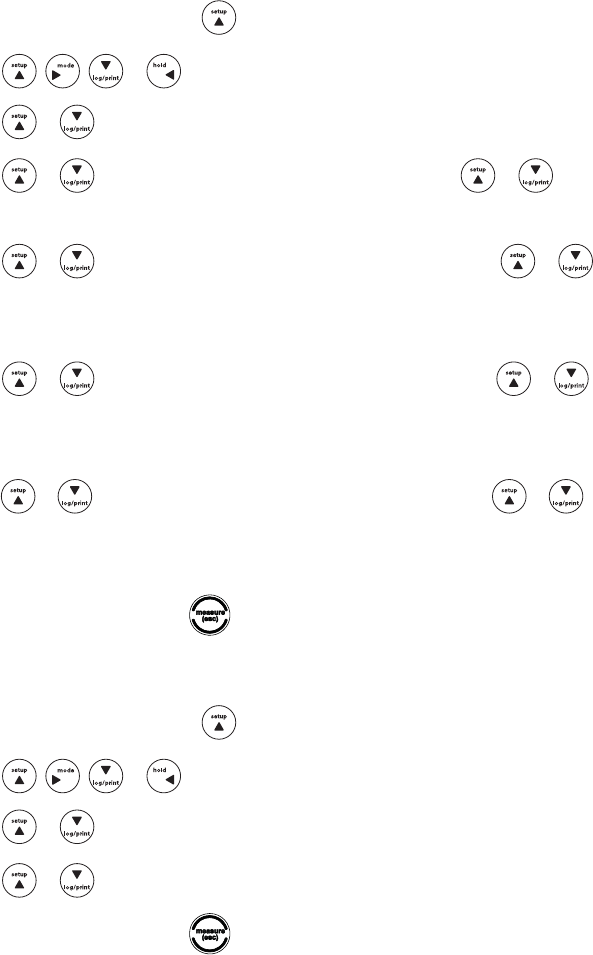
*OUIFNFBTVSFNFOUNPEFQSFTT .
2. Press , , or to highlight DO/RDO Channel and press f3 (select).
3. Press or to highlight Mode and Settings and press f3 (select).
1SFTT or to highlight Read Type and press f3 (select).
1SFTT or to highlight Auto, Continuous or Timed and press f3 (select).
a. Star A213 and Star A323 meters only –*GTimed is selected and the time interval needs to be changed –
highlight Timed; press UPIJHIMJHIUIPVST))NJOVUFT..PSTFDPOET44QSFTTf3 (edit) to
access the numeric entry screen; use the numeric entry screen to change the values and press f1 (back)
when the time interval is correct.
1SFTT to return to the measurement mode.
26 Thermo Scientific Orion Star A213 Benchtop and Star A223 and Star A323 Portable RDO/DO Meter Reference Guide
Computer and Printer Export Settings
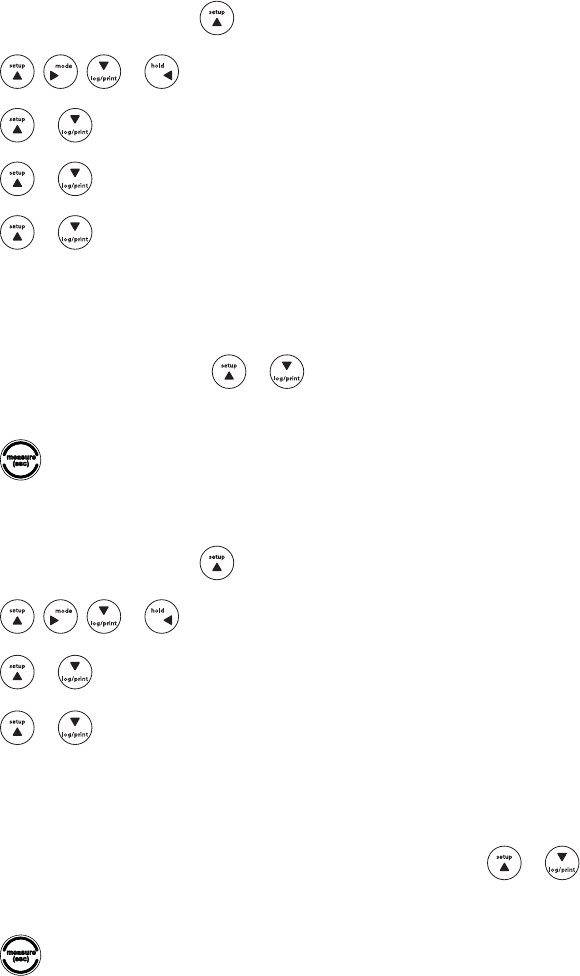
*OUIFNFBTVSFNFOUNPEFQSFTT .
2. Press , , or to highlight Settings and press f3 (select).
3. Press or to highlight Export Data and press f3 (select).
1SFTT or to highlight Printing and press f3 (select). Press or to highlight On or Off and
press f3 (select). Select On to allow data to be sent to a computer or printer.
1SFTT or to highlight Comm Setup and press f3 (select). Press or to highlight RS232 or
USB and press f3 (select). Select RS232 if the meter will be interfaced using the RS232 port and select USB
JGUIFNFUFSXJMMCFJOUFSGBDFEVTJOHUIF64#QPSU
1SFTT or to highlight Data Format and press f3 (select). Press or to highlight Printer or
PC (CSV) and press f3 (select). Select Printer to export the data as a string of text and select PC (CSV) to
export the data in comma delimited format.
1SFTT or to highlight Comm Config and press f3 (select). Press or to highlight 1200, 2400,
4800, 9600, 19200 or 38400 and press f3 (select). Select the baud rate best for the data transfer requirements.
The fixed meter output settings are 8 bits, 1 stop bit and parity none.
8. Press f1 (back) and then press to return to the measurement mode.
Data Log Settings
*OUIFNFBTVSFNFOUNPEFQSFTT .
2. Press , , or to highlight Settings and press f3 (select).
3. Press or to highlight Data Log and press f3 (select).
1SFTT or to highlight Off or On and press f3 (select).
1SFTTf1 (back) and then press to return to the measurement mode.
27
Thermo Scientific Orion Star A213 Benchtop and Star A223 and Star A323 Portable RDO/DO Meter Reference Guide
Viewing the Calibration Log and Data Log
5IF0SJPO4UBS"BOE4UBS"TFSJFTNFUFSTTBWFVQUPUFOPGUIFNPTUSFDFOUDBMJCSBUJPOTQFSDIBOOFM5IF4UBS
"NFUFSTBWFTVQUPTFUTPGEBUBQPJOUTUIF4UBS"NFUFSTBWFTVQUPTFUTPGEBUBQPJOUTBOEUIF
4UBS"NFUFSTBWFTVQUPTFUTPGEBUBQPJOUT"MPHOVNCFSJTBTTJHOFEUPFBDIEBUBQPJOU5IFSFBEUZQFPG
the displayed channel or channels determines when measurements are exported to the data log. When a data point is
exported to a computer or printer, the time stamp will include the hour, minutes and seconds.
Viewing the Calibration Log
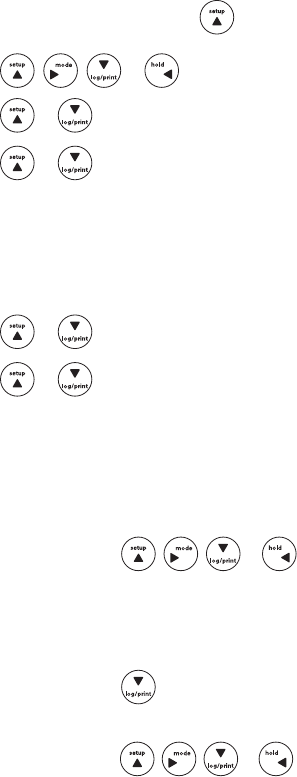
*OUIFNFBTVSFNFOUNPEFQSFTT .
2. Press , , or to highlight View Log and press f3 (select).
3. Press or to highlight Calibration Log and press f2 (accept).
1SFTT or to highlight DO/RDO – Channel and press f2 (select).
1SFTT or to highlight DO or RDO and press f2 (select).
5IFNFUFSXJMMEJTQMBZBMJTUPGDBMJCSBUJPOTGPSUIFTFMFDUFEDIBOOFMBOEDBMJCSBUJPOUZQF5IFMJTUTIPXTUIF
sequential number of the calibration and the date and time it was saved (07/01/2011 12:45).
5PWJFXUIFDBMJCSBUJPOEBUBQSFTT or to highlight a specific calibration and press f2 (select). Press f2
(print) to print the calibration or press f1 (back) to return to the list of calibrations.
8. Press to return to the measurement mode.
Viewing the Data Log
*OUIFNFBTVSFNFOUNPEFQSFTT .
2. Press , , or to highlight View Log and press f3 (select).
3. Press or to highlight Data Log and press f2 (accept).
1SFTT or to highlight DO/RDO – Channel and press f2 (select).
5IFNFUFSXJMMEJTQMBZBMJTUPGUIFEBUBQPJOUT5IFMJTUTIPXTUIFTFRVFOUJBMOVNCFSPGUIFEBUBQPJOUBOEUIF
date and time the data point was saved (07/01/2011 12:45).
5PWJFXUIFNFBTVSFNFOUJOGPSNBUJPOGPSBOJOEJWJEVBMEBUBQPJOUQSFTT or to highlight the data point
and press f2 (select). Press f2 (print) to print the data point or press f1 (back) to return to the list of data points.
1SFTT to return to the measurement mode.
28 Thermo Scientific Orion Star A213 Benchtop and Star A223 and Star A323 Portable RDO/DO Meter Reference Guide
Exporting the Data Log to a Computer or Printer
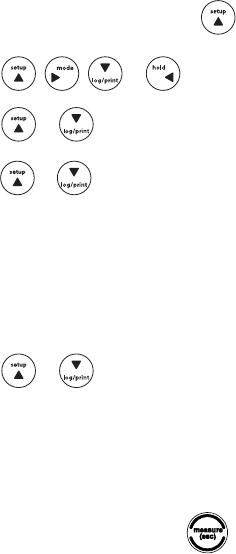
*OUIFNFBTVSFNFOUNPEFQSFTT .
2. Press , , or to highlight View Log and press f3 (select).
3. Press or to highlight Data Log and press f2 (accept).
1SFTT or to highlight DO/RDO – Channel and press f3 (select).
5IFNFUFSXJMMEJTQMBZBMJTUPGUIFEBUBQPJOUT5IFMJTUTIPXTUIFTFRVFOUJBMOVNCFSPGUIFEBUBQPJOUBOEUIF
date and time the data point was saved (07/01/2011 12:45).
1SFTTf3 (options).
1SFTT or to highlight Log Export and press f2 (accept).
8. Press or to highlight Today, Last 10, Range or All as the data log points to be exported
and press f2 (accept).
B *GToday, Last 10 or All is selected – press f2 (yes) to export the data.
C *GRange is selected – enter the first and last date points:
i. Press f3 (edit) to display the numeric entry screen.
ii. Press , , or to highlight a number, press f3 (enter) to select the highlighted
number and repeat until the number of the first data point to be exported is shown on the
display.
iii. Press f2 (done) to exit the numeric entry screen.
iv. Press to enter the last data point.
v. Press f3 (edit) to display the numeric entry screen.
vi. Press , , or to highlight a number, press f3 (enter) to select the highlighted
number and repeat until the number of the last data point to be exported is shown on the display.
vii. Press f2 (done) to exit the numeric entry screen.
viii. Press f2 (accept) and then press f2 (yes) to export the data.
"GUFSFYQPSUJOHUIFEBUBUIFNFUFSXJMMBVUPNBUJDBMMZSFUVSOUPUIFNFBTVSFNFOUNPEF
29
Thermo Scientific Orion Star A213 Benchtop and Star A223 and Star A323 Portable RDO/DO Meter Reference Guide
Clearing the Data Log
*OUIFNFBTVSFNFOUNPEFQSFTT .
2. Press , , or to highlight View Log and press f3 (select).
3. Press or to highlight Data Log and press f2 (accept).
1SFTT or to highlight RDO/DO – Channel and press f3 (select).
5IFNFUFSXJMMEJTQMBZBMJTUPGUIFEBUBQPJOUT5IFMJTUTIPXTUIFTFRVFOUJBMOVNCFSPGUIFEBUBQPJOUBOEUIF
date and time the data point was saved (07/01/2011 12:45).
1SFTTf3 (options).
1SFTT or to highlight Log Clear and press f2 (accept).
8. Press f2 (yes) twice to clear the entire data log.
&OUFSUIFQBTTXPSE5IFEFGBVMUJT111111 and pressing f2 (accept) will advance the meter to the next step.
1SFTTf1 (back) and then press to return to the measurement mode.
30 Thermo Scientific Orion Star A213 Benchtop and Star A223 and Star A323 Portable RDO/DO Meter Reference Guide
Interfacing a Printer
5IF0SJPO4UBSQSJOUFS$BU/PJTSFDPNNFOEFEGPSVTFXJUIUIF0SJPO4UBS"BOE4UBS"TFSJFT
NFUFST5IF0SJPO4UBSQSJOUFSIBTBCBVESBUFBOEJUJTQBDLBHFEXJUIUIF34QSJOUFSDBCMF$BU/P
XIJDIJTSFRVJSFEUPJOUFSGBDFBO0SJPO4UBS"NFUFSUPBQSJOUFS5IFCBVESBUFPGUIF0SJPO4UBS"
BOE4UBS"TFSJFTNFUFSTDBOCFTFUUPPSGPSDPNNVOJDBUJPOUPEJGGFSFOU
QSJOUFST5IFmYFENFUFSTFUUJOHTBSFOVNCFSPGCJUTTUPQCJUTQBSJUZOPOF5IFnPXDPOUSPMGPSUIFQSJOUFS
TIPVMECFTFUUP90/90''5IFNFUFSXJMMTFOENFBTVSFNFOUTBOEDBMJCSBUJPOEBUBUPUIFQSJOUFSJGUIFQSJOUFS
option is turned on in the setup menu. Alternatively, measurements and calibration data can be sent to the data log
and calibration log. From the data log and calibration log, the operator can chose to print a single data log point, a
range of data log points or the entire data log.
Interfacing a Computer
5IF0SJPO4UBS"BOE4UBS"TFSJFTNFUFSTDBOTFOENFBTVSFNFOUTBOEDBMJCSBUJPOEBUBUPBDPNQVUFSJOB
DPNNBEFMJNJUFEGPSNBUUIBUJTFBTZUPQBSTFJODPNQVUFSQSPHSBNTMJLF&YDFM$POOFDUUIF34DPNQVUFSDBCMF
$BU/PUPUIF34JOQVUPOUIFNFUFSBOEUIF34JOQVUPOBDPNQVUFS5IFCBVESBUFPGUIF0SJPO
4UBS"TFSJFTNFUFSTDBOCFTFUUPPS5IFmYFENFUFSTFUUJOHTBSFOVNCFS
PGCJUTTUPQCJUTQBSJUZOPOF5IFnPXDPOUSPMGPSUIFDPNQVUFSTIPVMECFTFUUP90/90''5IFNFUFSXJMM
send measurements and calibration data to the computer if the computer option is turned on in the setup menu.
Alternatively, measurements and calibration data can be sent to the data log and calibration log. From the data log
and calibration log, the operator can chose to send a single data log point, a range of data log points or the entire
data log to the computer.
A complimentary copy of general data logging software is available for use with the Orion Star A200 and Star A300 series
meters. This can be found on the CD included with the meter or at www.thermoscientific.com/water.
31
Thermo Scientific Orion Star A213 Benchtop and Star A223 and Star A323 Portable RDO/DO Meter Reference Guide
Chapter 9 Customer Services
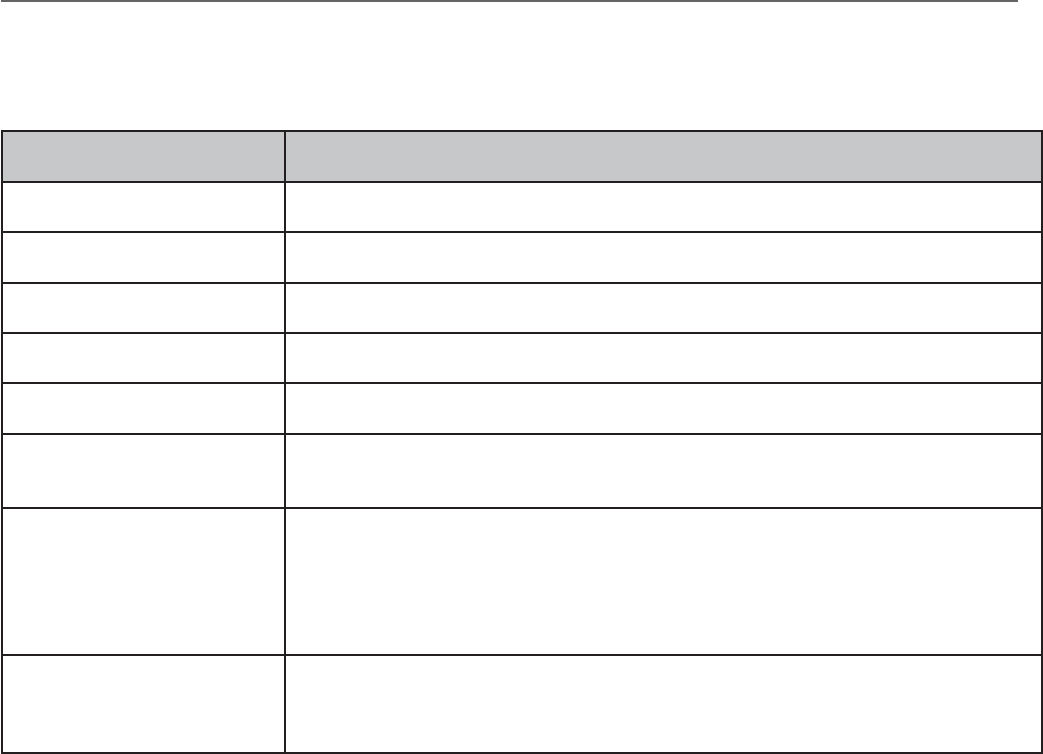
Meter Errors and Recommended Actions
Error Recommended Actions
%JTQMBZ&SSPS *GUIJTFSSPSPDDVSTDPOUBDU5FDIOJDBM4VQQPSU
)BSEXBSF&SSPS *GUIJTFSSPSPDDVSTDPOUBDU5FDIOJDBM4VQQPSU
$IBOOFM*OQVU&SSPS Disconnect all of the electrodes from the meter and repeat the self test.
3FGFSFODF*OQVU&SSPS Make sure that all of the electrodes are disconnected from the meter and repeat the self test.
(SPVOE*OQVU&SSPS Make sure that all of the electrodes are disconnected from the meter and repeat the self test.
,FZQBE'BJMVSF Repeat the self test. When the meter prompts, press each of the keys one at a time, including the
QPXFSLFZXJUIJOGJWFTFDPOETPGPOFPUIFS*GUIFFSSPSQFSTJTUTDPOUBDU5FDIOJDBM4VQQPSU
Over Range Measurement or
6OEFS3BOHF.FBTVSFNFOU
*GUIFNFBTVSFNFOUJTnBTIJOHBOEPWFSSBOHFPSVOEFSSBOHFUIFNFBTVSFNFOUWBMVFJT
outside of the allowable measurement range. Make sure that the electrode is connected to the
appropriate meter input and the electrode parameters are entered correctly in the setup menu.
$MFBOUIFFMFDUSPEFBDDPSEJOHUPUIFFMFDUSPEFVTFSHVJEFBOESFDBMJCSBUFUIFFMFDUSPEFXJUIOFX
CVGGFSTPSTUBOEBSET*GUIFFSSPSQFSTJTUTQFSGPSNUIFNFUFSTFMGUFTU
Measurement Out of Range
Make sure that the electrode is connected to the appropriate meter input and the electrode
parameters are entered correctly in the setup menu. Clean the electrode according to the electrode
VTFSHVJEFBOESFDBMJCSBUFUIFFMFDUSPEFXJUIOFXCVGGFSTPSTUBOEBSET1FSGPSNUIFNFUFSTFMGUFTU
32 Thermo Scientific Orion Star A213 Benchtop and Star A223 and Star A323 Portable RDO/DO Meter Reference Guide
Meter Self Test and Checkout
Meter Self Test
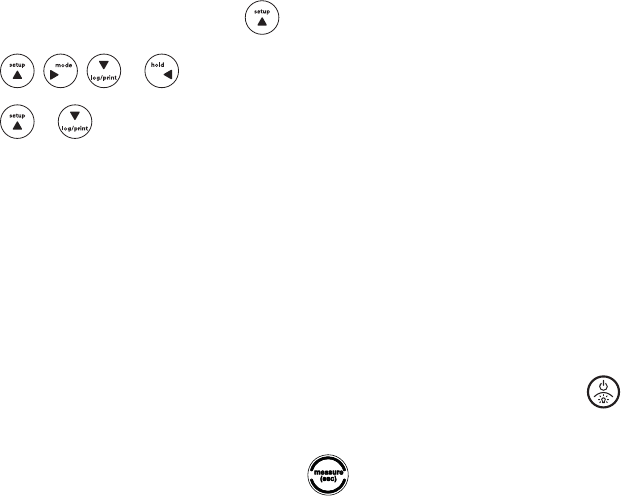
*OUIFNFBTVSFNFOUNPEFQSFTTTFUVQ .
2. Press , , or to highlight Diagnostics and press f3 (select).
3. Press or to highlight Self Test and press f2 (accept).
%JTDPOOFDUBMMPGUIFFMFDUSPEFTBOEQSPCFTGSPNUIFNFUFSBOEQSFTTf2 (yes).
1SFTTf2 (yes) to start the self test.
5IFNFUFSXJMMQFSGPSNBOBDDVSBDZUFTU8IFOUIFNFUFSEJTQMBZTAccuracy Test Passed, press f2 (next).
5IFNFUFSXJMMQFSGPSNBO&130.UFTU8IFOUIFNFUFSEJTQMBZTE2Prom Test Passed, press f2 (next).
5IFNFUFSXJMMQFSGPSNBLFZQBEUFTU1SFTTFBDIPGUIFLFZTPOUIFLFZQBEJODMVEJOH POFBUBUJNFJO
any order. When the meter displays Keypad Test Passed, press f2 (next).
5IFNFUFSXJMMEJTQMBZSelf Test Passed. Press to return to the measurement mode.
33
Thermo Scientific Orion Star A213 Benchtop and Star A223 and Star A323 Portable RDO/DO Meter Reference Guide
Electrode Stability Test
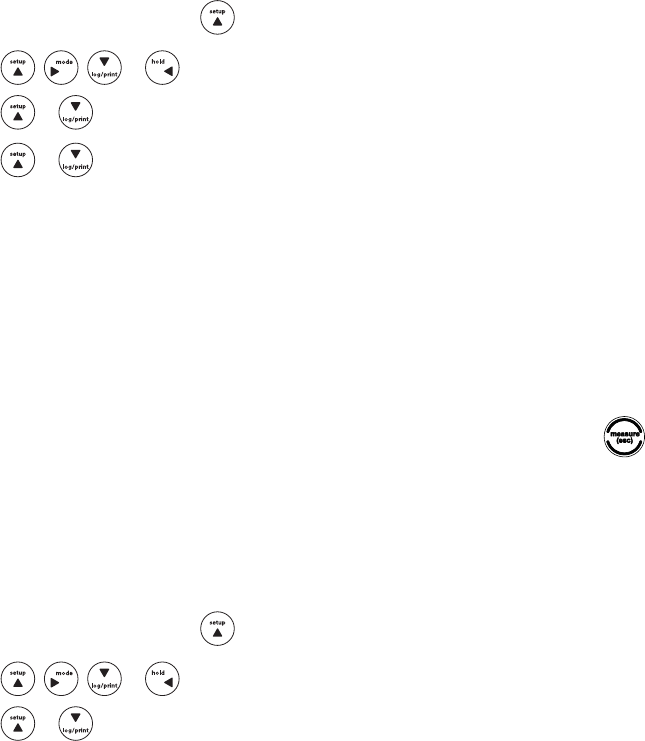
*OUIFNFBTVSFNFOUNPEFQSFTT .
2. Press , , or to highlight Diagnostics and press f3 (select).
3. Press or to highlight Stability Test and press f2 (accept).
1SFTT or to highlight DO/RDO – Channel and press f2 (next).
.BLFTVSFUIFFMFDUSPEFPSQSPCFUPCFUFTUFEJTDPOOFDUFEUPUIFDIBOOFMTFMFDUFEJOUIFQSFWJPVTTUFQBOE
press f2 (yes).
1MBDFUIFFMFDUSPEFPSQSPCFJOBOBQQSPQSJBUFTPMVUJPOXJUIBTUBCMFUFNQFSBUVSFBOEQSFTTf2 (yes).
B"QSFQBSFEXBUFSTBUVSBUFEBJSDBMJCSBUJPOTMFFWFJTSFDPNNFOEFEGPSUFTUJOH3%0PQUJDBM
dissolved oxygen and polarographic dissolved oxygen probes.
5IFNFUFSXJMMQFSGPSNUIFTUBCJMJUZUFTUBOETIPXUIFQFSNJOVUFESJGUBOEOPJTFPOUIFEJTQMBZ
8. The meter will display Stability Test Passed or Stability Test Failed. Press f1 (esc) or to return to the
measurement mode.
Meter Factory Reset
After a factory reset is performed, all of the meter settings will be reset to the factory defaults and the data log,
calibration log and methods will be deleted.
*OUIFNFBTVSFNFOUNPEFQSFTT .
2. Press , , or to highlight Diagnostics and press f3 (select).
3. Press or to highlight Factory Reset and press f2 (accept).
1SFTTf2 (yes) to reset the meter.
5IFNFUFSXJMMQBVTFQPXFSPGGBOESFTUBSUXJUIUIFGBDUPSZEFGBVMUTFUUJOHT
34 Thermo Scientific Orion Star A213 Benchtop and Star A223 and Star A323 Portable RDO/DO Meter Reference Guide
Meter User Reset
After a user reset is performed, all of the meter setup menu settings will be reset to the defaults; however, the data log,
calibration log and methods will be retained.
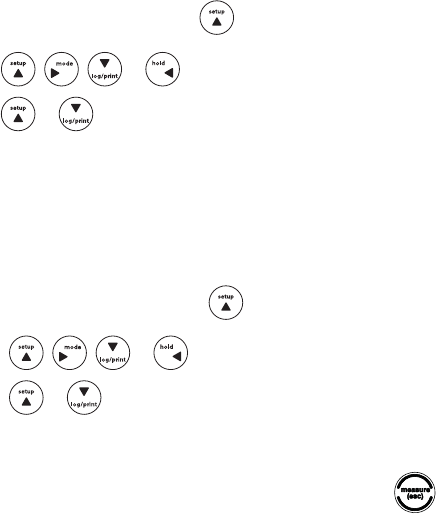
*OUIFNFBTVSFNFOUNPEFQSFTT .
2. Press , , or to highlight Diagnostics and press f3 (select).
3. Press or to highlight User Reset and press f2 (accept).
1SFTTf2 (yes) to reset the meter.
5IFNFUFSXJMMQBVTFBOEUIFOSFUVSOUPUIFNFBTVSFNFOUNPEFXJUIUIFEFGBVMUTFUVQNFOVTFUUJOHT
About Meter
*OUIFNFBTVSFNFOUNPEFQSFTT .
2. Press , , or to highlight Diagnostics and press f3 (select).
3. Press or to highlight About Meter and press f2 (accept).
5IFNFUFSNPEFMNFBTVSFNFOUQBSBNFUFSTTFSJBMOVNCFSBOETPGUXBSFSFWJTJPOXJMMCFEJTQMBZFE
1SFTTf1 (back) to return to the diagnostics menu or press to return to the measurement mode.
Assistance
"GUFSUSPVCMFTIPPUJOHBMMDPNQPOFOUTPGZPVSNFBTVSFNFOUTZTUFNDPOUBDU5FDIOJDBM4VQQPSU8JUIJOUIF6OJUFE4UBUFTDBMM
BOEPVUTJEFUIF6OJUFE4UBUFTDBMMPSGBY*O&VSPQFUIF.JEEMF&BTUBOE"GSJDB
contact your local authorized dealer. For the most current contact information, visit www.thermoscientific.com/water.
Warranty and Registration
To register your meter and for the most current warranty information, visit www.thermoscientific.com/water.

35
Thermo Scientific Orion Star A213 Benchtop and Star A223 and Star A323 Portable RDO/DO Meter Reference Guide
Ordering Information
Orion Star A200 Series Benchtop Meters
Cat. No. Description
STARA2110 4UBS"Q)#FODIUPQ.FUFSXJUI&MFDUSPEF4UBOE
STARA2115 4UBS"Q)#FODIUPQ.FUFSXJUI&MFDUSPEF4UBOE#/6.%3044Q)"5$5SJPEF
3044Q)#VGGFS,JU
STARA2120 4UBS"$POEVDUJWJUZ#FODIUPQ.FUFSXJUI&MFDUSPEF4UBOE
STARA2125 4UBS"$POEVDUJWJUZ#FODIUPQ.FUFSXJUI&MFDUSPEF4UBOE.%$POEVDUJWJUZ$FMM
$POEVDUJWJUZç4DN4UBOEBSE
STARA2126 4UBS"$POEVDUJWJUZ#FODIUPQ.FUFSXJUI&MFDUSPEF4UBOE.%$POEVDUJWJUZ$FMMXJUI
%FUBDIBCMF'MPX5ISPVHI$FMM$POEVDUJWJUZç4DN4UBOEBSE
STARA2130 4UBS"3%0%0#FODIUPQ.FUFSXJUI&MFDUSPEF4UBOE
STARA2135 4UBS"3%0%0#FODIUPQ.FUFSXJUI&MFDUSPEF4UBOE.%1PMBSPHSBQIJD%01SPCFXJUI
$BMJCSBUJPO4MFFWF1SPCF.BJOUFOBODF,JU#0%'VOOFM4UJSSFSBOE"EBQUFS
STARA2136 4UBS"3%0%0#FODIUPQ.FUFSXJUI&MFDUSPEF4UBOE.%"65045*3%0#0%1SPCF
1PMBSPHSBQIJD&MFDUSPMZUF4PMVUJPO1SPCF.BJOUFOBODF,JU
STARA2140 4UBS"Q)*4&#FODIUPQ.FUFSXJUI&MFDUSPEF4UBOE
STARA2145 4UBS"Q)*4&#FODIUPQ.FUFSXJUI&MFDUSPEF4UBOE#/68130446MUSBQ)&MFDUSPEF
.%"5$1SPCF4UJSSFS1SPCF3044Q)#VGGFS,JU
STARA2146
4UBS"Q)*4&#FODIUPQ.FUFSXJUI&MFDUSPEF4UBOE#/68130446MUSBQ)&MFDUSPEF
.%"5$1SPCF)1#/81)JHI1FSGPSNBODF"NNPOJB&MFDUSPEF4UJSSFS1SPCF
"NNPOJBQQN4UBOEBSE-PXMFWFM"NNPOJB*4""NNPOJB&MFDUSPEF
Storage Solution
STARA2147
4UBS"Q)*4&#FODIUPQ.FUFSXJUI&MFDUSPEF4UBOE#/68130446MUSBQ)&MFDUSPEF
.%"5$1SPCF#/81'MVPSJEF&MFDUSPEF4UJSSFS1SPCF'MVPSJEFQQN
XJUI5*4"#**4UBOEBSE'MVPSJEFQQNXJUI5*4"#**4UBOEBSE'MVPSJEFQQNXJUI
5*4"#**4UBOEBSE5*4"#**
STARA2148
4UBS"Q)*4&#FODIUPQ.FUFSXJUI&MFDUSPEF4UBOE#/68130446MUSBQ)&MFDUSPEF
.%"5$1SPCF#/8130444PEJVN&MFDUSPEFXJUI4PEJVN4UBOEBSET3FBHFOUTBOE
4PMVUJPOT4UJSSFS1SPCF
STARA2150 4UBS"Q)$POEVDUJWJUZ#FODIUPQ.FUFSXJUI&MFDUSPEF4UBOE
STARA2155
4UBS"Q)$POEVDUJWJUZ#FODIUPQ.FUFSXJUI&MFDUSPEF4UBOE#/6.%3044Q)"5$
5SJPEF.%$POEVDUJWJUZ$FMM3044Q)#VGGFS,JU$POEVDUJWJUZç4DN
Standard
STARA2160 4UBS"Q)3%0%0#FODIUPQ.FUFSXJUI&MFDUSPEF4UBOE
STARA2165
4UBS"Q)3%0%0#FODIUPQ.FUFSXJUI&MFDUSPEF4UBOE#/6.%3044Q)"5$5SJPEF
.%1PMBSPHSBQIJD%01SPCFXJUI$BMJCSBUJPO4MFFWF3044Q)#VGGFS,JU
1SPCF.BJOUFOBODF,JU#0%'VOOFM4UJSSFSBOE"EBQUFS

36 Thermo Scientific Orion Star A213 Benchtop and Star A223 and Star A323 Portable RDO/DO Meter Reference Guide
Ordering Information (cont.)
Orion Star A200 Series Portable Meters
Cat. No. Description
STARA2210 4UBS"Q)1PSUBCMF.FUFS
STARA2215
4UBS"Q)1PSUBCMF.FUFS68..%3044Q)"5$5SJPEFXJUI.FUFS$BCMFQ)#VGGFS
1PVDIFTQ)#VGGFS1PVDIFTQ)#VGGFS1PVDIFT3044&MFDUSPEF4UPSBHF
4PMVUJPO3JOTF4PMVUJPO1PVDIFT45"3"$44UBS"$BSSZJOH$BTF45"3""34UBS".FUFS"SNPS
STARA2220 Star A222 Conductivity Portable Meter
STARA2225
4UBS"$POEVDUJWJUZ1PSUBCMF.FUFS.%$POEVDUJWJUZ$FMMXJUI.FUFS$BCMF
$POEVDUJWJUZç4DN4UBOEBSE1PVDIFT3JOTF4PMVUJPO1PVDIFT45"3"$44UBS"$BSSZJOH$BTF
45"3""34UBS".FUFS"SNPS
STARA2230 Star A223 RDO/DO Portable Meter
STARA2235 4UBS"3%0%01PSUBCMF.FUFS.%3%00QUJDBM%01SPCFXJUI.FUFS$BCMF45"3"$44UBS"
$BSSZJOH$BTF45"3""34UBS".FUFS"SNPS
STARA3210 4UBS"Q)1PSUBCMF.FUFS
STARA3215
4UBS"Q)1PSUBCMF.FUFS68..%3044Q)"5$5SJPEFXJUI.FUFS$BCMFQ)#VGGFS
1PVDIFTQ)#VGGFS1PVDIFTQ)#VGGFS1PVDIFT3044&MFDUSPEF4UPSBHF
4PMVUJPO3JOTF4PMVUJPO1PVDIFT45"3"$44UBS"$BSSZJOH$BTF45"3""34UBS".FUFS"SNPS
STARA3220 Star A322 Conductivity Portable Meter
STARA3225
4UBS"$POEVDUJWJUZ1PSUBCMF.FUFS.%$POEVDUJWJUZ$FMMXJUI.FUFS$BCMF
$POEVDUJWJUZç4DN4UBOEBSE1PVDIFT3JOTF4PMVUJPO1PVDIFT45"3"$44UBS"$BSSZJOH$BTF
45"3""34UBS".FUFS"SNPS
STARA3230 Star A323 RDO/DO Portable Meter
STARA3235 4UBS"3%0%01PSUBCMF.FUFS.%3%00QUJDBM%01SPCFXJUI.FUFS$BCMF45"3"$44UBS"
$BSSZJOH$BTF45"3""34UBS".FUFS"SNPS
STARA3240 4UBS"Q)*4&1PSUBCMF.FUFS
STARA3245
4UBS"Q)*4&1PSUBCMF.FUFS68..%3044Q)"5$5SJPEFXJUI.FUFS$BCMFQ)#VGGFS
1PVDIFTQ)#VGGFS1PVDIFTQ)#VGGFS1PVDIFT3044&MFDUSPEF4UPSBHF
4PMVUJPO3JOTF4PMVUJPO1PVDIFT45"3"$44UBS"$BSSZJOH$BTF45"3""34UBS".FUFS"SNPS
STARA3250 4UBS"Q)$POEVDUJWJUZ1PSUBCMF.FUFS
STARA3255
4UBS"Q)$POEVDUJWJUZ1PSUBCMF.FUFS68..%3044Q)"5$5SJPEFXJUI.FUFS$BCMF
.%$POEVDUJWJUZ$FMMXJUI.FUFS$BCMFQ)#VGGFS1PVDIFTQ)#VGGFS
1PVDIFTQ)#VGGFS1PVDIFT3044&MFDUSPEF4UPSBHF4PMVUJPO$POEVDUJWJUZ
ç4DN4UBOEBSE1PVDIFT3JOTF4PMVUJPO1PVDIFT45"3"$44UBS"$BSSZJOH$BTF45"3""3
Star A Meter Armor
STARA3260 4UBS"Q)3%0%01PSUBCMF.FUFS
STARA3265
4UBS"Q)3%0%01PSUBCMF.FUFS68..%3044Q)"5$5SJPEFXJUI.FUFS$BCMF
.%3%00QUJDBM%01SPCFXJUI.FUFS$BCMFQ)#VGGFS1PVDIFTQ)
#VGGFS1PVDIFTQ)#VGGFS1PVDIFT3044&MFDUSPEF4UPSBHF4PMVUJPO45"3"$44UBS
"$BSSZJOH$BTF45"3""34UBS".FUFS"SNPS
STARA3290 4UBS"Q)*4&$POEVDUJWJUZ3%0%01PSUBCMF.FUFS
STARA3295
4UBS"Q)*4&$POEVDUJWJUZ3%0%01PSUBCMF.FUFS68..%3044Q)"5$5SJPEFXJUI.FUFS
$BCMF.%$POEVDUJWJUZ$FMMXJUI.FUFS$BCMF.%3%00QUJDBM%01SPCFXJUI.FUFS
$BCMFQ)#VGGFS1PVDIFTQ)#VGGFS1PVDIFTQ)#VGGFS1PVDIFT
3044&MFDUSPEF4UPSBHF4PMVUJPO$POEVDUJWJUZç4DN4UBOEBSE1PVDIFT
3JOTF4PMVUJPO1PVDIFT45"3"$44UBS"$BSSZJOH$BTF45"3""34UBS".FUFS"SNPS

37
Thermo Scientific Orion Star A213 Benchtop and Star A223 and Star A323 Portable RDO/DO Meter Reference Guide
Ordering Information (cont.)
Orion Star A Series Accessories and Electrodes
Cat. No. Description
STARA-BEA 0SJPO4UBS"4FSJFT&MFDUSPEF"SNBOE)PMEFS"UUBDIFTUPCBTFPGNFUFSPS45"3")#CBTF
STARA-HB 0SJPO4UBS"4FSJFT&MFDUSPEF4UBOE#BTF0OMZ6TFXIFOFMFDUSPEFBSNJTOPUBUUBDIFEUPNFUFS
STARA-CS 0SJPO4UBS"4FSJFT1PSUBCMF)BSE$BSSZJOH$BTF
STARA-AR 0SJPO4UBS"4FSJFT1PSUBCMF.FUFS"SNPSXJUI4UBOEJODMVEFTPOFQ)&MFDUSPEF)PMEFSXJUI
4UPSBHF4MFFWFBOEPOF$POEVDUJWJUZ$FMMBOE%01SPCF)PMEFS
STARA-ESPH 0SJPO4UBS"4FSJFTQ)&MFDUSPEF)PMEFSGPS.FUFS"SNPSSFRVJSFTQ)TUPSBHFTMFFWFQVSDIBTF
TFQBSBUFMZ
STARA-ESCD 0SJPO4UBS"4FSJFT$POEVDUJWJUZ$FMMBOE%01SPCF)PMEFSGPS.FUFS"SNPS
1010003 Orion Star A Series Power Adapter for Benchtop and Portable Meters
8102BNUWP 30446MUSB(MBTT3FGJMMBCMFQ)&MFDUSPEF
8302BNUMD 3044(MBTT3FGJMMBCMFQ)"5$5SJPEF
8157BNUMD 30443FGJMMBCMF&QPYZQ)"5$5SJPEF
8107UWMMD 3044(FMGJMMFE&QPYZQ)"5$5SJPEFXJUI.FUFS$BCMF
927005MD &QPYZ4UFFM"5$1SPCF
927007MD Stainless Steel ATC Probe
9179BNMD (FMGJMMFE&QPYZ031"5$5SJPEF
9180BNMD 3FGJMMBCMF&QPYZ031"5$5SJPEF
9512HPBNWP )JHI1FSGPSNBODF"NNPOJB&MFDUSPEF
9609BNWP 'MVPSJEF&MFDUSPEF
8611BNWP 30444PEJVN&MFDUSPEFXJUI4PEJVN4UBOEBSET3FBHFOUTBOE4PMVUJPOT
013005MD %VSB1SPCF&QPYZ$FMM,$POEVDUJWJUZ$FMM
013010MD %VSB1SPCF&QPYZ$FMM,$POEVDUJWJUZ$FMMXJUI.FUFS$BCMF
013020MD %VSB1SPCF&QPYZ$FMM,$POEVDUJWJUZ$FMMXJUI.FUFS$BCMF
013025MD %VSB1SPCF&QPYZ$FMM,$POEVDUJWJUZ$FMMXJUI.FUFS$BCMF
013016MD 4UFFM$FMM,$POEVDUJWJUZ$FMMXJUI%FUBDIBCMF'MPX5ISPVHI$FMM
083005MD Polarographic DO Probe with Calibration Sleeve
083010MD Polarographic DO Probe with Calibration Sleeve and 3 Meter Cable
083025MD 1PMBSPHSBQIJD%01SPCFXJUI$BMJCSBUJPO4MFFWFBOE.FUFS$BCMF
086030MD "65045*3%0#0%1SPCF
087010MD RDO Optical DO Probe with 3 Meter Cable
087020MD 3%00QUJDBM%01SPCFXJUI.FUFS$BCMF
087030MD 3%00QUJDBM%01SPCFXJUI.FUFS$BCMF
096019 4UJSSFS1SPCFGPS4UBS"4FSJFT#FODIUPQ.FUFST
38 Thermo Scientific Orion Star A213 Benchtop and Star A223 and Star A323 Portable RDO/DO Meter Reference Guide
This page intentionally left blank.

39
Thermo Scientific Orion Star A213 Benchtop and Star A223 and Star A323 Portable RDO/DO Meter Reference Guide
Chapter 10 Meter Compliance
Notice of Compliance
This equipment generates, uses, and can radiate radio frequency energy and if not installed and used in accordance
XJUIUIFJOTUSVDUJPONBOVBMNBZDBVTFJOUFSGFSFODFUPSBEJPDPNNVOJDBUJPOT*UIBTCFFOUFTUFEBOEGPVOEUPDPNQMZ
XJUIUIFMJNJUTGPSB$MBTT"DPNQVUJOHEFWJDFQVSTVBOUUP4VCQBSU+PG1BSUPG'$$3VMFTXIJDIBSFEFTJHOFEUP
provide reasonable protection against such interference when operated in a commercial environment. Operation of
this equipment in a residential area is likely to cause interference in which case the user, at his own expense, will be
required to take whatever measures may be required to correct the interference.
i5IJTEJHJUBMBQQBSBUVTEPFTOPUFYDFFEUIF$MBTT"MJNJUTGPSSBEJPOPJTFFNJTTJPOTGSPNEJHJUBMBQQBSBUVTTFUPVUJO
UIF3BEJP*OUFSGFSFODF3FHVMBUJPOTPGUIF$BOBEJBO%FQBSUNFOUPG$PNNVOJDBUJPOTw
i-FQSFTFOUBQQBSFJMOVNFSJRVFOFNFUQBTEFCSVJUTSBEJPFMFDUSJRVFTEFQBTTBOUMFTMJNJUFTBQQMJDBCMFTBVYBQQBSFJMT
OVNFSJRVFTEFMBDMBTT"QSFTDSJUFTEBOTMF3FHMFNFOUTVSMFCSPVJMMBHFSBEJPFMFDUSJRVFFEJDUFQBSMFNJOJTUFSFEFT
$PNNVOJDBUJPOTEV$BOBEBw
WEEE Compliance
5IJTQSPEVDUJTSFRVJSFEUPDPNQMZXJUIUIF&VSPQFBO6OJPOT8BTUF&MFDUSJDBM&MFDUSPOJD&RVJQNFOU8&&&
%JSFDUJWF&$*UJTNBSLFEXJUIUIFTZNCPMPOUIFMFGU
5IFSNP'JTIFS4DJFOUJmDIBTDPOUSBDUFEXJUIPOFPSNPSFSFDZDMJOHEJTQPTBMDPNQBOJFTJOFBDI&6.FNCFS4UBUFBOE
this product should be disposed of or recycled through them. Further information on compliance with these directives,
the recyclers in your country, and information on Thermo Scientific Orion products that may assist the detection of
TVCTUBODFTTVCKFDUUPUIF3P)4%JSFDUJWFBSFBWBJMBCMFBUXXXUIFSNPTDJFOUJmDDPN

40 Thermo Scientific Orion Star A213 Benchtop and Star A223 and Star A323 Portable RDO/DO Meter Reference Guide
Declaration of Conformity
Manufacturer: Thermo Fisher Scientific Inc.
Address: Ayer Rajah Crescent
#ML
4JOHBQPSF
Singapore
Hereby declares that the following products:
#FODIUPQNFUFSTBSFSBUFEUP7"$)["
)BOEIFMENFUFSTVTFGPVSOPOSFDIBSHFBCMF""CBUUFSJFT
Benchtop Meters Portable Meters
0SJPO4UBS"Q) 0SJPO4UBS"Q)
Orion Star A212 Conductivity Orion Star A222 Conductivity
Orion Star A213 RDO/DO Orion Star A223 RDO/DO
0SJPO4UBS"Q)*4& 0SJPO4UBS"Q)
0SJPO4UBS"Q)$POEVDUJWJUZ Orion Star A322 Conductivity
0SJPO4UBS"Q)3%0%0 Orion Star A323 RDO/DO
0SJPO4UBS"Q)*4&
0SJPO4UBS"Q)$POEVDUJWJUZ
0SJPO4UBS"Q)3%0%0
0SJPO4UBS"Q)*4&$POEVDUJWJUZ3%0%0
Equipment Class:
Measurement, control and laboratory
0SJPO4UBS"TFSJFTNFUFSTBSF&.$$MBTT"
Conforms with the following directives and standards:
EN61326-1:2006 Electromagnetic Compatibility (EMC Directive)
&MFDUSJDBMFRVJQNFOUGPSNFBTVSFNFOU
DPOUSPMBOEMBCPSBUPSZVTF&.$SFRVJSFNFOUT
EN61010-1:2001 Safety Standards
UL61010-1:2004 Safety requirements for electrical equipment for measurement,
CAN/CSA C22.2 No. 61010-1-04 DPOUSPMBOEMBCPSBUPSZVTFHFOFSBMSFRVJSFNFOUT
$IFPX,XBOH$IBO
QA/Regulatory Manager
1MBDFBOE%BUFPG*TTVF
+VOF
Singapore
41
Thermo Scientific Orion Star A213 Benchtop and Star A223 and Star A323 Portable RDO/DO Meter Reference Guide
Meter Specifications
Meter Operating Conditions
Operating Ambient Temperature UP¡$
0QFSBUJOH3FMBUJWF)VNJEJUZ UPOPODPOEFOTJOH
Storage Temperature UP¡$
4UPSBHF3FMBUJWF)VNJEJUZ UPOPODPOEFOTJOH
Pollution Degree 2
Overvoltage $BUFHPSZ**
Weight 1PSUBCMFH
#FODIUPQH
Size 1PSUBCMFDN)YDN8YDN%
#FODIUPQDN)YDN8YDN%
Regulatory and Safety $&567'$$$MBTT"
Power Rating %$*OQVU7%$"
#BUUFSZY""
4IPDLBOE7JCSBUJPO 7JCSBUJPOTIJQQJOHIBOEMJOHQFS*45""
4IPDLESPQUFTUJOQBDLBHJOHQFS*45""
&ODMPTVSFEFTJHOFEUPNFFU 1PSUBCMF*1
#FODIUPQ*1
Warranty 3 year meter replacement
Universal Power Adapter Operating Conditions
Operating Ambient Temperature UP¡$
0QFSBUJOH3FMBUJWF)VNJEJUZ UPOPODPOEFOTJOH
Storage Temperature UP¡$
4UPSBHF3FMBUJWF)VNJEJUZ UPOPODPOEFOTJOH
Pollution Degree 2
Overvoltage $BUFHPSZ**

42 Thermo Scientific Orion Star A213 Benchtop and Star A223 and Star A323 Portable RDO/DO Meter Reference Guide
Meter Parameter Specifications
Dissolved Oxygen Measurement
Concentration - Polarographic
Range UPNH-
Resolution
Relative Accuracy
% Saturation - Polarographic
Range UPTBU
Resolution
Relative Accuracy
Concentration - RDO
Range UPNH-
Resolution
Relative Accuracy NH-VQUPNH-
NH-GSPNUPNH-
PGSFBEJOHGSPNUPNH-
% Saturation - RDO
Range UPTBU
Resolution
Relative Accuracy
Automatic
Barometric Pressure Correction
UPNN)H
Salinity Factor Correction .BOVBMUPQQU
Calibration Features 8BUFSTBUVSBUFEBJSBJSTBUVSBUFEXBUFSNBOVBM8JOLMFSBOE[FSPQPJOU
Probe Characteristics Polarographic or RDO

43
Thermo Scientific Orion Star A213 Benchtop and Star A223 and Star A323 Portable RDO/DO Meter Reference Guide
Temperature Measurement
Range UP¡$
Resolution
Relative Accuracy
Offset Calibration 1 point
Data Logging
/VNCFSPG1PJOUT 4UBS"XJUIUJNFBOEEBUFTUBNQ
4UBS"XJUIUJNFBOEEBUFTUBNQ
4UBS"XJUIUJNFBOEEBUFTUBNQ
-PH'VODUJPO 4UBS".BOVBM3FBEZ"6503&"%5JNFE
4UBS".BOVBM"VUPNBUJDXJUI"6503&"%
4UBS".BOVBM3FBEZ"6503&"%5JNFE
-PH&EJU Star A213: Delete individual points, group of points or all
Star A223: Delete last reading or all
Star A323: Delete individual points, group of points or all
Inputs
%0XJUI#VJMUJO5FNQFSBUVSF
Probe
QJO.JOJ%*/
Output 3464#
Power
AC Adapter 6OJWFSTBM7"$JODMVEFEXJUI4UBS"
Battery Power 'PVS"MLBMJOF""JODMVEFEXJUI4UBS"BOE4UBS"
#BUUFSZ-JGF IPVST
44 Thermo Scientific Orion Star A213 Benchtop and Star A223 and Star A323 Portable RDO/DO Meter Reference Guide
This page intentionally left blank.

45
Thermo Scientific Orion Star A213 Benchtop and Star A223 and Star A323 Portable RDO/DO Meter Reference Guide
Appendix 1 Advanced Meter Features
Dissolved Oxygen Barometric Pressure Compensation
5IF0SJPO4UBS"BOE4UBS"TFSJFT3%0%0NFUFSTIBWFBOJOUFSOBMCBSPNFUFSUIBUJTVTFEGPSQSFTTVSF
compensated dissolved oxygen readings. The meter can also use manual barometric pressure compensation if
dissolved oxygen is measured with a submerged probe or in a pressurized vessel. The pressure must be entered
BTNN)H
1 mm Hg = 0.03937 inch Hg = 1.3332 hPa (mBar) = 0.01934 PSI.
Dissolved Oxygen Salinity Correction
"VUPNBUJDTBMJOJUZDPSSFDUJPOGPSEJTTPMWFEPYZHFOSFBEJOHTSFQPSUFEBTNH-JTBWBJMBCMFPOUIF0SJPO4UBS"Q)
*4&DPOEVDUJWJUZ3%0%0NFUFSUIBUIBTCPUIEJTTPMWFEPYZHFOBOEDPOEVDUJWJUZNFBTVSFNFOUNPEFT5IFNFUFSVTFT
the conductivity value read by the conductivity cell to calculate the salinity correction factor and applies the factor to
EJTTPMWFEPYZHFOSFBEJOHTSFQPSUFEBTNH-
.BOVBMTBMJOJUZDPSSFDUJPODBOCFVTFEGPSEJTTPMWFEPYZHFOSFBEJOHTSFQPSUFEBTNH-POBMM0SJPO4UBS"
BOE4UBS"TFSJFT3%0%0NFUFST5IFNBOVBMTBMJOJUZDPSSFDUJPOGBDUPSNVTUCFFOUFSFEBTQQUQBSUTQFSUIPVTBOE
Conductivity
at 20 °C
(mS/cm)
Salinity
Correction
Value (ppt)
Conductivity
at 20 °C
(mS/cm)
Salinity
Correction
Value (ppt)
Conductivity
at 20 °C
(mS/cm)
Salinity
Correction
Value (ppt)
3 13
21
22
823 38
28
11 18
12 8 18 32
13 8 28 33
21
31 22 38
11 32 22
18 12 33 23
13
5IJTUBCMFXBTDBMDVMBUFEGSPNUIF*OUFSOBUJPOBM0DFBOPHSBQIJD5BCMFT7PM/BUJPOBM*OTUJUVUFPG0DFBOPHSBQIZPG
(SFBU#SJUBJO8PNMFZ(PEBNJOH4VSSFZ&OHMBOEBOE6OFTDP1BSJT
This page intentionally left blank.

9 0 0 1 : 2 0 0 8
68X576703 RevA 10-11
Water Analysis Instruments
North America
166 Cummings Center
Beverly, MA 01915 USA
Toll Free: 1-800-225-1480
Tel: 1-978-232-6000
info.water@thermo.com
Netherlands
Tel: (31) 033-2463887
info.water.uk@thermo.com
India
Tel: (91) 22-4157-8800
wai.asia@thermofisher.com
Japan
Tel: (81) 045-453-9175
wai.asia@thermofisher.com
China
Tel: (86) 21-68654588
wai.asi@thermofisher.com
Singapore
Tel: (65) 6778-6876
wai.asia@thermofisher.com
Australia
Tel: (613) 9757-4300
in Australia (1300) 735-296
InfoWaterAU@thermofisher.com
www.thermoscientific.com/water
© 2011 Thermo Fisher Scientific Inc. All rights reserved.
