OMNIKEY HF Multi ISO RFID Reader User Manual V1.2
UserManual_HF_Multi_ISO_RFID_Reader_V1.2
UserManual_HF_Multi_ISO_RFID_Reader%20V1.2
User Manual: Pdf
Open the PDF directly: View PDF  .
.
Page Count: 125 [warning: Documents this large are best viewed by clicking the View PDF Link!]

Multi-ISO (OK 5553) RFID Reader
USER MANUAL
© 2008 HID Global Corporation. All rights reserved.
1508-USM-00-0-02
Firmware Version 1.2
November 4, 2008
Doc Number: 1508-USM-00, Rev A.0
TAGnology RFID GmbH | Grazer Vorstadt 142 | 8570 Voitsberg | AUSTRIA
phone: +43 (0)3142/ 28 9 28-10 | fax: +43 (0)3142/ 28 9 28-20 | ofce@tagnology.com | www.tagnology.com

Page 2 of 125 November 4, 2008
© 2008 HID Global Corporation. All rights reserved.
1508-USM-00-0-02 HF Multi ISO RFID Reader
User Manual, Firmware V1.2
Warning - Read before start-up!
• The product may only be used for the intended purpose designed by the manufacturer. The
operation manual should be conveniently kept available at all times for each user.
• Unauthorized changes that have not been sold or recommended by the manufacturer may have a
negative influence on the system the program has been installed or copied on. Such unauthorized
measures shall exclude any liability by the manufacturer.
• The liability-prescriptions of the manufacturer in the issue valid at the time of purchase are valid for
the device. The manufacturer shall not be held legally responsible for inaccuracies, errors, or
omissions in the manual or automatically set parameters for a device or for an incorrect application
of a device.
• Only qualified personnel should carry out installation, operation, and maintenance procedures.
• Use of the program and its installation must be in accordance with national legal requirements.
• When working on devices the valid safety regulations must be observed.
• International copyrights are applicable to this program. Unauthorized copying, distribution or resale
of this program or of parts of this program is a violation of applicable laws and will be prosecuted.

November 4, 2008 Page 3 of 125
© 2008 HID Global Corporation. All rights reserved.
HF Multi ISO RFID Reader 1508-USM-00-0-02
User Manual, Firmware V1.2
Read Me First
About This Guide
This manual describes the HF Multi ISO Reader. Its goal is to describe the reader, how it works,
how to integrate it and how to use it.
Contacts
Europe, Middle East and Africa
HID Global Corporation, Ltd. (Haverhill, UK)
email: eusupport@hidglobal.com
main: +44 (0) 1440 714 850
support: +44 (0) 1440 711 822
fax: +44 (0) 1440 714 840

Page 4 of 125 November 4, 2008
© 2008 HID Global Corporation. All rights reserved.
1508-USM-00-0-02 HF Multi ISO RFID Reader
User Manual, Firmware V1.2
Contents
Warning - Read before start-up! ...................................................................................................2
Read Me First ................................................................................................................................3
About This Guide.................................................................................................................3
Contacts ..............................................................................................................................3
Scope ................................................................................................................................8
Extended Documentation..............................................................................................................8
Overview ................................................................................................................................9
Definitions............................................................................................................................9
Abbreviations.......................................................................................................................9
Supported tags ..................................................................................................................10
1 The MIFARE® Transponder Family ...............................................................................13
1.1 MIFARE® Standard .............................................................................................13
1.2 MIFARE® Ultralight..............................................................................................15
1.3 MIFARE® 4k ........................................................................................................15
1.4 MIFARE® ProX ....................................................................................................15
1.5 MIFARE® DESFire...............................................................................................16
1.6 my-d™ IC (SLE 55Rxx)........................................................................................19
2 ISO 14443 Type B ............................................................................................................20
2.1 SR176 ..................................................................................................................20
2.2 SRIX4K.................................................................................................................21
3 ISO 15693 .........................................................................................................................22
3.1 Coding of UID.......................................................................................................22
3.2 Memory organization............................................................................................23
3.3 my-d™ IC (SRF55VxxP) ......................................................................................23
3.4 EM 4135 ...............................................................................................................24
4 ICODE ..............................................................................................................................25
4.1 Memory organization............................................................................................25
4.2 Serial number .......................................................................................................25
4.3 Write access condition .........................................................................................25
4.4 Special function (EAS,) AFI..................................................................................25
4.5 User data..............................................................................................................26
5 ICODE EPC.......................................................................................................................27
5.1 Memory organization............................................................................................27
5.2 Serial number .......................................................................................................27
5.3 Read Block ...........................................................................................................27

November 4, 2008 Page 5 of 125
© 2008 HID Global Corporation. All rights reserved.
HF Multi ISO RFID Reader 1508-USM-00-0-02
User Manual, Firmware V1.2
5.4 Write Block ...........................................................................................................27
6 ICODE UID........................................................................................................................28
6.1 Memory organization............................................................................................28
7 Hardware ..........................................................................................................................29
7.1 Dimensions...........................................................................................................30
8 Software ...........................................................................................................................37
8.1 ASCII Protocol......................................................................................................37
8.2 Binary Protocol .....................................................................................................37
8.3 Register Set..........................................................................................................39
9 Frequently Asked Questions .......................................................................................102
References ............................................................................................................................104
Appendix A - SAM ......................................................................................................................104
Appendix B ............................................................................................................................105
Compact Serial Plug & Play Module (RDHC-020xN0-02) ..............................................105
Short Range Plug & Play Module (RDHS-0204N0-02)...................................................113
Short Range USB Desktop Reader (RDHS-0204D0-02)................................................118
Plug-In Reader (RDHP-0206P0-02)................................................................................119
Appendix C - Timings ................................................................................................................120
Appendix D - Version History....................................................................................................122
Appendix E - Approvals / Certificates ......................................................................................123
CE Declaration ................................................................................................................123
FCC Declaration..............................................................................................................124
RoHS Compliance...........................................................................................................125
List of Figures
Figure 1 MIFARE® Standard: sector diagram ............................................................................................. 13
Figure 2 MIFARE® Standard: sector 0 / block 0.......................................................................................... 13
Figure 3 MIFARE® Standard: block 3, 7, 11, 15, ….................................................................................... 13
Figure 4 State diagram................................................................................................................................ 14
Figure 5 DESFire Memory........................................................................................................................... 16
Figure 7 DESFire state diagram.................................................................................................................. 17
Figure 7 Time slot formula........................................................................................................................... 55
Figure 8 Time slotted answers diagram ...................................................................................................... 55

Page 6 of 125 November 4, 2008
© 2008 HID Global Corporation. All rights reserved.
1508-USM-00-0-02 HF Multi ISO RFID Reader
User Manual, Firmware V1.2
Figure 9 Pin out of jumper 3...................................................................................................................... 108
Figure 10 Pin out of jumper 3 in RS232 Configuration ............................................................................. 109
Figure 11 Pin out of jumper 3 in RS422 Configuration ............................................................................. 110
Figure 12 Pin out of jumper 3 in RS232 Configuration ............................................................................. 111
Figure 13 Pin out of Jumper 4 (top view) .................................................................................................. 111
Figure 14 Pin out of jumper 4 .................................................................................................................... 112
Figure 15 Short Range Plug & Play Module - Top view............................................................................ 114
Figure 16 Short Range Plug & Play Module - Front View......................................................................... 115
Figure 17 Short Range Plug & Play Module - Bottom View...................................................................... 116
Figure 18 Pin out of Jumper 5 - Top View................................................................................................. 117
List of Tables
Table 1 MIFARE® 4k sector index table...................................................................................................... 15
Table 2 Electrical characteristics of pins ..................................................................................................... 33
Table 3 ASCII protocol frame...................................................................................................................... 37
Table 4 Binary Frame Version 1.................................................................................................................. 37
Table 5 Binary Frame Version 2.................................................................................................................. 37
Table 6 Protocol configuration register ....................................................................................................... 40
Table 7 ISO 14443 A Extended Serial number of part 3 selection ............................................................. 42
Table 8 ISO 14443 A Extended Serial number of part 4 selection ............................................................. 42
Table 9 ISO 14443 A tag type..................................................................................................................... 42
Table 10 ISO 14443 B Extended Serial number of part 3 selection ........................................................... 42
Table 11 ISO 14443 B Extended Serial number of part 4 selection ........................................................... 42
Table 12 Baud rate register......................................................................................................................... 43
Table 13 Baud rate settings ........................................................................................................................ 43
Table 14 Exact baud rates .......................................................................................................................... 43
Table 15 Communication settings............................................................................................................... 44
Table 16 Operation mode register .............................................................................................................. 44
Table 17 Protocol configuration register ..................................................................................................... 47
Table 18 Protocol configuration register ..................................................................................................... 47
Table 19 Command overview...................................................................................................................... 48
Table 20 Error codes................................................................................................................................... 50
Table 21 High Speed................................................................................................................................... 58
Table 22 Frame Size ................................................................................................................................... 58

November 4, 2008 Page 7 of 125
© 2008 HID Global Corporation. All rights reserved.
HF Multi ISO RFID Reader 1508-USM-00-0-02
User Manual, Firmware V1.2
Table 23 Baud Rate values ......................................................................................................................... 59
Table 24 Frame Size ................................................................................................................................... 59
Table 25 Flag Type with corresponding flag ............................................................................................... 66
Table 26 Register Type with corresponding register .................................................................................. 67
Table 27 Read USER port return values..................................................................................................... 70
Table 28 Write User port settings................................................................................................................ 71
Table 29 Sending Serial Data Frame.......................................................................................................... 71
Table 30 Receiving Serial Data Frame ....................................................................................................... 72
Table 31 Using a MIFARE® card...............................................................................................................103
Table 32 Get a serial number from NFC ................................................................................................... 103
Table 33 Pin out of jumper 2 ..................................................................................................................... 108
Table 34 Pin out of jumper 5 ..................................................................................................................... 117
Table 35 Electrical characteristics of pins ................................................................................................. 117
Table 36 Timings....................................................................................................................................... 120

Page 8 of 125 November 4, 2008
© 2008 HID Global Corporation. All rights reserved.
1508-USM-00-0-02 HF Multi ISO RFID Reader
User Manual, Firmware V1.2
Scope
The HID HF Multi ISO Reader Module supports a broad range of tags compliant with ISO 14443
type A and B standards, including SR176 tags, tags which belong to the Philips MIFARE® family,
ISO 15693 tags, ISO 18000-3, EPC and UID tags. An open command structure allows the device
to communicate with tags that use an operating system. The read/write unit supports ISO 14443-4
layer with automatic chaining, 256 byte buffer and frame length, extended time framing and up to
848kBaud transmission rates over the air interface.
Additionally this unit implements a DES cipher which enables to use MIFARE® DESFire tags.
These tags are designed for use in high security algorithms.
A SAM interface is also available.
Major applications are:
• Access control, identification using high security cards
• Ticketing using standard MIFARE® cards
• Data storage
• Multi-applications using operating systems
Extended Documentation
Please note that all confidential material is excluded from this documentation.
You can obtain the extended documentation containing the confidential information after signing a
NDA.

November 4, 2008 Page 9 of 125
© 2008 HID Global Corporation. All rights reserved.
HF Multi ISO RFID Reader 1508-USM-00-0-02
User Manual, Firmware V1.2
Overview
Definitions
Anti-collision loop
An algorithm used to identify and handle a dialogue between a reader and one or more tags in its
antenna field.
Hex notation
A hexadecimal value is marked with the suffix ‘h’, i.e. A1h has the value A1 hexadecimal.
ASCII notation
ASCII characters are listed within apostrophes, i.e. ‘x’ means a single x.
Abbreviations
Abbreviation Description
AID Application ID
ASCII American Standard Code for Information Interchange
ATR Answer to Reset
ATS Answer to Select
AFI Application Family Identifier
block For the MIFARE® Standard one block contains 16 bytes
CBC Cipher Block Chaining
CID Card Identifier (logical card address, ISO 14443-4)
CRC Cyclic Redundancy Check
DES Data Encryption Standard, for more details about DES refer to [3].
DSFID Data storage format identifier
EDC Error Detection Code
EGT Extra Guard Time
EOF End of Frame
ETU Elementary time unit
Hex / xxh Value in Hexadecimal notation
I-block Information block
KTT Key Transfer Transponder
LSB Least Significant Bit or Byte
MSB Most Significant Bit or Byte
NAD Node Address (ISO 14443-4)
OSI Open System Interconnection
OTP One time programmable
PCB Protocol Control Byte (ISO 14443-4)
PCON Protocol Configuration byte of the reader
PPS Protocol and Parameter Selection

Page 10 of 125 November 4, 2008
© 2008 HID Global Corporation. All rights reserved.
1508-USM-00-0-02 HF Multi ISO RFID Reader
User Manual, Firmware V1.2
Abbreviation Description
RATS Request for Answer to Select
R-block Receive ready block
REQA Request ISO Type A
REQB Request ISO Type B
RFU Reserved for Future Use
S-block Supervisory block
Sector For the MIFARE® Standard one sector contains 4 blocks
SID Station ID
SFGT Guard time after RATS
SN Serial Number of a tag (a 32 bit number)
SOF Start of frame
TDES Triple DES
Value block 32 bit data block format. Used in ticketing application
<CR> Carriage return (0Dh)
<LF> Line feed (0Ah)
Supported tags
Tag
Manufacturer
Serial number
Read/Write operation
Transfer command
Comments
ISO 14443 A
MIFARE® Standard NXP √ √ √
MIFARE® 4k NXP √ √ √
MIFARE® Ultralight NXP √ √ √
MIFARE® ProX NXP √ √ √
MIFARE® DESFire NXP √ - √
MIFARE® Mini NXP √ √ √
SLE66CLX320P Infineon
√ - √ encryption not included
SLE 55R04 / 08 Infineon √ - √ encryption included
Smart MX NXP √ - √
Jewel Innovision
√ √ √
Topaz Innovision
√ √ √

November 4, 2008 Page 11 of 125
© 2008 HID Global Corporation. All rights reserved.
HF Multi ISO RFID Reader 1508-USM-00-0-02
User Manual, Firmware V1.2
Tag
Manufacturer
Serial number
Read/Write operation
Transfer command
Comments
ISO 14443 B
SLE6666CL160S Infineon
√ - √
SR176 STM
√ √ √
SLIX 4K STM √ √ √
ASK GTML2 ISO ASK √ - √
ASK GTML ASK √ - √ extended setup needed
Sharp B Sharp √ - √
TOSMART P0032/64 Toshiba √ - √
Dual Interface
ISO 14443 A compliant1 various √ - √
ISO 14443 B compliant2 various √ - √
ISO 15693
EM 4135 EM √ √ √
ICode® SLI NXP √ √ √
LRI12 STM
√ √ √
LRI64 STM
√ √ √ with 10% modulation index
LRI128 STM
√ √ √
LRI2k STM
√ √ √ better performance with 10%
modulation index
SRF55VxxP Infineon
√ √ √
SRF55VxxS Infineon
√ √ √ encryption included
Tag-it™ HF-I Std TI √ √ √
Tag-it™ HF-I Pro TI - - √ only in addressed mode
TempSense KSW
√ - √ Temperature logging
ICode
1 Performance varies
2 Performance varies

Page 12 of 125 November 4, 2008
© 2008 HID Global Corporation. All rights reserved.
1508-USM-00-0-02 HF Multi ISO RFID Reader
User Manual, Firmware V1.2
Tag
Manufacturer
Serial number
Read/Write operation
Transfer command
Comments
ICode® NXP
√ √ √
ICode® EPC NXP √ √ √
ICode® UID NXP √ √ √
November 4, 2008 Page 13 of 125
© 2008 HID Global Corporation. All rights reserved.
HF Multi ISO RFID Reader 1508-USM-00-0-02
User Manual, Firmware V1.2
1 The MIFARE® Transponder Family
The MIFARE® transponder family consists of various 13.56 MHz transponder ICs, all compliant to
the ISO 14443 standard.
1.1 MIFARE® Standard
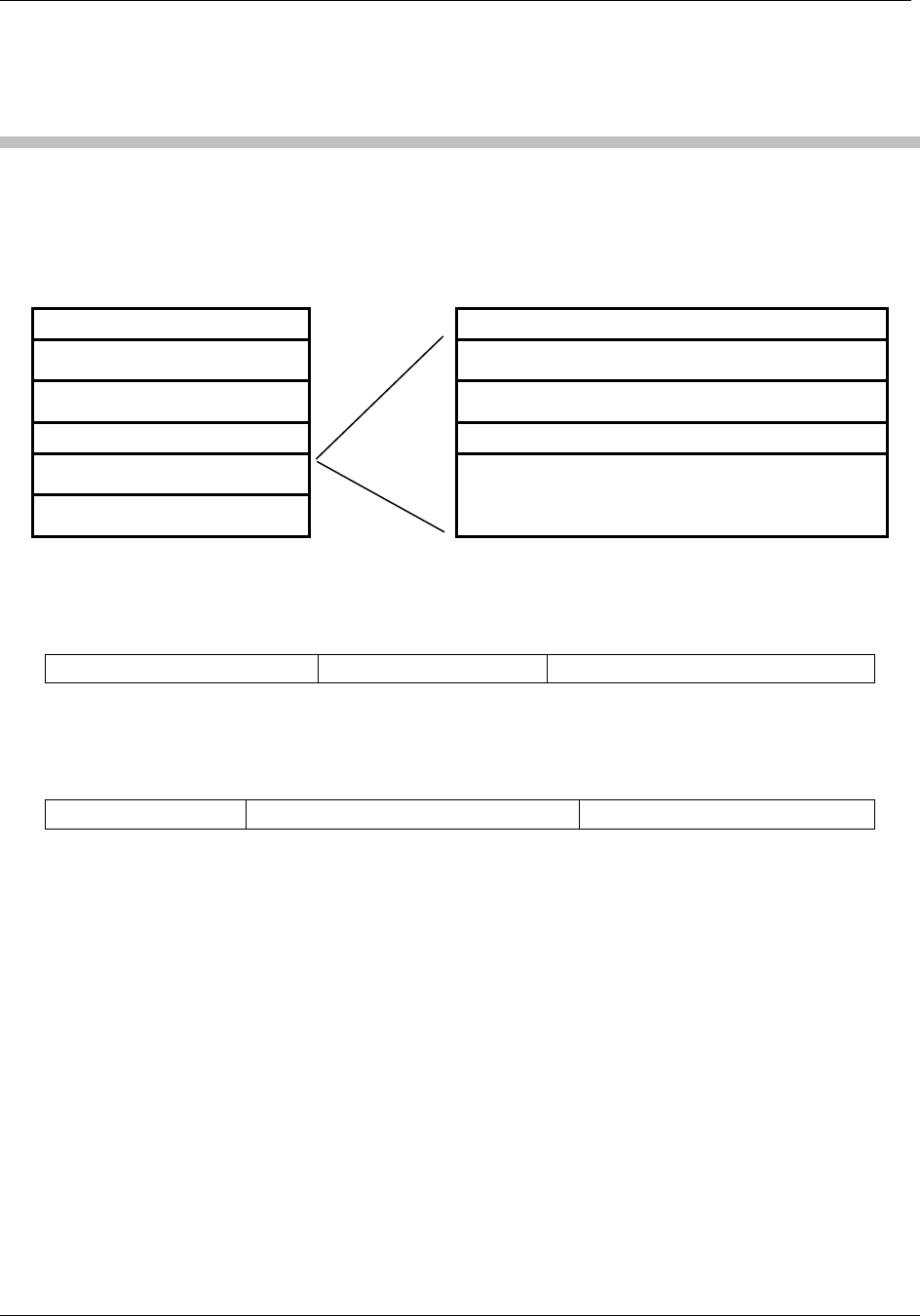
The MIFARE® Standard card consists of 16 sectors. A sector includes four blocks of 16 bytes
each.
MIFARE® Standard Sector 2
Sector 0 (Block: 0...3) Block 8: Data or value (16 bytes)
Sector 1 (Block: 4...7) Block 9: Data or value (16 bytes)
Sector 2 (Block 8...11) Block 10: Data or value (16 bytes)
...
Sector 15 (Block 60...63)
Block 11: Access Conditions (4 bytes),
Key A, Key B (16 bytes)
Figure 1 MIFARE® Standard: sector diagram
1.1.1 Sector 0 / Block 0
Block 0 is read only.
Serial Number (4 bytes) Check byte (1 byte) Manufacturer data (11 bytes)
Figure 2 MIFARE® Standard: sector 0 / block 0
1.1.2 Blocks 3, 7, 11, 15, …
Transport keys are set on delivery:
Key A (6 bytes) Access Conditions (4 bytes) Key B (6 bytes)
Figure 3 MIFARE® Standard: block 3, 7, 11, 15, …
Key A
A0 A1 A2 A3 A4 A5 (Infineon) or FF FF FF FF FF FF (new Philips cards)
Key B
B0 B1 B2 B3 B4 B5 (Infineon) or FF FF FF FF FF FF (new Philips cards)
Access Conditions
FF 07 80 xx (key A is used to read or write; key A itself is not readable; key B is data only). For
further information refer to the MIFARE® card manual.
Remarks
Enabled keys are always read as 00 00 00 00 00 00
Using key B as a data area will cause a security gap, due to the fact that it is necessary to rewrite
key A and the access conditions at each write process. It is not recommended to use key B as a
Page 14 of 125 November 4, 2008
© 2008 HID Global Corporation. All rights reserved.
1508-USM-00-0-02 HF Multi ISO RFID Reader
User Manual, Firmware V1.2
data storage area.
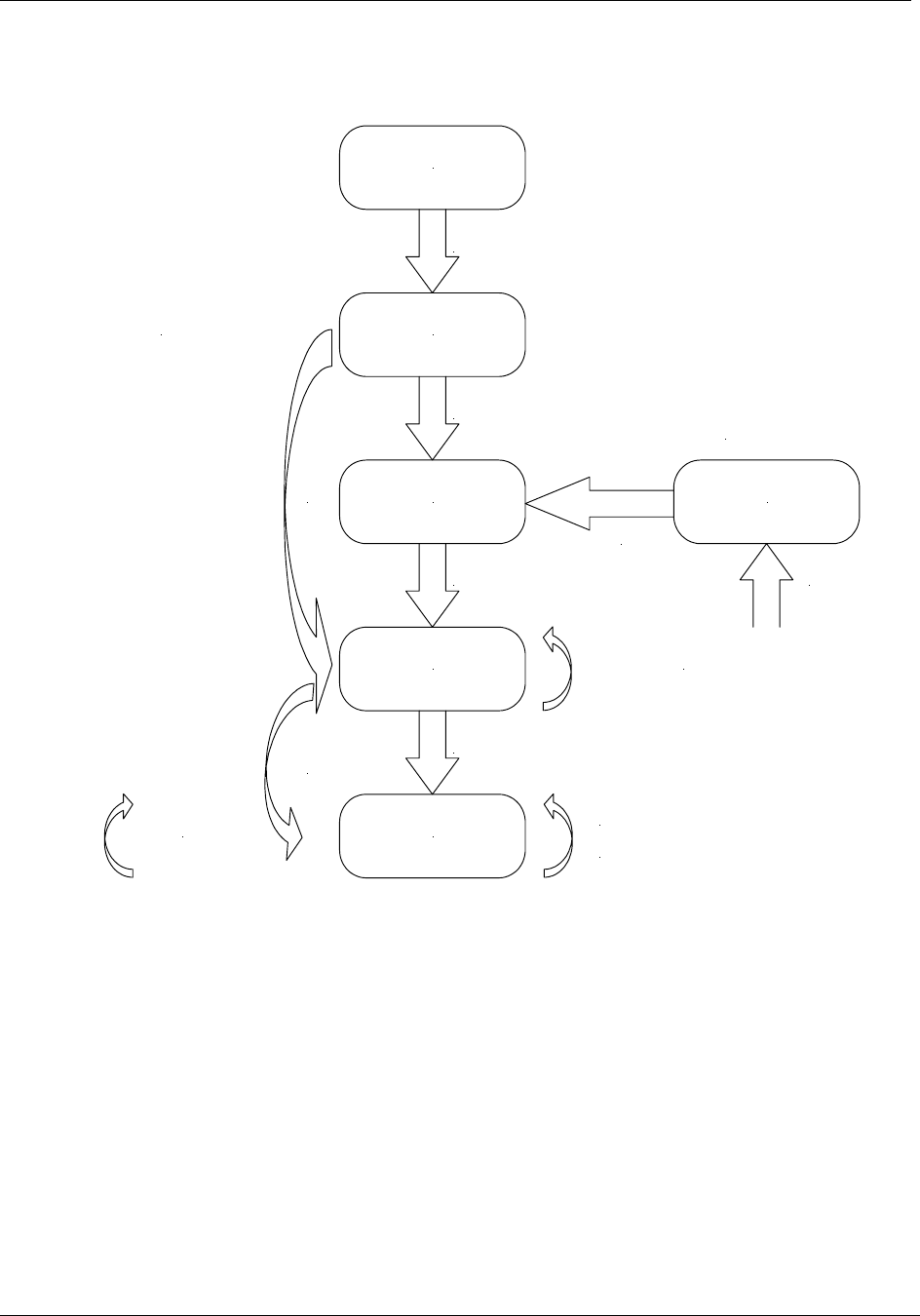
All MIFARE® cards use the following state diagram.
Power Off
Idle
Ready
Active
Authenticated
Halt
Authenticate
Select
REQA
Reset
Wake Up
Halt
Log In Select
read/write/... Tag interfacing
commands
Reader Instruction Set
ISO 14443 Commands
Anticollision Loop
Figure 4 State diagram

November 4, 2008 Page 15 of 125
© 2008 HID Global Corporation. All rights reserved.
HF Multi ISO RFID Reader 1508-USM-00-0-02
User Manual, Firmware V1.2
1.2 MIFARE® Ultralight
MIFARE® Ultralight cards have no encryption included. They only support plain text data
transmission.
MIFARE® Ultralight only supports 4 bytes per sector, but the command set uses 16 bytes per
sector. Only the 4 least significant bytes are valid when using MIFARE® Ultralight.
Ensure that the other bytes match with the tag content when using the write command; otherwise
the read back will fail.
1.3 MIFARE® 4k
MIFARE® 4k cards have an increased memory. Beginning from sector 32 (20h), sectors have 16
blocks. Due to compatibility reasons, the sector indices have changed according to the following
table. The login sector has to be used to access the corresponding sector on the card.
Table 1 MIFARE® 4k sector index table
Sector Block Login sector
00h 00h – 03h 00h
01h 04h – 07h 01h
… … …
1Fh 7Ch – 7Fh 1Fh
20h 80h – 8Fh 20h
21h 90h – 9Fh 24h
22h A0h – AFh 28h
23h B0h – BFh 2Ch
24h C0h – CFh 30h
25h D0h – DFh 34h
26h E0h – EFh 38h
27h F0h – FFh 3Ch
1.4 MIFARE® ProX
MIFARE® ProX tags have an operating system onboard. Data organization depends on the
operating system installed on the card. These cards can include additional functionalities such as
DES or a proprietary encipher algorithm.
Before accessing the operating system, the card must be selected. Customized commands are
issued using the transfer command.
Page 16 of 125 November 4, 2008
© 2008 HID Global Corporation. All rights reserved.
1508-USM-00-0-02 HF Multi ISO RFID Reader
User Manual, Firmware V1.2
1.5 MIFARE® DESFire
This tag supports additional security algorithms (DES, Triple-DES, MAC) for security sensitive
applications.
1.5.1 Memory organization
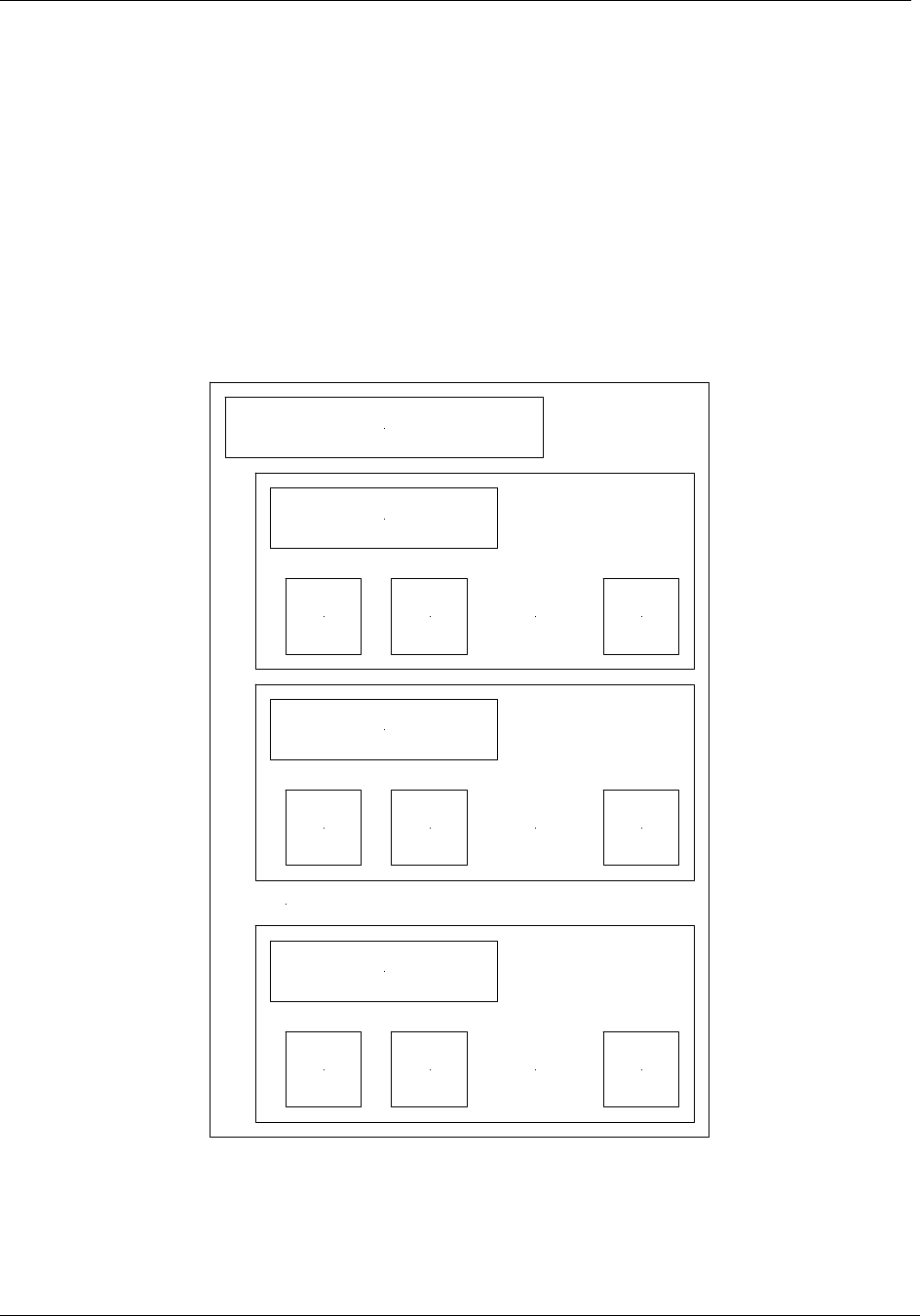
The memory of a DESFire card can be personalized to specific requirements. The card can be
seen as data storage device like a hard disk in a PC. The memory is divided into a maximum of 28
different applications (directories) with 16 files each. An application has up to 14 keys. Depending
on keys and access conditions a file can be accessed in four different ways. Plain data is never
secured. Data is secured using a MAC, single DES or triple DES enciphers.
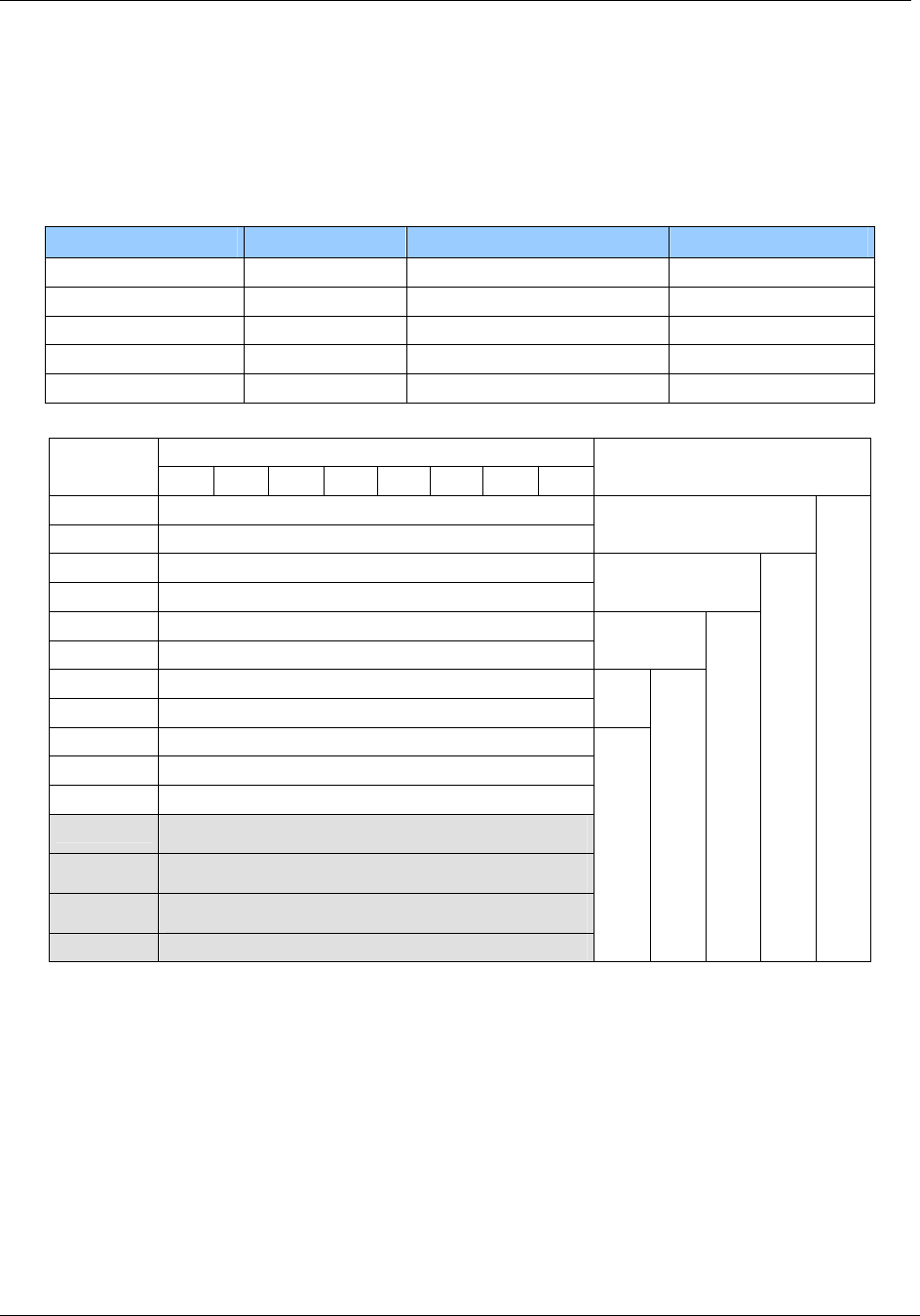
The following figure describes the memory organization of a DESFire card.
File
ID 2
Application 1
File
ID 1 ... File
ID n
File
ID 2
Application 2
File
ID 1 ... File
ID n
File
ID 2
Application n
File
ID 1 ... File
ID n
...
DESFire card (Application 0)
Figure 5 DESFire Memory
November 4, 2008 Page 17 of 125
© 2008 HID Global Corporation. All rights reserved.
HF Multi ISO RFID Reader 1508-USM-00-0-02
User Manual, Firmware V1.2
Activate DESFire card
Select Application
Login to Application
Select File with ID
Change File
Commit / Abort Transaction
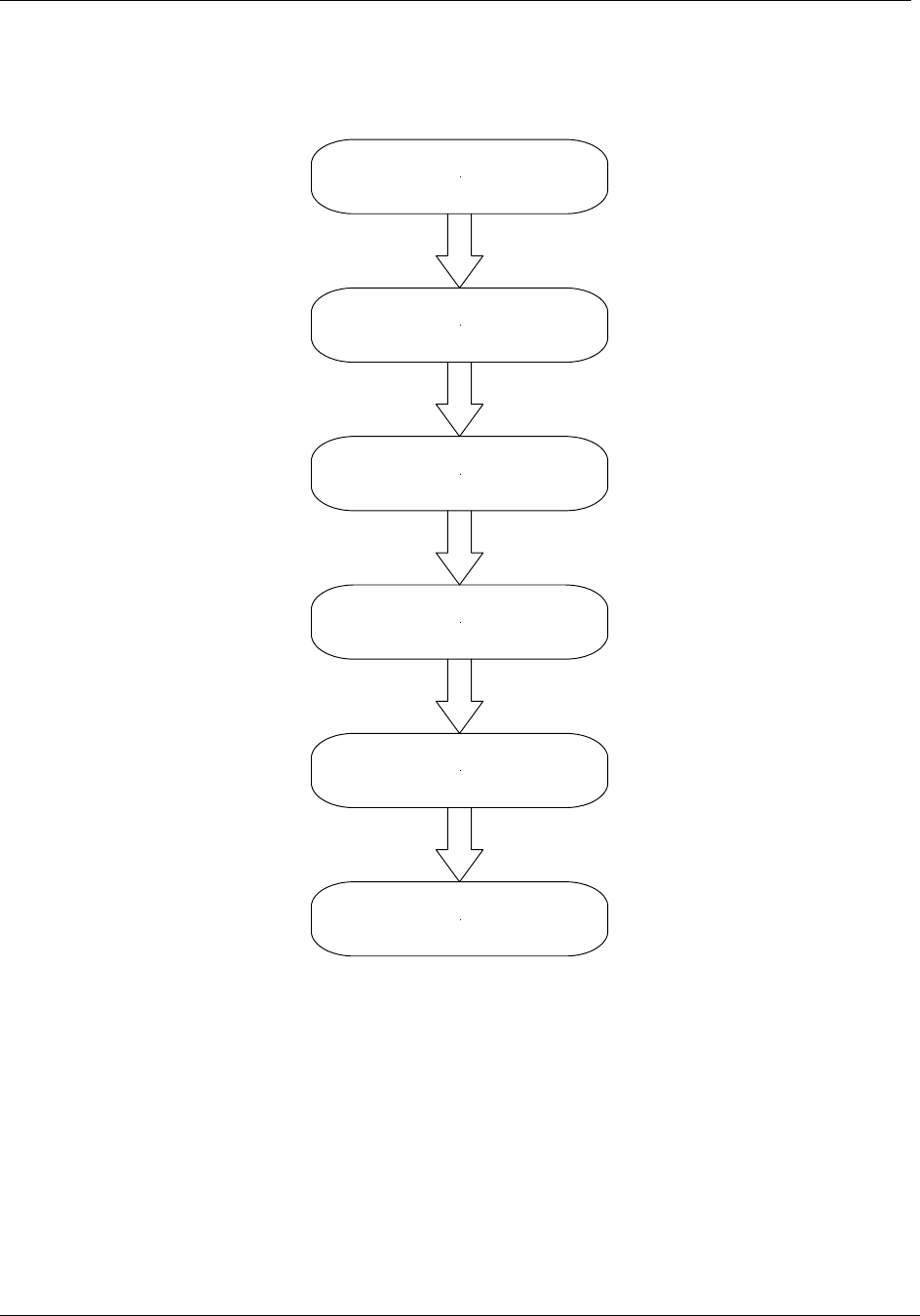
Figure 6 DESFire state diagram

Page 18 of 125 November 4, 2008
© 2008 HID Global Corporation. All rights reserved.
1508-USM-00-0-02 HF Multi ISO RFID Reader
User Manual, Firmware V1.2
1.5.1.1 Activate PICC
Before accessing a DESFire card, the card must be selected. A DESFire card has a 7 byte UID.
After activation, the card is powered up and ready to accept a DESFire command. Application 0 is
selected automatically.
1.5.1.2 Select application
To jump into another application, the application has to be selected. An application can be seen as
a directory, which contains up to 16 files. The size of the application depends on the stored files.
1.5.1.3 Login to application
Specific access rights can be set for each application. Login to an application allows changing the
organization of the application. Login to a file opens a secured file for access. A file can be
accessed in four different ways: without any security or secured with MAC, single DES or triple
DES.
1.5.1.4 Select file
Before accessing a file, the file must be selected
1.5.1.5 Change file
A selected file can be changed according its access rights. If a file is secured, a login is required
before changes can be made.
1.5.1.6 Commit / Abort transaction
Value files, backup files, linear record files and cyclic record files only adapt their values after the
commit transaction command is given. Several files can be changed within an application at the
same time. The abort transactions command annuls all changes within an application. Power loss
will cancel all modifications too.
For more details about application settings and access rights refer to [2].
November 4, 2008 Page 19 of 125
© 2008 HID Global Corporation. All rights reserved.
HF Multi ISO RFID Reader 1508-USM-00-0-02
User Manual, Firmware V1.2
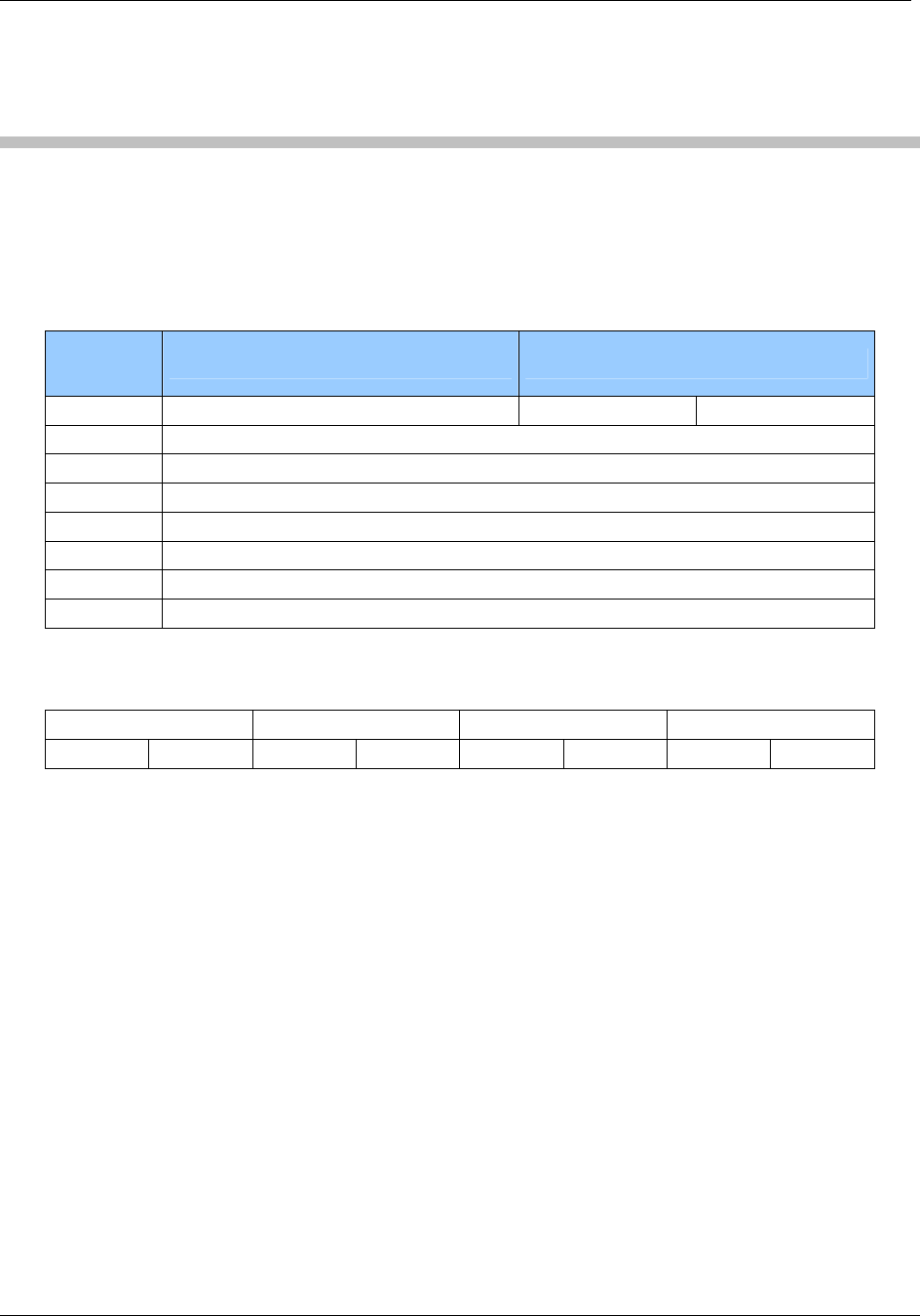
1.6 my-d™ IC (SLE 55Rxx)
my-d™ ICs are specific ICs from Infineon. These labels show a different memory organization.
Two different modes of tags are supported: plain and secure mode.
Memory Size of SLE Rxx-family
Type User Memory Administration Memory Number of pages
SLE 55R01 128 Bytes 32 Bytes 16
SLE 55R02 256 Bytes 64 Bytes 32
SLE 55R04 616 Bytes 154 Bytes 77
SLE 55R08 1024 Bytes 256 Bytes 128
SLE 55R16 2048 Bytes 512 Bytes 256
Byte number within a page
Address 0 1 2 3 4 5 6 7
FFh User data
… …
7Fh User data
… …
4Ch User data
… …
1Fh User data
… …
0Fh User data
… …
04h User data
03h
02h
01h
00h Serial number (UID)
SLE 55R01
SLE 55R02
SLE 55R04
SLE 55R08
SLE 55R16
Page 20 of 125 November 4, 2008
© 2008 HID Global Corporation. All rights reserved.
1508-USM-00-0-02 HF Multi ISO RFID Reader
User Manual, Firmware V1.2
2 ISO 14443 Type B
ISO 14443 type B cards are supported.
2.1 SR176
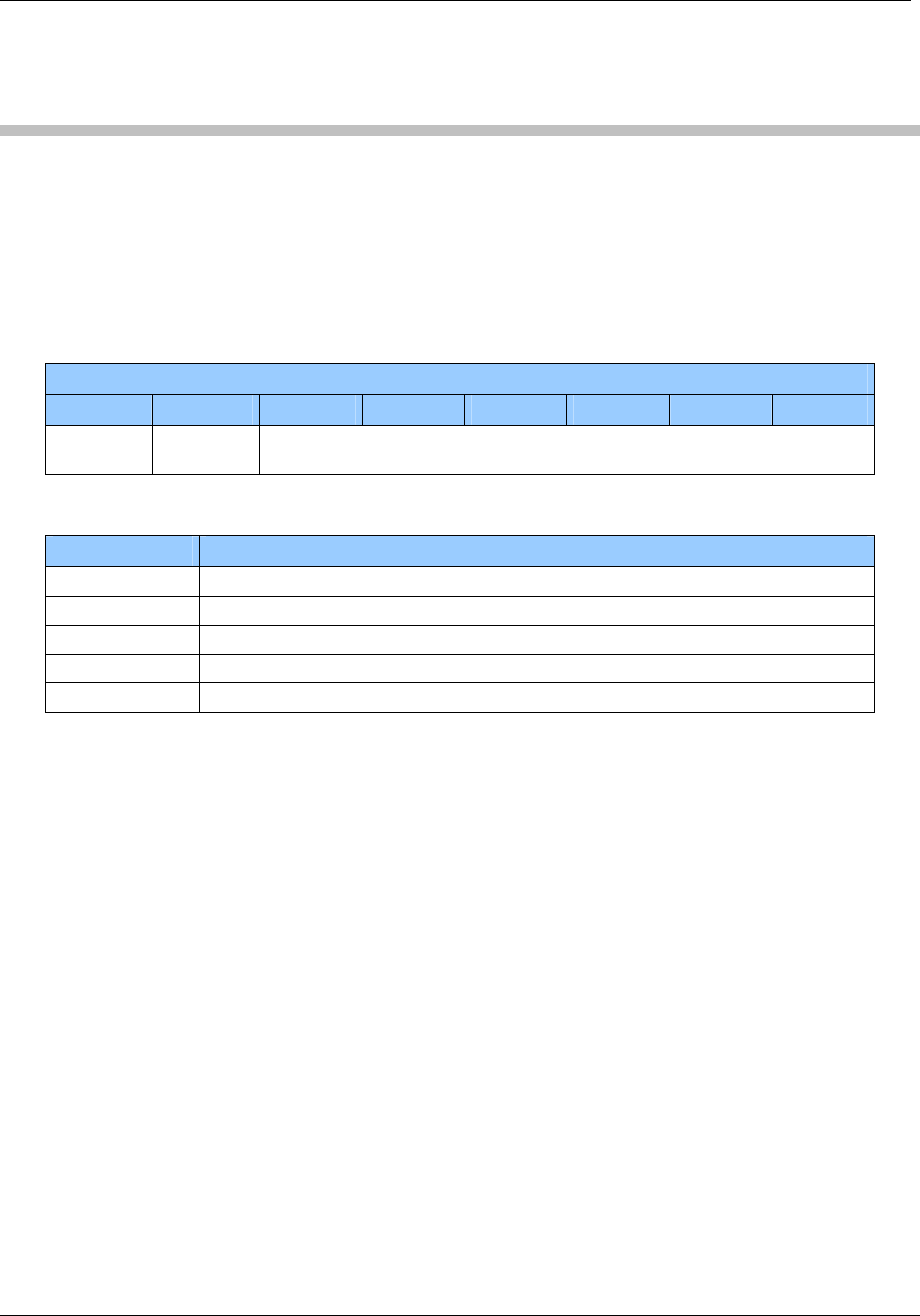
The SR176 label contains only 30 bytes of data organized in two bytes per page.
2.1.1 Memory organization
Block
address Byte 1 Byte 0
0Fh Lock byte RFU Chip ID
0Eh User data
… …
04h User data
03h Serial number
02h Serial number
01h Serial number
00h Serial number
2.1.2 Serial number UID
The UID is stored in the first 4 pages. Page 00h contains the LSB of the UID.
Page 03h Page 02h Page 01h Page 00h
Byte 1h Byte 0 Byte 1 Byte 0 Byte 1 Byte 0 Byte 1 Byte 0

November 4, 2008 Page 21 of 125
© 2008 HID Global Corporation. All rights reserved.
HF Multi ISO RFID Reader 1508-USM-00-0-02
User Manual, Firmware V1.2
2.1.3 Lock byte
The lock byte defines the write access condition of a pair of pages. Each bit can only be set once.
This procedure is irreversible. This byte is implemented as an OTP.
Bit 7 Bit 6 Bit 5 Bit 4 Bit 3 Bit 2 Bit 1 Bit 0
Page 0Eh Page 0Fh
Page 0Ch Page 0Dh
Page 0Ah Page 0Bh
Page 08h Page 09h
Page 06h Page 07h
Page 04h Page 05h
Page 02h Page 03h
Page 00h Page 01h
2.1.4 Chip ID
The Chip ID is defined in the low nibble of page 0Fh. It is manufacturer set and is used internally
to select and separate single tags.
2.2 SRIX4K
The SRIX4K label contains 512 bytes of data organized into four-byte pages.
2.2.1 Memory organization
Block
address Byte 3 Byte 2 Byte 1 Byte 0
FFh OTP Lock Reg ST Reserved ST Reserved Fixed Chip ID
7Fh User data
… …
07h User data
06h 32 bits binary counter
05h 32 bits binary counter
04h 32 bits Boolean Area
03h 32 bits Boolean Area
02h 32 bits Boolean Area
01h 32 bits Boolean Area
00h 32 bits Boolean Area
2.2.2 Lock block
Locking of blocks is not supported with this tag.
Page 22 of 125 November 4, 2008
© 2008 HID Global Corporation. All rights reserved.
1508-USM-00-0-02 HF Multi ISO RFID Reader
User Manual, Firmware V1.2
3 ISO 15693
The reader can communicate with ISO15693 tags. An anti-collision is needed if multiple instances
of tags are in the same antenna field. The reader detects each type of ISO15693 labels and
handles them individually
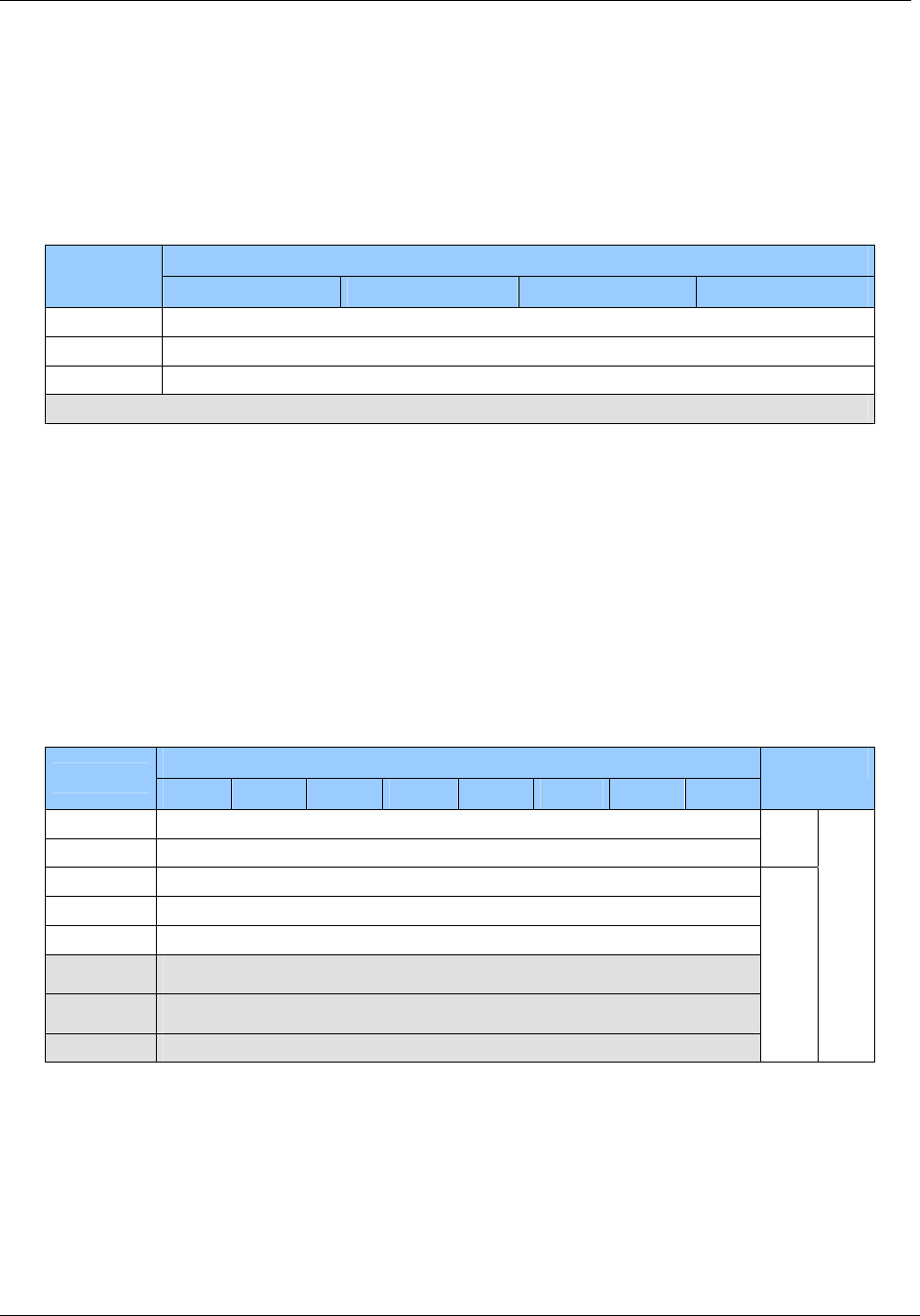
3.1 Coding of UID
The UID of a tag is defined in ISO/IEC 15693-3. All tags compliant to ISO15693 support the
specified format. The UID is factory programmed and cannot be changed. The UID is needed for
the anti-collision sequence to separate several tags in the same antenna field.
Byte
7 6 5 4 3 2 1 0
E0h MFR
Code
Serial number
The MFR Code is listed in ISO/IEC 7816-6:1996/Amd.1: 2000(E). Following manufacturer are
tested with our reader.
MFR-Code Company
02h ST Microelectronics
04h Philips Semiconductors
05h Infineon Technologies AG
07h Texas Instrument
16h EM Microelectronic-Marin SA
November 4, 2008 Page 23 of 125
© 2008 HID Global Corporation. All rights reserved.
HF Multi ISO RFID Reader 1508-USM-00-0-02
User Manual, Firmware V1.2
3.2 Memory organization
An ISO15693 tag is separated into two blocks. An administrative block which contains the UID,
AFI, DSFID and the lock page state. The user block is free for custom use. The chip manufacturer
defines the amount of bytes and number of pages of each tag. As default four bytes are used for
several tags.
Byte
Page
address 0 1 2 3
3Fh User data
… …
00h User data
Administrative block
3.3 my-d™ IC (SRF55VxxP)
my-d™ ICs are specific ICs from Infineon. These labels show a different memory organization.
Two different modes of tags are supported: plain and secure mode.
Two different cards with 320 bytes or 1k bytes EEPROM memory are available. The EEPROM
memory is divided into pages.
Each tag is split into two parts: The administrative blocks (00h, 01h, 02h) and the user area.
Administrative pages are read only and cannot be changed. User data is free for use. Additionally
user data pages can be locked. This procedure is irreversible.
The EEPROM of SRF55V10P is organized in 128 pages addressed 00h to 7Fh. The EEPROM of
SRF55V02P consists of 32 pages addressed 00h to 1Fh.
Byte number within a page
Address 0 1 2 3 4 5 6 7
7Fh User data
… …
1Fh User data
… …
03h User data
02h
01h
00h Serial number (UID)
SRF55V02P
SRF55V10P
3.3.1 UID
The UID of SRF55Vxx labels starts with 60h or E0h.

Page 24 of 125 November 4, 2008
© 2008 HID Global Corporation. All rights reserved.
1508-USM-00-0-02 HF Multi ISO RFID Reader
User Manual, Firmware V1.2
3.3.2 Security Bit
Bit 45 of the UID defines the secure mode of the SRF55Vxx. If set, the tag supports security
algorithm.
Bit 45 Description
1 Tag supports crypto security mechanism
0 Chip supports plain mode only
3.4 EM 4135
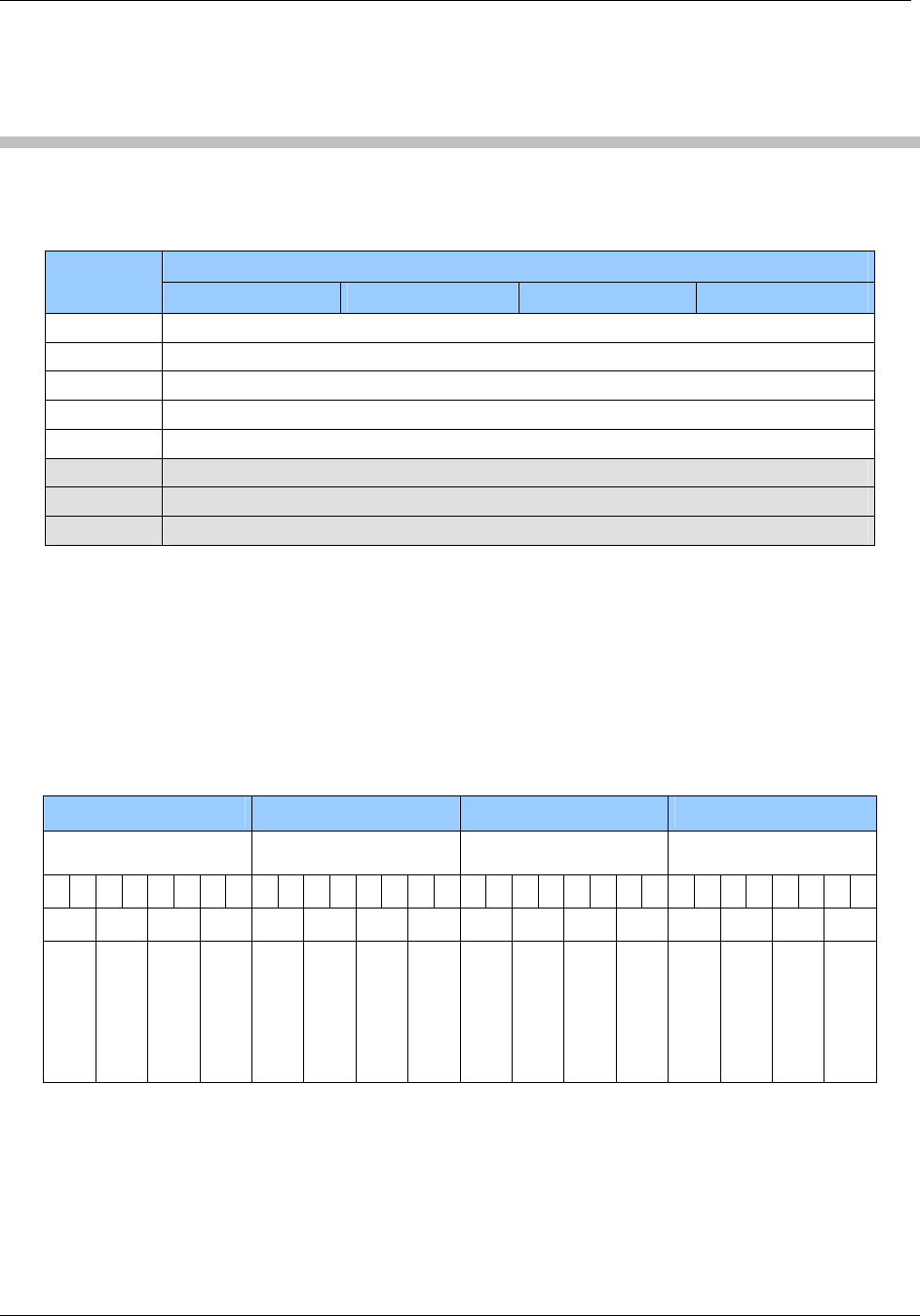
The EM4135 is an ISO15693 compliant label of EM Microelectronic-Marin SA. It has eight bytes
per page as the same as the my-d™ label. It only supports 36 pages. The administrative area
holds the information of the access condition and the UID.
Page
Address 0 1 2 3 4 5 6 7
23h User data
… …
00h User data
Administrative area
November 4, 2008 Page 25 of 125
© 2008 HID Global Corporation. All rights reserved.
HF Multi ISO RFID Reader 1508-USM-00-0-02
User Manual, Firmware V1.2
4 ICODE
ICODE® IC data is stored in a non-volatile EEPROM. Its capacity is 512 bits organized in 16
blocks consisting 4 bytes each (1 block = 32 bits). First 3 blocks contain administrative data.
4.1 Memory organization
Byte
Page
address 0 1 2 3
0Fh User data
… …
05h User data
04h Family code identifier / User data
03h Special function (EAS) / User data
02h Write access condition
01h Serial number
00h Serial number
4.2 Serial number
The serial number of a label is defined at the manufacturer process. It is stored on page 00h and
page 01h. LSB is stored first.
4.3 Write access condition
Page 02h contains the write access condition for each page. Each page can be set to read only
(bits are set to 0). This procedure is irreversible. Locking page 2 no further changed of the access
condition can be done. Always two bits must be change at the same time. This register is
implemented as OTP.
Byte 0 Byte 1 Byte 2 Byte 3
MSB LSB MSB
LSB MSB
LSB MSB
LSB
1 1 1 1 0 0 0 0 1 1 1 1 1 1 1 1 1 1 1 1 1 1 1 1 1 1 1 1 1 1 1 1
3 2 1 0 7 6 5 4 B A 9 8 F E D C
Special function
Write access
Serial number
Serial number
User data
…
…
…
…
…
…
…
…
…
…
User data
4.4 Special function (EAS,) AFI
Special Functions (EAS) and Family Code/Application Identifier are additional features. For more
information refer to the ICODE® manual.

Page 26 of 125 November 4, 2008
© 2008 HID Global Corporation. All rights reserved.
1508-USM-00-0-02 HF Multi ISO RFID Reader
User Manual, Firmware V1.2
4.5 User data
All other blocks are free for use and can be changed according the state of the write access
conditions.

November 4, 2008 Page 27 of 125
© 2008 HID Global Corporation. All rights reserved.
HF Multi ISO RFID Reader 1508-USM-00-0-02
User Manual, Firmware V1.2
5 ICODE EPC
ICODE EPC labels data is stored in a OTP memory. Its capacity is 136 bits organized in 17 blocks
consisting of 1 bytes each. All MSB of the different fields (EPC, CRC16, Destroy Code) are
located at the lowest block address.
5.1 Memory organization
Page address Byte
14h – 16h Destroy Code
12h – 13h CRC 16
00h – 11h EPC
5.2 Serial number
The serial number of a label is defined within the EPC blocks.
5.3 Read Block
It is not possible to read a block with the read block 'rb' command.
5.4 Write Block
It is possible to write the EPC data (12 bytes) with the write block 'wb' command using block
address 00h.

Page 28 of 125 November 4, 2008
© 2008 HID Global Corporation. All rights reserved.
1508-USM-00-0-02 HF Multi ISO RFID Reader
User Manual, Firmware V1.2
6 ICODE UID
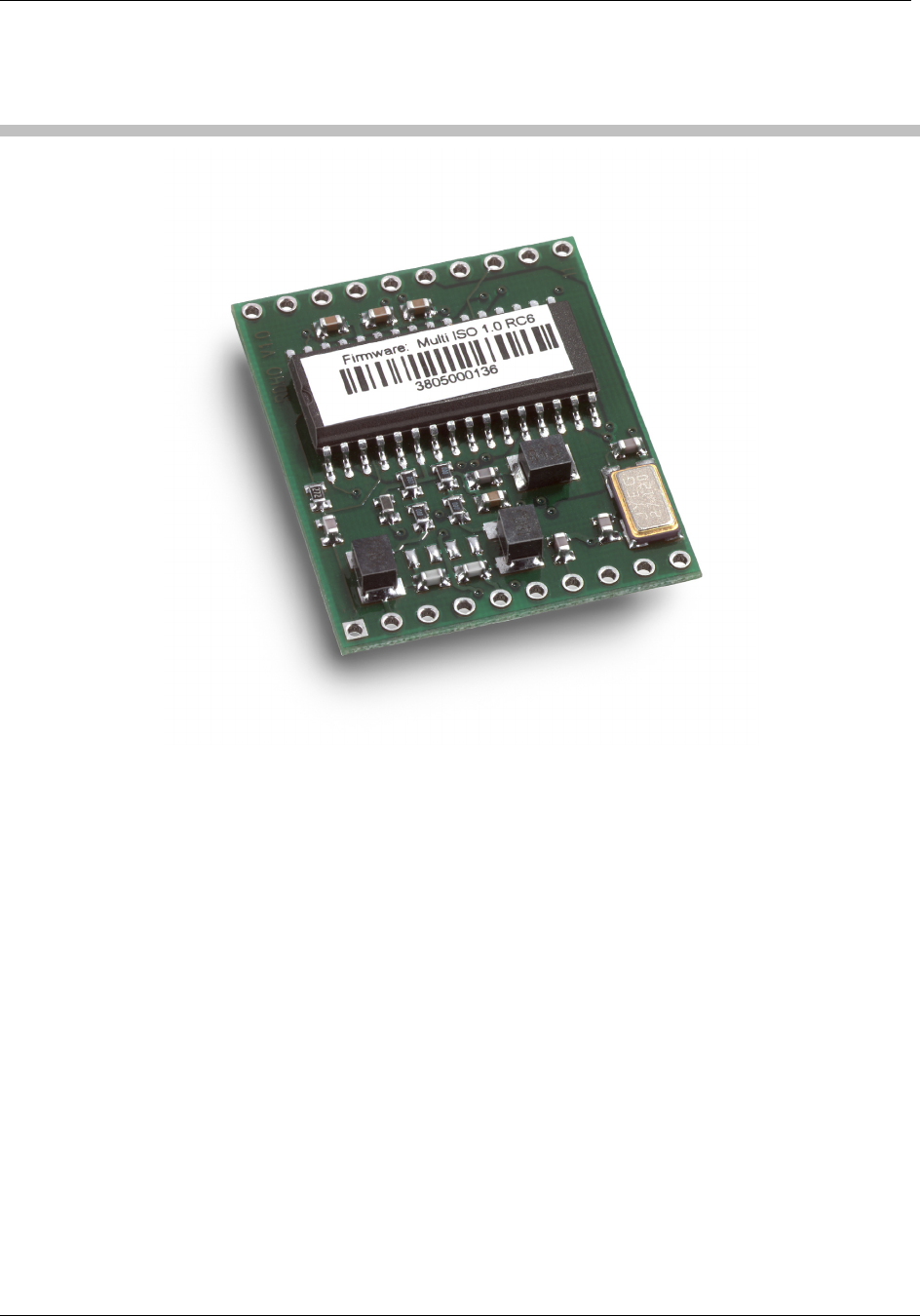
The memory has a capacity of 192 bits and is organized in 24 blocks, consisting of 1 byte each.
All MSB of the different fields (UD, UD CRC, CRC16, Destroy Code) are located at the lowest
block address.
6.1 Memory organization
Page address Access Condition Description
21h – 23h OTP Destroy Code
19h - 20h OTP CRC16
14h – 18h RO UID
12h – 13h R/W UD CRC16
00h – 11h R/W User data (UD)
6.1.1 Read Block
It is possible to read the user data (12 bytes) with the read block 'rb' command using block
address 00h.
6.1.2 Write Block
It is possible to write the UD data (12 bytes) with the write block 'wb' command using block
address 00h.
Additionally it is possible to write the destroy code (3 bytes) with the write block 'wb' command
using block address 01h.
November 4, 2008 Page 29 of 125
© 2008 HID Global Corporation. All rights reserved.
HF Multi ISO RFID Reader 1508-USM-00-0-02
User Manual, Firmware V1.2
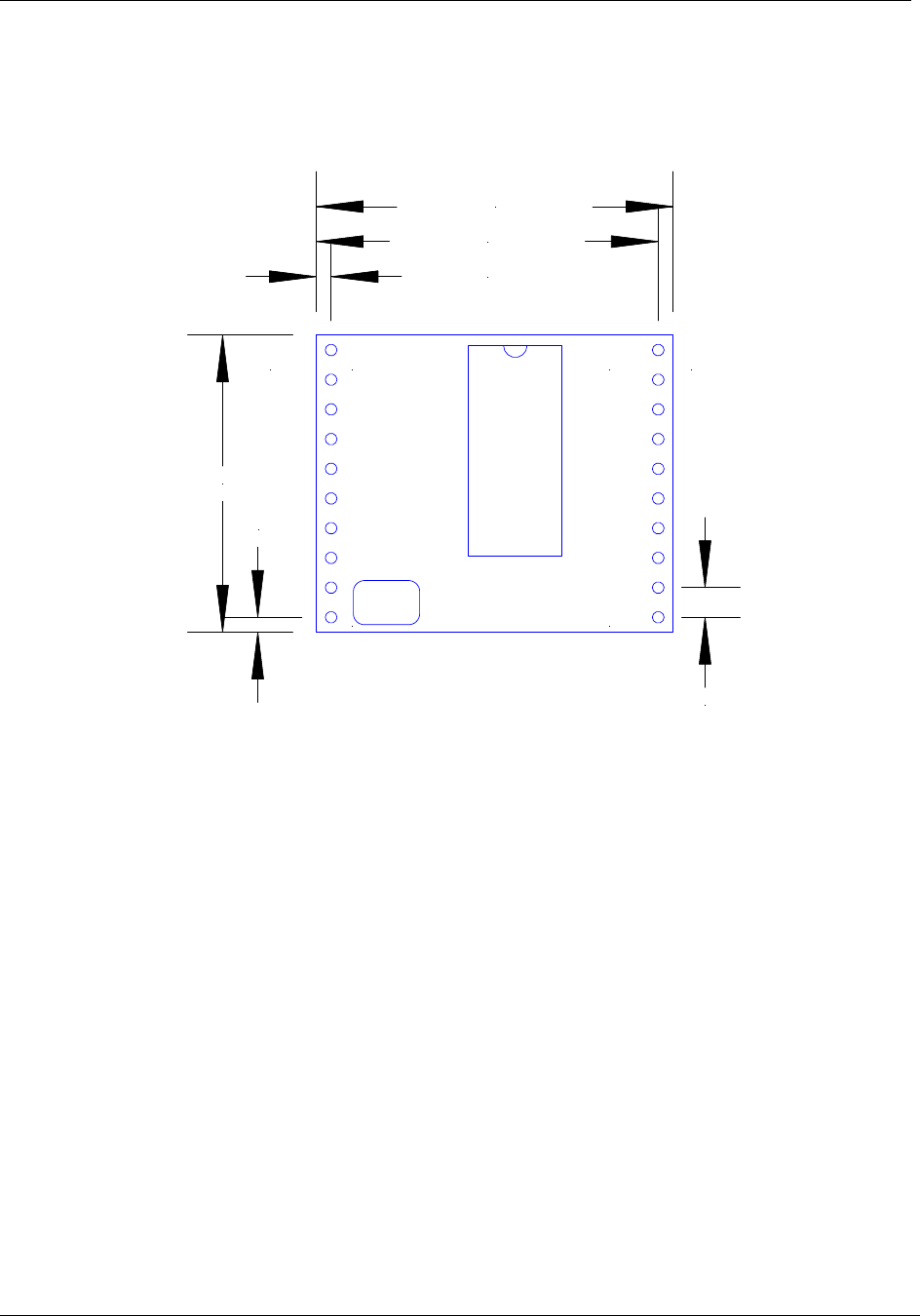
7 Hardware
Page 30 of 125 November 4, 2008
© 2008 HID Global Corporation. All rights reserved.
1508-USM-00-0-02 HF Multi ISO RFID Reader
User Manual, Firmware V1.2
7.1 Dimensions
All dimensions listed in mm
1
10 11
20J1 J2
2,54 mm
1,27 mm
29,21 mm
30,48 mm
1,27 mm
25,40 mm
Top View

November 4, 2008 Page 31 of 125
© 2008 HID Global Corporation. All rights reserved.
HF Multi ISO RFID Reader 1508-USM-00-0-02
User Manual, Firmware V1.2
7.1.1 Pin out – Jumper 1
PIN PIN No. Description
ARX 1 Antenna RX
ATX1 2 Antenna TX1
VDD 3 Supply Voltage
GND 4 Ground
ATX2 5 Antenna TX2
TGND 6 Antenna Ground
SAM CLK 7 SAM clock
SAM IO 8 SAM IO
SAM RESET 9 SAM Reset
RTS 10 Request to Send

Page 32 of 125 November 4, 2008
© 2008 HID Global Corporation. All rights reserved.
1508-USM-00-0-02 HF Multi ISO RFID Reader
User Manual, Firmware V1.2
7.1.2 Electrical characteristics of J1 PINs
PIN PIN No. Min Typ. Max. Description
ARX 1 1.1V
4.4V Antenna RX
ATX1 2 13,56 MHz
34 VPP
13.56MHz
100 mAPP
50VPP
Antenna TX1
+4.5V +5.0V +5.5V Supply Voltage VDD 3
32mA 150mA 250mA Supply Current (without SAM)
GND 4 GND Ground
ATX2 5 13,56 MHz
34 VPP
13.56MHz
100 mAPP
50VPP
Antenna TX2
TGND 6 GND Antenna Ground
TTL
25mA
SAM CLK 7
3,39MHz
SAM clock
SAM IO 8 TTL 25 mA
IO for SAM Input and SAM
Output
SAM RESET 9 TTL 25 mA SAM Reset
RTS 10 TTL 25 mA Request to Send

November 4, 2008 Page 33 of 125
© 2008 HID Global Corporation. All rights reserved.
HF Multi ISO RFID Reader 1508-USM-00-0-02
User Manual, Firmware V1.2
7.1.3 Pin out – Jumper 2
PIN PIN No. Description
VDD 20 Supply Voltage
GND 19 Ground
LEDg 18 LED green (reading LED)
LEDr 17 LED red
EN 16 Enable reader, open or logic high
MCLR 15 Master clear
USER 14 User Port
DIR 13 Direction of RS 485
TX 12 TX to PC
RX 11 RX from PC
7.1.4 Electrical characteristics of J2 PINs
Table 2 Electrical characteristics of pins
PIN PIN No. Min Typ. Max. Description
RX 11 USART-TTL1 25 mA RX to PC
To RS232, RS485 or RS422 device
driver
TX 12 USART-TTL1 25 mA TX to PC
To RS232, RS485 or RS422 device
driver
DIR 13 TTL 25 mA Direction of RS 485
Logic High = Reader to Host
Logic Low = Host to Reader
USER 14 TTL3 25 mA User Port
MCLR 15 TTL4 Master clear
Leave unconnected.
Low will reset the register and the key
management to default values.
EN 16 ST5 25 mA
Enable reader
logic low will disable the reader
Open or logic high
1 Universal Synchronous Asynchronous Receiver Transmitter
3 TTL buffer output / input
4 Voltage spikes below GND at the MCLR/VDD pin, including currents greater than 80mA, may cause
latch-up. Thus, a series resistor of 50-100Ω should be used when applying a "low" level to the MCLR/VDD,
rather than pulling this pin directly to GND.
5 Schmitt trigger buffer input

Page 34 of 125 November 4, 2008
© 2008 HID Global Corporation. All rights reserved.
1508-USM-00-0-02 HF Multi ISO RFID Reader
User Manual, Firmware V1.2
PIN PIN No. Min Typ. Max. Description
VDDmin
@ 25mA
VDDtyp
@ 11mA
VDDmax
@ 0 mA
LED red
Output Voltage
LEDr 17
11mA 25mA
External Resistor
min. 200 Ω
1.4V
@ 11mA
VDD
@ 0mA
LED green (reading LED)
with 330 Ω (internal serial) resistor
LEDg 18
11mA 15mA
GND 19 GND Ground
VDD 20 +4.5V +5.0V +5.5V Supply Voltage
IDD 32 mA 150 mA 250 mA Supply Current (Without SAM)
7.1.5 External Connections
7.1.5.1 Power Supply
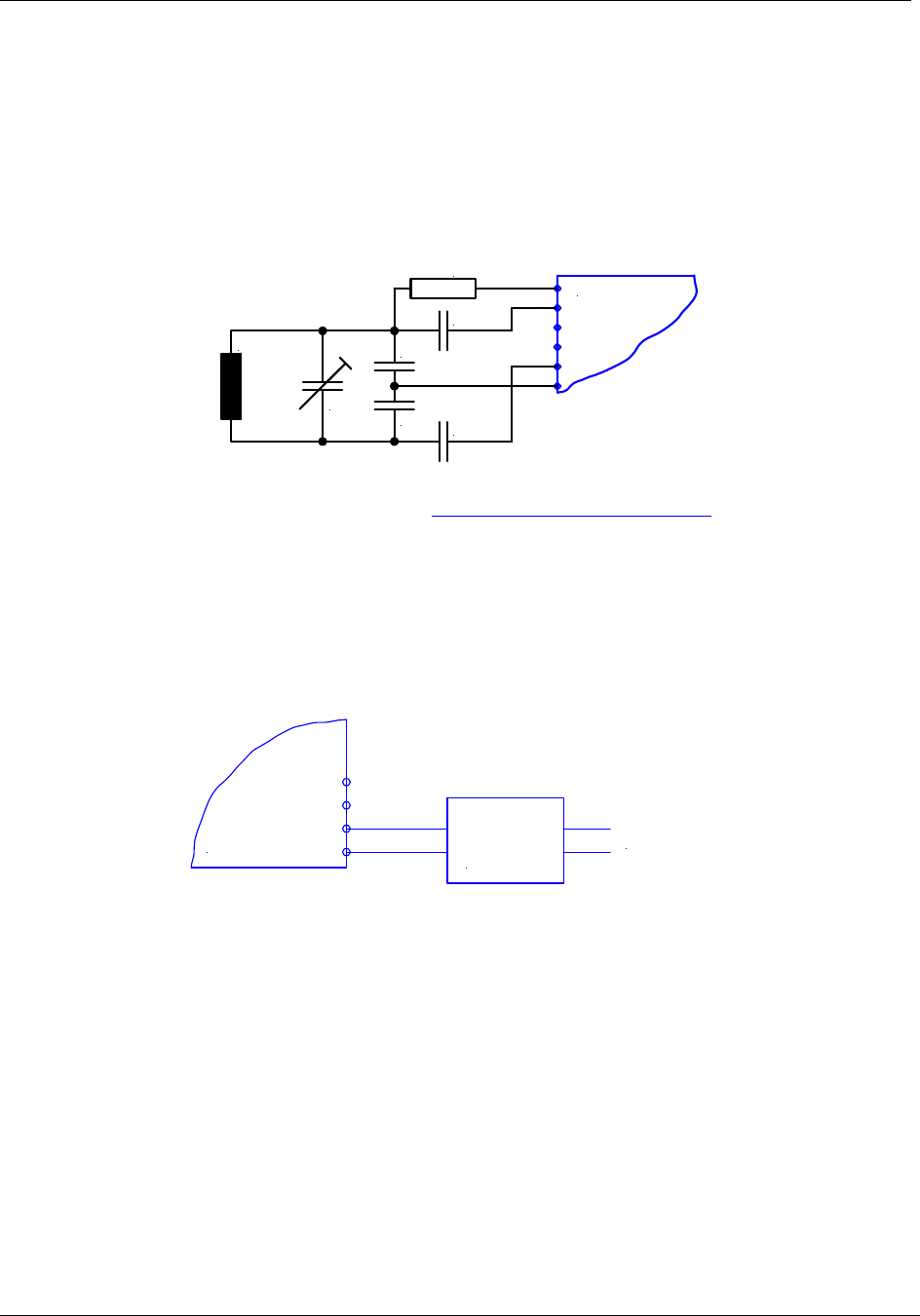
If the supply voltage and any noise modulated on the supply voltage remains within the specified
limits, no further filtering is required. In some cases it is recommended to use additional filtering for
the power supply line. Insufficient power line filtering could cause unexpected or irregular
performance drops.
Option 1
uC
20
19
OEM Board
+5V DC
Option 2
3
4
OEM Board
+5V DC
November 4, 2008 Page 35 of 125
© 2008 HID Global Corporation. All rights reserved.
HF Multi ISO RFID Reader 1508-USM-00-0-02
User Manual, Firmware V1.2
The board can be connected as shown above. Both alternatives are possible and can be used as
they fit best into the layout of the carrier board. The two VCC PINs and the two GND PINs are
connected internally.
7.1.5.2 Antenna
The typical antenna tuning and matching network is shown below. The external antenna has to
have the right inductance and a certain resistor and capacitor combination for an optimized
frequency tuning and antenna matching.
6
5
1
2OEM Board
C1
C2
C3
C4
C5
L ANT
R1
More details about the antenna design are available in the HIDid antenna design guide manual.
This document can be downloaded from http://www.hidcorp.com/Omnikey.
Please refer also to the specific application notes for the Philips reader IC (MIFARE® & I-Code,
Micore Reader IC family Directly Matched Antenna Design).
7.1.5.3 Serial Interface
The OEM Board can be connected directly with a micro controller. Alternatively the OEM Board
also can be connected to most serial interface types by using the right interface converter circuit.
In order to optimize the communication quality the specific application note of the interface
converter circuit needs to be taken into consideration.
12
11
Interface
Converter
Circuit
Host Interface
OEM Board
Page 36 of 125 November 4, 2008
© 2008 HID Global Corporation. All rights reserved.
1508-USM-00-0-02 HF Multi ISO RFID Reader
User Manual, Firmware V1.2
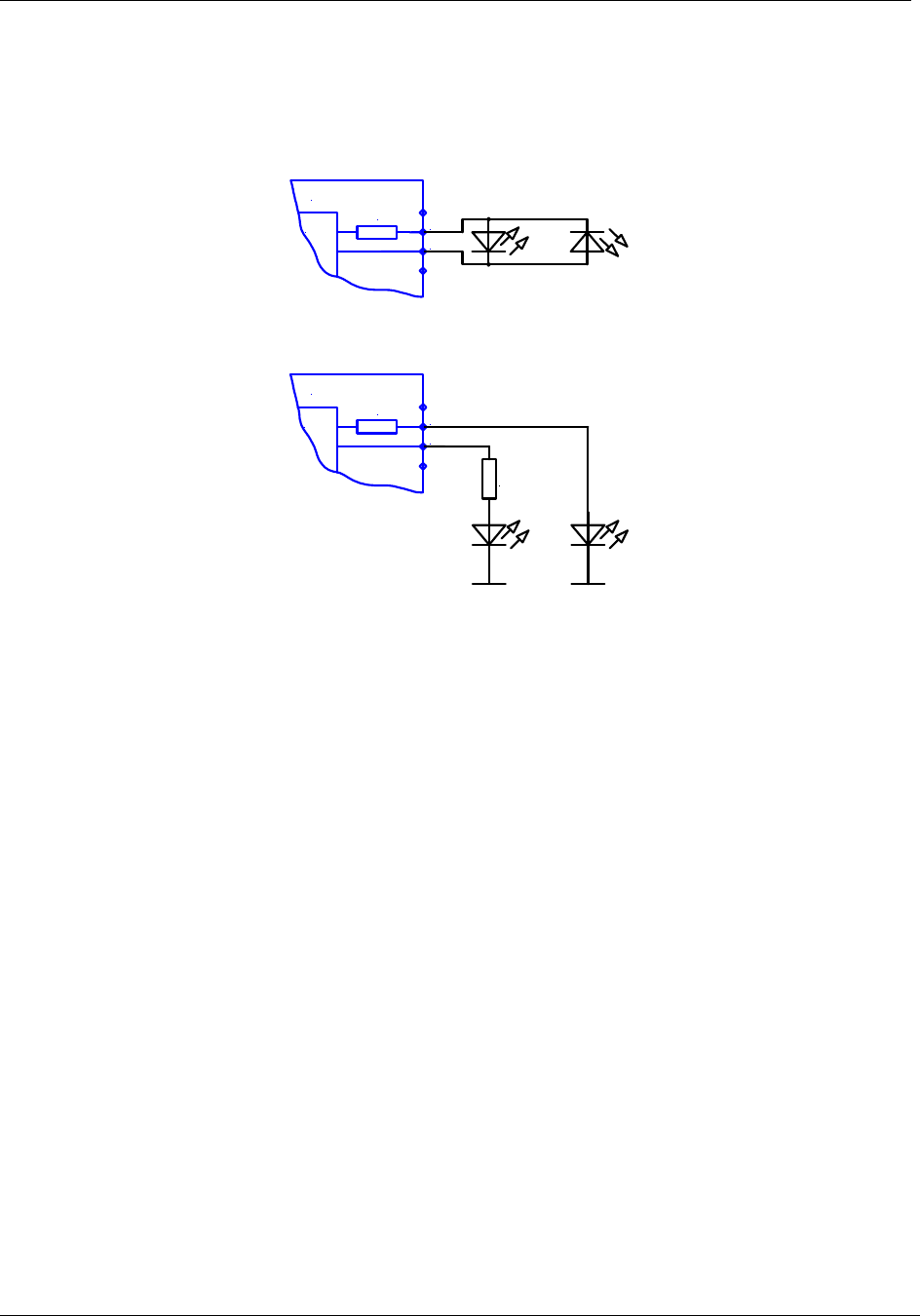
7.1.5.4 Function Control LEDs
Two external LEDs can be connected to the OEM Board. There are two alternatives possible.
Option 1
uC 18
17
OEM Board
330 Ohm
Option 2
uC 18
17
330 Ohm
OEM Board
330 Ohm
In both cases the LED supply voltage levels are TTL levels.

November 4, 2008 Page 37 of 125
© 2008 HID Global Corporation. All rights reserved.
HF Multi ISO RFID Reader 1508-USM-00-0-02
User Manual, Firmware V1.2
8 Software
By default, data is transmitted at 9600, n, 8, 1, no handshaking. Two protocol modes are
supported. The protocol mode is configured in the reader EEPROM. As factory default, the ASCII
protocol is used.
8.1 ASCII Protocol
This protocol is designed for easy handling. The commands are issued using a terminal program.
Data is transmitted as ASCII hexadecimal that can be displayed on any terminal program (i.e.
HyperTerminal).
Table 3 ASCII protocol frame
Command Data
Variable length Variable length
8.2 Binary Protocol
This protocol is designed for industrial applications with synchronization and frame checking. An
addressing byte for party line (master/slave, multi-drop) is also included.
The protocol usually requires a device driver. Data is transmitted in binary mode. The reader uses
an internal binary watchdog timer to ensure correct framing.
Table 4 Binary Frame Version 1
STX Station ID Length Data BCC ETX
1 byte 1 byte 1 byte Variable length 1 byte 1 byte
The binary frame version 2 is only sent to the host. It is implemented to give extended information
to the host.
Version 2 must be enabled in the Protocol configuration 2 register.
Table 5 Binary Frame Version 2
STX Station ID Length Flags Data BCC ETX
1 byte 1 byte 1 byte 1 byte Variable length 1 byte 1 byte
8.2.1 STX
Start of transmission (02h)
8.2.2 Station ID
Unique ID of the station
00h: Reserved for the bus master. Readers send response to this device ID.
FFh: Broadcast message. All devices will execute the command and send their response.
8.2.3 Length
Length defines the length of the data block, including the flag byte, if binary protocol version 2 is
activated.
If length is set to zero, 256 data bytes are transmitted. The reader module only can send 256 data
bytes, but cannot receive commands with 256 bytes.
Page 38 of 125 November 4, 2008
© 2008 HID Global Corporation. All rights reserved.
1508-USM-00-0-02 HF Multi ISO RFID Reader
User Manual, Firmware V1.2
8.2.4 Flags
The flag byte gives additional information to the host.
Bit 3 – Bit 7 Bit 1 – Bit 2 Bit 0
RFU Leading Character Info Error State
Error State
If cleared, the command was processed successfully.
If Error State is set, an error occurred.
Leading Character Info
Bit 1 & 2 defines how to interpret the data in the binary frame.
Bit 2 Bit 1 Description
0 0 No leading character available, all values are hexadecimal.
0 1 The data contains one leading character.
1 0 All data bytes are characters.
1 1 RFU
8.2.5 Data
This part contains the command and the data. The command values are the same as in ASCII
protocol mode (‘x’, ‘s’, …) whereas data is transmitted in binary mode.
The length of the command block depends on the instruction.
8.2.6 Block Check Character (BCC)
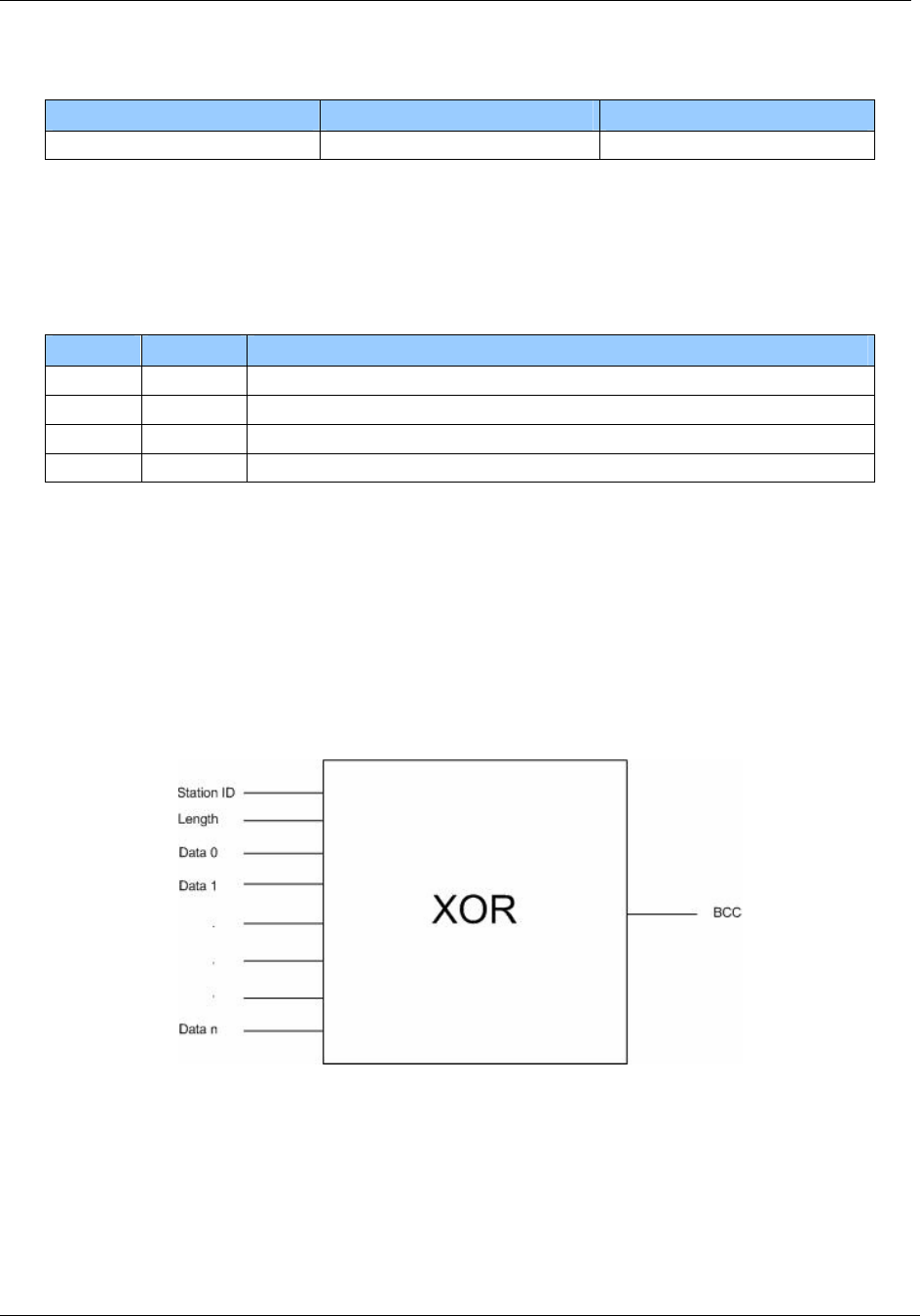
The BCC is used to detect transmission errors. The BCC is calculated XOR-ing each byte of the
transmission frame excluding the STX/BCC and ETX characters. The flags are part of the data.
)/(...)/()()( 0N
DataCommandXORXORDataCommandXORLengthXORStatIDBCC =
8.2.7 ETX
End of transmission. (03h)

November 4, 2008 Page 39 of 125
© 2008 HID Global Corporation. All rights reserved.
HF Multi ISO RFID Reader 1508-USM-00-0-02
User Manual, Firmware V1.2
8.2.8 Remarks
If the reader device receives an invalid instruction frame (i.e. wrong BCC) or the requested station
ID does not match the internal ID of the reader, the command is not executed. The reader waits
for the next valid frame.
The automatic binary time-out (see protocol configuration register) is used to detect incomplete
binary frames.
8.2.9 Examples
02h 64h 01h 78h 1Dh 03h
STX Station ID Length ‘x’ BCC ETX
This instruction frame will reset the reader module with the station ID 64h.
8.3 Register Set
The reader has several system flags used for customization purposes. The flags are stored in its
non-volatile EEPROM. The reader accepts changes to these settings only during the start-up
phase. Clearing all RFU bits is recommended in order to guarantee compatibility with future
releases.
The reader can store up to 32 authentication keys internally to login standard MIFARE® cards. An
additional 32 keys can be stored for DESFire authentication. All keys are read only and cannot be
accessed via the interface lines.
8.3.1 EEPROM memory organization
Register Description
00h … 04h Unique device ID; read only
05h … 09h Administrative data; read only
0Ah Station ID
0Bh Protocol configuration
0Ch Baud rate
0Dh Command Guard Time
0Eh Operation Mode
0Fh Single shot time-out value
10h Internal use / Do not change
11h Internal use / Do not change
12h Internal use / Do not change
13h Protocol configuration 2
14h Reset Off Time
15h Reset Recovery Time
16h Application Family Identifier
17h ISO 14443A Selection Time-out
18h ISO 14443B Selection Time-out
19h SR176 Selection Time-out

Page 40 of 125 November 4, 2008
© 2008 HID Global Corporation. All rights reserved.
1508-USM-00-0-02 HF Multi ISO RFID Reader
User Manual, Firmware V1.2
Register Description
1Ah ISO 15693 Selection Time-out
1Bh Protocol configuration 3
1Ch Page Start
1Dh Internal use / Do not change
1Eh Internal use / Do not change
1Fh Page number
20h Protocol configuration 4
21h CID
22h Internal use / Do not change
23h Internal use / Do not change
24h Internal use / Do not change
25h Internal use / Do not change
26h - 7Fh RFU
80h … EFh User data
8.3.2 Unique device ID (00h – 04h)
The unique device ID identifies a reader module. It is factory programmed and cannot be
changed.
8.3.3 Station ID (0Ah)
The station ID is used in binary mode to address a device in party line set up. The station ID can
range from 01h to FEh and can be set freely. The value 00h is reserved for the bus master. All
readers send their response to this device.
The broadcast message (FFh) forces all readers to response to the command.
Default value is 01h.
8.3.4 Protocol configuration (0Bh)
The protocol configuration register (PCON) specifies general behavior of the reader device.
Default value is 41h.
Table 6 Protocol configuration register
Protocol configuration register
Bit 7 Bit 6 Bit 5 Bit 4 Bit 3 Bit 2 Bit 1 Bit 0
Extend-ed
ID
Extend-ed
Protocol
Single-
shot LED New serial
mode Multitag Protocol Auto- start
8.3.4.1 Auto start (default 1)
If set, the reader device will start up in continuous read mode automatically.
This is only valid in ASCII mode.
8.3.4.2 Protocol (default 0)
If Protocol is set to ‘1’, then the reader uses binary protocol mode. Refer to binary protocol
for further information on the binary protocol format.
Default setting = ASCII protocol (0).
November 4, 2008 Page 41 of 125
© 2008 HID Global Corporation. All rights reserved.
HF Multi ISO RFID Reader 1508-USM-00-0-02
User Manual, Firmware V1.2
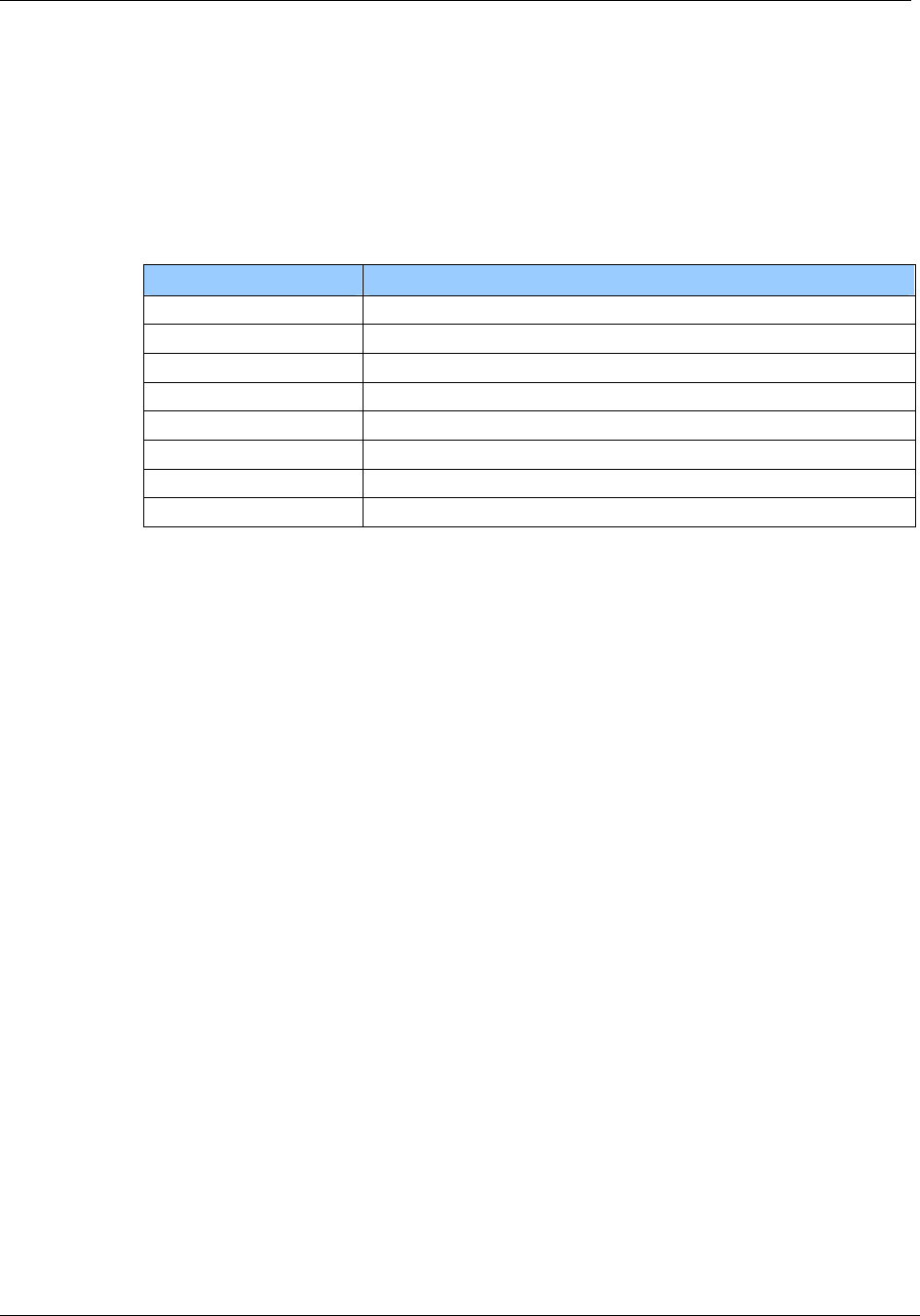
8.3.4.3 Multitag (default 0)
The Multitag flag will enable multi-tag recognition in continuous read mode. All tags are
detected and displayed. Due to the more complex search algorithm, the continuous read
command decreases its detection speed.
8.3.4.4 New Serial Mode (default 0)
If New Serial Mode is set to ‘1’, new serial mode is enabled. A leading character is added to
the serial number.
Leading Character Description
D ICode UID
E ICode EPC
I ICode
J ISO 14443 A Jewel tag
M ISO 14443 A
S SR 176
V ISO 15693
Z ISO 14443 B
8.3.4.5 LED (default 0)
If set the reader suppresses any LED activity. The user manages the state of the LEDs.
8.3.4.6 Single Shot (default 0)
If Single Shot is set, the reader displays the serial number of a tag in continuous read mode
once within a specified time-out. The time-out is defined at EEPROM register 0Fh.
The delay time can be adjusted stepwise in 100ms steps. 00h indicates no delay and FFh
indicates infinite delay.
Note: The delay precision depends on reset off and reset recovery time.
8.3.4.7 Extended Protocol (default 1)
If Extended Protocol is set, the transfer data telegram command supports ISO14443-4 and
automatically process the WTX and chaining for smaller frames.
If sending ISO 14443-3 commands this flag has to be switched off.
The transfer data telegram command is only supported in normal mode, not in transmit /
receive mode.

Page 42 of 125 November 4, 2008
© 2008 HID Global Corporation. All rights reserved.
1508-USM-00-0-02 HF Multi ISO RFID Reader
User Manual, Firmware V1.2
8.3.4.8 Extend ID (default 0)
If set, the reader extends the serial number with additional information.
ISO 14443 A tags
Table 7 ISO 14443 A Extended Serial number of part 3 selection
Tag type / ReqA Serial number [SAK]
1 byte / 2 bytes 4 / 7 / 10 bytes 1 byte
Table 8 ISO 14443 A Extended Serial number of part 4 selection
Tag type / ReqA Serial number [SAK] ATS Used Speed [CID]
1 byte / 2 bytes 4 / 7 / 10 bytes 1 byte n bytes 1 byte 1 byte
The tag type byte indicates the type of cascade level.
Table 9 ISO 14443 A tag type
Tag type Description
00h Cascade level 1 transponder
01h Cascade level 2 transponder
02h Cascade level 3 transponder
ISO 14443 B tags
Table 10 ISO 14443 B Extended Serial number of part 3 selection
Serial number Application data Protocol info MBLI/CID
4 bytes 4 bytes 3 bytes 1 byte
Table 11 ISO 14443 B Extended Serial number of part 4 selection
Serial number Application data Protocol info MBLI / CID Used Speed [CID]
4 bytes 4 bytes 3 bytes 1 byte 1 byte 1 byte
For detailed description of Application Data, Protocol Info and MBLI/CID, refer to the ISO 14443
documentation [1].

November 4, 2008 Page 43 of 125
© 2008 HID Global Corporation. All rights reserved.
HF Multi ISO RFID Reader 1508-USM-00-0-02
User Manual, Firmware V1.2
8.3.5 BAUD, Baud rate control register (0Ch)
The baud rate register defines the communication speed of the reader device.
Default value is 00h.
Table 12 Baud rate register
Baud rate register
Bit 7 Bit 6 Bit 5 Bit 4 Bit 3 Bit 2 Bit 1 Bit 0
RFU RFU RFU RFU RFU BS2 BS1 BS0
This register defines the baud rate of the device.
Table 13 Baud rate settings
BS2 BS1 BS0 Baud rate
0 0 0 9600 baud (default)
0 0 1 19200 baud
0 1 0 38400 baud
0 1 1 57600 baud
1 0 0 115200 baud
1 0 1 230400 baud (depends on the used interface chip)
1 1 0 460800 baud (depends on the used interface chip)
With the high baud rates (230400 and 460800 baud), proper operation depends on the interface
chip used. Please note that some of the interface chips available do not support these high baud
rates.
The following table describes the exact baud rates used by the reader.
Table 14 Exact baud rates
Baud rate Exact baud rate Difference
9600 baud 9603 baud 0.03 %
19200 baud 19207 baud 0.04 %
38400 baud 38305 baud -0.25 %
57600 baud 57458 baud -0.25 %
115200 baud 114915 baud -0.25 %
230400 baud 233793 baud 1.47 %
460800 baud 452000 baud -1.91 %
The following table describes the communication settings

Page 44 of 125 November 4, 2008
© 2008 HID Global Corporation. All rights reserved.
1508-USM-00-0-02 HF Multi ISO RFID Reader
User Manual, Firmware V1.2
Table 15 Communication settings
Description
8 data bits
No parity bit
1 stop bit
No flow control
8.3.5.1 CF Card Version
The Baud rate of the CF Card version is limited to 115200 baud. 230400 and 460800 are
not supported.
8.3.6 Command Guard Time (0Dh)
The Command Guard Time is used to ensure that commands are not sent to fast consecutively.
Following commands are sent after the guard time is elapsed. One time slice is around 37,8us.
The longest timeout value is 9,6ms (FFh).
The default value is 20h (1,2ms).
8.3.7 OPMODE, operating mode register (0Eh)
The operation mode register defines which tag types the reader supports. This register enables
fast tag recognition because only defined tag types are requested.
Table 16 Operation mode register
Operation mode register
Bit 7 (MSB) Bit 6 Bit 5 Bit 4 Bit 3 Bit 2 Bit 1 Bit 0 (LSB)
RFU
ICODE UID
ICODE EPC
ISO 15693
ICODE
SR176
ISO 14443B
ISO 14443A
Innovision Jewel tag
Innovision Jewel tag is part of ISO 14443 Type A. It can not be separately switched on/off.
8.3.8 Single Shot Time-out (0Fh)
The time-out value defines the delay time between two responses of the reader. It only has effect
in continuous read mode. To enable the time-out, the single shot flag has to be set. See the
protocol configuration register above. One time-out slice is around 100ms. Exact timing depends
on the protocol used.
Value 00h indicates no delay time.
Default value is 0Ah (1 second).

November 4, 2008 Page 45 of 125
© 2008 HID Global Corporation. All rights reserved.
HF Multi ISO RFID Reader 1508-USM-00-0-02
User Manual, Firmware V1.2
8.3.9 Protocol configuration 2 (13h)
The protocol configuration register 2 (PCON2) further specifies the general behavior of the reader
device.
Default value is 00h.
Protocol configuration 2 register
Bit 7 Bit 6 Bit 5 Bit 4 Bit 3 Bit 2 Bit 1 Bit 0
Disable
ISO 14443 -
4 Error
Handling
Enable ISO
14443B
Anti-
collision
Reset Recovery
Time Multiplier
Noisy
Environ-
ment
Enable
binary
frame v2
Disable start-
up message
Disable
multi-tag
reset
8.3.9.1 Disable multi-tag reset (default 0)
If set, the reader does not reset before the multi-tag list and multi-select command have
been performed.
8.3.9.2 Disable start-up message (default 0)
If Disable start-up message is set, the reader suppresses the start-up message in ASCII
mode. This flag is ignored in binary protocol mode.
8.3.9.3 Enable binary frame v2 (default 0)
If Enable binary frame v2 is set, the reader sends version 2 binary frames.
The get station ID command always sends version 1 binary frames!
8.3.9.4 Noisy Environment (default 0)
If Noisy Environment is set, the continuous read mode can only be aborted with the '.'
character. When working in a noisy environment, the probability for a reception of an
arbitrary/stochastic signal is quite high. This implies a high probability of an unintentional
command execution. To reduce this probability, only one character (out of 255) is chosen
(‘.’) to be interpreted as the continuous read stop command.
8.3.9.5 Reset Recovery Time Multiplier (default 0)
Multiplies the Reset Recovery Time, including the recovery time of the field reset command.
Reset Recovery Time Multiplier Reset Recovery Time
0 1x
1 2x
2 3x
3 4x
8.3.9.6 Enable ISO14443 B Anti-collision (default 0)
If set, the anti-collision algorithm for ISO 14443 B tags is enabled.
8.3.9.7 Disable ISO 14443-4 Error Handling (default 0)
If Disable ISO 14443-4 Error Handling is set, ISO14443-4 Error Handling is disabled. The
error handling always uses the TMR time-out.

Page 46 of 125 November 4, 2008
© 2008 HID Global Corporation. All rights reserved.
1508-USM-00-0-02 HF Multi ISO RFID Reader
User Manual, Firmware V1.2
8.3.10 Reset Off Time (14h)
The Reset Off Time register represents the field off time in ms.
This register is used for the select, continuous read and multi-tag commands.
Default value is 0Ah.
8.3.11 Reset Recovery Time (15h)
The Reset Recovery Time register represents the recovery time in ms after the field is
turned on.
This register is used for the select, continuous read and multi-tag commands.
Default value is 25h.
8.3.12 Application Family Identifier (16h)
The AFI (Application Family Identifier) is only supported for ISO14443B and ISO15693
tags. If the set value is different from 00h, the AFI is used. Only transponders with an
identical AFI will answer to the reader.
Default value is 00h.
8.3.13 Selection Time-out ISO 14443A (17h)
The Selection Time-out represents the reader card communication time-out for the select,
high-speed select, continuous read, multilist, multi-select and MIFARE® login command
with ISO 14443A tags. Use low values for a better reaction time between the card and the
reader. One time slice is around 300us.
The default value is 10h.
8.3.14 Selection Time-out ISO 14443B (18h)
The Selection Time-out represents the reader card communication time-out for the select,
high-speed select, continuous read, multilist and multi-select commands with ISO 14443B
tags. For a better reaction time, use low values. One time slice is around 300µs.
The default value is 10h.
8.3.15 Selection Time-out SR176 (19h)
The Selection Time-out represents the reader card communication time-out for the select,
continuous read, multilist and multi-select command with SR176 tags. For a better reaction
time, use low values. One time slice is around 300µs.
The default value is 10h.
8.3.16 Selection Time-out ISO 15693 (1Ah)
The Selection Time-out represents the reader card communication time-out for the select,
high-speed select, continuous read, multilist, multi-select and MIFARE® login command
with ISO 15693 tags. Use low values for a better reaction time between the card and the
reader. One time slice is around 300us.
The default value is 20h.

November 4, 2008 Page 47 of 125
© 2008 HID Global Corporation. All rights reserved.
HF Multi ISO RFID Reader 1508-USM-00-0-02
User Manual, Firmware V1.2
8.3.17 Protocol configuration 3 (1Bh)
The protocol configuration register 3 (PCON3) further specifies the general behavior of the
reader device.
Default value is 00h.
Table 17 Protocol configuration register
Protocol configuration 3 register
Bit 7 Bit 6 Bit 5 Bit 4 Bit 3 Bit 2 Bit 1 Bit 0
SAK Extended
ID
ReqA
Extended ID
Internal use / do not
change
Page
Read RFU
Disable automatic
ISO 14443-4
timeouts
8.3.17.1 Disable automatic ISO 14443-4 timeouts (default 0)
If Disable automatic ISO 14443-4 timeouts is set the automatic ISO 14443-4 timeouts are
disabled. The timeouts specified with TMR registers are used.
8.3.17.2 Page read (default 0)
If set the continuous read mode retrieves the content of the tag instead of the serial
number. The register Page Start (1Ch) defines the start block and the Page Number (1Fh)
defines the number of blocks to be read.
8.3.17.3 ReqA Extended ID (default 0)
If set the Extended ID information for ISO14443 A tags replaces the cascade level
information (1 byte) with Request A answer (2 bytes).
8.3.17.4 SAK Extended ID (default 0)
If set the Extended ID information for ISO 14443 A tags will include the SAK byte behind
the serial number.
8.3.18 Protocol configuration 4 (20h)
The protocol configuration register (PCON4) specifies general behavior of the reader
device.
Default value is 00h.
Table 18 Protocol configuration register
Protocol configuration register
Bit 7 Bit 6 Bit 5 Bit 4 Bit 3 Bit 2 Bit 1 Bit 0
RFU RFU RFU RFU
Internal
use / do
not change
CID
Extended
ID
WupA/B
Disable
Read after
Write
8.3.18.1 Disable Read after Write (default 0)
If set, the reader device will not make a read after write for the block write commands "w",
"wb", "wd" and "wv".
If the read after write is deactivated, acknowledge from the write commands is a 00h byte
instead of the written data.

Page 48 of 125 November 4, 2008
© 2008 HID Global Corporation. All rights reserved.
1508-USM-00-0-02 HF Multi ISO RFID Reader
User Manual, Firmware V1.2
8.3.18.2 WupA/B (default 0)
If set, the reader device will use WupA/B instead of ReqA/B during selection of an ISO
14443 tag. Supported commands are select, high-speed select and multi-select.
8.3.18.3 CID Extended ID (default 0)
If set, the extended ID information for ISO 14443 A/B tags will be extended with the CID
information only for the high-speed select. The CID byte will be appended on the end of the
output.
8.3.19 CID (21h)
The Card Identifier (CID) is used to activate multiple ISO 14443-4 cards at the same time. If
only one tag at the same time is used this value should be left 0.
Default value is 00h.
8.3.20 User data (80h - EFh)
These registers are for free use.
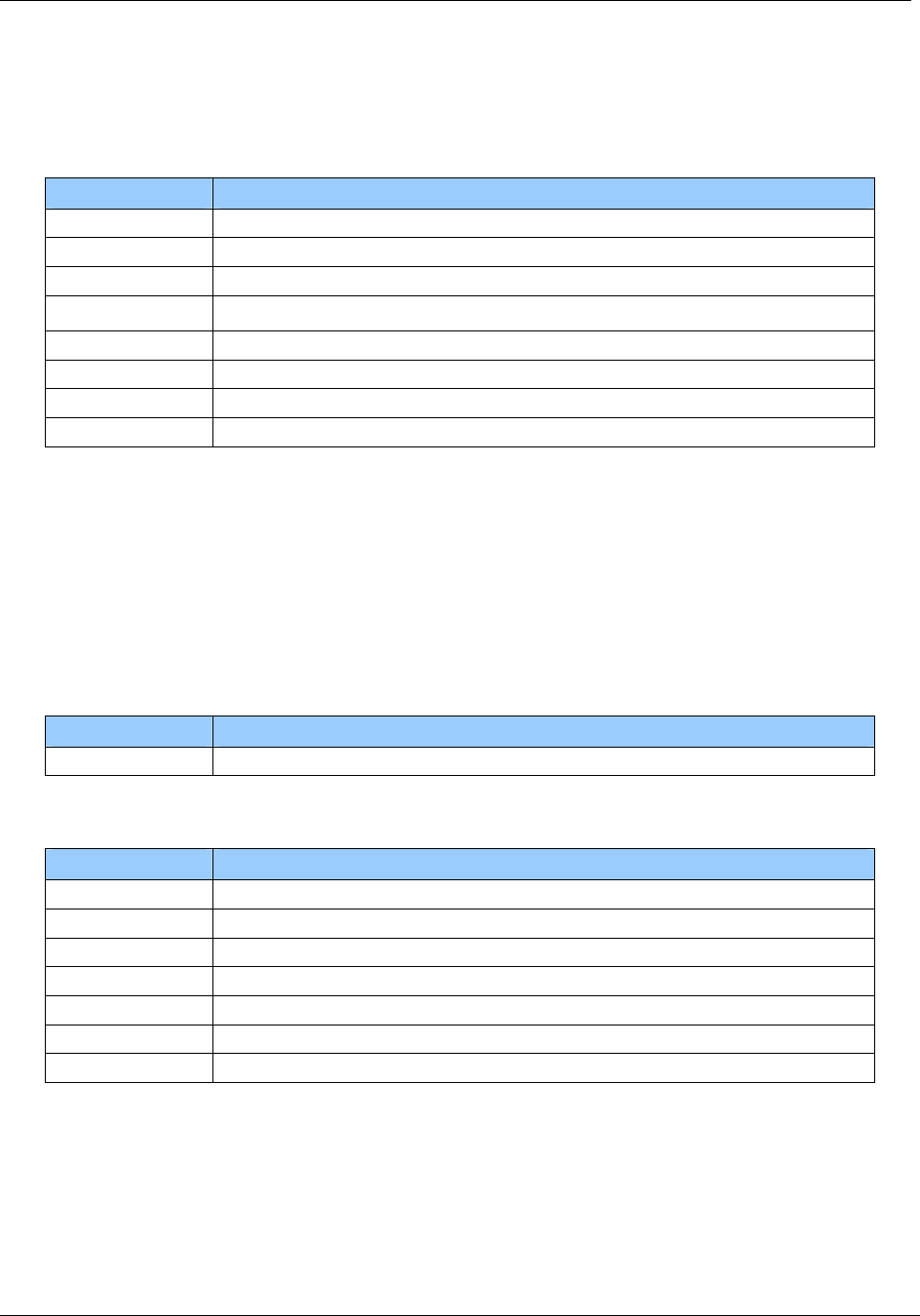
8.3.21 Instruction Set
Following table describes all the commands of the reader device. Each command returns
an answer to the host. Exceptions are mentioned explicitly. The green LED acknowledges a
successfully executed command. The red LED indicates an error.
8.3.22 Common Commands Overview
Table 19 Command overview
Command Description
'!' Test continuous read / Check KTT upload status
'c' Continuous read
'.' Abort continuous read, refer to continuous read
'dg' / 'dn' / 'dr' Set LED
'ds' DES encryption / decryption of data
'g' Get ID
'h' High-speed select
'k' Lock block
'm' MultiTag select / tag list
'o+a' / 'o+b' / 'o+d' / 'o+e' /
'o+i' / 'o+s' / 'o+v'
Include tag type
'o-a' / 'o-b' / 'o-d' /
'o-e' / 'o-i' / 'o-s' /
'o-v'
Exclude tag type
'oa' / 'ob' / 'od' / 'oe' / 'oi' / 'ot'
/ 'os' / 'ov'
Set tag type
'of' Set configuration flags
'og' Set configuration register
'ox' Reread all register
'poff' / 'pon' Antenna power off/on

November 4, 2008 Page 49 of 125
© 2008 HID Global Corporation. All rights reserved.
HF Multi ISO RFID Reader 1508-USM-00-0-02
User Manual, Firmware V1.2
Command Description
'pr' / 'pw' Read / write user port
'q' Quiet
'ra' Resend last answer
'r' / 'rb' Read block
'rd' Read data (multiple blocks)
'rp' Read EEPROM register
's' Select
'v' Get version
'w' / 'wb' Write block
'wd' Write data (multiple blocks)
'wp' Write EEPROM register
'x' Reset
'y' Field reset
ISO 14443 Type A (MIFARE®) only commands
'+' Increment value block (credit)
'-' Decrement value block (debit)
'=' Copy value block (backup)
'l' Login (authenticate tag)
'rv' Read value block
'wv' Write value block
Key Management
'ar' Authenticate to reader
'ia' Get key access rights
'it' Get key status
'rt' Reset key table
'ua' Update key access rights
'uc' Change key type
'uk' Update key
my-d™ secure commands
'!' Check KTT upload status / Test continuous read
'*' Abort KTT upload
'as' Authenticate to sector
'ik' Issue transponder key
'ut' Prepare for KTT
'z' my-d™ command
Page 50 of 125 November 4, 2008
© 2008 HID Global Corporation. All rights reserved.
1508-USM-00-0-02 HF Multi ISO RFID Reader
User Manual, Firmware V1.2
8.3.23 Error Codes
Following figure shows an overview of all error messages of the reader device.
Table 20 Error codes
Error Code Description
‘?’ Unknown command
'C' Collision or CRC/MAC Error
‘F’ General failure
‘I’ Invalid value format, specified block does not match the value format
‘N’ No tag in the field
'O' Operation mode failure or file not selected
‘R’ Command parameter out of range
'X' Authentication failed
8.3.24 Common commands
8.3.24.1 Test Continuous Read / Check KTT Upload Status
This command tests the state of the continuous read command and the state of the
Prepare for KTT 'ut' command.
The test continuous read command is only valid in ASCII mode.
Command
Command Data
'!' None
Answer
Answer Description
'!' Continuous read mode is active.
00h Keys from KTT successfully uploaded
01h Error during key upload detected, upload aborted
02h No KTT found, other tag was detected
FFh Prepare for KTT is in awareness mode
'F' Continuous read and Prepare for KTT is not active.
no response Key uploading is in progress
November 4, 2008 Page 51 of 125
© 2008 HID Global Corporation. All rights reserved.
HF Multi ISO RFID Reader 1508-USM-00-0-02
User Manual, Firmware V1.2
8.3.24.2 Continuous Read
The reader device reads and displays serial numbers continuously while one or more tags
remain in the field. This command stops if any character is sent to the reader module. The
reader module returns the character ‘S’ (53h).
The reader supports different tag types at the same time. To increase the reading
performance switch to a single tag mode. If more than one tag of the same type should be
detected at the same time, the Multitag flag must be activated. The response data length
depends on the tag type.
Command
Command Data
'c' None
Answer
Answer Description
Data Serial number (n bytes)
'N' Error: No Tag in the field (only binary protocol)
8.3.24.2.1 Multitag continuous read mode
If the Multitag flag is set in the Protocol Configuration (PCON) register the reader reads
multiple tags continuously.
8.3.24.2.2 Auto start
The continuous read mode is started automatically in ASCII mode. The auto start flag must
be set in the PCON register.
8.3.24.2.3 Noisy Environment
If the Noisy Environment flag is set, the continuous read mode can only be aborted with the
'.' character.
This is only valid in ASCII mode.
8.3.24.2.4 Binary mode
This command is fully supported in binary protocol mode except the test continuous read
command and the noisy environment flag.
Do not use this command on bus system environment in binary mode, because the
continuous read mode will take possession of the bus system.

Page 52 of 125 November 4, 2008
© 2008 HID Global Corporation. All rights reserved.
1508-USM-00-0-02 HF Multi ISO RFID Reader
User Manual, Firmware V1.2
8.3.24.2.5 Simple access control applications
Serial numbers are always sent plain. Data encryption is activated after a successful login.
For simple access control applications the use read-only blocks for the identification of the
tag is recommended.
Reading any block (even the manufacturer block) of the transponder will increase your
security.
8.3.24.2.6 LED activity
The LED stays green as long as a tag was found and goes dark if the tag is removed from
the field.
8.3.24.3 Set LED
This command controls the LED activity. If the LED flag is set, the automatic LED function
is switched off. The user can set the state of the LED manually.
Command
Command Data
'dg' None
'dr' None
'dn' None
Answer
Answer Description
'DG'
'DR'
'DN'
String of LED state
Example
Command Answer Description
'dg' DG Switch on LED green, LED red off
'dr' DR Switch on LED red, LED green off
'dn' DN Switch off both LEDs
November 4, 2008 Page 53 of 125
© 2008 HID Global Corporation. All rights reserved.
HF Multi ISO RFID Reader 1508-USM-00-0-02
User Manual, Firmware V1.2
8.3.24.4 DES encryption / decryption of data
This command returns 8 bytes of encrypted / decrypted data.
Command
Command Data
'ds' Options (1 byte)
Key (8/16 bytes) / Key Number (1 byte)
Data (8 byte)
Answer
Answer Description
Data Encrypted / Decrypted data (8 bytes)
Option byte
Option byte
Bit 7 Bit 6 Bit 5 Bit 4 Bit 3 Bit 2 Bit 1 Bit 0
RFU RFU RFU RFU RFU Encode Key Length Key Index
Key Index
If the Key Index is set, the command only needs the key number (1 byte) instead of the key
(8/16 bytes).
The key number corresponds to the key number used in the key management.
Key Length
If the Key Length is set, the command uses the TDES algorithm with 16-byte key.
If cleared, the command uses the DES algorithm with 8-byte key.
If key index is used the key length flag is valid.
Encode
Setting this flag encodes the data.
Clearing this flag decodes the data.

Page 54 of 125 November 4, 2008
© 2008 HID Global Corporation. All rights reserved.
1508-USM-00-0-02 HF Multi ISO RFID Reader
User Manual, Firmware V1.2
8.3.24.5 Get ID
This command returns the station ID of the reader device. The answer is time slotted to
enable the detection of all devices in party line mode.
The station ID has only effect in binary mode.
Command
Command Data
'g' None
Answer
Answer Description
Data Station ID of the reader device (1 byte)
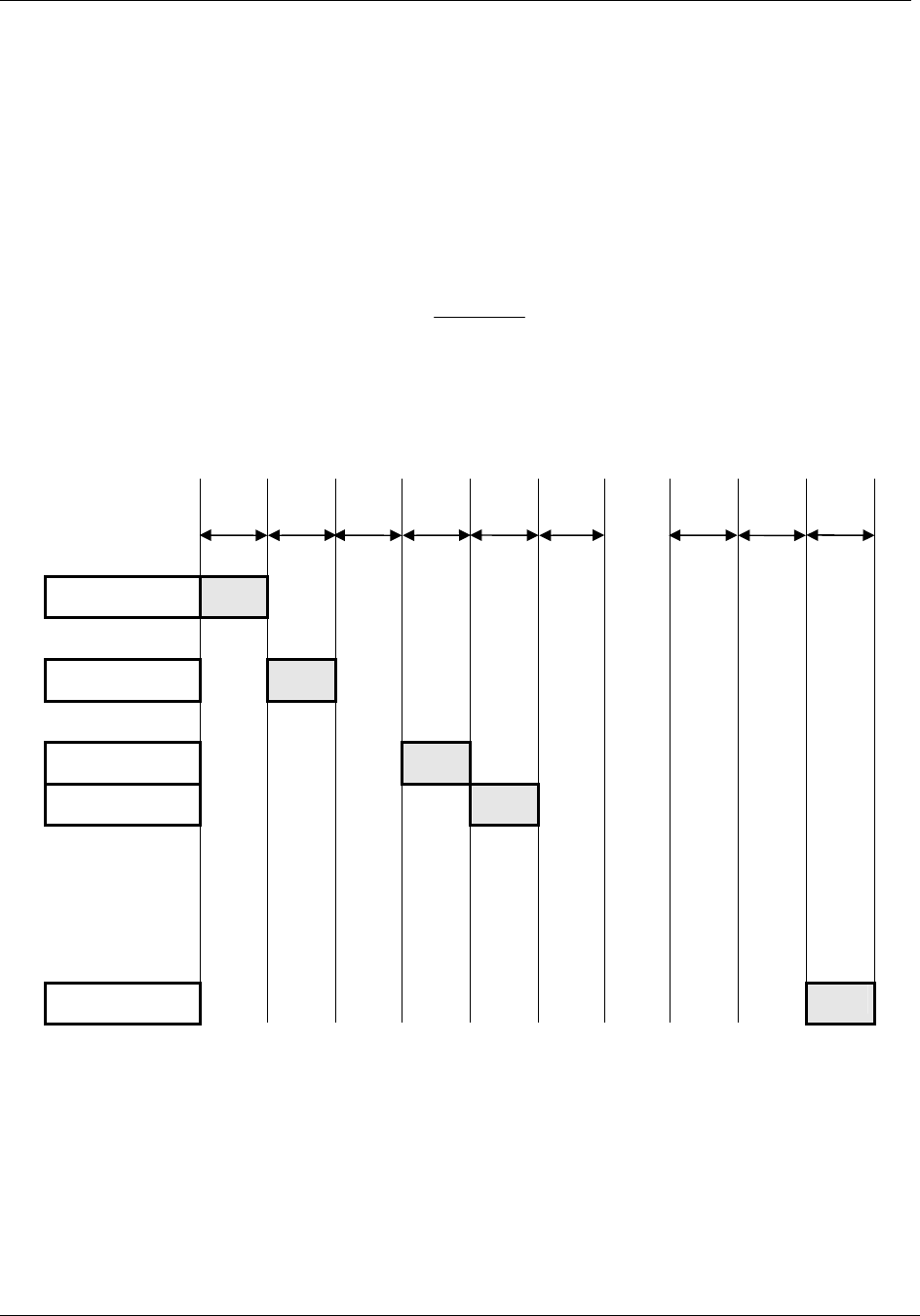
November 4, 2008 Page 55 of 125
© 2008 HID Global Corporation. All rights reserved.
HF Multi ISO RFID Reader 1508-USM-00-0-02
User Manual, Firmware V1.2
8.3.24.5.1 Time slotted answer
In party line mode, more than one reader can be used simultaneously. The time slotted
answer allows separating in time the answers from all connected devices. The station ID is
used to determine the correct time slot.
The reader supports up to 254 unique time slots. The following formula calculates the
duration of one time slot (only one baud rate is supported per party line):
6*
10
][
0Baudrate
sT =
Figure 7 Time slot formula
The following figure shows the timing diagram of time slotted answers.
Timeslot 0 1 2 3 4 5 … 252 253 254
T
0 T1 T2 T3 T4 T
5 T
252 T
253 T
254
HOST 'g' →
Reader (01) ← 01
Reader (03) ← 03
Reader (04) ← 04
Reader (254) ← 254
Figure 8 Time slotted answers diagram

Page 56 of 125 November 4, 2008
© 2008 HID Global Corporation. All rights reserved.
1508-USM-00-0-02 HF Multi ISO RFID Reader
User Manual, Firmware V1.2
8.3.24.5.2 Binary Protocol Version 2
This command never sends version 2 binary frames.
8.3.24.6 High-speed select
This command selects a card in the antenna field (according to the selection criteria) or
prepares a multi-select command, switches to high baud rates and enables 256-byte
frames. If execution is successful, the command returns the UID of the selected card and
the used baud rate. The reader automatically detects the maximum frame size of the card.
The reader also tries to communicate to the transponder with the specified baud rate. If no
communication is possible, the reader will automatically decrease the speed to the next
lower value.
In synchronous mode the up and downlink speed are identical.
In asynchronous mode the up and downlink speed can be different.
This command can also force the reader to the communication speed and frame size of the
tag to the specified values. This is only needed if the high-speed select is done manually
with the transfer command.
Command
Command Data
‘h’ Option byte (1 byte)
synchronous mode
00h … select a single card with 106kBaud
02h … select a single card with 212kBaud
04h … select a single card with 424kBaud
08h … select a single card with 848kBaud
10h … prepare next multi-select for 106kbaud
12h … prepare next multi-select for 212kbaud
14h … prepare next multi-select for 424kbaud
18h … prepare next multi-select for 848kbaud
20h … forces reader to 106kBaud
22h … forces reader to 212kBaud
24h … forces reader to 424kBaud
28h … forces reader to 848kBaud
tag size
30h – 38h … force tag frame size
asynchronous mode
80h … select a single card with 106kBaud
82h … select a single card with 212kBaud
84h … select a single card with 424kBaud
88h … select a single card with 848kBaud
90h … prepare next multi-select for 106kbaud
92h … prepare next multi-select for 212kbaud
94h … prepare next multi-select for 424kbaud
98h … prepare next multi-select for 848kbaud

November 4, 2008 Page 57 of 125
© 2008 HID Global Corporation. All rights reserved.
HF Multi ISO RFID Reader 1508-USM-00-0-02
User Manual, Firmware V1.2
Command Data
A0h … forces reader to 106kBaud from tag to reader
A2h … forces reader to 212kBaud from tag to reader
A4h … forces reader to 424kBaud from tag to reader
A8h … forces reader to 848kBaud from tag to reader
B0h … forces reader to 106kBaud from reader to tag
B2h … forces reader to 212kBaud from reader to tag
B4h … forces reader to 424kBaud from reader to tag
B8h … forces reader to 848kBaud from reader to tag
Answer
Answer Description
Data (n bytes) +
frame size and
baud rate (1byte)
Serial number + frame size used and baud rate
'F' Error: General failure
‘N’ Error: No Tag in the field
Note: If the tag does not support ISO 14443 part 4 F0h will return after serial number instead of
used frame size/baud rate.
Examples
High-speed select
Command Description
h08 1234567890ABCD84
Select the card with UID 1234567890SABCD.
The card supports a 256-byte frame size and 424kBaud on the air interface.
High-speed multi-select
Command Description
h18
m1234567890ABCD<CR>
Prepare next multi-select for 848kBd
1234567890ABCD84
Select the card with UID 1234567890SABCD.
The card supports a 256-byte frame size and 424kBaud on the air
interface.

Page 58 of 125 November 4, 2008
© 2008 HID Global Corporation. All rights reserved.
1508-USM-00-0-02 HF Multi ISO RFID Reader
User Manual, Firmware V1.2
8.3.24.6.1 Answer from 0xh and 1xh
The lower nibble contains the baud rate used for the air interface.
Table 21 High Speed
Baud Rate Description
x0 106kBaud
x2 212kBaud
x4 424kBaud
x8 848kBaud
The higher nibble contains the frame size used for the air interface.
Table 22 Frame Size
Frame Size Description
0x 16 Bytes
1x 24 Bytes
2x 32 Bytes
3x 40 Bytes
4x 48 Bytes
5x 64 Bytes
6x 96 Bytes
7x 128 Bytes
8x 256 Bytes

November 4, 2008 Page 59 of 125
© 2008 HID Global Corporation. All rights reserved.
HF Multi ISO RFID Reader 1508-USM-00-0-02
User Manual, Firmware V1.2
8.3.24.6.2 Answer from 8xh
The lower nibble contains the baud rate used for the air interface.
The value for the baud rate is XORed with the used up and downlink speed.
Table 23 Baud Rate values
Baud Rate Description
x1 106kBaud
x2 212kBaud
x4 424kBaud
x8 848kBaud
The higher nibble contains the frame size used for the air interface.
Table 24 Frame Size
Frame Size Description
0x 16 Bytes
1x 24 Bytes
2x 32 Bytes
3x 40 Bytes
4x 48 Bytes
5x 64 Bytes
6x 96 Bytes
7x 128 Bytes
8x 256 Bytes
8.3.24.6.3 Answer from 2xh, 3xh, 9xh, Axh and Bxh
The option byte is returned as the answer.
8.3.24.6.4 Select a single tag
No previous continuous read is required. The command executes an automatic field reset.
8.3.24.6.5 Extended ID
See above for more information on Extended ID.
The RATS answer is inserted between the serial number and baud rate / frame size byte for
ISO14443 A tags.
8.3.24.6.6 Multiple tags
This command with parameter 1xh prepares the next multi-select command as a high-
speed select. Any other command will disable the preparation.
Page 60 of 125 November 4, 2008
© 2008 HID Global Corporation. All rights reserved.
1508-USM-00-0-02 HF Multi ISO RFID Reader
User Manual, Firmware V1.2
8.3.24.6.7 RATS Guard Time SFGT
A high-speed select with parameters 0xh and 1xh automatically waits the SFGT guard time
received from the tag before sending the PPS command.
8.3.24.7 Lock block
This command locks a block permanently. Only SR176 and ISO 15693 tags are supported.
Command
Command Data
'k' Block address (1 byte)
Answer
Answer Description
data 'K' + page address
'F' Error: Lock failure
'N' Error: No tag in field
'O' Error: Operation mode failure (only SR176 and ISO 15693 tags are supported)
'X' Error: Block already locked
Example
Command Description
k05 K05
Lock block 05.
8.3.24.7.1 Operation mode failure 'O'
The presented tag is not a SR176 or a ISO 15693 tag.
8.3.24.7.2 Apply settings
After locking a block permanently, the tag needs to be selected for the settings to apply.

November 4, 2008 Page 61 of 125
© 2008 HID Global Corporation. All rights reserved.
HF Multi ISO RFID Reader 1508-USM-00-0-02
User Manual, Firmware V1.2
8.3.24.8 Multi-Tag Selection / List
This command detects several tags at the same time. It replaces the fast select command
('s') in multiple tag surroundings. The Multi-Tag List command lists all tags with their serial
numbers. Use the Multi-Tag Select command to select a single tag. Each tag has to be
selected separately.
Command
Command Data
'm' Serial number (n bytes)
<CR> (1 byte)
Answer
Answer Description
Data serial number
'N' Error: No Tag in the field
Example
Command Description
m<CR> 04E9E700000000 Æ first card
34030F07 Æ second card
02 Æ number of detected tags
m04E9E700000000<CR> Select card with its serial number
8.3.24.8.1 Multi-tag list
Sending a <CR> as the first parameter, the reader returns a list of all tags present in the
antenna field. In the end the total number of tags detected is returned.
8.3.24.8.2 Reading distance
Each card needs a specific amount of power. The reader always provides the same power
level. Therefore, the reading distance will decrease if more tags are present. Basically, the
reading distance depends on the tag, the antenna and the tuning of the antenna.
8.3.24.8.3 Multi-tag select
Using the serial number with <CR> as parameter, the corresponding tag will be selected.
High-level interactions can be performed addressing only this card. All other tags remain
silent.
8.3.24.8.4 Multi-tag reset
The antenna field reset can be deactivated with the Protocol configuration 2 register.
By suppressing the antenna field reset, it is possible to detect only new tags in the antenna
field.
Attention: It could be possible that ISO 15693 tags are interfered from ISO14443 type
B and SR 176 tags. In this case the ISO 15693 tag will always answers on a multi list
command even there had been no field reset before. In this case, deactivate ISO
14443 B and SR 176 tags.

Page 62 of 125 November 4, 2008
© 2008 HID Global Corporation. All rights reserved.
1508-USM-00-0-02 HF Multi ISO RFID Reader
User Manual, Firmware V1.2
8.3.24.8.5 Maximum number of tags
The maximum number of tags in the antenna field is limited to 64 and by the physical
characteristics of the antenna.
8.3.24.8.6 LED activity
The LED stays green as long as a tag was found and goes dark if the command is finished.
8.3.24.9 Include tag type
This command includes a specific tag type to those addressed by the reader device.
Command
Command Data
‘o+’ Tag type (1 byte)
Answer
Answer Description
'O+' + tag type (1 byte) Command code + String of tag type
Tag type character
Refer to Set tag type.
Example
Command Description
o+a Include ISO14443-A to the tag types addressed by the reader
device.

November 4, 2008 Page 63 of 125
© 2008 HID Global Corporation. All rights reserved.
HF Multi ISO RFID Reader 1508-USM-00-0-02
User Manual, Firmware V1.2
8.3.24.10 Exclude tag type
This command excludes a specific tag type from being addressed by the reader device.
Command
Command Data
‘o-’ Tag type (1 byte)
Answer
Answer Description
'O-' + tag type (1 byte) Command code + String of tag type
Tag type character
Refer to Set tag type.
Example
Command Description
o-a Exclude ISO14443-A from the tag types addressed by the
reader device.

Page 64 of 125 November 4, 2008
© 2008 HID Global Corporation. All rights reserved.
1508-USM-00-0-02 HF Multi ISO RFID Reader
User Manual, Firmware V1.2
8.3.24.11 Set tag type
This command sets up the reader for a specific tag type. The continuous read function will
speed up because only this type of tag is addressed. After a reset, the reader starts as
defined in its start-up configuration.
Command
Command Data
'o' ISO type (1 byte)
'a' … ISO 14443 Type A
'b' … ISO 14443 Type B
'd' … ICODE UID
'e' … ICODE EPC
'i' … ICODE
's' … SR176
't' … activate all tags
'v' ... ISO 15693
Answer
Answer Description
'OA'
'OB'
'OD'
'OE'
'OI'
'OS'
'OT'
'OV'
String of tag type
Example
Command Description
oa Sets the reader device to address ISO14443-A type tags.
Innovision Jewel tag
Innovision Jewel tag is part of ISO 14443 Type A. It can not be separately switched on/off.

November 4, 2008 Page 65 of 125
© 2008 HID Global Corporation. All rights reserved.
HF Multi ISO RFID Reader 1508-USM-00-0-02
User Manual, Firmware V1.2
8.3.24.12 Set Configuration Flags
This command allows setting some configuration flags just in time; no reset is needed. The
values are not stored in the EEPROM; therefore, the changed values are not available after
a reset.
Command
Command Data
of flag type (1 byte)
data (1 byte)
Answer
Answer Description
Data (1 byte) Current state of changed flag.
'R' Error: Out of range
Example
Command Description
of0101 Answer: 01
Enables the New Serial Mode flag.

Page 66 of 125 November 4, 2008
© 2008 HID Global Corporation. All rights reserved.
1508-USM-00-0-02 HF Multi ISO RFID Reader
User Manual, Firmware V1.2
Flag Types
The following table shows the Flag Type with its corresponding flag from the specified
Protocol Configuration Register.
Table 25 Flag Type with corresponding flag
Flag Type Corresponding Flag Protocol Configuration
Register
Valid
values
00h Multitag 1 00 / 01
01h New Serial Mode 1 00 / 01
02h LED 1 00 / 01
03h Single Shot 1 00 / 01
04h Extended Protocol 1 00 / 01
05h Extended ID 1 00 / 01
06h Disable Multitag Reset 2 00 / 01
07h Noisy Environment 2 00 / 01
08h Reset Recovery Time Multiplier 2 00 … 03
09h Enable ISO14443 B Anti-collision 2 00 / 01
0Ah Disable ISO14443-4 Error Handling 2 00 / 01
0Bh Disable automatic
ISO14443-4 timeouts
3 00 / 01
0Dh Page Read 3 00 / 01
11h ReqA Extended ID 3 00 / 01
12h Disable Read after Write 4 00 / 01
13h SAK Extended ID 3 00 / 01
14h WupA/B 4 00 / 01
15h CID Extended ID 4 00 / 01
16h Internal use / Do not change
8.3.24.12.1 Out of range failure 'R'
The entered flag type is out of range.

November 4, 2008 Page 67 of 125
© 2008 HID Global Corporation. All rights reserved.
HF Multi ISO RFID Reader 1508-USM-00-0-02
User Manual, Firmware V1.2
8.3.24.13 Set Configuration Register
This command allows setting some configuration registers just in time; no reset is needed.
The values are not stored in the EEPROM; therefore the changed values are not available
after a reset.
Command
Command Data
og Register type (1 byte)
data (1 byte)
Answer
Answer Description
Data (1 byte) Current state of changed register.
'R' Error: Out of range
Example
Command Description
og0450 Answer: 50
Sets the Reset Recovery Time to 50h.
Register Types
The following table shows the Register Type with its corresponding register.
Table 26 Register Type with corresponding register
Register Type Corresponding Register
00h Single shot time-out value
01h Internal use / Do not change
02h Internal use / Do not change
03h Reset Off Time
04h Reset Recovery Time
05h ISO 14443A Selection Time-out
06h ISO 14443B Selection Time-out
07h SR176 Selection Time-out
08h AFI
0Ch Page Read Start
0Dh Page Read Number
0Eh Command Guard Time
0Fh CID
10h Internal use / Do not change

Page 68 of 125 November 4, 2008
© 2008 HID Global Corporation. All rights reserved.
1508-USM-00-0-02 HF Multi ISO RFID Reader
User Manual, Firmware V1.2
8.3.24.13.1 Out of range failure 'R'
The entered register type is out of range.
8.3.24.14 Reread all register
This command rereads and applies all register settings.
Command
Command Data
ox none
Answer
Answer Description
Data (3 bytes) 'X' + new protocol + new baud rate
Example
Command Description
ox Answer: X0106
binary protocol and 460800 baud active
New protocol
00h means ASCII and 01h means binary protocol.
New baud rate
Values of 00h-06h are valid. For baud rate values refer to baud rate register.

November 4, 2008 Page 69 of 125
© 2008 HID Global Corporation. All rights reserved.
HF Multi ISO RFID Reader 1508-USM-00-0-02
User Manual, Firmware V1.2
8.3.24.15 Antenna power on/off
This command controls the antenna power. It can be used to decrease the power
consumption of the reader.
Command
Command Data
'pon' Switch reader on
'poff' Put reader in standby mode
Answer
Answer Description
'P' Positive acknowledge
Example
Command Description
poff Put reader in standby mode
8.3.24.15.1 Power off
The reader enters standby mode. Power consumption is decreased. All tags in the antenna
field are powered off and reset. Standby mode is only entered manually.
To switch off the whole unit, pin 16 (Enable) has to be set to logic low.
8.3.24.15.2 Power on
The reader leaves standby mode and is ready for the next command. Sending a tag
command (i.e. select, continuous read) the reader is powered up.
Page 70 of 125 November 4, 2008
© 2008 HID Global Corporation. All rights reserved.
1508-USM-00-0-02 HF Multi ISO RFID Reader
User Manual, Firmware V1.2
8.3.24.16 Read/Write user port
This command sets or reads the state of the user port (pin 14) of the OEM reader device.
The port is set either as output or as input.
Command
Command Data
'pr' None
'pw' State of user port (1 Byte)
Answer
Answer Description
Data State of user port (1 Byte)
'C' Error: Error correction fails
'F' Error: Transmission Error / No answer received
Example
Command Description
pr Reads user port
pw01 Sets user port state to high
8.3.24.16.1 Read port
The port read command returns the current state of the USER port.
Table 27 Read USER port return values
Port state Description
00h USER port is low
01h USER port is high

November 4, 2008 Page 71 of 125
© 2008 HID Global Corporation. All rights reserved.
HF Multi ISO RFID Reader 1508-USM-00-0-02
User Manual, Firmware V1.2
8.3.24.16.2 Write port
If user port is used as an output, a 1kΩ resistor has to be integrated into the wire. Otherwise
the reader device can be damaged.
Table 28 Write User port settings
Port state Description
00h Sets USER port to low
01h Sets USER port to high
02h – 7Fh RFU
80h - FFh Sends a serial data frame and checks the received frame
Sending a Data Frame
If the highest bit (MSB) is set in the State of the User Port, the command sends a serial
data frame out the USER port.
The frame includes a start bit, 8 data bits, parity bit and a stop bit.
Table 29 Sending Serial Data Frame
Transmit
Frame
Description
Low Start bit
Low RFU
Data Bit 6 State of the User Port Bit 6
Data Bit 5 State of the User Port Bit 5
Data Bit 4 State of the User Port Bit 4
Data Bit 3 State of the User Port Bit 3
Data Bit 2 State of the User Port Bit 2
Data Bit 1 State of the User Port Bit 1
Data Bit 0 State of the User Port Bit 0
Parity Bit Even Parity Bit
High Stop Bit
Page 72 of 125 November 4, 2008
© 2008 HID Global Corporation. All rights reserved.
1508-USM-00-0-02 HF Multi ISO RFID Reader
User Manual, Firmware V1.2
After 2ms Guard Time the answer should be received on the User Port otherwise an error is
returned.
Table 30 Receiving Serial Data Frame
Receive
Frame
Description
Low Start bit
Error Bit If set, an error was detected.
Data Bit 6 State of the User Port Bit 6
Data Bit 5 State of the User Port Bit 5
Data Bit 4 State of the User Port Bit 4
Data Bit 3 State of the User Port Bit 3
Data Bit 2 State of the User Port Bit 2
Data Bit 1 State of the User Port Bit 1
Data Bit 0 State of the User Port Bit 0
Parity Bit Even Parity Bit
High Stop Bit
If the Error bit is set or the Parity Bit is not correct, the Write User Port command returns an
error code.
8.3.24.17 Quiet
This command sets a selected tag into halt state. Only ISO14443 A+B and SR176 tags are
supported.
Command
Command Data
'q' None
Answer
Answer Description
'Q' Halt state successfully set.
'N' Error: No Tag in the field
8.3.24.17.1 ISO 14443 Type A
With ISO14443-3 Type A tags, the Quiet command always answers with 'Q' because the
halt command does not send any acknowledge.
In Part 4 a 'Deselect' command will be performed.
8.3.24.17.2 ISO 14443 Type B
Some ISO14443 Type B tags do not support this command or do not respond. ‘Quiet’ is an
ISO 14443-4 command, so it will work only if the ‘Deselect’ command is supported by the
corresponding transponder.

November 4, 2008 Page 73 of 125
© 2008 HID Global Corporation. All rights reserved.
HF Multi ISO RFID Reader 1508-USM-00-0-02
User Manual, Firmware V1.2
8.3.24.17.3 SR176
With SR176 tags the Quiet command always answer with 'Q' because the completion
command does not send any acknowledge.
8.3.24.18 Resend Last Answer
This command resends the last answer from the internal serial buffer of the reader.
Command
Command Data
'ra' Resend last answer
8.3.24.19 Read block
This command reads a data block on a card. The size of the returned data depends on the
tag used. The block address range depends on the tag as well.
Command
Command Data
'r' Block address (1 byte), valid range 00h – 40h
'rb' Block address (1 byte)
Answer
Answer Description
Data data block (depends on tag type)
'F' Error: read failure
'N' Error: No tag in field
'O' Error: Operation mode failure
'R' Error: Out of range
Example
Command Description
rb05 Reads block 05.
8.3.24.19.1 Read failure 'F'
This error is returned if either the reader receives bad data or the block address exceeds
the block address range of the sector.
8.3.24.19.2 No tag in field 'N'
The tag does not respond. There is either no tag present or addressed.

Page 74 of 125 November 4, 2008
© 2008 HID Global Corporation. All rights reserved.
1508-USM-00-0-02 HF Multi ISO RFID Reader
User Manual, Firmware V1.2
8.3.24.19.3 Operation mode failure 'O'
The presented tag is not ISO14443 type A, SR 176, ICode, ICode-UID and ISO 15693
compliant.
For ISO 14443 type A only MIFARE® tags are supported.
8.3.24.19.4 Out of range failure 'R'
The block address of the 'r' command is higher than 40h.
The block address of the 'r' command conflicts with other commands, therefore the block
address has to be limited to 40h.
Use the 'rb' command instead.
8.3.24.20 Read data (multiple blocks)
This command reads multiple data blocks on a card. The size of the returned data depends
on the tag used. The block address range depends on the tag as well.
Command
Command Data
'rd' Start block address (1 byte)
Number of blocks to read (1 byte)
Answer
Answer Description
Data data block (depends on tag type)
'F' Error: read failure
'N' Error: No tag in field
'O' Error: Operation mode failure
Example
Command Description
rd0504 Reads 4 blocks starting with block 05.
8.3.24.20.1 Read failure 'F'
This error is returned if either the reader receives bad data or the block address exceeds
the block address range of the sector.
8.3.24.20.2 No tag in field 'N'
The tag does not respond. There is either no tag present or addressed.

November 4, 2008 Page 75 of 125
© 2008 HID Global Corporation. All rights reserved.
HF Multi ISO RFID Reader 1508-USM-00-0-02
User Manual, Firmware V1.2
8.3.24.20.3 Operation mode failure 'O'
The presented tag is not ISO14443 type A, SR 176, ICode or ISO 15693 compliant.
For ISO 14443 type A only MIFARE® tags are supported.
8.3.24.21 Read reader EEPROM
This command reads the internal reader EEPROM. It contains all start-up parameters and
the device ID. Changes in the start-up settings will only go into effect after a reset of the
device.
Command
Command Data
'rp' EEPROM address (1 byte) 00h … EFh
Answer
Answer Description
Data EEPROM data (1 byte)
'R' Error: Out of range failure
Example
Command Description
rp0B Reads protocol configuration register.
8.3.24.21.1 Out of range failure 'R'
The entered EEPROM address is not valid.
8.3.24.22 Select
This command selects a single card in the antenna field. It can only be used in single tag
mode. If successfully executed, the command returns the UID of the selected card. The
reader detects the length of the UID automatically.
Command
Command Data
's' None
Answer
Answer Description
Data serial number
'N' Error: No Tag in the field
Example
Command Description
s 1234567890ABCD
Select the card with UID 1234567890SABCD.

Page 76 of 125 November 4, 2008
© 2008 HID Global Corporation. All rights reserved.
1508-USM-00-0-02 HF Multi ISO RFID Reader
User Manual, Firmware V1.2
8.3.24.22.1 Select a single tag
No previous continuous read is required. The command executes an automatic field reset.
8.3.24.22.2 Extended ID
See above for more information on Extended ID.
8.3.24.22.3 Multiple tags
This command is designed for fast access of a single tag in the field. If multiple cards are
used the 'm' instruction has to be used instead.
8.3.24.23 Get Version
This command returns the current version of the reader module.
Command
Command Data
'v' None
Answer
Answer Description
'MultiISO 1.0' + <CR> + <LF> ASCII Mode
02 00 0C 4D 75 6C 74 69 49 53 4F 20 31 2E 30 1F 03 Binary Mode
Example
Command Description
v ‘MultiISO 1.0’
Version of the reader module

November 4, 2008 Page 77 of 125
© 2008 HID Global Corporation. All rights reserved.
HF Multi ISO RFID Reader 1508-USM-00-0-02
User Manual, Firmware V1.2
8.3.24.24 Write block
This command writes data to a block.
Command
Command Data
'w' Block address (1 byte), valid range 00h – 40h
Data (n bytes)
'wb' Block address (1 byte)
Data (n bytes)
Answer
Answer Description
Data Data block (depends on tag type)
'F' Error: Write failure
'N' Error: No tag in field
'O' Error: Operation mode failure
'R' Error: Out of range
Example
Command Description
wb0511223344 Writes data 11223344 on block 05.
8.3.24.24.1 Write failure 'F'
This error is displayed if bad transmission conditions are given. If the block address
exceeds the physical number of blocks of a tag, this error is shown.
8.3.24.24.2 No tag error 'N'
This error is returned if no tag is present or the card does not respond.
8.3.24.24.3 Operation mode failure 'O'
The presented tag is not ISO14443 type A, SR 176, ICode, ICode-UID and ISO 15693
compliant.
For ISO 14443 type A only MIFARE® tags are supported.
8.3.24.24.4 Out of range failure 'R'
The block address of the 'w' command is higher than 40h.
The block address of the 'w' command conflicts with other commands, therefore the block
address has to be limited to 40h.
Use the 'wb' command instead.

Page 78 of 125 November 4, 2008
© 2008 HID Global Corporation. All rights reserved.
1508-USM-00-0-02 HF Multi ISO RFID Reader
User Manual, Firmware V1.2
8.3.24.24.5 Disable Read after Write
A read is done automatically after every write to ensure correct writing.
If the "disable Read after Write flag" is set no read is done, and the returned data is a 00h
byte in case of successfully written data.
8.3.24.25 Write data (multiple blocks)
This command writes multiple blocks to a card.
Command
Command Data
'wd' Start block address (1 byte)
Number of blocks (1 byte)
Data (n bytes)
Answer
Answer Description
Data Data block (depends on tag type)
'F' Error: Write failure
'N' Error: No tag in field
'O' Error: Operation mode failure
Example
Command Description
wd050211223344556
67788
Writes data 11223344 on block 05 and 55667788 on block 06.
8.3.24.25.1 Write failure 'F'
This error is displayed if bad transmission conditions are given. If the block address
exceeds the physical number of blocks of a tag, this error is shown.
8.3.24.25.2 No tag error 'N'
This error is returned if no tag is present or the card does not respond.
8.3.24.25.3 Operation mode failure 'O'
The presented tag is not ISO14443 type A, SR 176, ICode or ISO 15693 compliant.
For ISO 14443 type A only MIFARE® tags are supported.
November 4, 2008 Page 79 of 125
© 2008 HID Global Corporation. All rights reserved.
HF Multi ISO RFID Reader 1508-USM-00-0-02
User Manual, Firmware V1.2
8.3.24.25.4 Disable Read after Write
A read is done automatically after every write to ensure correct writing.
If the "disable Read after Write flag" is set no read is done, and the returned data is a 00h
byte in case of successfully written data.
8.3.24.26 Write EEPROM
Writes to the internal reader EEPROM. It contains all start-up parameters and the device
ID. Changes to the start-up settings will only go into effect after a reset of the device.
Command
Command Data
'wp' Address (1 byte), valid range 0Ah - EFh
Data (1 byte)
Answer
Answer Description
Data EEPROM data (1 byte)
'F' Error: Read after write failure
'R' Error: Out of range failure
Example
Command Description
wp0A01 Set EEPROM address 0A (Station ID) to 01h
8.3.24.26.1 Out of range failure 'R'
The entered address exceeds the address range.
Page 80 of 125 November 4, 2008
© 2008 HID Global Corporation. All rights reserved.
1508-USM-00-0-02 HF Multi ISO RFID Reader
User Manual, Firmware V1.2
8.3.24.27 Reset
This command executes a power on (software) reset. New configuration settings will be
loaded. It resets all tags in the antenna field.
Command
Command Data
'x' None
Answer
Answer Description
MultiISO 1.0' + <CR> + <LF> ASCII Mode
None Binary Mode
8.3.24.27.1 Disable Start-up Message
If the start-up message is disabled in the protocol configuration register 2, the ASCII mode
does not respond with the version of the reader.
8.3.24.27.2 Reset Timing
The power up timing depends on environmental conditions such as voltage ramp up. For
handheld devices the timing can vary based on the charge state of the battery.
8.3.24.27.3 Field Reset
The field reset switches off the antenna field for the specified duration. All tags need a
certain amount of time to initialize before a command can be processed. The second byte
specifies the field recovery time.
Command
Command Data
'y' Off time in milliseconds (1 byte)
Field recovery time in milliseconds (1 byte)
Answer
Answer Description
'Y' After the field reset the reader sends back a ‘Y’ to acknowledge the command.

November 4, 2008 Page 81 of 125
© 2008 HID Global Corporation. All rights reserved.
HF Multi ISO RFID Reader 1508-USM-00-0-02
User Manual, Firmware V1.2
8.3.25 ISO 14443 Type A (MIFARE®) only commands
8.3.25.1 Increment value block (credit)
Increments a value block with a defined value. A read is done automatically after a write to
verify data integrity. The command fails if the source block is not in value block format. A
previous login is needed to access a block.
Command
Command Data
'+' Block (1 byte)
Value (4 bytes)
Answer
Answer Description
Data Value (4 bytes)
'I' Error: value block failure
'F' Error: increment failure
'N' Error: No tag in field
'O' Error: Operation mode failure
Example
Command Description
+0400000001 Adds 1 to value block 4
+0500000100 Adds 256 to value block 5
8.3.25.1.1 No value block 'I'
Specified block does not match the value format. The value block is corrupted. A backup
block can be used to restore the correct value.
8.3.25.1.2 Increment failure 'F'
This indicates a general failure during the increment procedure or an inability to read after
the write process.
8.3.25.1.3 No tag error 'N'
The reader does not detect a response from the tag. There is either no tag present or the
tag does not respond to the request.
8.3.25.1.4 Operation mode failure 'O'
The tag is not ISO14443 type A compliant.

Page 82 of 125 November 4, 2008
© 2008 HID Global Corporation. All rights reserved.
1508-USM-00-0-02 HF Multi ISO RFID Reader
User Manual, Firmware V1.2
8.3.25.2 Decrement value block (debit)
Decrements a value block with a defined value. A read is done automatically after the write
to verify data integrity. The command fails if the source block is not in value block format. A
previous login is needed to access a block.
Command
Command Data
'-' Block (1 byte)
Value (4 bytes)
Answer
Answer Description
Data Value (4 bytes)
'I' Error: value block failure
'F' Error: decrement failure
'N' Error: No tag in field
'O' Error: Operation mode failure
Example
Command Description
-0400000001 Subtract 1 to value block 4
-0500000100 Subtract 256 to value block 5
8.3.25.2.1 No value block 'I'
Specified block does not match the value format. The value block is corrupted. A backup
block can be used to restore the correct value.
8.3.25.2.2 Decrement failure 'F'
This indicates a general failure during the decrement procedure or an inability to read after
the write process.
8.3.25.2.3 No tag error 'N'
The reader does not detect a response from the tag. There is either no tag present or the
tag does not respond to the request.
8.3.25.2.4 Operation mode failure 'O'
The tag is not ISO14443 type A compliant.

November 4, 2008 Page 83 of 125
© 2008 HID Global Corporation. All rights reserved.
HF Multi ISO RFID Reader 1508-USM-00-0-02
User Manual, Firmware V1.2
8.3.25.3 Copy value block (backup)
Copies a value block to another block of the same sector. A read is done automatically after
the write to ensure data integrity. Used for backup and error recovery. A previous login is
needed to access a block.
Command
Command Data
'=' Source block (1 byte)
Target block (1 byte)
Answer
Answer Description
Data New value of target block (4 bytes).
'I' Error: value block failure
'F' Error: copy failure
'N' Error: No tag in field
'O' Error: Operation mode failure
Example
Command Description
=0405 Copy value block 4 to block 5
=0506 Copy value block 5 to block 6
8.3.25.3.1 Target block
The target block does not need to be a valid value block. If the source block is not in value
format, the command fails.
8.3.25.3.2 No value block 'I'
Source value block is not in a valid value block. The value block is corrupted. A backup
block can be used to restore the correct value.
8.3.25.3.3 Copy failure 'F'
This indicates a general failure during the copy procedure or an inability to read after the
write process.
8.3.25.3.4 No tag error 'N'
The reader does not detect a response of the tag. There is either no tag present or the tag
does not respond to the request.
8.3.25.3.5 Operation mode failure 'O'
The tag is not ISO14443 type A compliant.
Page 84 of 125 November 4, 2008
© 2008 HID Global Corporation. All rights reserved.
1508-USM-00-0-02 HF Multi ISO RFID Reader
User Manual, Firmware V1.2
8.3.25.4 Login (authenticate tag)
Performs an authentication in order to access one sector of a MIFARE® card. Only one
sector can be accessed at a time.
Command
Command Data
'l' Sector (1 byte), valid range 00h - 3Fh
Key type (1 byte)
AAh authenticate with key type A
FFh authenticate with key type A, transport key
FFFFFFFFFFFFh
BBh authenticate with key type B
10h … 2Fh authenticate with key type A using stored
key (00h … 1Fh)
30h … 4Fh authenticate with key type B using stored
key (00h … 1Fh)
Key (6 bytes) / <CR> (1 byte), optional
By transmitting <CR> instead of the keydata
authentication is done with manufacturer’s transport
keys (A0A1A2A3A4A5h, B0B1B2B3B4B5h,
FFFFFFFFFFFFh).
Answer
Answer Description
data Login status (1 byte)
'L' Login success
'F' Error: General failure
'N' Error: No tag
'O' Error: Operation mode failure
'R' Error: Out of range
'X' Error: Authentication failed
Example
Command Description
l02AA<CR> Authenticate for sector 2, using the transport key A
(A0A1A2A3A4A5h, key type A)
l3FBB<CR> Authenticate for sector 63, using the transport key 2
(B0B1B2B3B4B5h, key type B)
l04FF<CR> Authenticate for sector 4, using the transport key 3
(FFFFFFFFFFFFh, key type A)
l0FAAFFFFFFFFFFFF Authenticate for sector 15, using key FFFFFFFFFFFFh, key type A
l0E14 Authenticate for sector 14, using EEPROM key 4, key type A
l0530 Authenticate for sector 5, using EEPROM key 0, key type B
l0732 Authenticate for sector 7, using EEPROM key 2, key type B
l0110 Authenticate for sector 1, using EEPROM key 0, key type A
l0ABBFF12FFFFFF35 Authenticate for sector 10, using key FF12FFFFFF35h, key type B

November 4, 2008 Page 85 of 125
© 2008 HID Global Corporation. All rights reserved.
HF Multi ISO RFID Reader 1508-USM-00-0-02
User Manual, Firmware V1.2
8.3.25.4.1 No tag error 'N'
The reader does not detect a response from the tag. There is either no tag present or the
tag does not respond to the request.
8.3.25.4.2 Operation mode failure 'O'
The tag is not ISO14443 type A compliant.
8.3.25.4.3 Out of range failure 'R'
The entered key type or the sector is out of range.
8.3.25.4.4 <CR>
Three transport keys are implemented to access cards quickly.
By transmitting <CR> instead of the key, the reader module uses the transport keys for the
login procedure.
Command Description
LxxAA<CR> Authenticate for sector xx, using the transport key 1
(A0A1A2A3A4A5h, key type A)
LxxBB<CR> Authenticate for sector xx, using the transport key 2
(B0B1B2B3B4B5h, key type B)
LxxFF<CR> Authenticate for sector xx, using the transport key 3
(FFFFFFFFFFFFh, key type A)
8.3.25.4.5 Login with key data from EEPROM
Each key stored in the reader EEPROM can be used as type A or type B key. To use a key
as type A, the value 10h must be added to the key index. 30h must be added to use a key
as type B.
8.3.25.4.6 Usage of key A, key B
MIFARE® cards support two different crypto keys for each sector. Each key is 32 bits long
and is stored in the sector trailer (last block of the sector) on the card. It is possible to set
different access rights for each key.

Page 86 of 125 November 4, 2008
© 2008 HID Global Corporation. All rights reserved.
1508-USM-00-0-02 HF Multi ISO RFID Reader
User Manual, Firmware V1.2
8.3.25.5 Read value block
Reads a value block. The command checks if data is in value block format. The read value
block command needs a successful login.
Command
Command Data
'rv' Value block (1 byte)
Answer
Answer Description
Data Read value (4 bytes)
'F' Error: General failure
'I' Error: value block failure
'N' Error: No tag in field
'O' Error: Operation mode failure
Example
Command Description
rv04 Reads value of block 4.
8.3.25.5.1 No value block 'I'
The value read back after the write value command is not a value block. Data was written
corruptly.
8.3.25.5.2 No tag error 'N'
This means that the tag does not respond, because either there is no tag present or none of
the tags in the field are authenticated ('l' instruction).
8.3.25.5.3 General failure 'F'
In addition to the case of a data read failure caused by bad transmission conditions, this
error is returned if a sector is addressed which is not located in the authenticated area.
8.3.25.5.4 Operation mode failure 'O'
The tag is not ISO14443 type A compliant.

November 4, 2008 Page 87 of 125
© 2008 HID Global Corporation. All rights reserved.
HF Multi ISO RFID Reader 1508-USM-00-0-02
User Manual, Firmware V1.2
8.3.25.6 Write value block
This command formats a block as a value block containing a 32-bit value. Value blocks
need a complete 16-byte block due to redundant storage. A successful login is required to
run the command.
Command
Command Data
'wv' Value block (1 byte)
Value (4 bytes)
Answer
Answer Description
Data Written value (4 bytes)
'I' Error: value block failure
'F' Error: write failure
'N' Error: No tag in field
'O' Error: Operation mode failure
Example
Command Description
wv05010055EF Writes value 010055EFh to block 5.
8.3.25.6.1 Invalid value 'I'
The value read back after the write value command is not a value block. Data was written
corruptly.
8.3.25.6.2 Write failure 'F'
In addition to the case of a data read failure caused by bad transmission conditions, this
error is returned if a sector is addressed which is not located in the authenticated area.
8.3.25.6.3 No tag error 'N'
This error is returned if no tag is present or the card does not respond.
8.3.25.6.4 Operation mode failure 'O'
The tag is not ISO14443 type A compliant.
8.3.25.6.5 Writing values
The write value block command is designed to create blocks in value format. This
command requires write access to the specified block. Using this instruction for ticketing
operations is not recommended. For ticketing applications, special instructions
(Increment/Decrement/Copy) are available.

Page 88 of 125 November 4, 2008
© 2008 HID Global Corporation. All rights reserved.
1508-USM-00-0-02 HF Multi ISO RFID Reader
User Manual, Firmware V1.2
8.3.25.6.6 Disable Read after Write
A read is done automatically after every write to ensure correct writing.
If the "disable Read after Write flag" is set no read is done, and the returned data is a 00h
byte in case of successfully written data.
8.3.26 Key Management
The Key Management is able to store up to 32 keys and is also able to manage 3 different
key types.
If no key is available to login into the reader, it is possible to reset the key table without any
authentication.
Key type Description
01 my-d™ secure key
02 DES key
03 MIFARE® key
8.3.26.1 Authenticate to reader
This command logs into a reader. Only my-d™ secure and DES keys are allowed to login
into reader. After successful log in the key table of the reader can be changed. The
authentication does 2 two-pass authentications, defined in ISO 9798 part 2, within two
steps. Following commands need a prior log in:
• Update key
• Update key access rights
• Change key type
• Reset key table
Command
Command Data
Step 1: 'ar' Option x1h (1 byte)
Key type (1 byte)
Key index (1 byte)
Step 2: 'ar' Option x2h (1 byte)
Random number key Management (8 bytes)
MAC key Management (8 bytes)
Answer
Answer Description
Step 1 Random number reader (8 bytes)
Step 2 MAC reader (8 bytes)

November 4, 2008 Page 89 of 125
© 2008 HID Global Corporation. All rights reserved.
HF Multi ISO RFID Reader 1508-USM-00-0-02
User Manual, Firmware V1.2
Option
The option byte defines the authentication step and type of authentication.
Bit Description
0 - 1 Authentication Steps
0: Log out
1: Step 1
2: Step 2
2 – 6 RFU
7 Authentication Algorithm
0: 2 two pass authentications
1: RFU
Key index
The key index of Step 1 points to a valid key with the access rights to login into the reader.
The key index is zero based.
Log out
It is possible to log out with Authentication Step 0.
Default Keys
The following keys are default:
Key Type Key
my-d™ 01020407080B0D0E10131516191A1C1Fh
Default Master key
DESFire 00000000000000000000000000000000h
MIFARE® A0A1A2A3A4A5h
MIFARE® B0B1B2B3B4B5h
MIFARE® FFFFFFFFFFFFh

Page 90 of 125 November 4, 2008
© 2008 HID Global Corporation. All rights reserved.
1508-USM-00-0-02 HF Multi ISO RFID Reader
User Manual, Firmware V1.2
Two-Pass Authentication Flow Diagram
Host Reader
1. Start Authentication Step 1 StartAuth Æ
2. Generate Random number RndRdr
Å RndRdr 3. Reply Random number
4. Generate Random number RndH
5. Calculate the MAC of the key
management
MacH = Enc(RndRdr)
6. Transmit Random number and MAC:
RndKm,MacH
RndKm,MacH Æ
7. Check the received MacH
RndRdr = Dec(MacH)
8. Calculate the MAC of the reader
MacRdr = Enc(RndH)
Å MacRdr 9. Reply MAC
10. Check the received MacRdr
RndH = Dec(MacRdr)?

November 4, 2008 Page 91 of 125
© 2008 HID Global Corporation. All rights reserved.
HF Multi ISO RFID Reader 1508-USM-00-0-02
User Manual, Firmware V1.2
8.3.26.2 Get Key Access Rights
This command returns the access rights of a key.
Command
Command Data
'ia' Key type (1 byte)
Key index (1 byte)
Answer
Answer Description
Data Access rights (2 bytes). Higher Byte is send first
Access Rights
Only the default master key has all access rights. New keys got the default value 0000h.
Bit Description
0 Allow Add Key
1 Allow Update Key
2 Allow Delete Key
3 Allow Reset Key table
4 - 7 RFU
8 RFU (Disable Serial Encryption)
9 Disable Authentication Tag
10 Allow Authentication Reader
11 Allow Changing Access rights
12 Allow Key Type changing
13 Allow 'ds' encryption
14 - 15 RFU

Page 92 of 125 November 4, 2008
© 2008 HID Global Corporation. All rights reserved.
1508-USM-00-0-02 HF Multi ISO RFID Reader
User Manual, Firmware V1.2
8.3.26.3 Get key status
This command reports the key status of the reader. The reader lists for each key the key
information. This command is used to inform the key management about the key status.
The first byte of the response lists the number of stored keys.
Command
Command Data
‘it’ key type (1)
Answer
Answer Description
my-d™ secure
Data
Number of keys (1 byte)
[Key information (8 bytes)]
Free User part (1 byte)
Project ID (3 bytes)
Logical Sector ID (1 byte)
Key type (1 byte)
KVV (2 bytes)
DES Data Number of keys (1 byte)
[Key information (10 bytes)]
Option byte (1 byte)
Free User part (9 bytes)
MIFARE® Data Number of keys (1 byte)
[Key information 10 bytes)]
Free User part (10 bytes)
More than 255 bytes
If the amount of data exceeds 255 bytes, than the answer is divided into more frames.
If a frame follows, the Number of keys byte is extended with a set MSB (80h).
8.3.26.4 Reset key table
The reset key table clears all key entries in the reader. Afterwards the default keys are
loaded automatically.
It is only allowed to reset the key table after a successful authentication to the reader.
If no keys are available to login into the reader, it is possible to reset the key table without
an authentication.
Command
Command Data
‘rt’ None
Answer
Answer Description
‘RT’ In case of success

November 4, 2008 Page 93 of 125
© 2008 HID Global Corporation. All rights reserved.
HF Multi ISO RFID Reader 1508-USM-00-0-02
User Manual, Firmware V1.2
8.3.26.5 Update key access rights
This command is able to change the access rights of a key.
It is only allowed to change the access rights after a successful authentication to the reader
with a key permitted to change the access rights.
Command
Command Data
‘ua’ Key type (1 byte)
Key index (1 byte)
Access rights (2 bytes)
Answer
Answer Description
Data Access rights (2 bytes). Higher Byte has to be sent first.
Access rights
For more detailed information refer to "Get key access rights".
8.3.26.6 Change key type
This command is able to change the key type. Be sure the key information data are suitable
to the key type.
It is only allowed to change the key type after a successful authentication to the reader with
a key permitted to change the key type.
Command
Command Data
‘uc’ Key type (1 byte)
Key index (1 byte)
New key type (1 bytes)
Answer
Answer Description
Data Access rights (2 bytes)

Page 94 of 125 November 4, 2008
© 2008 HID Global Corporation. All rights reserved.
1508-USM-00-0-02 HF Multi ISO RFID Reader
User Manual, Firmware V1.2
8.3.26.7 Update key
The update key command stores, modifies or deletes a key in the reader key table. A key is
identified with its key information data. The key information data has to be unique within the
same key type.
If a key is erased the key data must be dropped.
It is only allowed to update the key type after a successful authentication to the reader with
a key permitted the necessary rights.
Command
Command Data
my-d™ secure
‘uk’
Key type 01h (1 byte)
Action (1 byte)
Key information data (8 bytes)
Free User Part (1 byte)
Project ID (3 bytes)
Logical Sector ID (1 byte)
Key type (1 byte)
KVV (2 bytes)
Key Data (8 / 16 bytes)
DES
'uk'
Key type 02h (1 byte)
Action (1 byte)
Key information data (10 bytes)
Option (1 byte)
Free user part (9 bytes)
Key Data (16 bytes)
MIFARE®
'uk'
Key type 03h (1 byte)
Action (1 byte)
Key information data (10 bytes)
Free user part (10 bytes)
Key Data (16 bytes)
Answer
Answer Description
Data Index of key (1 byte)

November 4, 2008 Page 95 of 125
© 2008 HID Global Corporation. All rights reserved.
HF Multi ISO RFID Reader 1508-USM-00-0-02
User Manual, Firmware V1.2
Action
The Action byte defines the action of the key.
Action Description
Axh Add / Update key
5xh Delete Key
x1h my-d™ secure key A
x2h my-d™ secure key B
my-d™ secure key
For more detailed information on key information data refer to Infineon documentation.
DES key option byte
Bit Description
0 0 … 16 byte key
1 … 8 byte key
1 - 7 RFU
In case of an 8-byte key, the first 8 bytes of the key data are valid.
MIFARE® key
Only the first 6 bytes of key data are valid.
Number of stored keys
The key management is able to store up to 32 keys.
Encryption
Key Data for DESFire and MIFARE® keys has to be encrypted with the login key in CBC
mode. my-d™ S keys are enciphered every 8 byte block separately without CBC mode.
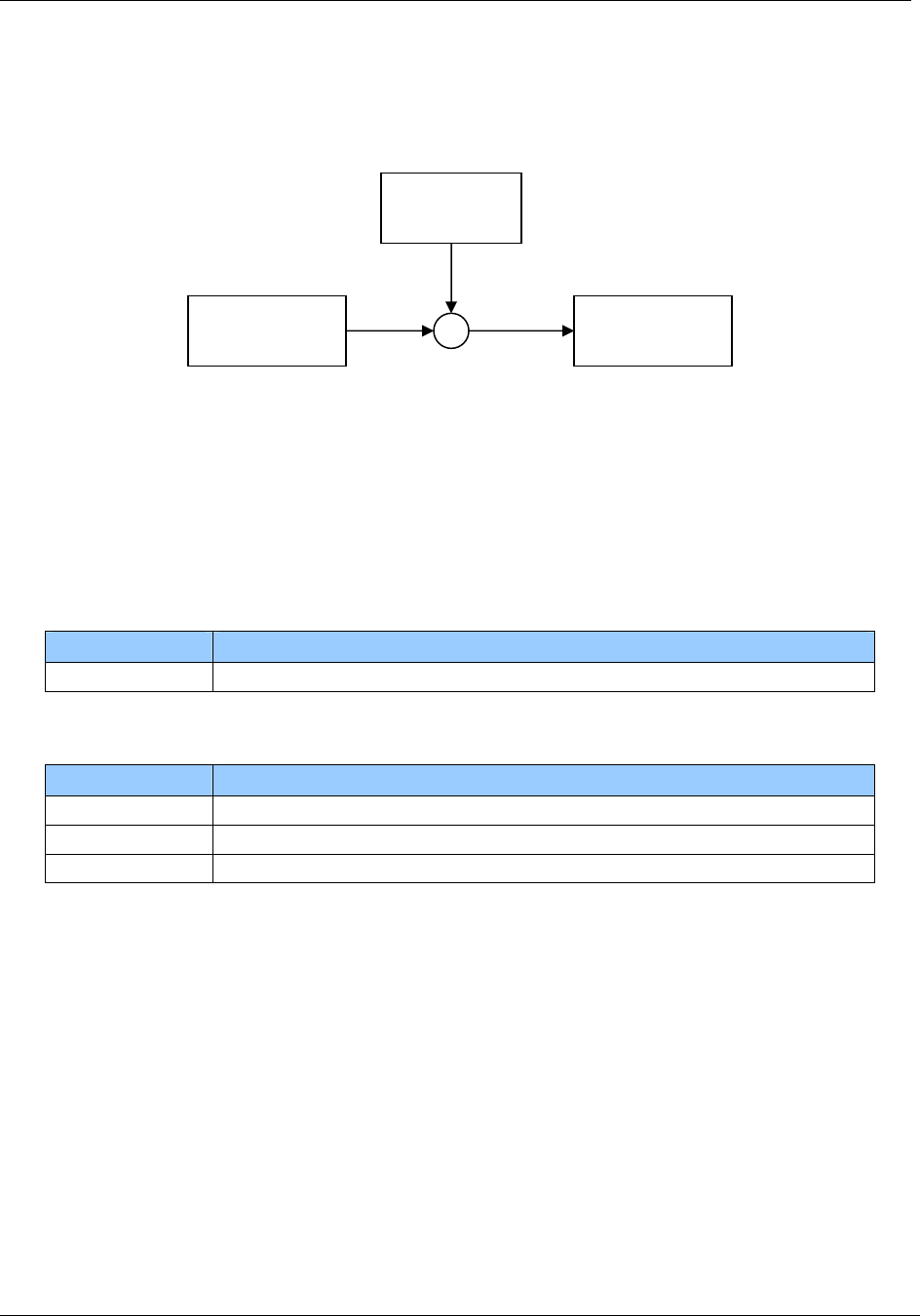
Page 96 of 125 November 4, 2008
© 2008 HID Global Corporation. All rights reserved.
1508-USM-00-0-02 HF Multi ISO RFID Reader
User Manual, Firmware V1.2
CBC mode
The data stream has to be divided into blocks of 8 bytes. The last enciphered block has to
be XORed with the next plain block.
8.3.27 my-d™ secure
Note that ISO 14443 tags do not support the addressed mode. Bit 5 and 6 of the option
byte are not used with ISO 14443 tags. The ISO 14443 tag only works in selected mode.
8.3.27.1 Abort KTT upload
This command aborts the Prepare for KTT ‘ut’ command, if the reader is in prepare for KTT
awareness mode.
Command
Command Data
‘*’ None
Answer
Answer Description
00h Prepare for KTT successfully aborted
‘F’ Prepare for KTT was not active
No response Key uploading is in progress
Enc(block1)
XOR
block2
Enc(block2)
Enc

November 4, 2008 Page 97 of 125
© 2008 HID Global Corporation. All rights reserved.
HF Multi ISO RFID Reader 1508-USM-00-0-02
User Manual, Firmware V1.2
8.3.27.2 Authenticate to sector
The Authenticate to sector command sets up a secured transmission to a transponder.
Command
Command Data
‘as’ Option byte (1 byte)
[UID (8 bytes)]
Key page (1 byte)
Key index (1 byte)
Counter page (2 byte)
Diversification data (8 bytes)
Answer
Answer Description
‘L’ In case of success
Option byte
The option byte defines the general behavior of the command.
Note that ISO 14443 tags are only working in selected mode.
Bit Description
7 RFU
6 If set the tag is in addressed mode. The UID is following as first 8 bytes after
the option byte. The my-d™ frame is following.
5 If set the tag is selected. No UID is needed.
4 - 0 RFU
Key page
This byte defines the key page number of the transponder
Key index
Defines the reader key index. If the index exceeds the key index of the reader the error ‘R’
out of range is thrown. The key index is zero based.
Counter page
This page number points to the authentication counter page. Lower byte of the page
number is sent first.

Page 98 of 125 November 4, 2008
© 2008 HID Global Corporation. All rights reserved.
1508-USM-00-0-02 HF Multi ISO RFID Reader
User Manual, Firmware V1.2
Diversification data
This data is used to diversify the key data.
Example
Command Answer / Description
'as20040103000000000000000000' 'L'
Login into tag.
8.3.27.3 Issue transponder key
Writes a diversified key to the transponder.
This command uses the write and Reread my-d™ command.
Command
Command Data
‘ik’ Option byte (1 byte)
[UID (8 bytes)]
Key index (1 byte)
Destination page (2 bytes)
Diversification data (8 bytes)
[Sector index and access conditions (2 bytes)]
Answer
Answer Description
‘IK’ Key successfully written

November 4, 2008 Page 99 of 125
© 2008 HID Global Corporation. All rights reserved.
HF Multi ISO RFID Reader 1508-USM-00-0-02
User Manual, Firmware V1.2
Option byte
The option byte defines general behavior of the command.
Note that ISO 14443 tags are only working in selected mode.
Bit Description
7 If set the user mode is used and the MAC is calculated and added to the frame.
If not set the issuer mode is used sector index and access conditions are
included and no MAC is calculated.
6 If set the tag is in addressed mode. The UID is following as first 8 bytes after
the option byte. The my-d™ frame is following.
5 If set the tag is selected. No UID is needed.
4 - 0 RFU
Key index
Defines the reader key index. If the index exceeds the key index of the reader the error ‘R’
out of range is thrown. The key index is zero based.
Destination page
Defines the transponder page index. Lower byte of the page number is sent first.
Sector index and access conditions
In issuer mode the sector index and the access conditions are added.
8.3.27.4 Prepare for KTT
This command sets the reader into KTT awareness mode.
Command
Command Data
‘ut’ Key page (1 byte)
Key index (1 byte)
Counter page (2 bytes)
Diversification data (8 bytes)
Answer
Use the check KTT upload status ‘!’ command to finish the upload procedure.
LED activity
The green and red LED indicates the state of the upload process.
Mode LED activity
Awareness Red and green LEDs are flashing slow
Upload in progress Green LED is active
Error during upload
detected
Red LED is flashing fast until the ‘!’ command is received
Upload finished
successfully
Green LED is flashing fast until the ‘!’ command is received
Upload aborted Red LED is active for 1 second
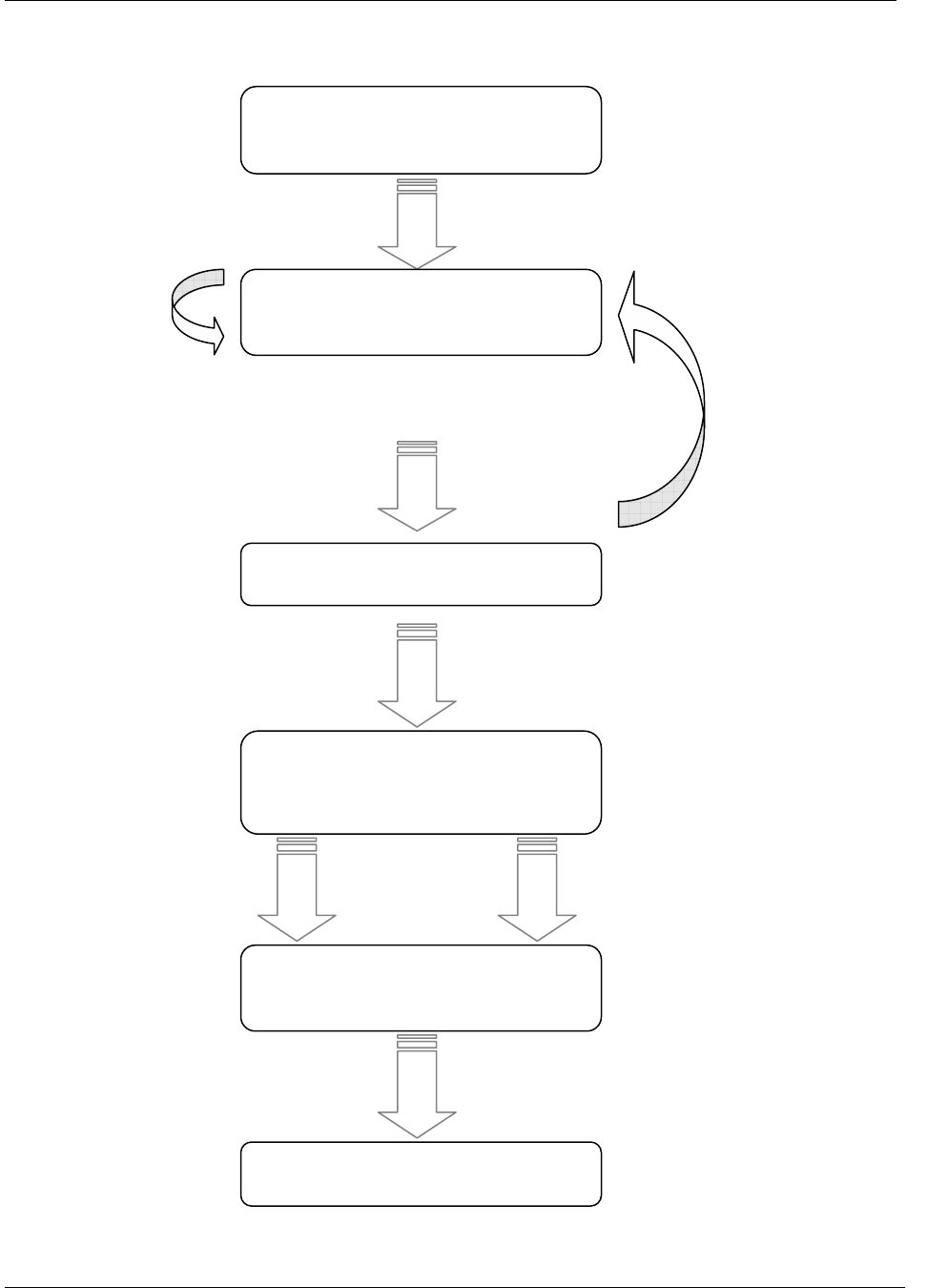
Page 100 of 125 November 4, 2008
© 2008 HID Global Corporation. All rights reserved.
1508-USM-00-0-02 HF Multi ISO RFID Reader
User Manual, Firmware V1.2
State diagram
no tag found
Prepare for KTT triggered 'ut'
(
no antenna field
)
Check for valid KTT
Upload all keys from KTT into Key
management
Searching tags
Awareness mode
tag found
other tag found
valid KTT found
Upload ready
Error during Upload OK
Return Upload result
get upload result '!'

November 4, 2008 Page 101 of 125
© 2008 HID Global Corporation. All rights reserved.
HF Multi ISO RFID Reader 1508-USM-00-0-02
User Manual, Firmware V1.2
8.3.27.5 my-d™ command
This command sends and receives my-d™ plain and secure commands including my-d™
secure algorithm.
Command
Command Data
‘z’ Downlink length (1 byte)
Option byte (1 byte)
[UID (8 bytes)]
my-d™ data (n bytes)
Answer
Answer Description
Data Status byte: 00h (1 byte)
Data without MAC and CRC (n bytes)
Downlink length
This byte is mandatory. It will define the length of the my-d™ data frame sent to the reader.
The MAC, CRC and the framing overhead is not included.
Option byte
The option byte defines general behavior of the command.
Note that ISO 14443 tags are only working in selected mode.
Bit Description
7 If set the MAC is calculated and added to the frame
6 If set the tag is in addressed mode. The UID is following as first 8 bytes after
the option byte. The my-d™ frame is following.
5 If set the tag is selected. No UID is needed.
4 - 0 RFU
Data
Data is sent as my-d™ plain command. It contains only data that is processed by the MAC
calculation. If the tag is addressed, only valid with ISO 15693 tags, with its UID the first 8
bytes are interpreted as UID and not included into the MAC calculation.
MAC calculation is done automatically if according flag is set. The ISO 15693 or the ISO
14443 frame is completed and the CRC is computed and added automatically.
The commands Write Page, Restricted Write and Write Byte do not need any MAC
verification for the answer.

Page 102 of 125 November 4, 2008
© 2008 HID Global Corporation. All rights reserved.
1508-USM-00-0-02 HF Multi ISO RFID Reader
User Manual, Firmware V1.2
9 Frequently Asked Questions
9.1.1 Getting Started
To test and interface the Dual ISO Module, you do not need a sophisticated µP development
system. All you need is a PC, a connection cable and a power supply for the reader. If you are
using Microsoft Windows (95/98/NT/…), take the following steps:
• Make sure, that your reader has an RS232 interface
• Start HyperTerminal
• Create a new connection (FILE/NEW CONNECTION)
• Enter a name for the connection (i.e. ‘MIFARE’)
• Select connect COM2 (COM1) direct connection
• Connection setup 9600,8,n,1,no handshake
• Connect your reader to COM2 (COM1) of the PC and apply appropriate supply
voltage. The reader transmits a string (“MultiISO 1.0”) to the PC.
• This string denotes the firmware provided with your reader module
• Put a tag to your reader. Serial numbers should be displayed properly
• Enter commands via keyboard. They should be transmitted to the reader and the
reader should reply
If using an operating system different from Microsoft Windows, you may use any other terminal
program that is capable of receiving/transmitting data via the serial port of your PC.
9.1.2 How should the Multi ISO Reader be personalized?
In ASCII protocol applications, no personalization is necessary.
In applications that are using the binary protocol mode, personalization is required. Use the Utility
program to set up your reader correctly. Contact support: eusupport@hidglobal.com to acquire the
utility. Minimum requirements are WIN98SE, WIN 2000, WIN XP and a free COM port on the PC.
9.1.3 What type of MIFARE® card should I use?
The MIFARE® standard is designed for multi-application environments. It contains 16 sectors each
with 2 individual keys, access conditions, and 3 data or value blocks. Some applications use the 1
Kbytes of the MIFARE® Standard Card Memory only as storage area.
MIFARE® Ultra light has no crypto unit on chip. It only supports 16 blocks.
MIFARE® Standard 4k cards have the same features as MIFARE® Standard cards but increased
memory capacity.

November 4, 2008 Page 103 of 125
© 2008 HID Global Corporation. All rights reserved.
HF Multi ISO RFID Reader 1508-USM-00-0-02
User Manual, Firmware V1.2
9.1.4 Using a MIFARE® card
This example demonstrates the detection of a card in the antenna field with continuous read and
the reading of a page.
Table 31 Using a MIFARE® card
Command Answer
c Activate continuous read mode
B2197B58
a card responds with its serial number
. S
abort continuous read mode
s B2197B58
select card
l01AAFFFFFFFFFFFF L
login into sector 1 with key FFFFFFFFFFFFh key
type A
rb04 00112233445566778899AABBCCDDEEFF
read block 04
c Activate continuous read mode to detect a new
card
9.1.5 Using NFC
The example shows how to communicate with NFC using the NFC demoboard PN531.
The reader is the initiator. The NFC has to be configured as passive target using MIFARE® 106kbps
(other NFC modes are not supported).
As first step place the reader on top of the NFC demoboard antenna in 3 cm distance.
Then load the "passive_target_106.cmd" file from the "Scripts\Tama\P2P" subfolder into the SCRTester
application. Run the code.
Now it is possible to get a serial number from the NFC.
Table 32 Get a serial number from NFC
Command Answer
s 08123456

Page 104 of 125 November 4, 2008
© 2008 HID Global Corporation. All rights reserved.
1508-USM-00-0-02 HF Multi ISO RFID Reader
User Manual, Firmware V1.2
References
[1] ISO/IEC 14443 Part 1-4, Identification Cards – Contact less integrated circuit(s) cards – Proximity
cards
[2] DESFire Documentation, NXP; www.nxp.com
[3] Data Encryption Standard (DES), FIPS PUB 46-3,
Reaffirmed 1995 October 25
[4] HID Antenna Design Guide
[5] Philips; Application Note, MIFARE® & I-Code, Micore Reader IC family Directly Matched Antenna
Design
Appendix A - SAM
Note: The power supply of the SAM adapter must be turned off during the entire card insertion
period; otherwise SAM card damage may occur.
For proper usage of the SAM, a 100nF capacitor between Vcc and GND is necessary.
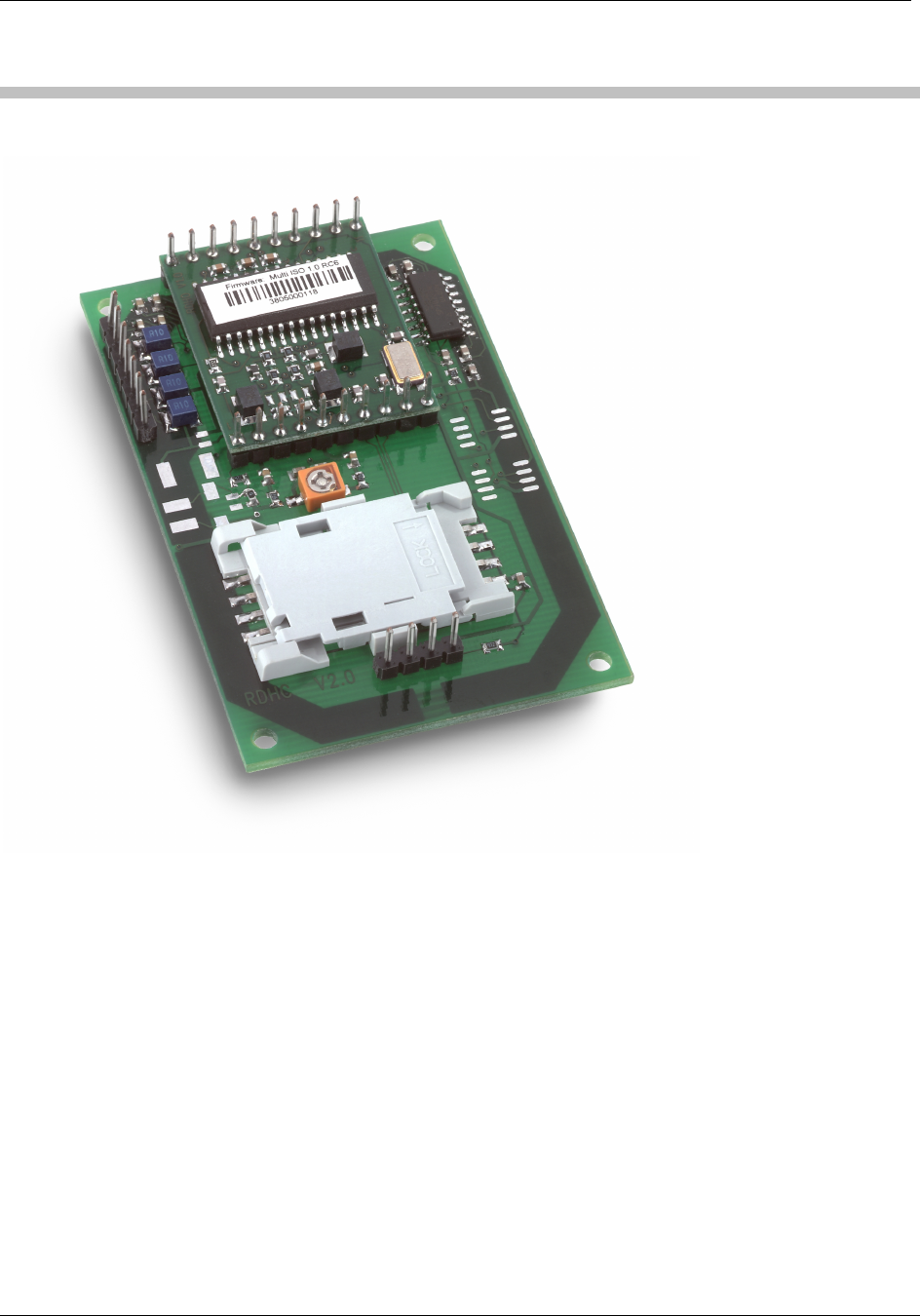
November 4, 2008 Page 105 of 125
© 2008 HID Global Corporation. All rights reserved.
HF Multi ISO RFID Reader 1508-USM-00-0-02
User Manual, Firmware V1.2
Appendix B
Compact Serial Plug & Play Module (RDHC-020xN0-02)
Features
• Interface type: RS232
• Dimensions: 70x45x12.1 (LxWxH), all in mm
• Reading Distance: up to 75mm, depending on the tag
• SAM: supported
• Boot loader: supported (²)
• Drivers: virtual COM port driver, DLL driver available
• Antenna: on board
• Signaling: reading LED, power LED
• Power Supply: 5VDC ± 10% regulated
(²) The boot loader enables to download a firmware update via the serial interface to the unit
without replacing/dismantling the hardware.
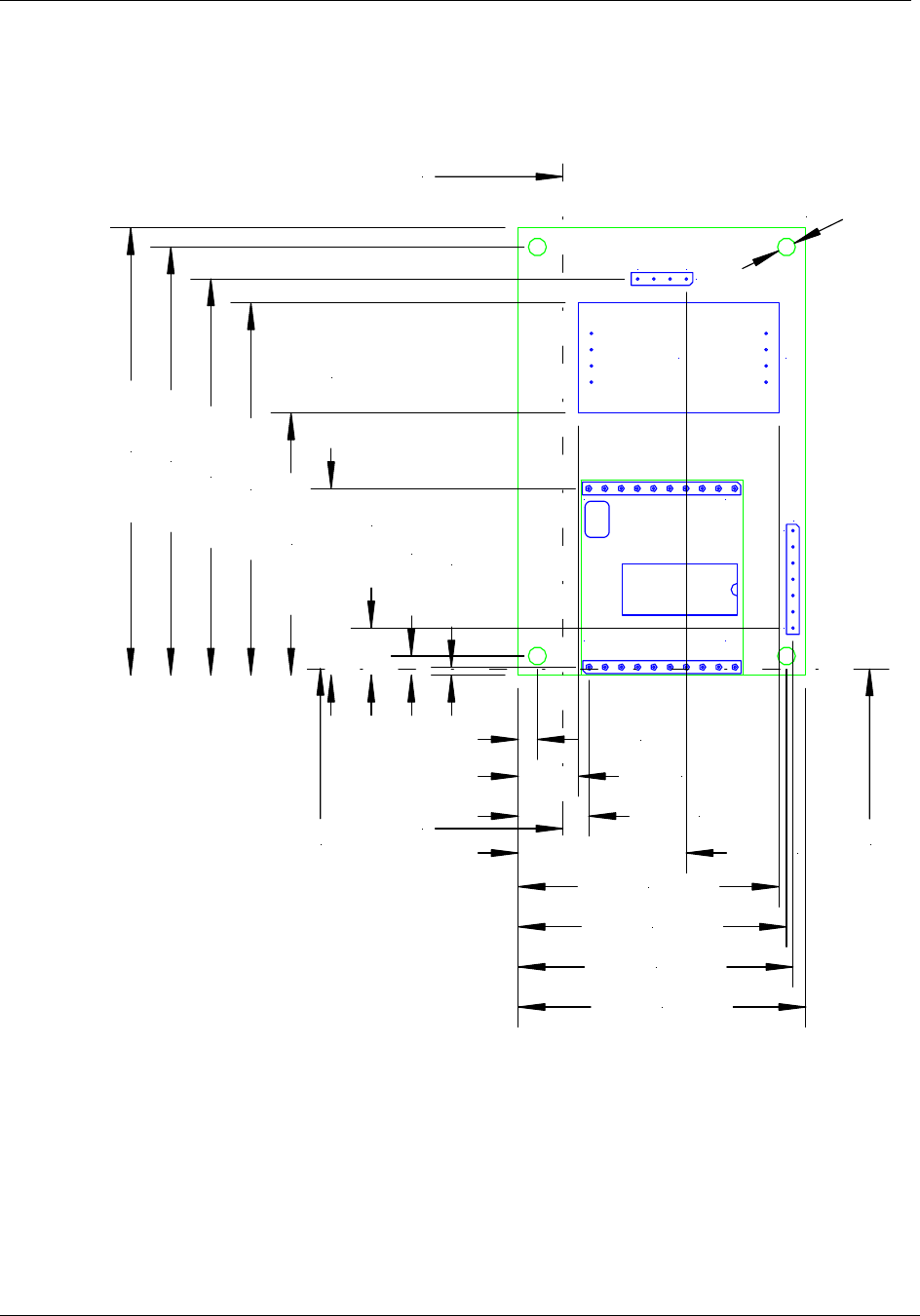
Page 106 of 125 November 4, 2008
© 2008 HID Global Corporation. All rights reserved.
1508-USM-00-0-02 HF Multi ISO RFID Reader
User Manual, Firmware V1.2
Dimensions
Top view
All dimensions are listed in mm
1
10 11
20
17 J3
J4
14
SAM Socket
J2
2,80
A
A'
B'
B
70,00 mm
67,00 mm
62,00 mm
58,26 mm
41,06 mm
29,21 mm
7,38 mm
3,00 mm
1,27 mm
3,00 mm
9,43 mm
11,07 mm
26,31 mm
40,83 mm
42,00 mm
43,00 mm
45,00 mm
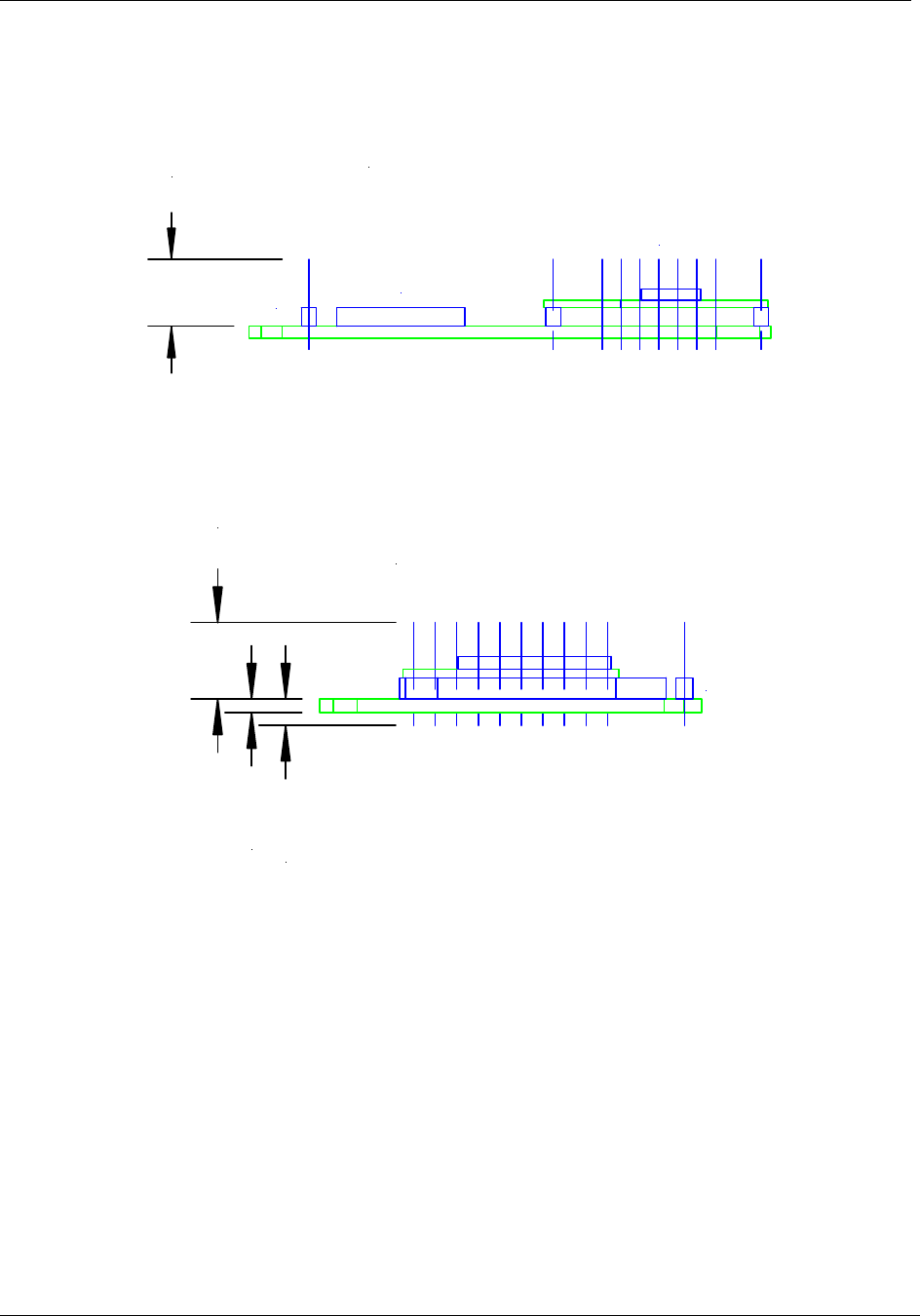
November 4, 2008 Page 107 of 125
© 2008 HID Global Corporation. All rights reserved.
HF Multi ISO RFID Reader 1508-USM-00-0-02
User Manual, Firmware V1.2
Side View
All dimensions are listed in mm
9,00
View A-A'
J4
J2
J3
Front View
All dimensions are listed in mm
9,00
1,60 mm
3,10 mm
J3
View B-B'
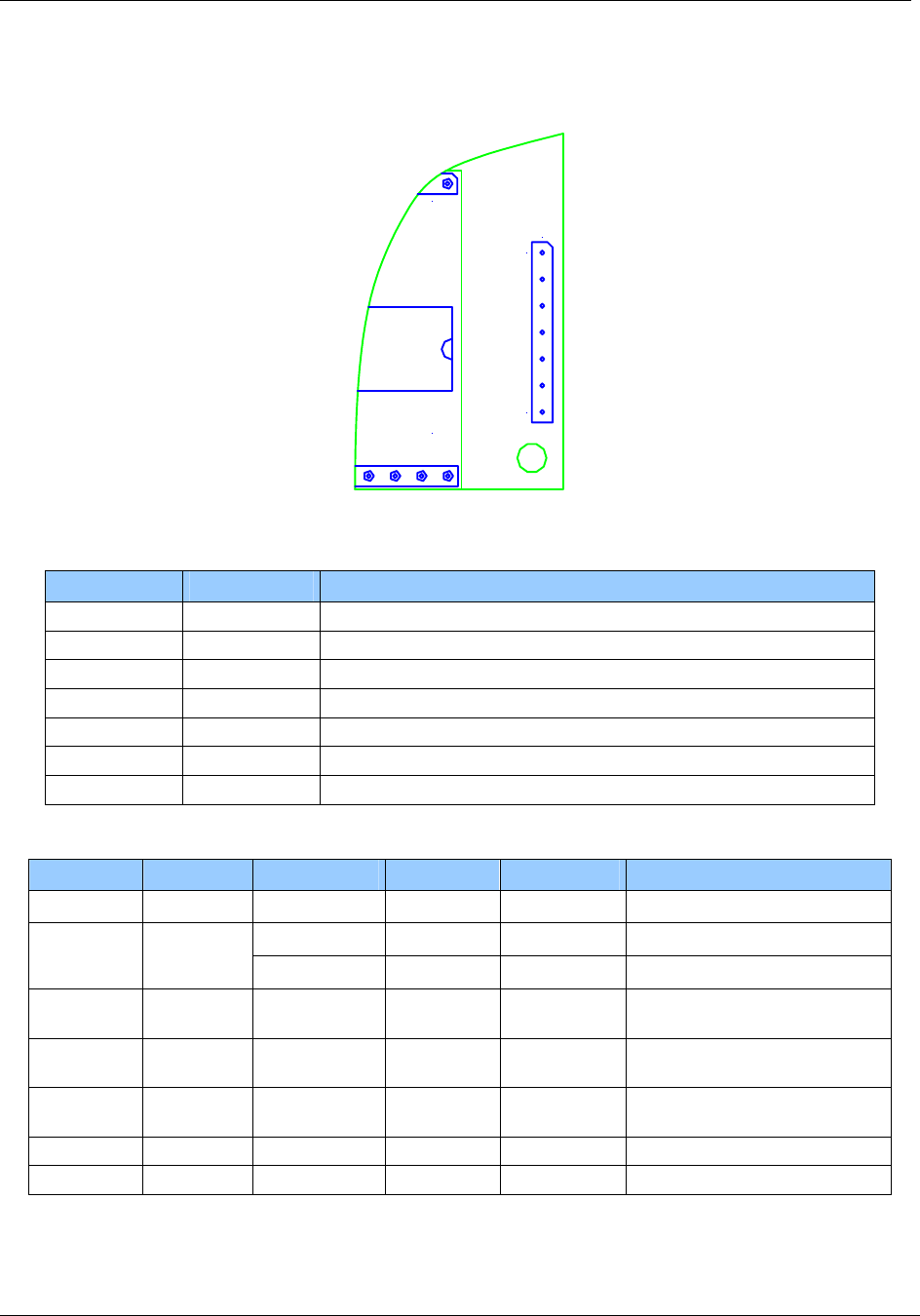
Page 108 of 125 November 4, 2008
© 2008 HID Global Corporation. All rights reserved.
1508-USM-00-0-02 HF Multi ISO RFID Reader
User Manual, Firmware V1.2
Pin Out – Jumper 3
120
17 J3
Figure 9 Pin out of jumper 3
Table 33 Pin out of jumper 2
PIN PIN No. Description
RFU 1 RFU
+5V 2 Supply Voltage
GND 3 Ground
RX/RXA 4 RS232 RX / RS422 RXA
TX/TXA 5 RS232 TX / RS422 TXA
RXB 6 RS422 RXB
TXB 7 RS422 TXB
Electrical characteristics of J3 PINs in RS232 Configuration.
PIN PIN No. Min Typ. Max. Description
RFU 1 Do not connect
4.5V 5V 5.5V Supply Voltage +5V 2
150mA 250mA Supply Current (without SAM)
GND 3 GND Ground for Power Supply and
Interface
RX/RXA 4 -15V
3kΩ
5kΩ
+15V
7kΩ
RS232 Voltage Levels
Input Impedance
TX/TXA 5 ±5V
300kΩ
±9V RS232 Voltage Levels
Output Impedance
RXB 6 Do not connect
TXB 7 Do not connect
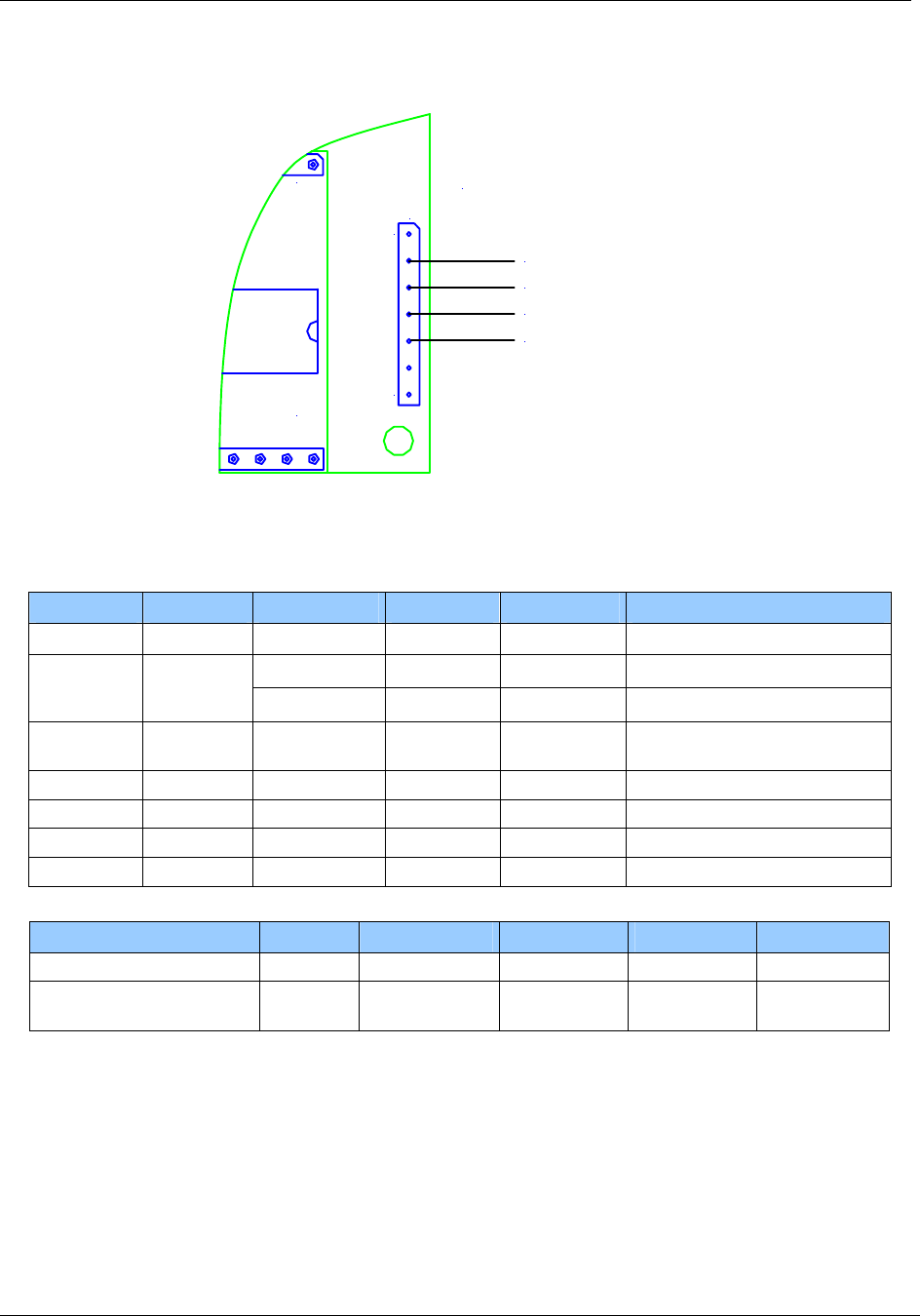
November 4, 2008 Page 109 of 125
© 2008 HID Global Corporation. All rights reserved.
HF Multi ISO RFID Reader 1508-USM-00-0-02
User Manual, Firmware V1.2
120
17 J3
+5V
Ground
RX
TX
RS232 Configuration
Figure 10 Pin out of jumper 3 in RS232 Configuration
Electrical characteristics of J3 PINs in RS422 Configuration
PIN PIN No. Min Typ. Max. Description
RFU 1 Do not connect
4.5V 5V 5.5V Supply Voltage +5V 2
150mA 250mA Supply Current (without SAM)
GND 3 GND Ground for Power Supply and
Interface
RX/RXA 4 -7V +12V RXA RS422
TX/TXA 5 -7V +12V TXA RS422 / Differential
RXB 6 -7V +12V RXB RS422
TXB 7 -7V +12V TXB RS422 / Differential
Description PIN No. Conditions Min Typ. Max.
Differential Output Voltage 4/6 Unloaded GND VCC
Differential Output Voltage 5/7 Loaded:
RL=50Ω
2V VCC
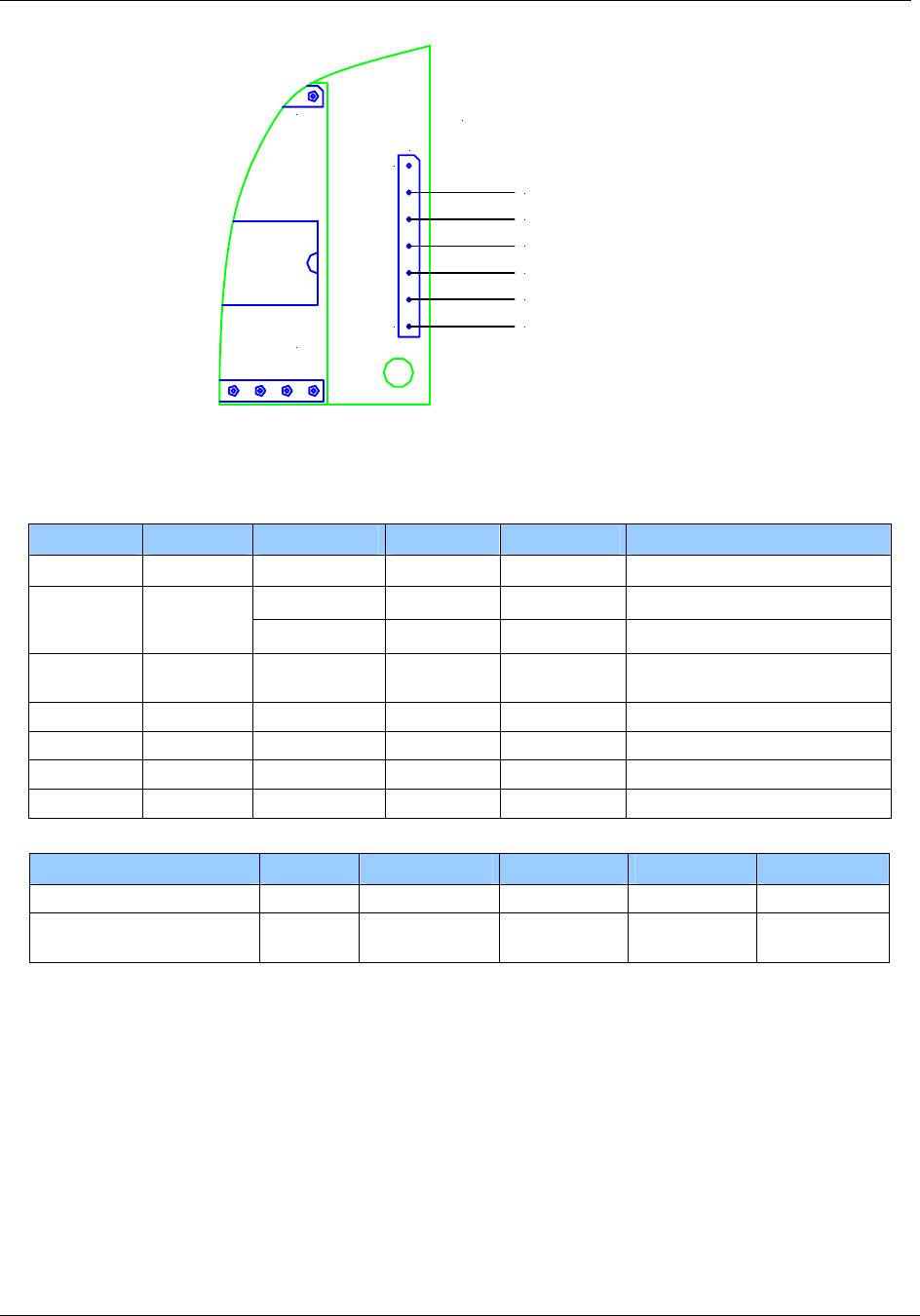
Page 110 of 125 November 4, 2008
© 2008 HID Global Corporation. All rights reserved.
1508-USM-00-0-02 HF Multi ISO RFID Reader
User Manual, Firmware V1.2
120
17 J3
+5V
Ground
RXA
TXA
RS422 Configuration
RXB
TXB
Figure 11 Pin out of jumper 3 in RS422 Configuration
Electrical characteristics of J3 PINs in RS485 Configuration
PIN PIN No. Min Typ. Max. Description
RFU 1 Do not connect
4.5V 5V 5.5V Supply Voltage +5V 2
150mA 250mA Supply Current (without SAM)
GND 3 GND Ground for Power Supply and
Interface
RX/RXA 4 -7V +12V RX, connect to PIN 5
TX/TXA 5 -7V +12V TX
RXB 6 -7V +12V RX, connect to PIN 7
TXB 7 -7V +12V TX
Description PIN No. Conditions Min Typ. Max.
Differential Output Voltage 4/6 Unloaded GND VCC
Differential Output Voltage 5/7 Loaded:
RL=270Ω
1.5V VCC
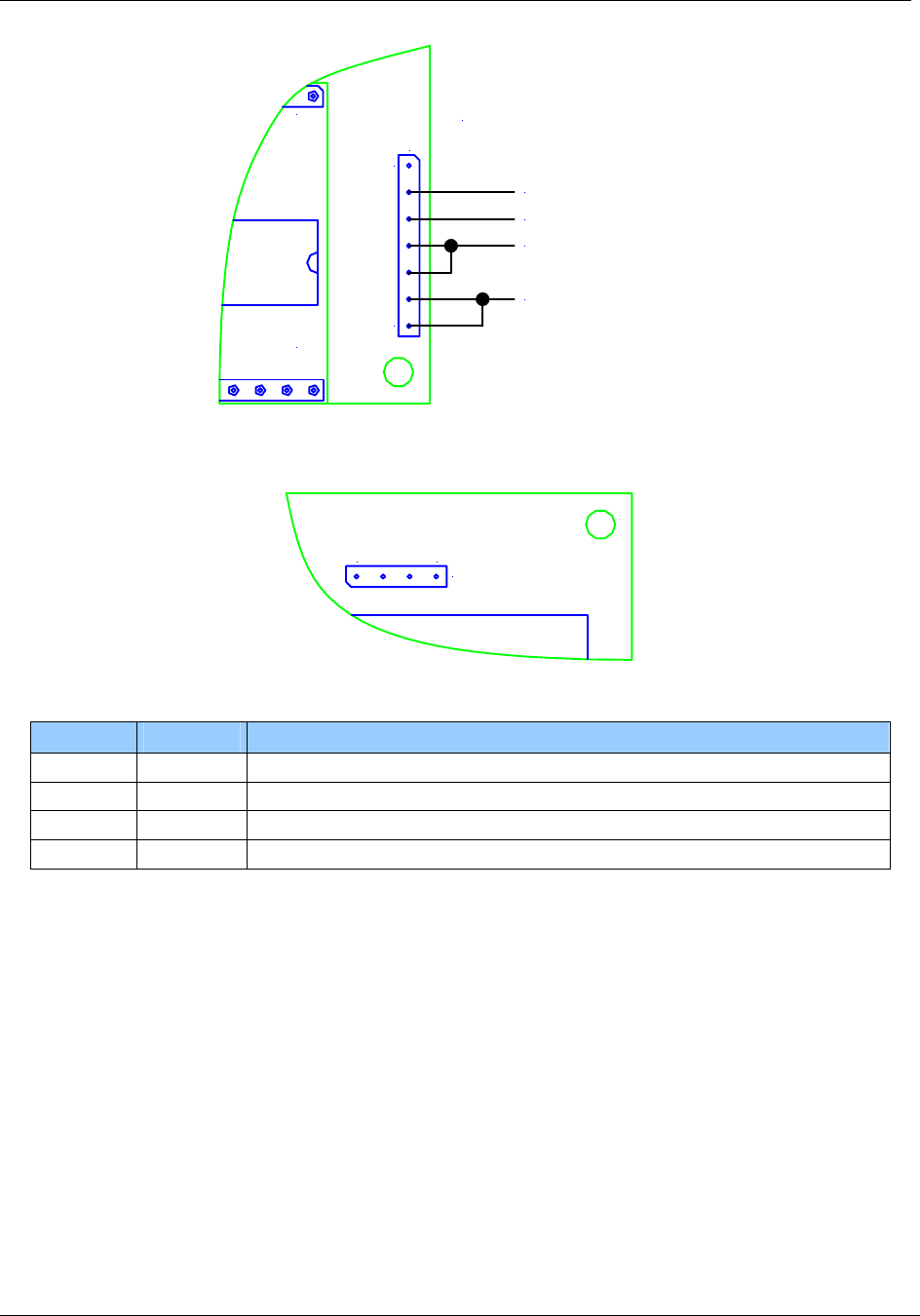
November 4, 2008 Page 111 of 125
© 2008 HID Global Corporation. All rights reserved.
HF Multi ISO RFID Reader 1508-USM-00-0-02
User Manual, Firmware V1.2
120
17 J3
+5V
Ground
RXA / TXA
RXB / TXB
RS485 Configuration
Figure 12 Pin out of jumper 3 in RS232 Configuration
Pin Out - Jumper 4
J4
41
Figure 13 Pin out of Jumper 4 (top view)
PIN PIN No. Description
Read+ 1 Connector for green Read Indicator LED
Read- 2 Connector for red Read Error Indicator LED
Power- 3 Ground
Power+ 4 Connector for Power Indicator LED
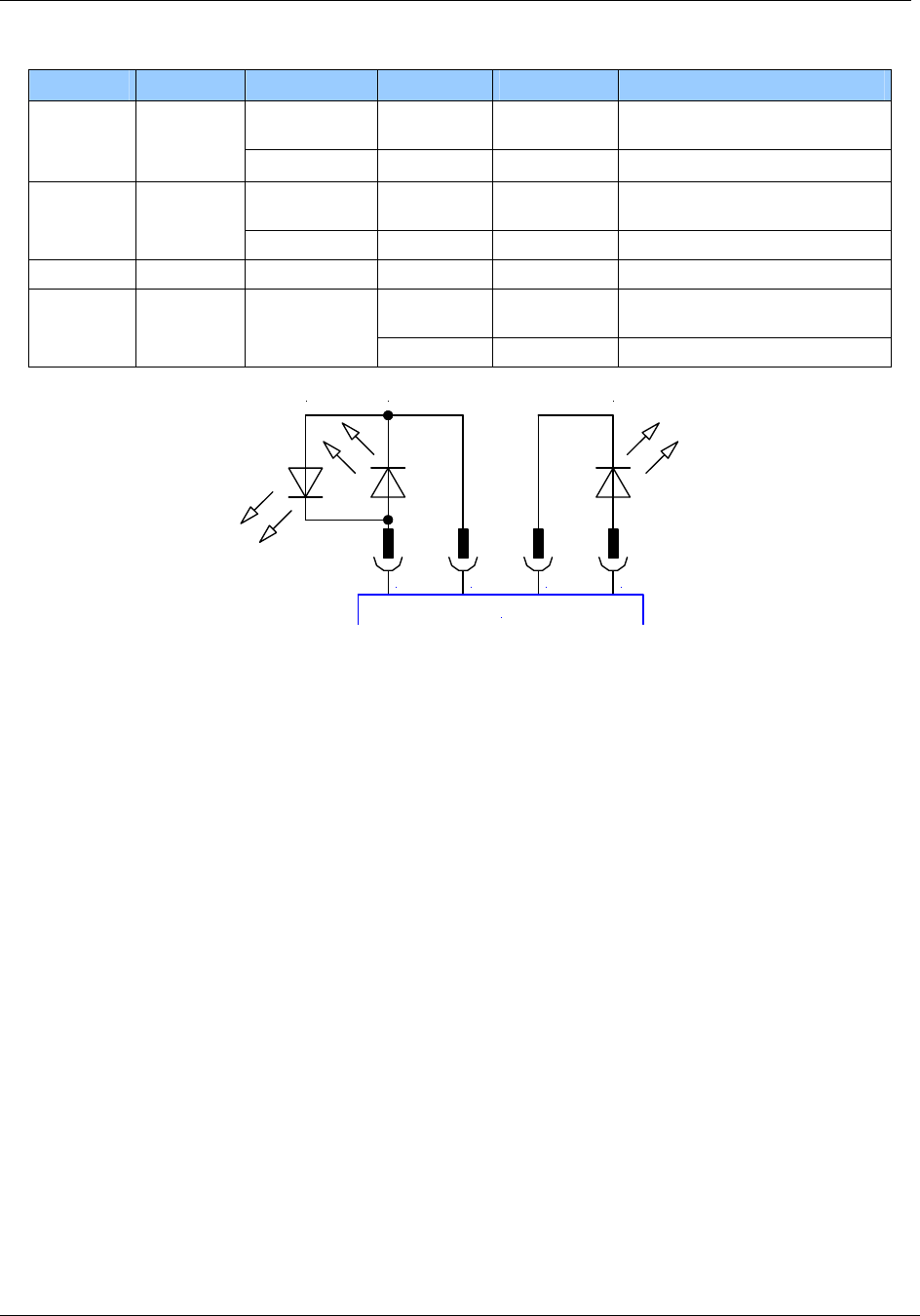
Page 112 of 125 November 4, 2008
© 2008 HID Global Corporation. All rights reserved.
1508-USM-00-0-02 HF Multi ISO RFID Reader
User Manual, Firmware V1.2
Electrical characteristics of J4 PINs
PIN PIN No. Min Typ. Max. Description
1.4V
@11mA
VDDmax Read+ 1
11mA @15mA
1.4V
@11mA
VDDmax Read- 2
11mA @15mA
Power- 3 GND
1.4V
@11mA
VDDmax Power+ 4
11mA 15mA
1 2 3 4
J4
LEDgLEDr Power
Figure 14 Pin out of jumper 4
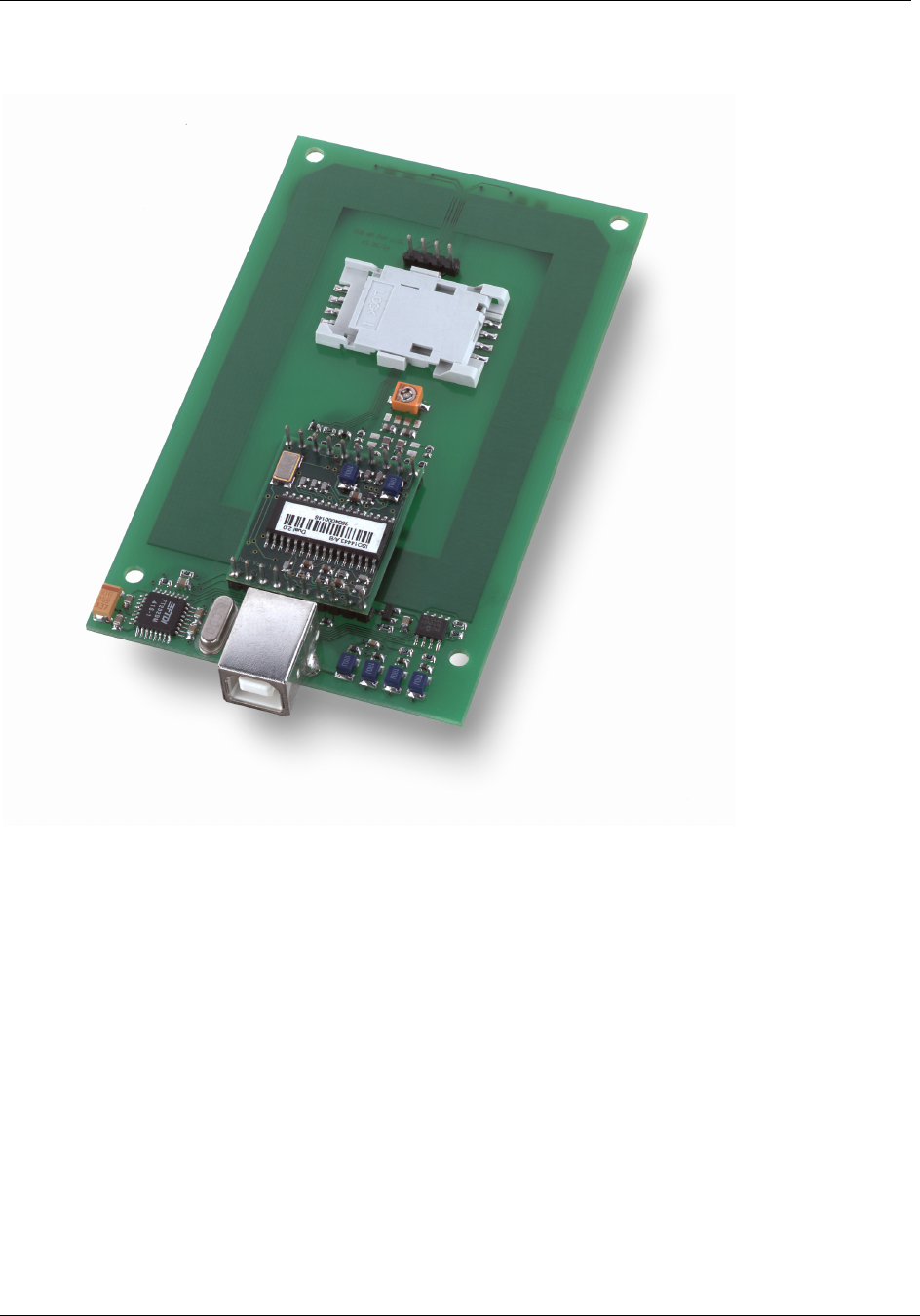
November 4, 2008 Page 113 of 125
© 2008 HID Global Corporation. All rights reserved.
HF Multi ISO RFID Reader 1508-USM-00-0-02
User Manual, Firmware V1.2
Short Range Plug & Play Module (RDHS-0204N0-02)
Features
• Interface type: USB 2.0
• Dimensions: 110x70x14 (LxWxH), all in mm
• Reading Distance: up to 90mm, depending on the tag
• SAM: supported
• Boot loader: supported (²)
• Drivers: virtual COM port driver, DLL driver available
• Antenna: on board
• Signaling: reading LED, power LED
• Power Supply: via USB
(²) The boot loader enables to download a firmware update via the serial interface to the unit
without replacing/dismantling the hardware.
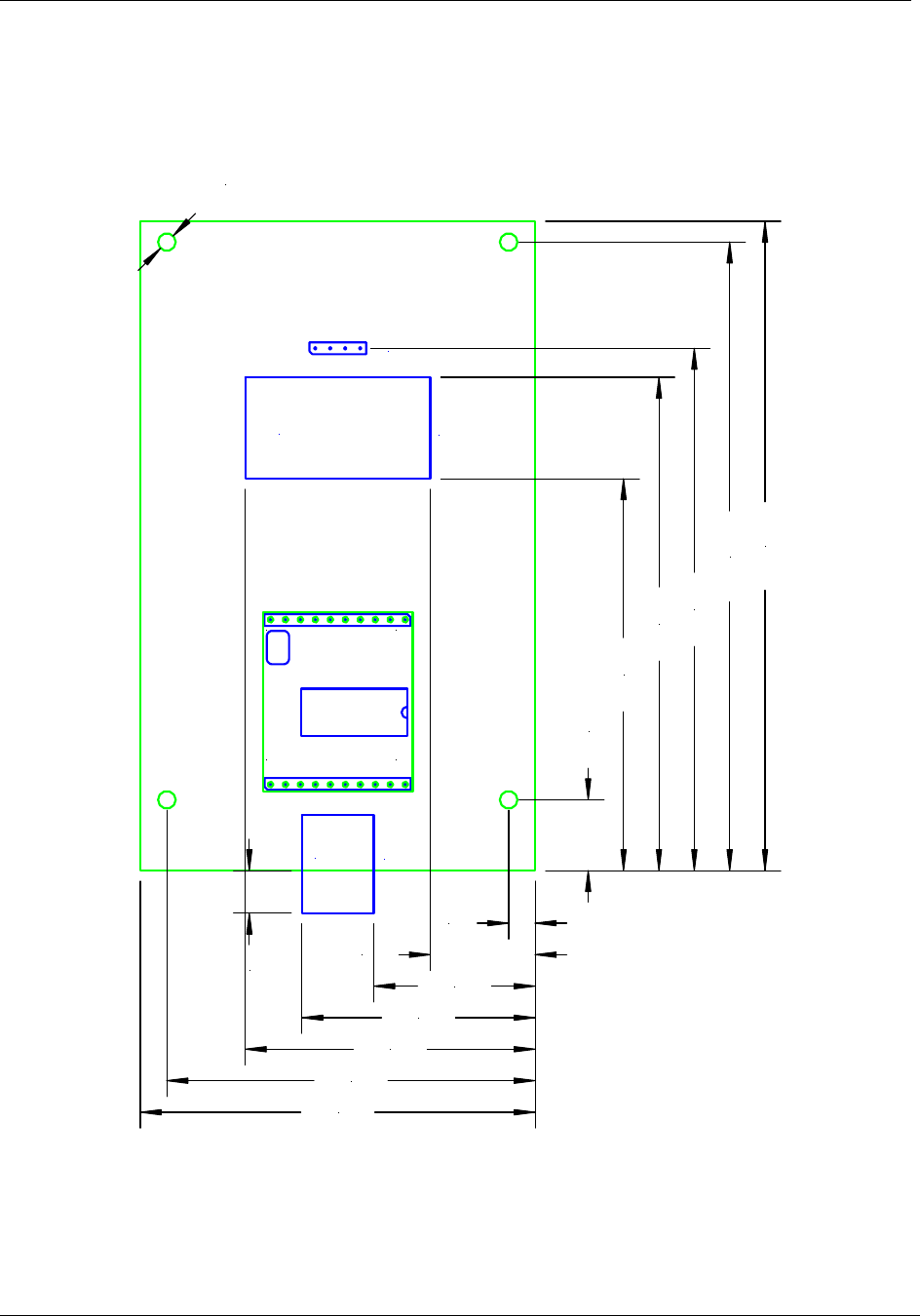
Page 114 of 125 November 4, 2008
© 2008 HID Global Corporation. All rights reserved.
1508-USM-00-0-02 HF Multi ISO RFID Reader
User Manual, Firmware V1.2
Dimensions
All dimensions are listed in mm
J2
J5
J3
Read LED +
Read LED -
Power LED +
Power LED -
SAM Socket
USB
1
10 11
20
12,00
66,40
83,60
88,50
106,50
110,00
4,50
17,78
27,40
39,60
49,18
62,50
67,00
7,20
ø 3,00
Figure 15 Short Range Plug & Play Module - Top view
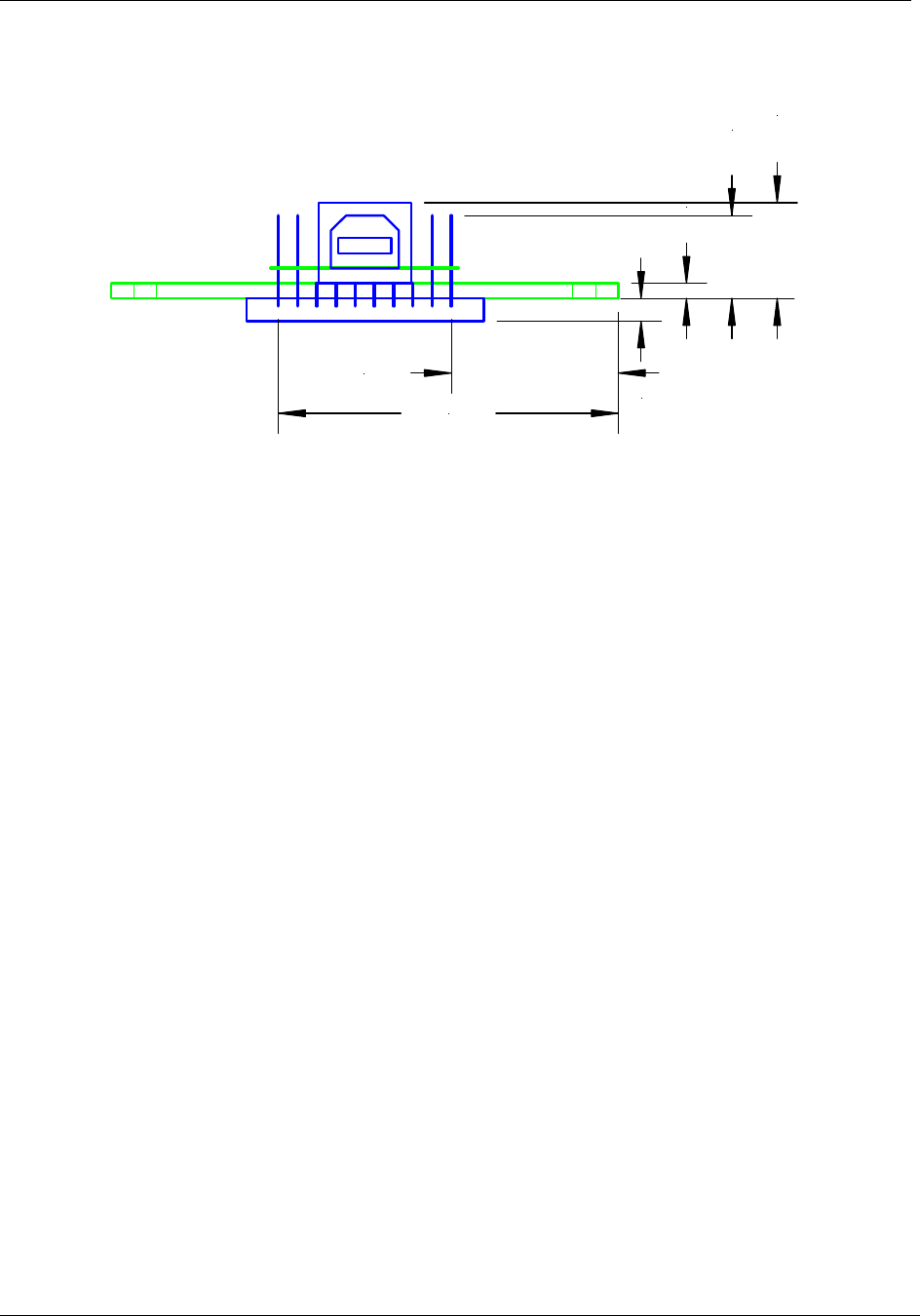
November 4, 2008 Page 115 of 125
© 2008 HID Global Corporation. All rights reserved.
HF Multi ISO RFID Reader 1508-USM-00-0-02
User Manual, Firmware V1.2
Front View
2,00
11,00
12,70
3,00
22,07
44,93
Figure 16 Short Range Plug & Play Module - Front View
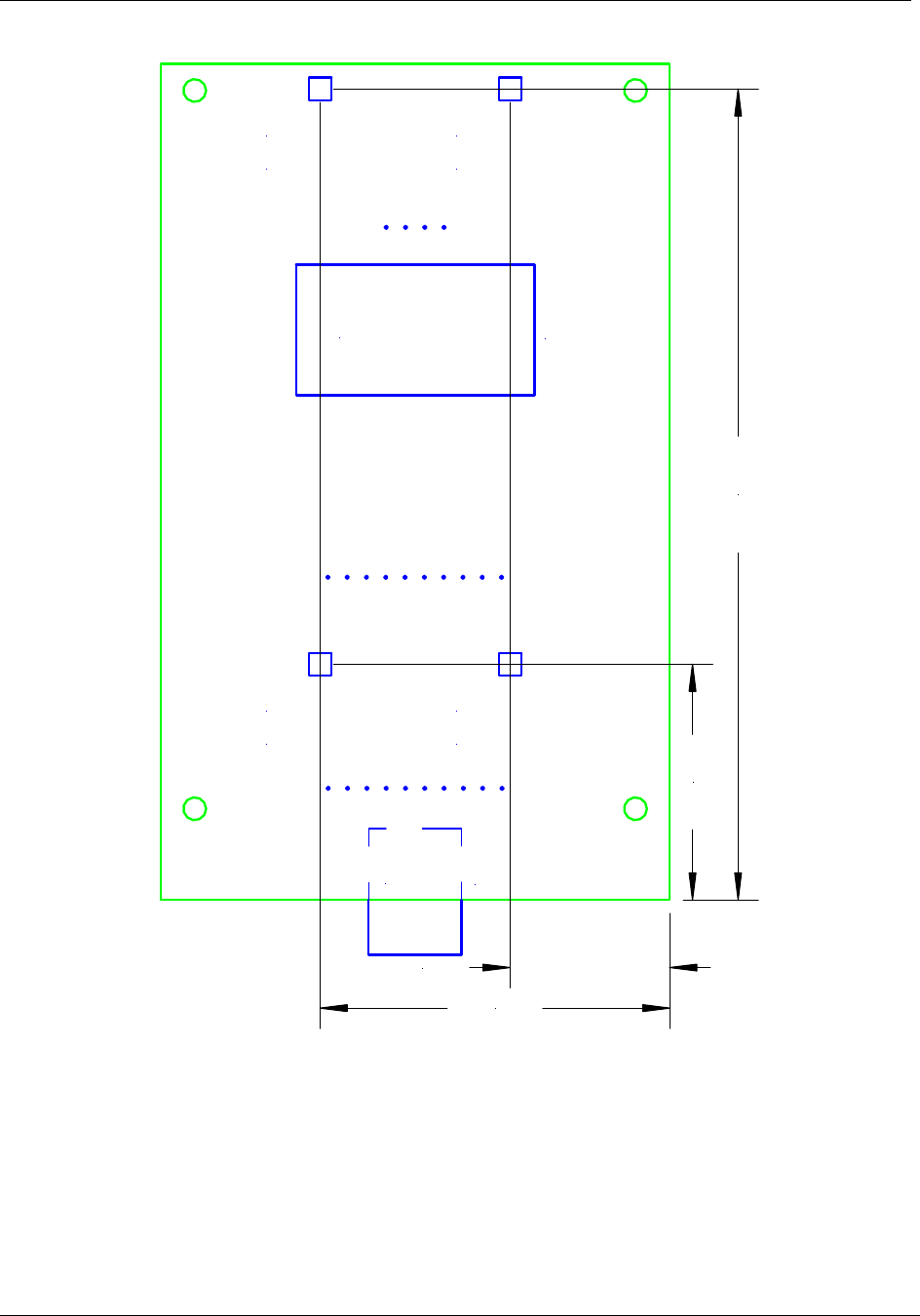
Page 116 of 125 November 4, 2008
© 2008 HID Global Corporation. All rights reserved.
1508-USM-00-0-02 HF Multi ISO RFID Reader
User Manual, Firmware V1.2
J2
J3
SAM Socket
USB
Read LED
(Option 1)
Power LED
(Option 1)
Power LED
(Option 2)
Read LED
(Option 2)
31,00
106,70
21,00
46,00
Figure 17 Short Range Plug & Play Module - Bottom View
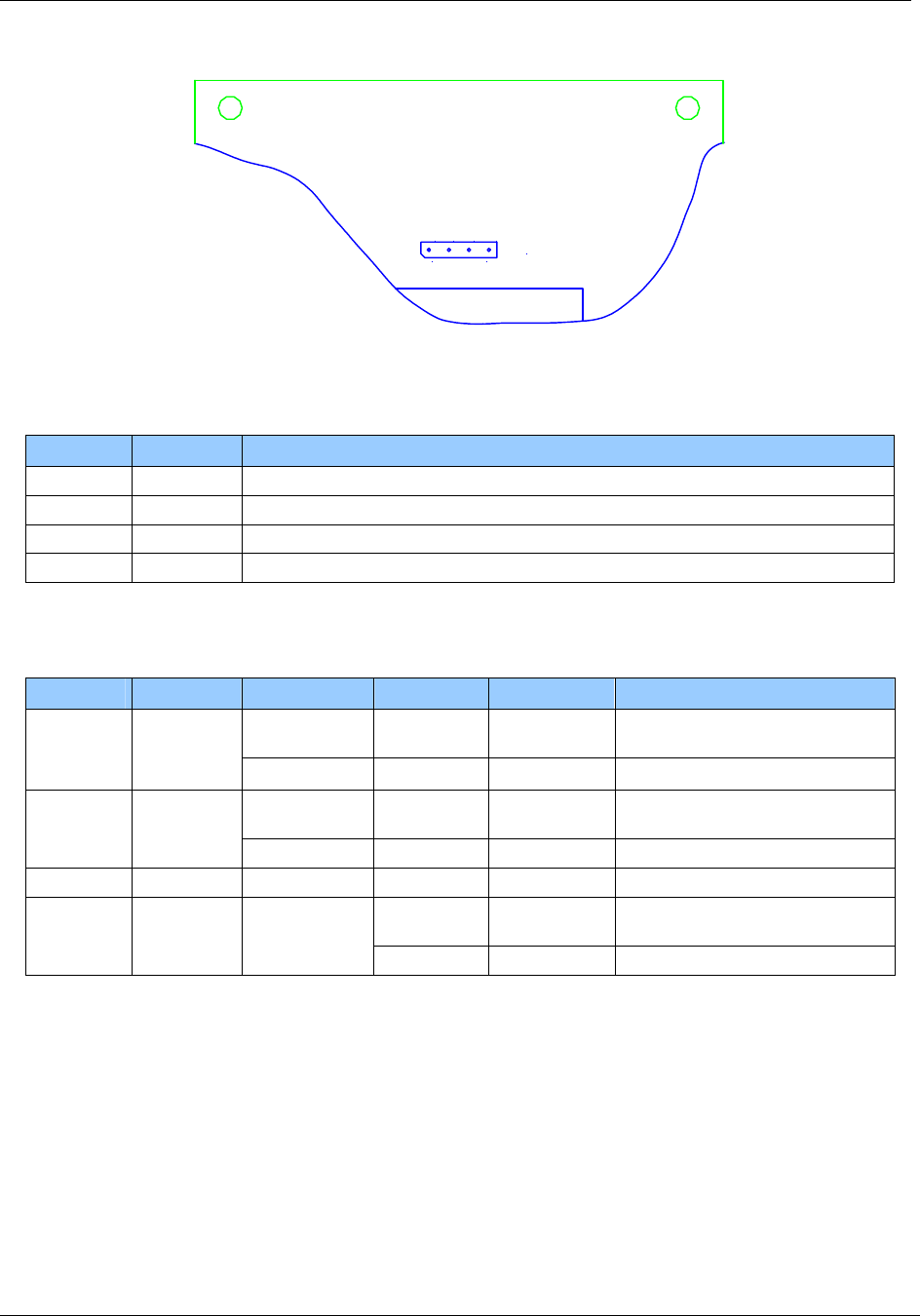
November 4, 2008 Page 117 of 125
© 2008 HID Global Corporation. All rights reserved.
HF Multi ISO RFID Reader 1508-USM-00-0-02
User Manual, Firmware V1.2
Pin Out – Jumper 5
J5
Read LED +
Read LED -
Power LED +
Power LED -
1 4
Figure 18 Pin out of Jumper 5 - Top View
Table 34 Pin out of jumper 5
PIN PIN No. Description
Read+ 1 Connector for green Read Indicator LED
Read- 2 Connector for red Read Error Indicator LED
Power- 3 Ground
Power+ 4 Connector for Power Indicator LED
Electrical characteristics of J5 PINs
Table 35 Electrical characteristics of pins
PIN PIN No. Min Typ. Max. Description
1.4V
@11mA
VDDmax Read+ 1
11mA @15mA
1.4V
@11mA
VDDmax Read- 2
11mA @15mA
Power- 3 GND
1.4V
@11mA
VDDmax Power+ 4
11mA 15mA
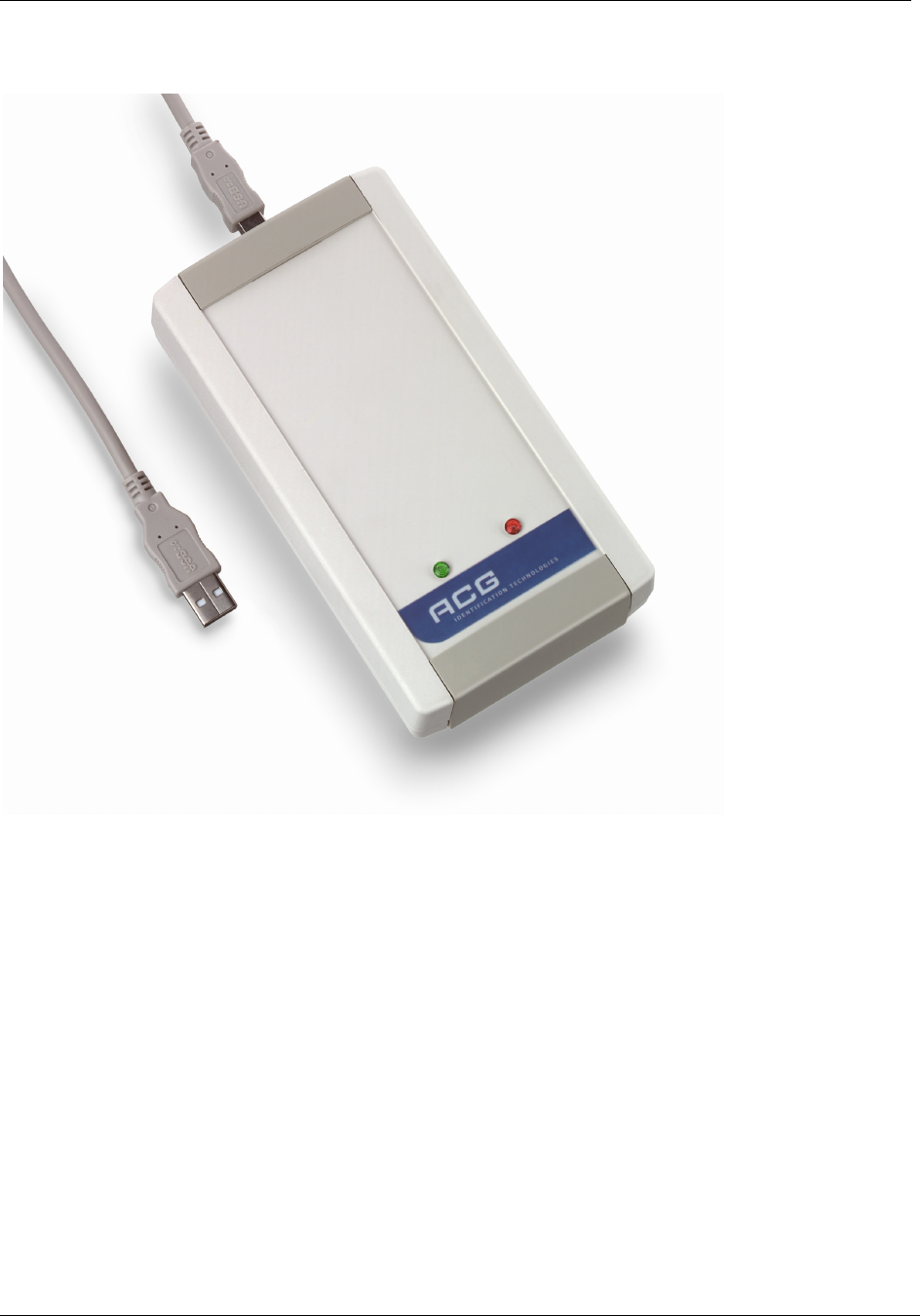
Page 118 of 125 November 4, 2008
© 2008 HID Global Corporation. All rights reserved.
1508-USM-00-0-02 HF Multi ISO RFID Reader
User Manual, Firmware V1.2
Short Range USB Desktop Reader (RDHS-0204D0-02)
Features
• Interface type: USB 2.0
• Dimensions: 155x82x35 (LxWxH), all in mm
• Reading Distance: up to 80mm, depending on the tag
• SAM: supported
• Boot loader: supported (²)
• Drivers: virtual COM port & PCSC driver available. DLL also available.
• Antenna: on board
• Signaling: reading LED, power LED
• Power Supply: via USB
(²) The boot loader makes it easy to download a firmware to the unit without replacing/dismantling
the hardware.
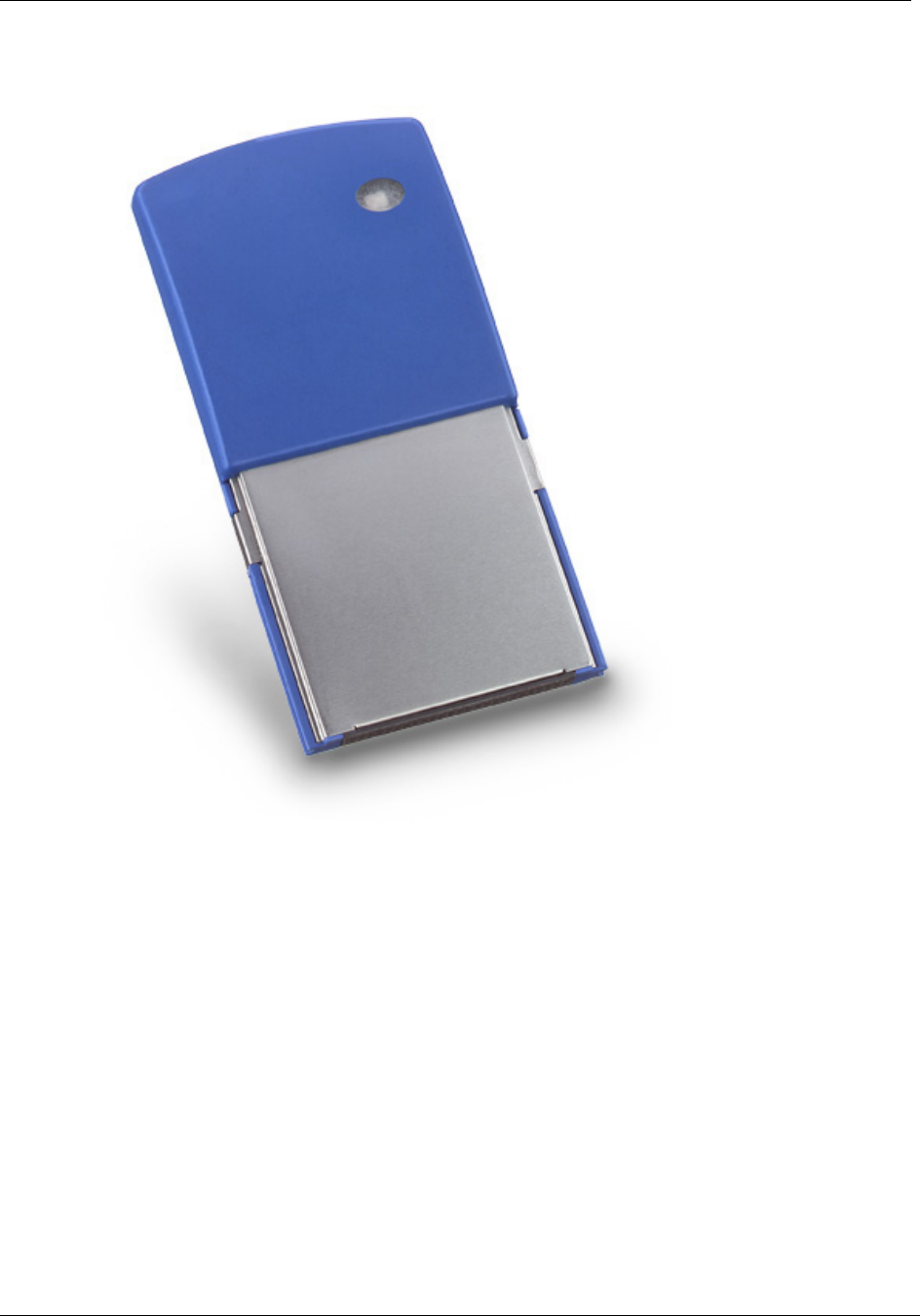
November 4, 2008 Page 119 of 125
© 2008 HID Global Corporation. All rights reserved.
HF Multi ISO RFID Reader 1508-USM-00-0-02
User Manual, Firmware V1.2
Plug-In Reader (RDHP-0206P0-02)
Features
• Interface type: CF Card Type II
• Dimensions: (LxWxH) 86.50x43.0x10.0mm ± 0.1mm (LxWxH)
• Reading Distance: up to 60mm, depending on the tag
• SAM: not integrated
• Boot loader: supported (²)
• Drivers: virtual COM port driver, DLL driver available
• Antenna: integrated
• Signaling: reading LED integrated
• Power Supply: via CF Card Interface
(²) The boot loader makes it easy to download a firmware to the unit without replacing/dismantling
the hardware.

Page 120 of 125 November 4, 2008
© 2008 HID Global Corporation. All rights reserved.
1508-USM-00-0-02 HF Multi ISO RFID Reader
User Manual, Firmware V1.2
Appendix C - Timings
t
CMD t
EXEC t
RES
PC: Request →
Reader: ← Response
Table 36 Timings
Command tEXEC [ms] Comments
Common commands
Cont. read (locked tag) 2.8 – 22.6 + Reset Off and Recovery Time
Cont. read (worst case) 54 + 3x Reset Off and Recovery Time
DES en/decryption 9.6 – 9.7
TDES en/decryption 28.7 – 28.8
High-speed select 'h08'
(locked tag)
8.9 – 14.4 + Reset Off and Recovery Time + SFGT
High-speed select 'h08'
(no tag)
15 + 3x Reset Off and Recovery Time
High-speed select 'h08'
(worst case)
14.7 + 3x Reset Off and Recovery Time + SFGT
Multi-select (locked tag) 5.8 – 11.4 + Reset Off and Recovery Time
Multi-select (no tag) 67 + Reset Off and Recovery Time
Multi-select (worst case) 67 + Reset Off and Recovery Time
Antenna on 0.2 + Reset Recovery Time
Antenna off 0.2
Port read 0.1
Port write 0.1
Read block 1.8 – 2.2
Write block 8.2 – 11
Reset 13.2
Select (locked tag) 5.4 – 22.8 + Reset Off and Recovery Time
Select (no tag) 38 + 3x Reset Off and Recovery Time
Select (worst case) 55 + 3x Reset Off and Recovery Time
ISO 14443 Type A only commands
Increment value block 18.4
Decrement value block 18.4
Copy value block 18.5

November 4, 2008 Page 121 of 125
© 2008 HID Global Corporation. All rights reserved.
HF Multi ISO RFID Reader 1508-USM-00-0-02
User Manual, Firmware V1.2
Command tEXEC [ms] Comments
Read value block 2.3
Write value block 7.9 - 10.5
MIFARE® Login 4.9
Power conditions
Power on 79 Does not include rise time of power supply
Enable on 85
Default Command Guard Time (20h = 1.2ms) was used.
All timing data is advisory application information and does not form part of the specifications. It
may change in future firmware releases. Please also note that all values specified in the above
table depend on the tag used and Command Guard Time.

Page 122 of 125 November 4, 2008
© 2008 HID Global Corporation. All rights reserved.
1508-USM-00-0-02 HF Multi ISO RFID Reader
User Manual, Firmware V1.2
Appendix D - Version History
09/02/2005 Initial Release Version 1.0, Rev. 1.0
09/06/2006 • Register default value changed for Selection
Timeout ISO 14443 B
• Support of asynchronous baud rates for the high-
speed select command
• Improved support of read / write operations for
LRI tags
• Added commands to read and write multiple
blocks ('rd' / 'wd')
• Flag added to disable read after write
• Bug fixes
Version 1.1, Rev. 1.0
10/22/2008 • Extended ID supports the ISO 14443 A SAK byte
• High Level support of the Innovision Jewel tag
(selection, read and write operations)
• Added functionality to switch between ReqA/B or
WupA/B usage
• The Quiet command now supports ISO 14443
part 3 and 4.
• Improved ISO 14443 4 handling
• Changed LED behavior in continuous read mode
and multilist
• Increased LED flash duration time
• New command "ox" added to reread all register
settings
• Basic Paypass 1.0 functionality
• Improved SAM handling & support for new NXP
SAM.
Version 1.2, Rev. 1.0

November 4, 2008 Page 123 of 125
© 2008 HID Global Corporation. All rights reserved.
HF Multi ISO RFID Reader 1508-USM-00-0-02
User Manual, Firmware V1.2
Appendix E - Approvals / Certificates
CE Declaration
HID Global declares that, in conformity with the European CE requirements specified
in the EMC Directive 89/336/EEC, the HID HF Multi ISO Plug & Play Modules, the HID
HF Multi ISO Desktop Reader and the Plug-In Reader Module, described in this
manual, are
CE compliant
The relevant documents are available.
If any of the Multi ISO Plug & Play Modules or the CF Card Reader Module is operated
from a mains power supply, all power connections and additional components of the
final device must also comply with the EMC Directive 89/336/EEC directive.
Customers selling into Europe must themselves make sure that the final device
conforms to the EMC Directive 89/336/EEC directive.
The compliance of important international regulations into business practices are a
priority and the implementation of the EMC Directive 89/336/EEC is fully in line with
the company’s commitment to continuously improve its Quality Management System.

Page 124 of 125 November 4, 2008
© 2008 HID Global Corporation. All rights reserved.
1508-USM-00-0-02 HF Multi ISO RFID Reader
User Manual, Firmware V1.2
FCC Declaration
HID Global declares that, in conformity with the U.S. Directive FCC part 15, HID HF
Multi ISO Plug & Play Modules, the HID HF Multi ISO Desktop Reader and the Plug-In
Reader Module, described in this manual, are
FCC part15 compliant
The relevant documents are available.
If any of the Multi ISO Plug & Play Modules or the CF Card Reader Module is operated
from a mains power supply, all power connections and additional components of the
final device must also comply with the US FCC Part 15 directive.
Customers selling into the USA must themselves make sure that the final device
conforms to the US FCC Part 15 directive.
Caution: Any changes or modifications not expressly approved by the party
responsible for compliance could void the user's authority to operate the equipment.
For HID Identification Technologies GmbH, the compliance of important international
regulations into business practices are a priority and the implementation of the FCC
part 15 is fully in line with the company’s commitment to continuously improve its
Quality Management System.

November 4, 2008 Page 125 of 125
© 2008 HID Global Corporation. All rights reserved.
HF Multi ISO RFID Reader 1508-USM-00-0-02
User Manual, Firmware V1.2
RoHS Compliance
HID Global declares that, in conformity with the Directive 2002/95/EC about the
Restriction of Hazardous Substances (RoHS), its HID HF Multi ISO RFID Reader
products, listed in this manual, are
RoHS compliant
The following substances are contained in accordance with the limits required by the
Directive.
Cadmium and cadmium compounds
Lead and lead compounds
Mercury and mercury compounds
Hexavalent chromium compounds
Polybrominated biphenyls (PBB)
Polybrominated Diphenylethers (BPDE)
For HID Global, the integration of environmental considerations into business
practices is a priority and the implementation of RoHS Directive is fully in line with
the company’s commitment to continuously improve its Quality Management System.
