StrideLinx Industrial VPN Router User Manual Appendix F Appxf
User Manual: Pdf Appendix F StrideLinx Series Industrial VPN Router - AutomationDirect
Open the PDF directly: View PDF  .
.
Page Count: 6

Appendix
Appendix
Appendix
F
F
F
Capabilities of ConneCted
automationdireCt deviCes
In this Appendix...
Network Topology ...................................................................................................... F-2
Network with StrideLinx VPN router using wired or WiFi network connectivity .........F-3
Network with StrideLinx VPN router using 4G cellular network connectivity .............F-4
Device Capabilities......................................................................................................F-5

StrideLinx™ Industrial VPN Routers User Manual 1st Edition, Rev. C
F-2
E
F
3
4
5
6
7
8
9
10
11
12
13
14
A
B
C
D
Appendix F: Capabilities of Connected AutomationDirect Devices
Linx
Network Topology
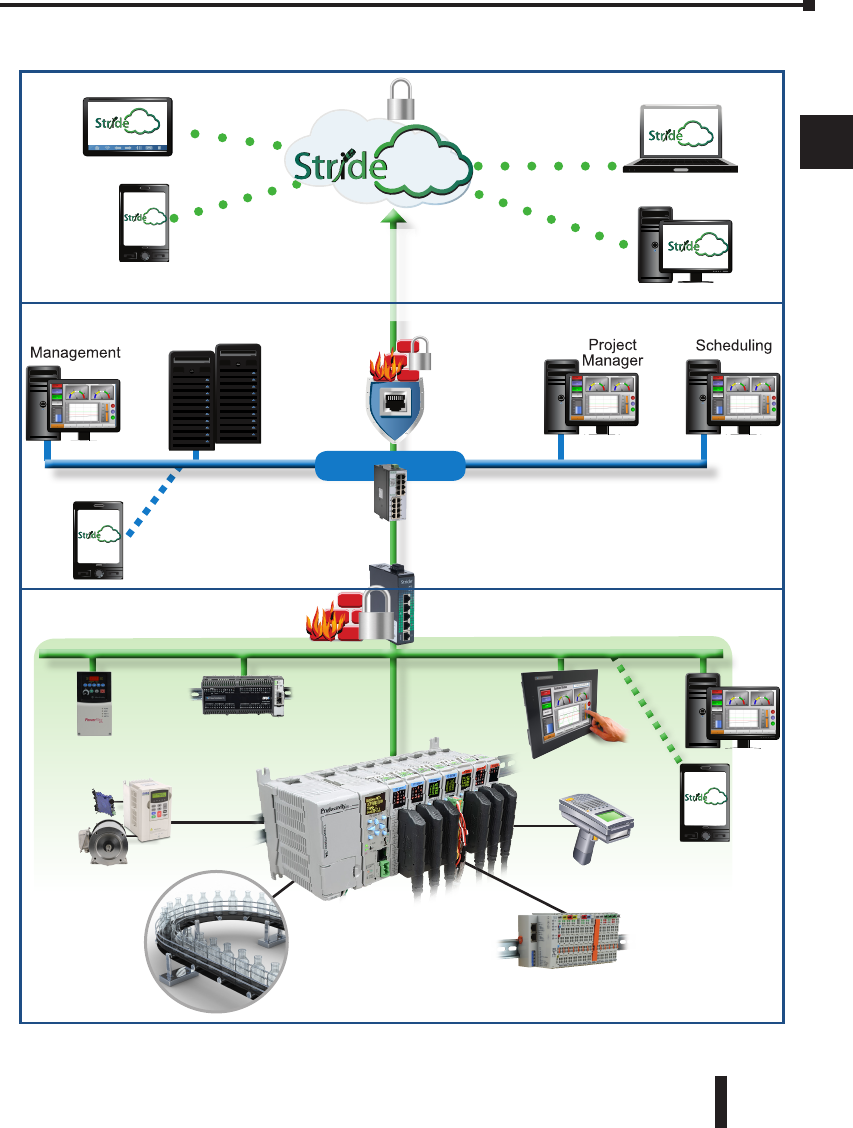
To facilitate description of the capabilities of various AutomationDirect product lines when
connected to a StrideLinx VPN router, the overall topology of a network connecting plant
devices to the StrideLinx platform can be divided into three zones, as illustrated in the two
figures later in this appendix.
The zones are defined as follows.
• Zone 1 is outside the company network, and includes the StrideLinx platform and secure
connections to it from various devices.
• Zone 2 is the company network, which exists behind a corporate firewall. This zone may
include various computer systems, but is isolated from the plant/controls network by the
internal firewall of the VPN router.
• Zone 3 comprises the devices connected to the VPN router, and thus potentially capable
of secure remote connection.
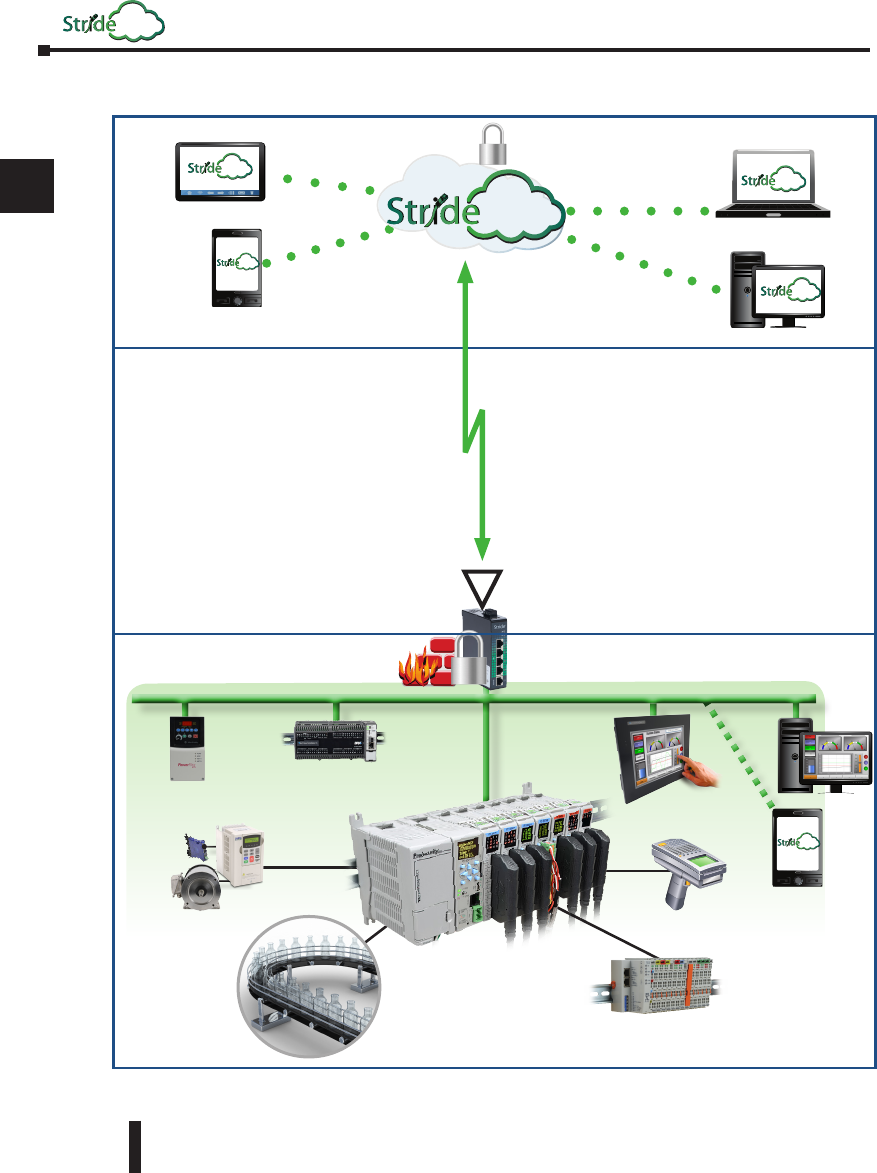
NOTE: Zone 2 does not participate at all in StrideLinx communications when a 4G cellular connection is used on the
VPN router, since the 4G connection does not traverse the company network.
StrideLinx™ Industrial VPN Routers User Manual 1st Edition, Rev. C F-3
Appendix F: Capabilities of Connected AutomationDirect Devices
E
F
3
4
5
6
7
8
9
10
11
12
13
14
A
B
C
D
Network with StrideLinx VPN router using wired or WiFi network connectivity
Field I/O
PLC
Application
Hand-held
Scanner
Ethernet
Outgoing
Connection
HMI
EtherNet/IP
Devices
PLC
VFD/Motor
VPN Connection
Linx
Linx
Linx
Plant/Controls Network
Internal
Fire Wall
Company Network
Linx
HTTPS Connection
Corporate
Servers
Corporate
Fire
Wall
VPN router
Zone 1
Zone 2
Linx Company
WiFi
Zone 3
Linx
Plant
WiFi
Linx
StrideLinx™ Industrial VPN Routers User Manual 1st Edition, Rev. C
F-4
E
F
3
4
5
6
7
8
9
10
11
12
13
14
A
B
C
D
Appendix F: Capabilities of Connected AutomationDirect Devices
Linx
Network with StrideLinx VPN router using 4G cellular network connectivity
Field I/O
PLC
Application
Hand-held
Scanner
Ethernet
HMI
EtherNet/IP
Devices
PLC
VFD/Motor
VPN Connection
Linx
Linx
Linx
Plant/Controls Network
Internal
Fire Wall
Linx
HTTPS Connection
4G VPN router
Zone 1
Zone 2
Zone 3
Linx
Plant
WiFi
4G Cellular
Connection
Linx

StrideLinx™ Industrial VPN Routers User Manual 1st Edition, Rev. C F-5
Appendix F: Capabilities of Connected AutomationDirect Devices
E
F
3
4
5
6
7
8
9
10
11
12
13
14
A
B
C
D
Device Capabilities
The following table describes the capabilities of devices to establish communications connections
across various network zones, as defined earlier.
Communications Capabilities of Devices Connected to StrideLinx Router
Functionality Zone 1->3
(StrideLinx App or
Browser w/o VPN)
Zone
1->3
(VPN)
Zone
2->3 1,6
Zone
3->2 6
Zone
3->1
Zone
3->3
Generic PLC programming SW
(Windows) N Y Y NA NA Y
Productivity programming SW N Y Y NA NA Y
BRX programming SW N Y Y NA NA Y
C-more programming SW N Y Y NA NA Y
C-more Remote Access (PC) N Y Y NA NA Y
PxK/C-more web server Y 4 Y Y NA NA Y
PxK/C-more FTP access
(into PxK/C-more)N Y Y NA NA Y
BRX/PxK/C-more Email to Server
(sent from BRX/PxK/C-more)NA NA NA Y 2 Y 2 NA
PxK/C-more FTP to PC
(sent from PxK/C-more)NA NA NA Y 2 Y 2 NA
PxK/C-more mobile app
(connect by WiFi) N N Y 3 NA NA Y
3rd party PLC or HMI web/VNC server Y 5 Y Y NA NA Y
Windows-based machine control N Y YNA NA Y
2nd StrideLinx Router
(M2M or site-to-site) NA NA NA NA NNA
1. Connections from Zone 2 to 3 can be made through VPN on a PC but require firewall adjustments (port forwarding) for
other devices. Consideration for security should be made before making firewall adjustments.
2. StrideLinx router firewall must be configured to allow internet access from the LAN side or allow access to corporate
network. This data does not pass through the VPN tunnel.
3.
StrideLinx router firewall must be configured to allow access to corporate network in order for the C-more Mobile App to connect.
4. PxK/C-more web server must be configured in StrideLinx platform (services tab) to provide the shortcut on the router
dashboard page.
5. Web/VNC server capability depends on 3rd party device capability. Web/VNC server must be configured in StrideLinx
platform (services tab) to provide the shortcut on the router dashboard page.
6. Connections to/from Zone 2 are not applicable when using a 4G cellular connection.
7. NA is used when the device is not located in the starting or ending zone.
NOTE: The StrideLinx router & platform should operate with any TCP/UDP Ethernet device designed with remote
connectivity functions such as unicast messaging, default gateway support and retry timeout parameters. ADC tech
support can assist with basic networking/connectivity troubleshooting for any device connected to a StrideLinx router,
but only officially supports ADC hardware and programming software tools.

StrideLinx™ Industrial VPN Routers User Manual 1st Edition, Rev. C
F-6
E
F
3
4
5
6
7
8
9
10
11
12
13
14
A
B
C
D
Appendix F: Capabilities of Connected AutomationDirect Devices
Linx
