Perceptimed WANTXRX1-G1 Simplex WAN Base Station User Manual

Perceptimed Inc Simplex WAN Base Station Users Manual

Users Manual

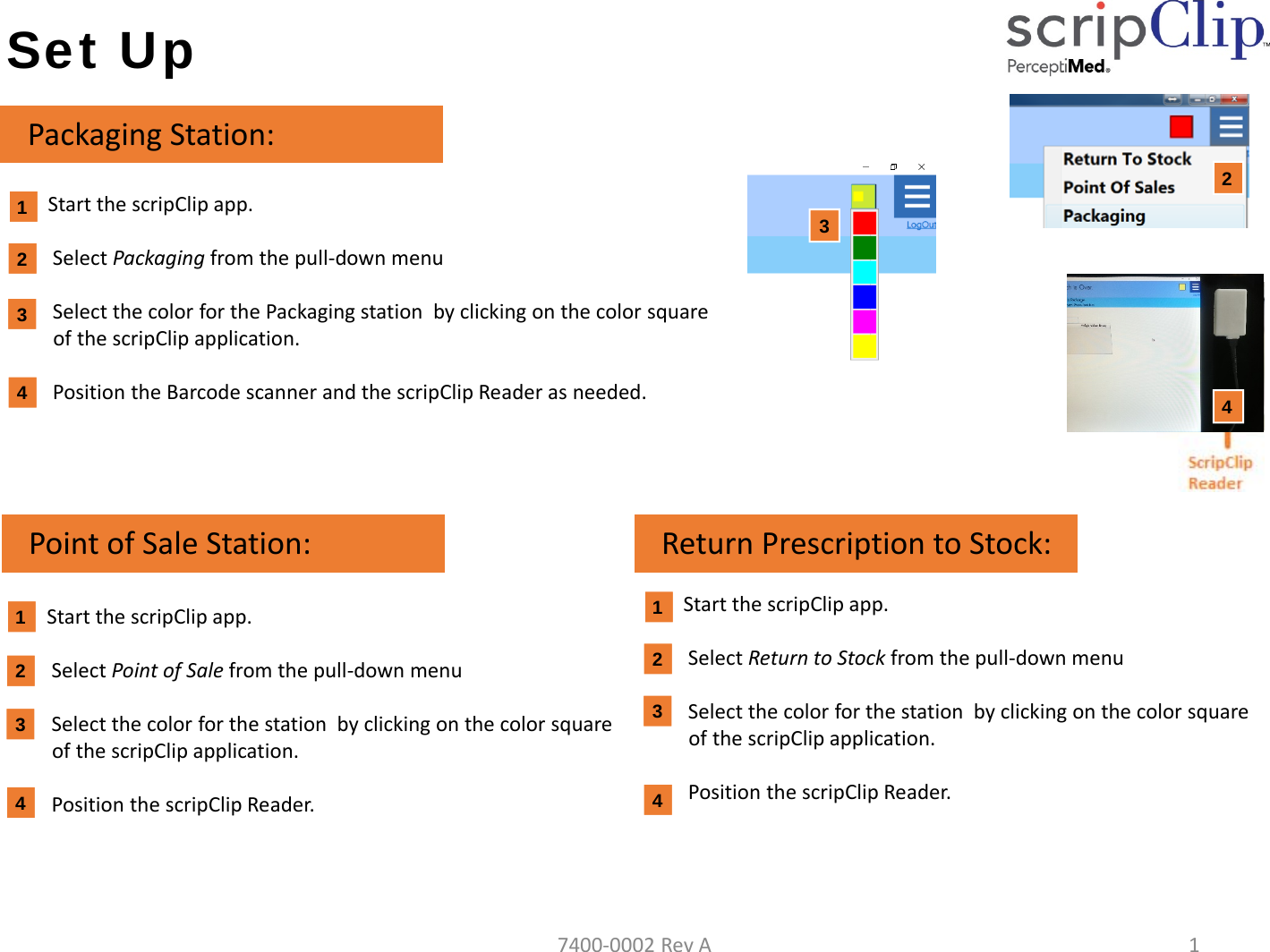
Set UpStartthescripClip app.SelectPackaging fromthepull‐downmenuSelectthecolorforthePackagingstationbyclickingonthecolorsquareofthescripClipapplication.PositiontheBarcodescannerandthescripClip Readerasneeded.PackagingStation:432412PointofSaleStation: ReturnPrescriptiontoStock:4StartthescripClip app.SelectPointofSale fromthepull‐downmenuSelectthecolorforthestationbyclickingonthecolorsquareofthescripClip application.PositionthescripClip Reader.StartthescripClip app.SelectReturntoStock fromthepull‐downmenuSelectthecolorforthestationbyclickingonthecolorsquareofthescripClip application.PositionthescripClip Reader.3241332417400‐0002RevA1
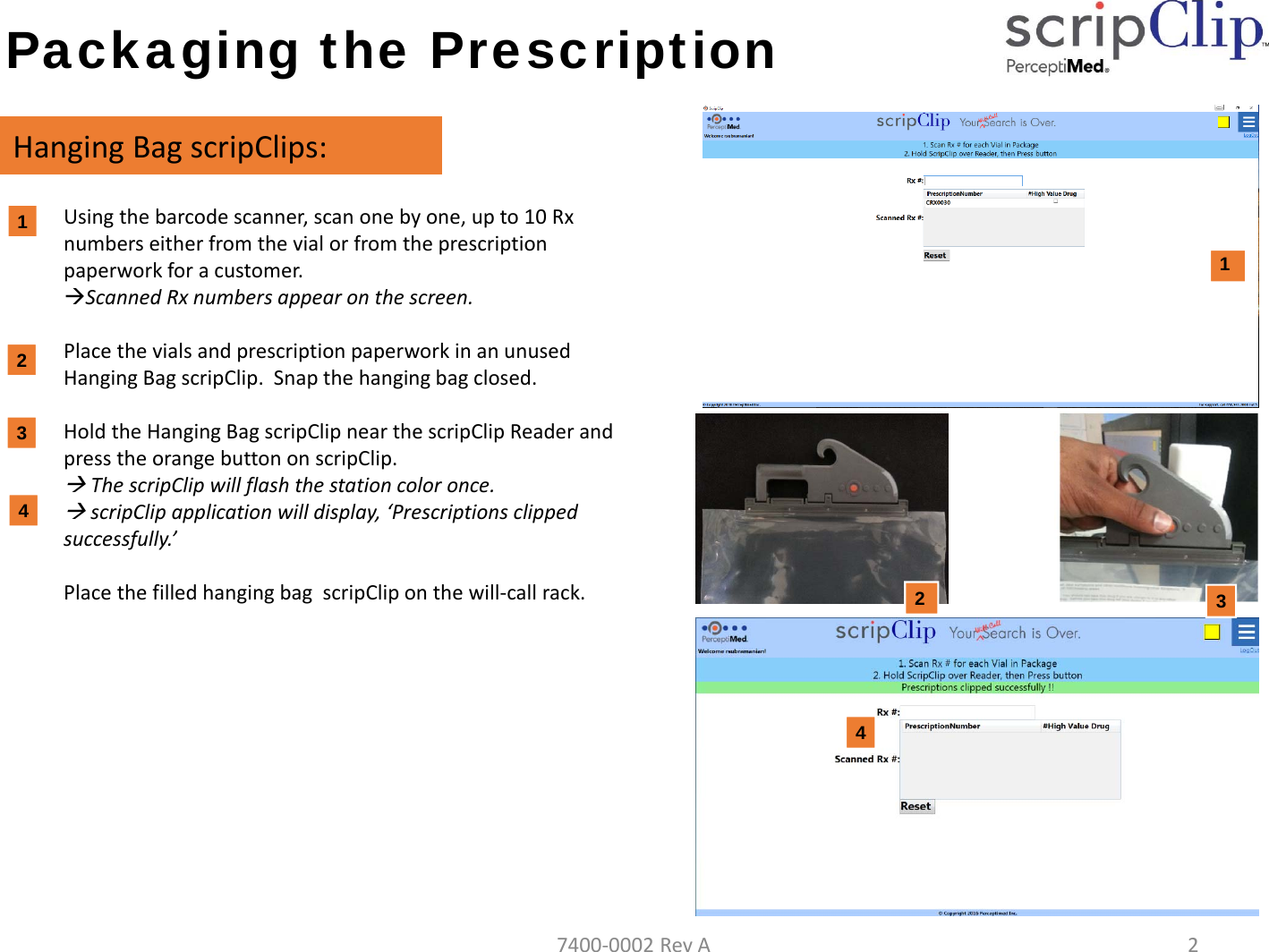
Packaging the PrescriptionHangingBagscripClips:1. Usingthebarcodescanner,scanonebyone,upto10Rxnumberseitherfromthevialorfromtheprescriptionpaperworkforacustomer.ScannedRxnumbersappearonthescreen.2. PlacethevialsandprescriptionpaperworkinanunusedHangingBagscripClip.Snapthehangingbagclosed.3. HoldtheHangingBagscripClipnearthescripClipReaderandpresstheorangebuttononscripClip.ThescripClipwillflashthestationcoloronce.scripClip applicationwilldisplay,‘Prescriptionsclippedsuccessfully.’PlacethefilledhangingbagscripCliponthewill‐callrack.11233PictureofHangingbag2447400‐0002RevA2
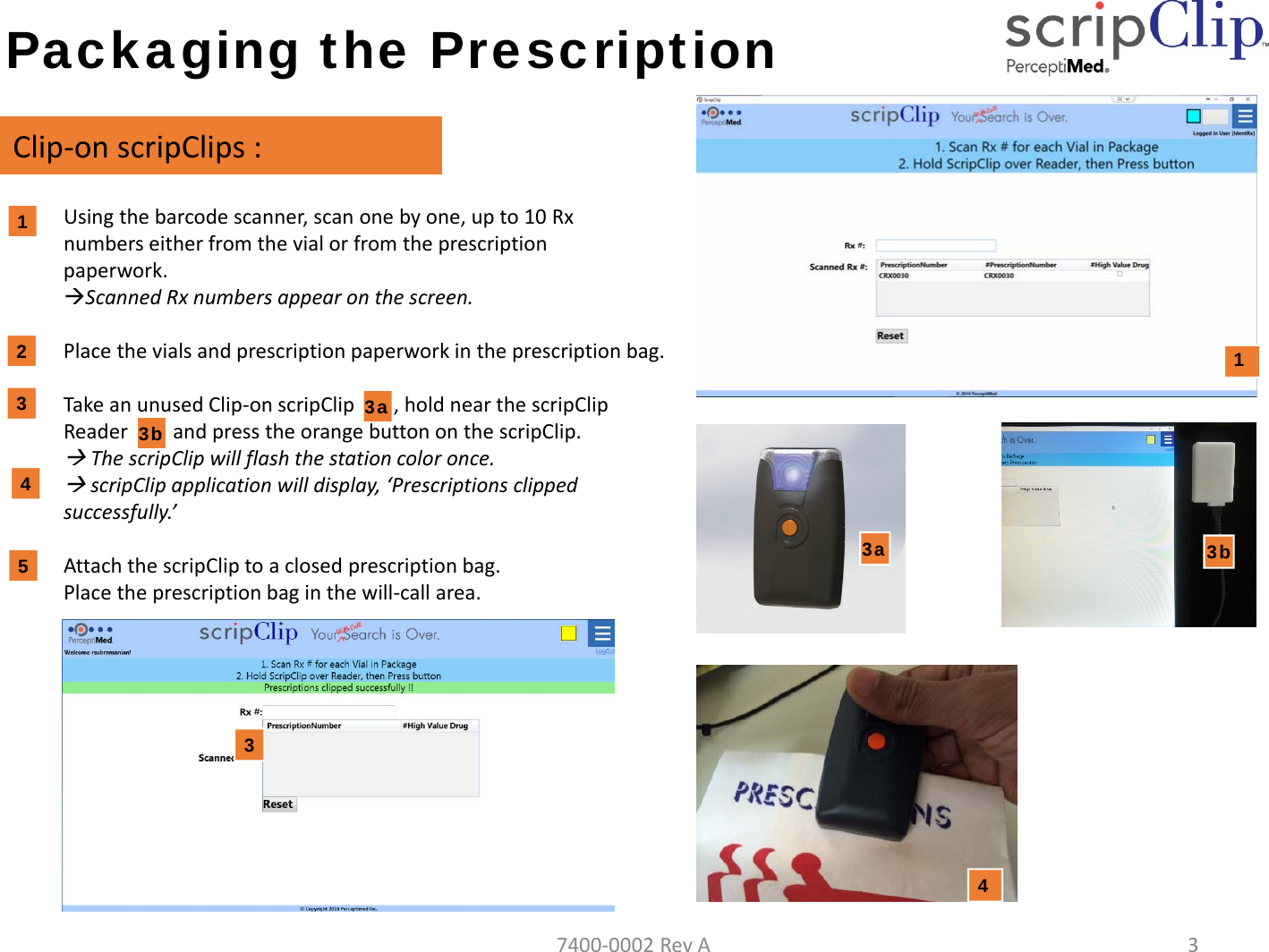
Packaging the PrescriptionClip‐onscripClips :1. Usingthebarcodescanner,scanonebyone,upto10Rxnumberseitherfromthevialorfromtheprescriptionpaperwork.ScannedRxnumbersappearonthescreen.2. Placethevialsandprescriptionpaperworkintheprescriptionbag.3. TakeanunusedClip‐onscripClip3a),holdnearthescripClipReader3b)andpresstheorangebuttononthescripClip.ThescripClipwillflashthestationcoloronce.scripClip applicationwilldisplay,‘Prescriptionsclippedsuccessfully.’4. AttachthescripClip toaclosedprescriptionbag.Placetheprescriptionbaginthewill‐callarea.11233b54343a3a3b7400‐0002RevA3
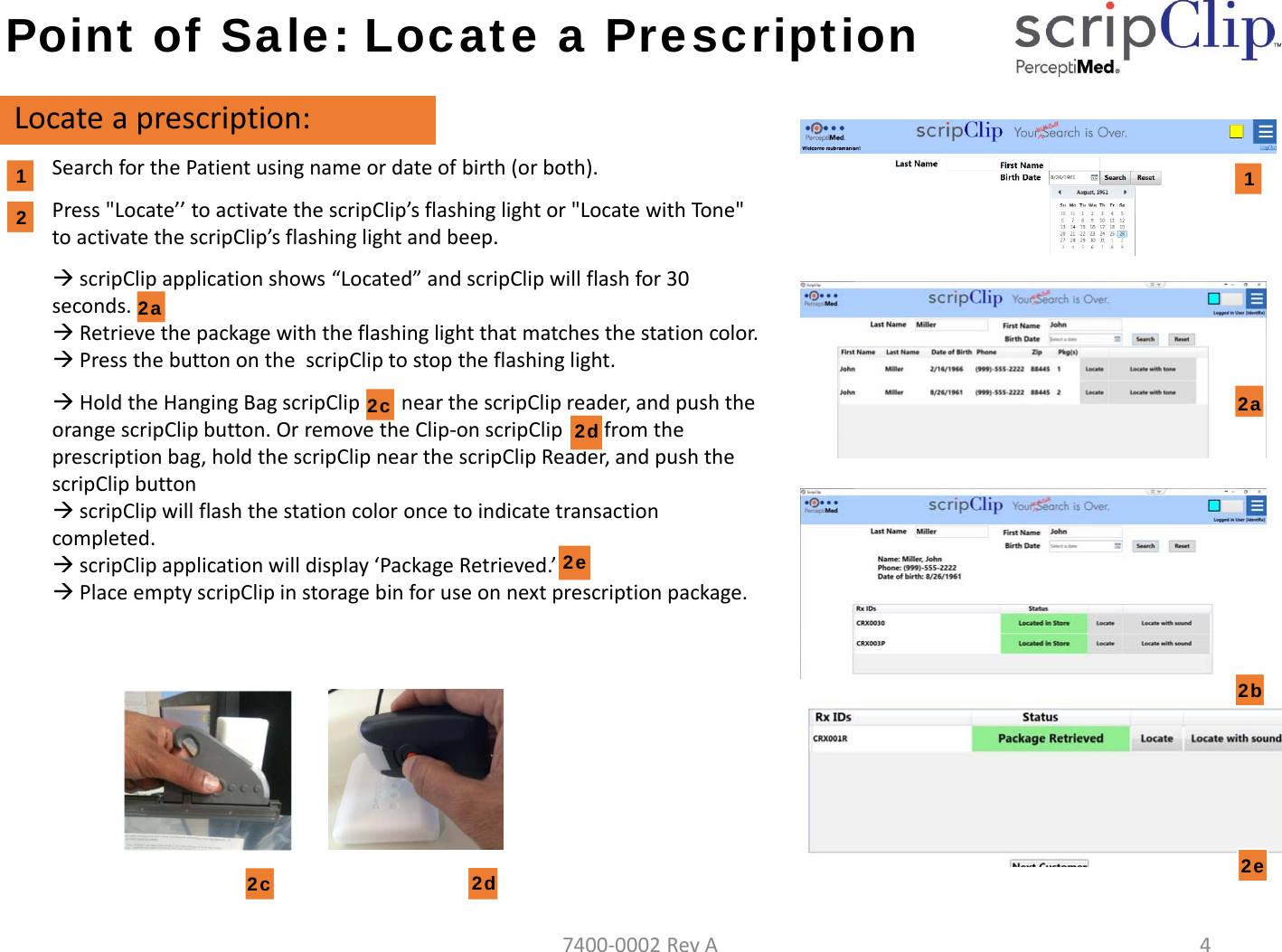
Point of Sale: Locate a PrescriptionLocateaprescription:SearchforthePatientusingnameordateofbirth(orboth).Press"Locate’’toactivatethescripClip’s flashinglightor"LocatewithTone"toactivatethescripClip’s flashinglightandbeep.scripClipapplicationshows“Located”andscripClipwillflashfor30seconds.Retrievethepackagewiththeflashinglightthatmatchesthestationcolor.PressthebuttononthescripCliptostoptheflashinglight.HoldtheHangingBagscripClipnearthescripClipreader,andpushtheorangescripClipbutton.OrremovetheClip‐onscripClipfromtheprescriptionbag,holdthescripClipnearthescripClipReader,andpushthescripClipbuttonscripClip willflashthestationcoloroncetoindicatetransactioncompleted.scripClip applicationwilldisplay‘PackageRetrieved.’PlaceemptyscripClipinstoragebinforuseonnextprescriptionpackage.122a2b2d 2e2c12c2d2a2e7400‐0002RevA4
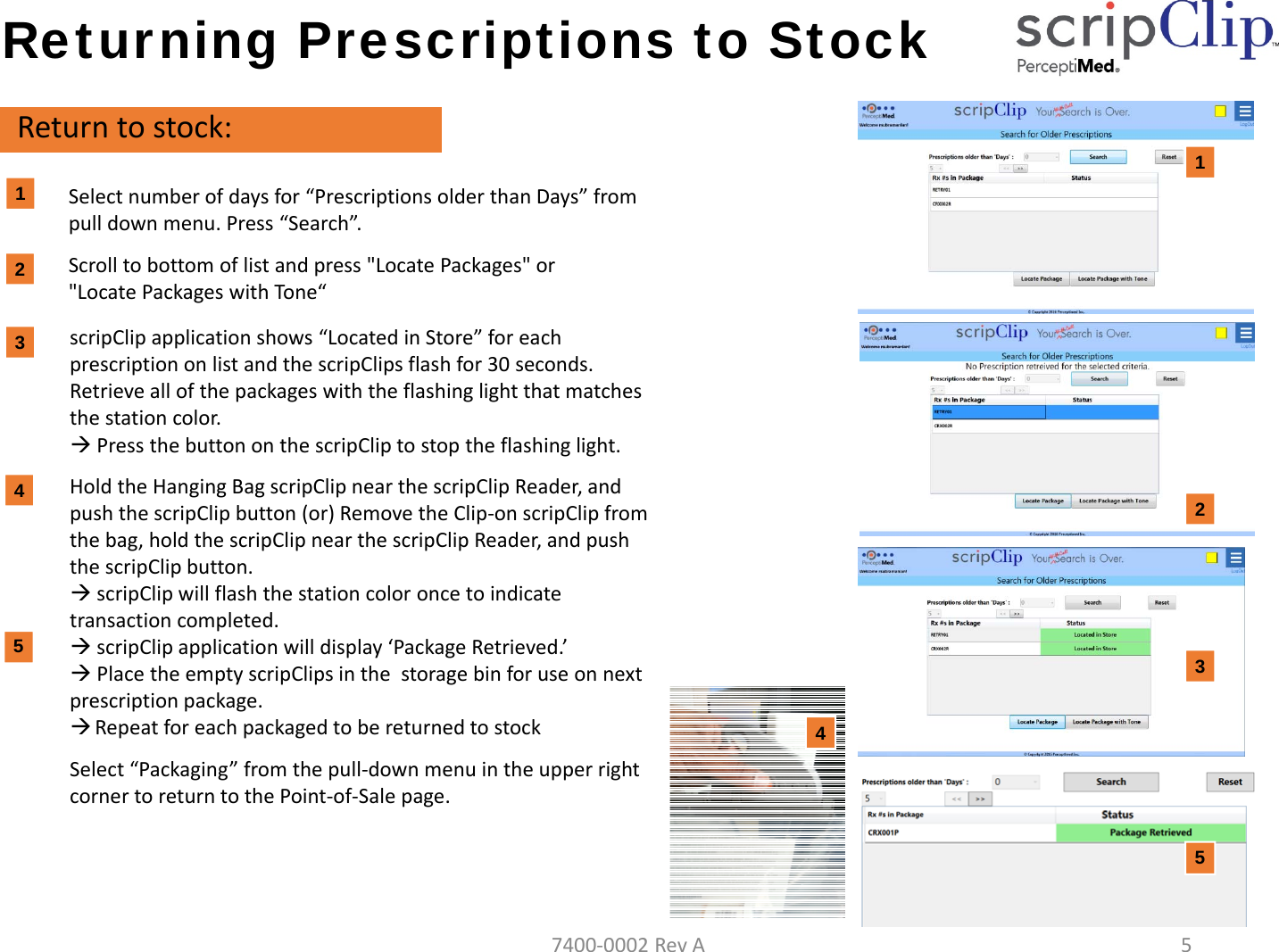
Returning Prescriptions to StockReturntostock:Selectnumberofdaysfor“PrescriptionsolderthanDays”frompulldownmenu.Press“Search”.Scrolltobottomoflistandpress"LocatePackages"or"LocatePackageswithTone“1122scripClipapplicationshows“LocatedinStore”foreachprescriptiononlistandthescripClips flashfor30seconds.Retrieveallofthepackageswiththeflashinglightthatmatchesthestationcolor.PressthebuttononthescripClip tostoptheflashinglight.HoldtheHangingBagscripClip nearthescripClipReader,andpushthescripClipbutton(or)RemovetheClip‐onscripClipfromthebag,holdthescripClipnearthescripClipReader,andpushthescripClipbutton.scripClip willflashthestationcoloroncetoindicatetransactioncompleted.scripClip applicationwilldisplay‘PackageRetrieved.’PlacetheemptyscripClips inthestoragebinforuseonnextprescriptionpackage.RepeatforeachpackagedtobereturnedtostockSelect“Packaging”fromthepull‐downmenuintheupperrightcornertoreturntothePoint‐of‐Salepage.3434557400‐0002RevA5
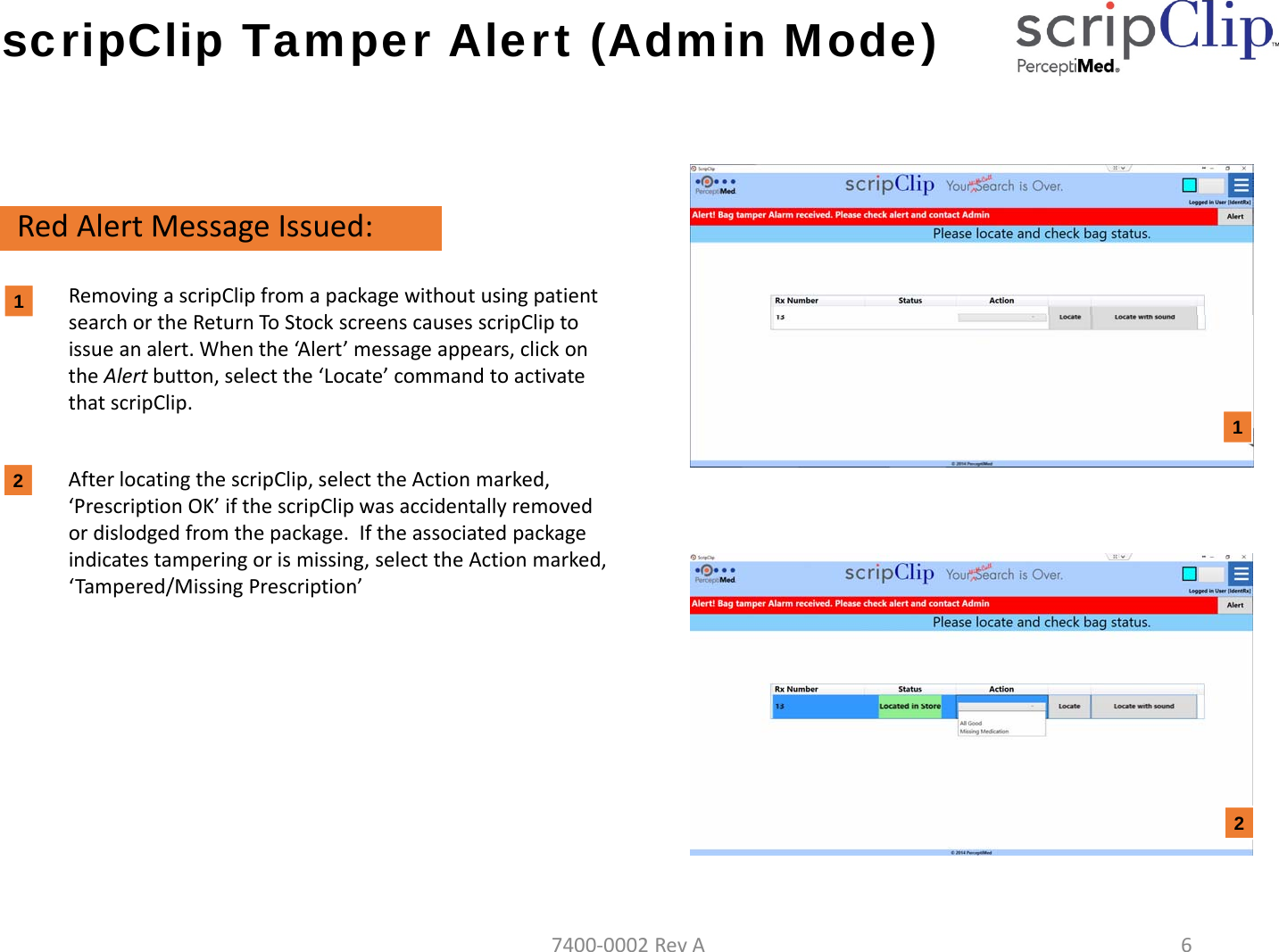
scripClip Tamper Alert (Admin Mode)RedAlertMessageIssued:RemovingascripClipfromapackagewithoutusingpatientsearchortheReturnToStockscreenscausesscripCliptoissueanalert.Whenthe‘Al ert ’messageappears,clickontheAlertbutton,selectthe‘Locate’commandtoactivatethatscripClip.AfterlocatingthescripClip,selecttheActionmarked,‘PrescriptionOK’ifthescripClipwasaccidentallyremovedordislodgedfromthepackage.Iftheassociatedpackageindicatestamperingorismissing,selecttheActionmarked,‘Tampered/MissingPrescription’12127400‐0002RevA6
Troubleshooting Message:TryagainCause:PackagenotlocatedinstoreSolution: CheckRxnumbersentered.Press“Locate”or“LocatewithTone”again.Message:Wrongpackageretrieved.Cause:scripClipscanneddoesnotmatchRxnumbers.Solution:PutscripClipbackonpackageandreturntoshelf.Press“Locate”again.Retrievecorrectpackage.Message:UnabletoreadRxnumbers.Cause:scripClipreaderdidnotreceiveallRxnumbersfromscripClipSolution:HoldscripClipclosertothescripClipReaderandpresstheorangebuttononscripClipagain.Event:UserisunabletofindflashingscripClipinstoreCause:scripClipstopsflashingafter30seconds.Solution:Press“LocatePrescriptions”againorpress“LocatePrescriptionswithTone”.Userdoesnotneedtore‐enterRxnumbers.Message:UnabletocommunicatewiththecentralserviceCause:PackagenotlocatedinstoreSolution: Call650941‐7000ext5orsendemailtosupport@perceptiMed.com7400‐0002RevA7
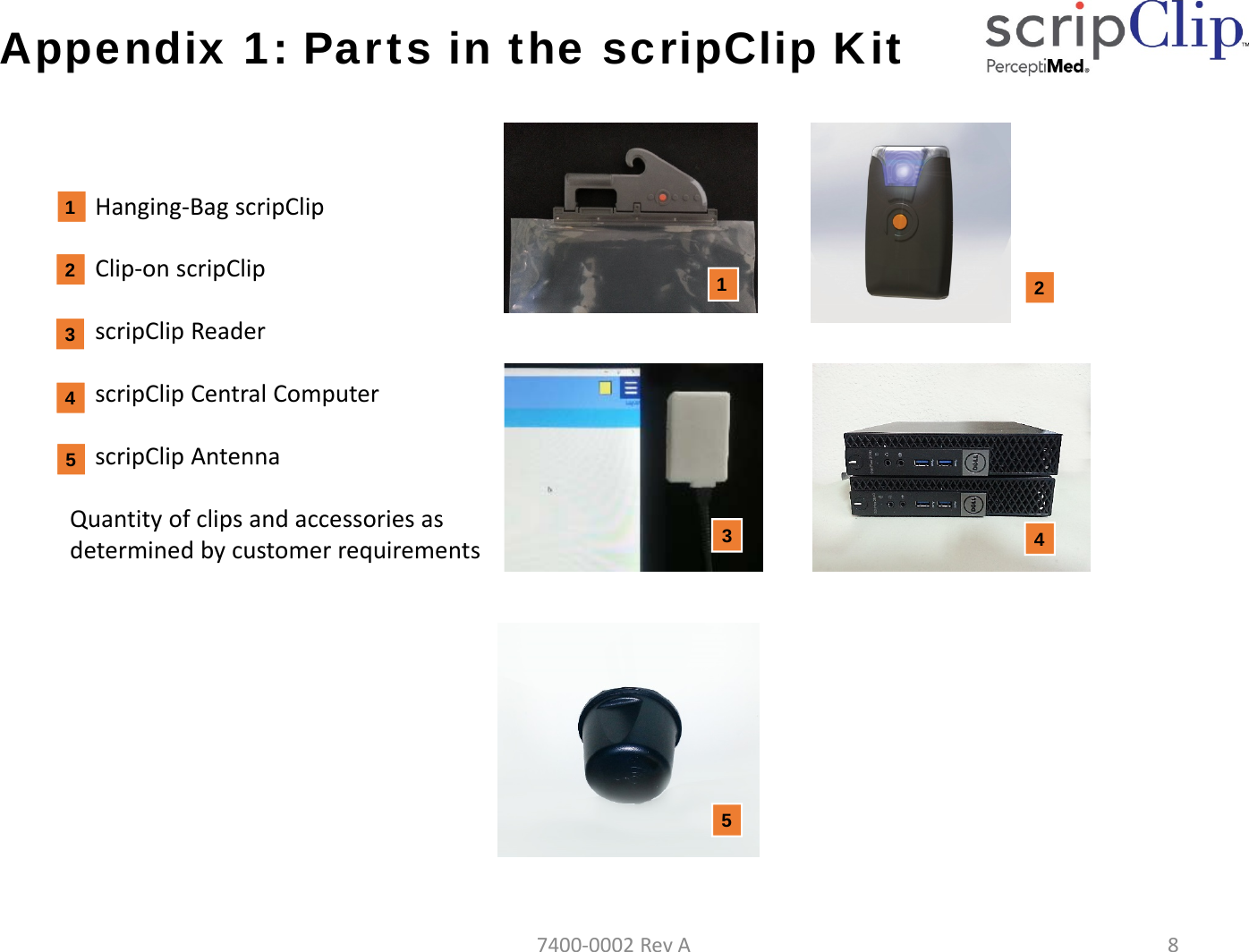
Appendix 1: Parts in the scripClip KitHanging‐BagscripClipClip‐onscripClipscripClip ReaderscripClipCentralComputerscripClip AntennaQuantityofclipsandaccessoriesasdeterminedbycustomerrequirements432415324157400‐0002RevA8
InformationBatteryReplacement:Do not attempt to replace the battery yourself. Perceptimed will replace battery and verify device asdirected by service contract.UseRestriction:Do not relocate system and components without a Perceptimed authorized installer. Components arerestricted to indoor pharmacy and non‐residential application.DisposalInformation:When this product reaches its end of life, return the device(s) to Perceptimed or dispose as directed bylocal laws and regulations. The collection and recycling of electronic waste conserves natural resourcesand protects human health and the environment.7400‐0002RevA9
Compliance InformationFCCComplianceStatement:This device complies with Part 15 of the FCC Rules. Operation is subject to the following two conditions:(1) this device may not cause harmful interference, and (2) this device must accept any interferencereceived, including interference that may cause undesired operation.This equipment has been tested and found to comply with the limits for a Class A digital device, pursuanttoPart15oftheFCCRules.Theselimitsaredesignedtoprovidereasonableprotectionagainstharmfulinterference when the equipment is operated in a commercial environment. This equipment generates,uses, and can radiate radio frequency energy and, if not installed and used in accordance with theinstruction manual, may cause harmful interference to radio communications. Operation of thisequipment in a residential area is not recommended. If this equipment does cause harmful interference oris interfered with by other services contact Perceptimed or its representative.Any modifications made to this device and accessories that are not approved by Perceptimed, Inc. mayvoid the authority granted to the user by the FCC to operate this equipment.ApplicabletotheFollowingDevices:Hanging‐Bag scripClip, Models SCLP‐HNGBAG‐G1V1 and SCLP‐HNGBAG‐G1V2, FCC ID: 2AJ8D‐HNGBAG‐G1Clip‐on scripClip, Model SCLP‐CLPON‐G1V1, FCC ID: 2AJ8D‐CLPON‐G1Sentinal scripClip, Model SCLP‐HNGBAG‐G1V3, FCC ID: 2AJ8D‐HNGBAG‐G1V3scripClip Reader, Model SCLP‐READER‐G1V1, FCC ID: 2AJ8D‐READER‐G1WAN Basestation, Model SCLP‐WANTXRX1‐G1V1, FCC ID: 2AJ8D‐WANTXRX1‐G17400‐0002RevA10
Compliance InformationDisclosureofExposuretoRadiofrequencyandElectromagneticFields:This equipment complies with the FCC radiation exposure limits set forth per 47 CFR §2.1091 for anuncontrolled environment (ie: both occupational and unrestricted exposure to the public).The operating power of the scripClip and its associated Reader is deliberately limited. No precautions arerequired for their use or operation.The wide area broadcast station and its antennas must be installed and operated such that at least 30cmseparation distance is maintained between these components and the operator or the general public. Thisis normally achieved by overhead ceiling mount of at least 8 feet from the level of the floor. Theseantennas may not be collocated with antennas for WiFi or other applications.7400‐0002RevA11

Navigation menu