Perceptimed WANTXRX1-G1 Simplex WAN Base Station User Manual
Perceptimed Inc Simplex WAN Base Station Users Manual
Users Manual
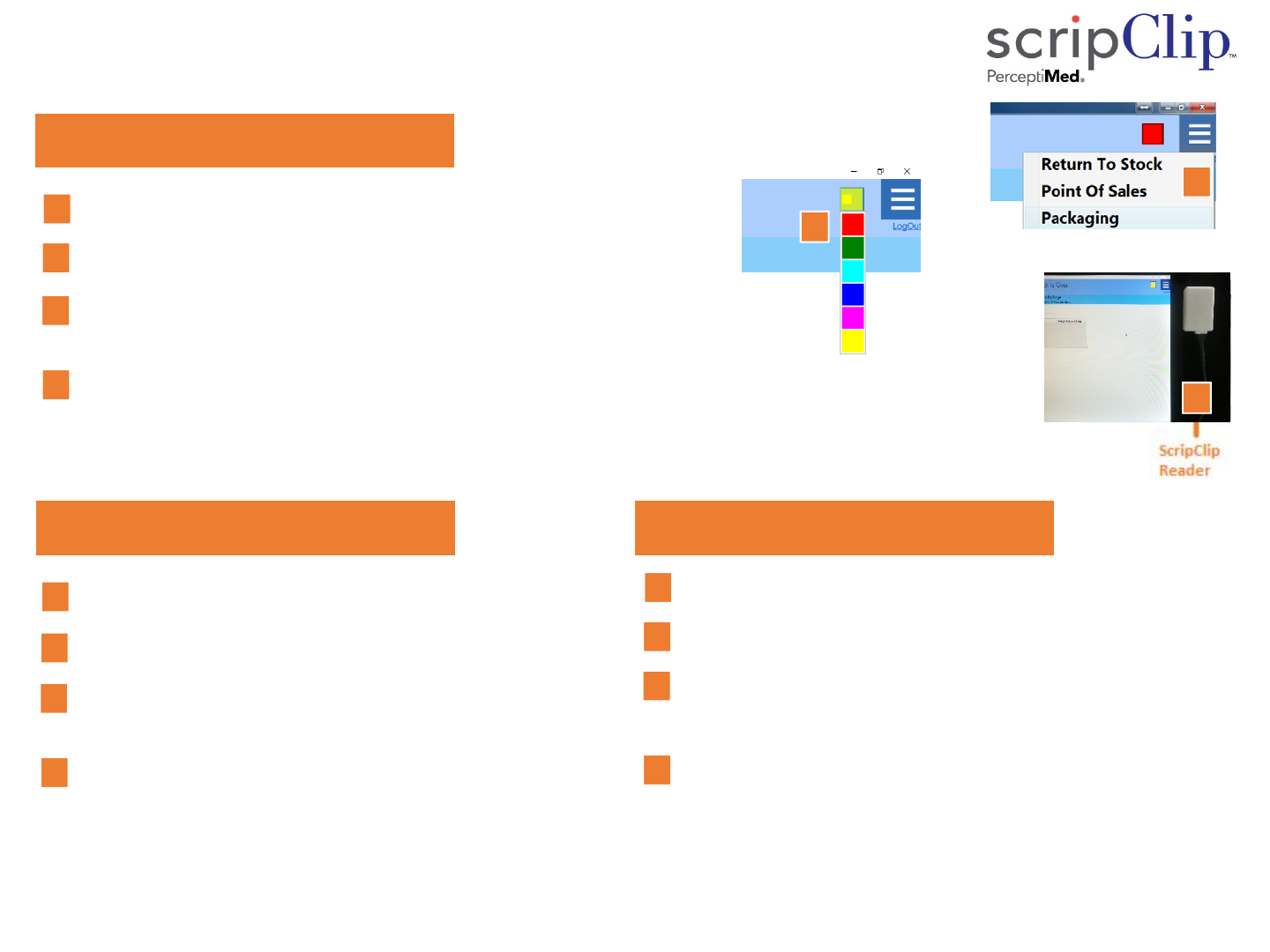
Set Up
StartthescripClip app.
SelectPackaging fromthepull‐downmenu
SelectthecolorforthePackagingstationbyclickingonthecolorsquare
ofthescripClipapplication.
PositiontheBarcodescannerandthescripClip Readerasneeded.
PackagingStation:
4
3
2
4
1
2
PointofSaleStation: ReturnPrescriptiontoStock:
4
StartthescripClip app.
SelectPointofSale fromthepull‐downmenu
Selectthecolorforthestationbyclickingonthecolorsquare
ofthescripClip application.
PositionthescripClip Reader.
StartthescripClip app.
SelectReturntoStock fromthepull‐downmenu
Selectthecolorforthestationbyclickingonthecolorsquare
ofthescripClip application.
PositionthescripClip Reader.
3
2
4
1
3
3
2
4
1
7400‐0002RevA1
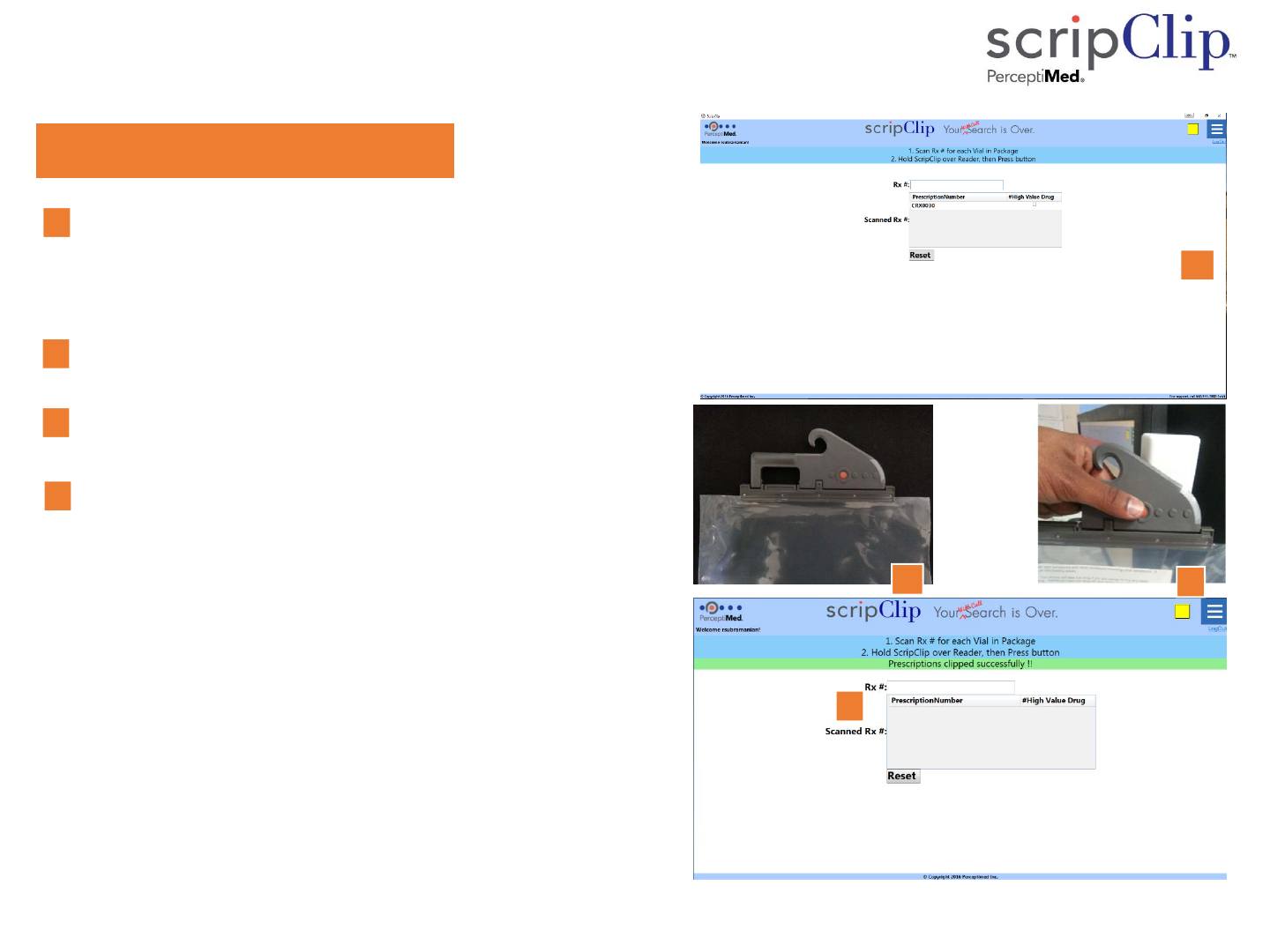
Packaging the Prescription
HangingBagscripClips:
1. Usingthebarcodescanner,scanonebyone,upto10Rx
numberseitherfromthevialorfromtheprescription
paperworkforacustomer.
ScannedRxnumbersappearonthescreen.
2. Placethevialsandprescriptionpaperworkinanunused
HangingBagscripClip.Snapthehangingbagclosed.
3. HoldtheHangingBagscripClipnearthescripClipReaderand
presstheorangebuttononscripClip.
ThescripClipwillflashthestationcoloronce.
scripClip applicationwilldisplay,‘Prescriptionsclipped
successfully.’
PlacethefilledhangingbagscripCliponthewill‐callrack.
1
1
2
3
3
Pictureof
Hangingbag
2
4
4
7400‐0002RevA2
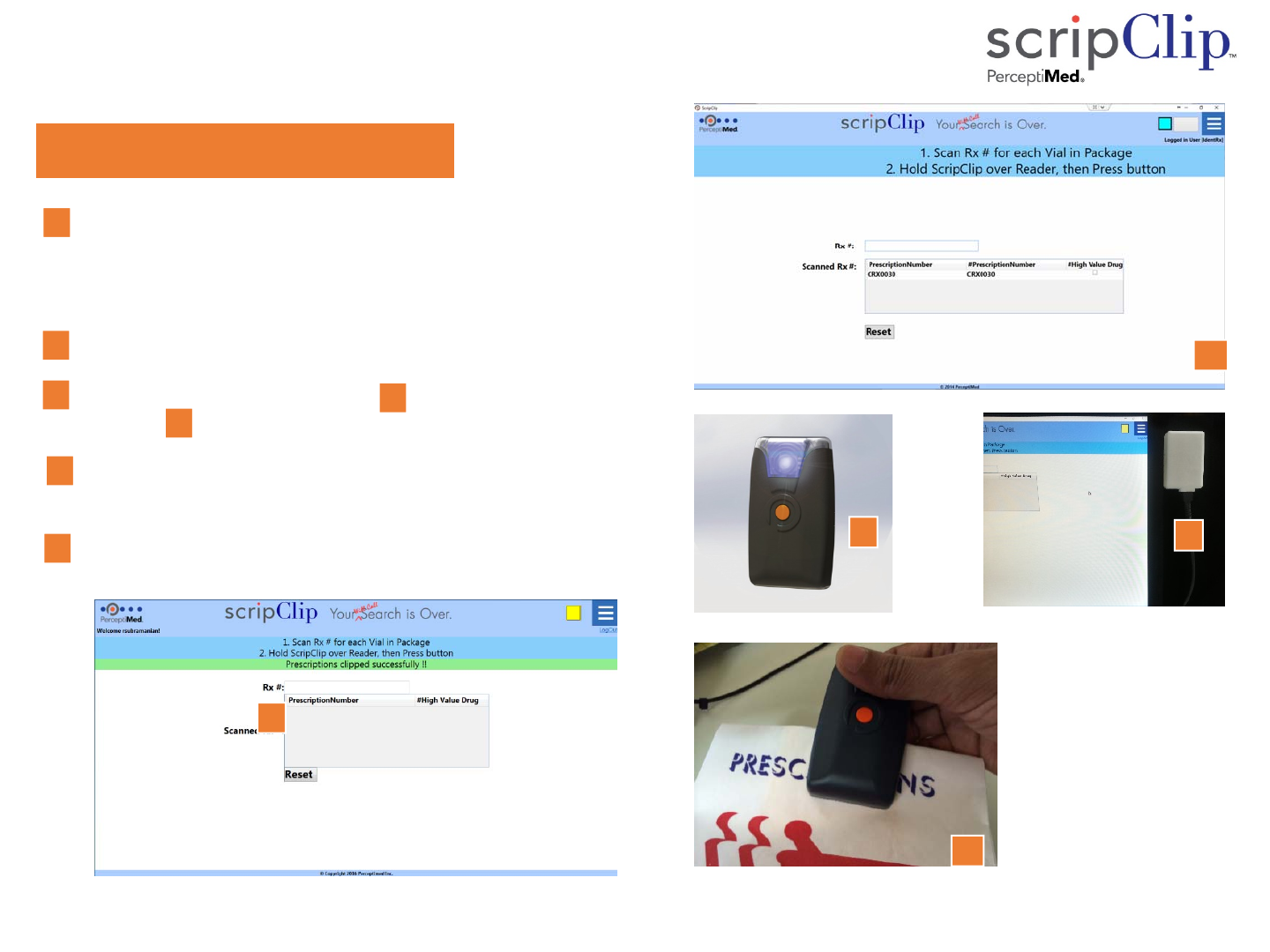
Packaging the Prescription
Clip‐onscripClips :
1. Usingthebarcodescanner,scanonebyone,upto10Rx
numberseitherfromthevialorfromtheprescription
paperwork.
ScannedRxnumbersappearonthescreen.
2. Placethevialsandprescriptionpaperworkintheprescriptionbag.
3. TakeanunusedClip‐onscripClip3a),holdnearthescripClip
Reader3b)andpresstheorangebuttononthescripClip.
ThescripClipwillflashthestationcoloronce.
scripClip applicationwilldisplay,‘Prescriptionsclipped
successfully.’
4. AttachthescripClip toaclosedprescriptionbag.
Placetheprescriptionbaginthewill‐callarea.
1
1
2
3
3b
5
4
3
4
3a
3a
3b
7400‐0002RevA3
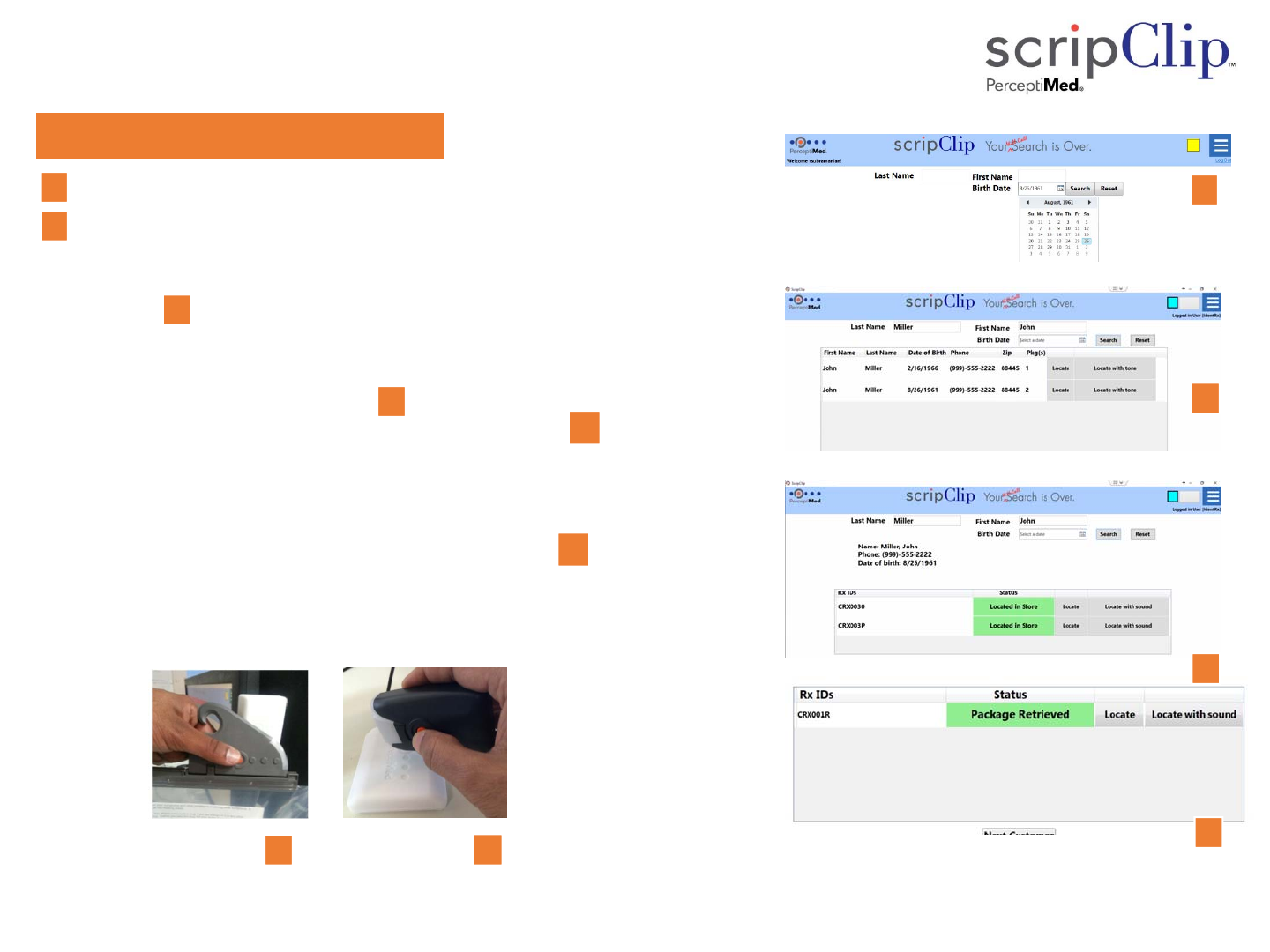
Point of Sale: Locate a Prescription
Locateaprescription:
SearchforthePatientusingnameordateofbirth(orboth).
Press"Locate’’toactivatethescripClip’s flashinglightor"LocatewithTone"
toactivatethescripClip’s flashinglightandbeep.
scripClipapplicationshows“Located”andscripClipwillflashfor30
seconds.
Retrievethepackagewiththeflashinglightthatmatchesthestationcolor.
PressthebuttononthescripCliptostoptheflashinglight.
HoldtheHangingBagscripClipnearthescripClipreader,andpushthe
orangescripClipbutton.OrremovetheClip‐onscripClipfromthe
prescriptionbag,holdthescripClipnearthescripClipReader,andpushthe
scripClipbutton
scripClip willflashthestationcoloroncetoindicatetransaction
completed.
scripClip applicationwilldisplay‘PackageRetrieved.’
PlaceemptyscripClipinstoragebinforuseonnextprescriptionpackage.
1
2
2a
2b
2d 2e
2c
1
2c
2d
2a
2e
7400‐0002RevA4
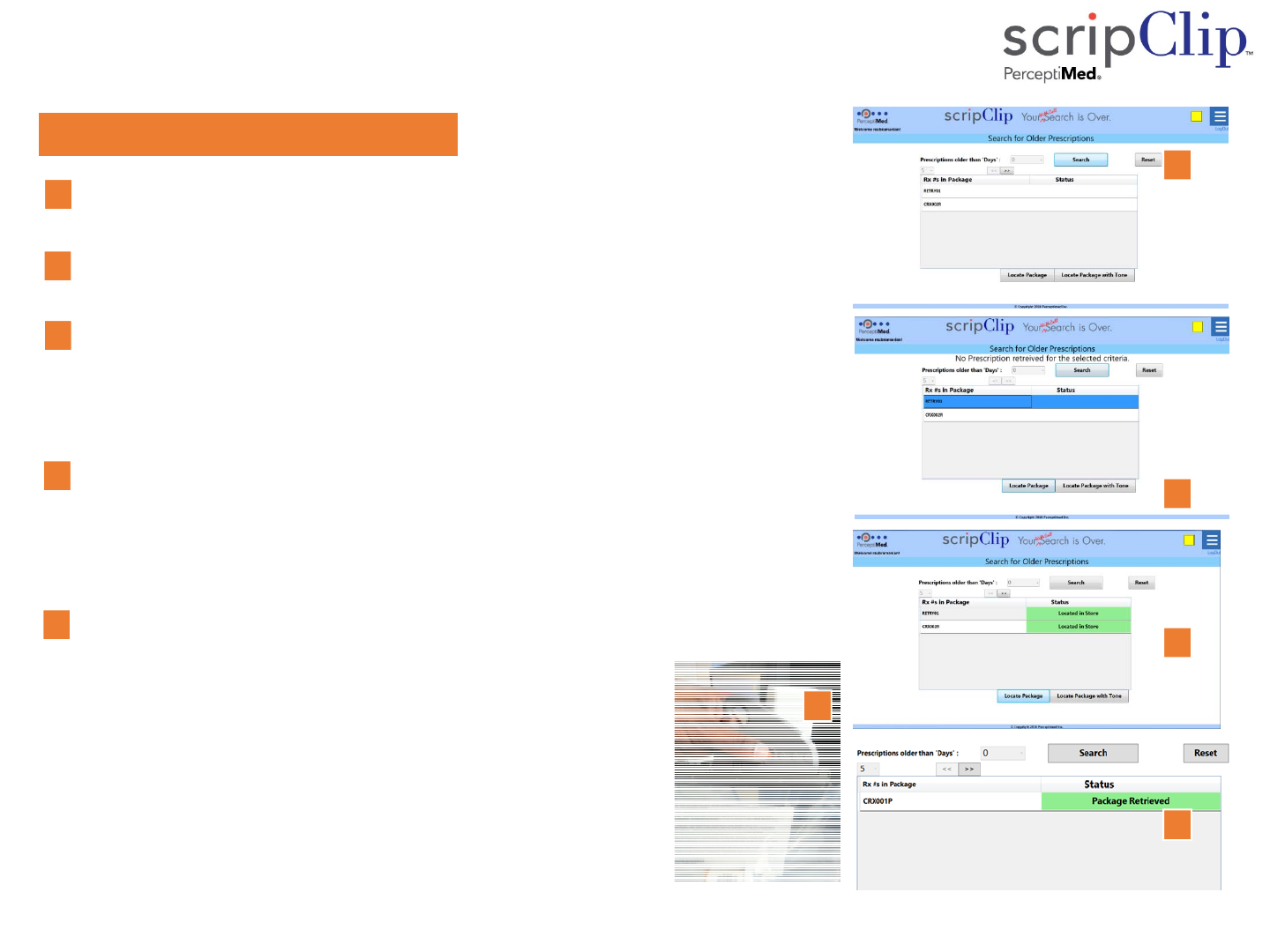
Returning Prescriptions to Stock
Returntostock:
Selectnumberofdaysfor“PrescriptionsolderthanDays”from
pulldownmenu.Press“Search”.
Scrolltobottomoflistandpress"LocatePackages"or
"LocatePackageswithTone“
1
1
2
2
scripClipapplicationshows“LocatedinStore”foreach
prescriptiononlistandthescripClips flashfor30seconds.
Retrieveallofthepackageswiththeflashinglightthatmatches
thestationcolor.
PressthebuttononthescripClip tostoptheflashinglight.
HoldtheHangingBagscripClip nearthescripClipReader,and
pushthescripClipbutton(or)RemovetheClip‐onscripClipfrom
thebag,holdthescripClipnearthescripClipReader,andpush
thescripClipbutton.
scripClip willflashthestationcoloroncetoindicate
transactioncompleted.
scripClip applicationwilldisplay‘PackageRetrieved.’
PlacetheemptyscripClips inthestoragebinforuseonnext
prescriptionpackage.
Repeatforeachpackagedtobereturnedtostock
Select“Packaging”fromthepull‐downmenuintheupperright
cornertoreturntothePoint‐of‐Salepage.
3
4
3
4
5
5
7400‐0002RevA5
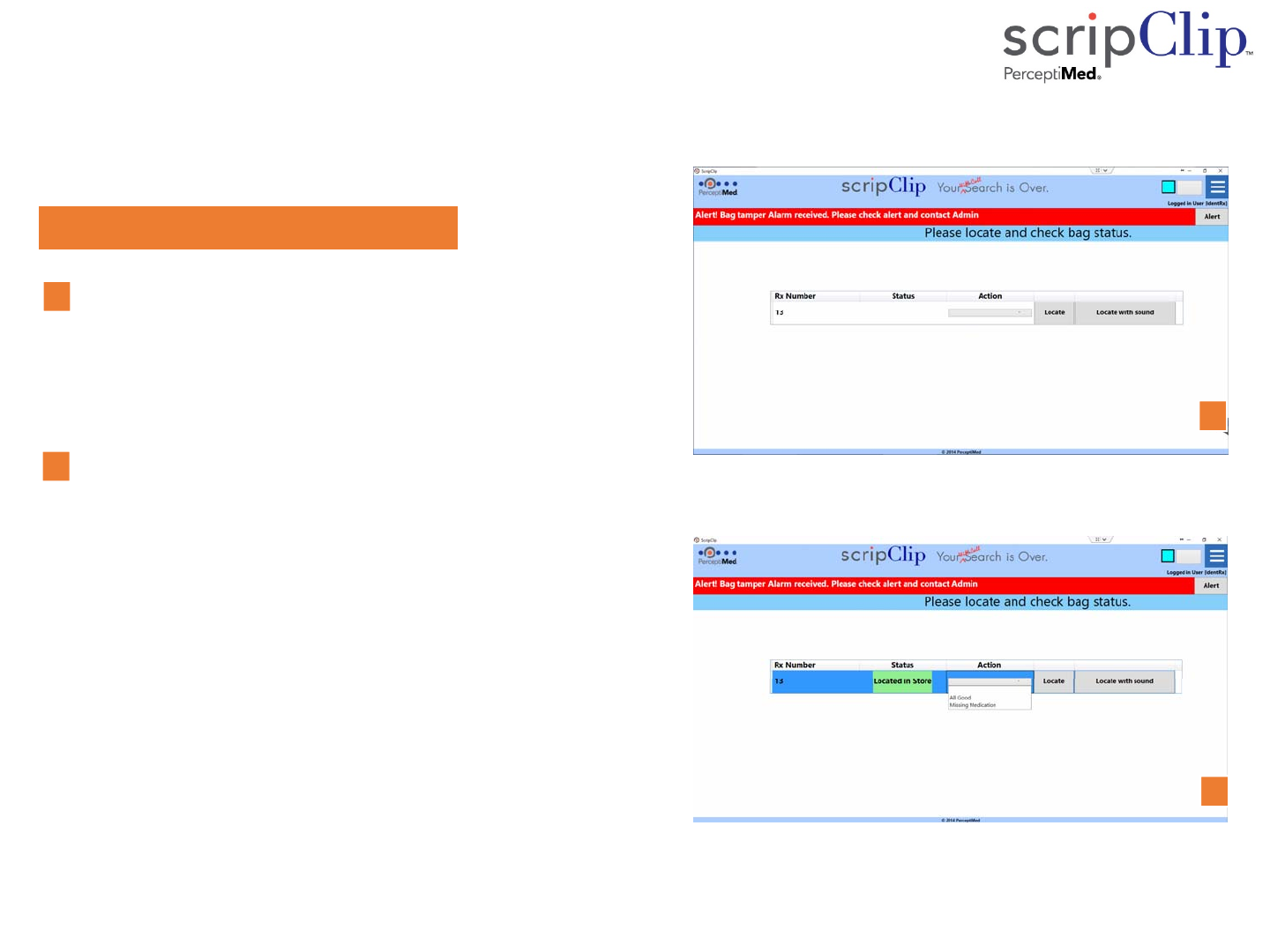
scripClip Tamper Alert (Admin Mode)
RedAlertMessageIssued:
RemovingascripClipfromapackagewithoutusingpatient
searchortheReturnToStockscreenscausesscripClipto
issueanalert.Whenthe‘Al ert ’messageappears,clickon
theAlertbutton,selectthe‘Locate’commandtoactivate
thatscripClip.
AfterlocatingthescripClip,selecttheActionmarked,
‘PrescriptionOK’ifthescripClipwasaccidentallyremoved
ordislodgedfromthepackage.Iftheassociatedpackage
indicatestamperingorismissing,selecttheActionmarked,
‘Tampered/MissingPrescription’
1
2
1
2
7400‐0002RevA6

Troubleshooting
Message:Tryagain
Cause:Packagenotlocatedinstore
Solution: CheckRxnumbersentered.Press“Locate”or“LocatewithTone”again.
Message:Wrongpackageretrieved.
Cause:scripClipscanneddoesnotmatchRxnumbers.
Solution:PutscripClipbackonpackageandreturntoshelf.Press“Locate”again.Retrievecorrect
package.
Message:UnabletoreadRxnumbers.
Cause:scripClipreaderdidnotreceiveallRxnumbersfromscripClip
Solution:HoldscripClipclosertothescripClipReaderandpresstheorangebuttononscripClipagain.
Event:UserisunabletofindflashingscripClipinstore
Cause:scripClipstopsflashingafter30seconds.
Solution:Press“LocatePrescriptions”againorpress“LocatePrescriptionswithTone”.Userdoesnot
needtore‐enterRxnumbers.
Message:Unabletocommunicatewiththecentralservice
Cause:Packagenotlocatedinstore
Solution: Call650941‐7000ext5orsendemailto
support@perceptiMed.com
7400‐0002RevA7
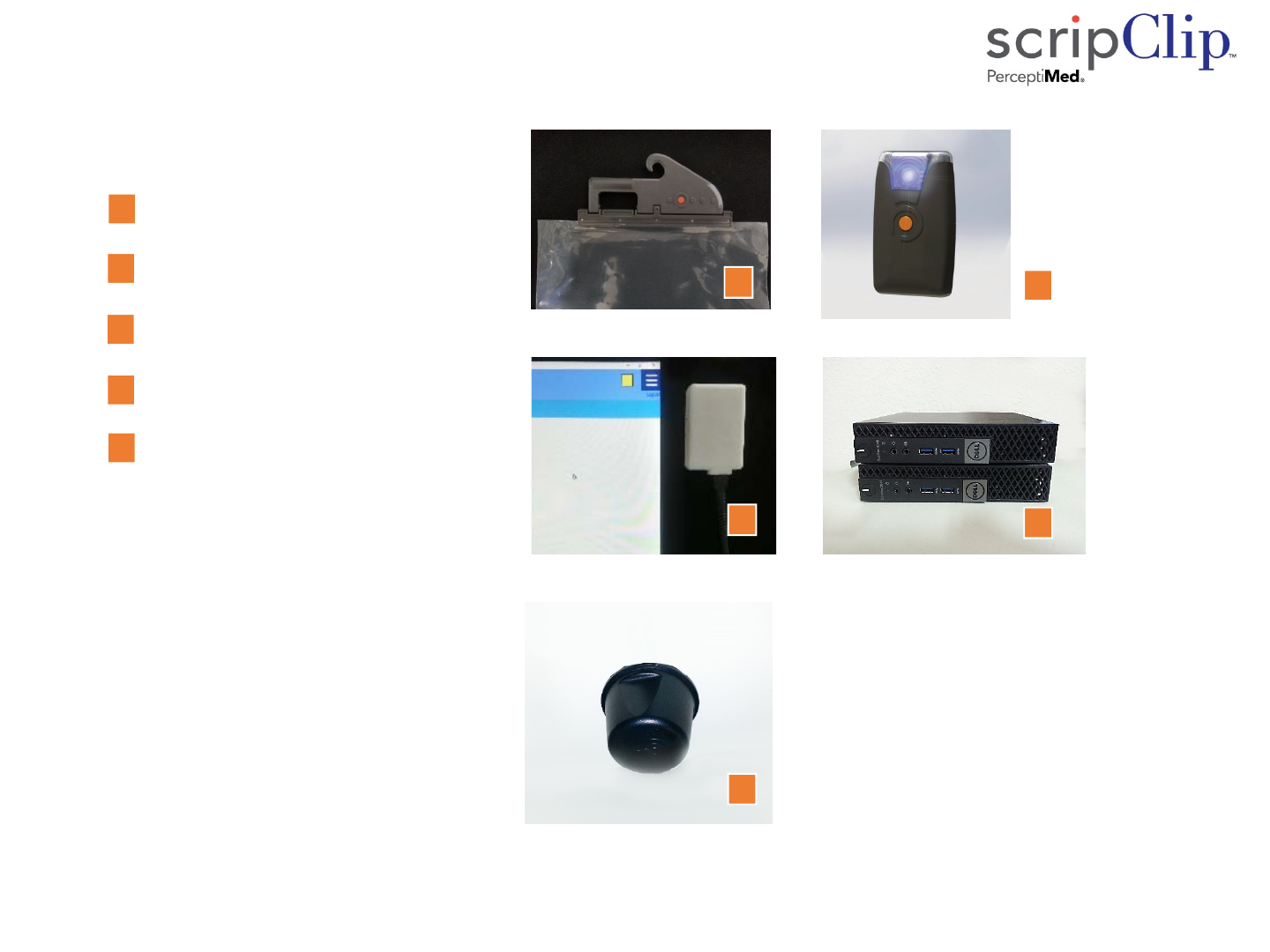
Appendix 1: Parts in the scripClip Kit
Hanging‐BagscripClip
Clip‐onscripClip
scripClip Reader
scripClipCentralComputer
scripClip Antenna
Quantityofclipsandaccessoriesas
determinedbycustomerrequirements
4
3
2
4
1
5
3
2
4
1
5
7400‐0002RevA8

Information
BatteryReplacement:
Do not attempt to replace the battery yourself. Perceptimed will replace battery and verify device as
directed by service contract.
UseRestriction:
Do not relocate system and components without a Perceptimed authorized installer. Components are
restricted to indoor pharmacy and non‐residential application.
DisposalInformation:
When this product reaches its end of life, return the device(s) to Perceptimed or dispose as directed by
local laws and regulations. The collection and recycling of electronic waste conserves natural resources
and protects human health and the environment.
7400‐0002RevA9

Compliance Information
FCCComplianceStatement:
This device complies with Part 15 of the FCC Rules. Operation is subject to the following two conditions:
(1) this device may not cause harmful interference, and (2) this device must accept any interference
received, including interference that may cause undesired operation.
This equipment has been tested and found to comply with the limits for a Class A digital device, pursuant
toPart15oftheFCCRules.Theselimitsaredesignedtoprovidereasonableprotectionagainstharmful
interference when the equipment is operated in a commercial environment. This equipment generates,
uses, and can radiate radio frequency energy and, if not installed and used in accordance with the
instruction manual, may cause harmful interference to radio communications. Operation of this
equipment in a residential area is not recommended. If this equipment does cause harmful interference or
is interfered with by other services contact Perceptimed or its representative.
Any modifications made to this device and accessories that are not approved by Perceptimed, Inc. may
void the authority granted to the user by the FCC to operate this equipment.
ApplicabletotheFollowingDevices:
Hanging‐Bag scripClip, Models SCLP‐HNGBAG‐G1V1 and SCLP‐HNGBAG‐G1V2, FCC ID: 2AJ8D‐HNGBAG‐G1
Clip‐on scripClip, Model SCLP‐CLPON‐G1V1, FCC ID: 2AJ8D‐CLPON‐G1
Sentinal scripClip, Model SCLP‐HNGBAG‐G1V3, FCC ID: 2AJ8D‐HNGBAG‐G1V3
scripClip Reader, Model SCLP‐READER‐G1V1, FCC ID: 2AJ8D‐READER‐G1
WAN Basestation, Model SCLP‐WANTXRX1‐G1V1, FCC ID: 2AJ8D‐WANTXRX1‐G1
7400‐0002RevA10

Compliance Information
DisclosureofExposuretoRadiofrequencyandElectromagneticFields:
This equipment complies with the FCC radiation exposure limits set forth per 47 CFR §2.1091 for an
uncontrolled environment (ie: both occupational and unrestricted exposure to the public).
The operating power of the scripClip and its associated Reader is deliberately limited. No precautions are
required for their use or operation.
The wide area broadcast station and its antennas must be installed and operated such that at least 30cm
separation distance is maintained between these components and the operator or the general public. This
is normally achieved by overhead ceiling mount of at least 8 feet from the level of the floor. These
antennas may not be collocated with antennas for WiFi or other applications.
7400‐0002RevA11