Phychips A100U SMART RFID DONGLE READER User Manual FCC ARETE POP User Guidex

Phychips Inc. SMART RFID DONGLE READER FCC ARETE POP User Guidex

User Manual

        User Guide ARETE POP Smart RFID Dongle Reader
 ARETE POP User Guide 2 / 17  Contents  1 Understanding ARETE POP ............................................................................. 3 1.1 ARETE POP at a Glance .................................................................................. 3 1.2 Accessories ......................................................................................................  3 2 Basics ................................................................................................................. 4 2.1 Activating .......................................................................................................... 4 3 How to use iPhone application ........................................................................ 5 3.1 How to install application in your iPhone ...................................................... 5 3.2 Main Display ..................................................................................................... 6 3.3 Inventory ...........................................................................................................  7 4 How to use Android application ....................................................................... 8 4.1 How to install application in your Android Phone ........................................ 8 4.2 Main Display ..................................................................................................... 9 4.3 Inventory .......................................................................................................... 11 4.4 Additional Functions ..................................................................................... 12
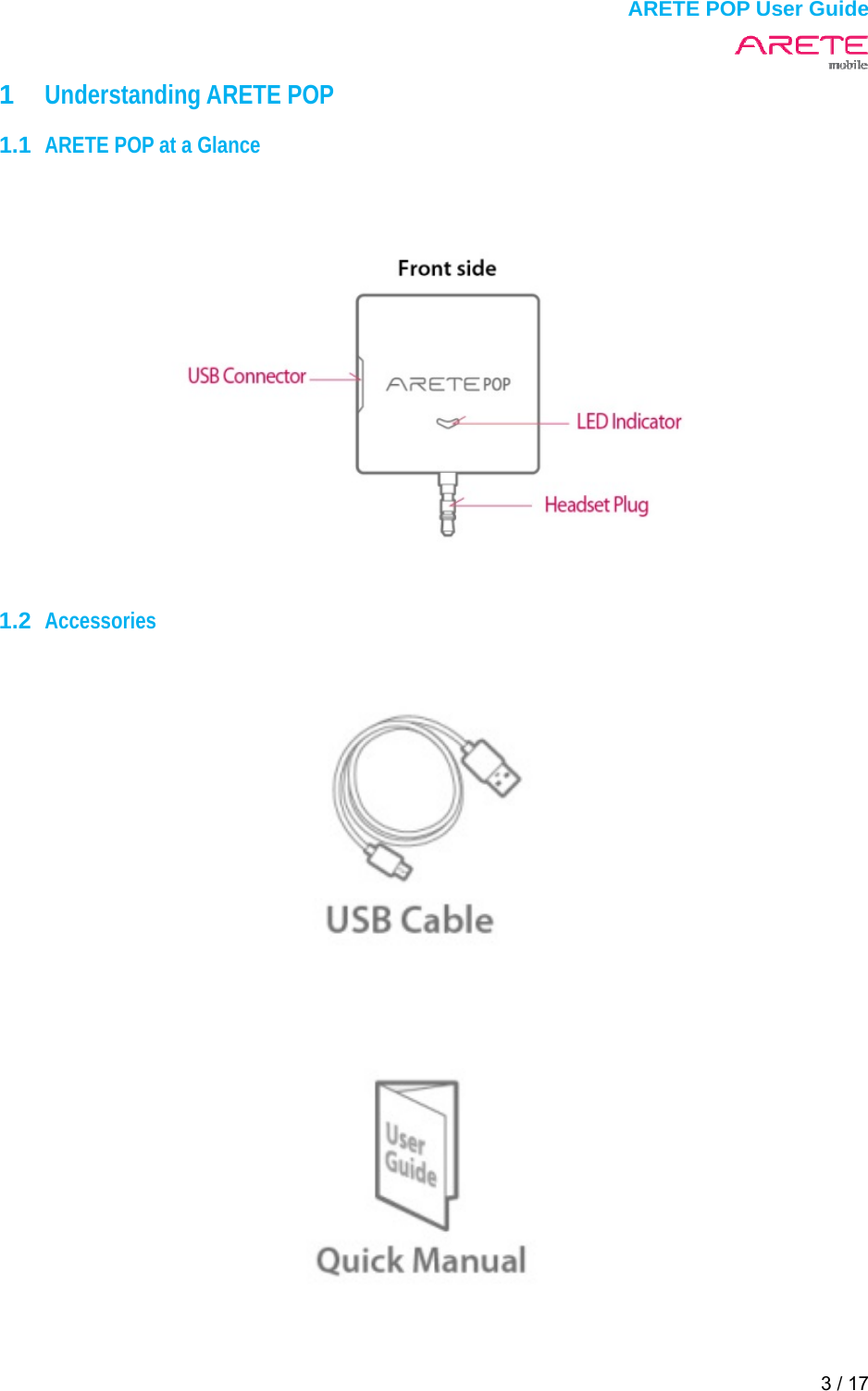
 ARETE POP User Guide 3 / 17  1  Understanding ARETE POP  1.1  ARETE POP at a Glance        1.2  Accessories
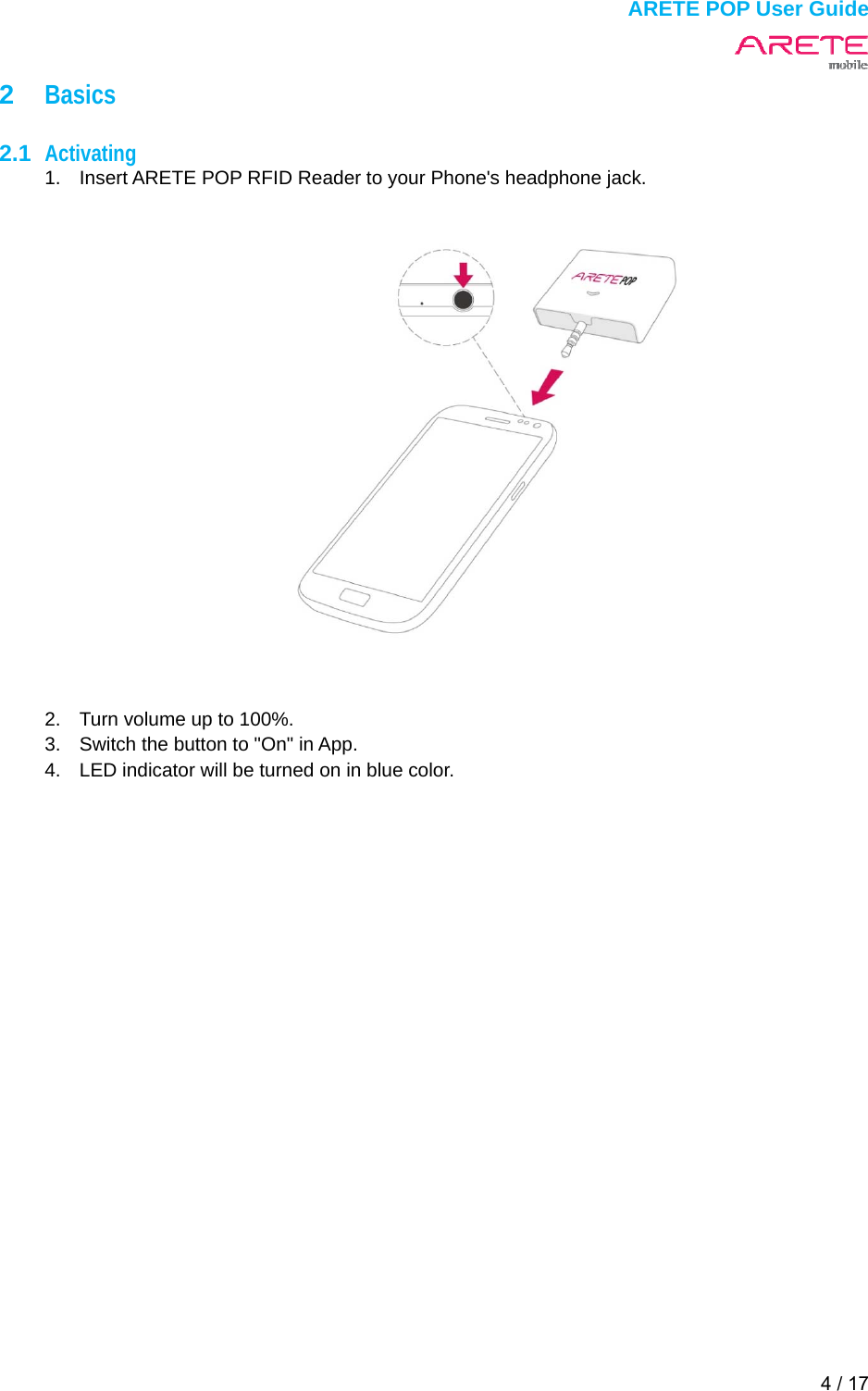
 ARETE POP User Guide 4 / 17  2  Basics  2.1  Activating 1.  Insert ARETE POP RFID Reader to your Phone's headphone jack.    2.  Turn volume up to 100%. 3.  Switch the button to "On" in App. 4.  LED indicator will be turned on in blue color.
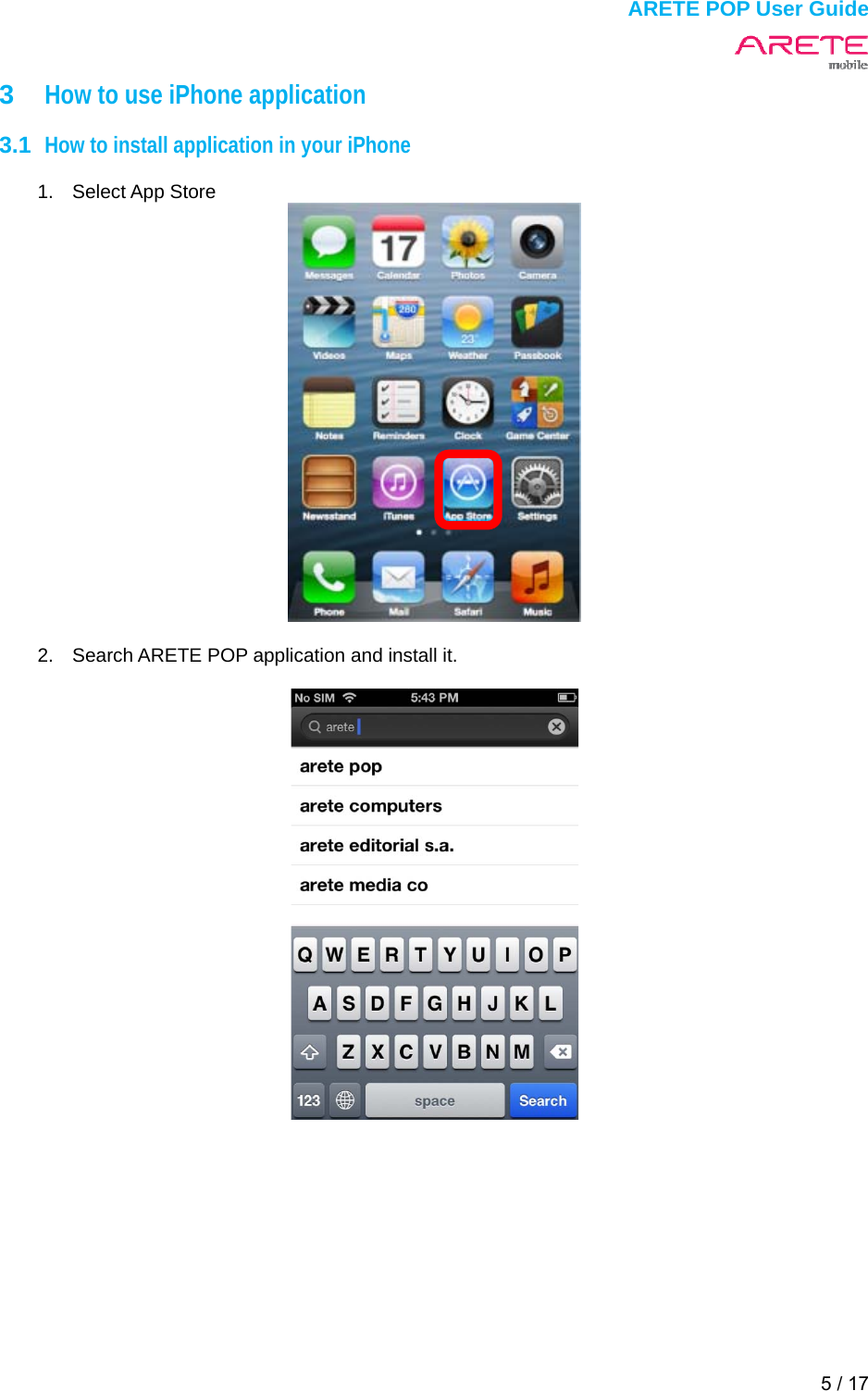
 ARETE POP User Guide 5 / 17  3  How to use iPhone application  3.1  How to install application in your iPhone  1. Select App Store    2.  Search ARETE POP application and install it.
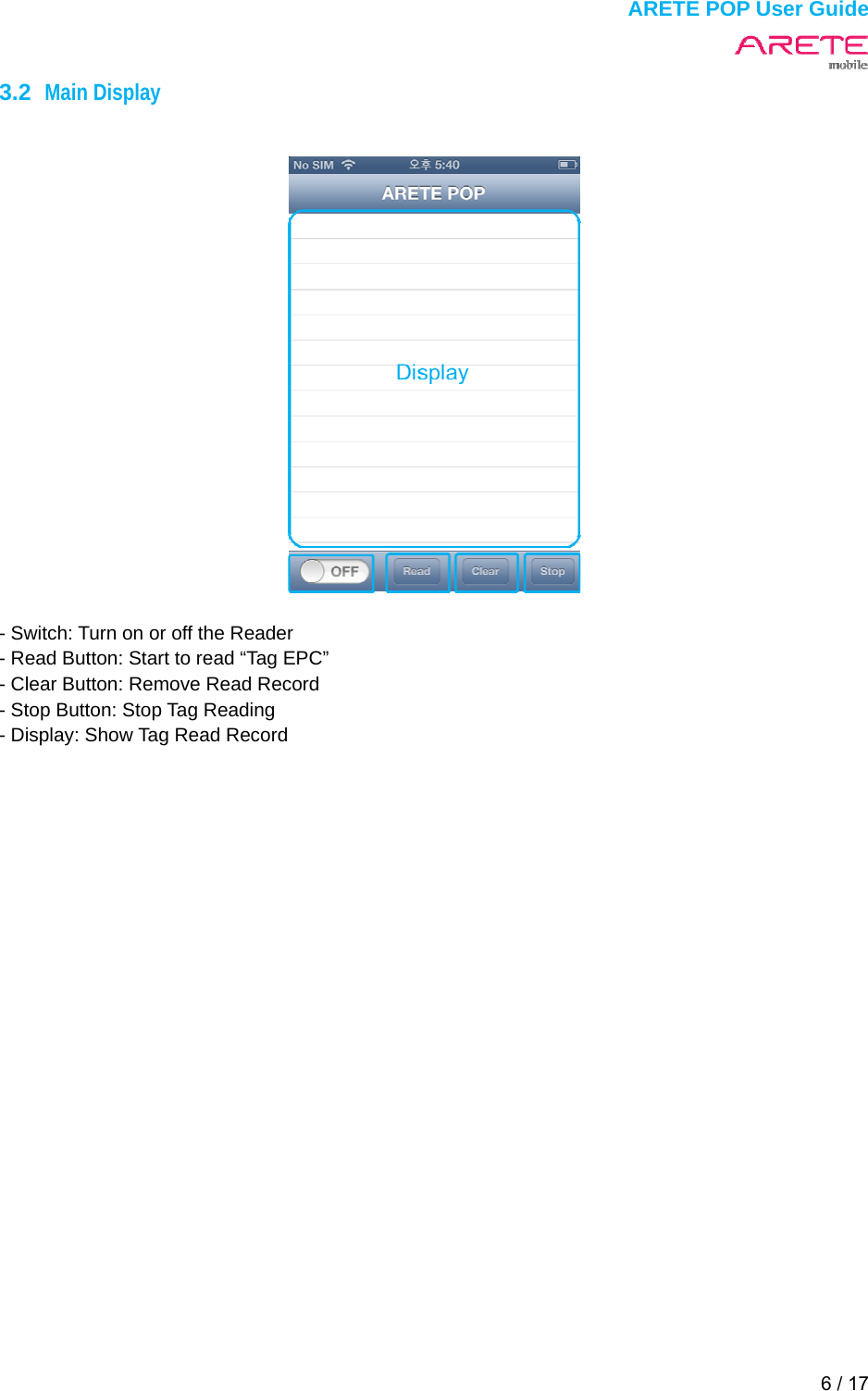
 ARETE POP User Guide 6 / 17  3.2  Main Display     - Switch: Turn on or off the Reader - Read Button: Start to read “Tag EPC” - Clear Button: Remove Read Record - Stop Button: Stop Tag Reading - Display: Show Tag Read Record
 ARETE POP User Guide 7 / 17  3.3  Inventory  1.  Switch the button to "On" 2. Touch Read button to inventory tag continuously 3. Touch Stop button to finish inventory tag
 ARETE POP User Guide 8 / 17  4  How to use Android application  4.1  How to install application in your Android Phone  1.  Connect your phone to Google Play Store.  2.  Search “ARETE POP” and touch install.   3.  ARETE POP app touch your phone.
 ARETE POP User Guide 9 / 17  4.2  Main Display         - State bar : Pop Connect, Beep on/off, ARETE POP on/off, ARETE POP Battery, TX output power    ARETE POP Connected      ARETE POP On    ARETE POP Beep off/on   ARETE POP Tx power (20,21,22,23,24,25 dBm)             ARETE POP Battery (1,10,20,30,40,50,60,70,80,90,100 %)
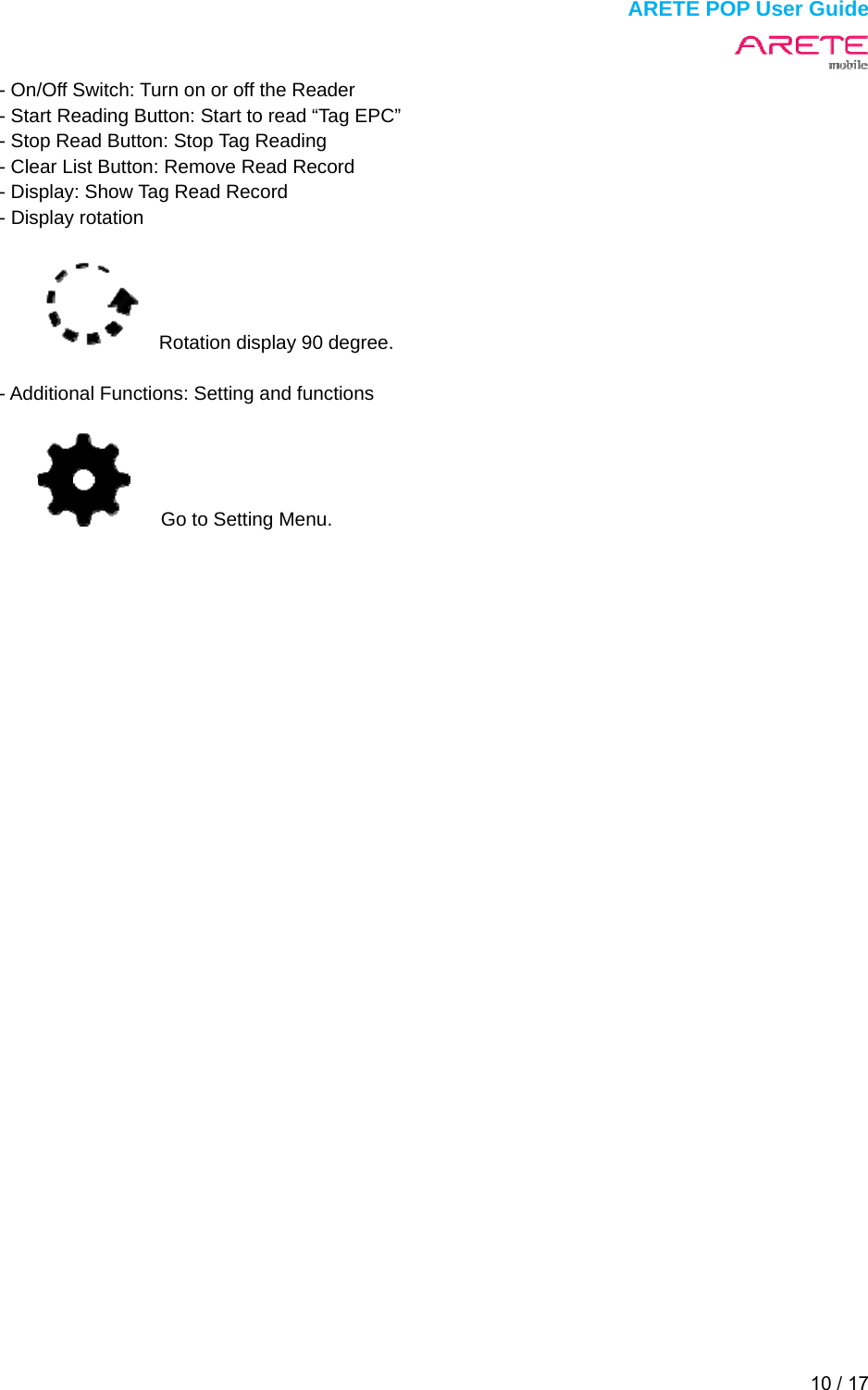
 ARETE POP User Guide 10 / 17  - On/Off Switch: Turn on or off the Reader - Start Reading Button: Start to read “Tag EPC” - Stop Read Button: Stop Tag Reading - Clear List Button: Remove Read Record - Display: Show Tag Read Record - Display rotation        Rotation display 90 degree.  - Additional Functions: Setting and functions     Go to Setting Menu.
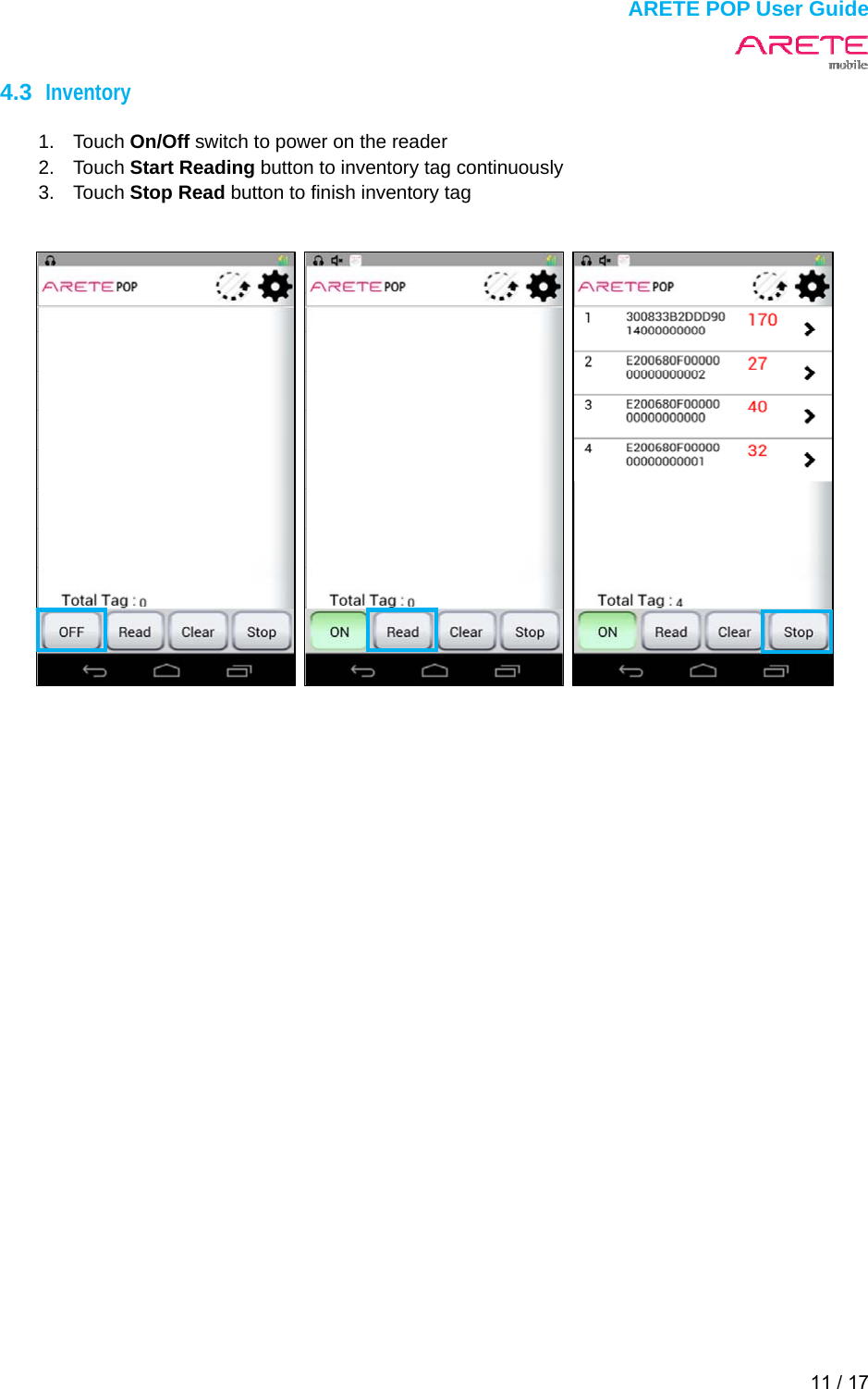
 ARETE POP User Guide 11 / 17  4.3  Inventory  1. Touch On/Off switch to power on the reader 2. Touch Start Reading button to inventory tag continuously 3. Touch Stop Read button to finish inventory tag
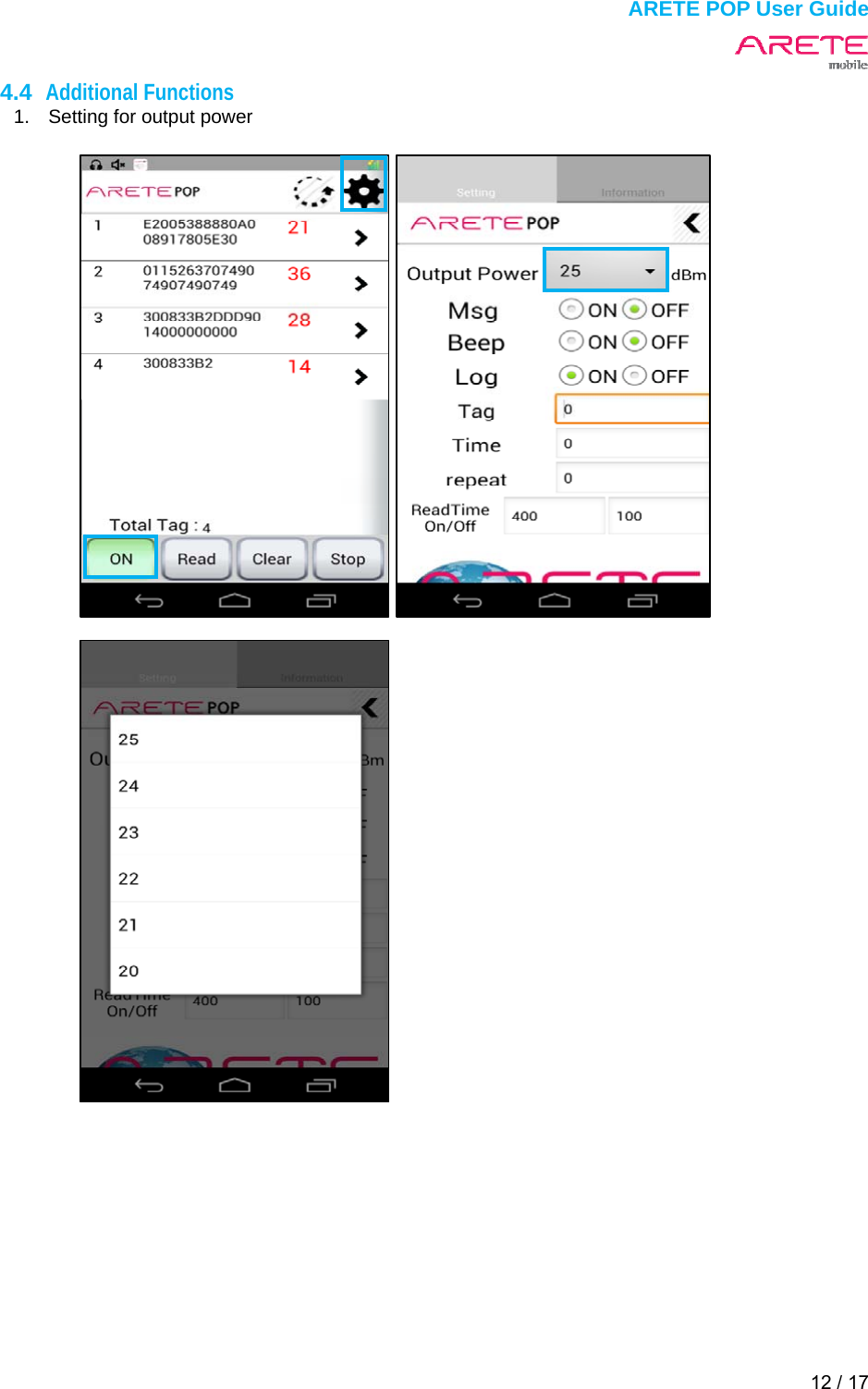
 ARETE POP User Guide 12 / 17  4.4  Additional Functions 1.  Setting for output power
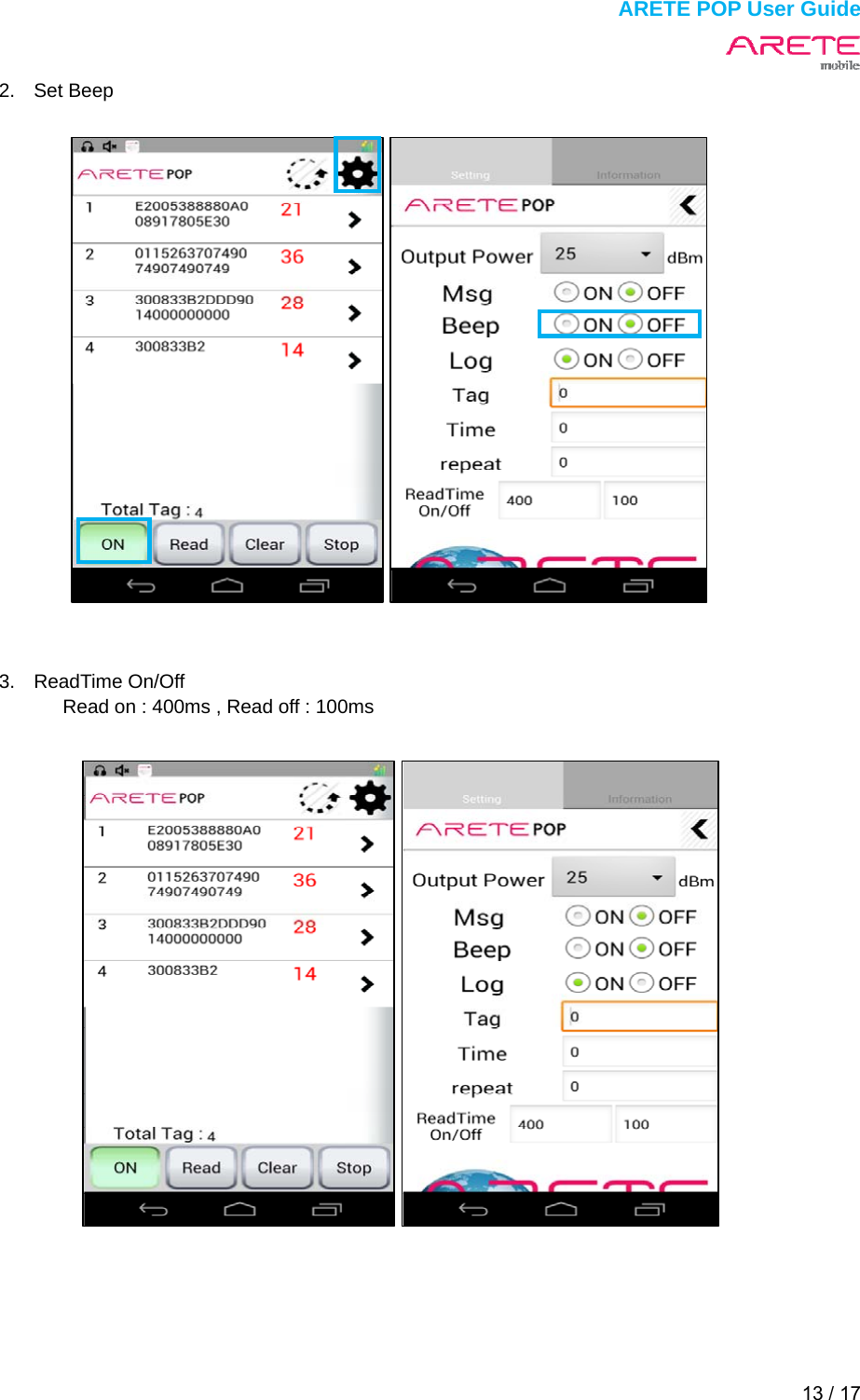
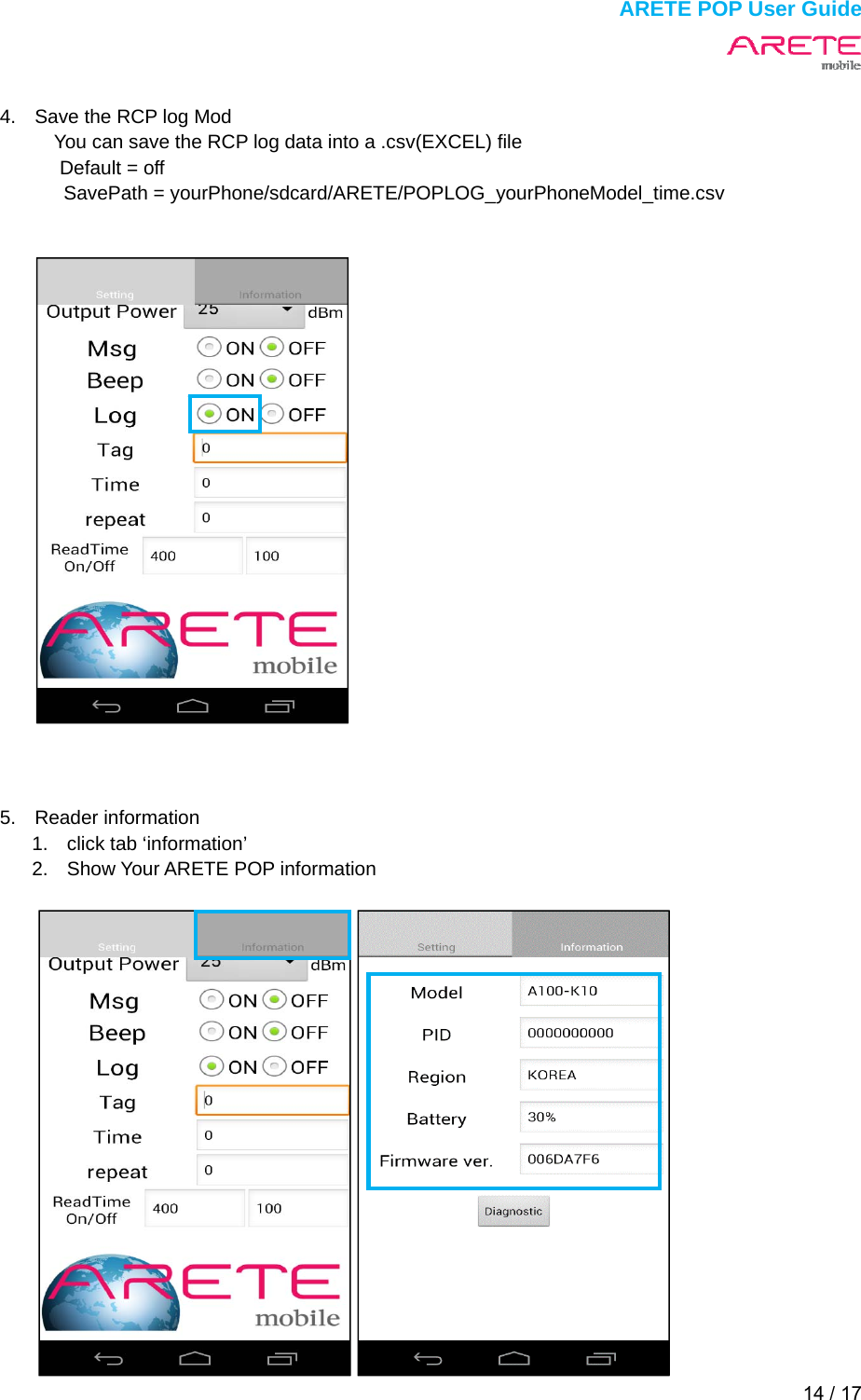
 ARETE POP User Guide 13 / 17  2. Set Beep                       3. ReadTime On/Off Read on : 400ms , Read off : 100ms
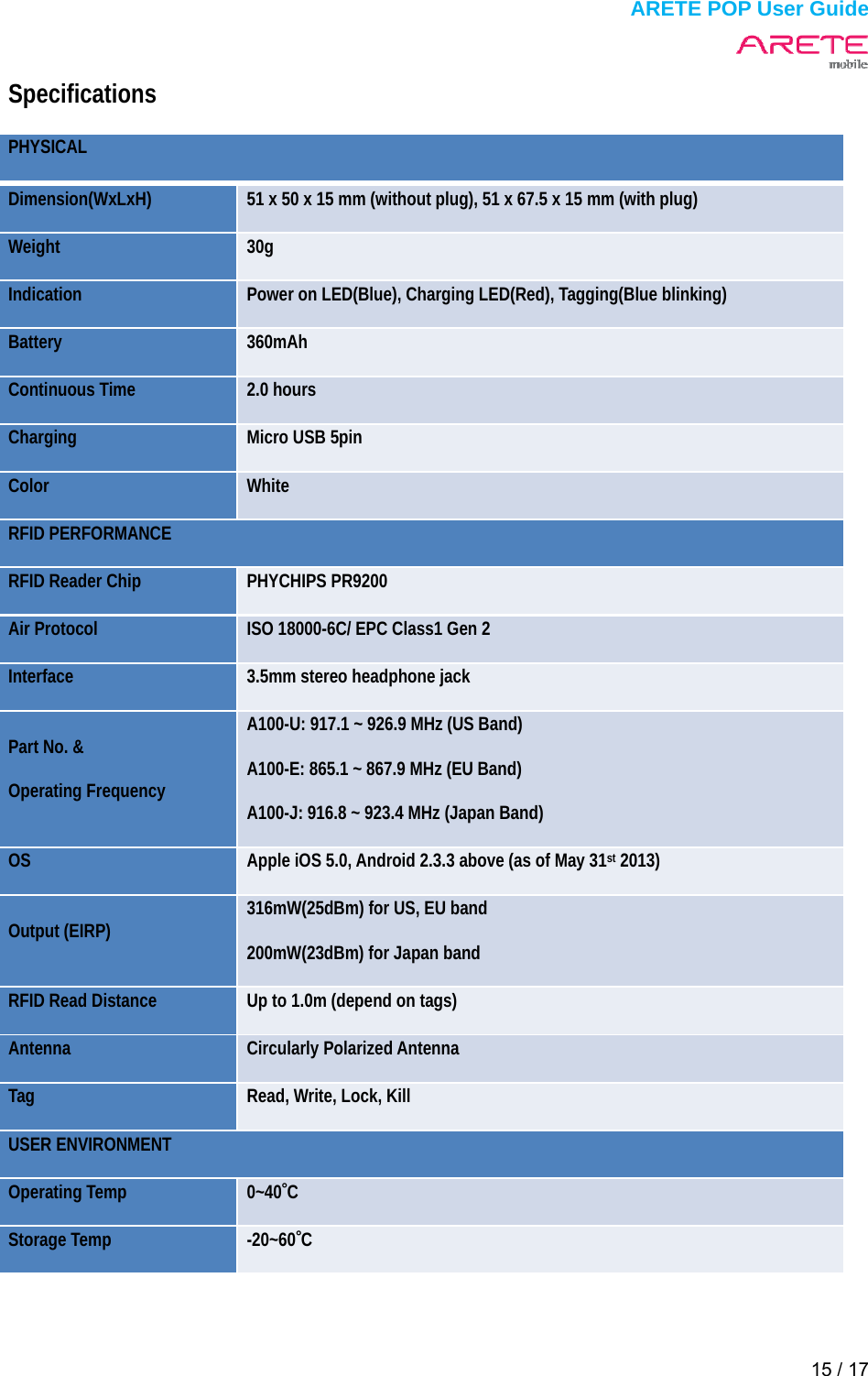
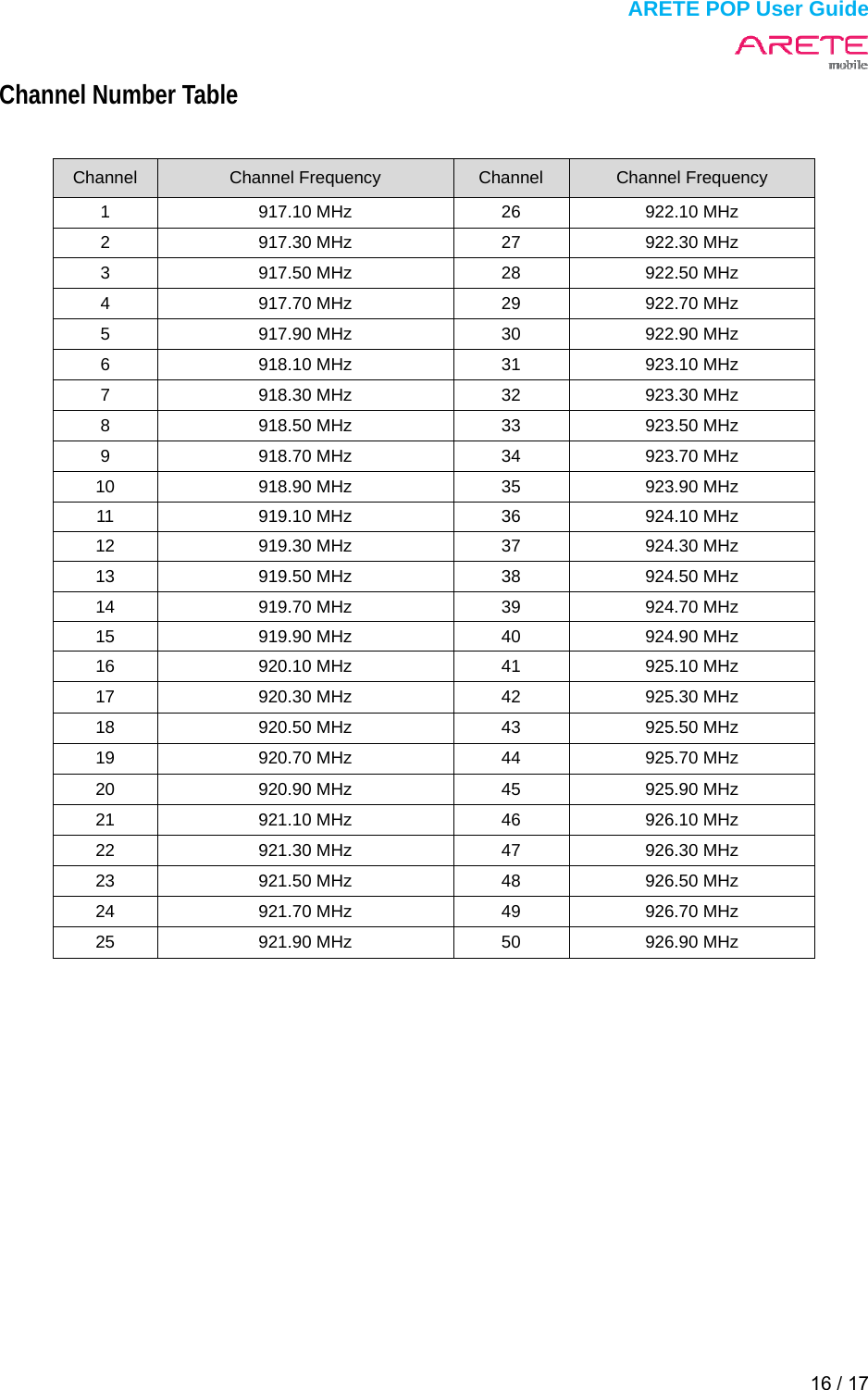
 ARETE POP User Guide 14 / 17   4.  Save the RCP log Mod You can save the RCP log data into a .csv(EXCEL) file Default = off SavePath = yourPhone/sdcard/ARETE/POPLOG_yourPhoneModel_time.csv             5. Reader information  1.  click tab ‘information’   2.  Show Your ARETE POP information
 ARETE POP User Guide 15 / 17  Specifications PHYSICAL  Dimension(WxLxH)   51 x 50 x 15 mm (without plug), 51 x 67.5 x 15 mm (with plug)   Weight   30g  Indication   Power on LED(Blue), Charging LED(Red), Tagging(Blue blinking)   Battery   360mAh  Continuous Time    2.0 hours   Charging   Micro USB 5pin   Color   White  RFID PERFORMANCE   RFID Reader Chip    PHYCHIPS PR9200   Air Protocol    ISO 18000-6C/ EPC Class1 Gen 2   Interface   3.5mm stereo headphone jack   Part No. &   Operating Frequency   A100-U: 917.1 ~ 926.9 MHz (US Band)   A100-E: 865.1 ~ 867.9 MHz (EU Band)   A100-J: 916.8 ~ 923.4 MHz (Japan Band)   OS   Apple iOS 5.0, Android 2.3.3 above (as of May 31st 2013)   Output (EIRP)    316mW(25dBm) for US, EU band   200mW(23dBm) for Japan band   RFID Read Distance    Up to 1.0m (depend on tags)   Antenna   Circularly Polarized Antenna   Tag   Read, Write, Lock, Kill   USER ENVIRONMENT   Operating Temp    0~40˚C  Storage Temp    -20~60˚C
 ARETE POP User Guide 16 / 17  Channel Number Table  Channel  Channel Frequency  Channel  Channel Frequency 1  917.10 MHz  26  922.10 MHz 2  917.30 MHz  27  922.30 MHz 3  917.50 MHz  28  922.50 MHz 4  917.70 MHz  29  922.70 MHz 5  917.90 MHz  30  922.90 MHz 6  918.10 MHz  31  923.10 MHz 7  918.30 MHz  32  923.30 MHz 8  918.50 MHz  33  923.50 MHz 9  918.70 MHz  34  923.70 MHz 10  918.90 MHz  35  923.90 MHz 11  919.10 MHz  36  924.10 MHz 12  919.30 MHz  37  924.30 MHz 13  919.50 MHz  38  924.50 MHz 14  919.70 MHz  39  924.70 MHz 15  919.90 MHz  40  924.90 MHz 16  920.10 MHz  41  925.10 MHz 17  920.30 MHz  42  925.30 MHz 18  920.50 MHz  43  925.50 MHz 19  920.70 MHz  44  925.70 MHz 20  920.90 MHz  45  925.90 MHz 21  921.10 MHz  46  926.10 MHz 22  921.30 MHz  47  926.30 MHz 23  921.50 MHz  48  926.50 MHz 24  921.70 MHz  49  926.70 MHz 25  921.90 MHz  50  926.90 MHz
 ARETE POP User Guide 17 / 17  For body worn operation, this device has been tested and meets the FCC RF exposure guidelines when a minimum distance of 0cm from user`s body.  CAUTION : Any changes or modifications in construction of this device which are not expressly approved by the party responsible for compliance could void the user's authority to operate the equipment  User Information This device may generate or use radio frequency energy. Changes or modifications to this equipment may cause harmful interference unless the modifications are expressly approved in the instruction manual. The user could lose the authority this equipment if an unauthorized change or modification is mode.  Note : This equipment has been tested and found to comply with the limits  for a Class B digital device, pursuant to part 15 of the FCC Rules. These limits are designed to provide reasonable protection against harmful interference in a residential installation This equipment generates, uses and can radiate radio frequency energy and, if not installed and used in accordance with the instructions, may cause harmful interference to radio communications, However, there is no guarantee that interference will not  occur in a particular installation. If this equipment does cause harmful interference to radio or television reception, which can be determined by turning the equipment off and on, the user is encouraged to try to correct the interference by one or more of the following measures:   - Reorient or relocate the receiving antenna.   - Increase the separation between the equipment and receiver.   - Connect the equipment into an outlet on a circuit different from that to which the receiver is connected.  - Consult the dealer or an experienced radio/TV technician for help.  The device complies with Part 15 of the FCC’s Rules. Operation is subject to the following two Conditions: 1. This device may not cause harmful interference, and 2. This device must accept any interference received, including interference that may cause undesirable operation.  We declare that this device is compliance with the essential requirements and other relevant provisions of directive 1999/5/EC.

Navigation menu