Poly NEC 2 1
User Manual: Poly APN-91 Troubleshooting: No Call Control | Poly, formerly Plantronics & Polycom
Open the PDF directly: View PDF  .
.
Page Count: 13
EHS Headset Release Notes
for the
DT330/730, DT430/830 and DT750 terminals
Date
Version
Notes
Author
7-1-13
1.0
Original Notification
EA
8-3-13
1.01
Availability date for release to the field
- Modification to optional statements
EA
9-3-14
2.0
Added DT430/DT830 Information
EA
9-30-14
2.1
Added procedure
EA
Document number: R290-13-028
Revision: 2.1
9-30-.2014
2 | P a g e
NEC Corporation of America
6535 N State Highway 161 Irving, Texas 75039 | Phone: 214.262.2000 | Fax: 214.262.2586
www.necunifiedsolutions.com
Table of Contents
1.0 EHS HEADSET DESCRIPTION ................................................................................................................ 3
1.1 FEATURES .............................................................................................................................................................. 3
2.0 PART LIST ....................................................................................................................................................... 4
2.1 EHS CABLE PART NUMBER ........................................................................................................................................ 4
2.2 EHS PICTURE ......................................................................................................................................................... 4
3.0 PLANTRONICS COMPATIBILITY ....................................................................................................................... 5
3.1 CS MODEL ........................................................................................................................................................ 5
3.2 SAVI 700 .......................................................................................................................................................... 5
4.0 SYSTEM COMPATIBILITY ................................................................................................................................. 6
4.1 SV8100 & SV9100 ............................................................................................................................................... 6
4.1.2 DT300/DT700 EHS support on SV8100 & SV9100 ....................................................................................... 6
4.1.3 DT400/DT800 EHS support on SV8100 & SV9100 ....................................................................................... 6
4.2 SV8300 & SV9300 ............................................................................................................................................... 7
4.2.1 DT300/DT700 EHS support on SV8300& SV9300 ........................................................................................ 7
4.2.2 DT400/DT800 EHS support on SV8300 & SV9300 ....................................................................................... 7
4.2.3 Service Conditions on SV8300 & SV9300 ..................................................................................................... 8
4.3 SV8500 & SV9500 ............................................................................................................................................... 9
4.3.1 DT300/DT700 EHS support on SV8500 & SV9500 ....................................................................................... 9
4.3.1.1 Service condition when using EHS Headset on DT700/DT300 ................................................................. 9
4.3.2 DT400/DT800 EHS support on SV8500 & SV9500 ..................................................................................... 10
4.3.2.1 Service condition when using EHS Headset on DT800/DT400 ............................................................... 10
5.0 RINGER LIMITATIONS ............................................................................................................................ 11
5.1 ITL TERMINALS HEADSET RING TONE SUPPORT ........................................................................................................... 11
5.2 DTL TERMINALS HEADSET RING TONE SUPPORT ......................................................................................................... 11
6.0 STEP BY STEP PROCEDURE FOR EHS HEADSET TO DT8XX/DT7XX/DT4XX/DT3XX ............ 12
7.0 PROCEDURE FOR ENABLING EHS FUNCTION ON THE UNIVERGE SWITCH ......................... 13
Document number: R290-13-028
Revision: 2.1
9-30-.2014
3 | P a g e
NEC Corporation of America
6535 N State Highway 161 Irving, Texas 75039 | Phone: 214.262.2000 | Fax: 214.262.2586
www.necunifiedsolutions.com
1.0 EHS Headset Description
The following release note provides details about the new feature, enhancements, bug
fixes and known limitations for the EHS functionality working on the ITL and DTL
terminals. EHS (Electronic Hook Switch) control allows for the answering/hanging up
of calls via wireless headset that is connected to the ITL and DTL terminals. There is
no longer a requirement for a user to lift the handset or manually press the headset
button on the NEC terminal to connect the voice path to the headset while receiving a
call.
1.1 Features
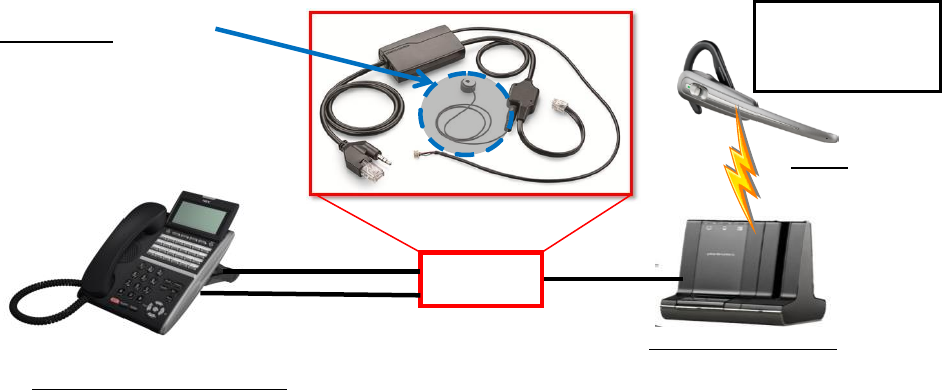
- Electronics Headset Switch (EHS) cable was designed specifically for NEC’s
DT300/400 and DT700/800 terminal
- Works with most wired to wireless Plantronics headsets.
- EHS allows user to control On/Off hook function from the headset. User can
answer/terminate calls via the control button of the headset.
DT330/430 and DT730/830
Plantronics Headset
(The above shows Savi 745)
DECT
(Up to 350 ft
/106m)
-Ringing
-On/Off hook
-Volume Control
EHS Cable
Control Cable
connects to Side 1
Connector
Voice Port connects
to Headset Jack
Microphone
It needs to detect a ringer on
DT300/DT700.
For DT400/DT800 operating on
SV8xxx/SV9xxx Microphone cable is
NOT required.
Document number: R290-13-028
Revision: 2.1
9-30-.2014
4 | P a g e
NEC Corporation of America
6535 N State Highway 161 Irving, Texas 75039 | Phone: 214.262.2000 | Fax: 214.262.2586
www.necunifiedsolutions.com
2.0 Part List
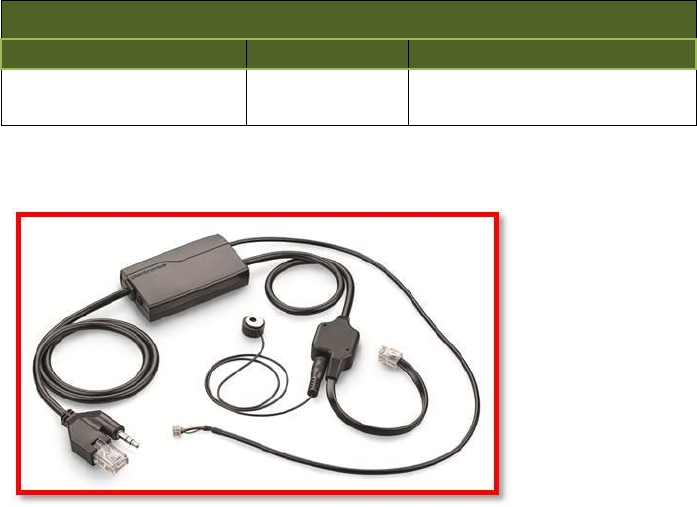
2.1 EHS cable Part Number
NEC Part Number
Name
Description
680063
APN-91
- Includes EHS Cable
- Includes Microphone
2.2 EHS Picture
Document number: R290-13-028
Revision: 2.1
9-30-.2014
5 | P a g e
NEC Corporation of America
6535 N State Highway 161 Irving, Texas 75039 | Phone: 214.262.2000 | Fax: 214.262.2586
www.necunifiedsolutions.com
3.0 Plantronics Compatibility
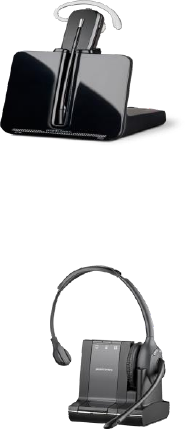
The following list of model headsets work with the EHS functionality
3.1 CS Model
o CS500 Series
o CS 500 XD Series
3.2 Savi 700
Document number: R290-13-028
Revision: 2.1
9-30-.2014
6 | P a g e
NEC Corporation of America
6535 N State Highway 161 Irving, Texas 75039 | Phone: 214.262.2000 | Fax: 214.262.2586
www.necunifiedsolutions.com
4.0 System Compatibility
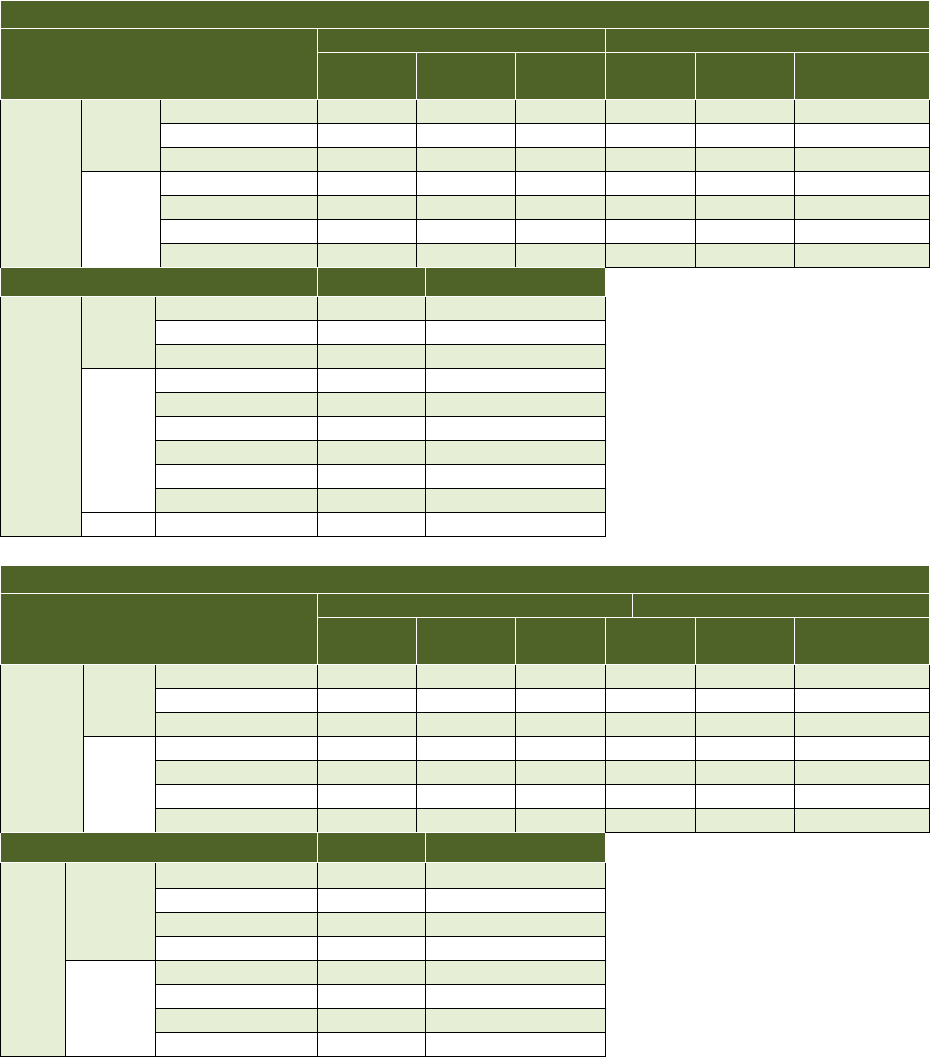
The following table notes the specification for each UNIVERGE Switch and NEC
terminal that allows for the EHS functionality to operate. The terminal should have the
latest firmware load based on the publication of this document for proper operation. IP
terminal firmware can be downloaded from the NTAC download section.
4.1 SV8100 & SV9100
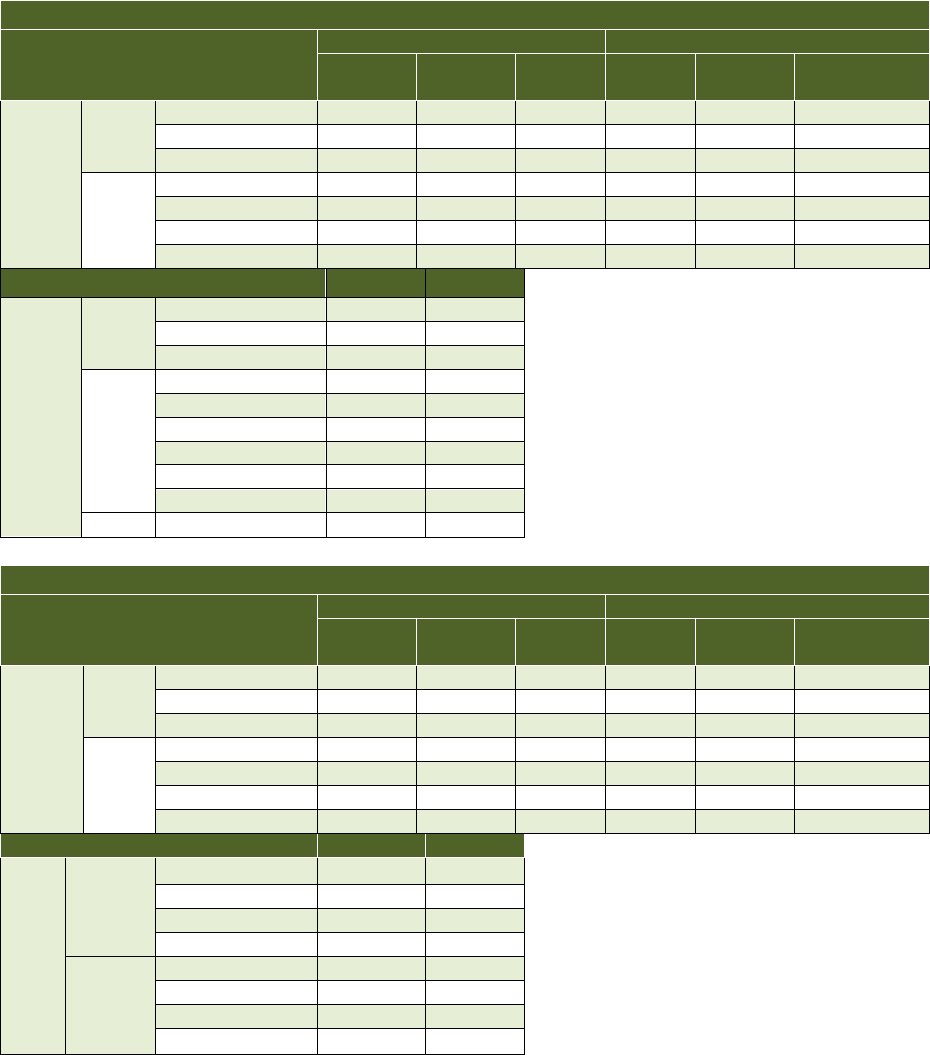
4.1.2 DT300/DT700 EHS support on SV8100 & SV9100
Terminal Type
SV9100
SV8100
GCD-
8DLCA
GCD-
16DLCA
GPZ-
8DLCB
CD-
8DLCA
PZ-
8DLCB
CD-16DLCA
Digital
DT310
DTL-2E-1Tel
No
No
No
No
No
No
DTL-6DE-1 Tel
No
No
No
No
No
No
DTL-12E-1 Tel
No
No
No
No
No
No
DT330
DTL-12D-1 Tel
YES
YES
YES
YES
YES
YES
DTL-24D-1 Tel
YES
YES
YES
YES
YES
YES
DTL-32D-1Tel
No
No
No
No
No
No
DTL-8LD-1 Tel
YES
YES
YES
YES
YES
YES
Switch
SV9100
SV8100
IP
DT710
ITL-2E-1 Tel
No
No
ITL-6DE-1 Tel
No
No
ITL-8LDE-1 Tel
No
No
DT730
ITL-12D-1 Tel
YES
YES
ITL-12DG-1 Tel
YES
YES
ITL-12CG-1 Tel
YES
YES
ITL-24D-1 Tel
YES
YES
ITL-32D-1 Tel
No
No
ITL-8LD-1 Tel
No
No
DT750
ITL-320C-2 Tel
YES
YES
4.1.3 DT400/DT800 EHS support on SV8100 & SV9100
Terminal Type
SV9100
SV8100
GCD-
8DLCA
GCD-
16DLCA
GPZ-
8DLCB
CD-
8DLCA
PZ-
8DLCB
CD-16DLCA
Digital
DT410
DTZ-2E-1Tel
No
No
No
No
No
No
DTZ-6DE-1 Tel
No
No
No
No
No
No
DTZ-12E-1 Tel
No
No
No
No
No
No
DT430
DTZ-12D-1 Tel
Yes
Yes
Yes
Yes
Yes
Yes
DTZ-24D-1 Tel
Yes
Yes
Yes
Yes
Yes
Yes
DTZ-32D-1Tel
No
No
No
No
No
No
DTZ-8LD-1 Tel
Yes
Yes
Yes
Yes
Yes
Yes
Switch
SV9100
SV8100
IP
DT830
ITZ-12D-1 Tel
Yes
Yes
ITZ-24D-1 Tel
Yes
Yes
ITZ-32D-1 Tel
No
No
ITZ-8LD-1 Tel
Yes
Yes
DT830G
ITZ-12DG-1 Tel
Yes
Yes
ITZ-24DG-1 Tel
Yes
Yes
ITZ-32DG-1 Tel
No
No
ITZ-8LDG-1 Tel
Yes
Yes
Document number: R290-13-028
Revision: 2.1
9-30-.2014
7 | P a g e
NEC Corporation of America
6535 N State Highway 161 Irving, Texas 75039 | Phone: 214.262.2000 | Fax: 214.262.2586
www.necunifiedsolutions.com
4.2 SV8300 & SV9300
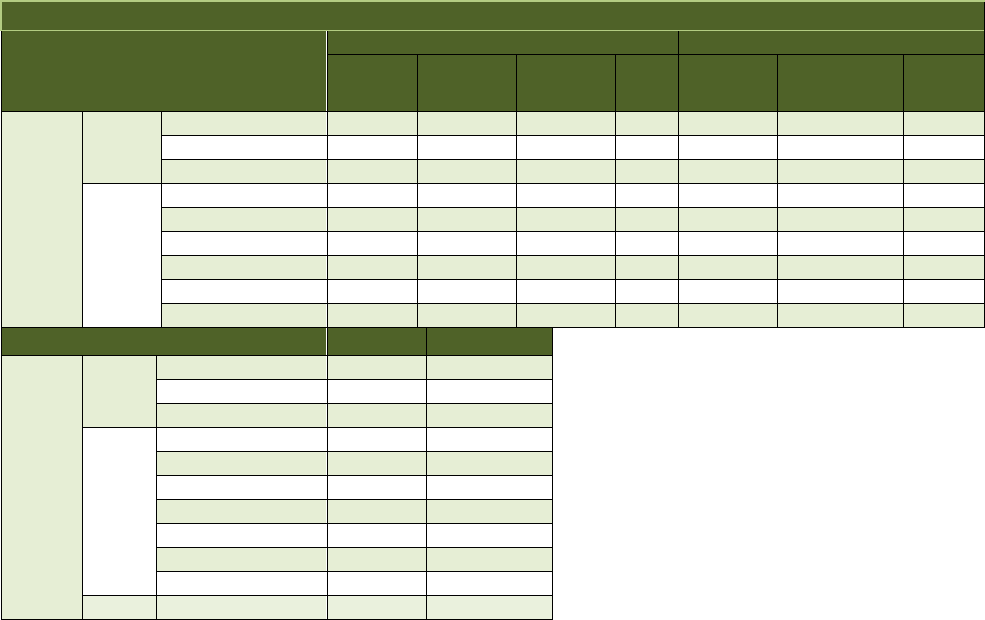
4.2.1 DT300/DT700 EHS support on SV8300& SV9300
Terminal Type
SV9300
SV8300
GCD-
8DLCA
GCD-
16DLCA
GPZ-
8DLCB
CD-
8DLCA
PZ-
8DLCB
CD-16DLCA
Digital
DT310
DTL-2E-1Tel
No
No
No
No
No
No
DTL-6DE-1 Tel
No
No
No
No
No
No
DTL-12E-1 Tel
No
No
No
No
No
No
DT330
DTL-12D-1 Tel
YES
YES
YES
YES
YES
YES
DTL-24D-1 Tel
YES
YES
YES
YES
YES
YES
DTL-32D-1Tel
No
No
No
No
No
No
DTL-8LD-1 Tel
YES
YES
YES
YES
YES
YES
Switch
SV9300
SV8300
IP
DT710
ITL-2E-1 Tel
No
No
ITL-6DE-1 Tel
No
No
ITL-8LDE-1 Tel
No
No
DT730
ITL-12D-1 Tel
YES
YES
ITL-12DG-1 Tel
YES
YES
ITL-12CG-1 Tel
YES
YES
ITL-24D-1 Tel
YES
YES
ITL-32D-1 Tel
No
No
ITL-8LD-1 Tel
YES
YES
DT750
ITL-320C-2 Tel
YES
YES
4.2.2 DT400/DT800 EHS support on SV8300 & SV9300
Terminal Type
SV9300
SV8300
GCD-
8DLCA
GCD-
16DLCA
GPZ-
8DLCB
CD-
8DLCA
PZ-
8DLCB
CD-16DLCA
Digital
DT410
DTZ-2E-1Tel
No
No
No
No
No
No
DTZ-6DE-1 Tel
No
No
No
No
No
No
DTZ-12E-1 Tel
No
No
No
No
No
No
DT430
DTZ-12D-1 Tel
Yes
Yes
Yes
Yes
Yes
Yes
DTZ-24D-1 Tel
Yes
Yes
Yes
Yes
Yes
Yes
DTZ-32D-1Tel
No
No
No
No
No
No
DTZ-8LD-1 Tel
Yes
Yes
Yes
Yes
Yes
Yes
Switch
SV9300
SV8300
IP
DT830
ITZ-12D-1 Tel
Yes
Yes
ITZ-24D-1 Tel
Yes
Yes
ITZ-32D-1 Tel
No
No
ITZ-8LD-1 Tel
Yes
Yes
DT830G
ITZ-12DG-1 Tel
Yes
Yes
ITZ-24DG-1 Tel
Yes
Yes
ITZ-32DG-1 Tel
No
No
ITZ-8LDG-1 Tel
Yes
Yes

Document number: R290-13-028
Revision: 2.1
9-30-.2014
8 | P a g e
NEC Corporation of America
6535 N State Highway 161 Irving, Texas 75039 | Phone: 214.262.2000 | Fax: 214.262.2586
www.necunifiedsolutions.com
4.2.3 Service Conditions on SV8300 & SV9300
A. The EHS is not supported when the ACD Feature “Headset Operation (with Automatic
Answer)” is enabled.
B. Must press headset button twice to receive dial tone, Must press headset control
button twice to answer incoming call if
o The outside party hands up and you let the phone go to automatic idle return
o If the headset user press the hang-up button on the headset within 1 second of
remote party hanging up.
C. If disconnecting call within 1 second of outside party, then headset button will need
to be pressed twice on the next call
o Note: 1, 2 these items must be done only if the user did not disconnect from the
previous call. If they disconnected properly then this is not required.
ITL/ITZ Specific Setting/ Limitations
o The normal ring volume must be turned up to the 11th bar to get the off hook ring
loud enough for the headset to detect
o ITL does not need 3533 set if using ring tones 9,10,12,13.
o If 3533 is set to a 0 then all tones will function.
o Sub line calls were tested on both internal and external calls.
o 1381 is required for headset to function
o Headset key is NOT assigned to any key on the SV8300/SV9300
o ITL volume must be at least 5 bars to activate EHS on both internal and external
calls to my line.
DTL/DTZ Specific Settings/ Limitations
A. Go off hook with speaker for short duration results in beep tone top headset.
B. The normal ring volume must be turned up to the 5th bar for regular ring to trigger the
headset and the 10th bar to get the off hook ring loud enough for the headset to
detect.
C. Must change external call ring sequence from 2-on 4-off to 1-on 2-off to get any
tones to function for an external call. All tones function after change.
D. ITL volume must be at least 5 bars to activate EHS on both internal and external call
to my line.
E. Must press the headset answer key twice to answer call if previous call is not
disconnected from properly.
F. Ambient noise will cause the headset to receive beeps.
G. 3533>XX>0 must be set for any ring tones to function for external calls to my line or sub
line.
H. Results for external and sub line calls are with 3533 set to a 0. There is no ringing if this is
not set.
I. 1381 is required for headset to function
J. Headset key is NOT assigned to any key on the SV8300
Document number: R290-13-028
Revision: 2.1
9-30-.2014
9 | P a g e
NEC Corporation of America
6535 N State Highway 161 Irving, Texas 75039 | Phone: 214.262.2000 | Fax: 214.262.2586
www.necunifiedsolutions.com
4.3 SV8500 & SV9500
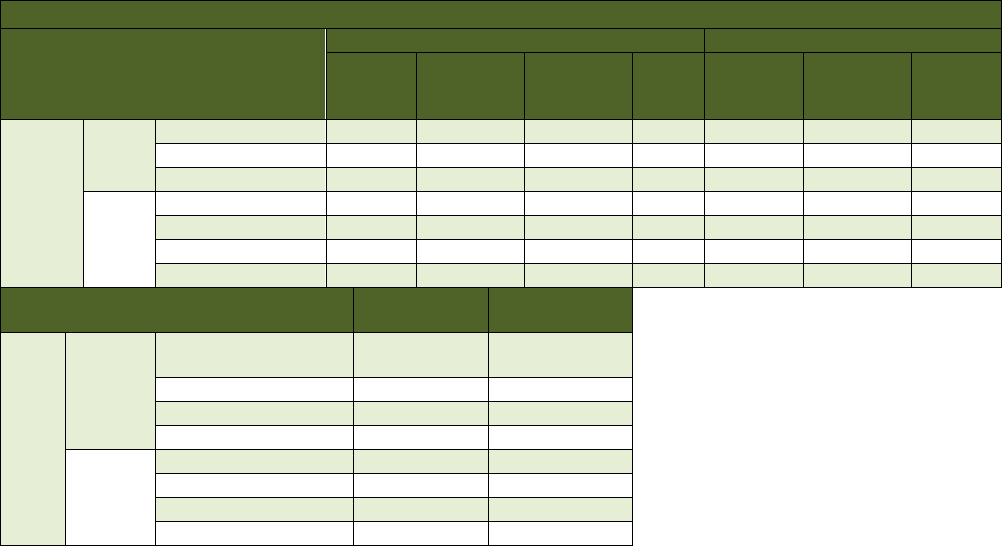
4.3.1 DT300/DT700 EHS support on SV8500 & SV9500
Terminal Type
SV9500
SV8500
SCH-
16ELCA
-A
SCH-
16ELCA
-A
SCH-
16ELCA
-A
UG50
SCH-
16ELCA
-A/-B
SCH-16ELCA
-A/-B/-C
UG50
Digital
DT310
DTL-2E-1Tel
No
No
No
No
No
No
No
DTL-6DE-1 Tel
No
No
No
No
No
No
No
DTL-12E-1 Tel
No
No
No
No
No
No
No
DT330
DTL-12D-1 Tel
YES
YES
YES
No
YES
YES
No
DTL-24D-1 Tel
YES
YES
YES
No
YES
YES
No
DTL-32D-1Tel
No
No
No
No
No
No
No
DTL-8LD-1 Tel
YES
YES
YES
No
YES
YES
No
DTL-12BT-1Tel
No
No
No
No
No
No
No
DTL-12PA-1Tel
YES
YES
YES
No
YES
YES
No
Switch
SV9500
SV8500
IP
DT710
ITL-2E-1 Tel
No
No
ITL-6DE-1 Tel
No
No
ITL-8LDE-1 Tel
No
No
DT730
ITL-12D-1 Tel
YES
YES
ITL-12DG-1 Tel
YES
YES
ITL-12CG-1 Tel
YES
YES
ITL-24D-1 Tel
YES
YES
ITL-32D-1 Tel
No
No
ITL-8LD-1 Tel
No
No
ITL-12PA-1Tel
YES
YES
DT750
ITL-320C-2 Tel
No
No
4.3.1.1 Service condition when using EHS Headset on DT700/DT300
• Following office data need to be assigned:
- Assign LKP=3(32 Line/Feature keys) with ADKS
- For the IP terminals and Digital terminals other than 8LD, assign FKY=125
(Headset/Handset key) to the Feature key (KYN=25) by using AKYD
- For DT330(8LD), assign FKY=125(Headset/Handset key) to the Feature key
(KYN=33) by using AKYD
• To activate a ringer tone when an incoming call arrives on the Headset, put the
attached microphone cable on the center of the telephone speaker.
• Ambient noise close and/or conversations close to the headset microphone may
trigger beeps to be heard in the headset.
• Reorder tone results in beeps heard in the headsets.
• Headset key can’t be assigned to multiple line keys or the softkey during EHS
mode.
• 8LK module is not supported options when the EHS function is enabled.
Document number: R290-13-028
Revision: 2.1
9-30-.2014
10 | P a g e
NEC Corporation of America
6535 N State Highway 161 Irving, Texas 75039 | Phone: 214.262.2000 | Fax: 214.262.2586
www.necunifiedsolutions.com
4.3.2 DT400/DT800 EHS support on SV8500 & SV9500
Terminal Type
SV9500
SV8500
SCH-
16ELCA
-A
SPA-
16ELCNA-
A/-B
SPA-
16ELCN
-A/-B/-C
UG50
SPA-
16ELCNA
-A/-B
SPA-16ELCN
-A/-B/-C
UG50
Digital
DT410
DTZ-2E-1Tel
No
No
No
No
No
No
No
DTZ-6DE-1 Tel
No
No
No
No
No
No
No
DTZ-12E-1 Tel
No
No
No
No
No
No
No
DT430
DTZ-12D-1 Tel
YES *1
YES *2
YES *2
No
YES *2
YES *2
No
DTZ-24D-1 Tel
YES *1
YES *2
YES *2
No
YES *2
YES *2
No
DTZ-32D-1Tel
No
No
No
No
No
No
No
DTZ-8LD-1 Tel
YES *1
No
No
No
No
No
No
Switch
SV9500
SV8500
IP
DT830
ITZ-12D-1 Tel
YES *1
YES *2
ITZ-24D-1 Tel
YES *1
YES *2
ITZ-32D-1 Tel
No
No
ITZ-8LD-1 Tel
YES *1
No
DT830G
ITZ-12DG/CG-1 Tel
YES *1
YES *2
ITZ-24DG/CG-1 Tel
YES *1
YES *2
ITZ-32DG/CG-1 Tel
No
No
ITZ-8LDG-1 Tel
YES *1
No
Note: For DT800/DT400, unlike in the case of DT700/DT300, there is no need to put the attached microphone
cable to the telephone’s speaker to activate a ringer tone when an incoming call arrives on the Headset.
4.3.2.1 Service condition when using EHS Headset on DT800/DT400
• 8LK module is not supported options when the EHS function is enabled.
• Headset key can’t be assigned to multiple line keys or the softkey during EHS mode.
*1: Following office data need to be assigned:
- Assign FKY=125 (Headset/Handset Key) to the Feature key (KYN=1-24) by
using the AKYD command. When the terminal is used with 60DSS console, the
Headset/Handset Key should be assigned to the Feature key (KYN=1-16). Do
not assign the key to the Feature/Line key on 8LK and 60DSS.
- FKY=125 (Headset/Handset Key) cannot be assigned on Softkey when using
EHS Headset.
*2: Following office data need to be assigned:
- Assign LKP=3(32 Line/Feature keys) with ADKS
- Assign FKY=125(Headset/Handset key) to the Feature key (KYN=25) by
using AKYD
Document number: R290-13-028
Revision: 2.1
9-30-.2014
11 | P a g e
NEC Corporation of America
6535 N State Highway 161 Irving, Texas 75039 | Phone: 214.262.2000 | Fax: 214.262.2586
www.necunifiedsolutions.com
5.0 Ringer Limitations
- Ambient noise close and/or conversations close to the headset microphone may
trigger beeps to be heard in the headset.
- Reorder tone results in beeps heard in the headsets.
5.1 ITL Terminals Headset Ring Tone Support
Tone Type
Switch Type
SV8500/9500
SV8300/9300
SV8100/9100
Internal
Call
External
Call
Internal
Call
External
Call
Internal
Call
External
Call
Auto
NG
NG
OK
NG
OK
OK
Type 1
NG
NG
OK
NG
OK
OK
Type 2
NG
NG
OK
NG
OK
OK
Type 3
NG
NG
OK
NG
OK
OK
Type 4
NG
NG
OK
NG
OK
OK
Type 5
NG
NG
OK
NG
OK
OK
Type 6
NG
NG
OK
NG
OK
OK
Type 7
NG
NG
OK
NG
OK
OK
Type 8
NG
NG
OK
NG
OK
OK
Type 9
OK
OK
OK
OK
OK
OK
Type 10
NG
NG
OK
OK
OK
OK
Type 11
NG
NG
OK
NG
OK
OK
Type 12
NG
NG
OK
OK
OK
OK
Type 13
NG
NG
OK
OK
OK
OK
Type 14
NG
NG
OK
NG
OK
OK
5.2 DTL Terminals Headset Ring Tone
Support
Tone Type
Switch Type
SV8500/9500
SV8300/9300
SV8100/9100
Internal
Call
External
Call
Internal
Call
External
Call
Internal Call
External
Call
Auto
NG
N/A
**
**
***
***
Type 1
NG
N/A
OK
OK
OK
OK
Type 2
NG
N/A
OK
OK
OK
OK
Type 3
NG
N/A
OK
OK
OK
OK
Type 4
NG
N/A
OK
OK
OK
OK
Type 5
OK
N/A
OK
OK
OK
OK
Type 6
NG
N/A
OK
OK
NG
NG
Type 7
NG
N/A
OK
OK
NG
NG
Type 8
NG
N/A
NG
NG
NG
NG
Type 9
NG
N/A
NG
NG
NG
NG
Type 10
NG
N/A
NG
NG
NG
NG
Note:
** SV8300/9300 doesn’t support Auto tone setting. This setting in the menu is “Type 0”
and it is supported.
*** SV8100/9100 doesn’t’ support Auto tone setting. This setting in the menu is
replaced by “High”, “Medium”, “Low” settings. All of these settings are supported on
the SV8100/9100.
Document number: R290-13-028
Revision: 2.1
9-30-.2014
12 | P a g e
NEC Corporation of America
6535 N State Highway 161 Irving, Texas 75039 | Phone: 214.262.2000 | Fax: 214.262.2586
www.necunifiedsolutions.com
6.0 Step by Step Procedure for EHS Headset to
DT8xx/DT7xx/DT4xx/DT3xx
Attention: The power must be turned off to the terminal when connecting the EHS cable to the DT8xx/DT7xx/DT4xx/DT3xx.
Additional instructions (beyond what is noted below) will be provided with the headset purchase.
1. Connect the EHS cable to the microphone and indicator.
Microphone: Detects the ringer activation on the DT8xx/DT7xx/DT4xx/DT3xx. Upon
detection, the headset provides a beep tone in the ear piece of the headset.
Note: In order to enable detection, the NEC terminal must be conditioned to
the appropriate ring type. Review ITL Terminals Headset Ring Tone Support and DTL
Terminal headset Ring Tone Support for configuration assignments.
Indicator: This provides an indication to the user that the headset is in use
2. Connect the EHS cable to the DT8xx/DT7xx/DT4xx/DT3xx Slot 1
Insert the EHS cable to side option connector (SIDE 1) and the headset module to the headset
jack.
ATTENTION: Special attention should be given when connecting the EHS cable to side 1 of the terminal. The
connector has groves that will allow the connector to fit easily into the port. Don’t jam (push) the connector in
the port otherwise the connector will break.
3. Paste the microphone to the DT8xx/DT7xx/DT4xx/DT3xx
4. Connect the EHS Cable to the Headset base
5. Turn on the DT8xx/DT7xx/DT4xx/DT3xx and Headset Base unit
Microphone
Indicator

Document number: R290-13-028
Revision: 2.1
9-30-.2014
13 | P a g e
NEC Corporation of America
6535 N State Highway 161 Irving, Texas 75039 | Phone: 214.262.2000 | Fax: 214.262.2586
www.necunifiedsolutions.com
7.0 Procedure for Enabling EHS function on the
UNIVERGE Switch
ATTENTION: EHS function can only be enabled when the headset function is assigned as
a feature key.
SV8xxx switch environments require a specific key assignment for the
headset feature key.
SV9xxx switch allow flexible location assignment for the headset feature
key.
Programming for the headset key is detailed in the NEC switch programming
manual. (UNIVERGE SV8100/SV8500)
- Assign a headset feature key to the terminal
Terminal Type
SV8100/
**SV8300
SV8500
SV9100/SV9300/SV9500
IP
12/24 Line
Key 25
Key 25
Headset Key can be
assigned to any feature
key between 25-32.
8LD (Desi-
less)
Key 33
Not
Supported
320C
Key 33
Not
Supported
Digital
12/24 Line
Key 25
Key 25
8LD (Desi-
less)
Key 33
Key 33
* Programming information for assigning headset key is defined in the system
manual for the appropriate switch.
** Enable EHS functionality for the terminal.
