Pulse Fitness PFW18IMX6 Console for Exercise Machine User Manual 135 1300 1

Pulse Fitness Ltd. Console for Exercise Machine 135 1300 1

User Manual

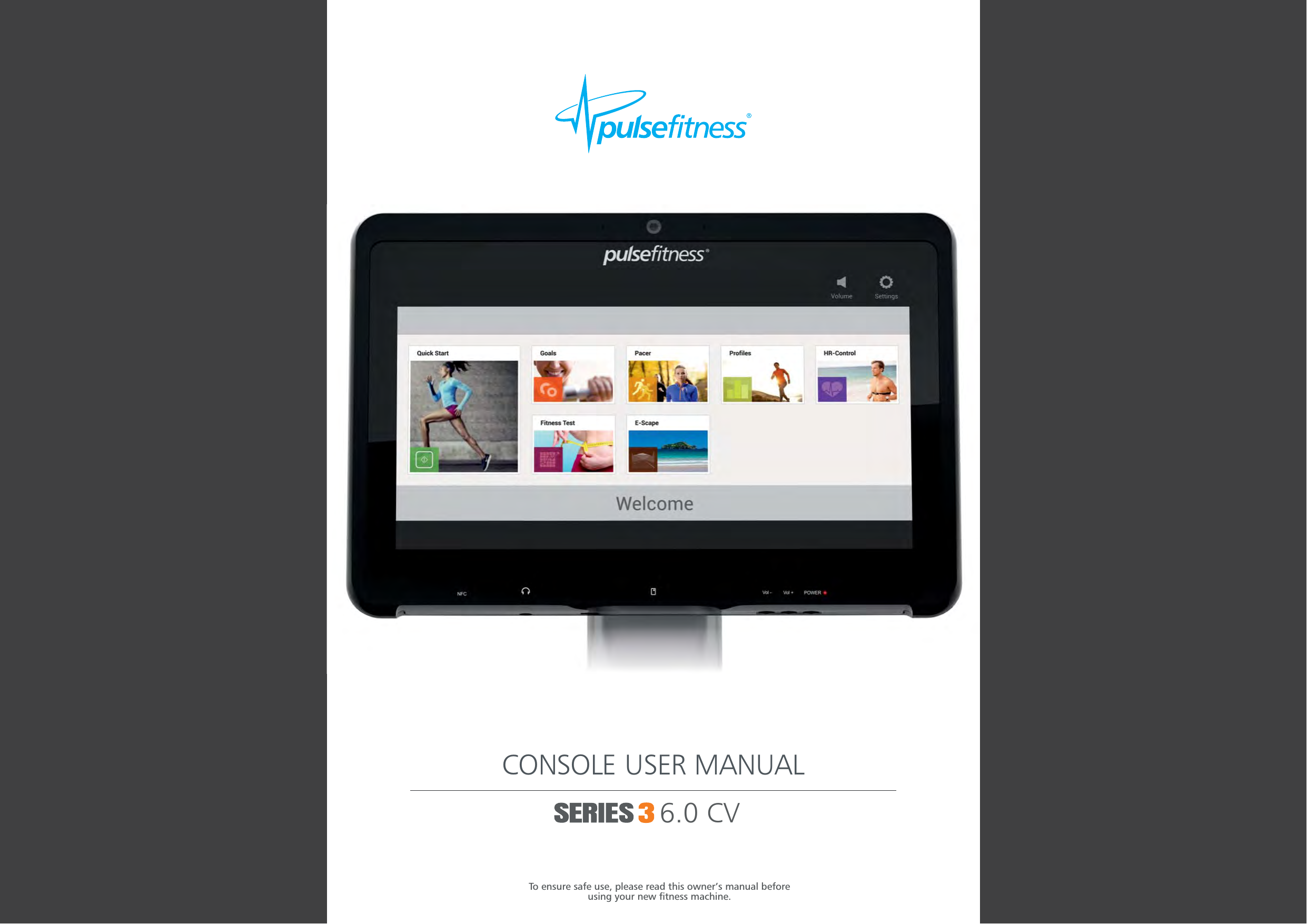
CONSOLE USER MANUAL6.0 CVTo ensure safe use, please read this owner’s manual beforeusing your new fitness machine.
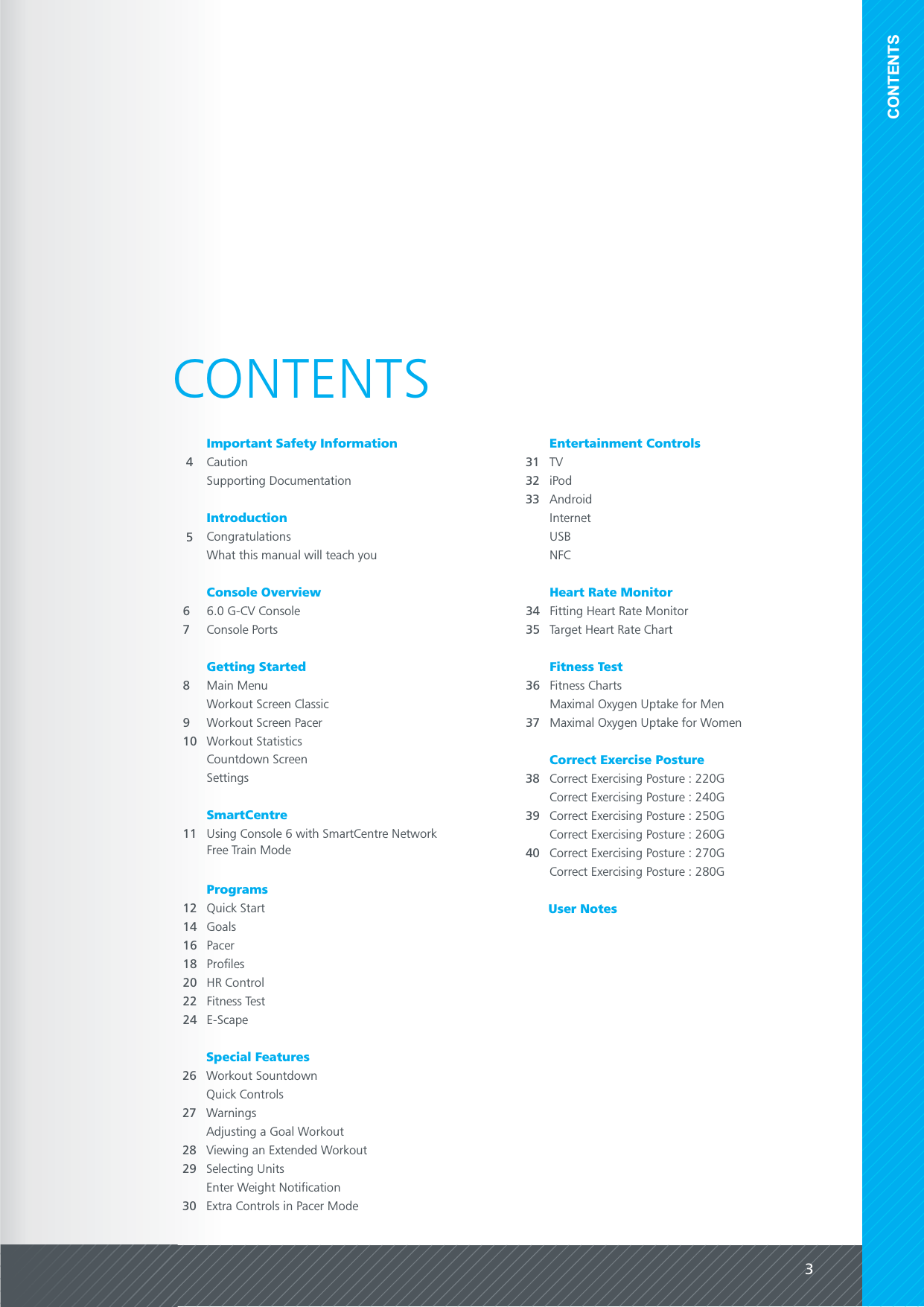
3CONTENTSCONTENTS4CautionIntroduction66.0 G-CV ConsoleConsole OverviewConsole PortsUser NotesImportant Safety Information8Main MenuGetting StartedWorkout Screen Classic11 Using Console 6 with SmartCentre NetworkSmartCentre38 Correct Exercising Posture : 220GCorrect Exercise PostureCorrect Exercising Posture : 240GCorrect Exercising Posture : 250GCorrect Exercising Posture : 260GCorrect Exercising Posture : 270GCorrect Exercising Posture : 280G73940CongratulationsWhat this manual will teach you5Supporting Documentation34 Fitting Heart Rate MonitorHeart Rate MonitorTarget Heart Rate Chart36 Fitness ChartsFitness Test35Workout Screen Pacer9Workout Statistics10Countdown ScreenSettingsFree Train Mode12 Quick StartProgramsGoals14Pacer16Profiles18HR Control20Fitness Test22E-Scape24Special Features26 Workout SountdownQuick ControlsWarningsAdjusting a Goal WorkoutViewing an Extended WorkoutSelecting Units272829Enter Weight Notification31 TVEntertainment ControlsiPodInternetUSBNFC3233Maximal Oxygen Uptake for Men37 Maximal Oxygen Uptake for WomenExtra Controls in Pacer Mode30Android
4 5Read these instructions carefully before operating Pulse equipment in conjunction withindividual machine instructions.Seek professional medical advice before using fitness equipment. Heart rate monitoringsystems may be inaccurate.  Over exercise may result in serious injury or death.  If you feelfaint, dizzy or exhausted stop exercising immediately.Ensure equipment is checked regularly for signs of damage and wear.  Do not useequipment if faulty or damaged until repaired using only genuine Pulse Fitness parts fittedby an authorised person.Carefully read and comprehend ALL of the safety documents relating to this piece ofequipment before commencing exercise.SERIOUS INJURY MAY OCCUR IF THESE PROCEDURES ARE NOT FOLLOWED.CAUTIONSUPPORTING DOCUMENTATIONIMPORTANT SAFETYINFORMATION INTRODUCTIONOn purchasing your new Pulse Fitness Console 6. This console will engage users with multiple entertaining and workout options. The18.5" high contrast, east-to-use, touch screen offers a personalised entertainment choice for complete motivation.CONGRATULATIONSWHAT THIS MANUAL WILL TEACH YOUThis manual will teach you how to get the most out of your console. It has clear step by step instructions on how to use the consoleand its programs.Please bear in mind we are continuously developing new and exciting updates for the console so some items may differ from yourproduct.
76CONSOLE PORTSSmartCentreHeadphone USB[Service Only]CONSOLEOVERVIEW6.0 G-CV CONSOLEPowerVolume[+/-]NFC CapacitiveTouchScreenWEBCAM & MICROPHONE - Coming SoonNFC - Coming SoonCAPACITIVE TOUCH SCREEN - Used for multi-gestures and navigating around the console.VOLUME - Use these to adjust volume of button feedback, tv etc. These controls are also duplicated on the screen.POWER - Turns the console on/off.SPEAKER - Provides feedback to the user such as, workout countdown.Speaker18.5" LCD Capacitive Touchscreen with scratch resistance glass featuring Pulse Fitness’ ‘Cirrus’ software running on Androids Jelly BeanOperating System. It has a display resolution of 1,366 x 768 pixels and runs on a IMX6 Quad Core processor [1.2GHz].
98GETTINGSTARTEDMAIN MENUWORKOUT SCREEN CLASSIC1 - Switch to Workout mode2 - Switch to TV mode3 - iPod Menu4 - Internet Options5 - Workout Entertainment Menu6 - Smartcard7 - Volume Control Bar8 - Settings Control9 - Contextual Entertainment Control10 - Statistics Boxes11 - Ascent Control [*note: only available on 260G]12 - Pause Workout13 - Speed / Effort Control11* 12 137681 2349105QUICK START - Basic ProgramGOALS - Countdown based on Time / Distance / SpeedPACER - Time & Distance / Time & Speed / Distance & SpeedPROFILES - Hills / Cross Country / Intervals / Aerobic / Custom /RandomHR CONTROL - Heart Rate Controled Workout (Not available on260G)FITNESS TEST -  Rockport (260G Only), Astrand (240G/250G)E-SCAPE - Forward motion video experience.L-TRAIN - Pre-set lateral workout (Only available on 270G)X-TRAIN - Pre-set workout with position prompts (OnlyWORKOUT SCREEN PACER1 - Switch to Workout mode2 - Switch to TV mode3 - iPod Menu4 - Internet Options5 - Workout Entertainment Menu6 - Smartcard7 - Volume Control Bar8 - Settings Control9 - Contextual Entertainment Control10 - Statistics Boxes11 - Ascent Control [*note: only available on 260G]12 - Pause Workout13 - Speed / Effort Control11* 12 137681 2349105WORKOUTSCREENCurrent position isindicated by thegreen column. Thebars will move upand down dependanton what effort /resistance andelevation [260G only]is selected.ExerciseTimeRemainingExerciseTimeElapsedABC DEA - - Displays the pacers current speed. The pacer will mirror the users speed for the first 40 seconds of the workoutPacer Speedbefore changing to its preset speed. This is to allow the user to bring the treadmill up to the desired speed whilst maintaining pacewith the pacer.B - - Displays the distance from the pacer the arrow depicts whether the user is in front or behind the pacer.Vs PacerC - - Displays the distance compared to when the user was on their best lap the arrow depicts whether the user is in frontVs Best Lapor behind the position at that time on the previous lap.D - - Displays the users lap times. If workout is longer than 6 laps, display page circles, and user can swipe left/right to seeLap Timesmore results. The best lap is depicted by a yellow circle. The active lap should count up from zero to indicate current lap time.E - - Displays the user and pacers position on the track. In the middle of the track display the number of laps completed.Lap DiagramIf more than 13 laps within the workout, display page circles, and user can scroll left and right. On user reaching lap 24 the windowautomatically scrolls to show the current lap.
10 11SETTINGSLEVELLevel of effort/resistance.POINTSPulse points earned.SPEED/RPM/SPMImperial / Metric [260G only]. RPM [240G/250G/270G/280G].SPM [220G Only].METsMetabolic Rate.WATTSPower generated during exercise.DISTANCEDistance travelled during exercise [Imperial].TIMETime remaining until the end of exercise or time elapsed[depending on program].ELEVATION260G only.KCALSCalories used during exercise.BPMHeart rate in beats per minute.WORKOUT STATISTICS1321 - Count Down (with audio feedback)2 - Workout Summary3 - Exit to Home ScreenSMARTCENTREUSING CONSOLE 6 WITH SMART CENTRE NETWORKCOUNTDOWN SCREENLanguages available are : EnglishINSERT SMART CARDA grey Smart Card icon will appear in the topbar of the screen. This indicates that a SmartCard has been inserted but is not currentlybeing accessed.FREE TRAIN MODE21 - - This animation shows that the data on the Smart Card is being accessed.Loading / Saving2 - - The SmartCentre is only visible when the Smart Card is inserted into the console.SmartCentre Activity IconACCESSING SMART CARDWhen the icon is flashing red, the Smart Cardis being accessed and shouldn’t be removedby the user.1Note - When a machine is not found on a workout plan, or has already been completed, the user can choose any program and resultsare stored on the Smart Card.
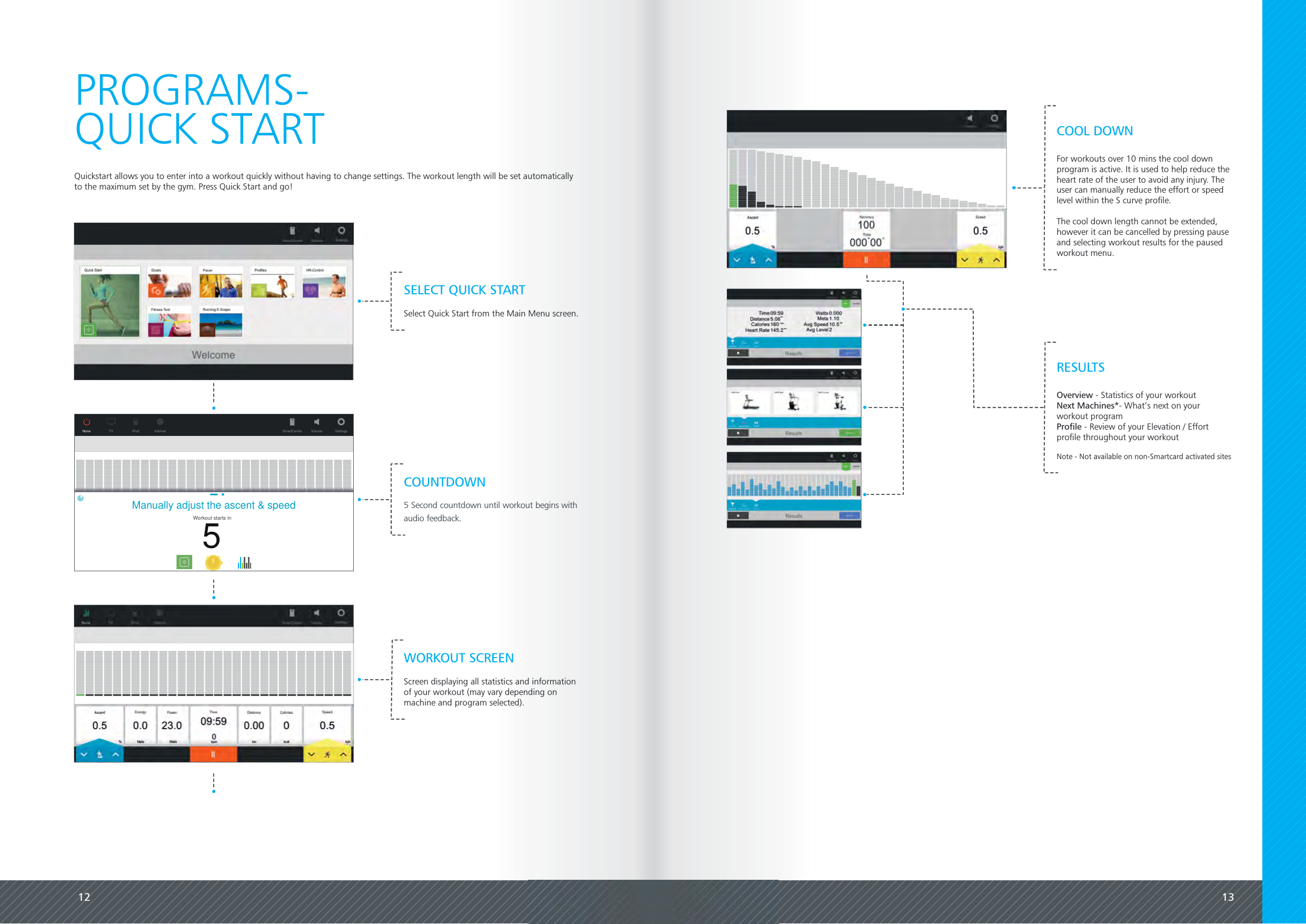
12 13PROGRAMS-Quickstart allows you to enter into a workout quickly without having to change settings. The workout length will be set automaticallyto the maximum set by the gym. Press Quick Start and go!QUICK STARTWORKOUT SCREENScreen displaying all statistics and informationof your workout (may vary depending onmachine and program selected).COUNTDOWN5 Second countdown until workout begins withaudio feedback.SELECT QUICK STARTSelect Quick Start from the Main Menu screen.For workouts over 10 mins the cool downprogram is active. It is used to help reduce theheart rate of the user to avoid any injury. Theuser can manually reduce the effort or speedlevel within the S curve profile.The cool down length cannot be extended,however it can be cancelled by pressing pauseand selecting workout results for the pausedworkout menu.COOL DOWNOverview - Statistics of your workoutNext Machines*- What’s next on yourworkout programProfile - Review of your Elevation / Effortprofile throughout your workoutNote - Not available on non-Smartcard activated sitesRESULTS10%Profile adjustNone TV iPod Internet Volume SettingsSmartCentre8.8SpeedCalories88.88.88Energy Power8.8 8.8DistanceTime88:88kphbpmlevel 88813X-Country BeginnerWattsMets km kcal/31Manually adjust the ascent & speed5Workout starts in
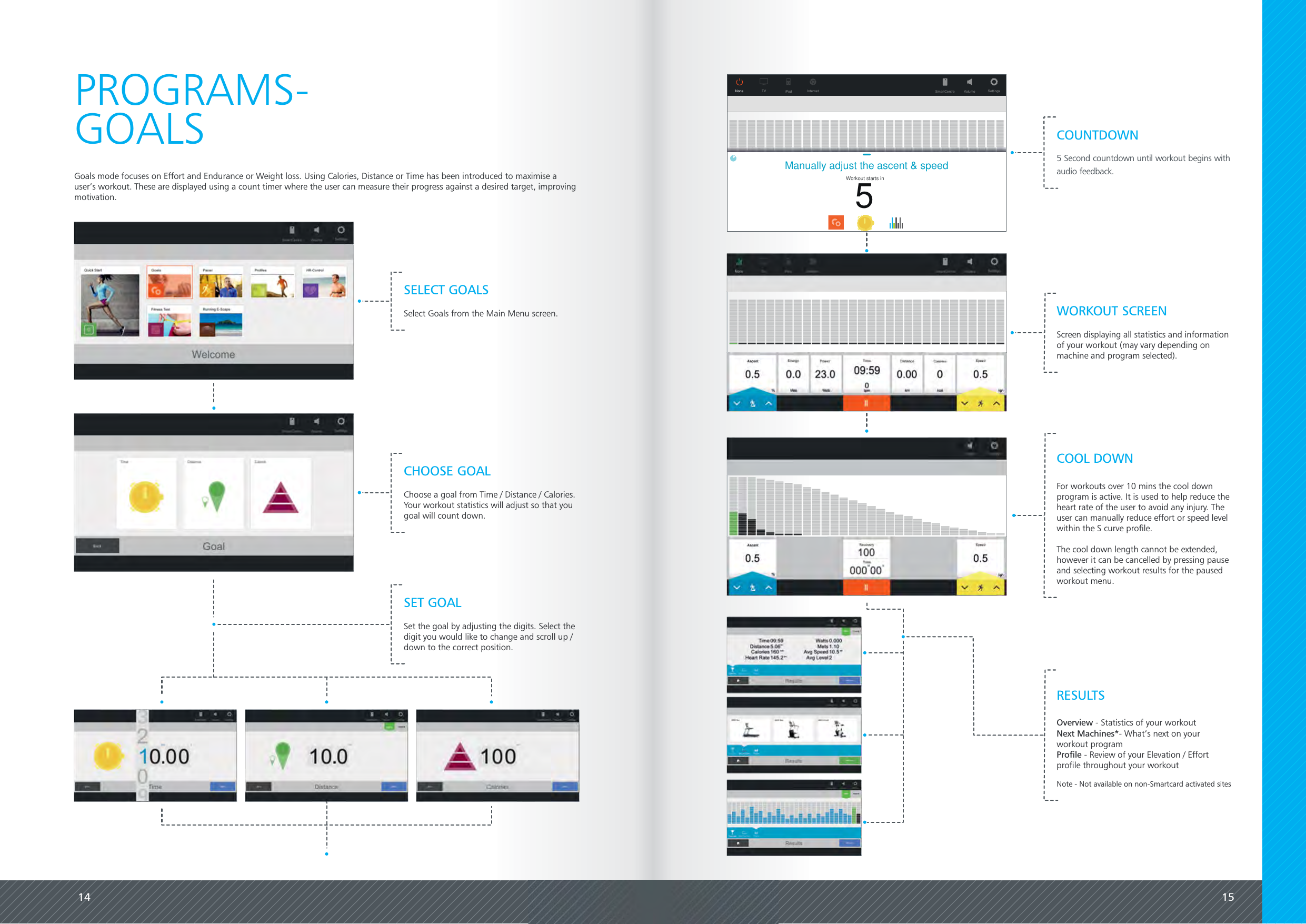
14 15PROGRAMS-Goals mode focuses on Effort and Endurance or Weight loss. Using Calories, Distance or Time has been introduced to maximise auser’s workout. These are displayed using a count timer where the user can measure their progress against a desired target, improvingmotivation.GOALSWORKOUT SCREENScreen displaying all statistics and informationof your workout (may vary depending onmachine and program selected).10%Profile adjustNone TV iPod Internet Volume SettingsSmartCentre8.8SpeedCalories88.88.88Energy Power8.8 8.8DistanceTime88:88kphlevel 88813X-Country BeginnerMets kcal/31Manually adjust the ascent & speed5Workout starts inCOUNTDOWN5 Second countdown until workout begins withaudio feedback.CHOOSE GOALChoose a goal from Time / Distance / Calories.Your workout statistics will adjust so that yougoal will count down.SELECT GOALSSelect Goals from the Main Menu screen.SET GOALSet the goal by adjusting the digits. Select thedigit you would like to change and scroll up /down to the correct position.Overview - Statistics of your workoutNext Machines*- What’s next on yourworkout programProfile - Review of your Elevation / Effortprofile throughout your workoutNote - Not available on non-Smartcard activated sitesRESULTSFor workouts over 10 mins the cool downprogram is active. It is used to help reduce theheart rate of the user to avoid any injury. Theuser can manually reduce effort or speed levelwithin the S curve profile.The cool down length cannot be extended,however it can be cancelled by pressing pauseand selecting workout results for the pausedworkout menu.COOL DOWN
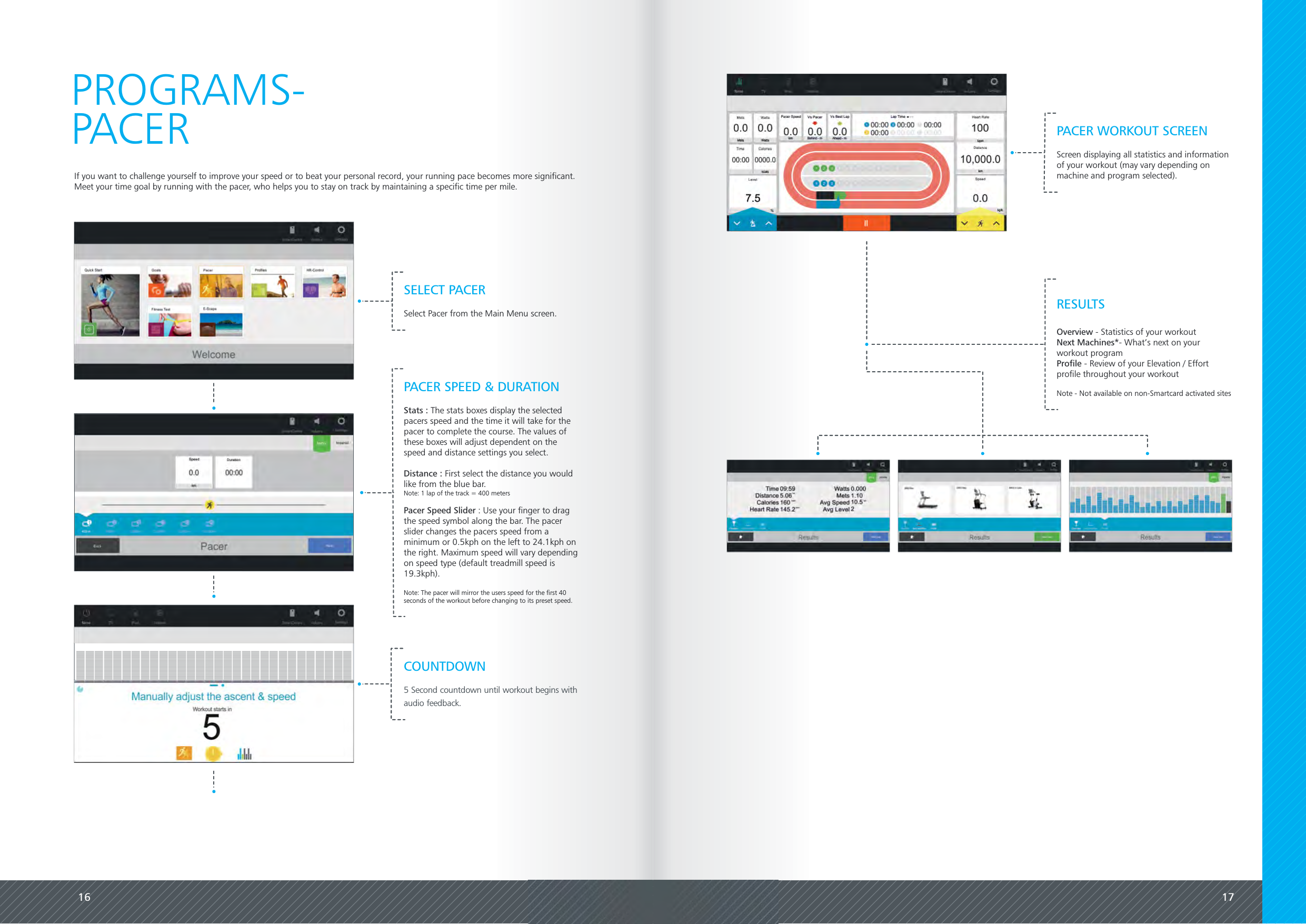
16 17If you want to challenge yourself to improve your speed or to beat your personal record, your running pace becomes more significant.Meet your time goal by running with the pacer, who helps you to stay on track by maintaining a specific time per mile.PROGRAMS-PACER PACER WORKOUT SCREENScreen displaying all statistics and informationof your workout (may vary depending onmachine and program selected).SELECT PACERSelect Pacer from the Main Menu screen.PACER SPEED & DURATIONStats : The stats boxes display the selectedpacers speed and the time it will take for thepacer to complete the course. The values ofthese boxes will adjust dependent on thespeed and distance settings you select.Distance : First select the distance you wouldlike from the blue bar.Note: 1 lap of the track = 400 metersPacer Speed Slider : Use your finger to dragthe speed symbol along the bar. The pacerslider changes the pacers speed from aminimum or 0.5kph on the left to 24.1kph onthe right. Maximum speed will vary dependingon speed type (default treadmill speed is19.3kph).Note: The pacer will mirror the users speed for the first 40seconds of the workout before changing to its preset speed.COUNTDOWN5 Second countdown until workout begins withaudio feedback.Overview - Statistics of your workoutNext Machines*- What’s next on yourworkout programProfile - Review of your Elevation / Effortprofile throughout your workoutNote - Not available on non-Smartcard activated sitesRESULTS
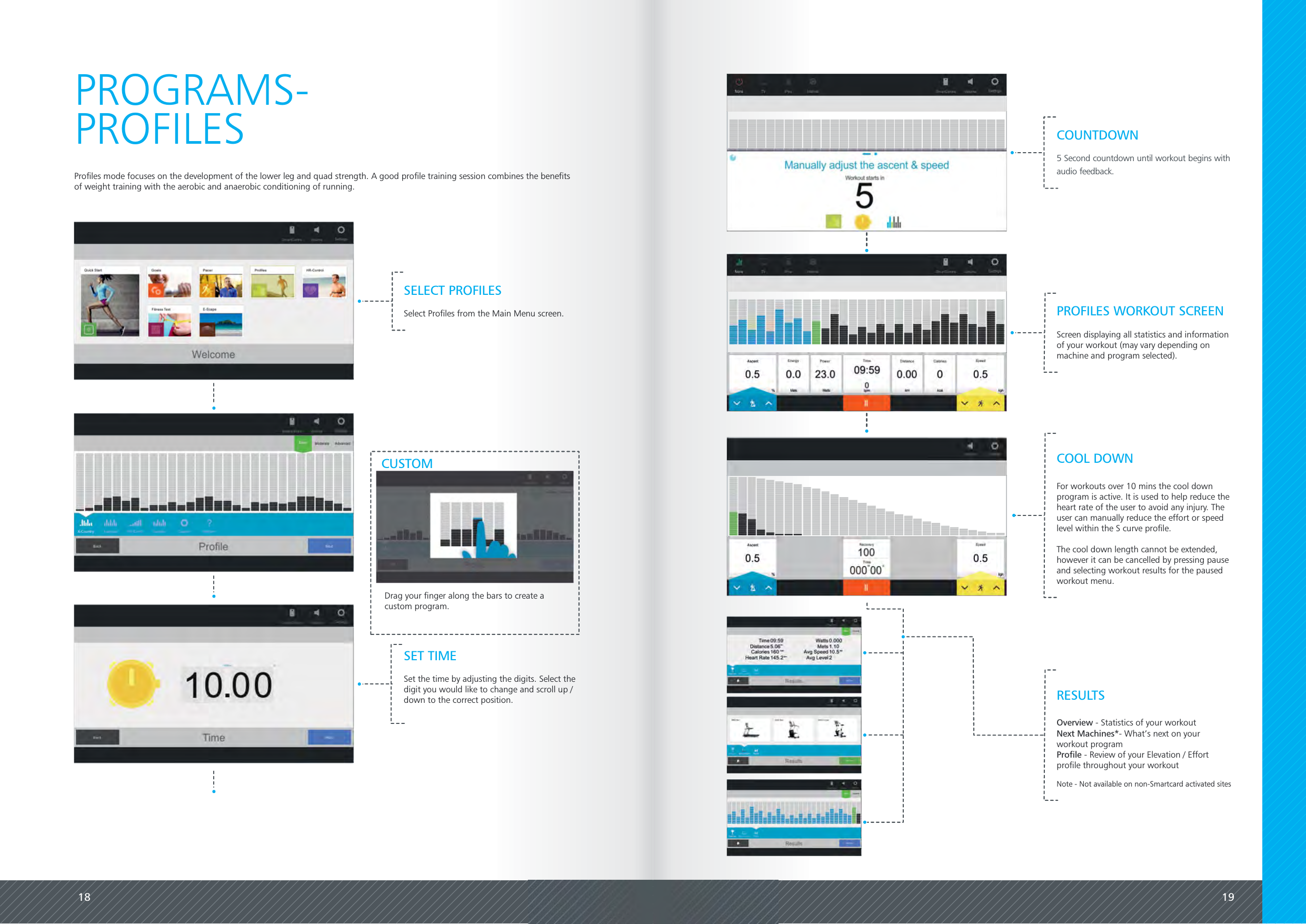
18 19Profiles mode focuses on the development of the lower leg and quad strength. A good profile training session combines the benefitsof weight training with the aerobic and anaerobic conditioning of running.PROGRAMS-PROFILESCUSTOMDrag your finger along the bars to create acustom program.PROFILES WORKOUT SCREENScreen displaying all statistics and informationof your workout (may vary depending onmachine and program selected).SELECT PROFILESSelect Profiles from the Main Menu screen.Overview - Statistics of your workoutNext Machines*- What’s next on yourworkout programProfile - Review of your Elevation / Effortprofile throughout your workoutNote - Not available on non-Smartcard activated sitesRESULTSCOUNTDOWN5 Second countdown until workout begins withaudio feedback.SET TIMESet the time by adjusting the digits. Select thedigit you would like to change and scroll up /down to the correct position.For workouts over 10 mins the cool downprogram is active. It is used to help reduce theheart rate of the user to avoid any injury. Theuser can manually reduce the effort or speedlevel within the S curve profile.The cool down length cannot be extended,however it can be cancelled by pressing pauseand selecting workout results for the pausedworkout menu.COOL DOWN
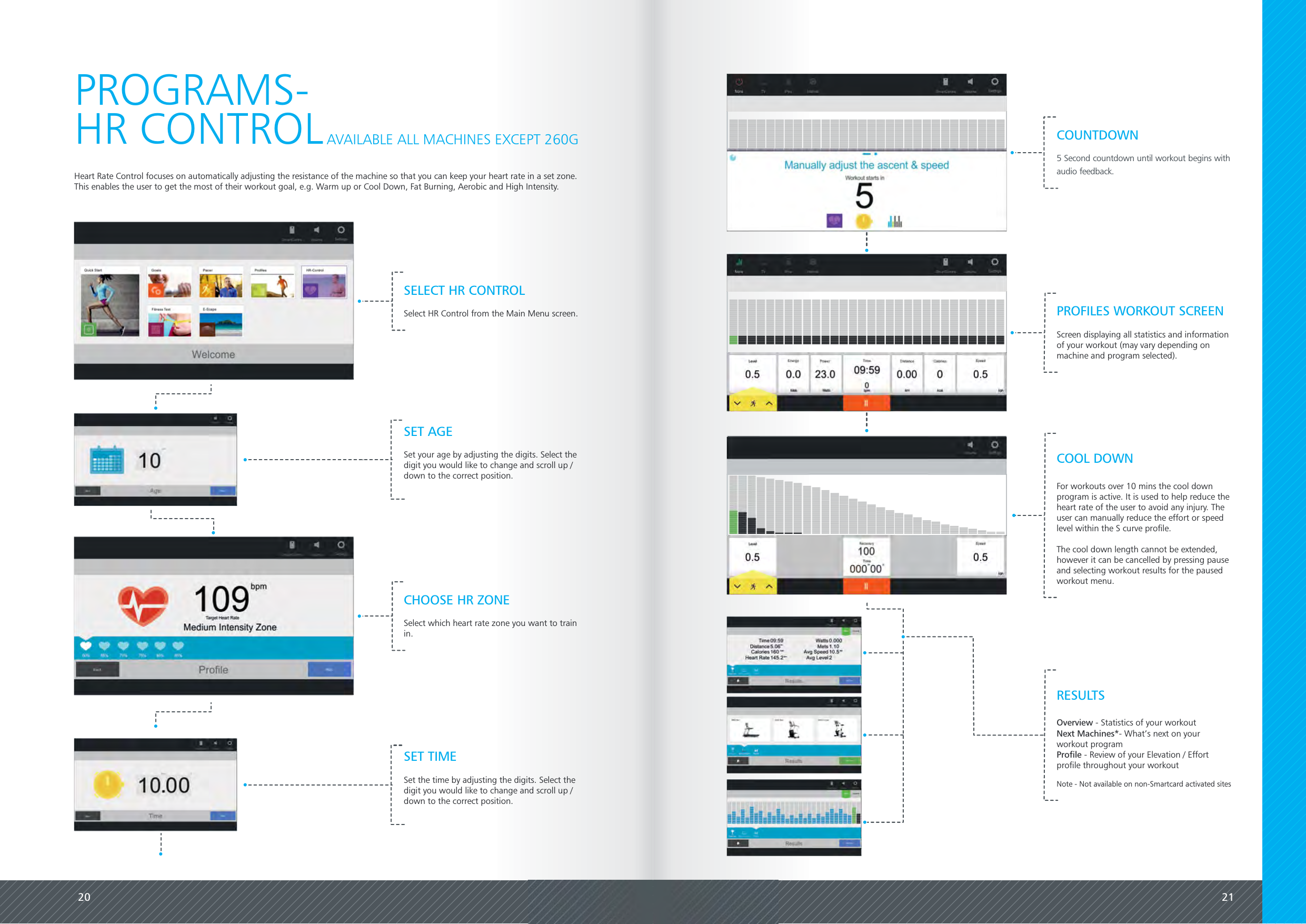
20 21Heart Rate Control focuses on automatically adjusting the resistance of the machine so that you can keep your heart rate in a set zone.This enables the user to get the most of their workout goal, e.g. Warm up or Cool Down, Fat Burning, Aerobic and High Intensity.PROGRAMS-HR CONTROLPROFILES WORKOUT SCREENScreen displaying all statistics and informationof your workout (may vary depending onmachine and program selected).AVAILABLE ALL MACHINES EXCEPT 260GSET AGESet your age by adjusting the digits. Select thedigit you would like to change and scroll up /down to the correct position.SET TIMESet the time by adjusting the digits. Select thedigit you would like to change and scroll up /down to the correct position.COUNTDOWN5 Second countdown until workout begins withaudio feedback.Overview - Statistics of your workoutNext Machines*- What’s next on yourworkout programProfile - Review of your Elevation / Effortprofile throughout your workoutNote - Not available on non-Smartcard activated sitesRESULTSSELECT HR CONTROLSelect HR Control from the Main Menu screen.CHOOSE HR ZONESelect which heart rate zone you want to trainin.For workouts over 10 mins the cool downprogram is active. It is used to help reduce theheart rate of the user to avoid any injury. Theuser can manually reduce the effort or speedlevel within the S curve profile.The cool down length cannot be extended,however it can be cancelled by pressing pauseand selecting workout results for the pausedworkout menu.COOL DOWN
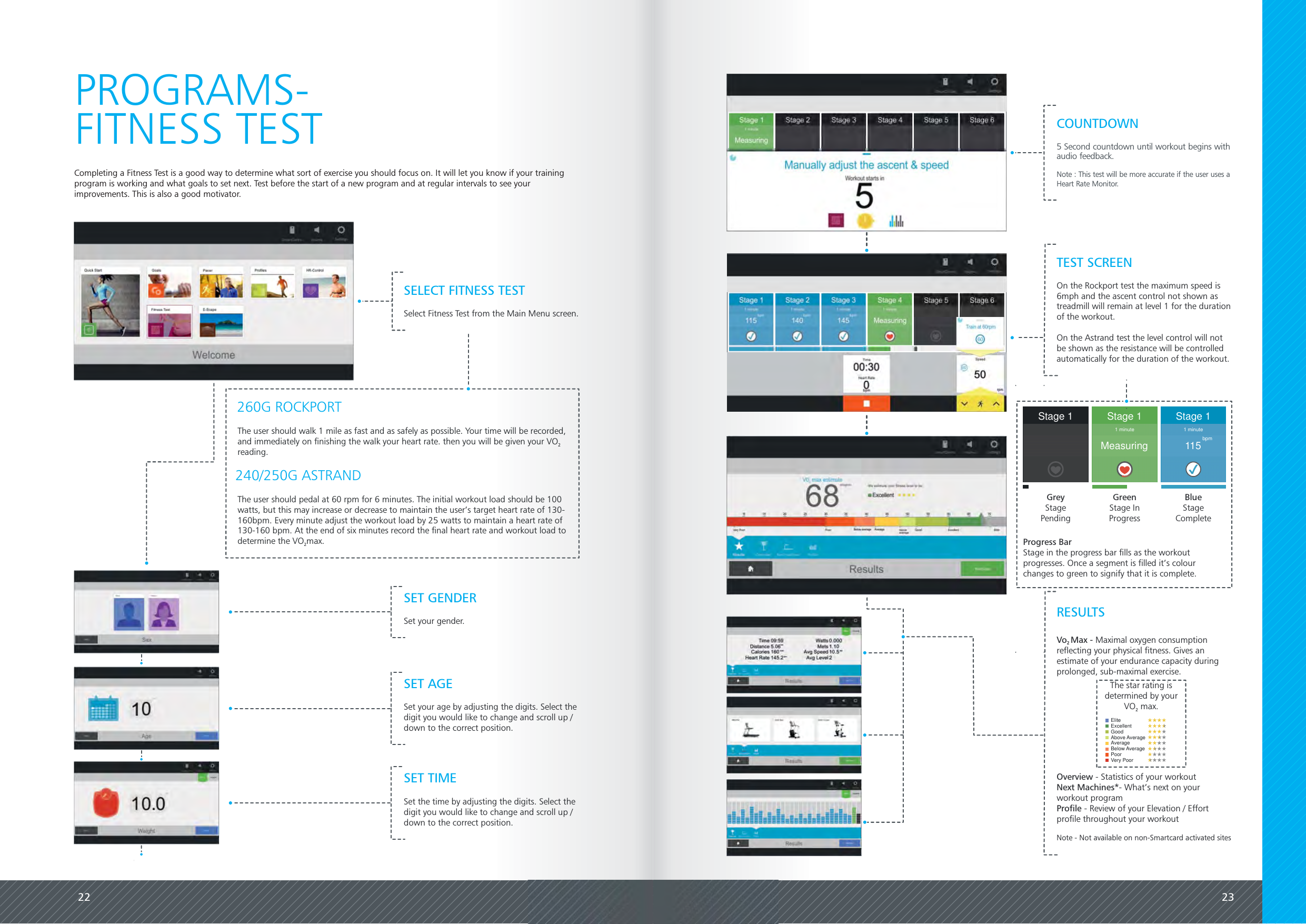
22 23Completing a Fitness Test is a good way to determine what sort of exercise you should focus on. It will let you know if your trainingprogram is working and what goals to set next. Test before the start of a new program and at regular intervals to see yourimprovements. This is also a good motivator.PROGRAMS-FITNESS TESTTEST SCREENOn the Rockport test the maximum speed is6mph and the ascent control not shown astreadmill will remain at level 1 for the durationof the workout.On the Astrand test the level control will notbe shown as the resistance will be controlledautomatically for the duration of the workout.Stage 1 Stage 1115 bpm1 minuteStage 1Measuring1 minuteGreyStagePendingGreenStage InProgressBlueStageCompleteSELECT FITNESS TESTSelect Fitness Test from the Main Menu screen.SET GENDERSet your gender.SET AGESet your age by adjusting the digits. Select thedigit you would like to change and scroll up /down to the correct position.SET TIMESet the time by adjusting the digits. Select thedigit you would like to change and scroll up /down to the correct position.COUNTDOWN5 Second countdown until workout begins withaudio feedback.Note : This test will be more accurate if the user uses aHeart Rate Monitor.The user should pedal at 60 rpm for 6 minutes. The initial workout load should be 100watts, but this may increase or decrease to maintain the user’s target heart rate of 130-160bpm. Every minute adjust the workout load by 25 watts to maintain a heart rate of130-160 bpm. At the end of six minutes record the final heart rate and workout load todetermine the VO max.2The user should walk 1 mile as fast and as safely as possible. Your time will be recorded,and immediately on finishing the walk your heart rate. then you will be given your VO2reading.240/250G ASTRAND260G ROCKPORTThe star rating isdetermined by yourVO max.2EliteExcellentGoodAbove AverageAverageBelow AveragePoorVery PoorVo Max -2Maximal oxygen consumptionreflecting your physical fitness. Gives anestimate of your endurance capacity duringprolonged, sub-maximal exercise.Overview - Statistics of your workoutNext Machines*- What’s next on yourworkout programProfile - Review of your Elevation / Effortprofile throughout your workoutNote - Not available on non-Smartcard activated sitesRESULTSProgress BarStage in the progress bar fills as the workoutprogresses. Once a segment is filled it’s colourchanges to green to signify that it is complete.
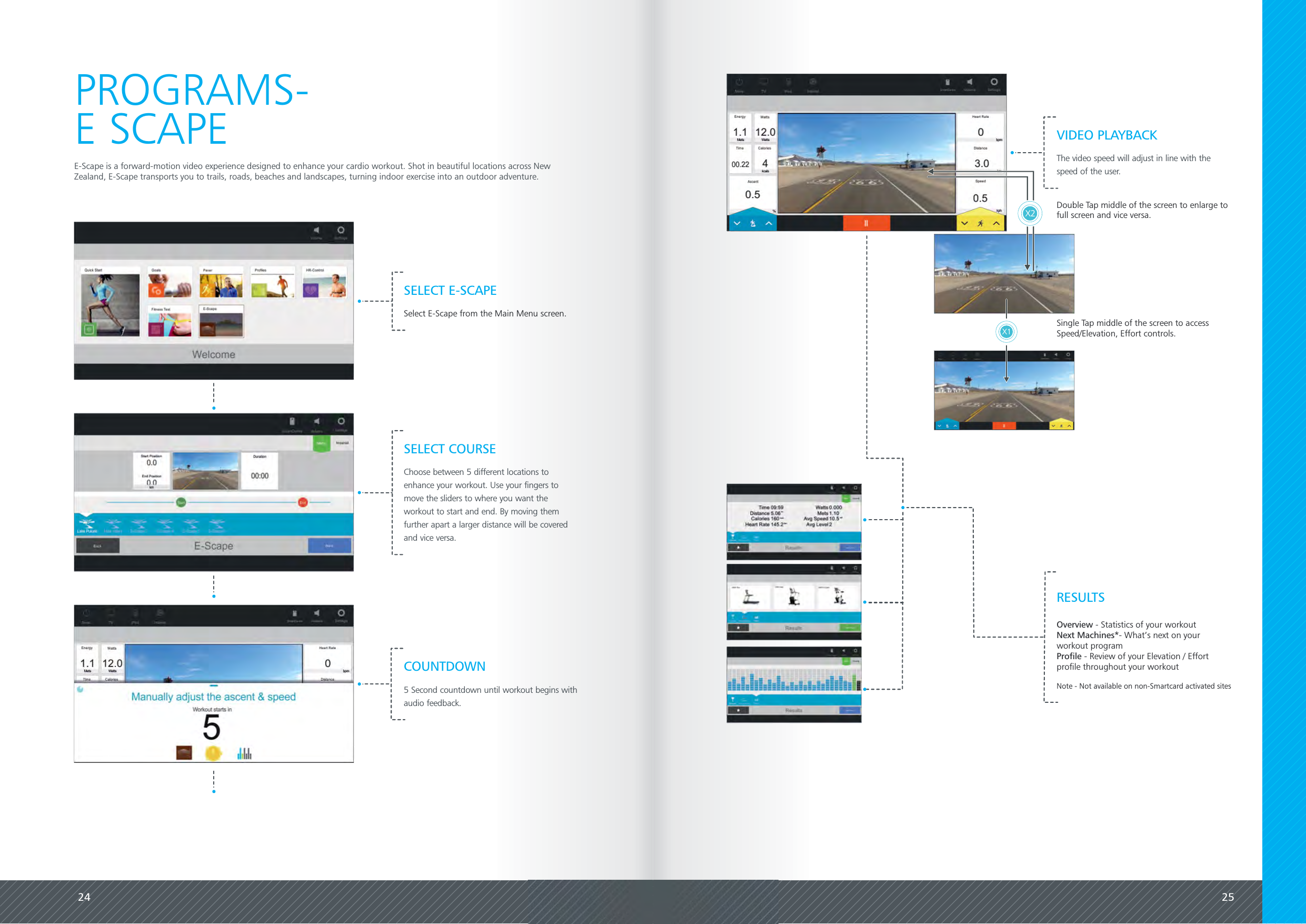
24 25E-Scape is a forward-motion video experience designed to enhance your cardio workout. Shot in beautiful locations across NewZealand, E-Scape transports you to trails, roads, beaches and landscapes, turning indoor exercise into an outdoor adventure.PROGRAMS-E SCAPESELECT E-SCAPESelect E-Scape from the Main Menu screen.SELECT COURSEChoose between 5 different locations toenhance your workout. Use your fingers tomove the sliders to where you want theworkout to start and end. By moving themfurther apart a larger distance will be coveredand vice versa.COUNTDOWN5 Second countdown until workout begins withaudio feedback.Overview - Statistics of your workoutNext Machines*- What’s next on yourworkout programProfile - Review of your Elevation / Effortprofile throughout your workoutNote - Not available on non-Smartcard activated sitesRESULTSDouble Tap middle of the screen to enlarge tofull screen and vice versa.X1 Single Tap middle of the screen to accessSpeed/Elevation, Effort controls.X2VIDEO PLAYBACKThe video speed will adjust in line with thespeed of the user.
26 27SPECIALFEATURESWORKOUT COUNTDOWNIf the user exceeds the tolerance in a program, e.g. the user should walk  at 5kph, the background fades to red to alert the user.Note: This function is not available on the treadmill.WARNINGSQUICK CONTROLSTo quickly change Speed/Elevation [260G only] or Effort, press and hold the icon button in the bottom right or left corners of the screen. Abar will appear. Drag the circle along the bar and the machine will adjust accordingly.To bypass the workout countdown you can swipe the screen in a downwards motion. This will take you straight into the workout. ADJUSTING A GOAL WORKOUTWorkout ends in000 00MS+1Swipedown tohideTap or swipe the goal box at any time to bring up the adjustworkout duration dialogue.Time09:590bpm
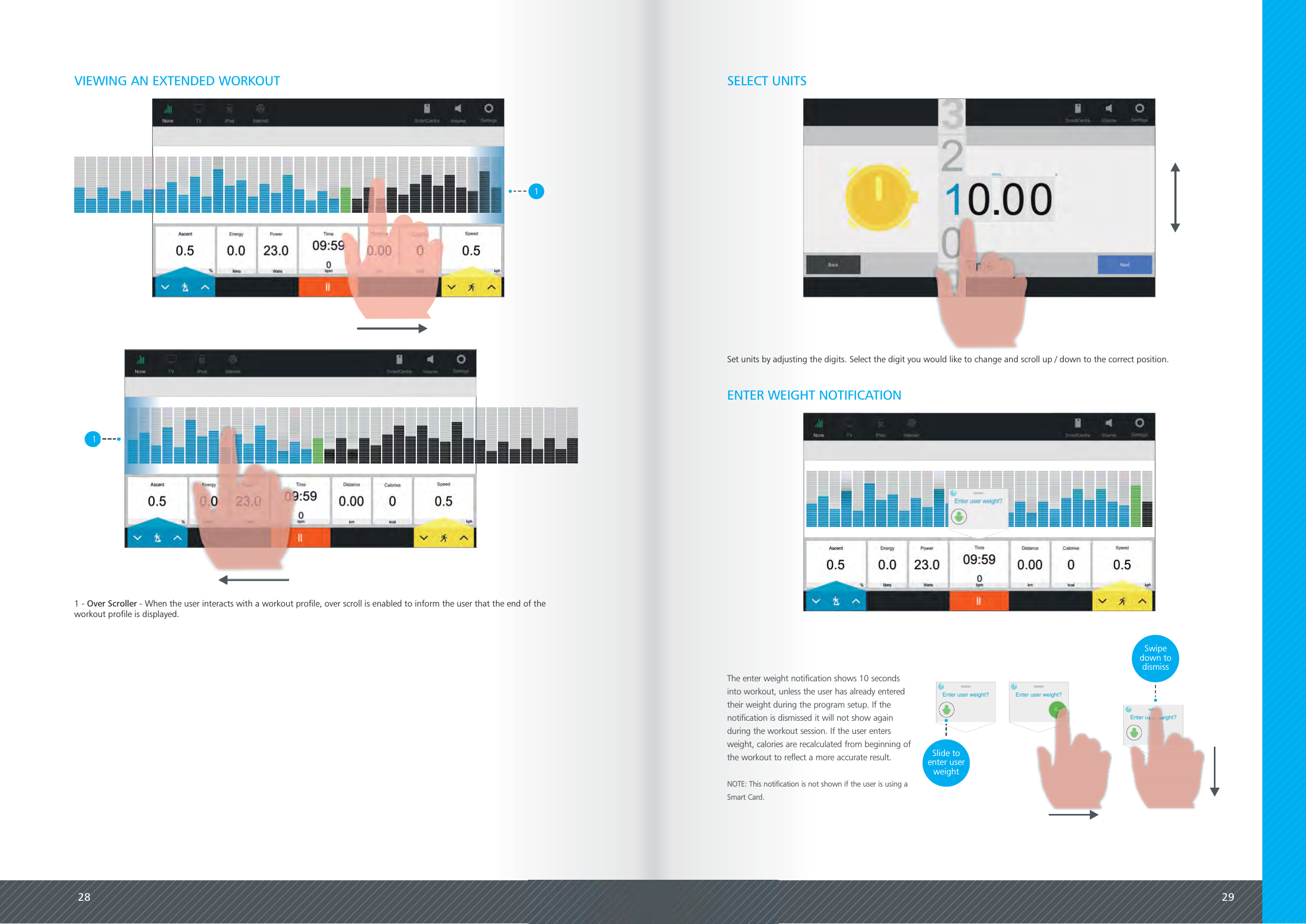
28 29VIEWING AN EXTENDED WORKOUT11 - - When the user interacts with a workout profile, over scroll is enabled to inform the user that the end of theOver Scrollerworkout profile is displayed.SELECT UNITSENTER WEIGHT NOTIFICATIONThe enter weight notification shows 10 secondsinto workout, unless the user has already enteredtheir weight during the program setup. If thenotification is dismissed it will not show againduring the workout session. If the user entersweight, calories are recalculated from beginning ofthe workout to reflect a more accurate result.NOTE: This notification is not shown if the user is using aSmart Card.Enter user weight? Enter user weight?GoSlide toenter userweightEnter user weight?Swipedown todismissSet units by adjusting the digits. Select the digit you would like to change and scroll up / down to the correct position.
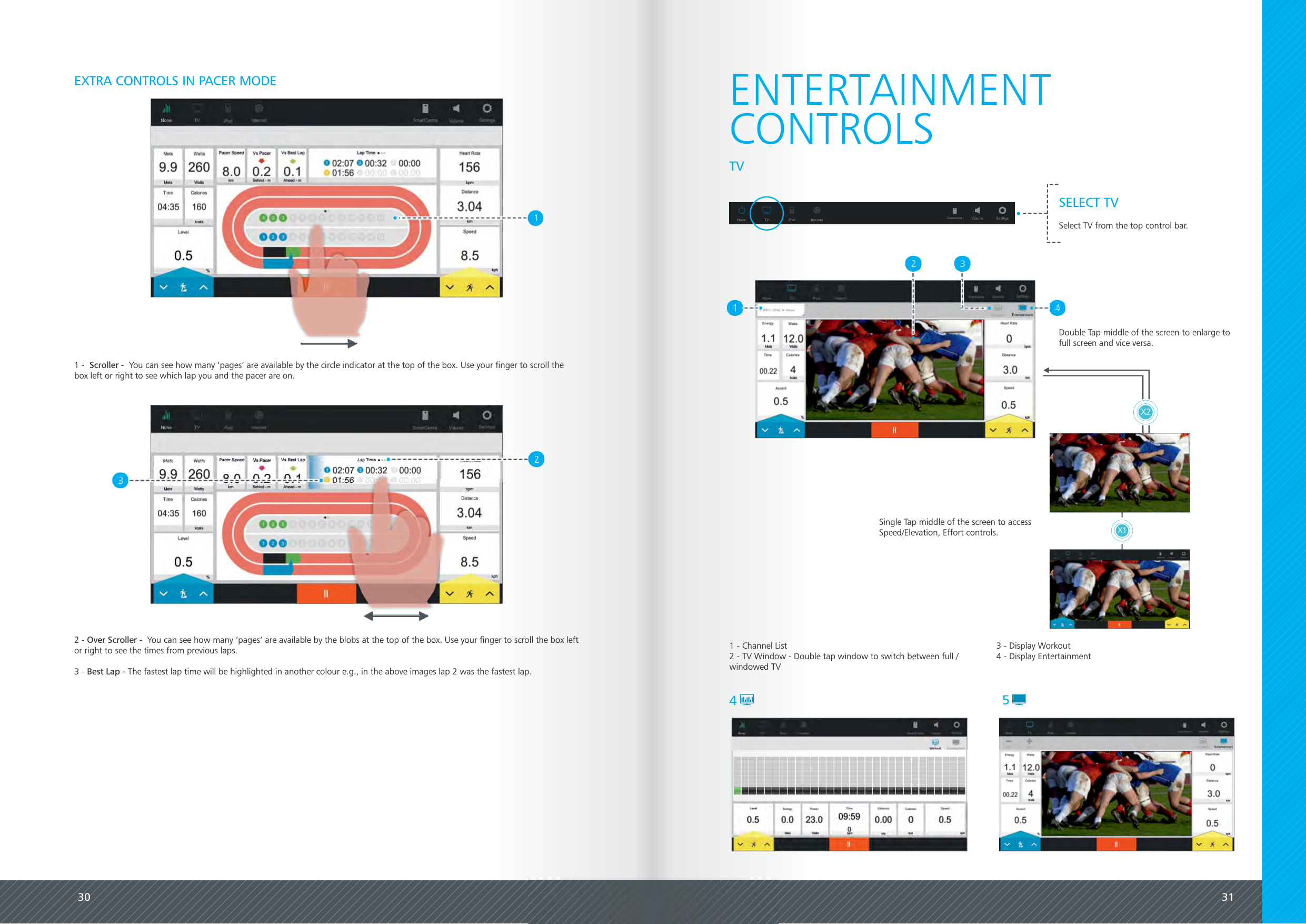
30 31EXTRA CONTROLS IN PACER MODE1 - You can see how many ‘pages’ are available by the circle indicator at the top of the box. Use your finger to scroll theScroller -box left or right to see which lap you and the pacer are on.2 - You can see how many ‘pages’ are available by the blobs at the top of the box. Use your finger to scroll the box leftOver Scroller -or right to see the times from previous laps.3 - The fastest lap time will be highlighted in another colour e.g., in the above images lap 2 was the fastest lap.Best Lap -1ENTERTAINMENT1 - Channel List2 - TV Window - Double tap window to switch between full /windowed TV45CONTROLSTVSELECT TVSelect TV from the top control bar.None TV iPod Internet Volume SettingsSmartCentreX1X2Double Tap middle of the screen to enlarge tofull screen and vice versa.Single Tap middle of the screen to accessSpeed/Elevation, Effort controls.3 - Display Workout4 - Display Entertainment
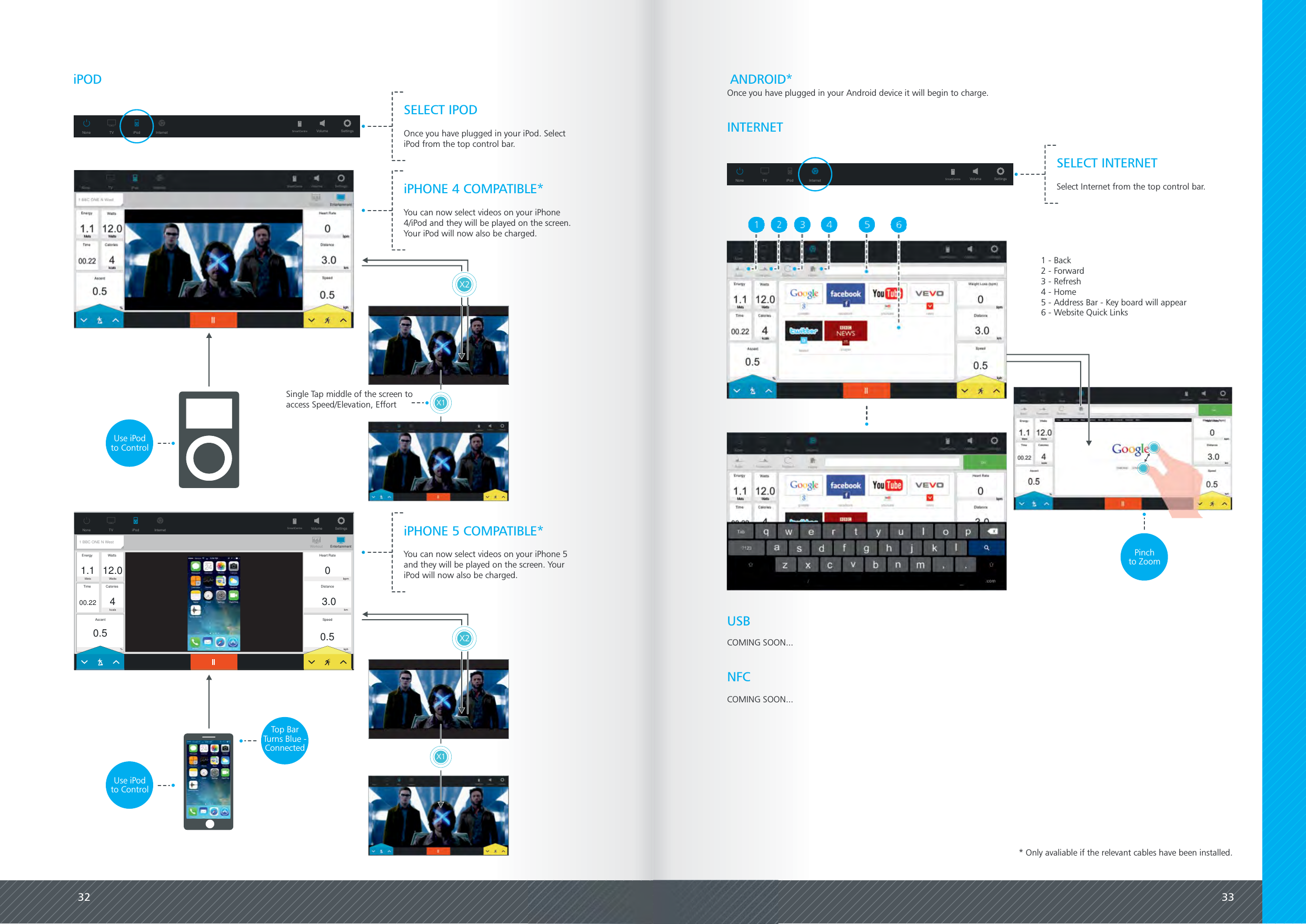
32 33iPODNone TV iPod Internet Volume SettingsSmartCentreINTERNETSELECT INTERNETSelect Internet from the top control bar.1 - Back2 - Forward3 - Refresh4 - Home5 - Address Bar - Key board will appear6 - Website Quick LinksPinchto ZoomSELECT IPODOnce you have plugged in your iPod. SelectiPod from the top control bar.None TV iPod Internet Volume SettingsSmartCentreUSBNFCCOMING SOON...COMING SOON...ANDROID*X1X2iPHONE 4 COMPATIBLE*You can now select videos on your iPhone4/iPod and they will be played on the screen.Your iPod will now also be charged.Use iPodto Control0.5SpeedHeart Rate03.0Distance0.5AscentEnergyTimeWattsCalories1.100.2212.04Volume SettingsSmartCentreMets Wattskcals%bpmkmkphWorkout EntertainmentNone TV iPod Internet1 BBC ONE N WestiPHONE 5 COMPATIBLE*You can now select videos on your iPhone 5and they will be played on the screen. YouriPod will now also be charged.Use iPodto ControlX1X2Top BarTurns Blue -ConnectedOnce you have plugged in your Android device it will begin to charge.* Only avaliable if the relevant cables have been installed.Single Tap middle of the screen toaccess Speed/Elevation, Effort
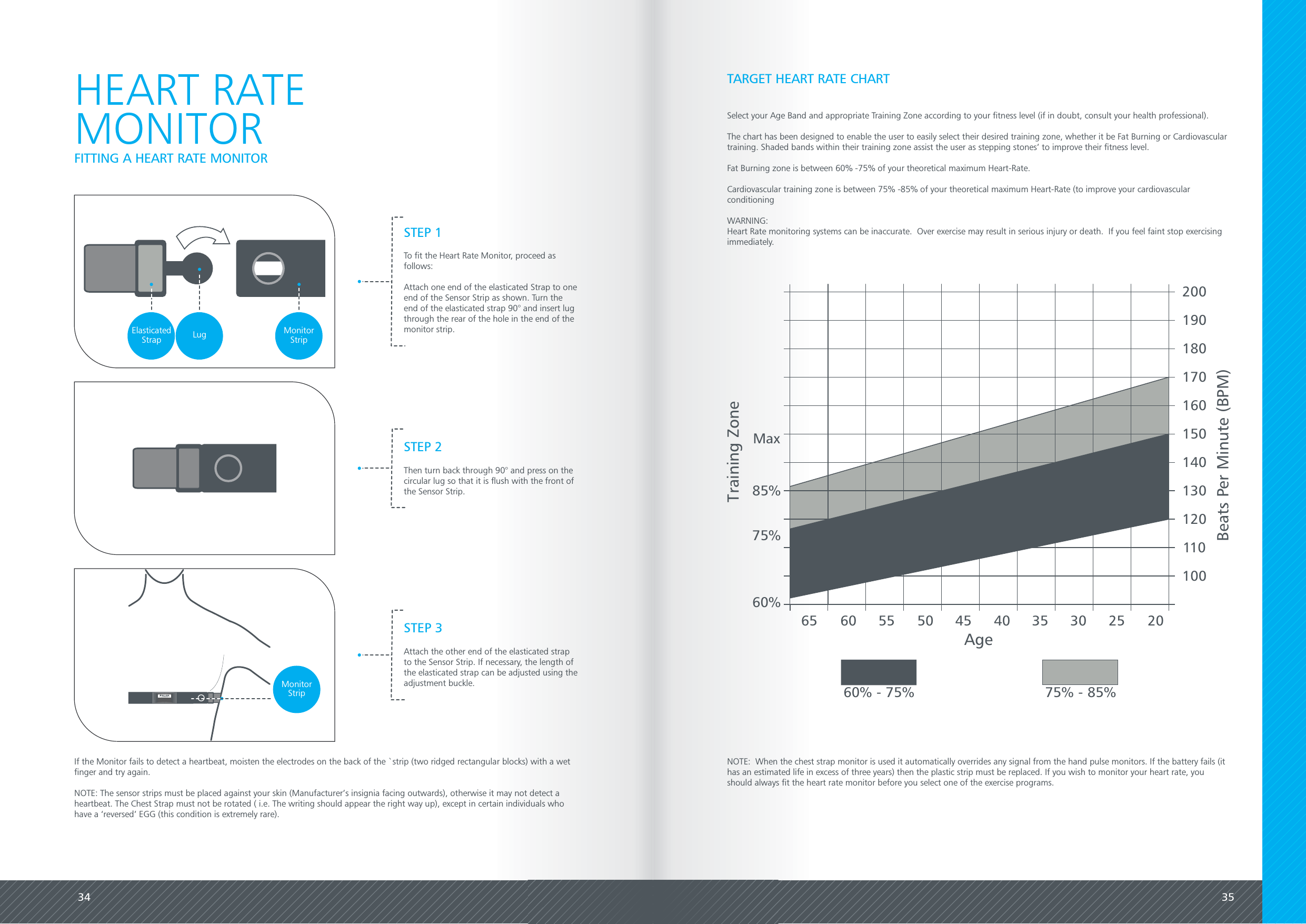
34 35HEART RATEMONITORSTEP 1To fit the Heart Rate Monitor, proceed asfollows:Attach one end of the elasticated Strap to oneend of the Sensor Strip as shown. Turn theend of the elasticated strap 90° and insert lugthrough the rear of the hole in the end of themonitor strip.STEP 2Then turn back through 90° and press on thecircular lug so that it is flush with the front ofthe Sensor Strip.STEP 3Attach the other end of the elasticated strapto the Sensor Strip. If necessary, the length ofthe elasticated strap can be adjusted using theadjustment buckle.FITTING A HEART RATE MONITORIf the Monitor fails to detect a heartbeat, moisten the electrodes on the back of the `strip (two ridged rectangular blocks) with a wetfinger and try again.NOTE: The sensor strips must be placed against your skin (Manufacturer’s insignia facing outwards), otherwise it may not detect aheartbeat. The Chest Strap must not be rotated ( i.e. The writing should appear the right way up), except in certain individuals whohave a ‘reversed’ EGG (this condition is extremely rare).ElasticatedStrap Lug MonitorStripMonitorStripTARGET HEART RATE CHARTSelect your Age Band and appropriate Training Zone according to your fitness level (if in doubt, consult your health professional).The chart has been designed to enable the user to easily select their desired training zone, whether it be Fat Burning or Cardiovasculartraining. Shaded bands within their training zone assist the user as stepping stones’ to improve their fitness level.Fat Burning zone is between 60% -75% of your theoretical maximum Heart-Rate.Cardiovascular training zone is between 75% -85% of your theoretical maximum Heart-Rate (to improve your cardiovascularconditioningWARNING:Heart Rate monitoring systems can be inaccurate.  Over exercise may result in serious injury or death.  If you feel faint stop exercisingimmediately.85%75%60%Max65 60 55 50 45 40 35 30 25 20Age60% - 75% 75% - 85%200190180170160150140130120110100Beats Per Minute (BPM)Training ZoneNOTE:  When the chest strap monitor is used it automatically overrides any signal from the hand pulse monitors. If the battery fails (ithas an estimated life in excess of three years) then the plastic strip must be replaced. If you wish to monitor your heart rate, youshould always fit the heart rate monitor before you select one of the exercise programs.
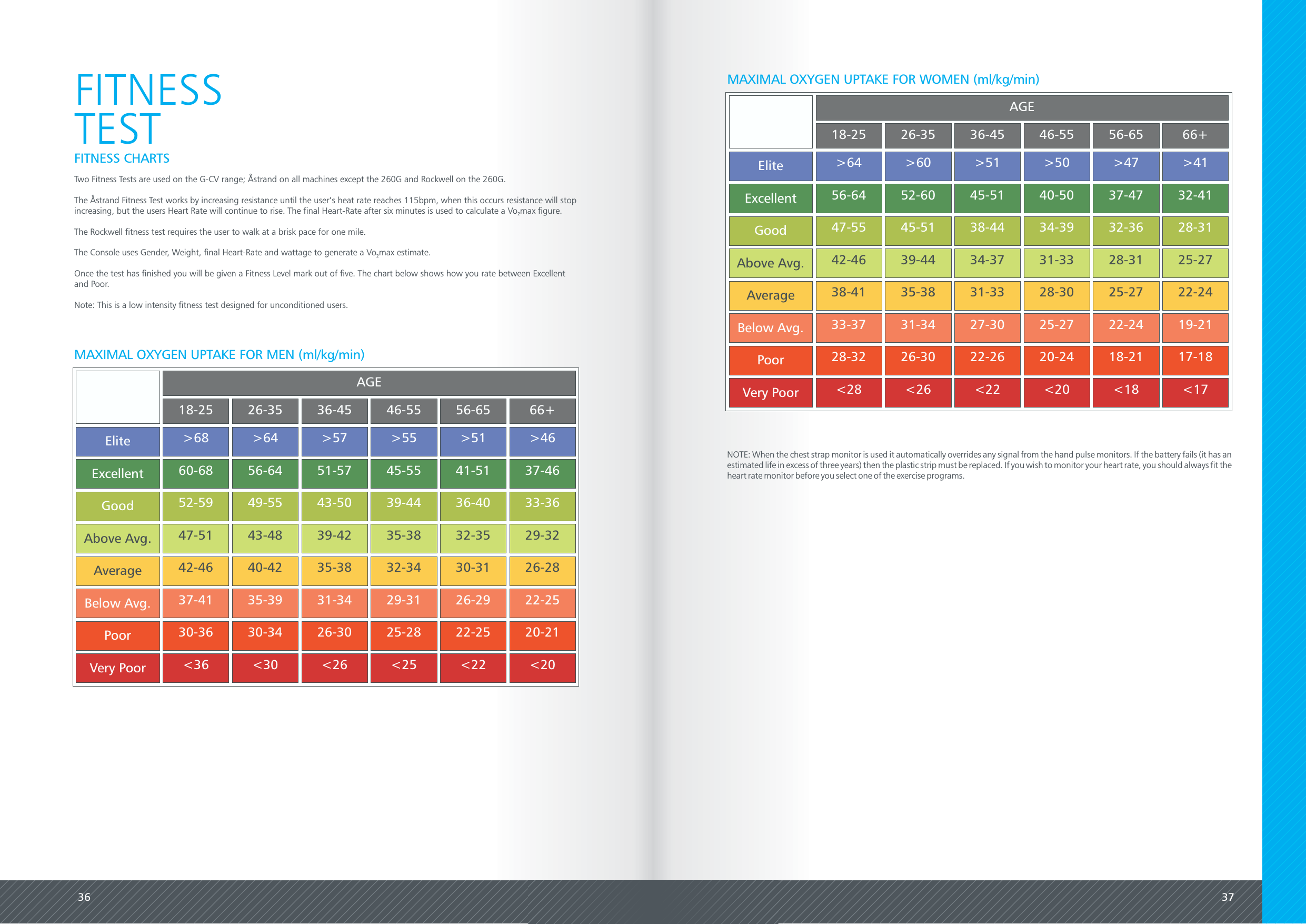
36 37NOTE: When the chest strap monitor is used it automatically overrides any signal from the hand pulse monitors. If the battery fails (it has anestimated life in excess of three years) then the plastic strip must be replaced. If you wish to monitor your heart rate, you should always fit theheart rate monitor before you select one of the exercise programs.FITNESSTESTFITNESS CHARTSTwo Fitness Tests are used on the G-CV range; Åstrand on all machines except the 260G and Rockwell on the 260G.The Åstrand Fitness Test works by increasing resistance until the user’s heat rate reaches 115bpm, when this occurs resistance will stopincreasing, but the users Heart Rate will continue to rise. The final Heart-Rate after six minutes is used to calculate a Vo max figure.2The Rockwell fitness test requires the user to walk at a brisk pace for one mile.The Console uses Gender, Weight, final Heart-Rate and wattage to generate a Vo max estimate.2Once the test has finished you will be given a Fitness Level mark out of five. The chart below shows how you rate between Excellentand Poor.Note: This is a low intensity fitness test designed for unconditioned users.AGE18-2526-3536-4546-5556-6566+Elite>68>64>57>55>51>46Excellent60-6856-6451-5745-5541-5137-46Good52-5949-5543-5039-4436-4033-36Above Avg.47-5143-4839-4235-3832-3529-32Average42-4640-4235-3832-3430-3126-28Below Avg.37-4135-3931-3429-3126-2922-25Poor30-3630-3426-3025-2822-2520-21Very Poor<36<30<26<25<22<20MAXIMAL OXYGEN UPTAKE FOR MEN (ml/kg/min)AGE18-2526-3536-4546-5556-6566+Elite>64>60>51>50>47>41Excellent56-6452-6045-5140-5037-4732-41Good47-5545-5138-4434-3932-3628-31Above Avg.42-4639-4434-3731-3328-3125-27Average38-4135-3831-3328-3025-2722-24Below Avg.33-3731-3427-3025-2722-2419-21Poor28-3226-3022-2620-2418-2117-18Very Poor<28<26<22<20<18<17MAXIMAL OXYGEN UPTAKE FOR WOMEN (ml/kg/min)
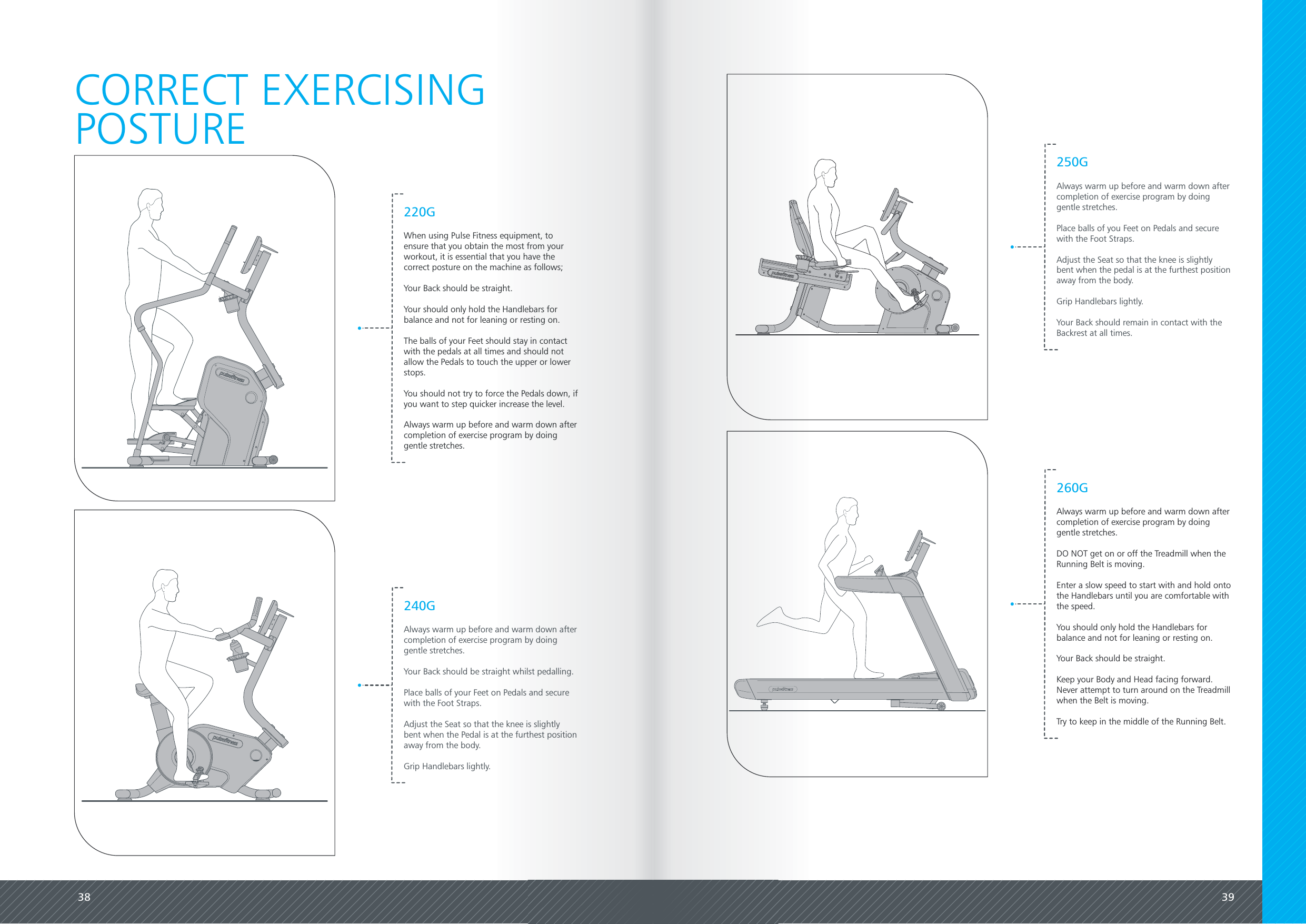
38 39CORRECT EXERCISINGPOSTURE220GWhen using Pulse Fitness equipment, toensure that you obtain the most from yourworkout, it is essential that you have thecorrect posture on the machine as follows;Your Back should be straight.Your should only hold the Handlebars forbalance and not for leaning or resting on.The balls of your Feet should stay in contactwith the pedals at all times and should notallow the Pedals to touch the upper or lowerstops.You should not try to force the Pedals down, ifyou want to step quicker increase the level.Always warm up before and warm down aftercompletion of exercise program by doinggentle stretches.240GAlways warm up before and warm down aftercompletion of exercise program by doinggentle stretches.Your Back should be straight whilst pedalling.Place balls of your Feet on Pedals and securewith the Foot Straps.Adjust the Seat so that the knee is slightlybent when the Pedal is at the furthest positionaway from the body.Grip Handlebars lightly.250GAlways warm up before and warm down aftercompletion of exercise program by doinggentle stretches.Place balls of you Feet on Pedals and securewith the Foot Straps.Adjust the Seat so that the knee is slightlybent when the pedal is at the furthest positionaway from the body.Grip Handlebars lightly.Your Back should remain in contact with theBackrest at all times.260GAlways warm up before and warm down aftercompletion of exercise program by doinggentle stretches.DO NOT get on or off the Treadmill when theRunning Belt is moving.Enter a slow speed to start with and hold ontothe Handlebars until you are comfortable withthe speed.You should only hold the Handlebars forbalance and not for leaning or resting on.Your Back should be straight.Keep your Body and Head facing forward.Never attempt to turn around on the Treadmillwhen the Belt is moving.Try to keep in the middle of the Running Belt.
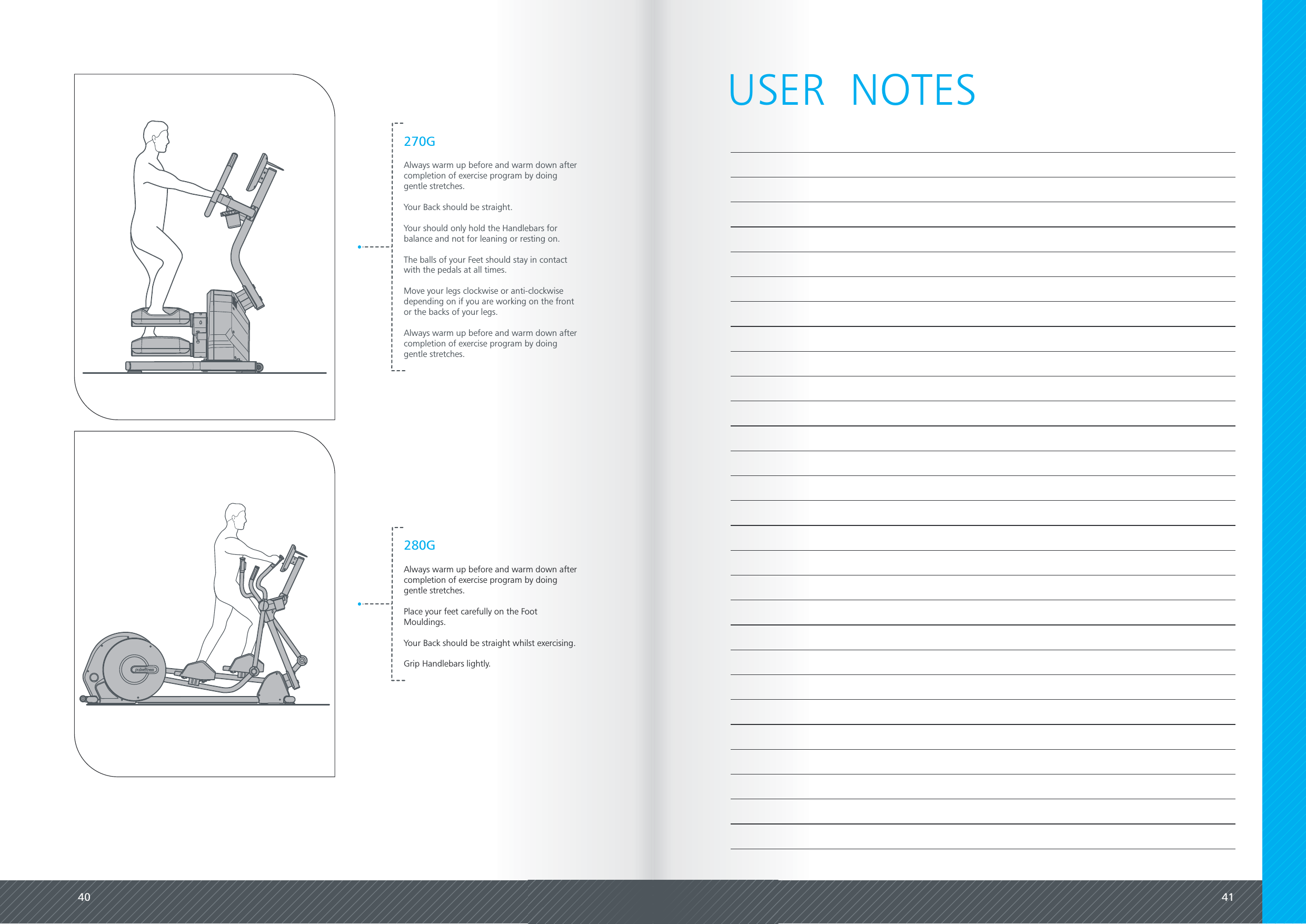
40 41270GAlways warm up before and warm down aftercompletion of exercise program by doinggentle stretches.Your Back should be straight.Your should only hold the Handlebars forbalance and not for leaning or resting on.The balls of your Feet should stay in contactwith the pedals at all times.Move your legs clockwise or anti-clockwisedepending on if you are working on the frontor the backs of your legs.Always warm up before and warm down aftercompletion of exercise program by doinggentle stretches.280GAlways warm up before and warm down aftercompletion of exercise program by doinggentle stretches.Place your feet carefully on the FootMouldings.Your Back should be straight whilst exercising.Grip Handlebars lightly.USER  NOTES
42USER  NOTESFCCWarning: Changes or modication to this unit not expressly approved by the party responsible for compliance could void the userauthority to operate the equipment.This equipment has been tested and found to comply with the limits for a Class B digital device, pursuant to part 15 of the FCC Rules.These limits are designed to provide reasonable protection against harmful interference in a residential installation. This equipmentgenerates, uses and can radiate radio frequency energy and, if not installed and used in accordance with the instructions, may causeharmful interference to radio communications. However, there is no guarantee that interference will not occur in a particularinstallation. If this equipment does cause harmful interference to radio or television reception, which can be determined by turning theequipment off and on, the user is encouraged to try to correct the interference by one or more of the following measures:- Reorient or relocate the receiving antenna.- Increase the separation between the equipment and receiver.- Connect the equipment into an outlet on a circuit different from that to which the receiver is connected.- Consult the dealer or an experienced radio/TV technician for help.MPETo comply with FCC RF exposure compliance requirements, a separation distance of at least 20cm must be maintained between theantenna of this device and all persons.This transmitter mst not be co-located or operating in conjunction with any other antenna or transmitter.ICThis device complies with Industry Canada license-exempt RSS standard(s). Operation is subject to the following two conditions:(1) this device may not cause interference, and(2) this device must accept any interference, including interference that may cause undesired operation of the device.France version / for  ICLetermeICsituéavantlenumérodecertication/enregistrementsigniequel'appareilrépondauxspé-cicationstechniquesdel'industrieduCanada.CetappareilestconformeauxnormesRSSdesRèglesd'IndustrieCanada.Sonutilisationestsoumiseauxdeuxconditionssuivantes :1.Cetappareilnedoitpascauserd'interférencesnuisibles.2.Cetappareilnedoitpasaccepterlesinterférencesreçues,ycomprislesinterférencessusceptiblesdecauserunfonctionnementindésirable.MPETo comply with FCC RF exposure compliance requirements, a separation distance of at least 20cm must be maintained between theantenna of this device and all persons.1. To comply with FCC RF exposure compliance requirements, a separation distance of at least 20cm must be maintained between theantenna of this device and all persons.2. This Transmitter must not be co-located or operating in conjunction with any other antenna or transmitter.COMPLIANCE
Pulse FitnessRadnor ParkGreenfield RoadCongletonCheshire CW12 4TWT: 01260 294610F: 01260 299282E: info@pulsefitness.comInternational Enquiries:+44 (0)1260 294610www.pulsefitness.comAll information, descriptions andillustrations are given solely as a guide.Actual product specifications may differdue to manufacturing requirements.Pulse Fitness reserve the right to makechanges to its products and services,where it considers necessary.©201 Pulse Fitness. All rights reserved.4135-1300-1

Navigation menu