QI SHENGLONG IST QSLHB202 Bluetooth Adapter User Manual 27M RF Mouse
SHENZHEN QI SHENGLONG INDUSTRIALIST CO.,LTD. Bluetooth Adapter 27M RF Mouse
Manual
Bluetooth
Bluetooth
Bluetooth
Bluetooth Adapter
Adapter
Adapter
Adapter instruction
instruction
instruction
instruction
1
1
1
1.Product
Product
Product
Product Appearance
Appearance
Appearance
Appearance
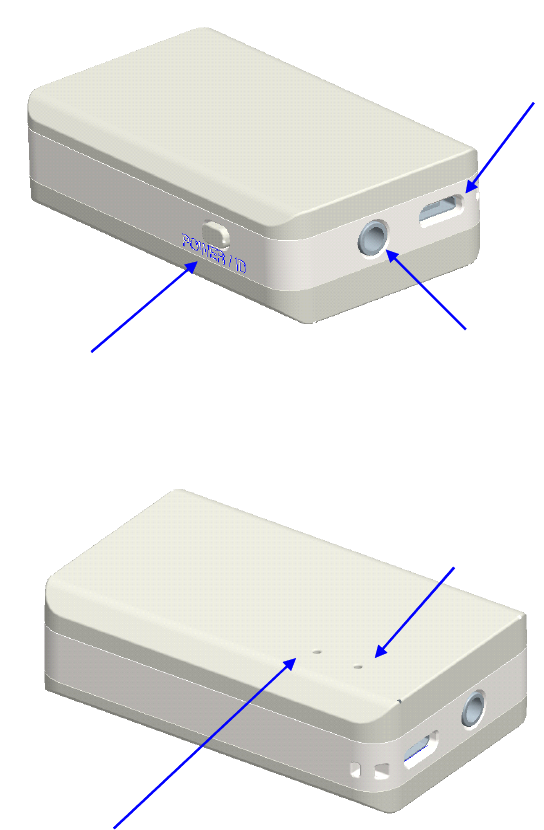
④BT indicator status
①
: On / Off Pairing power
③:3.5mm stereo output
②
:Micro-USB Charging port
⑤
:Indicator
2
2
2
2.Function
Function
Function
Function and
and
and
and characteristics
characteristics
characteristics
characteristics
This is a signal equipment for Bluetooth adapter , with a Micro-USB charging port and
3.5mm stereo turn interface, with 180maH lithium-ion battery, can repeat charging and
have a function of state. It's convenient to bluetooth pairing connection, simple
practical, good audio quality and so on.

2
2
3:
3:
3:
3: Using
Using
Using
Using method
method
method
method
3.1: Bluetooth pairing connection
3.1.1:The first paring connection: Turn on press " POWER /ID ” button for 5
seconds ,you can see the red and blue lights continuous rapid flashes about 2 times
Continue to hold it about 2 seconds untill the red.blue lights flashing alternately ,at
this time the machine is forced into pairing mode.
3.1.2:You will need to pair the other equipment,make it into pairing mode. Refer to
your BT adapter manual
3.1.3:When you searching the device, showed "FH-011" ,if prompting, you need to
input the password or PIN and input "0000" ,when the blue lights is blinking rapidly for
several times ,that's in pairing mode.
3.1.4:If two device have matching before ,when press “POWER /ID ” for 5
seconds next pairing , see the red and blue lights at the same time,release the button,
this to be automatic matching with another bluetooth equipment,when the red and blue
lights continuous rapid flashes two times, pairing successfully .if there is no automatic
matching connection, pairing again.
3.1.5:Turn off ,press “POWER /ID ” for 4 seconds, untill seeing the red, blue lights
quik flashing alternately for two times and then release the button.
3.2: Charging and state instructions
The equipment with Micro-USB to connect 5V DC power charging (can not support
data connection. When charging, the red indicator display. About two hours,charging is
over. The red indicator out automatically.
3.3: Audio output connection
When the bluetooth pairing successfully, can receive the audio signal from the
bluetooth equipment, From the 3.5mm stereo output audio signal, 3.5mm stereo can
connect with headphones or audio output interface .
4
4
4
4.Bluetooth
Bluetooth
Bluetooth
Bluetooth feature
feature
feature
feature
Bluetooth compatible: V3.0+EDR 。compatible with 1.1, 1.2, 2.0 or 2.1 version
Bluetooth transmission distance ≥10M
RF Frequency :2402 – 2480 MHZ ;
Continuous Play time :6-8 hours
Standby time :120-150 hours
FCC STATEMENT
1. This device complies with Part 15 of the FCC Rules. Operation is subject to the
following two conditions:
(1) This device may not cause harmful interference.
(2) This device must accept any interference received, including interference that may
cause undesired operation.
2. Changes or modifications not expressly approved by the party responsible for
compliance could void the user's authority to operate the equipment.
NOTE: This equipment has been tested and found to comply with the limits for a
Class B digital device, pursuant to Part 15 of the FCC Rules. These limits are
designed to provide reasonable protection against harmful interference in a residential
installation.
This equipment generates uses and can radiate radio frequency energy and, if not
installed and used in accordance with the instructions, may cause harmful interference
to radio communications. However, there is no guarantee that interference will not
occur in a particular installation.
If this equipment does cause harmful interference to radio or television reception,
which can be determined by turning the equipment off and on, the user is encouraged
to try to correct the interference by one or more of the following measures:
Reorient or relocate the receiving antenna.
Increase the separation between the equipment and receiver.
Connect the equipment into an outlet on a circuit different from that to which the
receiver is connected.
Consult the dealer or an experienced radio/TV technician for help.
FCC Radiation Exposure Statement
This equipment complies with FCC radiation exposure limits set forth for an
uncontrolled environment. This equipment should be installed and operated with
minimum distance 20cm between the radiator & your body