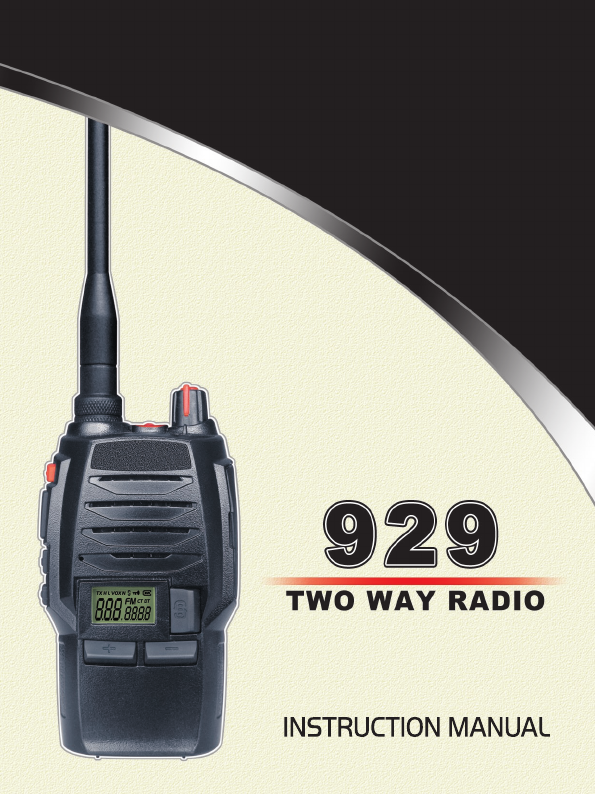
Qixiang Electron Science and Technology QZQX929 Two Way Radio User Manual
Qixiang Electron Science& Technology Co., Ltd Two Way Radio Users Manual
Users Manual
for "Occupation Use Only" In addition, our radio complies with the following
is designed for and classifed as "Occupation Use Only" meaning it must be used
Safety training Information
Our radio generates RF electromagnetic energy during transmit mode. This radio
only during the course of employment by individuals aware of the hazards, and
the ways to minimize such hazards. This radio is NOT intended for use by the
"General Population"in an uncontrolled environment.
This radio has been tested and complies with the FCC RF exposure limits
Standards and Guidelines with regard to RF energy and electromagnetic energy
levels and evaluation of such levels for exposure to humans:
1. FCC OET Bulletin 65 Edition 97-01 Supplement C, Evaluating Compliance
with FCC Guidelines for Human Exposure to Radio Frequency Electromagnetic
Fields.
2. American National Standards Institute (C95.1-1992), IEEE Standard for Safety
Levels with Respect to Human Exposure to Radio Frequency Electromagnetic
Fields, 3 kHz to 300 GHz.
3. American National Standards Institute (C95.3-1992), IEEE Recommended
Practice for the Measurement of Potentially Hazardous Electromagnetic Fields-
RF and Microwave.
4. The following accessories are authorized for use with this product. Use of
accessories other than those (listed in the instruction) specied may result in RF
exposure levels exceed the FCC requirements for wireless RF exposure.
This device complies wit h part 15 of the FCC Rules. Operation is subject to the
following two conditions: (1) This device may not cause harmful interference, and
(2) this device must acceptany interference received, including interference
that may cause undesired operation. Any Changes or modifications not expressly
approved by the party responsible for compliance could void the user’s authority
FCC Warning:
to operate the equipment.
when transmitting and only use our radio’s belt-clip which is listed in
To ensure that your expose to RF electromagnetic energy is within the
FCC allowable limits foroccupational use, always adhere to the following
guidelines:
1. DO NOT operate the radio without a proper antenna attached, as this may
damaged the radio and may also cause you to exceed FCC RF exposure
limits. A proper antenna is the antenna supplied with this radio by the
manufacturer or antenna specically authorized by the manufacturer for use
with this radio.
2. DO NOT transmits for more than 50% of total radio use time (“50% duty
cycle”). Transmitting more than 50% of the time can cause FCC RF exposure
compliance requirements to be exceeded. The radio is transmitting when the
“TX indicator”lights red. You can cause the radio to transmit by pressing the
“PTT”switch.
3. ALWAYS keep the antenna at least 2.5 cm (1 inch) away from the body
instructions when attaching the radio to your belt, etc., to ensure FCC
RF exposure compliance requirements are not exceeded. To provide the
recipients of your transmission the best sound quality, hold the antenna
at least 5 cm (2 inches) from your mouth, and slightly off to one side. The
information listed above provides the user with the information needed to
make him or her aware of RF exposure, and what to do to as*sure that this
radio operates with the FCC RF exposure limits of this radio.
Electromagnetic Interference/Compatibility During transmissions,our radio
generates RF energy that can possibly cause interference with other devices
or systems. To avoid such interference, turn off the radio in areas where
signs are posted to do so. DO NOT operate the transmitter in areas that are
sensitive to electromagnetic radiation such as hospitals, aircraft, and blasting
sites. Occupational/Controlled Use The radio transmitter is used in situations
in which persons are exposed as consequence of their employment provided
those persons are fully aware of the potential for exposure and can exercise
control over their exposure.
THANK YOU!
Thank you very much for choosing our transceiver. The transceiver
provides you with reliable, clear and efcient communication service.
Our 929 introduces innovative DSP (Digital Signal Processing)
baseband technique to achieve high-delity voice processing and
encryption.
929 is a compact and fashionable transceiver that allows you to
enjoy instant communication at ease. The features like novelty, nice
timbre, high power (4W), make 929 a high cost-effective professional
transceiver. It is of unique and innovative functions, such as,
oscillation and chord rings prompt missed calls, voice prompt
battery capacity, jacklight and optional high-fidelity earphones
fitted for using in Hotels, Amusement buildings, Emporium, Super
shopping center, Estate management and other trades. Apart from
these, the radio has long-distance anti-theft alarming, which makes
it a good option for simple alarm device in vehicles.
SAFETY INFORMATION FOR USER
Our transceiver is excellently designed with advanced technology.
Please observe the following precautions to perform your obligation,
prevent personal injury and ensure the safety of transceiver usage.
1. Keep the transceiver and accessories away from children.
2. Please do not try to open or modify the transceiver without
permission, non-professionals process may also cause damage.
3. Please use assorted battery and charger to avoid damage.
4. Please use assorted antenna to ensure the communication distance.
5. Please do not expose the transceiver to long period of direct sunlight,
nor place it close to heat appliances.
6. Please do not put the transceiver in excessively dusty or humid
areas.
7. Do not use harsh chemicals, cleaning solvents to clean the
transceiver.
8. Do not transmit without antenna.
9. When using this transceiver, we recommend transmitting for 1 minute
then receiving for 4 minutes. Continuous transmitting for long time
or working in high power will heat the back of the transceiver. Do not
place the transceiver’s hot back close to any surface of plastic.
10.If any abnormal odor or smoke detected coming from the
transceiver, turn off the power and take off the battery pack and its
case. Then contact local Soontone dealers.

CONTENTS
UNPACKING ......................................................................................01
Supplied Accessories ..................................................................................... 01
STANDARD ACCESSORIES/OPTIONAL ACCESSORIES ..............02
Standard Accessories ..................................................................................... 02
Optional Accessories ...................................................................................... 02
BATTERY INFORMATION .................................................................03
Charging the Battery Pack .............................................................................. 03
Charger Applied .............................................................................................. 03
NOTES ........................................................................................................... 03
How to Store the Battery ................................................................................ 04
Emergent Charging ........................................................................................ 05
PREPARATION ..................................................................................06
Installing / Removing the Battery .................................................................... 06
Installing / Removing the Antenna ............................................................... 06
Installing / Removing the Belt Clip .................................................................. 07
Installing the Additional Speaker/ Microphone (Optional) ............................... 07
Installing/ Removing the Hand Strap (Optional) ............................................. 07
GETTING ACQUAINTED ...................................................................08
LCD Display Screen ....................................................................................... 08
Backlight Status and Voice Prompt ................................................................ 11
[PF1] & [PF2] Key Default .............................................................................. 11
AUXILIARY FUNCTIONS ..................................................................12
BASIC OPERATIONS ........................................................................ 13
Switch on / off the Transceiver ....................................................................... 13
Switch on/off the Jacklight .............................................................................. 13
Volume Control ............................................................................................... 13
Current Channel Enquiry ................................................................................ 13
Adjust Frequency ............................................................................................ 13
Fast Adjust Frequency .................................................................................... 14
Channels Selection ......................................................................................... 14
Receiving ........................................................................................................ 15
Transmitting .................................................................................................... 15
Emergency Alarm Function ............................................................................ 16
Keypad Lockout .............................................................................................. 16
FUNCTIONS SETUP ..........................................................................17
Basic Functions Setup .................................................................................... 17

CONTENTS
CTCSS/DCS Encode/Decode ....................................................................... 17
CTCSS/DCS Encode/Decode Setup .............................................................. 17
Mode Selection ............................................................................................... 18
FM Radio ....................................................................................................... 18
Beep Voice Prompt ......................................................................................... 19
Squelch Level Setup ....................................................................................... 19
On/Off VOX ................................................................................................... 20
VOX Level Setup ............................................................................................ 20
Frequency Step Setup .................................................................................... 20
ADVANCE OPERATIONS .................................................................22
Squelch off ...................................................................................................... 22
Monitor ............................................................................................................ 22
Hi/Low Power Switch ...................................................................................... 22
Scan ............................................................................................................... 23
Frequency Reverse ........................................................................................ 23
Talk Around ..................................................................................................... 23
Battery Capacity Enquiry ................................................................................ 24
Call Alert ......................................................................................................... 24
Temporary Deletion of the Interfering Channel .............................................. 24
BACKGROUND OPERATIONS ......................................................... 26
Wide / Narrow Band Setup ............................................................................. 26
Busy Channel Lockout .................................................................................... 26
Accession to Scan List ................................................................................... 26
Time-out Timer ................................................................................................ 26
Time-Out Timer Pre-Alarm .............................................................................. 27
Battery Save Setup ......................................................................................... 27
Priority Scan Setup ......................................................................................... 27
Return to Appointed Channel ......................................................................... 27
Programming Software Installing & Starting (THIS INSTRUCTION TAKES
WINDOWS XP AS AN EXAMPLE) ........................................................................................ 29
Resume Factory Default ................................................................................. 30
Maintaining and Cleaning .............................................................................. 30
TECHNICAL SPECIFICATIONS ........................................................ 31
TROUBLE SHOOTING GUIDE .........................................................33
ATTACHED CHART ...........................................................................35
CTCSS Frequency Chart ............................................................................... 35
DCS Chart ...................................................................................................... 36
01
UNPACKING
Carefully unpack the transceiver. We recommend you identify the
items listed in the table as bellows before discarding the packing
material. If any items are missing or have been damaged during
shipment, please contact local dealers immediately.
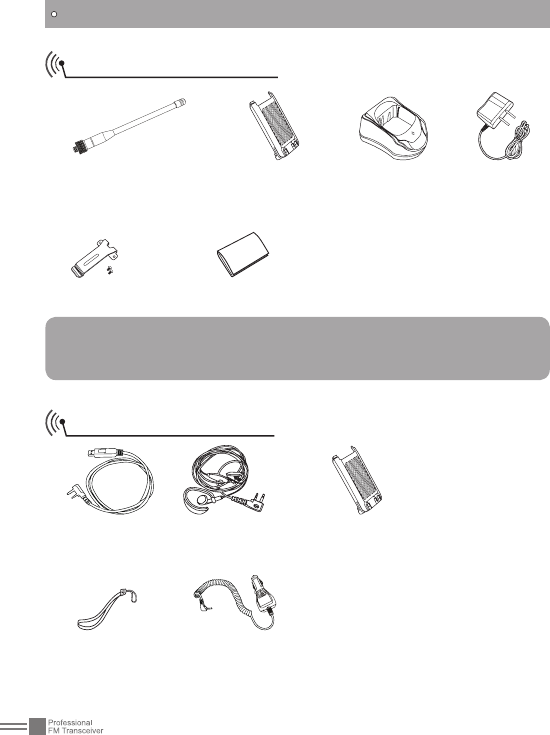
Supplied Accessories
Item Number Quantity
Antenna QA07V 1
Li-ion Battery Pack QB-33L 1
Battery Charger QBC-33L 1
AC adaptor QPS-05 1
Belt Clip BC06 1
Instruction Manual 1
02
STANDARD ACCESSORIES/OPTIONAL ACCESSORIES
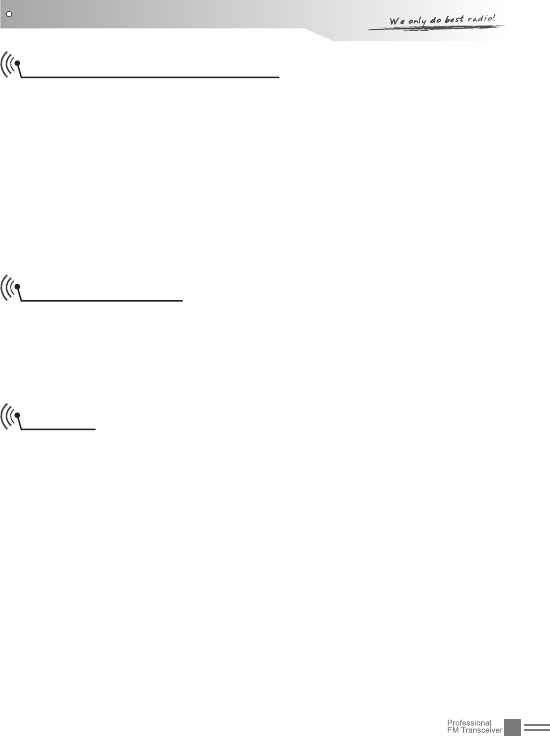
Standard Accessories
Antenna *
QA07V(400-470MHZ)
Li-ion Battery
Pack)1300mAh
QB-33L
Charger
QBC-33L
AC Adaptor
(12V/500mA)
QPS-05
Belt Clip BC06 Instruction Manual
Note:
For frequency band of antenna, please refer to label glued on
the bottom of the antenna.
Optional Accessories
USB Programming
Cable PC03
Earphone HS03 Backup Li-ion Battery
Pack (2200mAh)
QB-34L
Hand Strap GS01 Car Charger CPL-02
03
BATTERY INFORMATION
Charging the Battery Pack
The battery pack is not charged at the factory; please charge it
before use.
Charging the battery pack for the first time after purchase
or extended storage (more than 2 moths) may not bring the
battery pack to its normal operating capacity. After fully charging/
discharging cycle for two or three times, the operating capacity
will reach its best performance. The battery pack life is over when
its operating time decreases even though it is fully and correctly
charged. Change a new battery pack.
Charger Applied
Please use the specic charger appointed by our company. Other
models may cause explosion and personal injury. After installing the
battery pack, if the radio displays low battery with red ashing lamp
or voice prompt, please charge the battery.
NOTES
Do not short the battery terminals or throw the battery into fire. •
Never attempt to remove the casing from the battery pack. We
bear no responsibility on any results caused by modifying the
battery freely without permission of our factory.
The ambient temperature should be between 5• ℃ and 40℃ while
charging is in progress. Charging outside this range may not fully
charge the battery.
Always switch OFF the transceiver equipped with a battery pack •
before charging. Otherwise, it will interfere with correct charging.
To avoid interfering the charging, please do not cut off the power •
or take out the battery during charging.
Do not recharge the battery pack if it is already fully charged. This •
may shorten the life of the battery pack or damage the battery
pack.
04
Do not charge the battery or transceiver if it is damp. Dry it before •
charging to avoid danger.
BATTERY INFORMATION
WARNING:
When keys, ornamental chain or other electric metals contact
with the battery terminal, the battery may cause damage
or hurt bodies. If the battery terminal short circuit it will
generate a lot of heat, please be careful when you carry or
use the battery, please put battery or radio into insulated
container. Do not put it into metal container.
How to Store the Battery
If the battery needs to be stored, keep it in status of 50% 1.
discharged.
It should be kept in low temperature and dry environment.2.
Keep it away from hot places and direct sunlight. 3.
WARNING:
· Do not short circuit battery terminals.
· Never attempt to remove the casing from the battery pack.
· Never assemble the battery in dangerous surroundings, spark
may cause explosion.
· Do not put the battery in hot environment or throw it into
fire, it may cause explosion.
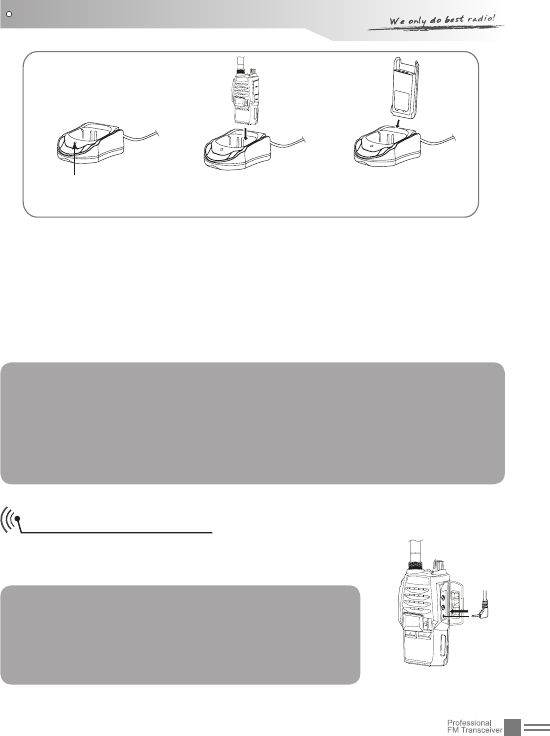
■To charge the battery directly or the transceiver via charger
You can charge the battery or transceiver separately.
Plug the AC adaptor into the AC outlet, and then plug the cable 1.
of the AC adaptor into the DC jack located on the back of the
Charger.
Charging indicator---Green
05
BATTERY INFORMATION
Plug the Li-ion battery or the transceiver installed with Li-ion 2.
battery into the matched charger.
A. Make sure that the battery is well connected with charging
connectors.
Charging indicator---Red
Fully charged. Charging indicator--Green.3.
Note:
It takes approximately 4 hours to fully charge the battery.
But, the actual charging time depends on the dump battery.
After fully charged, please remember to remove the battery
or transceiver out of charger. Over charging will shorten the
battery life and reduce its performance.
Emergent Charging
Connect the transceiver directly with adaptor
or car charger to charge.
Note:
Please power off the transceiver before
charging the transceiver in this way. Also, it
takes longer time (totally 12hours) to fully
charge the transceiver in this way.
Working Indicator
Charging Indicator
Transceiver Charge Battery Charge
06
PREPARATION
Installing / Removing the Battery
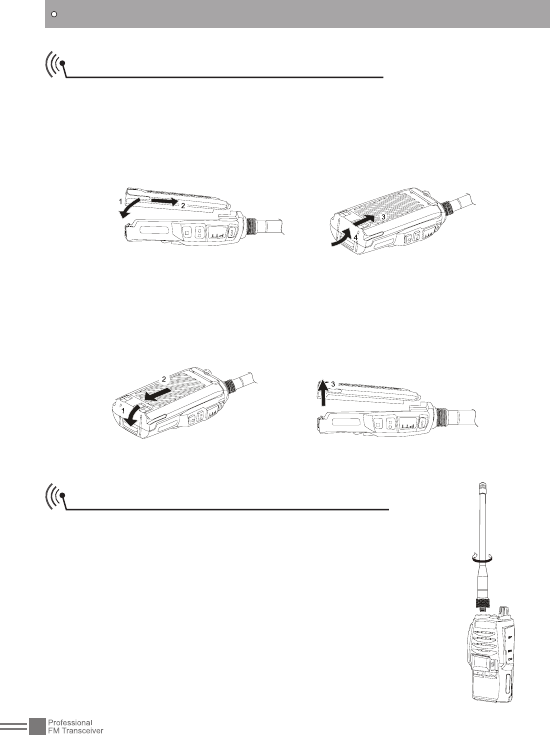
■Installing the battery:
Match the battery pack with the corresponding guides on the back
of the transceiver, and push it upwards till it is fully locked by the
battery latch.
■Removing the battery pack:
Slide up the battery latch and remove the pack away from the
transceiver.
Installing / Removing the Antenna
■Installing the Antenna:
Screw the antenna into the connector on the top
of the transceiver by holding the antenna at its
base and turning it clockwise until secure.
■Removing the Antenna:
Turn the antenna anticlockwise to remove it.
07
PREPARATION
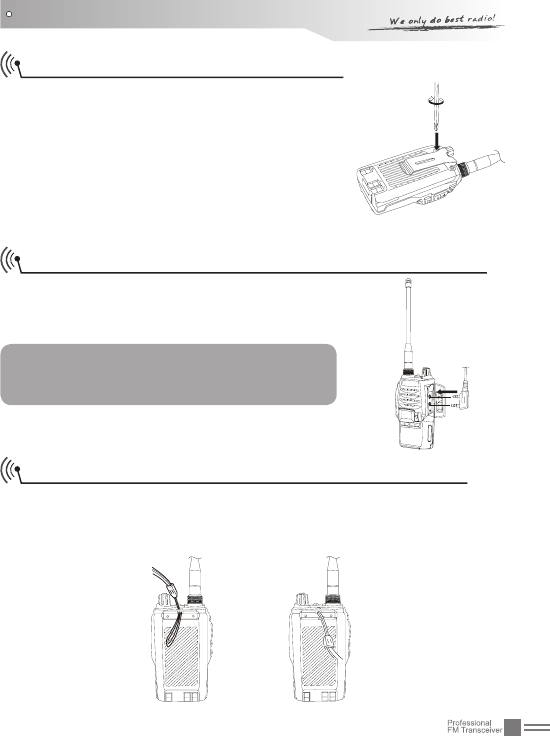
Installing / Removing the Belt Clip
■Installing the Belt Clip:
Place the belt clip to the corresponding
grooves on the back of the transceiver, and
then clockwise screw it.
■Removing the Belt Clip:
Anticlockwise turn the screws to remove
the belt clip.
Installing the Additional Speaker/ Microphone (Optional)
Unveil the MIC-SP jack cover and then
insert the Speaker/Microphone plug into
MIC-SP jack.
Note: The transceiver is not completely
waterproof while using the Speaker/
Microphone.
Installing/ Removing the Hand Strap (Optional)
Slide the loop of the hand strap through the eyelet on the upper
rear of the transceiver; then pull the entire hand strap through the
loop to secure the hands strap in place and lastly tighten the hands
strap.
08
GETTING ACQUAINTED
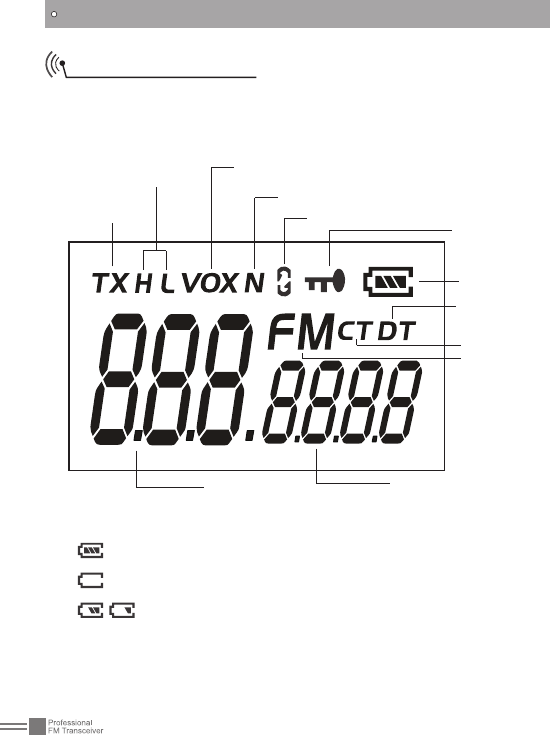
Transmitting
TX Power VOX
Narrow Band
Keypad
Lockout
Battery
Capacity
CTCSS
DCS
FM Radio
Code group/Function
status when setting
functions/VFO Frequency
Battery capacity indicator (Full)
Battery exhaust ,please change battery or recharge
Left battery capacity
LCD Display Screen
On the screen, icons for the optional functions are displayed on
the screen. It helps a lot when you forget the functions settings.
Voice Compander
Channel/
Frequency
09
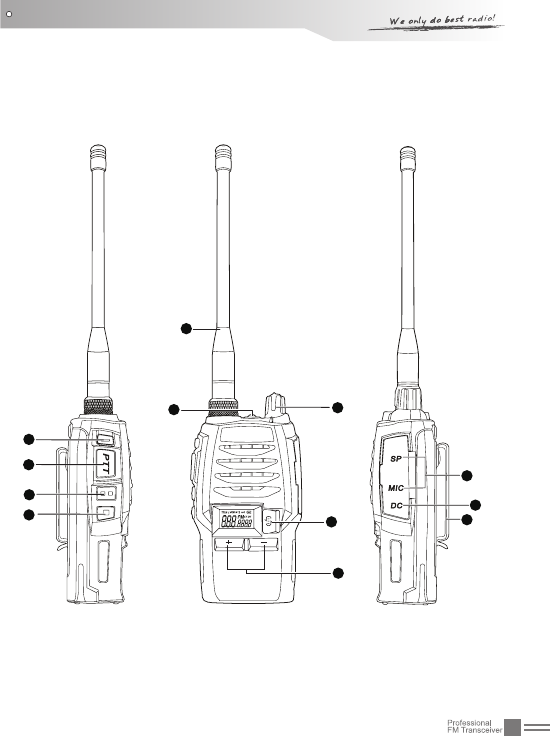
4
5
6
7
GETTING ACQUAINTED
1
32
8
9
10
11
12

10
GETTING ACQUAINTED
Antenna1.
POWER / VOLUME Switch:2.
Turn clockwise to switch on the transceiver, and turn anticlockwise
till hearing "Ka" to switch off the transceiver. After switching on the
transceiver, turn clockwise to increase the volume and anticlockwise to
decrease the volume.
Jacklight: 3.
under standby state, press this key to Emergency Alarm Key to power
on the jacklight. Repeat same operation to turn off the light.
Emergency Alarm Key4.
Under standby state, press this key for 1 second to enable alarm
function. Repeat same operation to exit the alarm status.
PTT Key5.
When you are making a call, please press and hold this key to speak
into the microphone. Release the key to receive.
PF1 Key6.
It is a programmable key that can realize different functions by
programming.
PF2 Key7.
It is a programmable key that can realize different functions by
programming.
Rotate the switch to select desired channel. Rotate it clockwise to
increase channel, anticlockwise to decrease channel.
8. / Key
After entering the Functions Setup menu, by this key you can adjust
channel or value of functions. Long press to adjust fast. When FM is
on, you can press this key to search radio stations.
9. key
Press this key repeatedly to select desired function to setup. Press
this key together with / key to set desired function value.
External MIC/Loudspeaker Jack/ Data jack10.
Emergent Charging Jack11.
Belt Clip12.
11
GETTING ACQUAINTED
Backlight Status and Voice Prompt
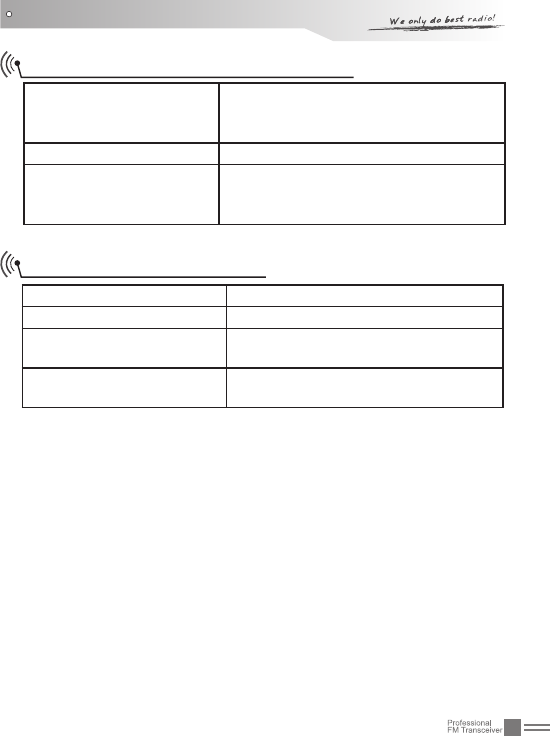
Warning on low voltage
Transceiver emits a low voltage beep
at intervals of 60 seconds, and red
light twinkles.
Receive Backlight lightens all the time
Keypad operation
Transceiver emits"DU" when entering
a function menu, "DU DU" to exit any
function.
[PF1] & [PF2] Key Default
Press [PF1] Battery Capacity Enquiry
Press [PF2] Squelch off
Press [PF1] and hold for
one second Call
Press [PF2] for one
seconds Hi/Low power switch

12
AUXILIARY FUNCTIONS
Users can setup the key [PF1] and PF2] to be one of the optional
functions as bellows:
Squelch off•
Monitor•
Hi/Low Power switch•
Scan•
Frequency Reverse•
Talk around•
Current battery capacity enquiry•
Call•
Temporarily delete interrupting channel•
For better information on this part, please refer to the "Advanced
Operation" instruction.
13
BASIC OPERATIONS
Switch on / off the Transceiver
Switch on the Transceiver: Under power-off state, turn POWER/
VOLUME knob clockwise till hearing "Click" to switch on the
transceiver. The transceiver will announce "Power on" and current
channel.
Switch off the Transceiver: When the transceiver is in the open
state, turn POWER / VOLUME anticlockwise till hearing "Click" to
switch off the transceiver.
Switch on/off the Jacklight
Under standby state, press the Emergency Alarm Key to switch on
the jacklight. Press the same key to switch off the light.
Volume Control
When the transceiver is in open state, turn POWER / VOLUME
knob to adjust the volume. Turn clockwise to increase the volume,
and anticlockwise to decrease the volume. You can press the
programmed key of squelch off [PF1] / [PF2] to monitor current
volume.
Current Channel Enquiry
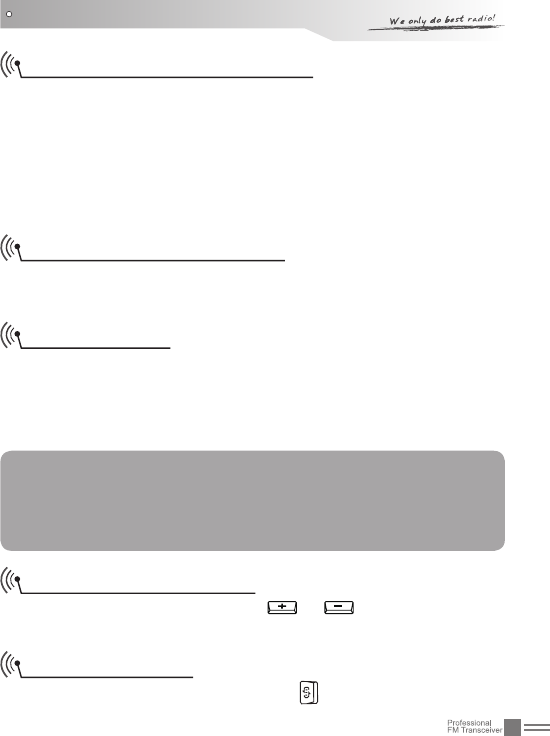
Under Standby state, pressing or , the transceiver will
announce channel number.
NOTE: You can firstly press the programmed key of squelch off
[PF1] / [PF2] to monitor the background noise and meanwhile
turn POWER / VOLUME to adjust the volume. Under the
communicating state, you can adjust volume as per your need
more accurately.
Adjust Frequency
Under VFO( frequency mode), press repeatedly till the decimal
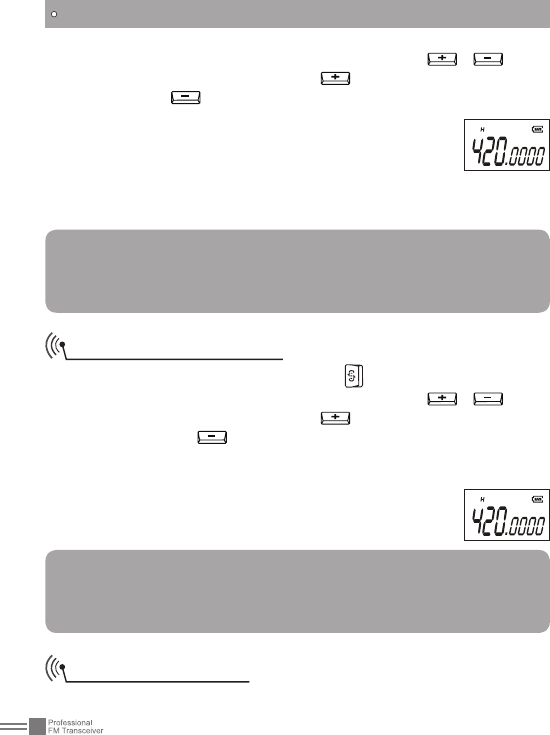
14
dot on the LCD twinkles. Under this state, press / to set
desired current frequency. Press to increase the frequency
value by step, to decrease the frequency value.
Press [PF1] or [PF2] key to confirm the selected
frequency and exit the frequency setting mode. After
entering the setting mode, if users do not set the
frequency or not exit the mode after adjusting the
frequency, the transceiver will exit the setting mode automatically
after 10seconds.
BASIC OPERATIONS
Fast Adjust Frequency
Under VFO( frequency mode), press repeatedly till the decimal
dot on the LCD twinkles. Under this state, press / to set
desired current frequency. Press to increase the frequency
value by 1MHZ, to decrease the frequency value by 1MHZ.
Press [PF1] or [PF2] key to conrm the selected frequency and exit
the frequency setting mode. After entering the setting mode, if users
do not set the frequency or not exit the mode after
adjusting the frequency, the transceiver will exit the
setting mode automatically after 10seconds.
NOTE:
Under channel mode, this function would be hidden.This
function is disabled as factory default. You can enable this
function via programming software.
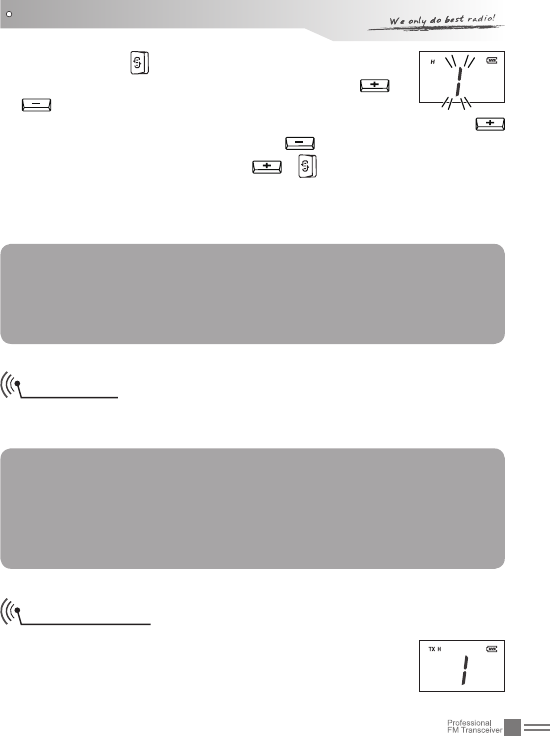
Channels Selection
Under channel mode, to choose the desired channel, rstly, users
NOTE:
Under channel mode, this function would be hidden. VFO
function is disabled as factory default. You can enable this
function via programming software.
15
BASIC OPERATIONS
need to press repeatedly till the channel number
displayed on the LCD twinkles, secondly, press or
to up or down the channel number, and then the
transceiver will announce the adjusted channel number. Press
to upward the channel number and to downward the channel
number. Press any key except , to conrm and exit. After
entering the setting mode, if users do not set the frequency or not
exit the mode after adjusting the channel number, the transceiver
will exit the setting mode automatically after 10seconds.
NOTE : When adjustin g channel , the tra nsc eiver will
automatically skip blank channels which are not edited.
Suppose you want to adjust the channel from NO.1 to NO.2, if
channel NO.2 is blank, the transceiver will skip it and jump to
channel NO.3.
Receiving
Once current channel is called, backlight lightens all the time, and
then you can hear other party calling.
NOTE:
•You may not receive the calling if you set a high squelch off
level of the transceiver.
•If current channel has been programmed with signaling, you
can only hear the call from a same signaling, other calls can’t
be heard.
Transmitting
Be sure that the channel you want to use is not in
busy state through monitoring for a while by pressing
the programmed Squelch off [PF1] / [PF2] key. Under
these conditions, press the [PTT] key and speak
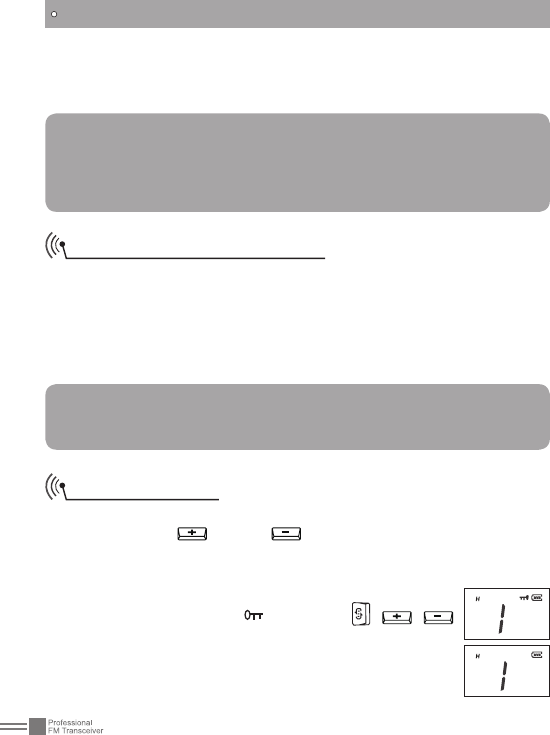
16
BASIC OPERATIONS
into microphone. Please keep around 2.5-5cm distance between
microphone and your lip. And please speak in normal tone to make
the receiver obtain best tone quality.
Emergency Alarm Function
Press this key for over 3 second to start the Emergency Alarm
Function.
Once this function is started, the transceiver will voice alarm
beep, start transmitting and send the alarm beep to companions
or systems. Restart the power supply to exit the emergency alarm
function.
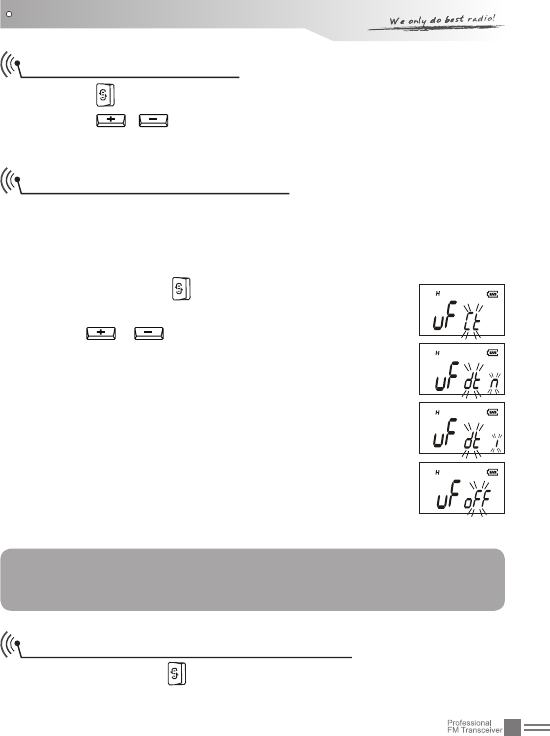
To prevent wrong operation, users can start Keypad Lockout
function to lock key and key.
To start Keypad Lockout function, press and hold Emergency
Alarm key while turning on the transceiver, and then release the
key when the transceiver emits "DU". Then, the
LCD displays the icon . The keys , ,
will be invalid when this functions is started. Repeat
the above operations to disable the keypad lockout
function with "DU DU" prompt.
Note:
Pressing and holding [PTT], if the backlight lightens for
10seconds and goes out afterwards and TX icon displayed on
the LCD, the transceiver is transmitting. Release the PTT to
receive.
NOTE:
Factory default: Disabled.
You can enable this function via programming software.
Keypad Lockout
17
FUNCTIONS SETUP
Basic Functions Setup
1. Press repeatedly to select desired sub-menu to setup.
2. Press / to set desired function value.
3. Press [PF1] or [PF2] to save and exit.
CTCSS/DCS Encode/Decode
When the transceiver is edited with this function, only when
CTCSS/DCS signaling is received can the transceiver hear the
calling of the other party. Transceivers that have matched CTCSS/
DCS or do not setup with any signaling can hear your call.
Repeatedly press 1. till "UF" icon is displayed on
the LCD.
Press 2. / to select CTCSS/DCS encode/
decode or disable this function.
When selecting CTCSS encode/decode, "CT" on the
LCD twinkles.
When selecting DCS positive encode/decode, "DTN"
on the LCD twinkles.
When selecting DCS invert encode/decode, "DTI" on
the LCD twinkles.
When switching off this function, "OFF" on the LCD
twinkles.
Press [PF1] or [PF2] to save and exit.3.
NOTE:
To manually set this function, users need to activate this
function via programming software firstly.
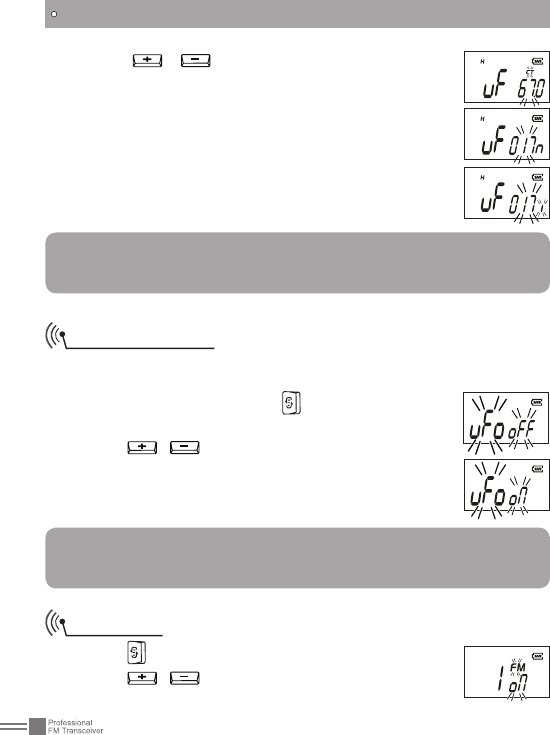
CTCSS/DCS Encode/Decode Setup
Repeatedly press 1. till CT/DT and CTCSS/DCS twinkles on the
LCD.
18
Press 2. / to select desired CTCSS/DCS
decode.
CTCSS: 67-254.1H, totally 50 groups. Default:
67HZ.
DCS: 017N-765I, totally 232 groups. "N" on the LCD
means positive code. "I" on the LCD means inverse
code. Default: 017N
Press [PF1] or [PF2] to save and back to standby 3.
state.
FUNCTIONS SETUP
NOTE:
The icon "N" or "L" will hide when CTCSS/DCS encode/decode
function is closed.
Mode Selection
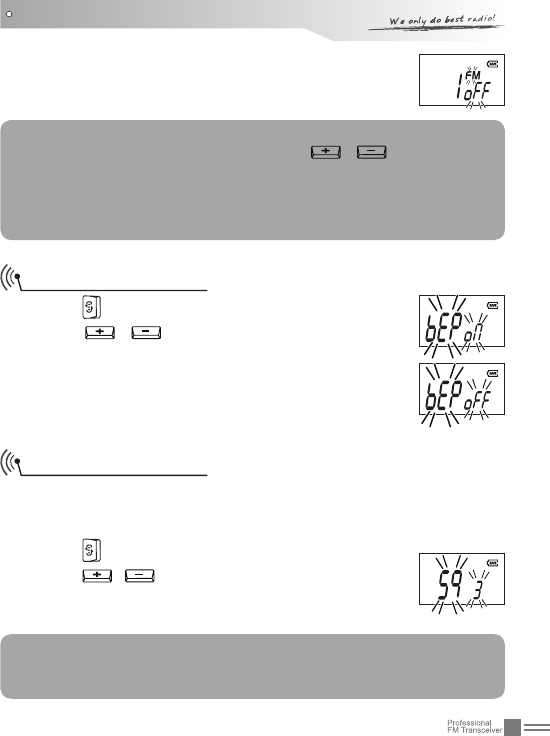
There are two modes for option, VFO (frequency mode) and
Channel mode.
Under standby state, press 1. repeatedly till "UFO"
on the LCD twinkles.
Press 2. / to select desired mode.
OFF: Channel mode
ON: Frequency mode
Press [PF1]/[PF2] to exit.3.
NOTE:
To manually set the VFO ON/OFF, users need to enable this
function via programming software firstly.
FM Radio
Press 1. repeatedly till "FM" on the LCD twinkles.
Press 2. / to on/off the FM radio function.
ON: turn on FM radio
19
FUNCTIONS SETUP
OFF: turn off FM radio function (reset the transceiver
when FM radio is on can also turn this function off)
Press [PF1] or [PF2] to exit.3.
NOTE:
When FM radio function is on, press / to search FM
radio station and announce current channel number. When
a certain radio station is detected, the radio will rest on the
station. The radio can transmit or receive when FM radio is
on.
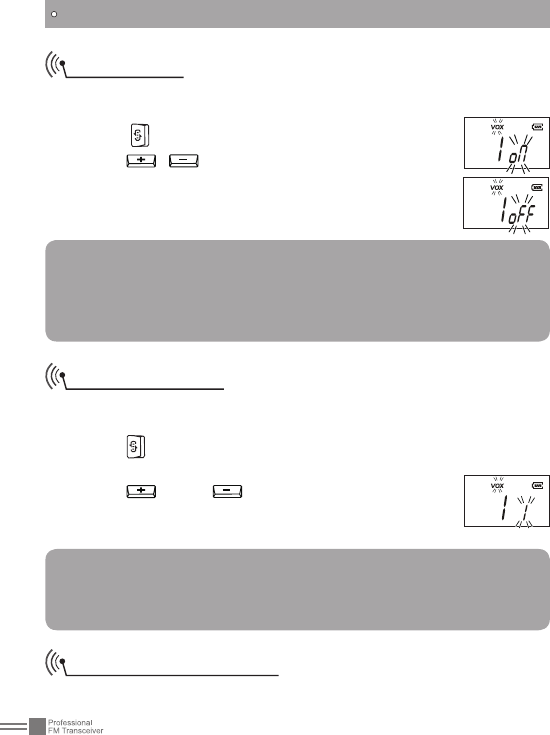
Beep Voice Prompt
Press 1. repeatedly till "BEP" on the LCD twinkles.
Press 2. / to on/off the BEEP voice prompt
function.
ON: turn on the BEEP voice prompt.
OFF: turn off the BEEP voice prompt.
Press [PF2] or [PF2] to exit.3.
Squelch Level Setup
This function is used to setup the receiving signal intensity. If the
receiving signal intensity reaches a certain level, you can hear the
other party calling, otherwise transceiver will remain mute.
Press 1. repeatedly till "SQ" on the LCD twinkles.
Press 2. / to select desired squelch level.
Totally 10 levels for option: OFF, 1-9 grade
Press [PF1] or [PF2] to exit.3.
NOTE:
To manually set this function, users need to enable this
function via programming software firstly.
20
FUNCTIONS SETUP
On/Off VOX
When this function is enabled, you can begin transmitting by tted
high voice, no needing to press the [PTT] key.
Press 1. repeatedly till "VOX" on the LCD twinkles.
Press 2. / to on/off VOX function.
ON: turn on VOX function
OFF: turn off VOX function
Press [PF1] or [PF2] to exit.3.
NOTE:
To manually set this function, users need to enable this
function via programming software firstly, otherwise this
option will hide. Reset the transceiver, the VOX function will
automatically be closed.
VOX Level Setup
This function is used to set the volume needed to transmit. The
higher the level is the louder voice it needs to transmit.
Press 1. repeatedly till "VOX" and current VOX grade on the LCD
twinkles.
Press 2. key or to select desired VOX level.
9 levels for option: 1-9 grades
Press [PF1] or [PF2] to exit.3.
Note:
To set desired VOX level, users need to enable the VOX
function by programming software in advance; otherwise, this
option will hide.
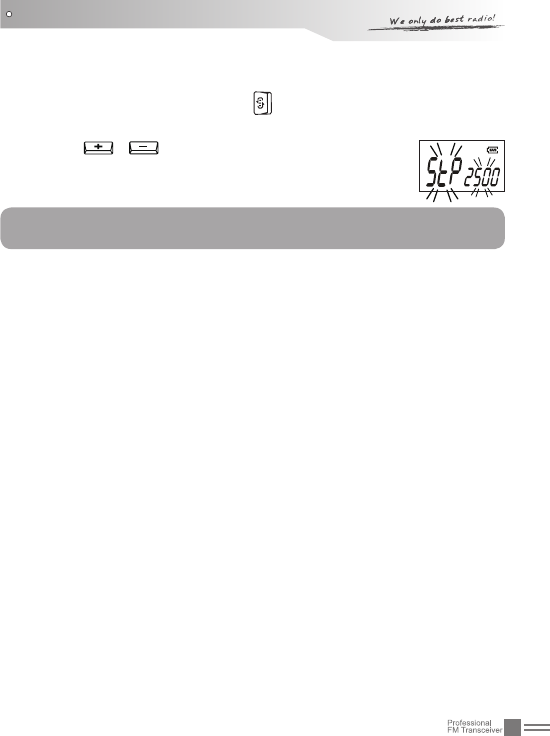
Frequency Step Setup
This function is valid when the radio is in VFO mode and invalid in
21
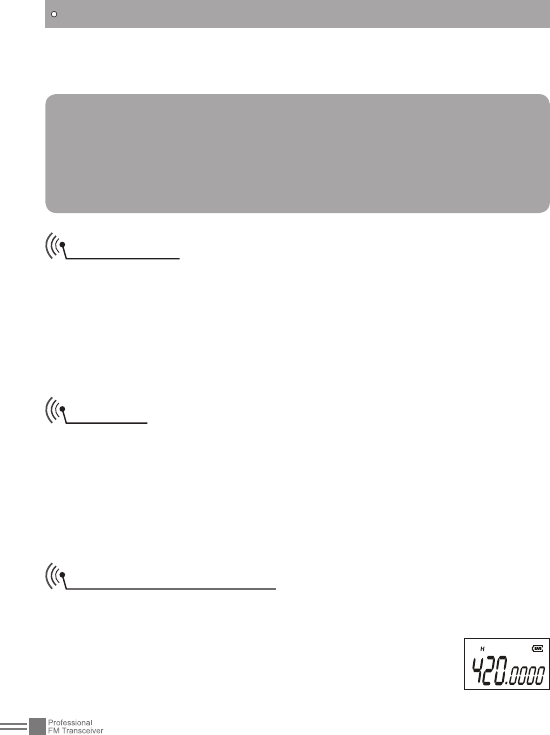
Under standby state, Press 1. repeatedly till "STP" icon and
current value of frequency step are displayed on the LCD.
Press 2. / to select desired value. There are
ve options: 5k, 6.25k, 10k, 12.5k.
Press [PF1] or [PF2] to exit.3.
channel mode. Under VFO mode, users can upward or downward
the frequency by frequency step.
FUNCTIONS SETUP
NOTE:
This function is invalid under channel mode.
22
ADVANCE OPERATIONS
[PF1] and [PF2] are programmable, which can realize certain
functions as bellows via programming software.
NOTE:
To start the function programmed on the [PF1]-1s or [PF2]-1s,
users need to press and hold [PF1] or [PF2] till the transceiver
voice "DU" and then release.
Repeat the above operation to turn off the programmed
function.
Squelch off
Under the standby state, pressing the programmed key of Squelch
off [PF1] / [PF2], the squelch circuit is not mute and at present you
can hear the background noise. Press this key again, the squelch
circuit becomes mute. By using this function you can monitor the
weaker signal which is hard to receive. Meanwhile, LCD will display
current signal intensity.
Monitor
Pressing the programmed key of Monitor [PF1] / [PF2], the
transceiver emits "Du" beep and then comes into the monitor state.
Under these conditions, transceiver will ignore CTCSS / DCS
decode and monitor signal of the other party as long as receiving
the matched carrier wave. Press this key again, transceiver emits
"Du Du" beep and exits the monitor state.
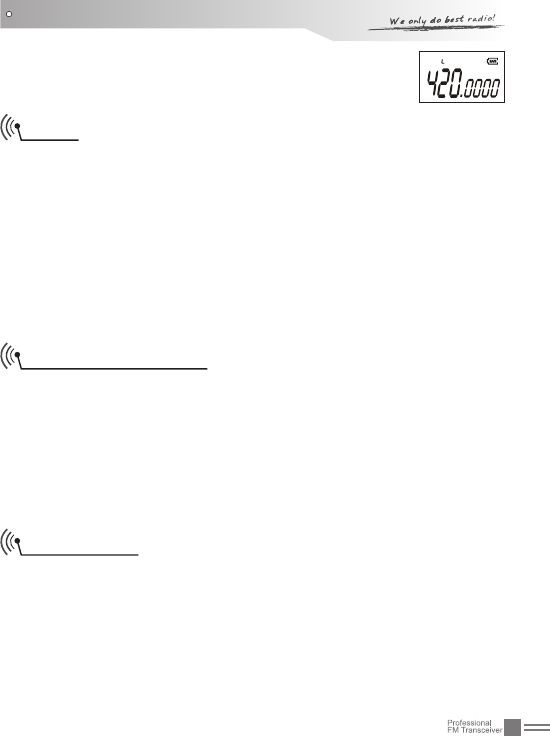
Hi/Low Power Switch
Pressing the programmed key of Monitor [PF1] / [PF2], the
transceiver emits "Du" beep and then announces current power
state. If "HI" is selected, current channel transmits
at high power. If "Low" is selected, current channel
transmits at low power.
23
"H" icon on the LCD means high power.
"L" icon on the LCD means low power 2.
ADVANCE OPERATIONS
Scan
Scan function can be used to monitor every channel.
Under the standby state, pressing the programmed "Scan" key,
transceiver emits "Du" beep and comes into scan state. It scans
channels in scan list one by one. When one channel receives a
matched signal, the transceiver temporarily stays in this channel
till the signal disappears. Then press Scan key again, transceiver
emits "Du Du" beep, exits scan and switches the working channel to
returned channel which is programmed by users in advance (Please
refer to returned channel in the programming software.).
Frequency Reverse
Under the standby state, pressing the programmed key of
Frequency Reverse, transceiver emits "Du" beep and then comes
into Frequency Reverse state. After that, the current channel RX
frequency will be switched to TX frequency, and the CTCSS or DCS
signal which has been setup will be also switched. Pressing this key
again, the transceiver exits frequency reverse function with "Du Du"
beep.
Talk Around
Under the standby state, pressing the programmed key of Talk
Around, transceiver emits "Du" beep and then the current channel
comes into Talk Around state. Under these conditions, transceiver
will transmit by receiving frequency. Also, the setting code (CTCSS/
DCS) will interchange encoding signaling as decoding signaling.
Pressing this key again, the transceiver exits talk around function
with "DU DU" beep.
24
Note:
Under the talk around state, the transceiver can not
communicate with other transceivers via repeaters.
ADVANCE OPERATIONS
Battery Capacity Enquiry
Pressing the programmed "Battery Capacity Enquiry", the
transceiver will announce current battery capacity. There are 10
grades in total. Grade 10th means full battery capacity.
When the battery state is grade 1th(6.1V), the LED lights red. The
transceiver will voice prompt users to charge timely and also enter
automatically the state of no transmission.
Call Alert
This function is to inform users of the coming call which is not yet
received.
Under the standby state, press the programmed key of Call, the
transceiver emits calling signal. When the receiver gets the calling
signal, the transceiver will remind him of the call by programmed
way.
Five call prompting ways:Vibration, ring (chord 1), ring (chord 2),
Vibration + ring (chord 1), vibration + ring (chord 2),Default: vibration
+ ring (chord 1) as missed call prompting.
NOTE:
Transceiver’s vibration function is optional. When there is no
vibration function, only ring is available for Call Alert.
Temporary Deletion of the Interfering Channel
This function can temporarily delete the interfering channel or
occupied channel from scan list. When scan rests on one channel,
pressing the programmed key of Temporary Deletion of the
Interfering Channel, transceiver emits "Du" beep and temporarily

25
deletes this channel from scan list. But the priority channels cannot
be temporarily deleted. If only one or two channels are in scan list,
this operation is not available. Restart the transceiver to add the
temporarily deleted channels into scan list again.
ADVANCE OPERATIONS
26
Time-out Timer
The purpose of the Time-out Timer is to prevent any caller from
Wide / Narrow Band Setup
On the basis of national conditions, users can set channel spacing
as 12.5K (narrow band) to communicate on the transceiver by
programming software.
This transceiver can realize 12.5K (narrow band) etc as
communication way.
NOTE:
"N" on LCD indicates narrow band. Otherwise it is wide band.
Busy Channel Lockout
When BCL function is enabled, you can not transmit in busy
channel. BCL prevents you from interfering with other parties who is
using the same frequency point that you select. Under this condition,
if you press the [PTT] to transmit, the transceiver will emit beep
prompt and return to receiving mode.
Users can set Busy Channel Lockout mode by programming
software.
Repeater: Repeat lockout, transmitting is inhibited when current 1.
channel receives a matched carrier with different CTCSS/DCS.
Carrier wave: Carrier busy lockout, transmitting is inhibited when 2.
current channel receives a matched carrier wave
Close: BCL disabled, you can do transmission under whatever 3.
receiving state.
Accession to Scan List
Via programming software, users can choose whether to add
current channel into scan list. If current channel is not in the scan
list, the transceiver will skip this channel when scanning.
BACKGROUND OPERATIONS
27
using a channel for an extended period of time. If you continuously
transmit for a period of time that exceeds the programmed time set
in advance, the transceiver will stop transmitting with voice prompt.
Users can set TOT timer by programming software.
Time-Out Timer Pre-Alarm
The Time-Out Timer Pre-Alarm is to alarm users that overtime
transmission is pending.
Users can program desired TOT Pre-Alarm time by programming
software.
Battery Save Setup
When this function is enabled, the transceiver can efficiently
reduce battery consumption. The transceiver will automatically
switch on Battery Save Function when not receiving any signal
or making any operations. But when the transceiver receives a
matched signal or make operations, it will automatically exit this
function.
Priority Scan Setup
There are two priority-channel settings of this transceiver,
"fixed" and "selected". Users can set the desired priority scan by
programming software. If transceiver sets priority scan, under
scanning and receiving no signal state, it will scan every channel
and also test priority channel at a time. When the non-priority
channel receives signal, it will test priority channel according to
yback time "A" and yback time "B" setup by users.
Return to Appointed Channel
During scan process, press [PTT] key to transmit or stop
scanning, then the transceiver will return to appointed channel.
BACKGROUND OPERATIONS

28
This transceiver is setup with different ways to return to appointed
channel. Users can choose the desired way by programming
software.
NOTE:
Users can set the basic and advanced operations via programming
software.
BACKGROUND OPERATIONS
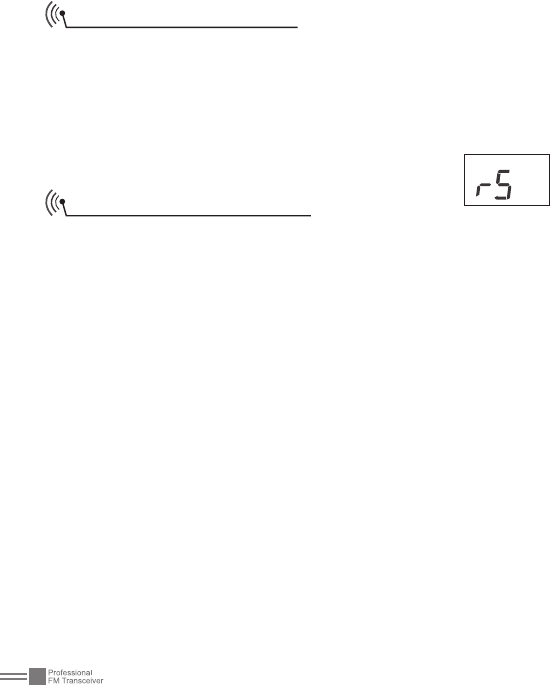
30
Resume Factory Default
Once transceiver works abnormally for wrong operations or wrong
programming, users can start this function to resume all functions
and channels as Factory Default.
Press [PTT] and [PF1] key synchronously to switch on transceiver.
Holding the two keys for more than 1 second, the transceiver will
resume Factory Default after announcing current channel number.
Maintaining and Cleaning
Cover the jack with its opercula when the transceiver is not at use.
After long-time use of the transceiver, keys, control buttons and
housing would become dirty. Then, neutral detergent (no corrosive
chemical agent) and wet cloth can be used to clean them.
More than 8 Hours (5-5-90 duty
31
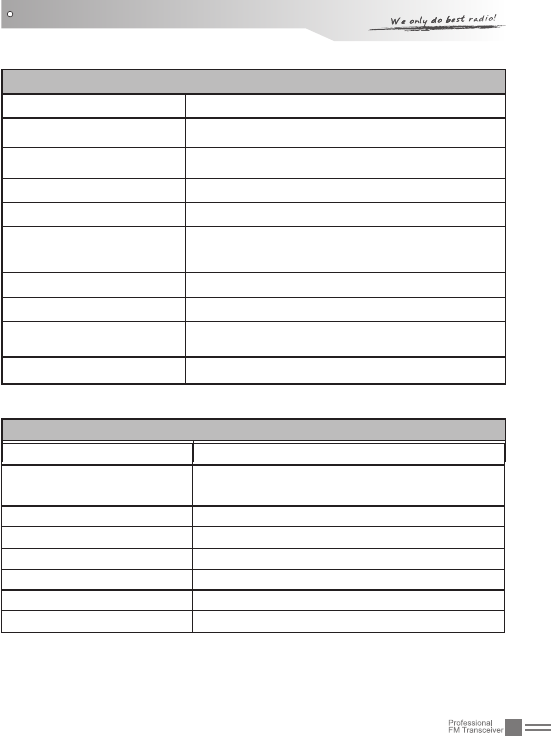
TECHNICAL SPECIFICATIONS
General
Frequency Range UHF:400-470MHZ
Channel Capacity 128 channels
Channel Spacing 12.5KHz
Phase-locked Step 5KHz, 6.25KHz
Operating Voltage 7.4 DC ±20%
Battery Life cycle with 1200mAh Libattery)
Frequency Stability ±2.5ppm
Operating Temperature -20~ +60℃
Size 108×56×32mm (with battery pack, no antenna)
Weight 175 g (with battery pack, no antenna)
Receiving Part
Sensitivity(12dB SINAD) ≤0.28μV
Adjacent Channel
Selectivity ≥60dB
Intermodulation ≥55dB
Spurious Rejection ≥80dB
Audio Response 66dB / per interval
Hum & Noise
Audio Distortion ≤5%
Audio Power Output 500mW (at 10%)
≥48dB
4W/1W
32
TECHNICAL SPECIFICATIONS
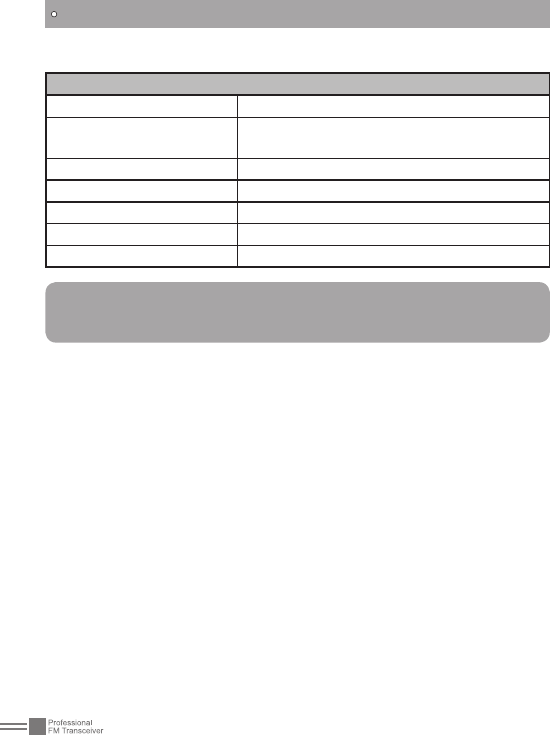
Transmitting Part
Power Output
Modulation
Adjacent Channel
Hum & Noise ≥40dB
Spurious Emission ≤-36dB
Audio Response 6dB / per interval
Audio Distortion ≤5%
Note:
No further advice when any necessary amendments are made
for technical need.
11KΦF3E
≥65dB
33
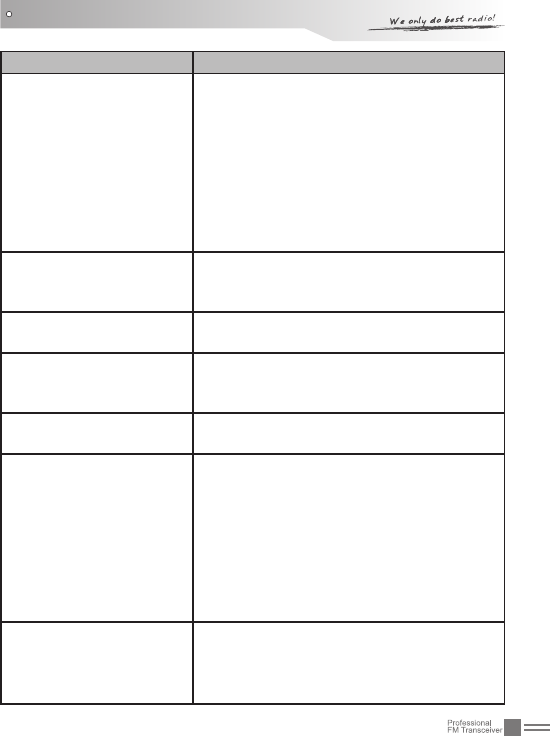
Problem Corrective Action
No power.
A.The battery pack may be exhausting.
Recharge or replace the battery pack.
B. The battery pack may not be installed
correctly. Remove the battery pack and
install it again.
C. The power switch is broken; send it to
local dealers to repair.
D. Battery touch is broken; send it to local
dealers to repair.
Battery power dies
shortly after correctly
charging.
The battery pack life is nished. Replace
the battery pack with a new one.
Transceiver cannot scan The channels are not in scan list.
(Professionals set it.)
All band noisy after
programmed or green
light always lightens
Turn on squelch when programmed. Non-
professionals are advised not to adjust
this function.
No sound after using
microphone for a while
Earphone jack is broken. (Please contact
with local dealers to repair it.)
Communication distance
becomes short, and it is
low sensitivity
A.Check whether the antenna is in good
condition and the antenna base do not
come adrift.
B. The selected mode frequency is not
in accord with local frequency when
programming.
C. Whether it has set in low power output.
(Please contact with local dealers to
repair it.)
Cannot talk to or hear
other members in your
group
A. Different frequency or channel, please
change it.
B. Different CTCSS / DCS please reset it.
C. Out of communication range.
TROUBLE SHOOTING GUIDE

34
Can not power on or
frequent power-off
Check whether the battery touch is out of
sharp or broken.
The other party gets low
or intermittent receiving
sound
Check weather the MIC is stoppage.
(Otherwise, please contact with local
dealers to repair it.)
Intermittent receiving
with big noise.
Out of communication range or obstruct
by tall buildings or in basement and so
on.
Loudspeaker become
lower or with "ka ka"
sound after using a
certain time
Check whether the loudspeaker net is
broken. Iron powder or sundries is in the
loudspeaker. (Please contact with local
dealers to repair it.)
Receive voice from the
other party but can not
transmit
Check [PTT] key. (Please contact with
local dealers to repair it.)
Receiving indicating lam
(green light) lightens but
no sound
A.Low volume, please turn on clockwise.
B. Lou d spe a ke r is b r oke n. ( P lea s e
contact with local dealers to repair it.)
C. Earphone jack is broken. (Please
contact with local dealers to repair it.)
D. Volume switch is broken. (Please
contact with local dealers to repair it.)
Can not adjust channels
Keypad locked. (Please refer to
"keyboard locked" on page 16th to close
the Keypad lockout function.)
TROUBLE SHOOTING GUIDE
35
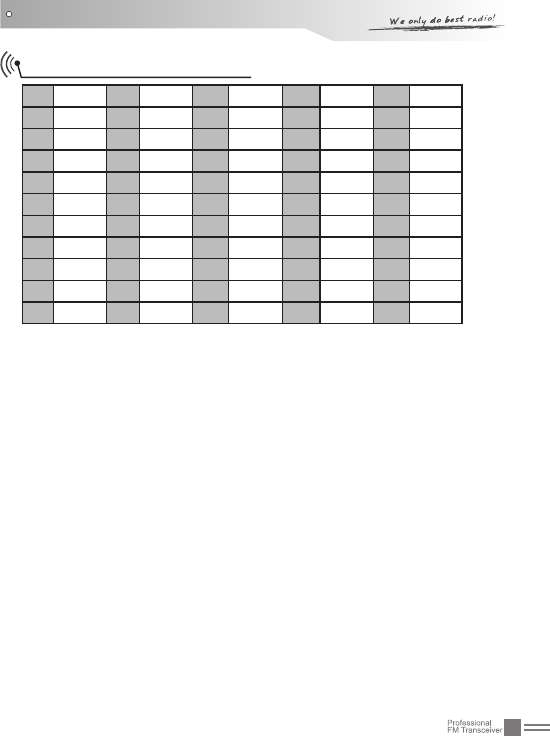
ATTACHED CHART
167.0 12 97.4 23 141.3 34 179.9 45 225.7
269.3 13 100.0 24 146.2 35 183.5 46 229.1
3 71.9 14 103.5 25 151.4 36 186.2 47 233.6
474.4 15 107.2 26 156.7 37 189.9 48 241.8
5 77.0 16 110.9 27 159.8 38 192.8 49 250.3
6 79.7 17 114.8 28 162.2 39 196.6 50 254.1
7 82.5 18 118.8 29 165.5 40 199.5
885.4 19 123.0 30 167.9 41 203.5
9 88.5 20 127.3 31 171.3 42 206.5
10 91.5 21 131.8 32 173.8 43 210.7
11 94.8 22 136.5 33 177.3 44 218.1
CTCSS Frequency Chart
36
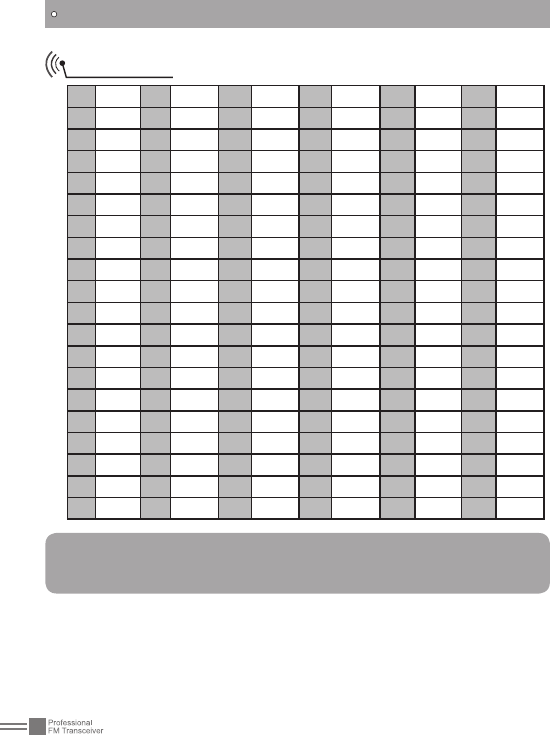
DCS Chart
ATTACHED CHART
1017 21 115 41 223 61 315 81 446 101 627
2023 22 116 42 225 62 325 82 452 102 631
3 025 23 122 43 226 63 331 83 454 103 632
4026 24 125 44 243 64 332 84 455 104 645
5 031 25 131 45 244 65 343 85 462 105 654
6 032 26 132 46 245 66 345 86 464 106 662
7 036 27 134 47 246 67 346 87 465 107 664
8043 28 135 48 251 68 351 88 466 108 703
9 047 29 143 49 252 69 356 89 503 109 712
10 050 30 145 50 254 70 364 90 506 110 723
11 051 31 152 51 255 71 365 91 516 111 731
12 053 32 155 52 261 72 371 92 523 112 732
13 054 33 156 53 263 73 411 93 526 113 734
14 055 34 162 54 265 74 412 94 532 114 743
15 065 35 165 55 266 75 413 95 534 115 754
16 071 36 172 56 271 76 423 96 546 116 765
17 072 37 174 57 274 77 425 97 565
18 073 38 205 58 305 78 431 98 606
19 074 39 212 59 306 79 432 99 612
20 114 40 217 60 311 80 445 100 624
NOTE:
N is positive code. "I" is negative code. There are 232 groups of DCS
in total. The overstriking marks are non-standard DCS.

A1.0-130620