Quanzhou Tesunho Electronics TH682 IP Trunking Radio User Manual TH518U USER S MANUAL
Quanzhou Tesunho Electronics Co., Ltd IP Trunking Radio TH518U USER S MANUAL
User Manual

1
USER’S MANUAL
TH-518U
IP Walkie-Talkie
4G LTE
SOS function
Sofeware off-line update
Items in the Package
2
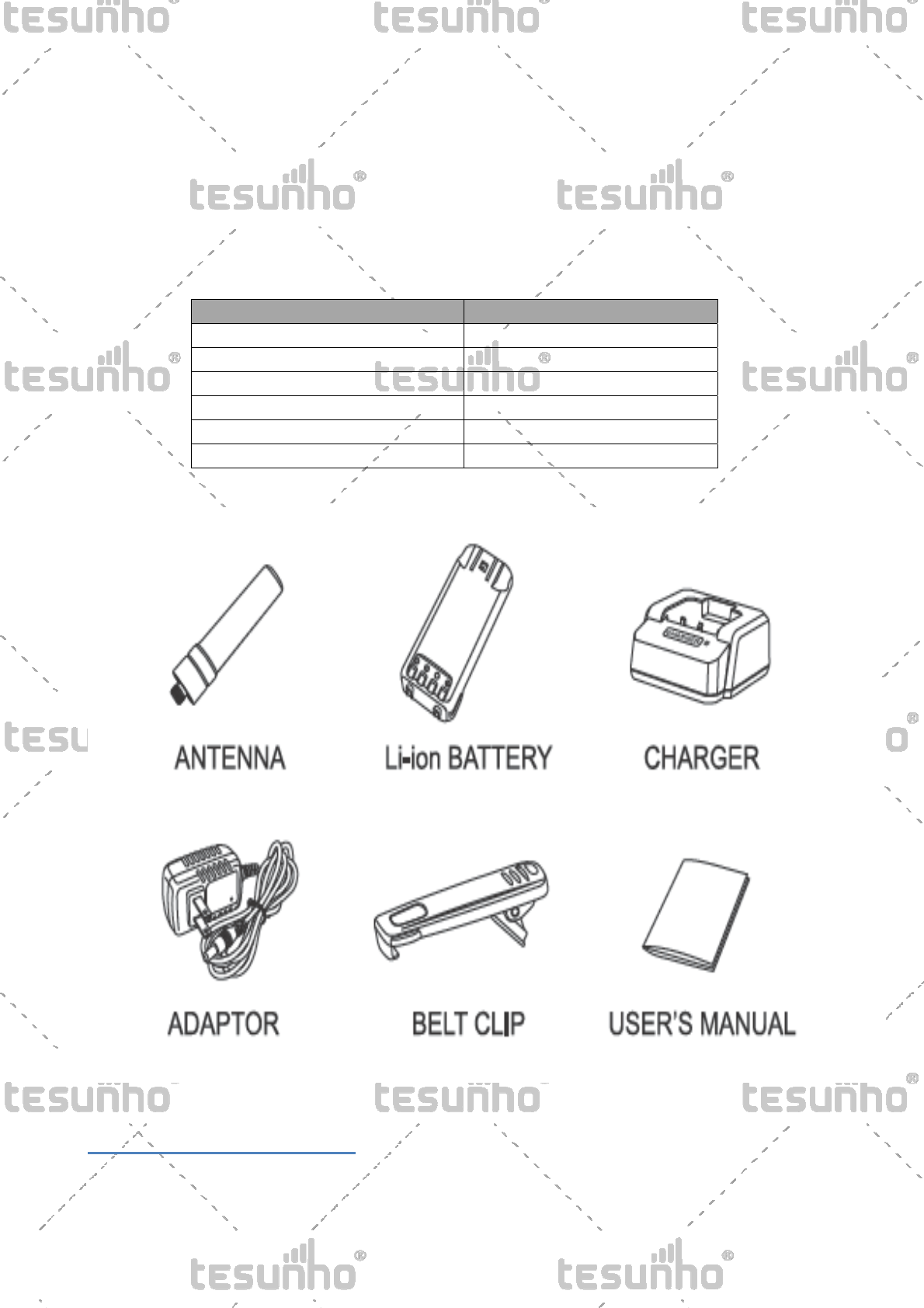
Carefully unpack the radio. We recommend that you identify the items listed in the following table before
discarding the packing material. If any items are missing or have been damaged during shipment, file a claim
with the carrier immediately.
ACCESSORIES
ITEM QUANTITY
ANTENNA 1
CHARGER 1
ADAPTOR 1
Li-Ion BATTERY 1
BELT CLIP 1
USER’S MANUAL 1
Product Overview
3
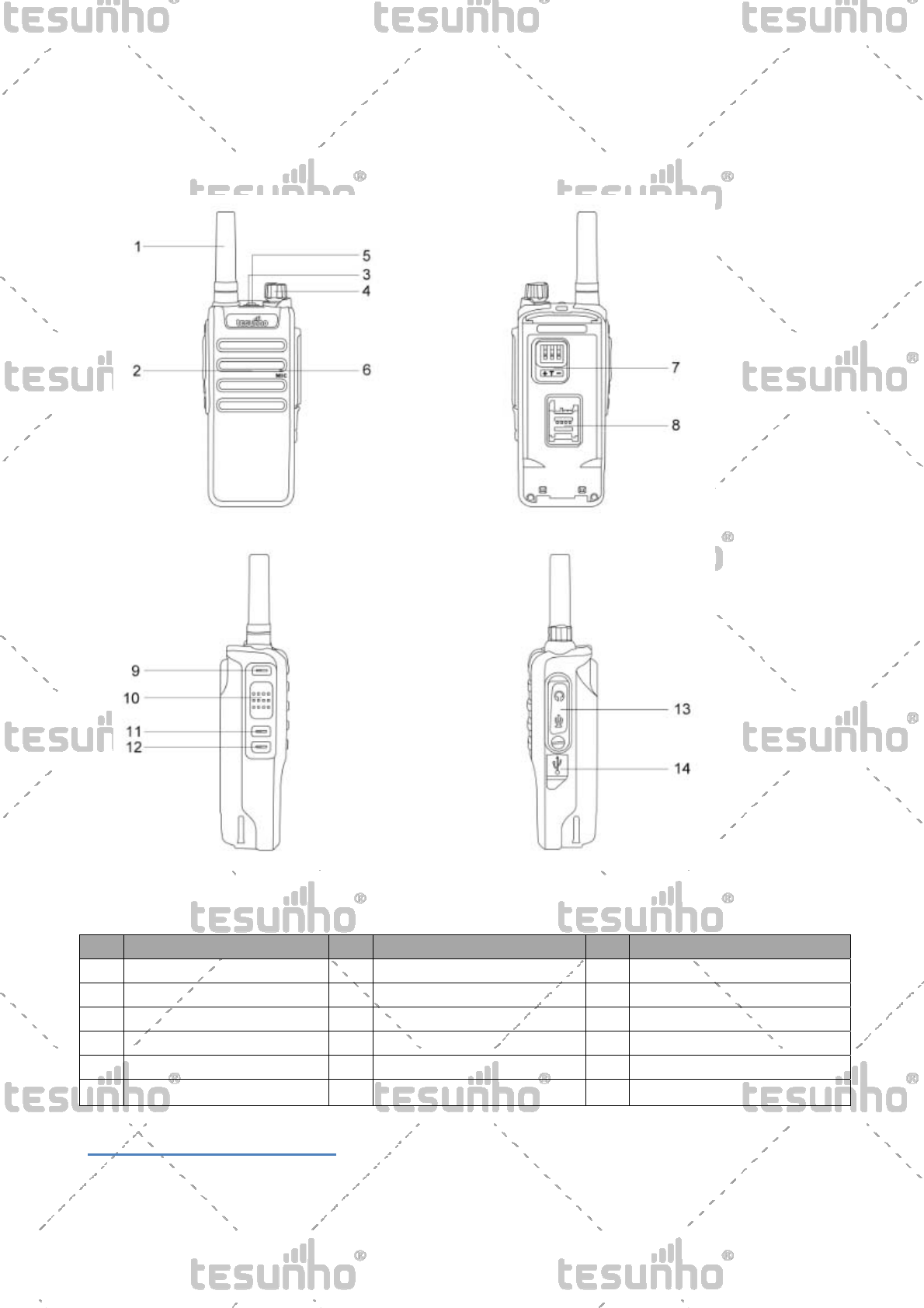
Product controls
No. Part Name No. Part Name No. Part Name
1 Antenna 7 Battery Contactor 13 Programming/Earphone jack
2 Speaker 8 SIM Card Slot 14 Micro USB charger jack
3 Indicator Light 9
Side Key 1(PF1)
4 Power and Volume Control 10 PTT
5 SOS Key 11
Side Key 2(PF2)
6 Microphone 12
Side Key 2(PF3)
Basic Operation
4
N
O
T
E
Please check the following two items before using.
a.Please make sure the SIM card has been activated and
has started the data service.
b.Please make sure the radio has been programmed with
the activated platform account and the correct APN
information.If not,please contact local dealer for
assistance.
1. Power on
A. Insert the SIM card
B. Pack the battery
C. Turn the volume control clockwise to power on.
2. Power off
Turn the volume control anticlockwise to power off.
Caution:No removing battery directly to power off, otherwise it will lead to the data loss and the walkie-talkie
damages.
3. Transmitting
Press the PTT button to transmit, keep away from microphone 5cm at least.
Exception & Talking Priority:
If there is an advanced user starts to talk when you are transmitting, you will be forced to exit the transmitting
mode.
4. Receiving
The LED indicator lights blue, LCD screen displays the transmitter’s name when it is receiving.
Menu Introduction
5
• Press MENU Key to enter menu
• Press“▲”or“▼” Key to select items
• Press BACK Key to back to the previous menu
• Press MENU Key to confirm selecting
Step 1 Step 2 Function Instruction
Menu
Choose Group Choose a group
Choose Friend
Shortcut to Private call (call to an active
user which management platform listed
from all groups)
Choose User
Shortcut to Private call from the working
group(call to an active user which
management platform listed from the
working group)
Network Mode
Auto Select 3G according network signals
automatically.
3G Only Only use 3G network.
Information
Group name Broadcast working group name
User name Broadcast working user name
Power remain Broadcast Power remain
GPS Broadcast GPS positioning or positioned
Version Broadcast software version
Account Relogging Relog account instead of restarting radio
when offline
AFTERSALES SERVICE
Warranty Period
6
Main Unit: Battery, Charger and Adapter: half a year from the data the radio is sold.
(It’s invalid without the seal of seller.)
Free Maintenance
The seller provides free maintenance for the nature breakups in the warranty period.
Paid Maintenance
Under the following conditions, the seller will charge the maintenance fee:
When the maintenance is beyond the warranty period, the seller will charge reasonable maintenance free.
The breakups are caused by nature disasters.
The breakups are cause by customers.(Or their deliberate intentions.)
The breakups are caused by the mishandling or operation unpermitted.
The breakups are caused by using the nonstandard battery packs.
Seller: Ser.No:
Model: Date: