RCA WHP150 User Manual To The 4985ad82 0086 4b30 978f 70da27be204c
User Manual: RCA WHP150 to the manual
Open the PDF directly: View PDF  .
.
Page Count: 12
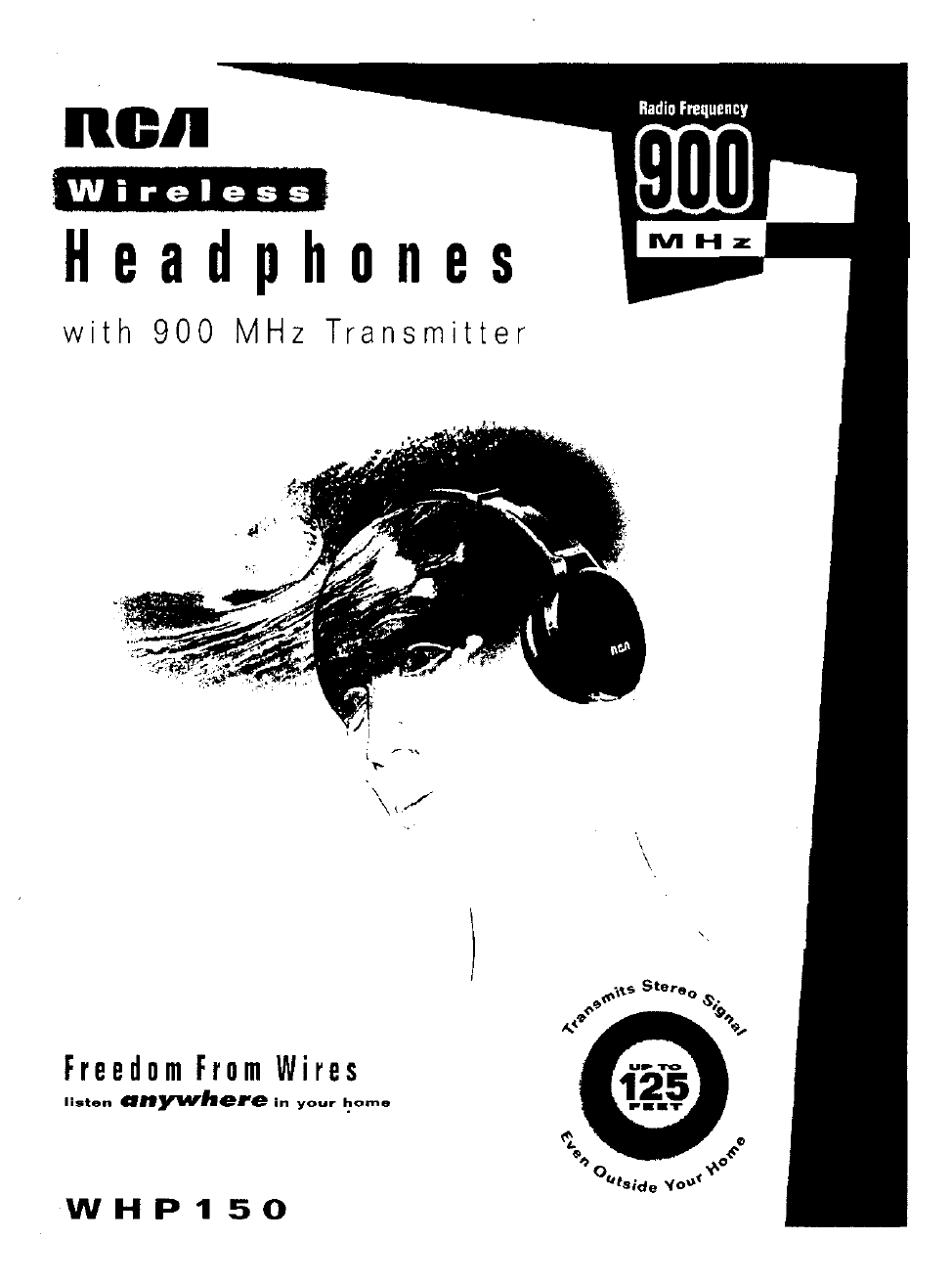
ROil
Wireless
H e a d p h 0 n e s
with
900
MHz
Transmitter
Freedom
From
Wires
listen
anY"f'here
in
your
1:-°""8
WHP150
\
\
INTRODUCTION
The
900
MHz
stereo wireless
headphone
system
uses latest
wireless technology
that
enables
you
to enjoy
music
and
TV
sound
anywhere
inside
or
outside
your
home. You
can
simply
connect
the
system
to
any
sound
source
such
as CD,
TV,
VCR,
Hi-Fi
and
radio.
It
is also perfect for
usage
in class rooms,
hospitals, meetings, churches, as a
hearing
aid,
and
for the
purpose
of
language
translation.
FEATURES
.
• 900
MHz
Radio
Frequency
(RF) technology
•
RF
technology lets
you
roam
freely
throughout
your
home
•
Operating
distance
up
to 125
ft.
•
No
line-of-sight limitations
• Built-in
charger
in
the
transmitter
• Virtually interference free stereo
quality
•
Automatic
Level
Control
and
auto
ON/OFF
control.
HEADSET
SAFETY
•
Do
not
play
your
headset
at
a
high
volume.
Hearing
experts
advise
against
continuous
extended
play.
• .
If
you
experience a
ringing
in
your
ears,
reduce
the
volume
or
discontinue
use.
•
Make
sure
the
volume
level of
the
headphone
is set
at
a comfortable listening level hefore
placing
it in
position
over
your
ears.
2
SYSTEM
COMPONENTS
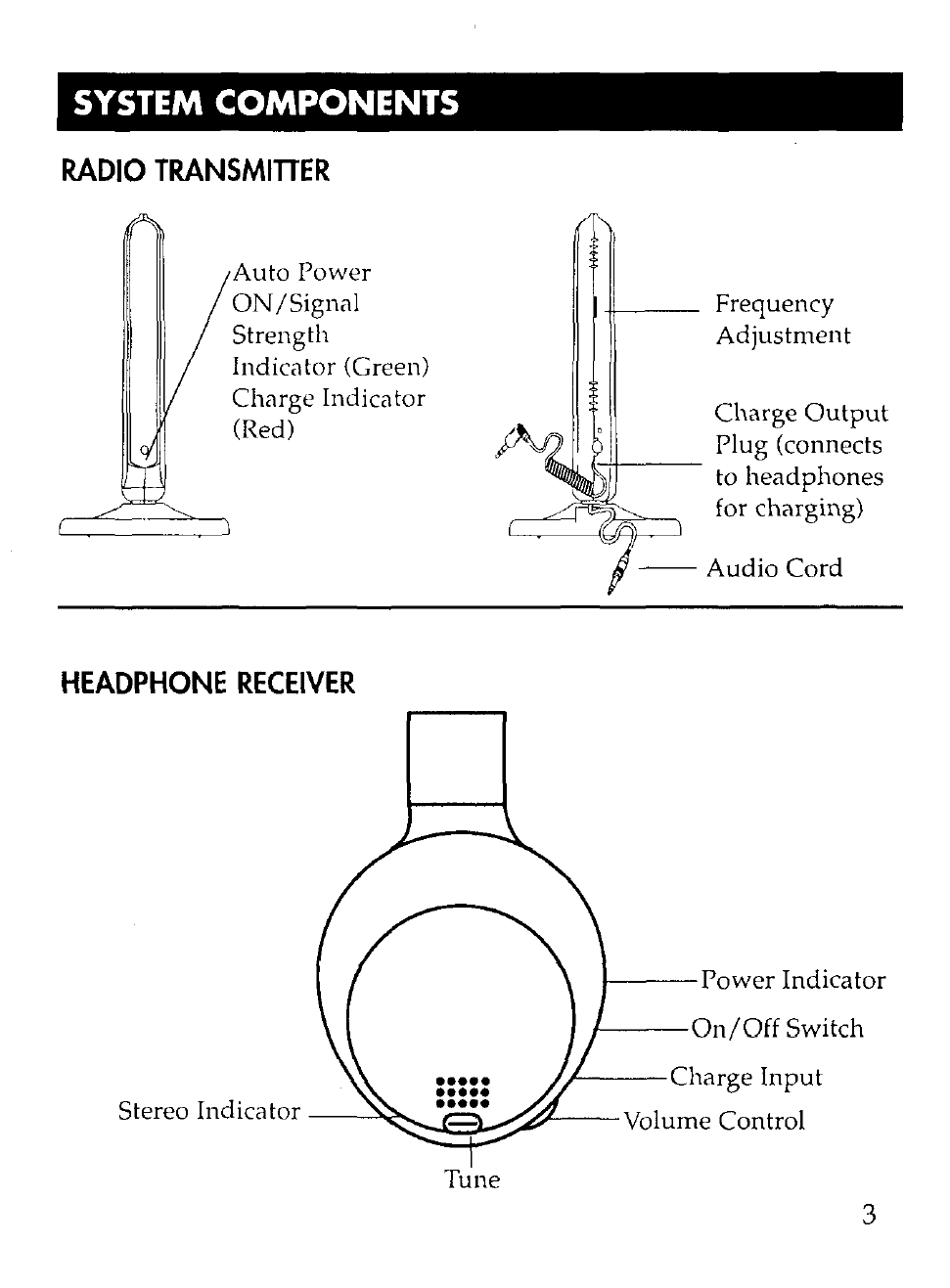
RADIO
TRANSMITIER
Auto
Power
ON/Signal
Strength
Indicator (Green)
Charge
Indica tor
(Red)
HEADPHONE
RECEIVER
-tI---
Frequency
Adjustment
Charge
Output
Plug (connects
H+---
to
headphones
for charging)
--
Audio
Cord
/---Power
Indicator
I---On/Off
Switch
/
/----Charge
Input
Stereo Indicator
--~::::::::§~
~'----Volume
Control
Tune
3
INSTALLATION OF
TRANSMlnER
1)
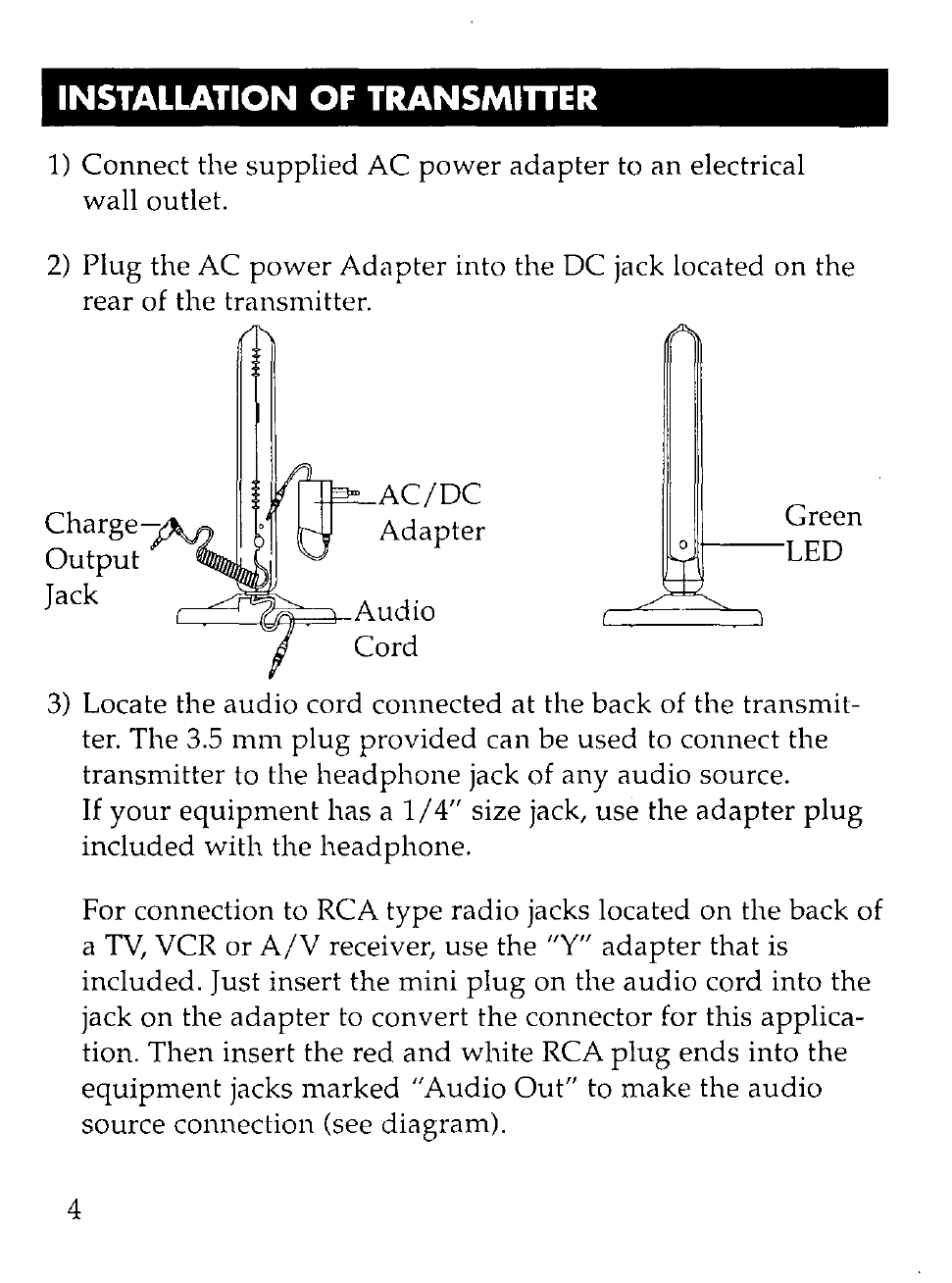
Connect
the
supplied
AC
power
adapter
to
an
electrical
wall outlet.
2)
Plug
the AC
power
Adapter
into the DC jack located
on
the
rear
of the transmitter.
AC/DC
Charge-
Adapter
Green
Output
LED
Jack
Audio
Cord
3)
Locate the
audio
cord connected at the back of the transmit-
ter.
The
3.5
mm
plug
provided
can be
used
to connect the
transmitter
to the
headphone
jack of
any
audio
source.
4
If
your
equipment
has
a
1/4"
size jack,
use
the
adapter
plug
included
with
the
headphone.
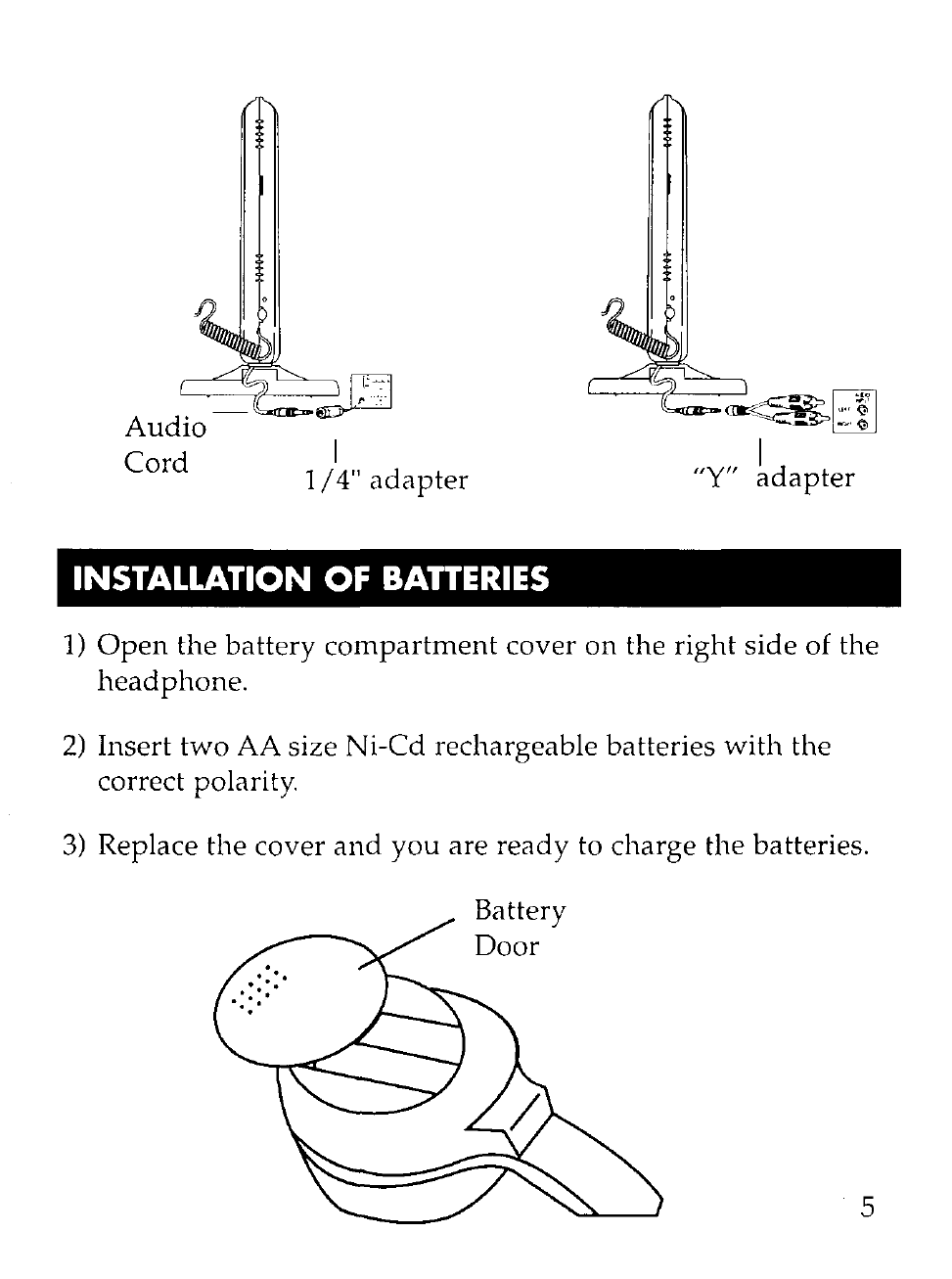
For connection to RCA
type
radio
jacks located
on
the back of
a
TV,
VCR
or
A/V
receiver,
use
the "Y"
adapter
that
is
included. Just insert
the
mini
plug
on
the
audio
cord into
the
jack
on
the
adapter
to
convert
the connector for this applica-
tion.
Then
insert
the red
and
white
RCA
plug
ends
into the
equipment
jacks
marked
"Audio
Out"
to
make
the
audio
source connection (see diagram).
~~~
Audio
'-r:o-(~~k
~
I
"Y"
kdapter
Cord
I
1/4"
adapter
INSTALLATION
OF
BATTERIES
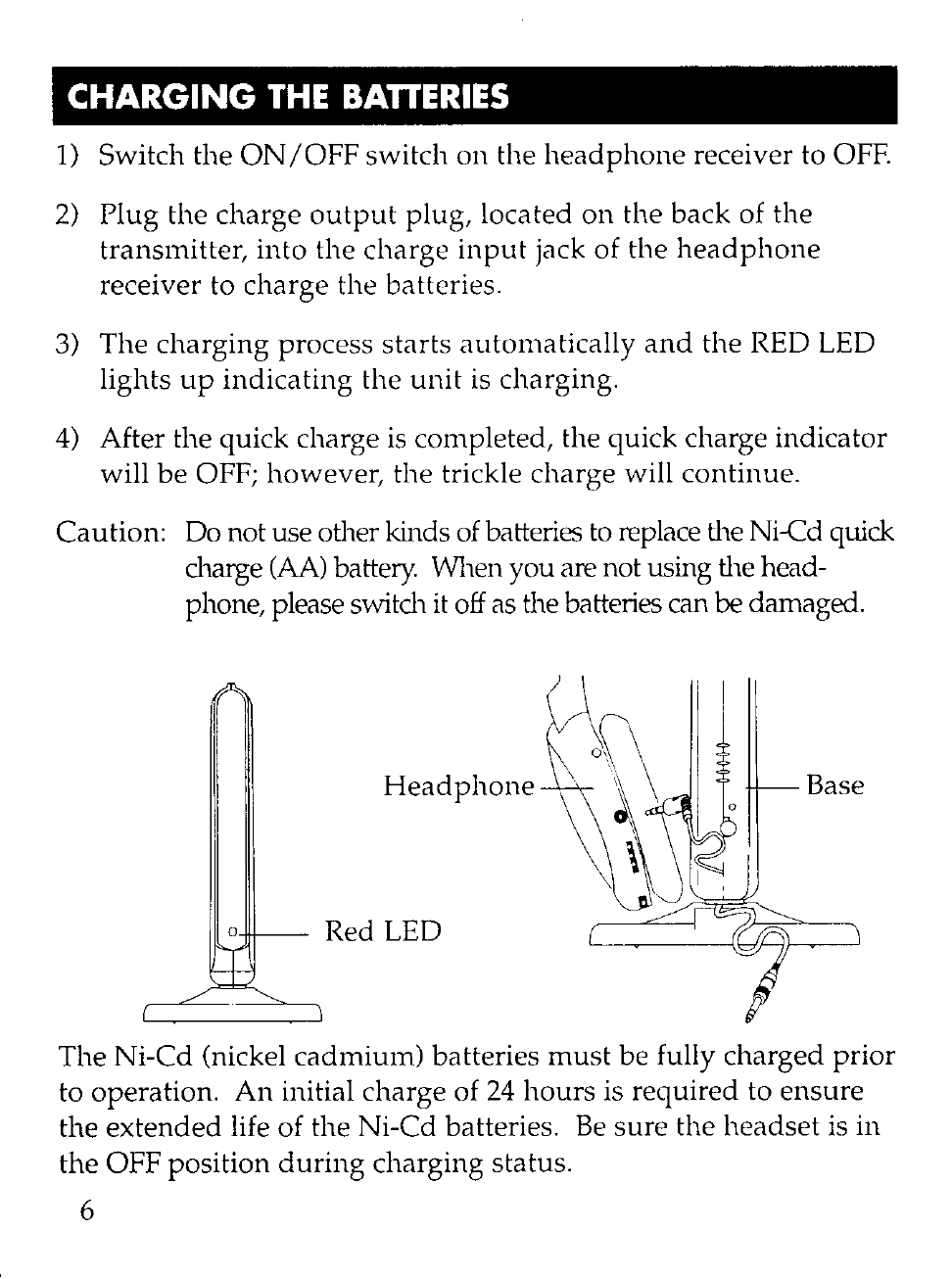
1)
Open
the
battery
compartment
cover
on
the
right
side
of
the
headphone.
2)
Insert
two
AA
size Ni-Cd rechargeable batteries
with
the
correct polarity.
3)
Replace
the
cover
and
you
are
ready
to
charge
the
batteries.
Battery
Door
5
I CHARGING
THE
BAnERIES
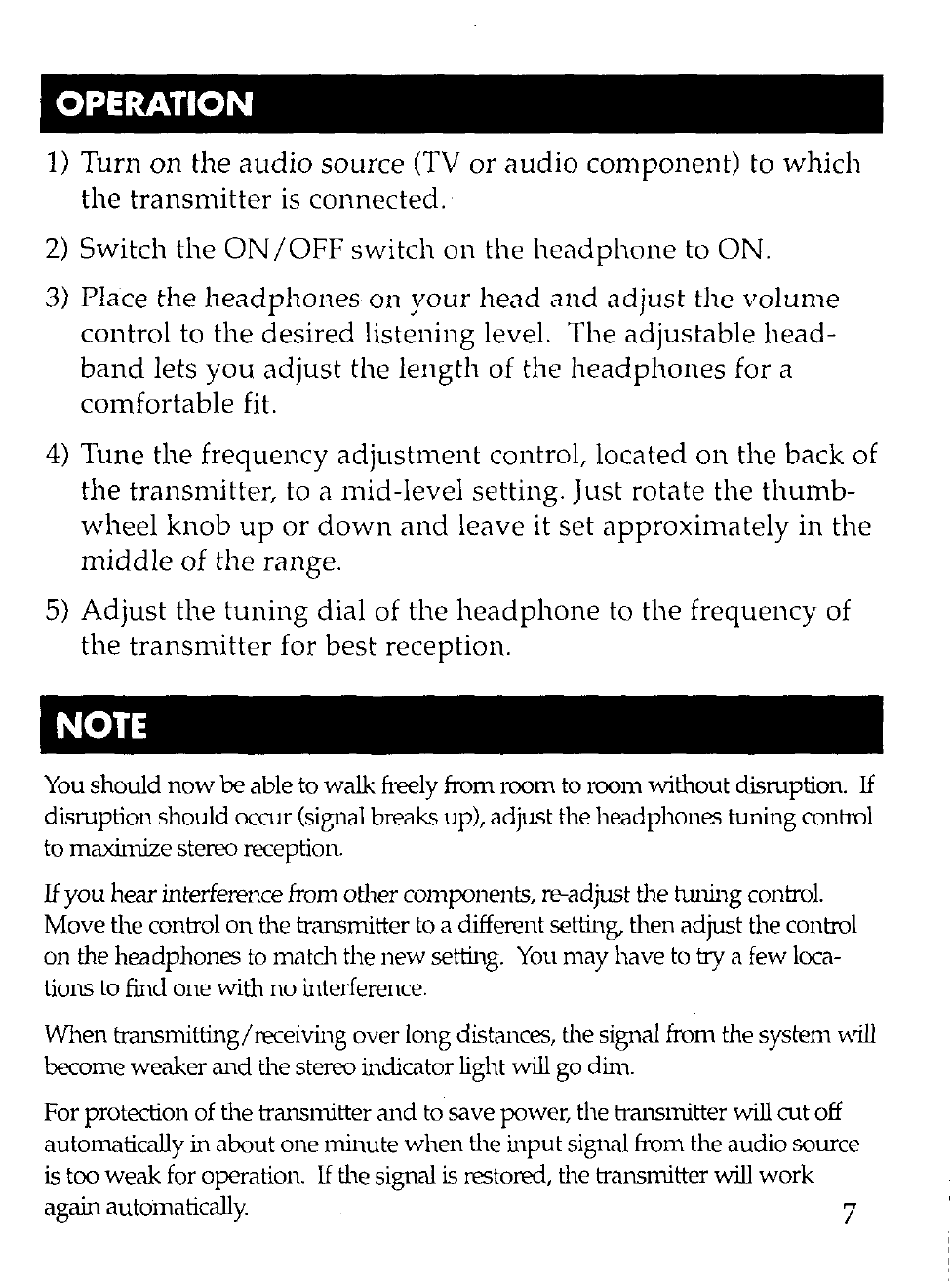
1)
Switch the
ON
/OFF
switch
on
the
headphone
receiver to OFF.
2)
Plug
the charge
output
plug, located
on
the
back
of
the
transmitter,
into
the
charge
input
jack of the
headphone
receiver to charge the batteries.
3)
The
charging
process
starts
automatically
and
the RED LED
lights
up
indicating
the
unit
is
charging.
4)
After the quick charge
is
completed, the quick charge indicator
will
be
OFF; however, the trickle charge will continue.
Caution: Do not use other kinds of batteries
to
replace the Ni-Cd quick
charge
(AA)
battery. When you are not using the head-
phone, please switch
it
off
as the batteries can be damaged.
Headphone
Base
a Red LED
The Ni-Cd (nickel
cadmium)
batteries
must
be fully charged
prior
to operation.
An
initial charge of
24
hours
is required to
ensure
the
extended
life of the Ni-Cd batteries.
Be
sure the
headset
is in
the
OFF position
during
charging status.
6
OPERATION
1)
Turn
on
the
audio
source
(TV
or
audio
component)
to
which
the
transmitter
is
connected.·
2)
Switch the
ON
/OFF
switch
on
the
headphone
to
ON.
3) Place the
headphones
on
your
head
and
adjust
the
volume
control to the
desired
listening level. The adjustable
head-
band
lets
you
adjust
the
length
of the
headphones
for a
comfortable fit.
4)
Tune the frequency
adjustment
control, located
on
the back of
the
transmitter, to a mid-level setting.
Just
rotate the
thumb-
wheel
knob
up
or
down
and
leave it set
approximately
in the
middle
of
the range.
5)
Adjust
the
tuning
dial of the
headphone
to the frequency of
the
transmitter
for
best
reception.
NOTE
You
should
now
be
able to walk freely from room to room without disruption.
If
disruption should occur (signal breaks up), adjust the headphones tuning control
to maximize stereo reception.
If
you
hear interference from other components, re-adjust the twung control.
Move the control
on
the transn1itter
to
a different setting, then adjust the control
on the headphones
to
matdl
the
new
setting.
You
may have
to
try a few loca-
tions to find one with no interference.
When
transn1itting/receiving over long distances, the signal from the system
will
become weaker
and
the stereo indicator light will go dinl.
For protection of the transnutter
and
to save power, the transnutter will cut off
automatically in about one minute
when
the input signal from the audio source
is
too weak for operation.
If
the signal
is
restored, the transnutter will work
again autoinatically. 7
TROUBLE SHOOTING,
No Sound
Distortion
8
Ensure the AC
adapter
is fully inserted into the
AC outlet
and
into the
power
connection input
on
the transmitter.
Ensure the
headphones
ON
/OFF switch is in
the ON position.
Headphone
batteries
may
be too low.
Charge
batteries.
Ensure the
TV
or
audio
component
is on
and
tuned
to a
channel with audio.
Adjust the
volume
control on the
headphone
to
turn
up
the volume.
The connected
audio/video
equipment
is not playing
(CD, Tape, etc.
..
).
Check the
audio
source.
The
volume
of
headphone
is
turned
down,
adjust the
volume
to an
appropriate
level.
Ensure the stereo indicator light is on.
If
not,
adjust the tuning control
on
the
headphones
until the indicator light
is
on.
Change
the position of the FREQ. ADJUST control
to change
operating
frequency. You
must
then
adjust the tuning control
on
the
headphone
until
the stereo indicator light is on.
Headphone batteries may be too
low.
Charge the batteries
or
replace with
new
ones
if
they
do
not
charge.
Ensure the level control wheel is adjusted properly.
The
headphone
is
too far from transmitter,
move
closer.
The
input
level of the
audio
Signal is too low. Turn
up
the
volume
of the
audio
source
equipment.
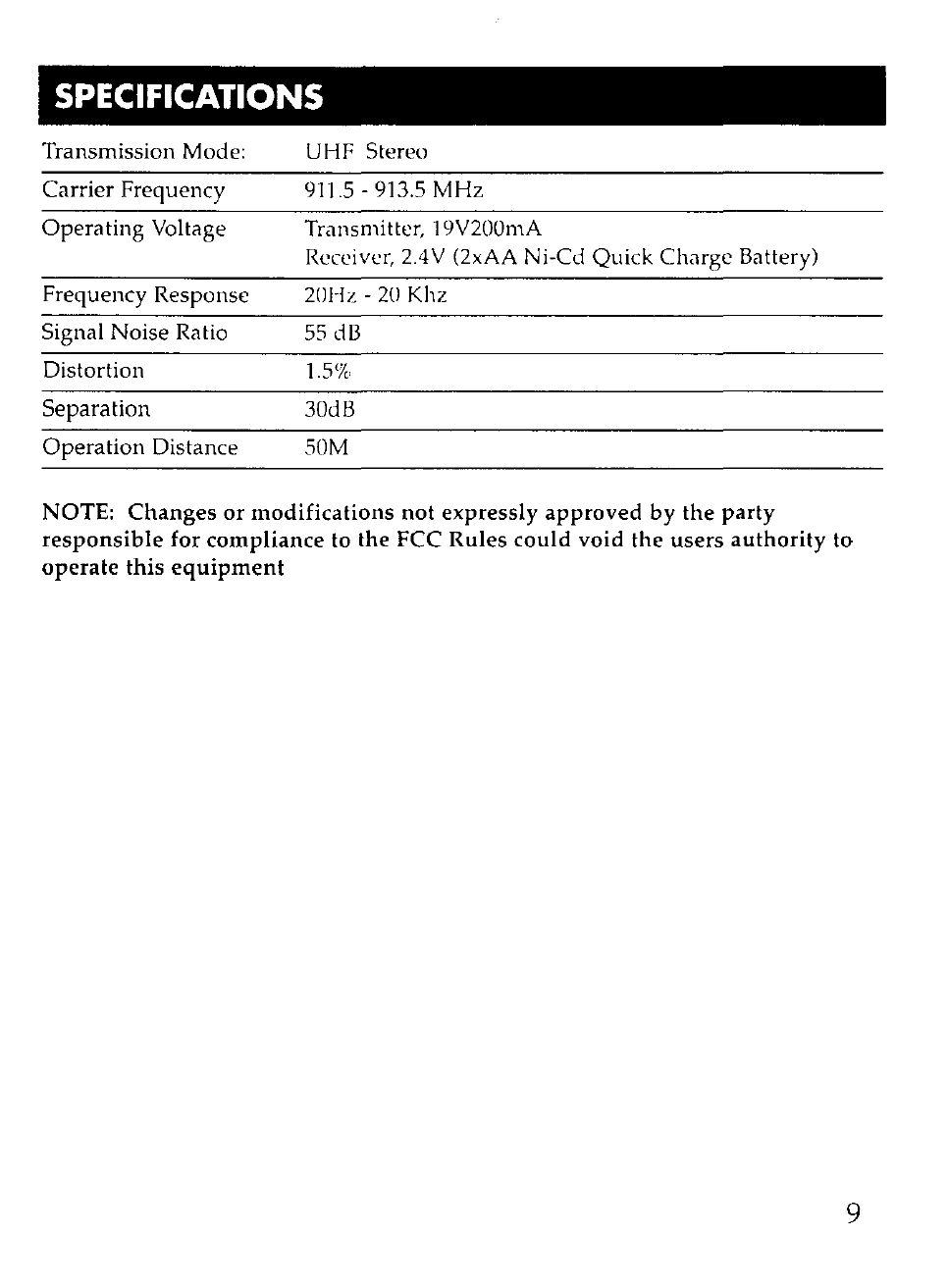
SPECIFICATIONS
Transmission Mode: UHF Stereo
Carrier
Frequency
911.5 -913.5
MHz
Operating
Voltage Transmitter, 19V200mA
Receiver, 2.4V (2xAA Ni-Cd
Quick
Charge
Battery)
Frequency
Response 20Hz -
20
Khz
Signal
Noise
Ratio
55
dB
Distortion 1.5%
Separation
30dB
Operation
Distance 50M
NOTE:
Changes
or
modifications
not
expressly
approved
by
the
party
responsible
for
compliance
to
the
FCC
Rules
could
void
the
users
authority
to
operate
this
equipment
9
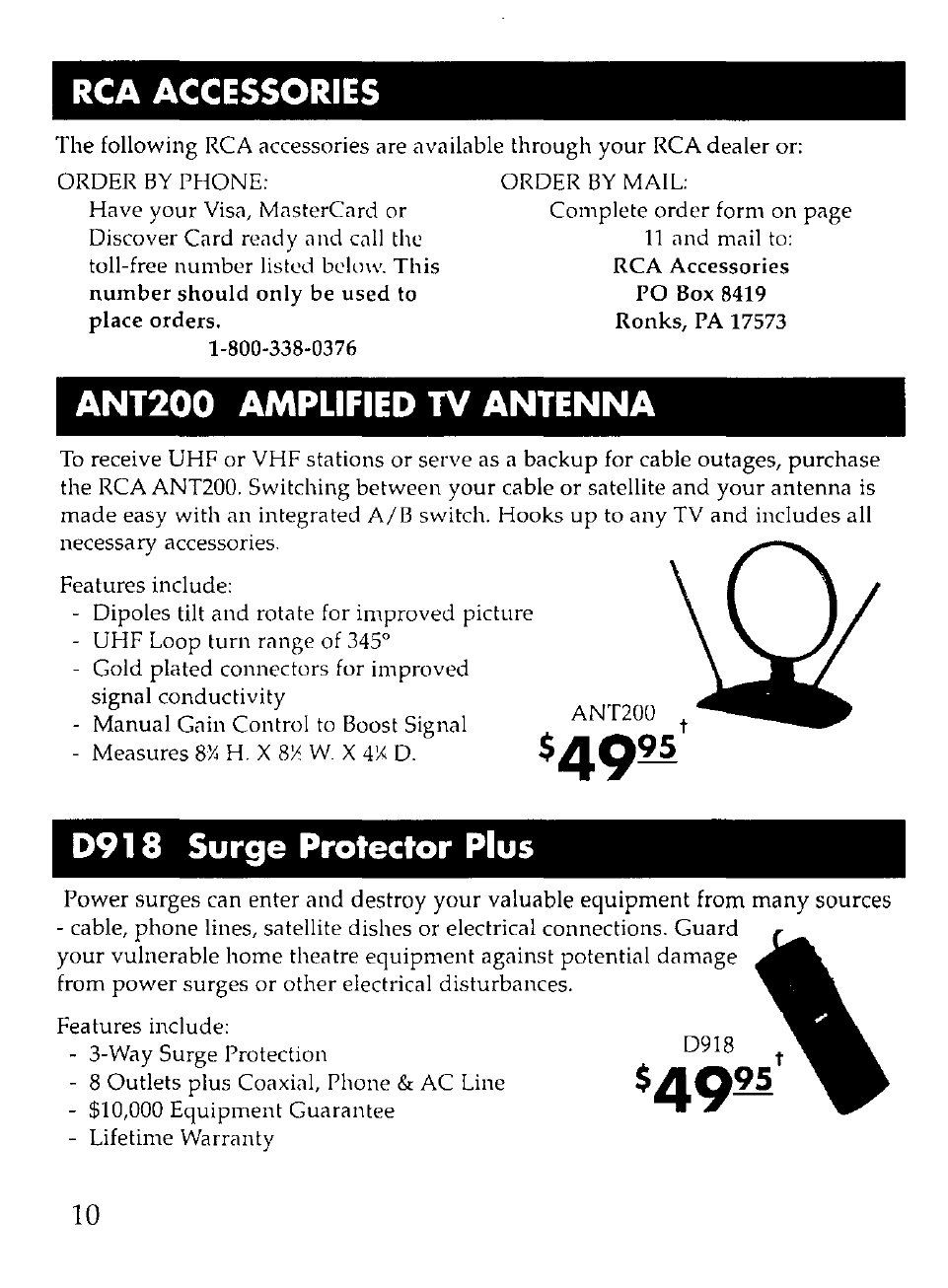
RCA
ACCESSORIES
The following RCA accessories are available
through
your
RCA dealer or:
ORDER
BY
PHONE: ORDER
BY
MAIL:
Have
your
Visa, MasterCard or
Discover Card ready
and
call the
toll-free
number
listed bel II IY.
This
number
should
only
be
used
to
place orders.
1-800-338-0376
Complete
order
form on
page
11
and
mail
to:
RCA Accessories
PO
Box
8419
Ronks,
PA
17573
ANT200
AMPLIFIED
TV
ANTENNA
To
receive UHF or VHF stations
or
serve as a
backup
for cable outages,
purchase
the RCA ANT200. Switching
between
your
cable or satellite
and
your
antenna
is
made
easy with
an
integrated
AlB
switch. Hooks
up
to
any
TV
and
includes all
necessary accessories.
Features include:
-Dipoles tilt
and
rotate for
improved
picture
-UHF Loop turn range of 3450
-Gold plated connectors for improved
signal conductivity
Manual
Gain Control
to
Boost Signal
-Measures
8Y,
H.
X 8)' W. X
4:,(
D.
D918
Surge Protector Plus
ANT200 t
$49
95
Power
surges can enter
and
destroy
your
valuable
equipment
from
many
sources
-cable,
phone
lines, satellite dishes or electrical connections.
Guard
your
vulnerable
home
theatre
equipment
against potential
damage
from
power
surges
or
other
electrical disturbances.
Features include:
3-Way Surge Protection
8 Outlets plus Coaxial, Phone & AC Line
-$10,000
Equipment
Guarantee
-Lifetime Warranty
10
0918
t
$49
95
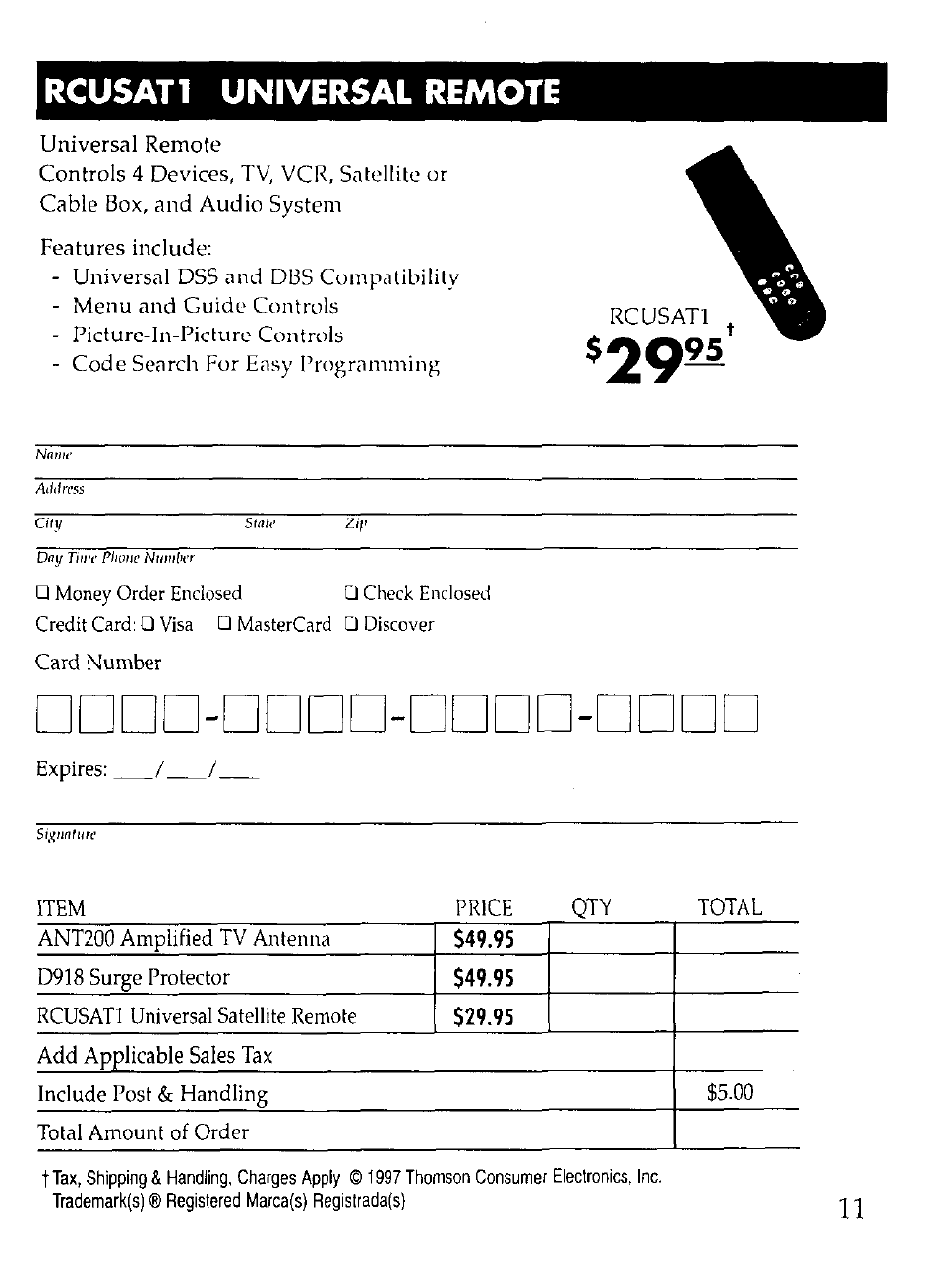
RCUSATl UNIVERSAL
REMOTE
Universal
Remote
Controls
4 Devices,
TV,
VCR,
Satellite
or
Cable
Box,
and
Audio
System
Features
include:
-
Universal
DSS
and
D13S
Compatibility
Menu
and
Guide
Controls
-
Picture-In-Picture
Controls
Code
Search
For
Easy
Programming
Nnlllt'
Address
City Sta/{'
Day
Timt'
Plume
NIIIII/'cl'
o Money Order Enclosed 0 Check Enclosed
Credit Card: 0
Visa
0 MasterCard 0 Discover
Card
Number
RCUSATl
t
$29
95
DDDD-DDDD-DDDD-DDDD
Expires:
_1_1_
Siglllltlire
ITEM
PRICE
QTY
TOTAL
ANT200 Amplified
TV
Antenna
$49.95
D918
Surge Protector
$49.95
RCUSATl
Universal Satellite Remote
$29.95
Add
Applicable Sales
Tax
Include Post & Handling $5.00
Total
Amount
of
Order
t
Tax,
Shipping
&
Handling,
Charges
Appty
©
1997
Thomson
Consumer
Electronics,
Inc.
Trademark(s)
®
Registered
Marca(s)
Registrada(s)
11

ONE
YEAR LIMITED WARRANTY
Thomson
Consumer
Electronics, Inc.
warrants
that
for
one
year from the
date
of
purchase
this
product
is free from defects in material
and
workmanship.
If
the
item is defective within that period, return
it
at
your
expense to the dealer from
whom
it
was
purchased together with proof of purchase for replacement. The
exchange
unit
is
under
warranty
for the
remainder
of the original
product's
warranty
period. This
warranty
excludes defects
or
damage
due
to misuse, abuse,
neglect
or
acts of God, including
but
not limited to lightning damage. The
foregoing represents
Thomson's
sole obligation
under
this warranty.
This
warranty
gives
you
specific legal rights,
and
you
may
have
other
rights
which
vary
from state to state. For purchases
outside
the United States, contact
your
dealer
for
warranty
information.
12
"Thomson
Consumer
Electronics, Inc.
Product
Exchange
Center
32B
Spur
Drive
EI
Paso, Texas 79906
IJ1500
Trademark(s) ® Registered
Marca(s) Registrada(s)
