Ranger Communications TR-286 AM/SSB CB Transceiver User Manual
Ranger Communications (M) SDN. BHD. AM/SSB CB Transceiver Users Manual
Users Manual
Printed In Malaysia
PD990922
TR-286 GX
SOLID STATE CITIZENS BAND
AM/SSB MOBILE TRANSCEIVER
OWNER’S MANUAL

TABLE OF CONTENTS
PAGE
CHAPTER 1
Specifications . . . . . . . . . . . . . . . . . . . . . . . . . . . . . . 2
CHAPTER 2
Installation . . . . . . . . . . . . . . . . . . . . . . . . . . . . . . . . 3
Location . . . . . . . . . . . . . . . . . . . . . . . . . . . . . . . . . 3
Mounting The Radio . . . . . . . . . . . . . . . . . . . . . . . 3
Ignition Noise Interference . . . . . . . . . . . . . . . . . . 4
Antenna . . . . . . . . . . . . . . . . . . . . . . . . . . . . . . . . . 4
Tuning The Antenna for Optimum SWR . . . . . . . 5
External Speaker . . . . . . . . . . . . . . . . . . . . . . . . . . 6
Public Address . . . . . . . . . . . . . . . . . . . . . . . . . . . . 6
CHAPTER 3
Operation . . . . . . . . . . . . . . . . . . . . . . . . . . . . . . . . . 7
Front Panel . . . . . . . . . . . . . . . . . . . . . . . . . . . . . . . 7
Rear Panel . . . . . . . . . . . . . . . . . . . . . . . . . . . . . . . 10
Frequency Chart . . . . . . . . . . . . . . . . . . . . . . . . . . . 11
Procedure to Receive And Transmit . . . . . . . . . . . 12
Receiving SSB Signals . . . . . . . . . . . . . . . . . . . . . 13
Alternate Microphone And Installation . . . . . . . . . 15
Maintenance And Adjustment . . . . . . . . . . . . . . . . 18
A Few Rules That Should Be Obeyed . . . . . . . . . . 19
How Your CB Can Serve You . . . . . . . . . . . . . . . . 19
Use Channel 9 For Emergency Messages Only . . . 20
CHAPTER 1 SPECIFICATIONS
GENERAL
Frequency Range 26.965 - 27.405 MHz
Channels 40
Frequency Control Phase-Lock-Loop ( PLL ) Synthesizer
Frequency Stability 0.001%
Temperature Range -30°C to +50°C
Input Voltage 13.8V DC
Antenna Impedance 50 Ohms
Size 7 7/8" (W) x 9 1/4" (D) x 2 3/8" (H)
Weight 5 lbs.
TRANSMITTER
RF Power Output AM 4W ; SSB 12W PEP
Carrier Emission -55 dB
Spurious Emission -55 dB
Audio Distortion 10%
Frequency Response 300 to 2500 Hz
Microphone Dynamic
RECEIVER
Sensitivity for 10 dB (S+N)/N < 1.0 uV (AM)
< 0.5 uV (SSB)
Squelch Sensitivity < 0.5 uV
Image Rejection More than 65 dB
AGC Figure of Merit 100 mV for 10 dB Change in Audio
Output
Audio Response 300 to 2500 Hz
( SPECIFICATIONS SUBJECT TO CHANGE WITHOUT NOTICE )
- 1 - - 2 -

CHAPTER 2 INSTALLATION
LOCATION
Plan the location of the transceiver and microphone bracket before starting
the installation. Select a location that is convenient for operation and does
not interfere with the driver or passengers. In automobiles, the transceiver is
usually mounted below the dash panel with the microphone bracket beside it.
MOUNTING THE RADIO
The transceiver is supplied with a universal mounting bracket. When
mounting the bracket and radio to your car, make sure it is mechanically
strong. Also, provide a good electrical grounding connection to the chassis
of the vehicle. Proceed as follows to mount the transceiver :
1. After you have determined the most convenient location in your vehicle,
hold the transceiver with mounting bracket in the exact location desired. If
nothing will interfere with mounting it in the desired position, remove the
mounting bolts. Before drilling the holes, make sure nothing will interfere
with the installation of the mounting bolts.
2. Connect the antenna cable plug to the standard receptacle on the rear
panel. Most transceiver antennas are terminated with a type PL-259 plug
and mate with the ANT receptacle.
3. Connect the red DC power input wire (with the fuse) to +13.8V DC. This
wire extends from the rear panel. In automobile installation, +13.8V DC is
usually obtained from the accessory contact on the ignition switch. This
prevents the set being left on accidentally when the driver leaves the car
and also permits operating the unit without the engine running. Locate the
accessory contact on most ignition switches by tracing the power wire from
the AM broadcast receiver in the car.
4. Connect the black lead to -13.8V DC. This is usually the chassis of the
car. Any convenient location with good electrical contact (remove paint)
may be used.
5. Mount the microphone bracket on the right side of the transceiver or near
the transceiver, using two screws supplied. When mounting in an
automobile, place the bracket under the dash so that the microphone is
readily accessible.
IGNITION NOISE INTERFERENCE
Use of a mobile receiver at low signal levels is normally limited by the
presence of electrical noise. The primary source of noise in automobile
installations is from the generator and ignition system in the vehicle. Under
most operating conditions, when signal level is adequate, the background
noise does not present a serious problem. Also, when extremely low level
signals are being received, the transceiver may be operated with vehicle
engine turned off. The unit requires very little current and therefore will not
significantly discharge the vehicle battery.
Even though the transceiver has ANL and NB controls, in some installations
ignition interference may be high enough to make good communications
impossible. The electrical noise may come from several sources. Many
possibilities exist as variations between vehicles require different solutions
to reduce the noise.
ANTENNA
A vertically polarized, quarter-wavelength whip antenna provides the most
reliable operation and greatest range. Shorter, loaded-type whip antennas are
more attractive, compact and adequate for applications where the maximum
possible distance is not required. Also, the loaded whips do not present the
problems of height imposed by a full quarter-wavelength whip.
Mobile whip antennas utilize the metal body of the vehicle as a ground
plane. When mounted at a corner of the vehicle they are slightly directional,
in the direction of the body of the vehicle. For all practical purposes,
however, the radiation pattern is nondirectional. The slight directional
characteristic will be observed only at extreme distances. A standard antenna
connector (type SO-239) is provided on the transceiver for easy connection
to a standard PL-259 cable termination.
If the transceiver is not mounted on a metal surface, it is necessary to run a
separate ground wire from the unit to a good metal electrical ground in the
vehicle. When installed in a boat, the transceiver will not operate at
maximum efficiency without a ground plate, unless the vessel has a steel
hull.
- 3 - - 4 -
Before installing the transceiver in a boat, consult your dealer for
information regarding an adequate grounding system and prevention of
electrolysis between fittings in the hull and water.
TUNING THE ANTENNA FOR OPTIMUM SWR
Since there is such a wide variety of base and mobile antennas, this section
will strictly concern itself to the various types of mobile adjustable antennas.
Because the antenna length is directly related to the channel frequency, it
must be tuned to resonate optimally an all channels of the transceiver. Low
channel (CH 1) requires a longer antenna than high channel (CH 40) because
it is a lower frequency.
Due to the various methods of adjusting antennas for proper S.W.R., we
have chosen what we think is the optimum method :
A. Antenna with adjustable screws (set screw)
1. Start with the antenna extended and tighten the set screw lightly enough so
that the antenna can be lightly tapped with your finger for easy adjustment.
2. Set your transceiver to middle channel (CH 20). Press the PTT (push-to-
talk) switch, and tap the antenna (making it shorter). The S.W.R. meter
will show a lower reading each time the antenna is tapped. By continuing
to shorten the antenna, you will notice the S.W.R. reading will reach a low
point and then start rising again. This means that you have passed the
optimum point for channel 20.
Extend the antenna a short distance and again follow the procedure above.
When the lowest point has been reached, switch to low channel (CH 1) and
then to high channel (CH 40) and compare S.W.R. readings. They should
be almost equal.
B. Antennas which must be cut to proper length
1. Follow the same procedure as above, but adjust the length by cutting in
1/8" increments until a good match is obtained.
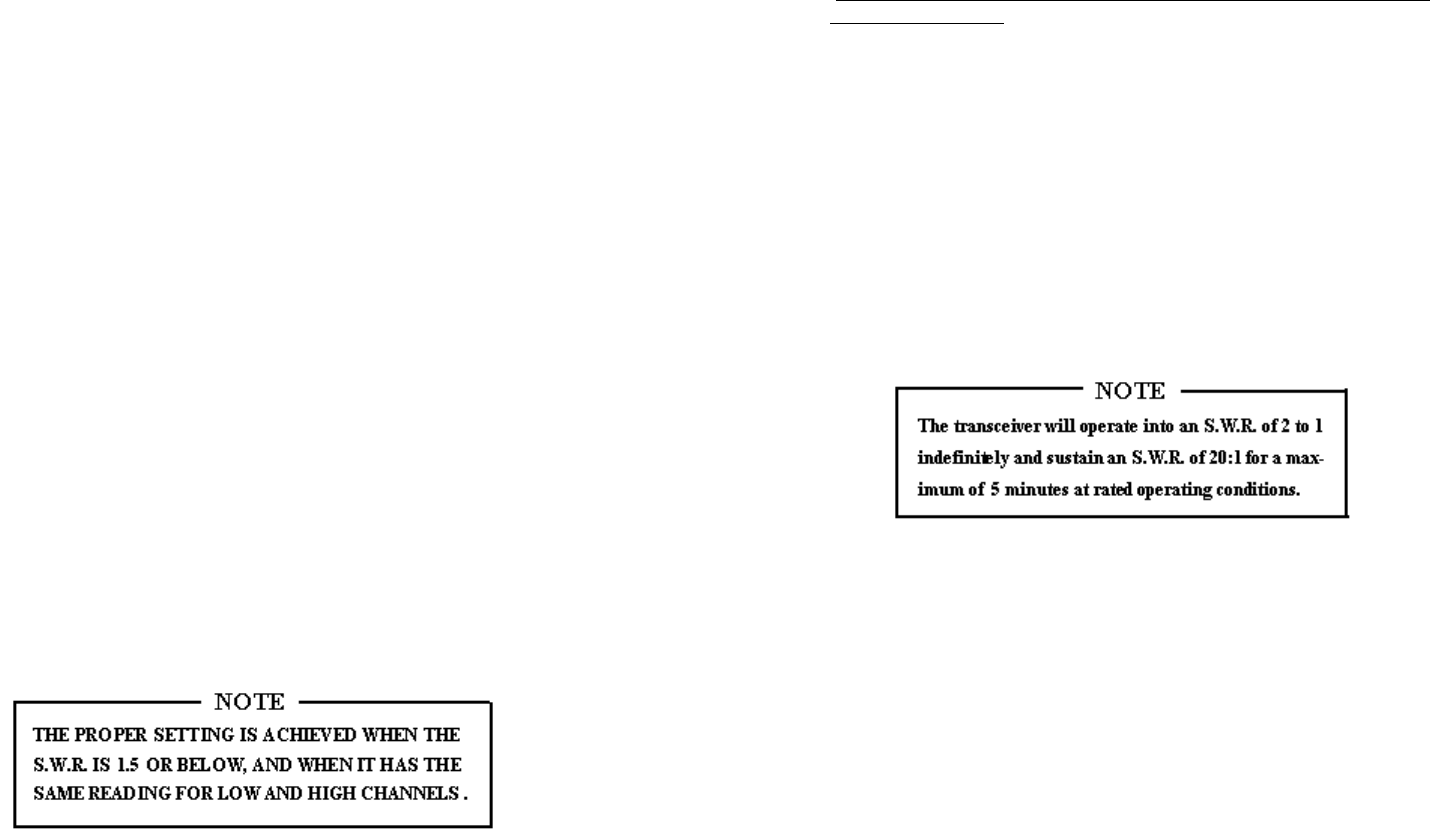
2. Be very careful not to cut too much at one time, as once it is cut, it can no
longer be lengthened.
3. The whip is easily cut by filing a notch all the way around and breaking
the piece off with pliers.
If you are having difficulties in adjusting your antenna, check the followings
:
a. All doors must be close when adjusting the antenna.
b. Make sure the antenna base is grounded.
c. Check your coaxial cable routing (it may be pinched when routed into the
car.)
d. Try a different location on your car (keeping in mind the radiation pattern
you wish.)
e. Is the antenna perfectly vertical?
f. Try a different location in your neighborhood. Stay away from large metal
objects when adjusting (metal telephone or lamp post, fences, etc.)
EXTERNAL SPEAKER
The external speaker jack (EXT. SP) on the rear panel is used for remote
receiver monitoring. The external speaker should have 8 Ohms impedance
and be able to handle at least 4 watts. When the external speaker is plugged
in, the internal speaker is disconnected.
PUBLIC ADDRESS
To use the transceiver as a public address system, connect an external 8
Ohms speaker (4 watts minimum) to the PA SP jack located on the rear
panel. Direct speaker away from the microphone to prevent acoustic
feedback. Physical separation or isolation of the microphone and speaker is
important when operating the PA at high output levels.
- 5 - - 6 -
CHAPTER 3 OPERATION
FRONT PANEL
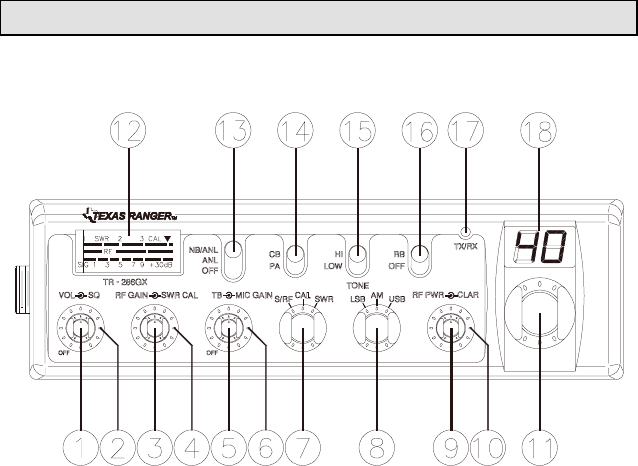
1. ON/OFF VOLUME CONTROL : This knob controls the volume and
the power to the radio. To turn the radio on, rotate the knob clockwise.
Turning the knob further will increase the volume of the receiver.
2. SQUELCH CONTROL : This control is used to eliminate background
noise being heard through the receiver which can be disturbing when no
transmissions are being received. To use this feature of your radio, gently
turn the switch counterclockwise until the switch will not turn further.
Then turn the switch clockwise until the background noise is just
eliminated. If you turn the switch too far in a clockwise direction, you may
not be able to hear weak transmissions.
3. RF GAIN CONTROL : A strong signal can overpower the RF
amplifier. This control is used to reduce the gain from strong signals.
4. SWR CAL CONTROL : This control allows the user to calibrate the
SWR meter, which is used to match the antenna to your radio.
5. TALKBACK CONTROL : This control is used to adjust the desired
volume of Talkback. This is used to monitor your own voice. For example,
you could use this feature to compare different microphone.
6. MIC GAIN CONTROL : Adjusts the microphone gain in the transmit
and PA modes. This controls the gain to the extent that full talk power is
available several inches away from the microphone. In the Public Address
(PA) mode, the control functions as the volume control.
7. S-RF/SWR/CAL SWITCH : This is a three function switch. In the S-RF
position, the meter will indicate the strength of the signal being received,
as well as the relative RF output of transmission. When calibrating the
SWR meter, you need to put this switch in the CAL position. To use the
meter to measure the standing wave ratio, turn the switch to the SWR
position.
8. MODE CONTROL : This control allows you to select one of the
following operating modes : LSB/AM/USB.
9. RF PWR CONTROL : This control allows the user to adjust RF power
output.
10. CLARIFY CONTROL : Allows tuning of the receive frequency above
or below the channel frequency by up to 1.5 KHz. Although this control is
intended primarily to tune in SSB signals, it may be used to optimize AM
signals as described in the Operating Procedure paragraphs.
11. CHANNEL SELECTOR : This control is used to select a desired
transmit and receive channel.
12. FRONT PANEL METER : The Front Panel Meter allows the user to
monitor signal strength, RF output power and S.W.R. level.
13. NB/ANL/OFF SWITCH : In the ANL position, only the Automatic
Noise Limiter in the audio circuits is activated. When the switch is place in
the ANL+NB position, the RF Noise Blanker is also activated. The RF
Noise Blanker is very effective in eliminating repetitive impulse noise such
as ignition interference.
- 7 - - 8 -
14. CB/PA SWITCH : Selects the mode of operation. In the PA position,
the transceiver acts as a public address amplifier. Before operating in the
PA mode, you must first connect an external PA speaker to the PA jack on
the rear panel. In the CB mode, the PA function is disabled.
15. TONE HI/LO SWITCH : This switch shapes audio response. In the LO
position, the base is increased and in the HI position, the treble is
increased.
16. RB/OFF SWITCH : In the Roger Beep position, the radio transmits an
audio tone at the end of your transmission. This indicates the end of your
transmission so that people who are having trouble hearing you will know
that you are done speaking. As a courtesy to others, use the Roger Beep
only when necessary.
17. TX/RX LED : The red LED indicates the unit is in the transmit mode.
The green LED indicates the unit is in the receive mode.
18. CHANNEL DISPLAY : The channel display indicates the current
selected channel.
REAR PANEL
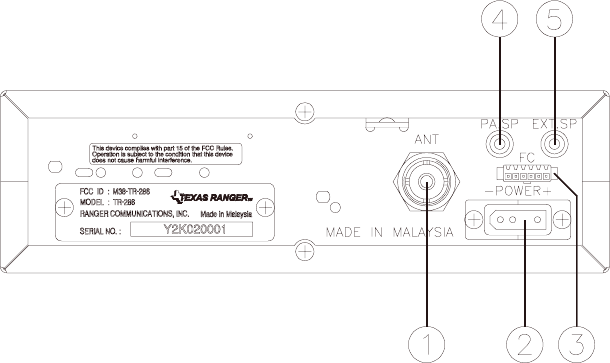
1. ANTENNA : This jack accepts 50 Ohms coaxial cable with a PL- 259
type plug.
2. POWER : This accepts 13.8V DC power cable with built-in fuse. The
power cord provided with the radio has a black and red wire. The black
goes to the negative and the red goes to the positive.
3. F. C. : This connector is used for an external frequency counter. It
indicate the frequency of the selected channel.
4. PA. SP. : This jack is for PA operation. Before operating, you must first
connect a PA speaker (8 ohms, 4W) to this jack.
5. EXT. SP. : This jack accepts 4 to 8 ohms, 4 watts external speaker. When
the external speaker is connected to this jack, the built-in speaker will be
disabled.
- 9 -

FREQUENCY CHART
Channel Channel
Frequency Channel Channel
Frequency
1 26.965 MHz 21 27.215 MHz
2 26.975 MHz 22 27.225 MHz
3 26.985 MHz 23 27.255 MHz
4 27.005 MHz 24 27.235 MHz
5 27.015 MHz 25 27.245 MHz
6 27.025 MHz 26 27.265 MHz
7 27.035 MHz 27 27.275 MHz
8 27.055 MHz 28 27.285 MHz
9 27.065 MHz 29 27.295 MHz
10 27.075 MHz 30 27.305 MHz
11 27.085 MHz 31 27.315 MHz
12 27.105 MHz 32 27.325 MHz
13 27.115 MHz 33 27.335 MHz
14 27.125 MHz 34 27.345 MHz
15 27.135 MHz 35 27.355 MHz
16 27.155 MHz 36 27.365 MHz
17 27.165 MHz 37 27.375 MHz
18 27.175 MHz 38 27.385 MHz
19 27.185 MHz 39 27.395 MHz
20 27.205 MHz 40 27.405 MHz
PROCEDURE TO RECEIVE AND TRANSMIT
A. MICROPHONE
The receiver and transmitter are controlled by the push-to-talk switch on the
microphone. Press the switch and the transmitter is activated, release switch
to receive. When transmitting, hold the microphone two inches from the
mouth and speak clearly in a normal "voice". The transceiver come complete
with a low impedance dynamic microphone.
B. PROCEDURE TO RECEIVE
1. Be sure that power source, microphone and antenna are connected to the
proper connectors before going to the next step.
2. Turn unit on by turning the VOL knob clockwise .
3. Set the VOL for a comfortable listening level.
4. Set the MODE switch to the desire mode.
5. Listen to the background noise from the speaker. Turn the SQ knob
slowly clockwise until the noise just disappear. Level the control at this
setting. This SQ is now properly adjusted. The receiver will remain quiet
until a signal is actually received. Do not advance the control too far, or
some of weaker signal will not be heard.
6. Set the CHANNEL selector switch to the desired channel.
7. Set the RF GAIN control fully clockwise for maximum RF gain.
8. Adjust the CLARIFY control to clarify the SSB signals or to optimize
AM signals.
C. PROCEDURE TO TRANSMIT
1. Select the desired channel of transmission.
2. Set the MIC GAIN control fully clockwise.
- 10 -- 11 - - 12 -
3. If the channel is clear, depress the push-to-talk switch on the microphone
and speak in a normal voice.
RECEIVING SSB SIGNALS
There are three types of signals presently used for communications in the
Citizens Band : AM, USB, LSB. When the MODE switch on your unit is
placed in the AM position, only standard double-sideband, full carrier
signals will be detected. An SSB signal may be recognized while in the AM
mode by its characteristic "Donald Duck" sound and the inability of the
detector to produce an intelligible output. The USB and LSB modes will
detect upper sideband and lower sideband respectively, and standard AM
signals.
SSB reception differs from standard AM reception in that SSB receiver does
not require a carrier or opposite sideband to produce an intelligible signal. A
single-sideband transmitted signal consists only of the upper or the lower
sideband and no carrier is transmitted. The elimination of the carrier from
the AM signal helps to eliminate the biggest cause of whistles and tones
heard on channels which make even moderately strong AM signals
unreadable. Also, SSB takes only half of an AM channel, therefore two SSB
conversations will fit into each channel, expanding the 40 AM channels to
80 SSB channels. The reduction in channel space required also helps in the
receiver because only half of the noise and interference can be received with
100% of the SSB signal.
An SSB signal may be received only when the listening receiver is
functioning in the same mode. In other words, an upper sideband signal
(USB) may be made intelligible only if the receiver is functioning in the
USB position.
If a lower sideband (LSB) signal is heard when the receiver is in the USB
mode, no amount of tuning will make the signal intelligible. The reason for
this may be understood if you consider that when the modulation is applied
to the transmitter's microphone in the USB mode, the transmitter output
frequency is increased whereas in the LSB mode the transmitter's output
frequency is decreased.
The result in listening to the receiver is that when the MODE switch is in the
proper position (either USB or LSB), a true reproduction of single tone of
modulation will result, and if the tone is increased in frequency (such as a
low-pitched whistle or a high-pitched whistle) you will hear the increase in
the output tone of the receiver. If the incorrect mode is selected, an increase
in tone of a whistle applied to the transmitter will cause a decrease in the
resultant tone from the receiver.
Thus when a voice is used in place of a whistle or tone, in the proper
listening mode the voice will be received correctly whereas in the incorrect
mode, the voice will be translated backwards and cannot be made intelligible
by the CLARIFY control. When listening to an AM transmission, a correct
sideband is heard in either mode since both upper and lower sideband are
received.
Once the desired SSB mode has been selected, frequency adjustment may be
necessary in order to make the incoming signal intelligible. The CLARIFY
control allows the operator to vary frequency above and below the exact-
center frequency of the received signal. If the sound of the incoming signal is
high or low pitched, adjust the operation of the CLARIFY.
Consider it as performing the same function as a phonograph speed control.
When the speed is set too high, voices will be high-pitched and if set too
low, voice will be low-pitched. Also, there is only one correct speed that will
make a particular record is played on a turntable that rotated in the wrong
direction (opposite sideband) no amount of speed control (CLARIFY) will
produce an intelligible sound.
An AM signal received while listening in one of the SSB modes will
produce a steady tone (carrier) in addition to the intelligence, unless the SSB
receiver is tuned to exactly the same frequency by the CLARIFY control.
For simplicity, it is recommended that the AM modes be used to listen to
AM signals.
- 13 -
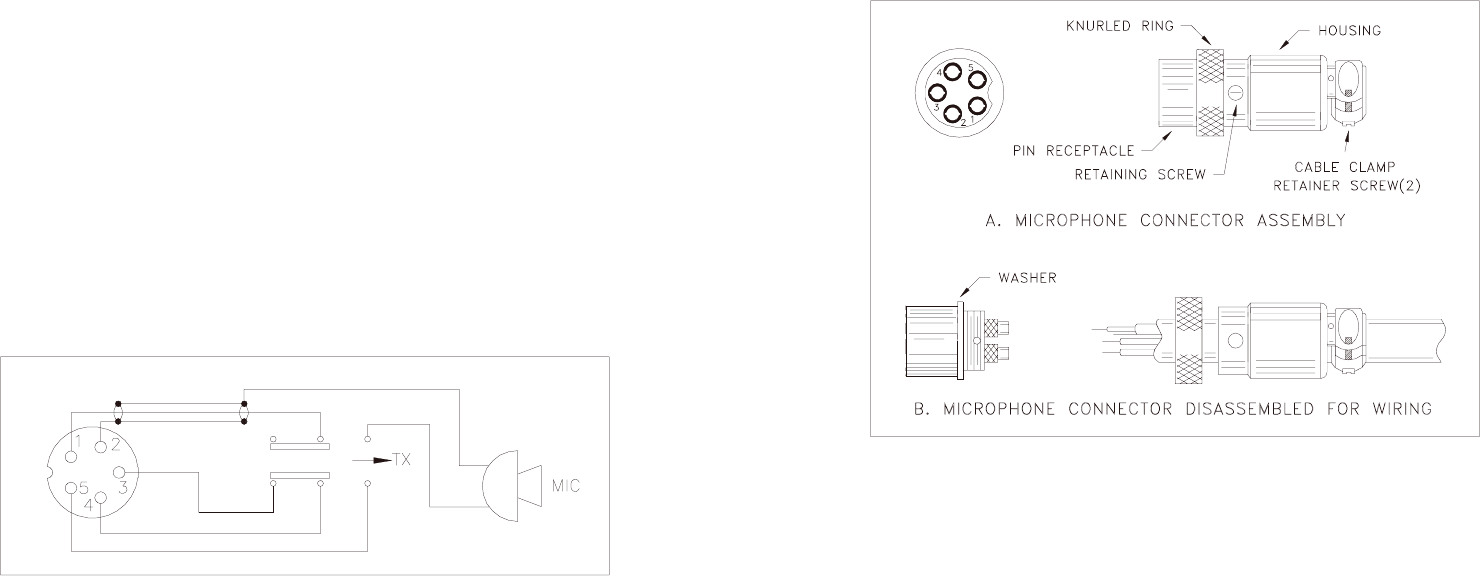
ALTERNATE MICROPHONES AND INSTALLATION
For best results, the user should select a low-impedance dynamic type
microphone or a transistorized microphone. Transistorized type microphones
have a low output impedance characteristics. The microphones must be
provided with a five-lead cable. The audio conductor and its shielded lead
comprise two of the leads. The third lead is for receive control, the forth is
for grounding and fifth is for transmit control.
The microphone should provide the functions shown in schematic below.
5 WIRE MIC CABLE
Pin Number Mic. Cable Lead
1 Audio Lead
2 Audio Shield
3 Receive Control
4 Grounding
5 Transmit Control
Fig. 1 Schematic of microphone
If the microphone to be used is provided with pre-cut leads, they must be
revised as follows :
1. Cut leads so that they extend 7/16" beyond the plastic insulating jacket of
the microphone cable.
2. All leads should be cut to the same length. Strip the ends of each wire 1/8"
and tin the exposed wire.
Before beginning the actual wiring, read carefully the circuit and wiring
information provided with the microphone you select. Use the minimum heat
required in soldering the connections. Keep the exposed wire lengths to a
minimum to avoid shorting when the microphone plug is reassembled.
Fig 2. Microphone plug wiring
To wire the microphone cable to the plug provided, proceed as follows :
1. Remove the retaining screw.
2. Unscrew the housing from the pin receptacle body.
3. Loosen the two cable clamp retainer screws.
4. Feed the microphone cable through the housing, knurled ring and washer
as shown Figure 2.
- 14 -- 15 -
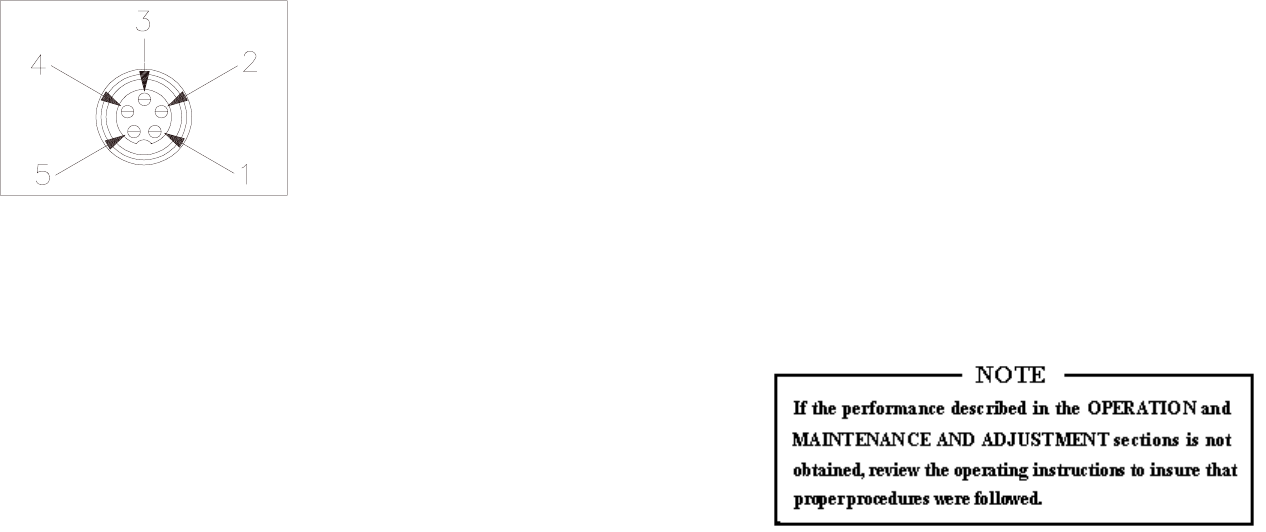
5. The wires must now be soldered to the pins as indicated in the above
wiring tables. If a vise or clamping tool is available it should be used to
hold the pin receptacle body during the soldering operation, so that both
hands are free to perform the soldering. If a vise or clamping tool is not
available, the pin receptacle body can be held in a stationary position by
inserting it into the microphone jack on the front panel. The numbers of the
microphone plug are shown in Figure 3, as viewed from the back of the
plug. Before soldering the wire to the pins, pre-tin the wire receptacle of
each pin of the plug.
Fig 3. Microphone pin numbers
6. Be sure that the housing and the knurled ring of Figure 2 are pushed back
onto the microphone cable before starting to solder. If the washer is not
captive to the pin receptacle body, make sure that it is placed on the
threaded portion of the pin receptacle body before soldering.
7. If the microphone jack is used to hold the pin receptacle during soldering
operation, best results are obtained when the connections to pin 1 and 3 are
made first and then the connections to pins 2, 4 and 5. Use a minimum
amount of soldering and be careful to prevent excessive solder
accumulation on pins, which could cause a short between the pin and the
microphone plug housing.
8. When all soldering connections to the pins of the microphone are
completed, push the knurled ring and the housing forward and screw the
housing onto the threaded portion of the pin receptacle body. Note the
location of the screw clearance hole in the plug housing with respect to the
threaded hole in the pin receptacle body. When the housing is completely
threaded into the pin receptacle body, a final fraction of a turn either
clockwise or counterclockwise may be required to align the screw hole
with the threaded hole in the pin receptacle body. When these are aligned,
the retaining screw is then screwed into place to secure the housing to the
pin receptacle body.
9. The two cable clamp retainer screws should now be tightened to secure
the housing to the microphone cord. If the cutting directions have been
carefully followed, the cable clamp should secure to the insulation jacket
of the microphone cable.
10. Upon completion of the microphone plug wiring, connect and secure the
microphone plug in the transceiver.
MAINTENANCE AND ADJUSTMENT
This transceiver is specifically designed for the environment encountered in
mobile installations. The use of all solid state circuitry and its light weight
result in high reliability. Should a failure occur, however, replace parts only
with identical parts. Do not substitute.
- 16 -- 17 - - 18 -
A FEW RULES THAT SHOULD BE OBEYED
1. You are not allowed to carry on a conversation with another station for
more than five minutes at a time without taking a one-minute break, to give
others a chance to use the channel.
2. You are not allowed to blast others off the air by over-powering them with
illegally amplified transmitter power, or illegally high antennas.
3. You can't use the transceiver to promote illegal activities.
4. You are not allowed to use profanity.
5. You may not play music in your transceiver.
6. You may not use your transceiver to sell merchandise or professional
service.
HOW YOUR CB CAN SERVE YOU
1. Warn of traffic tie ups ahead.
2. Provide weather and road information.
3. Provide help fast in event of emergency or breakdown.
4. Suggest good spots to eat and sleep.
5. Make long trips more interesting and help keep you awake.
6. Provide direct contact with your office or home.
7. Make friends for you as you travel.
8. Provide "local information" to find your destination.
9. Help law enforcement officers by reporting drunk and reckless drivers.
USE CHANNEL 9 FOR EMERGENCY MESSAGES
ONLY
FCC gives the following examples of permitted and prohibited types of
communications for use in emergency. These are guidelines and are not
intend to be all inclusive.
Permitted Example Message
YES "A tornado sighted six miles north of town."
NO "This is observation post number 10. No tornado sighted."
YES "I am out of gas on Interstate 95."
NO "I am out of gas in my driveway."
YES "There is a four-car collision at Exit 10 on the Beltway,
send police and ambulance."
NO "Traffic is moving smoothly on the Beltway."
YES "Base to Unit 1, the Weather Bureau has just issued a
thunder storm warning. Bring the sailboat into port."
NO "Attention all motorists. The Weather Bureau advises that
the snow tomorrow will accumulate 4 to 6 inches.
YES "There is a fire in the building on the corner of 6th and
Main Streets."
NO "This is Halloween patrol unit number 3. Everything is
quiet here."
- 19 - - 20 -