Remote Possibilities RBTX1A Remote Control Transmitter User Manual Basic 01 V1

Remote Possibilities LLC Remote Control Transmitter Basic 01 V1

Users Manual

  by Remote Possibilities LLC BASIC-01-MAN Ver.0_20041212  Page 1 of 1818 The RRemote Basic™ System The RRemote Basic™ System is designed to provide a very small, yet high output, remote control for model railroads.  By stepping outside the traditional 27 & 75 MHz “box” we are able to offer a compact modular design with the smallest transmitter in the industry. Configurability The RRemote Basic™ System offers great flexibility and configurability to meet a variety of applications.   ?? Add one or more BasicPWM™ drivers to the RRemote BasicRX™ to add direct motor drive in 5 Amp increments. ?? Add a BasicServo™ driver to the RRemote BasicRX™ to control your live steam locomotives.  ?? Add a BasicRelay™ driver to the RRemote BasicRX™ to remotely control large (up to 3 Amp) loads, such as track switches. ?? Use the RRemote BasicRX™ without driver boards to remotely control small (<500 mA) loads, such as lights. Customization Because the RRemote Basic™ System is so flexible, both standard and semi-custom firmware is available to meet the needs of our customers.  Special feature requests are welcome, and will be accommodated on a “time available” basis.   Dimensions The standard footprint for the RRemote BasicRX™, BasicPWM™, and BasicServo™*, and BasicSound™* boards is 1 x 2 inches.  The BasicRelay™ board, which is generally used at trackside, is larger (approx 3 inches square).
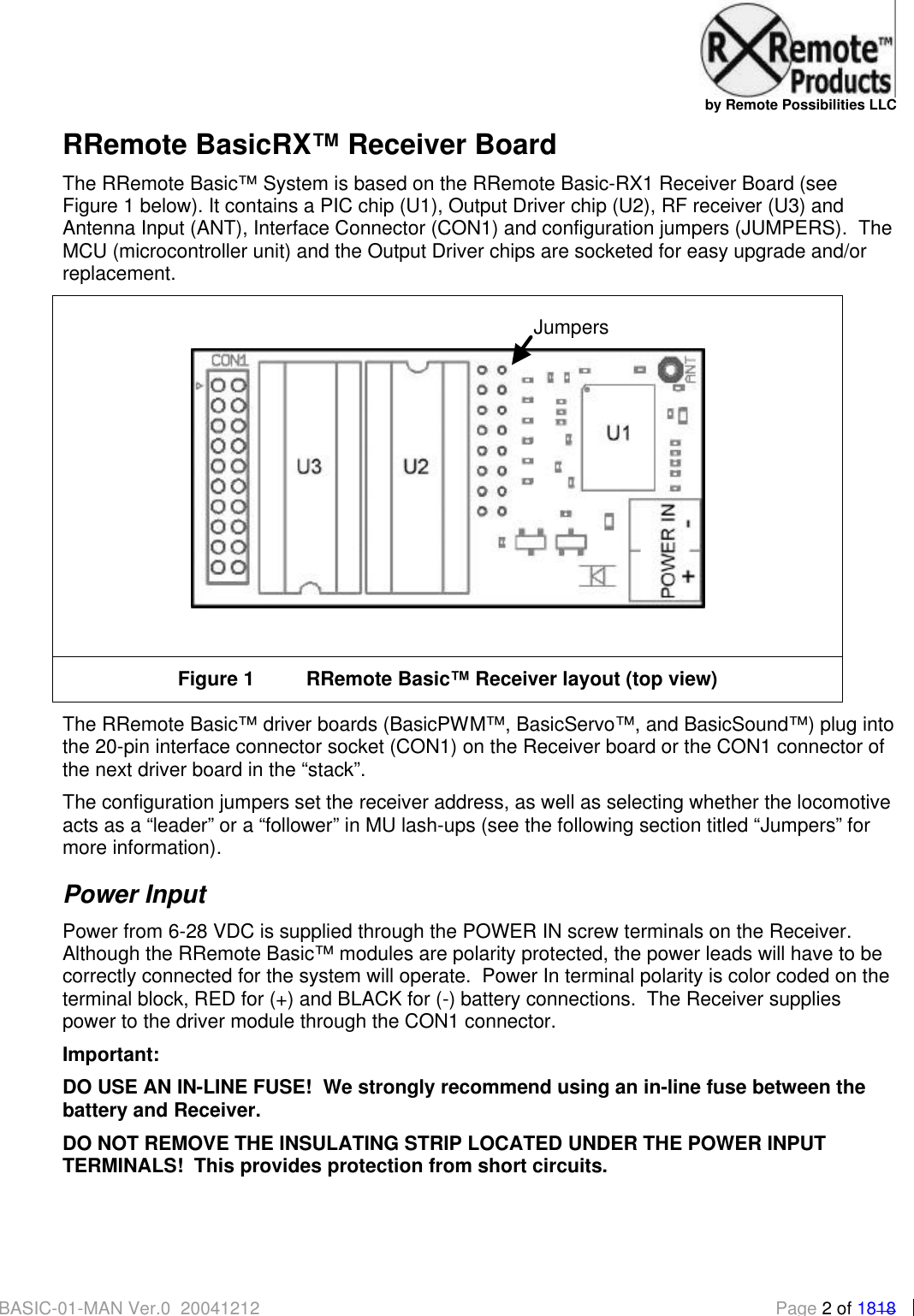
  by Remote Possibilities LLC BASIC-01-MAN Ver.0_20041212  Page 2 of 1818 RRemote BasicRX™ Receiver Board The RRemote Basic™ System is based on the RRemote Basic-RX1 Receiver Board (see Figure 1 below). It contains a PIC chip (U1), Output Driver chip (U2), RF receiver (U3) and Antenna Input (ANT), Interface Connector (CON1) and configuration jumpers (JUMPERS).  The MCU (microcontroller unit) and the Output Driver chips are socketed for easy upgrade and/or replacement.   Figure 1 RRemote Basic™ Receiver layout (top view) The RRemote Basic™ driver boards (BasicPWM™, BasicServo™, and BasicSound™) plug into the 20-pin interface connector socket (CON1) on the Receiver board or the CON1 connector of the next driver board in the “stack”.   The configuration jumpers set the receiver address, as well as selecting whether the locomotive acts as a “leader” or a “follower” in MU lash-ups (see the following section titled “Jumpers” for more information). Power Input Power from 6-28 VDC is supplied through the POWER IN screw terminals on the Receiver.  Although the RRemote Basic™ modules are polarity protected, the power leads will have to be correctly connected for the system will operate.  Power In terminal polarity is color coded on the terminal block, RED for (+) and BLACK for (-) battery connections.  The Receiver supplies power to the driver module through the CON1 connector.   Important: DO USE AN IN-LINE FUSE!  We strongly recommend using an in-line fuse between the battery and Receiver.   DO NOT REMOVE THE INSULATING STRIP LOCATED UNDER THE POWER INPUT TERMINALS!  This provides protection from short circuits.  Jumpers
  by Remote Possibilities LLC BASIC-01-MAN Ver.0_20041212  Page 3 of 1818 Antenna The RRemote Basic™ Receiver is supplied with an antenna wire connected to the “ANT” (Antenna) pad of the Receiver board.  The ANT wire is long enough to allow flexibility in installations, and coiled for compactness.  The free end of the coil can be pulled to extend the antenna.  The ANT wire can be trimmed to length, but a minimum length of 3.25 inches should be retained to assure a ¼ wavelength antenna.  A vertical antenna will show less directionality, but horizontal installations will also work fine at shorter ranges. Jumpers The Receiver address, as well as the whether the Receiver will function as a “lead” or “follower” locomotive in a Multi-Unit (MU) lash-up, is set by means of jumpers. set the as well as the role of the Receiver when operated as part of a Multi-Unit (MU) lash-up, are set  Address Jumpers The address jumpers on the receiver board are labeled 1 through 6.  63 individual unit addresses can be set, with unit address “00” reserved for secondary engines in MU consists (see section titled “Multi-Unit Configuration” for more information).  Unless otherwise requested the address jumpers will be pre-set at the factory, with no configuration required for standard operation.   Refer to the “Address Jumper Reference” at the end of this document for details on changing Receiver/Transmitter address jumper settings. The configuration jumpers can be fitted with a ribbon cable to allow the configuration jumpers to be positioned in a convenient location and set with miniature DIP switches.  This modification would be useful if you find yourself changing jumper settings often.  A Jumper Extension kit can be ordered from www.rremote.com to make this easier. Data Jumpers The data jumpers are used to select whether the Receiver will output data as the “leader” engine, or accept data from another Receiver as a “follower” engine in MU configurations.  When using the TX-1 Keyfob Transmitter all “follower” engines should be set to “00” (jumpers 1-6 installed) to program the “follower” to accept commands from the “lead” engine.  The “leader” engine receives commands via it’s normal address and retransmits them tagged with address “00” to the “followers” via the MU connection. Aux Outputs When activated each Aux Out provides a connection to electrical ground.  This type of Aux Out can drive circuits (headlamps, ditch lights, etc) and “masquerade” as a reed switch to directly trigger sound units.  The Aux Out can handle a single output load of 500 mA (milliamps), with a 1000 mA (1000mA = 1 Amp) total load for all Aux Outs combined. The Auxiliary Outputs are connected via the Interface Connector CON1.  An Aux Out ribbon cable connector is supplied with the system to simplify making connections, with extras available through www.rremote.com.  Alternately, a 2mm pitch 20 contact pin header can be
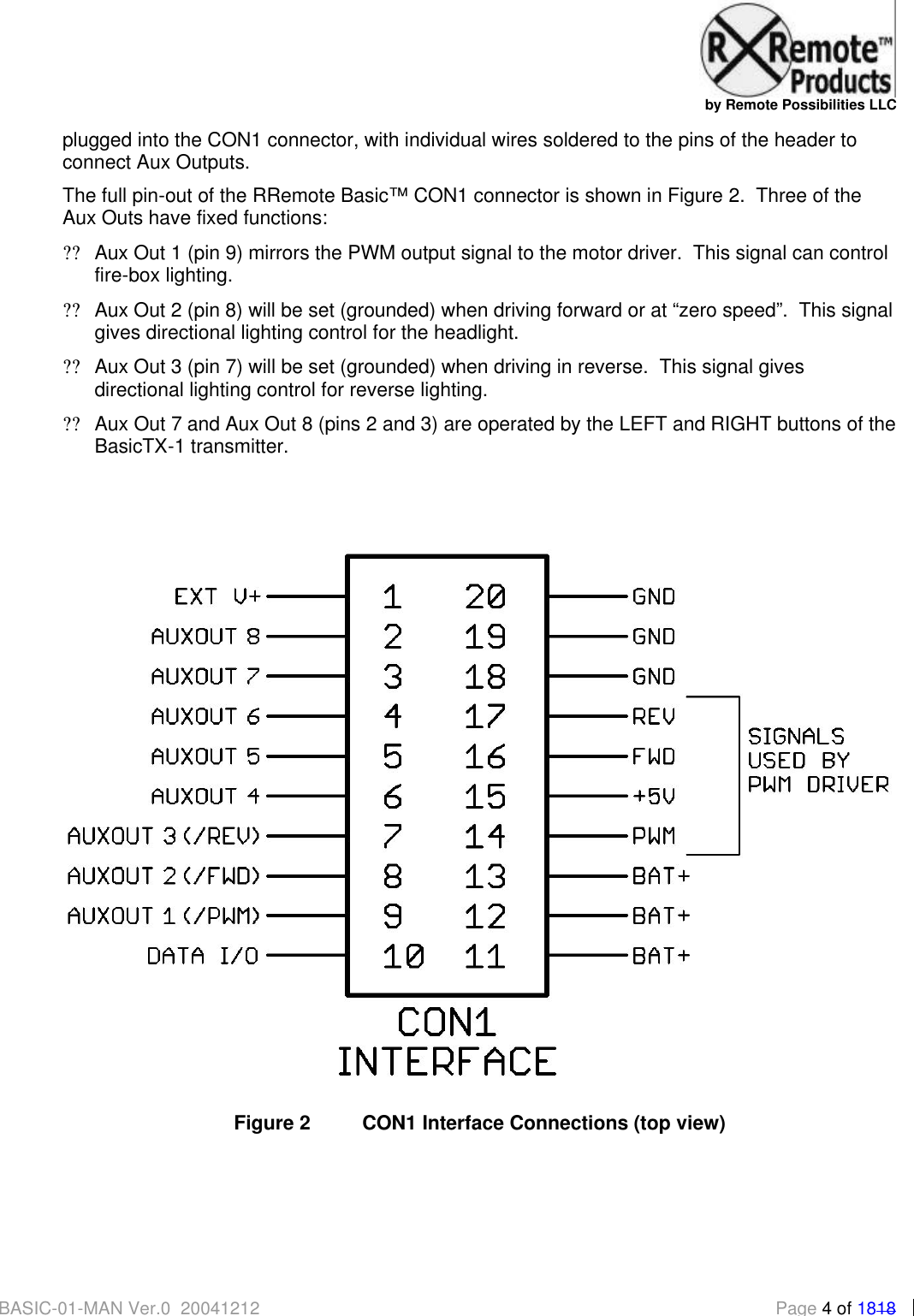
  by Remote Possibilities LLC BASIC-01-MAN Ver.0_20041212  Page 4 of 1818 plugged into the CON1 connector, with individual wires soldered to the pins of the header to connect Aux Outputs.   The full pin-out of the RRemote Basic™ CON1 connector is shown in Figure 2.  Three of the Aux Outs have fixed functions: ?? Aux Out 1 (pin 9) mirrors the PWM output signal to the motor driver.  This signal can control fire-box lighting. ?? Aux Out 2 (pin 8) will be set (grounded) when driving forward or at “zero speed”.  This signal gives directional lighting control for the headlight. ?? Aux Out 3 (pin 7) will be set (grounded) when driving in reverse.  This signal gives directional lighting control for reverse lighting. ?? Aux Out 7 and Aux Out 8 (pins 2 and 3) are operated by the LEFT and RIGHT buttons of the BasicTX-1 transmitter.    Figure 2 CON1 Interface Connections (top view)
  by Remote Possibilities LLC BASIC-01-MAN Ver.0_20041212  Page 5 of 1818 Triggering Sound Boards Aux Outputs 7 & 8 can be directly connected to the “trigger inputs” of most sound boards, and perform just like a reed switch for this purpose.  Remember to keep the grounds of the Receiver and the sound board connected. Aux Output Precautions The following precautions must be followed to avoid damage to the Aux Output Driver chip and to the RRemote Basic Receiver board as a whole: a) The power supply for external Aux Out loads must be less than 36 VDC b) The ground (-) terminal of the RRemote Basic™ POWER IN connector MUST be connected to the ground (-) terminal of the power supply of the external load to provide common grounding, and c) A maximum of 1000 mA (1 amp) can be controlled by the Aux Output Driver chip, and exceeding 500 mA through any one Aux Output will result in damage. d) If connecting a relay, motor or any other inductive type load, CON1 pin 9 MUST be connected to the positive (+) terminal of the supply voltage for the Aux Out.  It is advised that an external “snubber” (diode or RC network) be installed across the load to prevent damage to the Output Driver chip (from “inductive kickback” or “back-EMF spike”).   Output Driver Chip Damage A damaged Aux Output Driver chip (labeled U2 on the underside of the board) will usually show one or more of the following symptoms: ?? outputs won’t set ?? outputs are stuck “on” and won’t unset ?? the chip gets hot and releases all of its “magic smoke” The usual cause of any of these problems is exceeding the current or voltage limits of the Aux Outputs, or getting a “spike” from an inductive load (motor, solenoid, relay, etc) without a snubber.  Remember to always follow the precautions listed under “Aux Output Precautions”.   The Output Driver chip is easily replaced following the procedure in “Replacing Chips”. Replacement Output Driver chips (ULN2803A) are available either through www.rremote.com or an electronics distributor of your choice.  The Output Driver chip should only be replaced after you have identified and fixed the cause of the damage, disconnected the offending load, or determined that the chip just died of its own volition. PIC Chip Swaps The PIC chip (labeled U1 on the underside of the board) controls the operation of the Receiver board.  If you request customized features for your Receiver, upgrade your system to the Enhanced transmitter, or wish to change the role of the Receiver (e.g. changing from on-board throttle to controlling a Relay Driver board) you will need to swap out the PIC chip.  Follow the procedure in “Replacing Chips”.
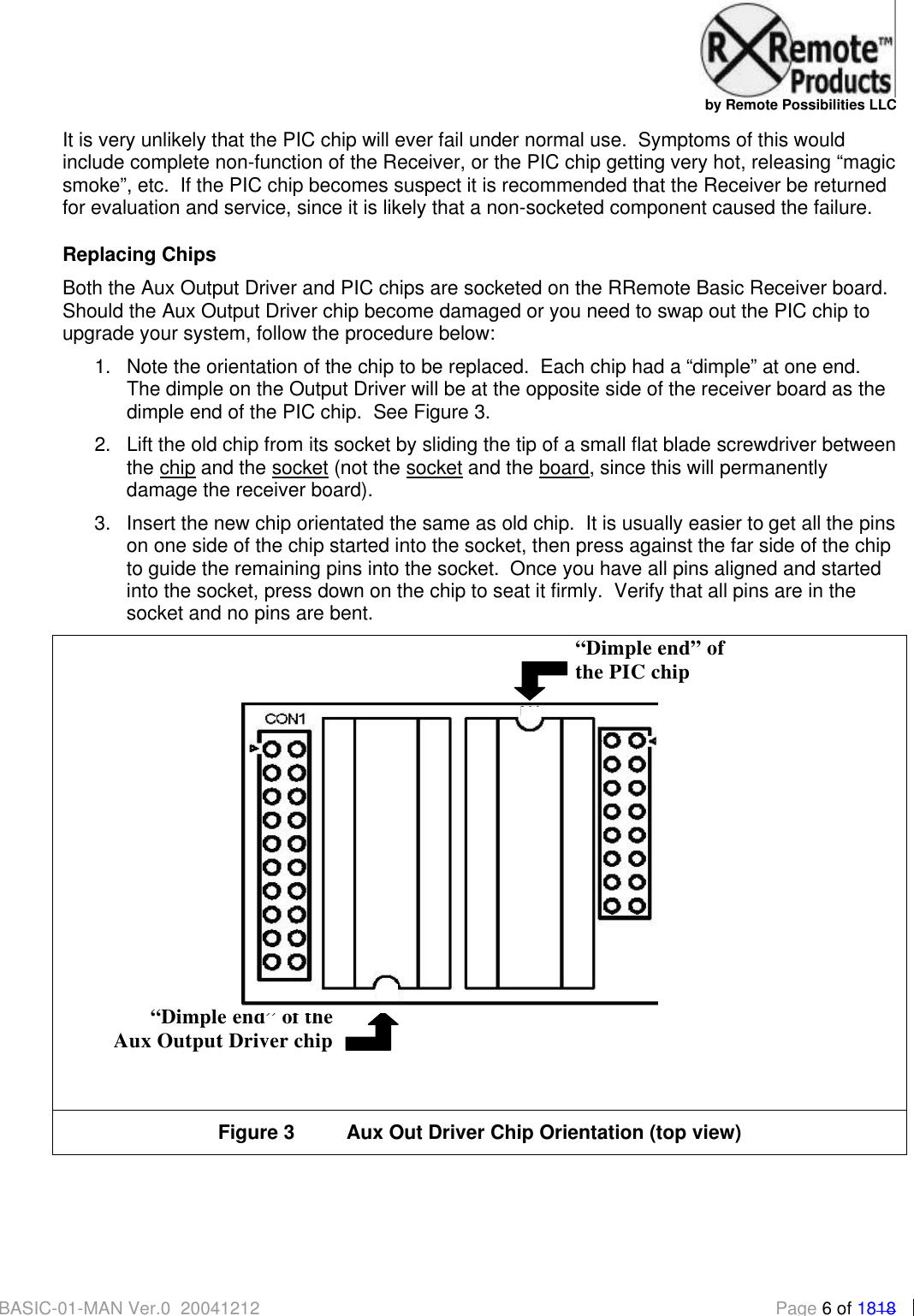
  by Remote Possibilities LLC BASIC-01-MAN Ver.0_20041212  Page 6 of 1818 It is very unlikely that the PIC chip will ever fail under normal use.  Symptoms of this would include complete non-function of the Receiver, or the PIC chip getting very hot, releasing “magic smoke”, etc.  If the PIC chip becomes suspect it is recommended that the Receiver be returned for evaluation and service, since it is likely that a non-socketed component caused the failure. Replacing Chips Both the Aux Output Driver and PIC chips are socketed on the RRemote Basic Receiver board.  Should the Aux Output Driver chip become damaged or you need to swap out the PIC chip to upgrade your system, follow the procedure below: 1. Note the orientation of the chip to be replaced.  Each chip had a “dimple” at one end.  The dimple on the Output Driver will be at the opposite side of the receiver board as the dimple end of the PIC chip.  See Figure 3. 2. Lift the old chip from its socket by sliding the tip of a small flat blade screwdriver between the chip and the socket (not the socket and the board, since this will permanently damage the receiver board).  3. Insert the new chip orientated the same as old chip.  It is usually easier to get all the pins on one side of the chip started into the socket, then press against the far side of the chip to guide the remaining pins into the socket.  Once you have all pins aligned and started into the socket, press down on the chip to seat it firmly.  Verify that all pins are in the socket and no pins are bent.   Figure 3 Aux Out Driver Chip Orientation (top view)    “Dimple end” of the Aux Output Driver chip “Dimple end” of  the PIC chip
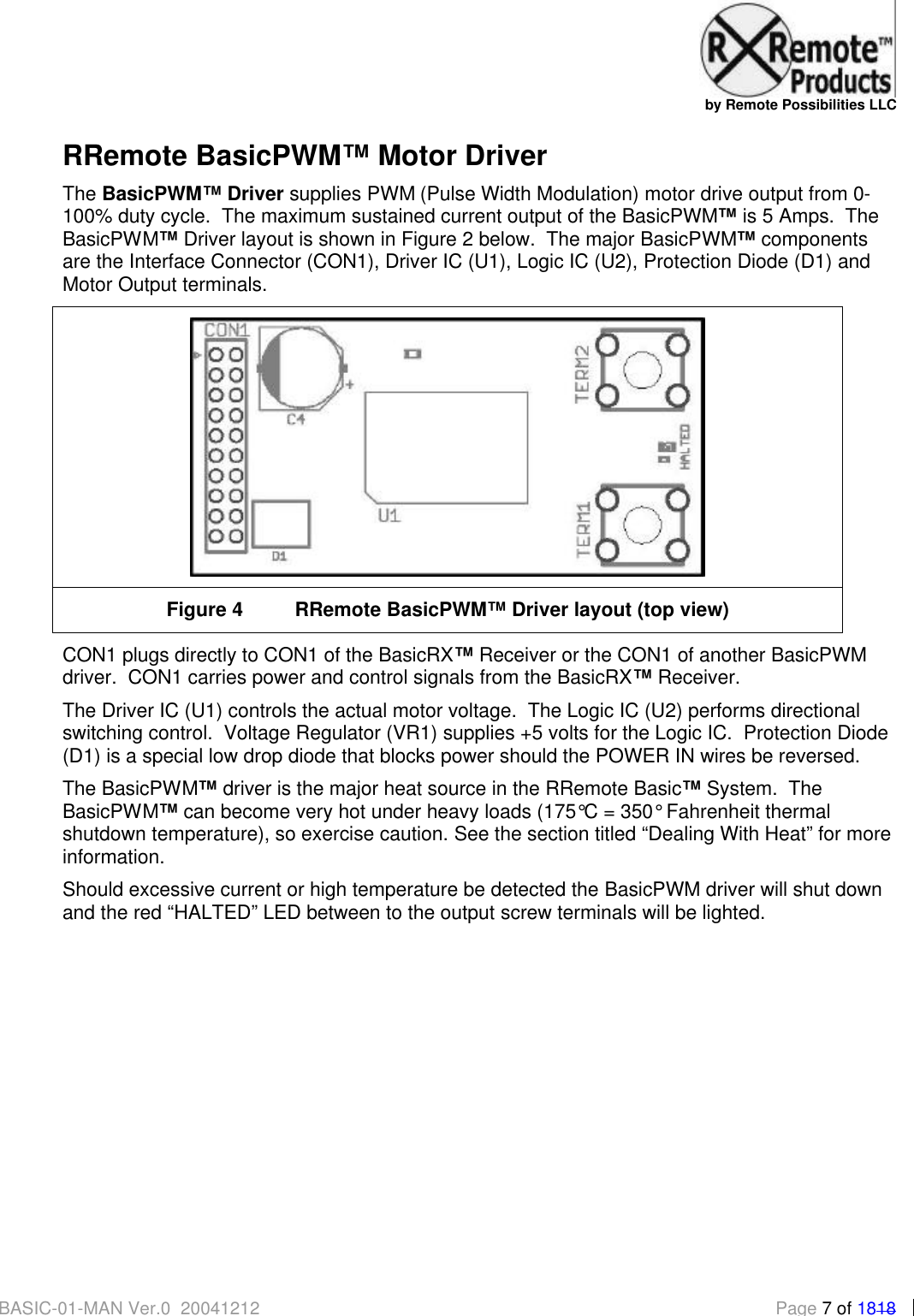
  by Remote Possibilities LLC BASIC-01-MAN Ver.0_20041212  Page 7 of 1818 RRemote BasicPWM™ Motor Driver The BasicPWM™ Driver supplies PWM (Pulse Width Modulation) motor drive output from 0-100% duty cycle.  The maximum sustained current output of the BasicPWM™ is 5 Amps.  The BasicPWM™ Driver layout is shown in Figure 2 below.  The major BasicPWM™ components are the Interface Connector (CON1), Driver IC (U1), Logic IC (U2), Protection Diode (D1) and Motor Output terminals.    Figure 4 RRemote BasicPWM™ Driver layout (top view) CON1 plugs directly to CON1 of the BasicRX™ Receiver or the CON1 of another BasicPWM driver.  CON1 carries power and control signals from the BasicRX™ Receiver. The Driver IC (U1) controls the actual motor voltage.  The Logic IC (U2) performs directional switching control.  Voltage Regulator (VR1) supplies +5 volts for the Logic IC.  Protection Diode (D1) is a special low drop diode that blocks power should the POWER IN wires be reversed.   The BasicPWM™ driver is the major heat source in the RRemote Basic™ System.  The BasicPWM™ can become very hot under heavy loads (175°C = 350° Fahrenheit thermal shutdown temperature), so exercise caution. See the section titled “Dealing With Heat” for more information. Should excessive current or high temperature be detected the BasicPWM driver will shut down and the red “HALTED” LED between to the output screw terminals will be lighted.
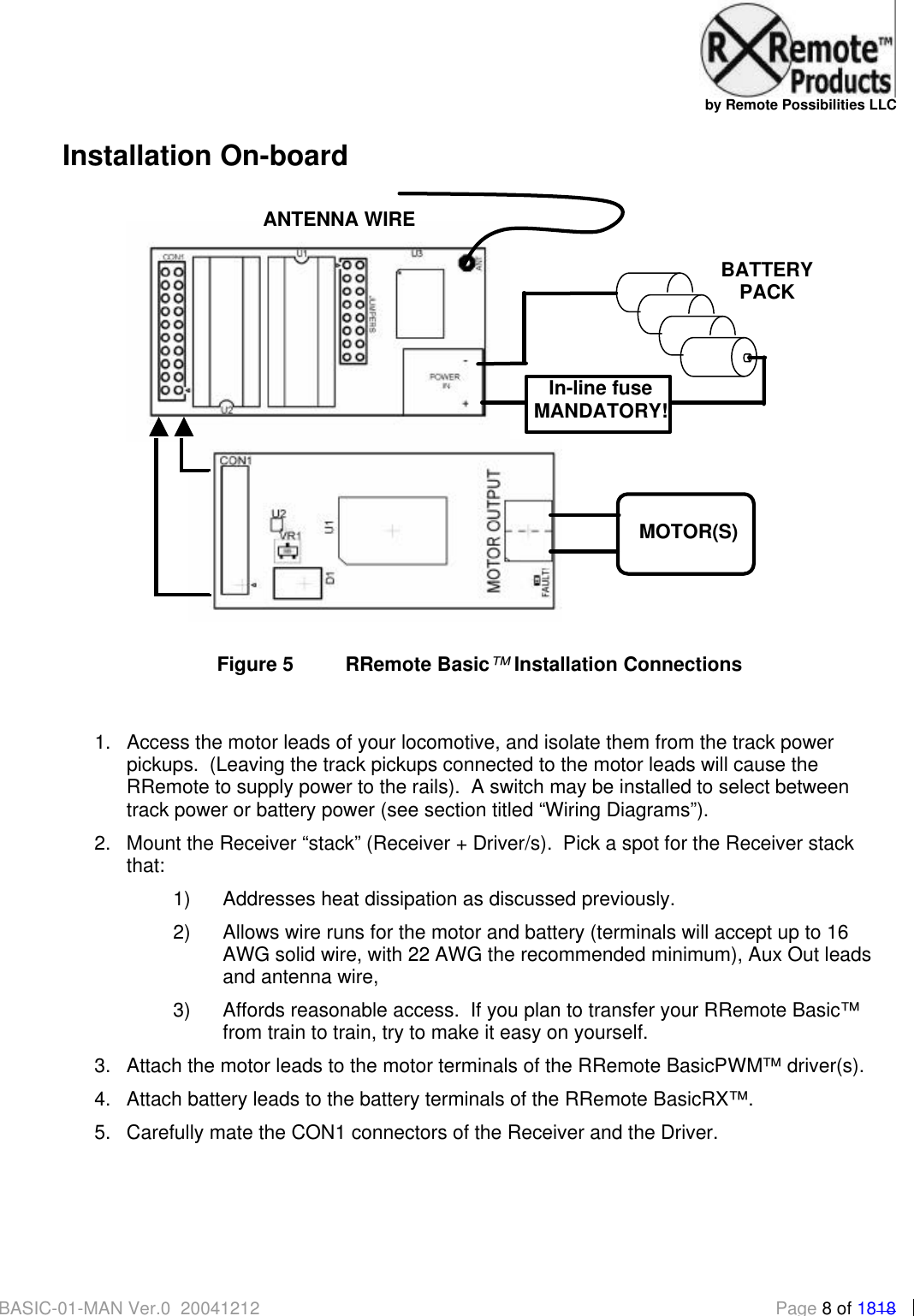
  by Remote Possibilities LLC BASIC-01-MAN Ver.0_20041212  Page 8 of 1818 Installation On-board   Figure 5 RRemote Basic™ Installation Connections  1. Access the motor leads of your locomotive, and isolate them from the track power pickups.  (Leaving the track pickups connected to the motor leads will cause the RRemote to supply power to the rails).  A switch may be installed to select between track power or battery power (see section titled “Wiring Diagrams”). 2. Mount the Receiver “stack” (Receiver + Driver/s).  Pick a spot for the Receiver stack that: 1) Addresses heat dissipation as discussed previously.   2) Allows wire runs for the motor and battery (terminals will accept up to 16 AWG solid wire, with 22 AWG the recommended minimum), Aux Out leads and antenna wire, 3) Affords reasonable access.  If you plan to transfer your RRemote Basic™ from train to train, try to make it easy on yourself.  3. Attach the motor leads to the motor terminals of the RRemote BasicPWM™ driver(s).   4. Attach battery leads to the battery terminals of the RRemote BasicRX™. 5. Carefully mate the CON1 connectors of the Receiver and the Driver.   + - In-line fuse MANDATORY! MOTOR(S) BATTERY PACK ANTENNA WIRE
  by Remote Possibilities LLC BASIC-01-MAN Ver.0_20041212  Page 9 of 1818 6. Before buttoning up your loco or tender, test for excessive heating and proper motor direction.  Apply power to the Receiver stack, then press and hold the forward command button of the transmitter for 10 seconds.  Check: a)   there is not excessive heating (from a mis-wire, excessive loading, etc) b) the direction of rotation of the wheels.  If the wheels are turning backward in response to the forward command, remove power and reverse the motor leads 7. Once you have confirmed the safe and correct operation of the receiver you can reassemble the car. 8. Installation is complete. For light-duty or temporary mounting, a small amount of 3M Outdoor Mounting Tape (available at most home improvement stores) is attached to the bottom of both the Receiver and BasicPWM driver boards.  It sticks well to most any clean dry surface, provides electrical insulation, and is just the right width.  Remove the red plastic backing to attach the Receiver.  If you re-apply 3M Outdoor Mounting Tape just use a little bit at either end of the Receiver stack: if you use too much you might not be able to pry the Receiver loose again. For heavy duty mounting, the BasicPWM has two holes for #2 screws.  Care should be taken when mounting the Driver to avoid shorting the output terminals or the CON1 connector area.  In the near future www.rremote.com will offer polymer heat-sink pads (conduct heat but not electricity) to make the heatsink mounting process easier. Dealing with Heat Planning for heat dissipation is important.  The RRemote Basic can generate heat just like any other remote control/throttle unit, so think about what kind of load you will be pulling when planning your installation.  Automatic thermal shutdown will happen when the internal temperature of the motor driver reaches 175 degrees C.  This will light the “HALTED” LED on the PWM driver board.  If this happens often you have a heat problem, and need to think about adding a heat-sink.  Heavy loads require the use of a heat-sink to help move heat away from the driver.  .  The idea is to spread the heat out over a larger area and let air carry it away.  Heat sinks come in many forms: finned, CPU-type heatsink/cooling fan combinations, or just a piece of sheet metal. How far can your car can go with the exhaust pipe plugged?  A heatsink is like an exhaust pipe, and the heat has to be able to get out of the heat-sink for it to do you any good.  Air flow is the escape route for this heat.
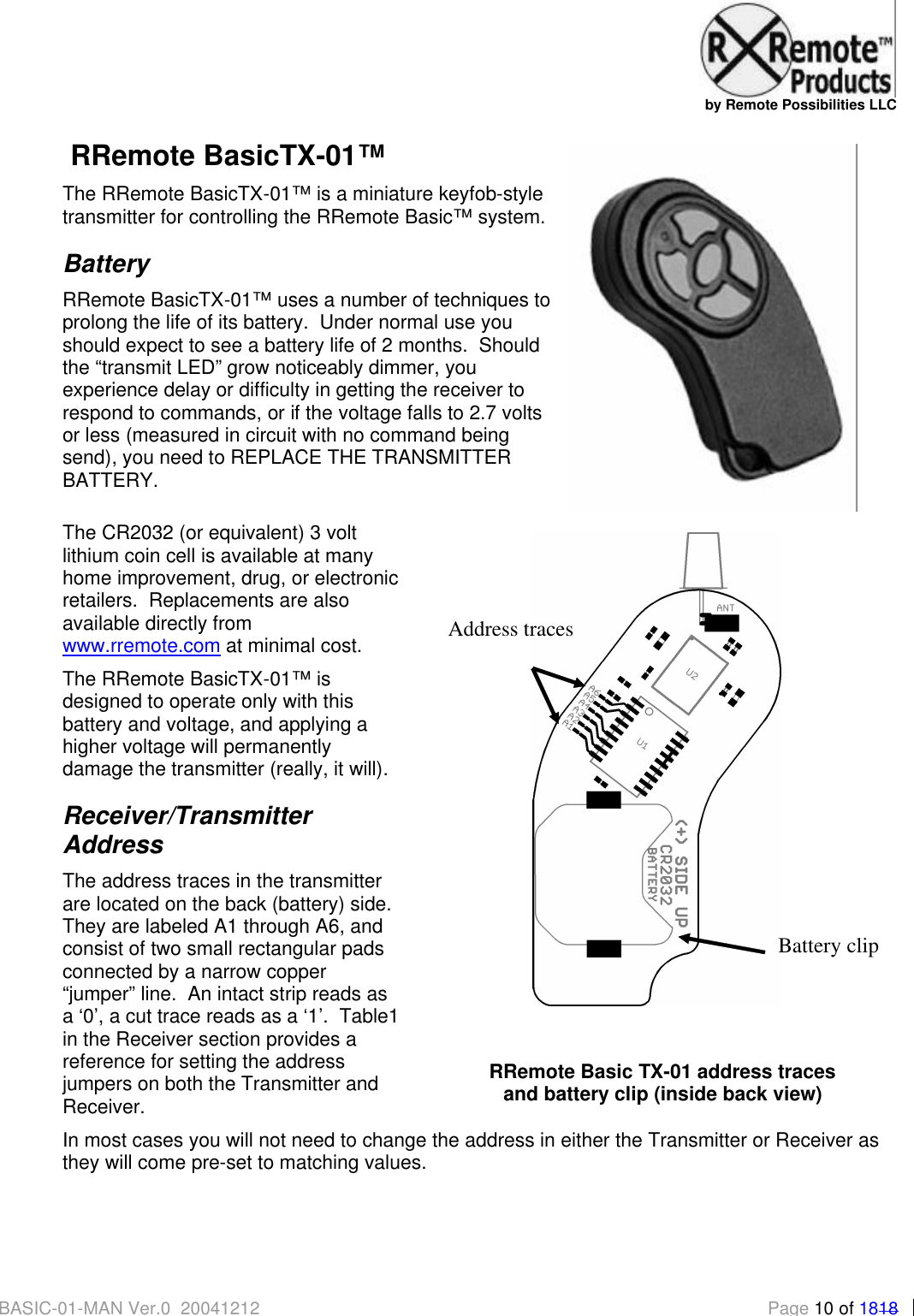
  by Remote Possibilities LLC BASIC-01-MAN Ver.0_20041212 Page 10 of 1818  RRemote BasicTX-01™ The RRemote BasicTX-01™ is a miniature keyfob-style transmitter for controlling the RRemote Basic™ system. Battery RRemote BasicTX-01™ uses a number of techniques to prolong the life of its battery.  Under normal use you should expect to see a battery life of 2 months.  Should the “transmit LED” grow noticeably dimmer, you experience delay or difficulty in getting the receiver to respond to commands, or if the voltage falls to 2.7 volts or less (measured in circuit with no command being send), you need to REPLACE THE TRANSMITTER BATTERY.   The CR2032 (or equivalent) 3 volt lithium coin cell is available at many home improvement, drug, or electronic retailers.  Replacements are also available directly from www.rremote.com at minimal cost. The RRemote BasicTX-01™ is designed to operate only with this battery and voltage, and applying a higher voltage will permanently damage the transmitter (really, it will). Receiver/Transmitter Address The address traces in the transmitter are located on the back (battery) side.  They are labeled A1 through A6, and consist of two small rectangular pads connected by a narrow copper “jumper” line.  An intact strip reads as a ‘0’, a cut trace reads as a ‘1’.  Table1 in the Receiver section provides a reference for setting the address jumpers on both the Transmitter and Receiver. In most cases you will not need to change the address in either the Transmitter or Receiver as they will come pre-set to matching values.   Address traces Battery clip   RRemote Basic TX-01 address traces  and battery clip (inside back view)
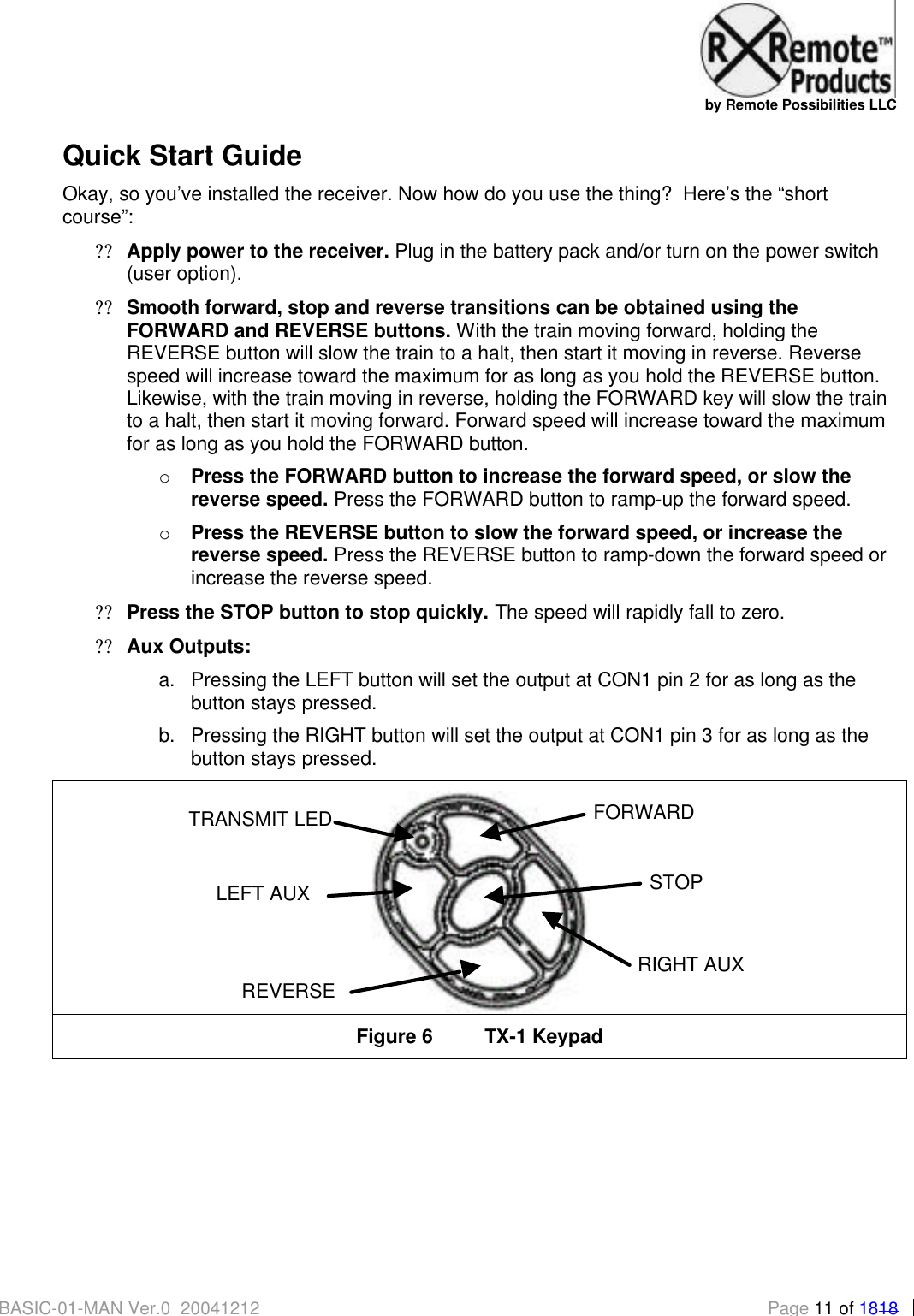
  by Remote Possibilities LLC BASIC-01-MAN Ver.0_20041212 Page 11 of 1818 Quick Start Guide Okay, so you’ve installed the receiver. Now how do you use the thing?  Here’s the “short course”: ?? Apply power to the receiver. Plug in the battery pack and/or turn on the power switch (user option). ?? Smooth forward, stop and reverse transitions can be obtained using the FORWARD and REVERSE buttons. With the train moving forward, holding the REVERSE button will slow the train to a halt, then start it moving in reverse. Reverse speed will increase toward the maximum for as long as you hold the REVERSE button.  Likewise, with the train moving in reverse, holding the FORWARD key will slow the train to a halt, then start it moving forward. Forward speed will increase toward the maximum for as long as you hold the FORWARD button. o Press the FORWARD button to increase the forward speed, or slow the reverse speed. Press the FORWARD button to ramp-up the forward speed. o Press the REVERSE button to slow the forward speed, or increase the reverse speed. Press the REVERSE button to ramp-down the forward speed or increase the reverse speed. ?? Press the STOP button to stop quickly. The speed will rapidly fall to zero. ?? Aux Outputs:  a. Pressing the LEFT button will set the output at CON1 pin 2 for as long as the button stays pressed. b. Pressing the RIGHT button will set the output at CON1 pin 3 for as long as the button stays pressed.  Figure 6 TX-1 Keypad  FORWARD REVERSE LEFT AUX RIGHT AUX TRANSMIT LEDSTOP
  by Remote Possibilities LLC BASIC-01-MAN Ver.0_20041212 Page 12 of 1818  RRemote Basic™ Relay Driver The RRemote Basic™ Relay Driver provides 8 DPDT relays with 5 Amp outputs suitable for control of switch motors, solenoid-type track switches, lighting, or other accessories.  Configured for “make/break” duty each relay can switch 10 Amps, and when configured for “reversing” duty each relay can switch 5 Amps. The 5 Amp 8 relay board measures approximately 2 ¾ inches square. Release date: TBA  RRemote Basic™ Servo Driver The RRemote Basic™ Servo Driver provides up to 4 servo outputs for control of ‘live steam’ or accessories. Release date: TBA.
  by Remote Possibilities LLC BASIC-01-MAN Ver.0_20041212 Page 13 of 1818      Wiring Diagrams  & Jumper Appendix
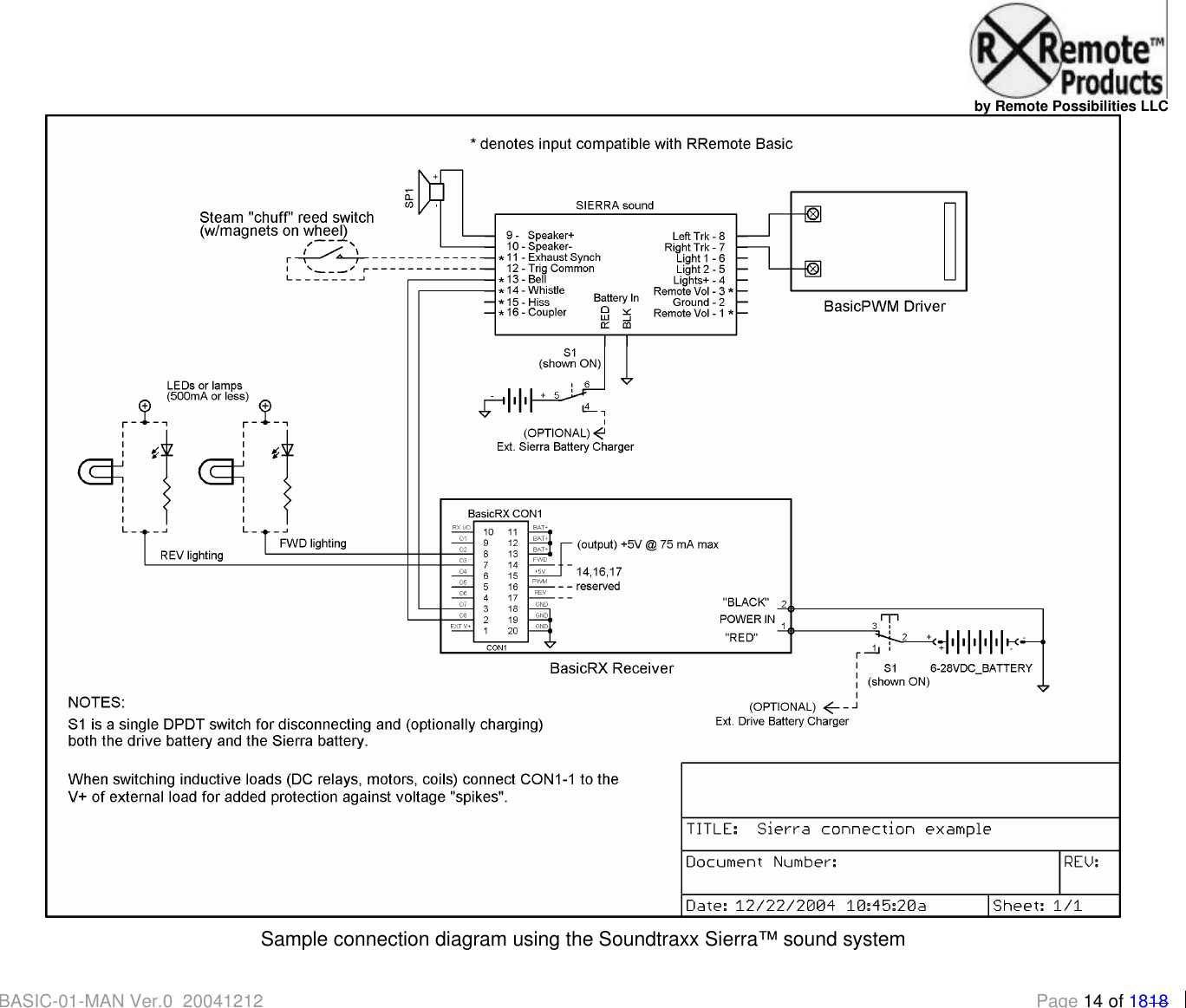
  by Remote Possibilities LLC BASIC-01-MAN Ver.0_20041212 Page 14 of 1818  Sample connection diagram using the Soundtraxx Sierra™ sound system
  by Remote Possibilities LLC BASIC-01-MAN Ver.0_20041212 Page 15 of 1818  Sample connection diagram using the Phoenix Big Sound 2K2™ sound system           Diagram TBD
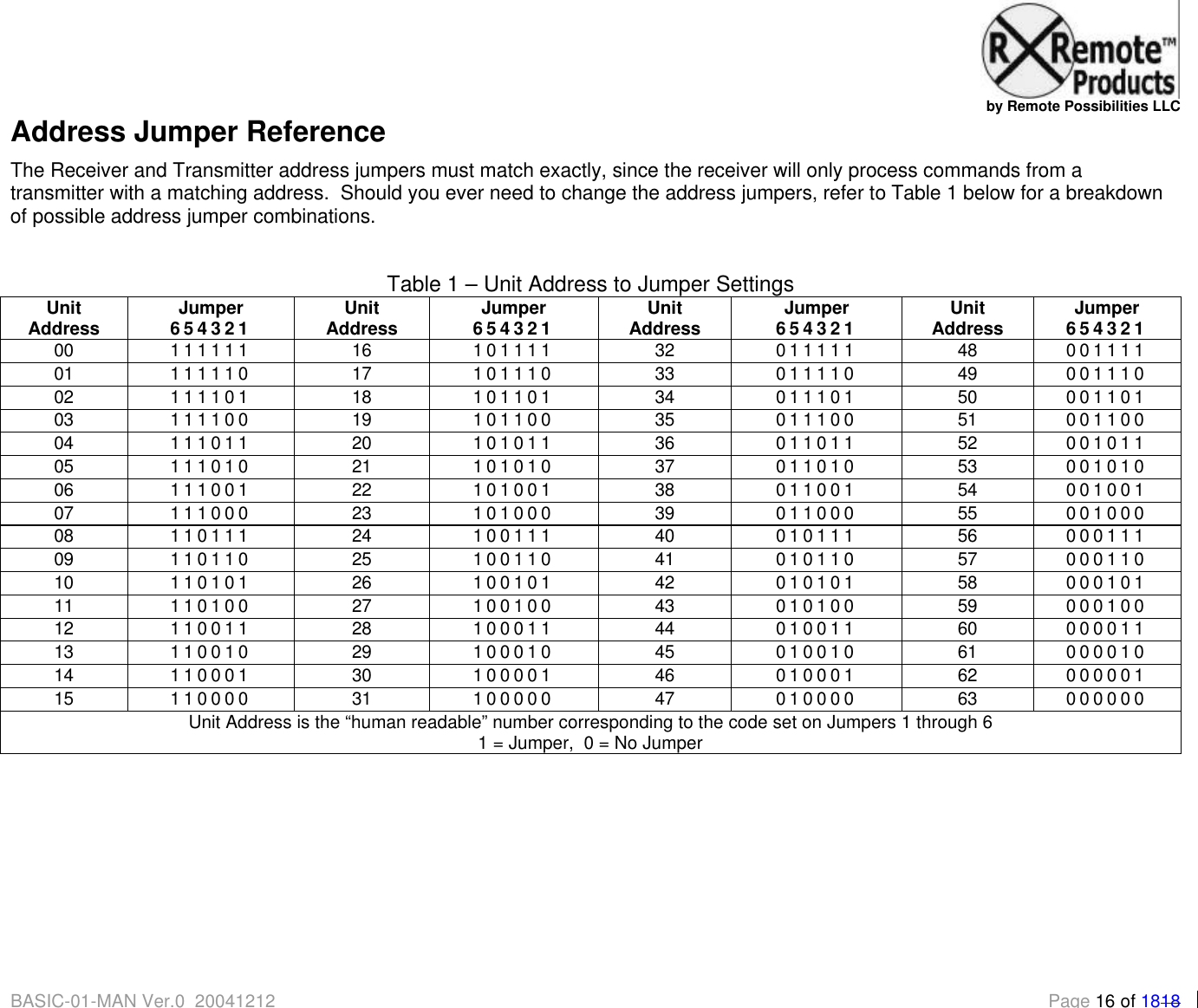
  by Remote Possibilities LLC BASIC-01-MAN Ver.0_20041212 Page 16 of 1818 Address Jumper Reference The Receiver and Transmitter address jumpers must match exactly, since the receiver will only process commands from a transmitter with a matching address.  Should you ever need to change the address jumpers, refer to Table 1 below for a breakdown of possible address jumper combinations.   Table 1 – Unit Address to Jumper Settings  Unit Address Jumper 654321 Unit Address Jumper 654321 Unit Address Jumper 654321 Unit Address Jumper 654321 00 111111 16 101111 32 011111 48 001111 01 111110 17 101110 33 011110 49 001110 02 111101 18 101101 34 011101 50 001101 03 111100 19 101100 35 011100 51 001100 04 111011 20 101011 36 011011 52 001011 05 111010 21 101010 37 011010 53 001010 06 111001 22 101001 38 011001 54 001001 07 111000 23 101000 39 011000 55 001000 08 110111 24 100111 40 010111 56 000111 09 110110 25 100110 41 010110 57 000110 10 110101 26 100101 42 010101 58 000101 11 110100 27 100100 43 010100 59 000100 12 110011 28 100011 44 010011 60 000011 13 110010 29 100010 45 010010 61 000010 14 110001 30 100001 46 010001 62 000001 15 110000 31 100000 47 010000 63 000000 Unit Address is the “human readable” number corresponding to the code set on Jumpers 1 through 6 1 = Jumper,  0 = No Jumper
  by Remote Possibilities LLC BASIC-01-MAN Ver.0_20050114 Page 17 of 1818     Regulatory Notices  & Information Appendix
  by Remote Possibilities LLC BASIC-01-MAN Ver.0_20050114 Page 18 of 1818 FCC Required Notices: This device complies with Part 15 of the FCC rules.  Operation is subject to the following two conditions: ?? this device may not cause harmful interference, and  ?? this device must accept any interference received, including that may cause undesired operation. Changes or modifications to this equipment could void the user's authority to operate the equipment. NOTE: This equipment has been tested and found to comply with the limits for a Class B digital device, pursuant to Part 15 of the FCC Rules. These limits are designed to provide reasonable protection against harmful interference in a residential installation.  This equipment generates, uses and can radiate radio frequency energy and, if not installed and used in accordance with the instructions, may cause harmful interference to radio communications. However, there is no guarantee that interference will not occur in a particular installation. If this equipment does cause harmful interference to radio or television reception, which can be determined by turning the equipment off and on, the user is encouraged to try to correct the interference by one or more of the following measures: -- Reorient or relocate the receiving antenna. -- Increase the separation between the equipment and receiver. --Connect the equipment into an outlet on a circuit different from that to which the receiver is connected. --Consult the dealer or an experienced radio/TV technician for help. IC Required Notices: The term "IC:" before the radio certification number only signifies that Industry Canada technical specifications were met. This device has been designated to operate with an antenna having a maximum gain of 1 dB. An antenna having a higher gain is strictly prohibited per regulations of Industry Canada. The required antenna impedance is 50 ohms. The installer of this radio equipment must insure that the antenna is located or pointed such that it does not emit RF field in excess of Health Canada limits for the general population; consult Safety Code 6, obtainable from Health Canada.  Equipment Identification:  FCC ID: SVARBTX1A   IC ID: 5630ARBTX1A

Navigation menu