Robertshaw Controls d b a Invensys Home Control Systems EMST-100 RF Thermostat User Manual 111 315
Robertshaw Controls Company d/b/a Invensys Home Control Systems RF Thermostat 111 315
User Manual

GENERAL INFORMATION
The thermostat normally displays room temperature, mode of operation and
whether cooling or heating is currently on. The six buttons on the front of the
unit allow complete control of your equipment.
You may select different heating and cooling setpoints for the system to
maintain, e.g., 70° in heating and 75° in cooling. Raising or lowering the set-
points in heating or cooling is as simple as pushing a button. In addition, you
may choose to display the temperature in °F or °C.
The thermostat also allows you to select continuous fan operation (useful
when using an air cleaner) or have the fan come on with the equipment.
BUTTON FUNCTIONS
SYSTEM Press to select COOL only, HEAT only, AUTO (cool and
heat), OFF, or EMERGENCY HEAT (heat pump
installations only).
FAN Press for continuous fan or auto fan
OCCUPANCY Press to select HOME (Occ1), AWAY (Occ2), SLEEP
(Occ3), VACANT (Occ4), or User Defined (USr1-USr4)
occupancy modes.
HOLD/RESUME Press to alternate between HOLD OVERRIDE and
RESUME program.
Operating Instructions
Single/Multistage Conventional or
Heat Pump with Auxiliary Heat
Electronic Digital Communicating
Non-Programmable Thermostat
HEATING
Select the temperature you want your equipment to maintain while in
the heating mode by pressing and holding the or buttons. The
control setpoint temperature is displayed for 5 seconds.
FAN
The fan will come on automatically when the system is operating,
but there is no indication of this on the display. To select continuous
fan operation, press the FAN button and the display will show .
This is recommended for electronic air cleaners and continuous ven-
tilation requirements.
OFF
To turn off the heating or cooling system, press the MODE button
until the word OFF appears on the LCD. It will remain displayed until
the mode is changed. The OFF mode prevents the system from
being energized.
Avoid using the OFF mode during extremely cold weather to prevent
damage to the equipment from freezing.
AUTO CHANGEOVER
You may set the thermostat to automatically switch from heating to
cooling mode by pressing the MODE button until the word AUTO
and both the heating and cooling icons appear on the LCD. The
thermostat will energize the heating or cooling system based on the
temperatures established for both modes.
USER CONTROLS (CONT’D)
TEMPORARY TEMPERATURE OVERRIDE
Press the or to temporarily raise or lower the setpoint until the
next scheduled setpoint change.
HOLD TEMPERATURE OVERRIDE
Press the HOLD/RESUME button to change a Temporary Override
to a Hold Override. This will prevent scheduled setpoint changes.
Press HOLD/RESUME button again to resume scheduled
setpoint changes.
CELSIUS / FAHRENHEIT
Simultaneously press and to switch between Celsius (C) and
Fahrenheit (F) temperature display.
REMOTE SENSOR (OPTION)
RS1 – RS2 – RS+V
The thermostat is designed to accept the electronic remote sensor,
which will allow you to locate your thermostat in an area away from
view. Indoor and outdoor sensors are available separately.
TEMPERATURE ACCURACY
Full temperature accuracy will be realized only after the thermostat
has been installed and powered for at least one (1) hour.
NOTES:
ADD-ON HEAT PUMPS
Your DSL thermostat is equipped to enhance the performance of an
add-on heat pump. Your thermostat, in most applications, will perform
the function of a fossil fuel kit.
To select add-on, place switches #3 and #5 to the ON position. The
thermostat will turn the compressor off with a call for auxiliary heat.
When switch #5 is set to normal (OFF), the thermostat will allow the
compressor and the auxiliary heat to be on at the same time.
POWER FAILURES
Your thermostat employs the latest in solid state electronic technology.
One of the unique features of your thermostat is that no battery is
required to maintain your selected setpoints in the event of a power loss
as the memory is unaffected by power failures of any duration.
When power is restored, the thermostat will continue operating as if the
power had never been off.
USER CONTROLS
SYSTEM – Select the desired mode of operation by repeatedly pressing
the MODE button:
– indicates cooling system only (the word COOL is displayed for 5
seconds)
– indicates heating system only (the word HEAT is displayed for 5
seconds)
– indicates both the heat and cool systems (the word AUTO is
displayed for 5 seconds)
Blinking – indicates cool ON
Flickering – indicates heat ON
OFF – disables controller so equipment will not operate (fan operation is still
possible in this mode)
E Ht - Emergency heat (heat-pump installations only).
COOLING
Select the temperature you want your equipment to maintain while in the
cooling mode by pressing and holding the or buttons. The control
setpoint temperature is displayed for 5 seconds.
234
5 6 7
1 (One) Year Limited Warranty
The manufacturer warrants to the original purchaser that its product and
component parts will be free from defects in workmanship and materials for a
period of 1 (one) year from the date of purchase. Return to the original point of
purchase for replacement of your product.
Warranty Limitations
This warranty begins at date of purchase.
Warranty is Void if:
The date code is defaced or removed.
The product has a defect or damage due to product alteration, connection
to an improper electrical supply, shipping and handling, accident, fire, flood,
lightning, or other conditions beyond the control of the manufacturer.
The product is not installed according to the manufacturers instructions and
specifications.
The product has been installed near sources of electromagnetic interference
(EMI) such as arcing relay contact.
Owner’s Responsibility
Provide proof of purchase.
Provide normal care and maintenance.
Pay for freight, labor and travel.
Pay for service calls related to product installation.
Return any defective product.
In no event shall the manufacturer be liable for incidental or consequential
damages.
This warranty gives you specific legal rights and you may have others which vary
by state and/or province. For example, some states and/or provinces do not
allow the exclusion or limitation of incidental or consequential damages so this
exclusion may not apply to you.
The manufacturer’s continuing commitment to quality products may require a
change in specifications without notice.
This equipment, if installed in strict accordance with the manufacturer's
instructions, complies with the limits for a Class B computing device pursuant to
Subpart J of Part 15 of FCC rules.
NEW AND IMPROVED FEATURES
Your new electronic digital thermostat has been designed to pro-
vide accurate control and display of room temperature. It also will
display all relevant system information.
Your new electronic thermostat has been made even better by the
introduction of several new and improved features. Building on its
reputation for efficient and dependable operation, your thermostat
now offers the following enhancement.
Thermostat and Sensor Calibration
Release 3 provides easy calibration of the thermostat and remote
sensors. Simply press and hold the FAN button for 10 seconds and
adjust with the or buttons.
INSTALLATION INSTRUCTIONS
It is recommended that installation be performed by a qualified installer.
Location
To ensure proper operation, the thermostat should be mounted on an
inside wall in a frequently occupied area of the building. In addition, its
position must be at least 18" (46cm) from any outside wall, and approx-
imately 5' (1.5m) above the floor in a location with freely circulating air
of an average temperature. You should avoid the following locations:
-behind doors or in corners where freely circulating air is unavailable;
-where direct sunlight or radiant heat from appliances might affect
control operation;
-on an outside wall;
-adjacent to, or in line with, conditioned air discharge grilles, stair-
wells, or outside doors;
-where its operation may be affected by steam or water pipes or
warm air stacks in an adjacent partition space, or by an area behind
the thermostat which is not climate controlled;
-where its operation will be affected by the supply air of an adjacent
climate control HVAC device;
-near sources of electrical interference such as arcing relay contacts.
TERMINAL DESIGNATIONS
CONVENTIONAL
Y2 . . . . . . .Compressor is energized for 2nd stage cooling
W1 . . . . . .Energizes for 1st stage heating
Y1 . . . . . . .Compressor energized for 1st stage cooling
W2 . . . . . .Energizes for 1st stage heating
HEAT PUMP
Y2 . . . . . . .Compressor is energized for 2nd stage heating or cooling if
multistage is selected
W1 . . . . . .Auxiliary heat is energized as back-up or emergency heat
Y1 . . . . . . .Compressor energized with a call for heating or cooling
O . . . . . . .Energizes the reversing valve continuously in cool mode
B . . . . . . . .Energizes the reversing valve continuously in heat mode
CONVENTIONAL OR HEAT PUMP
G . . . . . . .Fan operates with a call for heating or cooling or by pressing
the FAN button.
R . . . . . . . .Power from equipment
24V . . . . . .24 VAC hot and common to power the thermostat
24(c)
RS2 . . . . .Use to connect up to 6 (SL-IDS) indoor and/or 1
RS1 (SL-ODT) outdoor remote sensor/s.
RS+V When connected the thermostat will automatically use the
SL-IDS temperature sensor and not its own. Refer to the
instructions included with the sensor.
FAULT . . .Equipment Fault input. Connect through dry relay contact to
GP+V to signal equipment fault. Causes wrench icon to be
displayed on LCD and locks out all heat-pump stages (heat-
pump operation selected via DIP switch) when there is a call
for heat.
GPI1 . . . . .General purpose inputs. Connect through dry contact relay
GPI2 to GP+V
GP+V
X1 . . . . . . .Communication line
X2 . . . . . . .X1 return, connected to 24V(c)
SPECIFICATIONS
Rated Voltage . . . . . . . .20-30 VAC, 24 nominal
Rated A.C. 0.050 Amps to 0.75 Amps continuous
Current . . . . . . . . . . . . . .per output with surges to 3 Amps Max.
Rated D.C. 0 Amps to 0.75 Amps continuous
Current . . . . . . . . . . . . . .per output with surges to 3 Amps Max.
Default Control . . . . . . .Heating: 40° to 88°F in 1° Steps
Range 6° to 30°C in 1° Steps
Cooling: 60° to 95°F in 1° Steps
16° to 33°C in 1° Steps
Maximum . . . . . . . . . . . .Heating & Cooling: 40° to 95°F in 1° Steps
Programmable 6° to 33°C in 1° Steps
Control Range
Thermostat . . . . . . . . . .28° to 124°F or 0° to 48°C
Measurement Range
Minimum . . . . . . . . . . . .(between heating and cooling)
Deadband 2°F or 1°C
NOTE: This thermostat contains electronic circuitry replacing the
conventional mechanical anticipator.
DSL-600SC-HCS 111-315
VACANT
(Occ4) USER DEFINED
(USr1-USr4)
1
2
3
4
HOME
(Occ1)
AWAY
(Occ2) SLEEP
(Occ3)
OCCUPANCY MODES
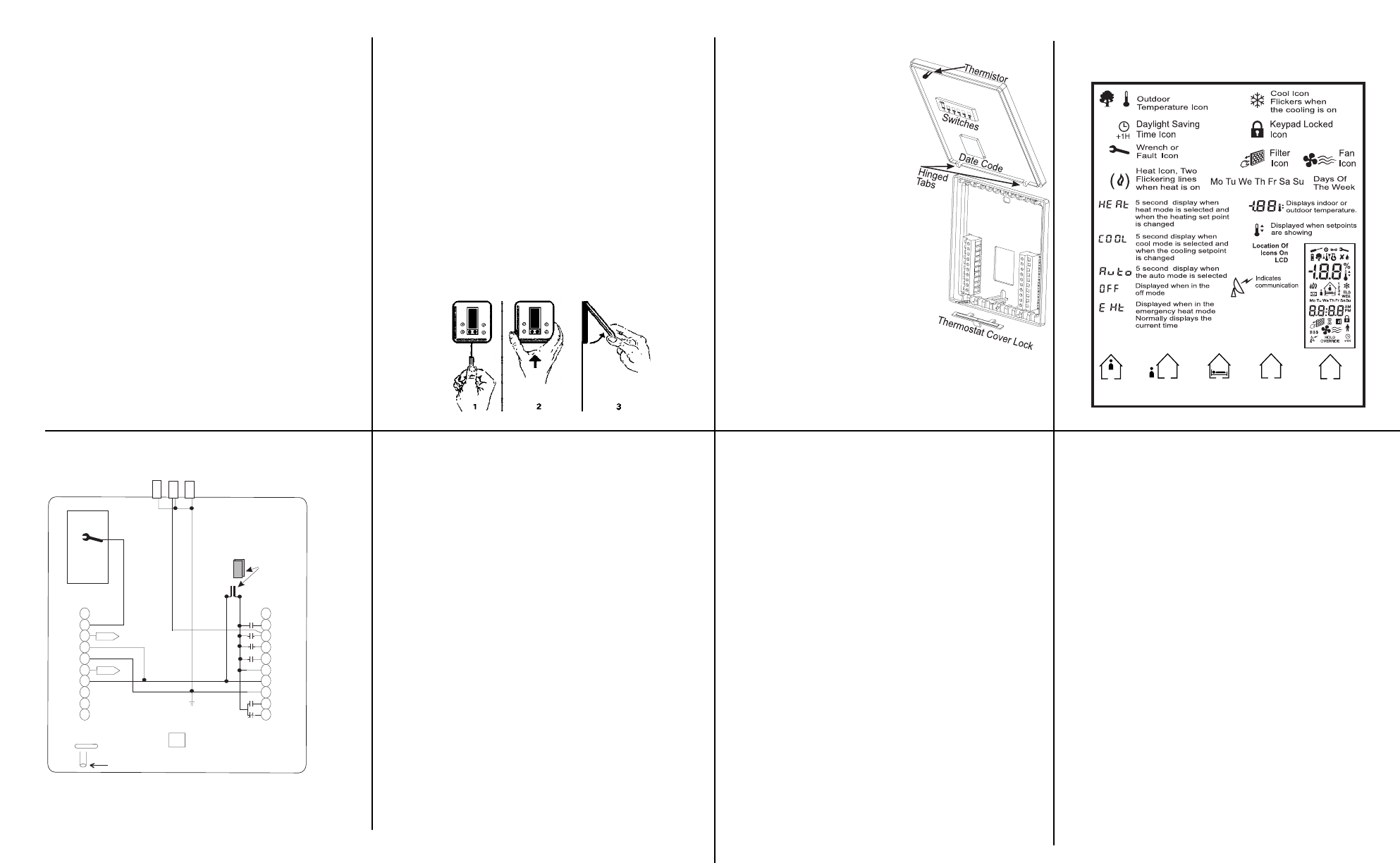
DESCRIPTION OF ICONS
WIRING DIAGRAM
Note: If the 24V(c) is not available from the equipment the jumper may be
removed and a separate 24V transformer must be used to power the thermostat.
This thermostat may be used with 24 Volt DC. The negative side of the DC
supply must be wired to the 24V (c) terminal.
910 11 12
16
14
13
DSL-600SC-HCS
Alarm LED (Left)
Auxiliary Heat LED
(Center)
Economy LED (Right)
GPI1
FAULT
GPI2
GP+V
RS2
RS1
RS+V
X2
X1
Y2
W1
Y1
G
R
24v
24v(c)
O/W2
B
Temperature Sensor
Display
New
R/24v Jumper replaced
with a connector (shunt).
Remove if thermostat power
is not supplied by equipment.
Removing the Thermostat from the Subbase
1. Insert a flat blade screwdriver or coin 1/8" into the slot located in the
bottom center of the thermostat case and twist 1/4 turn. When you feel
or hear a click, grasp the case from the bottom two corners and sepa-
rate from the subbase.
2. Swing the thermostat out from the bottom.
3. Lift the thermostat up and off the subbase.
4. Place the rectangular opening in the subbase over the equipment con-
trol wires protruding from the wall and, using the subbase as a tem-
plate, mark the location of the two mounting holes (exact vertical
mounting is necessary only for appearance).
5. Use the supplied anchors and screws for mounting on drywall or plas-
ter; drill two 3/16" (5mm) diameter holes at the marked locations; use a
hammer to tap the nylon anchors in flush to the wall surface and fasten
subbase using the supplied screws. (Do not overtighten!)
6. Connect the wires from your system to the thermostat terminals.
Carefully dress the wires so that any excess is pushed back into the
wall cavity or junction box. Ensure that the wires are flush to the plastic
subbase. The access hole should be sealed or stuffed to prevent drafts
from affecting the thermostat.
Replacing the Thermostat on Subbase
1. Position the thermostat on the hinged
tabs at the top of the subbase.
2. Gently swing the thermostat down
and press on the bottom center until
it snaps into place.
Thermostat Cover Lock
Insert the plastic lock piece into the bot-
tom of the mounted base. The ends of
the lock piece fit snugly under the lock
pins extending from the bottom of the
mounted base. The tab in the middle of
the lock piece extends down from the
base.
To release the locking mechanism,
press the lock piece up and into the
base while gently prying open.
Thermistor Mounting Instructions
When placing the front cover on the
thermostat ensure the thermistor is not
bent or misaligned.
Ensure that the thermistor does not
touch the thermostat case. The thermis-
tor should be placed horizontal to the
wall. Ensure the thermistor is not
pushed upward into the case.
The thermistor should be aligned so it is
visible between the ribs on the bottom
of the subbase.
DIP SWITCH OPTIONS AND FUNCTIONS
Positioning the DIP switches in either the ON or OFF position enables
you to choose between two different options. The DIP switches are
located on the interior of your thermostat and may be accessed by fol-
lowing the procedure for removing the thermostat from the subbase.
The following list describes your DIP switch options.
1. Not Used This switch must remain in the OFF position.
2. Not Used This switch must remain in the OFF position.
3. Conventional or Heat Pump Set to OFF position for conventional sys-
tems, or ON for heat pump systems.
4. 2 Minute or 4 Minute On/Off Times This option allows you to run the
equipment for either a 2 or 4 minute off and on time.
5.Plenum Fan (Conventional) In the OFF position, the fan comes on
immediately with a call for heat. In the ON position, the fan is controlled by
the equipment (plenum switch control).
5. Add-On Heat Pump (Heat Pump) In the OFF (normal) position, the
thermostat will allow the compressor and the auxiliary heat to be on at the
same time. In the ON (add-on) position, the compressor is turned off with
a call for auxiliary heat.
6. Single or Multi-stage Set to OFF for systems with no more than one
stage of cooling AND no more than one stage of heating (excluding the
auxiliary heat stage in heat pump applications), or ON for systems with
two stages of cooling OR two stages of heating (excluding the auxiliary
heat stage in heat pump applications).
7. Not Used This switch must remain in the OFF position.
8. Not Used This switch must remain in the OFF position.
DIP Switch DIP Switch OFF DIP Switch ON
1
2
3
4
5
6
7
8
Not used (OFF position)
Not used (OFF position)
Conventional
4 minute minimum ON/OFF
Normal
Single stage
Not used (OFF position)
Not used (OFF position)
Not used
Not used
Heat Pump
2 minute minimum ON/OFF
Plenum Fan (conventional)
Add-on (heat pump)
Multi-stage
Not used
Not used
15