Ruckus FastIron Ethernet Switch Software Upgrade Guide, 08.0.01 Fast Iron Guide 08001 SW
FastIron 08.0.01 Software Upgrade Guide FastIron_08001_SW_UpgradeGuide
2017-12-14
User Manual: Ruckus FastIron 08.0.01 Software Upgrade Guide
Open the PDF directly: View PDF  .
.
Page Count: 123 [warning: Documents this large are best viewed by clicking the View PDF Link!]
- Contents
- Preface
- About This Guide
- Upgrade and downgrade considerations
- Software Upgrade and Downgrade
- show command output differences between 07.4.00 and 08.0.xxrelease
53-1002971-02
11 October 2013
FastIron Ethernet Switch
Software Upgrade Guide
Supporting FastIron Software Release 08.0.01
Copyright © 2013, Brocade Communication Systems, Inc. All Rights Reserved.
ADX, AnyIO, Brocade, Brocade Assurance, the B-wing symbol, DCX, Fabric OS, FastIron , ICX, MLX, MyBrocade, NetIron, OpenScript,
ServerIron, VCS, VDX, and Vyatta are registered trademarks, and HyperEdge, The Effortless Network, and The On-Demand Data Center
are trademarks of Brocade Communications Systems, Inc., in the United States and/or in other countries. Other brands, products, or service
names mentioned may be trademarks of their respective owners.
Notice: This document is for informational purposes only and does not set forth any warranty, expressed or implied, concerning any
equipment, equipment feature, or service offered or to be offered by Brocade. Brocade reserves the right to make changes to this document
at any time, without notice, and assumes no responsibility for its use. This informational document describes features that may not be
currently available. Contact a Brocade sales office for information on feature and product availability. Export of technical data contained in
this document may require an export license from the United States government.
The authors and Brocade Communication Systems, Inc. shall have no liability or responsibility to any person or entity with respect to any
loss, cost, liability, or damages arising from the information contained in this book or the computer programs that accompany it.
The product described by this document may contain “open source” software covered by the GNU General Public License or other open
source license agreements. To find out which open source software is included in Brocade products, view the licensing terms applicable to
the open source software, and obtain a copy of the programming source code, please visit http://www.brocade.com/support/oscd.

Contents
Preface.....................................................................................................................................3
Document conventions......................................................................................3
Brocade Resources...........................................................................................5
Getting technical help........................................................................................5
Document feedback.......................................................................................... 6
About This Guide.......................................................................................................................7
Introduction....................................................................................................... 7
Supported Hardware............................................................................. 7
Unsupported features............................................................................7
Audience........................................................................................................... 8
What’s new in this document............................................................................ 8
Related publications..........................................................................................8
Upgrade and downgrade considerations....................................................................................9
Upgrade and downgrade considerations.......................................................... 9
General considerations......................................................................... 9
Considerations for devices with LAG.................................................. 10
Considerations for devices in stack configurations............................. 11
Changes between FastIron 07.4.00 and 08.0.xx release................................11
New or modified parameter values..................................................... 12
Command changes............................................................................. 14
Changes between FastIron 07.5.00 and 08.0.01 release............................... 26
Software Upgrade and Downgrade.......................................................................................... 27
Software upgrade overview.............................................................................27
Initial steps...................................................................................................... 28
Upgrade process.............................................................................................28
Software upgrade on ICX 6610, ICX 6430, ICX 6450, ICX 6650,
and FCX devices........................................................................... 29
Software upgrade on FSX devices......................................................29
Software upgrade on ICX 6430-C devices..........................................29
Software upgrade from 07.5.xx to 08.0.01.......................................... 30
Loading images on the device........................................................................ 30
Load the boot code............................................................................. 30
Load the flash code.............................................................................31
Upgrade using a manifest file..........................................................................33
Software downgrade....................................................................................... 35
Software downgrade on ICX 6610, ICX 6430, ICX 6450, ICX
6650, and FCX.............................................................................. 35
Software downgrade on FSX devices................................................. 36
Software downgrade from 08.0.01 to 07.5.xx..................................... 36
Upgrading software for TurboIron 24X............................................................36
Upgrading the Boot Code....................................................................36
Upgrading the Flash Code.................................................................. 37
Software recovery........................................................................................... 37
Software recovery on FCX, FSX, and ICX 6610 devices....................37
FastIron Ethernet Switch Software Upgrade Guide 1
53-1002971-02
Software recovery on ICX 6430 and ICX 6450 devices....................38
Example of manifest file upgrade..................................................................40
Sample output - determining the software versions......................................42
Example for determining the flash image version............................. 42
Example for determining the boot image versions............................42
Example for determining the current licenses installed.....................43
2 FastIron Ethernet Switch Software Upgrade Guide
53-1002971-02

Preface
● Document conventions......................................................................................................3
● Brocade Resources...........................................................................................................5
● Getting technical help........................................................................................................5
● Document feedback.......................................................................................................... 6
Document conventions
Text formatting conventions
The following text formatting conventions may be used in the flow of the text to highlight specific words
or phrases.
Format Description
bold text Identifies command names
Identifies keywords and operands
Identifies the names of user-manipulated GUI elements
Identifies text to enter at the GUI
italic text Identifies emphasis
Identifies variables and modifiers
Identifies paths and Internet addresses
Identifies document titles
code Identifies CLI output
Identifies command syntax examples
Command syntax conventions
The following text formatting conventions identify command syntax components.
Convention Description
bold text Identifies command names, keywords, and command options.
italic text Identifies a variable.
value In Fibre Channel products, a fixed value provided as input to a command
option is printed in plain text, for example, --show WWN
FastIron Ethernet Switch Software Upgrade Guide 3
53-1002971-02
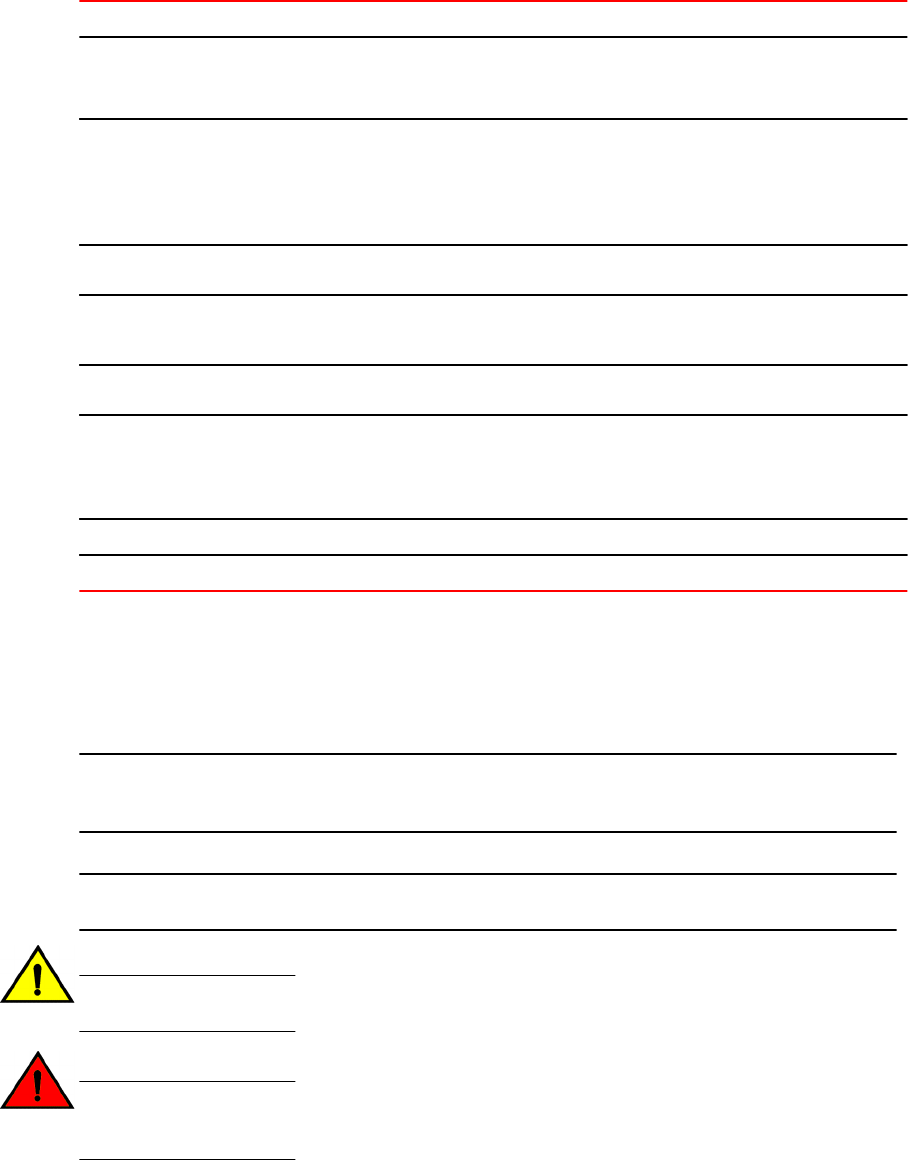
Convention Description
[ ] Syntax components displayed within square brackets are optional.
Default responses to system prompts are enclosed in square brackets.
{x|y|z}A choice of required parameters is enclosed in curly brackets separated by
vertical bars. You must select one.
In Fibre Channel products, square brackets may be used instead for this
purpose.
x|yA vertical bar separates mutually exclusive elements.
< > Nonprinting characters, for example, passwords, are enclosed in angle
brackets.
... Repeat the previous element. For example, member[member...]
\
Indicates a “soft” line break in command examples. If a backslash separates
two lines of a command input enter the entire command at the prompt without
the backslash
italic text Identifies a variable.
bold text Identifies command names, keywords, and command options.
Notes, cautions, and warnings
The following notices and statements may be used in this document. They are listed below in order of
increasing severity of potential hazards.
NOTE
A note provides a tip, guidance, or advice, emphasizes important information, or provides a reference
to related information.
ATTENTION
An Attention statement indicates potential damage to hardware or data.
CAUTION
A Caution statement alerts you to situations that can be potentially hazardous to you or cause
damage to hardware, firmware, software, or data.
DANGER
A Danger statement indicates conditions or situations that can be potentially lethal or
extremely hazardous to you. Safety labels are also attached directly to products to warn of
these conditions or situations
Preface
4 FastIron Ethernet Switch Software Upgrade Guide
53-1002971-02
Brocade Resources
Related publications
You can download additional publications supporting your product from the Brocade website at
www.brocade.com.
• Adapter documentation is available on the Downloads and Documentation for Brocade Adapters
page. Select your platform and scroll down to the documentation section.
• For all other products, select the Brocade product to open the individual product page, click the
Brocade product name or image to open the individual product page. The user manuals are
available in the resources module at the bottom of the page under the Documentation category.
Additional Brocade resources
To get up-to-the-minute information, go to MyBrocade. You can register at no cost to obtain a user ID
and password.
Release Notes are available on MyBrocade under Product Downloads.
White papers, online demonstrations, and data sheets are available through the Brocade website.
Getting technical help
For product support information and the latest information on contacting the Technical Assistance
Center, go to http://www.brocade.com/services-support/index.html
Contact Brocade Support 24x7
Use one of the following methods to contact the Brocade Technical Assistance Center.
Online Telephone Email
Preferred method of contact for non-
urgent issues:
•My Cases through MyBrocade
•Software downloads & licensing
tools
•Knowledge Base
Required for Sev 1-Critical and Sev
2-High issues:
• Continental US:
1-800-752-8061
• Europe, Middle East, Africa,
and Asia Pacific: +800-AT
FIBREE (+800 28 34 27 33)
• For areas unable to access toll
free number: +1-408-333-6061
•Toll-free numbers are available
in many countries.
support@brocade.com
Please include:
• Problem summary
• Serial number
• Installation details
• Environment description
Brocade Resources
FastIron Ethernet Switch Software Upgrade Guide 5
53-1002971-02
Document feedback
Quality is our first concern at Brocade and we have made every effort to ensure the accuracy and
completeness of this document. However, if you find an error or an omission, or you think that a topic
needs further development, we want to hear from you. You can provide feedback in two ways:
• Through the online feedback form in the HTML documents posted on www.brocade.com.
• By sending your feedback to documentation@brocade.com.
Provide the publication title, part number, and as much detail as possible, including the topic
heading and page number if applicable, as well as your suggestions for improvement.
Document feedback
6 FastIron Ethernet Switch Software Upgrade Guide
53-1002971-02

About This Guide
● Introduction....................................................................................................................... 7
● Audience........................................................................................................................... 8
● What’s new in this document............................................................................................ 8
● Related publications..........................................................................................................8
Introduction
This guide includes procedures for configuring the software. The software procedures show how to
perform tasks using the CLI. This guide also describes how to monitor Brocade products using statistics
and summary screens.
Supported Hardware
This guide supports the following product families from Brocade:
• FastIron X Series devices (chassis models):
‐FastIron SX 800
‐FastIron SX 1600
• Brocade FCX Series (FCX) Stackable Switch
• Brocade ICX™ 6610 (ICX 6610) Stackable Switch
• Brocade ICX 6430 Series (ICX 6430)
• Brocade ICX 6450 Series (ICX 6450)
• Brocade ICX 6650 series (ICX 6650)
•Brocade TurboIron 24X Series
For information about the specific models and modules supported in a product family, refer to the
hardware installation guide for that product family. Related publications on page 8 lists the hardware
installation guides.
NOTE
• The Brocade ICX 6430-C switch supports the same feature set as the Brocade ICX 6430 switch
unless otherwise noted.
• The Brocade ICX 6450-C switch supports the same feature set as the Brocade ICX 6450 switch
unless otherwise noted.
Unsupported features
Features that are not documented in Related publications on page 8 are not supported.
FastIron Ethernet Switch Software Upgrade Guide 7
53-1002971-02
Audience
This document is designed for network engineers with a working knowledge of Layer 2 and Layer 3
switching and routing.
If you are using a Brocade Layer 3 Switch, you should be familiar with the following protocols if
applicable to your network - IP, RIP, OSPF, BGP, ISIS, IGMP, PIM, DVMRP, and VRRP.
What’s new in this document
ICX 6650 support is included wherever applicable in this guide for FastIron release 08.0.01.
Related publications
The following Brocade Communication Systems, Inc documents supplement the information in this
guide and can be located at http://www.brocade.com/ethernetproducts.
• FastIron Ethernet Switch Administration Guide
• FastIron Ethernet Switch Platform and Layer 2 Switching Configuration Guide
• FastIron Ethernet Switch Layer 3 Routing Configuration Guide
• FastIron Ethernet Switch IP Multicast Configuration Guide
• FastIron Ethernet Switch Security Configuration Guide
• FastIron Switch Stacking Configuration Guide
• FastIron Ethernet Switch Traffic Management Guide
• FastIron Ethernet Switch Software Licensing Guide
• FastIron Feature Support Matrix
• Brocade TurboIron 24X Series Configuration Guide
• Brocade ICX 6430-C Switch Installation Guide
• Brocade ICX 6430 and ICX 6450 Stackable Switches Hardware Installation Guide
• Brocade FCX Series Hardware Installation Guide
• Brocade FastIron ICX 6610 Stackable Switch Hardware Installation Guide
• Brocade ICX 6650 Ethernet Switch Installation Guide
• Brocade FastIron SX Series Chassis Hardware Installation Guide
• Brocade TurboIron 24X Series Hardware Installation Guide
• Brocade ICX 6450-C12-PD Switch Installation Guide
• Brocade FastIron FCX, ICX, and TurboIron Diagnostic Reference
• Unified IP MIB Reference
Audience
8 FastIron Ethernet Switch Software Upgrade Guide
53-1002971-02

Upgrade and downgrade considerations
● Upgrade and downgrade considerations.......................................................................... 9
● Changes between FastIron 07.4.00 and 08.0.xx release................................................11
● Changes between FastIron 07.5.00 and 08.0.01 release............................................... 26
This chapter contains the upgrade and downgrade considerations, and the major differences between
FastIron 07.4.00 and 08.0.xx releases. For information on devices and FastIron software versions that
can be upgraded to FastIron 08.0.xx, see the release notes.
Upgrade and downgrade considerations
The following sections covers the details that should be considered before upgrading to FastIron
08.0.xx or downgrading to previous releases from FastIron 08.0.xx.
General considerations
General
• The erase startup-config command will erase all the startup configuration files (startup-config.txt
and also the backup files).
• FSX device with FastIron 08.0.xx, ICX 6430, and ICX 6450 devices support only one configured
system boot preference.
• For ICX 6430 devices, the system-max mac-filter-sys parameter value has changed from 512 to
508 in FastIron 08.0.xx. If the current value of system-max mac-filter-sys is more than 508, you
should change this value to 508 before upgrading. Otherwise, during upgrade, its value will be set
to the default value of 64.
• To use 07.x.xx configuration on a device upgraded to 08.0.xx image, replacing the running
configuration with 07.x.xx configuration is not supported. You will be required to copy the 07.x.xx
configuration onto the startup configuration file and reload the device.
Deprecated or removed features and commands
• SNTP is no longer supported. NTPv4 replaces SNTP.
• Port Speed Down-Shift feature is deprecated in FastIron 08.0.xx. The link-config gig copper
autoneg-control down-shift ethernet command is deprecated.
• The show cpu-utilization command replaces the show process cpu command.
Flash memory capacity
Consider the following limitations of different devices when upgrading software:
• FSX and FCX devices can hold two Full Layer 3 or Layer 2 or Base Layer 3 images.
• ICX 6430 devices can hold two Layer 2 images.
• ICX 6450 devices can hold two Layer 2 or Layer 3 images.
FastIron Ethernet Switch Software Upgrade Guide 9
53-1002971-02
Security
• SSHv2 RSA host key format is different between FastIron 07.x.xx, and 08.0.xx software versions.
• When you upgrade from FastIron 07.x.xx, 08.0.00 to 08.0.xx software version, if RSA key is
present in FastIron 07.x.xx or 08.0.00 software version, same size will be regenerated in FastIron
08.0.xx software version. Old SSHv2 host key is retained unless they are cleared by the crypto
key zeroize command.
• SSH host keys created with DSA method is interoperable between FastIron 07.x.xx, 08.0.00 and
08.0.xx software versions.
• RADIUS Server key default encryption type is 2 (simple_encryption_base64) in FastIron 08.0.xx
release instead of 1 (simple_encryption) as compared to the earlier releases. If you do not follow
the upgrade procedure, the RADIUS server key configuration will be removed during downgrade.
Downgrade considerations
• Any new command in FastIron 08.0.xx will be discarded during downgrade.
• The startup configuration as well as the run time changes in FastIron 08.0.xx configuration will be
lost during downgrade.
• If software-based licensing is in effect on the device, and if the software is downgraded to a
version earlier than 07.1.00, software-based licensing will not be supported.
• SSHv2 RSA host key format is different between FastIron 07.x.xx, 08.0.00, and 08.0.xx software
versions.
• When you downgrade the FastIron software from version 08.0.xx to 08.0.00 or 07.x.xx, consider
the following scenarios:
‐When SSHv2 RSA host key in FastIron 08.0.00a and above is retained from FastIron
07.x.xx or 08.0.00 software version, booting up with FastIron 07.x.xx or 08.0.00 software
versions reads the old format SSHv2 RSA host keys and enables the SSHv2 RSA server
on the switch.
‐When SSHv2 RSA host key is created in FastIron 08.0.00a and above, booting up with
FastIron 07.x.xx or 08.0.00 software versions does not read the new-format SSHv2 RSA
host keys and SSHv2 server is not enabled on the switch.
Considerations for devices with LAG
• If you are upgrading to FastIron 08.0.xx and have either LAGs or LACP configured, the previous
configuration will be automatically updated to form a new equivalent LAG. To accomplish this, the
old trunk and link-aggregation commands are maintained during startup configuration parsing,
but disabled during normal configurations.The following are the major differences in LAG
configuration in FastIron 08.0.xx compared to earlier releases:
‐A LAG is not created until a LAG is deployed using the deploy command.
‐LACP is not started until a dynamic LAG is deployed.
‐The number of LAG ports is 1 to 8. For FSX 3rd generation modules, the range is 1 to
12.
‐A LAG is created even if a static or dynamic LAG has only one port.
• If link aggregation is configured on your device and you are upgrading to FastIron 08.0.xx
configuration, the link aggregation configuration should have the key configured to identify the
LAG. If the key is not configured, when you upgrade to FastIron 08.0.xx, all the link aggregation
interfaces (without key) will be bundled as one misconfigured LAG. The configuration will fail if it
exceeds the supported maximum number of members per LAG limit.
Considerations for devices with LAG
10 FastIron Ethernet Switch Software Upgrade Guide
53-1002971-02
• All LAG configurations are lost during downgrade.
• The trunk configuration commands--trunk ethernet , trunk deploy , trunk-cfg-ind , link-
aggregation active | passive , link-aggregation conf key --are deprecated. Instead, you can use
the new LAG configuration commands.
Considerations for devices in stack configurations
Upgrade considerations
• The image for FastIron 07.2.00a and later uses different Interprocessor Communications (IPC)
versions for FCX devices; however, units in a stack must run the same IPC version to
communicate. After upgrading from FastIron 07.2.00 or earlier to FastIron 08.0.xx, you must verify
that the same image is downloaded to every unit in the stack before reloading the entire stack. To
verify the images, enter the show flash command at any level of the CLI. A stack cannot be built
and will not operate if one or more units have different software images.
• All devices in a mixed stack must run the same version of the software. A stack cannot form if the
software images are of different major versions. A stack member is not operational if it runs a
different minor version than other stack members.
• In FCX, ICX 6610, ICX 6430, and ICX 6450 devices, the auto-image upgrade feature in FastIron
08.0.xx release will automatically update the software image on member units when an image
mismatch occurs.
• For upgrading to mixed stack, the peripheral ports need to be configured manually.
• The Layer 3 configuration on your device will be part of the default VRF after upgrade. If no
configurations are done, all interfaces are part of the default VRF.
Downgrade considerations
• ICX 6610 devices in a mixed stack will form a homogenous stack when downgrading from FastIron
08.0.xx. Other members of the mixed stack are left out. You should manually configure the mixed
stack with devices other than ICX 6610 after downgrade from FastIron 08.0.xx.
• On downgrade, core ICX 6610 devices lose the ICX 6450 configuration and they also lose the peri-
port and peri-trunk configurations.
• After downgrade, a mixed stack changes into a homogenous stack.
• For FCX units, the 10G module name differs in software releases FastIron 08.0.xx compared to
releases 07.0.01b and 07.0.01c. Therefore, if an FCX device is downgraded from FastIron 08.0.xx
to release 07.0.01b or 07.0.01c, the stacking port configuration will be lost and the unit will not be
able to join the stack.
• If FCX units in an traditional stack are downgraded from FastIron 08.0.xx to earlier releases, in
some instances, the units may not be able to form a stack. This will occur if there is a mismatch of
BGP capability within the stack (that is, some units support it and others do not). If you encounter
this problem, contact Brocade Technical Support for assistance.
Changes between FastIron 07.4.00 and 08.0.xx release
FastIron 08.0.xx release brings support and enhanced functionality for a variety of desired Layer 3
features.
The changes in specific features have fundamentally changed a large amount of CLI configuration
commands, show commands, and show command output. A large reason for this change is due to the
VRF-lite support in the FastIron products: FSX 800, FSX 1600, ICX 6610, ICX 6650, and FCX.
Considerations for devices in stack configurations
FastIron Ethernet Switch Software Upgrade Guide 11
53-1002971-02
The FastIron 08.0.xx release newly supports BGP4+(IPv6), IPv6 Multicast, Management VRF, and
Multi-VRF. There are also changes to BGP4 (IPv4), OSPFv2, OSPFv3, RIP, RIPng, and IP Multicast.
While some of these protocols are new to the FastIron family, some have been supported since Layer
3 routing has been supported. There are changes in the implementation to have a more unified CLI
and approach across the entire IP product portfolio.
For detailed information on the commands, configurations, and feature behaviors, see the FastIron
08.0.xx configuration guides.
For more information on supported features and platforms, see FastIron 08.0.xx release notes.
New or modified parameter values
The following sections cover the changes in the parameter values for various protocols in FastIron
08.0.xx as compared to FastIron 07.4.00:
NOTE
Only the parameters whose allowed value or range is changed have been listed.
Management parameter default values
Changes in management defaults TABLE 1
Parameter FastIron 08.0.xx FastIron 07.4.00
Maximum number of outbound Telnet sessions 5 1
Maximum number of outbound SSH sessions 5 1
Multicast parameter values
Changes in multicast parameter values TABLE 2
Parameter Device FastIron 08.0.xx(minimum/
maximum/default)
FastIron 07.4.00(minimum/maximum/
default)
L2 Multicast
IGMP Group ICX 6430 256/4096/1024 256/1024/256
MLD Groups FCX 256/8192/4096 256/32768/8192
ICX 6610 256/8192/4096 256/32768/8192
SX Gen2 256/8192/4096 256/32768/8192
SX Gen3 256/8192/4096 256/32768/8192
ICX 6450 256/8192/4096 256/32768/8192
ICX 6430 256/4096/1024 256/1024/256
New or modified parameter values
12 FastIron Ethernet Switch Software Upgrade Guide
53-1002971-02

Changes in multicast parameter values (Continued)TABLE 2
Parameter Device FastIron 08.0.xx(minimum/
maximum/default)
FastIron 07.4.00(minimum/maximum/
default)
L3 Multicast
IGMP Groups FCX 1/8192/4096 256/8192/4096
ICX 6610 1/8192/4096 256/8192/4096
SX Gen2 1/8192/4096 256/8192/4096
SX Gen3 1/8192/4096 256/8192/4096
PIM (S,G) mcache FCX 256/6144/1024 256/4096/1024
ICX 6610 256/6144/1024 256/4096/1024
SX Gen3 256/6144/1024 256/4096/1024
MSDP SA cache FCX 1024/8192/4096 Not supported in FastIron 07.4.00
ICX 6610 1024/8192/4096 Not supported in FastIron 07.4.00
MLD Groups FCX 1/8192/4096 Not supported in FastIron 07.4.00
ICX 6610 1/8192/4096 Not supported in FastIron 07.4.00
SX Gen2 1/8192/4096 Not supported in FastIron 07.4.00
SX Gen3 1/8192/4096 Not supported in FastIron 07.4.00
PIM6 (S.G) mcache FCX 256/1024/512 Not supported in FastIron 07.4.00
ICX 6610 256/1024/512 Not supported in FastIron 07.4.00
SX Gen3 256/1800/1024 Not supported in FastIron 07.4.00
BGP parameter default values
Changes in BGP, BGP4+, and Route Maps defaults TABLE 3
Parameter FastIron 08.0.xx FastIron 07.4.00 Note
Maximum retry interval 160 NA If an error occurs during the
establishment of BGP adjacency, the
retry interval would have exponential
backoff. The maximum delay can be
160 seconds.
Maximum routemap length 81 32 Configures the maximum routemap
length when configured through
SNMP (not configurable).
BGP parameter default values
FastIron Ethernet Switch Software Upgrade Guide 13
53-1002971-02
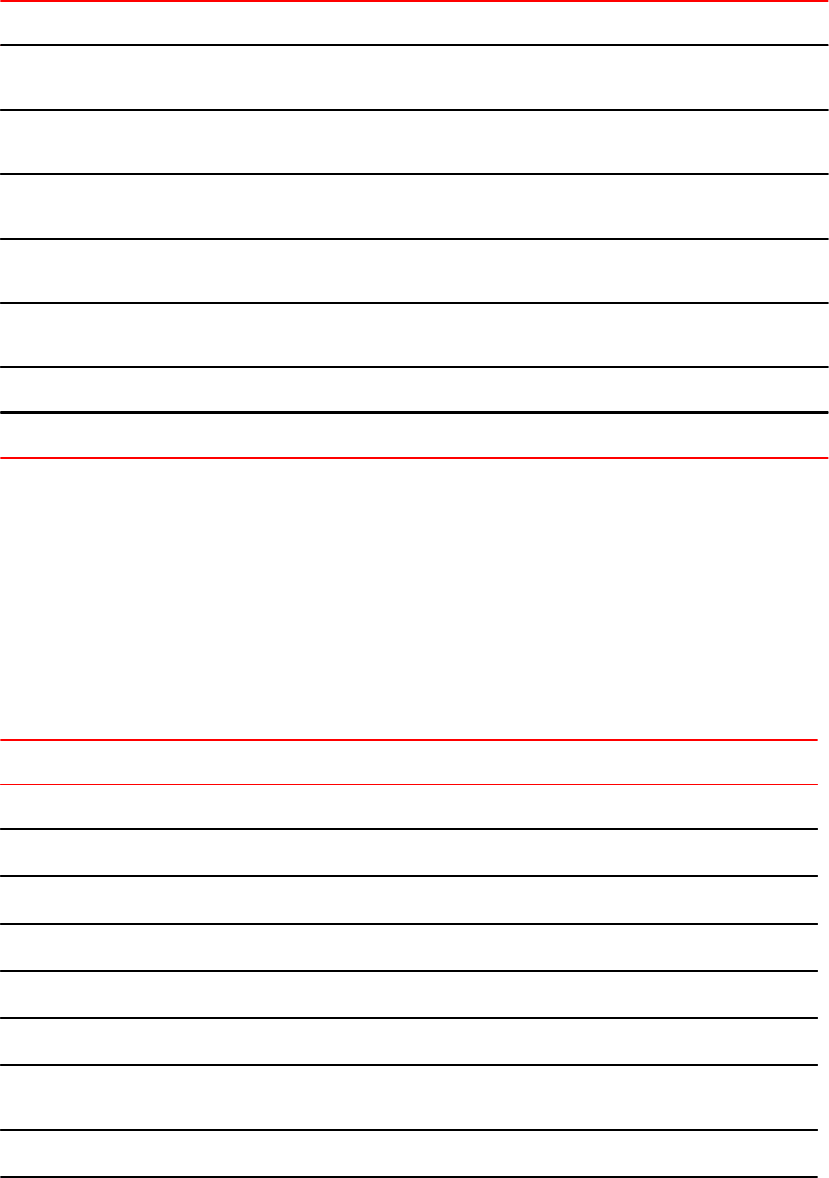
Changes in BGP, BGP4+, and Route Maps defaults (Continued)TABLE 3
Parameter FastIron 08.0.xx FastIron 07.4.00 Note
Default behavior for invalid
confederation as path
Ignore Not ignored Not configurable.
Minimal route advertisement
interval
0 30 Configurable.
Maximum router advertisement
interval
3600 sec 600 sec Configurable.
Update time 0 - 30 sec 1 - 30 sec Configures iBGP route update
interval.
Maximum ECMP paths in BGP 8/6 (stackable and TI/
others)
8 Configures the number of ECMP
paths.
Minimum allowed update time 0 1 Not configurable.
Routes displayed per page 13 5 Not configurable.
Command changes
Several commands have been replaced or modified in FastIron 08.0.xx release. It is recommended to
use the new set of commands. The following sections summarize the differences in commands
between FastIron 08.0.xx and 07.4.00.
OSPFv2
New OSPFv2 commands TABLE 4
Command Note
Global level command (router OSPF and sub-command)
[no] router ospf vrf Configures OSPF instance with VRF index.
[no] default-passive-interface Sets OSPF interface passive.
[no] max-metric Configures Stub Router Advertisement.
[no] nonstop-routing Enables OSPF nonstop routing capability.
[no] nssa-translator Enables NSSA Type 7 to Type 5 LSA translation.
[no] vrf-lite-capability Configures CE Router VRF Lite capability (disable DN bit
checks).
cost (area decimal range sub-command) Configures area range cost.
Command changes
14 FastIron Ethernet Switch Software Upgrade Guide
53-1002971-02
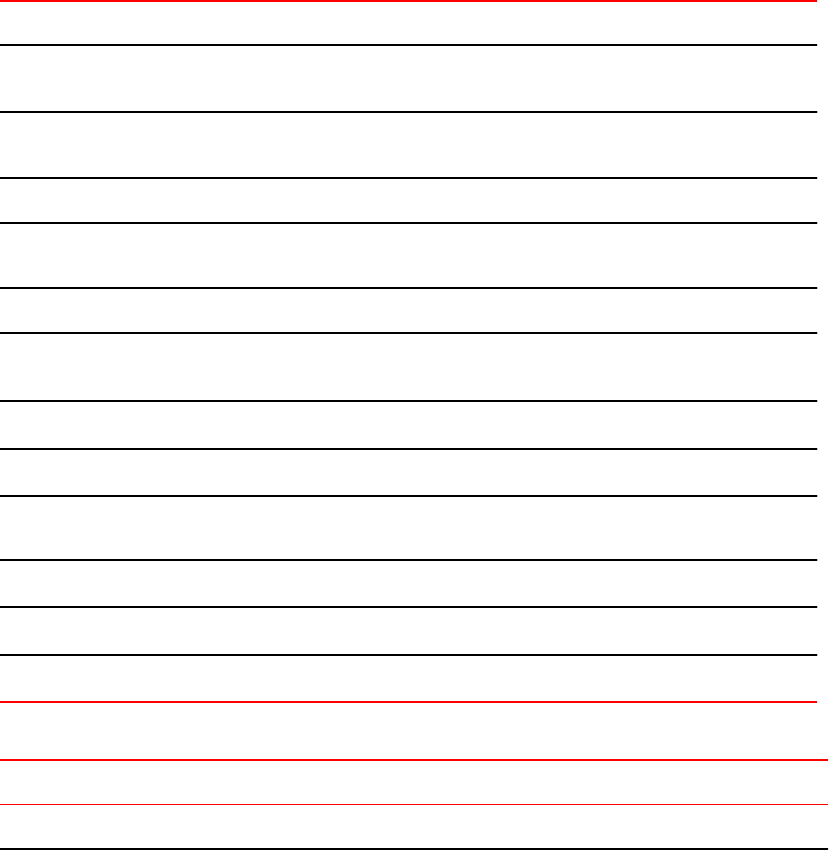
New OSPFv2 commands (Continued)TABLE 4
Command Note
cost (area decimal range advertise sub-
command)
Configures area range cost for Advertise this type-3
summarization.
cost (area decimal range not-advertise sub-
command)
Configures the area range cost for Not Advertise this type-3
summarization.
Interface level command
[no] active Configures Active information. FastIron 07.4.00 behavior was
always active.
Show command
show ip ospf database database-
summary
Displays summary of OSPF database.
show ip ospf summary Displays summary of OSPF instances.
show ip ospf traffic Displays OSPF packet counters and errors.
show ip ospf vrf Displays OSPF information for interfaces configured in a
particualr VRF.
Clear command
clear ip ospf traffic Clears OSPF packet counters and errors.
clear ip ospf vrf Resets OSPF for VRF.
Modified OSPFv2 commands TABLE 5
FastIron 08.0.xx FastIron 07.4.00 Note
Global level command (router OSPF and sub-command)
Upgrade and downgrade considerations
FastIron Ethernet Switch Software Upgrade Guide 15
53-1002971-02
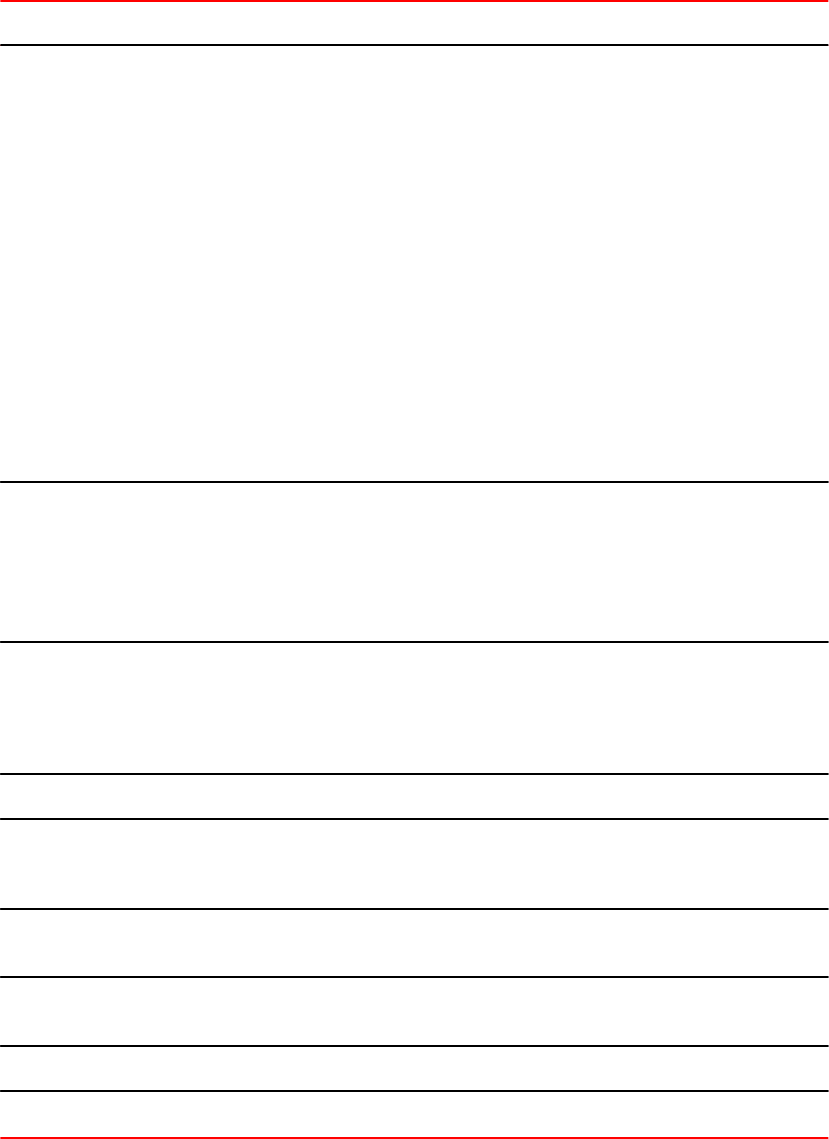
Modified OSPFv2 commands (Continued)TABLE 5
FastIron 08.0.xx FastIron 07.4.00 Note
[no] timers throttle spf
delay hold-time max-hold
timers spf delay hold-
time
FastIron 07.4.00:
delay corresponds to delay between receiving a
change to SPF calculation. The valid range is 0 to
65535.
hold-time corresponds to hold time between
consecutive SPF calculations. The valid range is 0 to
65535.
FastIron 08.0.xx:
delay corresponds to initial delay (milliseconds)
between receiving a change to SPF, valid range is
0-60000.
hold-time corresponds to hold time (milliseconds)
between two SPF calculations. Default is 0 and valid
range is 0-60000.
max-hold corresponds to max hold time
(milliseconds) between two SPF calculations. Default
is 0 and valid range is 0-60000.
default-information-
originate always
default-information-
originate
In FastIron 07.4.00 release, the default-information-
originate command was enough to originate default
route irrespective of any static or dynamic default
route present on the router. However, in FastIron
08.0.xx, if no default route is present on the router,
then you are required to use the default-
information-originate always command.
distribute-list [standard-ip-
access-list | extended-ip-
access-list | access-list-
name | route-map route-
map-name ] in
distribute-list [standard-
ip-access-list | extended-
ip-access-list | access-
list-name] in [ethernet |
ve]
In FastIron 08.0.xx release, the distribute-list is
applied to all interfaces. Also, you can configure the
OSPF distribution using route map as input.
Show command
show ip ospf area ip-addr
database link-state nssa
link-id adv-router router-id
show ip ospf area ip-
addr database link-
state nssa
In FastIron 08.0.xx, you can display the link state for
specific advertising router.
show ip ospf virtual link show ip ospf virtual-
links
Displays OSPF virtual link information.
show ip ospf virtual
neighbor
show ip ospf virtual-
neighbor
Displays OSPF virtual neighbour information.
Clear command
clear ip ospf route clear ospf route Clears all or specific OSPF route.
Upgrade and downgrade considerations
16 FastIron Ethernet Switch Software Upgrade Guide
53-1002971-02

Deprecated OSPFv2 commands TABLE 6
Command Note
Global level commands (router OSPF and sub-commands)
RFC 1583-type3-cost If RFC 1583-compatibility is configured, sets the cost for advertised type 3
summary LSAs to the smallest cost of any of the component networks in
FastIron 08.0.00.
Show command
show ip ospf error Displays OSPF warnings and errors.
show growable pool info Displays growable pool information.
Clear command
clear ip ospf area Clears OSPF area.
clear ip ospf error Clears OSPF error.
clear ip ospf graceful-restart Clears OSPF graceful-restart
clear ip ospf redistribution Clears all routes redistributed through other protocols.
OSPFv3
New OSPFv3 commands TABLE 7
Command Note
Global level command (router OSPF and sub-command)
[no] ipv6 router ospf vrf Configures OSPFv3 with a VRF index.
[no] graceful-restart helper Configures OSPFv3 graceful restart options (helper only).
[no] nonstop-routing Enables the OSPFv3 nonstop routing capability.
area decimal sub-command nssa Specifies an NSSA area.
area decimal range sub-command cost Configures area range cost.
area decimal range advertise sub-
command cost
Configures area range cost for Advertise this type-3
summarization.
area decimal range not-advertise sub-
command cost
Configures area range cost for Not Advertise this type-3
summarization.
distribute-list prefix-list ascii string in
loopback
Configures OSPFv3 distribution list using an IPv6 prefix list as
input.
OSPFv3
FastIron Ethernet Switch Software Upgrade Guide 17
53-1002971-02

New OSPFv3 commands (Continued)TABLE 7
Command Note
Interface level commands
[no] active Sets active status. FastIron 07.4.00 behavior was always
active.
[no] hello-jitter Configures jitter between HELLO packets, in percentage.
[no] suppress-linklsa Suppresses link LSA advertisements.
Show command
show ipv6 ospf summary Displays summary of IPv6 OSPF instances.
show ipv6 ospf vrf Displays IPv6 OSPF information for a VRF or all VRF
interfaces.
Clear command
clear ipv6 ospf route Clears OSPF routes.
clear ipv6 ospf vrf Clears OSPF all or specific data in a specific vrf.
Deprecated OSPFv3 commands TABLE 8
Command Note
Global level command (router OSPF and sub-command)
[no] virtual-link-if-address Configures source address to use with virtual links.
RIP
New RIP commands TABLE 9
Command Note
Global level command (router RIP and sub-command)
[no] learn-default Enables learning of RIP default routes.
[no] poison-local-routes Advertises local routes with maximum metrics when they go down.
Interface level commands
[no] ip rip learn-default Enables learning of RIP default routes from this interface.
RIP
18 FastIron Ethernet Switch Software Upgrade Guide
53-1002971-02

Modified RIP commands TABLE 10
FastIron 08.0.xx FastIron 07.4.00 Note
Global level command (router RIP and sub-command)
[no] redistribute connected |
bgp | ospf | static [metric
value | route-map name]
[no] redistribution Redistributes routes from other routing
protocols.
[no] prefix-list name in | out filter filter-num permit | deny
source-ip-address | any source-
mask | any [log]
Specifies the prefix list as route map to
filter out specific routes.
[no] timers seconds update-time 1-1000 Configures timer to set how often should
RIP send updates. This command is
added for backward compatibility.
Interface level command
[no] ip rip metric-offset num
in | out
ip metric 1-16 ip metric is not supported. Since ip
metric was used to modify RIP metric, it
is changed to ip rip metric-offset. It is
added for backward compatibility only.
[no] ip rip prefix-list name in |
out
[no] ip rip filter-group in |
out filter-list
Specifies the prefix list as route map to
filter out specific routes.
Deprecated RIP commands TABLE 11
Command Note
Global level command (router RIP and sub-command)
[no] offset-list ACL-number-or-name in | out offset
[ethernet port]
Instead, the route-map or prefix-list command
can be used.
[no] permit | deny redistribute filter-num all | bgp | ospf
| static address ip-addr ip-mask [match-metric value |
set-metric value]
Instead, the route-map command can be used.
[no] dont-advertise-connected Connected routes are not redistributed by default
in FastIron 08.0.00.
BGP and Route-Map
Modified BGP commands TABLE 12
FastIron 08.0.xx FastIron 07.4.00 Note
Clear command
BGP and Route-Map
FastIron Ethernet Switch Software Upgrade Guide 19
53-1002971-02
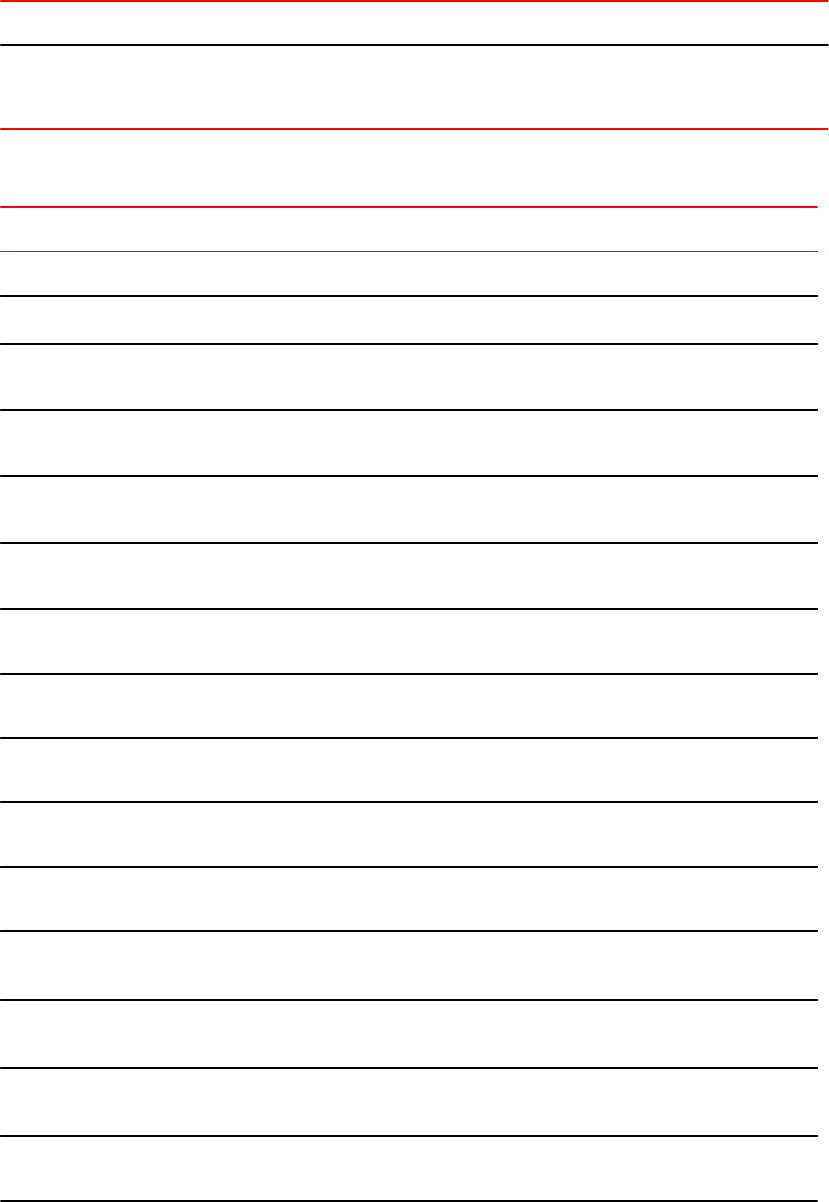
Modified BGP commands (Continued)TABLE 12
FastIron 08.0.xx FastIron 07.4.00 Note
clear ip bgp flap-statistics clear ip bgp flap-statistics as-
path-filter list-num
The as-path-filter option is removed
because flap statistics do not have as-
path-filter option anymore.
Deprecated BGP and Route-Map commands TABLE 13
Command Note
Global level command
[no] set mirror-interface int-num Sets a mirror interface for route maps.
[no] neighbor ipvx-addr distribute-list [in | out]
list-num
Configures the distribution list for BGP neighbors.
[no] neighbor ipvx-addr filter-list [in | out] filter-
num
Configures the filter list for BGP neighbors.
[no] neighbor peer-group distribute-list [in | out]
list-num
Configures the distribution list for BGP peer groups.
[no] neighbor peer-group filter-list[in | out] filter-
num
Configures the filter list for BGP peer groups.
[no] set next-hop next-hop-addr Configures the set route map rule for a next hop
address.
[no] match address-filter filter-num Configures the match route map rule with an address
filter.
[no] match as-path-filters filter-num Configures the match route map rule with an as-path
filter.
[no] match community-filters num Configures the match route map rule with a community
filter.
[no] match next-hop next-hop-addr Configures the match route map rule with a next hop
address.
[no] aggregate-address ip-addr mask nlri
[multicast | unicast] [multicast | unicast]
Configures MBGP Aggregate Address to advertise in
BGP.
[no] neighbor ip-addr peer-group string nlri
[multicast | unicast] [multicast | unicast]
Configures BGP peer group with specific NLRIs to
advertise.
[no] network ip-addr mask nlri [multicast |
unicast] [multicast | unicast]
Configures the BGP neighbor to announce a network
with specific NLRIs to filter.
[no] match nlri [multicast | unicast]Configures the route map match rule with multicast or
unicast NLRI.
Upgrade and downgrade considerations
20 FastIron Ethernet Switch Software Upgrade Guide
53-1002971-02
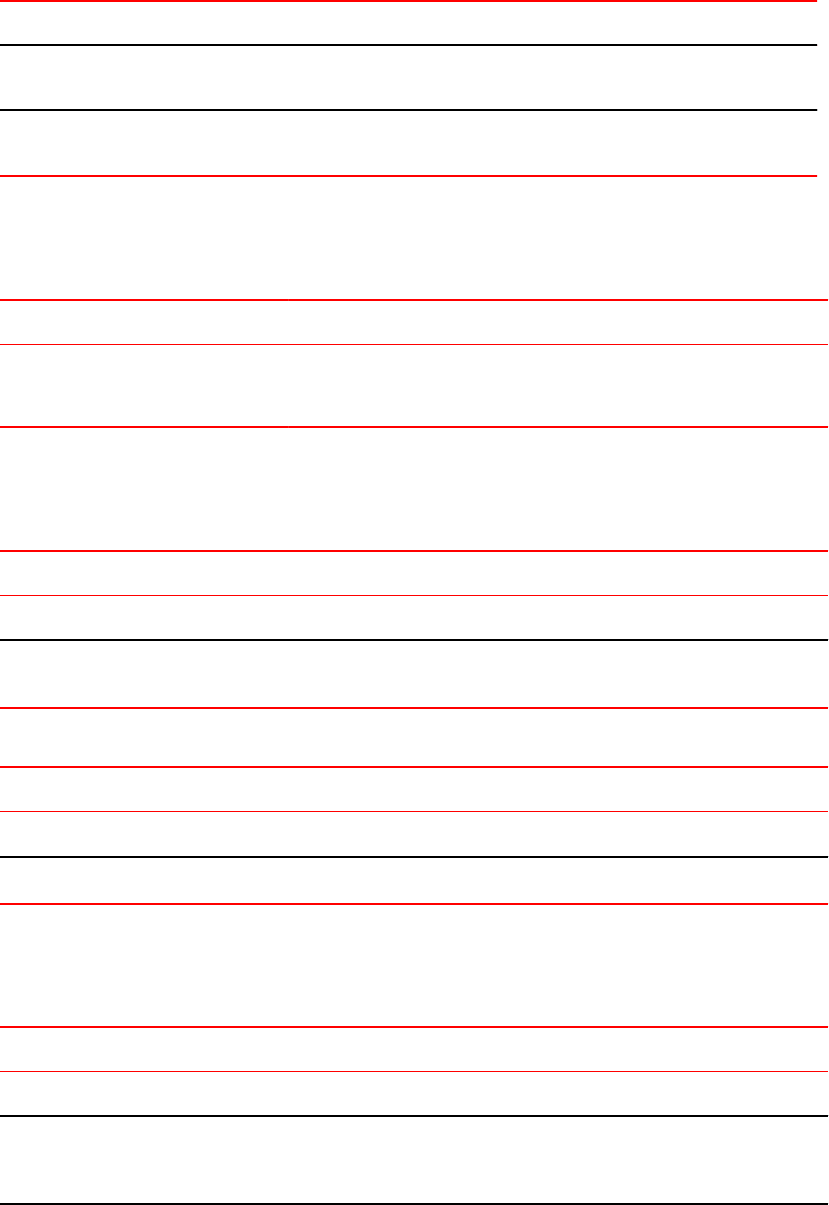
Deprecated BGP and Route-Map commands (Continued)TABLE 13
Command Note
[no] set nlri [multicast | unicast]Configures the route map set rule with multicast or
unicast NLRI.
[no] neighbor peer-group update-source pos
interface
Configures the router to communicate with a neighbor
through specified interface.
ARP
Modified ARP commands TABLE 14
FastIron 08.0.xx FastIron 07.4.00 Note
[no] arp ip-addr mac-addr [ethernet
slot/port l vlan vlan-id ]
[no] arp num ip-addr mac-addr
ethernet port
For static ARP configuration, index
number in the CLI is not needed
anymore.
IGMP-Snooping
Modified IGMP-Snooping command TABLE 15
FastIron 08.0.xx FastIron 07.4.00 Note
Global level command
[no] system-max igmp-snoop-
group-addr num
[no] system-max igmp-max-
group-addr num
Sets the maximum limit for the IGMP
group records.
Deprecated IGMP-Snooping command TABLE 16
Command Note
VLAN level command
[no] multicast static-group group-addr Configures static IGMP groups on entire VLAN.
MLD-Snooping
Modified MLD-Snooping commands TABLE 17
FastIron 08.0.xx FastIron 07.4.00 Note
Global level command
ipv6 multicast ipv6 mld-snooping Configures MLD snooping globally. This
command is now consistent with IGMP
snooping command.
ARP
FastIron Ethernet Switch Software Upgrade Guide 21
53-1002971-02
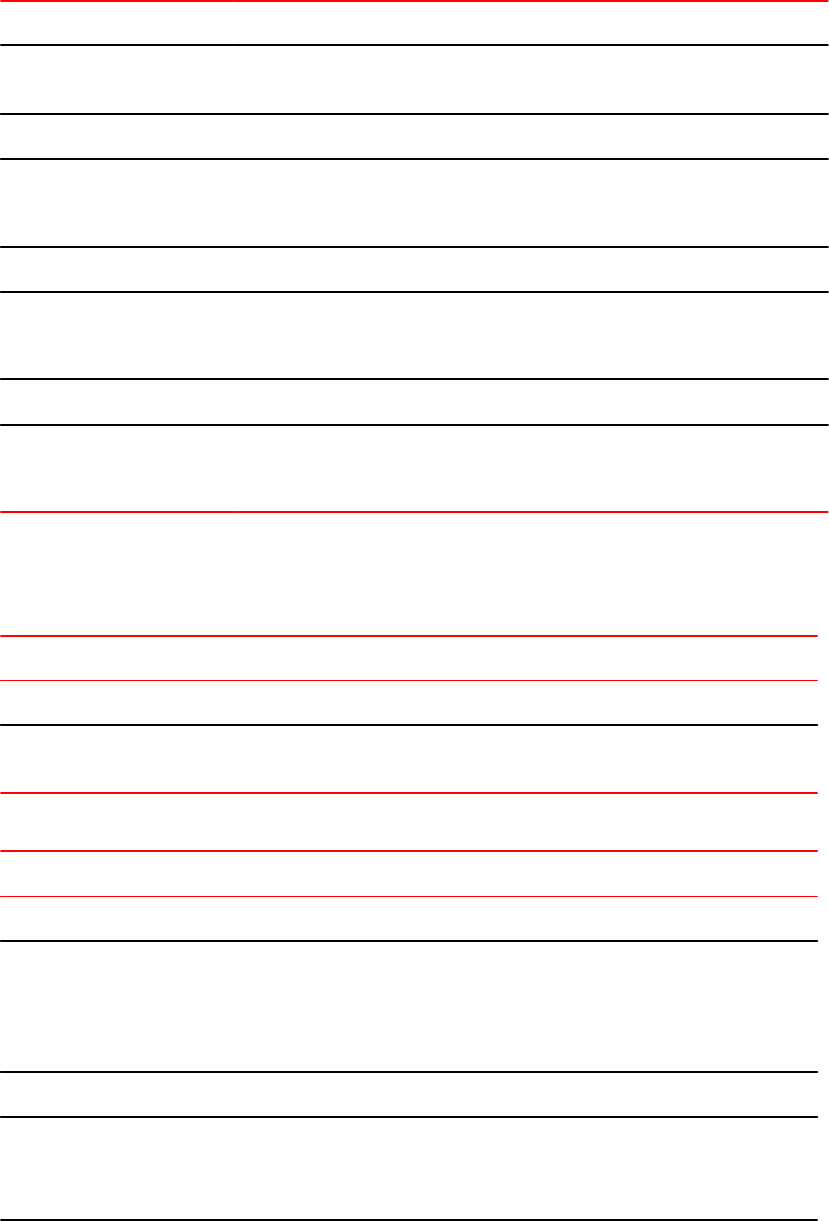
Modified MLD-Snooping commands (Continued)TABLE 17
FastIron 08.0.xx FastIron 07.4.00 Note
[no] system-max mld-
snoop-group-addr num
[no] system-max mld-
max-group-addr num
Sets the maximum limit for the MLD group
records.
VLAN level command
multicast6 mld-snooping Configures MLD snooping on a particular VLAN.
This command is now consistent with IGMP
snooping command.
Show command
show ipv6 multicast show ipv6 mld-snooping Shows MLD snooping related information. This
command is now consistent with IGMP
snooping command.
Clear command
clear ipv6 multicast clear ipv6 mld-snooping Clears MLD snooping mcache or counters. This
command is now consistent with IGMP
snooping command.
IGMP (L3 Routing)
New IGMP L3 routing commands TABLE 18
Command Note
Show command
show ip igmp [vrf vrf-name] static Displays IGMP static membership information. The show ip igmp
group command also displays static IGMP membership information.
Modified IGMP L3 routing commands TABLE 19
FastIron 08.0.xx FastIron 07.4.00 Note
Global level command
[no] ip igmp group-
membership-time seconds
default: 260 secs
allowed range: [5 -26000] secs
[no] ip igmp group-
membership-time seconds
default: 260 secs
allowed range: [20 - 7200] secs
Configures IGMP group membership
times. The allowed range for time has
changed from [20 - 7200] to [5 - 26000].
Interface level command
[no] ip igmp port-version
version ethernet num
[no] ip igmp port-version
version ethernet num
Configures the IGMP version on a
physical port within a virtual routing
interface. The allowed IGMP version
range has changed from [2-3] to [1-3].
IGMP (L3 Routing)
22 FastIron Ethernet Switch Software Upgrade Guide
53-1002971-02
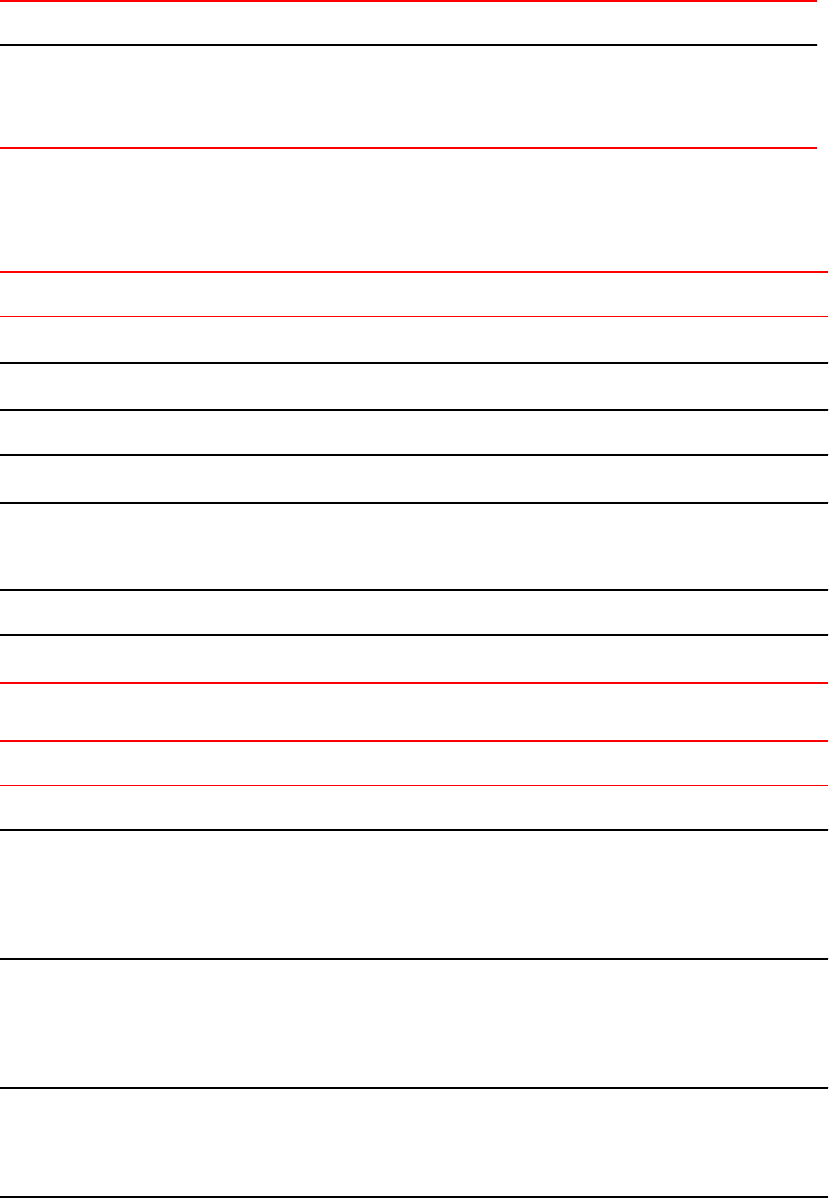
Modified IGMP L3 routing commands (Continued)TABLE 19
FastIron 08.0.xx FastIron 07.4.00 Note
[no] ip igmp static-group
group-addr [ethernet ...]
[no] ip igmp static-group
group-addr [count num]
[ethernet ...]
Configures a static member of an IGMP
group. In FastIron 08.0.xx, it does not
support specifying multiple contiguous
static groups using "count" option.
PIM
New PIM commands TABLE 20
Command Note
ipv6 pimsm-snooping Enables PIM6 SM snooping globally.
multicast6 pimsm-snooping Enables PIM6 SM snooping on the VLAN.
Show command
show ipv6 multicast pimsm-snooping Displays PIM6 SM snooping information.
show ip igmp [vrf vrf-name] static Displays IGMP static membership information. The show ip igmp
group command also displays static IGMP membership
information.
Clear command
clear ipv6 multicast pimsm-snooping Clears PIM6 SM snooping information.
Modified PIM commands TABLE 21
FastIron 08.0.xx FastIron 07.4.00 Note
Global level command
[no] hello-timer seconds
default: 30 secs
allowed range: [10 -3600]
secs
[no] hello-timer seconds
default: 60 secs
allowed range: [10 -3600]
secs
Configures the hello timer. The default value has
been changed from 60 seconds to 30 seconds.
[no] nbr-timeout seconds
default: 105 secs
allowed range: [3 - 65535]
secs
[no] nbr-timeout seconds
default: 180 secs
allowed range: [60 - 8000]
secs
Configures the PIM neighbor timeout value. The
default value has been changed from 180 seconds
to 105 seconds and the allowed range has been
changed from [60-8000] seconds to [3-65535]
seconds.
[no] prune-wait seconds
default: 3 secs
allowed range: [0 - 30] secs
[no] prune-wait seconds
default: 3 secs
allowed range: [0 - 3] secs.
Configures the PIM prune wait timer. The allowed
range has been changed from [0-3] seconds to
[0-30] seconds.
PIM
FastIron Ethernet Switch Software Upgrade Guide 23
53-1002971-02
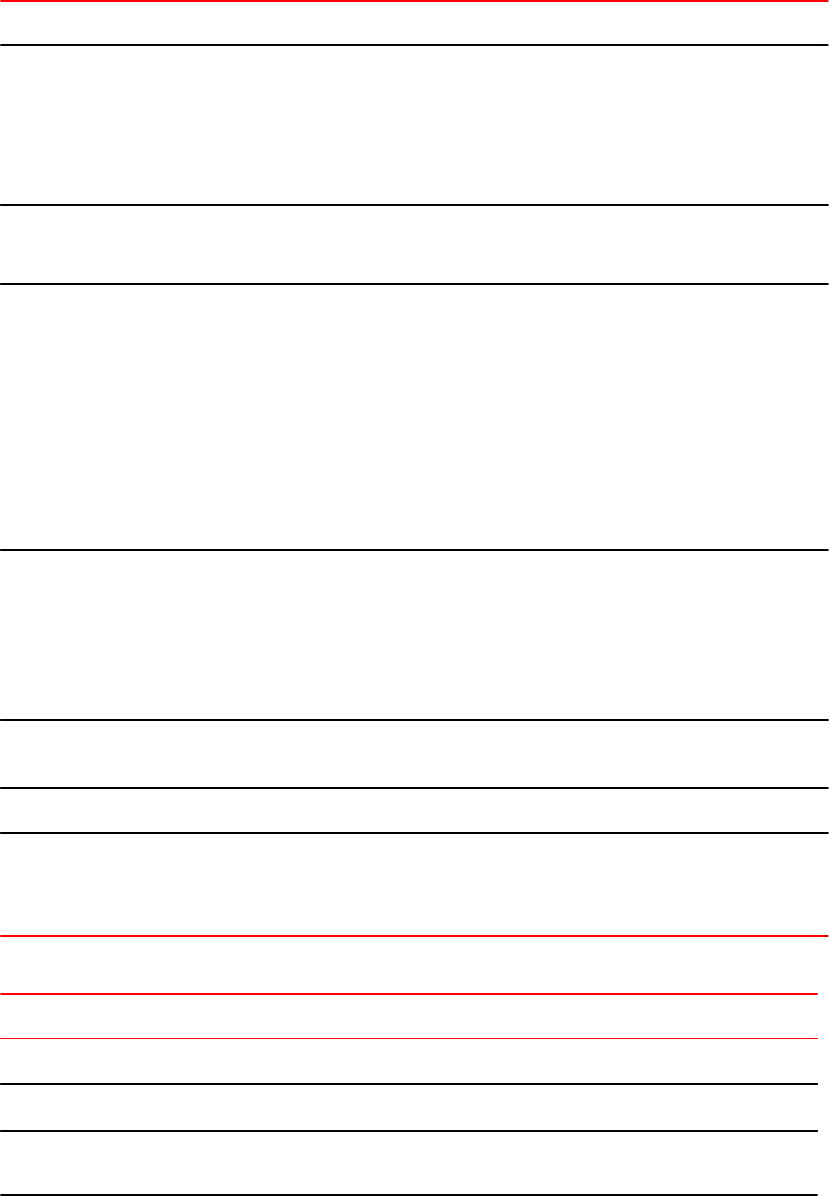
Modified PIM commands (Continued)TABLE 21
FastIron 08.0.xx FastIron 07.4.00 Note
[no] message-interval
seconds
default: 60 secs
allowed range: [10 - 65535]
secs
[no] message-interval
seconds
default: 60 secs
allowed range: [1 - 65535]
secs
Configures PIM prune wait timer. The allowed
range has been changed from [1-65535] seconds
to [10-65535] seconds.
[no] hardware-drop-
disable
[no] hardware-drop
Default: PMRI is enabled
Configures Passive Multicast Router Insertion
(PMRI). PMRI is enabled by default.
[no] rp-address address
[acl-num | acl-name]
[no] rp-address address
[std-acl-num [override]]
Configures static RP using ACL.
FastIron 07.4.00 supports only standard numbered
ACL, whereas in FastIron 08.0.xx, all ACLs
(standard, extended, numbered, and named) are
supported.
In FastIron 07.4.00, RP address learned from the
Bootstrap protocol takes precedence over static
RP, so override option was provided to give
precedence to static RP. In FastIron 08.0.xx, static-
RP takes precedence.
[no] rp-candidate
ethernet | ve | loopback
num
[no] rp-candidate
ethernet | ve | loopback
num [group-list std-acl-num]
Configures RP candidate using ACL.
In FastIron 07.4.00, ACLs can be used to limit RP
candidate for certain groups.
In FastIron 08.0.xx, this feature is not available.
So, RP candidate is for all the groups.
[no] system-max pim-
hw-mcache num
[no] system-max pim-
mcache num
Sets the maximum limit for the PIM mcache (flows)
that can be programmed in the hardware.
Interface level command
[no] ip pim [version][no] ip pim [version]Configures the PIM SM/DM version on particular
interface. PIM DM version 1 is not supported any
more. PIM-SM v2, PIM-DM v1, and PIM-DM v2 are
supported versions.
Deprecated PIM commands TABLE 22
Command Note
Global level command
[no] disable-pim Disables the PIM operation without removing the PIM configuration.
[no] rp-address all Removes all static RP configurations. In FastIron 08.0.xx, all static RP address
configuration have to be deleted individually.
Upgrade and downgrade considerations
24 FastIron Ethernet Switch Software Upgrade Guide
53-1002971-02

Deprecated PIM commands (Continued)TABLE 22
Command Note
Interface level command
[no] ip pim ttl-threshold ttl Configures Multicast TTL-threshold on a particular interface.
This feature was never supported in FastIron even though the command was
available. TTL threshold value of 1 was used internally. The behavior is same in
FastIron 08.0.00.
ip-multicast-disable Disables multicast routing and snooping on this particular interface or list of ports
within a virtual interface.
Show command
show ip pim error Displays PIM errors counters. In FastIron 08.0.xx, a new command show ip pim
counter displays the error counters.
Clear command
clear pim flow Clears all PIM flows from hardware.
Network Management
New network management commands TABLE 23
Command Note
show ip dns Shows the Domain List and IP address of the DNS server.
show ip dns-server domain-list Shows the Domain List of DNS servers.
show ip dns-server server-address Shows the IP addresses of DNS servers.
show ip ssl Displays the SSL connection in use.
show management-vrf Shows the Management VPN Routing/Forwarding (VRF) instance
information.
show ntp associations Shows NTP associations.
show ntp associations detail Shows NTP associations in detail.
show ntp associations detail Shows the IPv4 address of NTP server/peer.
show ntp associations detail Shows the IPv6 address of NTP server/peer.
show ntp status Shows the NTP Status information.
show snmp buffer Shows the SNMP buffer.
Network Management
FastIron Ethernet Switch Software Upgrade Guide 25
53-1002971-02
New network management commands (Continued)TABLE 23
Command Note
show cpu-utilization tasks Shows the CPU utilization.
show running-config vrf Shows the VRF-Lite running configuration.
show running-config vlan vlanid Shows the information on a VLAN ID in the running configuration.
Deprecated network management commands TABLE 24
Command Note
show cpu-utilization detail Shows the CPU utilization rate in detail.
show rmon statistics unit Shows the RMON Ethernet statistics table.
show rmon statistics unit num Shows the RMON Ethernet statistics table for the specified unit.
Changes between FastIron 07.5.00 and 08.0.01 release
The changes between FastIron 07.5.00 and 08.0.01 release are same as those documented in the
section Changes between FastIron 07.4.00 and 08.0.00 release.
Changes between FastIron 07.5.00 and 08.0.01 release
26 FastIron Ethernet Switch Software Upgrade Guide
53-1002971-02
Software Upgrade and Downgrade
● Software upgrade overview.............................................................................................27
● Initial steps...................................................................................................................... 28
● Upgrade process.............................................................................................................28
● Loading images on the device........................................................................................ 30
● Upgrade using a manifest file..........................................................................................33
● Software downgrade....................................................................................................... 35
● Upgrading software for TurboIron 24X............................................................................36
● Software recovery........................................................................................................... 37
● Example of manifest file upgrade....................................................................................40
● Sample output - determining the software versions........................................................ 42
For easy software image management, all Brocade devices support the download and upload of
software images between the flash modules on the devices and a TFTP server on the network.
Brocade devices have two flash memory modules:
• Primary flash - The default local storage device for image files and configuration files.
• Secondary flash - A second flash storage device. You can use the secondary flash to store
redundant images for additional booting reliability or to preserve one software image while testing
another one.
Only one flash device is active at a time. By default, the primary image becomes active when you
reboot the device.
You can update the software contained on a flash module using TFTP to copy the update image from a
TFTP server onto the flash module. You can also use SCP to copy images to and from a host that has
the images that you need. In addition, you can copy software images and configuration files from a flash
module to a TFTP server when you want to backup the current configuration and images on the device.
NOTE
Brocade devices are TFTP clients but not TFTP servers. You must perform the TFTP transaction from
the Brocade device.
Software upgrade overview
The upgrade procedure consists of the following steps:
1. Determine the current software versions, lincese requirements, and download the software. See
the Initial steps on page 28.
2. Upgrade the software. See the Upgrade process on page 28.
FastIron 08.0.00a and above also supports Manifest file upgrade but this process can be used only
to upgrade from 08.0.00a and above to later release. For more information, see the section
Upgrade using a manifest file on page 33.
FastIron Ethernet Switch Software Upgrade Guide 27
53-1002971-02

Initial steps
Perform the following steps before doing an upgrade or downgrade.
NOTE
Please note that in this section the output is truncated only relevant portion of the output is displayed.
For detailed output, see the Sample output - determining the software versions on page 42 section.
1. Determine the current boot image version using the show flash command
Brocade#show flash
Active Management Module (Slot 9):
Compressed Pri Code size = 3613675, Version 03.1.00aT3e3 (sxr03100a.bin)
Compressed Sec Code size = 2250218, Version 03.1.00aT3e1 (sxs03100a.bin)
Compressed BootROM Code size = 524288, Version 03.0.01T3e5
Code Flash Free Space = 9699328
<output is truncated to show relevant sections only>
2. Determine the current flash image version using the show version command.
device#show version
Copyright (c) 1996-2012 Brocade Communications Systems, Inc. All rights
reserved.
UNIT 1: compiled on Mar 2 2012 at 12:38:17 labeled as ICX64S07400
(10360844 bytes) from Primary ICX64S07400.bin
SW: Version 07.4.00T311
Boot-Monitor Image size = 774980, Version:07.4.00T310 (kxz07400)
HW: Stackable ICX6450-24
<output is truncated to show relevant sections only>
3. Determine the current license installed using the show version command.
device#show version
...
License: BASE_SOFT_PACKAGE (LID: dbuFJJHiFFi)
P-ENGINE 0: type DEF0, rev 01
...
<output is truncated to show relevant sections only>
4. Generate a new license, if required from Software License page on Brocade.com. If you are
upgrading to a different type of image that uses a different license from the one which is already
on the device, generate a separate license file. For more information on license, see the FastIron
Ethernet Switch Administration Guide .
5. Download the required software images from the Downloads page in MyBrocade web site. For the
exact list of software image files available for FastIron Release 08.0.xx, see the release notes.
Upgrade process
FastIron 08.0.xx release introduces several new features and enhancements across all FastIron
products. Before upgrading the software on the device, see Upgrade and downgrade considerations
on page 9.
Initial steps
28 FastIron Ethernet Switch Software Upgrade Guide
53-1002971-02

Software upgrade on ICX 6610, ICX 6430, ICX 6450, ICX 6650, and
FCX devices
NOTE
For limitations on upgrading an ICX 6650 device from 07.5.xx to 08.0.01, see Software upgrade from
07.5.xx to 08.0.01 on page 30.
1. Load the boot code and flash code. For detailed steps, refer to Loading images on the device on
page 30.
2. Enter the write memory command to backup the existing startup configuration and to save the
running configuration as the startup configuration. The existing startup configuration file, startup-
config.txt is automatically copied/synced to the standby unit.
NOTE
When a device boots up with a FastIron 08.0.xx image after an upgrade, the commands in the
startup configuration are converted to corresponding 08.0.xx supported commands. The running
configuration will have FastIron 08.0.xx-supported commands and the startup configuration file will
have the configuration commands supported in releases prior to FastIron 08.0.xx. When you enter
the write memory command, it will first backup the startup configuration file (startup-config.txt) as
startup-config.legacy file, and then save the running configuration file as the startup configuration.
The backup configuration file (startup-config.legacy) is used when you downgrade to an earlier
version.
Software upgrade on FSX devices
FastIron 08.0.xx software is supported only with FastIron SX Series 0-Port management module. You
cannot upgrade the older management module with FastIron 08.0.xx software. The new management
module comes with a factory-loaded 08.0.00a or above image. To upgrade an FSX device to 08.0.xx,
perform the following steps.
1. Uninstall the older management module.
2. Install the FastIron SX Series 0-Port management module. For information on installing the
management module in FSX, see the Brocade FastIron SX Series Chassis Hardware Installation
Guide .
NOTE
The new management module has a factory-loaded FastIron 08.0.xx image.
3. To change the factory-loaded FastIron 08.0.xx image with another FastIron 08.0.xx image, load the
new boot and flash code. For detailed steps, refer to Loading images on the device on page 30.
Software upgrade on ICX 6430-C devices
ICX 6430-C devices have a factory-loaded FastIron 08.0.xx image.
To change the factory-loaded FastIron 08.0.xx image with another or later version FastIron image, load
the new boot and flash code. For detailed steps, refer to Loading images on the device on page 30.
Software upgrade on ICX 6610, ICX 6430, ICX 6450, ICX 6650, and FCX devices
FastIron Ethernet Switch Software Upgrade Guide 29
53-1002971-02

Software upgrade from 07.5.xx to 08.0.01
The following limitations are applicable while upgrading from 07.5.xx to 08.0.01:
• When you load the 08.0.01 boot code on a 07.5.xx FastIron device, the device loses all boot
environment variables. As a result, you cannot use the boot system flash primary or boot
system flash secondary commands to configure boot preference. The device also ignores any
boot preference stated in the startup configuration file. Therefore, the device boots from the
default primary flash. This is only an upgrade limitation. After the completion of upgrade, the
device boots from the preferred flash partition, as configured.
• You must load the primary as well as the secondary flash with the 08.0.01 flash image. A mix of
07.5.xx and 08.0.01 images in the flash partitions is not supported.
Loading images on the device
Any software upgrade or downgrade require you to copy the downloaded images on to the device and
load the new image on the device. You need to load the boot code and flash code on the device.
Load the boot code
You can load the boot code using either TFTP or SCP as described in the following sections:
NOTE
For upgrading 07.3.00f to 08.0.xx and 08.0.00a to 08.0.01, it is strongly recommended that you use
SCP for reliable and secure loading of boot code. For upgrading 07.4.xx to 08.0.xx and 07.5.xx to
08.0.01, use TFTP ensuring that you have no network disruptions during upgrade.
Load the boot code using TFTP
1. Place the new boot code on a TFTP server to which the Brocade device has access.
2. If the device has only 8 MB of flash memory or if you want to install a full layer 3 image on an FCX
or FSX device, delete both the primary and secondary images using the erase flash command.
3. Enter the following command at the privileged EXEC level of the CLI to copy the boot code from
the TFTP server into flash memory:
copy tftp flash ip-addr image-file-name bootrom
For example:
Brocade # copy tftp flash 192.168.10.12 grz07302.bin bootrom
FSX, FCX, and ICX 6610 devices generate an output similar to the following:
Brocade # Flash Memory Write (8192 bytes per
dot) ...........................
(Boot Flash Update)Erase.........Write.............
TFTP to Flash Done
ICX 6430 and ICX 6450 devices generate an output similar to the following:
Brocade # Load to buffer (8192 bytes per dot)
Software upgrade from 07.5.xx to 08.0.01
30 FastIron Ethernet Switch Software Upgrade Guide
53-1002971-02

.........................................................................
.....................
SYNCING IMAGE TO FLASH. DO NOT SWITCH OVER OR POWER DOWN THE UNIT...
.........................................................................
.....................
TFTP to Flash Done
NOTE
It is recommended that you use the copy tftp flash command to copy the boot code to the device
during a maintenance window. Attempting to do so during normal networking operations may cause
disruption to your network.
4. Verify that the code has been successfully copied by using the show flash command at any level
of the CLI to check the boot code version. The output will display the compressed boot ROM code
size and the boot code version.
Load the boot code using SCP
NOTE
TurboIron devices do not support loading the boot code using SCP.
1. Place the new boot code on a SCP-enabled host to which the Brocade device has access.
2. If the device has only 8 MB of flash memory or if you want to install a full Layer 3 image, delete
both the primary and secondary image using the erase flash command.
3. Enter the following command to copy the boot code from the SCP-enabled host into flash memory:
pscp image-file-name hostname@management-ip:flash:bootrom
For example:
C:\> pscp grz07302.bin terry@10.168.1.50:flash:bootrom
4. Verify that the code has been successfully copied onto the device by using the show flash
command at any level of the CLI. The output will display the compressed boot ROM code size and
the boot code version.
Load the flash code
You can load the flash code using either TFTP or SCP as described in the following sections.
NOTE
It is strongly recommended that you use SCP for reliable and secure loading of flash code.
Load the flash code using TFTP
1. Place the new flash code on a TFTP server to which the Brocade device has access.
2. If the device has only 8 MB of flash memory or if you want to install a Full Layer 3 image, make
sure that the TFTP server and the image file are reachable and then delete the primary and
secondary images before proceeding further.
Load the boot code using SCP
FastIron Ethernet Switch Software Upgrade Guide 31
53-1002971-02
NOTE
If the primary flash contains additional files that are not related to the software update, it is
recommended that these files are also deleted.
3. Enter the following command at the privileged EXEC level of the CLI to copy the flash code from
the TFTP server into flash memory.
copy tftp flash ip-addr image-file-name primary | secondary
For example,
Brocade # copy tftp flash 192.168.10.12 TIS07300f.bin primary
FSX, FCX, and ICX 6610 devices generate an output similar to the following:
Device# Flash Memory Write (8192 bytes per
dot) ................................
........................................................................
...................................................................
TFTP to Flash Done
ICX 6430 and ICX 6450 devices generate an output similar to the following:
Brocade # Load to buffer (8192 bytes per dot)
.......................................................................
.......................
SYNCING IMAGE TO FLASH. DO NOT SWITCH OVER OR POWER DOWN THE UNIT...
.......................................................................
.......................
TFTP to Flash Done.
4. Verify the flash image version by using the show flash command at any level of the CLI.
NOTE
When upgrading the flash image version, the image is automatically updated across all stack
units. For other devices, when upgrading from one major release to another (for example, from
software release 07.1.00 to 07.2.00), make sure that every unit in the traditional stack has the
same code. If you reboot the stack while units are running different code versions, the units will
not be able to communicate.
5. Reboot the device using the reload or boot system command.
6. Verify that the new flash image is running on the device by using the show version command.
Load the flash code using SCP
1. Place the new flash code on a SCP-enabled host to which the Brocade device has access.
2. If the device has only 8 MB of flash memory or if you want to install a Full Layer 3 image, delete
the primary and secondary images before upgrading the image. If the primary flash contains
additional files that are not related to the software update, delete these that files also.
3. Copy the flash code from the SCP-enabled host into the flash memory with either the following
command:
scp image-file-name hostname@management-ip:flash:primary | secondary
OR
If you also want to specify the name for the image file on the FastIron device, enter the following
command:
scp image-file-name-on-scp-host hostname@management-ip:flash:pri | sec:image-file-name-on-
device
Load the flash code using SCP
32 FastIron Ethernet Switch Software Upgrade Guide
53-1002971-02

NOTE
The image-file-name-on-device variable is case-insensitive and converts any upper case
characters in the image filename to lower case characters.
For example:
C:\> scp FCXR08000.bin terry@10.168.1.50:flash:primary
or
C:\> scp FCXR08000.bin terry@10.168.1.50:flash:pri:FCXR08000.bin
or
C:\> scp FCXR08000.bin terry@10.168.1.50:flash:secondary
or
C:\> scp FCXR08000.bin terry@10.168.1.50:flash:sec:FCXR08000.bin
NOTE
On ICX 6430 and ICX 6450 devices, you can use the same syntax as FCX devices. However, after
the copy operation is completed at the host, you do not get the command prompt back because the
device is synchronizing the image to flash. To ensure that you have successfully copied the file,
issue the show flash command. If the copy operation is not complete, the show flash command
output will show the partition (primary or secondary) as EMPTY.
4. Verify that the flash code has been successfully copied onto the device by using the show flash at
any level of the CLI.
5. Reboot the device using the reload or boot system command.
6. Verify that the new flash image is running on the device by using the show version command.
Upgrade using a manifest file
FastIron 08.0.00a introduces a manifest file to provide a simplified upgrade mechanism from FastIron
08.0.00a to later releases, especially for units in a stack. You can use a single command to copy boot
and flash images. Using the official manifest file, the images are copied onto the devices and all the
member units are upgraded.
NOTE
Software upgrade using manifest file is supported on FCX, ICX 6610, ICX 6430, ICX 6430-C, and ICX
6450 standalone devices and on both homogeneous and mixed stacks.
NOTE
The manifest file upgrade process is only applicable when you upgrade a device from FastIron 08.0.00a
to a higher version. For upgrade from 07.x.xx to 08.0.xx, see Upgrade process on page 28.
Upgrade using a manifest file
FastIron Ethernet Switch Software Upgrade Guide 33
53-1002971-02

1. Unzip the downloaded FastIron image files on the TFTP server. This will place the manifest file at
the top of the directory structure with the images in sub directories. Ensure that the Brocade
device has access to the TFTP server.
2. Delete the following lines from the manifest text file.
-DIRECTORY /RP/Boot
fxz08001b007.bin
-DIRECTORY /RP/Images
ICXS08001q033.bin
ICXR08001q033.bin
-DIRECTORY /RP/Signatures
fxz08001b007.sig
ICXS08001q033.sig
ICXR08001q033.sig
-DIRECTORY /RP/MIBs
ICXS08001q033.mib
ICXR08001q033.mib
-DIRECTORY /RP/Manuals
3. If the FastIron device has only 8 MB of flash memory or if you want to install a Full Layer 3 image
on a device, delete the primary and secondary images before upgrading the image.
NOTE
Make sure that the TFTP server and the image files are reachable before deleting the image from
flash. If the primary flash contains additional files that are not related to the software update, it is
recommended that those files are also deleted.
4. Manifest file upgrade process does not support download of boot images in a mixed stack.
Therefore, if a newer boot image version is available for upgrade, load the boot code manually in
the stack units of a mixed stack. For detailed steps, see Load the boot code on page 30
5. Enter the following commands to copy the manifest file and the images from the TFTP server to
the device:
copy tftp system-manifest server-ip-address manifest-file-name [ primary | secondary ]
OR
copy tftp system-manifest server-ip-address manifest-file-name [ all-images-primary | all-
images-secondary ]
For example:
Brocade # copy tftp system-manifest 192.168.10.12 manifest.txt primary
You can use the all-images-primary and all-images-secondary options to copy all the images.
NOTE
Copying manifest file using SCP is not supported.
Software Upgrade and Downgrade
34 FastIron Ethernet Switch Software Upgrade Guide
53-1002971-02
NOTE
For standalone devices or homogenous stack, the manifest upgrade process will download the
boot image to the device only if a newer boot image version is available for upgrade.
The manifest file specifies images for both router and switch types. Depending on the device family
and the type of image (switch or router image), the appropriate images are installed.
After all the relevant images have been installed on the device, you will be prompted to reboot the
device to complete the upgrade process.
Software downgrade
Before downgrading the software on the device, see Upgrade and downgrade considerations on page
9.
Software downgrade on ICX 6610, ICX 6430, ICX 6450, ICX 6650, and
FCX
1. Enter the downgrade_to command at the Privileged EXEC level to downgrade the software from
FastIron 08.0.xx. This command backs renames the startup.config.legacy file as startup-
config.txt and overwrites the existing startup configuration file.
Brocade#downgrade_to 7.x-releases
This operation will delete the current configuration. Are you sure?
(enter 'y' or 'n'):
NOTE
Do not run the write memory command after using downgrade_to command; otherwise you will
lose the legacy configuration.
NOTE
The downgrade_to command renames the backup configuration file startup-config.legacy as
startup-config.txt overwriting the FastIron 08.0.xx startup configuration file. If there is no startup-
config.legacy file, the device will boot with the default configuration. During downgrade, the
FastIron 08.0.xx startup configuration file is not saved. You can manually back up the FastIron
08.0.xx startup configuration file if required.
NOTE
If you reboot from a flash partition that has a FastIron image version earlier than 08.0.xx without
running the downgrade_to command, a warning message will prompt you to run this command.
2. Load an earlier version of the boot code and flash code. See the section Loading images on the
device on page 30.
NOTE
If you are downgrading an ICX 6650 device from 08.0.01 to 07.5.xx, see Software downgrade from
08.0.01 to 07.5.xx on page 36
Software downgrade
FastIron Ethernet Switch Software Upgrade Guide 35
53-1002971-02

NOTE
For downgrade of ICX 6610, ICX 6430, ICX 6450, and FCX devices, it is not mandatory to load an
earlier version of the boot code.
Software downgrade on FSX devices
The new FastIron SX Series 0-Port Management Module is not compatible with the versions of
FastIron software earlier than 08.0.00a.
To use a version earlier than FastIron 08.0.00a image, perform the following steps.
1. Replace the new FastIron SX Series 0-Port management module with the old management
module. For information on installing the management module in FSX, see the Brocade FastIron
SX Series Chassis Hardware Installation Guide .
2. Load an earlier version of the boot and flash code. Refer to Loading images on the device on
page 30.
Software downgrade from 08.0.01 to 07.5.xx
Note the following while downgrading from 08.0.01 to 07.5.xx:
• You must load the primary as well as the secondary flash with the 07.5.xx flash image. A mix of
07.5.xx and 08.0.01 images in the flash partitions is not supported.
• After loading the 07.5.xx boot and flash images, reboot the device. Then, load just the 07.5.xx
flash image again and reboot the device. This completes the downgrade process.
Upgrading software for TurboIron 24X
NOTE
FastIron 07.4.00 configurations and commands will work the same way even after upgrade. For the
supported TurboIron features, refer to the FastIron 08.0.00a Release Notes.
Upgrading the Boot Code
1. Place the new boot code on a TFTP server to which the device has access.
2. Enter the following command at the Privileged EXEC level of the CLI (example: FastIron Switch#)
to copy the boot code from the TFTP server into flash memory: copy tftp flash ip-addr image-file-
name bootrom
3. Use the copy tftp flash command to copy the boot code to the Brocade device only during a
maintenance window. Attempting to do so during normal networking operations can cause
disruption to the network.
4. Verify that the code has been successfully copied by entering the show flash command at any
level of the CLI. The output will display the compressed boot ROM code size and the boot code
version.
5. Upgrade the flash code as instructed in the following section.
Software downgrade on FSX devices
36 FastIron Ethernet Switch Software Upgrade Guide
53-1002971-02
Upgrading the Flash Code
1. Place the new flash code on a TFTP server to which the Brocade device has access.
2. Enter the following command at the Privileged EXEC level of the CLI (example: FastIron#) to copy
the flash code from the TFTP server into the flash memory: copy tftp flash ip-addr image-file-
name primary | secondary
3. Verify that the flash code has been successfully copied by entering the show flash command at
any level of the CLI.
4. If the flash code version is correct, go to step 5. Otherwise, go to step 1.
5. Reload the software by entering the reload command. The reload command boots from the default
boot source, which is the primary flash area by default.
Software recovery
If the software upgrade or downgrade fails, the device might reboot continuously as shown in the
following CLI ouput:
bootdelay: ===
Booting image from Primary
Bad Magic Number
could not boot from primary, no valid image; trying to boot from secondary
Booting image from Secondary
Bad Magic Number
## Booting image at 01ffffc0 ...
Bad Magic Number
## Booting image at 01ffffc0 ...
Bad Magic Number
could not boot from secondary, no valid image; trying to boot from primary
Booting image from Primary
Bad Magic Number
## Booting image at 01ffffc0 ...
Bad Magic Number
This section explains how to recover devices from image installation failure or deleted or corrupted flash
images.
NOTE
It is recommended that software recovery is performed under the supervision of a Brocade support
engineer.
Software recovery on FCX, FSX, and ICX 6610 devices
NOTE
In practice, the TFTP server is also used as terminal server to see the CLI output.
1. Connect a console cable from console port to the terminal server.
2. Connect Ethernet cable from the management port (port located under the console port on the
device) to the TFTP server.
3. On the TFTP server, assign an IP address to the connected NIC. For example, 10.10.10.1 mask
255.255.255.0.
Upgrading the Flash Code
FastIron Ethernet Switch Software Upgrade Guide 37
53-1002971-02

4. Reboot the device and go to the boot monitor mode by pressing "b ". For example:
BOOT INFO: RESET ACTIVE
master arbitrate : become primary arbitrator.
BOOT INFO: Become active CPU module
M2 BI Boot Code Version 07.06.05
Enter 'b' to go to boot monitor ...
BOOT MONITOR>
5. Set a temporary IP address of the same subnet as the TFTP server NIC, for the device
management port using the ip address command. For example:
BOOT MONITOR> ip address 10.10.10.2/24
BOOT INFO: set ip addr to 10.10.10.2, ip mask to 255.255.255.000
6. Test the connectivity from the device to the TFTP server using the ping command to ensure a
working connection. For example:
BOOT MONITOR> ping 10.10.10.1
Reply from 10.10.10.1 : bytes=100 time=1ms TTL=64
7. Enter the following command to boot from the image on a TFTP server that hosts a valid software
image:
boot system tftp ip-address image-file-name
For example:
Brocade # boot system tftp 192.168.1.200 FCXR08000.bin
You will get an output similar to the following:
BOOT MONITOR>
BOOT MONITOR> boot system tftp 192.168.1.200 FCXR08000.bin
BOOT INFO: try to boot thru tftp 192.168.001.200, FCXR08000.bin
BOOT INFO: tftp copy successful!
BOOT INFO: bootparam at 27ffffe0, mp_flash_size = 002d022b
BOOT INFO: code decompression completed
BOOT INFO: start with hardware reset
BOOT INFO: branch to 20000104
Reset all modules ...
Init Management module 1 ...
Init DMA 1.. 2.. 3.. 4..
Init module 5 ...
Init DMA 1.. 2.. 3..
Parsing Config Data ...
Load config data from flash memory...
SW: Version 08.0.00acT5 Copyright (c) 1996-2004 Foundry Networks, Inc.
Compiled on Apr 06 2013 at 20:13:29 labeled as FCXR08000
(2949675 bytes) from Tftp
8. Copy the image from the TFTP server to the primary and secondary flash partition using the copy
tftp flash ip-address image-file-name primary | secondary command. For example:
copy tftp flash 192.168.1.200 FCXR08000.bin primary
9. Enter the show flash command to check whether image copy process is successful.
10. Reboot the device using the reload command.
Software recovery on ICX 6430 and ICX 6450 devices
NOTE
In practice, the TFTP server is also used as terminal server to see the CLI output.
Software recovery on ICX 6430 and ICX 6450 devices
38 FastIron Ethernet Switch Software Upgrade Guide
53-1002971-02
1. Connect a console cable from console port to the terminal server.
2. Connect Ethernet cable from the management port (port located under the console port on the
device) to the TFTP server.
3. On the TFTP server, assign an IP address to the connected NIC. For example, IP address
10.10.10.1 mask255.255.255.0 .
4. Reboot the device and go to the boot monitor mode by pressing "b ".
5. When in boot mode, enter the printenv command to display details of the images available on the
device memory. For example:
BOOT MONITOR> printenv
baudrate=9600
uboot=/foundry/FGS/bootcode/kxz07400.bin
ver=07.4.00T310 (Mar 1 2012 - 11:28:23)
6. Provide the IP address of the TFTP server that hosts a valid software image using the setenv
serverip command. For example:
BOOT MONITOR> setenv serverip 10.10.10.1
7. Set an IP address of the same subnet as the TFTP server NIC, for the device management port
using the setenv ipaddr command. For example:
BOOT MONITOR> setenv ipaddr 10.10.10.2
8. Enter the printenv command to verify the IP addresses that you configured for the device and the
TFTP server. For example:
BOOT MONITOR> printenv
baudrate=9600
ipaddr=10.10.10.2
serverip=10.10.10.1
uboot=/foundry/FGS/bootcode/kxz07400.bin
ver=07.4.00T310 (Mar 1 2012 - 11:28:23)
9. Test the connectivity to the TFTP server from the device using the ping command to ensure a
working connection. For example:
BOOT MONITOR> ping 10.10.10.1
ethPortNo = 0
Using egiga0 device
host 10.10.10.1 is alive
10. Provide the filename of the image that you want to copy from the TFTP server using the setenv
command. For example:
BOOT MONITOR> setenv ICX64R08000.bin images/ICX/ICX64R08000.bin
11. Update the primary flash using the update_primary command. For example:
BOOT MONITOR> update_primary
ethPortNo = 0
Using egiga0 device
TFTP from server 198.162.32.2; our IP address is 198.162.32.1
Download Filename 'ICX64S07400.bin'.
Load address: 0x3000000
Download to address: 0x3000000
Loading:
%#################################################################
#################################################################
#################################################################
#################################################################
#################################################################
#################################################################
Software Upgrade and Downgrade
FastIron Ethernet Switch Software Upgrade Guide 39
53-1002971-02
#################################################################
#################################################################
#################################################################
#################################################################
########################################################
done
Bytes transferred = 10360844 (9e180c hex)
prot off f8100000 f907ffff
........................................................................
........
........................................................................
........
........................................................................
........
........
Un-Protected 248 sectors
erase f8100000 f907ffff
.................................................
.................................................................
.................................................................
.................................................................
....
Erased 248 sectors
copying image to flash, it will take sometime...
sflash write 3000000 100000 f80000
TFTP to Flash Done.
12. Load the image from the primary flash using the boot_primary command. For example:
BOOT MONITOR> boot_primary
Booting image from Primary
## Booting image at 00007fc0 ...
Created: 2012-03-02 20:38:52 UTC
Data Size: 10360268 Bytes = 9.9 MB
Load Address: 00008000
Entry Point: 00008000
Verifying Checksum ... OK
OK
Starting kernel in BE mode ...
Uncompressing
Image.............................................................
........................................................................
........
........................................................................
........
........................................................................
........
........................................................................
........
........................................... done, booting the kernel.
Config partition mounted.
13. Enter show flash and see the output to check whether image copy process is successful.
14. Reboot the device to boot in normal mode.
15. Copy the image from primary to secondary flash partition using the copy flash flash secondary
command.
Example of manifest file upgrade
Brocade#copy tf sys 10.20.65.49 FI08000B3_Manifest.txt all-images-primary
Example of manifest file upgrade
40 FastIron Ethernet Switch Software Upgrade Guide
53-1002971-02
You are about to download boot image and boot signature image as well, ARE
YOU SURE?(enter 'y' or 'n'): y
Brocade#Flash Memory Write (8192 bytes per dot) .
DOWNLOADING MANIFEST FILE Done.
Brocade#Flash Memory Write (8192 bytes per dot)
Automatic copy to member units: 2
DOWNLOAD OF ICX6610 BOOT SIGNATURE Done.
Brocade#Load to buffer (8192 bytes per dot)
Automatic copy to member units: 2
................................................................Write to
boot flash..
DOWNLOAD OF ICX6610 BOOT Done.
Brocade#Flash Memory Write (8192 bytes per dot)
Automatic copy to member units: 2
Copy ICX6610 signature from TFTP to Flash Done
Brocade#Flash Memory Write (8192 bytes per dot)
Automatic copy to member units: 2
............................................................................
............................................................................
............................................................................
............
WARNING: New user connected to this port.
Current number of users: 5
............................................................................
............................................................................
............................................................................
............................................................................
............................................................................
............................................................................
.........................................................
Copy ICX6610 from TFTP to Flash Done.
Brocade#Flash Memory Write (8192 bytes per dot)
Automatic copy to member units: 3 4 5 7 8
.
COPY ICX6450 SIGNATURE TFTP to Flash Done .
Brocade#Flash Memory Write (8192 bytes per dot)
Automatic copy to member units: 3 4 5 7 8
............................................................................
............................................................................
............................................................................
............................................................................
............................................................................
............................................................................
............................................................................
............................................................................
............................................................................
............................................................................
............................................................................
............................................................................
.............PLEASE WAIT. MEMBERS SYNCING IMAGE TO FLASH. DO NOT SWITCH
OVER OR POWER DOWN THE UNIT....
Copy ICX6450 from TFTP to Flash Done
Brocade#Flash Memory Write (8192 bytes per dot)
Automatic copy to member units: 3 4 5 7 8
.
DOWNLOAD OF ICX6450 BOOT SIGNATURE Done
Brocade#Load to buffer (8192 bytes per dot)
Automatic copy to member units: 3 4 5 7 8
............................................................................
...................PLEASE WAIT. MEMBERS SYNCING IMAGE TO FLASH. DO NOT
SWITCH OVER OR POWER DOWN THE UNIT...Write to boot flash..
ICX6450 Boot IMAGE COPY IS DONE .
Software Upgrade and Downgrade
FastIron Ethernet Switch Software Upgrade Guide 41
53-1002971-02
Sample output - determining the software versions
Example for determining the flash image version
Enter the show version command at any level of the CLI. The following shows an example output:
device#show version
Copyright (c) 1996-2012 Brocade Communications Systems, Inc. All rights
reserved.
UNIT 1: compiled on Mar 2 2012 at 12:38:17 labeled as ICX64S07400
(10360844 bytes) from Primary ICX64S07400.bin
SW: Version 07.4.00T311
Boot-Monitor Image size = 774980, Version:07.4.00T310 (kxz07400)
HW: Stackable ICX6450-24
==========================================================================
UNIT 1: SL 1: ICX6450-24 24-port Management Module
Serial #: BZSXXXXXXXX
License: BASE_SOFT_PACKAGE (LID: dbuFJJHiFFi)
P-ENGINE 0: type DEF0, rev 01
==========================================================================
UNIT 1: SL 2: ICX6450-SFP-Plus 4port 40G Module
==========================================================================
800 MHz ARM processor ARMv5TE, 400 MHz bus
65536 KB flash memory
512 MB DRAM
STACKID 1 system uptime is 3 minutes 39 seconds
The system : started=warm start reloaded=by "reload"
The version information is shown in bold type in this example:
• "07.4.00T311" indicates the flash code version number. The "T311" is used by Brocade for record
keeping.
• "labeled as ICX64S07400" indicates the flash code image label. The label indicates the image
type and version and is especially useful if you change the image file name.
• "Primary ICX64S07400.bin" indicates the flash code image file name that was loaded.
• "License: BASE_SOFT_PACKAGE (LID: dbuFJJHiFFi)" indicates the license currently installed
on the device.
Example for determining the boot image versions
To determine the boot and flash images installed on a device, enter the show flash command at any
level of the CLI. The following shows an example output:
device#show flash
Active Management Module (Slot 9):
Compressed Pri Code size = 3613675, Version 03.1.00aT3e3 (sxr03100a.bin)
Compressed Sec Code size = 2250218, Version 03.1.00aT3e1 (sxs03100a.bin)
Compressed BootROM Code size = 524288, Version 03.0.01T3e5
Code Flash Free Space = 9699328
Standby Management Module (Slot 10):
Compressed Pri Code size = 3613675, Version 03.1.00aT3e3 (sxr03100a.bin)
Compressed Sec Code size = 2250218, Version 03.1.00aT3e1 (sxs03100a.bin)
Compressed BootROM Code size = 524288, Version 03.0.01T3e5
Code Flash Free Space = 524288
Sample output - determining the software versions
42 FastIron Ethernet Switch Software Upgrade Guide
53-1002971-02
• The "Compressed Pri Code size" line lists the flash code version installed in the primary flash area.
• The "Compressed Sec Code size" line lists the flash code version installed in the secondary flash
area.
• The "Compressed BootROM Code size" line lists the boot code version installed in flash memory.
The device does not have separate primary and secondary flash areas for the boot image. The
flash memory module contains only one boot image.
Example for determining the current licenses installed
Use the show version command to display the licenses installed on the device. For example, the
following line from the output of this command lists the license ID.
device#show version
Copyright (c) 1996-2012 Brocade Communications Systems, Inc. All rights
reserved.
UNIT 1: compiled on Mar 2 2012 at 12:38:17 labeled as ICX64S07400
(10360844 bytes) from Primary ICX64S07400.bin
SW: Version 07.4.00T311
Boot-Monitor Image size = 774980, Version:07.4.00T310 (kxz07400)
HW: Stackable ICX6450-24
==========================================================================
UNIT 1: SL 1: ICX6450-24 24-port Management Module
Serial #: BZSXXXXXXXX
License: BASE_SOFT_PACKAGE (LID: dbuFJJHiFFi)
P-ENGINE 0: type DEF0, rev 01
Example for determining the current licenses installed
FastIron Ethernet Switch Software Upgrade Guide 43
53-1002971-02
44 FastIron Ethernet Switch Software Upgrade Guide
53-1002971-02

07.4.00 CLI 08.0.xx Output Comments
show ip
ospf
database
external-
link-state
advertise
2
Brocade#sh ip ospf database external-link-state advertise 1
Type-5 AS External Link States
Index Age LS ID Router Netmask Metric Flag Fwd
Address SyncState
1 343 0.0.0.0 192.168.98.190 0 0000000a 0000
0.0.0.0 Done
LSA Header: age: 343, options: 0x02, seq-nbr: 0x80001ab8, length: 36
NetworkMask: 0.0.0.0
TOS 0: metric_type: 2, metric: 10
forwarding_address: 0.0.0.0
external_route_tag: 0
The output display
includes the "Fwd
Address" and
"Sync State" fields.
show ip
ospf
database
external-
link-state
extensive
Brocade#sh ip ospf database external-link-state extensive
Type-5 AS External Link States
Index Age LS ID Router Netmask Metric Flag Fwd
Address SyncState
1 427 0.0.0.0 192.168.98.190 0 0000000a 0000
0.0.0.0 Done
LSA Header: age: 427, options: 0x02, seq-nbr: 0x80001ab8, length: 36
NetworkMask: 0.0.0.0
TOS 0: metric_type: 2, metric: 10
forwarding_address: 0.0.0.0
external_route_tag: 0
The output display
includes the "Fwd
Address" and
"Sync State" fields.
show ip
ospf
database
external-
link-state
link-state-
id 1.2.3.4
Brocade#sh ip ospf database external-link-state link-state-id 0.0.0.0
Ospf ext link-state by link-state ID 0.0.0.0 are in the following:
Type-5 AS External Link States
Index Age LS ID Router Netmask Metric Flag Fwd
Address SyncState
1 476 0.0.0.0 192.168.98.190 0 0000000a 0000
0.0.0.0 Done
LSA Header: age: 476, options: 0x02, seq-nbr: 0x80001ab8, length: 36
NetworkMask: 0.0.0.0
TOS 0: metric_type: 2, metric: 10
forwarding_address: 0.0.0.0
external_route_tag: 0
The output display
includes the "Fwd
Address" and
"Sync State" fields.
show command output differences between 07.4.00 and 08.0.xx
release
There are differences in several show command outputs between FastIron 07.4.00 and 08.0.xx release. This section
provides more information about the show command output changes.
FastIron Ethernet Switch Software Upgrade Guide
53-1002971-02

show command output differences between 07.4.00 and 08.0.xx
show ip
ospf
database
external-
link-state
router-id
1.2.3.4
Brocade#sh ip ospf database external-link-state router-id 192.168.98.190
Ospf ext link-state by router ID 192.168.98.190 are in the following:
Type-5 AS External Link States
Index Age LS ID Router Netmask Metric Flag Fwd
Address SyncState
1 536 0.0.0.0 192.168.98.190 0 0000000a 0000
0.0.0.0 Done
LSA Header: age: 536, options: 0x02, seq-nbr: 0x80001ab8, length: 36
NetworkMask: 0.0.0.0
TOS 0: metric_type: 2, metric: 10
forwarding_address: 0.0.0.0
external_route_tag: 0
The output display
includes the "Fwd
Address" and
"Sync State" fields.
show ip
ospf
database
external-
link-state
sequence-
number
7FFF
Brocade#sh ip ospf database external-link-state sequence-number 80001ab8
Ospf ext link-state by sequence number 80001ab8 are in the following:
Type-5 AS External Link States
Index Age LS ID Router Netmask Metric Flag Fwd
Address SyncState
1 707 0.0.0.0 192.168.98.190 0 0000000a 0000
0.0.0.0 Done
LSA Header: age: 707, options: 0x02, seq-nbr: 0x80001ab8, length: 36
NetworkMask: 0.0.0.0
TOS 0: metric_type: 2, metric: 10
forwarding_address: 0.0.0.0
external_route_tag: 0
The output display
includes the "Fwd
Address" and
"Sync State" fields.
show ip
ospf
database
external-
link-state
?
Brocade#sh ip ospf database external-link-state
Type-5 AS External Link States
Index Age LS ID Router Netmask Metric Flag Fwd
Address SyncState
1 198 0.0.0.0 192.168.98.190 0 0000000a 0000
0.0.0.0 Done
The output display
includes the "Fwd
Address" and
"Sync State" fields.
FastIron Ethernet Switch Software Upgrade Guide
53-1002971-02

show command output differences between 07.4.00 and 08.0.xx
show ip
ospf
interface
?
Brocade#sh ip ospf interface
e 2/3/1 admin down, oper down, ospf enabled, state down
IP Address 192.213.112.213, Area 0.0.0.200
Database Filter: Not Configured
State down, Pri 1, Cost 1, Options 2, Type broadcast Events 0
Timers(sec): Transmit 1, Retrans 5, Hello 10, Dead 40
DR: Router ID 0.0.0.0 Interface Address 0.0.0.0
BDR: Router ID 0.0.0.0 Interface Address 0.0.0.0
Packets Received Packets Sent
Hello 0 0
Database 0 0
LSA Req 0 0
LSA Upd 0 4
LSA Ack 0 0
No Packet Errors!
Neighbor Count = 0, Adjacent Neighbor Count= 0
Authentication-Key: None
MD5 Authentication: Key None, Key-Id None, Auth-change-wait-time
300
e 4/3/1 admin up, oper up, ospf enabled, state up
IP Address 193.213.111.213, Area 0.0.0.200
Database Filter: Not Configured
State DR, Pri 1, Cost 1, Options 2, Type broadcast Events 3
Timers(sec): Transmit 1, Retrans 5, Hello 10, Dead 40
DR: Router ID 192.168.98.213 Interface Address 193.213.111.213
BDR: Router ID 192.168.98.111 Interface Address 193.213.111.111
Packets Received Packets Sent
Hello 525 524
Database 4 3
LSA Req 0 1
LSA Upd 106 24
LSA Ack 17 52
No Packet Errors!
Neighbor Count = 1, Adjacent Neighbor Count= 1
Neighbor: 193.213.111.111 [id 192.168.98.111] (BDR)
Authentication-Key: None
MD5 Authentication: Ke
y
None
,
Ke
y
-Id None
,
Auth-chan
g
e-wait-time
The output display
includes the "
DataBase Filter"
and Packet Count
table.
show ip
ospf
interface
1.2.3.4
Brocade#sh ip ospf interface 192.213.111.213
ve 17 admin up, oper up, ospf enabled, state up
IP Address 192.213.111.213, Area 0.0.0.200
Database Filter: Not Configured
State DR, Pri 1, Cost 1, Options 2, Type broadcast Events 2
Timers(sec): Transmit 1, Retrans 5, Hello 10, Dead 40
DR: Router ID 192.168.98.213 Interface Address 192.213.111.213
BDR: Router ID 192.168.98.111 Interface Address 192.213.111.111
Packets Received Packets Sent
Hello 536 538
Database 3 3
LSA Req 0 1
LSA Upd 108 27
LSA Ack 24 104
No Packet Errors!
Neighbor Count = 1, Adjacent Neighbor Count= 1
Neighbor: 192.213.111.111 [id 192.168.98.111] (BDR)
Authentication-Key: None
MD5 Authentication: Key None, Key-Id None, Auth-change-wait-time
300
The output display
includes the "
DataBase Filter"
and Packet Count
table.
FastIron Ethernet Switch Software Upgrade Guide
53-1002971-02

show command output differences between 07.4.00 and 08.0.xx
show snmp
group
Brocade#show snmp group
groupname = admingrp
security model = v3
security level = authNoPriv
ACL id = 0
readview = all
writeview = all
The output display
does not include
the "notifyview =
all" field.
show ip
ospf
database
link-state
?
Brocade#sh ip ospf database link-state
Link States
Index Area ID Type LS ID Adv Rtr Seq(Hex) Age
Cksum SyncState
1 0.0.0.200 Rtr 192.168.98.111 192.168.98.111 800001ce 1432
0xafbc Done
2 0.0.0.200 Rtr 192.168.98.213 192.168.98.213 8000001e 852
0xb281 Done
3 0.0.0.200 Rtr 192.168.98.113 192.168.98.113 800001ad 790
0x8749 Done
4 0.0.0.200 Rtr 192.168.98.112 192.168.98.112 80000256 720
0x2532 Done
5 0.0.0.200 Net 192.113.112.113 192.168.98.113 800000c0 790
0xfbd4 Done
6 0.0.0.200 Net 192.213.111.213 192.168.98.213 80000006 1572
0x6595 Done
7 0.0.0.200 Net 192.113.111.113 192.168.98.113 80000113 1512
0x5727 Done
8 0.0.0.200 Net 193.213.111.213 192.168.98.213 80000007 852
0x56a2 Done
9 0.0.0.200 Summ 192.213.1.166 192.168.98.112 80000004 720
0xca12 Done
10 0.0.0.200 Summ 192.213.2.180 192.168.98.112 80000004 720
0x339a Done
11 0.0.0.200 Summ 192.213.1.242 192.168.98.112 80000004 720
0xcfc0 Done
12 0.0.0.200 Summ 192.213.2.62 192.168.98.112 80000004 720
0xd370 Done
13 0.0.0.200 Summ 192.213.1.48 192.168.98.112 80000004 720
0x6be7 Done
14 0.0.0.200 Summ 192.213.2.138 192.168.98.112 80000004 720
0xd81f Done
15 0.0.0.200 Summ 192.213.1.124 192.168.98.112 80000004 720
0x7096 Done
16 0.0.0.200 Summ 192.213.1.200 192.168.98.112 80000004 720
0x7545 Done
17 0.0.0.200 Summ 192.213.2.214 192.168.98.112 80000004 720
0xddcd Done
The output display
includes the "Sync
State" field.
FastIron Ethernet Switch Software Upgrade Guide
53-1002971-02

show command output differences between 07.4.00 and 08.0.xx
show ip
ospf
border-
routers ?
Brocade#sh ip ospf border-routers
router ID router type next hop router outgoing interface
Area
1 192.168.98.111 ABR 193.213.111.111 4/3/1*8/3/1
0.0.0.200
1 192.168.98.111 ABR 192.213.111.111 v17
0.0.0.200
1 192.168.98.112 ABR 193.213.111.111 4/3/1*8/3/1
0.0.0.200
1 192.168.98.112 ABR 192.213.111.111 v17
0.0.0.200
1 192.168.98.113 ABR 193.213.111.111 4/3/1*8/3/1
0.0.0.200
1 192.168.98.113 ABR 192.213.111.111 v17
0.0.0.200
1 192.168.98.113 ABR 192.213.163.163 v222 400
1 192.168.98.111 ABR 193.213.111.111 4/3/1*8/3/1 0
1 192.168.98.111 ABR 192.213.111.111 v17 0
1 192.168.98.112 ABR 193.213.111.111 4/3/1*8/3/1 0
1 192.168.98.112 ABR 192.213.111.111 v17 0
1 192.168.98.190 ASBR 193.213.111.111 4/3/1*8/3/1 0
1 192.168.98.190 ASBR 192.213.111.111 v17 0
Brocade#
The output display
field "type" is
renamed as
"Router type".
show ip
ospf
border-
routers
1.2.3.4
Brocade#sh ip ospf border-routers 192.168.98.111
router ID router type next hop router outgoing interface
192.168.98.111 ABR 193.213.111.111 4/3/1*8/3/1 0
The output display
field "type" is
renamed as
"router type".
show ipv6
vrrp ?
Brocade#sh ipv6 vrrp
brief Summary
ethernet Ethernet port
stat Status
statistics VRRP/VRRP-E packet counts
ve Virtual Ethernet port
vrid Virtual router ID
| Output modifiers
<cr>
The "show ipv6
vrrp" command
output display
includes the Hello
TX statistics
packet counts.
FastIron Ethernet Switch Software Upgrade Guide
53-1002971-02

show command output differences between 07.4.00 and 08.0.xx
show ip
vrrp stat
Brocade#sh ip vrrp stat
Interface ethernet 1/1/12
rxed vrrp header error count = 0
rxed vrrp auth error count = 0
rxed vrrp auth passwd mismatch error count = 0
rxed vrrp vrid not found error count = 0
VRID 200
rxed arp packet drop count = 0
rxed ip packet drop count = 0
rxed vrrp port mismatch count = 0
rxed vrrp number of ip address mismatch count = 0
rxed vrrp ip address mismatch count = 0
rxed vrrp hello interval mismatch count = 0
rxed vrrp priority zero from master count = 0
rxed vrrp higher priority count = 0
transitioned to master state count = 0
transitioned to backup state count = 1
total number of vrrp packets received = 991
backup advertisements received = 0
total number of vrrp packets sent = 0
backup advertisements sent = 11
Interface ethernet v100
rxed vrrp header error count = 0
rxed vrrp auth error count = 0
rxed vrrp auth passwd mismatch error count = 0
rxed vrrp vrid not found error count = 0
VRID 100
rxed arp packet drop count = 0
rxed ip packet drop count = 0
rxed vrrp port mismatch count = 0
rxed vrrp number of ip address mismatch count = 0
rxed vrrp ip address mismatch count = 0
rxed vrrp hello interval mismatch count = 0
rxed vrrp priority zero from master count = 0
rxed vrrp higher priority count = 0
transitioned to master state count = 0
transitioned to backup state count = 1
total number of vrrp packets received = 991
backu
p
advertisements received = 0
The "show ip vrrp
statistics"
command output
display includes
the Hello TX
statistics packet
counts.
show ip
vrrp stat
ethernet
1/1
Brocade#sh ip vrrp stat eth 1/1/12
Interface ethernet 1/1/12
rxed vrrp header error count = 0
rxed vrrp auth error count = 0
rxed vrrp auth passwd mismatch error count = 0
rxed vrrp vrid not found error count = 0
VRID 200
rxed arp packet drop count = 0
rxed ip packet drop count = 0
rxed vrrp port mismatch count = 0
rxed vrrp number of ip address mismatch count = 0
rxed vrrp ip address mismatch count = 0
rxed vrrp hello interval mismatch count = 0
rxed vrrp priority zero from master count = 0
rxed vrrp higher priority count = 0
transitioned to master state count = 0
transitioned to backup state count = 1
total number of vrrp packets received = 1282
backup advertisements received = 0
total number of vrrp packets sent = 0
backup advertisements sent = 16
The "show ip vrrp-
extended statistics
[ethernet
<slackid> |
<slotnum> |
<portnum>]"
command output
display includes
the Hello TX
statistics packet
counts.
FastIron Ethernet Switch Software Upgrade Guide
53-1002971-02

show command output differences between 07.4.00 and 08.0.xx
show ip
vrrp stat
ve 2
Brocade#sh ip vrrp stat ve 100
Interface ethernet v100
rxed vrrp header error count = 0
rxed vrrp auth error count = 0
rxed vrrp auth passwd mismatch error count = 0
rxed vrrp vrid not found error count = 0
VRID 100
rxed arp packet drop count = 0
rxed ip packet drop count = 0
rxed vrrp port mismatch count = 0
rxed vrrp number of ip address mismatch count = 0
rxed vrrp ip address mismatch count = 0
rxed vrrp hello interval mismatch count = 0
rxed vrrp priority zero from master count = 0
rxed vrrp higher priority count = 0
transitioned to master state count = 0
transitioned to backup state count = 1
total number of vrrp packets received = 1353
backup advertisements received = 0
total number of vrrp packets sent = 0
backup advertisements sent = 23
The "show ip vrrp
statistics [ve
<num> ]"
command output
display includes
the Hello TX
statistics packet
counts.
show ip
vrrp-
extended
stat
Brocade#sh ip vrrp-extended stat
Interface ethernet 1/1/12
rxed vrrp header error count = 0
rxed vrrp auth error count = 0
rxed vrrp auth passwd mismatch error count = 0
rxed vrrp vrid not found error count = 0
VRID 200
rxed arp packet drop count = 0
rxed ip packet drop count = 0
rxed vrrp port mismatch count = 0
rxed vrrp number of ip address mismatch count = 0
rxed vrrp ip address mismatch count = 0
rxed vrrp hello interval mismatch count = 0
rxed vrrp priority zero from master count = 0
rxed vrrp higher priority count = 0
transitioned to master state count = 0
transitioned to backup state count = 1
total number of vrrp packets received = 991
backup advertisements received = 0
total number of vrrp packets sent = 0
backup advertisements sent = 11
Interface ethernet v100
rxed vrrp header error count = 0
rxed vrrp auth error count = 0
rxed vrrp auth passwd mismatch error count = 0
rxed vrrp vrid not found error count = 0
VRID 100
rxed arp packet drop count = 0
rxed ip packet drop count = 0
rxed vrrp port mismatch count = 0
rxed vrrp number of ip address mismatch count = 0
rxed vrrp ip address mismatch count = 0
rxed vrrp hello interval mismatch count = 0
rxed vrrp priority zero from master count = 0
rxed vrrp higher priority count = 0
transitioned to master state count = 0
transitioned to backup state count = 1
total number of vrrp packets received = 991
backu
p
advertisements received = 0
The "show ip vrrp-
extended statistics
" command output
display includes
the Hello TX
statistics packet
counts.
FastIron Ethernet Switch Software Upgrade Guide
53-1002971-02

show command output differences between 07.4.00 and 08.0.xx
show ip
vrrp-
extended
stat
ethernet
1/1
Brocade#sh ip vrrp-extended stat eth 1/1/12
Interface ethernet 1/1/12
rxed vrrp header error count = 0
rxed vrrp auth error count = 0
rxed vrrp auth passwd mismatch error count = 0
rxed vrrp vrid not found error count = 0
VRID 200
rxed arp packet drop count = 0
rxed ip packet drop count = 0
rxed vrrp port mismatch count = 0
rxed vrrp number of ip address mismatch count = 0
rxed vrrp ip address mismatch count = 0
rxed vrrp hello interval mismatch count = 0
rxed vrrp priority zero from master count = 0
rxed vrrp higher priority count = 0
transitioned to master state count = 0
transitioned to backup state count = 1
total number of vrrp packets received = 1282
backup advertisements received = 0
total number of vrrp packets sent = 0
backup advertisements sent = 16
The "show ip vrrp-
extended statistics
[ethernet
<slackid> |
<slotnum> |
<portnum>]"
command output
display includes
the Hello TX
statistics packet
counts.
show ip
vrrp-
extended
stat ve 2
Brocade#sh ip vrrp-extended stat ve 100
Interface ethernet v100
rxed vrrp header error count = 0
rxed vrrp auth error count = 0
rxed vrrp auth passwd mismatch error count = 0
rxed vrrp vrid not found error count = 0
VRID 100
rxed arp packet drop count = 0
rxed ip packet drop count = 0
rxed vrrp port mismatch count = 0
rxed vrrp number of ip address mismatch count = 0
rxed vrrp ip address mismatch count = 0
rxed vrrp hello interval mismatch count = 0
rxed vrrp priority zero from master count = 0
rxed vrrp higher priority count = 1
transitioned to master state count = 2
transitioned to backup state count = 3
total number of vrrp-extended packets received = 1697
backup advertisements received = 0
total number of vrrp-extended packets sent = 14
backup advertisements sent = 31
The "show ip vrrp-
extended statistics
[ve <num>]"
command output
display includes
the Hello TX
statistics packet
counts.
FastIron Ethernet Switch Software Upgrade Guide
53-1002971-02

show command output differences between 07.4.00 and 08.0.xx
show ipv6
vrrp stat
Brocade#sh ipv6 vrrp stat
Interface ethernet 1/1/12
rxed vrrp header error count = 0
rxed vrrp auth error count = 0
rxed vrrp auth passwd mismatch error count = 0
rxed vrrp vrid not found error count = 0
VRID 200
rxed arp packet drop count = 0
rxed ip packet drop count = 0
rxed vrrp port mismatch count = 0
rxed vrrp ip address mismatch count = 0
rxed vrrp hello interval mismatch count = 0
rxed vrrp priority zero from master count = 0
rxed vrrp higher priority count = 0
transitioned to master state count = 0
transitioned to backup state count = 1
total number of vrrp packets received = 1802
backup advertisements received = 0
total number of vrrp packets sent = 0
backup advertisements sent = 31
Interface ethernet v100
rxed vrrp header error count = 0
rxed vrrp auth error count = 0
rxed vrrp auth passwd mismatch error count = 0
rxed vrrp vrid not found error count = 0
VRID 100
rxed arp packet drop count = 0
rxed ip packet drop count = 0
rxed vrrp port mismatch count = 0
rxed vrrp ip address mismatch count = 0
rxed vrrp hello interval mismatch count = 0
rxed vrrp priority zero from master count = 0
rxed vrrp higher priority count = 0
transitioned to master state count = 0
transitioned to backup state count = 1
total number of vrrp packets received = 1801
backup advertisements received = 0
total number of vrrp packets sent = 0
backu
p
advertisements sent = 31
The "show ipv6
vrrp statistics "
command output
display includes
the Hello TX
statistics packet
counts.
show ipv6
vrrp stat
ethernet
1/1
Brocade#sh ipv6 vrrp stat ethernet 1/1/12
Interface ethernet 1/1/12
rxed vrrp header error count = 0
rxed vrrp auth error count = 0
rxed vrrp auth passwd mismatch error count = 0
rxed vrrp vrid not found error count = 0
VRID 200
rxed arp packet drop count = 0
rxed ip packet drop count = 0
rxed vrrp port mismatch count = 0
rxed vrrp ip address mismatch count = 0
rxed vrrp hello interval mismatch count = 0
rxed vrrp priority zero from master count = 0
rxed vrrp higher priority count = 0
transitioned to master state count = 0
transitioned to backup state count = 1
total number of vrrp packets received = 1864
backup advertisements received = 0
total number of vrrp packets sent = 0
backup advertisements sent = 32
The "show ipv6
vrrp statistics
[ethernet
<slackid> |
<slotnum> |
<portnum>] "
command output
display includes
the Hello TX
statistics packet
counts.
FastIron Ethernet Switch Software Upgrade Guide
53-1002971-02

show command output differences between 07.4.00 and 08.0.xx
show ipv6
vrrp stat
ve 2
Brocade#sh ipv6 vrrp stat ve 100
Interface ethernet v100
rxed vrrp header error count = 0
rxed vrrp auth error count = 0
rxed vrrp auth passwd mismatch error count = 0
rxed vrrp vrid not found error count = 0
VRID 100
rxed arp packet drop count = 0
rxed ip packet drop count = 0
rxed vrrp port mismatch count = 0
rxed vrrp ip address mismatch count = 0
rxed vrrp hello interval mismatch count = 0
rxed vrrp priority zero from master count = 0
rxed vrrp higher priority count = 0
transitioned to master state count = 0
transitioned to backup state count = 1
total number of vrrp packets received = 1873
backup advertisements received = 0
total number of vrrp packets sent = 0
backup advertisements sent = 32
The "show ipv6
vrrp statistics [ve
<num>]"
command output
display includes
the Hello TX
statistics packet
counts.
show ipv6
vrrp-
extended
stat
Brocade#sh ipv6 vrrp-extended stat
Interface ethernet 1/1/12
rxed vrrp header error count = 0
rxed vrrp auth error count = 0
rxed vrrp auth passwd mismatch error count = 0
rxed vrrp vrid not found error count = 0
VRID 200
rxed arp packet drop count = 0
rxed ip packet drop count = 0
rxed vrrp port mismatch count = 0
rxed vrrp number of ip address mismatch count = 0
rxed vrrp ip address mismatch count = 0
rxed vrrp hello interval mismatch count = 0
rxed vrrp priority zero from master count = 0
rxed vrrp higher priority count = 0
transitioned to master state count = 0
transitioned to backup state count = 1
total number of vrrp packets received = 991
backup advertisements received = 0
total number of vrrp packets sent = 0
backup advertisements sent = 11
Interface ethernet v100
rxed vrrp header error count = 0
rxed vrrp auth error count = 0
rxed vrrp auth passwd mismatch error count = 0
rxed vrrp vrid not found error count = 0
VRID 100
rxed arp packet drop count = 0
rxed ip packet drop count = 0
rxed vrrp port mismatch count = 0
rxed vrrp number of ip address mismatch count = 0
rxed vrrp ip address mismatch count = 0
rxed vrrp hello interval mismatch count = 0
rxed vrrp priority zero from master count = 0
rxed vrrp higher priority count = 0
transitioned to master state count = 0
transitioned to backup state count = 1
total number of vrrp packets received = 991
backu
p
advertisements received = 0
The "show ipv6
vrrp-extended
statistics "
command output
display includes
the Hello TX
statistics packet
counts.
FastIron Ethernet Switch Software Upgrade Guide
53-1002971-02

show command output differences between 07.4.00 and 08.0.xx
show ipv6
vrrp-
extended
stat
ethernet
1/1
Brocade#sh ipv6 vrrp-extended stat eth 1/1/12
Interface ethernet 1/1/12
rxed vrrp header error count = 0
rxed vrrp auth error count = 0
rxed vrrp auth passwd mismatch error count = 0
rxed vrrp vrid not found error count = 0
VRID 200
rxed arp packet drop count = 0
rxed ip packet drop count = 0
rxed vrrp port mismatch count = 0
rxed vrrp number of ip address mismatch count = 0
rxed vrrp ip address mismatch count = 0
rxed vrrp hello interval mismatch count = 0
rxed vrrp priority zero from master count = 0
rxed vrrp higher priority count = 0
transitioned to master state count = 0
transitioned to backup state count = 1
total number of vrrp packets received = 1282
backup advertisements received = 0
total number of vrrp packets sent = 0
backup advertisements sent = 16
The "show ipv6
vrrp-extended
statistics [ethernet
<slackid> |
<slotnum> |
<portnum>] "
command output
display includes
the Hello TX
statistics packet
counts.
show ipv6
vrrp-
extended
stat ve 2
Brocade#sh ipv6 vrrp-extended stat ve 100
Interface ethernet v100
rxed vrrp header error count = 0
rxed vrrp auth error count = 0
rxed vrrp auth passwd mismatch error count = 0
rxed vrrp vrid not found error count = 0
VRID 100
rxed arp packet drop count = 0
rxed ip packet drop count = 0
rxed vrrp port mismatch count = 0
rxed vrrp number of ip address mismatch count = 0
rxed vrrp ip address mismatch count = 0
rxed vrrp hello interval mismatch count = 0
rxed vrrp priority zero from master count = 0
rxed vrrp higher priority count = 1
transitioned to master state count = 2
transitioned to backup state count = 3
total number of vrrp-extended packets received = 1697
backup advertisements received = 0
total number of vrrp-extended packets sent = 14
backup advertisements sent = 31
The "show ipv6
vrrp-extended
statistics [ve
<num>] "
command output
display includes
the Hello TX
statistics packet
counts.
show ip
vrrp ?
Brocade#sh ipv6 vrrp
brief Summary
ethernet Ethernet port
stat Status
statistics VRRP/VRRP-E packet counts
ve Virtual Ethernet port
vrid Virtual router ID
| Output modifiers
<cr>
The new Hello TX
statistics packet
counts is added in
the output.
show ip
vrrp-
extended ?
Brocade#show ip vrrp-extended
brief Summary
ethernet Ethernet port
stat Status
statistics VRRP/VRRP-E packet counts
ve Virtual Ethernet port
vrid Virtual router ID
| Output modifiers
<cr>
The new Hello TX
statistics packet
counts is added in
the output.
FastIron Ethernet Switch Software Upgrade Guide
53-1002971-02

show command output differences between 07.4.00 and 08.0.xx
show ipv6
vrrp-
extended ?
Brocade#show ipv6 vrrp-extended
brief Summary
ethernet Ethernet port
stat Status
statistics VRRP/VRRP-E packet counts
ve Virtual Ethernet port
vrid Virtual router ID
| Output modifiers
<cr>
The new Hello TX
statistics packet
counts is added in
the output.
show arp
mac-
address ?
Brocade#show arp mac-address
HHHH.HHHH.HHHH MAC address in xxxx.xxxx.xxxx
| pipe and <CR>
removed from
output.
show
cluster
Brocade#sh cluster Brocade#sh cluster
Cluster SX800 1
===============
Rbridge Id: 1, Session Vlan: 2
Cluster State: Deploy
Client Isolation Mode: Loose
Member Vlan Range: 101 to 118
ICL Info:
---------
Name Port Trunk
1 8/1 449
Peer Info:
----------
Peer IP: 1.1.1.2, Peer Rbridge Id: 2, ICL: 1
KeepAlive Interval: 10 , Hold Time: 90, Fast Failover
Active Vlan Range: 101 to 121
Peer State: CCP Up (Up Time: 0 days: 0 hr: 5 min:26 sec)
Client Info:
------------
Number of Clients configured: 13
Name Rbridge-id Config LACP Port Trunk FSM-
State
A-CCEP-102--002438795280 2426 Deployed yes 3/5 - Local
Deploy
A-CCEP-103--002438790240 2488 Deployed yes 3/9 - Local
Deploy
A-CCEP-104--002438793f20 2070 Deployed yes 3/13 - Local
Deploy
A-CCEP-105--0012f2e5dbc0 888 Deployed no 3/17 145 Up
A-CCEP-106--002438d1c0c0 320 Deployed no 3/21 149 Local
Deploy
A-CCEP-107--001beda4a1c0 4072 Deployed no 4/1 193 Up
A-CCEP-108--00e052000100 3032 Deployed yes 4/5 - Local
Deploy
A-CCEP-110--001bed902400 1632 De
p
lo
y
ed no 4
/
13 205 U
p
Due to LAG
changes, LACP
column is
removed.
FastIron Ethernet Switch Software Upgrade Guide
53-1002971-02

show command output differences between 07.4.00 and 08.0.xx
show ipv6
route
2000:5678:
90ab:cdef:
0123:4567:
890a:bcde/
64debug
Brocade#show ipv6 route 2000:5:5:5::5/64 deb
Type Codes - B:BGP C:Connected I:ISIS L:Local O:OSPF R:RIP S:Static
BGP Codes - i:iBGP e:eBGP
OSPF Codes - i:Inter Area 1:External Type 1 2:External Type 2
Type IPv6 Prefix Next Hop Router Interface Dis/Metric
Uptime
C 2000:5:5:5::/64 :: loopback 5 0/0
5d18h
IPv6 fwd route 2000:5:5:5::/64 (0x1003a98e)
rib#:0, rib:0x1003e325, redis:0x40, best:1
type:1, sub:0, tag:0, path:1 PIM:0
route info:0x1004459b, direct 1
Parent fwd route ::/0 (0x1003aa21)
The output is
modified.
show ipv6
route
connect
Brocade#show ipv6 route connect
Type Codes - B:BGP C:Connected I:ISIS L:Local O:OSPF R:RIP S:Static
BGP Codes - i:iBGP e:eBGP
OSPF Codes - i:Inter Area 1:External Type 1 2:External Type 2
Type IPv6 Prefix Next Hop Router Interface Dis/Metric
Uptime
C 2000:2:2:2::/64 :: loopback 2 0/0
5d18h
C 2000:5:5:5::/64 :: loopback 5 0/0
5d18h
C 2000:10:10:10::/64 :: loopback 10 0/0
5d18h
C fd00:60:69bc:224::/64 :: e mgmt1 0/0
5d18h
New field "Uptime"
is added.
show ipv6
route
2000:5678:
90ab:cdef:
0123:4567:
890a:bcde
Brocade#show ipv6 route 2000:5:5:5::5
Type Codes - B:BGP C:Connected I:ISIS L:Local O:OSPF R:RIP S:Static
BGP Codes - i:iBGP e:eBGP
OSPF Codes - i:Inter Area 1:External Type 1 2:External Type 2
Type IPv6 Prefix Next Hop Router Interface Dis/Metric
Uptime
C 2000:5:5:5::/64 :: loopback 5 0/0
5d18h
New field "Uptime"
is added.
show ip
pim rp-set
Brocade#show ip pim rp-set
Number of group prefixes Learnt from BSR: 1
Group prefix = 224.0.0.0/4 # RPs expected: 4
# RPs received: 4
RP 1: 25.0.0.25 priority=0 age=0 holdtime=150
"age", and
"holdtime"
information is
added.
show ip
pim
interface
?
Brocade#show ip pim int
ethernet Ethernet port
loopback Loopback port
tunnel Tunnel Interface
ve Virtual port
| Output modifiers
<cr>
Explanation for
options "ethernet"
and "loopback"
added in help.
FastIron Ethernet Switch Software Upgrade Guide
53-1002971-02

show command output differences between 07.4.00 and 08.0.xx
show ip
pim
interface
STR ?
Brocade#sh ip pim interface
ethernet Ethernet port
loopback Loopback port
tunnel Tunnel Interface
ve Virtual port
| Output modifiers
<cr>
Brocade#
Brocade#sh ip pim vrf white interface
ethernet Ethernet port
loopback Loopback port
tunnel Tunnel Interface
ve Virtual port
| Output modifiers
<cr>
Brocade#
Explanation for
options "ethernet"
and "loopback"
added in help.
show ip
pim mcache
1.2.3.4 ?
Brocade#show ip pim mc 226.0.0.201
A.B.C.D Multicast cache IP source or group address
| Output modifiers
<cr>
Filtering option is
added.
show ip
pim
flowcache
1.2.3.4
1.2.3.4
Brocade#show ip pim flowcache 90.1.1.32, 226.0.0.201
Invalid input -> 90.1.1.32, 226.0.0.201
Type ? for a list
Brocade#show ip pim flowcache 90.1.1.32 226.0.0.201
1. Multicast flow (90.1.1.32 226.0.0.201):
Vidx for source vlan forwarding: 4188 (Blackhole, no L2 clients)
Hardware MC Entry hit on devices: 0
Route Prefix TCAM Index: Row=3103 Column=2
MC Entry[14]: [3]=00000000, [2]=00040000, [1]=00148002, [0]=05A00000
------------------- MLL contents read from Device 0 -------------------
MLL[2]: [3]=00000800, [2]=405F8169, [1]=00000800, [0]=40738371
last0 [0]= last mll startOfTunnel0 [1]= False
mllVid0 [3:14]= 110 useVIDX0 [15]= True
VIDX0 [16:28]= 115 mllRpfFailCmd0 [29:31]= trap
ttl/HopLimitThreshold0 [43:50]= 1 excludeSrcVlan0 [51]= False
last1 [64]= last mll startOfTunnel1 [65]= False
reserved [66]= 0 mllVid1 [67:78]= 45
useVIDX1 [79]= True VIDX1 [80:92]= 95
mllRpfFailCmd1 [93:95]= trap ttl/HopLimitThreshold1
[107:114]= 1
excludeSrcVlan1 [115]= False nextMllPtr [116:127]= 0x000
1 flow printed
MLL and Vidx
information is
added.
FastIron Ethernet Switch Software Upgrade Guide
53-1002971-02

show command output differences between 07.4.00 and 08.0.xx
show ip
pim mcache
1.2.3.4
1.2.3.4
Brocade#show ip pim mc 90.1.1.32 226.0.0.201
IP Multicast Mcache Table
Entry Flags : SM - Sparse Mode, SSM - Source Specific Multicast, DM -
Dense Mode
RPT - RPT Bit, SPT - SPT Bit, LSRC - Local Source,
LRCV - Local Receiver
HW - HW Forwarding Enabled, FAST - Resource Allocated,
TAG - Need For Replication Entry
REGPROB - Register In Progress, REGSUPP - Register
Suppression Timer
MSDPADV - Advertise MSDP, NEEDRTE - Route Required for
Src/RP, PRUN - DM Prune Upstream
Interface Flags: IM - Immediate, IH - Inherited, WA - Won Assert
MJ - Membership Join, MI - Membership Include, ME -
Membership Exclude
BR - Blocked RPT, BA - Blocked Assert, BF - Blocked
Filter, BI - Blocked IIF
1 (90.1.1.32, 226.0.0.201) in v90 (tag e1/3/2), Uptime 02:09:34,
Rate 0 (SM)
Source is directly connected. RP 25.0.0.25
Flags (0x2042cce1) SM SPT L2REG LSRC HW FAST TAG MSDPADV
fast ports: ethe 1/1/13
AgeSltMsk: 1, FID: NotReq, DIT: 2 , RegPkt: 0, AvgRate: 0,
profile: none
Forwarding_oif: 1, Immediate_oif: 1, Blocked_oif: 0
L3 (HW) 1:
TR(e1/1/13,e1/1/13)(VL110), 01:28:23/174, Flags: IM IH
L2 FID: 105c Src-Vlan: 90
REP_IDX 2: L:VL110 FID: 1073 FSID: 2a680a00
More detailed
explanation
provided for the
acronyms in the
output.
show ip
pim sparse
Brocade#show ip pim sparse
Global PIM Sparse Mode Settings
Maximum Mcache : 4096 Current Count : 605
Hello interval : 30 Neighbor timeout : 105
Join/Prune interval : 60 Inactivity interval : 180
Hardware Drop Enabled : Yes Prune Wait Interval : 3
Bootstrap Msg interval : 60 Candidate-RP Msg interval : 60
Register Suppress Time : 60 Register Probe Time : 10
Register Stop Delay : 60 Register Suppress interval : 60
SSM Enabled : No SPT Threshold : 1
Route Precedence : mc-non-default mc-default uc-non-default uc-
default
More fields added
for detailed PIM
parameters.
show ip
pim mcache
?
Brocade#show ip pim mc
A.B.C.D Multicast cache IP source or group address
counts Display only the count of entries
dense Display only the Dense entries
dit-idx Display on the entries using this resource
fid Display on the entries using this resource
g_entries Display only the (*, G) entries
receiver Display the IGMP/PIM Receiver
sg_entries Display only the (S, G) entries
sparse Display only the Sparse entries
ssm Display only the SSM entries
| Output modifiers
<cr>
More options such
as "counts",
"dense", etc. have
been added.
FastIron Ethernet Switch Software Upgrade Guide
53-1002971-02

show command output differences between 07.4.00 and 08.0.xx
Brocade#show ip pim
all-vrf Show all VRF
anycast-rp PIM Anycast RP info
bsr Bootstrap router
counter PIM internal counters
dense Dense-mode settings
flowcache Active PIM flow
group IP multicast group and its associated information
interface PIM interface
mcache PIM multicast cache
neighbor PIM neighbor states
nsr Multicast NSR status
optimization PIM Optimization
prune Active prunes for PIM operations
resource PIM resources
rp-candidate Candidate rendezvous point (RP)
rp-hash Multicast group to rendezvous point (RP) hash
rp-map Active multicast group to rendezvous point (RP)
mappings
rp-set List of rendezvous point (RP) candidates
rpf Find the reverse path forwarding
sparse Sparse-mode settings
traffic Active multicast traffic
vrf VRF-based PIM
Options such as
"all-vrf", "anycast-
rp", "nsr",
"optimization",
"vrf". And
Deprecate option
"error" have been
added.
show ip
pim
flowcache
1.2.3.4 ?
Brocade#show ip pim flowcache 226.1.1.1
A.B.C.D Multicast flow IP group address
| Output modifiers
<cr>
Pipe option for
filtering is added.
show ip
pim prune
Brocade#show ip pim prune
Total Prune entries: 0
Prune entry count
information is
added.
show ip
pim bsr
Brocade#show ip pim bsr
PIMv2 Bootstrap information for Vrf Instance : default-vrf
------------------------------------------------------------------
This system is a Candidate BSR
BSR address: 54.0.0.54. Hash Mask Length 4. Priority 20.
Configuration:
Candidate loopback 1 (Address 25.0.0.25). Hash Mask Length 4.
Priority 20.
Next Candidate-RP-advertisment in 00:00:20
RP: 25.0.0.25
group prefixes:
224.0.0.0 / 4
Candidate-RP-advertisement period: 60
VRF category, etc.
are added.
FastIron Ethernet Switch Software Upgrade Guide
53-1002971-02

show command output differences between 07.4.00 and 08.0.xx
show ip
pim
resource
PIM IPV4 CLASS Num alloc:1, System max:17, Size:378155
Vrf Instance : default-vrf
--------------------------------------
alloc in-use avail get-fail limit get-mem
size init
NBR list 256 5 251 0 512 17
96 256
RP set list 256 1 255 0 1536 1480
49 256
Static RP 64 0 64 0 64 0
42 64
LIF Entry 512 0 512 0 512 0
47 512
Anycast RP 64 0 64 0 64 0
190 64
timer 256 0 256 0 59392 26
64 256
prune 128 0 128 0 29696 0
34 128
pimsm J/P elem 1024 0 1024 0 48960 8687
29 1024
Timer Data 256 118 138 0 59392 589
28 256
mcache SLIB Sync 1280 0 1280 0 296960 13464
34 1280
mcache 1024 605 419 0 4096 794
1144 256
graft if no mcache 197 0 197 0 45704 0
64 197
HW replic vlan 2000 133 1867 0 464000 624
66 2000
HW replic port 1024 133 891 0 237568 624
81 1024
pim/dvm intf. group 256 0 256 0 59392 0
24 256
pim/dvm global group 256 1 255 0 59392 1
46 256
re
p
l entr
y(
Global
)
1024 7 1017 0 237568 601
VRF category, ITC,
etc. are added.
show ip
pim group
Brocade#show ip pim group
Total number of groups for VRF default-vrf: 1
1 Group 226.1.1.1
Group member at e2/3/4: v90
VRF information
category is added.
show ip
bgp peer-
group STR
Brocade#show ip bgp peer-group STR
1 BGP peer-group is STR
Address family : IPV4 Unicast
activate
Address family : IPV4 Multicast
no activate
Address family : IPV6 Unicast
no activate
Address family : IPV6 Multicast
no activate
Address family : VPNV4 Unicast
no activate
Address family : L2VPN VPLS
no activate
Members:
IP Address: 125.1.1.1, AS: 5
"activate" or "no
activate"
information is
added for Address-
family.
FastIron Ethernet Switch Software Upgrade Guide
53-1002971-02

show command output differences between 07.4.00 and 08.0.xx
show ipv6
interface
tunnel 2
Brocade#show ipv6 interface tunnel 1
Interface Tunnel 1 is up, line protocol is up
IPv6 is enabled, link-local address is fe80::101:102 [Preferred]
Global unicast address(es):
2001:100::2 [Preferred], subnet is 2001:100::/64
2001:100:: [Anycast], subnet is 2001:100::/64
Joined group address(es):
ff02::1:ff00:2
ff02::1:ff01:102
ff02::16
ff02::d
ff02::1:ff00:0
ff02::2
ff02::1
Port belongs to VRF: default-vrf
MTU is 1480 bytes
ICMP redirects are disabled
No Inbound Access List Set
Outbound Access List
Anycast and VRF
information are
added.
show ip
ospf
routes
1.2.3.4 ?
Brocade#sh ip ospf route 192.190.101.0
Destination Mask Path_Cost Type2_Cost Path_Type
192.190.101.0 255.255.255.0 3 0 Intra
Adv_Router Link_State Dest_Type State Tag
Flags
192.168.98.190 192.168.98.190 Network Valid 0
0000
Paths Out_Port Next_Hop Type State
1 e 4/3/1 193.213.111.111 OSPF 29 a8
2 ve 17 192.213.111.111 OSPF 00 00
ARP index field is
deprecated.
show ipv6
cache 2
Total number of IPv6 and IPv6 VPN cache entries: 44
IPv6 Address Next Hop
Port
2 2000:824:824:824::8 DIRECT ve
824
3 fe80:512::512:1 LOCAL e
5/1/2
4 2000:202:202:202::1 LOCAL
loopback 2
5 2000:400:400:400::2 LOCAL ve
400
6 2000:824:824:824::4 LOCAL ve
824
7 2000:411:411:411::1 LOCAL e
1/1/1
8 2000:400:400:400::3 DIRECT ve
400
9 fe80:824::824:4 LOCAL ve
824
10 fe80:411::411:1 LOCAL e
1/1/1
11 2000:512:512:512::1 LOCAL e
5/1/2
12 fe80::234:ff:fe34:34 LOCAL
loopback 2
The output is
modified as
highlighted in red.
FastIron Ethernet Switch Software Upgrade Guide
53-1002971-02

show command output differences between 07.4.00 and 08.0.xx
show ipv6
debug
Brocade#show ipv6 debug
RTM Class for vrf default-vrf/0, safi 0, route_update 0
client connected (0x10042036):
enabled 1, itc_id 0, import default 0
EventQ: count 0, head 0, tail 0
alloc 0, get 0, free 0
client static (0x10042064):
enabled 1, itc_id 0, import default 0
EventQ: count 0, head 0, tail 0
alloc 0, get 0, free 0
client ripng (0x10042092):
enabled 0, itc_id 0, import default 0
EventQ: count 0, head 0, tail 0
alloc 0, get 0, free 0
client ospf6 (0x100420c0):
enabled 1, itc_id 35, import default 0
EventQ: count 0, head 0, tail 0
alloc 0, get 0, free 0
client bgp (0x1004211c):
enabled 0, itc_id 0, import default 0
bgp route limit 4294967295, current 0
EventQ: count 0, head 0, tail 0
alloc 0, get 0, free 0
client mcast (0x10042178):
enabled 0, itc_id 0, import default 0
EventQ: count 0, head 0, tail 0
alloc 0, get 0, free 0
RTM6: switchover_over_pending 0x0
rtm6 (0x23327d54), itc_ctx 0x2660ec00, routes 400 (alloc 401, config 0),
path 8
mem 0x10042000, size 216909, event 0x10077000, size 10875
rtable 0x100421dc, count 1, default_valid 0, default 0x0
top 0x100422d4, pool 0x10042298, next 0x10042310 (0x10042298)
fwd 0x1004809c, next 0x100480fe, count 1, mng 0 0
rib 0x1004cd65, next 0x1004cdb9, count 1, max 800, dy_pool 0
pool: 23327fa7, unit_size: 0, initial_number:0, upper_limit:0
total_number:0, allocated_number:0, alloc_failure 0
flag: 0, pool_index:0, avail_data:0
rinfo 0x100550ad
,
next 0x100550ff
,
count 1
(
1
),
max 1600
,
d
y_p
ool 0
RTM6 class for
VRF is displayed.
show ip
ospf
neighbor
detail
(show ip
ospf
neighbor
extensive)
Brocade#sh ip ospf neigh extensive
Number of Neighbors is 3, in FULL state 3
Port Address Pri State Neigh Address Neigh ID
Ev Opt Cnt
4/3/1*8/3/1 193.213.111.213 1 FULL/BDR 193.213.111.111
192.168.98.111 6 2 0
Neighbor is known for 0d:01h:32m:39s and up for 0d:01h:32m:36s
v17 192.213.111.213 1 FULL/BDR 192.213.111.111
192.168.98.111 6 2 0
Neighbor is known for 0d:01h:32m:37s and up for 0d:01h:32m:36s
v222 192.213.163.213 1 FULL/BDR 192.213.163.163
192.168.98.163 6 2 0
Neighbor is known for 0d:01h:32m:40s and up for 0d:01h:32m:36s
Command is
changed to "sh ip
ospf neighbor
extensive".
Options and CNT
fields are added.
show ip
route
1.2.3.0
255.255.25
5.0 longer
Brocade#show ip route 1.102.1.0 255.255.255.0 longer
1 1.102.1.0/24 1.1.1.2 ve 100 110/2 O
6m46s
Description field
removed.
show ip
route
1.2.3.0/24
longer
Brocade#show ip route 1.102.1.0/24 longer
1 1.102.1.0/24 1.1.1.2 ve 100 110/2 O
9m5s
Description field
removed.
FastIron Ethernet Switch Software Upgrade Guide
53-1002971-02

show command output differences between 07.4.00 and 08.0.xx
show ip
ospf
virtual-
neighbor 2
Brocade# sh ip ospf virtual-neigh 1
Transit Area Router ID Neighbor address options
0.0.0.200 192.168.98.111 192.213.111.111 2
Port Address state events count
4/3/1*8193.213.111.213 FULL 5 0
address 192.213.111.111, priority 1, id 192.168.98.111
designated_router 0.0.0.0, backup_designated_router 0.0.0.0, interface
state Point To Point
state 8, event 5, mode 2, flags 1, option 2
ls_request_queue_count 0, ls_request_list_has_changed 0,
ls_req_can_be_sent 0
retransmit_queue_count 0, database_summary_queue_count 0
pkt_rx_count 0
inactivity_timer_enabled 1, periodic_inactivity_time_counter 10
md5_sequence 0, sequence 43320, neighbor_sequence 0
last_dd_sequence 43319, last_exchange 0
last_dd_flags 24d713d9, last_dd_options 24d713d8
periodic_slave_hold_time_counter 6126
sptr_retransmit 0, sptr_retransmit_tail 0
sptr_database_summary 0
sptr_ls_request[1-5, 9] 0 0 0 0 0 0
interface 4/3/1*8/3/1, address 193.213.111.213, subnet/nexthop
193.213.111.111
sptr_nbr->retransmit_queue:
The output is more
detailed.
show sflow Brocade#sh sflow
sFlow version: 5
sFlow services are enabled.
sFlow agent IPv6 address: 10::12
4 collector destinations configured:
Collector IP 10.37.224.233, UDP 6343, Configured VRF: None, Using VRF:
default-vrf
Collector IP 10.37.224.233, UDP 6343, Configured VRF: sflow
Collector IP 10.37.224.164, UDP 6343, Configured VRF: None, Using VRF:
default-vrf
Collector IPv6 10::2, UDP 6343, Configured VRF: 6sflow
UDP source port: 8888 (Default)
Polling interval is 20 seconds.
Configured default sampling rate: 1 per 500 packets.
Actual default sampling rate: 1 per 500 packets.
The maximum sFlow sample size: 128.
sFlow exporting cpu-traffic is disabled.
123 UDP packets exported
0 sFlow flow samples collected.
sFlow ports: ethe 1/1/9 to 1/1/10 ethe 1/2/4 ethe 2/1/7 to 2/1/8 ethe
2/1/12
Module Sampling Rates
---------------------
Port Sampling Rates
-------------------
Port=1/1/9, configured rate=200, actual rate=200
Port=1/1/10, configured rate=500, actual rate=500
Port=1/2/4, configured rate=500, actual rate=500
Port=2/1/7, configured rate=500, actual rate=500
Port=2/1/8, configured rate=500, actual rate=500
Port=2/1/12, configured rate=400, actual rate=400
The output is more
detailed.
FastIron Ethernet Switch Software Upgrade Guide
53-1002971-02

show command output differences between 07.4.00 and 08.0.xx
show
radius aaa-
auth-queue
Brocade#sh radius aaa-auth-queue
AAA Queue Display Start...
PortId=1/1/1 context=0 Username=, RadiusClient=0
PortId=1/1/1 context=1 Username=, RadiusClient=0
PortId=1/1/1 context=2 Username=, RadiusClient=0
PortId=1/1/1 context=3 Username=, RadiusClient=0
PortId=1/1/1 context=4 Username=, RadiusClient=0
PortId=1/1/1 context=5 Username=, RadiusClient=0
PortId=1/1/1 context=6 Username=, RadiusClient=0
PortId=1/1/1 context=7 Username=, RadiusClient=0
PortId=1/1/1 context=8 Username=, RadiusClient=0
PortId=1/1/1 context=9 Username=, RadiusClient=0
PortId=1/1/1 context=10 Username=, RadiusClient=0
PortId=1/1/1 context=11 Username=, RadiusClient=0
PortId=1/1/1 context=12 Username=, RadiusClient=0
PortId=1/1/1 context=13 Username=, RadiusClient=0
PortId=1/1/1 context=14 Username=, RadiusClient=0
PortId=1/1/1 context=15 Username=, RadiusClient=0
PortId=1/1/1 context=16 Username=, RadiusClient=0
PortId=1/1/1 context=17 Username=, RadiusClient=0
PortId=1/1/1 context=18 Username=, RadiusClient=0
PortId=1/1/26 context=19 Username=, RadiusClient=0
PortId=1/1/1 context=20 Username=, RadiusClient=0
PortId=1/1/1 context=21 Username=, RadiusClient=0
PortId=1/1/1 context=22 Username=, RadiusClient=0
PortId=1/1/1 context=23 Username=, RadiusClient=0
PortId=1/1/1 context=24 Username=, RadiusClient=0
PortId=1/1/1 context=25 Username=, RadiusClient=0
PortId=1/1/1 context=26 Username=, RadiusClient=0
PortId=1/1/1 context=27 Username=, RadiusClient=0
PortId=1/1/1 context=28 Username=, RadiusClient=0
PortId=1/1/1 context=29 Username=, RadiusClient=0
PortId=1/1/1 context=30 Username=, RadiusClient=0
PortId=1/1/1 context=31 Username=, RadiusClient=0
PortId=1/1/1 context=32 Username=, RadiusClient=0
PortId=1/1/1 context=33 Username=, RadiusClient=0
PortId=1/1/1 context=34 Username=, RadiusClient=0
PortId=1/1/1 context=35 Username=, RadiusClient=0
PortId=1
/
1
/
1 context=36 Username=
,
RadiusClient=0
The output is more
detailed.
FastIron Ethernet Switch Software Upgrade Guide
53-1002971-02

show command output differences between 07.4.00 and 08.0.xx
show
webauth
vlan 2
webpage
Brocade#sh who
Console connections:
established, monitor enabled, privilege super-user, in config
mode
you are connecting to this session
Telnet server status: Enabled
Telnet connections (inbound):
1 established, client ip address 10.120.35.95, user is rose,
privilege super-user
using vrf default-vrf.
4 seconds in idle
2 closed
3 closed
4 closed
5 closed
Telnet connection (outbound):
6 closed
7 closed
8 closed
9 closed
10 closed
SSH server status: Enabled
SSH connections:
SSH connections (inbound):
1 closed
2 closed
3 closed
4 closed
5 closed
SSH connection (outbound):
6 closed
7 closed
8 closed
9 closed
10 closed
HTTP server status: Enabled
HTTPS server status: Disabled
The ouput is more
detailed.
show ip
pim
interface
STR
ethernet
1/1
Brocade#sh ip pim interface e 1/1/7
---------+---------------+----+---+-----------------------+---+---------
+-------+------+---------+
Interface|Local |Ver |St | Designated Router
|TTL|Multicast| VRF | DR | Override
|Address | | |Address Port|Thr|Boundary
| | Prio | Interval
---------+---------------+----+---+-----------------------+---+---------
+-------+------+---------+
e1/1/7 33.0.0.6 SMv2 Ena Itself 1 None
default 1 3000ms
Total Number of Interfaces : 1
Brocade#
The output is
modified and it
now also shows
VRF information.
FastIron Ethernet Switch Software Upgrade Guide
53-1002971-02

show command output differences between 07.4.00 and 08.0.xx
show ip
pim
interface
STR
loopback 2
Brocade#sh ip pim interface loopback 6
---------+---------------+----+---+-----------------------+---+---------
+-------+------+---------+
Interface|Local |Ver |St | Designated Router
|TTL|Multicast| VRF | DR | Override
|Address | | |Address Port|Thr|Boundary
| | Prio | Interval
---------+---------------+----+---+-----------------------+---+---------
+-------+------+---------+
l6 100.0.0.6 SMv2 Ena Itself 1 None
default 1 3000ms
Total Number of Interfaces : 1
Brocade#
The output is
modified and it
now also shows
VRF information.
show ip
pim
interface
STR tunnel
Brocade#sh ip pim vrf white interface tunnel
DECIMAL Number
Brocade#
The output is
modified and it
now also shows
VRF information.
show ip
pim
interface
STR tunnel
2
Brocade#sh ip pim vrf white interface tunnel 11
---------+---------------+----+---+-----------------------+---+---------
+-------+------+---------+
Interface|Local |Ver |St | Designated Router
|TTL|Multicast| VRF | DR | Override
|Address | | |Address Port|Thr|Boundary
| | Prio | Interval
---------+---------------+----+---+-----------------------+---+---------
+-------+------+---------+
tn11 61.0.0.6 SMv2 Ena 61.0.0.11 1/1/7 1 None
white 1 3000ms
Total Number of Interfaces : 1
Brocade#
The output is
modified and it
now also shows
VRF information.
show ip
pim
interface
STR ve
Brocade#sh ip pim vrf white interface ve
DECIMAL Number
Brocade#
The output is
modified and it
now also shows
VRF information.
show ip
pim
interface
STR ve 2
Brocade#sh ip pim vrf white interface ve 25
---------+---------------+----+---+-----------------------+---+---------
+-------+------+---------+
Interface|Local |Ver |St | Designated Router
|TTL|Multicast| VRF | DR | Override
|Address | | |Address Port|Thr|Boundary
| | Prio | Interval
---------+---------------+----+---+-----------------------+---+---------
+-------+------+---------+
v25 25.0.0.6 SMv2 Ena Itself 1 None
white 1 3000ms
Total Number of Interfaces : 1
Brocade#
The output is
modified and it
now also shows
VRF information.
show auth-
mac-
addresses
1234.4567.
89AB ip-
addr
Brocade#sh auth-mac-addresses 54d1.1896.0000 ip-addr
-------------------------------------------------------------------------
------
MAC Address SourceIp Port Vlan Auth Age dot1x ACL
-------------------------------------------------------------------------
------
54d1.1896.0000 102.1.1.1 2/1/8 1006 Yes S28 Ena 103
The output is
displayed
differently. ACL
field is shown
before dot1x in
FastIron 07.4.00b.
FastIron Ethernet Switch Software Upgrade Guide
53-1002971-02

show command output differences between 07.4.00 and 08.0.xx
show auth-
mac-
addresses
authorized-
mac ip-
addr
Brocade#sh auth-mac-addresses authorized-mac ip-add
-------------------------------------------------------------------------
------
MAC Address SourceIp Port Vlan Auth Age dot1x ACL
-------------------------------------------------------------------------
------
54d1.1896.0000 102.1.1.1 2/1/8 1006 Yes Ena Ena 103
The output is
displayed
differently. ACL
field is shown
before dot1x in
FastIron 07.4.00b.
show ipv6
interface
ethernet
1/1 ?
Interface Eth 1/1/1 is up, line protocol is up
IPv6 is enabled, link-local address is fe80:411::411:1 [Preferred]
Global unicast address(es):
2000:411:411:411::1 [Preferred], subnet is 2000:411:411:411::/64
2000:411:411:411:: [Anycast], subnet is 2000:411:411:411::/64
Joined group address(es):
ff02::1:ff00:1
ff02::1:ff11:1
ff02::16
ff02::d
ff02::1:ff00:0
ff02::2
ff02::1
Port belongs to VRF: default-vrf
MTU is 1500 bytes
ICMP redirects are disabled
ND DAD is enabled, number of DAD attempts: 3
ND reachable time is 30000 miliseconds
ND retransmit interval is 1000 miliseconds
ND advertised reachable time is 0 seconds
ND advertised retransmit interval is 0 miliseconds
ND router advertisements are sent every 113 seconds
ND router advertisements live for 1800 seconds
Hosts use stateless autoconfig for addresses
No Inbound Access List Set
Outbound Access List
"Port belongs to
VRF" information
is added.
FastIron Ethernet Switch Software Upgrade Guide
53-1002971-02

show command output differences between 07.4.00 and 08.0.xx
show tech-
support
memory
Brocade#sh tech-support memory
MEMORY Related Information :
Stack unit 1:
Total DRAM: 536870912 bytes
Dynamic memory: 427036672 bytes total, 291012608 bytes free, 31% used
Stack unit 2:
Total DRAM: 536870912 bytes
Dynamic memory: 427053056 bytes total, 293904384 bytes free, 31% used
FLASH Related Information :
Stack unit 1:
Compressed Pri Code size = 8780516, Version:008.0.00a.00áT7f3
(FCXR08000b1.bin)
Compressed Sec Code size = 7184942, Version:07.4.00bT7f3
(FCXR07400b.bin)
Compressed Boot-Monitor Image size = 370733, Version:07.3.03T7f5
Code Flash Free Space = 48627712
Stack unit 2:
Compressed Pri Code size = 8780516, Version:008.0.00a.00BT7f3
(FCXR08000b1.bin)
Compressed Sec Code size = 7184942, Version:07.4.00BT7f3
(FCXR07400b.bin)
Compressed Boot-Monitor Image size = 370733, Version:07.3.03T7f5
Code Flash Free Space = 48889856
DM memory-
related
information is
removed.
FastIron Ethernet Switch Software Upgrade Guide
53-1002971-02

show command output differences between 07.4.00 and 08.0.xx
show auth-
mac-
addresses
detailed
ethernet ?
Brocade#sh auth-mac-addresses detailed e 2/1/8
Port : 2/1/8
Dynamic-Vlan Assignment : Enabled
RADIUS failure action : Block Traffic
Failure restrict use dot1x : No
Override-restrict-vlan : Yes
Port Default VLAN : 1006 ( RADIUS assigned: Yes) (1006)
Port Vlan State : RADIUS VLAN
802.1x override Dynamic PVID : NO
Original PVID : 1
DOS attack protection : Disabled
Accepted Mac Addresses : 1
Rejected Mac Addresses : 0
Authentication in progress : 0
Authentication attempts : 0
RADIUS timeouts : 0
RADIUS timeouts action : Retry
MAC Address on PVID : 1
MAC Address authorized on PVID : 1
Aging of MAC-sessions : Enabled
Port move-back vlan : Port-configured-vlan
Max-Age of sw mac session : 120 seconds
hw age for denied mac : 70 seconds
MAC Filter applied : No
Dynamic Acl applied : Yes( 103 )
default ACL ID on port : 0
number of dynamic ACL : 1
num Dynamic Tagged Vlan : 0
-------------------------------------------------------------------------
-----
MAC Address RADIUS Server Authenticated Time Age Dot1x
-------------------------------------------------------------------------
-----
54d1.1896.0000 10.20.79.121 Yes 00d00h01m57s Ena Ena
"Dynamic ACL
applied" field
shows correct
information in
FastIron 08.0.00a.
FastIron Ethernet Switch Software Upgrade Guide
53-1002971-02

show command output differences between 07.4.00 and 08.0.xx
show ipv6
interface
ve 2 debug
Brocade#show ipv6 int ve 400 debug
Interface ve 400 , Port 2065, addr c:0x263019d6, p:0x2a588300,
n:0x263886c6
Conf:
#Addr 1, enabled_conf 1, curr: enabled 1
port_enabled 1, port_is_up 0, mtu 1500, metric 1, redir 0
Address: 2000:400:400:400::3/64
LL address fe80:400::400:1
RUN:
Port 2065, EUI 205:ff:fe05:5/64, MAC 0005.0005.0005/6, #Addr 0
MC addr ff02::16, ref 1, valid 1
MC addr ff02::d, ref 1, valid 1
MC addr ff02::1:ff00:0, ref 1, valid 1
MC addr ff02::2, ref 1, valid 1
MC addr ff02::1, ref 1, valid 1
ND6:
reachable time 23241, base 30000
dad_transmit 3, retransmit_timer(NS) 1000 (mSecs)
link_mtu 0, max_mtu 0, hop_limit 64
flags 0, managed_flag 0, other_config_flag 0
send_router_solicit 0, solicit_sent_count 0, solicit_timer 0
send_rtr_advert 1, send_init_rtr_advert 0, time_since_last_ra_sent 2
rtr_adv_interval (cfg)(curr) 3(3), rtr_adv_timer 2, rtr_adv_sent_cnt 3
adv: default_lifetime 1800, reachable_time 0, retransmit_timer 0
(milisecs)
adv: link_mtu 1500, hop_limit 64, managed_flag 0, other_config_flag 0
Brocade#
VLAN ID greater
than 255 can now
be used.
show ipv6
interface
loopback 2
?
Interface Loopback 2 is up, line protocol is up
IPv6 is enabled, link-local address is fe80::205:ff:fe05:5 [Preferred]
Global unicast address(es):
2000:2:2:2::20 [Preferred], subnet is 2000:2:2:2::/64
2000:2:2:2:: [Anycast], subnet is 2000:2:2:2::/64
Joined group address(es):
ff02::1:ff00:20
ff02::1:ff05:5
ff02::16
ff02::d
ff02::1:ff00:0
ff02::2
ff02::1
Port belongs to VRF: default-vrf
MTU is 1500 bytes
ICMP redirects are disabled
No Inbound Access List Set
Outbound Access List
OSPF enabled
"Port belongs to
VRF" information
is added.
FastIron Ethernet Switch Software Upgrade Guide
53-1002971-02

show command output differences between 07.4.00 and 08.0.xx
show ip
ospf area
1.2.3.4
database
link-state
?
Brocade#sh ip ospf area 0.0.0.200 database link-state
Link States
Index Area ID Type LS ID Adv Rtr Seq(Hex) Age
Cksum SyncState
1 0.0.0.200 Rtr 192.168.98.111 192.168.98.111 800001c3 498
0x2cb1 Done
2 0.0.0.200 Rtr 192.168.98.213 192.168.98.213 8000000b 498
0x723b Done
3 0.0.0.200 Rtr 192.168.98.113 192.168.98.113 800001a4 1246
0x9940 Done
4 0.0.0.200 Rtr 192.168.98.112 192.168.98.112 8000024f 646
0x332b Done
5 0.0.0.200 Net 192.113.112.113 192.168.98.113 800000ba 1246
0x08ce Done
6 0.0.0.200 Net 192.213.111.111 192.168.98.111 80000002 535
0x6d5e Done
7 0.0.0.200 Net 192.113.111.113 192.168.98.113 8000010e 1246
0x6122 Done
8 0.0.0.200 Net 193.213.111.213 192.168.98.213 80000002 498
0x609d Done
The output format
is different. And,
new "sync state"
field is added.
show ip
ospf ?
Brocade#sh ip ospf
OSPF Version Version 2
Router Id 192.168.98.213
ASBR Status Yes
ABR Status Yes (1)
Redistribute Ext Routes from Connected RIP
Initial SPF schedule delay 0 (msecs)
Minimum hold time for SPFs 0 (msecs)
Maximum hold time for SPFs 0 (msecs)
External LSA Counter 2
External LSA Checksum Sum 000104fc
Originate New LSA Counter 737
Rx New LSA Counter 1591
External LSA Limit 6990506
Database Overflow Interval 0
Database Overflow State : NOT OVERFLOWED
RFC 1583 Compatibility : Enabled
NSSA Translator: Enabled
Nonstop Routing: Disabled
Graceful Restart: Enabled, timer 120
Graceful Restart Helper: Enabled
The output format
is different. And,
more fields are
added including
ABR Status,
Redistribution
status, SPF delay,
Hold time for
SPFs, NSSA
translator,
Nonstop routing
info, and GR
helper.
FastIron Ethernet Switch Software Upgrade Guide
53-1002971-02

show command output differences between 07.4.00 and 08.0.xx
show ip
ospf area
1.2.3.4
database
link-state
advertise
2
Brocade#sh ip ospf area 0.0.0.200 database link-state advertise 1
Index Area ID Type LS ID Adv Rtr Seq(Hex) Age
Cksum SyncState
1 0.0.0.200 Rtr 192.168.98.111 192.168.98.111 8000010a 477
0xbe56 Done
LSA Header: options: 0x02, seq-nbr: 0x8000010a, length: 72,
flags:0x0500
link id = 193.213.111.213, link data = 193.213.111.111, type =
transit(2)
tos count = 0, tos0_metric = 1
link id = 192.113.111.113, link data = 192.113.111.111, type =
transit(2)
tos count = 0, tos0_metric = 1
link id = 192.213.111.111, link data = 192.213.111.111, type =
transit(2)
tos count = 0, tos0_metric = 1
link id = 193.113.111.113, link data = 193.113.111.111, type =
transit(2)
tos count = 0, tos0_metric = 1
The output format
is different. And,
new "sync state"
field is added.
show ip
ospf area
1.2.3.4
database
link-state
asbr
Brocade#sh ip ospf area 0.0.0.200 database link-state asbr
Area ID Type LS ID Adv Rtr Seq(Hex) Age Cksum
SyncState
0.0.0.200 ASBR 192.168.98.213 192.168.98.113 80000003 1129
0xc1b7 Done
LSA Header: options: 0x02, seq-nbr: 0x80000003, length: 28
NetworkMask: 0.0.0.0
TOS 0: metric: 2
Area ID Type LS ID Adv Rtr Seq(Hex) Age Cksum
SyncState
0.0.0.200 ASBR 192.168.98.190 192.168.98.111 80000108 1776
0x9def Done
LSA Header: options: 0x02, seq-nbr: 0x80000108, length: 28
NetworkMask: 0.0.0.0
TOS 0: metric: 1
Area ID Type LS ID Adv Rtr Seq(Hex) Age Cksum
SyncState
0.0.0.200 ASBR 192.168.98.190 192.168.98.112 80000143 814
0x2b25 Done
LSA Header: options: 0x02, seq-nbr: 0x80000143, length: 28
NetworkMask: 0.0.0.0
TOS 0: metric: 2
The output format
is different. And,
new "sync state"
field is added.
FastIron Ethernet Switch Software Upgrade Guide
53-1002971-02

show command output differences between 07.4.00 and 08.0.xx
show ip
ospf area
1.2.3.4
database
link-state
extensive
Brocade#sh ip ospf area 0.0.0.200 database link-state extensive
Area ID Type LS ID Adv Rtr Seq(Hex) Age Cksum
SyncState
0.0.0.200 Rtr 192.168.98.111 192.168.98.111 800001cc 874
0xb3ba Done
LSA Header: options: 0x02, seq-nbr: 0x800001cc, length: 72,
flags:0x0500
link id = 193.213.111.213, link data = 193.213.111.111, type =
transit(2)
tos count = 0, tos0_metric = 1
link id = 192.113.111.113, link data = 192.113.111.111, type =
transit(2)
tos count = 0, tos0_metric = 1
link id = 192.213.111.213, link data = 192.213.111.111, type =
transit(2)
tos count = 0, tos0_metric = 1
link id = 193.113.111.0, link data = 255.255.255.0, type = stub(3)
tos count = 0, tos0_metric = 1
Area ID Type LS ID Adv Rtr Seq(Hex) Age Cksum
SyncState
0.0.0.200 Rtr 192.168.98.213 192.168.98.213 8000001c 337
0xb67f Done
LSA Header: options: 0x02, seq-nbr: 0x8000001c, length: 3072,
flags:0x0700
link id = 192.168.98.213, link data = 255.255.255.255, type = stub(3)
tos count = 0, tos0_metric = 1
link id = 192.169.98.113, link data = 255.255.255.255, type = stub(3)
tos count = 0, tos0_metric = 1
link id = 193.213.111.213, link data = 193.213.111.213, type =
transit(2)
tos count = 0, tos0_metric = 1
link id = 192.213.111.213, link data = 192.213.111.213, type =
transit(2)
tos count = 0, tos0_metric = 1
link id = 192.213.101.0, link data = 255.255.255.0, type = stub(3)
tos count = 0, tos0_metric = 1
link id = 192.213.1.2, link data = 255.255.255.254, type = stub(3)
tos count = 0
,
tos0
_
metric = 1
The output format
is different. And,
new "sync state"
field is added.
FastIron Ethernet Switch Software Upgrade Guide
53-1002971-02

show command output differences between 07.4.00 and 08.0.xx
show ip
ospf area
1.2.3.4
database
link-state
link-state-
id 1.2.3.4
Brocade#sh ip ospf area 0.0.0.200 database link-state link-state-id
192.168.98.111
Ospf link-state by link-state ID 192.168.98.111 are in the following:
Area ID Aging LS ID Router Seq(hex) Chksum
SyncState Type
0.0.0.200 991 192.168.98.111 192.168.98.111 800001cc 0000b3ba
Done RTR
LSA Header: options: 0x02, seq-nbr: 0x800001cc, length: 72,
flags:0x0500
link id = 193.213.111.213, link data = 193.213.111.111, type =
transit(2)
tos count = 0, tos0_metric = 1
link id = 192.113.111.113, link data = 192.113.111.111, type =
transit(2)
tos count = 0, tos0_metric = 1
link id = 192.213.111.213, link data = 192.213.111.111, type =
transit(2)
tos count = 0, tos0_metric = 1
link id = 193.113.111.0, link data = 255.255.255.0, type = stub(3)
tos count = 0, tos0_metric = 1
Area ID Aging LS ID Router Seq(hex) Chksum
SyncState Type
0.0.0.200 746 192.168.98.111 192.168.98.111 80000107 0000c618
Done SUMM
LSA Header: options: 0x02, seq-nbr: 0x80000107, length: 28
NetworkMask: 255.255.255.255
TOS 0: metric: 1
Area ID Aging LS ID Router Seq(hex) Chksum
SyncState Type
0.0.0.200 1686 192.168.98.111 192.168.98.112 800001fc 0000de08
Done SUMM
LSA Header: options: 0x02, seq-nbr: 0x800001fc, length: 28
NetworkMask: 255.255.255.255
TOS 0: metric: 2
The output format
is different. And,
new "sync state"
field is added.
FastIron Ethernet Switch Software Upgrade Guide
53-1002971-02

show command output differences between 07.4.00 and 08.0.xx
show ip
ospf area
1.2.3.4
database
link-state
network
Brocade#sh ip ospf area 0.0.0.200 database link-state network
Area ID Type LS ID Adv Rtr Seq(Hex) Age Cksum
SyncState
0.0.0.200 Net 192.113.112.113 192.168.98.113 800000be 409
0xffd2 Done
LSA Header: options: 0x02, seq-nbr: 0x800000be, length: 32
NetworkMask: 255.255.255.254
attached router: 192.168.98.113
attached router: 192.168.98.112
Area ID Type LS ID Adv Rtr Seq(Hex) Age Cksum
SyncState
0.0.0.200 Net 192.213.111.213 192.168.98.213 80000004 1063
0x6993 Done
LSA Header: options: 0x02, seq-nbr: 0x80000004, length: 32
NetworkMask: 255.255.255.0
attached router: 192.168.98.213
attached router: 192.168.98.111
Area ID Type LS ID Adv Rtr Seq(Hex) Age Cksum
SyncState
0.0.0.200 Net 192.113.111.113 192.168.98.113 80000111 1098
0x5b25 Done
LSA Header: options: 0x02, seq-nbr: 0x80000111, length: 32
NetworkMask: 255.255.255.0
attached router: 192.168.98.113
attached router: 192.168.98.111
Area ID Type LS ID Adv Rtr Seq(Hex) Age Cksum
SyncState
0.0.0.200 Net 193.213.111.213 192.168.98.213 80000005 436
0x5aa0 Done
LSA Header: options: 0x02, seq-nbr: 0x80000005, length: 32
NetworkMask: 255.255.255.0
attached router: 192.168.98.213
attached router: 192.168.98.111
Brocade#
The output format
is different. And,
new "sync state"
field is added.
show ip
ospf area
1.2.3.4
database
link-state
router
Brocade#sh ip ospf area 0.0.0.200 database link-state router
Area ID Type LS ID Adv Rtr Seq(Hex) Age Cksum
SyncState
0.0.0.200 Rtr 192.168.98.111 192.168.98.111 800001ce 260
0xafbc Done
LSA Header: options: 0x02, seq-nbr: 0x800001ce, length: 72,
flags:0x0500
link id = 193.213.111.213, link data = 193.213.111.111, type =
transit(2)
tos count = 0, tos0_metric = 1
link id = 192.113.111.113, link data = 192.113.111.111, type =
transit(2)
tos count = 0, tos0_metric = 1
link id = 192.213.111.213, link data = 192.213.111.111, type =
transit(2)
tos count = 0, tos0_metric = 1
link id = 193.113.111.0, link data = 255.255.255.0, type = stub(3)
tos count = 0, tos0_metric = 1
The output format
is different. And,
new "sync state"
field is added.
FastIron Ethernet Switch Software Upgrade Guide
53-1002971-02

show command output differences between 07.4.00 and 08.0.xx
show ip
ospf area
1.2.3.4
database
link-state
router-id
1.2.3.4
Brocade#sh ip ospf area 0.0.0.200 database link-state router-id
192.168.98.111
Ospf link-state by router ID 192.168.98.111 are in the following:
Area ID Aging LS ID Router Seq(hex) Chksum
SyncState Type
0.0.0.200 1928 192.168.98.111 192.168.98.111 800001cd 0000b1bb
Done RTR
LSA Header: options: 0x02, seq-nbr: 0x800001cd, length: 72,
flags:0x0500
link id = 193.213.111.213, link data = 193.213.111.111, type =
transit(2)
tos count = 0, tos0_metric = 1
link id = 192.113.111.113, link data = 192.113.111.111, type =
transit(2)
tos count = 0, tos0_metric = 1
link id = 192.213.111.213, link data = 192.213.111.111, type =
transit(2)
tos count = 0, tos0_metric = 1
link id = 193.113.111.0, link data = 255.255.255.0, type = stub(3)
tos count = 0, tos0_metric = 1
Area ID Aging LS ID Router Seq(hex) Chksum
SyncState Type
0.0.0.200 1686 192.168.42.111 192.168.98.111 80000108 00002fe6
Done SUMM
LSA Header: options: 0x02, seq-nbr: 0x80000108, length: 28
NetworkMask: 255.255.255.255
TOS 0: metric: 1
Area ID Aging LS ID Router Seq(hex) Chksum
SyncState Type
0.0.0.200 1686 192.190.101.0 192.168.98.111 80000108 0000fe34
Done SUMM
LSA Header: options: 0x02, seq-nbr: 0x80000108, length: 28
NetworkMask: 255.255.255.0
TOS 0: metric: 2
The output format
is different. And,
new "sync state"
field is added.
FastIron Ethernet Switch Software Upgrade Guide
53-1002971-02

show command output differences between 07.4.00 and 08.0.xx
show ip
ospf area
1.2.3.4
database
link-state
summary
Brocade#sh ip ospf area 0.0.0.200 database link-state summary
Area ID Type LS ID Adv Rtr Seq(Hex) Age Cksum
SyncState
0.0.0.200 Summ 192.213.1.166 192.168.98.112 80000003 1670
0xcc11 Done
LSA Header: options: 0x02, seq-nbr: 0x80000003, length: 28
NetworkMask: 255.255.255.254
TOS 0: metric: 4
Area ID Type LS ID Adv Rtr Seq(Hex) Age Cksum
SyncState
0.0.0.200 Summ 192.213.2.180 192.168.98.112 80000003 1670
0x3599 Done
LSA Header: options: 0x02, seq-nbr: 0x80000003, length: 28
NetworkMask: 255.255.255.254
TOS 0: metric: 4
Area ID Type LS ID Adv Rtr Seq(Hex) Age Cksum
SyncState
0.0.0.200 Summ 192.213.1.242 192.168.98.112 80000003 1670
0xd1bf Done
LSA Header: options: 0x02, seq-nbr: 0x80000003, length: 28
NetworkMask: 255.255.255.254
TOS 0: metric: 4
Area ID Type LS ID Adv Rtr Seq(Hex) Age Cksum
SyncState
0.0.0.200 Summ 192.213.2.62 192.168.98.112 80000003 1670
0xd56f Done
LSA Header: options: 0x02, seq-nbr: 0x80000003, length: 28
NetworkMask: 255.255.255.254
TOS 0: metric: 4
Area ID Type LS ID Adv Rtr Seq(Hex) Age Cksum
SyncState
0.0.0.200 Summ 192.213.1.48 192.168.98.112 80000003 1670
0x6de6 Done
LSA Header: options: 0x02, seq-nbr: 0x80000003, length: 28
NetworkMask: 255.255.255.254
The output format
is different. And,
new "sync state"
field is added.
show ip
ospf area
1.2.3.4
database
link-state
sequence-
number
7FFF
Brocade#sh ip ospf area 0.0.0.200 database link-state sequence-number
80000143
Ospf link-state by sequence number 80000143 are in the following:
Area ID Aging LS ID Router Seq(hex) Chksum
SyncState Type
0.0.0.200 865 192.168.98.190 192.168.98.112 80000143 0000430d
Done SUMM
LSA Header: options: 0x02, seq-nbr: 0x80000143, length: 28
NetworkMask: 255.255.255.255
TOS 0: metric: 3
Area ID Aging LS ID Router Seq(hex) Chksum
SyncState Type
0.0.0.200 865 192.168.98.190 192.168.98.112 80000143 00002b25
Done ASBR
LSA Header: options: 0x02, seq-nbr: 0x80000143, length: 28
NetworkMask: 0.0.0.0
TOS 0: metric: 2
The output format
is different. New
"sync state" field is
added. "tos count"
field is changed to
"TOS",
"tos0_metric" is
changed
to"metric". "Flags"
option is removed.
FastIron Ethernet Switch Software Upgrade Guide
53-1002971-02

show command output differences between 07.4.00 and 08.0.xx
show ip
bgp debug
network
1.2.3.0
255.255.25
5.0
Brocade#show ip bgp debug network 1.1.1.32/32
BGP: network 1.1.1.32/32 found
(x26ce0498, 0, 26ce0405) 1.1.1.32/32
weight:32768 back_door:0 imported:1
route-map:<> sptr:x0
next_hop:0.0.0.0 med:0 tag:0 type:1
Found entry is
added in front of
network.
show ipv6
ospf
memory
Brocade#sh ipv6 ospf memory
Total Dynamic Memory Allocated for this instance : 7944947 bytes
Memory Type Size Allocated Max-alloc Alloc-
Fails
MTYPE_OSPF6_AREA 471191 3 4 0
MTYPE_OSPF6_AREA_RANGE 29 0 4 0
MTYPE_OSPF6_SUMMARY_ADDRE 25 0 4 0
MTYPE_OSPF6_IF 280 254 256 0
MTYPE_OSPF6_NEIGHBOR 12502 3 8 0
MTYPE_OSPF6_ROUTE_NODE 21 324 512 0
MTYPE_OSPF6_ROUTE_INFO 35 322 512 0
MTYPE_OSPF6_PREFIX 20 0 4 0
MTYPE_OSPF6_LSA 129 976 1024 0
MTYPE_OSPF6_VERTEX 166 14 16 0
MTYPE_OSPF6_SPFTREE 44 3 4 0
MTYPE_OSPF6_NEXTHOP 28 258 512 0
MTYPE_OSPF6_EXTERNAL_INFO 40 2 512 0
MTYPE_THREAD 32 75 1024 0
MTYPE_OSPF6_LINK_LIST 20 15544 16384 0
MTYPE_OSPF6_LINK_NODE 12 2885 4096 0
MTYPE_OSPF6_LSA_RETRANSMI 6 0 1024 0
global memory pool for all instances
Memory Type Size Allocated Max-alloc Alloc-
Fails
MTYPE_OSPF6_TOP 61475 1 1 0
MTYPE_OSPF6_LSA_HDR 5072 976 977 0
MTYPE_OSPF6_RMAP_COMPILED 0 0 0 0
MTYPE_OSPF6_OTHER 0 0 0 0
MTYPE_THREAD_MASTER 84 1 1 0
Global Memory
pool for all
instances is
added.
show ip
ssh config
Brocade#show ip ssh config
SSH server : Enabled
SSH port : tcp\22
Host Key : DSA 1024
Encryption : AES-256, AES-192, AES-128, 3-DES
Permit empty password : No
Authentication methods : Password, Public-key, Interactive
Authentication retries : 3
Login timeout (seconds) : 120
Idle timeout (minutes) : 0
Strict management VRF : Disabled
SCP : Enabled
SSH IPv4 clients : All
SSH IPv6 clients : All
SSH IPv4 access-group :
SSH IPv6 access-group :
SSH Client Keys :
Brocade#
The output is
modified and now
it also shows Host
Key, Strict
management VRF,
and SSH Client
Keys.
FastIron Ethernet Switch Software Upgrade Guide
53-1002971-02

show command output differences between 07.4.00 and 08.0.xx
show
ipc_stats
Brocade#show ipc_stats
Total available Hsync channel space = 1572868
Total available Appl channel space = 1572868
Total number of application msgs in dyn queue = 0
Total number of hsync msgs in dyn queue = 0
Total number of rx pkt msgs in standby dynamic queue = 0
Total number of rx pkts relayed = 458429
Total number of rx pkts received = 0
Total number of dy-sync messages received so far = 0
Total number of rel-sync pending complete = 0
Total number of L3 baseline-sync packets = 1
Avg number of retries for packet send on IPC = 0
Is image_sync_in_progress? = 0
Is hotswap_in_progress? = 0
Is mgmt_hswap_in_progress? = 0
Total num of rx dyn queue drops = 0
Total num of jumbo corrupts = 0
Is l3_ip6_cleanup_not_done? = 0
Rel Sync Ready Status = 2
Is Console Access through Appl Task? = 1
Is reload required? = 0
Real-time yeilds = 0
Brocade#
The output is
modified.
show ipv6
memory
Brocade#show ipv6 memory
Memory Type Size Allocated Max-alloc Alloc-
Fails
MTYPE_TMP 0 0 0 0
MTYPE_ROUTE_TABLE 180 121 121 0
MTYPE_ROUTE_NODE 0 0 0 0
MTYPE_IF_PORT 120 22 22 0
MTYPE_IF_ADDRESS_CONFIG 23 27 27 0
MTYPE_IF_ADDRESS 56 66 66 0
MTYPE_IF_PREFIX 0 0 0 0
MTYPE_MC_ADDRESS 24 187 187 0
MTYPE_DEFAULT_ROUTE 0 0 0 0
MTYPE_ND6_NEIGHBOR_STATIC 0 0 0 0
MTYPE_ND6_DAD 22 0 34 0
MTYPE_ND6_PREFIX_ADV 0 0 0 0
MTYPE_LINK_LIST 0 0 0 0
MTYPE_LINK_NODE 0 0 0 0
MTYPE_ECHO_RESULTMTYPE_RI 0 0 0 0
0 0 0 0
MTYPE_RIPNG_PO
RT field is
removed. Also,
MTYPE_ECHO_RE
SULT fields are
different.
FastIron Ethernet Switch Software Upgrade Guide
53-1002971-02

show command output differences between 07.4.00 and 08.0.xx
show ipv6
interface
loopback 2
debug
Interface Loopback 2 is up, line protocol is up
IPv6 is enabled, link-local address is fe80::234:ff:fe34:34
[Preferred]
Global unicast address(es):
2000:202:202:202::1 [Preferred], subnet is 2000:202:202:202::/64
2000:202:202:202:: [Anycast], subnet is 2000:202:202:202::/64
Joined group address(es):
ff02::1:ff00:1
ff02::1:ff34:34
ff02::16
ff02::d
ff02::1:ff00:0
ff02::2
ff02::1
Port belongs to VRF: default-vrf
MTU is 1500 bytes
ICMP redirects are disabled
No Inbound Access List Set
Outbound Access List
OSPF enabled
Interface loopback 2, Port 2304, addr c:0x2598e600, p:0x29c03880,
n:0x259f6600
Conf:
#Addr 1, enabled_conf 1, curr: enabled 1
port_enabled 1, port_is_up 1, mtu 1500, metric 1, redir 0
Address: 2000:202:202:202::1/64
RUN:
Port 2304, EUI 234:ff:fe34:34/64, MAC 0034.0034.0034/6, #Addr 2
LL Addr fe80::234:ff:fe34:34, Preferred, Cache 0
flags 00, preferred_lifetime 4294967295, valid_lifetime 4294967295
Addr 2000:202:202:202::1, Preferred, subnet 2000:202:202:202::/64
flags 00, preferred_lifetime 4294967295, valid_lifetime 4294967295
Addr 2000:202:202:202::, Anycast, subnet 2000:202:202:202::/64
flags 21, preferred_lifetime 4294967295, valid_lifetime 4294967295
MC addr ff02::1:ff00:1, ref 1, valid 1
MC addr ff02::1:ff34:34, ref 1, valid 1
MC addr ff02::16, ref 1, valid 1
MC addr ff02::d, ref 1, valid 1
MC addr ff02::1:ff00:0
,
ref 1
,
valid 1
"Port belongs to
VRF" information
is added.
show ipv6
ospf area
1.2.3.4
Brocade#show ipv6 ospf area 100
Area 100:
Authentication: Not Configured
Active interface(s)attached to this area: ve 100
Inactive interface(s)attached to this area: None
Number of Area scoped LSAs is 5
Sum of Area LSAs Checksum is 2e293
Statistics of Area 100:
SPF algorithm executed 3 times
SPF last updated: 15 sec ago
Current SPF node count: 3
Router: 2 Network: 1
Maximum of Hop count to nodes: 2
Inactive interfaces
and virtual-link
interface
information are
added.
FastIron Ethernet Switch Software Upgrade Guide
53-1002971-02

show command output differences between 07.4.00 and 08.0.xx
show tech-
support l3
ipv4-uc
Too big to paste IP Routing Table,
IP Ospf Trap, IP
Ospf Error, IP Ospf
Resource, IP Ospf
Neighbor Detail, IP
Ospf Virtual-link, IP
Ospf Virtual-
neighbor, IP RIP
Routes, and IP RIP
Interfaces
information
removed.
show ipv6
route rip
Brocade#show ipv6 route rip
Type Codes - B:BGP C:Connected I:ISIS L:Local O:OSPF R:RIP S:Static
BGP Codes - i:iBGP e:eBGP
OSPF Codes - i:Inter Area 1:External Type 1 2:External Type 2
Type IPv6 Prefix Next Hop Router Interface Dis/Metric
Uptime
R 7124::/64 fe80::224:38ff:febb:e500
ve 4011 100/2
0m0s
R 8111::1/128 fe80::224:38ff:febb:e500
ve 4011 100/2
0m0s
Brocade#
ISIS option is
added. And, OSPF
Codes displayed in
a different format.
show ipv6
route
static
Brocade#show ipv6 route static
Type Codes - B:BGP C:Connected I:ISIS L:Local O:OSPF R:RIP S:Static
BGP Codes - i:iBGP e:eBGP
OSPF Codes - i:Inter Area 1:External Type 1 2:External Type 2
Type IPv6 Prefix Next Hop Router Interface Dis/Metric
Uptime
ISIS option is
added. And, OSPF
codes are
displayed in a
different format.
show ipv6
route
summary
Brocade#show ipv6 route summary
IPv6 Routing Table - 6 entries:
6 connected, 0 static, 0 RIP, 0 OSPF, 0 BGP, 0 ISIS
Number of prefixes:
/64:6
ISIS option is
added.
FastIron Ethernet Switch Software Upgrade Guide
53-1002971-02

show command output differences between 07.4.00 and 08.0.xx
show ip
ospf
config
Brocade#sh ip osp config
Router OSPF: Enabled
Nonstop Routing: Enabled
Graceful Restart: Disabled
Graceful Restart Helper: Enabled
Graceful Restart Time: 120
Graceful Restart Notify Time: 0
Redistribution: Disabled
Default OSPF Metric: 10
OSPF Auto-cost Reference Bandwidth: Disabled
Default Passive Interface: Disabled
OSPF Redistribution Metric: Type2
OSPF External LSA Limit: 6990506
OSPF Database Overflow Interval: 0
RFC 1583 Compatibility: Enabled
Router id: 1.2.3.4
Interface State Change Trap: Enabled
Virtual Interface State Change Trap: Enabled
Neighbor State Change Trap: Enabled
Virtual Neighbor State Change Trap: Enabled
Interface Configuration Error Trap: Enabled
Virtual Interface Configuration Error Trap: Enabled
Interface Authentication Failure Trap: Enabled
Virtual Interface Authentication Failure Trap: Enabled
Interface Receive Bad Packet Trap: Enabled
Virtual Interface Receive Bad Packet Trap: Enabled
Interface Retransmit Packet Trap: Disabled
Virtual Interface Retransmit Packet Trap: Disabled
Originate LSA Trap: Disabled
Originate MaxAge LSA Trap: Disabled
Link State Database Overflow Trap: Disabled
Link State Database Approaching Overflow Trap: Disabled
OSPF Area currently defined:
Area-ID Area-Type Cost
100 normal 0
0 normal 0
List of OSPF
configure
interfaces is not
listed under this
command in
FastIron 08.0.00a.
You can instead
use "show ip ospf
interface"
command to see
them.
show ip
pim
flowcache
Router OSPF: Enabled Explanation is
changed.
show arp ? Nonstop Routing: Enabled Management and
VRF option is
added.
show arp Graceful Restart: Disabled Maximum capacity
is removed. And,
default routing
instance is added.
show arp
2
Graceful Restart Helper: Enabled Maximum capacity
is removed. And,
default routing
instance is added.
show arp
inspect
Graceful Restart Time: 120 Maximum capacity
is removed. And,
default routing
instance is added.
FastIron Ethernet Switch Software Upgrade Guide
53-1002971-02

show command output differences between 07.4.00 and 08.0.xx
show ip
ospf
redistribu
te route ?
Graceful Restart Notify Time: 0 "metric" keyword is
added.
show ip
ospf
redistribu
te route
1.2.3.4
1.2.3.4
Redistribution: Disabled "metric" keyword is
added.
show ip
pim nbr
Default OSPF Metric: 10 Header format is
modified.
show ip
pim
neighbor
OSPF Auto-cost Reference Bandwidth: Disabled Header format is
modified.
show ip
pim
traffic
Default Passive Interface: Disabled Header format is
modified.
show ip
pim rp-map
OSPF Redistribution Metric: Type2 Header format is
modified.
show ip
rip ?
OSPF External LSA Limit: 6990506 The output is
modified to
provide more
details.
show snmp
server
OSPF Database Overflow Interval: 0 More options are
added. For
example, "Status:
Enabled".
show ip
rip
interface
?
RFC 1583 Compatibility: Enabled The output format
is modified. Metric-
offset, Prefix List,
and Route-map
information are
added.
show ip
rip
interface
ethernet
1/1
Router id: 1.2.3.4 The output format
is different. Metric-
offset, Prefix List,
Route-map
information, RIP
sent/receive
packet statistics,
and RIP error
packet statistics
information are
added.
FastIron Ethernet Switch Software Upgrade Guide
53-1002971-02

show command output differences between 07.4.00 and 08.0.xx
show ip
rip
interface
ve 2
Interface State Change Trap: Enabled The output format
is different. Metric-
offset, Prefix List,
Route-map
information, RIP
sent/receive
statistics, and
Error information
are added.
show ip ? Virtual Interface State Change Trap: Enabled "mroute" is
removed. And, dns-
server, msdp, rtm,
ssl, and vrf are
added.
show ipsec
policy
Interface Authentication Failure Trap: Enabled The output format
is different.
show ipv6
ospf
interface
?
Virtual Interface Authentication Failure Trap: Enabled The output format
is different.
show ipv6
ospf
interface
tunnel ?
Interface Receive Bad Packet Trap: Enabled The output format
is different.
show ipv6
ospf
routes
2000:5678:
90ab:cdef:
0123:4567:
890a:bcde
Virtual Interface Receive Bad Packet Trap: Enabled The output format
is different.
FastIron Ethernet Switch Software Upgrade Guide
53-1002971-02

show command output differences between 07.4.00 and 08.0.xx
show ip
ospf debug
memory
WEN-FCX(config-vif-100)#sh ip osp debug mem
OSPF Memory Use 1233360, Mem_Quota 251658240, DEFAULT_LSDB_LIMIT 6990506
Pid BlkSize BlkTotal UsedBlks FreeBlks AllocErr StartAddr ListAddr
0 0 0 0 0 0 0 0
1 40 2000 13 1987 0 274a4004 274a41e4
2 104 4000 11 3989 0 274b8004 274b847c
3 132 32 0 32 0 2751e004 2751e004
4 260 16 0 16 0 27520004 27520004
5 519 32 2 30 0 27522004 27522412
6 1504 32 0 32 0 27527004 27527004
7 4309 16 1 15 0 27533004 275340d9
8 37204 16 2 14 0 27544004 275562ac
9 0 0 0 0 0 0 0
10 0 0 0 0 0 0 0
11 0 0 0 0 0 0 0
Total Memory blocks allocated 29
Mega Memory List
Pool Id = 1, Total Mega blocks = 1 Errors = 0
Pool Id = 2, Total Mega blocks = 1 Errors = 0
Pool Id = 3, Total Mega blocks = 1 Errors = 0
Pool Id = 4, Total Mega blocks = 1 Errors = 0
Pool Id = 5, Total Mega blocks = 1 Errors = 0
Pool Id = 6, Total Mega blocks = 1 Errors = 0
Pool Id = 7, Total Mega blocks = 1 Errors = 0
Pool Id = 8, Total Mega blocks = 1 Errors = 0
OSPF Main Routing Table: 2660fc00
node_count 3, top 0x26857024, default_valid 0, default_route 0xffffffff
Table private pool:
init#=4096 unit_s=36 total=4096 in_use=2 **fail=0** limit=950272
UsedBlks AllocErr TotAlloc PType
0 0 0 0 OSPF_MEMORY_POOL_ANY
1 3 0 9 OSPF_MEMORY_POOL_ROUTER_LINK_ADVERTISEMENT
2 1 0 1 OSPF_MEMORY_POOL_NETWORK_LINK_ADVERTISEMENT
3 3 0 5 OSPF_MEMORY_POOL_SUMMARY_LINK_ADVERTISEMENT
4 0 0 0 OSPF_MEMORY_POOL_EXTERNAL_LINK_ADVERTISEMENT
5 0 0 0 OSPF_MEMORY_POOL_OPAQUE_LINK_ADVERTISEMENT
6 0 0 2 OSPF_MEMORY_POOL_LS_DATABASE_SUMMARY
7 0 0 2 OSPF_MEMORY_POOL_LS_DATABASE_NODE
8 0 0 10 OSPF
_
MEMORY
_
POOL
_
SHORTEST
_
PATH
_
NODE
New memory
allocation table is
added.
show ip
route
summary
Brocade#show ip route summary
IP Routing Table - 13 entries:
7 connected, 2 static, 1 RIP, 2 OSPF, 1 BGP
Number of prefixes:
/8: 1 /24: 7 /26: 1 /30: 2 /32: 2
Nexthop Table Entry - 9 entries
Nexthop Table
Entry information
is added.
FastIron Ethernet Switch Software Upgrade Guide
53-1002971-02

show command output differences between 07.4.00 and 08.0.xx
show
processes
cpu 2
Brocade#show process cpu 2
Statistics for last 1 sec and 988 ms
Process Name Sec(%) Time(ms)
ARP 0.08 1
BGP 0.00 0
DOT1X 0.00 0
GVRP 0.00 0
ICMP 0.00 0
IP 0.00 0
OSPF 0.00 0
RIP 0.00 0
STP 0.00 0
VRRP 0.70 14
Statistics for last 1 sec and 988 ms
Process Name Sec(%) Time(ms)
IPv6 0.00 0
ICMP6 0.01 0
ND6 0.02 0
RIPng 0.00 0
OSPFv3 0.00 0
IPV6_RX 0.00 0
NULL 0.00 0
Brocade#
NULL entry is
added.
show ipv6
route ?
Brocade#show ipv6 route
X:X::X:X IPv6 address
X:X::X:X/M IPv6 prefix
bgp Display BGP routes
connect Display directly attached routes
ospf Display OSPFv3 routes
rip Display RIPng routes
static Display static IPv6 routes
summary Summary display
vrf Display VRF routes
| Output modifiers
<cr>
Option vrf will now
display VRF
specific routes.
show ipv6
ospf
virtual-
neighbor
Brocade#sh ipv6 ospf virtual-neigh
Index Router ID Address State Interface
1 192.168.98.111 5100::192:113:111:111 Full e 4/3/1
Option: 00-00-00 QCount: 0 Timer: 476
Option, Qcount
and Timer options
are added.
show ip
ospf
neighbor ?
Brocade#sh ip ospf neigh
Number of Neighbors is 3, in FULL state 3
Port Address Pri State Neigh Address Neigh ID
Ev Opt Cnt
4/3/1*8/3/1 193.213.111.213 1 FULL/BDR 193.213.111.111
192.168.98.111 6 2 0
v17 192.213.111.213 1 FULL/BDR 192.213.111.111
192.168.98.111 6 2 0
v222 192.213.163.213 1 FULL/BDR 192.213.163.163
192.168.98.163 6 2 0
Options and CNT
fields are added.
show ip
ospf
neighbor 2
Brocade#sh ip ospf neigh 2
Port Address Pri State Neigh Address Neigh ID
Ev Opt Cnt
v17 192.213.111.213 1 FULL/BDR 192.213.111.111
192.168.98.111 6 2 0
Options and CNT
fields are added.
FastIron Ethernet Switch Software Upgrade Guide
53-1002971-02

show command output differences between 07.4.00 and 08.0.xx
show ip
ospf
neighbor
router-id
1.2.3.4
Brocade#sh ip ospf neighbor router-id 192.168.98.111
Port Address Pri State Neigh Address Neigh ID
Ev Opt Cnt
4/3/1*8/3/1 193.213.111.213 1 FULL/BDR 193.213.111.111
192.168.98.111 6 2 0
v17 192.213.111.213 1 FULL/BDR 192.213.111.111
192.168.98.111 6 2 0
Options and CNT
fields are added.
show ip
route 2
Brocade#show ip route 2
Total number of IP routes: 8
Type Codes - B:BGP D:Connected O:OSPF R:RIP S:Static; Cost - Dist/Metric
BGP Codes - i:iBGP e:eBGP
OSPF Codes - i:Inter Area 1:External Type 1 2:External Type 2
Destination Gateway Port Cost
Type Uptime
2 1.0.0.2/32 1.1.1.2 ve 100 110/501 O
41m45s
3 1.1.1.0/30 DIRECT ve 100 0/0 D
42m24s
4 1.100.1.0/24 DIRECT e 1/1/24 0/0 D
45m26s
5 1.102.1.0/24 1.1.1.2 ve 100 110/2 O
13m26s
6 1.111.1.0/30 DIRECT tunnel 2 0/0 D
29m12s
7 10.0.0.0/8 10.20.75.126 e mgmt1 1/1 S
12h24m
8 10.20.75.64/26 DIRECT e mgmt1 0/0 D
12h24m
OSPF and BGP sub
-
codes, and Uptime
information are
added.
show ip
route bgp
Brocade#show ip route bgp
Type Codes - B:BGP D:Connected O:OSPF R:RIP S:Static; Cost - Dist/Metric
BGP Codes - i:iBGP e:eBGP
OSPF Codes - i:Inter Area 1:External Type 1 2:External Type 2
Destination Gateway Port Cost
Type Uptime
1 1.202.1.0/24 1.1.1.2 ve 100 200/0
Bi 2m3s
OSPF and BGP sub
-
codes, and Uptime
information are
added.
show ip
route
direct
Brocade#show ip route direct
Type Codes - B:BGP D:Connected O:OSPF R:RIP S:Static; Cost - Dist/Metric
BGP Codes - i:iBGP e:eBGP
OSPF Codes - i:Inter Area 1:External Type 1 2:External Type 2
Destination Gateway Port Cost
Type Uptime
1 1.0.0.1/32 DIRECT loopback 1 0/0 D
12h36m
2 1.1.1.0/30 DIRECT ve 100 0/0 D
54m2s
3 1.100.1.0/24 DIRECT e 1/1/24 0/0 D
57m4s
4 1.111.1.0/30 DIRECT tunnel 2 0/0 D
40m50s
5 1.201.1.0/24 DIRECT loopback 2 0/0 D
4m13s
6 10.20.75.64/26 DIRECT e mgmt1 0/0 D
12h36m
OSPF and BGP sub
-
codes, and Uptime
information are
added.
FastIron Ethernet Switch Software Upgrade Guide
53-1002971-02

show command output differences between 07.4.00 and 08.0.xx
show ip
route ospf
Brocade#show ip route ospf
Type Codes - B:BGP D:Connected O:OSPF R:RIP S:Static; Cost - Dist/Metric
BGP Codes - i:iBGP e:eBGP
OSPF Codes - i:Inter Area 1:External Type 1 2:External Type 2
Destination Gateway Port Cost
Type Uptime
1 1.0.0.2/32 1.1.1.2 ve 100 110/501 O
1h3m
2 1.102.1.0/24 1.1.1.2 ve 100 110/2 O
35m5s
OSPF and BGP sub
-
codes, and Uptime
information are
added.
show ip
route rip
Brocade#show ip route rip
Type Codes - B:BGP D:Connected O:OSPF R:RIP S:Static; Cost - Dist/Metric
BGP Codes - i:iBGP e:eBGP
OSPF Codes - i:Inter Area 1:External Type 1 2:External Type 2
Destination Gateway Port Cost
Type Uptime
1 1.252.1.0/24 1.1.1.2 ve 100 120/2 R
0m28s
OSPF and BGP sub
-
codes, and Uptime
information are
added.
show ip
route
static
Brocade#show ip route static
Type Codes - B:BGP D:Connected O:OSPF R:RIP S:Static; Cost - Dist/Metric
BGP Codes - i:iBGP e:eBGP
OSPF Codes - i:Inter Area 1:External Type 1 2:External Type 2
Destination Gateway Port Cost
Type Uptime
1 1.212.1.0/24 1.1.1.2 ve 100 1/1 S
0m29s
2 10.0.0.0/8 10.20.75.126 e mgmt1 1/1 S
12h49m
OSPF and BGP sub
-
codes, and Uptime
information are
added.
show ipv6
rip route
2000:5678:
90ab:cdef:
0123:4567:
890a:bcde
Brocade#show ipv6 route 2001:db8::
Type Codes - B:BGP C:Connected I:ISIS L:Local O:OSPF R:RIP S:Static
BGP Codes - i:iBGP e:eBGP
OSPF Codes - i:Inter Area 1:External Type 1 2:External Type 2
Type IPv6 Prefix Next Hop Router Interface Dis/Metric
Uptime
C 2001:db8::/64 :: e 1/2/3 0/0
3h8m
Brocade#
Brocade#
Output has Uptime
and other header
information.
show ipv6
rip route
2000:5678:
90ab:cdef:
0123:4567:
890a:bcde/
64
Brocade#
Brocade#show ipv6 route 2001:db8::/64
Type Codes - B:BGP C:Connected I:ISIS L:Local O:OSPF R:RIP S:Static
BGP Codes - i:iBGP e:eBGP
OSPF Codes - i:Inter Area 1:External Type 1 2:External Type 2
Type IPv6 Prefix Next Hop Router Interface Dis/Metric
Uptime
C 2001:db8::/64 :: e 1/2/3 0/0
3h8m
Brocade#
Brocade#
Output has Uptime
and other header
information.
FastIron Ethernet Switch Software Upgrade Guide
53-1002971-02

show command output differences between 07.4.00 and 08.0.xx
show ip
rip route
Brocade#show ip rip route
RIP Routing Table - 8 entries:
1.1.1.1/32, from 0.0.0.0, null (0)
CONNECTED, metric 1, tag 0, timers: none
1.1.1.2/32, from 192.168.1.2, e 1/1/1 (5923)
RIP, metric 2, tag 0, timers: aging 15
1.1.1.3/32, from 192.168.1.2, e 1/1/1 (7043)
RIP, metric 4, tag 0, timers: aging 15
1.1.1.4/32, from 192.168.1.2, e 1/1/1 (5513)
RIP, metric 3, tag 0, timers: aging 15
1.1.1.5/32, from 192.168.1.2, e 1/1/1 (5514)
RIP, metric 4, tag 0, timers: aging 15
1.1.1.6/32, from 192.168.1.2, e 1/1/1 (5515)
RIP, metric 3, tag 0, timers: aging 15
1.1.1.7/32, from 192.168.1.2, e 1/1/1 (9650)
RIP, metric 3, tag 0, timers: aging 15
The output is
modified.
show ip
mtu-
profile
detail
Brocade#show ip mtu-profile detail
idx size usage ref-count
0 1500 1 default
port(s) ethe 1/1/1 to 1/1/2
1 1480 1 1
port(s) ethe 1/1/2
2 1476 0 1
Port information is
added.
show ip
ospf
virtual-
neighbor ?
Brocade# sh ip ospf virtual-neigh
Indx Transit Area Router ID Neighbor address options
1 0.0.0.200 192.168.98.111 192.213.111.111 2
Port Address state events count
4/3/1*8193.213.111.213 FULL 5 0
Port information is
added.
show dot1x
configurat
ion
ethernet
Brocade#sh dot1x configuration e 2/1/8
Port-Control : control-auto
filter strict security : Enable
Action on RADIUS timeout : Treat as a successful authentication
Authentication-fail-action : Global action
PVID State : Normal (1006)
Original PVID : 1006
Authorized PVID ref count : 1
Restricted PVID ref count : 0
Radius assign PVID ref count : 0
num mac sessions : 1
num mac authorized : 1
num Dynamic Tagged Vlan : 0
Number of Auth filter : 0
PVID state shows
as Radius in
FastIron 07.4.00
whereas it shows
as Normal in
FastIron 08.0.00a.
FastIron Ethernet Switch Software Upgrade Guide
53-1002971-02

show command output differences between 07.4.00 and 08.0.xx
show ip
traffic
Brocade#show ip traffic
IP Statistics
5145 received, 5751 sent, 0 forwarded
0 filtered, 0 fragmented, 0 reassembled, 0 bad header
0 no route, 0 unknown proto, 0 no buffer, 0 other errors
ARP Statistics
944 total recv, 826 req recv, 143 req sent, 99 rep sent
0 pending drop, 0 invalid source, 0 invalid dest
ICMP Statistics
Received:
0 total, 0 errors, 0 unreachable, 0 time exceed
0 parameter, 0 source quench, 0 redirect, 0 echo,
0 echo reply, 0 timestamp, 0 timestamp reply, 0 addr mask
0 addr mask reply, 0 irdp advertisement, 0 irdp solicitation
Sent:
0 total, 0 errors, 0 unreachable, 0 time exceed
0 parameter, 0 source quench, 0 redirect, 0 echo,
0 echo reply, 0 timestamp, 0 timestamp reply, 0 addr mask
0 addr mask reply, 0 irdp advertisement, 0 irdp solicitation
UDP Statistics
102 received, 216 sent, 0 no port, 0 input errors
TCP Statistics
1 active opens, 0 passive opens, 1 failed attempts
2 active resets, 0 passive resets, 0 input errors
130 in segments, 128 out segments, 1 retransmission
RIP Statistics
removed.
show ipv6
ospf ?
Brocade#show ipv6 ospf
OSPFv3 Process number 0 with Router ID 0xc0a862d5(192.168.98.213)
Running 0 days 2 hours 55 minutes 36 seconds
Number of AS scoped LSAs is 4
Sum of AS scoped LSAs Checksum is 18565
External LSA Limit is 250000
Database Overflow Interval is 10
Database Overflow State is NOT OVERFLOWED
Route calculation executed 15 times
Pending outgoing LSA count 0
Authentication key rollover interval 300 seconds
Number of areas in this router is 3
Router is operating as ABR
Router is operating as ASBR, Redistribute: CONNECTED RIP
High Priority Message Queue Full count: 0
Graceful restart helper is enabled, strict lsa checking is disabled
Nonstop Routing is disabled
Router role
information , GR
helper info and
NONSTOP routing
information is
added.
show snmp
?
Brocade#show snmp
engineid show local and remote SNMP engine IDs
group show SNMP groups
server Display SNMP server status and trap information
user show SNMPv3 users
| Output modifiers
<cr>
Server explanation
is added.
FastIron Ethernet Switch Software Upgrade Guide
53-1002971-02

show command output differences between 07.4.00 and 08.0.xx
show ipv6
route rip
Brocade#show ipv6 route rip
Type Codes - B:BGP C:Connected I:ISIS L:Local O:OSPF R:RIP S:Static
BGP Codes - i:iBGP e:eBGP
OSPF Codes - i:Inter Area 1:External Type 1 2:External Type 2
Type IPv6 Prefix Next Hop Router Interface Dis/Metric
Uptime
R ada::1:1:1:2/128 fe80::224:38ff:fe8f:3000
e 1/1/1 120/2
22h11m
R 2003:db8::/64 fe80::224:38ff:fe8f:3000
e 1/1/1 120/2
22h11m
R 2004:db8::/64 fe80::224:38ff:fe8f:3000
e 1/1/1 120/2
22h11m
R 2004:db9::/64 fe80::224:38ff:fe8f:3000
e 1/1/1 120/2
22h11m
R 2006:db8::/64 fe80::224:38ff:fe8f:3000
e 1/1/1 120/3
22h11m
R 2007:db8::/64 fe80::224:38ff:fe8f:3000
e 1/1/1 120/4
22h11m
R bebe::1:1:1:4/128 fe80::224:38ff:fe8f:3000
e 1/1/1 120/3
22h11m
R cccc::1:1:1:3/128 fe80::224:38ff:fe8f:3000
e 1/1/1 120/4
22h11m
R feed:acee:0:0:223:223::/96
fe80::224:38ff:fe8f:3000
e 1/1/1 120/5
22h11m
Uptime
information is
added.
show ip
pim dense
Brocade#show ip pim dense
Global PIM Dense Mode Settings
Maximum Mcache : 4096 Current Count
: 105
Hello interval : 30 Neighbor timeout
: 105
Join/Prune interval : 60 Inactivity interval
: 180
Hardware Drop Enabled : Yes Prune Wait Interval
: 3
Graft Retransmit interval : 180 Prune Age
: 180
Route Precedence : mc-non-default mc-default uc-non-default
uc-default
More pim dense
parameter
information is
displayed.
FastIron Ethernet Switch Software Upgrade Guide
53-1002971-02

show command output differences between 07.4.00 and 08.0.xx
show ipv6
interface
?
Brocade#sh ipv6 interface
Routing Protocols : R - RIP O - OSPF
Interface Status Routing Global Unicast Address
VRF
Eth 1/1/1 up/up 2000:411:411:411::1/64
default-vrf
Eth 5/1/2 up/up 2000:512:512:512::1/64
default-vrf
V
e 300 up/up O 2000:300:300:300::2/64
alpha
V
e 301 up/up O 2000:301:301:301::2/64
scale1
V
e 302 up/up O 2000:302:302:302::2/64
scale2
V
e 303 up/up O 2000:303:303:303::2/64
scale3
V
e 304 up/up O 2000:304:304:304::2/64
scale4
V
e 305 up/up O 2000:305:305:305::2/64
scale5
V
e 306 up/up O 2000:306:306:306::2/64
scale6
V
e 307 up/up O 2000:307:307:307::2/64
scale7
V
e 308 up/up O 2000:308:308:308::1/64
scale8
V
e 309 up/up O 2000:309:309:309::1/64
scale9
V
e 310 up/up O 2000:310:310:310::1/64
scale10
V
e 311 up/up O 2000:311:311:311::1/64
scale11
V
e 312 up/up O 2000:312:312:312::1/64
scale12
V
e 313 up/up O 2000:313:313:313::1/64
scale13
V
e 314 up/up O 2000:314:314:314::1/64
scale14
V
e 315 u
p/
u
p
O 2000:315:315:315::1
/
64
The VRF to which
the interface
belongs, is added
in the output.
FastIron Ethernet Switch Software Upgrade Guide
53-1002971-02

show command output differences between 07.4.00 and 08.0.xx
show ip
route ?
Brocade#show ip route rip
Type Codes - B:BGP D:Connected O:OSPF R:RIP S:Static; Cost - Dist/Metric
BGP Codes - i:iBGP e:eBGP
OSPF Codes - i:Inter Area 1:External Type 1 2:External Type 2
Destination Gateway Port Cost
Type Uptime
1 1.1.1.2/32 192.168.1.2 e 1/1/1 120/2 R
1d3h
2 1.1.1.3/32 192.168.1.2 e 1/1/1 120/4 R
1d0h
3 1.1.1.4/32 192.168.1.2 e 1/1/1 120/3 R
1d3h
4 1.1.1.6/32 192.168.1.2 e 1/1/1 120/3 R
1d3h
5 1.1.1.7/32 192.168.1.2 e 1/1/1 120/3 R
1d3h
6 1.1.2.1/32 192.168.1.2 e 1/1/1 120/2 R
1d3h
7 1.1.6.1/32 192.168.1.2 e 1/1/1 120/3 R
1d3h
8 1.1.26.1/32 192.168.1.2 e 1/1/1 120/2 R
1d3h
9 1.1.26.2/32 192.168.1.2 e 1/1/1 120/2 R
1d3h
10 1.1.26.3/32 192.168.1.2 e 1/1/1 120/2 R
1d3h
11 1.1.26.4/32 192.168.1.2 e 1/1/1 120/2 R
1d3h
Row number and
uptime for a route,
are added.
FastIron Ethernet Switch Software Upgrade Guide
53-1002971-02

show command output differences between 07.4.00 and 08.0.xx
show tech-
support
stack
Brocade#sh tech-support stack
Stacking Status.
alone: standalone, D: dynamic config, S: static config
ID Type Role Mac Address Pri State Comment
1 S ICX6610-24F standby 748e.f834.8198 0 remote Ready
2 S ICX6610-24 active 748e.f893.4e1c 0 local Ready
active standby
+---+ +---+
=2/6| 2 |2/1==2/6| 1 |2/1=
| +---+ +---+ |
| |
|------------------------|
Standby u1 - protocols ready, can failover or manually switch over
Current stack management MAC is 748e.f834.8199
Image-Auto-Copy is Enabled.
Stack Port Status Neighbors
Unit# Stack-port1 Stack-port2 Stack-port1 Stack-port2
1 up (1/2/1-1/2/2) up (1/2/6-1/2/7) U2 (2/2/6-2/2/7) U2 (2/2/1-
2/2/2)
2 up (2/2/1-2/2/2) up (2/2/6-2/2/7) U1 (1/2/6-1/2/7) U1 (1/2/1-
1/2/2)
Unit# System uptime
1 2 days 20 hours 57 minutes 35 seconds
2 2 days 21 hours 33 seconds
Stack Resource information.
alloc in-use avail get-fail limit get-mem
size init
register attribute 19200 13636 5564 0 556800 18708
336 2400
general 12B data 32 2 30 0 7424 3
12 32
RB-tree node 16384 13641 2743 0 237568 14114
18 1024
Some extra
information is
added in "sh tech-
support stack"
output.
show ip
bgp
filtered-
routes as-
path-
access-
list STR
Brocade#sh ip bgp filtered-routes as-path-access-list Block
Searching for matching routes, use ^C to quit...
Status A:AGGREGATE B:BEST b:NOT-INSTALLED-BEST C:CONFED_EBGP D:DAMPED
E:EBGP H:HISTORY I:IBGP L:LOCAL M:MULTIPATH m:NOT-INSTALLED-
MULTIPATH
S:SUPPRESSED F:FILTERED s:STALE
Prefix Next Hop MED LocPrf Weight
Status
1 42.42.42.42/32 103.1.1.1 0 100 0
EF
AS_PATH: 5
2 42.42.42.42/32 106.1.1.1 0 100 0
EF
AS_PATH: 5
Status string m:
not-local-multipath
is changed to m:
not-installed-
multipath.
FastIron Ethernet Switch Software Upgrade Guide
53-1002971-02

show command output differences between 07.4.00 and 08.0.xx
show ip
bgp
filtered-
routes
detail
prefix-
list STR
Brocade#sh ip bgp filtered-routes detail prefix-list STR
Searching for matching routes, use ^C to quit...
Status A:AGGREGATE B:BEST b:NOT-INSTALLED-BEST C:CONFED_EBGP D:DAMPED
E:EBGP H:HISTORY I:IBGP L:LOCAL M:MULTIPATH m:NOT-INSTALLED-
MULTIPATH
S:SUPPRESSED F:FILTERED s:STALE
1 Prefix: 42.42.42.42/32, Status: EF, Age: 0h29m37s
NEXT_HOP: 103.1.1.1, Not Reachable, Learned from Peer:
103.1.1.1 (5)
LOCAL_PREF: 100, MED: 0, ORIGIN: igp, Weight: 0
AS_PATH: 5
2 Prefix: 42.42.42.42/32, Status: EF, Age: 0h29m33s
NEXT_HOP: 106.1.1.1, Not Reachable, Learned from Peer:
106.1.1.1 (5)
Status string m:
not-local-multipath
is changed to m:
not-installed-
multipath.
show ip
bgp routes
as-path-
access-
list STR
Brocade#show ip bgp routes as-path-access-list Block
Searching for matching routes, use ^C to quit...
Status A:AGGREGATE B:BEST b:NOT-INSTALLED-BEST C:CONFED_EBGP D:DAMPED
E:EBGP H:HISTORY I:IBGP L:LOCAL M:MULTIPATH m:NOT-INSTALLED-
MULTIPATH
S:SUPPRESSED F:FILTERED s:STALE
Prefix Next Hop MED LocPrf Weight
Status
1 1.1.1.2/32 6.1.1.1 30 100 32768
BL
AS_PATH:
2 1.1.1.32/32 0.0.0.0 0 100 32768
BL
AS_PATH:
3 6.6.6.0/24 6.1.1.1 30 100 32768
BL
AS_PATH:
4 7.7.7.0/24 6.1.1.1 30 100 32768
BL
AS_PATH:
5 11.1.1.0/24 6.1.1.1 30 100 32768
BL
AS_PATH:
Status string m:
not-local-multipath
is changed to m:
not-installed-
multipath.
FastIron Ethernet Switch Software Upgrade Guide
53-1002971-02

show command output differences between 07.4.00 and 08.0.xx
show ip
bgp routes
best
Brocade#sh ip bgp routes best
Searching for matching routes, use ^C to quit...
Status A:AGGREGATE B:BEST b:NOT-INSTALLED-BEST C:CONFED_EBGP D:DAMPED
E:EBGP H:HISTORY I:IBGP L:LOCAL M:MULTIPATH m:NOT-INSTALLED-
MULTIPATH
S:SUPPRESSED F:FILTERED s:STALE
Prefix Next Hop MED LocPrf Weight
Status
1 36.5.5.5/32 36.0.0.1 100 0
BE
AS_PATH: 3
2 36.5.5.6/32 36.0.0.1 100 0
BE
AS_PATH: 3
3 36.5.5.7/32 36.0.0.1 100 0
BE
AS_PATH: 3
4 36.5.5.8/32 36.0.0.1 100 0
BE
AS_PATH: 3
5 36.5.5.9/32 36.0.0.1 100 0
BE
AS_PATH: 3
6 36.5.5.10/32 36.0.0.1 100 0
BE
AS_PATH: 3
7 36.5.5.11/32 36.0.0.1 100 0
BE
AS_PATH: 3
8 36.5.5.12/32 36.0.0.1 100 0
BE
AS_PATH: 3
9 36.5.5.13/32 36.0.0.1 100 0
BE
AS_PATH: 3
--More--, next page: Space, next line: Return key, quit: Control-c
Status string m:
not-local-multipath
is changed to m:
not-installed-
multipath.
show ip
bgp routes
community
2
Brocade#sh ip bgp routes community 2
Searching for matching routes, use ^C to quit...
Status A:AGGREGATE B:BEST b:NOT-INSTALLED-BEST C:CONFED_EBGP D:DAMPED
E:EBGP H:HISTORY I:IBGP L:LOCAL M:MULTIPATH m:NOT-INSTALLED-
MULTIPATH
S:SUPPRESSED F:FILTERED s:STALE
Prefix Next Hop MED LocPrf Weight
Status
1 18.18.18.0/24 106.1.1.2 0 150 200
BE
AS_PATH: 3
Status string m:
not-local-multipath
is changed to m:
not-installed-
multipath.
show ip
bgp routes
community
0:11
Brocade#sh ip bgp routes community 0:11
Searching for matching routes, use ^C to quit...
Status A:AGGREGATE B:BEST b:NOT-INSTALLED-BEST C:CONFED_EBGP D:DAMPED
E:EBGP H:HISTORY I:IBGP L:LOCAL M:MULTIPATH m:NOT-INSTALLED-
MULTIPATH
S:SUPPRESSED F:FILTERED s:STALE
Prefix Next Hop MED LocPrf Weight
Status
1 18.18.18.0/24 106.1.1.2 0 150 200
BE
AS_PATH: 3
Status string m:
not-local-multipath
is changed to m:
not-installed-
multipath.
FastIron Ethernet Switch Software Upgrade Guide
53-1002971-02

show command output differences between 07.4.00 and 08.0.xx
show ip
bgp routes
community
internet
Brocade#sh ip bgp routes community internet
Searching for matching routes, use ^C to quit...
Status A:AGGREGATE B:BEST b:NOT-INSTALLED-BEST C:CONFED_EBGP D:DAMPED
E:EBGP H:HISTORY I:IBGP L:LOCAL M:MULTIPATH m:NOT-INSTALLED-
MULTIPATH
S:SUPPRESSED F:FILTERED s:STALE
Prefix Next Hop MED LocPrf Weight
Status
1 36.5.5.5/32 36.0.0.1 100 0
BE
AS_PATH: 3
2 36.5.5.6/32 36.0.0.1 100 0
BE
AS_PATH: 3
3 36.5.5.7/32 36.0.0.1 100 0
BE
AS_PATH: 3
4 36.5.5.8/32 36.0.0.1 100 0
BE
AS_PATH: 3
5 36.5.5.9/32 36.0.0.1 100 0
BE
AS_PATH: 3
6 36.5.5.10/32 36.0.0.1 100 0
BE
AS_PATH: 3
Status string m:
not-local-multipath
is changed to m:
not-installed-
multipath.
show ip
bgp routes
community
local-as
Brocade#sh ip bgp routes community local-as
Searching for matching routes, use ^C to quit...
Status A:AGGREGATE B:BEST b:NOT-INSTALLED-BEST C:CONFED_EBGP D:DAMPED
E:EBGP H:HISTORY I:IBGP L:LOCAL M:MULTIPATH m:NOT-INSTALLED-
MULTIPATH
S:SUPPRESSED F:FILTERED s:STALE
Prefix Next Hop MED LocPrf Weight
Status
1 18.18.18.0/24 106.1.1.2 0 150 200
BE
AS_PATH: 3
Status string m:
not-local-multipath
is changed to m:
not-installed-
multipath.
show ip
bgp routes
community
no-
advertise
Brocade#sh ip bgp routes community no-advertise
Searching for matching routes, use ^C to quit...
Status A:AGGREGATE B:BEST b:NOT-INSTALLED-BEST C:CONFED_EBGP D:DAMPED
E:EBGP H:HISTORY I:IBGP L:LOCAL M:MULTIPATH m:NOT-INSTALLED-
MULTIPATH
S:SUPPRESSED F:FILTERED s:STALE
Prefix Next Hop MED LocPrf Weight
Status
1 18.18.18.0/24 106.1.1.2 0 150 200
BE
AS_PATH: 3
Status string m:
not-local-multipath
is changed to m:
not-installed-
multipath.
FastIron Ethernet Switch Software Upgrade Guide
53-1002971-02

show command output differences between 07.4.00 and 08.0.xx
show ip
bgp routes
community
no-export
Brocade#sh ip bgp routes community no-export
Searching for matching routes, use ^C to quit...
Status A:AGGREGATE B:BEST b:NOT-INSTALLED-BEST C:CONFED_EBGP D:DAMPED
E:EBGP H:HISTORY I:IBGP L:LOCAL M:MULTIPATH m:NOT-INSTALLED-
MULTIPATH
S:SUPPRESSED F:FILTERED s:STALE
Prefix Next Hop MED LocPrf Weight
Status
1 18.18.18.0/24 106.1.1.2 0 150 200
BE
AS_PATH: 3
Status string m:
not-local-multipath
is changed to m:
not-installed-
multipath.
show ip
bgp routes
community-
access-
list STR
Brocade#show ip bgp routes community-access-li SECURE:IXP
Searching for matching routes, use ^C to quit...
Status A:AGGREGATE B:BEST b:NOT-INSTALLED-BEST C:CONFED_EBGP D:DAMPED
E:EBGP H:HISTORY I:IBGP L:LOCAL M:MULTIPATH m:NOT-INSTALLED-
MULTIPATH
S:SUPPRESSED F:FILTERED s:STALE
Prefix Next Hop MED LocPrf Weight
Status
1 1.1.1.1/32 0.0.0.0 1 100 32768
BL
AS_PATH:
2 1.1.1.2/32 100.1.1.2 30 100 0
BE
AS_PATH: 3
Status string m:
not-local-multipath
is changed to m:
not-installed-
multipath.
show ip
bgp routes
community-
reg-
expression
STR regexp
Brocade#sh ip bgp routes community-reg-expression n
Searching for matching routes, use ^C to quit...
Status A:AGGREGATE B:BEST b:NOT-INSTALLED-BEST C:CONFED_EBGP D:DAMPED
E:EBGP H:HISTORY I:IBGP L:LOCAL M:MULTIPATH m:NOT-INSTALLED-
MULTIPATH
S:SUPPRESSED F:FILTERED s:STALE
Prefix Next Hop MED LocPrf Weight
Status
1 18.18.18.0/24 106.1.1.2 0 150 200
BE
AS_PATH: 3
Status string m:
not-local-multipath
is changed to m:
not-installed-
multipath.
show ip
bgp routes
detail 2
Brocade#sh ip bgp routes detail 36.5.5.5
Number of BGP Routes matching display condition : 1
Status A:AGGREGATE B:BEST b:NOT-INSTALLED-BEST C:CONFED_EBGP D:DAMPED
E:EBGP H:HISTORY I:IBGP L:LOCAL M:MULTIPATH m:NOT-INSTALLED-
MULTIPATH
S:SUPPRESSED F:FILTERED s:STALE
1 Prefix: 36.5.5.5/32, Status: BE, Age: 0h2m10s
NEXT_HOP: 36.0.0.1, Metric: 0, Learned from Peer: 36.0.0.1 (3)
LOCAL_PREF: 100, MED: none, ORIGIN: igp, Weight: 0
AS_PATH: 3
Adj_RIB_out count: 2, Admin distance 20
Last update to IP routing table: 0h2m10s, 1 path(s) installed:
Route is advertised to 2 peers:
100.0.0.3(65002) 100.0.0.5(65002)
Status string m:
not-local-multipath
is changed to m:
not-installed-
multipath.
FastIron Ethernet Switch Software Upgrade Guide
53-1002971-02

show command output differences between 07.4.00 and 08.0.xx
show ip
bgp routes
best
Brocade#show ip bgp routes best
Searching for matching routes, use ^C to quit...
Status A:AGGREGATE B:BEST b:NOT-INSTALLED-BEST C:CONFED_EBGP D:DAMPED
E:EBGP H:HISTORY I:IBGP L:LOCAL M:MULTIPATH m:NOT-INSTALLED-
MULTIPATH
S:SUPPRESSED F:FILTERED s:STALE
Prefix Next Hop MED LocPrf Weight
Status
1 1.1.1.2/32 6.1.1.1 30 100 32768
BL
AS_PATH:
2 1.1.1.32/32 0.0.0.0 0 100 32768
BL
AS_PATH:
3 18.18.0.0/16 0.0.0.0 100 32768
BAL
AS_PATH:
4 18.18.18.0/24 0.0.0.0 0 100 32768
BLS
AS_PATH:
5 160.10.0.0/16 0.0.0.0 100 32768
BAL
AS_PATH:
6 160.10.10.10/32 0.0.0.0 30 100 32768
BL
AS_PATH:
7 192.213.0.0/16 0.0.0.0 30 100 32768
BL
AS_PATH:
Status string m:
not-local-multipath
is changed to m:
not-installed-
multipath.
show ip
bgp routes
cidr-only
Brocade#show ip bgp routes cidr-only
Searching for matching routes, use ^C to quit...
Status A:AGGREGATE B:BEST b:NOT-INSTALLED-BEST C:CONFED_EBGP D:DAMPED
E:EBGP H:HISTORY I:IBGP L:LOCAL M:MULTIPATH m:NOT-INSTALLED-
MULTIPATH
S:SUPPRESSED F:FILTERED s:STALE
Prefix Next Hop MED LocPrf Weight
Status
1 1.1.1.2/32 6.1.1.1 30 100 32768
BL
AS_PATH:
2 1.1.1.32/32 0.0.0.0 0 100 32768
BL
AS_PATH:
3 18.18.0.0/16 0.0.0.0 100 32768
BAL
AS_PATH:
4 18.18.18.0/24 0.0.0.0 0 100 32768
BLS
AS_PATH:
5 160.10.10.10/32 0.0.0.0 30 100 32768
BL
AS_PATH:
6 192.213.0.0/16 0.0.0.0 30 100 32768
BL
AS_PATH:
Status string m:
not-local-multipath
is changed to m:
not-installed-
multipath.
FastIron Ethernet Switch Software Upgrade Guide
53-1002971-02

show command output differences between 07.4.00 and 08.0.xx
show ip
bgp routes
best
Brocade#show ip bgp routes best
Searching for matching routes, use ^C to quit...
Status A:AGGREGATE B:BEST b:NOT-INSTALLED-BEST C:CONFED_EBGP D:DAMPED
E:EBGP H:HISTORY I:IBGP L:LOCAL M:MULTIPATH m:NOT-INSTALLED-
MULTIPATH
S:SUPPRESSED F:FILTERED s:STALE
Prefix Next Hop MED LocPrf Weight
Status
1 1.1.1.2/32 6.1.1.1 30 100 32768
BL
AS_PATH:
2 1.1.1.32/32 0.0.0.0 0 100 32768
BL
AS_PATH:
3 18.18.0.0/16 0.0.0.0 100 32768
BAL
AS_PATH:
4 18.18.18.0/24 0.0.0.0 0 100 32768
BLS
AS_PATH:
5 160.10.0.0/16 0.0.0.0 100 32768
BAL
AS_PATH:
6 160.10.10.10/32 0.0.0.0 30 100 32768
BL
AS_PATH:
7 192.213.0.0/16 0.0.0.0 30 100 32768
BL
AS_PATH:
Status string m:
not-local-multipath
is changed to m:
not-installed-
multipath.
show ip
bgp routes
community
2
Brocade#sh ip bgp routes detail 36.5.5.5
Number of BGP Routes matching display condition : 1
Status A:AGGREGATE B:BEST b:NOT-INSTALLED-BEST C:CONFED_EBGP D:DAMPED
E:EBGP H:HISTORY I:IBGP L:LOCAL M:MULTIPATH m:NOT-INSTALLED-
MULTIPATH
S:SUPPRESSED F:FILTERED s:STALE
1 Prefix: 36.5.5.5/32, Status: BE, Age: 0h2m10s
NEXT_HOP: 36.0.0.1, Metric: 0, Learned from Peer: 36.0.0.1 (3)
LOCAL_PREF: 100, MED: none, ORIGIN: igp, Weight: 0
AS_PATH: 3
Adj_RIB_out count: 2, Admin distance 20
Last update to IP routing table: 0h2m10s, 1 path(s) installed:
Route is advertised to 2 peers:
100.0.0.3(65002) 100.0.0.5(65002)
Status string m:
not-local-multipath
is changed to m:
not-installed-
multipath.
FastIron Ethernet Switch Software Upgrade Guide
53-1002971-02

show command output differences between 07.4.00 and 08.0.xx
show ip
bgp routes
community
internet
Brocade#show ip bgp routes community internet
Searching for matching routes, use ^C to quit...
Status A:AGGREGATE B:BEST b:NOT-INSTALLED-BEST C:CONFED_EBGP D:DAMPED
E:EBGP H:HISTORY I:IBGP L:LOCAL M:MULTIPATH m:NOT-INSTALLED-
MULTIPATH
S:SUPPRESSED F:FILTERED s:STALE
Prefix Next Hop MED LocPrf Weight
Status
1 1.1.1.2/32 125.1.1.2 30 150 0
BE
AS_PATH: 3
2 1.1.1.2/32 100.1.1.2 30 100 0 E
AS_PATH: 3
3 1.1.1.2/32 101.1.1.2 30 100 0 E
AS_PATH: 3
4 1.1.1.2/32 104.1.1.2 30 100 0 E
AS_PATH: 3 65540 65540 65540 3
5 1.1.1.2/32 105.1.1.2 30 100 0 E
AS_PATH: 3
6 1.1.1.2/32 107.1.1.2 30 100 0 E
AS_PATH: 3
7 1.1.1.2/32 109.1.1.2 30 100 0 E
AS_PATH: 3
8 1.1.1.2/32 110.1.1.2 30 100 0 E
AS_PATH: 3
9 1.1.1.2/32 111.1.1.2 30 100 0 E
AS_PATH: 3
Status string m:
not-local-multipath
is changed to m:
not-installed-
multipath.
show ip
bgp routes
detail
local
Brocade#show ip bgp routes detail local
Searching for matching routes, use ^C to quit...
Status A:AGGREGATE B:BEST b:NOT-INSTALLED-BEST C:CONFED_EBGP D:DAMPED
E:EBGP H:HISTORY I:IBGP L:LOCAL M:MULTIPATH m:NOT-INSTALLED-
MULTIPATH
S:SUPPRESSED F:FILTERED s:STALE
1 Prefix: 1.1.1.2/32, Status: BL, Age: 8h48m10s
NEXT_HOP: 6.1.1.1, Learned from Peer: Local Router
LOCAL_PREF: 100, MED: 30, ORIGIN: incomplete, Weight: 32768
AS_PATH:
Adj_RIB_out count: 58, Admin distance 120
2 Prefix: 18.18.0.0/16, Status: BAL, Age: 4h49m11s
NEXT_HOP: 0.0.0.0, Learned from Peer: Local Router
LOCAL_PREF: 100, MED: none, ORIGIN: igp, Weight: 32768
AS_PATH:
ATOMIC_AGGREGATE: set, AGGREGATOR: 3(32.32.32.32)
Adj_RIB_out count: 58, Admin distance 200
Status string m:
not-local-multipath
is changed to m:
not-installed-
multipath.
FastIron Ethernet Switch Software Upgrade Guide
53-1002971-02

show command output differences between 07.4.00 and 08.0.xx
show ipv6
ospf
database ?
Brocade#sh ipv6 ospf database
LSA Key - Rtr:Router Net:Network Inap:InterPrefix Inar:InterRouter
Extn:ASExternal Grp:GroupMembership Typ7:Type7 Link:Link
Iap:IntraPrefix Grc:Grace
Area ID Type LSID Adv Rtr Seq(Hex) Age Cksum Len
Sync
0.0.0.200 Link 897 192.168.98.213 80000007 1277 9044 64
Yes
0.0.0.200 Link 136 192.168.98.111 80000007 582 fb0b 64
Yes
0.0.0.200 Link 2049 192.168.98.213 80000006 1277 381a 64
Yes
0.0.0.200 Link 1156 192.168.98.111 80000007 582 cf38 64
Yes
0.0.0.200 Link 2052 192.168.98.213 80000004 799 5b06 64
Yes
0.0.0.200 Rtr 0 192.168.98.111 800002ea 823 cb7b 56
Yes
0.0.0.200 Rtr 0 192.168.98.213 800001c7 799 8402 56
Yes
0.0.0.200 Net 1156 192.168.98.111 80000004 823 b2d2 32
Yes
0.0.0.200 Net 136 192.168.98.111 80000008 823 aed2 32
Yes
Sync information
is added.
show ipv6
ospf
database
advrtr
1.2.3.4
Brocade#sh ipv6 ospf database advr 192.168.98.111
LSA Key - Rtr:Router Net:Network Inap:InterPrefix Inar:InterRouter
Extn:ASExternal Grp:GroupMembership Typ7:Type7 Link:Link
Iap:IntraPrefix Grc:Grace
Area ID Type LSID Adv Rtr Seq(Hex) Age Cksum Len
Sync
0.0.0.200 Link 136 192.168.98.111 80000007 634 fb0b 64
Yes
Router Priority: 1
Options: V6E---R--
LinkLocal Address: fe80::768e:f8ff:fe3e:1800
Number of Prefix: 1
Prefix Options:
Prefix: 5100::193:213:111:0/112
Sync information
is added.
FastIron Ethernet Switch Software Upgrade Guide
53-1002971-02

show command output differences between 07.4.00 and 08.0.xx
show ipv6
ospf
database
as-
external
Brocade#sh ipv6 ospf database as-external
LSA Key - Rtr:Router Net:Network Inap:InterPrefix Inar:InterRouter
Extn:ASExternal Grp:GroupMembership Typ7:Type7 Link:Link
Iap:IntraPrefix Grc:Grace
Area ID Type LSID Adv Rtr Seq(Hex) Age Cksum Len
Sync
N/A Extn 2 192.168.98.213 80000004 895 6e5e 44
Yes
Bits: E--
Metric: 0
Prefix Options:
Referenced LSType: 0
Prefix: 5100:213:213:0:192:213:1:0/112
LSA Key - Rtr:Router Net:Network Inap:InterPrefix Inar:InterRouter
Extn:ASExternal Grp:GroupMembership Typ7:Type7 Link:Link
Iap:IntraPrefix Grc:Grace
Area ID Type LSID Adv Rtr Seq(Hex) Age Cksum Len
Sync
N/A Extn 1 192.168.98.190 80001394 643 1cc9 28
Yes
Bits: E--
Metric: 1
Prefix Options:
Referenced LSType: 0
Prefix: ::/0
LSA Key - Rtr:Router Net:Network Inap:InterPrefix Inar:InterRouter
Extn:ASExternal Grp:GroupMembership Typ7:Type7 Link:Link
Iap:IntraPrefix Grc:Grace
Area ID Type LSID Adv Rtr Seq(Hex) Age Cksum Len
Sync
N/A Extn 2 192.168.98.71 80000258 132 a3ff 32
Yes
Bits: E-T
Sync information
is added.
FastIron Ethernet Switch Software Upgrade Guide
53-1002971-02

show command output differences between 07.4.00 and 08.0.xx
show ipv6
ospf
database
extensive
Brocade#sh ipv6 ospf database extensive
LSA Key - Rtr:Router Net:Network Inap:InterPrefix Inar:InterRouter
Extn:ASExternal Grp:GroupMembership Typ7:Type7 Link:Link
Iap:IntraPrefix Grc:Grace
Area ID Type LSID Adv Rtr Seq(Hex) Age Cksum Len
Sync
0.0.0.200 Link 897 192.168.98.213 80000007 1432 9044 64
Yes
Router Priority: 1
Options: V6E---R--
LinkLocal Address: fe80::214:ff:fe77:96ff
Number of Prefix: 1
Prefix Options:
Prefix: 5100::193:213:111:0/112
LSA Key - Rtr:Router Net:Network Inap:InterPrefix Inar:InterRouter
Extn:ASExternal Grp:GroupMembership Typ7:Type7 Link:Link
Iap:IntraPrefix Grc:Grace
Area ID Type LSID Adv Rtr Seq(Hex) Age Cksum Len
Sync
0.0.0.200 Link 136 192.168.98.111 80000007 737 fb0b 64
Yes
Router Priority: 1
Options: V6E---R--
LinkLocal Address: fe80::768e:f8ff:fe3e:1800
--More--, next page: Space, next line: Return key, quit: Control-c
Sync information
is added.
show ipv6
ospf
database
inter-
prefix
Brocade#sh ipv6 ospf database inter-prefix
LSA Key - Rtr:Router Net:Network Inap:InterPrefix Inar:InterRouter
Extn:ASExternal Grp:GroupMembership Typ7:Type7 Link:Link
Iap:IntraPrefix Grc:Grace
Area ID Type LSID Adv Rtr Seq(Hex) Age Cksum Len
Sync
0.0.0.200 Inap 32 192.168.98.213 80000004 987 4198 44
Yes
Metric: 1
Prefix Options:
Prefix: 5100::192:111:6:111/128
LSA Key - Rtr:Router Net:Network Inap:InterPrefix Inar:InterRouter
Extn:ASExternal Grp:GroupMembership Typ7:Type7 Link:Link
Iap:IntraPrefix Grc:Grace
Area ID Type LSID Adv Rtr Seq(Hex) Age Cksum Len
Sync
0.0.0.200 Inap 750 192.168.98.111 800000e2 772 199d 44
Yes
Metric: 1
Prefix Options:
Prefix: 5100::192:111:101:0/112
Sync information
is added.
FastIron Ethernet Switch Software Upgrade Guide
53-1002971-02

show command output differences between 07.4.00 and 08.0.xx
show ipv6
ospf
database
inter-
router
Brocade#sh ipv6 ospf database inter-router
LSA Key - Rtr:Router Net:Network Inap:InterPrefix Inar:InterRouter
Extn:ASExternal Grp:GroupMembership Typ7:Type7 Link:Link
Iap:IntraPrefix Grc:Grace
Area ID Type LSID Adv Rtr Seq(Hex) Age Cksum Len
Sync
0.0.0.200 Inar 8 192.168.98.111 800000b4 811 aaf9 32
Yes
Options: V6E---R--
Metric: 1
Destination Router ID: 192.168.98.190
LSA Key - Rtr:Router Net:Network Inap:InterPrefix Inar:InterRouter
Extn:ASExternal Grp:GroupMembership Typ7:Type7 Link:Link
Iap:IntraPrefix Grc:Grace
Area ID Type LSID Adv Rtr Seq(Hex) Age Cksum Len
Sync
0.0.0.200 Inar 23 192.168.98.111 80000004 571 8e40 32
Yes
Options: ---------
Metric: 3
Destination Router ID: 192.168.98.71
LSA Key - Rtr:Router Net:Network Inap:InterPrefix Inar:InterRouter
Extn:ASExternal Grp:GroupMembership Typ7:Type7 Link:Link
Sync information
is added.
FastIron Ethernet Switch Software Upgrade Guide
53-1002971-02

show command output differences between 07.4.00 and 08.0.xx
show ipv6
ospf
database
intra-
prefix
Brocade#sh ipv6 ospf database intra-prefix
LSA Key - Rtr:Router Net:Network Inap:InterPrefix Inar:InterRouter
Extn:ASExternal Grp:GroupMembership Typ7:Type7 Link:Link
Iap:IntraPrefix Grc:Grace
Area ID Type LSID Adv Rtr Seq(Hex) Age Cksum Len
Sync
0.0.0.200 Iap 3 192.168.98.213 80000009 1054 6a0e 1272
Yes
Number of Prefix: 62
Referenced LS Type: Router
Referenced LS ID: 0
Referenced Advertising Router: 192.168.98.213
Prefix Options: Metric: 1
Prefix: 5100:213:213:0:192:213:186:0/112
Prefix Options: Metric: 1
Prefix: 5100:213:213:0:192:213:187:0/112
Prefix Options: Metric: 1
Prefix: 5100:213:213:0:192:213:188:0/112
Prefix Options: Metric: 1
Prefix: 5100:213:213:0:192:213:189:0/112
Prefix Options: Metric: 1
Prefix: 5100:213:213:0:192:213:190:0/112
Prefix Options: Metric: 1
Prefix: 5100:213:213:0:192:213:191:0/112
Prefix Options: Metric: 1
Prefix: 5100:213:213:0:192:213:192:0/112
Prefix Options: Metric: 1
Prefix: 5100:213:213:0:192:213:193:0/112
Prefix Options: Metric: 1
Prefix: 5100:213:213:0:192:213:194:0/112
Prefix Options: Metric: 1
Prefix: 5100:213:213:0:192:213:195:0/112
Prefix Options: Metric: 1
Sync information
is added.
FastIron Ethernet Switch Software Upgrade Guide
53-1002971-02

show command output differences between 07.4.00 and 08.0.xx
show ipv6
ospf
database
link
Brocade#sh ipv6 ospf database link
LSA Key - Rtr:Router Net:Network Inap:InterPrefix Inar:InterRouter
Extn:ASExternal Grp:GroupMembership Typ7:Type7 Link:Link
Iap:IntraPrefix Grc:Grace
Area ID Type LSID Adv Rtr Seq(Hex) Age Cksum Len
Sync
0.0.0.200 Link 897 192.168.98.213 80000007 1574 9044 64
Yes
Router Priority: 1
Options: V6E---R--
LinkLocal Address: fe80::214:ff:fe77:96ff
Number of Prefix: 1
Prefix Options:
Prefix: 5100::193:213:111:0/112
LSA Key - Rtr:Router Net:Network Inap:InterPrefix Inar:InterRouter
Extn:ASExternal Grp:GroupMembership Typ7:Type7 Link:Link
Iap:IntraPrefix Grc:Grace
Area ID Type LSID Adv Rtr Seq(Hex) Age Cksum Len
Sync
0.0.0.200 Link 136 192.168.98.111 80000007 879 fb0b 64
Yes
Router Priority: 1
Options: V6E---R--
LinkLocal Address: fe80::768e:f8ff:fe3e:1800
Number of Prefix: 1
Prefix Options:
Prefix: 5100::193:213:111:0/112
LSA Key - Rtr:Router Net:Network Inap:InterPrefix Inar:InterRouter
Extn:ASExternal Grp:GroupMembership Typ7:Type7 Link:Link
Iap:IntraPrefix Grc:Grace
Area ID Type LSID Adv Rtr Seq(Hex) Age Cksum Len
Sync
0.0.0.200 Link 2049 192.168.98.213 80000006 1575 381a 64
Sync information
is added.
FastIron Ethernet Switch Software Upgrade Guide
53-1002971-02

show command output differences between 07.4.00 and 08.0.xx
show ipv6
ospf
database
link-id 2
Brocade#sh ipv6 ospf database link-id 1156
LSA Key - Rtr:Router Net:Network Inap:InterPrefix Inar:InterRouter
Extn:ASExternal Grp:GroupMembership Typ7:Type7 Link:Link
Iap:IntraPrefix Grc:Grace
Area ID Type LSID Adv Rtr Seq(Hex) Age Cksum Len
Sync
0.0.0.200 Link 1156 192.168.98.111 80000007 914 cf38 64
Yes
Router Priority: 1
Options: V6E---R--
LinkLocal Address: fe80::768e:f8ff:fe3e:1800
Number of Prefix: 1
Prefix Options:
Prefix: 5100::192:213:111:0/112
LSA Key - Rtr:Router Net:Network Inap:InterPrefix Inar:InterRouter
Extn:ASExternal Grp:GroupMembership Typ7:Type7 Link:Link
Iap:IntraPrefix Grc:Grace
Area ID Type LSID Adv Rtr Seq(Hex) Age Cksum Len
Sync
0.0.0.200 Net 1156 192.168.98.111 80000004 1155 b2d2 32
Yes
Options: V6E---R--
Attached Router: 192.168.98.111
Attached Router: 192.168.98.213
Sync information
is added.
FastIron Ethernet Switch Software Upgrade Guide
53-1002971-02

show command output differences between 07.4.00 and 08.0.xx
show ipv6
ospf
database
network
Brocade#sh ipv6 ospf database network
LSA Key - Rtr:Router Net:Network Inap:InterPrefix Inar:InterRouter
Extn:ASExternal Grp:GroupMembership Typ7:Type7 Link:Link
Iap:IntraPrefix Grc:Grace
Area ID Type LSID Adv Rtr Seq(Hex) Age Cksum Len
Sync
0.0.0.200 Net 1156 192.168.98.111 80000004 1238 b2d2 32
Yes
Options: V6E---R--
Attached Router: 192.168.98.111
Attached Router: 192.168.98.213
LSA Key - Rtr:Router Net:Network Inap:InterPrefix Inar:InterRouter
Extn:ASExternal Grp:GroupMembership Typ7:Type7 Link:Link
Iap:IntraPrefix Grc:Grace
Area ID Type LSID Adv Rtr Seq(Hex) Age Cksum Len
Sync
0.0.0.200 Net 136 192.168.98.111 80000008 1238 aed2 32
Yes
Options: V6E---R--
Attached Router: 192.168.98.111
Attached Router: 192.168.98.213
LSA Key - Rtr:Router Net:Network Inap:InterPrefix Inar:InterRouter
Sync information
is added.
FastIron Ethernet Switch Software Upgrade Guide
53-1002971-02

show command output differences between 07.4.00 and 08.0.xx
show ipv6
ospf
database
prefix
2000:5678:
90ab:cdef:
0123:4567:
890a:bcde/
64
Brocade#sh ipv6 ospf database prefix 5100::192:168:98:190/128
LSA Key - Rtr:Router Net:Network Inap:InterPrefix Inar:InterRouter
Extn:ASExternal Grp:GroupMembership Typ7:Type7 Link:Link
Iap:IntraPrefix Grc:Grace
Area ID Type LSID Adv Rtr Seq(Hex) Age Cksum Len
Sync
0.0.0.200 Inap 839 192.168.98.111 800000db 1033 8153 44
Yes
Metric: 1
Prefix Options:
Prefix: 5100::192:168:98:190/128
LSA Key - Rtr:Router Net:Network Inap:InterPrefix Inar:InterRouter
Extn:ASExternal Grp:GroupMembership Typ7:Type7 Link:Link
Iap:IntraPrefix Grc:Grace
Area ID Type LSID Adv Rtr Seq(Hex) Age Cksum Len
Sync
0.0.0.200 Inap 270 192.168.98.213 80000004 1250 235d 44
Yes
Metric: 2
Prefix Options:
Prefix: 5100::192:168:98:190/128
LSA Key - Rtr:Router Net:Network Inap:InterPrefix Inar:InterRouter
Extn:ASExternal Grp:GroupMembership Typ7:Type7 Link:Link
Iap:IntraPrefix Grc:Grace
Area ID Type LSID Adv Rtr Seq(Hex) Age Cksum Len
Sync
400 Inap 272 192.168.98.213 80000004 1249 0f6f 44
Yes
Metric: 2
Prefix Options:
Prefix: 5100::192:168:98:190/128
LSA Ke
y
- Rtr:Router Net:Network Ina
p
:InterPrefix Inar:InterRouter
Sync information
is added.
FastIron Ethernet Switch Software Upgrade Guide
53-1002971-02

show command output differences between 07.4.00 and 08.0.xx
show ipv6
ospf
database
router
Brocade#sh ipv6 ospf database router
LSA Key - Rtr:Router Net:Network Inap:InterPrefix Inar:InterRouter
Extn:ASExternal Grp:GroupMembership Typ7:Type7 Link:Link
Iap:IntraPrefix Grc:Grace
Area ID Type LSID Adv Rtr Seq(Hex) Age Cksum Len
Sync
0.0.0.200 Rtr 0 192.168.98.111 800002ea 1300 cb7b 56
Yes
Capability Bits: --V-B
Options: V6E---R--
Type: Transit Metric: 1
Interface ID: 136 Neighbor Interface ID: 136
Neighbor Router ID: 192.168.98.111
Type: Transit Metric: 1
Interface ID: 1156 Neighbor Interface ID: 1156
Neighbor Router ID: 192.168.98.111
LSA Key - Rtr:Router Net:Network Inap:InterPrefix Inar:InterRouter
Extn:ASExternal Grp:GroupMembership Typ7:Type7 Link:Link
Iap:IntraPrefix Grc:Grace
Area ID Type LSID Adv Rtr Seq(Hex) Age Cksum Len
Sync
0.0.0.200 Rtr 0 192.168.98.213 800001c7 1276 8402 56
Yes
Capability Bits: --VEB
Options: V6E---R--
Type: Transit Metric: 1
Interface ID: 897 Neighbor Interface ID: 136
Neighbor Router ID: 192.168.98.111
Type: Transit Metric: 1
Interface ID: 2049 Neighbor Interface ID: 1156
Neighbor Router ID: 192.168.98.111
LSA Key - Rtr:Router Net:Network Inap:InterPrefix Inar:InterRouter
Extn:ASExternal Grp:GroupMembership Typ7:Type7 Link:Link
Ia
p
:IntraPrefix Grc:Grace
Sync information
is added.
FastIron Ethernet Switch Software Upgrade Guide
53-1002971-02

show command output differences between 07.4.00 and 08.0.xx
show ipv6
ospf
database
scope area
?
Brocade#sh ipv6 ospf database scope area
LSA Key - Rtr:Router Net:Network Inap:InterPrefix Inar:InterRouter
Extn:ASExternal Grp:GroupMembership Typ7:Type7 Link:Link
Iap:IntraPrefix Grc:Grace
Area ID Type LSID Adv Rtr Seq(Hex) Age Cksum Len
Sync
0.0.0.200 Rtr 0 192.168.98.111 800002ea 1356 cb7b 56
Yes
Capability Bits: --V-B
Options: V6E---R--
Type: Transit Metric: 1
Interface ID: 136 Neighbor Interface ID: 136
Neighbor Router ID: 192.168.98.111
Type: Transit Metric: 1
Interface ID: 1156 Neighbor Interface ID: 1156
Neighbor Router ID: 192.168.98.111
LSA Key - Rtr:Router Net:Network Inap:InterPrefix Inar:InterRouter
Extn:ASExternal Grp:GroupMembership Typ7:Type7 Link:Link
Iap:IntraPrefix Grc:Grace
Area ID Type LSID Adv Rtr Seq(Hex) Age Cksum Len
Sync
0.0.0.200 Rtr 0 192.168.98.213 800001c7 1332 8402 56
Yes
Capability Bits: --VEB
Options: V6E---R--
Type: Transit Metric: 1
Interface ID: 897 Neighbor Interface ID: 136
Neighbor Router ID: 192.168.98.111
Type: Transit Metric: 1
Interface ID: 2049 Neighbor Interface ID: 1156
Neighbor Router ID: 192.168.98.111
LSA Key - Rtr:Router Net:Network Inap:InterPrefix Inar:InterRouter
Extn:ASExternal Grp:GroupMembership Typ7:Type7 Link:Link
Ia
p
:IntraPrefix Grc:Grace
Sync information
is added.
FastIron Ethernet Switch Software Upgrade Guide
53-1002971-02

show command output differences between 07.4.00 and 08.0.xx
show ipv6
ospf
database
scope area
0.0.0.200
Brocade#sh ipv6 ospf database scope area 0.0.0.200
LSA Key - Rtr:Router Net:Network Inap:InterPrefix Inar:InterRouter
Extn:ASExternal Grp:GroupMembership Typ7:Type7 Link:Link
Iap:IntraPrefix Grc:Grace
Area ID Type LSID Adv Rtr Seq(Hex) Age Cksum Len
Sync
0.0.0.200 Rtr 0 192.168.98.111 800002ea 1383 cb7b 56
Yes
Capability Bits: --V-B
Options: V6E---R--
Type: Transit Metric: 1
Interface ID: 136 Neighbor Interface ID: 136
Neighbor Router ID: 192.168.98.111
Type: Transit Metric: 1
Interface ID: 1156 Neighbor Interface ID: 1156
Neighbor Router ID: 192.168.98.111
LSA Key - Rtr:Router Net:Network Inap:InterPrefix Inar:InterRouter
Extn:ASExternal Grp:GroupMembership Typ7:Type7 Link:Link
Iap:IntraPrefix Grc:Grace
Area ID Type LSID Adv Rtr Seq(Hex) Age Cksum Len
Sync
0.0.0.200 Rtr 0 192.168.98.213 800001c7 1359 8402 56
Yes
Capability Bits: --VEB
Options: V6E---R--
Type: Transit Metric: 1
Interface ID: 897 Neighbor Interface ID: 136
Neighbor Router ID: 192.168.98.111
Type: Transit Metric: 1
Interface ID: 2049 Neighbor Interface ID: 1156
Neighbor Router ID: 192.168.98.111
LSA Key - Rtr:Router Net:Network Inap:InterPrefix Inar:InterRouter
Extn:ASExternal Grp:GroupMembership Typ7:Type7 Link:Link
Ia
p
:IntraPrefix Grc:Grace
Sync information
is added.
FastIron Ethernet Switch Software Upgrade Guide
53-1002971-02

show command output differences between 07.4.00 and 08.0.xx
show ipv6
ospf
database
scope as
Brocade#sh ipv6 ospf database scope as
LSA Key - Rtr:Router Net:Network Inap:InterPrefix Inar:InterRouter
Extn:ASExternal Grp:GroupMembership Typ7:Type7 Link:Link
Iap:IntraPrefix Grc:Grace
Area ID Type LSID Adv Rtr Seq(Hex) Age Cksum Len
Sync
N/A Extn 2 192.168.98.213 80000004 1409 6e5e 44
Yes
Bits: E--
Metric: 0
Prefix Options:
Referenced LSType: 0
Prefix: 5100:213:213:0:192:213:1:0/112
LSA Key - Rtr:Router Net:Network Inap:InterPrefix Inar:InterRouter
Extn:ASExternal Grp:GroupMembership Typ7:Type7 Link:Link
Iap:IntraPrefix Grc:Grace
Area ID Type LSID Adv Rtr Seq(Hex) Age Cksum Len
Sync
N/A Extn 1 192.168.98.190 80001394 1157 1cc9 28
Yes
Bits: E--
Metric: 1
Prefix Options:
Referenced LSType: 0
Prefix: ::/0
LSA Key - Rtr:Router Net:Network Inap:InterPrefix Inar:InterRouter
Extn:ASExternal Grp:GroupMembership Typ7:Type7 Link:Link
Iap:IntraPrefix Grc:Grace
Area ID Type LSID Adv Rtr Seq(Hex) Age Cksum Len
Sync
N/A Extn 2 192.168.98.71 80000258 630 a3ff 32
Yes
Bits: E-T
Sync information
is added.
FastIron Ethernet Switch Software Upgrade Guide
53-1002971-02

show command output differences between 07.4.00 and 08.0.xx
show ipv6
ospf
database
scope link
Brocade#sh ipv6 ospf database scope link
LSA Key - Rtr:Router Net:Network Inap:InterPrefix Inar:InterRouter
Extn:ASExternal Grp:GroupMembership Typ7:Type7 Link:Link
Iap:IntraPrefix Grc:Grace
Area ID Type LSID Adv Rtr Seq(Hex) Age Cksum Len
Sync
0.0.0.200 Link 136 192.168.98.111 80000007 1227 fb0b 64
Yes
Router Priority: 1
Options: V6E---R--
LinkLocal Address: fe80::768e:f8ff:fe3e:1800
Number of Prefix: 1
Prefix Options:
Prefix: 5100::193:213:111:0/112
LSA Key - Rtr:Router Net:Network Inap:InterPrefix Inar:InterRouter
Extn:ASExternal Grp:GroupMembership Typ7:Type7 Link:Link
Iap:IntraPrefix Grc:Grace
Area ID Type LSID Adv Rtr Seq(Hex) Age Cksum Len
Sync
0.0.0.200 Link 897 192.168.98.213 80000008 11 8e45 64
Yes
Router Priority: 1
Options: V6E---R--
LinkLocal Address: fe80::214:ff:fe77:96ff
Number of Prefix: 1
Prefix Options:
Prefix: 5100::193:213:111:0/112
LSA Key - Rtr:Router Net:Network Inap:InterPrefix Inar:InterRouter
Extn:ASExternal Grp:GroupMembership Typ7:Type7 Link:Link
Iap:IntraPrefix Grc:Grace
Area ID Type LSID Adv Rtr Seq(Hex) Age Cksum Len
Sync
0.0.0.200 Link 1156 192.168.98.111 80000007 1228 cf38 64
Sync information
is added.
show ipv6
?
Brocade#show ipv6
access-list Show IPv6 Access Lists
bgp Show IPv6 bgp
cache Show IPv6 cache
dhcp-relay Show IPv6 dhcp relay agent info
dhcp6 Show DHCPv6 info
dns-server Show IPv6 DNS server info
interface Show interface level IPv6 settings
mld Show MLD commands
multicast Show MLD snooping
neighbor Show IPv6 neighbors
ospf Show IPv6 ospf version 3
pim Show IPv6 pim
prefix-lists Show IPv6 Prefix Lists commands
raguard Show IPv6 RA-guard information
rip Show IPv6 rip
route Show IPv6 routes
router Show local IPv6 routers
static Show static route information
tcp Show TCP INFO
traffic Show IPv6 traffic statistics
tunnel Show IPv6 tunnels
vrrp Show VRRP commands
vrrp-extended Show VRRP-Extended commands
| Output modifiers
<cr>
The output is
modified.
FastIron Ethernet Switch Software Upgrade Guide
53-1002971-02

show command output differences between 07.4.00 and 08.0.xx
show tech-
support
cpu
Brocade#sh tech-support cpu
CPU Usage Information
Current total CPU utilization = 73%
... Usage average for all tasks in the last 1 second ...
==========================================================
Name %
idle 27
con 0
mon 0
flash 0
dbg 0
boot 0
main 0
stkKeepAliveTsk 0
keygen 0
itc 0
poeFwdfsm 0
tmr 0
scp 0
appl 73
snms 0
rtm 0
rtm6 0
rip 0
bgp 0
bgp_io 0
ospf 0
ospf_r_calc 0
mcast_fwd 0
mcast 0
msdp 0
ripng 0
ospf6 0
ospf6_rt 0
m
cast6 0
The CPU usage
information is
shown differently
as FastIron
08.0.00a has task
based achitecture.
CPU utilization is
shown for each
task.
show ip
cache
1.2.3.4
Brocade#show ip cache 5.1.1.1
Entries in default routing instance:
D:Dynamic P:Permanent F:Forward U:Us C:Complex Filter
W:Wait ARP I:ICMP Deny K:Drop R:Fragment S:Snap Encap
IP Address Next Hop MAC Type Port
Vlan Pri
5.1.1.1 DIRECT 0000.0000.0000 PU n/a
0
Total number of
cache entries is
removed. Entries
in default routing
instance are
added.
show ip
cache 2
Brocade#show ip cache 2
Entries in default routing instance:
D:Dynamic P:Permanent F:Forward U:Us C:Complex Filter
W:Wait ARP I:ICMP Deny K:Drop R:Fragment S:Snap Encap
IP Address Next Hop MAC Type Port
Vlan Pri
3 5.20.1.1 DIRECT 0000.0000.0000 PU n/a
0
4 5.10.1.1 DIRECT 0000.0000.0000 PU n/a
0
5 5.1.1.1 DIRECT 0000.0000.0000 PU n/a
0
6 5.3.1.254 DIRECT 0000.0000.0000 PU n/a
0
7 10.20.75.99 DIRECT 0000.0000.0000 PU n/a
0
8 255.255.255.255 DIRECT 0000.0000.0000 PU n/a
0
Total number of
cache entries is
removed. Entries
in default routing
instance are
added.
FastIron Ethernet Switch Software Upgrade Guide
53-1002971-02

show command output differences between 07.4.00 and 08.0.xx
show ip
pim rpf
1.2.3.4 ?
Brocade#show ip pim rpf
A.B.C.D Source address for RPF check
The explanation
for A.B.C.D is
updated.
show ip
pim rpf
1.2.3.4
1.2.3.4
Brocade#show ip pim rpf 90.1.1.32 226.0.0.201
upstream nbr 110.1.1.25 on v110
The explanation
details are
updated.
show ipv6
route ospf
Brocade#show ipv6 route ospf
Type Codes - B:BGP C:Connected I:ISIS L:Local O:OSPF R:RIP S:Static
BGP Codes - i:iBGP e:eBGP
OSPF Codes - i:Inter Area 1:External Type 1 2:External Type 2
Type IPv6 Prefix Next Hop Router Interface Dis/Metric
Uptime
O2 ::/0 fe80::768e:f8ff:fe3e:1800
e 4/3/1 110/1
6h12m
fe80::768e:f8ff:fe3e:1800
ve 17
O 5100::192:61:1001:0/112
fe80::768e:f8ff:fe3e:1800
e 4/3/1 110/3
6h7m
fe80::768e:f8ff:fe3e:1800
ve 17
O 5100::192:111:3:111/128
fe80::768e:f8ff:fe3e:1800
e 4/3/1 110/1
6h7m
fe80::768e:f8ff:fe3e:1800
ve 17
O 5100::192:111:4:111/128
fe80::768e:f8ff:fe3e:1800
e 4/3/1 110/1
6h7m
fe80::768e:f8ff:fe3e:1800
ve 17
Uptime field is
added.
show ip
interface
ethernet
1/1
Brocade#show ip interface ethernet 1/1/24
Interface Ethernet 1/1/24
port enabled
port state: UP
ip address: 1.100.1.1 subnet mask: 255.255.255.0
Port belongs to VRF: default-vrf
encapsulation: ETHERNET, mtu: 1500, metric: 1
directed-broadcast-forwarding: disabled
proxy-arp: disabled
ip arp-age: 10 minutes
No Helper Addresses are configured.
No inbound ip access-list is set
No outgoing ip access-list is set
VRF information is
added.
FastIron Ethernet Switch Software Upgrade Guide
53-1002971-02

show command output differences between 07.4.00 and 08.0.xx
show ip
interface
loopback 2
Brocade#show ip interface loopback 1
Interface Loopback 1
port enabled
port state: UP
ip address: 1.0.0.1 subnet mask: 255.255.255.255
Port belongs to VRF: default-vrf
encapsulation: ETHERNET, mtu: 1500, metric: 1
directed-broadcast-forwarding: disabled
proxy-arp: disabled
ip arp-age: 10 minutes
No Helper Addresses are configured.
No inbound ip access-list is set
No outgoing ip access-list is set
VRF information is
added.
show ip
interface
tunnel 2
Brocade#show ip interface tunnel 2
Interface Tunnel 2
port enabled
port state: UP
ip address: 1.111.1.1 subnet mask: 255.255.255.252
Port belongs to VRF: default-vrf
encapsulation: GRE, mtu: 1476, metric: 1
directed-broadcast-forwarding: disabled
proxy-arp: disabled
ip arp-age: 10 minutes
No Helper Addresses are configured.
No inbound ip access-list is set
No outgoing ip access-list is set
VRF information is
added.
show ip
interface
ve 2
Brocade#show ip interface ve 100
Interface Ve 100
members: ethe 1/1/1
active: ethe 1/1/1
port enabled
port state: UP
ip address: 1.1.1.1 subnet mask: 255.255.255.252
Port belongs to VRF: default-vrf
encapsulation: ETHERNET, mtu: 1500, metric: 1
directed-broadcast-forwarding: disabled
proxy-arp: disabled
ip arp-age: 10 minutes
No Helper Addresses are configured.
No inbound ip access-list is set
No outgoing ip access-list is set
VRF information is
added.
show ip
tcp status
1.2.3.4 2
1.2.3.4 2
Brocade#show ip tcp status 1.0.0.1 179 1.0.0.2 8132
TCP: TCB = 0x24dcee60
TCP: 1.0.0.1:179 <-> 1.0.0.2:8132: state: ESTABLISHED VRF: 0
Send: initial sequence number = 2676825448
Send: first unacknowledged sequence number = 2676826779
Send: current send pointer = 2676826779
Send: next sequence number to send = 2676826779
Send: remote received window = 16384
Send: total unacknowledged sequence number = 0
Send: total used buffers 0
Receive: initial incoming sequence number = 725765880
Receive: expected incoming sequence number = 725767021
Receive: received window = 16384
Receive: bytes in receive queue = 0
Receive: congestion window = 1455
VRF information is
added.
FastIron Ethernet Switch Software Upgrade Guide
53-1002971-02

show command output differences between 07.4.00 and 08.0.xx
show ip
ospf
routes ?
Brocade#sh ip ospf summ
Total number of OSPF instances: 1
Seq Instance Intfs Nbrs Nbrs-Full LSAs Routes
1 default-vrf 259 4 4 1742 310
Brocade#sh ip ospf route
OSPF Area 0 ASBR Routes 1:
Destination Mask Path_Cost Type2_Cost Path_Type
192.168.98.190 255.255.255.255 2 0 Intra
Adv_Router Link_State Dest_Type State Tag
Flags
192.168.98.190 192.168.98.190 Asbr Valid 0
4000*
Paths Out_Port Next_Hop Type State
1 e 4/3/1 193.213.111.111 OSPF 29 a8
2 ve 17 192.213.111.111 OSPF 00 00
OSPF Regular Routes 309:
Destination Mask Path_Cost Type2_Cost Path_Type
0.0.0.0 0.0.0.0 2 10 Type2_Ext
Adv_Router Link_State Dest_Type State Tag
Flags
192.168.98.190 0.0.0.0 Ase Valid 0
1800
Paths Out_Port Next_Hop Type State
1 e 4/3/1 193.213.111.111 OSPF 29 a8
2 ve 17 192.213.111.111 OSPF 00 00
Destination Mask Path_Cost Type2_Cost Path_Type
192.112.61.0 255.255.255.0 3 0 Intra
Adv_Router Link_State Dest_Type State Tag
Flags
192.168.98.112 192.112.61.112 Network Valid 0
0000
Paths Out_Port Next_Hop Type State
1 e 4/3/1 193.213.111.111 OSPF 29 a8
2 ve 17 192.213.111.111 OSPF 00 00
VRF instance
information is
added.
show
running-
config ?
Brocade#show running-config
interface Interface running-config section
vlan VLAN running-config section
vrf VRF-Lite running-config section
| Output modifiers
<cr>
VRF option is
added.
show ip
bgp ?
Brocade#sh ip bgp
A.B.C.D or A.B.C.D/L Route IP address
attribute-entries Display AS-path attribute entries
config Display BGP running configuration
dampened-paths Display paths suppressed due to dampening
filtered-routes Display filtered routes
flap-statistics Display flap statistics of routes
neighbors Details on TCP and BGP neighbor connections
peer-group Display information of peer-groups
routes BGP routes information
summary Summary of BGP neighbor status
vrf Display information for a Virtual
Routing/Forwarding
instance
| Output modifiers
<cr>
VRF option is
added.
FastIron Ethernet Switch Software Upgrade Guide
53-1002971-02

show command output differences between 07.4.00 and 08.0.xx
show ip
cache ?
Brocade#show ip cache
DECIMAL Cached entry index
A.B.C.D Cached IP address
vrf VPN Routing/Forwarding instance
| Output modifiers
<cr>
VRF option is
added.
FastIron Ethernet Switch Software Upgrade Guide
53-1002971-02
