SACKit ApS TOUCHIT TOUCHit Wireless active noise cancellation headphones User Manual

SACKit ApS TOUCHit Wireless active noise cancellation headphones Users Manual

User manual

 TOUCHit Wireless active noise cancellation headphones Model: TOUCHit User manual Thank you for purchasing this TOUCHit Wireless active noise cancellation headphones. Please read the instructions and warnings carefully before use to ensure safe and satisfactory of this product.  Caution  Please charge your battery if you can’t turn on the headphone  Please turn off your headphone after use to keep a longer battery life  Please use USB cable included in the package for battery charging    Please don’t change any other battery  Please don’t keep headphone in a wet place  Do not exposure or toss headphone into fire. It will probably cause an accident    Please don’t try to disassemble the headphone    Description of the appliance
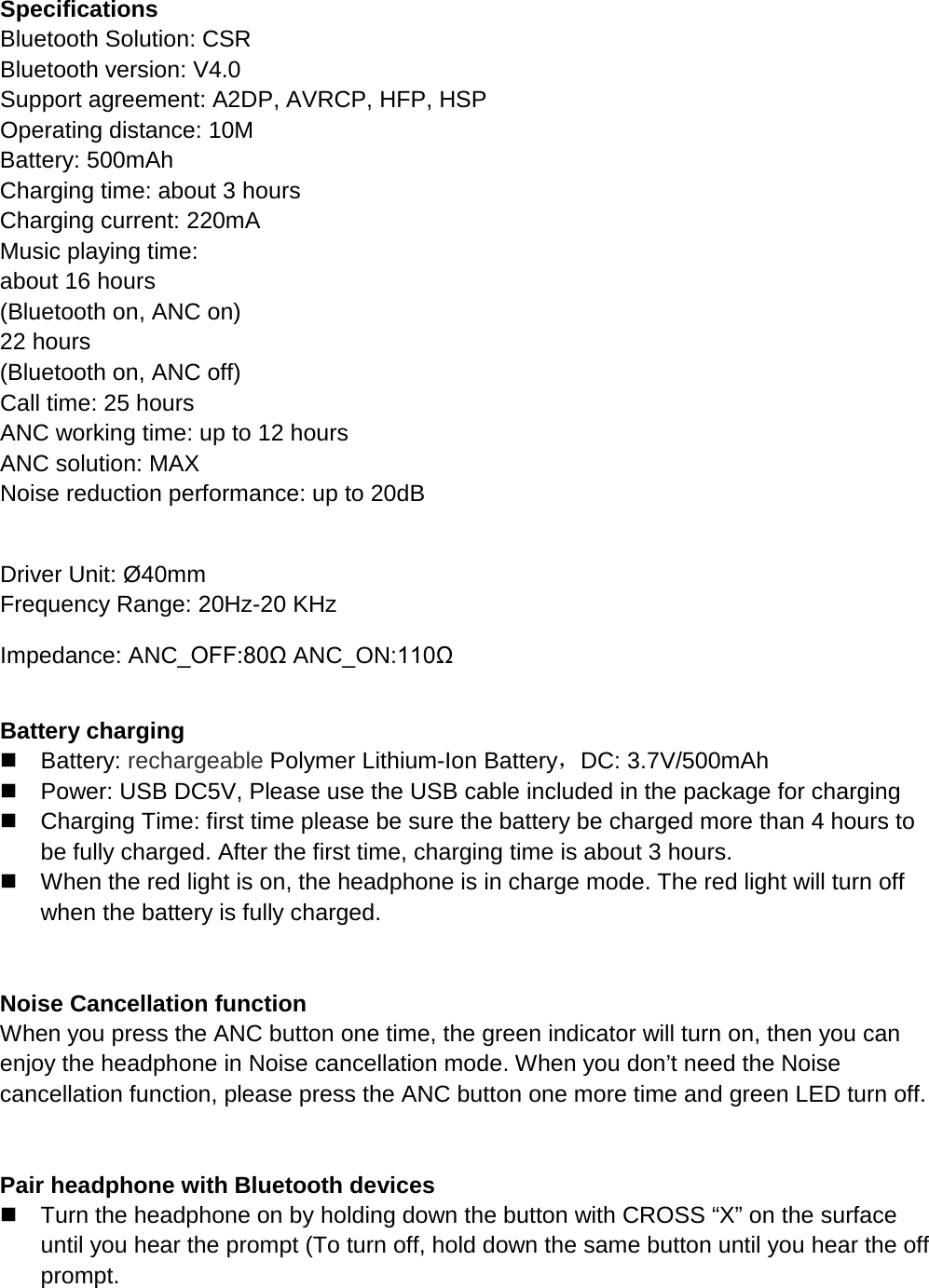
  Specifications Bluetooth Solution: CSR Bluetooth version: V4.0 Support agreement: A2DP, AVRCP, HFP, HSP Operating distance: 10M Battery: 500mAh Charging time: about 3 hours Charging current: 220mA Music playing time:                                                               about 16 hours (Bluetooth on, ANC on)                                                           22 hours (Bluetooth on, ANC off)                                                                                                    Call time: 25 hours ANC working time: up to 12 hours ANC solution: MAX Noise reduction performance: up to 20dB                                                                                                                                                            Driver Unit: Ø40mm          Frequency Range: 20Hz-20 KHz Impedance: ANC_OFF:80Ω ANC_ON:110Ω    Battery charging    Battery: rechargeable Polymer Lithium-Ion Battery,DC: 3.7V/500mAh  Power: USB DC5V, Please use the USB cable included in the package for charging  Charging Time: first time please be sure the battery be charged more than 4 hours to be fully charged. After the first time, charging time is about 3 hours.  When the red light is on, the headphone is in charge mode. The red light will turn off when the battery is fully charged.   Noise Cancellation function When you press the ANC button one time, the green indicator will turn on, then you can enjoy the headphone in Noise cancellation mode. When you don’t need the Noise cancellation function, please press the ANC button one more time and green LED turn off.     Pair headphone with Bluetooth devices  Turn the headphone on by holding down the button with CROSS “X” on the surface until you hear the prompt (To turn off, hold down the same button until you hear the off prompt.
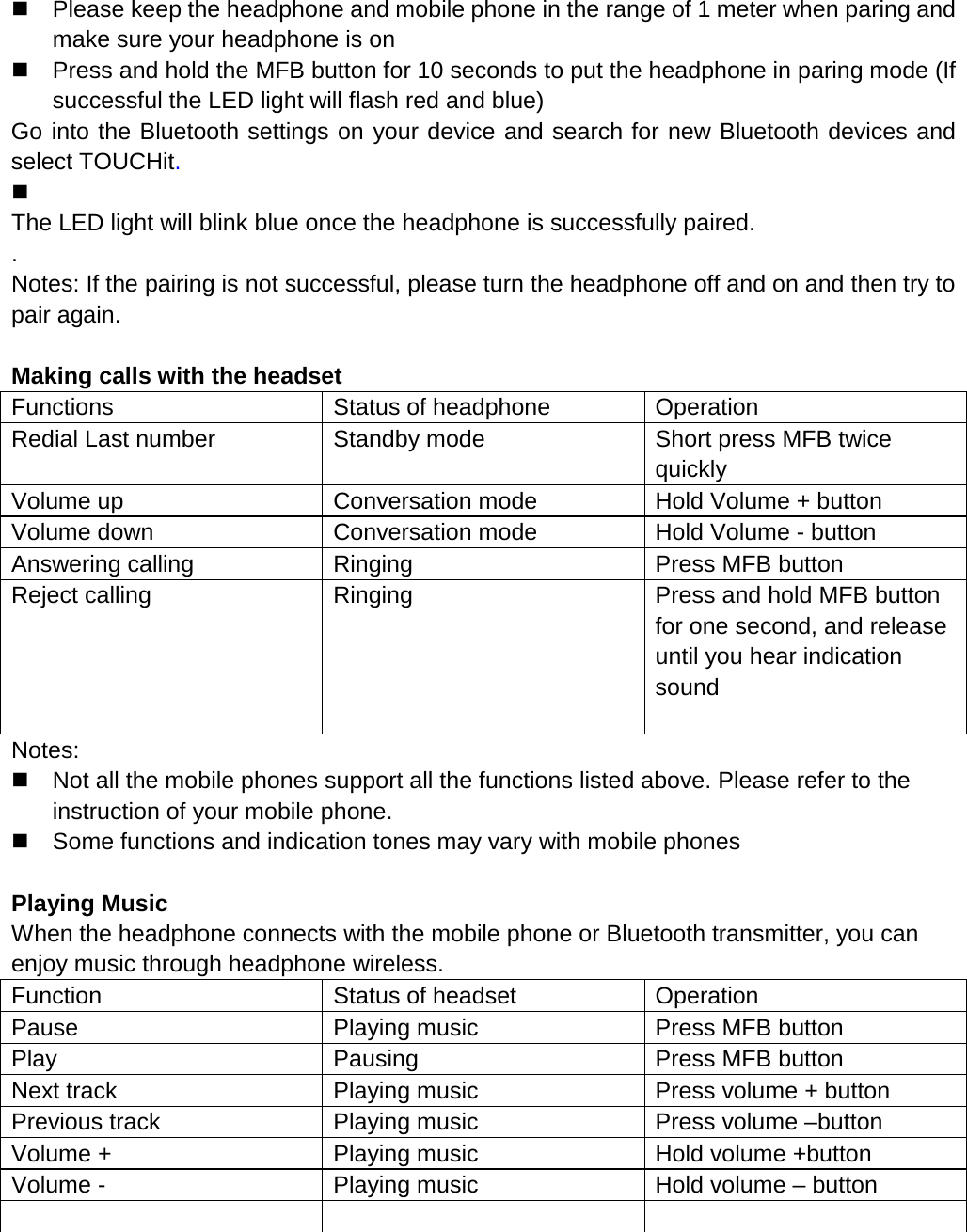
  Please keep the headphone and mobile phone in the range of 1 meter when paring and make sure your headphone is on  Press and hold the MFB button for 10 seconds to put the headphone in paring mode (If successful the LED light will flash red and blue) Go into the Bluetooth settings on your device and search for new Bluetooth devices and select TOUCHit.    The LED light will blink blue once the headphone is successfully paired. . Notes: If the pairing is not successful, please turn the headphone off and on and then try to pair again.  Making calls with the headset Functions Status of headphone Operation Redial Last number Standby mode Short press MFB twice quickly Volume up Conversation mode Hold Volume + button Volume down Conversation mode Hold Volume - button Answering calling Ringing Press MFB button Reject calling Ringing Press and hold MFB button for one second, and release until you hear indication sound    Notes:  Not all the mobile phones support all the functions listed above. Please refer to the instruction of your mobile phone.  Some functions and indication tones may vary with mobile phones  Playing Music When the headphone connects with the mobile phone or Bluetooth transmitter, you can enjoy music through headphone wireless. Function Status of headset Operation Pause Playing music Press MFB button Play Pausing Press MFB button Next track Playing music Press volume + button Previous track Playing music Press volume –button Volume + Playing music Hold volume +button Volume - Playing music Hold volume – button
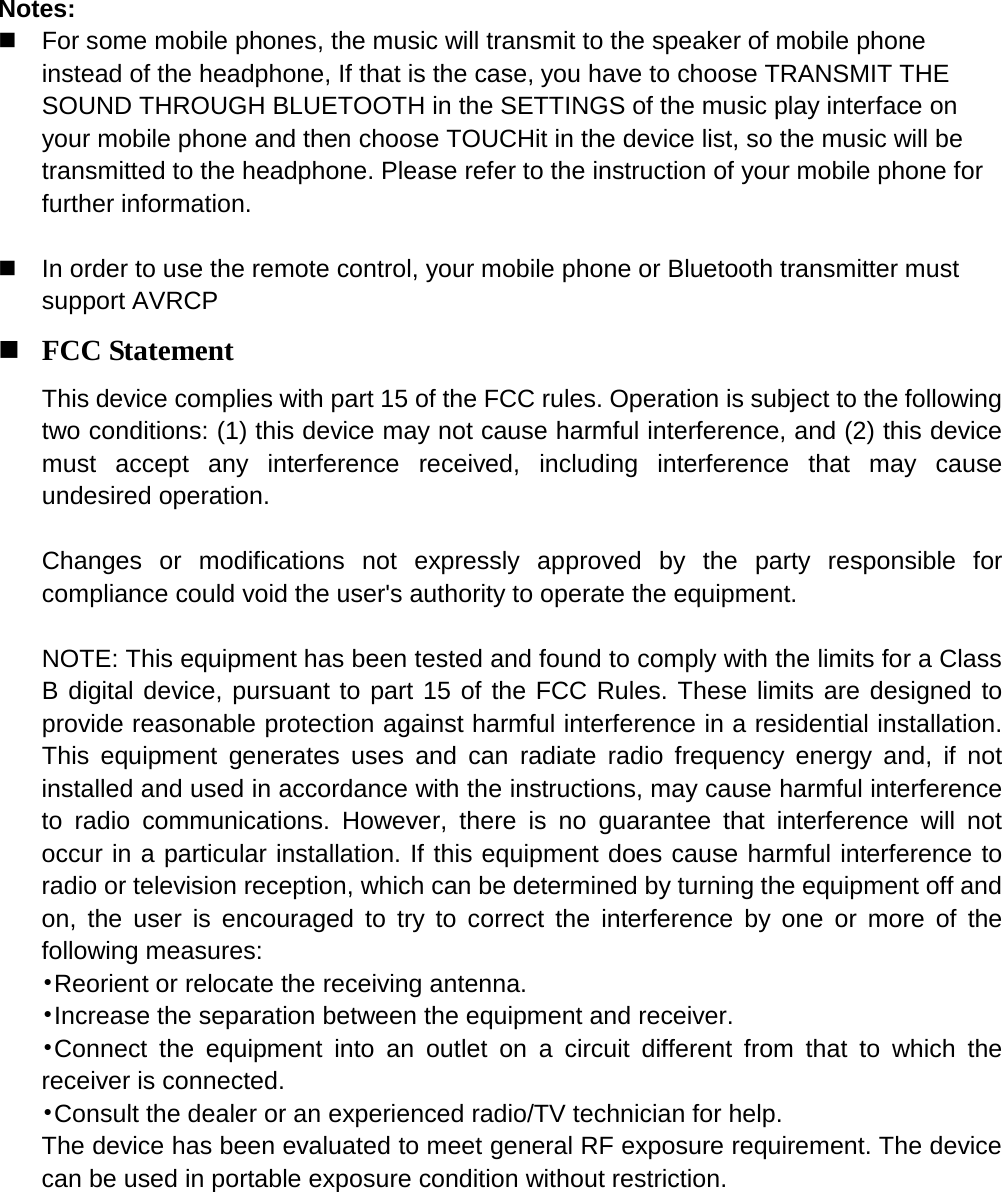
   Notes:  For some mobile phones, the music will transmit to the speaker of mobile phone instead of the headphone, If that is the case, you have to choose TRANSMIT THE SOUND THROUGH BLUETOOTH in the SETTINGS of the music play interface on your mobile phone and then choose TOUCHit in the device list, so the music will be transmitted to the headphone. Please refer to the instruction of your mobile phone for further information.     In order to use the remote control, your mobile phone or Bluetooth transmitter must support AVRCP  FCC Statement This device complies with part 15 of the FCC rules. Operation is subject to the following two conditions: (1) this device may not cause harmful interference, and (2) this device must accept any interference received, including interference that may cause undesired operation.    Changes or modifications not expressly approved by the party responsible for compliance could void the user's authority to operate the equipment.  NOTE: This equipment has been tested and found to comply with the limits for a Class B digital device, pursuant to part 15 of the FCC Rules. These limits are designed to provide reasonable protection against harmful interference in a residential installation. This equipment generates uses and can radiate radio frequency energy and, if not installed and used in accordance with the instructions, may cause harmful interference to radio communications. However, there is no guarantee that interference will not occur in a particular installation. If this equipment does cause harmful interference to radio or television reception, which can be determined by turning the equipment off and on, the user is encouraged to try to correct the interference by one or more of the following measures: •Reorient or relocate the receiving antenna. •Increase the separation between the equipment and receiver. •Connect the equipment into an outlet on a circuit different from that to which the receiver is connected. •Consult the dealer or an experienced radio/TV technician for help. The device has been evaluated to meet general RF exposure requirement. The device can be used in portable exposure condition without restriction.

Navigation menu