SALUS North America SS901ZB Water Leak Sensor User Manual WLS QSG ENv1

SALUS North America, Inc. Water Leak Sensor WLS QSG ENv1

User manual

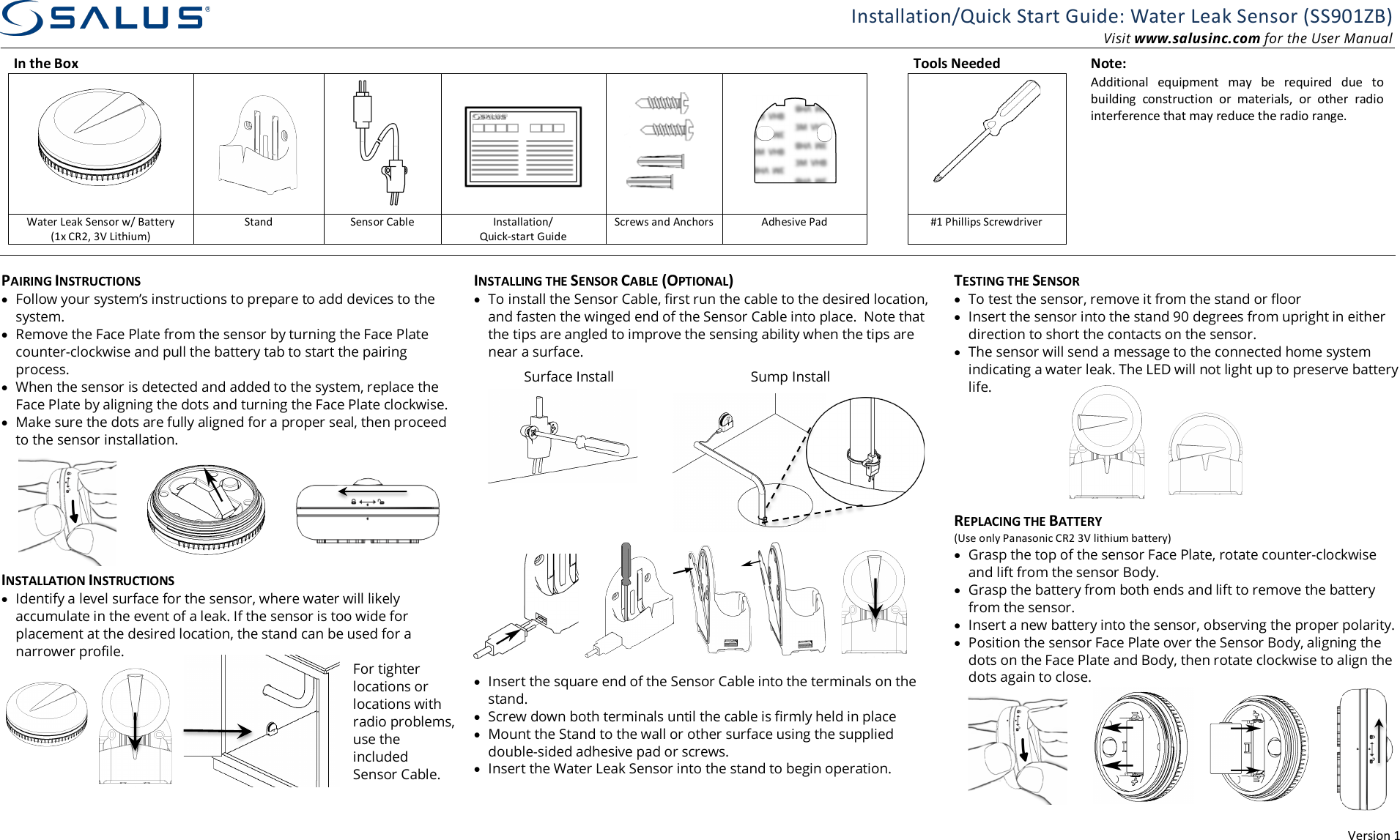
Version 1 Installation/Quick Start Guide: Water Leak Sensor (SS901ZB) Visit www.salusinc.com for the User Manual In the Box       Tools Needed  Note:           Additional  equipment  may  be  required  due  to building  construction  or  materials,  or  other  radio interference that may reduce the radio range. Water Leak Sensor w/ Battery (1x CR2, 3V Lithium) Stand Sensor Cable Installation/ Quick-start Guide Screws and Anchors Adhesive Pad  #1 Phillips Screwdriver            PAIRING INSTRUCTIONS • Follow your system’s instructions to prepare to add devices to the system. • Remove the Face Plate from the sensor by turning the Face Plate counter-clockwise and pull the battery tab to start the pairing process. • When the sensor is detected and added to the system, replace the Face Plate by aligning the dots and turning the Face Plate clockwise.  • Make sure the dots are fully aligned for a proper seal, then proceed to the sensor installation.  INSTALLATION INSTRUCTIONS • Identify a level surface for the sensor, where water will likely accumulate in the event of a leak. If the sensor is too wide for placement at the desired location, the stand can be used for a narrower profile. For tighter locations or locations with radio problems, use the included Sensor Cable. INSTALLING THE SENSOR CABLE (OPTIONAL) • To install the Sensor Cable, first run the cable to the desired location, and fasten the winged end of the Sensor Cable into place.  Note that the tips are angled to improve the sensing ability when the tips are near a surface.        • Insert the square end of the Sensor Cable into the terminals on the stand. • Screw down both terminals until the cable is firmly held in place • Mount the Stand to the wall or other surface using the supplied double-sided adhesive pad or screws. • Insert the Water Leak Sensor into the stand to begin operation.   TESTING THE SENSOR • To test the sensor, remove it from the stand or floor • Insert the sensor into the stand 90 degrees from upright in either direction to short the contacts on the sensor. • The sensor will send a message to the connected home system indicating a water leak. The LED will not light up to preserve battery life.       REPLACING THE BATTERY (Use only Panasonic CR2 3V lithium battery) • Grasp the top of the sensor Face Plate, rotate counter-clockwise and lift from the sensor Body.  • Grasp the battery from both ends and lift to remove the battery from the sensor. • Insert a new battery into the sensor, observing the proper polarity.  • Position the sensor Face Plate over the Sensor Body, aligning the dots on the Face Plate and Body, then rotate clockwise to align the dots again to close.  Surface Install Sump Install
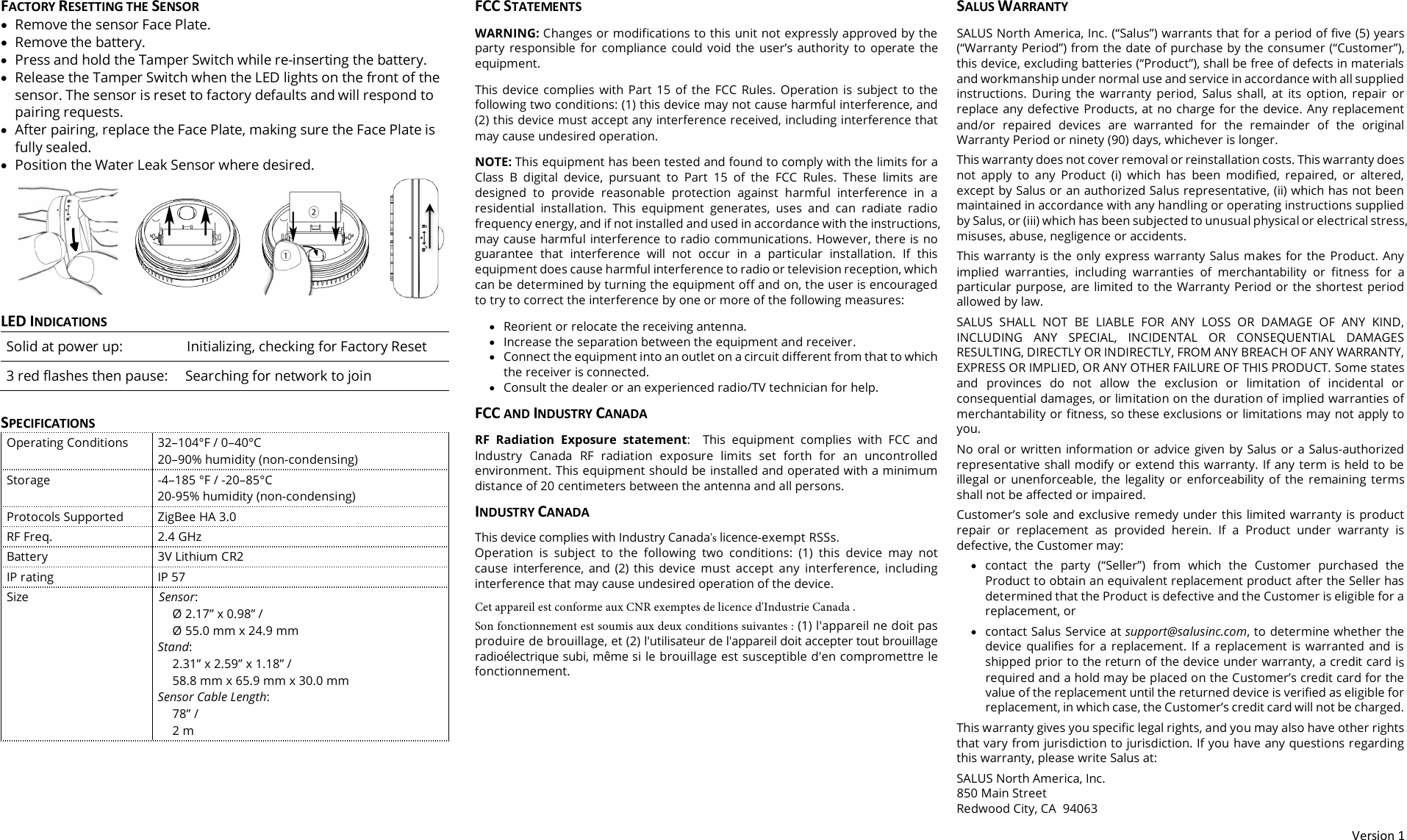
Version 1 FACTORY RESETTING THE SENSOR •Remove the sensor Face Plate.•Remove the battery.•Press and hold the Tamper Switch while re-inserting the battery.•Release the Tamper Switch when the LED lights on the front of thesensor. The sensor is reset to factory defaults and will respond topairing requests.•After pairing, replace the Face Plate, making sure the Face Plate isfully sealed.•Position the Water Leak Sensor where desired.LED INDICATIONS Solid at power up: Initializing, checking for Factory Reset 3 red flashes then pause: Searching for network to join SPECIFICATIONS Operating Conditions 32–104°F / 0–40°C 20–90% humidity (non-condensing) Storage -4–185 °F / -20–85°C 20-95% humidity (non-condensing) Protocols Supported ZigBee HA 3.0 RF Freq. 2.4 GHz Battery 3V Lithium CR2 IP rating IP 57 Size Sensor: Ø 2.17” x 0.98” /  Ø 55.0 mm x 24.9 mm Stand: 2.31” x 2.59” x 1.18” /  58.8 mm x 65.9 mm x 30.0 mm Sensor Cable Length: 78” / 2 m FCC STATEMENTS WARNING: Changes or modifications to this unit not expressly approved by the party  responsible  for  compliance  could  void  the  user’s  authority  to  operate  the equipment.This  device  complies  with  Part  15  of  the  FCC  Rules.  Operation  is  subject  to  the following two conditions: (1) this device may not cause harmful interference, and (2) this device must accept any interference received, including interference that may cause undesired operation.NOTE: This equipment has been tested and found to comply with the limits for a Class  B  digital  device,  pursuant  to  Part  15  of  the  FCC  Rules.  These  limits  are designed  to  provide  reasonable  protection  against  harmful  interference  in  a residential  installation.  This  equipment  generates,  uses  and  can  radiate radio frequency energy, and if not installed and used in accordance with the instructions, may cause harmful interference to radio communications. However, there is no guarantee  that  interference  will  not  occur  in  a  particular  installation.  If  this equipment does cause harmful interference to radio or television reception, which can be determined by turning the equipment off and on, the user is encouraged to try to correct the interference by one or more of the following measures:•Reorient or relocate the receiving antenna.•Increase the separation between the equipment and receiver. •Connect the equipment into an outlet on a circuit different from that to whichthe receiver is connected.•Consult the dealer or an experienced radio/TV technician for help.FCC AND INDUSTRY CANADA RF  Radiation  Exposure  statement:  This  equipment  complies  with  FCC  and Industry  Canada  RF  radiation  exposure  limits  set  forth  for  an  uncontrolled environment. This equipment should be installed and operated with a minimum distance of 20 centimeters between the antenna and all persons. INDUSTRY CANADA This device complies with Industry Canada's licence-exempt RSSs. Operation  is  subject  to  the  following  two  conditions:  (1)  this  device  may  not cause  interference,  and  (2)  this  device  must  accept  any  interference,  including interference that may cause undesired operation of the device. Cet appareil est conforme aux CNR exemptes de licence d'Industrie Canada . Son fonctionnement est soumis aux deux conditions suivantes : (1) l'appareil ne doit pas produire de brouillage, et (2) l'utilisateur de l'appareil doit accepter tout brouillage radioélectrique subi, même si le brouillage est susceptible d'en compromettre le fonctionnement. SALUS WARRANTY SALUS North America, Inc. (“Salus”) warrants that for a period of five (5) years (“Warranty Period”) from the date of purchase by the consumer (“Customer”), this device, excluding batteries (“Product”), shall be free of defects in materials and workmanship under normal use and service in accordance with all supplied instructions.  During  the  warranty  period,  Salus  shall,  at  its  option,  repair  or replace any defective Products, at no charge for the device. Any replacement and/or  repaired  devices  are  warranted  for  the  remainder  of  the  original Warranty Period or ninety (90) days, whichever is longer. This warranty does not cover removal or reinstallation costs. This warranty does not  apply  to  any  Product  (i)  which  has  been  modified,  repaired,  or  altered, except by Salus or an authorized Salus representative, (ii) which has not been maintained in accordance with any handling or operating instructions supplied by Salus, or (iii) which has been subjected to unusual physical or electrical stress, misuses, abuse, negligence or accidents. This warranty  is  the only  express  warranty Salus makes for the  Product. Any implied  warranties,  including  warranties  of  merchantability  or  fitness  for  a particular  purpose,  are limited to  the Warranty  Period or  the shortest  period allowed by law.  SALUS  SHALL  NOT  BE  LIABLE  FOR  ANY  LOSS  OR  DAMAGE  OF  ANY  KIND, INCLUDING  ANY  SPECIAL,  INCIDENTAL  OR  CONSEQUENTIAL  DAMAGES RESULTING, DIRECTLY OR INDIRECTLY, FROM ANY BREACH OF ANY WARRANTY, EXPRESS OR IMPLIED, OR ANY OTHER FAILURE OF THIS PRODUCT. Some states and  provinces  do  not  allow  the  exclusion  or  limitation  of  incidental  or consequential damages, or limitation on the duration of implied warranties of merchantability or fitness, so these exclusions or limitations may not apply to you. No oral or written information or advice  given by Salus or  a Salus-authorized representative shall modify or extend this warranty. If any term is held to be illegal  or  unenforceable,  the  legality  or  enforceability  of  the  remaining  terms shall not be affected or impaired. Customer’s sole and exclusive remedy under this limited warranty is product repair  or  replacement  as  provided  herein.  If  a  Product  under  warranty  is defective, the Customer may: •contact  the  party  (“Seller”)  from  which  the  Customer  purchased  theProduct to obtain an equivalent replacement product after the Seller hasdetermined that the Product is defective and the Customer is eligible for areplacement, or•contact Salus Service at support@salusinc.com, to determine whether thedevice  qualifies  for  a  replacement.  If  a  replacement  is  warranted  and  isshipped prior to the return of the device under warranty, a credit card isrequired and a hold may be placed on the Customer’s credit card for thevalue of the replacement until the returned device is verified as eligible forreplacement, in which case, the Customer’s credit card will not be charged.This warranty gives you specific legal rights, and you may also have other rights that vary from jurisdiction to jurisdiction. If you have any questions regarding this warranty, please write Salus at: SALUS North America, Inc. 850 Main Street  Redwood City, CA  94063

Navigation menu