SK Telecom ALBERT-BT BT Device User Manual part 2

SK Telecom Co., Ltd. BT Device part 2

Contents

User Manual part 2

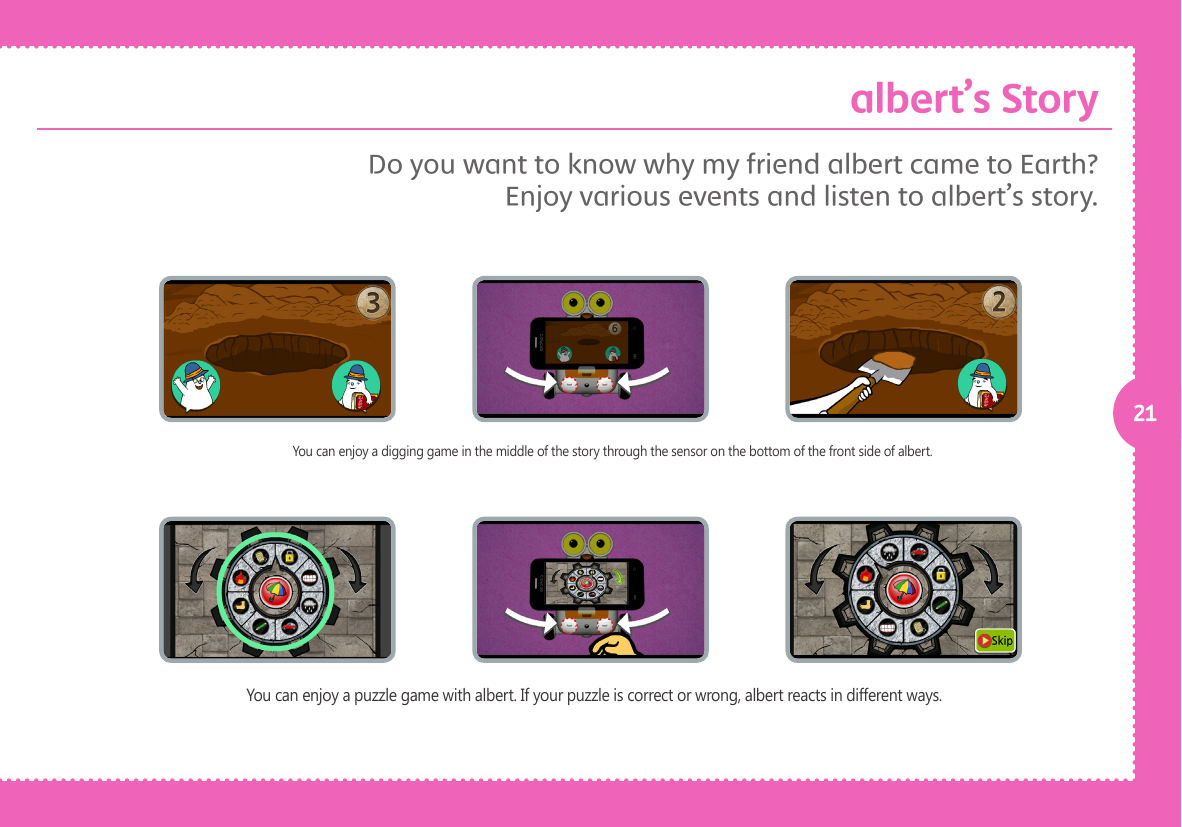
21You can enjoy a digging game in the middle of the story through the sensor on the bottom of the front side of albert.You can enjoy a puzzle game with albert. If your puzzle is correct or wrong, albert reacts in different ways. Do you want to know why my friend albert came to Earth? Enjoy various events and listen to albert’s story. albert’s Story
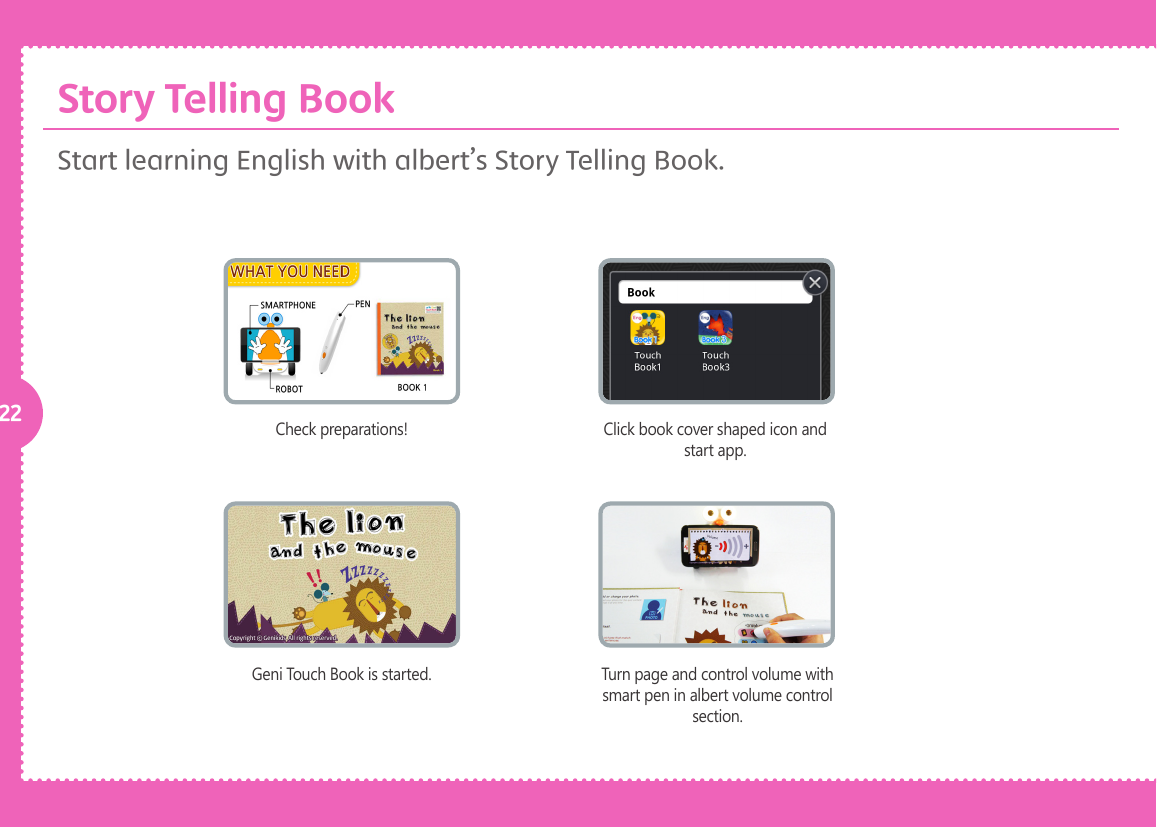
22 Check preparations!Geni Touch Book is started.Click book cover shaped icon and start app.Turn page and control volume with smart pen in albert volume control section.Start learning English with albert’s Story Telling Book. Story Telling Book
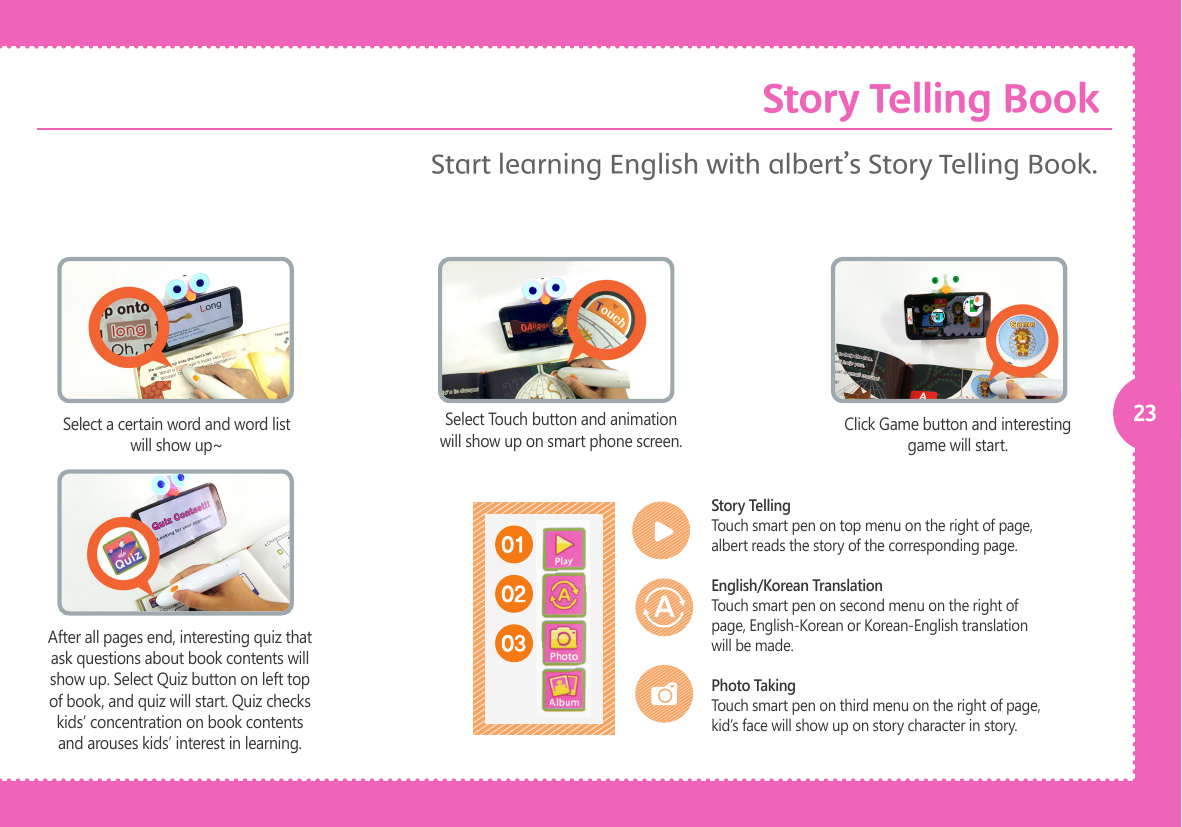
23Select a certain word and word list will show up~Click Game button and interesting game will start.Select Touch button and animation will show up on smart phone screen.After all pages end, interesting quiz that ask questions about book contents will show up. Select Quiz button on left top of book, and quiz will start. Quiz checks kids’ concentration on book contents and arouses kids’ interest in learning. Story TellingTouch smart pen on top menu on the right of page, albert reads the story of the corresponding page.English/Korean TranslationTouch smart pen on second menu on the right of page, English-Korean or Korean-English translation will be made.Photo TakingTouch smart pen on third menu on the right of page, kid’s face will show up on story character in story.Start learning English with albert’s Story Telling Book. Story Telling Book
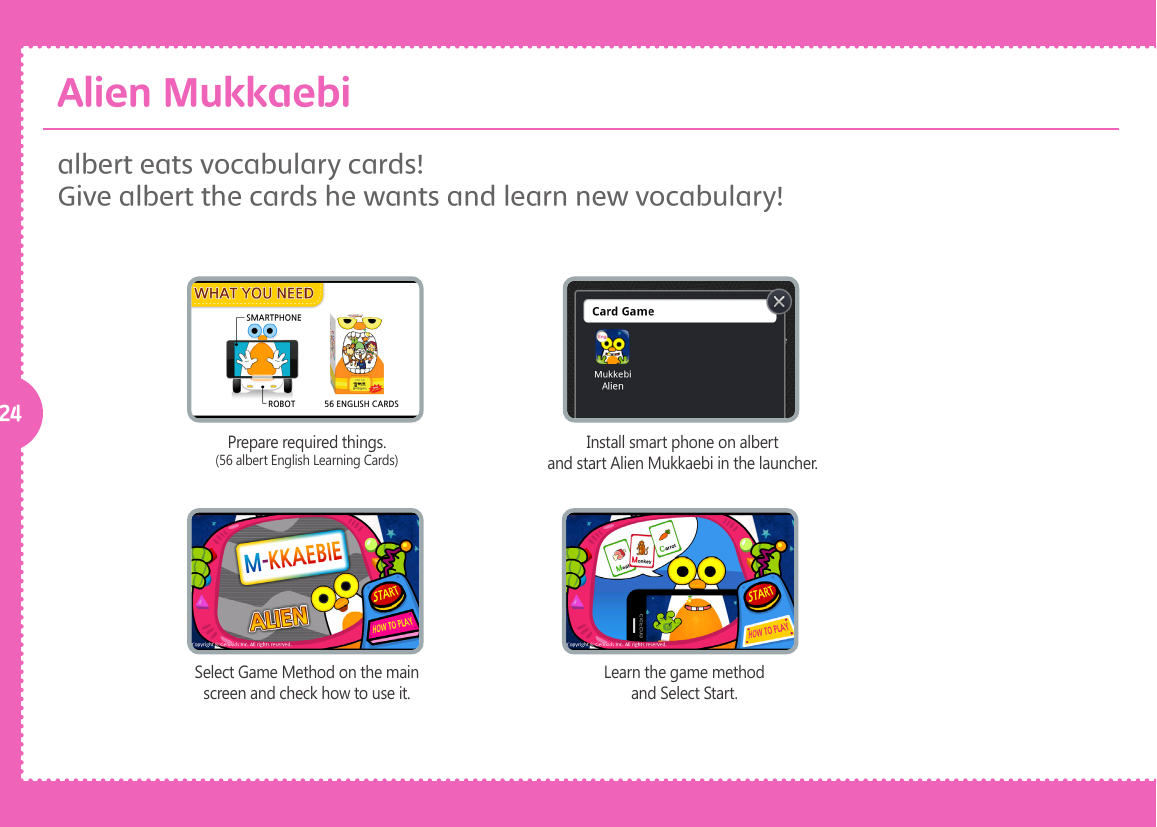
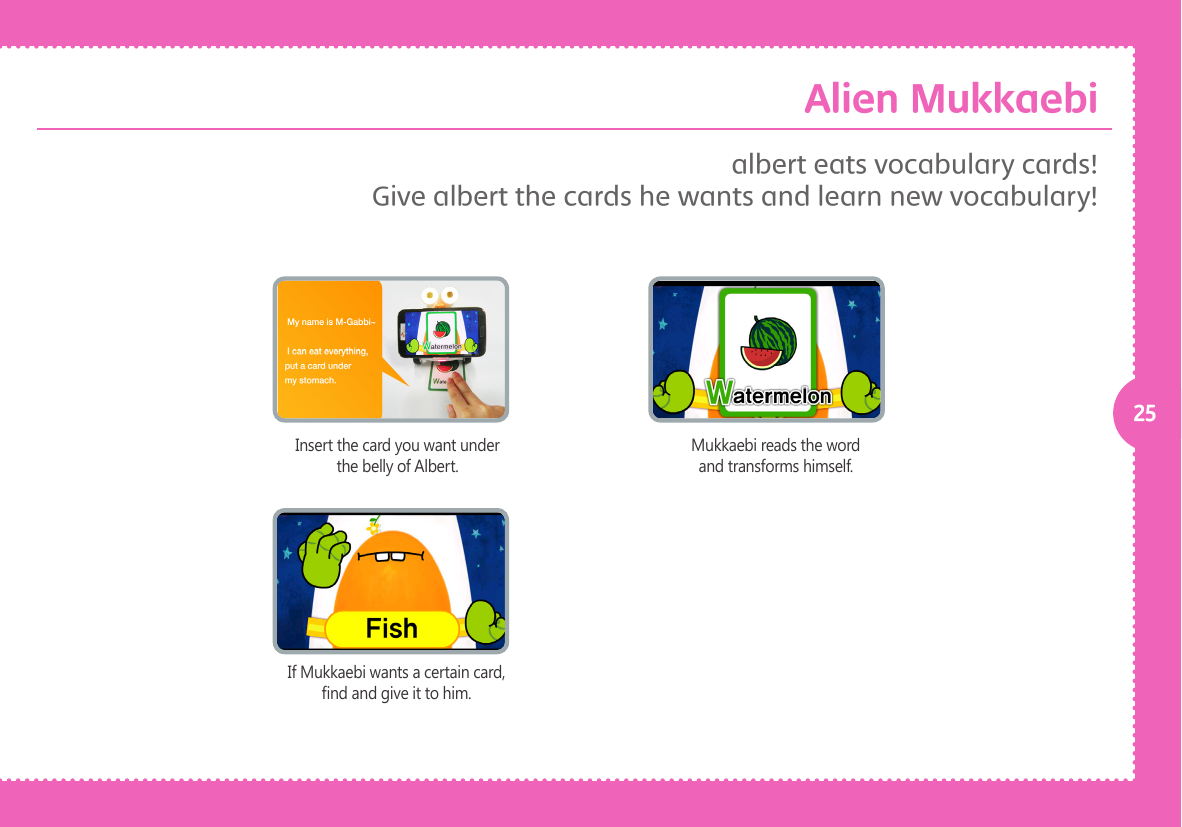
24Prepare required things.(56 albert English Learning Cards)Select Game Method on the main screen and check how to use it.Install smart phone on albert and start Alien Mukkaebi in the launcher.Learn the game method and Select Start.albert eats vocabulary cards!Give albert the cards he wants and learn new vocabulary!Alien Mukkaebi
25Insert the card you want under the belly of Albert.If Mukkaebi wants a certain card, nd and give it to him.Mukkaebi reads the word and transforms himself.albert eats vocabulary cards!Give albert the cards he wants and learn new vocabulary!Alien Mukkaebi
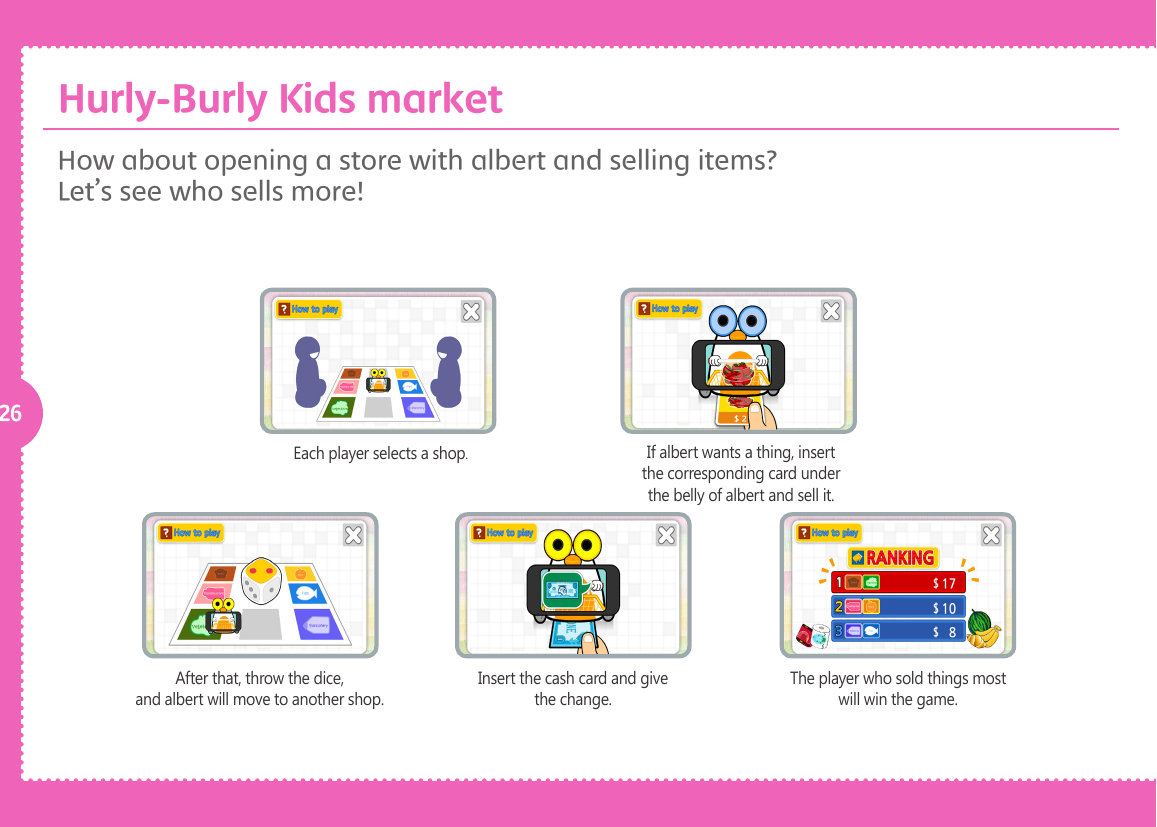
26Each player selects a shop.If albert wants a thing, insert the corresponding card under the belly of albert and sell it.After that, throw the dice, and albert will move to another shop.Insert the cash card and give the change.The player who sold things most will win the game.How about opening a store with albert and selling items? Let’s see who sells more! Hurly-Burly Kids market
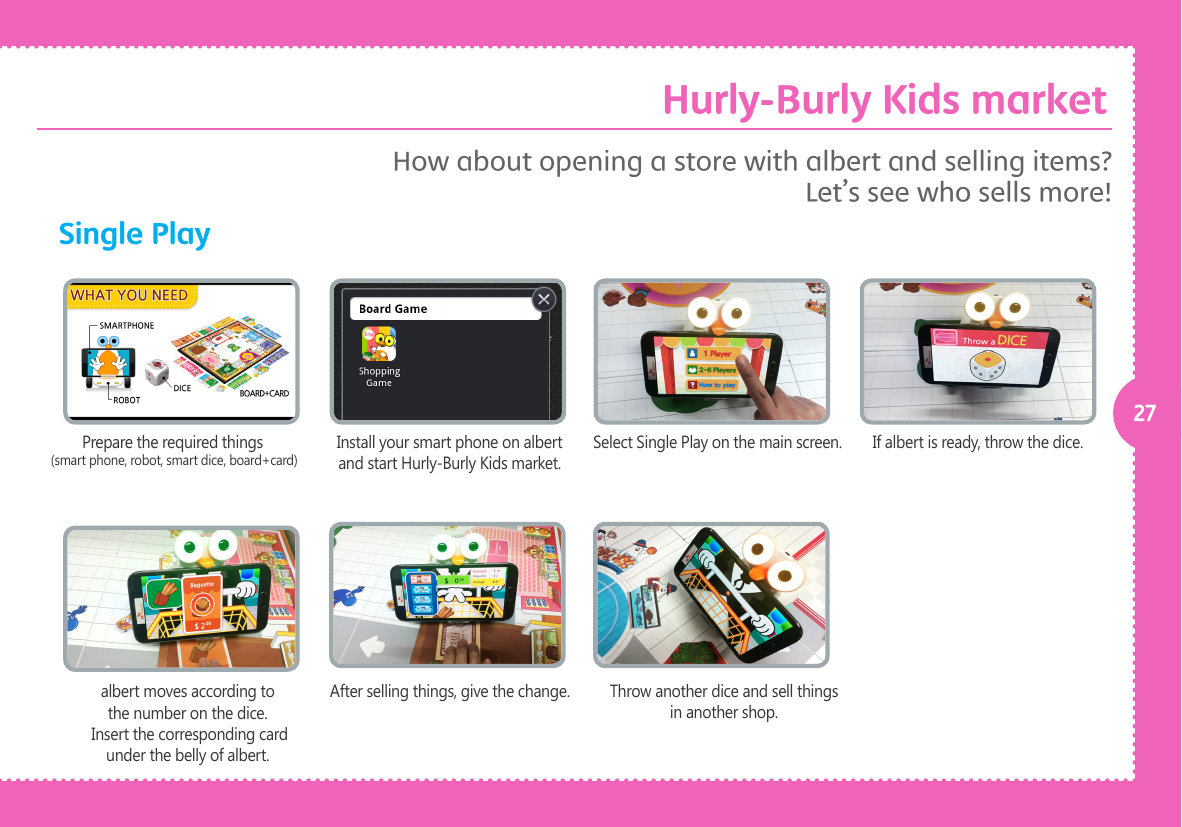
27Single PlayPrepare the required things (smart phone, robot, smart dice, board+card)albert moves according to the number on the dice. Insert the corresponding card under the belly of albert.Install your smart phone on albert and start Hurly-Burly Kids market.After selling things, give the change.Select Single Play on the main screen.Throw another dice and sell things in another shop.If albert is ready, throw the dice.How about opening a store with albert and selling items? Let’s see who sells more! Hurly-Burly Kids market
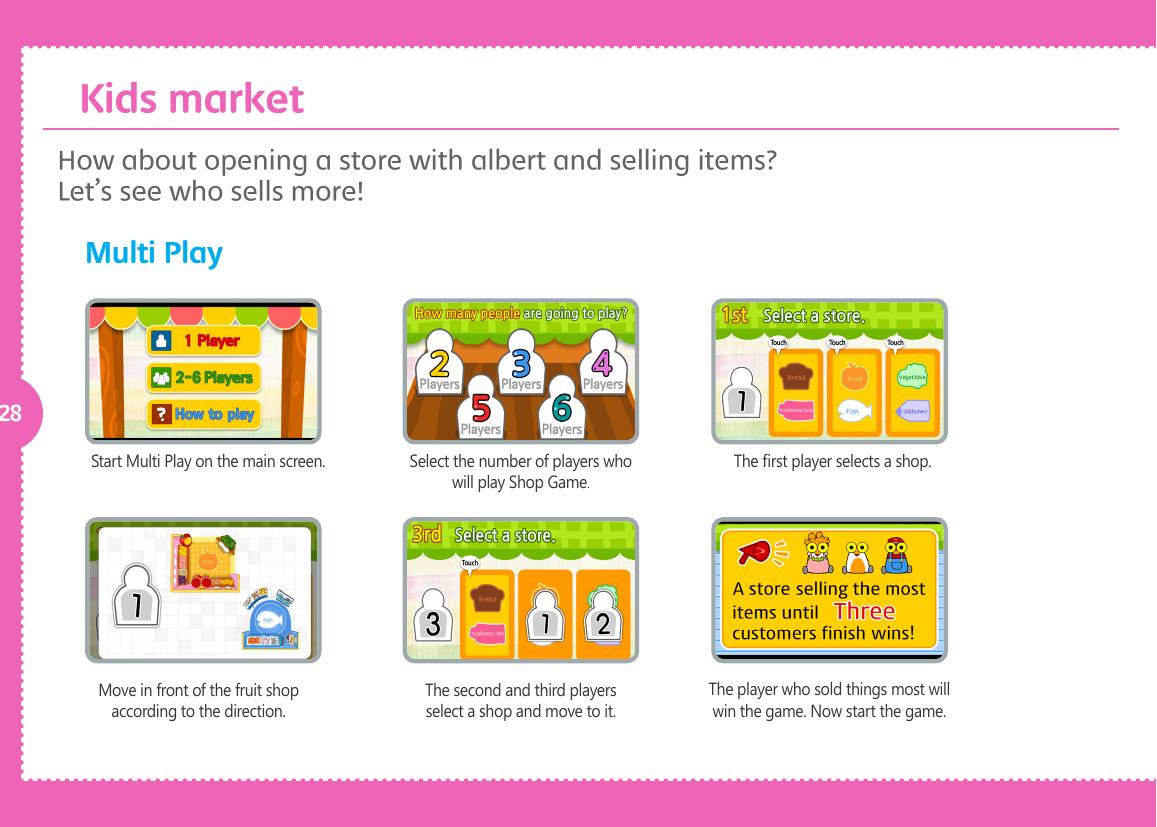
28Start Multi Play on the main screen. Select the number of players who will play Shop Game.The rst player selects a shop.Move in front of the fruit shop according to the direction.The second and third players select a shop and move to it.The player who sold things most will win the game. Now start the game.How about opening a store with albert and selling items? Let’s see who sells more! Multi Play  Kids market
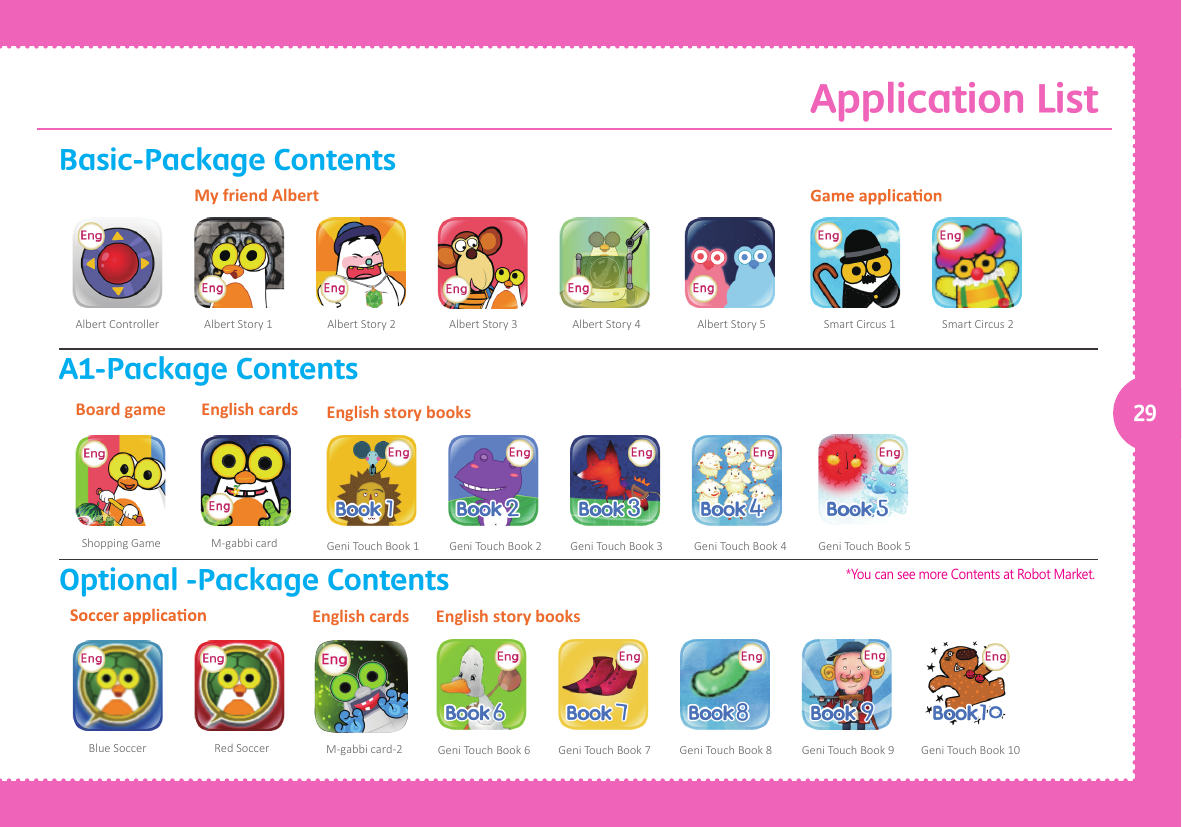
Application List29Blue Soccer Red Soccer M-gabbi card-2Albert Controller Albert Story 1 Albert Story 2 Albert Story 3 Albert Story 4 Albert Story 5 Smart Circus 1 Smart Circus 2My friend AlbertShopping Game M-gabbi cardBoard game English cardsGeni Touch Book 1 Geni Touch Book 2 Geni Touch Book 3 Geni Touch Book 4 Geni Touch Book 5English story booksGeni Touch Book 10Geni Touch Book 6 Geni Touch Book 7 Geni Touch Book 8 Geni Touch Book 9English story booksEnglish cardsBasic-Package ContentsA1-Package ContentsOptional -Package Contents*You can see more Contents at Robot Market.
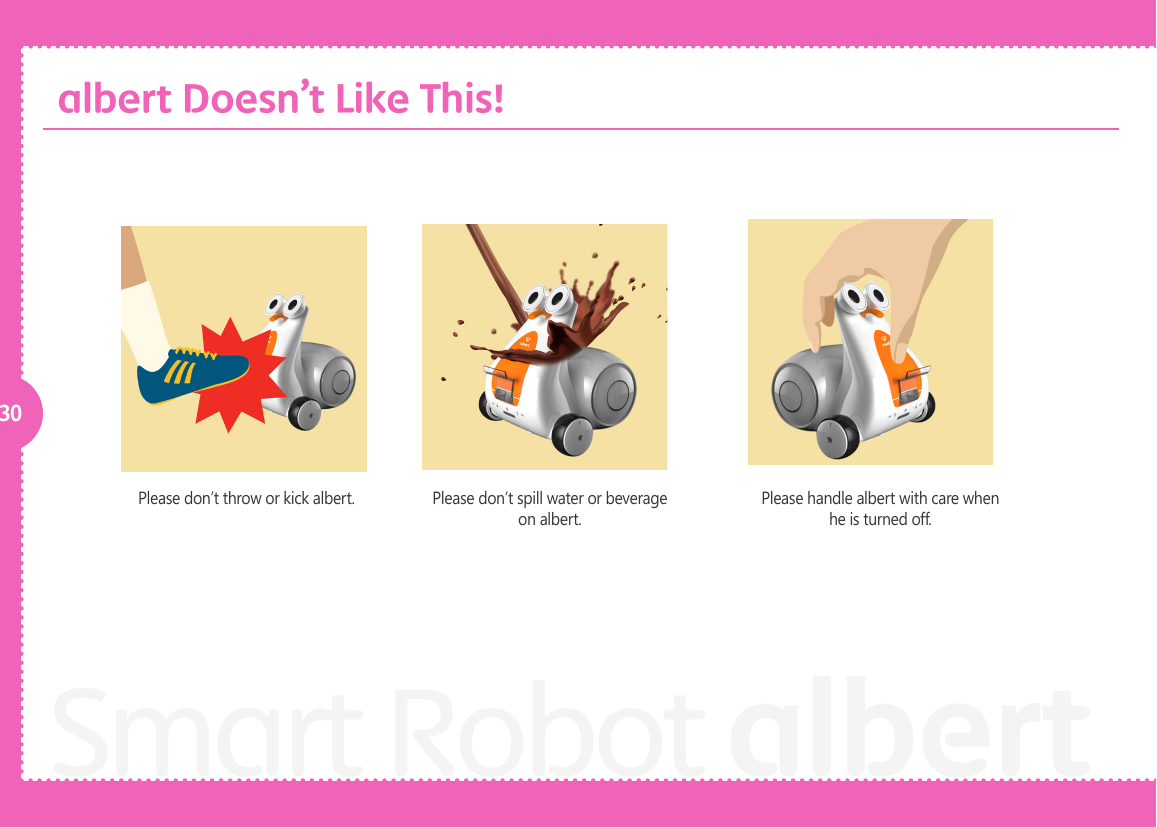
30Smart Robot albertPlease don’t throw or kick albert. Please don’t spill water or beverage on albert. Please handle albert with care when he is turned off. albert Doesn’t Like This!
31Guide BookDo not use force to connect or disconnect your sma rtphone. The smartphone stand could break. The smart pen sensor is in the touch book. Please don’t tear or wrinkle the Touch Book. Please don’t spill liquid on the vocabulary cards and board or stain them.albert Doesn’t Like This!
32
33Service
34Consumers have the right to receive free-of-charge service during the 12 months period starting from the date of the purchase in the case of prod-uct failure during use. However, in the event of failure arising from misuse on consumer’s part or failure due to natural disaster, any service related to such failures will be charged even during the period of free service.* Warranty period for the battery is 6 months after the date of the purchase.Service at a costIn the event of following circumstances, consumer will be charged for any services provided even within the free service period.1. Not product failure  - Service charge will occur when service is requested and no malfunction or defect is found to be present.    We strongly recommend all users to read the manual to become familiar with the product.2. Failure by user’s misusage  - Failure by unstable input power and connection with faulty devices.  - Failure by inserting foreign substance into the robot.  - Failure by accidental dropping and external shock on the robot.  - Failure by disassembling robot at user’s own discretion and part missing arisin from user’s disassembly.  - Exterior damage and deformation by using corrosive solution or liquid such as thinner and benzene.  - Failure by not following cautions, warning articles described on the manual.  - Failure by user’s mistake, misusage or failure caused by external factors.3. Others  - Failure by natural disaster (such as thunderbolt, re, storm, ood, sea water, earthquake, etc.)  - Replacement battery and other consumable items.Service
35Exemption• The manufacturer, importer and dealers are not liable for any damage including injury caused by improper usage or operation.• The specication and features are subject to be changed without prior notice for further improvement.• The manufacturer, importer and dealers are not liable for any loss of data in user’s smart phone arising from operation of the robot.• For more detailed information, please visit T smart learning website at www.tsmartlearning.com• Small scratches and macula can be made during manufacturing process.Service
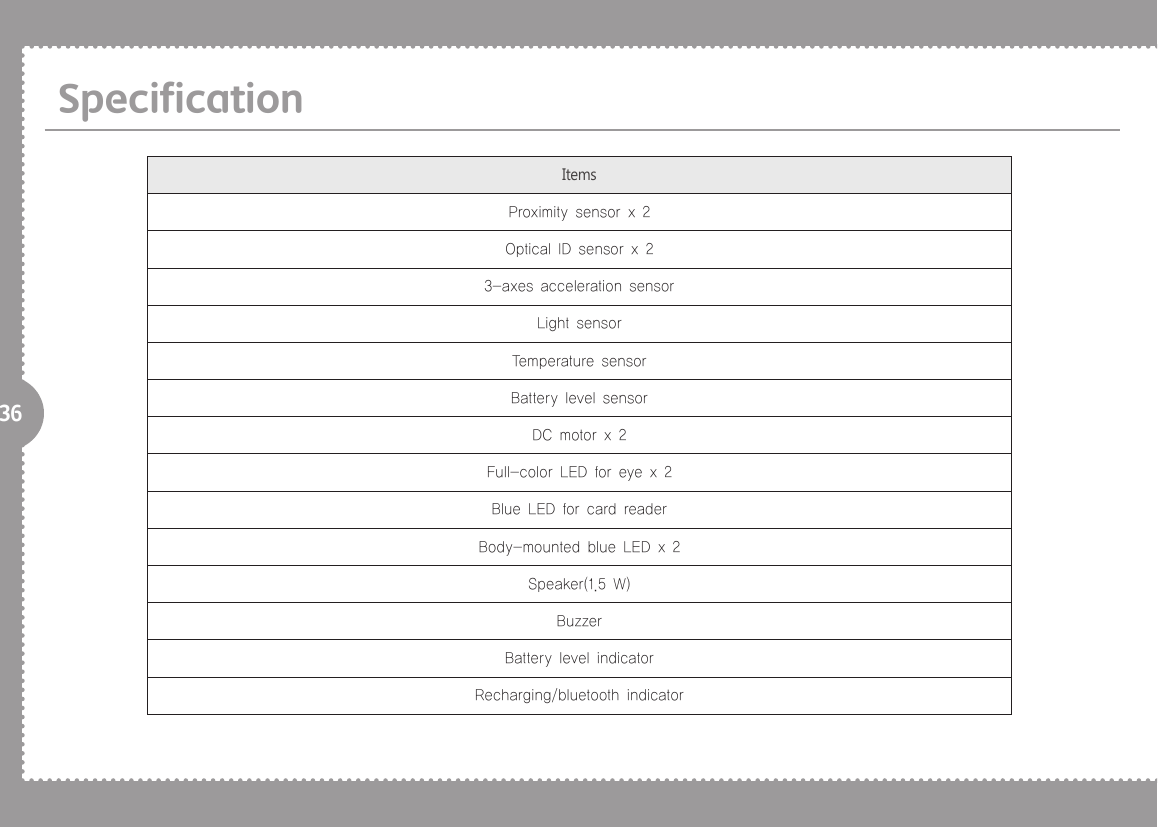
36SpecificationItemsProximity sensor x 2Optical ID sensor x 23-axes acceleration sensorLight sensorTemperature sensorBattery level sensorDC motor x 2Full-color LED for eye x 2Blue LED for card readerBody-mounted blue LED x 2Speaker(1.5 W)BuzzerBattery level indicatorRecharging/bluetooth indicator
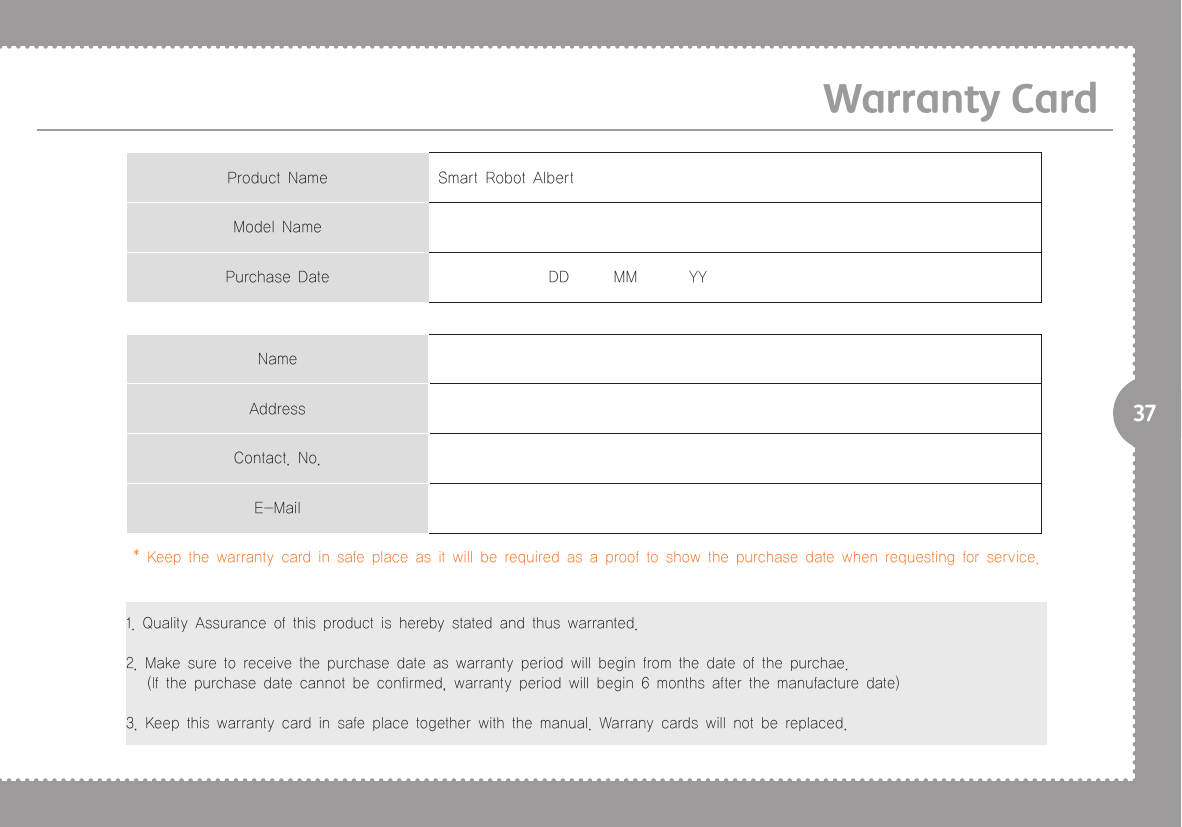
37Warranty CardProduct Name Smart Robot AlbertModel NamePurchase Date                DD      MM       YYNameAddressContact. No.E-Mail* Keep the warranty card in safe place as it will be required as a proof to show the purchase date when requesting for service.1. Quality Assurance of this product is hereby stated and thus warranted.2. Make sure to receive the purchase date as warranty period will begin from the date of the purchae.   (If the purchase date cannot be confirmed, warranty period will begin 6 months after the manufacture date)3. Keep this warranty card in safe place together with the manual. Warrany cards will not be replaced.
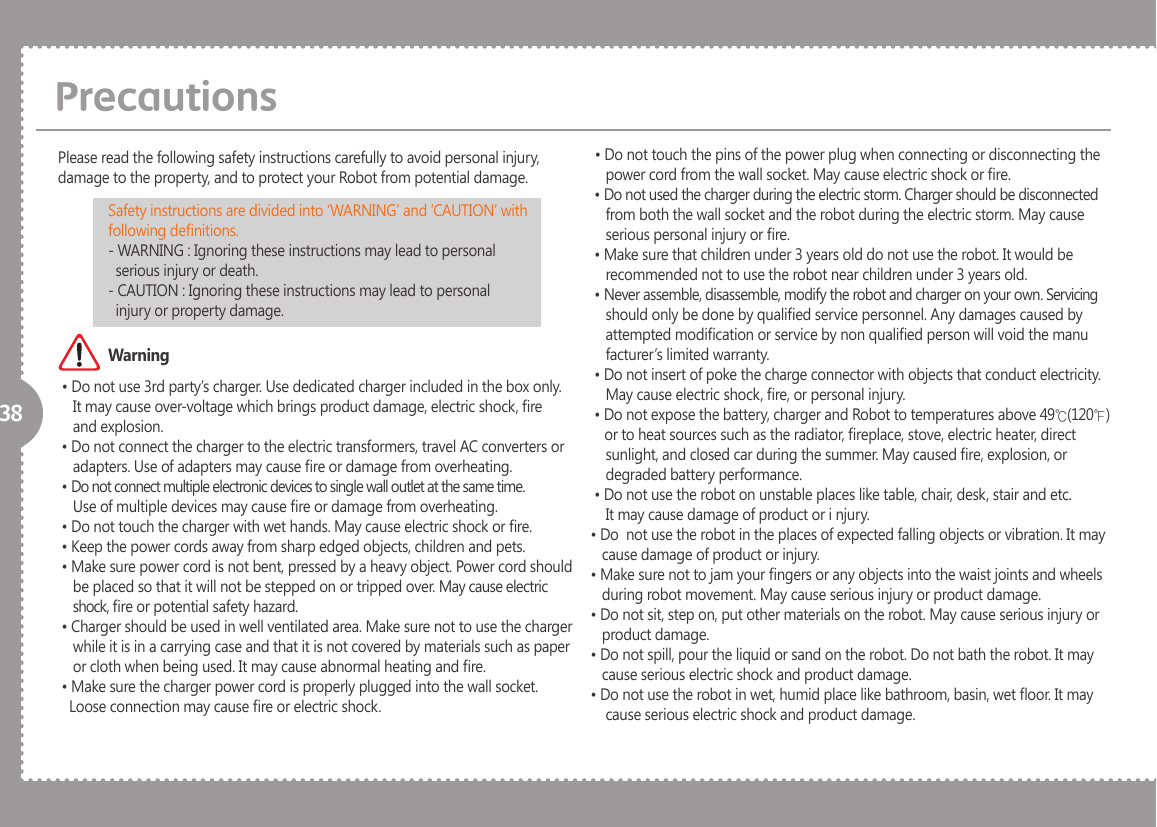
38 • Do not use 3rd party’s charger. Use dedicated charger included in the box only.     It may cause over-voltage which brings product damage, electric shock, re     and explosion. • Do not connect the charger to the electric transformers, travel AC converters or     adapters. Use of adapters may cause re or damage from overheating. • Do not connect multiple electronic devices to single wall outlet at the same time.    Use of multiple devices may cause re or damage from overheating. • Do not touch the charger with wet hands. May cause electric shock or re. • Keep the power cords away from sharp edged objects, children and pets. • Make sure power cord is not bent, pressed by a heavy object. Power cord should     be placed so that it will not be stepped on or tripped over. May cause electric     shock, re or potential safety hazard. • Charger should be used in well ventilated area. Make sure not to use the charger     while it is in a carrying case and that it is not covered by materials such as paper    or cloth when being used. It may cause abnormal heating and re. • Make sure the charger power cord is properly plugged into the wall socket.     Loose connection may cause re or electric shock.Please read the following safety instructions carefully to avoid personal injury, damage to the property, and to protect your Robot from potential damage. • Do not touch the pins of the power plug when connecting or disconnecting the     power cord from the wall socket. May cause electric shock or re. • Do not used the charger during the electric storm. Charger should be disconnected     from both the wall socket and the robot during the electric storm. May cause     serious personal injury or re. • Make sure that children under 3 years old do not use the robot. It would be     recommended not to use the robot near children under 3 years old. • Never assemble, disassemble, modify the robot and charger on your own. Servicing     should only be done by qualied service personnel. Any damages caused by     attempted modication or service by non qualied person will void the manu    facturer’s limited warranty. • Do not insert of poke the charge connector with objects that conduct electricity.     May cause electric shock, re, or personal injury. • Do not expose the battery, charger and Robot to temperatures above 49℃(120℉)        or to heat sources such as the radiator, replace, stove, electric heater, direct    sunlight, and closed car during the summer. May caused re, explosion, or     degraded battery performance. • Do not use the robot on unstable places like table, chair, desk, stair and etc.     It may cause damage of product or i njury.• Do  not use the robot in the places of expected falling objects or vibration. It may    cause damage of product or injury.• Make sure not to jam your ngers or any objects into the waist joints and wheels    during robot movement. May cause serious injury or product damage.• Do not sit, step on, put other materials on the robot. May cause serious injury or    product damage.• Do not spill, pour the liquid or sand on the robot. Do not bath the robot. It may    cause serious electric shock and product damage.• Do not use the robot in wet, humid place like bathroom, basin, wet oor. It may     cause serious electric shock and product damage.PrecautionsSafety instructions are divided into ‘WARNING’ and ‘CAUTION’ with following denitions.- WARNING : Ignoring these instructions may lead to personal   serious injury or death.- CAUTION : Ignoring these instructions may lead to personal   injury or property damage.Warning
39• In case of moving the robot from cold place to the warmer place, dew/moisture    may be created on the surface / inside of the robot. In this case, turn off the robot    power (if the power is on) and leave the robot more than 1 hours to remove the    dew/moisture. • Use soft, dry cloth to clean the robot surface. Wet cloth may cause electric shock     and serious injury and rough cloth may cause scratches on the robot surface. • The robot uses Li-Ion(Atti) and Li-Po(magic wand) battery. Please follow local     recycling instruction for discard the battery. • Do not use 3rd party’s battery. Please contact your local reseller to replace the     battery, and use genuine batteries provided by manufacturer. Otherwise, it may     cause re or explosion. • For proper robot movement, please remove objects and obstacles such as wire,     cloth, books, etc. It may cause re or product damage. • Keep the battery away from the children. • In case the magnet in the wing copula is separated from the body due to the    external shock, please make sure children not to swallow it. It may cause serious    injury or death. • Follow the temperature of 0 ~ +40˚C for the product storage and use. • When lifting the robot out of the box, put your hand below the robot and lift by     the body.    (Do not grasp wings, feet, phone cover to lift the robot. Robot can be dropped.) • Do not lift the robot by arm, leg, neck, or other part alone. Lift by holding the     body. It may cause damage to the product.  • Store the robot in the original box or in another appropriate box to prevent damage     during transportation or long storage. • Battery will discharge naturally over period of time even when it was not in use.     Charge the battery before using again.  • Do not drop or apply external shock to the robot. It may cause damage to the     product.  • Robot may not respond to the remote control command while it is in motion. Do     not force movement. Try the remote control after the robot has completed cur    rent motion.  • Robot may fall or not move if the surface is not at, angled, slippery or lled with     obstacles.  • Do the store the root near a magnet or X-Ray. It may cause damage or produce     malfunction in the product.  • Only use the robot indoors. Do not use the robot on rough surface such as     concrete oors. It may cause damage to the product.  • Do not lubricate robot joints, wheels or other parts. It may cause damage to the     product.  • Do not force to bend the waist of the robot. It may cause foreign substance jam    ming or damage to the product.  • In case of ringing in the ears, decrease the volume or cease to use of robot.PrecautionsCaution
40PrecautionsFCC ( Federal Communications Commission) This equipment has been tested and found to comply with limits for a Class B digital device, pursuant to Part 15 of the FCC Rules. These limits are residential installation. This equipment generates uses and can radiate radio frequency energy and, if not install and use in accordance with the instructions, may cause harmful interference to radio communications. However, there is no guarantee that interference will not occur in a particular installation. If this equipment dose cause harmful interference to radio or television reception , which can be determined by turning the equipment off and on, the user is encouraged to try  to correct the interference by one or more of the following measures:  -Reorient or relocate the receiving antenna.  -Increase the separation between the equipment and receiver.  -Connect the equipment into an outlet in a circuit different                    from that to which the receiver is connected.  -Consult the dealer or an experienced radio/ TV technical for                     help. WARNING: this equipment may generate or use radio fre   quency energy. Changes or modications or this equipment   may cause harmful interference unless the modications are   expressly approved in the instruction manual. The user could    lose the authority to operate this equipment if an unauthorized   change or modication is made. This device complies with Par 15 of the FCC’s Rules. Operation is subject to the following two Conditions:  1.This device may not cause harmful interference, and   2.This device must accept an interference received, interfer     ence received, including interference that may cause unde     sirable operation.CE(Communaut’ Europeen) Hereby, SK telecom. declares that this albert-BT is in compliance with the essential requirements and other relevant provisions of directive (1999/5/EC.)
41Memo
Smart Robot albertGuide Book

Navigation menu