SKYPINE ELECTRONICS CES8243CL All In One DVD Player User Manual VX405 Usermanual EN 2014 12 12

SKYPINE ELECTRONICS (SHEN ZHEN) CO., LTD. All In One DVD Player VX405 Usermanual EN 2014 12 12

User Manual 3

37
VX405
English
English Owner’s Manual
13. Bluetooth® AUDIO PLAYER OPERATIONS
฀฀฀฀฀฀฀
฀฀฀฀฀฀฀
฀฀฀฀฀฀฀฀
฀฀฀฀฀฀฀฀
฀฀฀฀฀฀฀฀฀
Note:
฀฀฀฀฀฀฀฀฀฀
฀฀฀฀
฀฀฀฀฀฀฀฀
audio players, see our home page: 
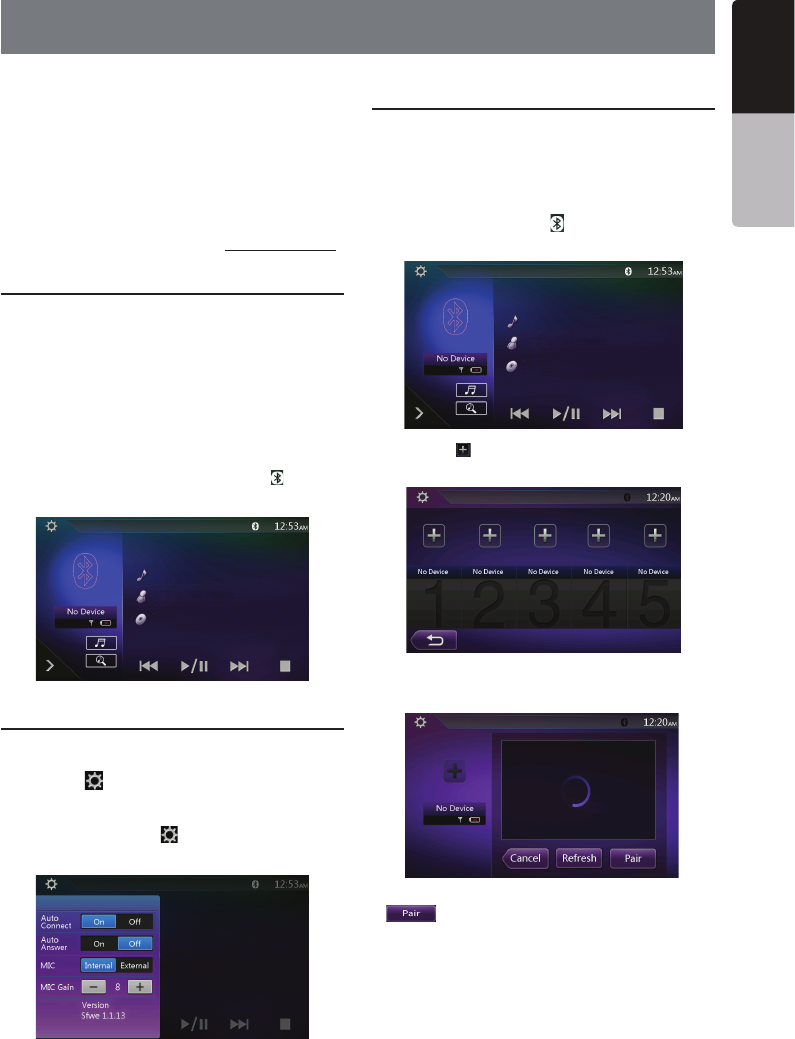
Selecting the Bluetooth Audio Mode
฀฀ [BT Audio]฀฀฀฀฀
฀฀฀฀฀฀
฀฀฀฀฀฀฀฀฀
฀฀฀฀฀฀฀฀
฀฀฀฀฀฀฀

฀฀฀฀฀฀฀฀
฀฀฀฀฀฀฀
฀ ฀฀฀฀฀฀฀฀
฀฀฀฀฀฀฀[]฀฀฀
฀฀฀฀฀฀
Bluetooth Audio Player Settings
฀฀฀฀฀฀฀
฀฀฀
฀฀฀[]฀฀฀฀฀฀฀
฀
฀฀฀฀฀฀฀
฀฀฀[] button to return to the
฀
Registering Your Bluetooth Audio
Player (Pairing)
฀฀฀฀฀฀฀฀
฀฀฀฀฀฀฀
฀฀฀฀
฀฀฀฀฀฀฀฀฀฀฀
฀฀
฀฀฀฀฀[]฀฀฀฀฀
฀
฀฀฀[ ]฀฀฀฀฀฀฀

฀฀฀฀฀฀฀฀[
]฀฀฀฀฀฀฀฀
฀฀฀฀฀฀฀
38
VX405
English Owner’s Manual
฀฀฀฀฀฀
฀฀฀฀฀฀฀
฀฀฀฀฀฀฀฀฀
฀฀฀฀฀฀฀฀฀
฀฀฀฀฀[]฀฀฀฀
฀฀฀฀฀฀฀
฀฀฀฀฀฀฀
฀฀฀ ฀฀฀฀฀
฀฀฀฀
฀฀฀ ฀฀฀฀
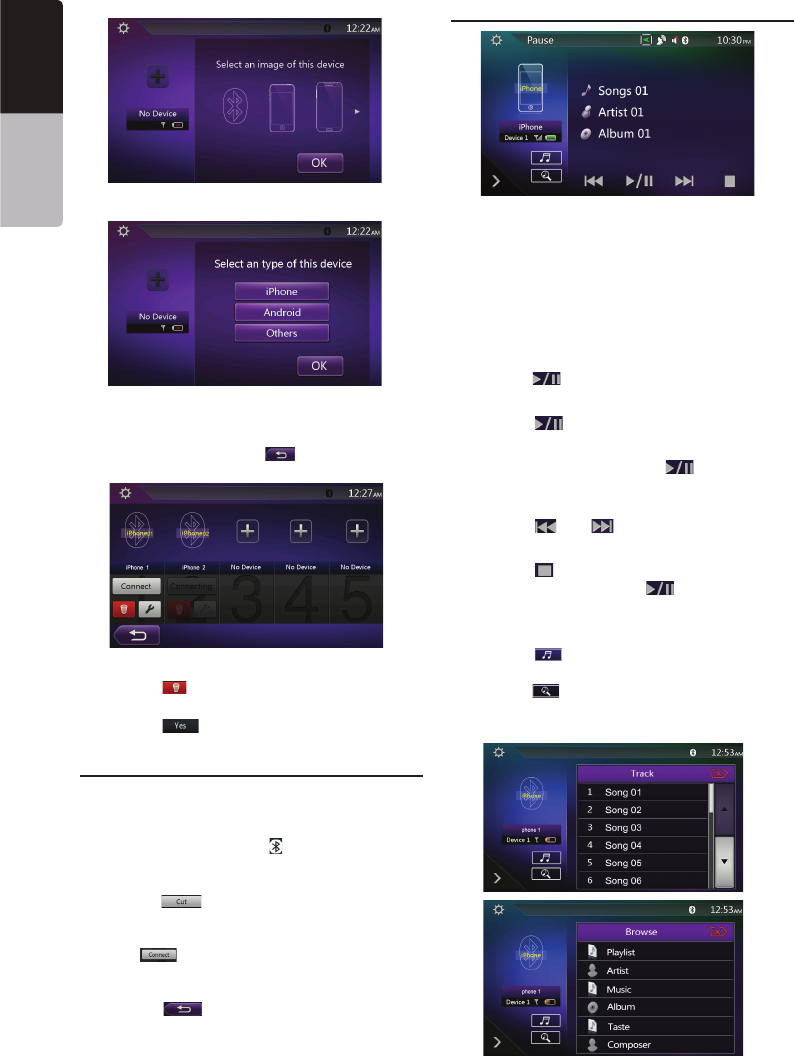
Selecting the Bluetooth Audio Player
฀฀฀฀฀฀฀฀฀
฀฀฀฀฀฀฀฀
฀
฀฀฀฀฀฀[]฀฀฀฀
฀
฀฀฀฀฀฀฀฀
฀฀[]฀฀฀฀฀฀

฀฀฀฀฀฀฀฀฀฀
฀[]฀฀฀฀฀฀฀฀
฀฀฀฀฀฀฀฀
฀
฀฀฀[]฀฀฀฀฀฀฀฀

Controlling the Bluetooth Audio Player
Note:
฀฀฀฀฀฀฀
sounds may be fragmented, or switch noises may be
generated.
Playing Music
฀฀฀฀฀฀฀฀฀
฀฀฀฀฀฀
฀ ฀฀฀฀฀฀฀฀
฀฀[]฀฀
Pausing Playback
฀฀฀[]฀฀฀
Playback Pauses.
฀฀฀฀฀฀[] button.
฀
Skipping a Track Searching
฀฀฀[] or [ ]฀฀฀
Stopping Playback
฀฀฀[]฀฀฀
฀฀฀฀฀[] button to
฀฀฀
Show Track List
฀฀฀[]฀฀฀฀฀฀฀

฀฀฀฀฀[]฀฀฀฀฀฀฀฀฀
฀฀฀฀฀฀฀฀฀฀
฀
39
VX405
English
English Owner’s Manual
฀฀฀฀฀฀฀
฀฀฀฀฀฀฀
฀฀฀
฀ ฀฀฀฀฀฀฀฀

฀ ฀฀฀฀
฀ ฀฀฀฀฀฀฀
฀ ฀฀฀฀฀฀฀฀฀฀
฀฀
฀ ฀฀฀฀฀฀฀฀฀
฀
Note:
฀฀฀฀฀฀฀฀฀฀฀
฀฀฀฀฀
฀฀฀฀฀฀฀฀฀฀
฀฀฀฀฀฀฀฀
during the data transmission.
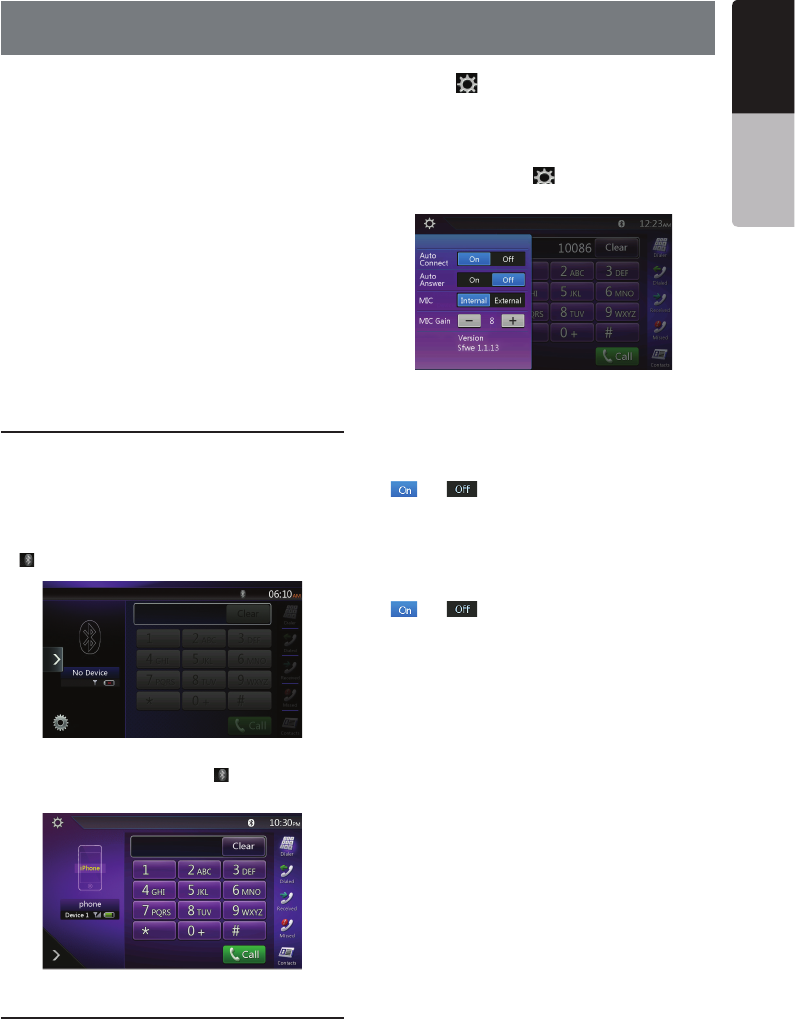
Select the BT Phone Mode
฀฀฀[TEL]฀฀฀฀฀฀
฀฀
฀฀฀฀
฀฀฀฀฀฀฀฀฀
฀฀฀฀
฀ ฀฀฀฀฀฀฀
[]฀฀฀฀฀฀฀฀
฀ ฀฀฀฀฀฀฀
฀฀฀฀฀[]฀฀฀฀
฀฀฀฀฀฀฀฀
Bluetooth Telephone Settings
฀฀฀฀฀฀฀
฀฀฀
฀฀฀[]฀฀฀฀฀฀฀
฀
฀฀฀฀฀฀฀฀฀
฀฀฀
฀฀฀฀฀฀฀
฀฀฀[] button to return to the
฀
฀฀
฀฀฀฀฀฀
฀฀฀฀฀฀฀฀฀฀

฀ ฀฀฀฀฀฀฀฀
[] or [ ]฀฀฀฀฀฀
฀฀฀฀฀฀฀
฀฀
฀฀฀฀฀฀฀฀
฀฀
฀ ฀฀฀฀฀฀฀฀
[] or [ ]฀฀฀฀฀฀฀
฀฀฀฀฀฀
฀฀฀
฀฀฀฀฀฀฀฀฀฀
฀
฀ ฀฀฀฀฀฀฀฀
฀฀฀฀฀฀
Note:
฀฀฀฀฀฀฀฀฀฀฀
฀฀฀฀฀฀฀฀฀฀
other end of the telephone has a reception problem.
14. Bluetooth
®
TELEPHONE OPERATIONS
40
VX405
English Owner’s Manual
Registering Your Cellular Phone
(Pairing)
฀฀฀฀฀฀฀฀฀
฀฀฀฀฀฀฀฀฀
฀฀
฀฀฀฀฀฀฀
฀฀฀฀
฀฀฀฀฀฀฀฀฀฀฀฀

฀฀฀฀฀[]฀฀฀฀
฀฀
฀฀฀[ ]฀฀฀฀฀฀
฀
฀฀฀฀฀฀฀฀฀
฀฀฀฀฀฀฀฀฀
[]฀฀฀฀฀฀฀
฀
฀ ฀฀฀฀฀฀฀฀
฀฀฀฀฀฀
฀฀฀฀
฀฀฀฀฀฀฀฀฀฀฀฀
฀฀฀฀฀฀฀฀฀฀

฀ ฀฀฀฀฀฀฀฀฀
฀฀฀฀฀฀฀฀
฀฀
฀ ฀฀฀฀฀฀
฀฀฀฀฀฀฀฀
฀฀฀฀฀฀฀
฀
฀ ฀฀฀฀฀
฀฀฀ ฀฀฀฀฀฀
฀฀฀฀
฀฀฀ ฀฀฀฀
Select the Cellular Phone
฀฀฀฀฀฀฀฀฀
฀฀฀฀฀฀฀
฀
฀฀฀[]฀฀฀฀฀฀฀

฀฀฀฀฀฀฀฀
[]฀฀฀฀฀฀
฀฀฀฀฀฀฀฀฀฀
฀[]฀฀฀฀฀฀฀฀
฀฀฀฀฀฀฀฀
฀฀
฀ ฀฀฀฀฀฀฀฀฀฀฀
฀฀
฀ ฀฀฀฀฀฀฀฀
฀฀฀฀฀฀฀฀฀
฀฀฀฀฀฀฀฀
฀฀
฀฀฀[]฀฀฀฀฀฀฀

Get the Phone Book Data
฀฀฀฀฀฀฀฀฀
฀฀฀฀฀฀฀฀฀฀
฀฀฀
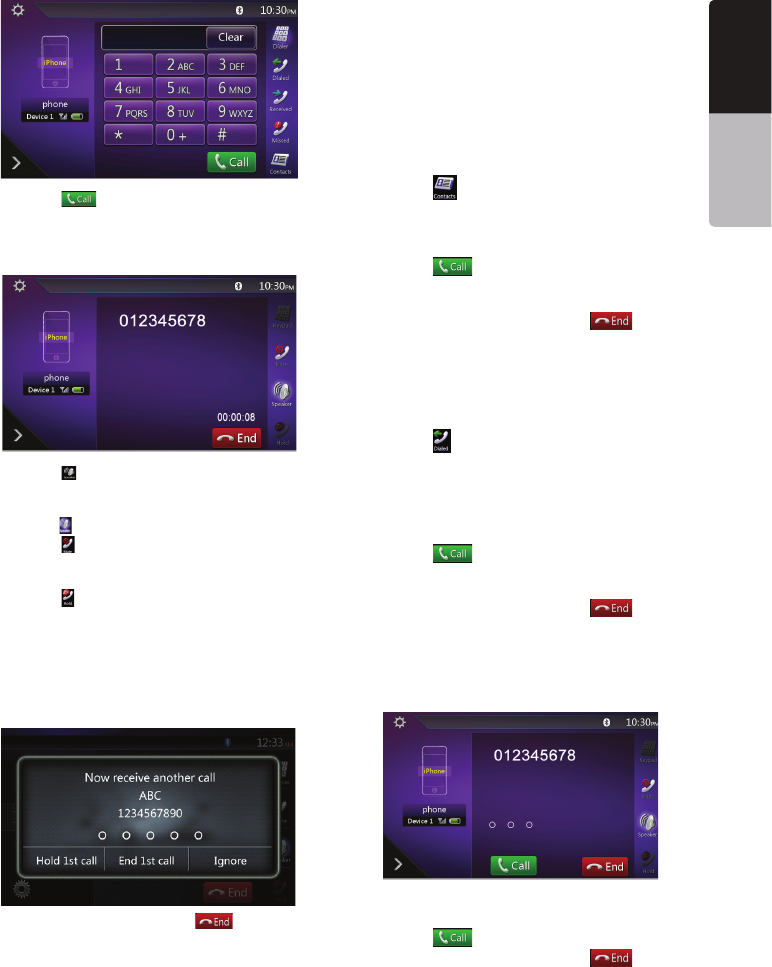
Telephone Operations
Making a call using the Ten-Key pad
฀฀฀[]฀฀฀฀฀฀฀

฀฀฀฀฀฀฀฀฀
฀฀฀฀
41
VX405
English
English Owner’s Manual
฀฀฀[ ]฀฀฀฀฀฀฀

฀ ฀฀฀฀฀฀
฀฀฀
฀ ฀฀[ ]฀฀฀฀฀฀฀฀
฀฀฀฀฀฀
฀฀฀฀฀฀฀฀
฀฀[]฀฀
฀ ฀฀[]฀฀฀฀฀฀
฀฀฀฀฀฀฀฀฀฀฀
฀฀฀
฀ ฀฀[]฀฀฀฀฀฀฀฀
฀฀฀฀฀฀฀฀฀
฀฀฀฀฀฀
฀฀฀฀฀฀฀฀฀฀฀฀฀฀฀
฀฀฀฀฀฀฀฀฀฀฀
฀฀฀฀฀฀฀฀฀฀฀
฀฀฀
฀฀฀฀฀฀฀[ ] button to
฀฀
Note:
฀฀฀฀฀฀฀฀
฀฀฀฀฀฀฀฀
connection with this system may be disconnected
฀฀฀฀
Making a Call Using the Phone Book
฀฀฀฀฀฀฀฀฀฀
฀฀฀฀฀฀฀฀
Note:
฀฀฀฀฀฀฀฀฀฀
be sent from the cellular phone.
฀฀฀฀฀฀฀฀฀฀฀
฀฀฀฀฀฀฀฀
฀฀฀฀฀฀
฀฀฀[]฀฀฀฀฀฀฀

฀฀฀฀฀฀฀฀฀
฀ ฀฀฀฀฀฀฀฀฀
฀฀฀[]฀฀฀฀฀฀
฀฀฀฀฀฀
฀฀฀
฀ ฀฀฀฀฀฀฀[] button
฀฀
Making a Call Using the History
฀฀฀฀฀฀฀
฀฀฀฀฀฀฀฀฀฀฀
฀฀฀฀฀฀฀
฀฀฀[]฀฀฀฀฀฀฀

฀ ฀฀฀฀฀฀฀฀
฀
฀ ฀฀฀฀฀฀฀฀฀
฀฀฀฀฀฀฀฀฀฀
฀฀฀[ ]฀฀฀฀฀฀
฀฀฀฀฀฀
฀฀฀
฀ ฀฀฀฀฀฀฀[] button
฀฀
Answering to an incoming call
฀฀฀฀฀฀฀฀
฀฀
฀฀฀฀฀฀฀฀฀฀฀
฀฀
฀฀฀[]฀฀฀฀฀
฀฀฀฀฀฀฀฀[] button
฀฀฀
42
VX405
English Owner’s Manual
Using Siri Eyes Free Function
You can use the Siri Eyes Free function by the
following operation.
1. Turn on Siri setting of your iPhone.
2. Press and hold the [VOICE] button until you hear
the warning tone.
The indicator change as follows.
3. Talk to Siri the same way as using it on the iPhone.
4. To finish Siri Eyes Free function, touch the []
button.
Notes:
Siri Eyes Free is availabe on iOS 6.1 or higher.
Please use external mic when you use the Siri Eyes
Free function.
43
VX405
English
English Owner’s Manual
15. TUNER OPERATIONS
Listening to the Tuner
฀฀฀฀[Tuner]฀฀฀฀฀฀฀
฀฀฀฀฀
฀฀฀฀฀฀฀฀฀
฀฀฀฀฀฀฀฀฀
฀฀฀฀฀฀฀฀
฀฀
฀฀฀฀฀
฀฀฀฀฀
฀฀฀฀฀
฀฀฀฀฀
฀฀฀฀฀
฀฀฀฀
฀฀฀฀
฀฀฀฀฀
฀฀฀฀฀
฀฀
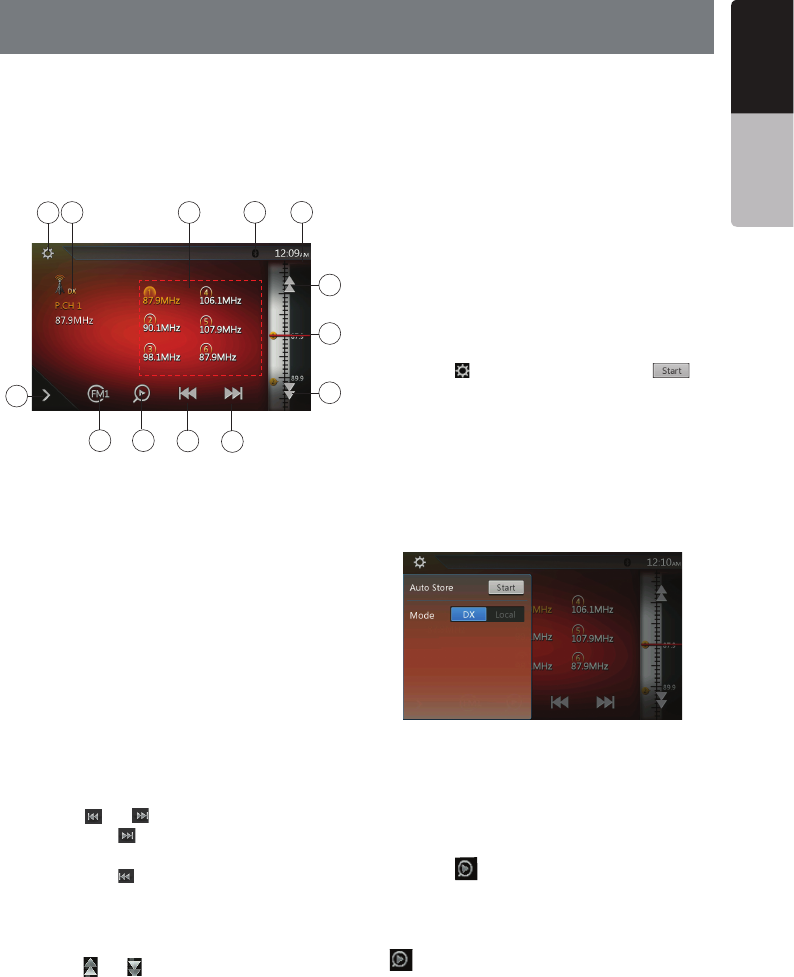
11. Band button
฀฀
฀฀
Seek Tuning
฀฀฀฀฀฀฀฀฀
฀฀฀
฀฀฀[] or [ ] button
฀฀฀฀[]฀฀฀฀฀
฀฀฀฀฀฀฀฀
฀฀฀฀[]฀฀฀฀฀฀
฀฀฀฀฀
Step Tuning
฀฀฀฀฀฀฀฀฀
฀฀฀
฀฀฀[] or [ ]฀฀฀฀฀฀
฀฀฀฀฀฀
Recalling a preset station
฀฀฀[FM1/2/3/AM]฀฀฀฀฀฀
฀฀฀฀฀฀
฀฀฀฀฀฀฀฀฀฀
Manual memory
฀฀฀฀฀฀฀฀฀฀
฀฀฀
฀฀฀฀฀฀฀฀฀฀฀฀
฀฀฀฀฀
฀฀฀฀฀฀฀฀฀฀
฀฀฀฀฀
Auto Store
฀฀฀฀฀฀฀฀฀฀฀฀
฀฀฀฀฀฀฀฀
฀฀฀฀฀฀฀฀฀
฀฀฀
฀฀฀[FM1/2/3/AM]฀฀฀฀฀
฀฀฀฀
฀฀฀[]฀฀฀฀฀฀[ ]
฀฀฀฀฀
฀฀฀฀฀฀฀฀฀
฀฀฀฀฀฀
Notes:
฀฀฀฀฀฀฀฀฀฀
overwritten.
฀฀฀฀฀฀฀฀฀฀฀฀฀
฀฀
Preset Scan
฀฀฀฀฀฀฀฀฀
฀฀฀฀฀฀฀฀฀
฀฀฀฀฀฀
฀฀฀฀฀฀฀฀฀
฀฀฀
฀฀฀[]฀฀฀฀฀฀
฀฀฀฀฀฀฀฀฀
฀฀฀฀฀฀฀฀฀
฀฀฀฀฀฀฀
฀฀฀฀฀฀฀฀฀฀
[

]฀฀฀฀฀฀฀
DX/Local Setting
฀฀฀฀฀฀฀฀฀฀
฀฀฀฀฀฀฀฀
฀฀฀฀฀฀฀฀฀฀
฀
11
12
78
910
23
4
6
5
1
13
44 VX405
English Owner’s Manual
16. SiriusXM
®
Satellite Radio OPERATIONS
฀
®
®
฀฀฀฀฀฀฀฀
฀฀฀฀฀฀฀฀฀฀฀
฀฀฀฀฀฀฀
฀฀฀฀฀฀฀
฀฀฀฀฀฀฀฀฀
฀฀฀฀฀฀฀
฀
Activating Your SiriusXM Subscription
฀฀฀฀฀฀฀
฀฀฀฀฀฀฀฀฀
฀฀฀฀฀฀฀฀฀
฀฀฀฀฀฀฀฀฀
฀฀฀฀฀฀฀฀
฀฀฀฀฀฀฀฀
฀฀
฀฀฀฀฀฀฀฀฀฀
฀฀฀฀฀฀฀฀฀฀฀
฀฀฀฀฀฀฀฀฀
฀฀฀฀฀฀฀฀
฀฀฀฀฀฀฀฀฀
฀฀฀฀฀฀
Note:
The SiriusXM Radio ID does not include the letters
I, O, S or F. In the USA, you can activate online or
by calling SiriusXM Listener care:
฀฀฀
฀฀฀฀฀฀฀
For Canadian Subscriptions, please contact:
฀฀฀
฀฀฀฀฀฀฀
As part of the activation process, the SiriusXM
satellites will send an activation message to your
tuner. When your radio detects that the tuner has
received the activation message, your radio will
display: “Subscription Updated”. Once subscribed,
you can tune to channels in your subscription
฀฀฀฀฀฀฀฀
฀฀฀฀฀฀฀฀฀฀฀
radio will need to be powered on and receiving the
SiriusXM signal to receive the activation message.
Selecting a Satellite Radio Mode
฀฀฀฀฀฀฀฀฀
฀฀฀฀฀฀฀฀
฀฀฀฀฀฀
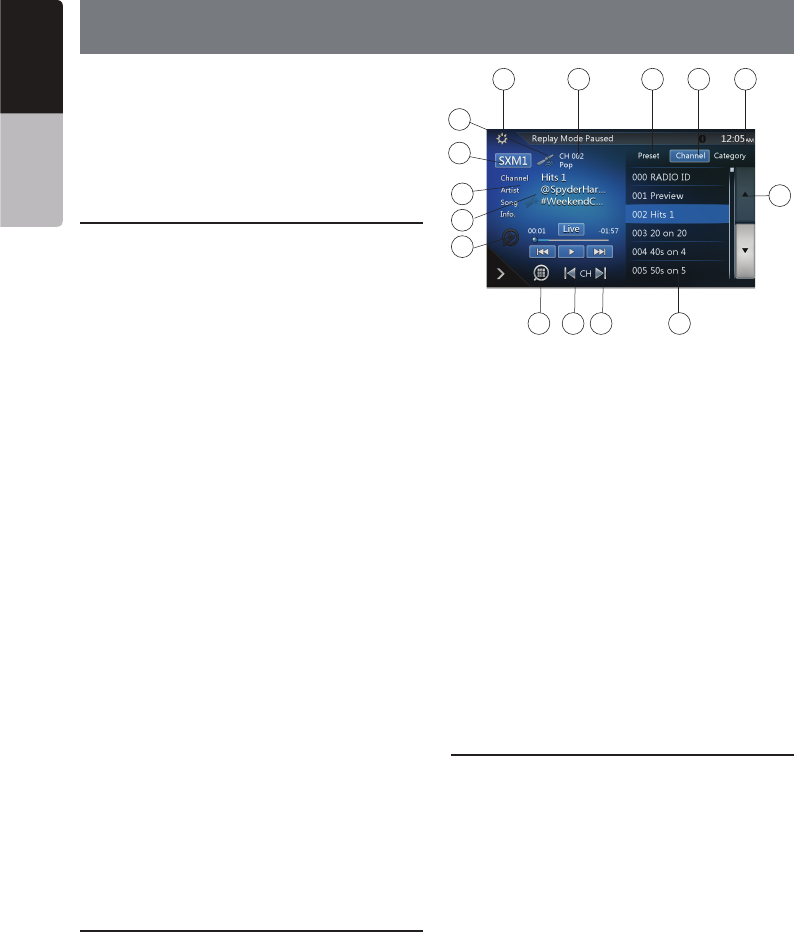
1. Band select button
2. Signal status
3. Option Setting button
4. Current Channel Number / Category Name / Preset
Number
5. Preset List Button
6. Channel List Button
7. Category List Button
8. List scroll buttons
9. Channel List
10. Channel up button
11. Channel down button
12. Direct Channel Tuning button
13. TuneMix button
14. iTunes radio tagging button
15. Channel Name / Artist Name / Song Title / Content
Info
Displaying the SiriusXM Radio ID
฀฀฀฀฀฀฀฀
The SiriusXM Radio ID is required for activation and
can be found by tuning to Channel 0 as well as on
the label found on the SiriusXM Connect tuner and its
packaging.
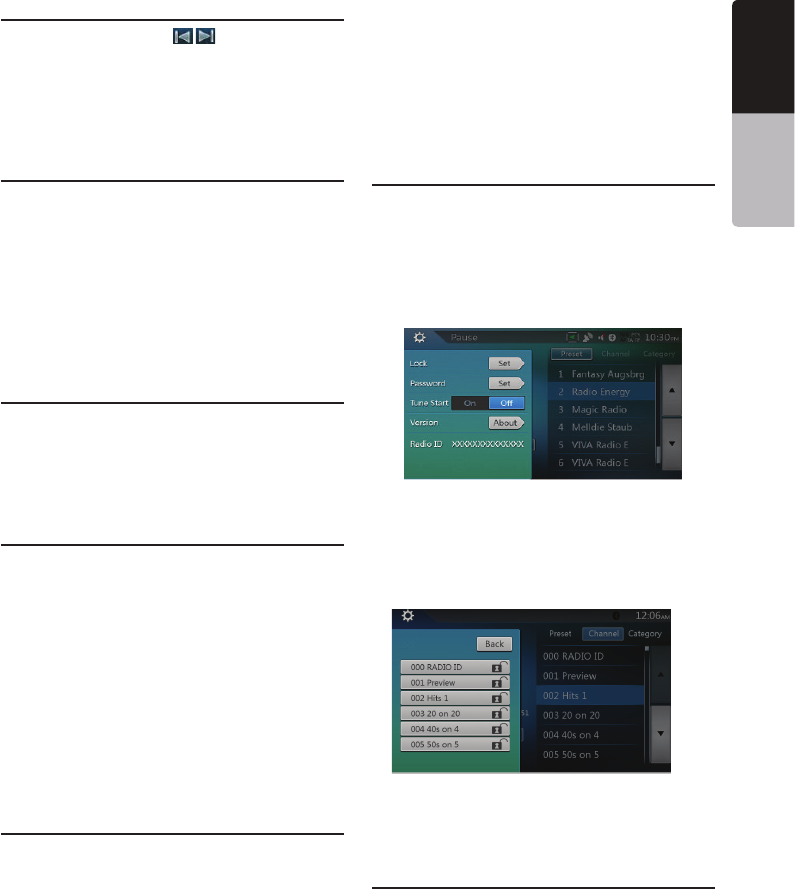
You can also find it by touching the [Option Setting]
button to enter the Setting menu.
3 4 5 67
2
1
15
14
13
12 11 10 9
8
45
VX405
English
English Owner’s Manual
Channel Selection by Up/Down Button
1. Select the channel with [ ] button. Only
channels that can be received are selected.
Channels that are locked and channels not covered
by the subscription will be skipped. The receiver
tunes to the next available channel below or above
the current channel.
Channel Selection by Channel Number
1. Touch the [Direct Channel Tuning] button to enter
channels directly.
2. Enter the number of your desired channel by
touching the [0] to [9] buttons. If you enter a wrong
number, you can cancel it by touching the [Clear]
button.
3. Touch the [OK] button. The radio will be tuned to
the channel you entered.
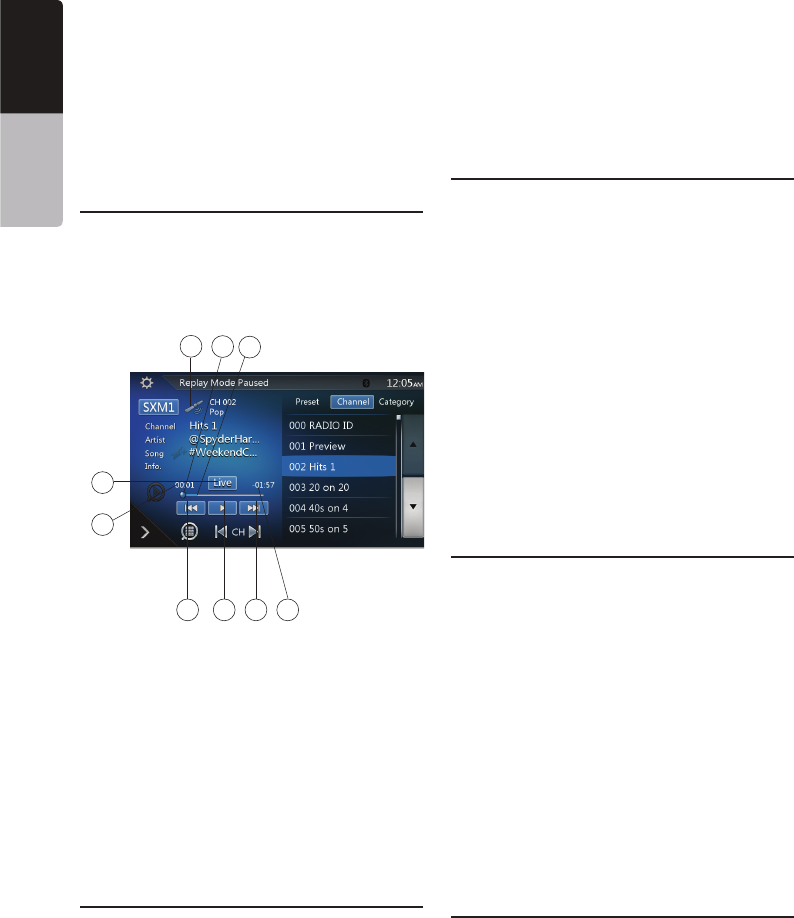
Tuning to Channels from the Channel
List
1. Touch the [Channel List] button on the SiriusXM
Menu display to enter channel list preview mode.
2. Touch and flick the category list up or down.
3. You can select any channels in the list directly.
Tuning to Channels from the Preset
Channel List
A total of 6 SiriusXM channels for each band can be
stored in the tuner’s memory. You can access the
presets by touching the Preset button. This allows you
to store your favorite satellite radio channels in the
memory for later recall.
1. Touch the [Preset List] button on the SiriusXM
Menu display to enter preset list preview mode.
You can select the desired channel by touching the
preset list.
2. To store the current channel as a preset, touch and
hold a preset button for more than 2 seconds to
save the channel to that preset button.
Tuning to Channels from the Category
List
Satellite Radio allows you to select broadcast channel
category (contents).
1. Touch the [Category List] button on the SiriusXM
Menu display to enter category list preview mode.
2. Touch and flick the category list up or down.
3. Touch the desired category item button to enter
channel lists belonging to this category.
4. Select the desired channel by touching it on the list.
5. Touch the [Return] button to go back to category
list.
Note:
“All Chan” category includes all channels available
with your subscription, including locked channels
which are displayed with an “(L)”.
Parental Control Lock / Unlock
The Parental Control feature allows you to limit access
to any SiriusXM channels, including those with mature
content. When enabled, the Parental Control feature
requires you to enter a passcode to tune to the locked
channels. Information on setting up the passcode and
locking channels can be found below.
1. Touch the [Option Setting] button to enter setting
page.
2. Touch the [Set] button in “Lock” item to enter
passcode screen, enter the right passcode to
enter the lock list.
3. Touch and flick the channel list up or down.
4. Touch and hold the channel item, and it will be
locked or unlocked alternately.
Setting the Password
1. Touch the [Option Setting] button to enter setting
page.
2. Touch the [Set] button in “Password” item to set a
new passcode following the screen indicator.
46 VX405
English Owner’s Manual
If you enter a wrong number, you can cancel it by
touching the [Clear] button .
Note:
You must input the correct passcode to enter the
lock list. When you try to tune to a locked channel by
the direct tune keypad, it will display the password
keypad. Only entering the correct code can tune to
that channel, otherwise it will go back to the previous
channel.
The default passcode is “0000”.
Replay
The Replay feature allows you to pause, rewind and
replay live SiriusXM Satellite Radio programming.
Operation of the Replay feature can be found below.
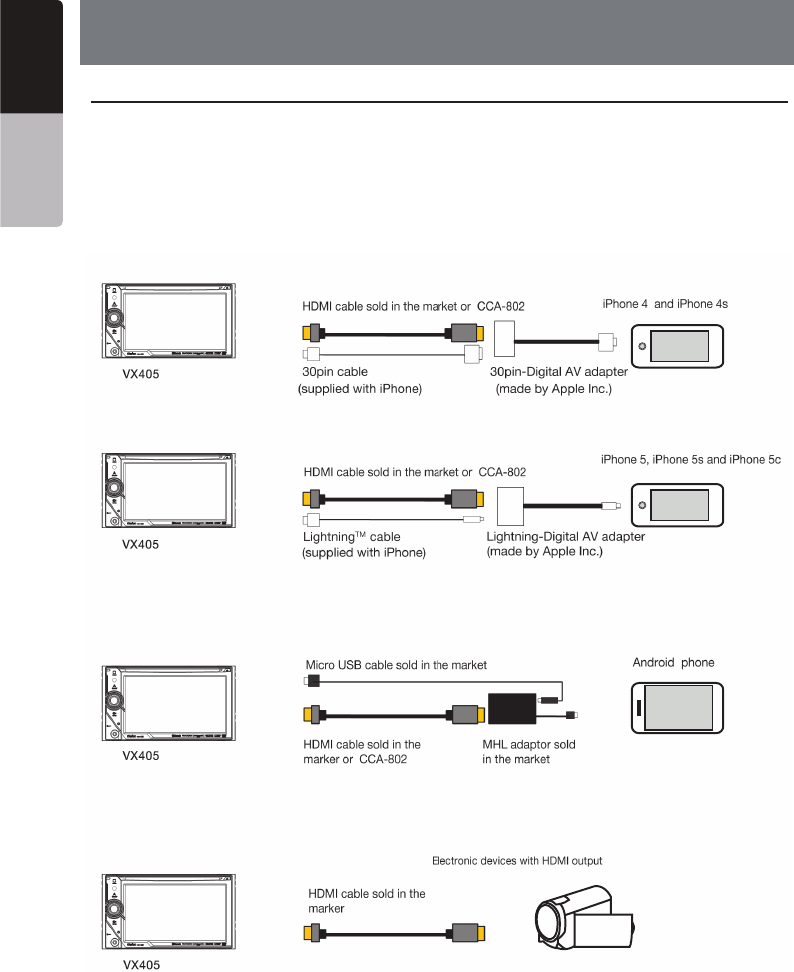
1. Touch the [Play/Pause] button to start Replay mode.
2. In Replay mode you can use the buttons below to
control playback.
1. Playback Status.
2. Previous track/program.
Fast Backward (long press).
3. Play/Pause Button.
4. Next track/program.
Fast forward (long press).
5. Go to Live mode (Only displayed during Replay
mode).
6. Remaining time to LIVE.
7. Buffered memory.
8. Playback position.
9. Current track play time .
SmartFavorites
SmartFavorites allow you to rewind and replay any
missed programming from your current Band of Preset
channels. Miss a music, news, talk or sports segment?
No Problem, because you can rewind and replay when
you tune to one of your Preset channels and hear what
you missed.
Note:
1. Compatible with SXV200 or later tuner models.
2. SXM1 band only is assigned as SmartFavorites for
SXV200, and SXM1/SXM2/SXM3 bands for SXV300
or later.
TuneStart™
With the TuneStart™ feature turned ON, you will hear
the beginning of the song when you tune to one of
your Preset channels. It may take a minute or two for
the feature to work after power up or after changing
preset bands.
You can turn TuneStart On or Off in the following
operation.
1. Touch the [Option Setting] button to enter the
setting men.
2. Touch and slide to select “On” or “Off” in
“TuneStart” item.
Note:
1. Compatible with SXV200 or later tuner models.
2. TuneStart will only work for channels in the SXM1
band with a SXV200, and channels in the SXM1/
SXM2/SXM3 bands with a SXV300 or later in SXM1/
SXM2/SXM3 bands for SXV300 or later.
TuneMix™
TuneMix™ plays a unique blend of songs from your
Preset music channels from the current SiriusXM
Preset Band, allowing you to build a custom channel
from as few as two to as many as 6 music channels.
You can even skip songs you don’t want to hear.
Operation of the TuneMix Feature can be found below.
1. Touch the [TuneMix] button to start playback with
the [TuneMix] button highlighted.
2. You can operate the buttons for the Replay function
while listening to TuneMix.
3. To cancel the TuneMix feature, touch the [TuneMix]
button again.
Note:
1. Compatible with SXV300 or later tuner models.
2. When there are not enough channels or tracks, the
[TuneMix] button is grayed out.
iTunes Radio Tagging
With iTunes song tagging, you can tag songs you hear
while listening to SiriusXM. The tagging information
is saved in your radio until you connect your iPod or
18 7
5
2 3 4 6
9

47
VX405
English
English Owner’s Manual
iPhone and then the tagging information is transferred
to your iPod/iPhone.
When your iPod/iPhone is connected to iTunes, you
will then be able to preview and purchase the song
that you heard while listening to SiriusXM Satellite
Radio. Information on using the iTunes song tagging
feature is described below:
1. When tagging data is available for the current song,
a flag in the “Song” field will be highlighted.
2. Touch this flag to tag the song; the color of the flag
will turn to blue with a message of “Tagging x/64” in
the header portion of the screen. “x” is the number of
songs tagged & stored on your head unit.
Note:
1. During tagging, if your iPod/iPhone is connected to
the head unit then tagged songs will be stored
directly to the iPod/iPhone instead of the head
unit. If no iPod/iPhone is connected then the tag
information will be saved to the head unit.
2. This unit can store up to 64 pieces of tagged
information. When the memory of the unit is full,
“Memory Full Connect iPod” may be displayed.
3. If there is stored tag information on the unit, when
an iPod/iPhone supporting the tag function is
connected, the stored tag information will be
transferred to the iPod/iPhone automatically.
48
VX405
English Owner’s Manual
17. HDMI MODE
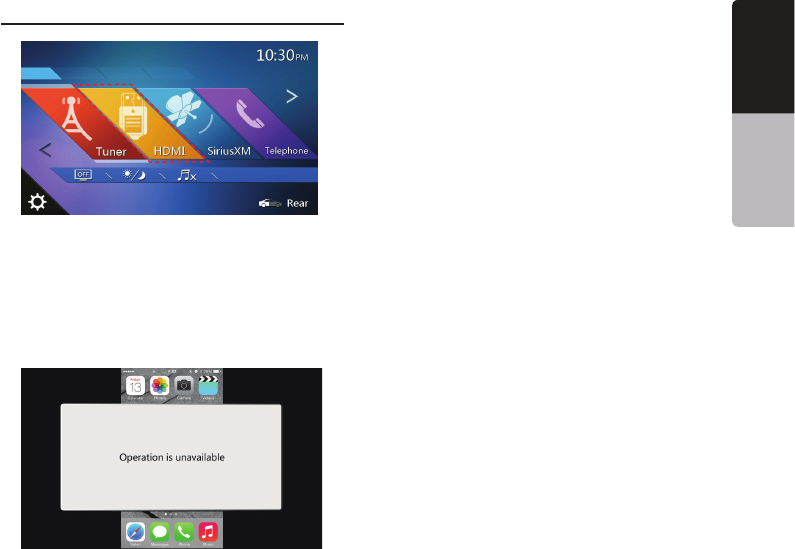
iPhone 4, iPhone 4s, iPhone 5, iPhone 5s and iPhone 5c can be connected by using the connector cable
supplied with the iPhone 4, iPhone 4s, iPhone 5, iPhone 5s and iPhone 5c and HDMI cable (sold in the
market) or CCA-802 (sold separately) and digital Av adapter
Note:
The following is part of the wiring example.
Depending on the device, there is a case to connect to the device directly with the CCA-771.
Depending on the adapter or device, there is a case that the audio noise and video noise is generated.
Wire Connection of HDMI Mode
(1) Connection with the iPhone 4 and iPhone 4s
(2) Connection with the iPhone 5, iPhone 5s and iPhone 5c
(3) Connection with the Android Phone
(4) Connection with the equipment with HDMI output
49
VX405
English
English Owner’s Manual
Select HDMI Source
฀฀฀฀฀฀฀฀฀
฀฀฀
This HDMI mode is only indicate the screen of the
iPhone, Android. Can‘t operate by the touch screen
of NX405
Note:
฀฀฀฀฀฀฀฀฀
฀฀฀฀฀฀฀฀฀฀
฀฀฀

Navigation menu