SKYPINE ELECTRONICS CES8243CL All In One DVD Player User Manual VX405 Usermanual EN 2014 12 12

SKYPINE ELECTRONICS (SHEN ZHEN) CO., LTD. All In One DVD Player VX405 Usermanual EN 2014 12 12

User Manual 4

50 VX405English Owner’s Manual18. AUX ฀฀฀฀฀฀฀฀฀฀฀฀฀฀฀฀฀฀฀฀฀฀฀฀฀฀฀฀฀฀฀Switching to AUX IN ฀[AUX1] [AUX2]฀฀฀฀฀฀฀฀฀฀฀฀฀฀฀฀฀฀฀฀฀฀฀฀฀฀฀฀฀฀฀฀฀฀฀฀฀฀฀฀฀฀฀฀฀฀฀฀฀฀฀฀19. CAMERA INPUT OPERATIONSSwitching to Camera mode฀฀฀฀฀฀฀฀฀฀฀฀฀฀฀฀฀฀฀฀฀฀฀฀฀฀฀฀฀฀฀฀฀฀฀฀฀฀฀฀฀฀฀Setting Camera audio฀฀฀฀฀฀฀฀฀฀฀฀฀฀฀฀฀฀฀฀฀฀฀฀฀฀฀฀฀฀฀฀฀฀฀฀฀฀฀฀฀฀฀฀฀฀฀฀฀฀฀฀฀฀฀฀฀฀฀฀฀฀฀฀฀฀฀Note:If the reverse cable is connected correctly to the car, the unit goes to camera mode automatically when the car is in reverses.As an additional safety feature, the audio from camera with built-in microphones can be heard through the NX405.
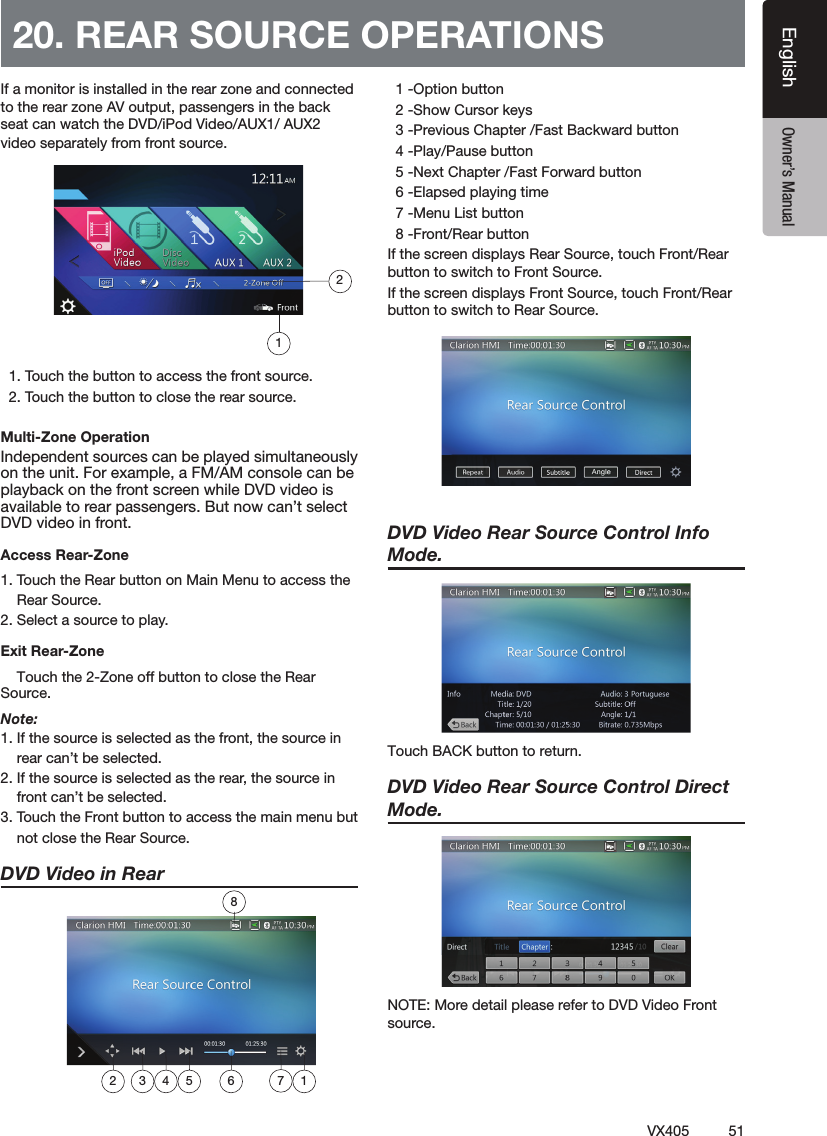
51VX405EnglishEnglish Owner’s Manual฀฀฀฀฀฀฀฀฀฀฀฀฀฀฀฀฀฀฀฀฀฀฀฀฀฀฀฀฀฀฀฀฀฀฀฀฀฀฀฀฀฀฀฀฀฀฀฀฀฀฀฀฀Multi-Zone Operation฀฀฀฀฀฀฀฀฀฀฀฀฀฀฀฀฀฀฀฀฀฀฀฀฀฀฀฀฀฀฀฀฀฀฀฀Access Rear-Zone฀฀฀฀฀฀฀฀฀฀฀฀฀฀฀฀฀฀฀฀฀Exit Rear-Zone    Touch the 2-Zone off button to close the Rear Source. Note:฀฀฀฀฀฀฀฀฀฀฀฀฀฀฀฀฀฀฀฀฀฀฀฀฀฀฀฀฀฀฀฀฀฀฀฀฀฀฀฀฀฀฀฀฀฀฀฀฀฀฀฀฀฀฀฀฀DVD Video in Rear  ฀฀฀฀฀฀฀฀฀฀฀฀฀฀฀฀฀฀฀฀฀฀฀฀฀฀฀฀฀฀฀฀฀฀฀฀฀฀฀฀฀฀฀฀฀฀฀฀฀฀฀฀฀฀฀฀฀฀฀฀฀฀฀฀฀฀฀DVD Video Rear Source Control Info Mode. 5PVDI#"$,CVUUPOUPSFUVSODVD Video Rear Source Control Direct Mode. ฀฀฀฀฀฀฀฀฀฀20. REAR SOURCE OPERATIONS1872 3 4 5 6 12
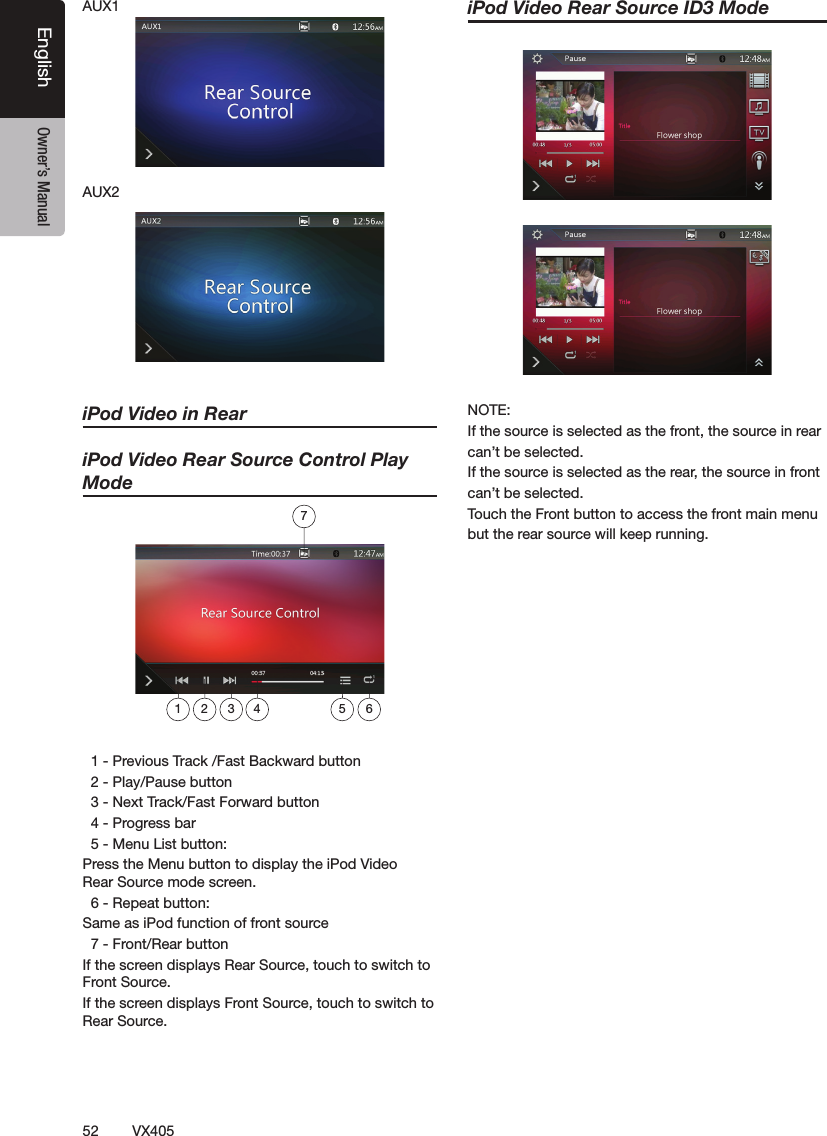
52 VX405English Owner’s ManualiPod Video in ReariPod Video Rear Source Control Play Mode฀฀฀฀฀฀฀฀฀฀฀฀฀฀฀฀฀฀฀฀฀฀฀฀฀฀฀฀฀฀฀฀฀฀฀฀฀฀฀฀฀฀฀฀฀฀฀฀฀฀฀฀฀฀฀฀฀฀฀฀฀฀฀฀฀฀฀฀฀฀฀฀฀฀฀฀฀฀฀฀฀฀฀฀฀฀฀฀฀฀฀฀฀iPod Video Rear Source ID3 Mode฀฀฀฀฀฀฀฀฀฀฀฀฀฀฀฀฀฀฀฀฀฀฀฀฀฀฀฀฀฀฀฀฀฀฀฀฀฀฀฀฀฀฀฀฀1 2 3 4 5 67
53VX405EnglishEnglish Owner’s Manual21. SETTING OPERATIONS฀[ ]฀฀฀฀฀฀฀฀฀฀฀฀General Setup Menu฀฀฀฀฀฀฀฀฀฀฀฀฀฀฀฀฀฀฀฀฀฀฀฀฀฀฀24-Hour Format: Set the time display mode.฀฀฀฀฀฀฀฀฀฀฀฀฀฀฀฀฀฀฀฀฀฀฀฀฀฀฀฀฀฀฀฀฀฀฀฀฀฀฀฀฀฀฀฀฀฀Illumination Color: Set the illumination color on the panel.฀฀฀฀฀฀฀฀฀Tel Speaker: There are two options, Left and Right. For example, if current setting is Right, when BT phone is coming in, only right speaker can hear the phone. Camera Audio: There are three options, Off, On and Mute.Version: Display the software version information.Note:฀฀฀฀฀฀฀฀฀฀฀฀฀฀฀฀฀฀฀฀time.Video Setup Menu
54 VX405English Owner’s ManualDVD Wide Screen Mode: Set the DVD wide screen mode On or Off.฀฀฀฀฀฀฀฀฀฀฀฀฀฀฀฀Audio Setup Menu฀฀฀฀฀฀฀฀฀฀฀฀฀฀฀฀฀฀฀฀฀฀฀฀฀฀฀฀฀฀฀฀฀฀฀฀฀฀฀฀฀฀฀฀฀฀฀฀฀฀฀฀฀฀฀฀฀฀฀฀฀฀฀฀฀฀฀฀฀฀฀฀฀฀฀฀฀฀฀฀฀฀฀฀฀฀฀฀฀฀฀฀฀฀฀฀Note:฀฀฀฀฀฀฀฀฀฀฀฀Others Setup Menu.฀฀฀฀฀฀฀฀฀฀฀฀฀฀฀฀฀฀฀฀฀฀฀฀฀฀฀฀฀฀฀฀฀฀฀฀฀฀฀฀฀฀฀฀฀฀฀฀฀฀฀฀฀฀฀฀฀฀฀฀฀฀฀฀฀฀฀฀฀฀฀฀฀฀฀฀฀฀฀฀[ ] button ฀฀฀฀฀฀฀฀฀฀฀฀฀฀฀฀฀ ฀฀฀฀฀฀฀฀฀฀฀฀฀฀฀฀฀฀฀฀฀฀฀฀฀฀฀฀฀฀฀฀฀฀฀฀฀฀฀฀฀฀฀฀฀฀฀฀฀฀฀฀฀฀฀฀฀฀฀฀฀฀฀฀฀฀฀ ฀฀฀฀฀฀฀฀฀฀฀฀฀฀฀฀฀฀฀฀฀฀฀Note:฀฀฀฀฀฀฀฀฀฀฀฀฀฀฀฀฀฀฀฀฀฀฀฀฀
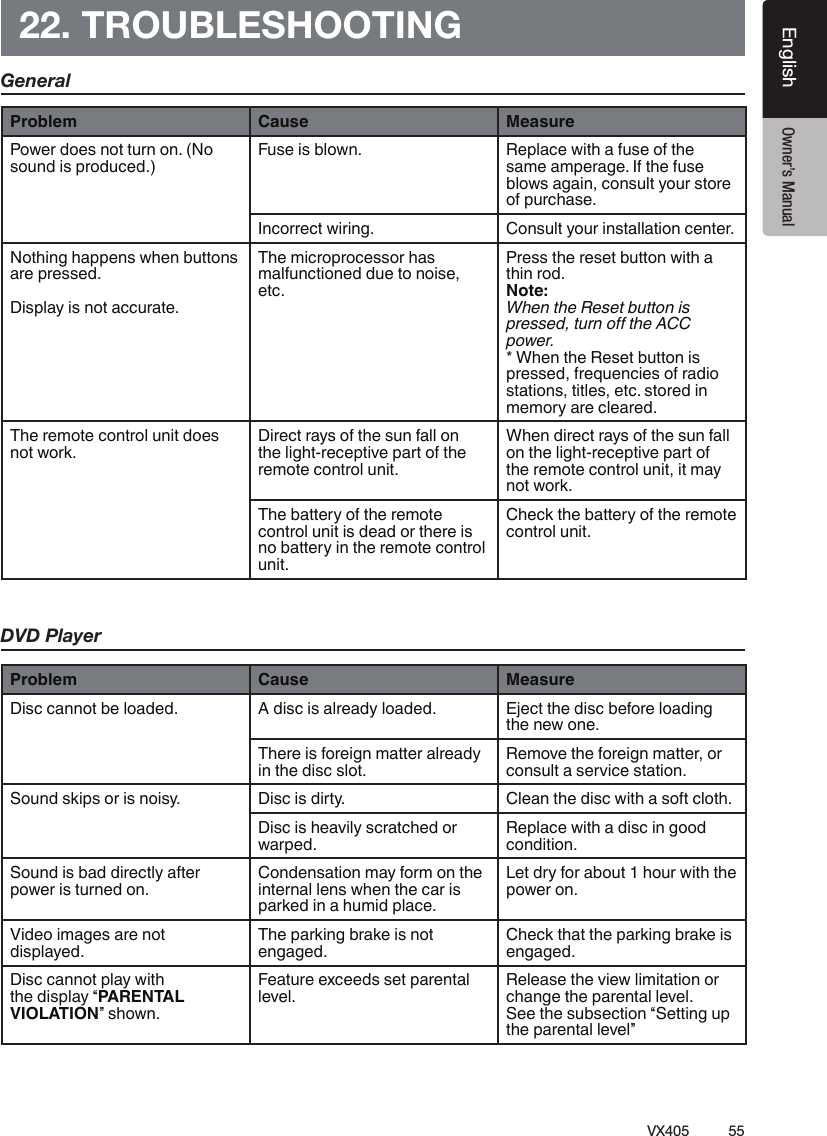
55VX405EnglishEnglish Owner’s Manual22. TROUBLESHOOTINGGeneralDVD PlayerProblem Cause MeasurePower does not turn on. (No sound is produced.)Fuse is blown. Replace with a fuse of the same amperage. If the fuse blows again, consult your store of purchase.Incorrect wiring. Consult your installation center.Nothing happens when buttons are pressed. Display is not accurate.The microprocessor has malfunctioned due to noise, etc.Press the reset button with a thin rod.Note:When the Reset button is ÈʽË˽¼ƓÌÍÊÆÇŰÌÀ½power. * When the Reset button is pressed, frequencies of radio stations, titles, etc. stored in memory are cleared.The remote control unit does not work.Direct rays of the sun fall on the light-receptive part of the remote control unit.When direct rays of the sun fall on the light-receptive part of the remote control unit, it may not work.The battery of the remote control unit is dead or there is no battery in the remote control unit.Check the battery of the remote control unit.Problem Cause MeasureDisc cannot be loaded. A disc is already loaded. Eject the disc before loading the new one.There is foreign matter already in the disc slot.Remove the foreign matter, or consult a service station.Sound skips or is noisy. Disc is dirty. Clean the disc with a soft cloth.Disc is heavily scratched or warped.Replace with a disc in good condition.Sound is bad directly after power is turned on.Condensation may form on the internal lens when the car is parked in a humid place.Let dry for about 1 hour with the power on.Video images are not displayed.The parking brake is not engaged.Check that the parking brake is engaged.Disc cannot play with the display “PARENTAL VIOLATION” shown.Feature exceeds set parental level.Release the view limitation or change the parental level. See the subsection “Setting up the parental level”
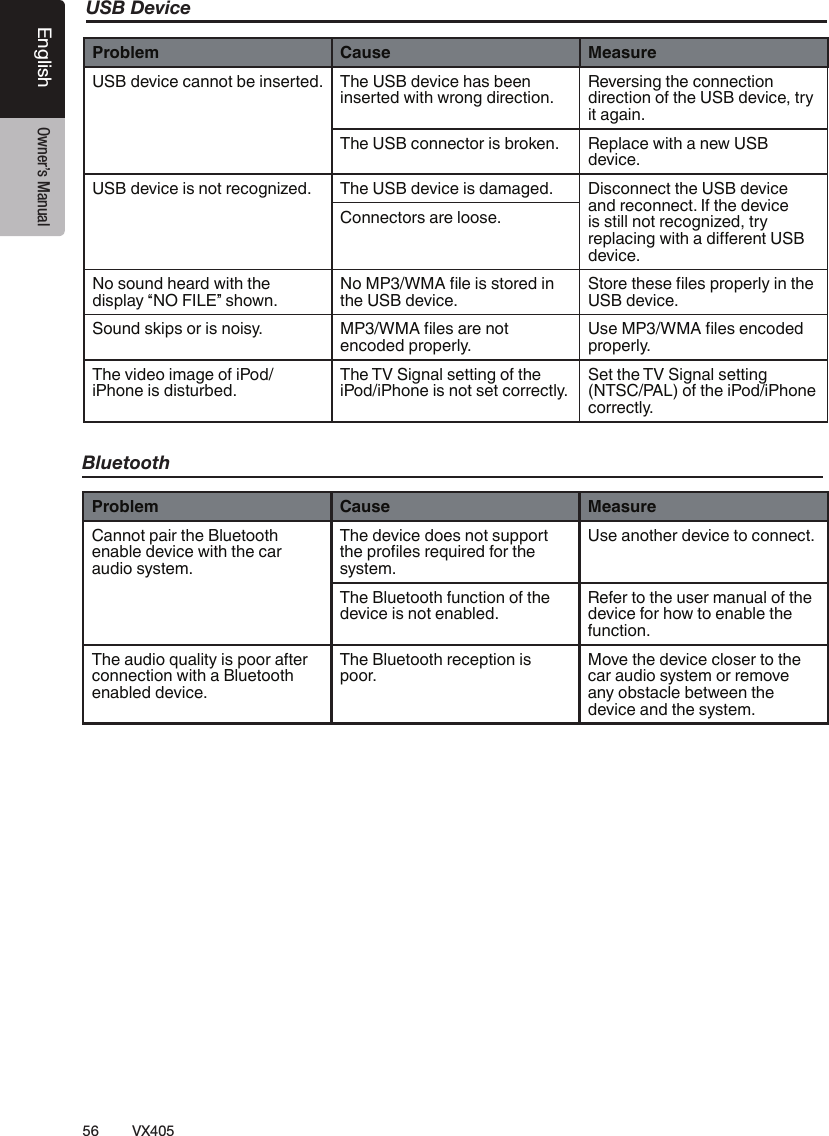
56 VX405English Owner’s ManualUSB DeviceProblem Cause MeasureUSB device cannot be inserted. The USB device has been inserted with wrong direction.Reversing the connection direction of the USB device, try it again.The USB connector is broken. Replace with a new USB device.USB device is not recognized. The USB device is damaged. Disconnect the USB device and reconnect. If the device is still not recognized, try ʽÈĹ»ÁÆ¿ÏÁÌÀ¹¼ÁŰ½Ê½ÆÌdevice.Connectors are loose.No sound heard with the display “NO FILE” shown.ÇˀƯŲĽÁËËÌÇʽ¼ÁÆthe USB device.ÌÇʽÌÀ½Ë½ŲĽËÈÊÇȽÊÄÑÁÆÌÀ½USB device.Sound skips or is noisy. ˀƯŲĽË¹Ê½ÆÇÌencoded properly.˽ˀƯŲĽË½Æ»Ç¼½¼properly.The video image of iPod/iPhone is disturbed.The TV Signal setting of the iPod/iPhone is not set correctly.Set the TV Signal setting (NTSC/PAL) of the iPod/iPhone correctly.BluetoothProblem Cause MeasureCannot pair the Bluetooth enable device with the car audio system.The device does not support ÌÀ½ÈÊÇŲĽËʽÉÍÁʽ¼¾ÇÊÌÀ½system.Use another device to connect.The Bluetooth function of the device is not enabled.Refer to the user manual of the device for how to enable the function.The audio quality is poor after connection with a Bluetooth enabled device.The Bluetooth reception is poor.Move the device closer to the car audio system or remove any obstacle between the device and the system.
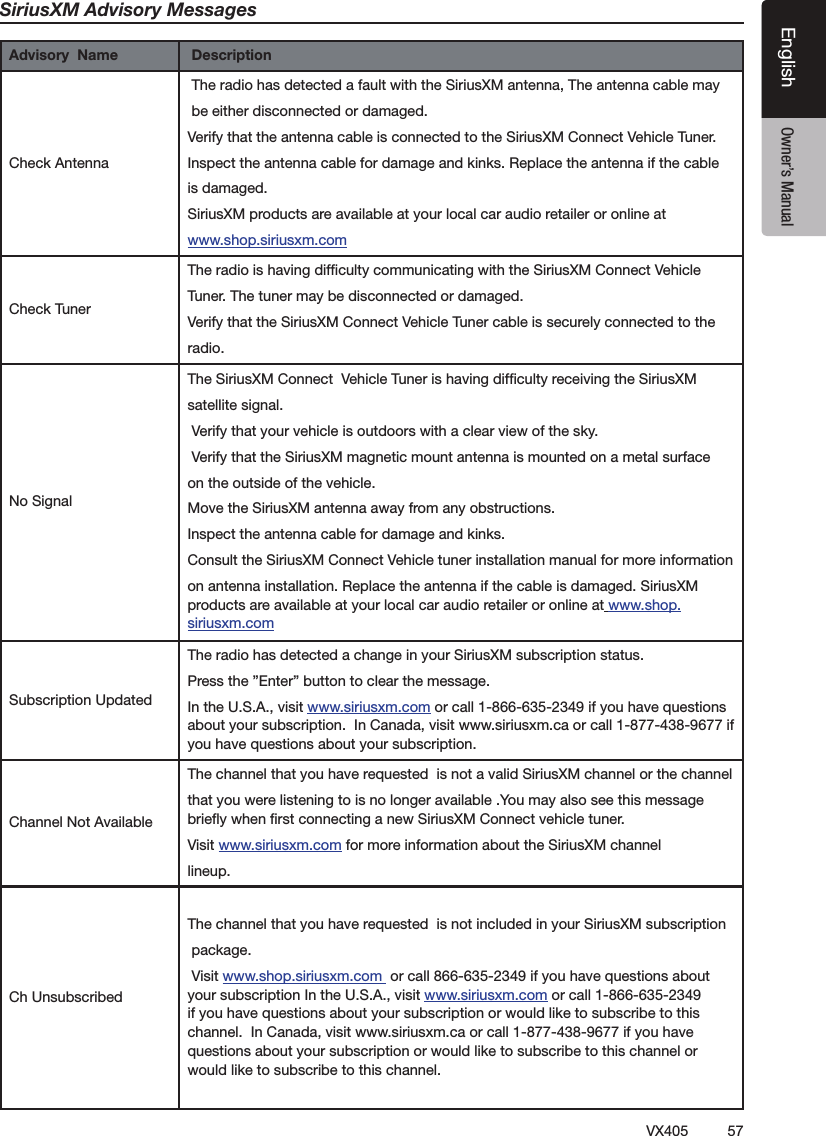
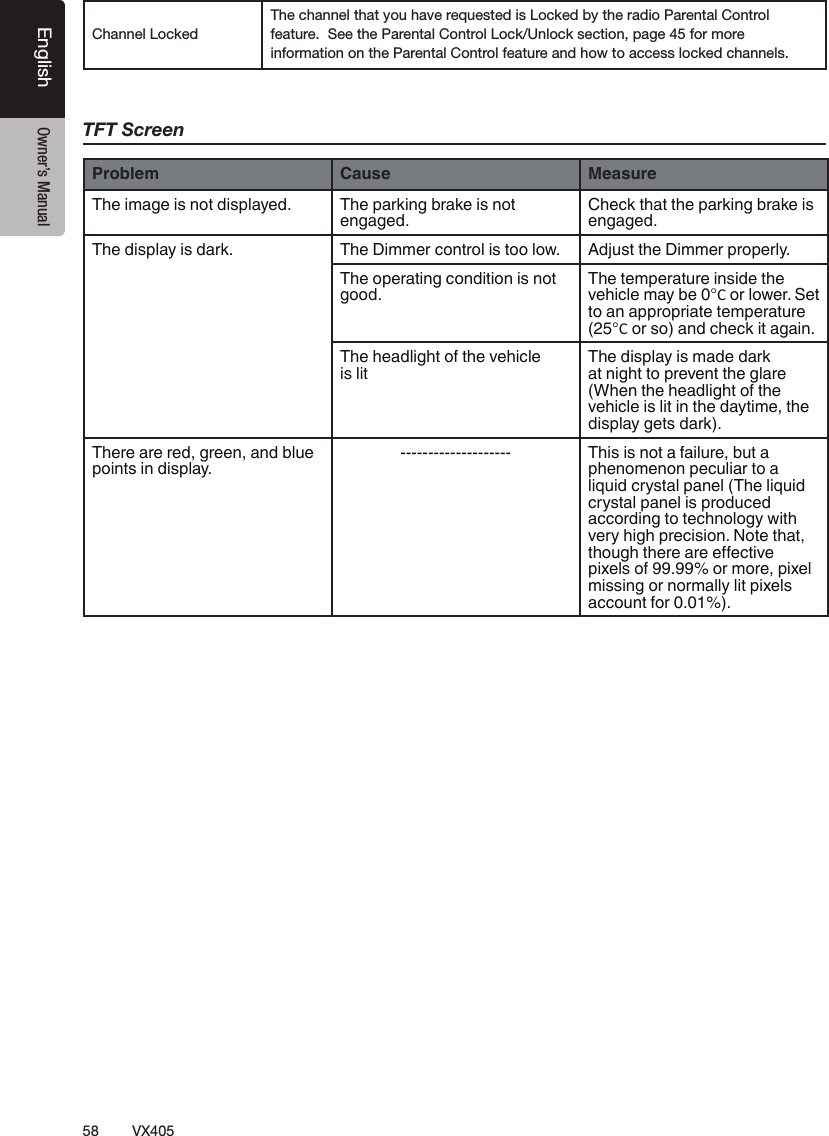
57VX405EnglishEnglish Owner’s ManualSiriusXM Advisory MessagesAdvisory  Name  Description฀฀฀฀฀฀฀฀฀฀฀฀฀฀฀฀฀฀฀฀฀฀฀฀฀฀฀฀฀฀฀฀฀฀฀฀฀฀฀฀฀฀฀฀฀฀฀฀฀฀฀฀฀฀฀฀฀฀฀฀฀฀฀฀฀฀฀฀฀฀฀฀฀฀฀฀฀฀฀฀฀฀฀฀฀฀฀฀฀฀฀฀฀฀฀฀฀฀฀฀฀฀฀฀฀฀฀฀฀฀฀฀฀฀฀฀฀฀฀฀฀฀฀฀฀฀฀฀฀฀฀฀฀฀฀฀฀฀฀฀฀฀฀฀฀฀฀฀฀฀฀฀฀฀฀฀฀฀฀฀฀฀฀฀฀฀฀฀฀฀฀฀฀฀฀฀฀฀฀฀฀฀ ฀฀฀฀฀฀฀฀฀฀฀฀฀฀฀฀฀฀฀฀฀฀฀฀฀฀฀฀฀฀฀฀฀฀฀฀฀฀฀฀฀฀฀฀฀฀฀฀฀฀฀฀฀฀฀฀฀฀฀฀฀฀฀฀฀฀฀฀฀฀฀฀฀฀฀฀฀฀฀฀฀฀฀฀฀฀฀฀฀฀฀฀฀฀฀฀฀฀฀฀฀฀฀฀฀฀฀฀฀฀฀฀฀฀฀฀฀฀฀฀฀฀฀฀฀฀฀฀฀฀฀฀฀฀฀฀฀฀฀฀฀฀฀฀฀฀฀฀฀฀฀฀฀฀฀฀฀฀฀฀฀฀฀฀฀฀฀฀฀฀฀฀฀฀฀฀฀฀฀฀฀฀฀฀฀
58 VX405English Owner’s Manual฀฀฀฀฀฀฀฀฀฀฀฀฀฀฀฀฀฀฀฀฀฀฀฀฀฀฀฀฀฀฀฀฀฀฀฀฀TFT ScreenProblem Cause MeasureThe image is not displayed. The parking brake is not engaged.Check that the parking brake is engaged.The display is dark. The Dimmer control is too low. Adjust the Dimmer properly.The operating condition is not good.The temperature inside the vehicle may be 0°C or lower. Set to an appropriate temperature (25°C or so) and check it again.The headlight of the vehicle is litThe display is made dark at night to prevent the glare (When the headlight of the vehicle is lit in the daytime, the display gets dark).There are red, green, and blue points in display.-------------------- This is not a failure, but a phenomenon peculiar to a liquid crystal panel (The liquid crystal panel is produced according to technology with very high precision. Note that, ÌÀÇÍ¿ÀÌÀ½Ê½¹Ê½½Ű½»ÌÁνpixels of 99.99% or more, pixel missing or normally lit pixels account for 0.01%).
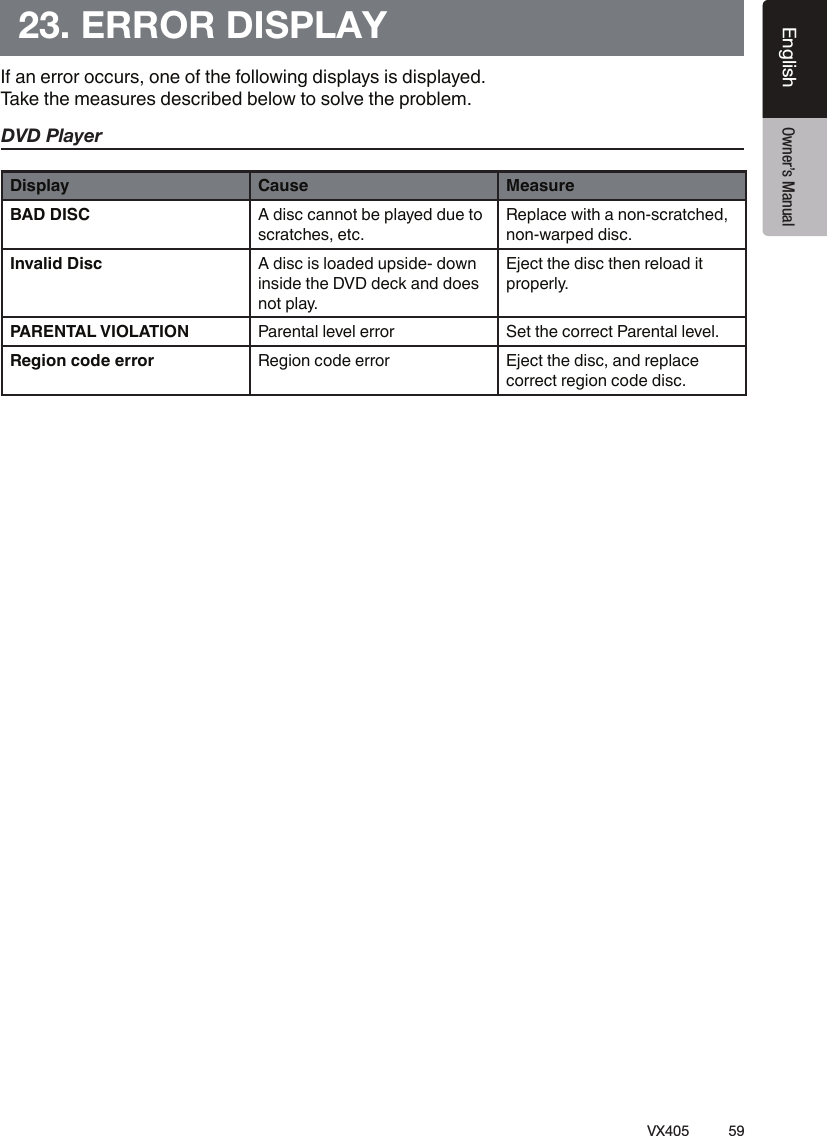
59VX405EnglishEnglish Owner’s Manual23. ERROR DISPLAYIf an error occurs, one of the following displays is displayed. Take the measures described below to solve the problem.DVD PlayerDisplay Cause MeasureBAD DISC A disc cannot be played due to scratches, etc.Replace with a non-scratched, non-warped disc.Invalid Disc A disc is loaded upside- down inside the DVD deck and does not play.Eject the disc then reload it properly.PARENTAL VIOLATION Parental level error Set the correct Parental level.Region code error Region code error Eject the disc, and replace correct region code disc.
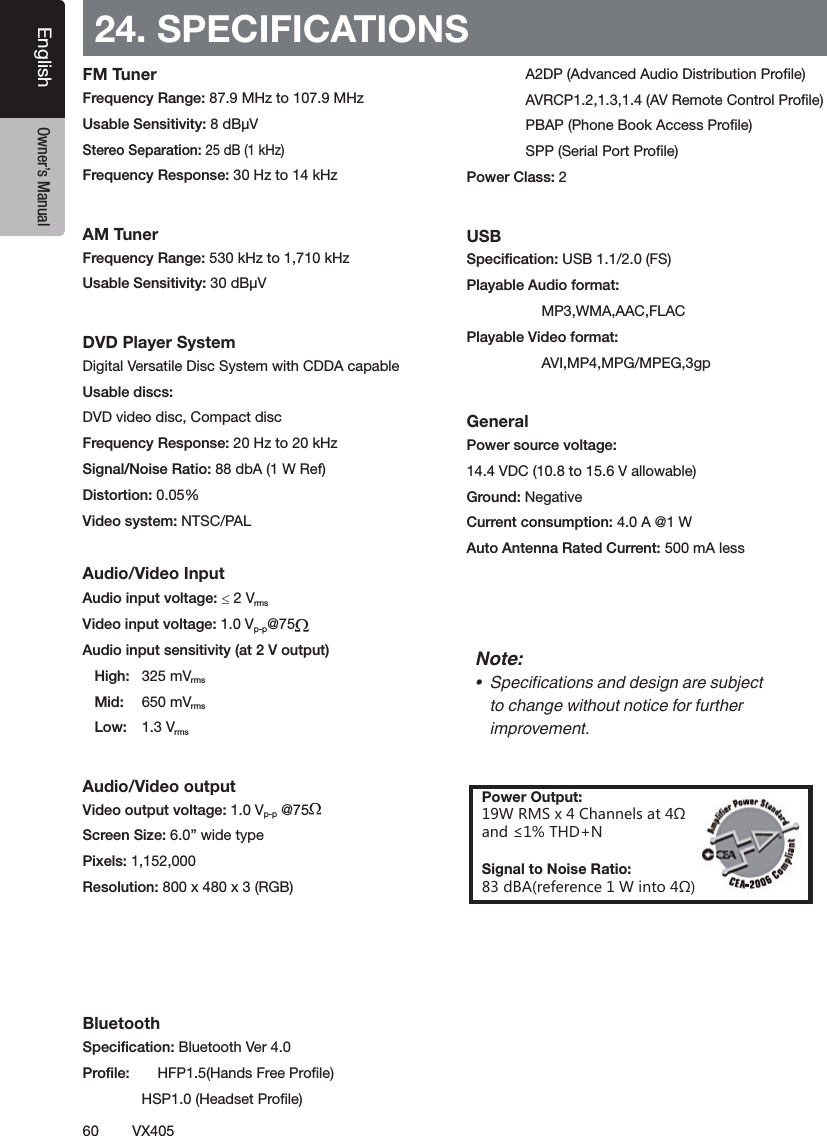
60VX405English Owner’s Manual24. SPECIFICATIONSFM Tuner฀ ฀฀฀฀฀฀฀฀฀ ฀฀฀฀฀฀฀฀฀AM Tuner฀฀฀฀฀฀฀฀฀฀DVD Player System฀฀฀฀฀฀฀฀฀฀฀฀฀฀฀฀฀฀฀฀฀88 ฀฀฀฀0.05%฀฀Audio/Video Input฀฀ d฀฀฀฀฀฀฀฀฀฀฀฀฀ ฀฀ ฀฀ ฀Audio/Video output฀฀฀฀฀฀฀฀฀฀฀฀฀฀฀฀Bluetooth฀฀฀฀ ฀฀฀฀ ฀฀฀฀฀ ฀฀฀฀฀ ฀฀฀฀฀ ฀฀฀฀฀ ฀฀฀฀ 2USB฀฀฀฀฀฀฀ ฀฀฀฀ General฀฀฀฀฀฀฀฀฀฀฀฀฀฀฀฀฀฀฀฀฀฀฀Note:ƹ Ƚ»ÁŲ»¹ÌÁÇÆË¹Æ¼¼½ËÁ¿Æ¹Ê½Ëͺ½»Ìto change without notice for further improvement.Power Output:=839^)NGTTKRYGZœGTJʇ:.*4Signal to Noise Ratio:J('XKLKXKTIK=OTZUœ
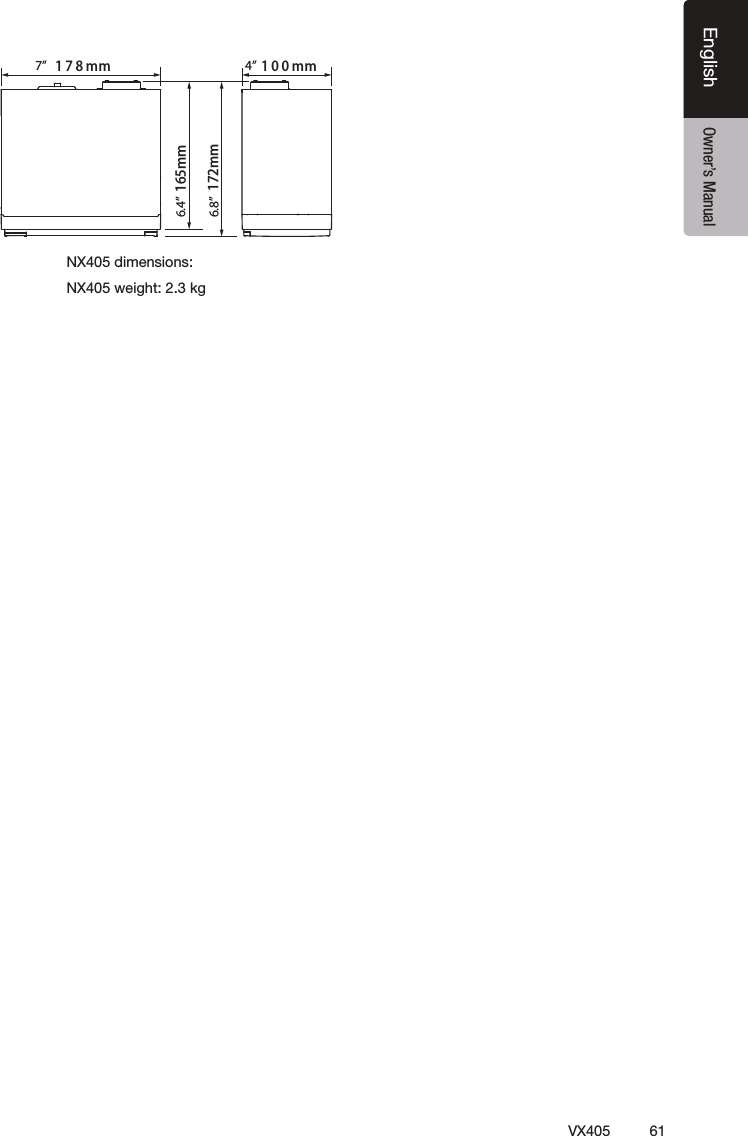
61VX405EnglishEnglish Owner’s Manual฀฀฀฀฀mm001mm871165mm172mm7’’ 4’’6.8’’6.4’’
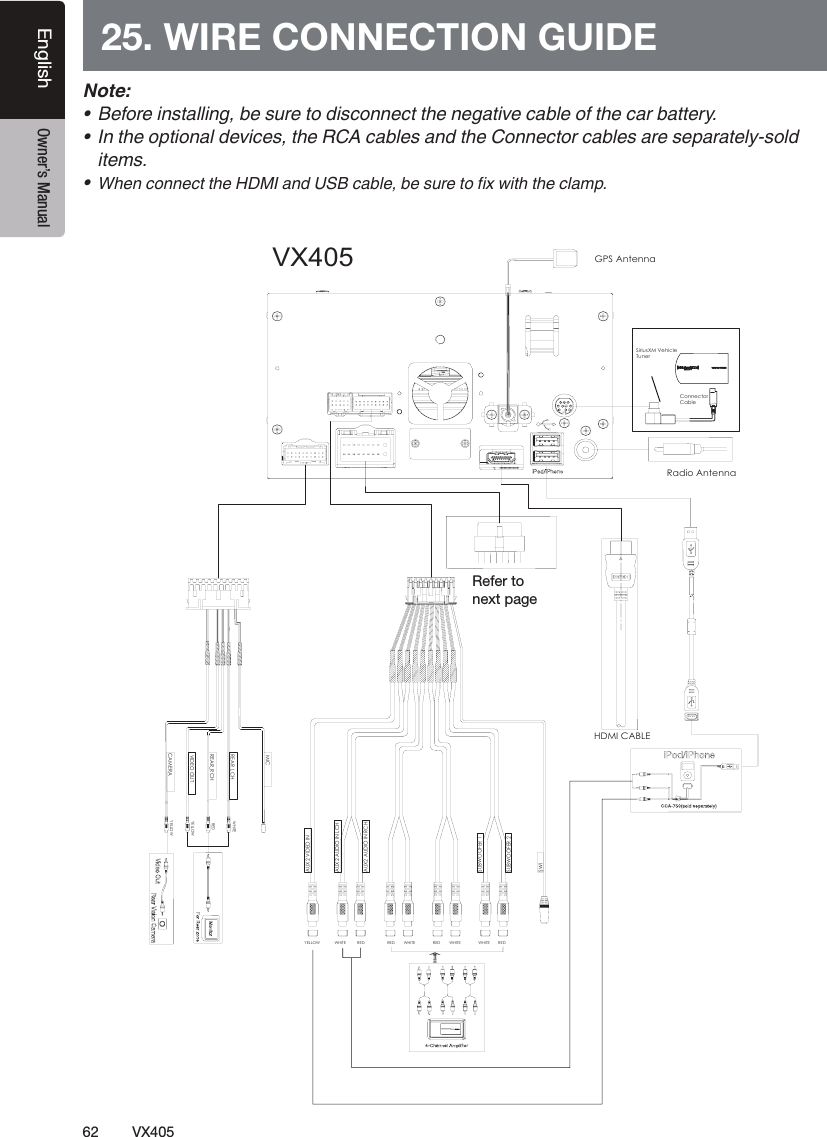
62 VX405English Owner’s Manual25. WIRE CONNECTION GUIDENote:ƹ ½¾ÇʽÁÆË̹ÄÄÁÆ¿Ɠº½ËÍʽÌÇ¼ÁË»ÇÆÆ½»ÌÌÀ½ƽ¿¹ÌÁν»¹ºÄ½ǾÌÀ½»¹Êº¹Ì̽ÊÑƖƹ ÆÌÀ½ÇÈÌÁÇÆ¹Ä¼½ÎÁ»½ËƓÌÀ½»¹ºÄ½Ë¹Æ¼ÌÀ½ÇÆÆ½»ÌÇÊ»¹ºÄ½Ë¹Ê½˽ȹʹ̽ÄÑƘËÇļitems.ƹÀ½Æ»ÇÆÆ½»ÌÌÀ½¹Æ¼»¹ºÄ½Ɠº½ËÍʽÌÇŲÐÏÁÌÀÌÀ½»Ä¹ÅÈƖVX405Radio AntennaGPS AntennaHDMI CABLESiriusXM Vehicle TunerAUX2 VIDEO INAUX2 AUDIO IN LCHAUX2 AUDIO IN RCHSUBWOOFER 1SUBWOOFER 2YELLOW WHITE RED WHITE WHITE WHITE DERDERDERSWICAMERAYELLOWMICYELLOWWHITEREDVIDEO OUTREAR_LCHREAR_RCHConnectorCable ฀฀฀฀
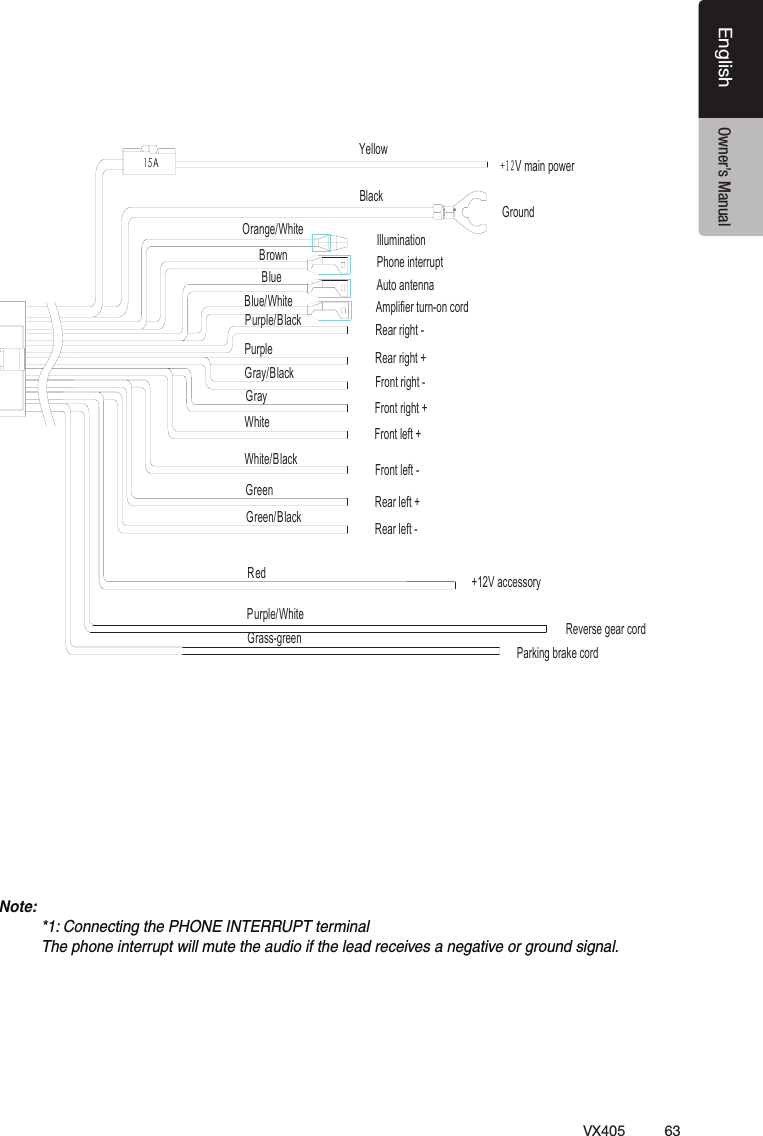
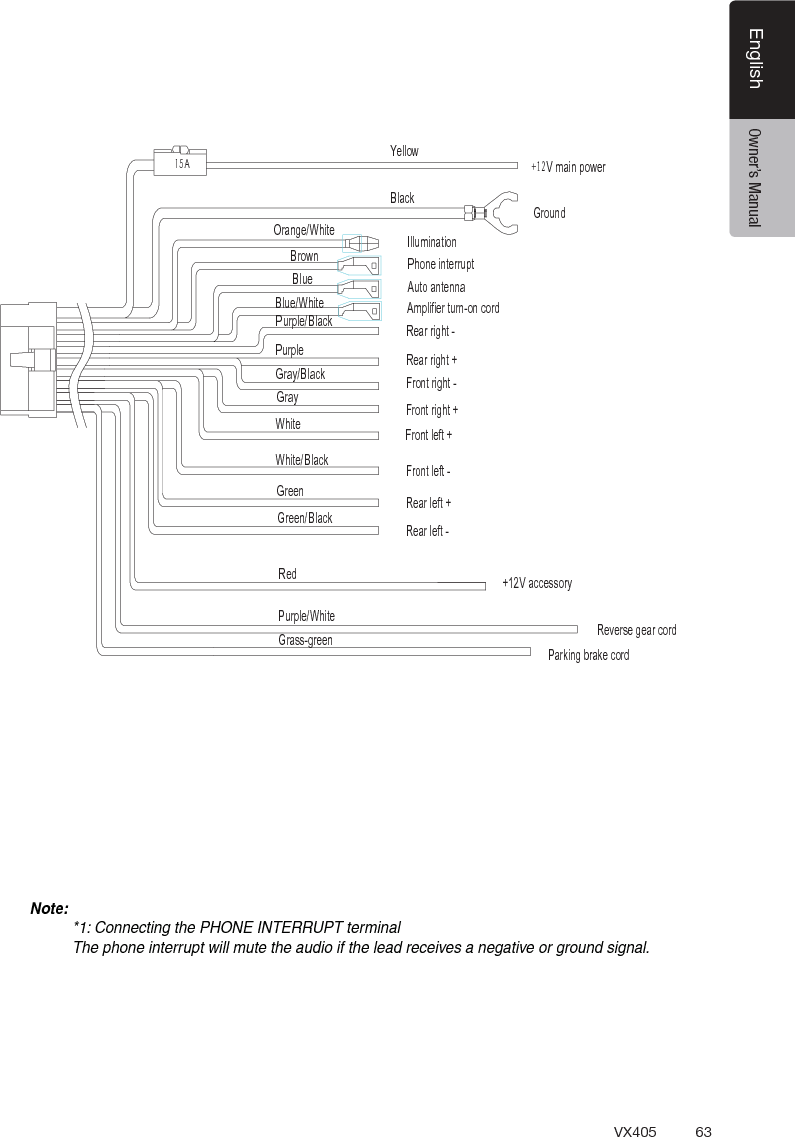
63VX405EnglishEnglish Owner’s Manual15A9PDLQSRZHU*URXQG<HOORZ%ODFN,OOXPLQDWLRQOUDQJHWKLWHBURZQ 3KRQHLQWHUUXSWBOXH $XWRDQWHQQD$PSOLILHUWXUQRQFRUGBOXHWKLWH5HDUULJKWPXUSOHBODFN3XUSOHGUD\BODFNGUD\WKLWHWKLWHBODFNGUHHQGUHHQBODFNRHGPXUSOHWKLWHGUDVVJUHHQ5HDUULJKW)URQWULJKW)URQWULJKW)URQWOHIW)URQWOHIW5HDUOHIW5HDUOHIW9DFFHVVRU\5HYHUVHJHDUFRUG3DUNLQJEUDNHFRUGNote:*1: Connecting the PHONE INTERRUPT terminalThe phone interrupt will mute the audio if the lead receives a negative or ground signal.
 Clarion Co., Ltd.All Rights Reserved. Copyright © 2014: Clarion Co., Ltd.

Navigation menu