SKYPINE ELECTRONICS CES8243CL All In One DVD Player User Manual VX405 Usermanual EN 2014 12 12
SKYPINE ELECTRONICS (SHEN ZHEN) CO., LTD. All In One DVD Player VX405 Usermanual EN 2014 12 12
Contents
- 1. User Manual 1
- 2. User Manual 2
- 3. User Manual 3
- 4. User Manual 4
User Manual 1

DVD MULTIMEDIA STATION WITH BUILT-IN NAVIGATION &
6.0’’ TOUCH PANEL CONTROL
VX405
Owner’s manual
1
VX405
English
English Owner’s Manual
CLARION PRODUCT REGISTRATION INFORMATION
INFORMATIONS DE L’ENREGISTREMENT DE PRODUITS CLARION
INFORMACIÓN DEL REGISTRO DE PRODUCT O DE CLARION
For USA and Canada only
www.clarion.com
Pour les Étas Unis et le Canada seulement
www.clarion.com
Para USA y Canada nomas
www.clarion.com
Dear Customer:
Congratulations on your purchase of a Clarion mobile electronic product. We are
confident that you’ll enjoy your Clarion experience.
There are many benefits to registering your product. We invite you to visit our website
at www.clarion.com to register your Clarion product.
We have made product registration simple with our easy to use website.
The registration form is short and easy to complete. Once you’re registered, we can
keep you informed of important product information.
Register at www.clarion.com - it’s easy to keep your Clarion product up to date.
Cher client:
Nous vous remercions d’avoir acheté ce produit électronique mobile Clarion. Nous
sommes confiants que vous apprécierez votre expérience Clarion.
Il y a beaucoup d’avantage à enregistrer votre produits. Nous vous invitons à visiter
notre site Web www.clarion.com pour enregistrer votre produit Clarion.
Nous avons facilité la tache d’enregistrement de produit simple et facile grâce à notre
site Web.Le formulaire d’enregistrement est court et facile à compléter. Lorsque vous
êtes enregistrer, nous pouvons vous tenir informé des informations important de
produits. Enregistrer à www.clarion.com - c’est facile de mettre à jour votre produit
Clarion.
Querido Cliente:
Felicitaciones por su compra de producto electrónico móvil de Clarion. Estamos
seguros que usted gozará de su experiencia con el producto de Clarion.
Hay muchas ventajas al registrar su producto. Le invitamos a que visite nuestro sitio
en internet www.clarion.com para registrar su producto de Clarion.
Hemos hecho el registro de producto fácil en nuestro sitio. La forma de registro es
corta y fácil de completar. Una vez que lo registre, podremos proporcionarle la infor-
mación de su producto.
Registrese en www.clarion.com - es fácil mantener su producto de Clarion actual-
izado.
Under Industry Canada regulations, this radio transmitter may only operate using an
antenna of a type and maximum (or lesser) gain approved for the transmitter by Industry
Canada. To reduce potential radio interference to other users, the antenna type and its
gain should be so chosen that the equivalent isotropically radiated power (e.i.r.p.) is not
more than that necessary for successful communication.
Conformément à la réglementation d’Industrie Canada, le présent émetteur radio peut
fonctionner avec une antenne d’un type et d’un gain maximal (ou inférieur) approuvé pour
l’émetteur par Industrie Canada. Dans le but de réduire les risques de brouillage radioé-
lectrique
à l’intention des autres utilisateurs, il faut choisir le type d’antenne et son gain de sorte
que la puissance isotrope rayonnée équivalente (p.i.r.e.) ne dépasse pas l’intensité néces-
saire à l’établissement d’une communication satisfaisante.

2VX405
English Owner’s Manual
Contents
1. FEATURES ...........................................................................................................5
Expanding Systems ..............................................................................................5
2. PRECAUTIONS ....................................................................................................6
3. CAUTIONS ON HANDLING.................................................................................9
Operation Panel ....................................................................................................9
USB Port ...............................................................................................................9
Cleaning ................................................................................................................9
Handling Discs ....................................................................................................10
4. OPERATION PANEL ..........................................................................................12
Functions of Buttons ...........................................................................................12
5. REMOTE CONTROL..........................................................................................13
Remote Control Functions ..................................................................................14
6. MAIN MENU.......................................................................................................16
7. DVD VIDEO PLAYER OPERATIONS ...............................................................17
Discs ...................................................................................................................17
Change DVD System Settings ............................................................................18
Watching to a Disc ..............................................................................................18
Showing DVD Player Mode Screen ....................................................................19
Operate the DVD Player Menu ............................................................................19
Showing Video Files Player Mode Screen ..........................................................20
Operate the Video Files Player Menu .................................................................21
Playable Video Disc Formats ..............................................................................21
8. CD PLAYER OPERATIONS ..............................................................................23
Listening to a Disc/Ejecting a Disc .....................................................................23
Showing CD Player Mode Screen ......................................................................23
Operate the CD Player Menu ..............................................................................23
Listening to Compressed Audio .........................................................................24
Tag Display Function ..........................................................................................24
Playback MP3/WMA/AAC menu ........................................................................25
9. USB/SD AUDIO OPERATIONS ........................................................................26
Notes on Using USB/SD Memories ....................................................................26
Select USB/SD Audio Mode ...............................................................................26
Playing Audio Files in USB/SD Memory .............................................................27
Notes on Using USB/SD Memories ....................................................................28
Select USB/SD Video Mode ...............................................................................28
Playing Video Files in USB/SD Memory .............................................................28
Playable Video Format ........................................................................................28
10. USB/SD VIDEO OPERATIONS .......................................................................28
11. iPod OPERATIONS..........................................................................................30
Notes on Using iPod/iPhone ...............................................................................30
iPod Audio Menu Operations ..............................................................................30
iPod Audio ID3 Mode Screen .............................................................................30
iPod Audio Playlist Mode Screen .......................................................................31
iPod Audio List Mode Screen .............................................................................31
iPod Audio Simple Control Mode Screen ...........................................................32
iPod Video Menu Operations ..............................................................................32
iPod Video ID3 Mode Screen ..............................................................................32
iPod Video List Mode Screen .............................................................................33
iPod Video Simple Control Mode Screen ...........................................................33
iPod Video Play Mode Screen ............................................................................33
iPod Audio Bluetooth Mode ................................................................................34
12. Pandora® OPERATIONS ................................................................................35
Selecting the Pandora Mode ..............................................................................35

3
VX405
English
English Owner’s Manual
Pandora
®
Bluetooth Mode ..................................................................................36
13. Bluetooth® AUDIO PLAYER OPERATIONS ..................................................37
Selecting the Bluetooth Audio Mode ..................................................................37
Bluetooth Audio Player Settings .........................................................................37
Registering Your Bluetooth Audio Player (Pairing) .............................................37
Selecting the Bluetooth Audio Player .................................................................38
Controlling the Bluetooth Audio Player ...............................................................38
14. Bluetooth
®
TELEPHONE OPERATIONS ..........................................................39
Select the BT Phone Mode .................................................................................39
Bluetooth Telephone Settings ............................................................................39
Registering Your Cellular Phone (Pairing) ...........................................................40
Select the Cellular Phone ....................................................................................40
Get the Phone Book Data ...................................................................................40
Telephone Operations ........................................................................................40
Using Siri Eyes Free Function .............................................................................42
15. TUNER OPERATIONS .....................................................................................43
16. SiriusXM Satellite Radio OPERATIONS ....................................................44
Activating Your SiriusXM Subscription ...............................................................44
Selecting a Satellite Radio Mode ........................................................................44
Displaying the SiriusXM Radio ID .......................................................................44
Channel Selection by Up/Down Button ..............................................................45
Channel Selection by Channel Number ..............................................................45
Tuning to Channels from the Channel List .........................................................45
Tuning to Channels from the Preset Channel List ..............................................45
Tuning to Channels from the Category List ........................................................45
Parental Control Lock / Unlock ...........................................................................45
Setting the Password ..........................................................................................45
Replay .................................................................................................................46
SmartFavorites ....................................................................................................46
TuneStart™ .........................................................................................................46
TuneMix™ ...........................................................................................................46
iTunes Radio Tagging ........................................................................................46
17. HDMI MODE ....................................................................................................48
Wire Connection of HDMI Mode .........................................................................48
Select HDMI Source ..........................................................................................49
18. AUX .................................................................................................................50
19. CAMERA INPUT OPERATIONS .....................................................................50
20. REAR SOURCE OPERATIONS .......................................................................51
DVD Video in Rear ..............................................................................................51
DVD Video Rear Source Control Info Mode. ......................................................51
DVD Video Rear Source Control Direct Mode. ..................................................51
iPod Video in Rear ..............................................................................................52
iPod Video Rear Source Control Play Mode .......................................................52
iPod Video Rear Source ID3 Mode .....................................................................52
21. SETTING OPERATIONS ..................................................................................53
General Setup Menu ...........................................................................................53
Video Setup Menu ..............................................................................................53
Audio Setup Menu ..............................................................................................54
Others Setup Menu .............................................................................................54
Set the Anti-Theft Code ......................................................................................54
22. TROUBLESHOOTING .....................................................................................55
General ................................................................................................................55
DVD Player ..........................................................................................................55
USB Device .........................................................................................................56
®

4VX405
English Owner’s Manual
Bluetooth ............................................................................................................56
SiriusXM Advisory Messages..............................................................................57
TFT Screen ..........................................................................................................58
23. ERROR DISPLAY.............................................................................................59
DVD Player ..........................................................................................................59
24. SPECIFICATIONS ............................................................................................60
25. WIRE CONNECTION GUIDE ...........................................................................62
5
VX405
English
English Owner’s Manual
1. FEATURES
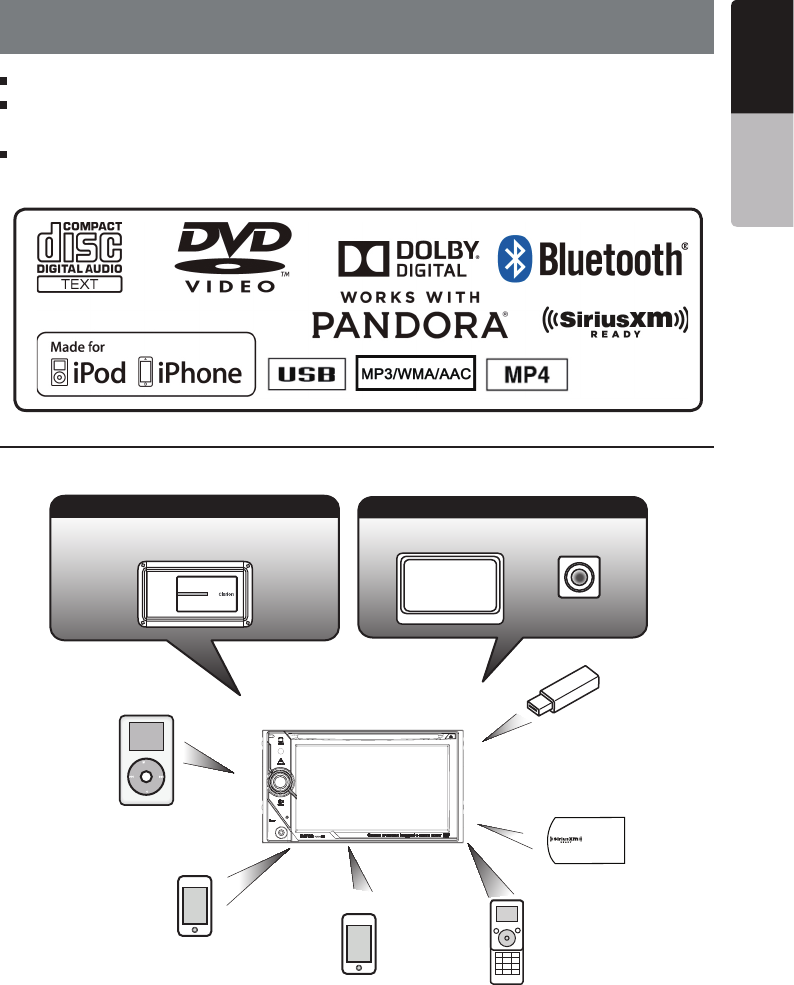
Expanding Systems
NOTE:
t
The items listed outside of the frames are the commercial products generally sold.
t
CCA-750,CCA-771,CCA-802:Sold separately.
FLAC(Free Lossless Audio Codec) Compatible with ID3-TAG Display
Built-in Bluetooth
®
Handsfree (HFP) and Audio Streaming (A2DP &
AVRCP)
Front-Panel Auxiliary Input and 6ch RCA Output with Subwoofer Control
iPod
®
Expanding Visual Features
Rear Monitor Rear Vision Camera
Expanding Audio Features
External Power
ÅÈÄÁŲ½Ê
iPhone
®
USB
Memory
Bluetooth
Telephone
(Connect via CCA-750)
(Connect via CCA-750)
(Connect via CCA-771,CCA-802)
iPhone/ Smartphone via HDMI
SiriusXM-Connect
Vehicle Tuner
VEHICLE TUNER

6VX405
English Owner’s Manual
2. PRECAUTIONS
t 'PSZPVSTBGFUZUIFESJWFSTIPVMEOPUXBUDIBOZWJEFPTPVSDFTBOEPSPQFSBUFUIFDPOUSPMTXIJMFESJWJOH
Please note that watching and operating any video sources while driving are prohibited by law in some
countries. Also, while driving, keep the volume to a level at which external sounds can be heard.
t%POPUEJTBTTFNCMFPSNPEJGZUIJTVOJU*UNBZDBVTFBOBDDJEFOUmSFPSFMFDUSJDTIPDL
t%POPUVTFUIJTVOJUXIFOBUSPVCMFFYJTUTTVDIBTOPTDSFFODPOUFOUBQQFBSTPSOPTPVOEJT
audible. It may cause an accident, fire, or electric shock. For that case, consult your authorized
dealer or a nearest Clarion service center.
t*ODBTFPGBQSPCMFNTVDIBTBOZNBUFSJBMIBTCFFOFOUFSFEJOUIFVOJUUIFVOJUHFUTXFUPS
smoke or strange smells come out of the unit, etc., stop using this unit immediately, and consult
your authorized dealer or a nearest Clarion service center.
Using it in that condition may cause an accident, fire, or electric shock.
t6TFBGVTFXJUIUIFTBNFTQFDJmDBUJPOPOMZXIFOSFQMBDJOHUIFGVTF
Using a fuse with a different specification may causes a fire.
t'PSUIFJOTUBMMBUJPOPGUIJTVOJUPSBDIBOHFJOUIFJOTUBMMBUJPOBTLZPVSBVUIPSJ[FEEFBMFSPSB
nearest Clarion service center for safety. Professional skills and experiences are required to do
so.
t5IJTOBWJHBUJPOTZTUFNTIPVMEOPUCFVTFEUPSFQMBDFZPVSPXOKVEHNFOU/PJUJOFSBSZTVHHFTUFE
by this navigation system should ever override any highway regulations, your own judgment, or a
knowledge of safe driving practices. Do not follow the navigation system’s suggested itinerary if it
would cause you to perform a dangerous or illegal act, place you in a dangerous situation, or take
you into an area you consider unsafe.
t5IFBEWJDFQSPWJEFECZUIFOBWJHBUJPOTZTUFNJTUPCFSFHBSEFEBTBTVHHFTUJPOPOMZ5IFSFNBZ
be times when the navigation system displays the vehicle’s location incorrectly, fails to suggest
the shortest route, or fails to direct you to your desired destination. In such instances, rely on your
own driving judgment, taking into account the driving conditions at the time.
t%POPUVTFUIFOBWJHBUJPOTZTUFNUPMPDBUFFNFSHFODZTFSWJDFT5IFEBUBCBTFEPFTOPUDPOUBJO
a complete listing of emergency services such as police stations, fire halls, hospitals and walk-in
clinics. Please show discretion and ask for directions in such instances.
t"TUIFESJWFSZPVBMPOFBSFSFTQPOTJCMFGPSZPVSESJWJOHTBGFUZ
t*OPSEFSUPBWPJEBUSBGmDBDDJEFOUEPOPUPQFSBUFUIFTZTUFNXIJMFESJWJOH
t*OPSEFSUPBWPJEBUSBGmDBDDJEFOUPQFSBUFUIFTZTUFNPOMZXIFOUIFWFIJDMFJTTUPQQFEBUBTBGF
place and the parking brake is on.
t*OPSEFSUPBWPJEBUSBGmDBDDJEFOUPSUSBGmDPGGFOTFSFNFNCFSUIBUBDUVBMSPBEDPOEJUJPOTBOE
traffic regulations take precedence over the information contained on the navigation system.
t5IFTPGUXBSFNBZDPOUBJOJOBDDVSBUFPSJODPNQMFUFJOGPSNBUJPOEVFUPUIFQBTTBHFPGUJNF
changing circumstances, and the sources of information used. Please respect current traffic
conditions and regulations at all times while driving.
t8IFSFBDUVBMSPBEDPOEJUJPOTBOEIJHIXBZSFHVMBUJPOTEJGGFSGSPNUIFJOGPSNBUJPODPOUBJOFEPO
the navigation system, abide by the highway regulations.
t,FFQUIFBNPVOUPGUJNFTQFOUWJFXJOHUIFTDSFFOXIJMFESJWJOHUPBTUSJDUNJOJNVN
t5IFOBWJHBUJPOTZTUFNEPFTOPUQSPWJEFOPSSFQSFTFOUJOBOZXBZJOGPSNBUJPOPOUSBGmDBOE
highway regulations; technical aspects of the vehicle including weight, height, width, load and
WARNING

7
VX405
English
English Owner’s Manual
speed limits; road conditions including grade, percentage of incline and surface conditions;
obstacles such as the height and width of bridges and tunnels; and other current driving or road
conditions. Always rely on your own judgment when driving a car, taking into account current
driving conditions.
t$IBOHFTPSNPEJmDBUJPOTOPUFYQSFTTMZBQQSPWFECZUIFQBSUZSFTQPOTJCMFGPSDPNQMJBODFDPVME
void the user’s authority to operate the equipment.
This equipment has been tested and found to comply with the limits for a Class B digital device,
pursuant to Part 15 of the FCC Rules. These limits are designed to provide reasonable protection
against harmful interference in a residential installation. This equipment generates, uses and can
radiate radio frequency energy and, if not installed and used in accordance with the instructions,
may cause harmful interference to radio communications. However, there is no guarantee that
interference will not occur in a particular installation.
If this equipment does cause harmful interference to radio or television reception, which can be
determined by turning the equipment off and on, the user is encouraged to try to correct the
interference by one or more of the following measures:
-- Reorient or relocate the receiving antenna.
-- Increase the separation between the equipment and receiver.
-- Connect the equipment into an outlet on a circuit different from that to which the receiver is
connected.
-- Consult the dealer or an experienced radio/TV technician for help.
8VX405
English Owner’s Manual
1.When the inside of the car is very cold and
the player is used soon after switching on the
heater, moisture may form on the disc (DVD/
CD) or the optical parts of the player and
proper playback may not be possible. If
moisture forms on the disc (DVD/CD), wipe it
ÇŰÏÁÌÀ¹ËǾ̻ÄÇÌÀƖ¾ÅÇÁËÌÍʽ¾ÇÊÅËÇÆÌÀ½
optical parts of the player, do not use the
player for about one hour. The condensation
will disappear naturally allowing normal
operation.
2.Driving on extremely bumpy roads which
cause severe vibration may cause the sound
to skip.
3.This unit uses a precision mechanism. Even
in the event that trouble arises, never open
the case, disassemble the unit, or lubricate
the rotating parts.
This device complies with Industry Canada license-
exempt RSS standard(s). Operation is subject to
the following two conditions: (1) this device may not
cause interference, and (2) this device must accept
any interference, including interference that may
cause undesired operation of the device.
Le présent appareil est conforme aux CNR
d’Industrie Canada applicables aux appareils radio
exempts de licence. L’exploitation est autorisée aux
deux conditions suivantes :(1) l’appareil ne doit pas
produire de brouillage, et (2) l’utilisateur de l’appareil
doit accepter tout brouillage radioélectrique
subi, même si le brouillage est susceptible d’en
compromettre le fonctionnement.
VX405
68B A
V8V CES 824 3CL
VX405
861 4A- CES 824 3C L
INFORMATION FOR USERS

9
VX405
English
English Owner’s Manual
3. CAUTIONS ON HANDLING
Operation Panel
t5IFPQFSBUJPOQBOFMXJMMPQFSBUFQSPQFSMZJOB
temperature range of 0˚ to 60˚ C.
t%POPUBMMPXBOZMJRVJETPOUIFTFUGSPN
drinks, umbrellas etc. Doing so may damage
the internal circuitry.
t%POPUEJTBTTFNCMFPSNPEJGZUIFTFUJOBOZ
way. Doing so may result in damage.
t4VCKFDUJOHUIFPQFSBUJPOQBOFMUPTIPDLT
may result in breakage, deformation or other
damage.
t%POPUMFUDJHBSFUUFTCVSOUIFEJTQMBZ
t*GBQSPCMFNTIPVMEPDDVSIBWFUIFTFU
inspected at your store of purchase.
t5IFSFNPUFDPOUSPMVOJUNBZOPUXPSLJGUIF
remote control sensor is exposed to direct
sunlight.
t*OFYUSFNFMZDPMEXFBUIFSUIFEJTQMBZ
movement may slow down and the display
may darken, but this is not a malfunction.
The display will work normally when the
temperature increases.
t4NBMMCMBDLBOETIJOZTQPUTJOTJEFUIFMJRVJE
crystal panel are normal for LCD products.
For a longer service life, be sure to read the following cautions.
Cleaning
ƹ Ľ¹ÆÁÆ¿ÌÀ½»¹ºÁƽÌ
Use a soft, dry cloth and gently wipe off
the dirt. For tough dirt, apply some neutral
detergent diluted in water to a soft cloth, wipe
off the dirt gently, then wipe again with a dry
cloth.
Do not use benzene, thinner, car cleaner, etc.,
as these substances may damage the cabinet
or cause the paint to peel. Also, leaving rubber
or plastic products in contact with the cabinet
for long periods of time may cause stains.
ƹ Ľ¹ÆÁÆ¿ÌÀ½ÄÁÉÍÁ¼»ÊÑË̹ÄȹƽÄ
The liquid crystal panel tends to collect dust,
so wipe it off occasionally with a soft cloth.
The surface is easily scratched, so do not rub
it with hard objects.
USB Port
t5IF64#NFNPSZTUJDLTNVTUCFSFDPHOJ[FE
as “USB mass storage class” to work
properly. Some models may not operate
correctly.
When the memorized data is lost or
damaged by any chance, Clarion shall not
be liable for any damage.
When using an USB memory stick, we
recommend that you backup your data stored
on it before by using a personal computer etc.
t%BUBmMFTNBZCFCSPLFOXIFOVTJOH64#
memory sticks in the following situation:
When disconnecting the USB memory stick or
turning the power off during writing or reading
data. When affected by static electricity or
electric noise. Connect/disconnect the USB
memory stick when it is not accessed.
t$POOFDUJOHXJUIUIFDPNQVUFSJTOPU
supported.
t$POOFDUJOHXJUIUIF64#)VCJTOPU
supported.
10 VX405
English Owner’s Manual
Handling Discs
Handling
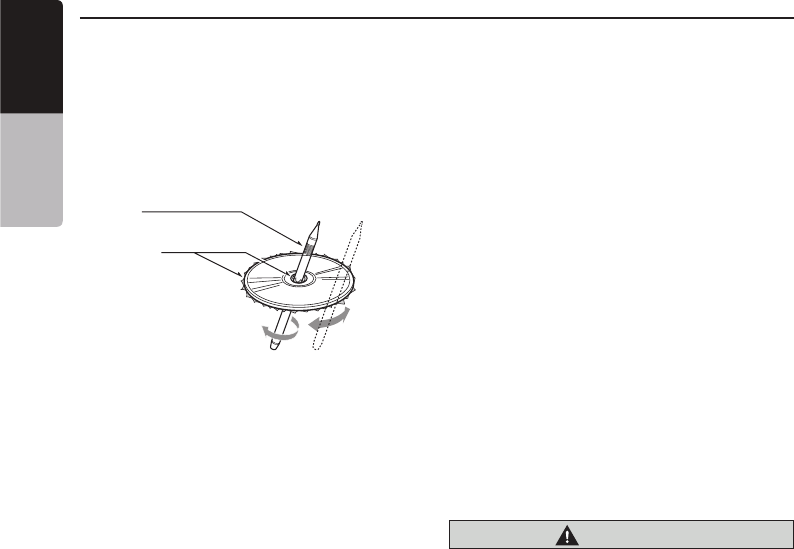
t/FXEJTDTNBZIBWFTPNFSPVHIOFTT
around the edges. If such discs are used,
the player may not work or the sound
may skip. Use a ball-point pen or the like
to remove any roughness from the edge
of the disc.
Ball-point pen
Roughness
Never stick labels on the surface of the
disc or mark the surface with a pencil or
pen.
t/FWFSQMBZBEJTDXJUIBOZDFMMPQIBOF
tape or other glue on it or with peeling off
marks. If you try to play such a disc, you
may not be able to get it back out of the
DVD player or it may damage the DVD
player.
t%POPUVTFEJTDTUIBUIBWFMBSHF
scratches, are misshapen, cracked,
etc. Use of such discs may cause
missoperation or damage.
t5PSFNPWFBEJTDGSPNJUTTUPSBHFDBTF
press down on the center of the case
and lift the disc out, holding it carefully
by the edges.
t%POPUVTFDPNNFSDJBMMZBWBJMBCMFEJTD
protection sheets or discs equipped with
stabilizers, etc. These may damage the
disc or cause breakdown of the internal
mechanism.
Storage
t%POPUFYQPTFEJTDTUPEJSFDUTVOMJHIUPS
any heat source.
t%POPUFYQPTFEJTDTUPFYDFTTIVNJEJUZ
or dust.
t%POPUFYQPTFEJTDTUPEJSFDUIFBUGSPN
heaters.
Cleaning
t5PSFNPWFmOHFSNBSLTBOEEVTUVTF
a soft cloth and wipe in a straight
line from the center of the disc to the
circumference.
t%POPUVTFBOZTPMWFOUTTVDIBT
commercially available cleaners, anti-
static spray, or thinner to clean discs.
t"GUFSVTJOHTQFDJBMEJTDDMFBOFSMFUUIF
disc dry off well before playing it.
On Discs
t/FWFSUVSOPGGUIFQPXFSBOESFNPWFUIF
unit from the car with a disc loaded.
CAUTION
For your safety, the driver should not
insert or eject a disc while driving.

11
VX405
English
English Owner’s Manual
ƹ
This product incorporates copyright protection
technology that is protected by U.S. patents
and other intellectual property rights. Use of this
copyright protection technology must be authorized
by Rovi Corporation, and is intended for home and
other limited viewing uses only unless otherwise
authorized by Rovi Corporation.
Reverse engineering or disassembly is prohibited.
ƹ
Manufactured under license from Dolby
Laboratories. “Dolby” and the double-D symbol are
trademarks of Dolby Laboratories.
ƹ
"Made for iPod" and "Made for iPhone" mean that
an electronic accessory has been designed to
connect specifically to iPod or iPhone, respectively,
and has been certified by the developer to meet
Apple performance standards. Apple is not
responsible for the operation of this device or its
compliance with safety and regulatory standards.
Please note that the use of this accessory with iPod
or iPhone may affect wireless performance.
iPhone, iPod, Siri and iTunes are trademarks
of Apple Inc., registered in the U.S. and other
countries.
Lightning is a trademark of Apple Inc.
ƹ AndroidTM is the trademark of Google Inc.
ƹ
The Bluetooth® word mark and logos are registered
trademarks owned by the Bluetooth® SIG, Inc. And
any use of such marks by Clarion Co., Ltd. is under
license. Other trademarks and trade names are
those of their respective owners.
ƹ
Pandora, the Pandora logo, and the Pandora trade
dress are trademarks or registered trademarks of
Pandora Media, Inc. used with permission.
Pandora® is currently only available in the United
States, Australia and New Zealand.
ƹ
Sirius, XM and all related marks and logos are
trademarks of Sirius XM Radio Inc. All rights
reserved.
About the registered marks, etc.
12 VX405
English Owner’s Manual
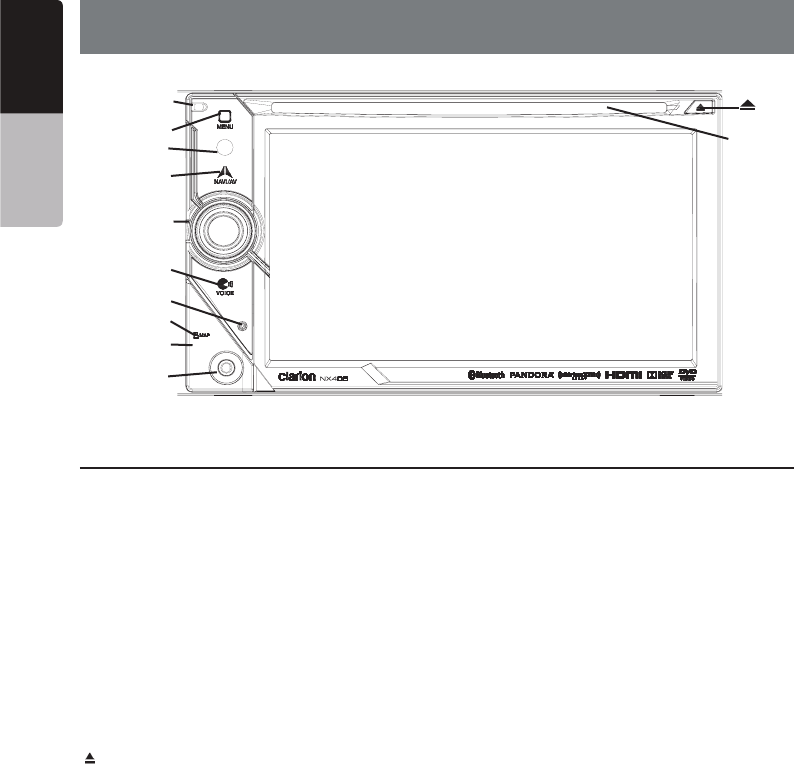
[Microphone]
[MENU]
[NAVI/AV]
[IR]
[Cover]
[AUX IN]
[RESET]
[microSD slot]
[POWER/VOL]
[Disc slot]
[ ]
4. OPERATION PANEL
Functions of Buttons
[POWER/VOL] Knob
[NAVI/AV] Button
[] Button
[MENU] Button
[RESET] Button
Note: When the [RESET] button is pressed, frequencies
of radio stations, titles, etc. stored in memory are
cleared.
[microSD slot ]
[AUX IN]
[Microphone]
[IR]
[VOICE] Button
Press and hold this button until you hear the warning
tone, then you can use Siri
®
Eyes Free function.
Only navigation map card is available and don’t remove it when unit is power on
[VOICE]
13
VX405
English
English Owner’s Manual
5. REMOTE CONTROL
Replacing the batteries
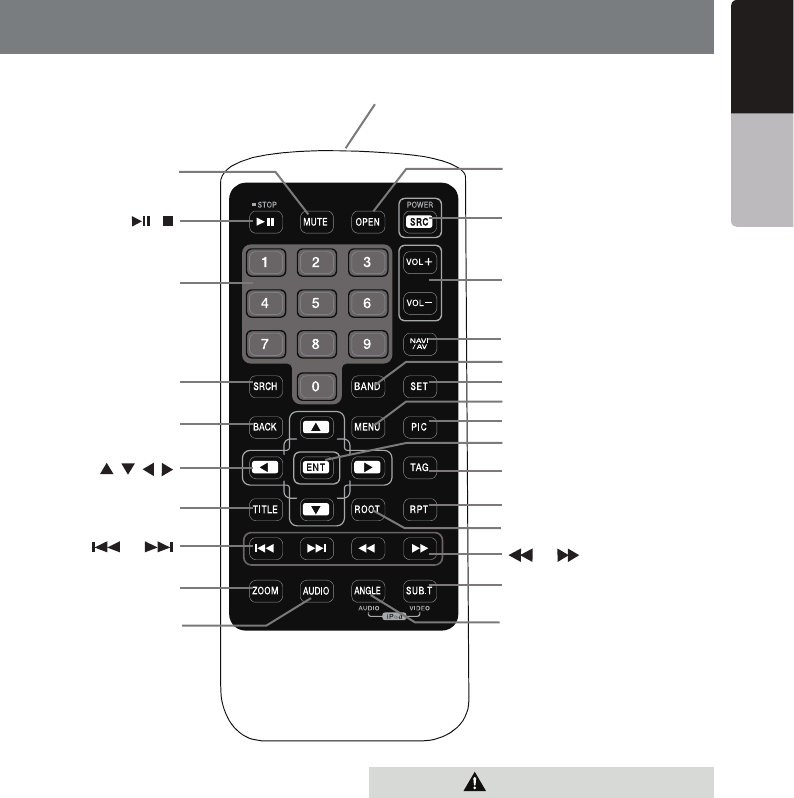
[ / ]
[ 0-9 ]
[SRCH]
[BACK]
[ , , , ]
[TITLE]
[ ], [ ]
[ZOOM]
[MUTE]
[AUDIO]
[POWER / SRC]
[VOLUME]
[SET]
[PIC]
[TAG]
[RPT]
[ ], [ ]
[SUB.T]
[OPEN]
[ANGLE]
[NAV/ AV]
[MENU]
[BAND]
[ROOT]
[ENT]
CAUTION
RCX005 Remote Control Included

14 VX405
English Owner’s Manual
[ / ] Button
[MUTE] Button
[POWER/SRC] Button
[0 - 9]
[VOLUME]
[NAVI/AV] Button
[SRCH] Button
[BAND] Button
[SET] Button
[BACK] Button
[ ], [ ], [ ], [ ]
[MENU] Button
[PIC] Button
[ENT] Button
[TAG] Button
®
[TITLE] Button
[ROOT] Button
Remote Control Functions
Note:
CAUTION
Important

15
VX405
English
English Owner’s Manual
[RPT] Button
[ ], [ ]
[ ], [ ]
[ZOOM] Button
.
[AUDIO] Button
[SUB-T] Button
[ANGLE] Button
[OPEN] Button
16 VX405
English Owner’s Manual
6. MAIN MENU
.*3/
®
8KGX8KGX
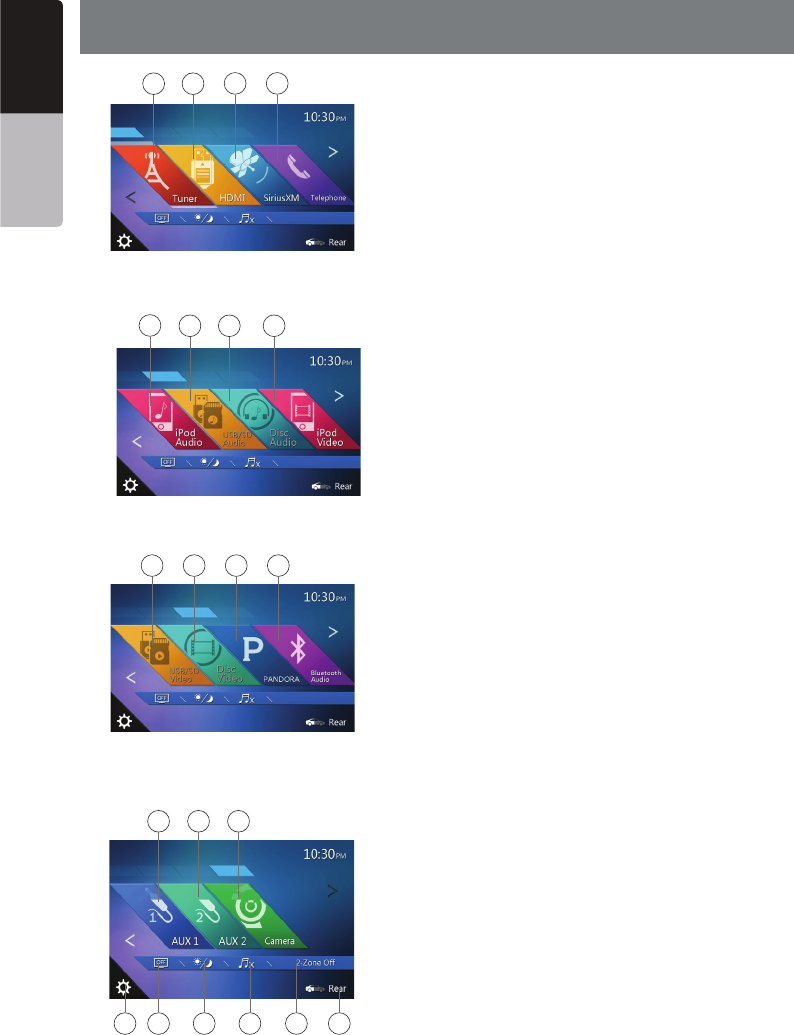
Scrolling the menu
Flicking to right or left it will switch to next or previous
page of main menu.
Moving the menu position
1. Touch any quadrate icon on main menu more than 2
seconds, the icon will float on main menu.
2. Scrolling the floating icon to any position you want.
1 2 3 4
56 7 8
9 10 11 12
13 14 15
16 17 21
18 19 20
17
VX405
English
English Owner’s Manual
7. DVD VIDEO PLAYER OPERATIONS
Playable discs
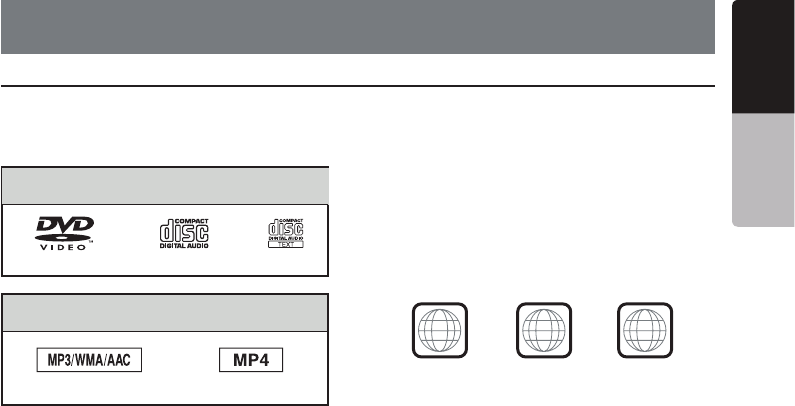
This DVD video player can play the following
discs.
Playable discs
CD TEXTDVD video discs Audio CD
ĹѹºÄ½Å½¼Á¹ŲĽË
MP3/WMA/AAC
About CD Extra disc
A CD Extra disc is a disc in which a total of two
˽ËËÁÇÆËÀ¹Î½º½½Æʽ»Çʼ½¼ƖÀ½ŲÊËÌ˽ËËÁÇÆ
is Audio session and the second session is Data
session.
Your personally-created CDs with more than
second data sessions recorded cannot be played
on this DVD video player.
Note:
t
When you play a CD Extra disc, only the first
session will be recognized.
Discs that cannot be played back
This DVD video player cannot play back DVD-
Audio, DVD-RAM, Photo CDs, etc.
Note:
t
I
t may also not be possible to play back CDs
recorded on a CD-R unit and CD-RW unit.
(Cause: disc characteristics, cracks, dust/dirt,
dust/dirt on player’s lens, etc.)
t
If a CD-R or CD-RW disc that has not been
finalized is played, it will take a long time to
start playing. Also, it may not be possible to
play depending on its recording conditions.
t
You cannot play SuperAudio CD.
The CD player is not supported even if it is a
hybrid disc.
About MP3/WMA/AAC playback
This unit can play back CD-R/CD-RW, DVD-R/
RW and DVD+R/RW discs on which MP3/WMA/
AAC music data have been recorded.
For a detailed information, see the section
entitled “Listening to compressed audio”.
Note on region numbers
The DVD video system assigns a region
number to DVD video players and DVD discs
by sales area. DVD video players sold in U.S.A
and Canada can play back DVD discs with the
region number “ALL”, “1” or any combination of
numbers that also incorporate a “1”.
The DVD video region number is marked on the
disc jacket as shown below.
1
ALL
134
Discs
MP4
18 VX405
English Owner’s Manual
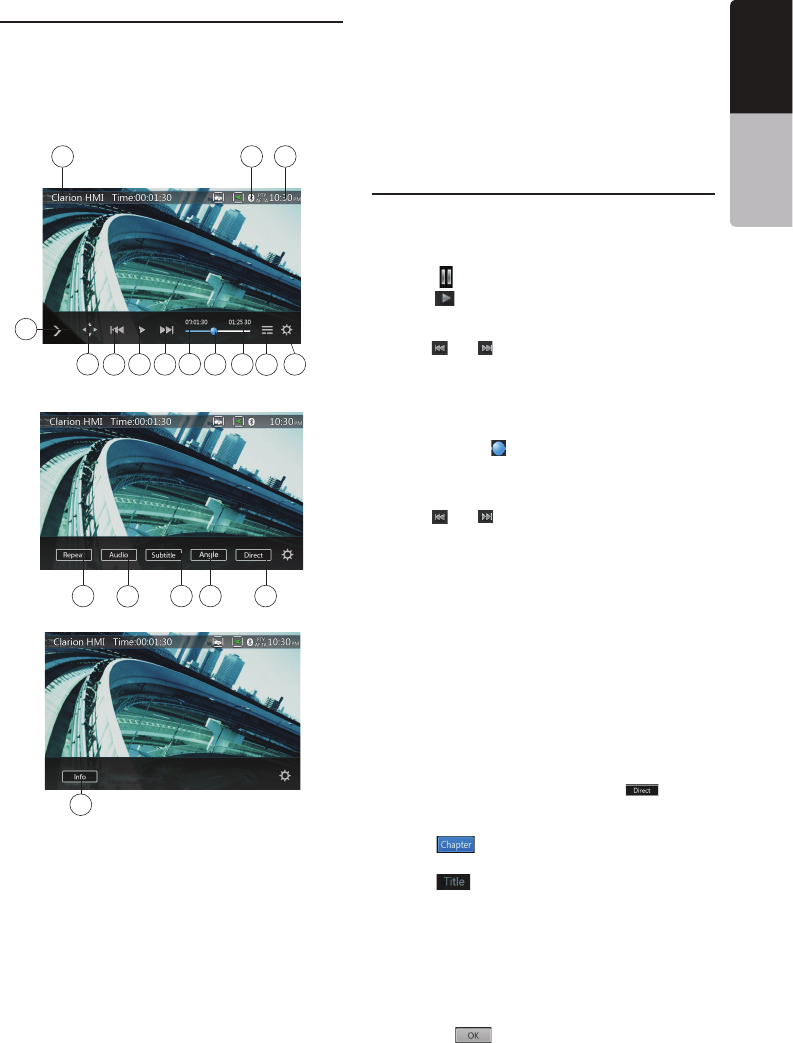
Change DVD System Settings
Note:
If the setup operation is performed in the middle of DVD
video play, the disc will restart from the beginning.
Selecting DVD Setup Menu
[Settings]
[Video]
Setting up the Screen Size
[DVD Wide Screen Mode] button to turn on
Setting up the password for parental level
control
1.In Main Menu[Settings]
[Others][Set
Password] ----
Note:
When a disc with view restrictions is inserted, you will
viewable until the correct password is entered.
Set rating for parental level control
[Parental Control]
Note:
password unlocked status, and the limits can be set only
under the password locked status.
Watching to a Disc
CAUTION
For your safety, the driver should not
insert or eject a disc while driving.
Note:
disc in the mechanism or the unit may require service.
WARNING
Some videos may be recorded at higher
than desired volume levels. Increase the
volume gradually from the minimal setting
after the video has started.
Ejecting a disc
[]
Note:
If you force a disc into before auto reloading, it may
damage a disc.
19
VX405
English
English Owner’s Manual
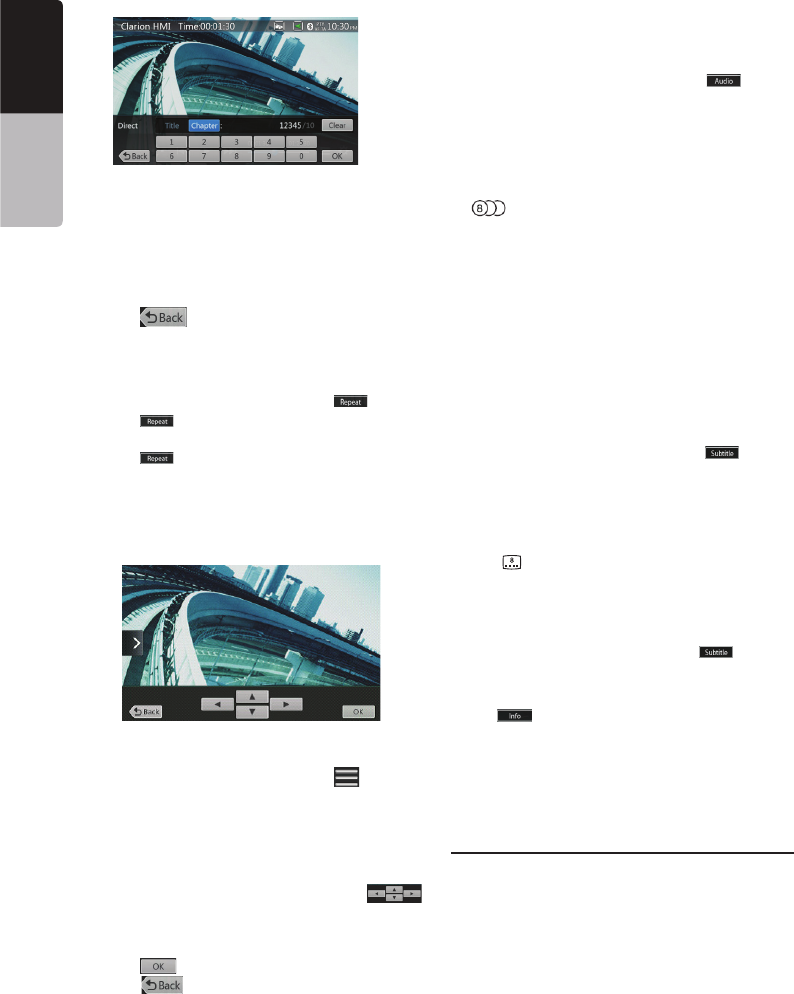
Showing DVD Player Mode Screen
Operate the DVD Player Menu
Play/Pause Playback
[ ]
[]
Skip (Search) a Chapter
[] or [ ]
Skip use seek bar
[]
Fast Forward/Fast Backward
[] or [ ]
Note:
backward operation.
depending on the disc.
Search function
[] button.
[]
[]
[0] to [9]
[] button.
14 15 16
19
18
13
101112
1
235 6 89
47
17
20
VX405
English Owner’s Manual
NOTE:
[]
Repeat Playback
[] button.
[]
[]
Using the Title Menu
[ ] button
[]
[] button.
Switching Audio
[] button
Switching Subtitles
[] button
[] button
Displaying the playback status
[]
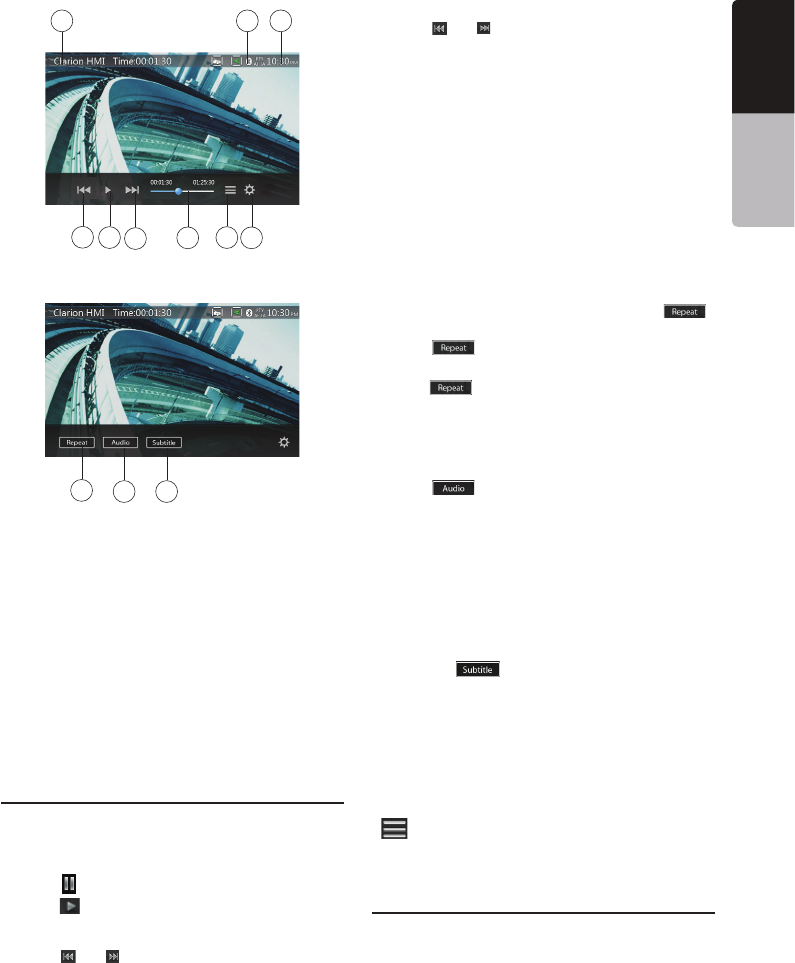
Play video files
Showing Video Files Player Mode
Screen
21
VX405
English
English Owner’s Manual
Operate the Video Files Player Menu
Play/Pause Playback
Switch to Previous/Next File
[] or [ ]
Skip using seek bar
Fast Forward /Fast Backward
[] or [ ]
Note:
backward operation.
depending on the disc.
Repeat Playback
[]
button.
[]
[]
Switching Audio
[]
Switching Subtitles
[]
Video Files List
[]
Playable Video Disc Formats
10 11 12
1
23456
78
9

22 VX405
English Owner’s Manual
23
VX405
English
English Owner’s Manual
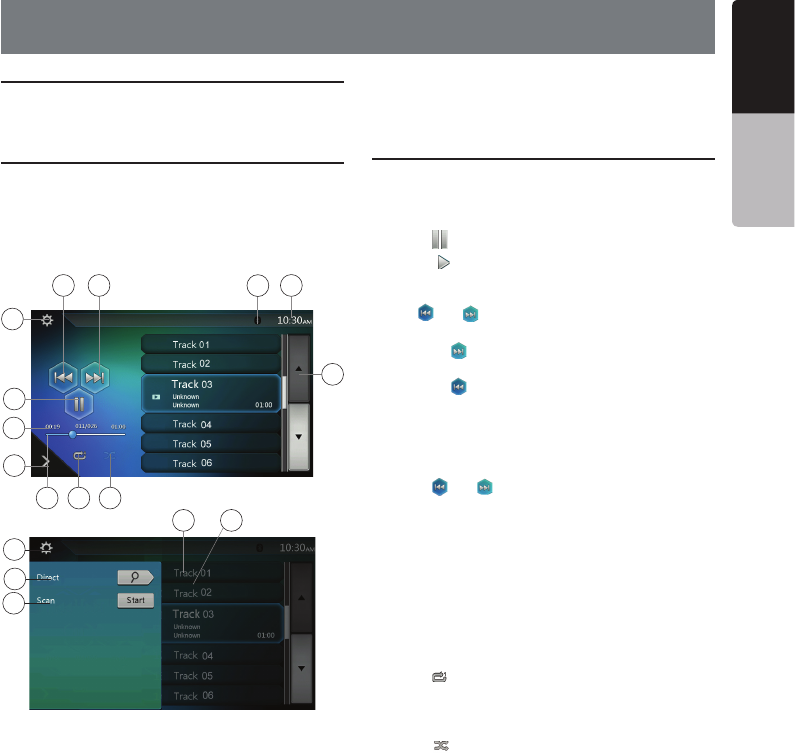
Listening to a Disc/Ejecting a Disc
Showing CD Player Mode Screen
[Disc Audio]
Operate the CD Player Menu
Play/Pause Playback
[]
[]
Switch to Previous/Next file or track
[] or [ ]
[]
[]
Fast Forward /Fast Backward
[] or [ ]
Note:
depending on the disc.
Repeat Playback
[]
Shuffle Playback
Selecting a track on the Track List Screen
8. CD PLAYER OPERATIONS
4
10
2
1
13
14
123
6
15
85
11
7
9
16
17
24
VX405
English Owner’s Manual
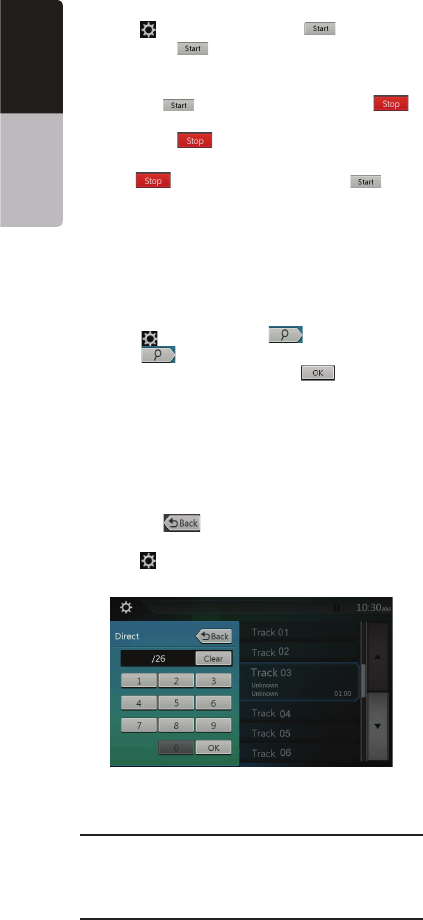
Scanning the Tracks
[][Scan ] button.
[Scan ]
[Scan ][Scan ]
button.
[Scan ] button.
[Scan ][Scan ]
button.
Searching with the Track Number
[][ ] button.
[]
[0] to [9]
[]
[]
.
Listening to Compressed Audio
Tag Display Function
1.1 and 1.0.
Note:
usable.
Displaying MP3/WMA/AAC TAG titles
Precautions when creating MP3 disc
25
VX405
English
English Owner’s Manual
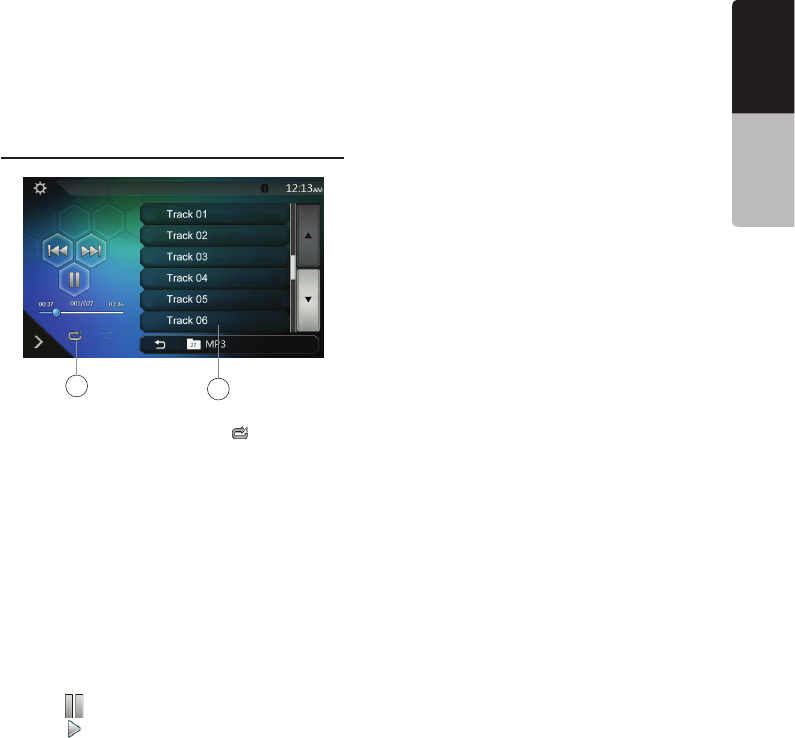
Playback MP3/WMA/AAC menu
*Other operations about playing MP3/WMA/AAC are
almost same as CD Player mode.
[ ]
[ ]
12
26 VX405
English Owner’s Manual
Note:
Notes on Using USB/SD Memories
General notes
Notes on the Tag titles
Select USB/SD Audio Mode
the [USB/SD Audio]
enabled.
[USB/SD Audio]
Note:
on the list.
9. USB/SD AUDIO OPERATIONS
19
20
7
12
13
5648
2
3
9
1011
1
14
15
16
17
18
27
VX405
English
English Owner’s Manual
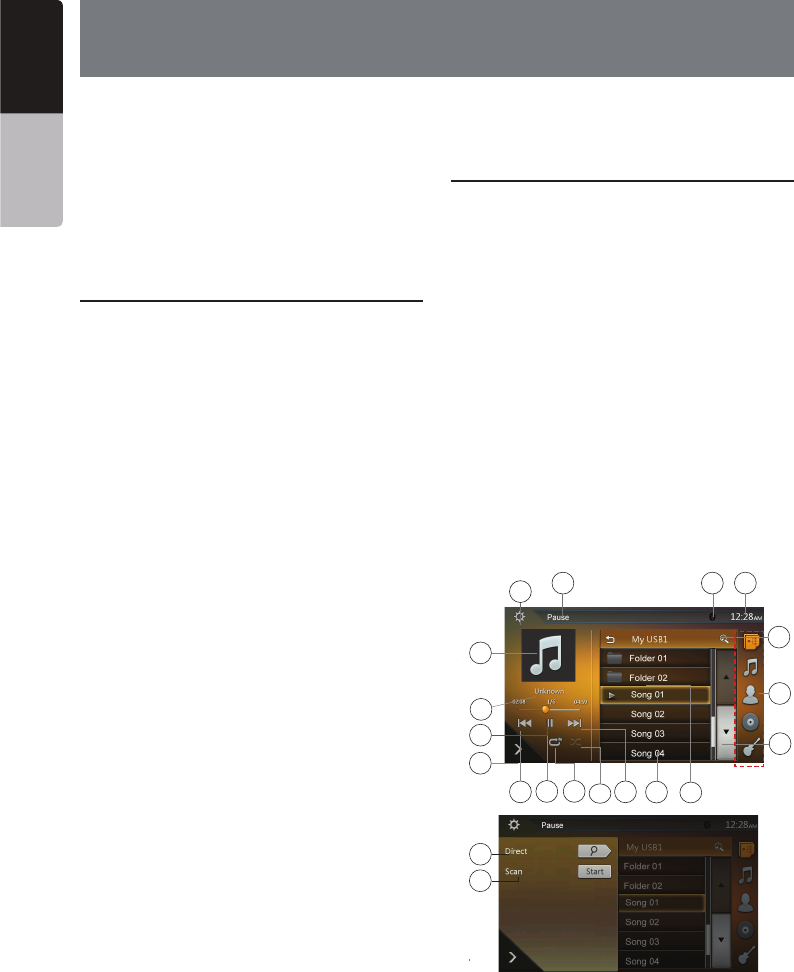
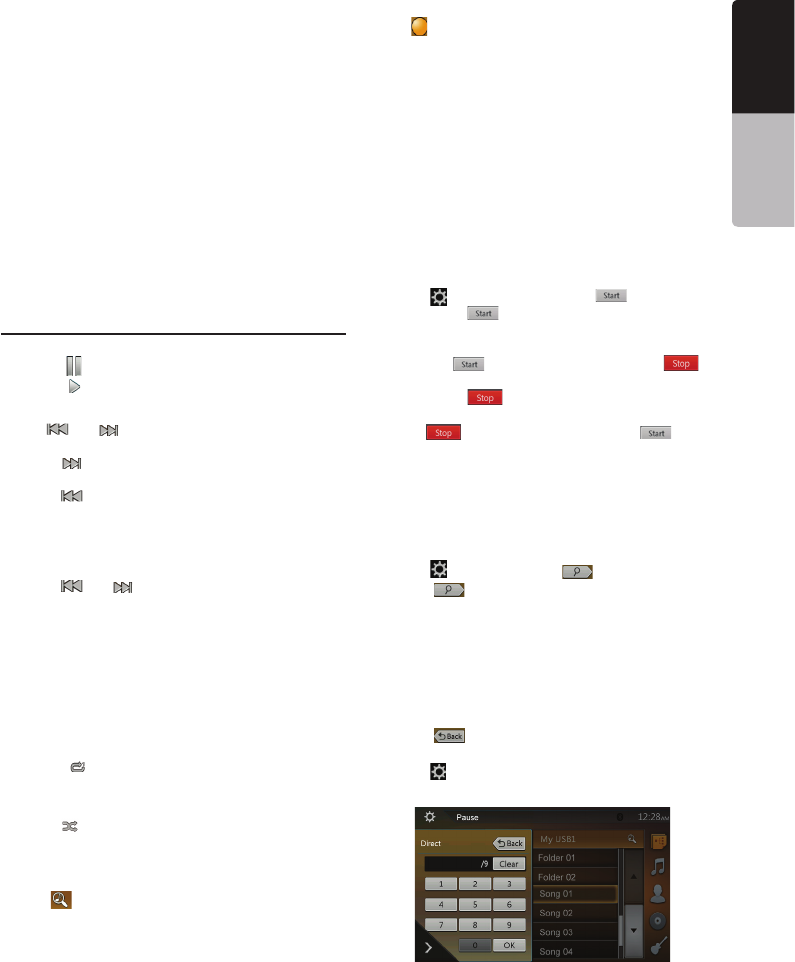
Playing Audio Files in USB/SD Memory
Play/Pause Playback
[ ]
[ ]
Switch to Previous/Next file
[] or [ ]
[]
[]
Fast Forward /Fast Backward
[] or [ ]
Note:
depending on the audio files.
Repeat Playback
[]
Shuffle Playback
[]
Alphabet Search
[ ]
Album Art work
ID3 Information Area
Skip Using Seek Bar
Select a Folder on Display List
Selecting a Track on the Display List
and
Scanning the Tracks
[][Scan ] button.
[Scan ]
[Scan ][Scan ]
button.
[Scan ] button.
[Scan ][Scan ]
button.
Searching with the Track Number
[][ ] button.
[ ]
[0] to [9]
[ ]
[]