SOLEM TBOS2FTUS1 TBOS-II Field Transmitter User Manual Manual

SOLEM TBOS-II Field Transmitter Manual

Manual

TBOS‐II™FieldTransmitterInfraRedandRadioCommunication868MHz(EU,SouthAfrica)915MHz(USA,Canada,Mexico,Australia)ENGLISHDRAFT–FIELDTESTVERSIONJuly2011
STATEMENTRFEXPOSUREThisdevicecomplieswithFCCRFandIndustryCanadaradiationexposurelimitssetforthforgeneralpopulation.Thisdevicemustbeinstalledtoprovideaseparationdistanceofatleast20cmfromallpersonsandmustnotbeco‐locatedoroperatinginconjunctionwithanyotherantennaortransmitter.FCCSTATEMENTTheuser’smanualorinstructionmanualforanintentionalorunintentionalradiatorshallcautiontheuserthatchangesormodificationsnotexpresslyapprovedbythepartyresponsibleforcompliancecouldvoidtheuser'sauthoritytooperatetheequipment.NOTE:ThisequipmenthasbeentestedandfoundtocomplywiththelimitsforaClassBdigitaldevice,pursuanttopart15oftheFCCRules.Theselimitsaredesignedtoprovidereasonableprotectionagainstharmfulinterferenceinaresidentialinstallation.Thisequipmentgeneratesusesandcanradiateradiofrequencyenergyand,ifnotinstalledandusedinaccordancewiththeinstruction,maycauseharmfulinterferencetoradiocommunications.However,thereisnoguaranteethatinterferencewillnotoccurinaparticularinstallation.Ifthisequipmentdoescauseharmfulinterferencetoradioortelevisionreceptionwhichcanbedeterminedbyturningtheequipmentoffandon,theuserisencouragedtotrytocorrectinterferencebyoneormoreofthefollowingmeasures:‐Reorientorrelocatethereceivingantenna.‐ Increasetheseparationbetweentheequipmentandreceiver.‐Connecttheequipmentintoanoutletoncircuitdifferentfromthattowhichthereceiverisconnected.‐Consultthedealeroranexperiencedradio/TVtechnicianforhelp.Labelingrequirements.ThisdevicecomplieswithPart15oftheFCCRules.Operationissubjecttothefollowingtwoconditions:(1)Thisdevicemaynotcauseharmfulinterference,and(2)thisdevicemustacceptanyinterferencereceived,includinginterferencethatmaycauseundesiredoperation.ICSTATEMENTRSSGen/TransmitterAntenna.UnderIndustryCanadaregulations,thisradiotransmittermayonlyoperateusinganantennaofatypeandmaximum(orlesser)gainapprovedforthetransmitterbyIndustryCanada.Toreducepotentialradiointerferencetootherusers,theantennatypeanditsgainshouldbesochosenthattheequivalentisotropicallyradiatedpower(e.i.r.p.)isnotmorethanthatnecessaryforsuccessfulcommunication.Conformémentàlaréglementationd'IndustrieCanada,leprésentémetteurradiopeutfonctionneravecuneantenned'untypeetd'ungainmaximal(ouinférieur)approuvépourl'émetteurparIndustrieCanada.Danslebutderéduirelesrisquesdebrouillageradioélectriqueàl'intentiondesautresutilisateurs,ilfautchoisirletyped'antenneetsongaindesortequelapuissanceisotroperayonnéeéquivalente(p.i.r.e.)nedépassepasl'intensiténécessaireàl'établissementd'unecommunicationsatisfaisante.RSSGen/UserManualNoticeforLicence‐ExemptRadioApparatus.ThisdevicecomplieswithIndustryCanadalicense‐exemptRSSstandard(s).Operationissubjecttothefollowingtwoconditions:(1)thisdevicemaynotcauseinterference,and(2)thisdevicemustacceptanyinterference,includinginterferencethatmaycauseundesiredoperationofthedevice.LeprésentappareilestconformeauxCNRd'IndustrieCanadaapplicablesauxappareilsradioexemptsdelicence.L'exploitationestautoriséeauxdeuxconditionssuivantes:(1)l'appareilnedoitpasproduiredebrouillage,et(2)l'utilisateurdel'appareildoitacceptertoutbrouillageradioélectriquesubi,mêmesilebrouillageestsusceptibled'encompromettrelefonctionnement.RADIOConformémentàlaréglementationd'IndustrieCanada,leprésentémetteurradiopeutfonctionneravecuneantenned'untypeetd'ungainmaximal(ouinférieur)approuvépourl'émetteurparIndustrieCanada.Danslebutderéduirelesrisquesdebrouillageradioélectriqueàl'intentiondesautresutilisateurs,ilfautchoisirletyped'antenneetsongaindesortequelapuissanceisotroperayonnéeéquivalente(p.i.r.e.)nedépassepasl'intensiténécessaireàl'établissementd'unecommunicationsatisfaisante.NORMESCEM(radio)CE‐ETSI EN 300220-(V2.3.1-2010/02) and ETSI EN 300220-1 (V2.3.1-2010/02)-EN50371(2002)‐ETSIEN301489‐1(V1.8.1‐2008/4)etETSIEN301489‐3(V1.4.1‐2002108)CANADA‐RSS‐210Issue7‐Jun2007‐RSS‐GenIssue2‐Jun2007FCC‐FCCPart15,SubpartC15.247‐ANSIC63.4(2009)DÉCLARATIONDECONFORMITÉFR‐ Etanchéité IP44EN‐ IP44 sealingES‐Estanquiedad IP68ConformémentàlaDirectiveEuropéenne2002/96/CEetàlanormeEN50419:2005,cetéquipementnedoitpasêtrejetéaveclesorduresménagères.Ildoitfairel’objetd’unecollectesélectiveappropriéeafindepermettresavalorisation.Parcegeste,vouscontribuerezaurespectdel’environnementetàlaprotectiondesressourcesnaturelles.
3SummaryA.SystemTBOS‐IITMIntroduction........................................................................................................51.TheTBOS‐IITMSystem..................................................................................................................52.SystemDescription......................................................................................................................63.NewfeaturesofTBOS‐IITMSystem..............................................................................................64.TBOS‐IITMFieldTransmitterIntroduction....................................................................................7B.FieldTransmitterStart‐up/Configuration......................................................................................91.FirstUse.......................................................................................................................................92.FieldTransmitterConfigurationdelaconsole(SettingsMenu).................................................9SettingTime/Date...........................................................................................................................9Adjustingthecontrast...................................................................................................................10Customizethefieldtransmittername(16lettersanddigits).......................................................10FieldTransmitterlanguageselection............................................................................................11Settingthescreenlightingtime....................................................................................................11Restoreinitialsettings...................................................................................................................11Displayingfieldtransmitterdata...................................................................................................11C.UsingtheFieldTransmitterviaInfraRedConnection(IR)............................................................121.ProgrammingTBOS‐IITMFieldTransmitter.................................................................................12CreatingIrrigationSchedules–WateringDays.............................................................................12Starttimes.....................................................................................................................................13WateringrunTime........................................................................................................................14Transmittingtime,dateandprogram...........................................................................................141.WaterBudgetProgramming.....................................................................................................14Seasonaladjustmentperprogram................................................................................................14Seasonaladjustmentpermonth...................................................................................................152.Cancelirrigationprograms........................................................................................................153.ReadingIrrigationPrograms......................................................................................................165.TransmittinganirrigationprogramtoTBOS™/TBOS‐II™ControlModule...............................16D.Manualactions..............................................................................................................................161.CancelIrrigation........................................................................................................................166.ManualStationlaunch..............................................................................................................177.ManualProgramLaunch...........................................................................................................178.IrrigationTestonallstations.....................................................................................................179.ON/OFF&RainDelay................................................................................................................1810.GeneralProgramSavinginTBOS‐II™FieldTransmitter........................................................1811.SavingprogramintotheTBOS‐II™ControlModule..............................................................1812.CustomizationofControlModule(s)andStation(s)names..................................................19E.UsingTBOS‐II™FieldTransmitterviaRADIOConnection.............................................................201.RadioMarkingofTBOS‐II™Products........................................................................................202.SpecialradiomarkingofoldTBOS™RadioAdaptors................................................................213.ChangingtheNetworkNumberofRadiodevices.....................................................................214.AutomaticRadiofindingofTBOSControlModules..................................................................225.ReceivingaprogramfromtheControlModuleviaradio.........................................................236.Transmittingaprogramvialaradio..........................................................................................24F.Sensor............................................................................................................................................241.OverallDescription....................................................................................................................24
42.StateswitchofaRainSensor....................................................................................................253.Stateswitchofaflowsensor.....................................................................................................25Leakage..........................................................................................................................................25ExcessiveConsomption(SEEF)......................................................................................................26FloWatch.......................................................................................................................................26G.TBOSRadioNetworkBuilding.......................................................................................................261.RadiorangeincreasebetweenFieldTransmitterandRadioAdaptorTBOS‐II™..........................26OptimumRadiorangebetweenTransmitterandRadioAdaptor.................................................26TBOSRadioRelays.........................................................................................................................272.TBOSCentralizationonIQV2Softawre....................................................................................27IQ‐TBOSMasterRadioModule.....................................................................................................27IQSoftware....................................................................................................................................283.TBOS‐II™FieldTransmitter‐RadioRelayCommunication.........................................................28TBOS‐IIFieldTransmittertocommunicatewithradiorelay.........................................................28Relayradiomarking.......................................................................................................................29NetworknumberModificationofRadioDevices..........................................................................294.AutomaticRadiofindingforTBOSRadioRelays.......................................................................30AutomaticRadiorelayfindingwiththeFieldTransmitter............................................................30AutomaticTBOSfindingfromRadiorelay.....................................................................................315.Automaticfindingofsecondaryrelays......................................................................................326.CommunicationwithTBOS/TBOS‐IIcontrollersviaaradiorelay.............................................32ManualCommands.......................................................................................................................33H.DetailsofTBOS‐II™FieldTransmitterUserinterfaceMenus.......................................................34
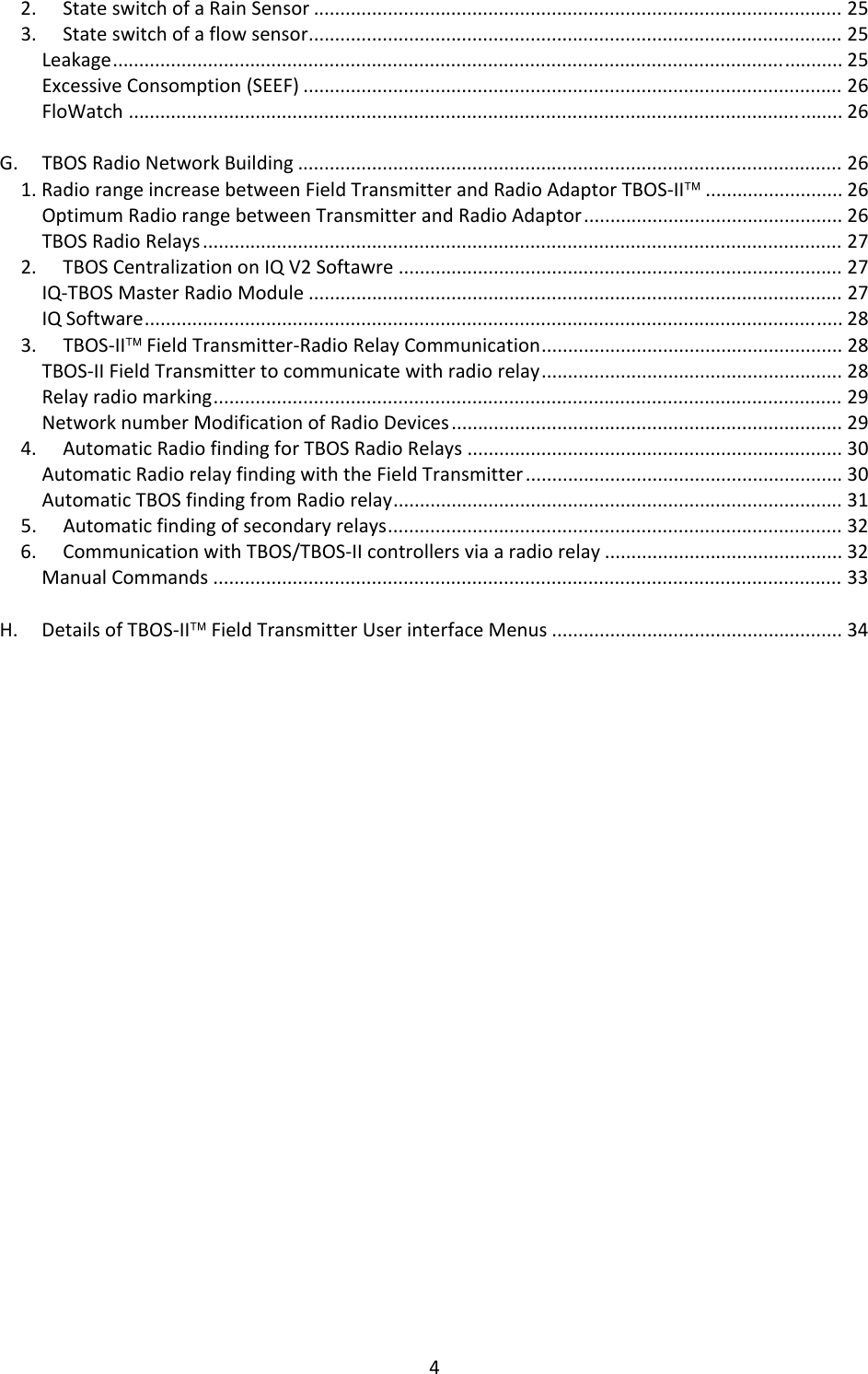
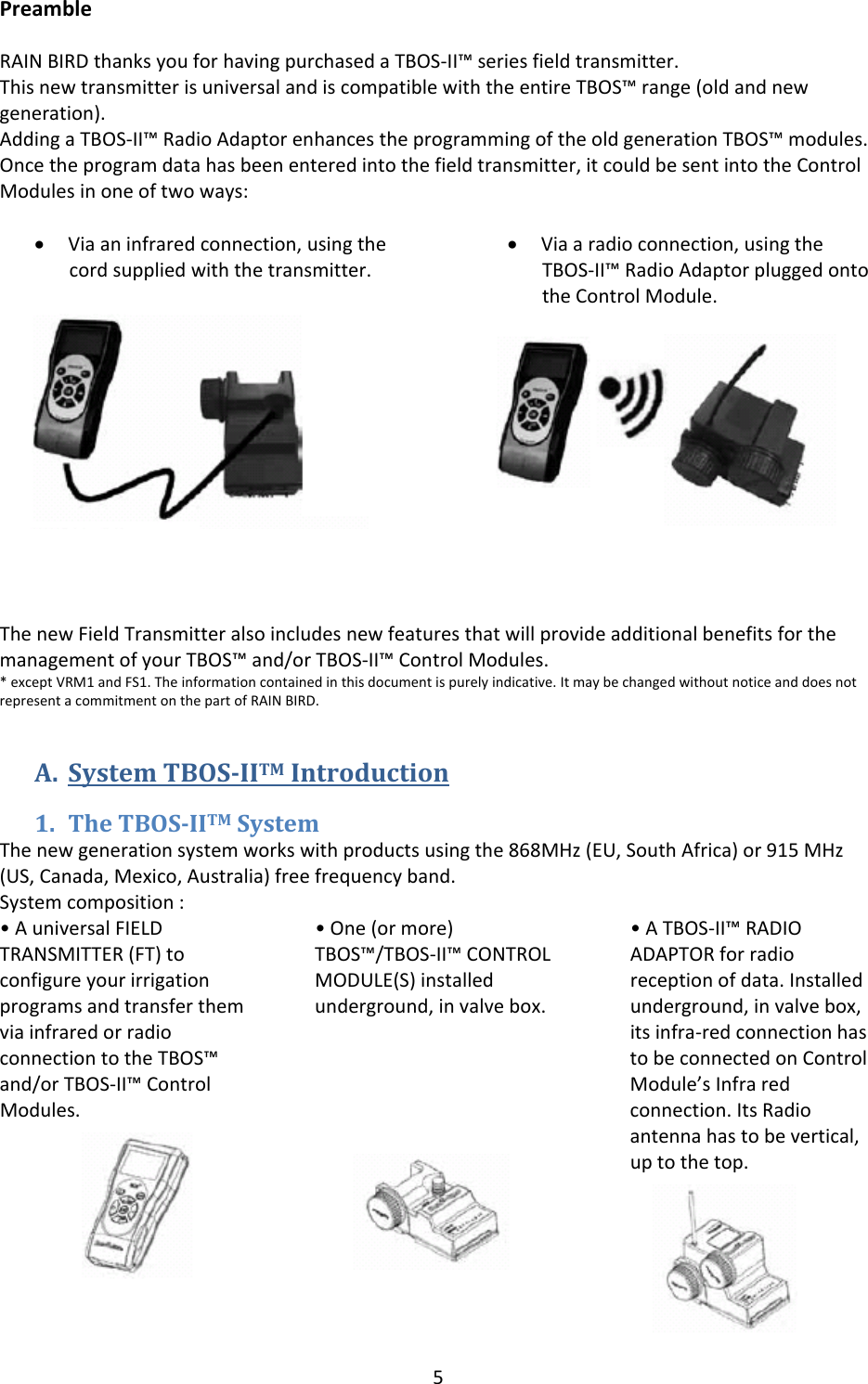
5PreambleRAINBIRDthanksyouforhavingpurchasedaTBOS‐II™seriesfieldtransmitter.ThisnewtransmitterisuniversalandiscompatiblewiththeentireTBOS™range(oldandnewgeneration).AddingaTBOS‐II™RadioAdaptorenhancestheprogrammingoftheoldgenerationTBOS™modules.Oncetheprogramdatahasbeenenteredintothefieldtransmitter,itcouldbesentintotheControlModulesinoneoftwoways:• Viaaninfraredconnection,usingthecordsuppliedwiththetransmitter.• Viaaradioconnection,usingtheTBOS‐II™RadioAdaptorpluggedontotheControlModule.ThenewFieldTransmitteralsoincludesnewfeaturesthatwillprovideadditionalbenefitsforthemanagementofyourTBOS™and/orTBOS‐II™ControlModules.*exceptVRM1andFS1.Theinformationcontainedinthisdocumentispurelyindicative.ItmaybechangedwithoutnoticeanddoesnotrepresentacommitmentonthepartofRAINBIRD.A. SystemTBOSIITMIntroduction1. TheTBOSIITMSystemThenewgenerationsystemworkswithproductsusingthe868MHz(EU,SouthAfrica)or915MHz(US,Canada,Mexico,Australia)freefrequencyband.Systemcomposition:•AuniversalFIELDTRANSMITTER(FT)toconfigureyourirrigationprogramsandtransferthemviainfraredorradioconnectiontotheTBOS™and/orTBOS‐II™ControlModules.•One(ormore)TBOS™/TBOS‐II™CONTROLMODULE(S)installedunderground,invalvebox.•ATBOS‐II™RADIOADAPTORforradioreceptionofdata.Installedunderground,invalvebox,itsinfra‐redconnectionhastobeconnectedonControlModule’sInfraredconnection.ItsRadioantennahastobevertical,uptothetop.
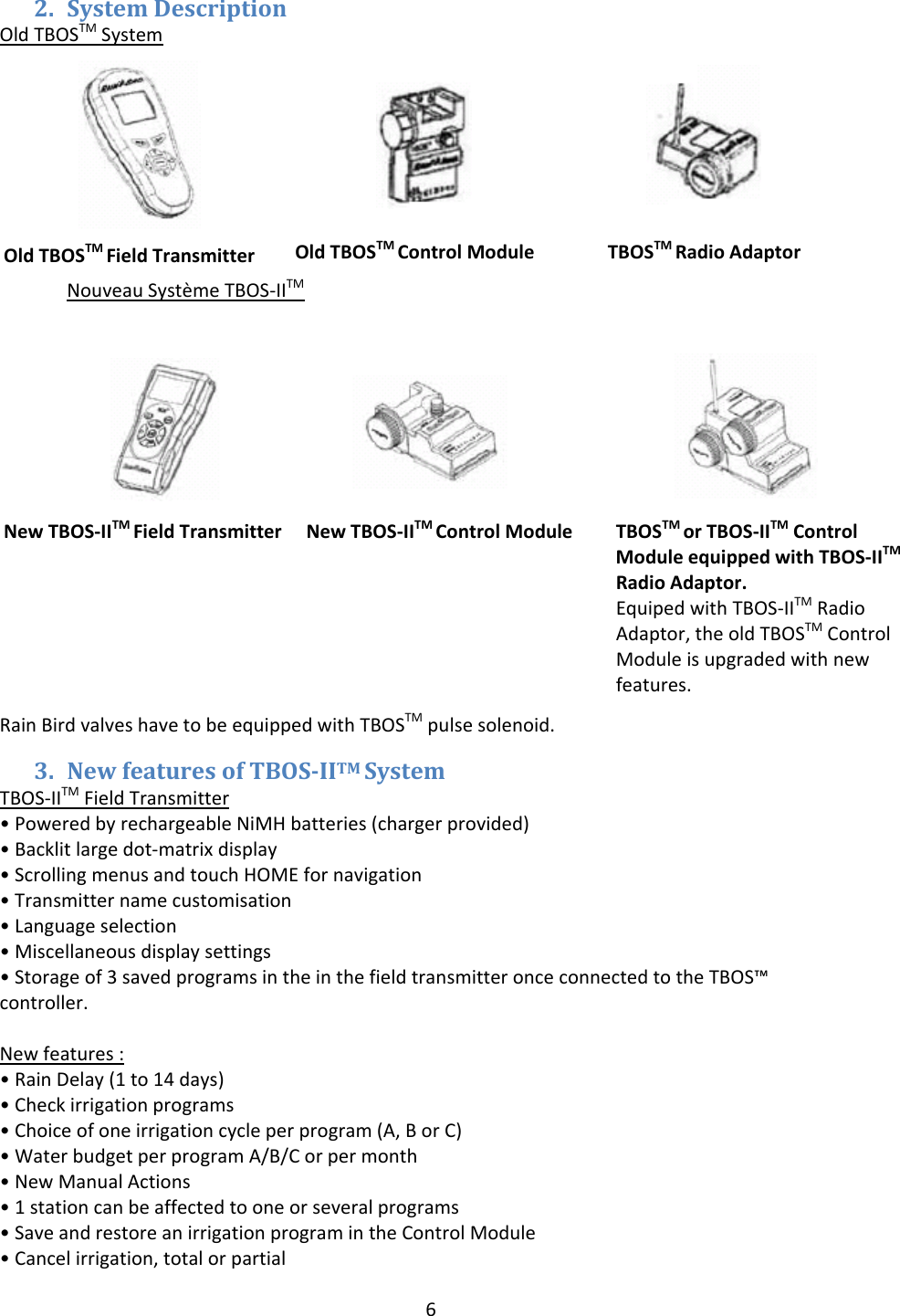
6OldTBOSTMFieldTransmitterOTBOSTMRadioAdaptorOldTBOSTM ControlModule2. SystemDescriptionOldTBOSTMSystemNouveauSystèmeTBOS‐IITMRainBirdvalveshavetobeequippedwithTBOSTMpulsesolenoid.3. NewfeaturesofTBOSIITMSystemTBOS‐IITMFieldTransmitter•PoweredbyrechargeableNiMHbatteries(chargerprovided)•Backlitlargedot‐matrixdisplay•ScrollingmenusandtouchHOMEfornavigation•Transmitternamecustomisation•Languageselection•Miscellaneousdisplaysettings•Storageof3savedprogramsintheinthefieldtransmitteronceconnectedtotheTBOS™controller.Newfeatures:•RainDelay(1to14days)•Checkirrigationprograms•Choiceofoneirrigationcycleperprogram(A,BorC)•WaterbudgetperprogramA/B/Corpermonth•NewManualActions•1stationcanbeaffectedtooneorseveralprograms•SaveandrestoreanirrigationprogramintheControlModule•Cancelirrigation,totalorpartialNewTBOS‐IITM ControlModuleNewTBOS‐IITMFieldTransmitterTBOSTMorTBOS‐IITMControlModuleequippedwithTBOS‐IITMRadioAdaptor.EquipedwithTBOS‐IITMRadioAdaptor,theoldTBOSTMControlModuleisupgradedwithnewfeatures.
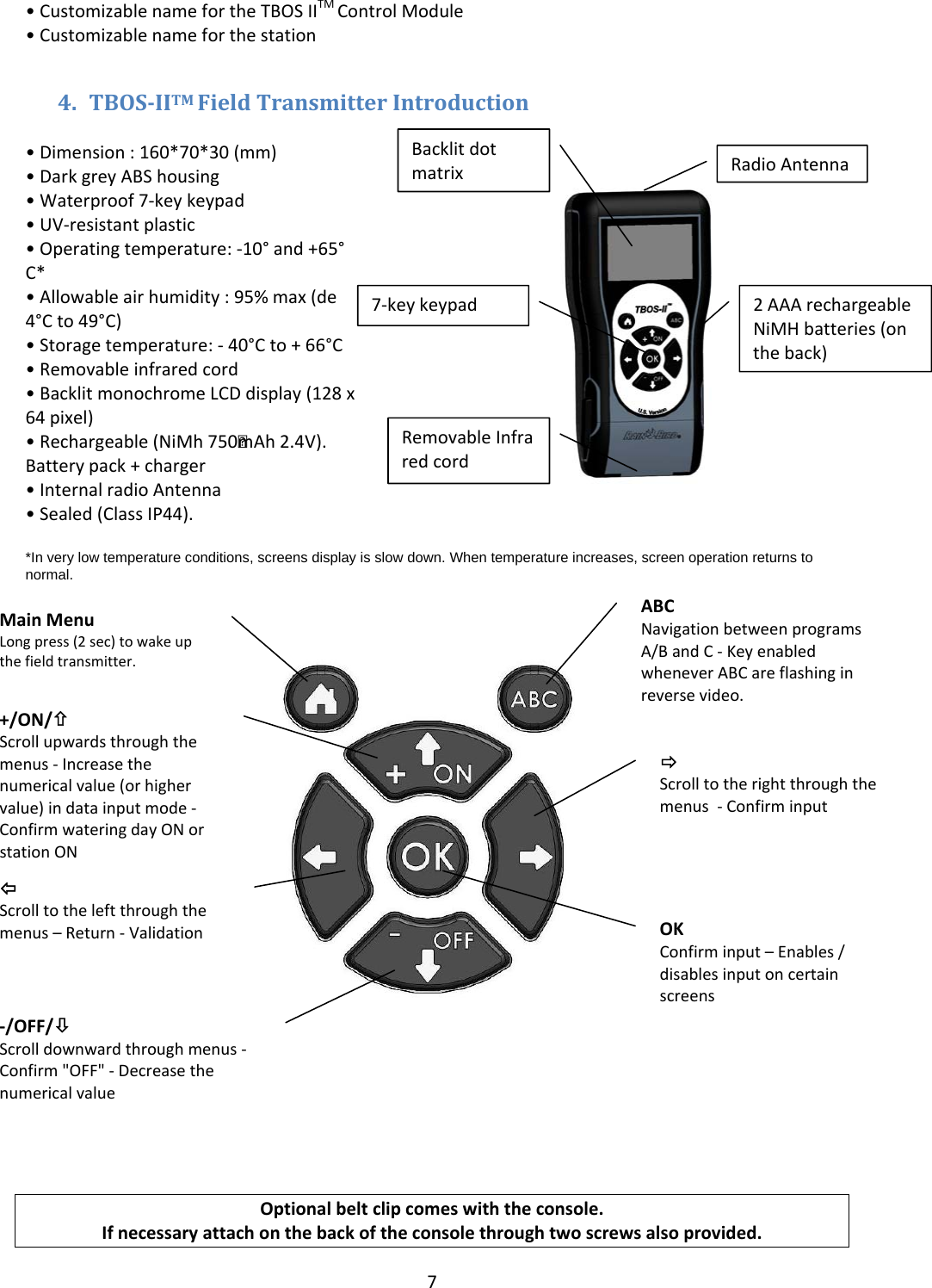
7•CustomizablenamefortheTBOSIITMControlModule•Customizablenameforthestation4. TBOSIITMFieldTransmitterIntroduction•Dimension:160*70*30(mm)•DarkgreyABShousing•Waterproof7‐keykeypad•UV‐resistantplastic•Operatingtemperature:‐10°and+65°C*•Allowableairhumidity:95%max(de4°Cto49°C)•Storagetemperature:‐40°Cto+66°C•Removableinfraredcord•BacklitmonochromeLCDdisplay(128x64pixel)•Rechargeable(NiMh750 mAh2.4V).Batterypack+charger•InternalradioAntenna•Sealed(ClassIP44).*In very low temperature conditions, screens display is slow down. When temperature increases, screen operation returns to normal.   Optionalbeltclipcomeswiththeconsole.Ifnecessaryattachonthebackoftheconsolethroughtwoscrewsalsoprovided.RadioAntennaBacklitdotmatrix7‐keykeypadRemovableInfraredcord2AAArechargeableNiMHbatteries(ontheback)ABCNavigationbetweenprogramsA/BandC‐KeyenabledwheneverABCareflashinginreversevideo.ÖScrolltotherightthroughthemenus‐ConfirminputMainMenuLongpress(2sec)towakeupthefieldtransmitter.+/ON/×Scrollupwardsthroughthemenus‐Increasethenumericalvalue(orhighervalue)indatainputmode‐ConfirmwateringdayONorstationON‐/OFF/ØScrolldownwardthroughmenus‐Confirm"OFF"‐DecreasethenumericalvalueÕScrolltotheleftthroughthemenus–Return‐ValidationOKConfirminput–Enables/disablesinputoncertainscreens
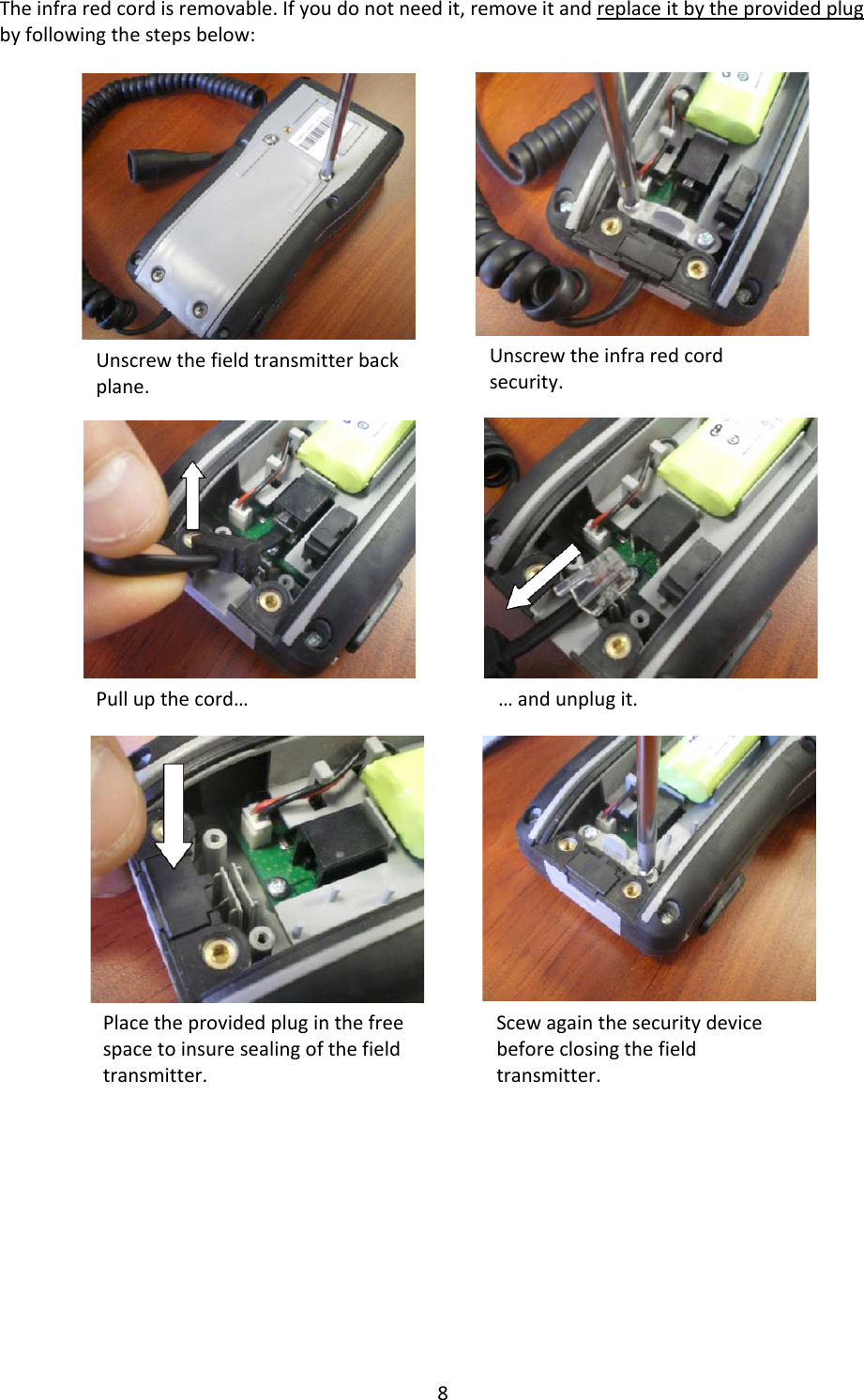
8Theinfraredcordisremovable.Ifyoudonotneedit,removeitandreplaceitbytheprovidedplugbyfollowingthestepsbelow:Unscrewthefieldtransmitterbackplane.Unscrewtheinfraredcordsecurity.Pullupthecord……andunplugit.Placetheprovidedpluginthefreespacetoinsuresealingofthefieldtransmitter.Scewagainthesecuritydevicebeforeclosingthefieldtransmitter.
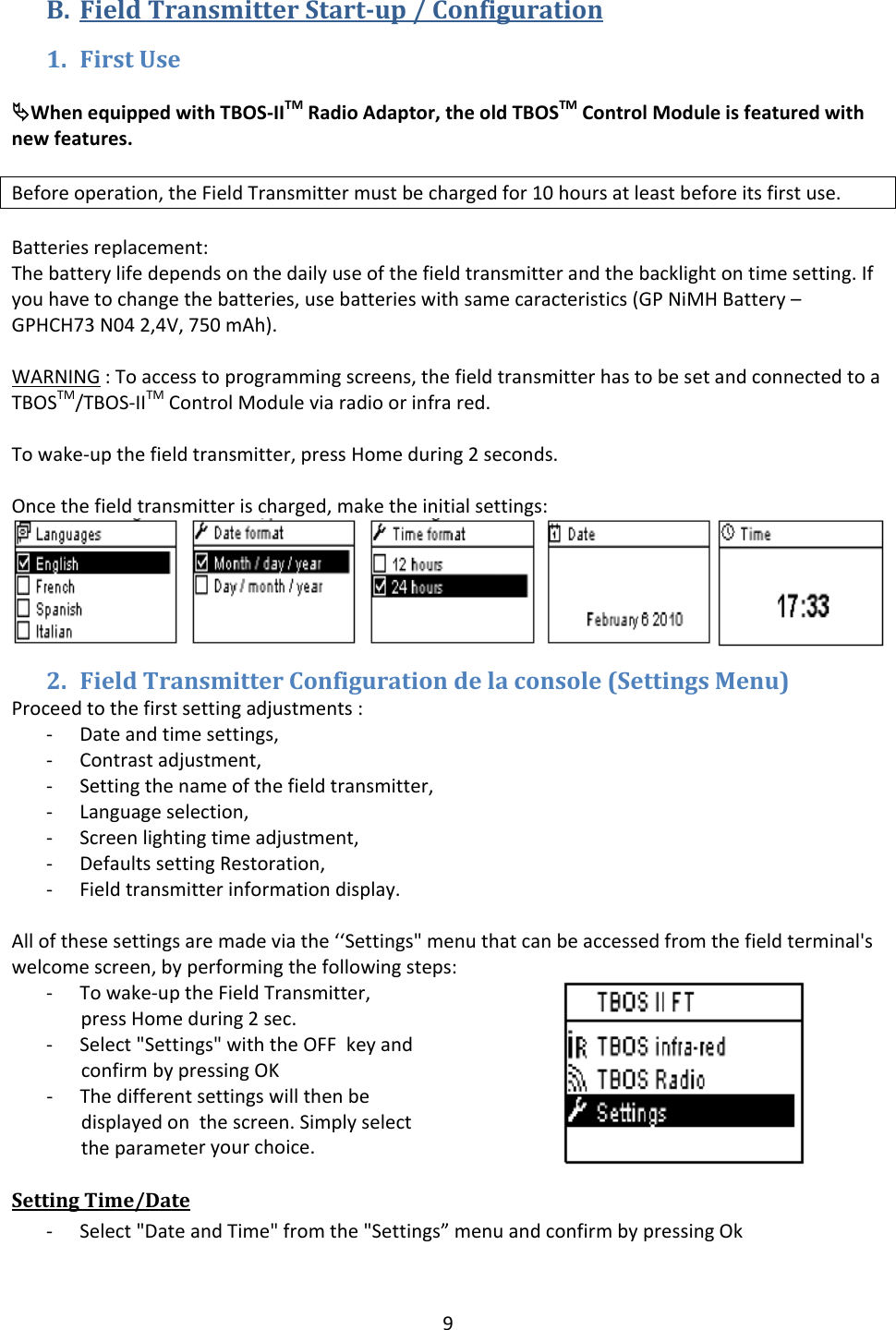
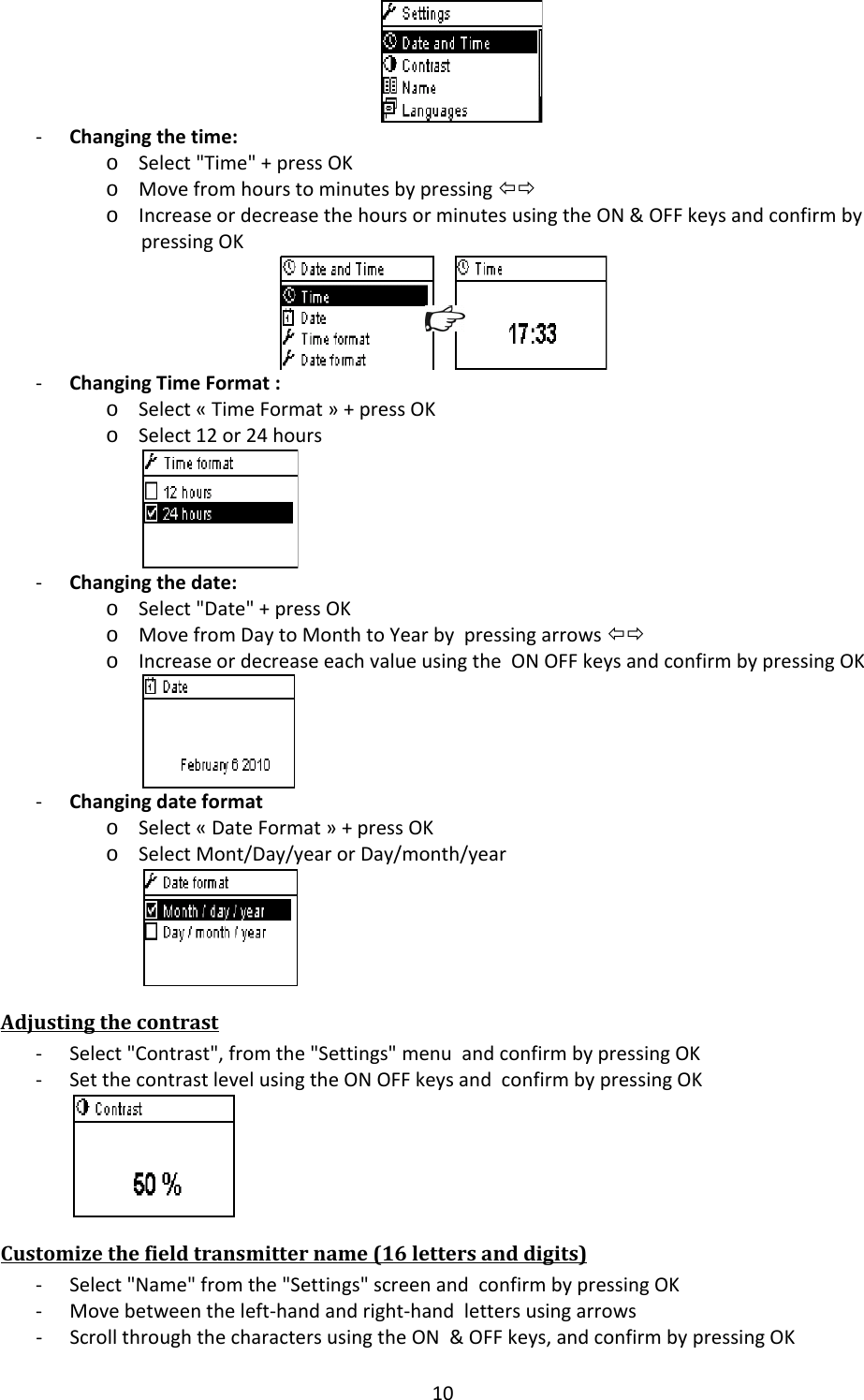
9B. FieldTransmitterStartup/Configuration1. FirstUseªWhenequippedwithTBOS‐IITMRadioAdaptor,theoldTBOSTMControlModuleisfeaturedwithnewfeatures.Beforeoperation,theFieldTransmittermustbechargedfor10hoursatleastbeforeitsfirstuse.Batteriesreplacement:Thebatterylifedependsonthedailyuseofthefieldtransmitterandthebacklightontimesetting.Ifyouhavetochangethebatteries,usebatterieswithsamecaracteristics(GPNiMHBattery–GPHCH73N042,4V,750mAh).WARNING:Toaccesstoprogrammingscreens,thefieldtransmitterhastobesetandconnectedtoaTBOSTM/TBOS‐IITMControlModuleviaradioorinfrared.Towake‐upthefieldtransmitter,pressHomeduring2seconds.Oncethefieldtransmitterischarged,maketheinitialsettings:2. FieldTransmitterConfigurationdelaconsole(SettingsMenu)Proceedtothefirstsettingadjustments:‐ Dateandtimesettings,‐ Contrastadjustment,‐ Settingthenameofthefieldtransmitter,‐ Languageselection,‐ Screenlightingtimeadjustment,‐ DefaultssettingRestoration,‐ Fieldtransmitterinformationdisplay.Allofthesesettingsaremadeviathe‘‘Settings"menuthatcanbeaccessedfromthefieldterminal'swelcomescreen,byperformingthefollowingsteps:‐ Towake‐uptheFieldTransmitter,pressHomeduring2sec.‐ Select"Settings"withtheOFFkeyandconfirmbypressingOK‐ Thedifferentsettingswillthenbedisplayedonthescreen.Simplyselecttheparameteryourchoice.SettingTime/Date‐ Select"DateandTime"fromthe"Settings”menuandconfirmbypressingOk
10‐ Changingthetime:o Select"Time"+pressOKo MovefromhourstominutesbypressingÕÖo IncreaseordecreasethehoursorminutesusingtheON&OFFkeysandconfirmbypressingOK‐ ChangingTimeFormat:o Select«TimeFormat»+pressOKo Select12or24hours‐ Changingthedate:o Select"Date"+pressOKo MovefromDaytoMonthtoYearbypressingarrowsÕÖo IncreaseordecreaseeachvalueusingtheONOFFkeysandconfirmbypressingOK‐ Changingdateformato Select«DateFormat»+pressOKo SelectMont/Day/yearorDay/month/yearAdjustingthecontrast‐ Select"Contrast",fromthe"Settings"menuandconfirmbypressingOK‐ SetthecontrastlevelusingtheONOFFkeysandconfirmbypressingOKCustomizethefieldtransmittername(16lettersanddigits)‐ Select"Name"fromthe"Settings"screenandconfirmbypressingOK‐ Movebetweentheleft‐handandright‐handlettersusingarrows‐ ScrollthroughthecharactersusingtheON&OFFkeys,andconfirmbypressingOK
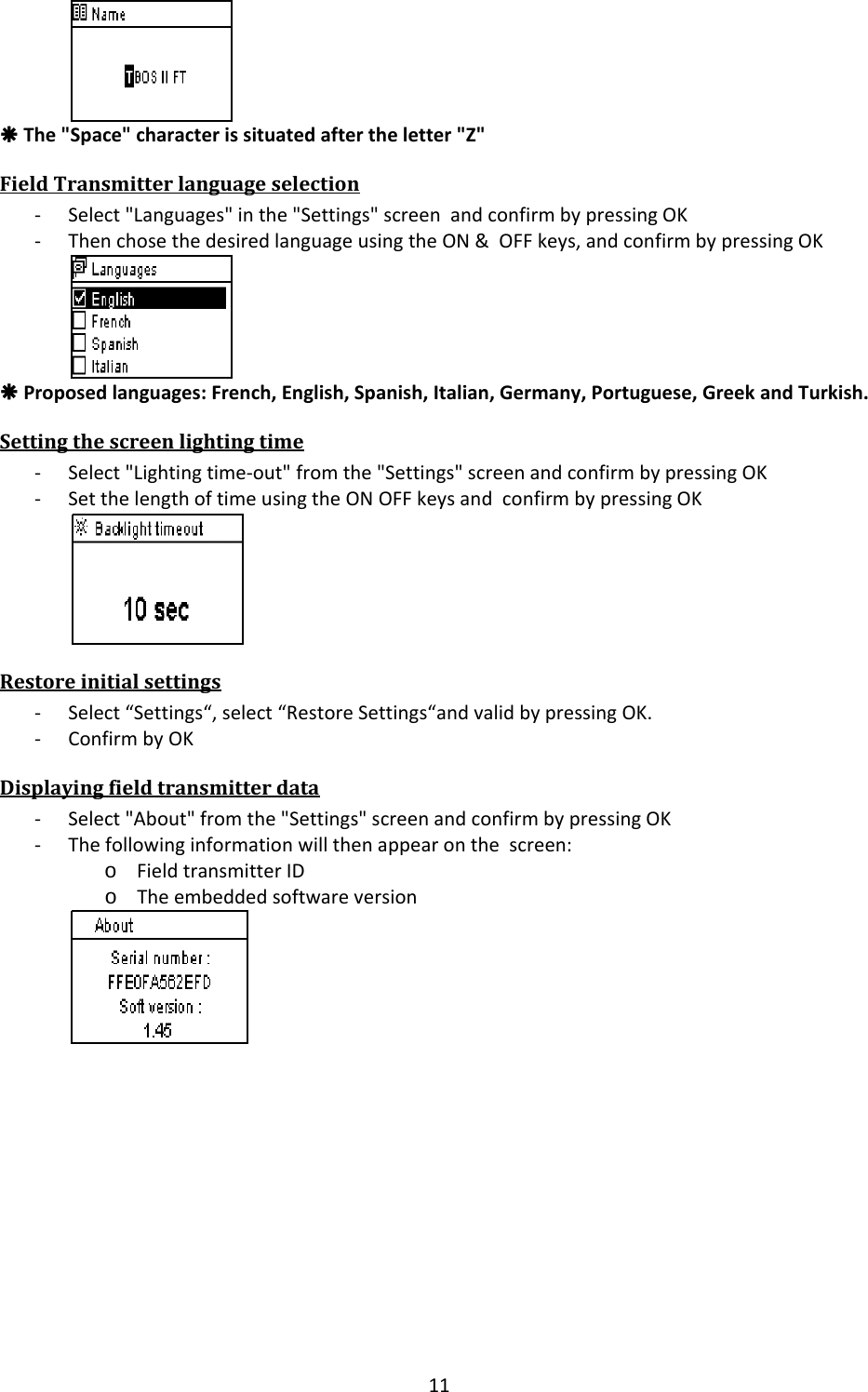
11ÅThe"Space"characterissituatedaftertheletter"Z"FieldTransmitterlanguageselection‐ Select"Languages"inthe"Settings"screenandconfirmbypressingOK‐ ThenchosethedesiredlanguageusingtheON&OFFkeys,andconfirmbypressingOKÅProposedlanguages:French,English,Spanish,Italian,Germany,Portuguese,GreekandTurkish.Settingthescreenlightingtime‐ Select"Lightingtime‐out"fromthe"Settings"screenandconfirmbypressingOK‐ SetthelengthoftimeusingtheONOFFkeysandconfirmbypressingOKRestoreinitialsettings‐ Select“Settings“,select“RestoreSettings“andvalidbypressingOK.‐ ConfirmbyOKDisplayingfieldtransmitterdata‐ Select"About"fromthe"Settings"screenandconfirmbypressingOK‐ Thefollowinginformationwillthenappearonthescreen:o FieldtransmitterIDo Theembeddedsoftwareversion
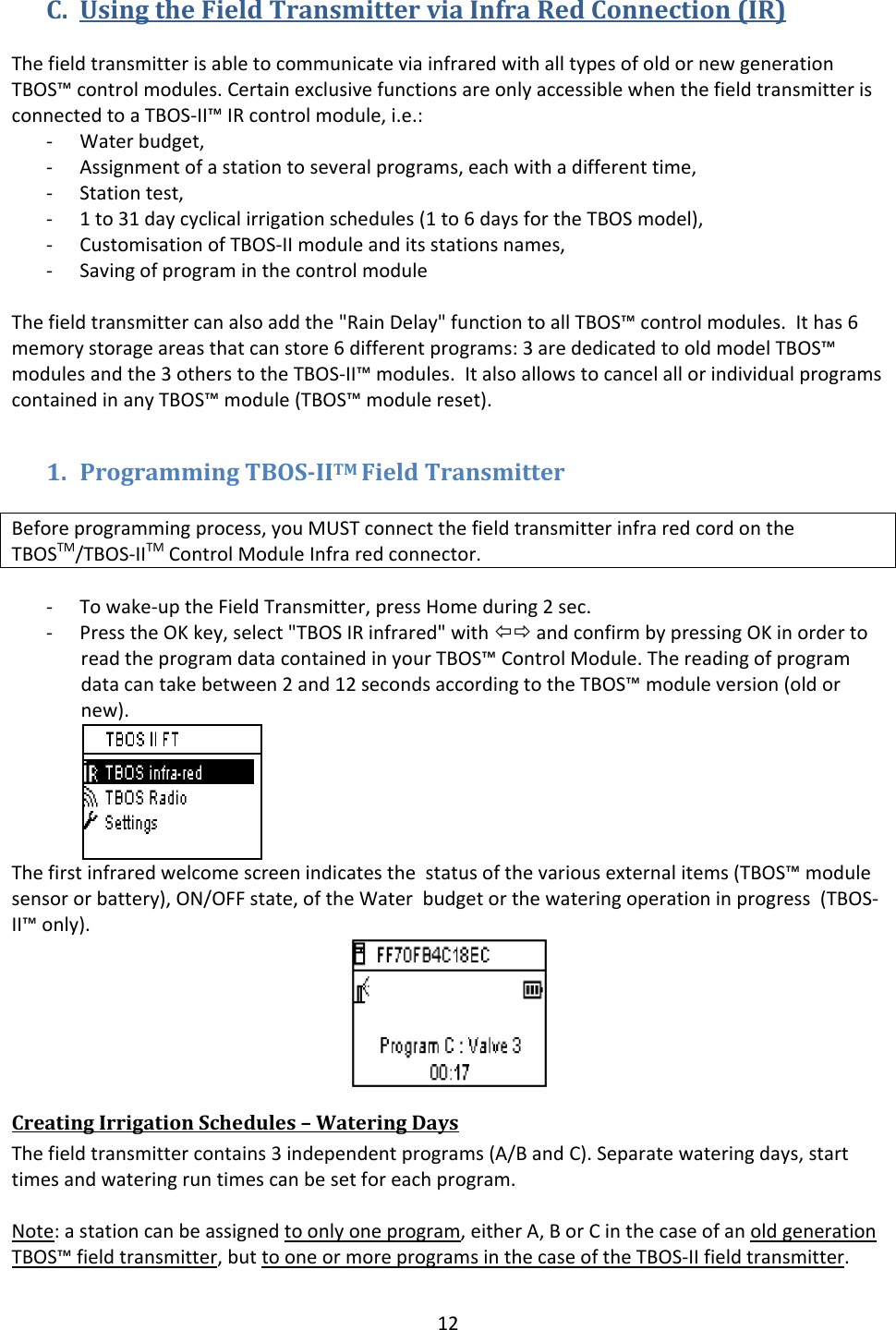
12C. UsingtheFieldTransmitterviaInfraRedConnection(IR)ThefieldtransmitterisabletocommunicateviainfraredwithalltypesofoldornewgenerationTBOS™controlmodules.CertainexclusivefunctionsareonlyaccessiblewhenthefieldtransmitterisconnectedtoaTBOS‐II™IRcontrolmodule,i.e.:‐ Waterbudget,‐ Assignmentofastationtoseveralprograms,eachwithadifferenttime,‐ Stationtest,‐ 1to31daycyclicalirrigationschedules(1to6daysfortheTBOSmodel),‐ CustomisationofTBOS‐IImoduleanditsstationsnames,‐ SavingofprograminthecontrolmoduleThefieldtransmittercanalsoaddthe"RainDelay"functiontoallTBOS™controlmodules.Ithas6memorystorageareasthatcanstore6differentprograms:3arededicatedtooldmodelTBOS™modulesandthe3otherstotheTBOS‐II™modules.ItalsoallowstocancelallorindividualprogramscontainedinanyTBOS™module(TBOS™modulereset).1. ProgrammingTBOSIITMFieldTransmitterBeforeprogrammingprocess,youMUSTconnectthefieldtransmitterinfraredcordontheTBOSTM/TBOS‐IITMControlModuleInfraredconnector.‐ Towake‐uptheFieldTransmitter,pressHomeduring2sec.‐ PresstheOKkey,select"TBOSIRinfrared"withÕÖandconfirmbypressingOKinordertoreadtheprogramdatacontainedinyourTBOS™ControlModule.Thereadingofprogramdatacantakebetween2and12secondsaccordingtotheTBOS™moduleversion(oldornew).Thefirstinfraredwelcomescreenindicatesthestatusofthevariousexternalitems(TBOS™modulesensororbattery),ON/OFFstate,oftheWaterbudgetorthewateringoperationinprogress(TBOS‐II™only).CreatingIrrigationSchedules–WateringDaysThefieldtransmittercontains3independentprograms(A/BandC).Separatewateringdays,starttimesandwateringruntimescanbesetforeachprogram.Note:astationcanbeassignedtoonlyoneprogram,eitherA,BorCinthecaseofanoldgenerationTBOS™fieldtransmitter,buttooneormoreprogramsinthecaseoftheTBOS‐IIfieldtransmitter.
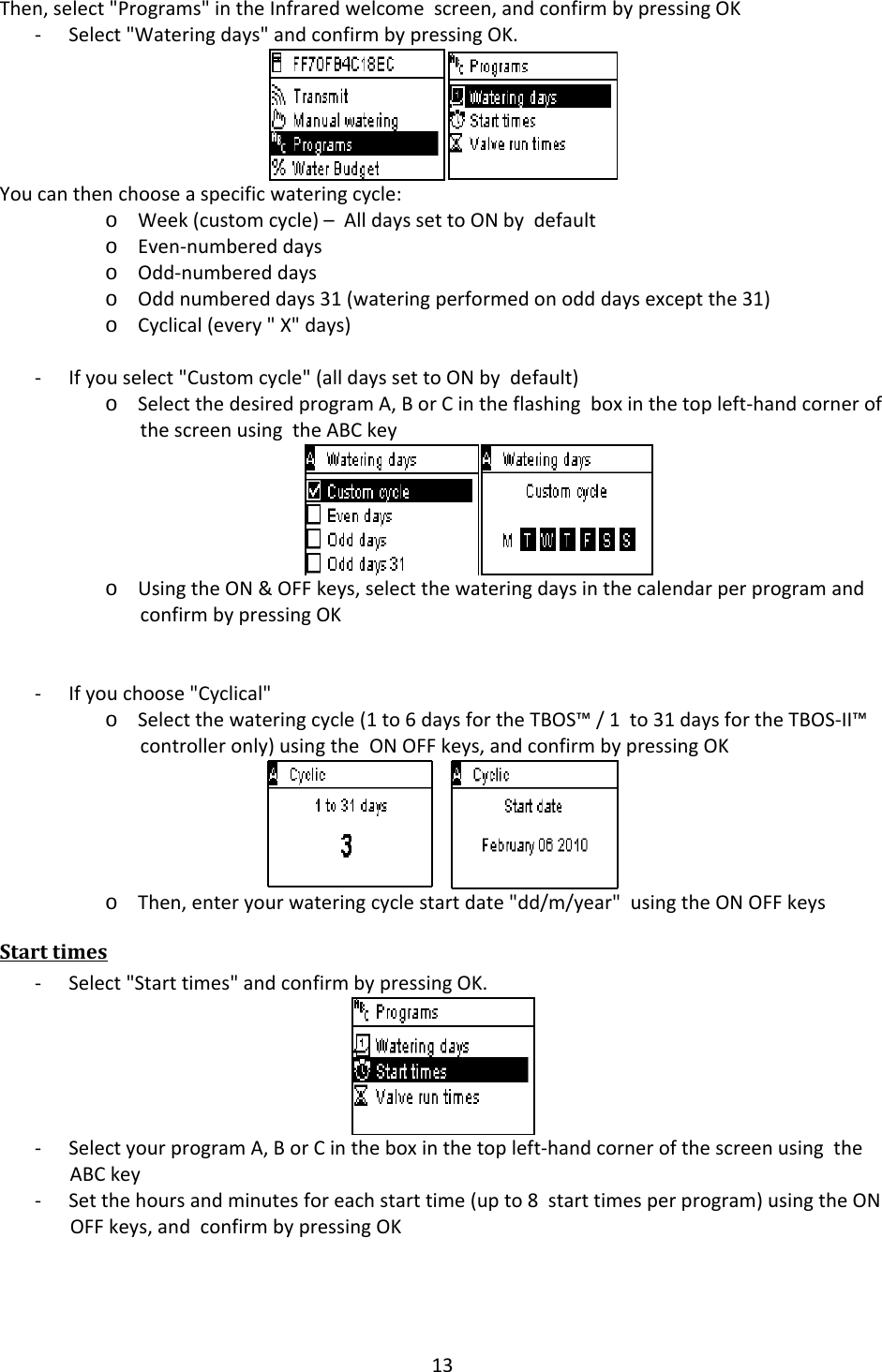
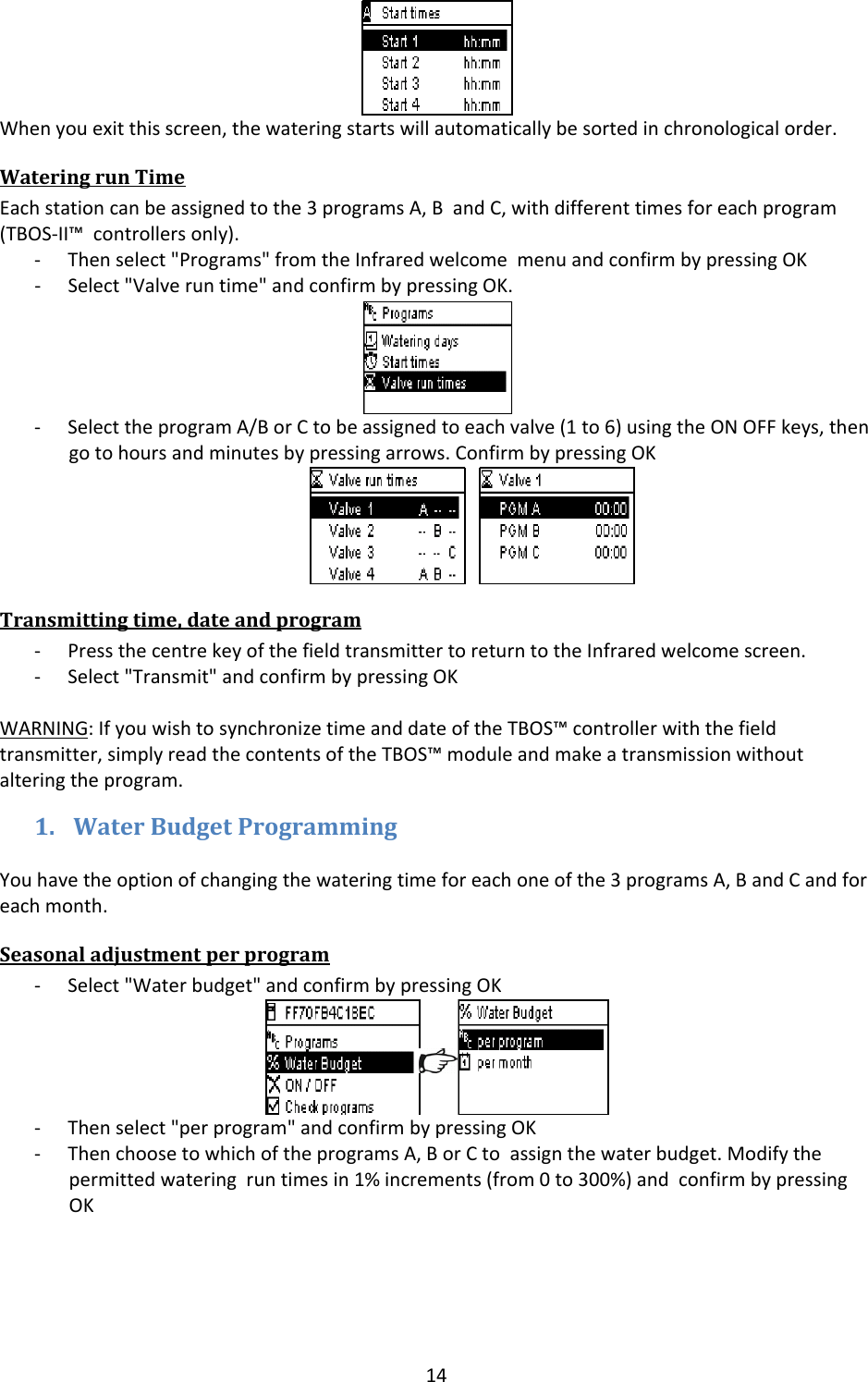
13Then,select"Programs"intheInfraredwelcomescreen,andconfirmbypressingOK‐ Select"Wateringdays"andconfirmbypressingOK.Youcanthenchooseaspecificwateringcycle:o Week(customcycle)–AlldayssettoONbydefaulto Even‐numbereddayso Odd‐numbereddayso Oddnumbereddays31(wateringperformedonodddaysexceptthe31)o Cyclical(every"X"days)‐ Ifyouselect"Customcycle"(alldayssettoONbydefault)o SelectthedesiredprogramA,BorCintheflashingboxinthetopleft‐handcornerofthescreenusingtheABCkeyo UsingtheON&OFFkeys,selectthewateringdaysinthecalendarperprogramandconfirmbypressingOK‐ Ifyouchoose"Cyclical"o Selectthewateringcycle(1to6daysfortheTBOS™/1to31daysfortheTBOS‐II™controlleronly)usingtheONOFFkeys,andconfirmbypressingOKo Then,enteryourwateringcyclestartdate"dd/m/year"usingtheONOFFkeysStarttimes‐ Select"Starttimes"andconfirmbypressingOK.‐ SelectyourprogramA,BorCintheboxinthetopleft‐handcornerofthescreenusingtheABCkey‐ Setthehoursandminutesforeachstarttime(upto8starttimesperprogram)usingtheONOFFkeys,andconfirmbypressingOK
14Whenyouexitthisscreen,thewateringstartswillautomaticallybesortedinchronologicalorder.WateringrunTimeEachstationcanbeassignedtothe3programsA,BandC,withdifferenttimesforeachprogram(TBOS‐II™controllersonly).‐ Thenselect"Programs"fromtheInfraredwelcomemenuandconfirmbypressingOK‐ Select"Valveruntime"andconfirmbypressingOK.‐ SelecttheprogramA/BorCtobeassignedtoeachvalve(1to6)usingtheONOFFkeys,thengotohoursandminutesbypressingarrows.ConfirmbypressingOKTransmittingtime,dateandprogram‐ PressthecentrekeyofthefieldtransmittertoreturntotheInfraredwelcomescreen.‐ Select"Transmit"andconfirmbypressingOKWARNING:IfyouwishtosynchronizetimeanddateoftheTBOS™controllerwiththefieldtransmitter,simplyreadthecontentsoftheTBOS™moduleandmakeatransmissionwithoutalteringtheprogram.1. WaterBudgetProgrammingYouhavetheoptionofchangingthewateringtimeforeachoneofthe3programsA,BandCandforeachmonth.Seasonaladjustmentperprogram‐ Select"Waterbudget"andconfirmbypressingOK‐ Thenselect"perprogram"andconfirmbypressingOK‐ ThenchoosetowhichoftheprogramsA,BorCtoassignthewaterbudget.Modifythepermittedwateringruntimesin1%increments(from0to300%)andconfirmbypressingOK
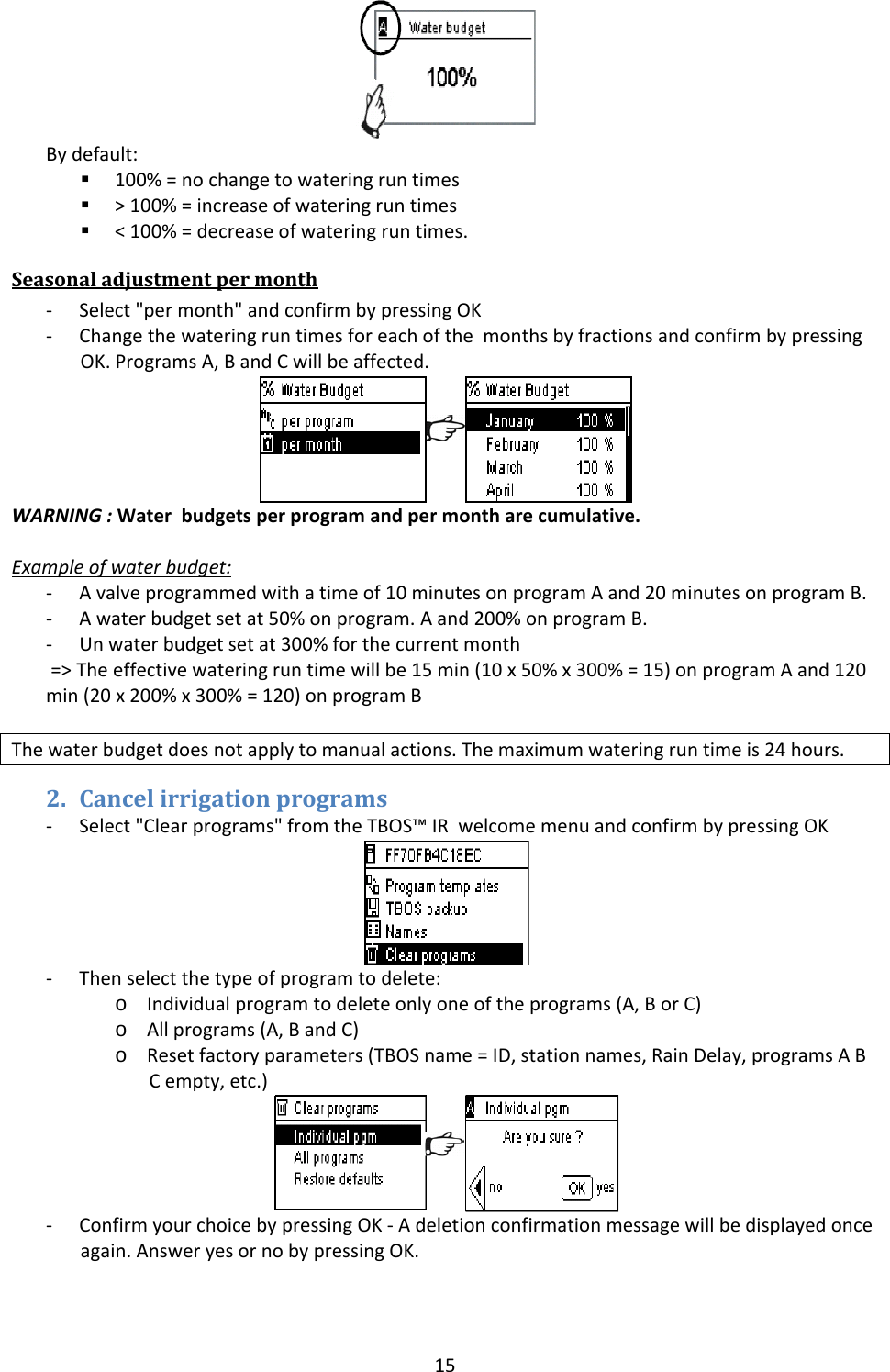
15Bydefault: 100%=nochangetowateringruntimes >100%=increaseofwateringruntimes <100%=decreaseofwateringruntimes.Seasonaladjustmentpermonth‐ Select"permonth"andconfirmbypressingOK‐ ChangethewateringruntimesforeachofthemonthsbyfractionsandconfirmbypressingOK.ProgramsA,BandCwillbeaffected.WARNING:Waterbudgetsperprogramandpermontharecumulative.Exampleofwaterbudget:‐ Avalveprogrammedwithatimeof10minutesonprogramAand20minutesonprogramB.‐ Awaterbudgetsetat50%onprogram.Aand200%onprogramB.‐ Unwaterbudgetsetat300%forthecurrentmonth=>Theeffectivewateringruntimewillbe15min(10x50%x300%=15)onprogramAand120min(20x200%x300%=120)onprogramBThewaterbudgetdoesnotapplytomanualactions.Themaximumwateringruntimeis24hours.2. Cancelirrigationprograms‐ Select"Clearprograms"fromtheTBOS™IRwelcomemenuandconfirmbypressingOK‐ Thenselectthetypeofprogramtodelete:o Individualprogramtodeleteonlyoneoftheprograms(A,BorC)o Allprograms(A,BandC)o Resetfactoryparameters(TBOSname=ID,stationnames,RainDelay,programsABCempty,etc.)‐ ConfirmyourchoicebypressingOK‐Adeletionconfirmationmessagewillbedisplayedonceagain.AnsweryesornobypressingOK.
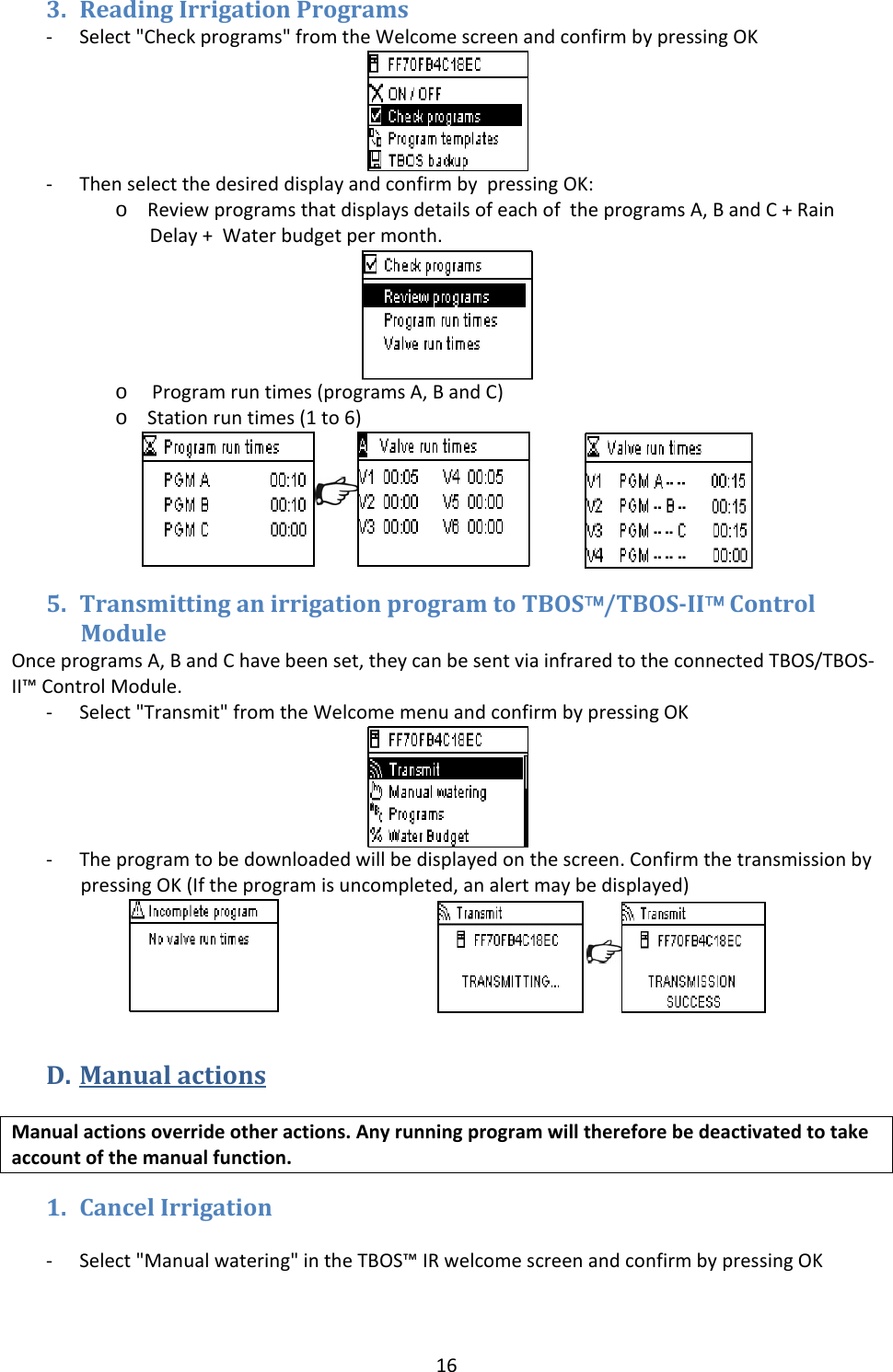
163. ReadingIrrigationPrograms‐ Select"Checkprograms"fromtheWelcomescreenandconfirmbypressingOK‐ ThenselectthedesireddisplayandconfirmbypressingOK:o ReviewprogramsthatdisplaysdetailsofeachoftheprogramsA,BandC+RainDelay+Waterbudgetpermonth.o Programruntimes(programsA,BandC)o Stationruntimes(1to6) 5. TransmittinganirrigationprogramtoTBOS™/TBOSII™ControlModuleOnceprogramsA,BandChavebeenset,theycanbesentviainfraredtotheconnectedTBOS/TBOS‐II™ControlModule.‐ Select"Transmit"fromtheWelcomemenuandconfirmbypressingOK‐ Theprogramtobedownloadedwillbedisplayedonthescreen.ConfirmthetransmissionbypressingOK(Iftheprogramisuncompleted,analertmaybedisplayed) D. ManualactionsManualactionsoverrideotheractions.Anyrunningprogramwillthereforebedeactivatedtotakeaccountofthemanualfunction.1. CancelIrrigation‐ Select"Manualwatering"intheTBOS™IRwelcomescreenandconfirmbypressingOK
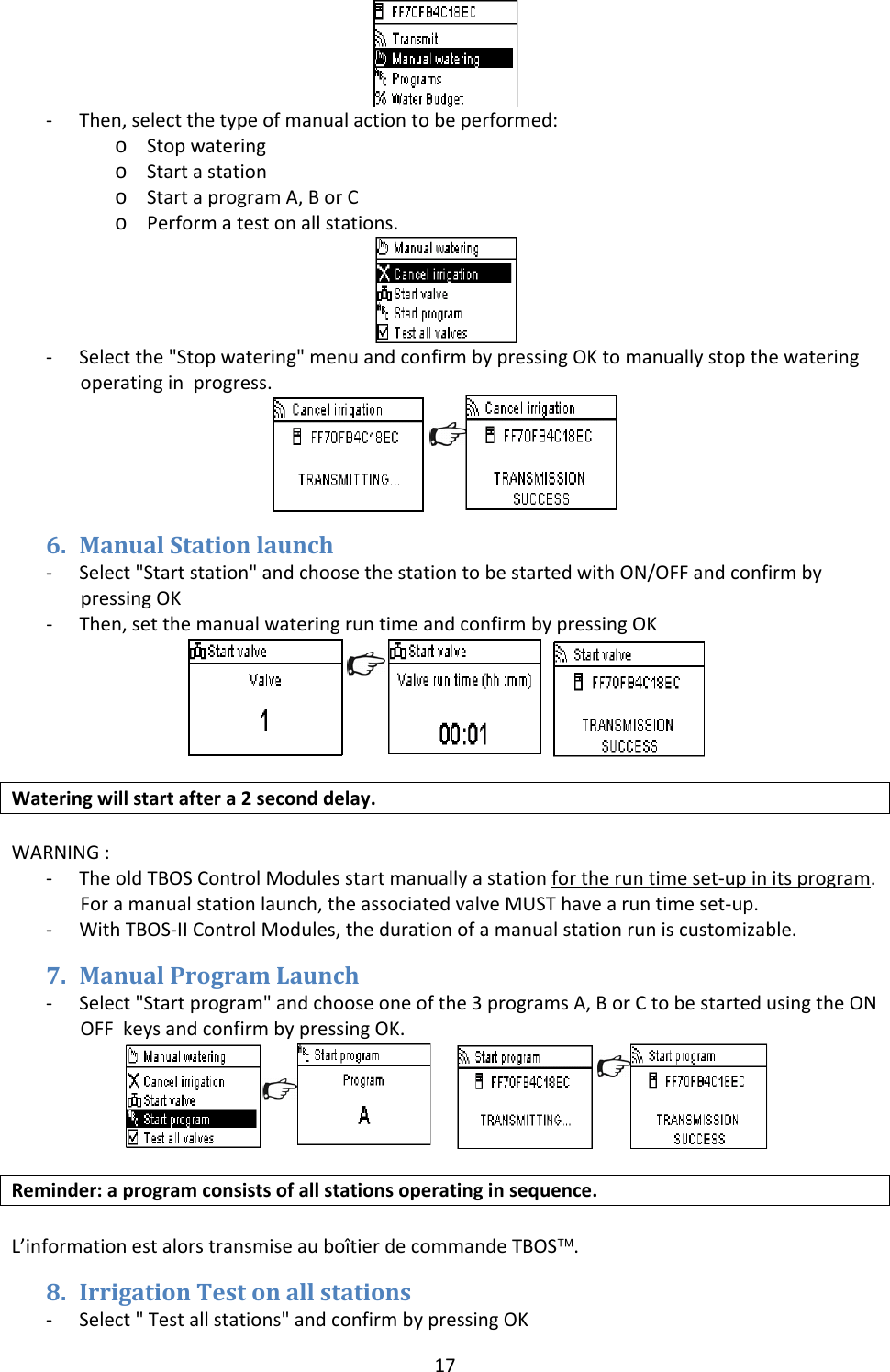
17‐ Then,selectthetypeofmanualactiontobeperformed:o Stopwateringo Startastationo StartaprogramA,BorCo Performatestonallstations.‐ Selectthe"Stopwatering"menuandconfirmbypressingOKtomanuallystopthewateringoperatinginprogress.6. ManualStationlaunch‐ Select"Startstation"andchoosethestationtobestartedwithON/OFFandconfirmbypressingOK‐ Then,setthemanualwateringruntimeandconfirmbypressingOK Wateringwillstartaftera2seconddelay.WARNING:‐ TheoldTBOSControlModulesstartmanuallyastationfortheruntimeset‐upinitsprogram.Foramanualstationlaunch,theassociatedvalveMUSThavearuntimeset‐up.‐ WithTBOS‐IIControlModules,thedurationofamanualstationruniscustomizable.7. ManualProgramLaunch‐ Select"Startprogram"andchooseoneofthe3programsA,BorCtobestartedusingtheONOFFkeysandconfirmbypressingOK. Reminder:aprogramconsistsofallstationsoperatinginsequence.L’informationestalorstransmiseauboîtierdecommandeTBOS™.8. IrrigationTestonallstations‐ Select"Testallstations"andconfirmbypressingOK
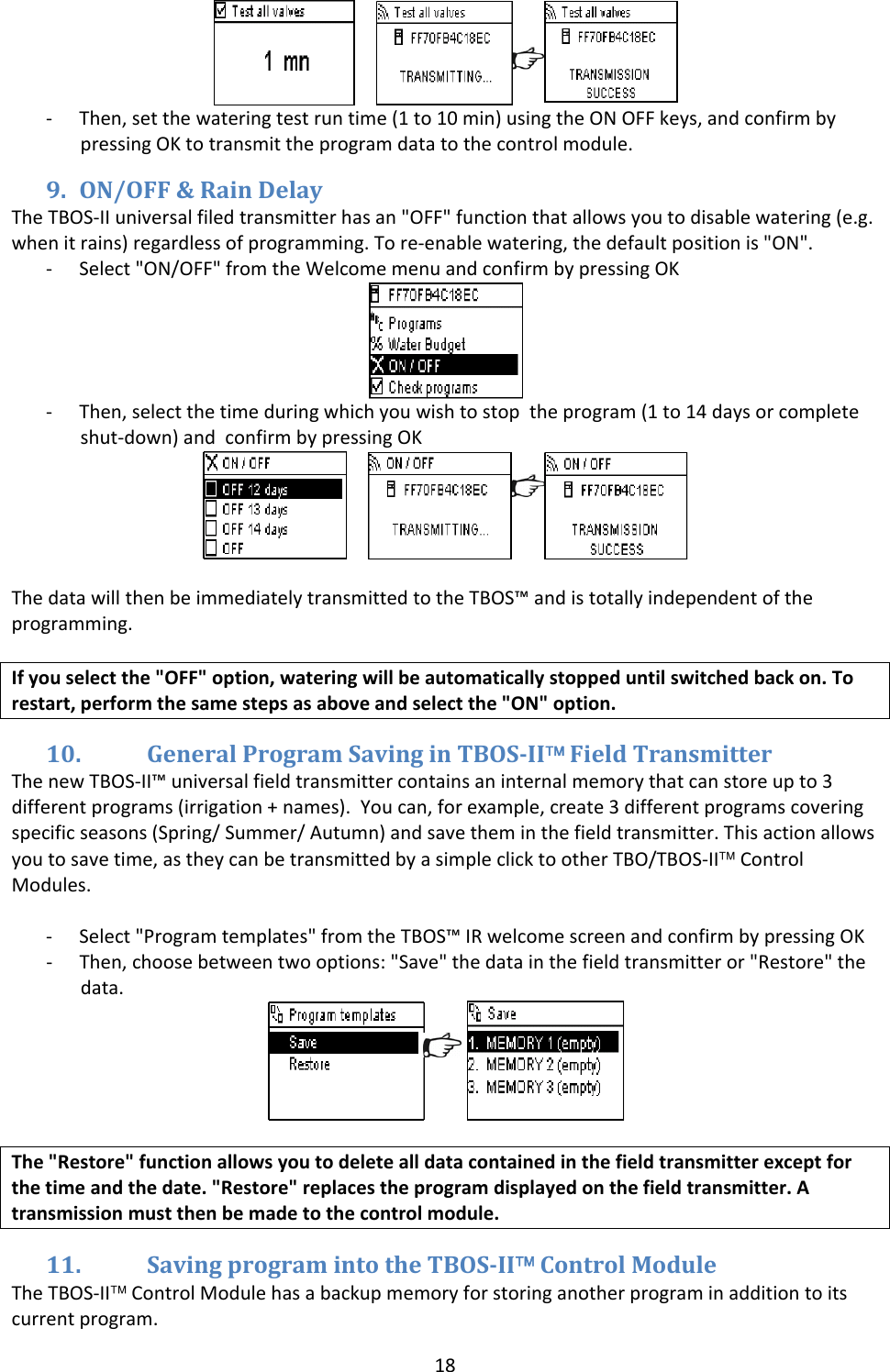
18 ‐ Then,setthewateringtestruntime(1to10min)usingtheONOFFkeys,andconfirmbypressingOKtotransmittheprogramdatatothecontrolmodule.9. ON/OFF&RainDelayTheTBOS‐IIuniversalfiledtransmitterhasan"OFF"functionthatallowsyoutodisablewatering(e.g.whenitrains)regardlessofprogramming.Tore‐enablewatering,thedefaultpositionis"ON".‐ Select"ON/OFF"fromtheWelcomemenuandconfirmbypressingOK‐ Then,selectthetimeduringwhichyouwishtostoptheprogram(1to14daysorcompleteshut‐down)andconfirmbypressingOK ThedatawillthenbeimmediatelytransmittedtotheTBOS™andistotallyindependentoftheprogramming.Ifyouselectthe"OFF"option,wateringwillbeautomaticallystoppeduntilswitchedbackon.Torestart,performthesamestepsasaboveandselectthe"ON"option.10. GeneralProgramSavinginTBOSII™FieldTransmitterThenewTBOS‐II™universalfieldtransmittercontainsaninternalmemorythatcanstoreupto3differentprograms(irrigation+names).Youcan,forexample,create3differentprogramscoveringspecificseasons(Spring/Summer/Autumn)andsavetheminthefieldtransmitter.Thisactionallowsyoutosavetime,astheycanbetransmittedbyasimpleclicktootherTBO/TBOS‐II™ControlModules.‐ Select"Programtemplates"fromtheTBOS™IRwelcomescreenandconfirmbypressingOK‐ Then,choosebetweentwooptions:"Save"thedatainthefieldtransmitteror"Restore"thedata.The"Restore"functionallowsyoutodeletealldatacontainedinthefieldtransmitterexceptforthetimeandthedate."Restore"replacestheprogramdisplayedonthefieldtransmitter.Atransmissionmustthenbemadetothecontrolmodule.11. SavingprogramintotheTBOSII™ControlModuleTheTBOS‐II™ControlModulehasabackupmemoryforstoringanotherprograminadditiontoitscurrentprogram.
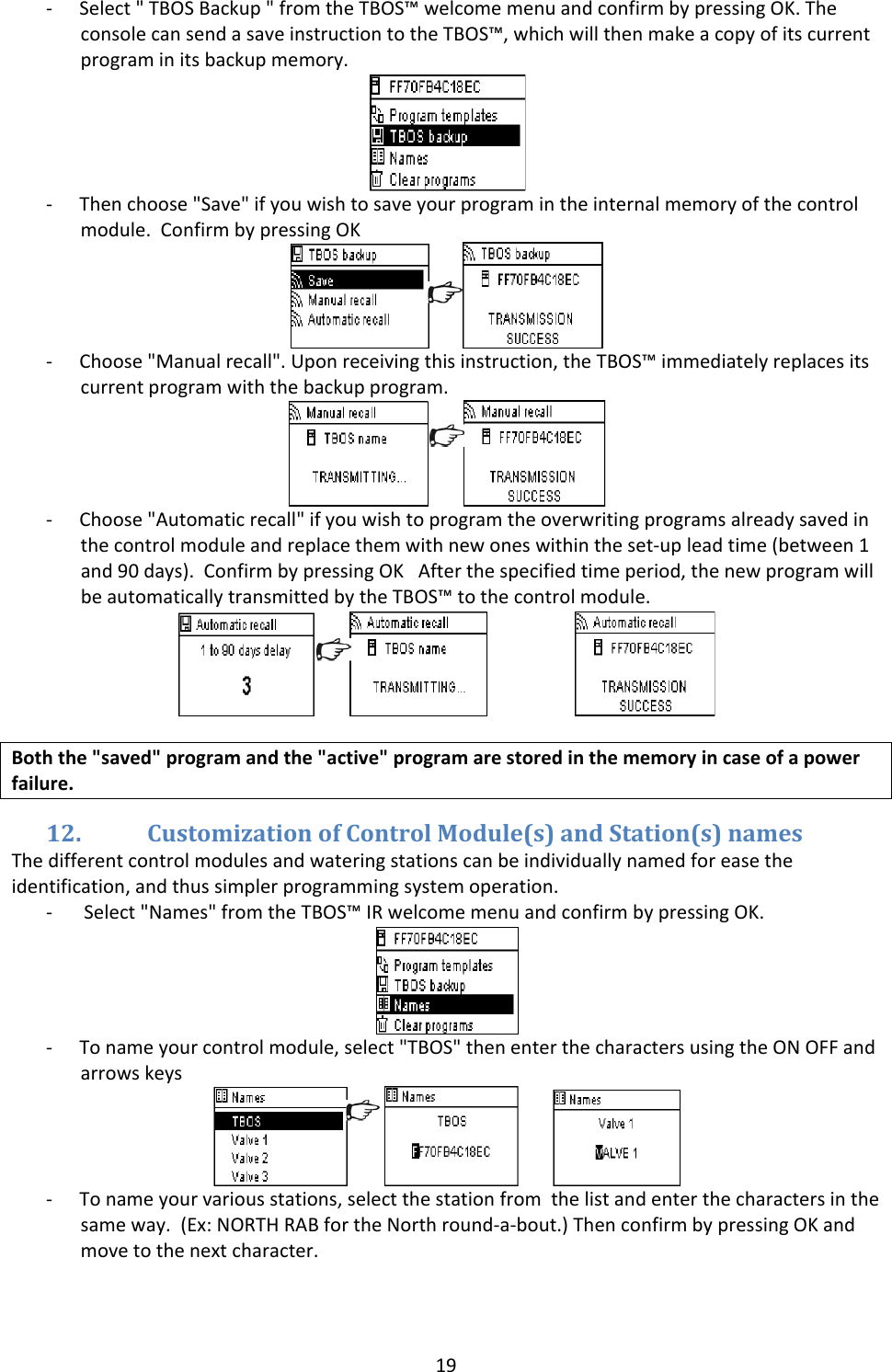
19‐ Select"TBOSBackup"fromtheTBOS™welcomemenuandconfirmbypressingOK.TheconsolecansendasaveinstructiontotheTBOS™,whichwillthenmakeacopyofitscurrentprograminitsbackupmemory.‐ Thenchoose"Save"ifyouwishtosaveyourprogramintheinternalmemoryofthecontrolmodule.ConfirmbypressingOK‐ Choose"Manualrecall".Uponreceivingthisinstruction,theTBOS™immediatelyreplacesitscurrentprogramwiththebackupprogram.‐ Choose"Automaticrecall"ifyouwishtoprogramtheoverwritingprogramsalreadysavedinthecontrolmoduleandreplacethemwithnewoneswithintheset‐upleadtime(between1and90days).ConfirmbypressingOKAfterthespecifiedtimeperiod,thenewprogramwillbeautomaticallytransmittedbytheTBOS™tothecontrolmodule. Boththe"saved"programandthe"active"programarestoredinthememoryincaseofapowerfailure.12. CustomizationofControlModule(s)andStation(s)namesThedifferentcontrolmodulesandwateringstationscanbeindividuallynamedforeasetheidentification,andthussimplerprogrammingsystemoperation.‐ Select"Names"fromtheTBOS™IRwelcomemenuandconfirmbypressingOK.‐ Tonameyourcontrolmodule,select"TBOS"thenenterthecharactersusingtheONOFFandarrowskeys ‐ Tonameyourvariousstations,selectthestationfromthelistandenterthecharactersinthesameway.(Ex:NORTHRABfortheNorthround‐a‐bout.)ThenconfirmbypressingOKandmovetothenextcharacter.
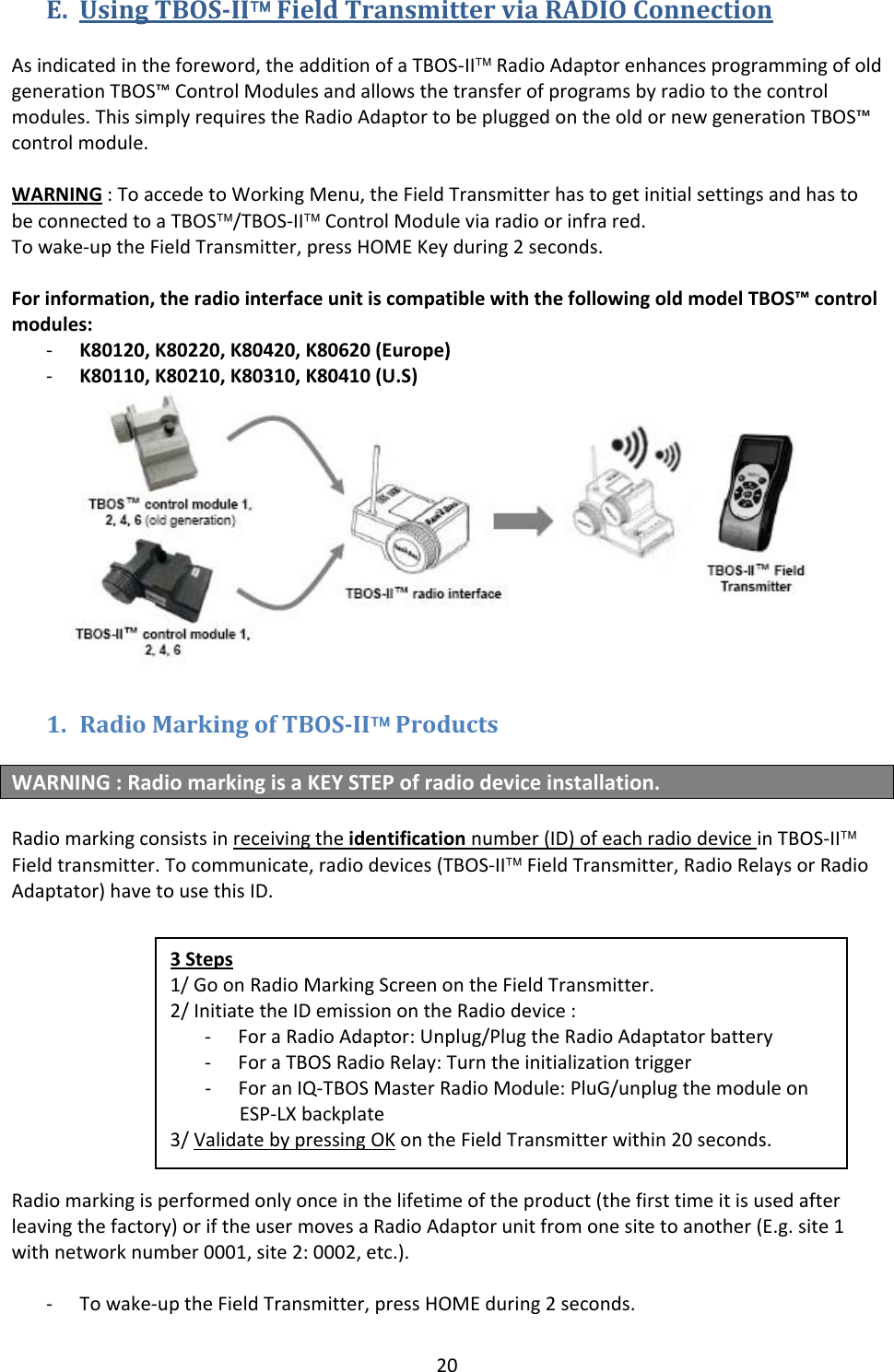
20E. UsingTBOSII™FieldTransmitterviaRADIOConnectionAsindicatedintheforeword,theadditionofaTBOS‐II™RadioAdaptorenhancesprogrammingofoldgenerationTBOS™ControlModulesandallowsthetransferofprogramsbyradiotothecontrolmodules.ThissimplyrequirestheRadioAdaptortobepluggedontheoldornewgenerationTBOS™controlmodule.WARNING:ToaccedetoWorkingMenu,theFieldTransmitterhastogetinitialsettingsandhastobeconnectedtoaTBOS™/TBOS‐II™ControlModuleviaradioorinfrared.Towake‐uptheFieldTransmitter,pressHOMEKeyduring2seconds.Forinformation,theradiointerfaceunitiscompatiblewiththefollowingoldmodelTBOS™controlmodules:‐ K80120,K80220,K80420,K80620(Europe)‐ K80110,K80210,K80310,K80410(U.S)1. RadioMarkingofTBOSII™ProductsWARNING:RadiomarkingisaKEYSTEPofradiodeviceinstallation.Radiomarkingconsistsinreceivingtheidentificationnumber(ID)ofeachradiodeviceinTBOS‐II™Fieldtransmitter.Tocommunicate,radiodevices(TBOS‐II™FieldTransmitter,RadioRelaysorRadioAdaptator)havetousethisID.Radiomarkingisperformedonlyonceinthelifetimeoftheproduct(thefirsttimeitisusedafterleavingthefactory)oriftheusermovesaRadioAdaptorunitfromonesitetoanother(E.g.site1withnetworknumber0001,site2:0002,etc.).‐ Towake‐uptheFieldTransmitter,pressHOMEduring2seconds.3Steps1/GoonRadioMarkingScreenontheFieldTransmitter.2/InitiatetheIDemissionontheRadiodevice:‐ ForaRadioAdaptor:Unplug/PlugtheRadioAdaptatorbattery‐ ForaTBOSRadioRelay:Turntheinitializationtrigger‐ ForanIQ‐TBOSMasterRadioModule:PluG/unplugthemoduleonESP‐LXbackplate3/ValidatebypressingOKontheFieldTransmitterwithin20seconds.
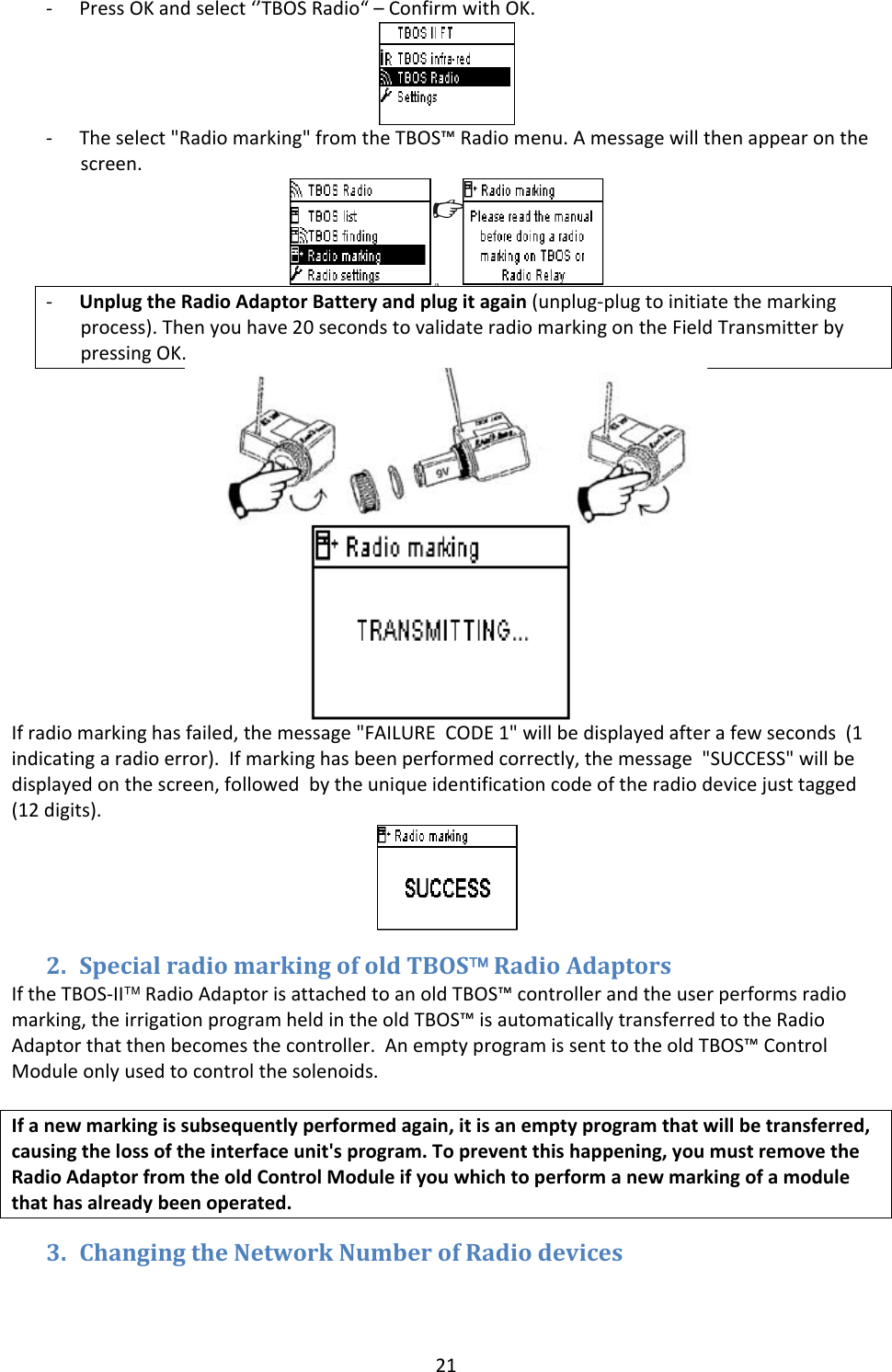
21‐ PressOKandselect‘’TBOSRadio“–ConfirmwithOK.‐ Theselect"Radiomarking"fromtheTBOS™Radiomenu.Amessagewillthenappearonthescreen.‐ UnplugtheRadioAdaptorBatteryandplugitagain(unplug‐plugtoinitiatethemarkingprocess).Thenyouhave20secondstovalidateradiomarkingontheFieldTransmitterbypressingOK.Ifradiomarkinghasfailed,themessage"FAILURECODE1"willbedisplayedafterafewseconds(1indicatingaradioerror).Ifmarkinghasbeenperformedcorrectly,themessage"SUCCESS"willbedisplayedonthescreen,followedbytheuniqueidentificationcodeoftheradiodevicejusttagged(12digits).2. SpecialradiomarkingofoldTBOS™RadioAdaptorsIftheTBOS‐II™RadioAdaptorisattachedtoanoldTBOS™controllerandtheuserperformsradiomarking,theirrigationprogramheldintheoldTBOS™isautomaticallytransferredtotheRadioAdaptorthatthenbecomesthecontroller.AnemptyprogramissenttotheoldTBOS™ControlModuleonlyusedtocontrolthesolenoids.Ifanewmarkingissubsequentlyperformedagain,itisanemptyprogramthatwillbetransferred,causingthelossoftheinterfaceunit'sprogram.Topreventthishappening,youmustremovetheRadioAdaptorfromtheoldControlModuleifyouwhichtoperformanewmarkingofamodulethathasalreadybeenoperated.3. ChangingtheNetworkNumberofRadiodevices
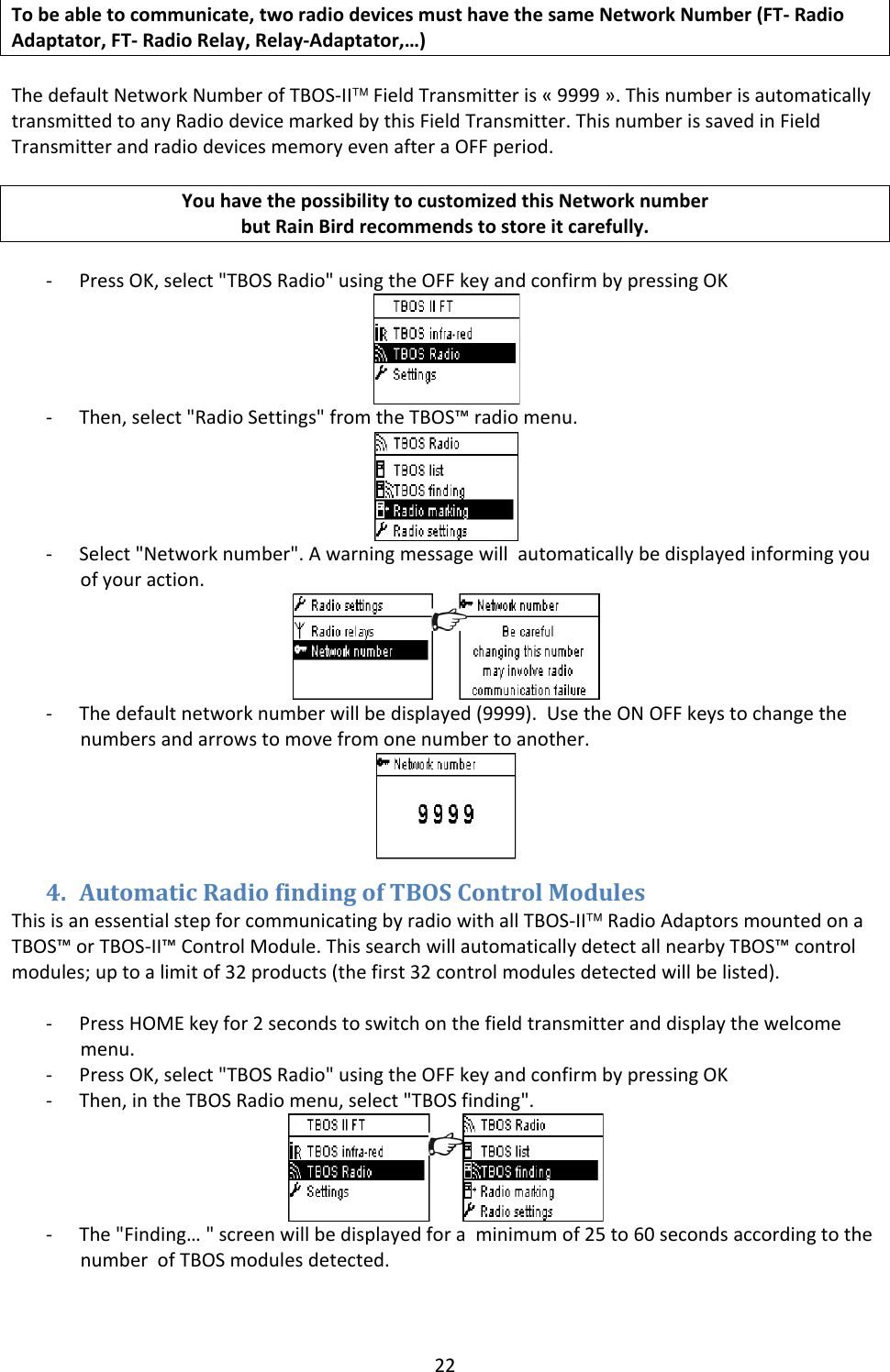
22Tobeabletocommunicate,tworadiodevicesmusthavethesameNetworkNumber(FT‐RadioAdaptator,FT‐RadioRelay,Relay‐Adaptator,…)ThedefaultNetworkNumberofTBOS‐II™FieldTransmitteris«9999».ThisnumberisautomaticallytransmittedtoanyRadiodevicemarkedbythisFieldTransmitter.ThisnumberissavedinFieldTransmitterandradiodevicesmemoryevenafteraOFFperiod.YouhavethepossibilitytocustomizedthisNetworknumberbutRainBirdrecommendstostoreitcarefully.‐ PressOK,select"TBOSRadio"usingtheOFFkeyandconfirmbypressingOK‐ Then,select"RadioSettings"fromtheTBOS™radiomenu.‐ Select"Networknumber".Awarningmessagewillautomaticallybedisplayedinformingyouofyouraction.‐ Thedefaultnetworknumberwillbedisplayed(9999).UsetheONOFFkeystochangethenumbersandarrowstomovefromonenumbertoanother.4. AutomaticRadiofindingofTBOSControlModulesThisisanessentialstepforcommunicatingbyradiowithallTBOS‐II™RadioAdaptorsmountedonaTBOS™orTBOS‐II™ControlModule.ThissearchwillautomaticallydetectallnearbyTBOS™controlmodules;uptoalimitof32products(thefirst32controlmodulesdetectedwillbelisted).‐ PressHOMEkeyfor2secondstoswitchonthefieldtransmitteranddisplaythewelcomemenu.‐ PressOK,select"TBOSRadio"usingtheOFFkeyandconfirmbypressingOK‐ Then,intheTBOSRadiomenu,select"TBOSfinding".‐ The"Finding…"screenwillbedisplayedforaminimumof25to60secondsaccordingtothenumberofTBOSmodulesdetected.
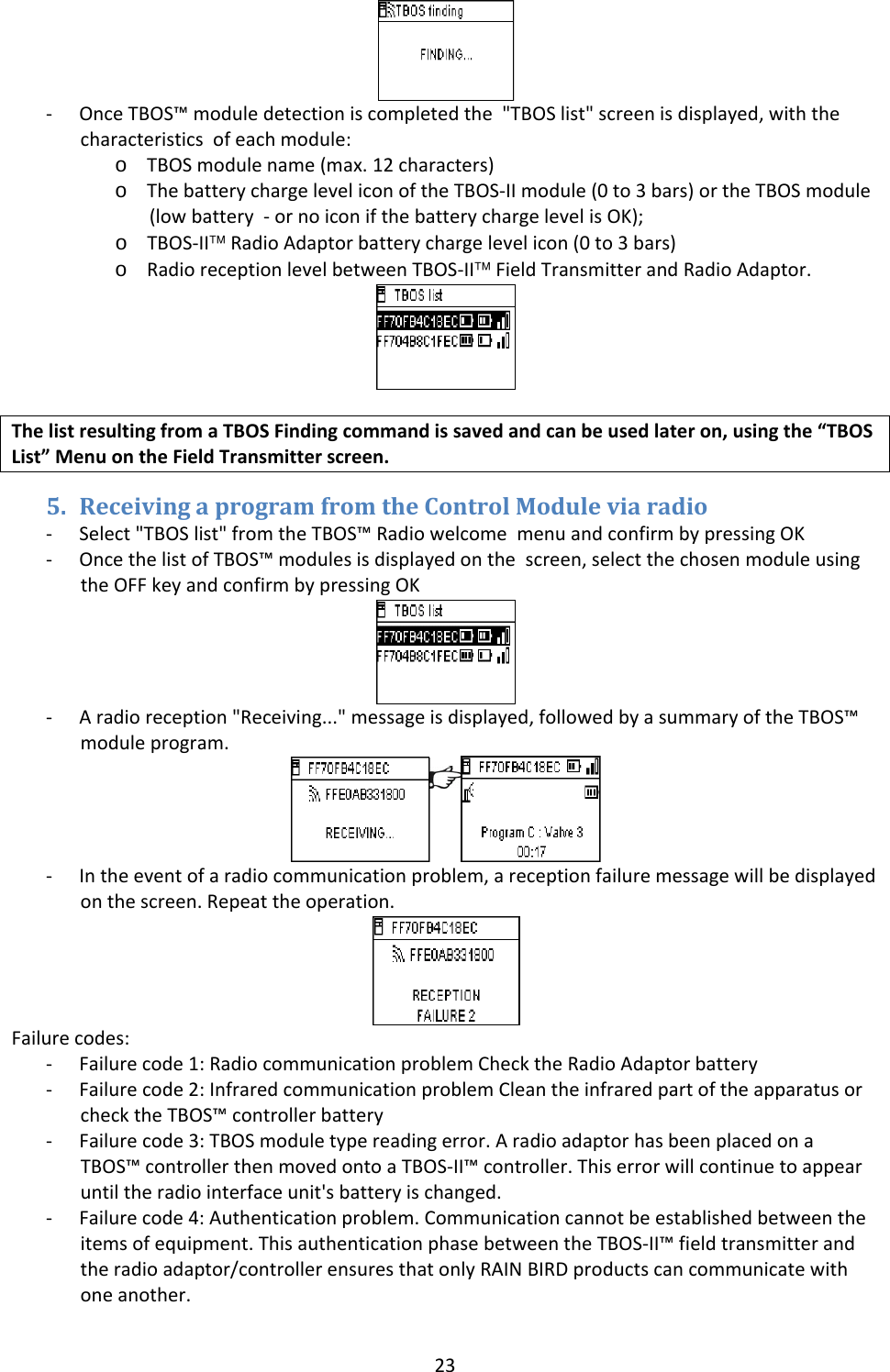
23‐ OnceTBOS™moduledetectioniscompletedthe"TBOSlist"screenisdisplayed,withthecharacteristicsofeachmodule:o TBOSmodulename(max.12characters)o ThebatterychargeleveliconoftheTBOS‐IImodule(0to3bars)ortheTBOSmodule(lowbattery‐ornoiconifthebatterychargelevelisOK);o TBOS‐II™RadioAdaptorbatterychargelevelicon(0to3bars)o RadioreceptionlevelbetweenTBOS‐II™FieldTransmitterandRadioAdaptor.ThelistresultingfromaTBOSFindingcommandissavedandcanbeusedlateron,usingthe“TBOSList”MenuontheFieldTransmitterscreen.5. ReceivingaprogramfromtheControlModuleviaradio‐ Select"TBOSlist"fromtheTBOS™RadiowelcomemenuandconfirmbypressingOK‐ OncethelistofTBOS™modulesisdisplayedonthescreen,selectthechosenmoduleusingtheOFFkeyandconfirmbypressingOK‐ Aradioreception"Receiving..."messageisdisplayed,followedbyasummaryoftheTBOS™moduleprogram.‐ Intheeventofaradiocommunicationproblem,areceptionfailuremessagewillbedisplayedonthescreen.Repeattheoperation.Failurecodes:‐ Failurecode1:RadiocommunicationproblemChecktheRadioAdaptorbattery‐ Failurecode2:InfraredcommunicationproblemCleantheinfraredpartoftheapparatusorchecktheTBOS™controllerbattery‐ Failurecode3:TBOSmoduletypereadingerror.AradioadaptorhasbeenplacedonaTBOS™controllerthenmovedontoaTBOS‐II™controller.Thiserrorwillcontinuetoappearuntiltheradiointerfaceunit'sbatteryischanged.‐ Failurecode4:Authenticationproblem.Communicationcannotbeestablishedbetweentheitemsofequipment.ThisauthenticationphasebetweentheTBOS‐II™fieldtransmitterandtheradioadaptor/controllerensuresthatonlyRAINBIRDproductscancommunicatewithoneanother.
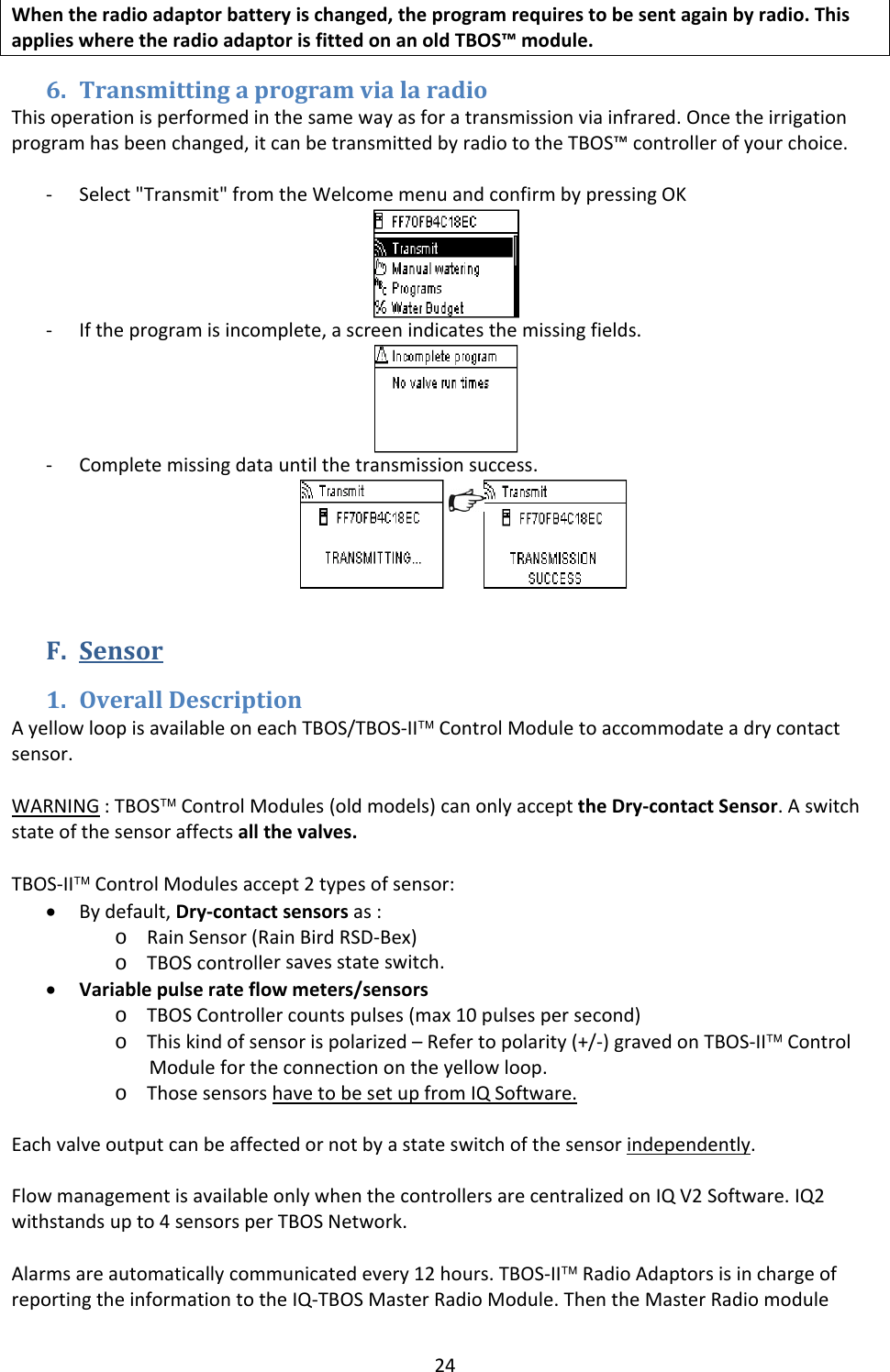
24Whentheradioadaptorbatteryischanged,theprogramrequirestobesentagainbyradio.ThisapplieswheretheradioadaptorisfittedonanoldTBOS™module.6. TransmittingaprogramvialaradioThisoperationisperformedinthesamewayasforatransmissionviainfrared.Oncetheirrigationprogramhasbeenchanged,itcanbetransmittedbyradiototheTBOS™controllerofyourchoice.‐ Select"Transmit"fromtheWelcomemenuandconfirmbypressingOK‐ Iftheprogramisincomplete,ascreenindicatesthemissingfields.‐ Completemissingdatauntilthetransmissionsuccess.F. Sensor1. OverallDescriptionAyellowloopisavailableoneachTBOS/TBOS‐II™ControlModuletoaccommodateadrycontactsensor.WARNING:TBOS™ControlModules(oldmodels)canonlyaccepttheDry‐contactSensor.Aswitchstateofthesensoraffectsallthevalves.TBOS‐II™ControlModulesaccept2typesofsensor:• Bydefault,Dry‐contactsensorsas:o RainSensor(RainBirdRSD‐Bex)o TBOScontrollersavesstateswitch. • Variablepulserateflowmeters/sensorso TBOSControllercountspulses(max10pulsespersecond)o Thiskindofsensorispolarized–Refertopolarity(+/‐)gravedonTBOS‐II™ControlModulefortheconnectionontheyellowloop.o ThosesensorshavetobesetupfromIQSoftware.Eachvalveoutputcanbeaffectedornotbyastateswitchofthesensorindependently.FlowmanagementisavailableonlywhenthecontrollersarecentralizedonIQV2Software.IQ2withstandsupto4sensorsperTBOSNetwork.Alarmsareautomaticallycommunicatedevery12hours.TBOS‐II™RadioAdaptorsisinchargeofreportingtheinformationtotheIQ‐TBOSMasterRadioModule.ThentheMasterRadiomodule
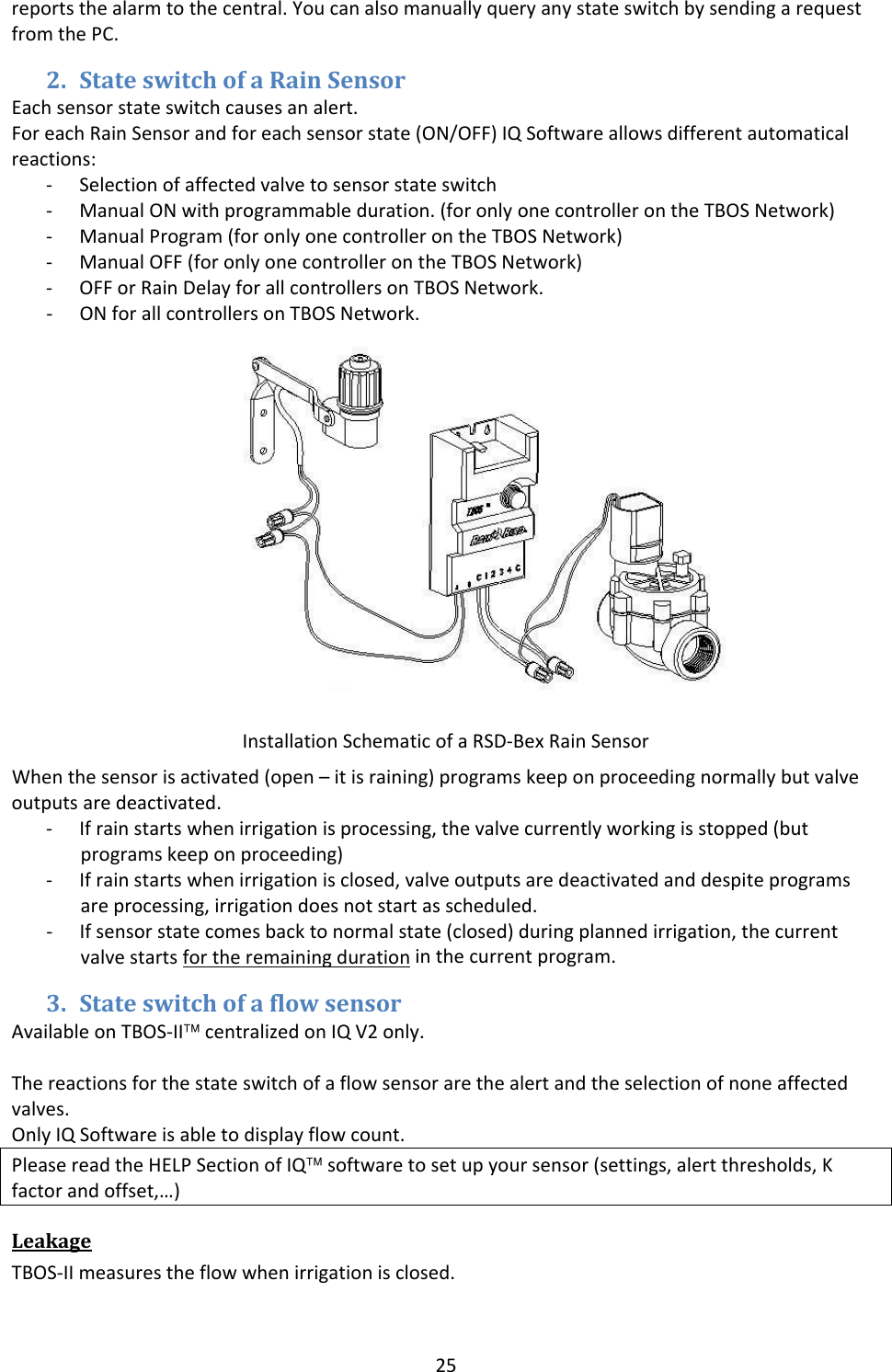
25reportsthealarmtothecentral.YoucanalsomanuallyqueryanystateswitchbysendingarequestfromthePC.2. StateswitchofaRainSensorEachsensorstateswitchcausesanalert.ForeachRainSensorandforeachsensorstate(ON/OFF)IQSoftwareallowsdifferentautomaticalreactions:‐ Selectionofaffectedvalvetosensorstateswitch‐ ManualONwithprogrammableduration.(foronlyonecontrollerontheTBOSNetwork)‐ ManualProgram(foronlyonecontrollerontheTBOSNetwork)‐ ManualOFF(foronlyonecontrollerontheTBOSNetwork)‐ OFForRainDelayforallcontrollersonTBOSNetwork.‐ ONforallcontrollersonTBOSNetwork.Whenthesensorisactivated(open–itisraining)programskeeponproceedingnormallybutvalveoutputsaredeactivated.‐ Ifrainstartswhenirrigationisprocessing,thevalvecurrentlyworkingisstopped(butprogramskeeponproceeding)‐ Ifrainstartswhenirrigationisclosed,valveoutputsaredeactivatedanddespiteprogramsareprocessing,irrigationdoesnotstartasscheduled.‐ Ifsensorstatecomesbacktonormalstate(closed)duringplannedirrigation,thecurrentvalvestartsfortheremainingdurationinthecurrentprogram.3. StateswitchofaflowsensorAvailableonTBOS‐II™centralizedonIQV2only.Thereactionsforthestateswitchofaflowsensorarethealertandtheselectionofnoneaffectedvalves.OnlyIQSoftwareisabletodisplayflowcount.PleasereadtheHELPSectionofIQ™softwaretosetupyoursensor(settings,alertthresholds,Kfactorandoffset,…)LeakageTBOS‐IImeasurestheflowwhenirrigationisclosed.InstallationSchematicofaRSD‐BexRainSensor
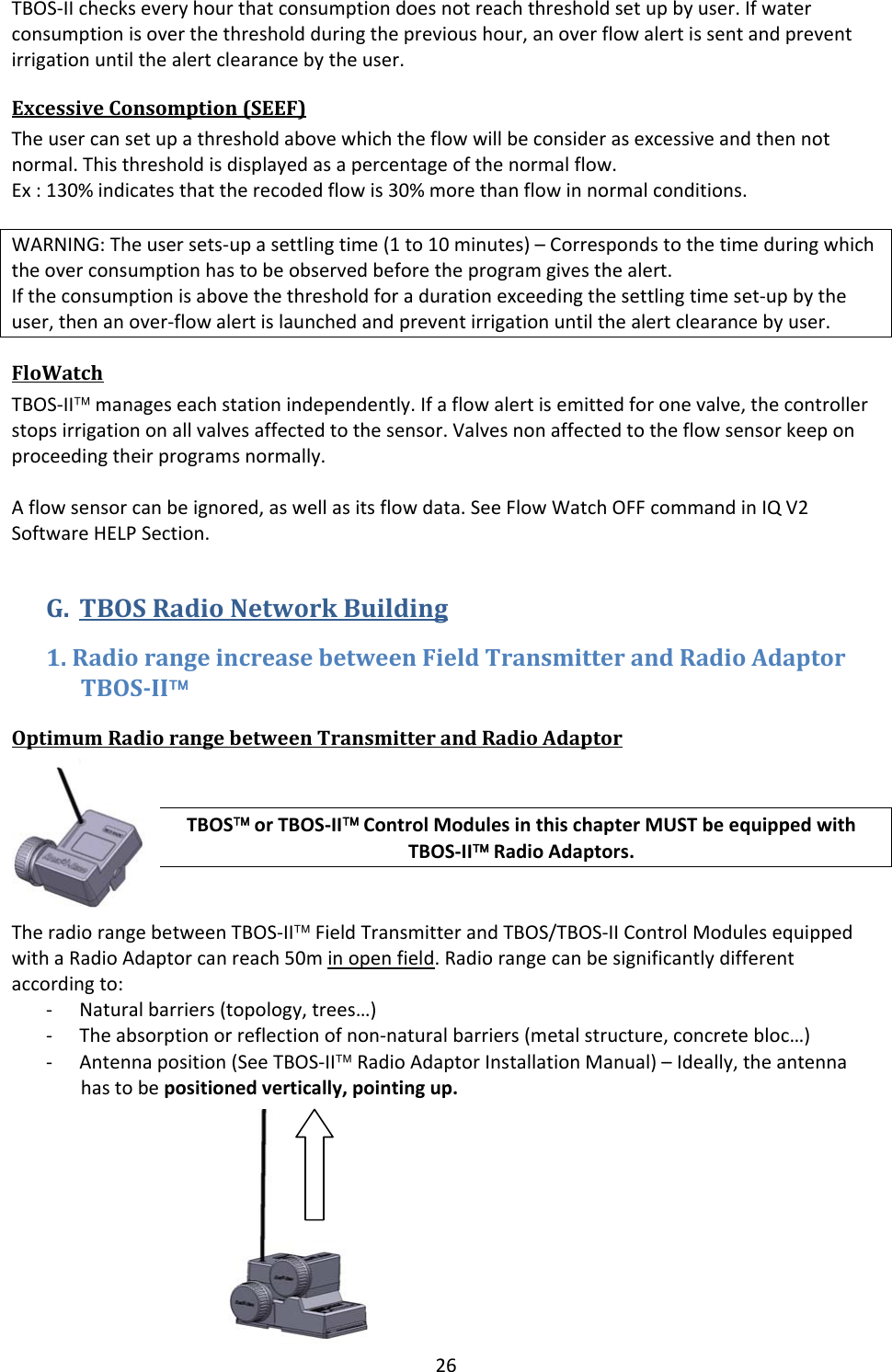
26TBOS‐IIcheckseveryhourthatconsumptiondoesnotreachthresholdsetupbyuser.Ifwaterconsumptionisoverthethresholdduringtheprevioushour,anoverflowalertissentandpreventirrigationuntilthealertclearancebytheuser.ExcessiveConsomption(SEEF)Theusercansetupathresholdabovewhichtheflowwillbeconsiderasexcessiveandthennotnormal.Thisthresholdisdisplayedasapercentageofthenormalflow.Ex:130%indicatesthattherecodedflowis30%morethanflowinnormalconditions.WARNING:Theusersets‐upasettlingtime(1to10minutes)–Correspondstothetimeduringwhichtheoverconsumptionhastobeobservedbeforetheprogramgivesthealert.Iftheconsumptionisabovethethresholdforadurationexceedingthesettlingtimeset‐upbytheuser,thenanover‐flowalertislaunchedandpreventirrigationuntilthealertclearancebyuser.FloWatchTBOS‐II™manageseachstationindependently.Ifaflowalertisemittedforonevalve,thecontrollerstopsirrigationonallvalvesaffectedtothesensor.Valvesnonaffectedtotheflowsensorkeeponproceedingtheirprogramsnormally.Aflowsensorcanbeignored,aswellasitsflowdata.SeeFlowWatchOFFcommandinIQV2SoftwareHELPSection.G. TBOSRadioNetworkBuilding1.RadiorangeincreasebetweenFieldTransmitterandRadioAdaptorTBOSII™OptimumRadiorangebetweenTransmitterandRadioAdaptorTBOS™orTBOS‐II™ControlModulesinthischapterMUSTbeequippedwithTBOS‐II™RadioAdaptors.TheradiorangebetweenTBOS‐II™FieldTransmitterandTBOS/TBOS‐IIControlModulesequippedwithaRadioAdaptorcanreach50minopenfield.Radiorangecanbesignificantlydifferentaccordingto:‐ Naturalbarriers(topology,trees…)‐ Theabsorptionorreflectionofnon‐naturalbarriers(metalstructure,concretebloc…)‐ Antennaposition(SeeTBOS‐II™RadioAdaptorInstallationManual)–Ideally,theantennahastobepositionedvertically,pointingup.
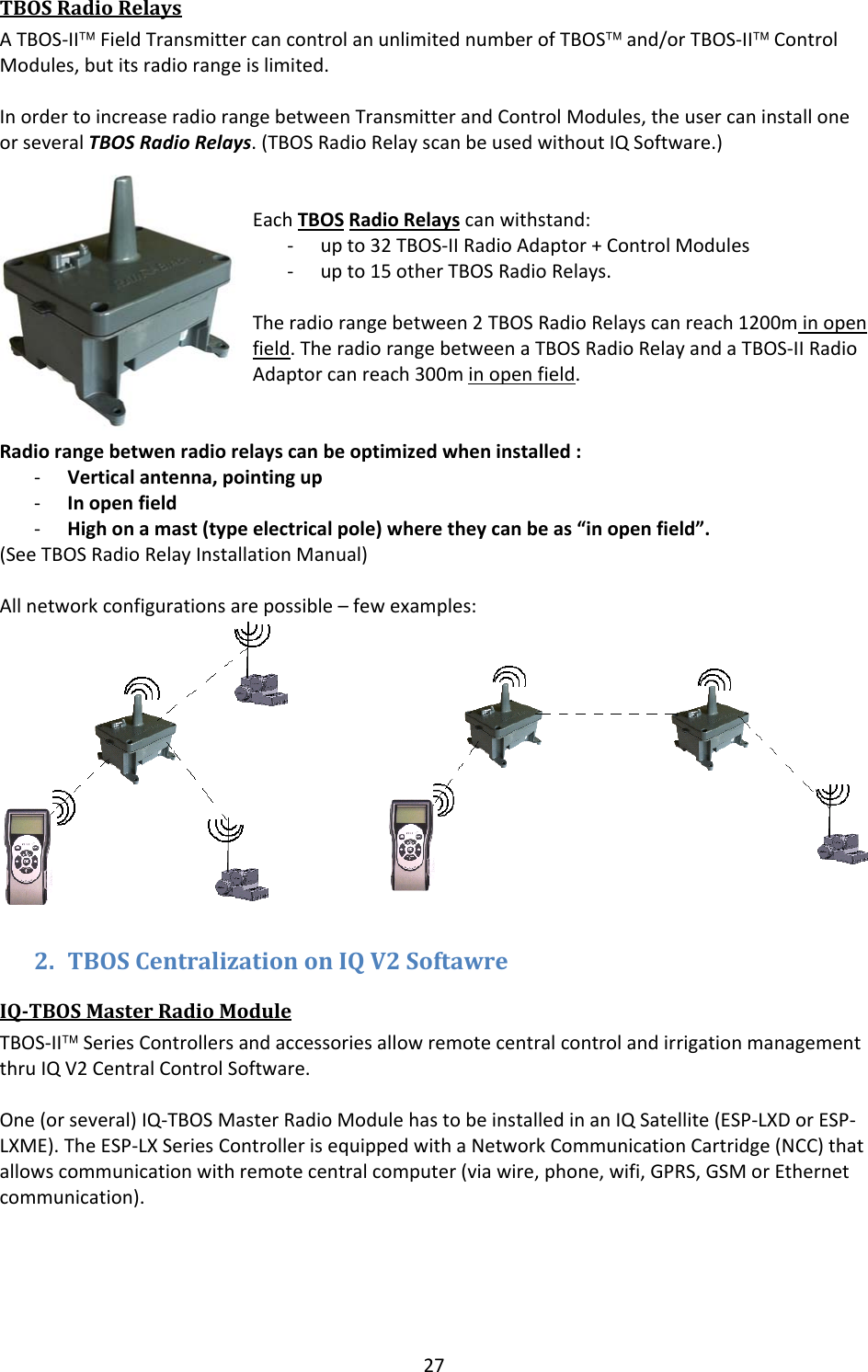
27TBOSRadioRelaysATBOS‐II™FieldTransmittercancontrolanunlimitednumberofTBOS™and/orTBOS‐II™ControlModules,butitsradiorangeislimited.InordertoincreaseradiorangebetweenTransmitterandControlModules,theusercaninstalloneorseveralTBOSRadioRelays.(TBOSRadioRelayscanbeusedwithoutIQSoftware.)EachTBOSRadioRelayscanwithstand:‐ upto32TBOS‐IIRadioAdaptor+ControlModules‐ upto15otherTBOSRadioRelays.Theradiorangebetween2TBOSRadioRelayscanreach1200minopenfield.TheradiorangebetweenaTBOSRadioRelayandaTBOS‐IIRadioAdaptorcanreach300minopenfield.Radiorangebetwenradiorelayscanbeoptimizedwheninstalled:‐ Verticalantenna,pointingup‐ Inopenfield‐ Highonamast(typeelectricalpole)wheretheycanbeas“inopenfield”.(SeeTBOSRadioRelayInstallationManual)Allnetworkconfigurationsarepossible–fewexamples:2. TBOSCentralizationonIQV2SoftawreIQTBOSMasterRadioModuleTBOS‐II™SeriesControllersandaccessoriesallowremotecentralcontrolandirrigationmanagementthruIQV2CentralControlSoftware.One(orseveral)IQ‐TBOSMasterRadioModulehastobeinstalledinanIQSatellite(ESP‐LXDorESP‐LXME).TheESP‐LXSeriesControllerisequippedwithaNetworkCommunicationCartridge(NCC)thatallowscommunicationwithremotecentralcomputer(viawire,phone,wifi,GPRS,GSMorEthernetcommunication).
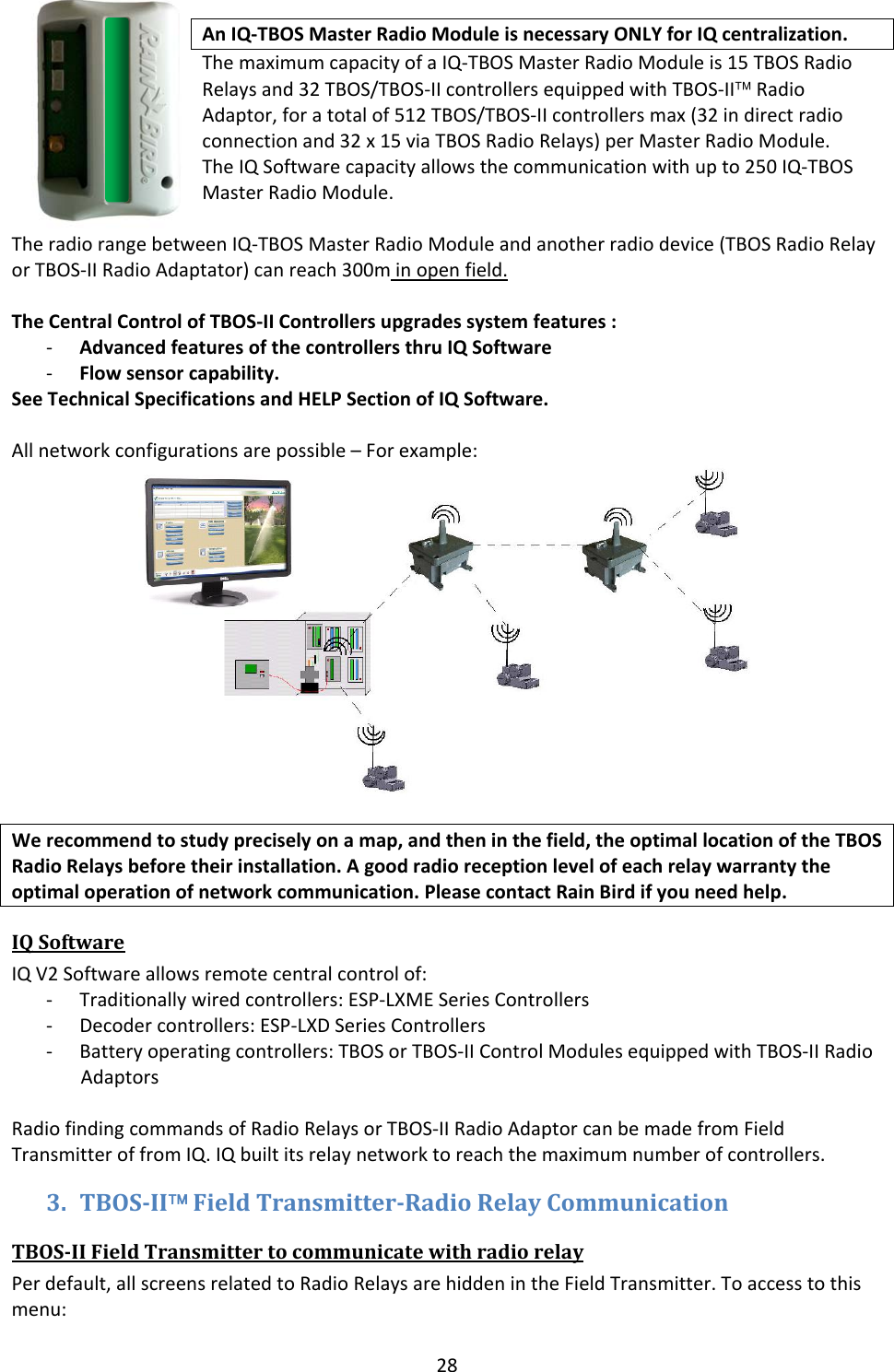
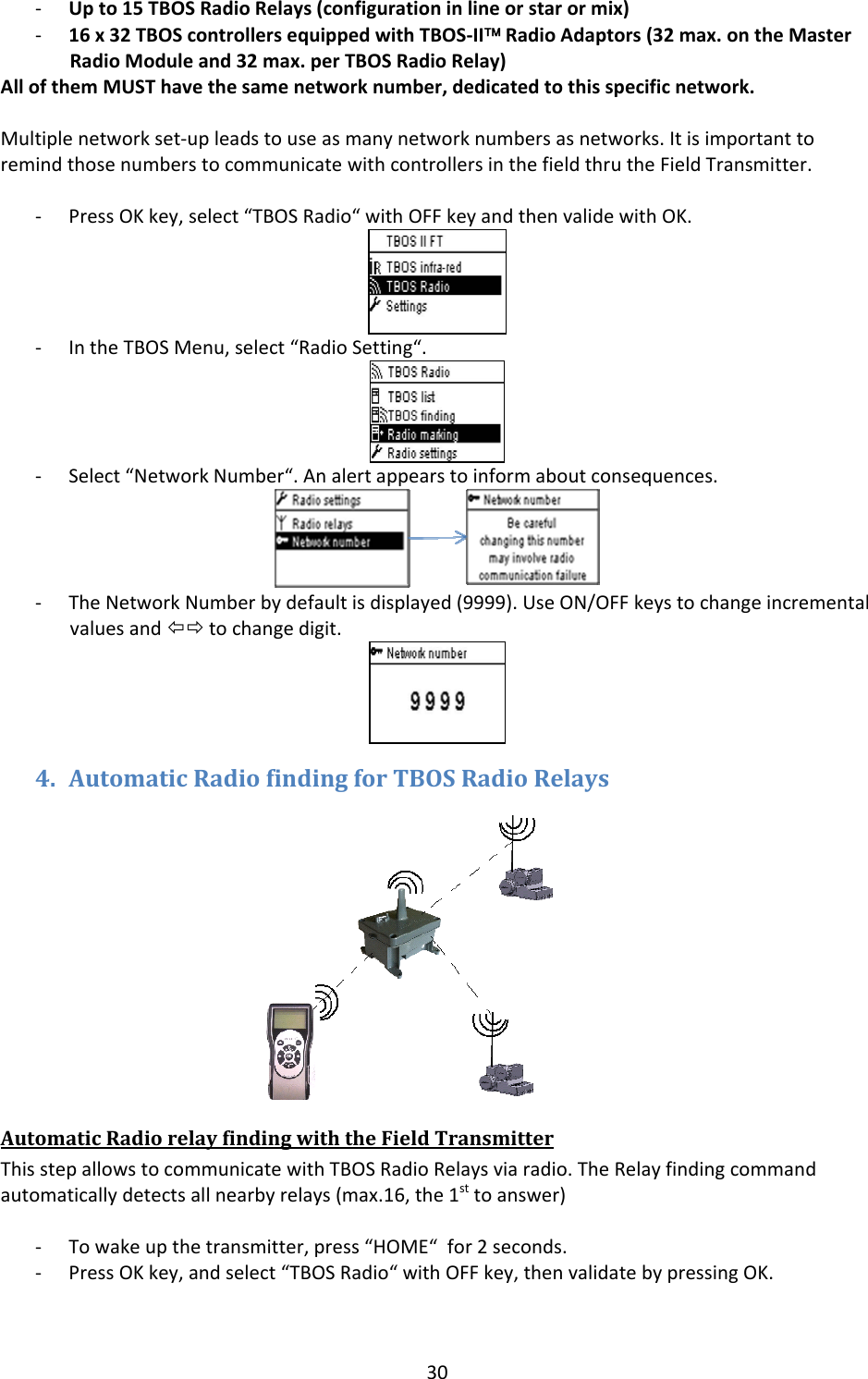
28AnIQ‐TBOSMasterRadioModuleisnecessaryONLYforIQcentralization.ThemaximumcapacityofaIQ‐TBOSMasterRadioModuleis15TBOSRadioRelaysand32TBOS/TBOS‐IIcontrollersequippedwithTBOS‐II™RadioAdaptor,foratotalof512TBOS/TBOS‐IIcontrollersmax(32indirectradioconnectionand32x15viaTBOSRadioRelays)perMasterRadioModule.TheIQSoftwarecapacityallowsthecommunicationwithupto250IQ‐TBOSMasterRadioModule.TheradiorangebetweenIQ‐TBOSMasterRadioModuleandanotherradiodevice(TBOSRadioRelayorTBOS‐IIRadioAdaptator)canreach300minopenfield.TheCentralControlofTBOS‐IIControllersupgradessystemfeatures:‐ AdvancedfeaturesofthecontrollersthruIQSoftware‐ Flowsensorcapability.SeeTechnicalSpecificationsandHELPSectionofIQSoftware.Allnetworkconfigurationsarepossible–Forexample:Werecommendtostudypreciselyonamap,andtheninthefield,theoptimallocationoftheTBOSRadioRelaysbeforetheirinstallation.Agoodradioreceptionlevelofeachrelaywarrantytheoptimaloperationofnetworkcommunication.PleasecontactRainBirdifyouneedhelp.IQSoftwareIQV2Softwareallowsremotecentralcontrolof:‐ Traditionallywiredcontrollers:ESP‐LXMESeriesControllers‐ Decodercontrollers:ESP‐LXDSeriesControllers‐ Batteryoperatingcontrollers:TBOSorTBOS‐IIControlModulesequippedwithTBOS‐IIRadioAdaptorsRadiofindingcommandsofRadioRelaysorTBOS‐IIRadioAdaptorcanbemadefromFieldTransmitteroffromIQ.IQbuiltitsrelaynetworktoreachthemaximumnumberofcontrollers.3. TBOSII™FieldTransmitterRadioRelayCommunicationTBOSIIFieldTransmittertocommunicatewithradiorelayPerdefault,allscreensrelatedtoRadioRelaysarehiddenintheFieldTransmitter.Toaccesstothismenu:
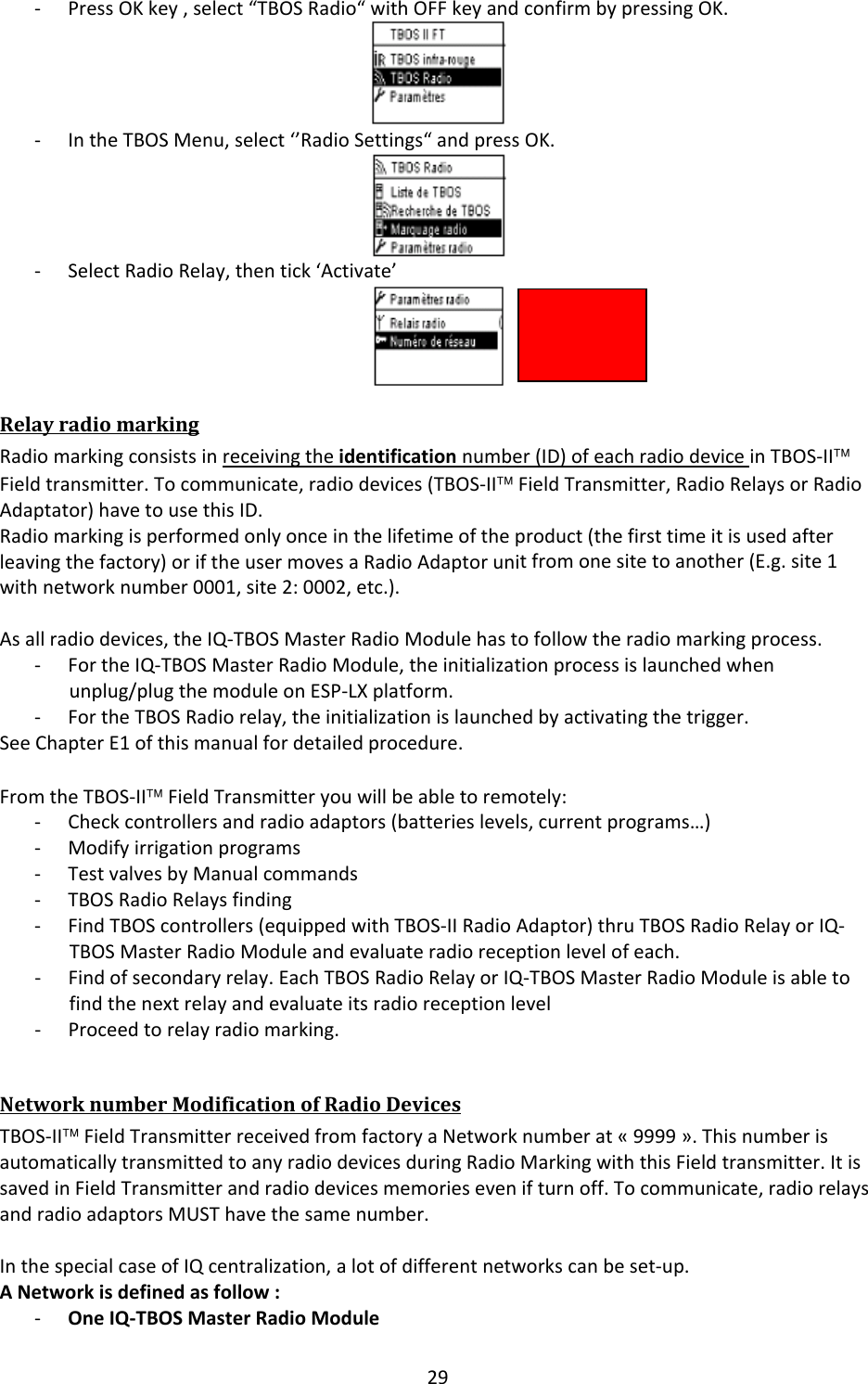
29‐ PressOKkey,select“TBOSRadio“withOFFkeyandconfirmbypressingOK.‐ IntheTBOSMenu,select‘’RadioSettings“andpressOK.‐ SelectRadioRelay,thentick‘Activate’RelayradiomarkingRadiomarkingconsistsinreceivingtheidentificationnumber(ID)ofeachradiodeviceinTBOS‐II™Fieldtransmitter.Tocommunicate,radiodevices(TBOS‐II™FieldTransmitter,RadioRelaysorRadioAdaptator)havetousethisID.Radiomarkingisperformedonlyonceinthelifetimeoftheproduct(thefirsttimeitisusedafterleavingthefactory)oriftheusermovesaRadioAdaptorunitfromonesitetoanother(E.g.site1withnetworknumber0001,site2:0002,etc.).Asallradiodevices,theIQ‐TBOSMasterRadioModulehastofollowtheradiomarkingprocess.‐ FortheIQ‐TBOSMasterRadioModule,theinitializationprocessislaunchedwhenunplug/plugthemoduleonESP‐LXplatform.‐ FortheTBOSRadiorelay,theinitializationislaunchedbyactivatingthetrigger.SeeChapterE1ofthismanualfordetailedprocedure.FromtheTBOS‐II™FieldTransmitteryouwillbeabletoremotely:‐ Checkcontrollersandradioadaptors(batterieslevels,currentprograms…)‐ Modifyirrigationprograms‐ TestvalvesbyManualcommands‐ TBOSRadioRelaysfinding‐ FindTBOScontrollers(equippedwithTBOS‐IIRadioAdaptor)thruTBOSRadioRelayorIQ‐TBOSMasterRadioModuleandevaluateradioreceptionlevelofeach.‐ Findofsecondaryrelay.EachTBOSRadioRelayorIQ‐TBOSMasterRadioModuleisabletofindthenextrelayandevaluateitsradioreceptionlevel‐ Proceedtorelayradiomarking.NetworknumberModificationofRadioDevicesTBOS‐II™FieldTransmitterreceivedfromfactoryaNetworknumberat«9999».ThisnumberisautomaticallytransmittedtoanyradiodevicesduringRadioMarkingwiththisFieldtransmitter.ItissavedinFieldTransmitterandradiodevicesmemoriesevenifturnoff.Tocommunicate,radiorelaysandradioadaptorsMUSThavethesamenumber.InthespecialcaseofIQcentralization,alotofdifferentnetworkscanbeset‐up.ANetworkisdefinedasfollow:‐ OneIQ‐TBOSMasterRadioModule
30‐ Upto15TBOSRadioRelays(configurationinlineorstarormix)‐ 16x32TBOScontrollersequippedwithTBOS‐II™RadioAdaptors(32max.ontheMasterRadioModuleand32max.perTBOSRadioRelay)AllofthemMUSThavethesamenetworknumber,dedicatedtothisspecificnetwork.Multiplenetworkset‐upleadstouseasmanynetworknumbersasnetworks.ItisimportanttoremindthosenumberstocommunicatewithcontrollersinthefieldthrutheFieldTransmitter.‐ PressOKkey,select“TBOSRadio“withOFFkeyandthenvalidewithOK.‐ IntheTBOSMenu,select“RadioSetting“.‐ Select“NetworkNumber“.Analertappearstoinformaboutconsequences.‐ TheNetworkNumberbydefaultisdisplayed(9999).UseON/OFFkeystochangeincrementalvaluesandÕÖtochangedigit.4. AutomaticRadiofindingforTBOSRadioRelaysAutomaticRadiorelayfindingwiththeFieldTransmitterThisstepallowstocommunicatewithTBOSRadioRelaysviaradio.TheRelayfindingcommandautomaticallydetectsallnearbyrelays(max.16,the1sttoanswer)‐ Towakeupthetransmitter,press“HOME“for2seconds.‐ PressOKkey,andselect“TBOSRadio“withOFFkey,thenvalidatebypressingOK.
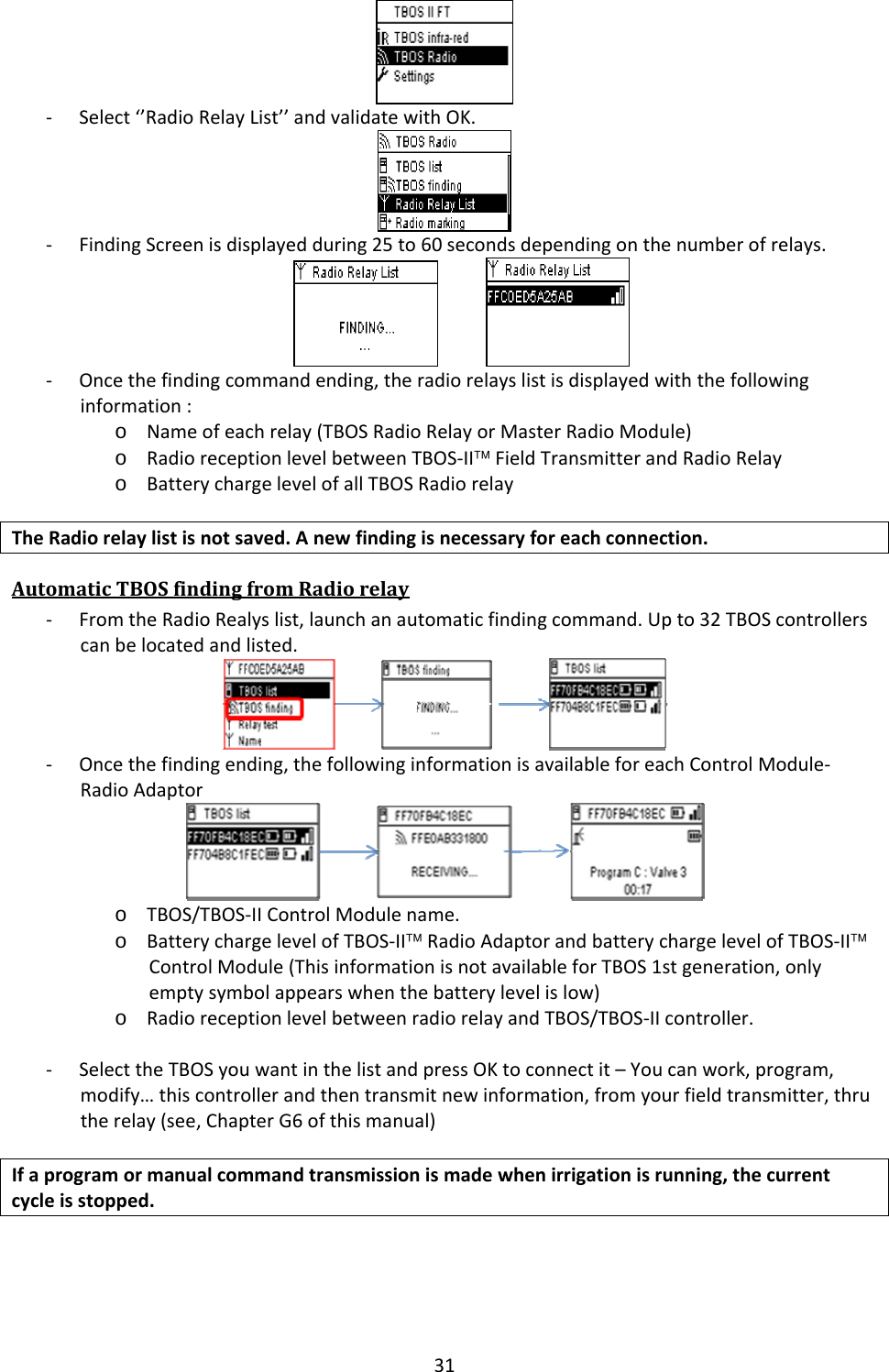
31‐ Select‘’RadioRelayList’’andvalidatewithOK.‐ FindingScreenisdisplayedduring25to60secondsdependingonthenumberofrelays. ‐ Oncethefindingcommandending,theradiorelayslistisdisplayedwiththefollowinginformation:o Nameofeachrelay(TBOSRadioRelayorMasterRadioModule)o RadioreceptionlevelbetweenTBOS‐II™FieldTransmitterandRadioRelayo BatterychargelevelofallTBOSRadiorelayTheRadiorelaylistisnotsaved.Anewfindingisnecessaryforeachconnection.AutomaticTBOSfindingfromRadiorelay‐ FromtheRadioRealyslist,launchanautomaticfindingcommand.Upto32TBOScontrollerscanbelocatedandlisted. ‐ Oncethefindingending,thefollowinginformationisavailableforeachControlModule‐RadioAdaptoro TBOS/TBOS‐IIControlModulename.o BatterychargelevelofTBOS‐II™RadioAdaptorandbatterychargelevelofTBOS‐II™ControlModule(ThisinformationisnotavailableforTBOS1stgeneration,onlyemptysymbolappearswhenthebatterylevelislow)o RadioreceptionlevelbetweenradiorelayandTBOS/TBOS‐IIcontroller.‐ SelecttheTBOSyouwantinthelistandpressOKtoconnectit–Youcanwork,program,modify…thiscontrollerandthentransmitnewinformation,fromyourfieldtransmitter,thrutherelay(see,ChapterG6ofthismanual)Ifaprogramormanualcommandtransmissionismadewhenirrigationisrunning,thecurrentcycleisstopped.
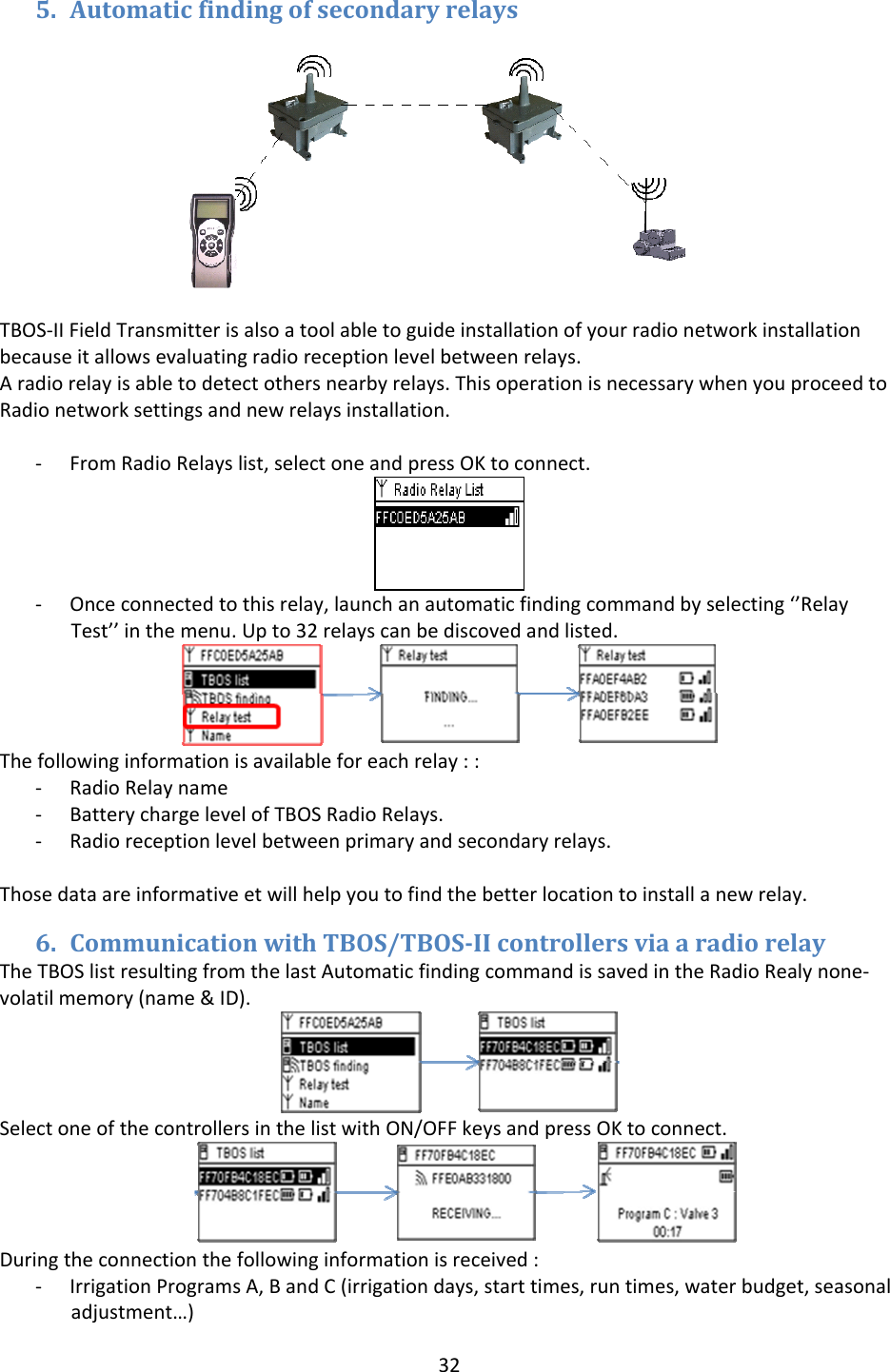
325. AutomaticfindingofsecondaryrelaysTBOS‐IIFieldTransmitterisalsoatoolabletoguideinstallationofyourradionetworkinstallationbecauseitallowsevaluatingradioreceptionlevelbetweenrelays.Aradiorelayisabletodetectothersnearbyrelays.ThisoperationisnecessarywhenyouproceedtoRadionetworksettingsandnewrelaysinstallation.‐ FromRadioRelayslist,selectoneandpressOKtoconnect.‐ Onceconnectedtothisrelay,launchanautomaticfindingcommandbyselecting‘’RelayTest’’inthemenu.Upto32relayscanbediscovedandlisted.Thefollowinginformationisavailableforeachrelay::‐ RadioRelayname‐ BatterychargelevelofTBOSRadioRelays.‐ Radioreceptionlevelbetweenprimaryandsecondaryrelays.Thosedataareinformativeetwillhelpyoutofindthebetterlocationtoinstallanewrelay.6. CommunicationwithTBOS/TBOSIIcontrollersviaaradiorelayTheTBOSlistresultingfromthelastAutomaticfindingcommandissavedintheRadioRealynone‐volatilmemory(name&ID).SelectoneofthecontrollersinthelistwithON/OFFkeysandpressOKtoconnect.Duringtheconnectionthefollowinginformationisreceived:‐ IrrigationProgramsA,BandC(irrigationdays,starttimes,runtimes,waterbudget,seasonaladjustment…)
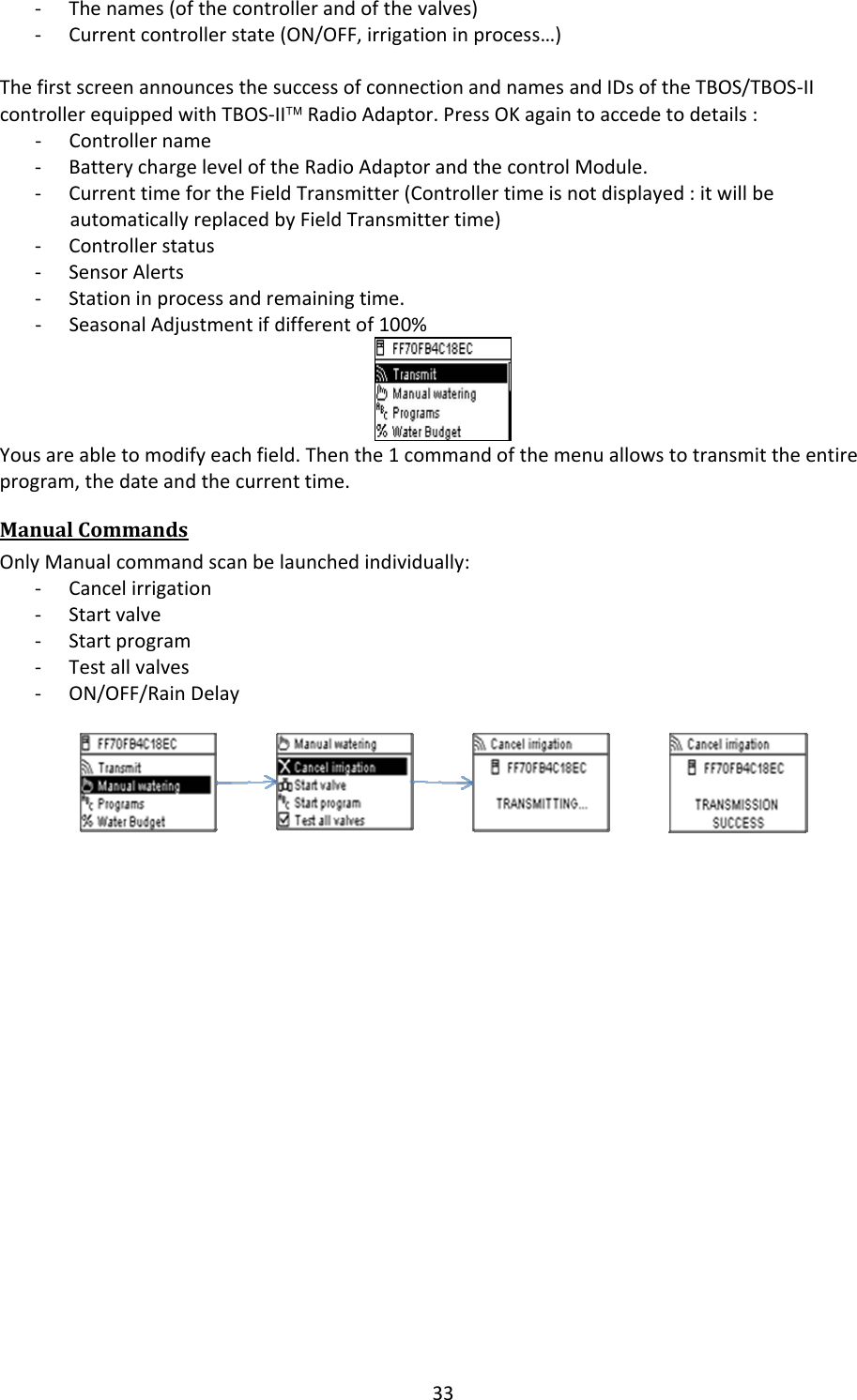
33‐ Thenames(ofthecontrollerandofthevalves)‐ Currentcontrollerstate(ON/OFF,irrigationinprocess…)ThefirstscreenannouncesthesuccessofconnectionandnamesandIDsoftheTBOS/TBOS‐IIcontrollerequippedwithTBOS‐II™RadioAdaptor.PressOKagaintoaccedetodetails:‐ Controllername‐ BatterychargeleveloftheRadioAdaptorandthecontrolModule.‐ CurrenttimefortheFieldTransmitter(Controllertimeisnotdisplayed:itwillbeautomaticallyreplacedbyFieldTransmittertime)‐ Controllerstatus‐ SensorAlerts‐ Stationinprocessandremainingtime.‐ SeasonalAdjustmentifdifferentof100%Yousareabletomodifyeachfield.Thenthe1commandofthemenuallowstotransmittheentireprogram,thedateandthecurrenttime.ManualCommandsOnlyManualcommandscanbelaunchedindividually:‐ Cancelirrigation‐ Startvalve‐ Startprogram‐ Testallvalves‐ ON/OFF/RainDelay
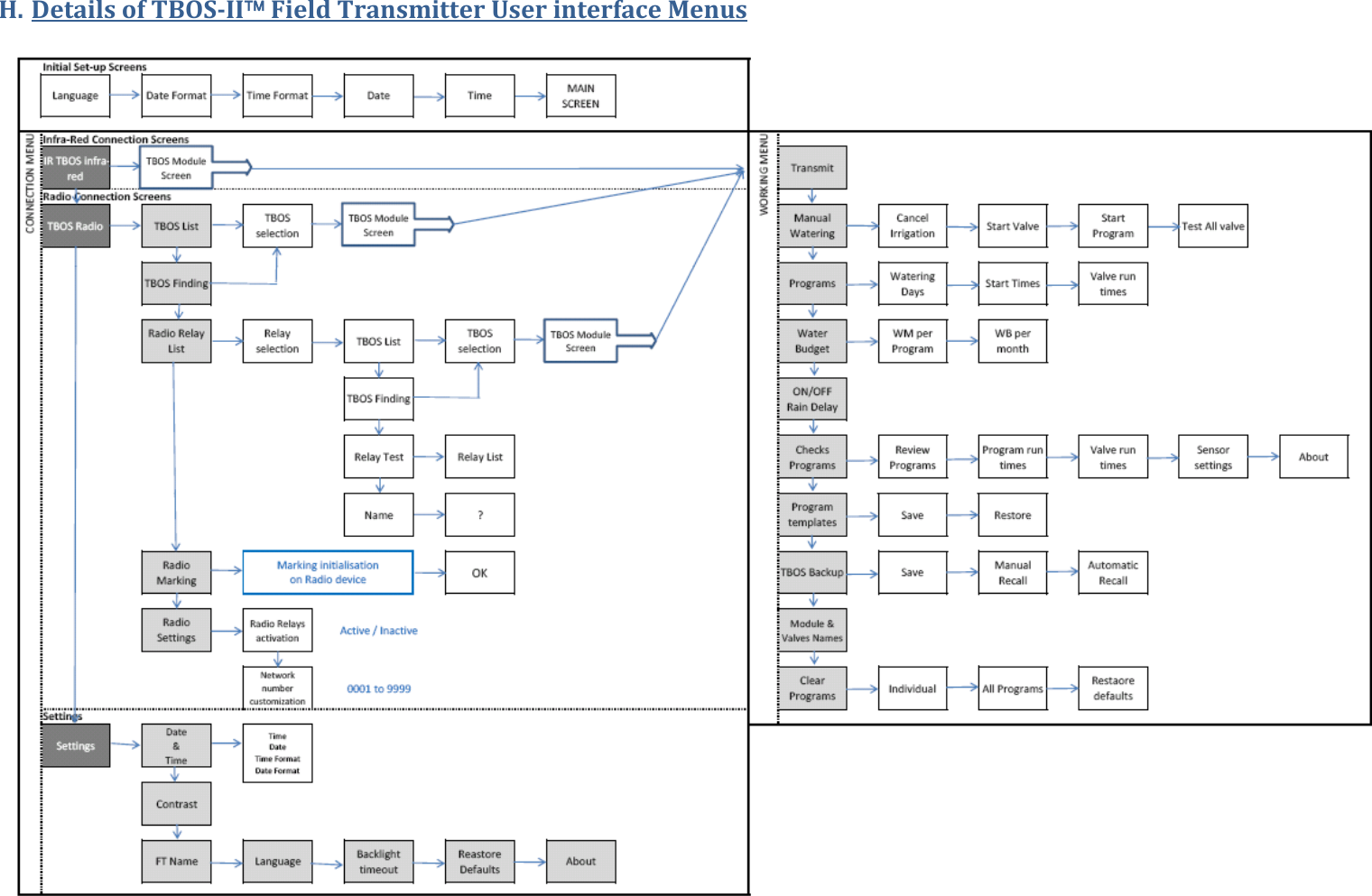
H. DetailsofTBOSII™FieldTransmitterUserinterfaceMenus
RAINBIRDCORPORATION6991E.SouthpointRoad–Tucson,AZ85756–USAwww.rainbird.comRAINBIRDEUROPESNC900,rueAmpère,BP72000–13792Aix‐en‐ProvenceCEDEX3–Francewww.rainbird.eu®RegisteredtrademarkofRainBirdSprinklerMfg.Corp.©2011RainBirdCorporation07/11RBE‐11‐TE‐35b

Navigation menu