users manual
350 S. St. Charles St. Jasper, In. 47546 Ph. 812.482.2932 Fax 812.634.6632
on the internet: www.ridetech.com
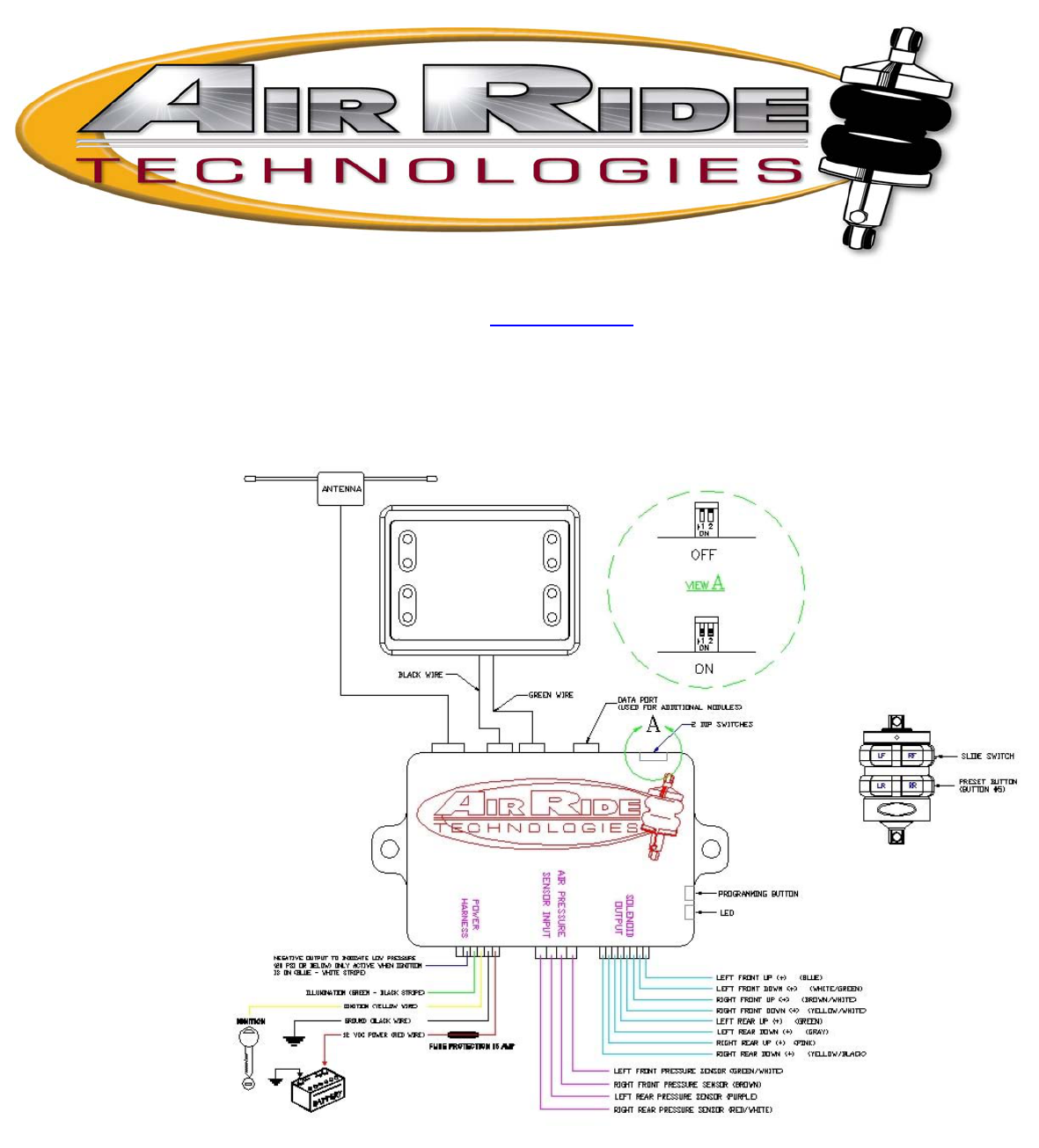
Connector # 1 – Power harness
•
Connect green/black stripe to----------------- illumination
•
Connect yellow to-------------------------------- ignition
•
Connect black to----------------------------------directly to ground of battery
•
Connect red to------------------------------------ directly to battery 12v positive
Connector # 2 – Sensor harness
•
Connect green/white wire to------------------ left front pressure sensor
•
Connect brown wire to------------------------- right front pressure sensor
•
Connect purple wire to------------------------- left rear pressure sensor
•
Connect red/white wire to--------------------- right rear pressure sensor
Connector # 3 – Solenoid harness NOTE: This harness will have a weatherpak connector on it that will
plug in to our existing RidePro solenoids. There will be no further connections necessary. If you have
another brand or type of solenoid, please refer to the connection instructions below for proper connection.
•
Connect blue wire to -------------------------- left front UP solenoid
•
Connect white/green wire to----------------- left front DOWN solenoid
•
Connect brown/white wire to---------------- right front UP solenoid
•
Connect yellow/white wire to----------------right front DOWN solenoid
•
Connect green wire to------------------------ left rear UP solenoid
•
Connect gray wire to--------------------------left rear DOWN solenoid
•
Connect pink wire to---------------------------right rear UP solenoid
•
Connect yellow/black wire to--------------- right rear DOWN solenoid
Installation notes:
1. The computer box should be mounted inside the vehicle to avoid moisture and to be accessible to make
programming changes. DO NOT MOUNT THE COMPUTER BOX IN THE ENGINE BAY OR
UNDERNEATH THE CAR.
2. Do not plug in the receiver module until all the wiring is complete.
3. The air pressure sending units must be grounded to function properly. This can be accomplished
through a metal mounting bracket or by attaching a ground wire to the main body of the sensor.
4. The control panel display unit can be flush mounted or surface mounted in any location inside the
vehicle…or it can be left unmounted. It is supplied with 6 ft. leads to the computer box. 12 ft. leads are
available from the factory if desired. DO NOT lengthen or shorten these leads…call the factory for a longer
harness.
5. The control panel is an LCD display. This display may be unsatisfactory if mounted at an extreme angle
to the driver. You may want to power up the system temporarily to insure you are able to see the display
properly in your selected mounting location.
How to program the air pressure presets:
To Program air pressure preset #1: This is the default setting that will be engaged every time the vehicle
is started. It can also be engaged via the [optional] keyfob transmitter by placing the slide switch in the “up”
position. It is recommended that this air pressure be adjusted to the highway ride height of the vehicle.
1. Place the DIP-switches located on the side of the computer box in the OFF [“up”] position
2.Turn ignition ON
3. Set desired air pressure of the vehicle with main control panel switches
4. Press the “program” button, located on the side of the computer box 6 times, (If the program
button is held for 3 seconds on the 7th press of the button, level one will be set.) … the led beside the
program button will then flash (4 Times) to indicate programming was successful.
OPTIONAL: If you have the optional remote control system, set the slide switch on the side of the
transmitter to the “UP” position and press the #5 button on the side of the keyfob transmitter to enter the #1
setting into the remote control system. The main control panel display will flash slowly four times to indicate
remote control setting #1 was successful.
After ALL programming is complete, return the DIP switches to the “ON” position to activate
the air pressure presets.
To Program air pressure setting #2: This air pressure preset is only accessible from the optional remote
control keyfob transmitter. This air pressure setting is typically adjusted to set the vehicle at a lower ride
height for parking.
1. Place the DIP-switches located on the side of the computer box in the OFF [“up”] position
2.Turn ignition ON
3. Set desired air pressure of the vehicle with main control panel switches
4. Press the “program” button, located on the side of the computer box 6 times … the led beside the
program button will then flash.
5. Set the slide switch on the side of the transmitter to the “DOWN” position and press the #5 button
on the side of the keyfob transmitter to enter the #2 setting into the remote control system. The main
control panel display will flash quickly four times to indicate remote control setting #2 was successful.
After ALL programming is complete, return the DIP-switches to the “ON” position to activate the
air pressure presets.
NOTE: The vehicle will return to the #1 air pressure preset every time the vehicle is started. If you DO NOT
wish to use the air pressure preset feature, simply leave the DIP switches in the “OFF” [UP] position.
How to operate the RidePro E system
The main control panel display contains the switches for inflating or deflating the individual airsprings. The
position of the switches correspond to the position of the airsprings in your vehicle. NOTE: The control
panel is functional ONLY when the key is “ON”. It is disabled when the key is “OFF”. The optional remote
control system is functional ONLY when the key is “OFF”.
Control Panel:
Top Left Switch: Controls left front ride height UP or DOWN
Indicates Air Pressure of left front air bag
Top Right Switch: Controls right front ride height UP or DOWN
Indicates Air Pressure of right front air bag
Bottom Left Switch: Controls left rear ride height UP or DOWN
Indicates Air Pressure of left rear air bag
Bottom Right Switch: Controls right rear ride height UP or DOWN
Indicates Air Pressure of right rear air bag
Optional Remote Control Transmitter:
Button 1 (LF): Controls left front ride height UP or DOWN
Button 2 (RF): Controls right front ride height UP or DOWN
Button 3 (LR): Controls left rear ride height UP or DOWN
Button 4 (RR): Controls right rear ride height UP or DOWN
Button 5 (side of transmitter): Activates air pressure presets
Slide Switch UP: Controls buttons 1-4 ride height UP and controls level #1 setting
Slide Switch DOWN: Controls buttons 1-4 ride height DOWN and controls level # 2 setting
To Change ride height with the optional remote transmitters: Remotes only function with ignition OFF
1. To raise vehicle place remote switch in the UP position
2. To lower vehicle place remote switch in the DOWN position
3. Press the corresponding button of the remote for the corner you wish to raise/lower
Remote Automatic Height Adjustment via Programmed settings: The remote will only operate when
ignition is OFF
To return to Setting Number 1:
1. Turn the ignition OFF
2. Press Slide Switch to the UP position
3. Press button Number 5. . .Vehicle will attempt to achieve setting number 1
To return to Setting Number 2:
1. Turn the ignition OFF
2. Press Slide Switch to the DOWN position
3. Press button Number 5. . .Vehicle will attempt to achieve setting number 2
Using the optional remote transmitter to operate Settings Number 1 and 2: The remote will only
operate when ignition is OFF
To return to Setting Number 1:
1. Turn the ignition OFF
2. Press Slide Switch to the UP position
3. Press button Number 5. . .Vehicle will attempt to achieve setting number 1
To return to Setting Number 2:
1. Turn the ignition OFF
2. Press Slide Switch to the DOWN position
3. Press button Number 5. . .Vehicle will attempt to achieve setting number 2
FCC Statement
This device complies with part 15 of the FCC rules. Operation is subject to the following two conditions.
(1) This device may not cause harmful interference and (2) This device must accept any interference
received, including interference that may cause undesired operation.
You are cautioned that changes or modifications not expressly approved by the party responsible for compliance could void your
authority to operate the equipment.
Note: The manufacturer is not responsible for any radio or TV interference caused by unauthorized modifications to operate the
equipment.