SPAL USA UTRX Automated Control User Manual ACE OG

SPAL USA Automated Control ACE OG

users manual

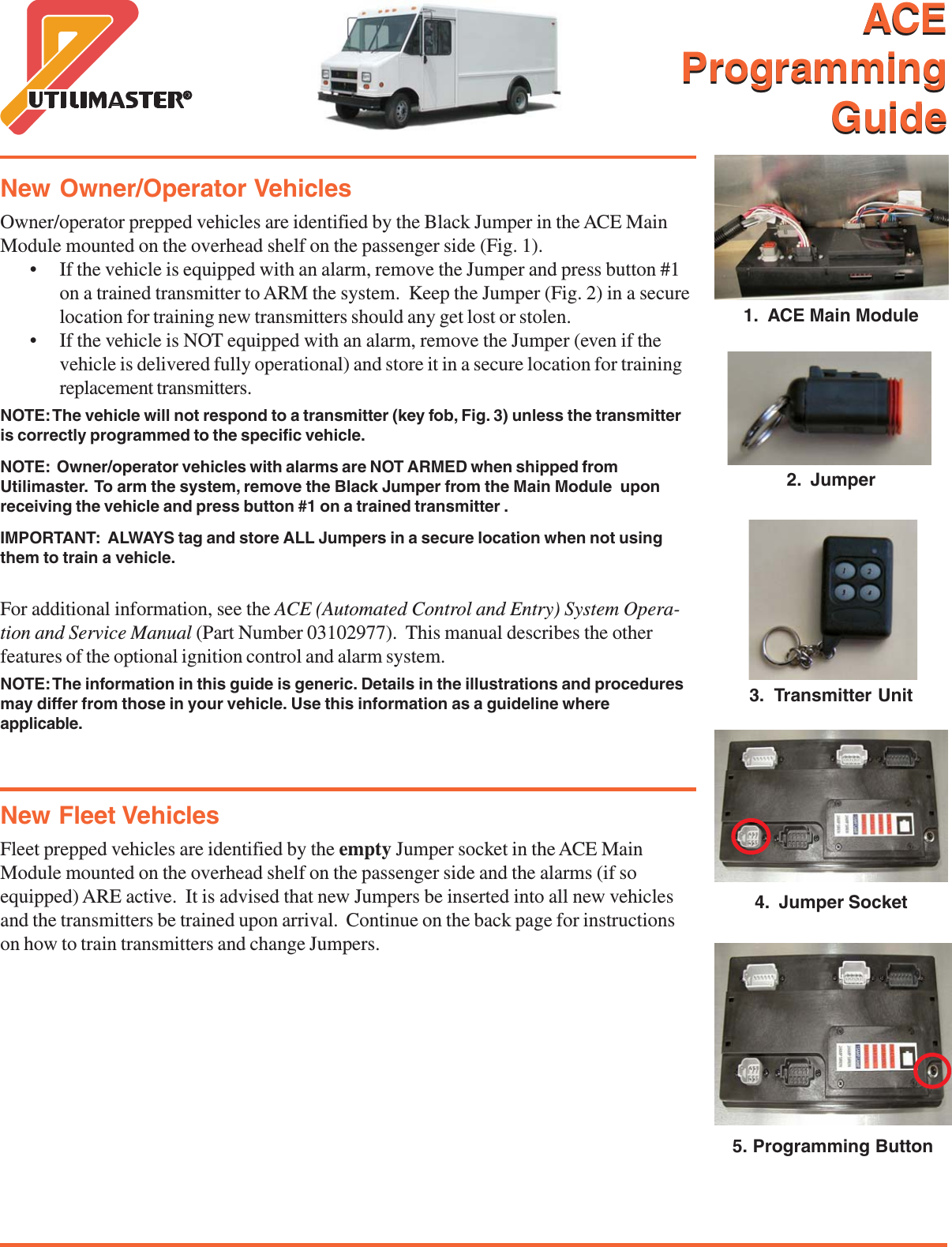
  ACEProgrammingGuide1.  ACE Main Module2.  Jumper3.  Transmitter Unit4.  Jumper Socket5. Programming ButtonNew Owner/Operator VehiclesOwner/operator prepped vehicles are identified by the Black Jumper in the ACE MainModule mounted on the overhead shelf on the passenger side (Fig. 1).• If the vehicle is equipped with an alarm, remove the Jumper and press button #1on a trained transmitter to ARM the system.  Keep the Jumper (Fig. 2) in a securelocation for training new transmitters should any get lost or stolen.• If the vehicle is NOT equipped with an alarm, remove the Jumper (even if thevehicle is delivered fully operational) and store it in a secure location for trainingreplacement transmitters.NOTE: The vehicle will not respond to a transmitter (key fob, Fig. 3) unless the transmitteris correctly programmed to the specific vehicle.NOTE:  Owner/operator vehicles with alarms are NOT ARMED when shipped fromUtilimaster.  To arm the system, remove the Black Jumper from the Main Module  uponreceiving the vehicle and press button #1 on a trained transmitter .IMPORTANT:  ALWAYS tag and store ALL Jumpers in a secure location when not usingthem to train a vehicle.For additional information, see the ACE (Automated Control and Entry) System Opera-tion and Service Manual (Part Number 03102977).  This manual describes the otherfeatures of the optional ignition control and alarm system.NOTE: The information in this guide is generic. Details in the illustrations and proceduresmay differ from those in your vehicle. Use this information as a guideline whereapplicable.New Fleet VehiclesFleet prepped vehicles are identified by the empty Jumper socket in the ACE MainModule mounted on the overhead shelf on the passenger side and the alarms (if soequipped) ARE active.  It is advised that new Jumpers be inserted into all new vehiclesand the transmitters be trained upon arrival.  Continue on the back page for instructionson how to train transmitters and change Jumpers.ACEProgrammingGuide
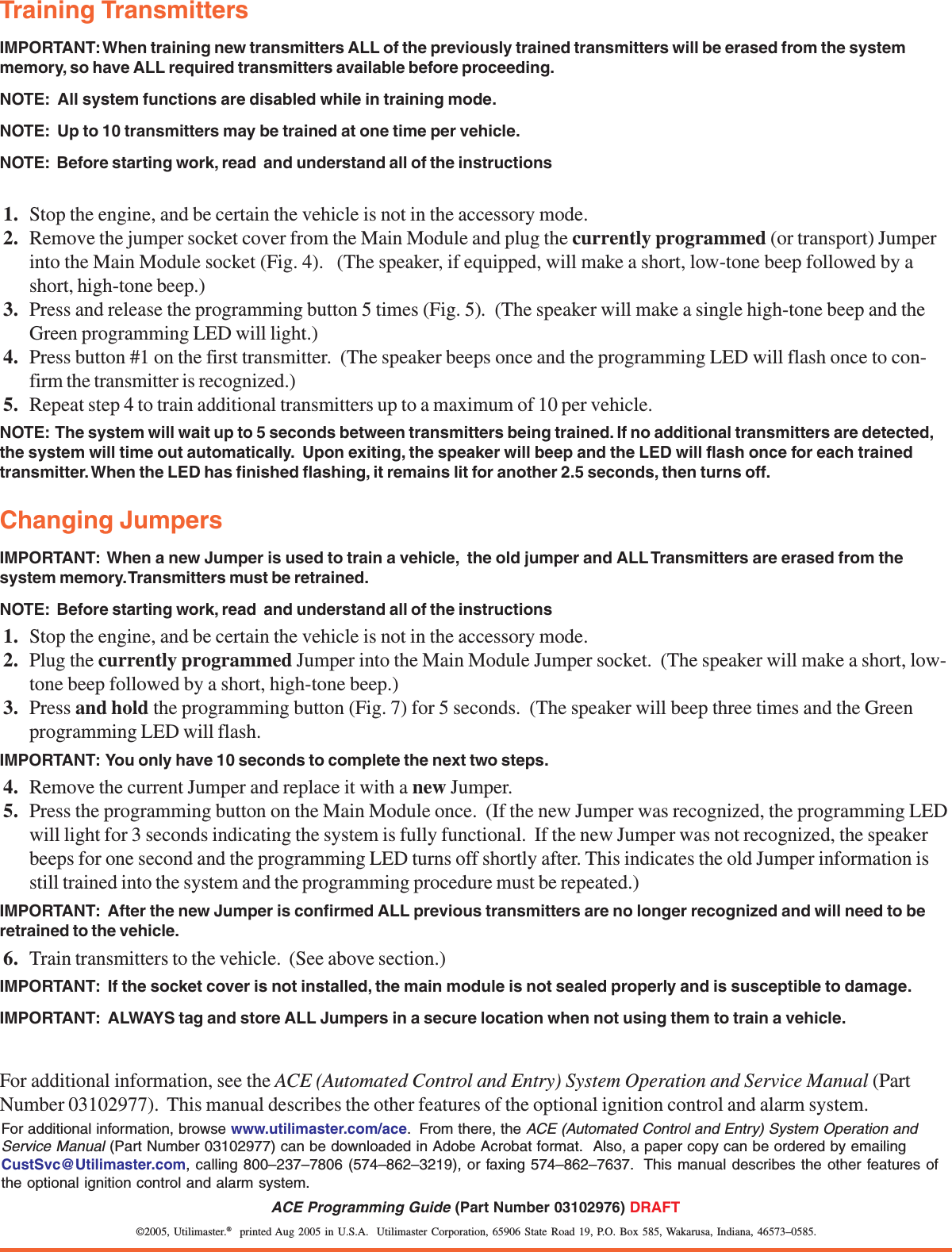
©2005, Utilimaster.®  printed Aug 2005 in U.S.A.  Utilimaster Corporation, 65906 State Road 19, P.O. Box 585, Wakarusa, Indiana, 46573–0585.ACE Programming Guide (Part Number 03102976) DRAFTTraining TransmittersIMPORTANT: When training new transmitters ALL of the previously trained transmitters will be erased from the systemmemory, so have ALL required transmitters available before proceeding.NOTE:  All system functions are disabled while in training mode.NOTE:  Up to 10 transmitters may be trained at one time per vehicle.NOTE:  Before starting work, read  and understand all of the instructions1. Stop the engine, and be certain the vehicle is not in the accessory mode.2. Remove the jumper socket cover from the Main Module and plug the currently programmed (or transport) Jumperinto the Main Module socket (Fig. 4).   (The speaker, if equipped, will make a short, low-tone beep followed by ashort, high-tone beep.)3. Press and release the programming button 5 times (Fig. 5).  (The speaker will make a single high-tone beep and theGreen programming LED will light.)4. Press button #1 on the first transmitter.  (The speaker beeps once and the programming LED will flash once to con-firm the transmitter is recognized.)5. Repeat step 4 to train additional transmitters up to a maximum of 10 per vehicle.NOTE:  The system will wait up to 5 seconds between transmitters being trained. If no additional transmitters are detected,the system will time out automatically.  Upon exiting, the speaker will beep and the LED will flash once for each trainedtransmitter. When the LED has finished flashing, it remains lit for another 2.5 seconds, then turns off.Changing JumpersIMPORTANT:  When a new Jumper is used to train a vehicle,  the old jumper and ALL Transmitters are erased from thesystem memory. Transmitters must be retrained.NOTE:  Before starting work, read  and understand all of the instructions1. Stop the engine, and be certain the vehicle is not in the accessory mode.2. Plug the currently programmed Jumper into the Main Module Jumper socket.  (The speaker will make a short, low-tone beep followed by a short, high-tone beep.)3. Press and hold the programming button (Fig. 7) for 5 seconds.  (The speaker will beep three times and the Greenprogramming LED will flash.IMPORTANT:  You only have 10 seconds to complete the next two steps.4. Remove the current Jumper and replace it with a new Jumper.5. Press the programming button on the Main Module once.  (If the new Jumper was recognized, the programming LEDwill light for 3 seconds indicating the system is fully functional.  If the new Jumper was not recognized, the speakerbeeps for one second and the programming LED turns off shortly after. This indicates the old Jumper information isstill trained into the system and the programming procedure must be repeated.)IMPORTANT:  After the new Jumper is confirmed ALL previous transmitters are no longer recognized and will need to beretrained to the vehicle.6. Train transmitters to the vehicle.  (See above section.)IMPORTANT:  If the socket cover is not installed, the main module is not sealed properly and is susceptible to damage.IMPORTANT:  ALWAYS tag and store ALL Jumpers in a secure location when not using them to train a vehicle.For additional information, see the ACE (Automated Control and Entry) System Operation and Service Manual (PartNumber 03102977).  This manual describes the other features of the optional ignition control and alarm system.For additional information, browse www.utilimaster.com/ace.  From there, the ACE (Automated Control and Entry) System Operation andService Manual (Part Number 03102977) can be downloaded in Adobe Acrobat format.  Also, a paper copy can be ordered by emailingCustSvc@Utilimaster.com, calling 800–237–7806 (574–862–3219), or faxing 574–862–7637.  This manual describes the other features ofthe optional ignition control and alarm system.

Navigation menu