SUNGALE ELECTRONICS C10011008 IP CAMERA User Manual IP CAMERA
SUNGALE ELECTRONICS (SHENZHEN) CO., LTD. IP CAMERA IP CAMERA
User manual
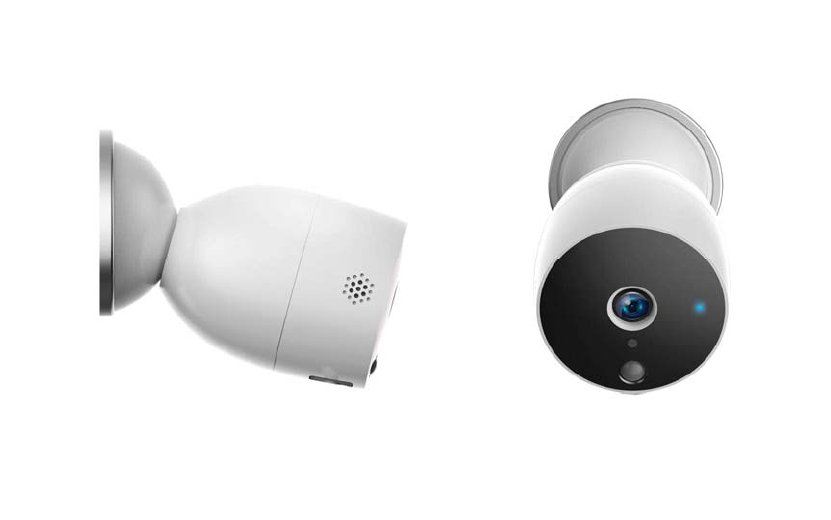
IPCAMERA
USERMANUAL
Model#SC‐BIPC‐1001
For ongoing product improvement, this manual is subject to modification without prior notice
Thankyouforpurchasingtheeco4lifeIPcamera.Weareexcitedinbeing
apartofmakingyourlifeeasier,saferandbringingpeaceofmindinto
yourhomes.
Whatinthebox?
1xCamera
6xBattery
1xWarranty
1xUsermanual
2xScrews
2xPlastichousing
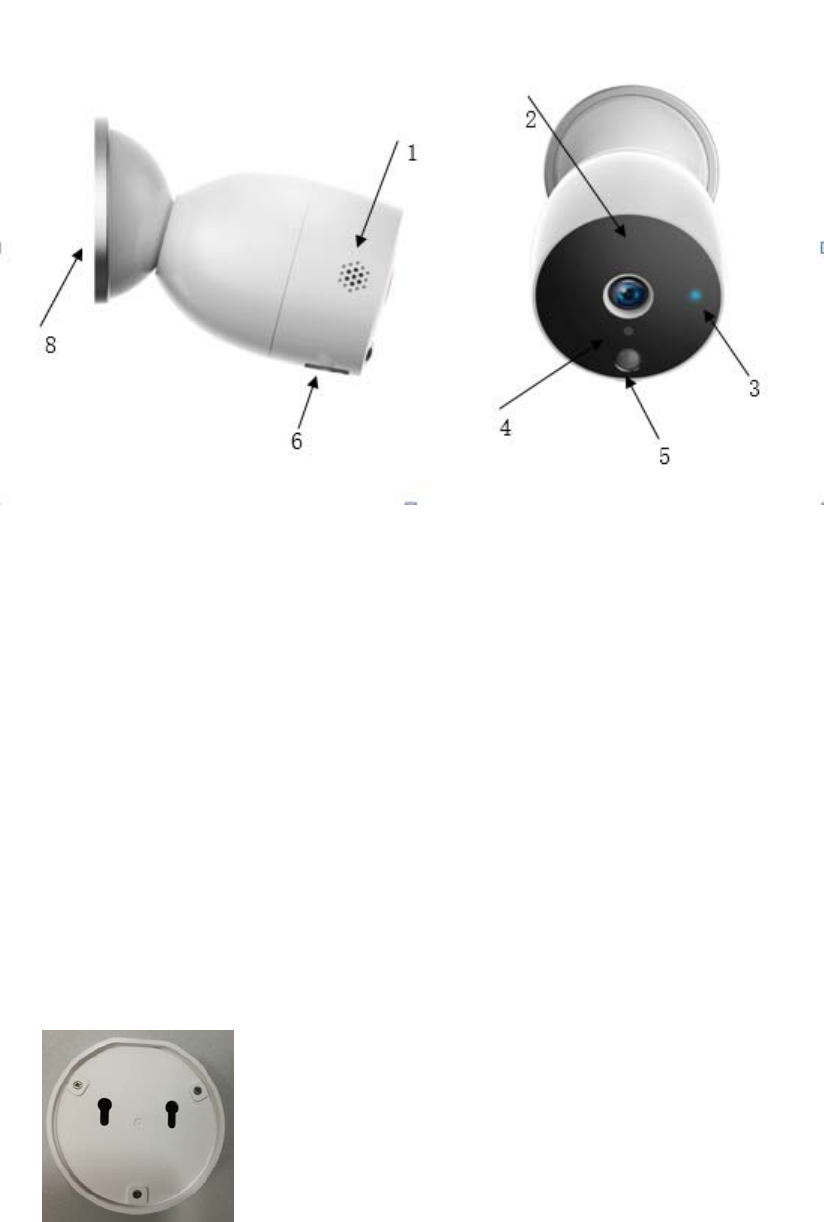
Productoverview
1. Speaker
2. Microphone
3. IndicatorLight
SolidRedlighton:thecameranetworkisabnormal
SlowlyBlinkingredlight:awaitingWiFiconnection
(Holdontheresetbuttonfor5secondstosettheredlighttoSlowlyblink)
Solidbluelighton:camerarunningcorrectly
Blinkingbluelight:CurrentlyConnecting
4. Lightsensor
5. Motionsensor
6. MicroUSBport
Connectthecameratothecomputer,tocopythevideofromcameratocomputer.
7. Turntheupperhalfpartofthecameraclockwiseandpullituptoopenthecameratoputthe
battery
8. Camerabase
Hangitonthewallbythescrews
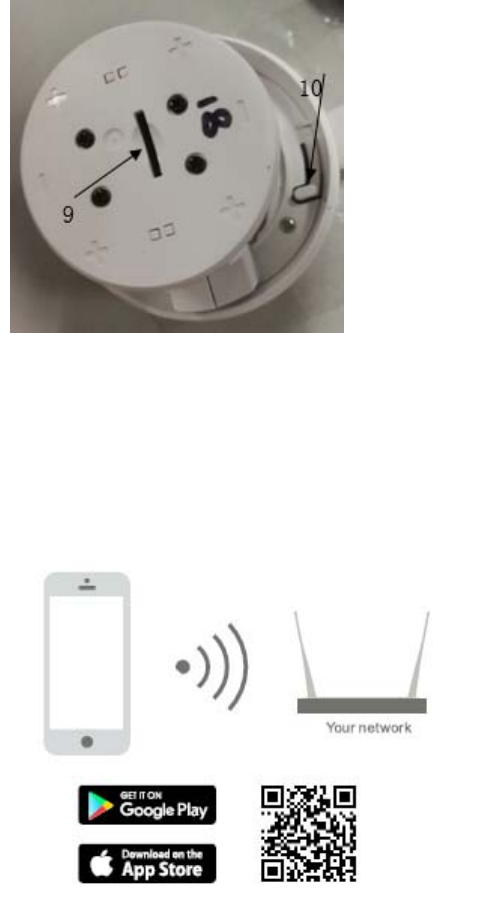
9. SDslot(SDslotisinnerthecamera)
10. Resetbutton
Set‐up
1. Install6pcsAAbatteryintothecamera.
2. Downloadoureco4lifeappbyscanningQRcodebeloworsearchingfromyouappstore.
Followourpromptstofinishsetup.
Importantremindersbeforeaddingthedevice:
1. Thiscameraonlysupports2.4GHZWiFirouter,pleasemakesureyouareusinga2.4GHZ
WiFirouter.
2. Pleasefollowtheinstructionsandmakesurethepasswordisenteredcorrectly.
3. Onlyonecameraandoneregisteredaccountisallowedbytheapp.ifaRegistered
accountaddedthecamerathroughtheAPP,anotherUsercannotlongeraddand
registeranaccount.
4. YoumustdeletethefirstRegisteredAccountfromtheApp,thenanotherUsermayadd
thedeviceandregisteranaccount.
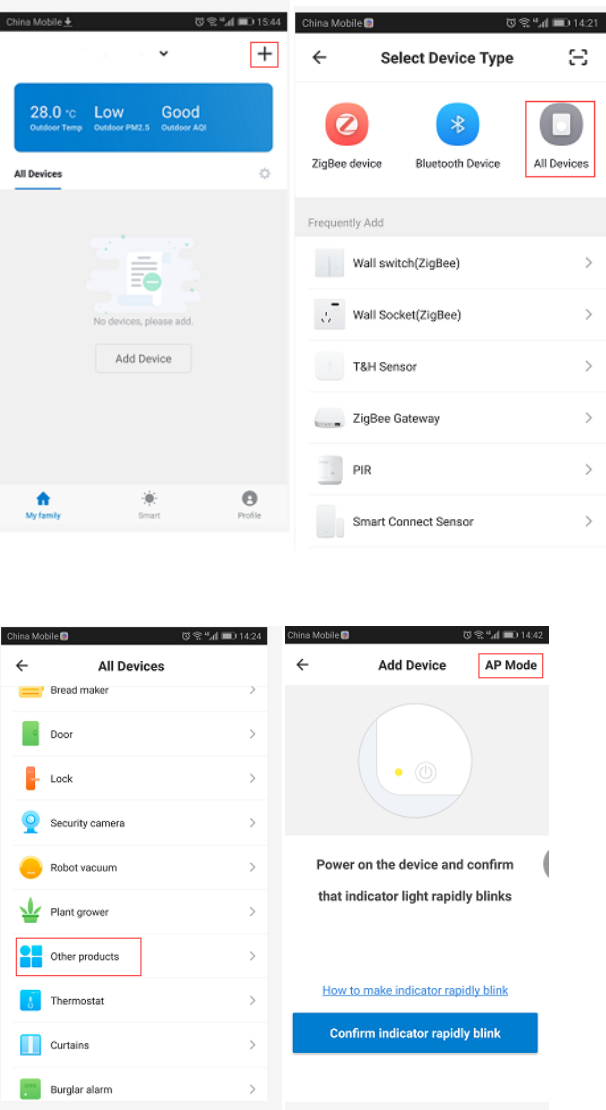
Howtoaddthedevice:
Step1:Opentheeco4lifeApp,click”+”,Select”Alldevices”thenselect”otherdevices”
Select”otherdevices”,andclick”APmode”
Makesuretheindicatorlightisslowlyblinking,andclick“Confirmindicatorslowlyblink”
SelecttheWiFirouterandinputtheWIFipassword,andclickthe“Confirm”
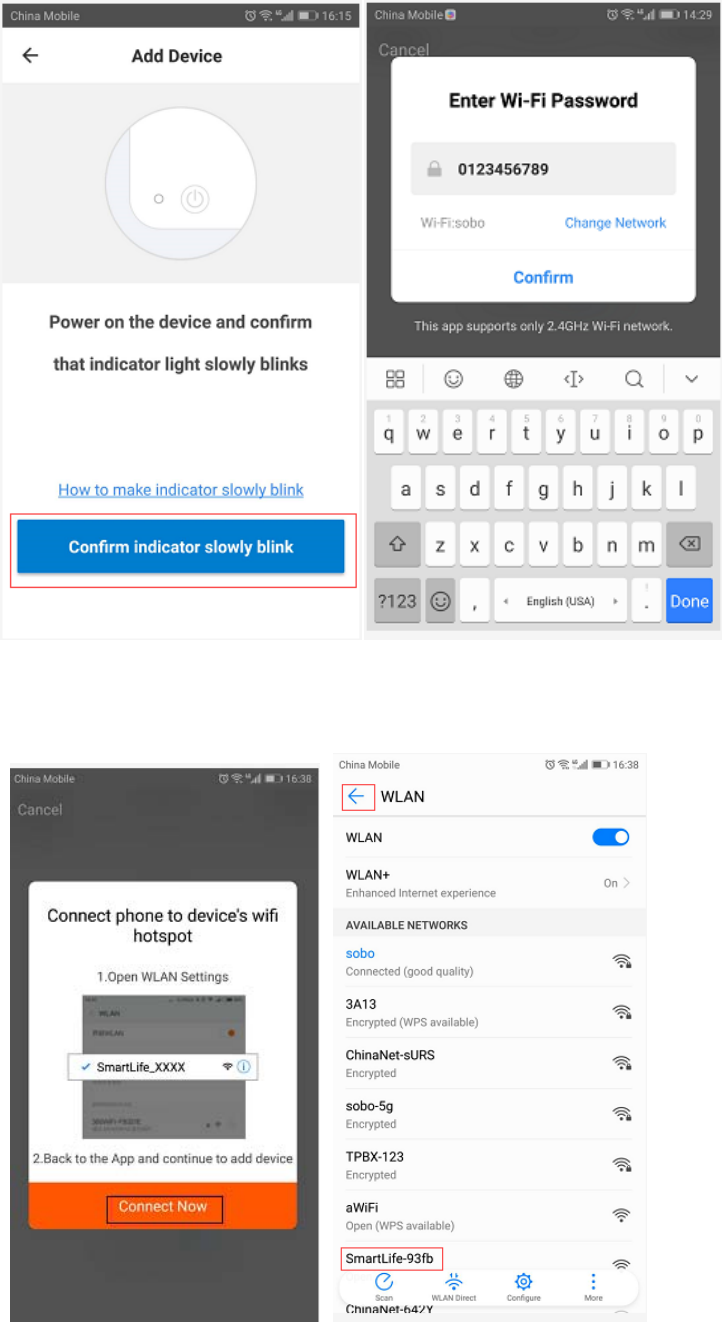
Click”ConnectNow”,andselecttheWlan”SmartLfe‐93fbtoconnect.
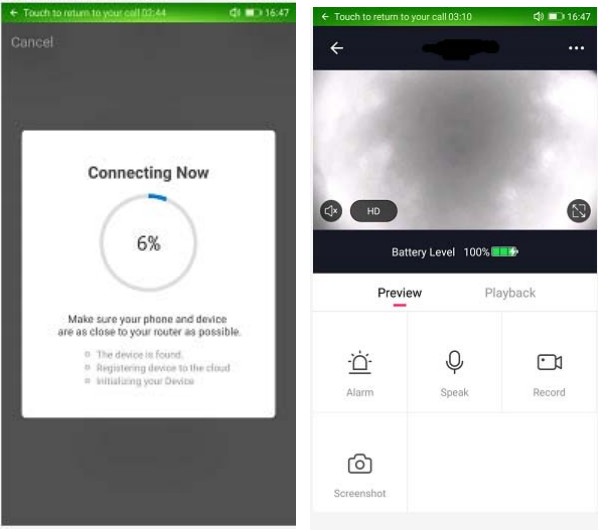
Pressthebackarrowofthetopleftcorner.Willbegintheconfigurationofthemobileandthe
camera,
FCCStatement:
ThisdevicecomplieswithPart15oftheFCCrules.Operationissubjecttothefollowingtwo
conditions:1)thisdevicemaynotcauseharmfulinterference,and2)thisdevicemustaccept
anyinterferencereceived,includinginterferencethatmaycauseundesiredoperation.
Note:ThisequipmenthasbeentestedandfoundtocomplywiththelimitsforaClassB
digitaldevice,pursuanttopart15oftheFCCRules.Theselimitsaredesignedtoprovide
reasonableprotectionagainstharmfulinterferenceinaresidentialinstallation.
Thisequipmentgeneratesusesandcanradiateradiofrequencyenergyand,ifnotinstalled
andusedinaccordancewiththeinstructions,maycauseharmfulinterferencetoradio
communications.However,thereisnoguaranteethatinterferencewillnotoccurinparticular
installation.Ifthisequipmentdoescauseharmfulinterferencetoradioortelevision
reception,whichcanbedeterminedbyturningtheequipmentoffandon,theuseris
encouragedtotrytocorrecttheinterferencebyoneormoreofthefollowingmeasures:
‐‐Reorientorrelocatethereceivingantenna.
‐‐Increasetheseparationbetweentheequipmentandreceiver.
‐‐Connecttheequipmentintoanoutletonacircuitdifferentfromthattowhichthereceiver
isconnected.
‐‐Consultthedealeroranexperiencedradio/TVtechnicianforhelp.
Changesormodificationsnotexpresslyapprovedbythepartyresponsibleforcompliance
couldvoidtheuser’sauthoritytooperatetheequipment.
FCCRadiationExposureStatement
ThisdevicecomplieswithFCCRFradiationexposurelimitssetforthforanuncontrolled
environment.Thistransmittermustnotbeco‐locatedoroperatinginconjunctionwithany
otherantennaortransmitter.
Thisdevicemustoperatewithaminimumdistanceof20cmbetweentheradiatoranduser
body.