Saab Defense and Security USA SID915 STRUCTURAL INFORMATION DEVICE User Manual

Saab Defense and Security USA LLC STRUCTURAL INFORMATION DEVICE

User Manual

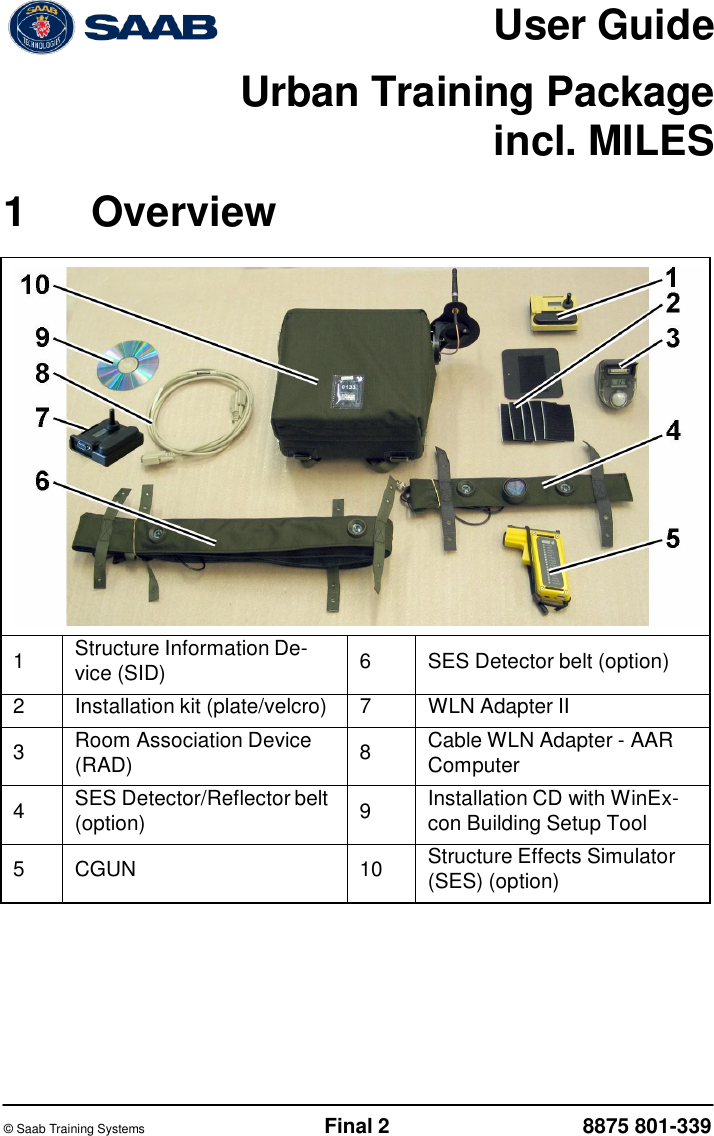
                                                     User Guide Urban Training Package incl. MILES  1  Overview    1 Structure Information De- vice (SID)  6  SES Detector belt (option) 2 Installation kit (plate/velcro) 7 WLN Adapter II  3 Room Association Device (RAD)  8 Cable WLN Adapter - AAR Computer  4 SES Detector/Reflector belt (option)  9 Installation CD with WinEx- con Building Setup Tool  5  CGUN  10 Structure Effects Simulator (SES) (option)           © Saab Training Systems  Final 2  8875 801-339
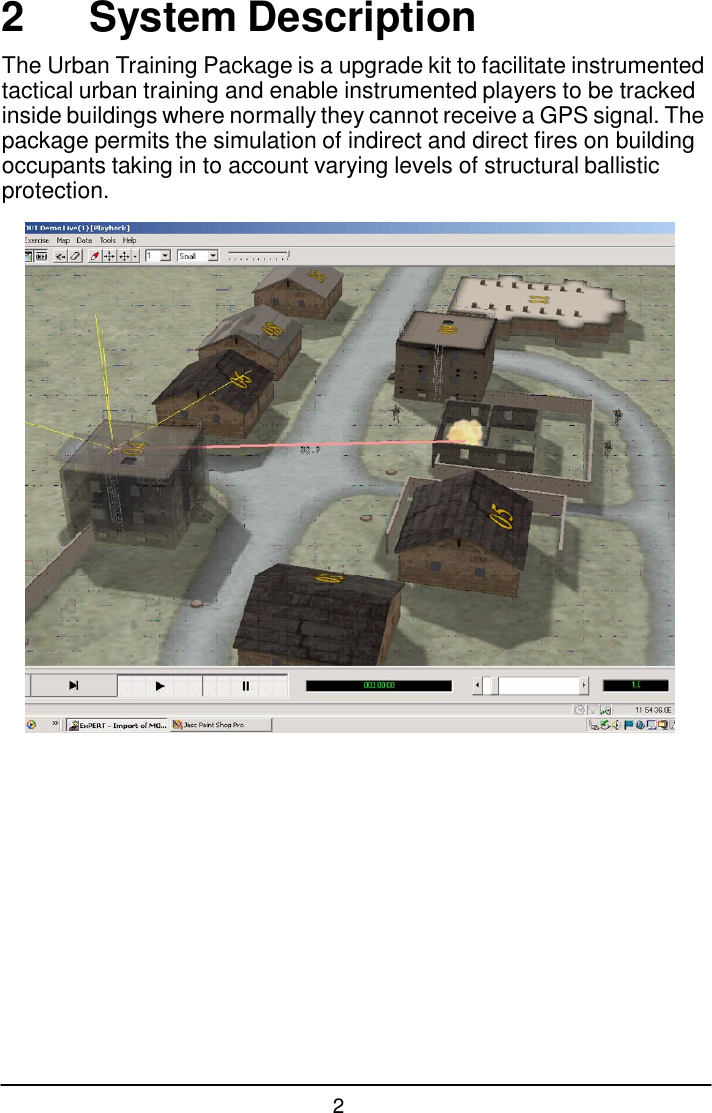
2  2  System Description  The Urban Training Package is a upgrade kit to facilitate instrumented tactical urban training and enable instrumented players to be tracked inside buildings where normally they cannot receive a GPS signal. The package permits the simulation of indirect and direct fires on building occupants taking in to account varying levels of structural ballistic protection.
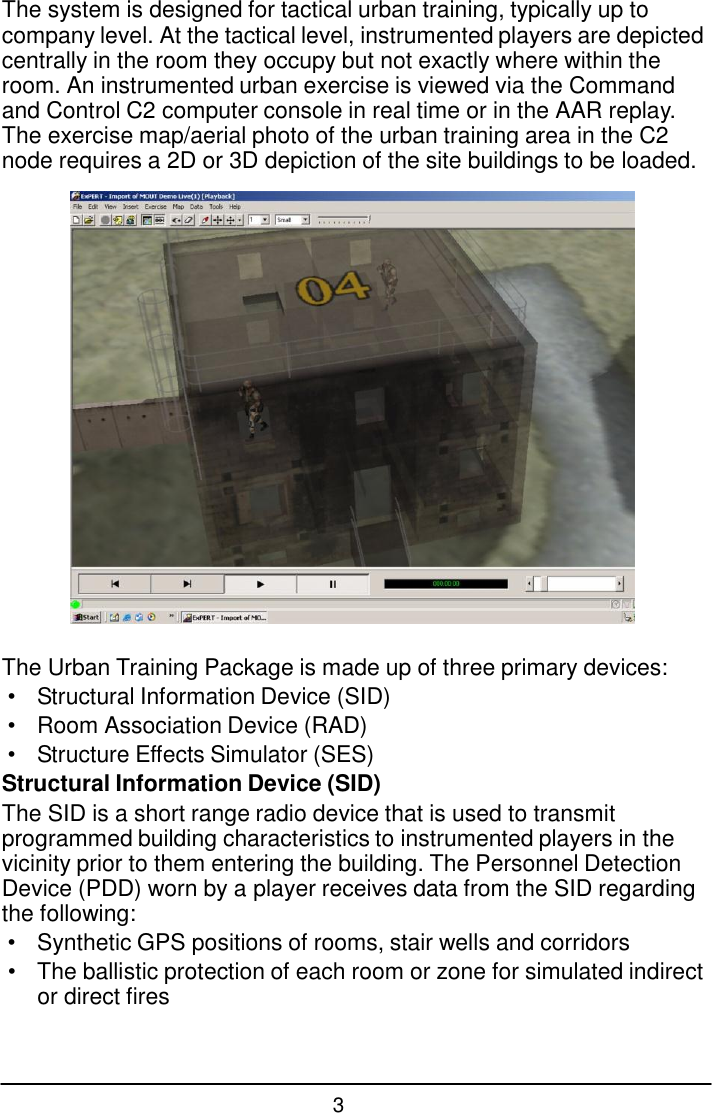
3  The system is designed for tactical urban training, typically up to company level. At the tactical level, instrumented players are depicted centrally in the room they occupy but not exactly where within the room. An instrumented urban exercise is viewed via the Command and Control C2 computer console in real time or in the AAR replay. The exercise map/aerial photo of the urban training area in the C2 node requires a 2D or 3D depiction of the site buildings to be loaded.    The Urban Training Package is made up of three primary devices: •  Structural Information Device (SID) •  Room Association Device (RAD) •  Structure Effects Simulator (SES) Structural Information Device (SID) The SID is a short range radio device that is used to transmit programmed building characteristics to instrumented players in the vicinity prior to them entering the building. The Personnel Detection Device (PDD) worn by a player receives data from the SID regarding the following: •  Synthetic GPS positions of rooms, stair wells and corridors • The ballistic protection of each room or zone for simulated indirect or direct fires
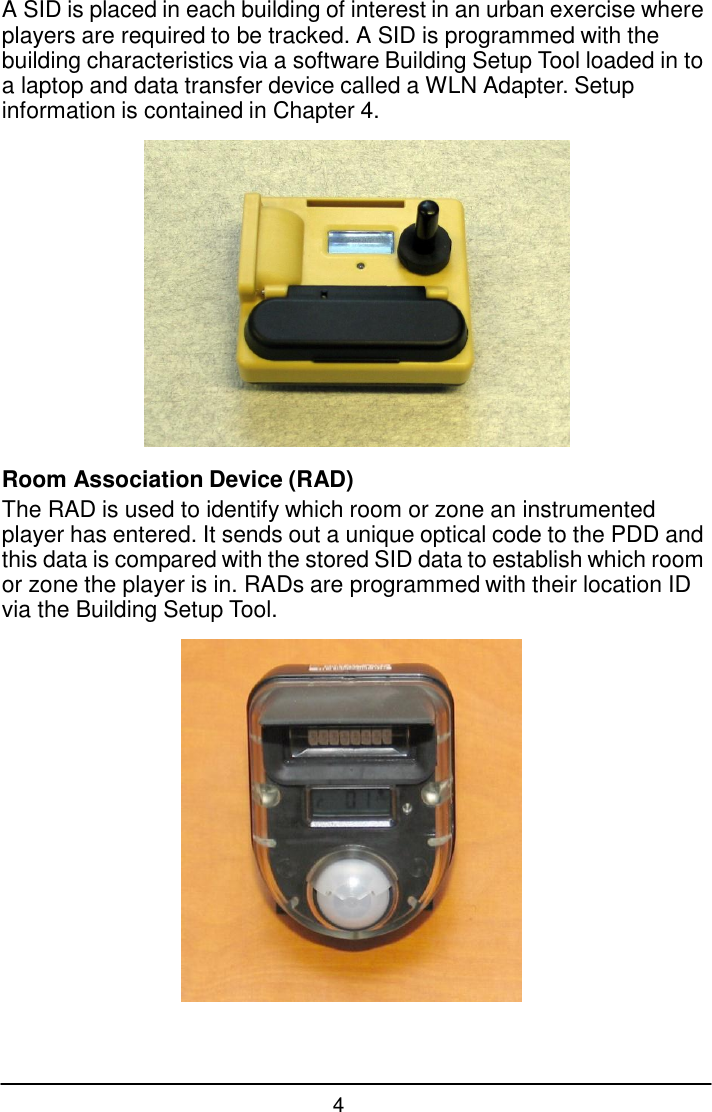
4  A SID is placed in each building of interest in an urban exercise where players are required to be tracked. A SID is programmed with the building characteristics via a software Building Setup Tool loaded in to a laptop and data transfer device called a WLN Adapter. Setup information is contained in Chapter 4.    Room Association Device (RAD) The RAD is used to identify which room or zone an instrumented player has entered. It sends out a unique optical code to the PDD and this data is compared with the stored SID data to establish which room or zone the player is in. RADs are programmed with their location ID via the Building Setup Tool.
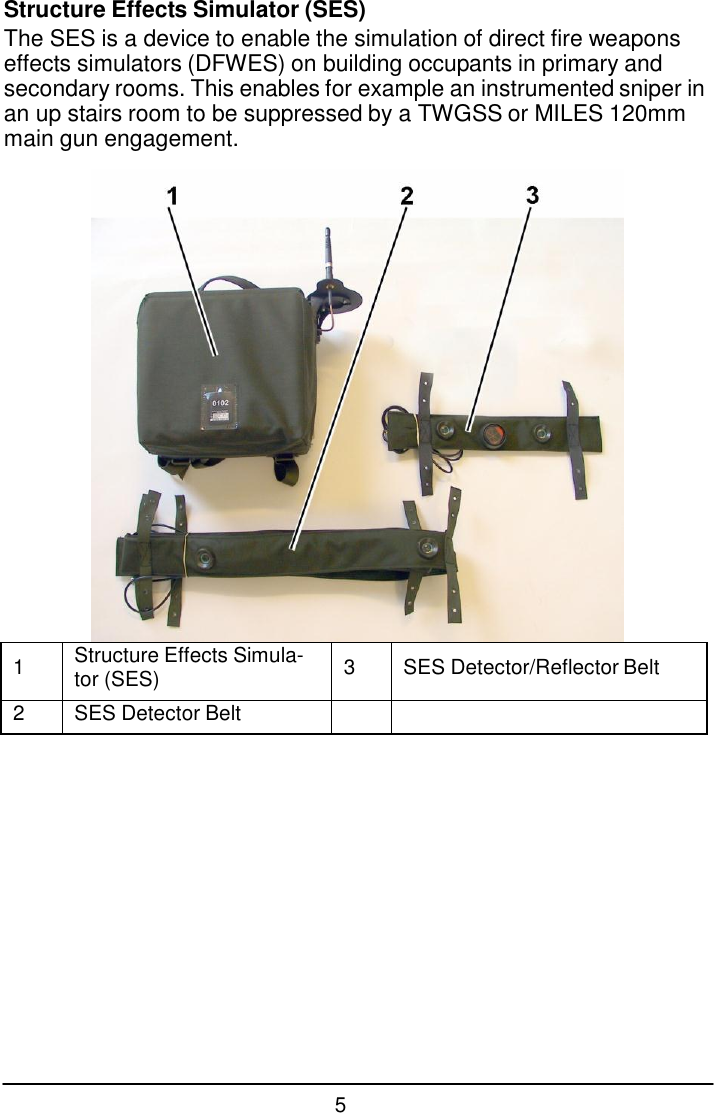
5   1 Structure Effects Simula- tor (SES)  3  SES Detector/Reflector Belt 2 SES Detector Belt    Structure Effects Simulator (SES) The SES is a device to enable the simulation of direct fire weapons effects simulators (DFWES) on building occupants in primary and secondary rooms. This enables for example an instrumented sniper in an up stairs room to be suppressed by a TWGSS or MILES 120mm main gun engagement.
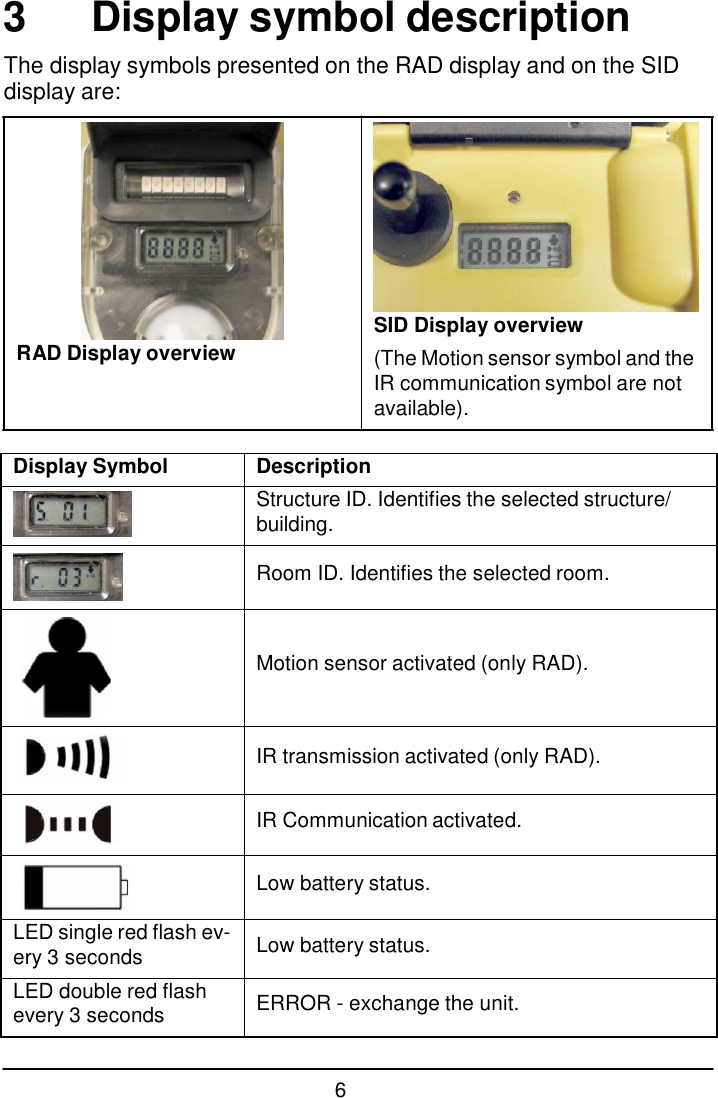
6  3  Display symbol description  The display symbols presented on the RAD display and on the SID display are:             RAD Display overview SID Display overview (The Motion sensor symbol and the IR communication symbol are not available).  Display Symbol Description  Structure ID. Identifies the selected structure/ building.   Room ID. Identifies the selected room.    Motion sensor activated (only RAD).    IR transmission activated (only RAD).   IR Communication activated.   Low battery status. LED single red flash ev- ery 3 seconds  Low battery status. LED double red flash every 3 seconds  ERROR - exchange the unit.
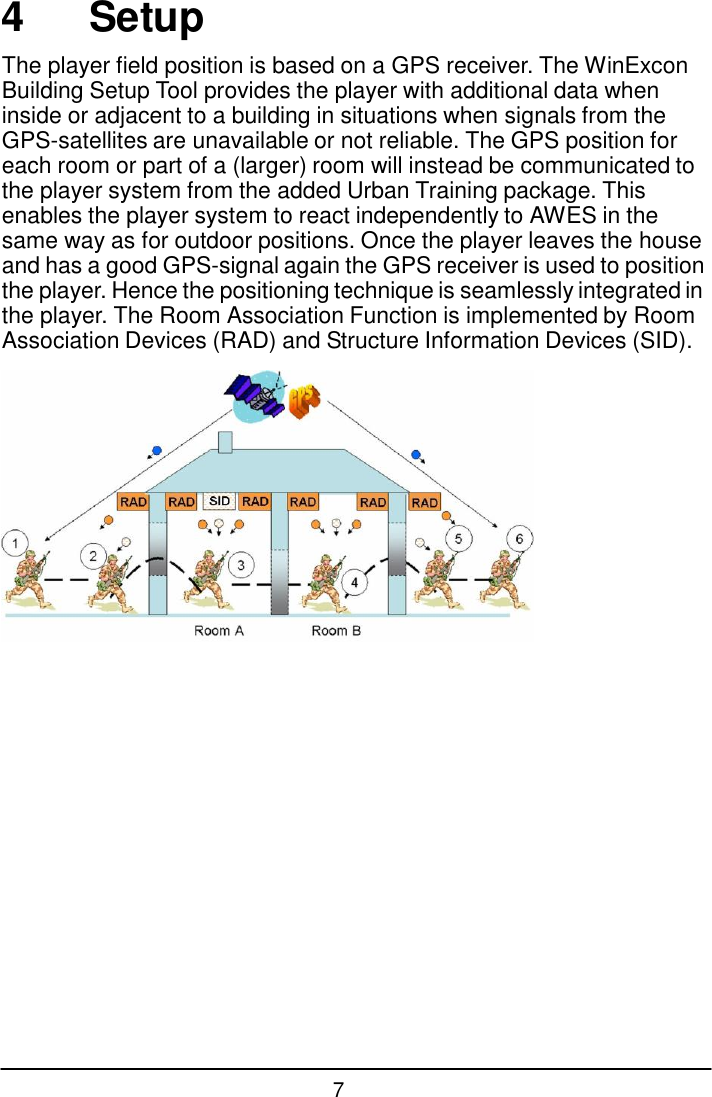
7  4  Setup  The player field position is based on a GPS receiver. The WinExcon Building Setup Tool provides the player with additional data when inside or adjacent to a building in situations when signals from the GPS-satellites are unavailable or not reliable. The GPS position for each room or part of a (larger) room will instead be communicated to the player system from the added Urban Training package. This enables the player system to react independently to AWES in the same way as for outdoor positions. Once the player leaves the house and has a good GPS-signal again the GPS receiver is used to position the player. Hence the positioning technique is seamlessly integrated in the player. The Room Association Function is implemented by Room Association Devices (RAD) and Structure Information Devices (SID).
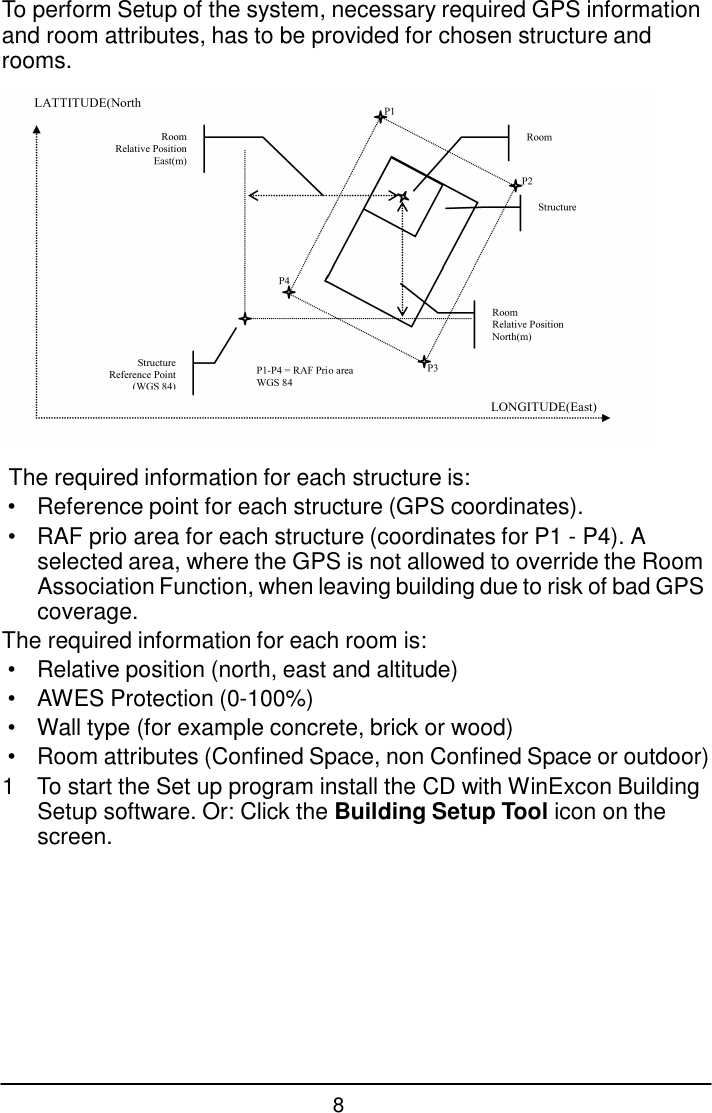
8  To perform Setup of the system, necessary required GPS information and room attributes, has to be provided for chosen structure and rooms.    The required information for each structure is: •  Reference point for each structure (GPS coordinates). • RAF prio area for each structure (coordinates for P1 - P4). A selected area, where the GPS is not allowed to override the Room Association Function, when leaving building due to risk of bad GPS coverage. The required information for each room is: • Relative position (north, east and altitude) •  AWES Protection (0-100%) •  Wall type (for example concrete, brick or wood) •  Room attributes (Confined Space, non Confined Space or outdoor) 1  To start the Set up program install the CD with WinExcon Building Setup software. Or: Click the Building Setup Tool icon on the screen.
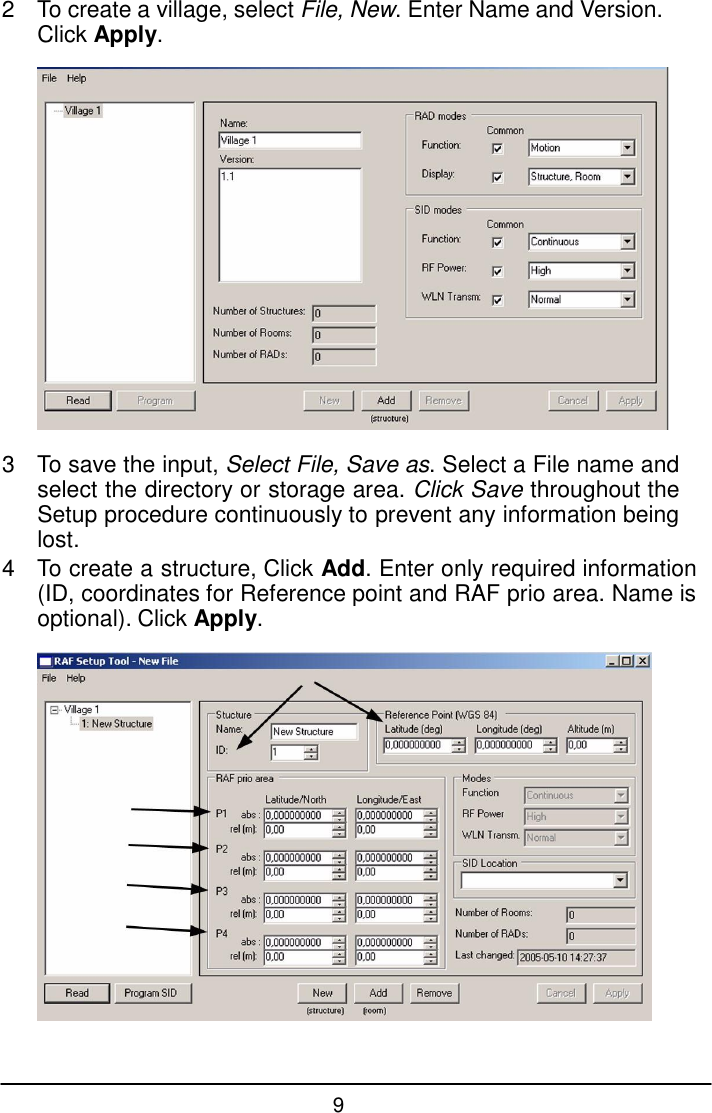
9  2  To create a village, select File, New. Enter Name and Version. Click Apply.    3  To save the input, Select File, Save as. Select a File name and select the directory or storage area. Click Save throughout the Setup procedure continuously to prevent any information being lost. 4  To create a structure, Click Add. Enter only required information (ID, coordinates for Reference point and RAF prio area. Name is optional). Click Apply.
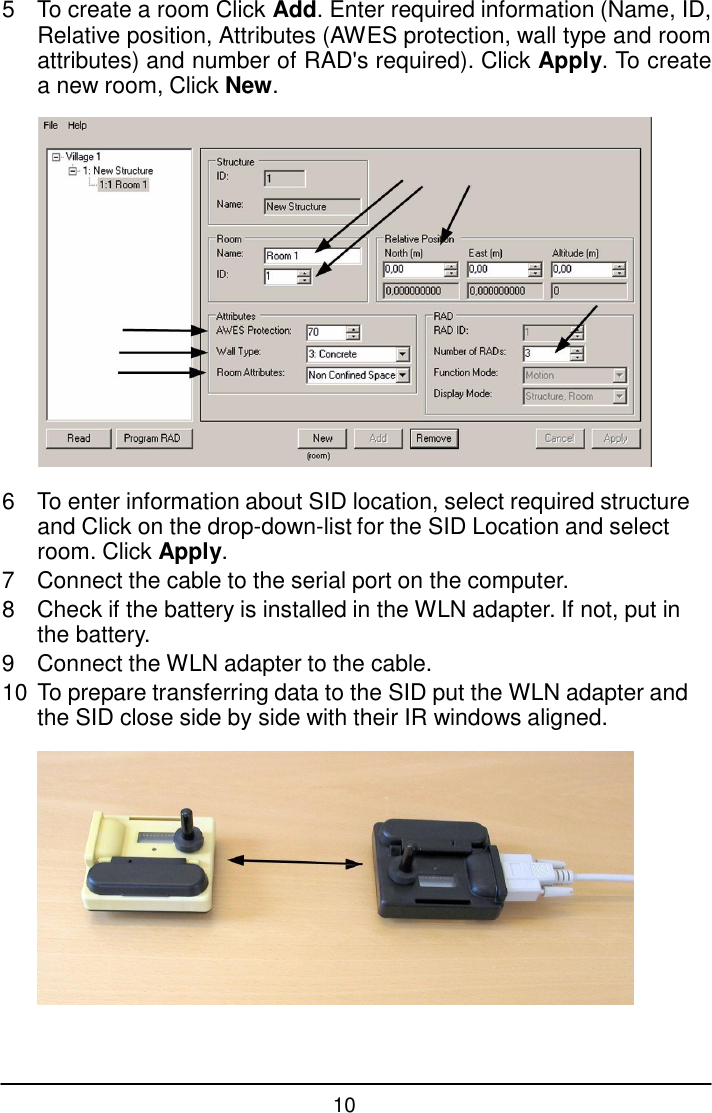
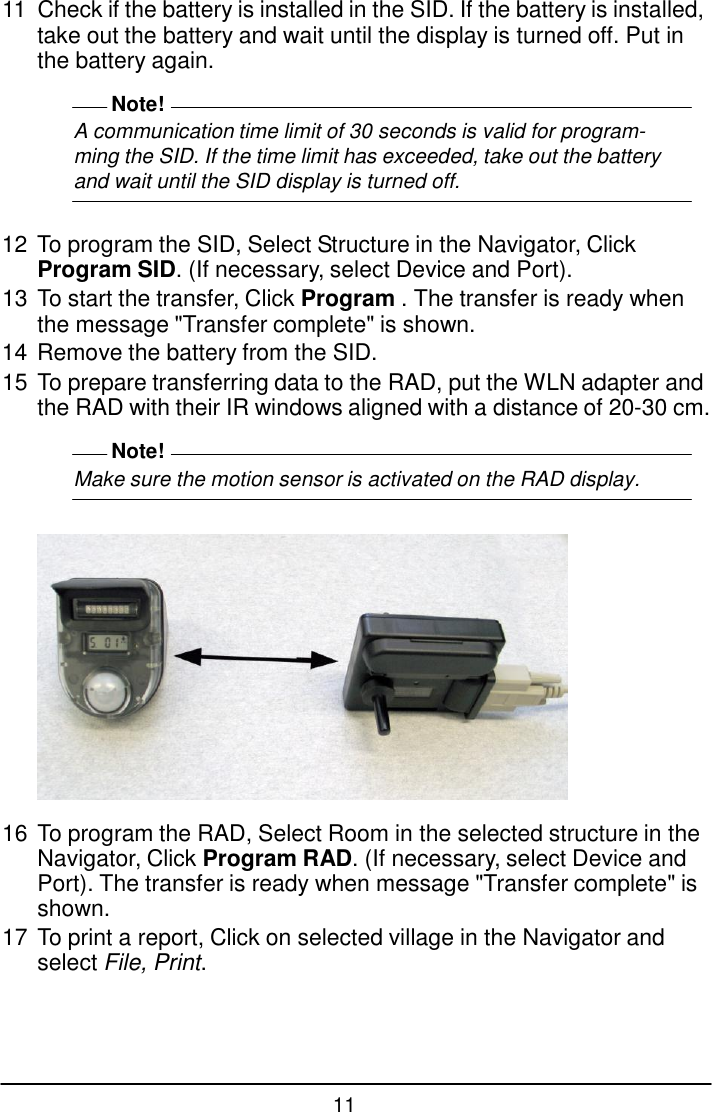
10  5  To create a room Click Add. Enter required information (Name, ID, Relative position, Attributes (AWES protection, wall type and room attributes) and number of RAD's required). Click Apply. To create a new room, Click New.    6  To enter information about SID location, select required structure and Click on the drop-down-list for the SID Location and select room. Click Apply. 7  Connect the cable to the serial port on the computer. 8  Check if the battery is installed in the WLN adapter. If not, put in the battery. 9  Connect the WLN adapter to the cable. 10 To prepare transferring data to the SID put the WLN adapter and the SID close side by side with their IR windows aligned.
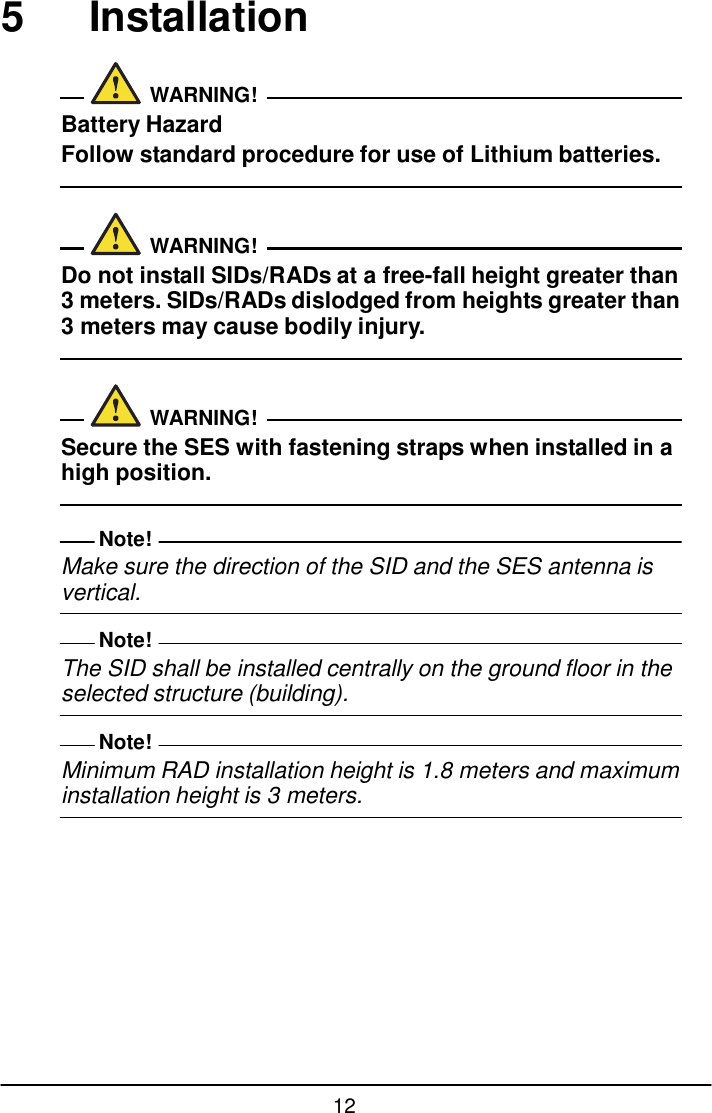
11  11  Check if the battery is installed in the SID. If the battery is installed, take out the battery and wait until the display is turned off. Put in the battery again.  Note! A communication time limit of 30 seconds is valid for program- ming the SID. If the time limit has exceeded, take out the battery and wait until the SID display is turned off.   12 To program the SID, Select Structure in the Navigator, Click Program SID. (If necessary, select Device and Port). 13 To start the transfer, Click Program . The transfer is ready when the message "Transfer complete" is shown. 14 Remove the battery from the SID. 15 To prepare transferring data to the RAD, put the WLN adapter and the RAD with their IR windows aligned with a distance of 20-30 cm.  Note! Make sure the motion sensor is activated on the RAD display.     16 To program the RAD, Select Room in the selected structure in the Navigator, Click Program RAD. (If necessary, select Device and Port). The transfer is ready when message "Transfer complete" is shown. 17 To print a report, Click on selected village in the Navigator and select File, Print.
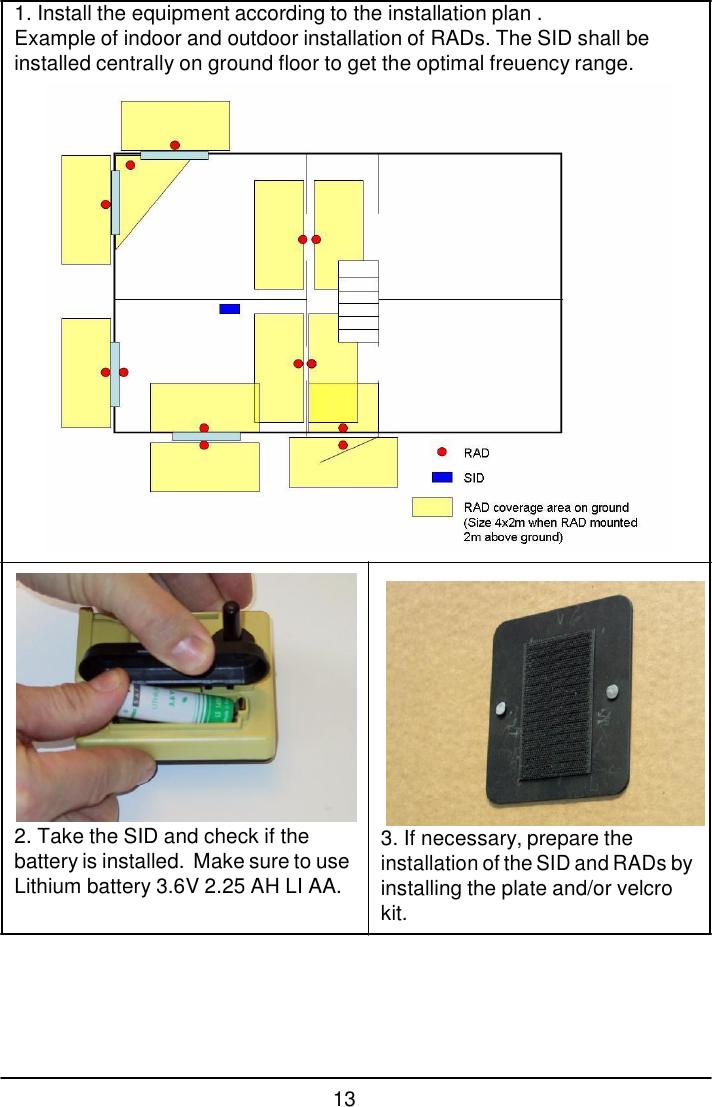
12  5  Installation   WARNING! Battery Hazard Follow standard procedure for use of Lithium batteries.    WARNING! Do not install SIDs/RADs at a free-fall height greater than 3 meters. SIDs/RADs dislodged from heights greater than 3 meters may cause bodily injury.    WARNING! Secure the SES with fastening straps when installed in a high position.   Note! Make sure the direction of the SID and the SES antenna is vertical.  Note! The SID shall be installed centrally on the ground floor in the selected structure (building).  Note! Minimum RAD installation height is 1.8 meters and maximum installation height is 3 meters.
13  1. Install the equipment according to the installation plan . Example of indoor and outdoor installation of RADs. The SID shall be installed centrally on ground floor to get the optimal freuency range.                                     2. Take the SID and check if the battery is installed. Make sure to use Lithium battery 3.6V 2.25 AH LI AA. 3. If necessary, prepare the installation of the SID and RADs by installing the plate and/or velcro kit.
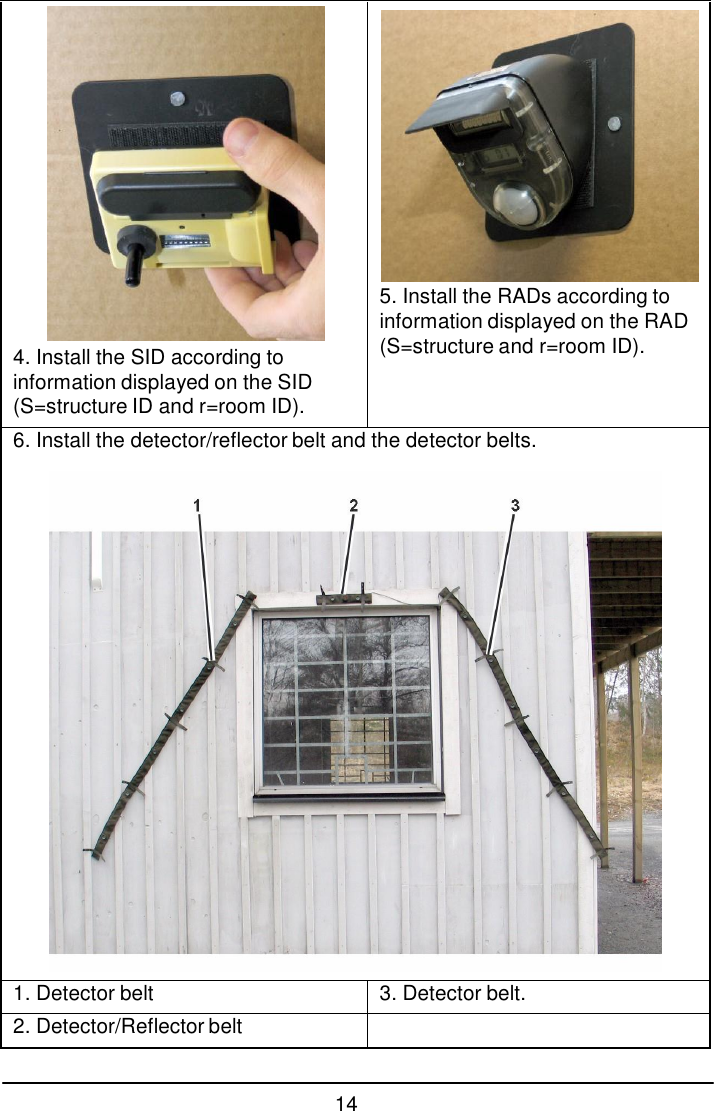
14    4. Install the SID according to information displayed on the SID (S=structure ID and r=room ID).  5. Install the RADs according to information displayed on the RAD (S=structure and r=room ID). 6. Install the detector/reflector belt and the detector belts. 1. Detector belt 3. Detector belt. 2. Detector/Reflector belt
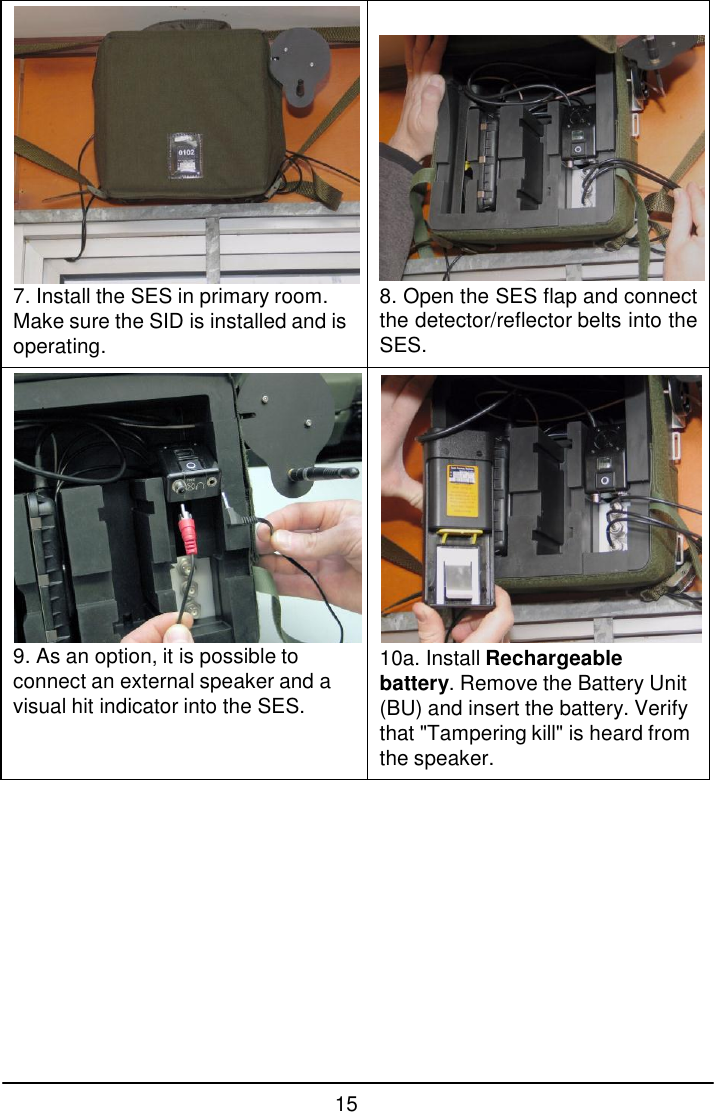
15    7. Install the SES in primary room. Make sure the SID is installed and is operating.    8. Open the SES flap and connect the detector/reflector belts into the SES.  9. As an option, it is possible to connect an external speaker and a visual hit indicator into the SES.  10a. Install Rechargeable battery. Remove the Battery Unit (BU) and insert the battery. Verify that "Tampering kill" is heard from the speaker.
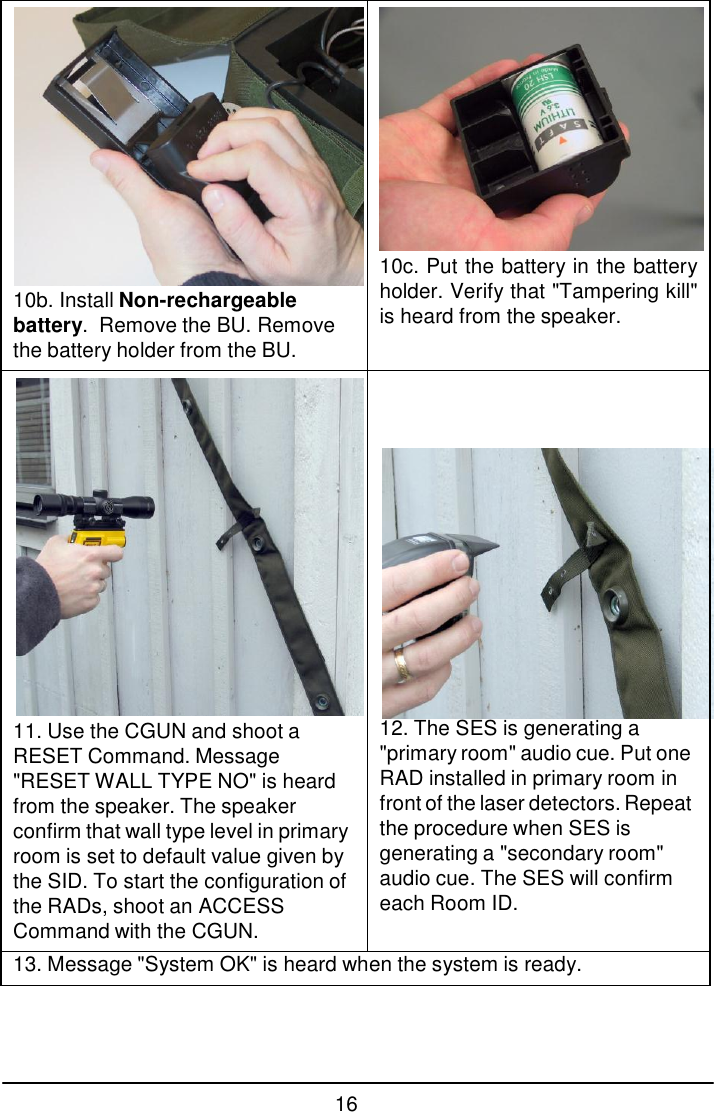
16    10b. Install Non-rechargeable battery.  Remove the BU. Remove the battery holder from the BU.  10c. Put the battery in the battery holder. Verify that "Tampering kill" is heard from the speaker.  11. Use the CGUN and shoot a RESET Command. Message "RESET WALL TYPE NO" is heard from the speaker. The speaker confirm that wall type level in primary room is set to default value given by the SID. To start the configuration of the RADs, shoot an ACCESS Command with the CGUN.                  12. The SES is generating a "primary room" audio cue. Put one RAD installed in primary room in front of the laser detectors. Repeat the procedure when SES is generating a "secondary room" audio cue. The SES will confirm each Room ID. 13. Message "System OK" is heard when the system is ready.
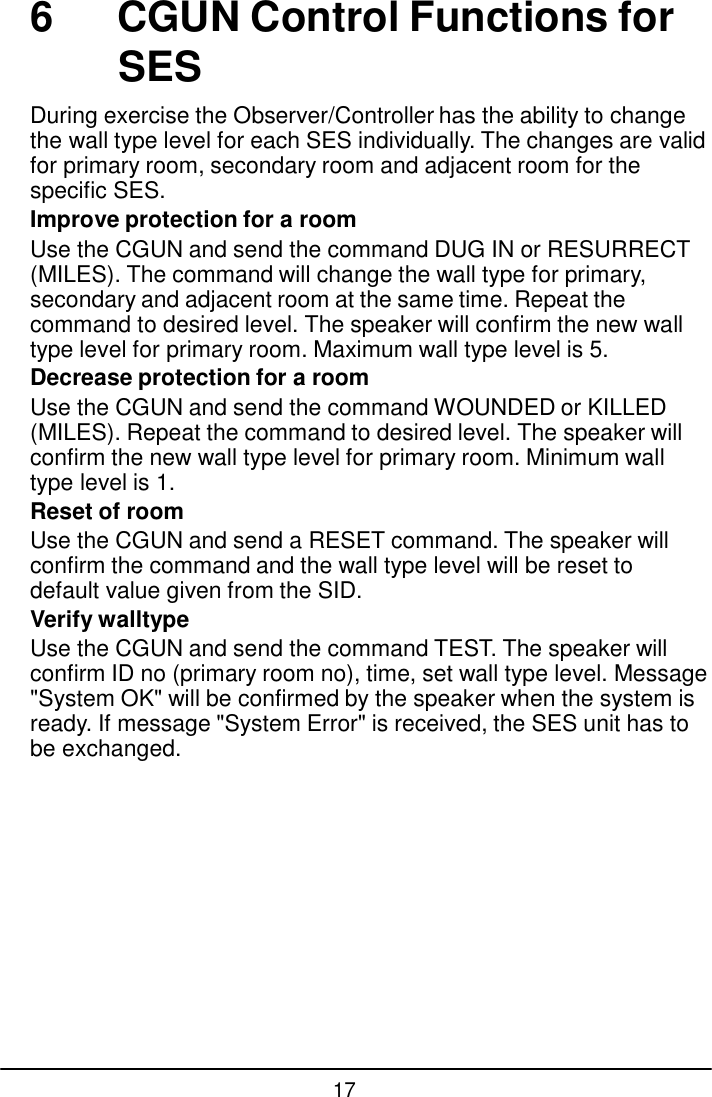
17  6  CGUN Control Functions for SES  During exercise the Observer/Controller has the ability to change the wall type level for each SES individually. The changes are valid for primary room, secondary room and adjacent room for the specific SES. Improve protection for a room Use the CGUN and send the command DUG IN or RESURRECT (MILES). The command will change the wall type for primary, secondary and adjacent room at the same time. Repeat the command to desired level. The speaker will confirm the new wall type level for primary room. Maximum wall type level is 5. Decrease protection for a room Use the CGUN and send the command WOUNDED or KILLED (MILES). Repeat the command to desired level. The speaker will confirm the new wall type level for primary room. Minimum wall type level is 1. Reset of room Use the CGUN and send a RESET command. The speaker will confirm the command and the wall type level will be reset to default value given from the SID. Verify walltype Use the CGUN and send the command TEST. The speaker will confirm ID no (primary room no), time, set wall type level. Message "System OK" will be confirmed by the speaker when the system is ready. If message "System Error" is received, the SES unit has to be exchanged.
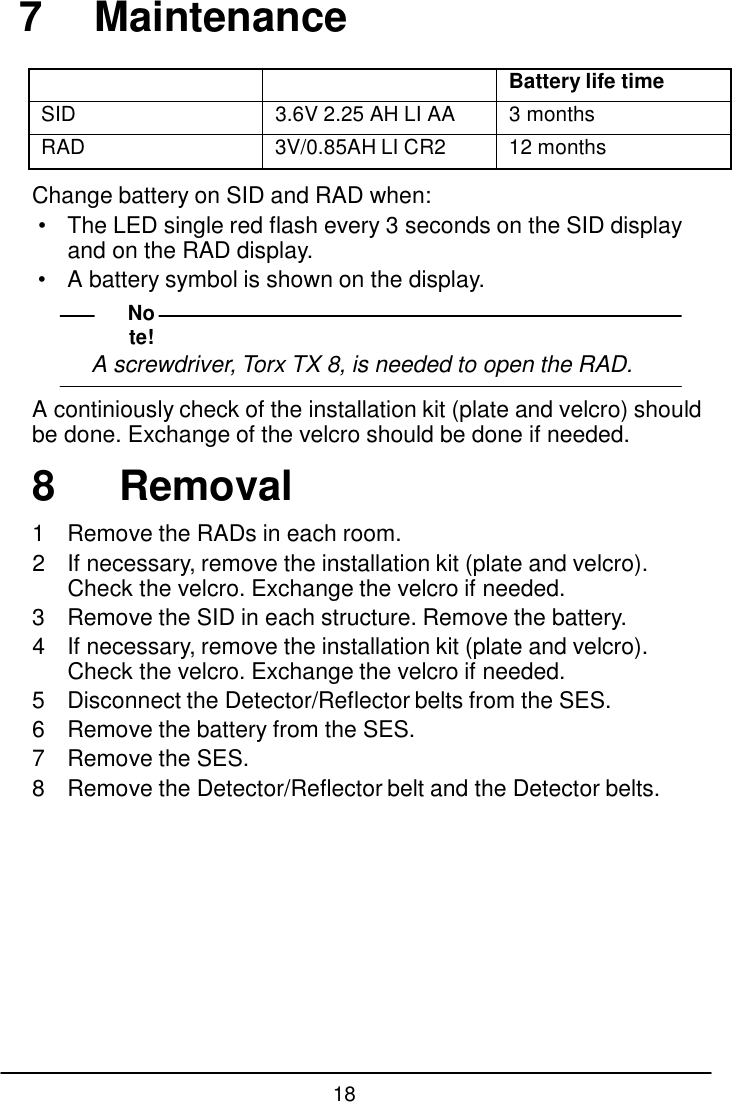
18  7  Maintenance    Battery life time SID 3.6V 2.25 AH LI AA 3 months RAD 3V/0.85AH LI CR2 12 months  Change battery on SID and RAD when: • The LED single red flash every 3 seconds on the SID display and on the RAD display. •  A battery symbol is shown on the display. Note! A screwdriver, Torx TX 8, is needed to open the RAD.  A continiously check of the installation kit (plate and velcro) should be done. Exchange of the velcro should be done if needed.  8  Removal  1  Remove the RADs in each room. 2  If necessary, remove the installation kit (plate and velcro). Check the velcro. Exchange the velcro if needed. 3  Remove the SID in each structure. Remove the battery. 4  If necessary, remove the installation kit (plate and velcro). Check the velcro. Exchange the velcro if needed. 5  Disconnect the Detector/Reflector belts from the SES. 6  Remove the battery from the SES. 7  Remove the SES. 8  Remove the Detector/Reflector belt and the Detector belts.
19  9      Regulatory Statement 9.1  FCC Certification The United States Federal Communication Commission (FCC) has established certain rules governing the use of electronic equipment. 9.2   Part15, Class B 1 This system contains a device that is FCC certified, FCC ID: R4ASID915 2 This device complies with Part 15 of FCC rules and operation and is subject to the following two conditions: 2.1 This device may not cause harmful interference, and 2.2 This device must accept any interference received, including interference that may cause undesired operation. This equipment has been tested and found to comply with the limits for a Class B digital device, pursuant to Part 15 of the FCC rules.  9.3     IC Certification This system contains a device that is IC certified, IC: 4660D-SID915  IC RSS-GEN, Sec 7.1.3 Warning Statement- (Required for license-exempt devices) ENGLISH: This device complies with Industry Canada license-exempt RSS standard(s). Operation is subject to the following two conditions:  (1) this device may not cause interference, and  (2) this device must accept any interference, including interference that may cause undesired operation of the device. FRENCH:  Le présent appareil est conforme aux CNR d'Industrie Canada applicables aux appareils radio exempts de licence. L'exploitation est autorisée aux deux conditions suivantes :  (1) l'appareil ne doit pas produire de brouillage, et  (2) l'utilisateur de l'appareil doit accepter tout brouillage radioélectrique subi, même si le brouillage est susceptible d'en compromettre le fonctionnement.
20  IC RSS-GEN, Sec 7.1.2 Warning Statement- (Required for Transmitters) ENGLISH: Under Industry Canada regulations, this radio transmitter may only operate using an antenna of a type and maximum (or lesser) gain approved for the transmitter by Industry Canada. To reduce potential radio interference to other users, the antenna type and its gain should be so chosen that the equivalent isotropically radiated power (e.i.r.p.) is not more than that necessary for successful communication. FRENCH:  Conformément à la réglementation d'Industrie Canada, le présent émetteur radio peut fonctionner avec une antenne d'un type et d'un gain maximal (ou inférieur) approuvé pour l'émetteur par Industrie Canada. Dans le but de réduire les risques de brouillage radioélectrique à l'intention des autres utilisateurs, il faut choisir le type d'antenne et son gain de sorte que la puissance isotrope rayonnée quivalente (p.i.r.e.) ne dépassepas l'intensité nécessaire à l'établissement d'une communication satisfaisante.     9.4   User Information                                    WARNING! Any changes or modifications not expressly approved by the party responsible for compliance, namely Saab Defense and Security USA LLC, could void the user's authority to operate the equipment.

Navigation menu