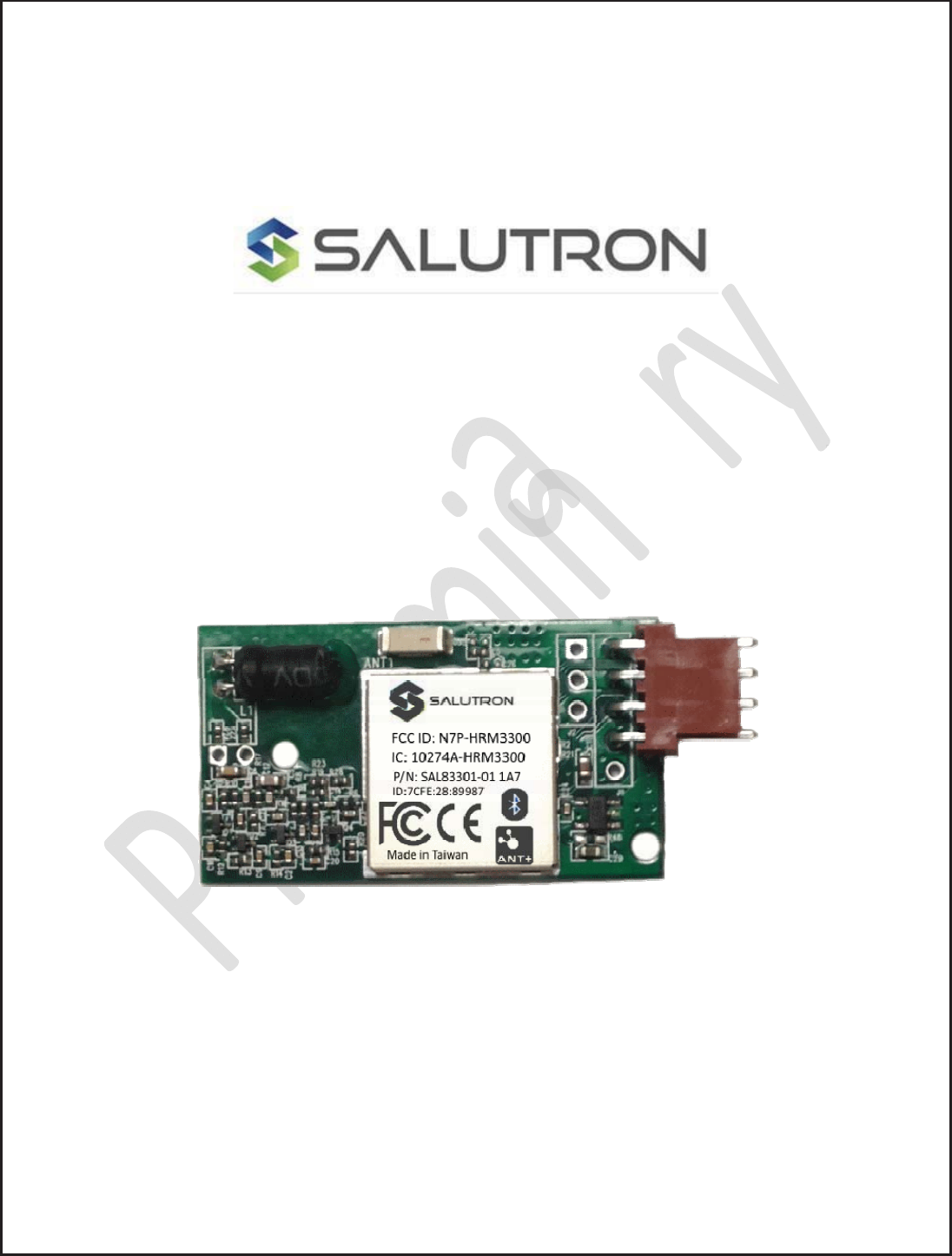
Salutron HRM3300 Heart rate module 3300 series User Manual
Salutron Inc. Heart rate module 3300 series
Salutron >
User Manual
User Manual
Product Name: Heart rate module 3300 series
Brand: SALUTRON
Model:HRM3300,3300 series
Manufacture: Salutron Inc.
CONFIDENTIAL
Copyright 2016, Salutron, Incorporated Revision 1.1 Revision Date:07/31//17 Page: 2 of 23
RevisionHistory:
Revision Releasedate Description By
0.1 11/29/16 PreliminaryDraft BC
0.2 12/22/16 Changedoutputpinassignments BC
0.3 01/30/17 RevisedUartcommunicationprotocol,
addedresponsebit
MC/BC
0.4 02/10/17 CorrectedUARTpackagetable MC
0.5 02/14/17 Revisedgeneraldescription(page4) BG
0.6 02/24/17 PCBApictureupdated,andrevisedflowchart BC
0.7 02/28/17 AddedFCC/ICstatement BC
0.8 05/17/17 Added5KHZactivecodeindication MC
0.9 06/25/17 AddedFECsupportandmoduleplacementguideline MC/BC
1.0 7/14/17 Addedovertheairdevicefirmwareupdateinformation MC
1.1 7/31/17 UpdateddocumentforHRdisplayprofile,FEC,Optionfor
autoconnect5KHZ,programflowdescription,diagram
andcommpackagetable
MC

CONFIDENTIAL
Copyright 2016, Salutron, Incorporated Revision 1.1 Revision Date:07/31//17 Page: 3 of 23
Contents
General Description .............................................................................................................................. 4
Features: ............................................................................................................................................. 4
Physical Dimensions: Inches (mm) ......................................................................................................... 5
Connection Diagram: (Typical) .............................................................................................................. 5
Electrical Characteristics: ...................................................................................................................... 6
5KHZ Wireless Specification: ................................................................................................................. 6
BLE/ANT+ Specification: ....................................................................................................................... 6
1. UART COMMUNICATION PROTOCOL: ................................................................................................. 8
1.2.Block Diagram ............................................................................................................................ 8
2. OPERATION ..................................................................................................................................... 8
2.1. Description ................................................................................................................................ 8
2.2. UART Specification ..................................................................................................................... 9
2.3. Equipment Assumption ............................................................................................................... 9
2.4. Equipment and HRM3300 Operation ............................................................................................ 9
2.5. HRM3300 Programming flow ...................................................................................................... 10
2.6. HRM3300 OTA. ......................................................................................................................... 13
3. UART COMMUNICATION PROTOCOL PACKETS ................................................................................... 14
3.1. Packets .................................................................................................................................... 14
3.2. Example of Sending Packets Equipment Console .......................................................................... 14
3.3. Example of Sending Packet to HRM3300 ..................................................................................... 15
3.4. UART Protocol Packet Table: ..................................................................................................... 16
3.5. UART BIKE FE-C Protocol Packet Table: ...................................................................................... 18
Appendix A : HRM3300 Placement Guideline .......................................................................................... 20
FCC/IC statement ................................................................................................................................ 22
FCC statement ................................................................................................................................ 22
IC statement
................................................................................................................................... 22
CONFIDENTIAL
Copyright 2016, Salutron, Incorporated Revision 1.1 Revision Date:07/31//17 Page: 4 of 23
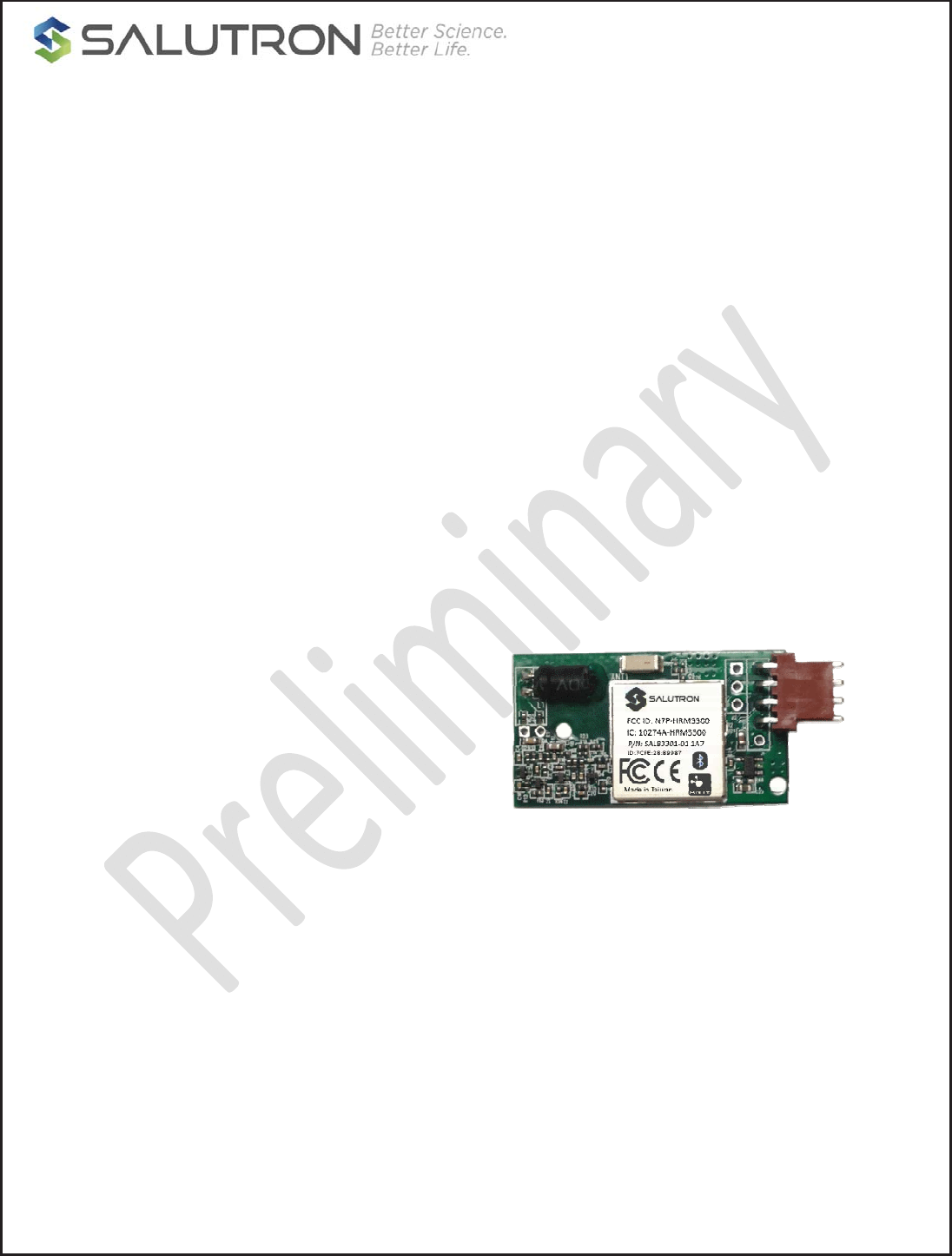
Model 3300 Series
Wireless Heart Rate Monitor Specifications
General Description
x The Model 3300 Wireless Heart Rate Monitor is
designed to manage and support the reception
of heart rate data from either 2.4G digital BLE
or ANT+ chest straps and wearable devices,
and standard 5kHz chest straps.
x Once enabled by the Console, the Model 3300
actively scans for local strap/device signals,
and supports a user selection/pairing protocol
processed by the Console.
x Once a strap is selected/paired, the Model
3300 streams the user heart rate data until the
end of the workout session, when the 3300
then ‘unpairs’.
Features:
x Direct connection to equipment; no phone
device or app ‘middleman’
x Supports multiple inbound sources for HR:
BLE, ANT+, 5kHz
x Automatic proximity sensing to minimizing
interference from competing HR signals
x Console controllable proximity commands
allowing ‘customization’ of the scanning
proximity during integration development of
the 3300 into the console
x Simplified user pairing routine
x Future-proof: OTA updateable to support
future features (based on console pass-
through, if available)
x Interface: UART, custom command protocol
The Model 3300 series wireless receiver
delivers high performance telemetry heart rate
monitoring - for both commercial/club and
home cardio equipment applications.
Model 3300 is designed to manage and support
the reception of heart rate data from either BLE,
ANT+, or standard 5kHz chest straps and devices.
The model 3300 series receiver serves as a BLE
central or ANT+ master role. It communicates
and passes the heart rate data from the heart
rate monitor to the equipment console through
proprietary UART protocol.
The 3300 series offers a special proximity pairing
feature that allows the equipment console to
discover only the transmitting devices in close
proximity. This feature minimizes unwanted
devices and speeds up the pairing process,
especially useful in health club environments
where there may be multiple BLE or ANT+
devices present. After successful pairing, the
reception distance will automatically increase to
maximum range.
The 3300 series receiver also supports legacy
5kHz chest strap data reception. It utilizes
Salutron proprietary Digital Crosstalk Control and
Digital Noise Filter algorithms that can filter out
unwanted competing chest strap signals. This
supports better wireless reception and reduce
5kHz noise from potentially unfriendly high ‘noise’
environments coming from power systems and
console electronics.
o BLE smart and ANT+ data reception
o Standard 5.3kHz chest strap, coded and un-
coded signal reception
o Proximity pairing feature.
o UART communication protocol
o Stationary Bike FE-C support
o 3-6V operation.
o RoHS compliant.
CONFIDENTIAL
Copyright 2016, Salutron, Incorporated Revision 1.1 Revision Date:07/31//17 Page: 5 of 23
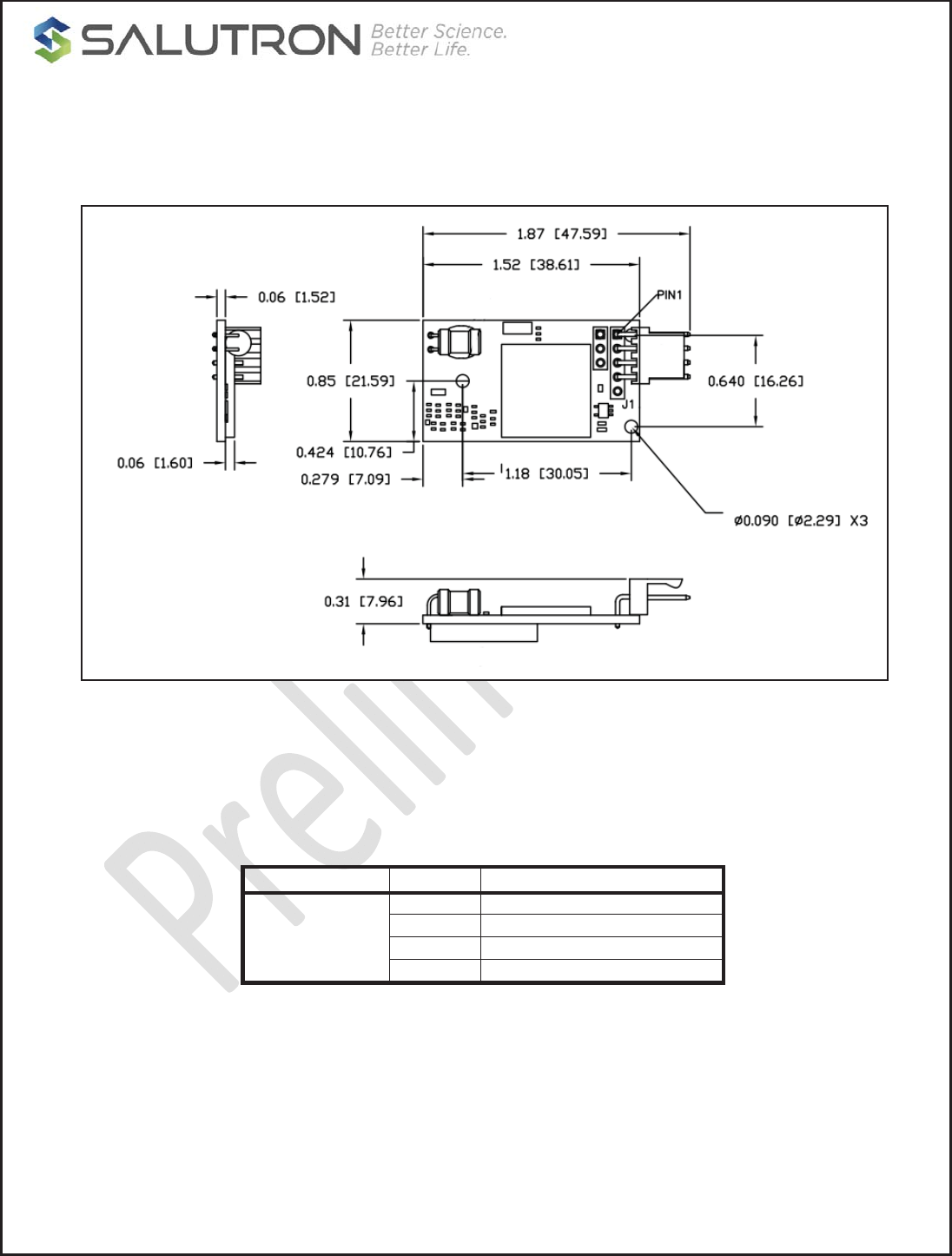
Physical Dimensions: Inches (mm)
Figure1:Physicaldimensions
Connection Diagram: (Typical)
TYPE PIN No. DESCRIPTION
J1 – Main
1 GND
2 VCC
3 TXD
4 RXD
CONFIDENTIAL
Copyright 2016, Salutron, Incorporated Revision 1.1 Revision Date:07/31//17 Page: 6 of 23
Electrical Characteristics:
Symbol Parameter Conditions Min. Typ. Max. Units
VS Supply voltage - 3 5 6 V
IS Supply current Vcc = 5V 5.2 5.5 10.5 mA
To Operating Temperature - -10 - 60 °C
Ts Storage Temperature - -40 - 85 °C
5KHZ Wireless Specification:
Parameter Conditions Min. Typ. Max. Units
5KHZ Wireless reception range Noise free environment 31
80
35
90
39
100
Inches
cm
5KHZ Wireless reception
frequency
T= 25ºC, Vcc =5.0V 4.8 5.3 5.9 KHz
Heart rate detection T= 25ºC, Vcc =5.0V 30 - 240 BPM
Output format UART Protocol
BLE/ANT+ Specification:
Minimum Typical Maximum Unit
HR Measurement
Range 30 - 240 beats per minute
Frequency 2379 - 2496 MHz
Center Frequency - 2402 - MHZ
Channel Bandwidth - - 2 MHZ
Low speed Crystal Freq - 32.768 - KHZ
High speed Crystal Freq - 32 - MHZ
Channel Spacing - 2 - MHZ
No. of channels used - - 40 Channels
Modulation GFSK
CONFIDENTIAL
Copyright 2016, Salutron, Incorporated Revision 1.1 Revision Date:07/31//17 Page: 7 of 23
Output power -20 - 4 dBm
Open Air range - - 10 Meter
Power Consumption Vdd=5.0V @ 25°C
Standby mode - 5.5 - mA
Operation Modes
Device Searching Mode - 10 10.5 mA
Heart rate Data transfer - 5.5 5.6 mA
2.4GHZ Transmission
distance
-
-
-
-
33
10
Feet
Meter
CONFIDENTIAL
Copyright 2016, Salutron, Incorporated Revision 1.1 Revision Date:07/31//17 Page: 8 of 23
1. UART COMMUNICATION PROTOCOL:
The following section describes the communication protocol between the HRM3300 and Equipment console.
The protocol is intended to provide a reliably link between the HRM3300 and Equipment console. The UART
protocol supports the two way link communication between the two devices.
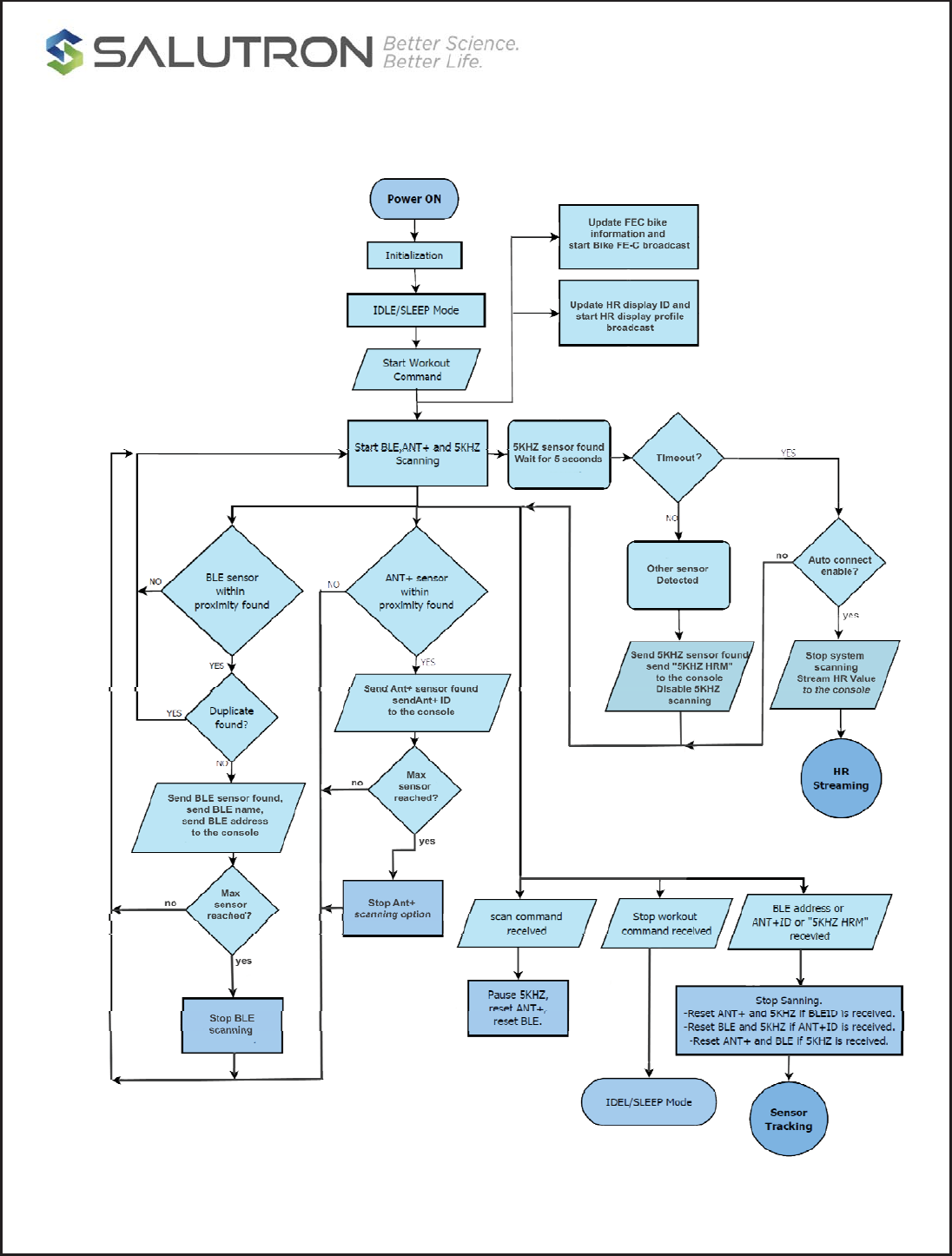
1.2.Block Diagram
2. OPERATION
2.1. Description
The Equipment console and HRM3300 uses standard UART protocol to transmit and receive custom
packets. The Equipment console control the HRM3300 operation. The HRM3300 operations are:
x Start and stop 5Khz, BLE and ANT+ scanning
x Connect and disconnect to a heart rate sensor using 5khz, BLE and ANT+.
x On-demand scanning
x Stationary bike FE-C broadcast is activated with user selected ID at the start of workout
x HRM display profile is broadcasted with user selected ID at the start of workout
x HRM display profile and Stationary bike have the same ID

CONFIDENTIAL
Copyright 2016, Salutron, Incorporated Revision 1.1 Revision Date:07/31//17 Page: 9 of 23
2.2. UART Specification
Baudrate: 9600 (default), 4800, 2400, 115200
Parity: No parity
Flow Control: Disable
2.3. Equipment Assumption
Upon power up of the equipment device, the HRM3300 is also power up. Since the equipment is controlling
the HRM3300, the HRM3300 will be on the idle state or waiting state for the command from the equipment
console.
2.4. Equipment and HRM3300 Operation
The equipment console will send “workout” command to HRM3300 to wake up the HRM3300 from idle
state to scanning state. The HRM3300 will start scanning for 5kHz, BLE and ANT+ sensors advertising
within its proximity. The proximity setting is added in the “workout” command send by the console.
The sensors that are found during scanning state will be sent to the Equipment console. For BLE, the
advertising name and BLE address are sent to the console. A separator key is added in between the
advertising name and the BLE address. See the UART package table for the details of communication
protocol. All BLE sensors send to the console are uniquely. This means there are no duplicate for BLE
sensors received by the equipment console.
For ANT+ the advertising ID is sent to the equipment console. There is a possibility of duplication of ANT+
sensors because of the limitation of ANT+ protocol.
For 5kHz, a "5kHz HRM" name is sent. Only one 5kHz sensor is send to equipment console while a
maximum five devices each for BLE and ANT+. Up to maximum of eleven sensors can be sent to the
equipment console. Although the console can receive more than eleven devices, the limitation is due to the
capacity of HRM3300 microcontroller. Maximum capacity might change in the future or upon customer
request.
After all sensors within the pairing proximity range are sent to the equipment console, the user is expected
to choose what type of sensor to be used during workout. If the user selects the BLE device, the
corresponding BLE address is sent back to HRM3300. The BLE address is one of the parameters for pairing
and tracking BLE sensor.
If user selects ANT+ device, the HRM3300 will use the ANT+ advertising name for pairing and tracking. If
there are more than one ANT+ device with the same advertising name then there might be a chance for
the user to pair to a wrong sensor. For 5kHz device, the strongest signal is expected to be paired.
After the HRM3300 successfully paired with the selected sensor, it starts streaming the heart rate data. The
heart rate data will be sent to console. The frequency of heart rate streaming will be dependent upon the
kind of sensor device but for 5kHz it would depend upon the heart rate value.
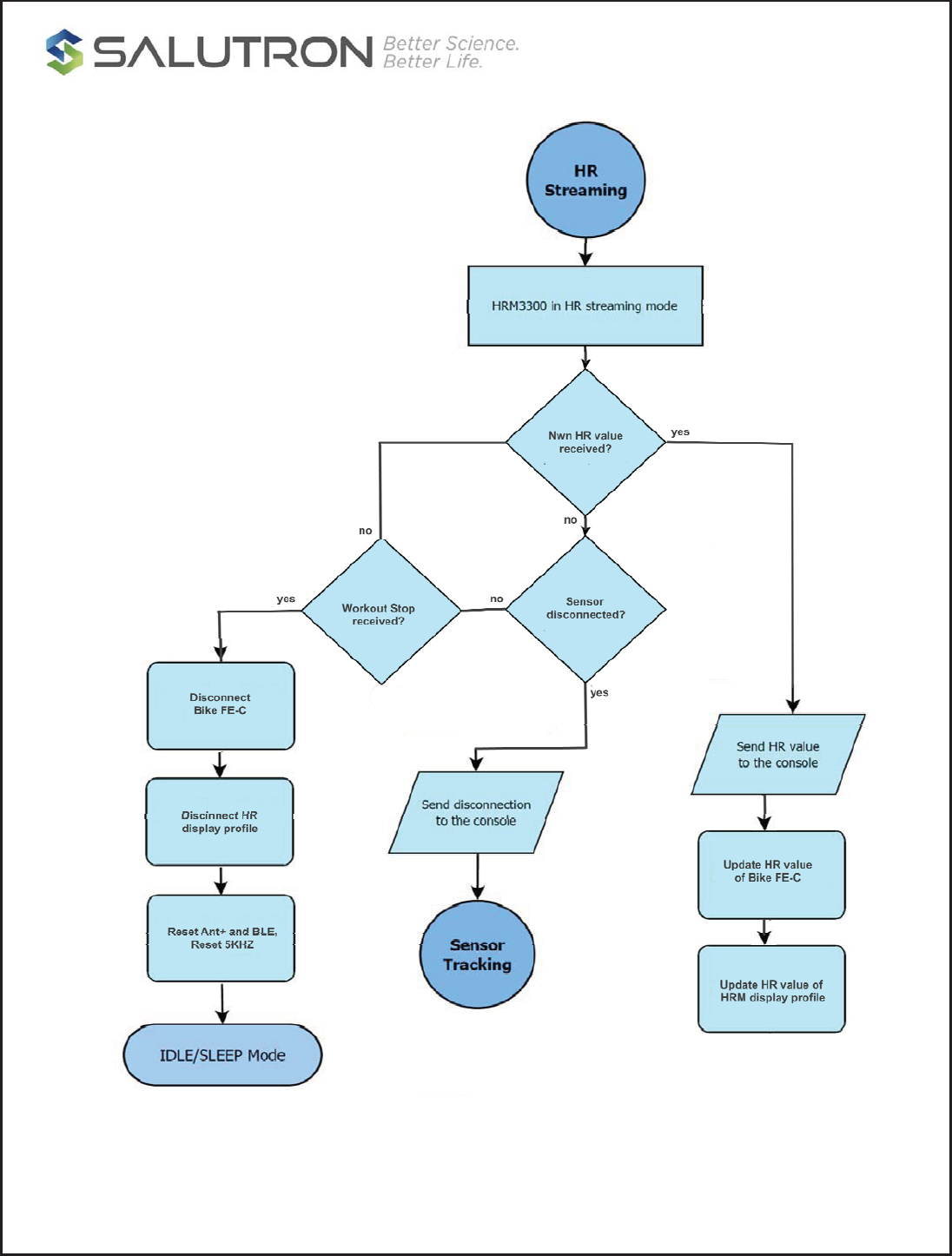
The equipment console would need to send a “stop workout” command to disconnect the HRM3300 to the
paired sensor. The HRM3300 will forget that sensor device and go to idle state and wait for next
interaction.
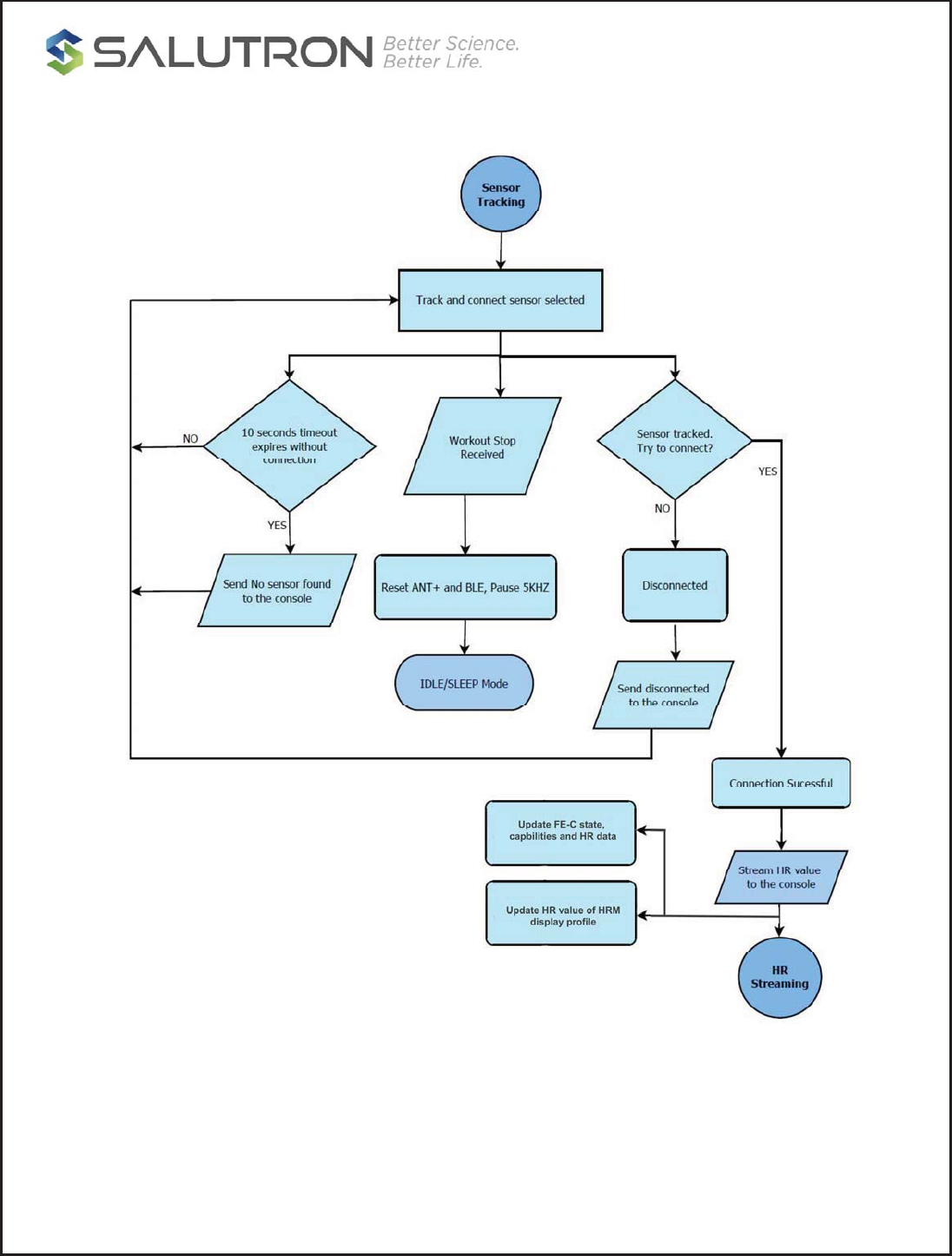
A special process was made if only 5kHz was detected during scanning. By default, the HRM3300 will not
wait for user confirmation but directly connect to 5kHz sensor if it is the only one detected during scanning.
HRM data will automatically send to console after connection However console has an option to override it
with “5KHZ disable auto connect” command, in this case the console will wait for user confirmation. A stop
workout command will disconnect the HRM3300 to 5kHz sensor and go to idle state.
CONFIDENTIAL
Copyright 2016, Salutron, Incorporated Revision 1.1 Revision Date:07/31//17 Page: 10 of 23
2.5. HRM3300 Programming flow
CONFIDENTIAL
Copyright 2016, Salutron, Incorporated Revision 1.1 Revision Date:07/31//17 Page: 11 of 23
CONFIDENTIAL
Copyright 2016, Salutron, Incorporated Revision 1.1 Revision Date:07/31//17 Page: 12 of 23

CONFIDENTIAL
Copyright 2016, Salutron, Incorporated Revision 1.1 Revision Date:07/31//17 Page: 13 of 23
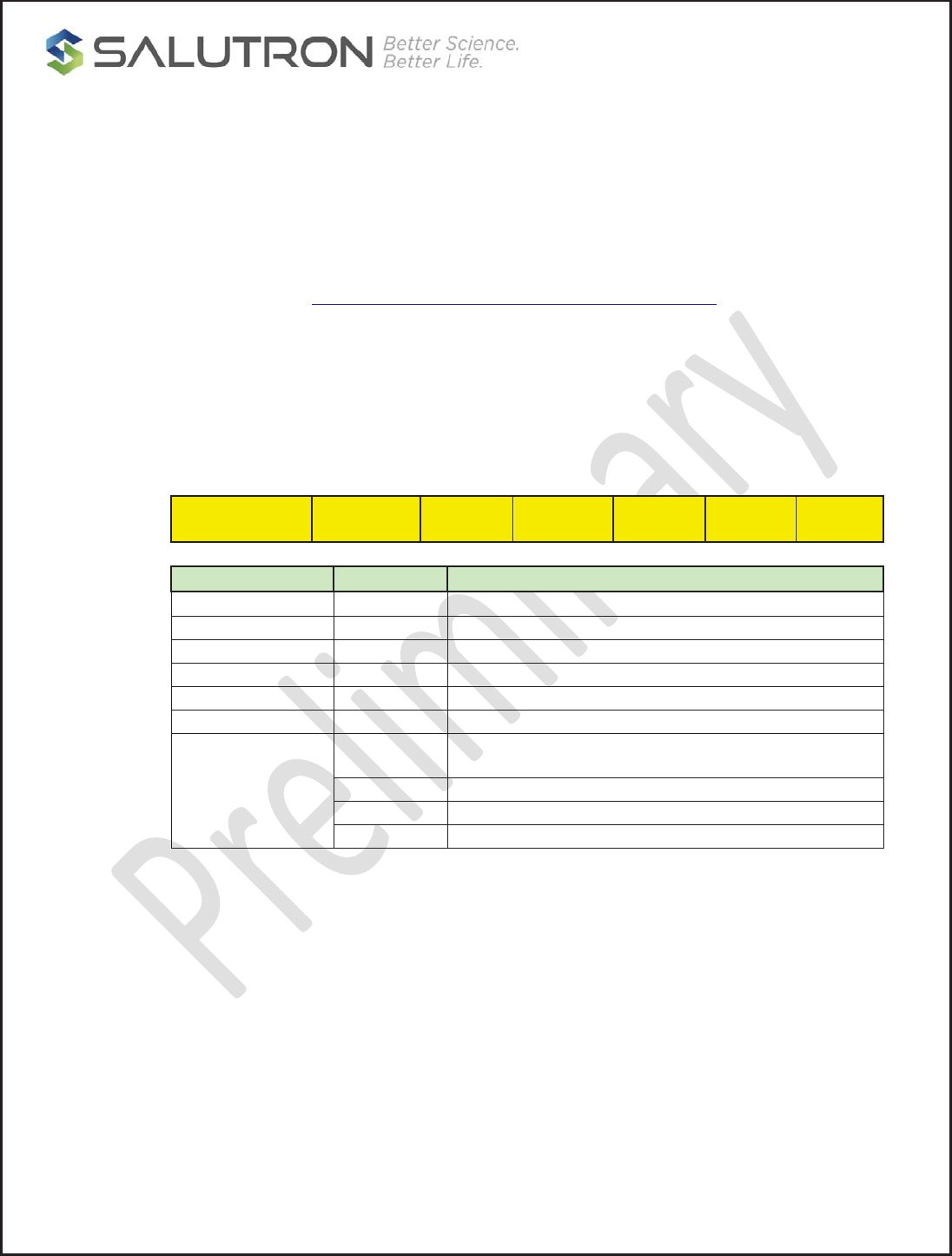
2.6. HRM3300 OTA.
The new code update can be flashed into the device using over the air programming. The BLE DFU feature
of OEM3300 can be triggered using the activation
command
from the console. Once triggered the
OEM3300 function as BLE peripheral and will broadcast “OEM_3300”. Using Nordic NRF Connect
application installed in the phone and the OAD zip file released, the OEM3300 firmware can be updated.
For more information and procedure on how to OTA, please refer to OEM3300 OAD procedure document.
CONFIDENTIAL
Copyright 2016, Salutron, Incorporated Revision 1.1 Revision Date:07/31//17 Page: 14 of 23
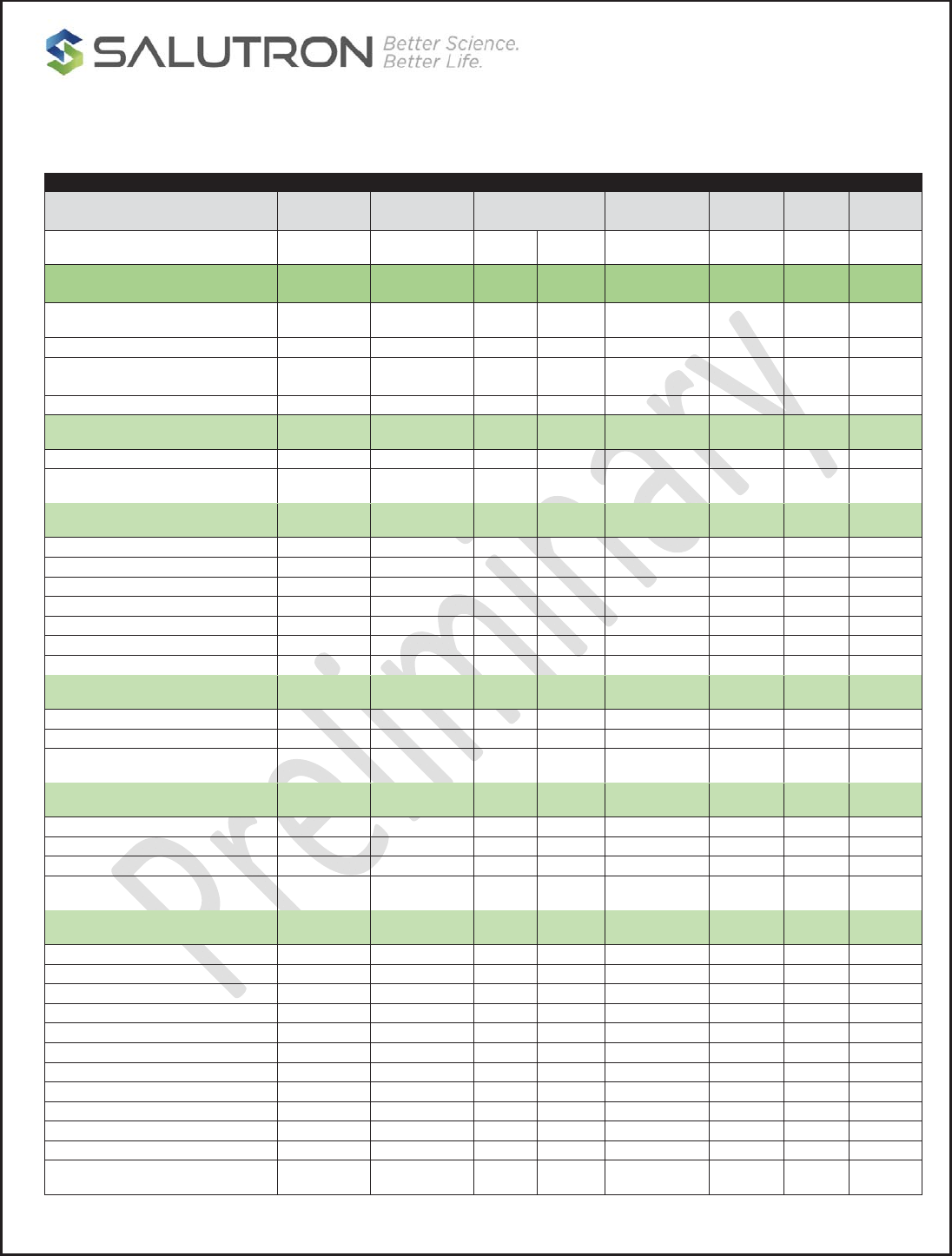
3. UART COMMUNICATION PROTOCOL PACKETS
3.1. Packets
The uart protocol packets contain data that will be used as an interface between the HRM3300 and the
equipment console. A maximum of twenty four bytes and a minimum of eight bytes are used during Uart
communication.
Fletcher checksum reference: https://en.wikipedia.org/wiki/Fletcher%27s_checksum
For 5kHz analog strap, the name to be transmitted will be “5kHz HRM”.
Below is the UART packet:
A response bit when set means the receiver is obliged to response acknowledgement when package is
received from the transmitting Uart port
START
COMMAND
PACKET LEN CHECK
SUM
RESPONSE
BIT
CLASS SUB DATAx
Type Size in bytes Description
START COMMAND 1 Start byte
PACKET LEN 1 Number of bytes in a packet
CHECK SUM 2 Fletcher checksum
RESPONSE BIT 1 Response bit
CLASS 1 Packet Class type
SUB CLASS 1 Packet sub-class type
DATA
17
BLE advertising name and BLE address with “0x1F” separator
between name and address
8 5Khz HRM name
2 ANT+ ID
1 Other data
3.2. Example of Sending Packets Equipment Console
Usage:
Sending packet name to equipment console
Format:
[Start Command]
[Packet Size]
[Fletcher check sum low byte]
[Fletcher check sum high byte]
[Response bit]
[Class]
[Sub Class]
[Name 1st byte]

CONFIDENTIAL
Copyright 2016, Salutron, Incorporated Revision 1.1 Revision Date:07/31//17 Page: 15 of 23
[Name … byte]
[Name xth byte]
Packet:
ex. 5Khz advertising name = “5kHz HRM”
[0x0A]
[0x0F]
[0xYY]
[0xZZ]
[0x0C]
[0x00]
[0x01]
[0x35]
[0x6B]
[0x48]
[0x7A]
[0x20]
[0x48]
[0x52]
[0x4D]
3.3. Example of Sending Packet to HRM3300
Usage:
Sending selected packet name to HRM3300
Format:
[Start Command]
[Packet Size]
[Fletcher check sum low byte]
[Fletcher check sum high byte]
[Response bit]
[Class]
[Sub Class]
[Name 1st byte]
[Name … byte]
[Name xth byte]
Packet:
ex. 5Khz advertising name = “5kHz HRM”
[0x0B]
[0x0F]
[0xYY]
[0xZZ]
[0x00]
[0x1C]
[0x01]
[0x35]
[0x6B]
[0x48]
[0x7A]
[0x20]
[0x48]
[0x52]
[0x4D]
CONFIDENTIAL
Copyright 2016, Salutron, Incorporated Revision 1.1 Revision Date:07/31//17 Page: 16 of 23
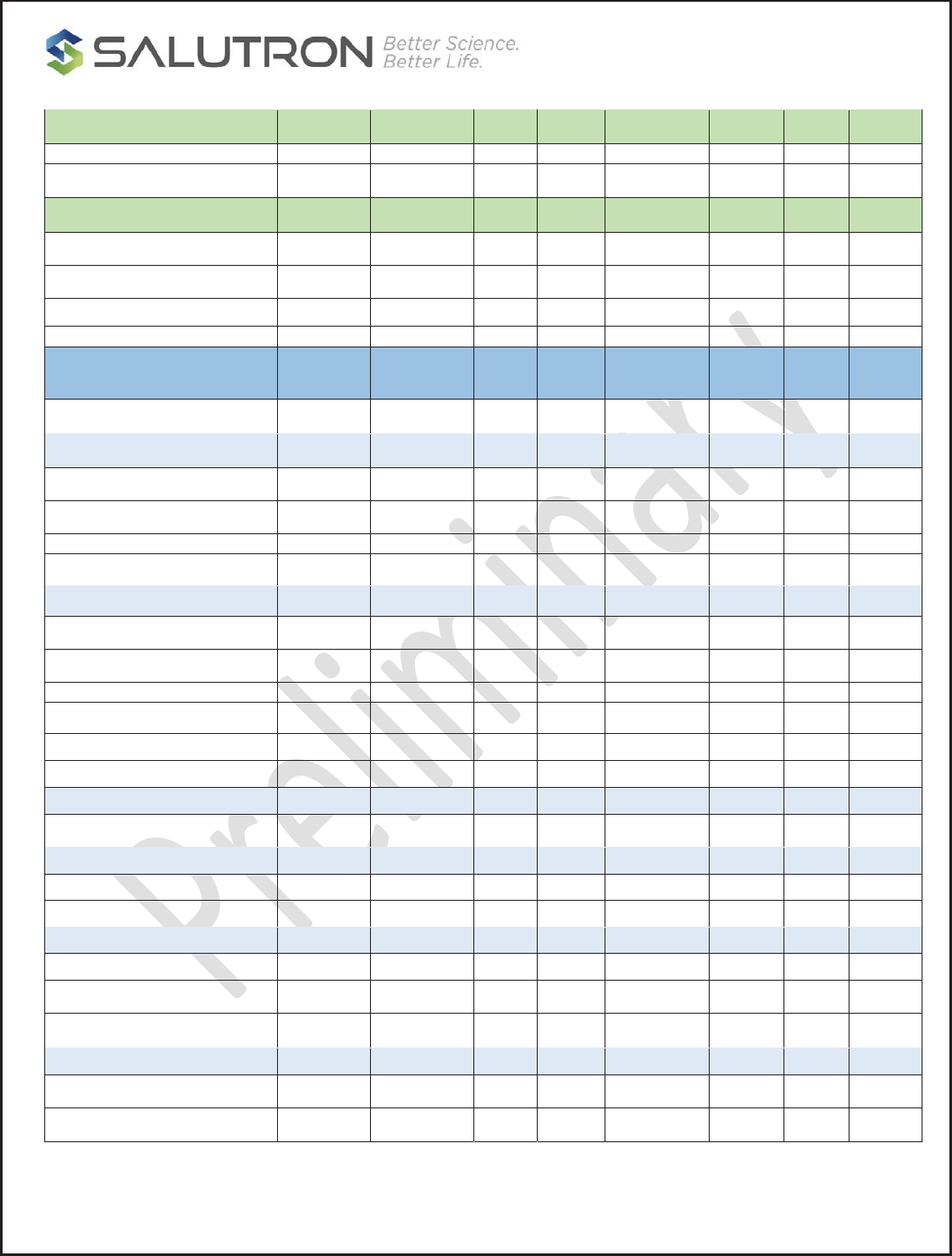
3.4. UART Protocol Packet Table:
UART PROTOCOL PACKET
DESCRIPTIONCOMMANDPACKET
LENGHT
CHECK SUM RESPONSE
BIT
CLASSSUB DATA
(1-n)
HRM3300 TO EQUIPMENT
CONSOLE
5Khz name to Console0x0A15 0xYY 0xYY 0x00 0x0C0x01 0xYY...
BLE name and Address to
Console
0x0A24 0xYY 0xYY 0x00 0x0C0x02 0xYY...
ANT name to Console0x0A11 0xYY 0xYY 0x00 0x0C0x03 0xYY...
HR DATA0x0A8 0xYY 0xYY 0x00 0x0C0x04 0xYY
5KHZ ERROR CODE
Connection lost0x0A8 0xYY 0xYY 0x00 0x0C0x05 0x01
Corrupted HR 0x0A8 0xYY 0xYY 0x00 0x0C0x05 0x02
Relearn 0x0A8 0xYY 0xYY 0x00 0x0C0x05 0x03
Code Noisy0x0A8 0xYY 0xYY 0x00 0x0C0x05 0x04
Code Noisy Off0x0A8 0xYY 0xYY 0x00 0x0C0x05 0x05
Code Over Limit0x0A8 0xYY 0xYY 0x00 0x0C0x05 0x06
Cross Talk 0x0A8 0xYY 0xYY 0x00 0x0C0x05 0x07
BLE Error code only0x0A8 0xYY 0xYY 0x00 0x0C0x05 0x1Y
ANT+ error code only0x0A8 0xYY 0xYY 0x00 0x0C0x05 0x2Y
COMMON ERROR
Connection lost0x0A8 0xYY 0xYY 0x00 0x0C0x05 0x31
Connection failed0x0A8 0xYY 0xYY 0x00 0x0C0x05 0x32
No device found0x0A8 0xYY 0xYY 0x00 0x0C0x05 0x33
STATUS
Disconnected0x0A8 0xYY 0xYY 0x00 0x0C0x06 0x01
Searching device0x0A8 0xYY 0xYY 0x00 0x0C0x06 0x02
Device not found0x0A8 0xYY 0xYY 0x00 0x0C0x06 0x03
Device found0x0A8 0xYY 0xYY 0x00 0x0C0x06 0x04
Idle Mode0x0A8 0xYY 0xYY 0x00 0x0C0x06 0x05
Connected0x0A8 0xYY 0xYY 0x00 0x0C0x06 0x06
Scanning0x0A8 0xYY 0xYY 0x00 0x0C0x06 0x07
Stop Scanning0x0A8 0xYY 0xYY 0x00 0x0C0x06 0x08
Workout started0x0A8 0xYY 0xYY 0x00 0x0C0x06 0x09
workout stopped0x0A8 0xYY 0xYY 0x00 0x0C0x06 0x0A
5KHZ WL active 0x0A8 0xYY 0xYY 0x00 0x0C0x06 0x0B
CONFIDENTIAL
Copyright 2016, Salutron, Incorporated Revision 1.1 Revision Date:07/31//17 Page: 17 of 23
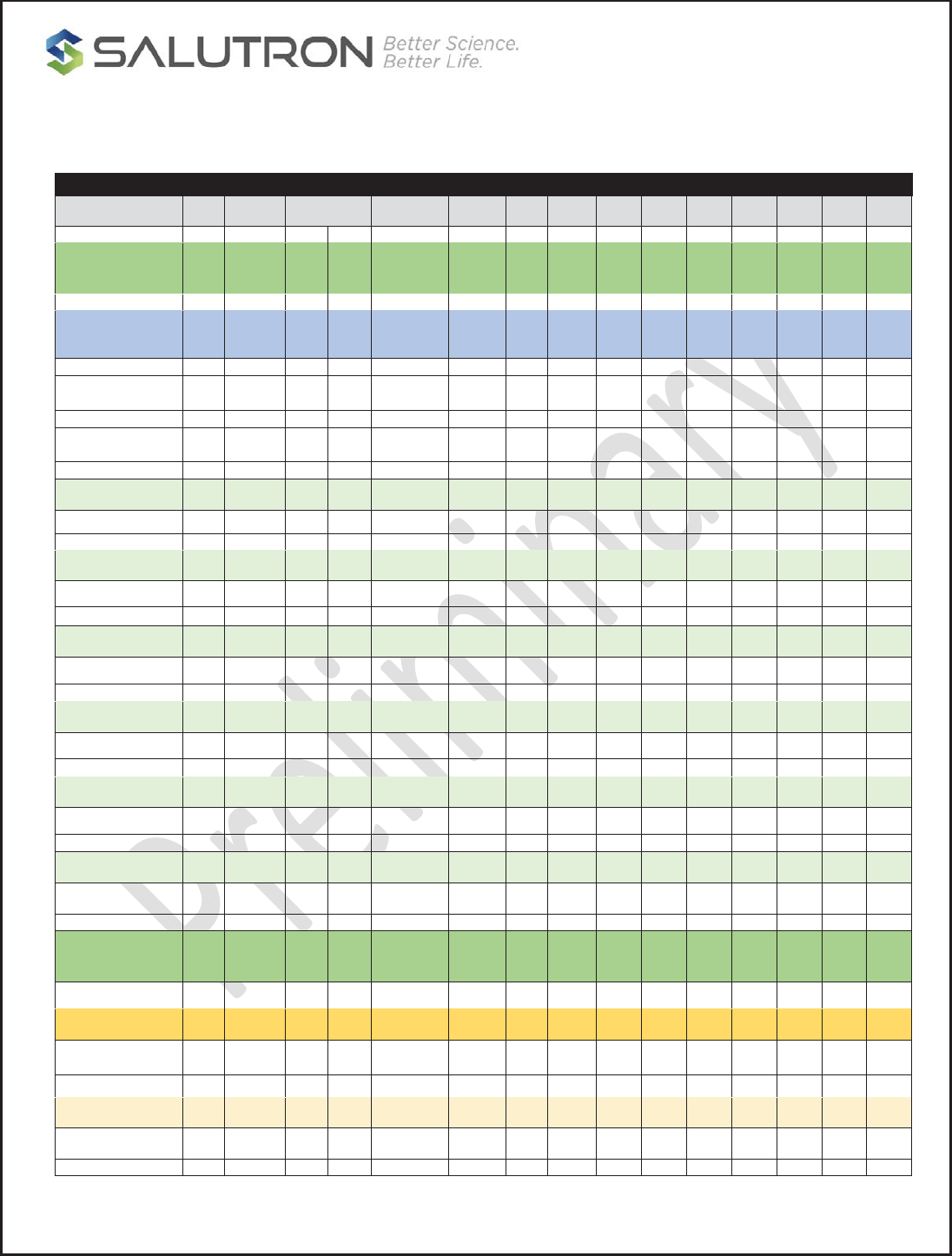
ACKNOWLEDGEMENT
ACLK0x0A8 0xYY 0xYY 0x00 0x0C0x07 0x01
RSSI Value
5Khz name0x0A8 0xYY 0xYY 0x00 0x0D0x01 0x01
BLE RSSI Data0x0A8 0xYY 0xYY 0x00 0x0D0x10 0xYY
ANT+ RSSI Data0x0A8 0xYY 0xYY 0x00 0x0D0x20 0xYY
EQUIPMENT CONSOLE TO
HRM3300
CONNECTING
Sending 5Khz Name to MCU0x0B15 0xYY 0xYY 0x00 0x1C0x01 0xYY...
Sending BLE address to MCU0x0B15 0xYY 0xYY 0x00 0x1C0x02 0xYY...
Sending ANT ID to MCU0x0B11 0xYY 0xYY 0x00 0x1C0x03 0xYY...
WORKOUT
Start workout with RSSI option 10x0B8 0xYY 0xYY 0x00 0x1C0x04 0x01
Start workout with RSSI option 20x0B8 0xYY 0xYY 0x00 0x1C0x04 0x02
Start workout with RSSI option 30x0B8 0xYY 0xYY 0x00 0x1C0x04 0x03
Stop Workout0x0B8 0xYY 0xYY 0x00 0x1C0x04 0x04
StartWorkoutwithRSSIdata(dbm) 0x0B8 0xYY 0xYY 0x00 0x1C0x04 0xYY
SCANNING
Start Scanning0x0B8 0xYY 0xYY 0x00 0x1C0x05 0x01
GET STATUS
Get state status 0x0B 8 0xYY 0xYY 0x01 0x1C 0x06 0x01
5KHZ COMMAND
Auto connect0x0B 8 0xYY 0xYY 0x01 0x1C 0x07 0x01
Disable auto connect0x0B8 0xYY 0xYY 0x01 0x1C0x07 0x02
ENABLE BLE OTA
Start BLE Broadcast 0x0B8 0xYY 0xYY 0x00 0x1E0x01 0x01
Stop BLE Broadcast 0x0B8 0xYY 0xYY 0x00 0x1E0x01 0x02
CONFIDENTIAL
Copyright 2016, Salutron, Incorporated Revision 1.1 Revision Date:07/31//17 Page: 18 of 23
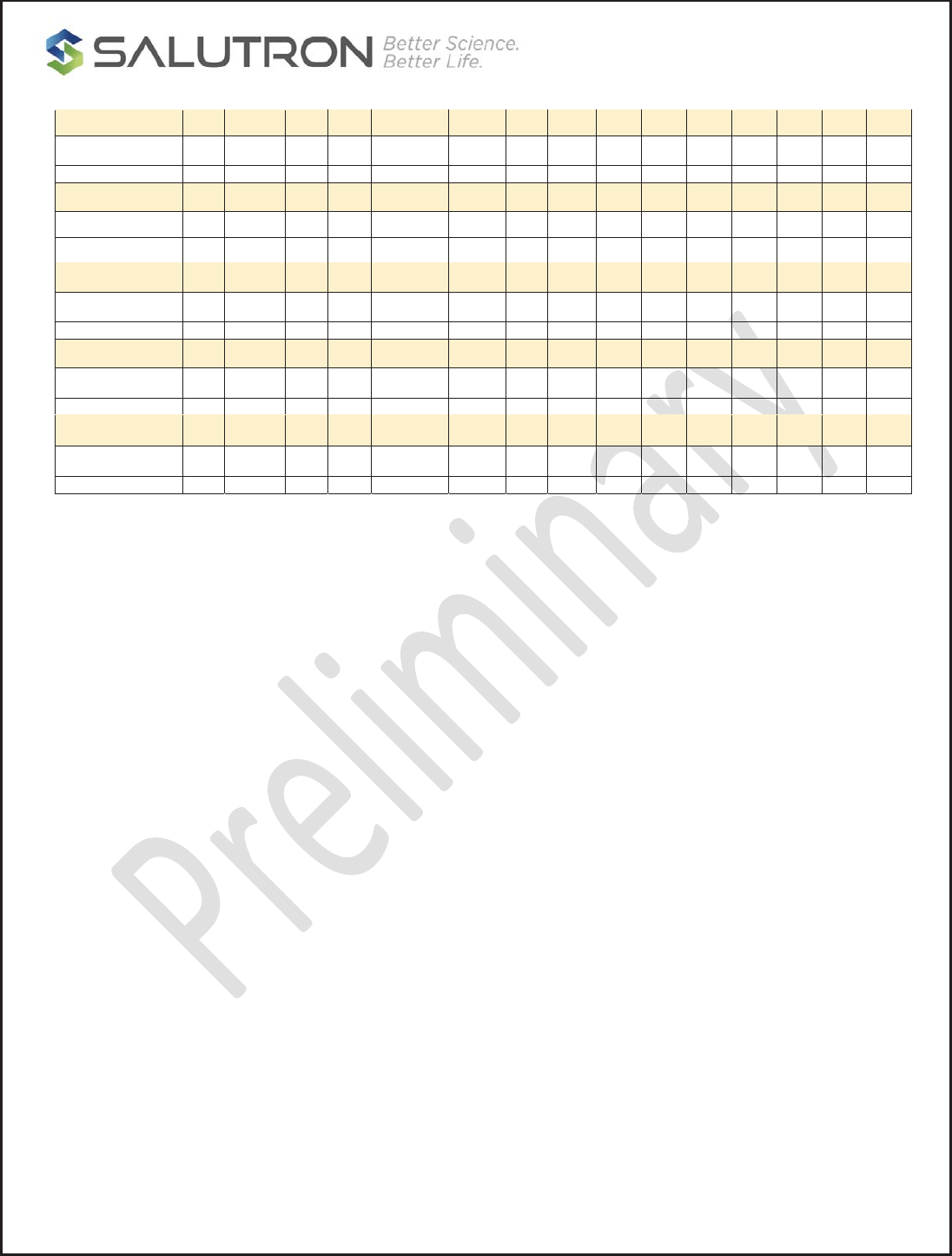
3.5. UART BIKE FE-C Protocol Packet Table:
UART BIKE FE-C PROTOCOL PACKET
DESCRIPTIONCMDPACKET
LENGHT
CHECK SUMRESPONSE
BIT
CLASS SUB DATA DAT
A
DAT
A
DAT
A
DAT
A
DAT
A
DAT
A
DAT
A
EQUIPMENT
CONSOLE TO
HRM3300
Console FE-C
status
Set FEC supported 0x0A 8 0xYY 0xYY 0x00 0x10 0x01 0x01
Set FEC not
supported
0x0A 8 0xYY 0xYY 0x00 0x10 0x01 0x00
Start FEC
Broadcast
0x0B 8 0xYY 0xYY 0x00 0x11 0x01 0x01
Stop FEC 0x0B 8 0xYY 0xYY 0x00 0x11 0x02 0x02
Details for Page 16
Set Page 16 0x0B 15 0xYY 0xYY 0x00 0x12 0x01 Byte0 Byte1 Byte2 Byte3 Byte4 Byte5 Byte6 Byte7
Details for Page 18
Set page 18 0x0B 15 0xYY 0xYY 0x00 0x13 0x01 Byte0 Byte1 Byte2 Byte3 Byte4 Byte5 Byte6 Byte7
Details for Page21
Set page 21 0x0B 15 0xYY 0xYY 0x00 0x14 0x01 Byte0 Byte1 Byte2 Byte3 Byte4 Byte5 Byte6 Byte7
Details for Page 80
Set page 80 0x0B 15 0xYY 0xYY 0x00 0x15 0x01 Byte0 Byte1 Byte2 Byte3 Byte4 Byte5 Byte6 Byte7
Details for page 81
Set Page 81 0x0B 15 0xYY 0xYY 0x00 0x16 0x01 Byte0 Byte1 Byte2 Byte3 Byte4 Byte5 Byte6 Byte7
DEVICE ID
Set Device ID 0x0B 8 0xYY 0xYY 0x00 0x17 0x01 0xYY
HRM3300 TO
EQUIPMENT
CONSOLE
FEC Status
Get FEC support
status
0x0A 8 0xYY 0xYY 0x00 0x20 0x01 0x01
Page 16
Get data page 16 0x0A 8 0xYY 0xYY 0x00 0x22 0x01 0x01
CONFIDENTIAL
Copyright 2016, Salutron, Incorporated Revision 1.1 Revision Date:07/31//17 Page: 19 of 23
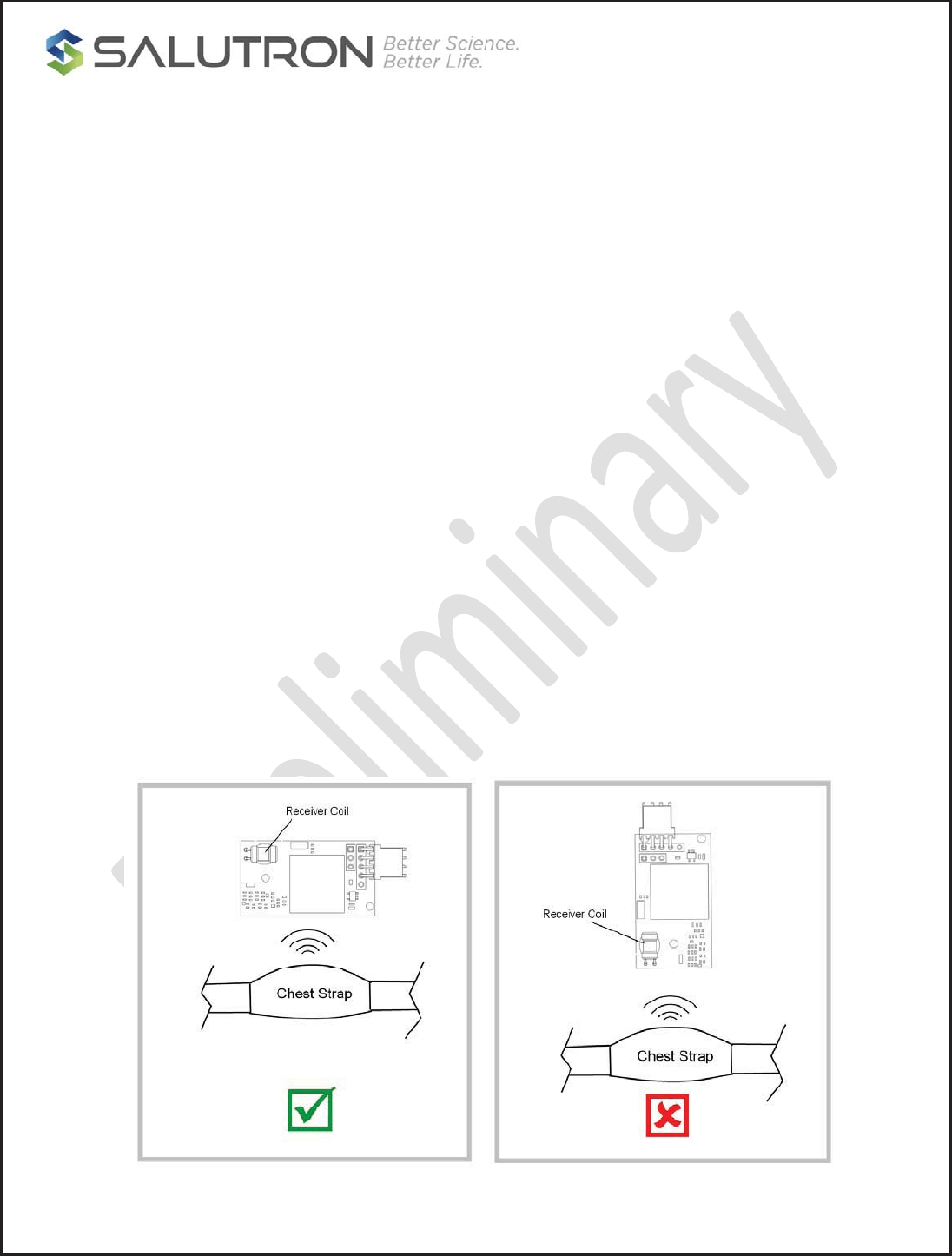
Page 18
Get data page 18 0x0A 8 0xYY 0xYY 0x00 0x23 0x01 0x01
Page 21
Get data page 21 0x0A 8 0xYY 0xYY 0x00 0x24 0x01 0x01
Page 80
Get data page 80 0x0A 8 0xYY 0xYY 0x00 0x25 0x01 0x01
Page81
Get data page 81 0x0A 8 0xYY 0xYY 0x00 0x26 0x01 0x01
DEVICE ID
Get Device ID 0x0A 8 0xYY 0xYY 0x00 0x27 0x01 0x01
CONFIDENTIAL
Copyright 2016, Salutron, Incorporated Revision 1.1 Revision Date:07/31//17 Page: 20 of 23
Appendix A : HRM3300 Placement Guideline
The electrical noise generates from the machine could affect the reception range of 5KHZ
wireless receiver. It is better to avoid any noise frequency near 5KHZ or harmonics get near
the module.
Although not all electrical noise can be avoided, the following sources could contribute to the
interference. It is recommended to position the HR wireless module as far from these sources
as possible.
x LED display
x Electrical fan
x Audio speaker
x Magnetic field
x Piezo buzzer/beeper
x Magnetic brake (Bike)
x External/ internal CD player
x Excessive ripple noise on power supply
x Switching power supply
x Motor controller
x Sound or noise source in audio band (20HZ~20KHZ)
x Cell phone
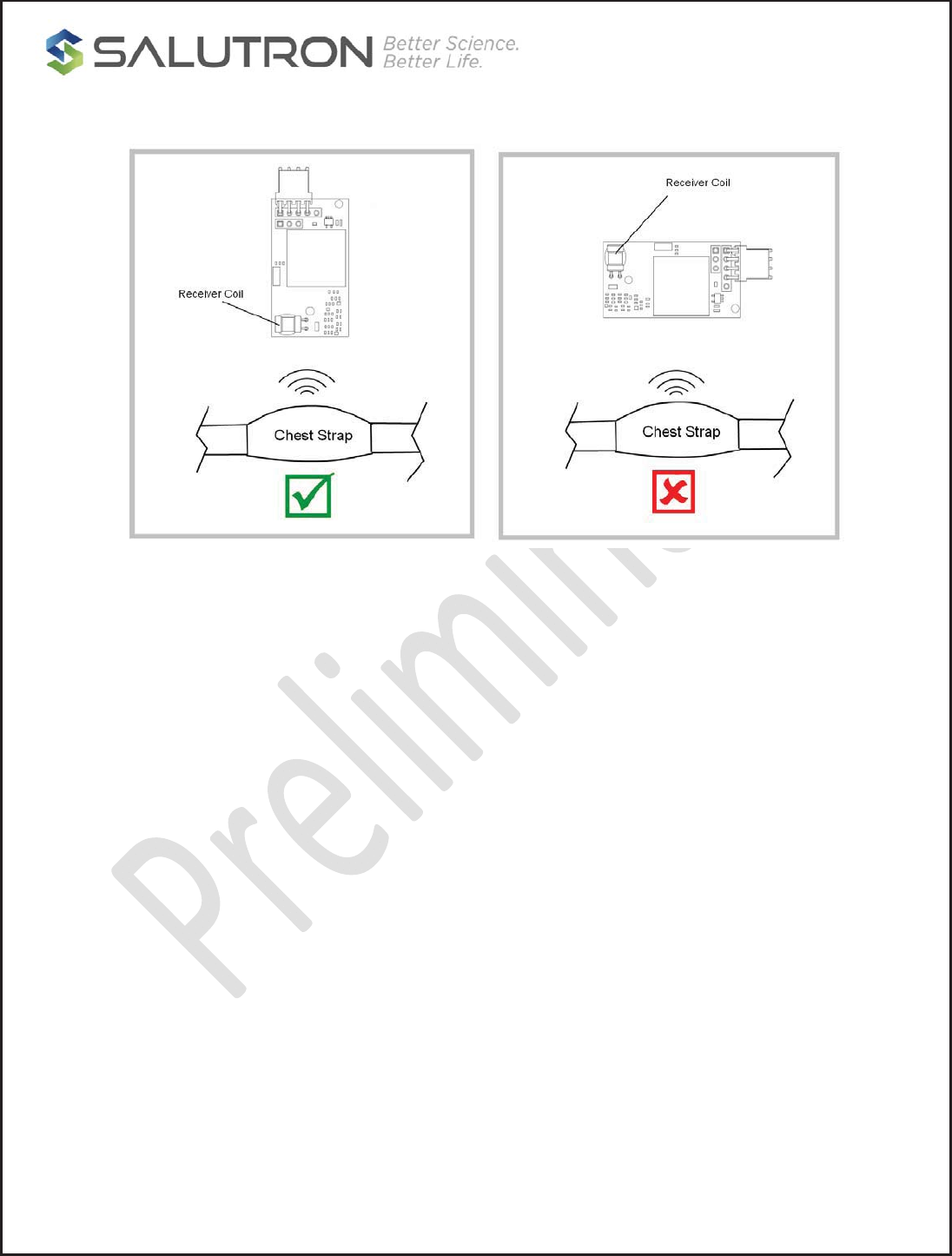
An incorrect wireless coil orientation placement will affect the range. The orientation of the
receiving coil on the HRM wireless module should be in horizontal or parallel with the
transmitter’s coil to obtain the optimal performance.
CONFIDENTIAL
Copyright 2016, Salutron, Incorporated Revision 1.1 Revision Date:07/31//17 Page: 21 of 23
The ideal placement location of the HR wireless module would be at the center, toward the front
that is closer to the user, and away from the noise sources.
In case the wireless module has to place off to the left or right side from the center of the console,
then try to keep the offset distance within 12 inches (30cm) or less, otherwiseThe reception
distance of the HRM will be shorten if it is placed too far off from the center.

CONFIDENTIAL
Copyright 2016, Salutron, Incorporated Revision 1.1 Revision Date:07/31//17 Page: 22 of 23
FCC/IC statement
FCC statement
This device complies with part 15 of the FCC Rules. Operation is subject to the
following two conditions: (1) This device may not cause harmful interference,
and (2) this device must accept any interference received, including
interference that may cause undesired operation.
Any Changes or modifications not expressly approved by the party responsible
for compliance could void the user's authority to operate the equipment.
The modular can be installed or integrated in mobile or fix devices only. This
modular cannot be installed in any portable device.
FCC Radiation Exposure Statement
This modular complies with FCC RF radiation exposure limits set forth for an
uncontrolled environment. This transmitter must not be co-located or operating
in conjunction with any other antenna or transmitter. This modular has been
If the FCC identification number is not visible when the module is installed
inside another device, then the outside of the device into which the module is
installed must also display a label referring to the enclosed module. This
exterior label can use wording such as the following: “Contains Transmitter
Module FCC ID: Or ContainsFCC ID: N7P-HRM3300
N7P-HRM3300
This equipment has been tested and found to comply with the limits for a Class B digital device,
pursuant to part 15 of the FCC Rules. These limits are designed to provide reasonable protection
against harmful interference in a residential installation. This equipment generates uses and can
radiate radio frequency energy and, if not installed and used in accordance with the instructions,
may cause harmful interference to radio communications. However, there is no guarantee that
interference will not occur in a particular installation. If this equipment does cause harmful
interference to radio or television reception, which can be determined by turning the equipment off
and on, the user is encouraged to try to correct the interference by one or more of the following
measures:
-Reorient or relocate the receiving antenna.
-Increase the separation between the equipment and receiver.
-Connect the equipment into an outlet on a circuit different from that to which the receiver is connected.
-Consult the dealer or an experienced radio/TV technician for help.
evaluated to meet general RF exposure requirement. The device can be used in portable
exposure condition without restriction.

CONFIDENTIAL
Copyright 2016, Salutron, Incorporated Revision 1.1 Revision Date:07/31//17 Page: 22 of 23
FCC/IC statement
IC statement
This device complies with Industry Canada’s licence-exempt RSSs. Operation is subject to the
following two conditions:
(1) This device may not cause interference; and
(2) This device must accept any interference, including interference that may cause undesired
operation of the device.
Cet appareil est conforme aux CNR exemptes de licence d'Industrie Canada . Son fonctionnement
est soumis aux deux conditions suivantes :
( 1 ) Ce dispositif ne peut causer d'interférences ; etc
( 2 ) Ce dispositif doit accepter toute interférence , y compris les interférences qui peuvent
causer un mauvais fonctionnement de l'appareil.
For a host manufacture's using a certified modular, if (1) the module's IC number is not visible
when installed in the host, or (2) if the host is marketed so that end users do not have straightforward
commonly used methods for access to remove the module so that the IC number of the
module is visible; then an additional permanent label referring to the enclosed module:
"Contains Transmitter
Module IC: " or "Contains IC: 10274A-HRM3300" must be used.
10274A-HRM3300
"
When the module is installed inside another device, the user manual of the
host must contain below warning statements;
1. This device complies with Part 15 of the FCC Rules. Operation is subject to
the following two conditions:
(1) This device may not cause harmful interference.
(2) This device must accept any interference received, including interference
that may cause undesired operation.
2. Changes or modifications not expressly approved by the party responsible
for compliance could void the user's authority to operate the equipment.
The devices must be installed and used in strict accordance with the
manufacturer's instructions as described in the user documentation that comes
with the product.
Any company of the host device which install this modular with single modular
approval should perform the test of radiated emissionand spurious emission
according to FCC part 15C : 15.247 requirement,Only if the test
result comply with FCC part 15C : 15.247 requirement ˈthen the
host can be sold legally.
Le dispositif a été évalué pour répondre aux exigences générales d'exposition RF. Le dispositif
peut être utilisé dans une condition d'exposition portable sans restriction.
RF warning for Portable device:
The device has been evaluated to meet general RF exposure requirement. The device
can be used in portable exposure condition without restriction.
Avertissement RF pour Appareil portable:

CONFIDENTIAL
Copyright 2016, Salutron, Incorporated Revision 1.1 Revision Date:07/31/17 Page: 23 of 23
OrderInformation
Salutron’scommitmenttocustomersatisfactionisthedrivingforcebehindourproduct
offerings.Contactustodiscussanyspecificconnectoroptions,preloadedfeatures,andspecific
applicationinformationthatyoumayneed.
LifeSupportPolicy
Salutron’s products are not authorized for use as critical components in life support devices.
ContactInformation
Office: 510-795-2876
http://www.salutron.com
Salutron Inc.
8371 Central Avenue, Unit A, Newark, California, United States, 94560