Salutron HRW03 R Series Activity & Wellness Monitor with Heart Rate Measurement, Spectral Ambient Light Sensor & Intelligent Alerts User Manual
Salutron Inc. R Series Activity & Wellness Monitor with Heart Rate Measurement, Spectral Ambient Light Sensor & Intelligent Alerts
Salutron >
User manual
Quick Start Guide
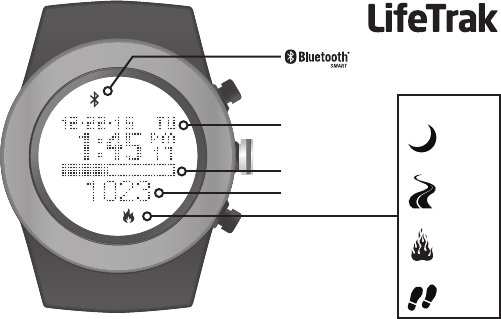
Zone R420
Goal Progress Bar
Time / Date
Activity Value
Activity Type
sleep
distance
calories
steps
®
Welcome to LifeTrak. Let’s take a quick tour of the basic features.
• To turn on your tness tracker, press and hold any button.
Learn more
• For support, tips, product information and full instructions, please visit:
www.lifetrakusa.com/support/help-center/
Copyright © 2015 LifeTrak, Inc. All rights reserved. Duplication or copying of all or part of this manual without
the express written consent of LifeTrak, Inc. is prohibited.
Website: www.LifeTrakUSA.com
Facebook: www.facebook.com/lifetrak
Twitter & Instagram: mylifetrak
Pinterest: pinterest.com/lifetrak
YouTube: www.youtube.com/lifetrakusa
NOTE: Actual model / screen images may vary from images shown.
NOTE: This is NOT a medical device. Please visit our website to view
cautions and warranty information in the full instruction manual.
CUSTOMER SERVICE
If you have questions about your
LifeTrak activity tracker, please
confact our customer service team
support@LifeTrakUSA.com

Button Layout...........................................................................................................................................
Setting Goals...........................................................................................................................................
Setting Time.............................................................................................................................................
Setting User Info......................................................................................................................................
Sleep Tracker........................................................................................................................................
Modes of Operation : Workout.............................................................................................................
Heart Rate Monitor (Two Ways) : Finger Touch vs BLE Chest Belt..............................................
Pair Your Chest Belt..........................................................................................................................
Set HR Log Rate...............................................................................................................................
Sessions...........................................................................................................................................
View Recorded Data.........................................................................................................................
Storage Remaining...........................................................................................................................
Delete Recorded Data......................................................................................................................
Modes of Operation : Hourly Display.............................................................................................
Modes of Operation : Weekly Display................................................................................................
Advanced Settings............................................................................................................................
Sync Fitness Data / LifeTrak App......................................................................................................
Helpful Hints & FCC / IC Cautions....................................................................................................
Warnings & Cautions...............................................................................................................
1
2
3
4
5-6
7
8-10
11
12
13
14
15
16
17-18
19
20-22
23-24
25-28
Back Cover
TABLE OF CONTENTS
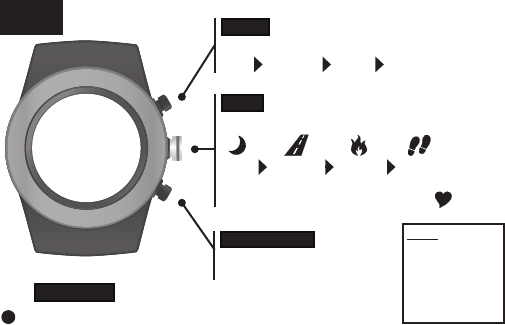
Press to view:
sleep distance calories steps
Press & hold to read your heart rate
MODE
Press to change modes:
Time Workout Hourly Weekly
START / STOP
Press to start and stop in
Workout Mode
VIEW
BUTTON
LAYOUT
BACKLIGHT
To activate the backlight, double-click VIEW
NOTE:
The buttons are
NOT intended for
use under water.
If used, water
could leak in and
cause damage.
1
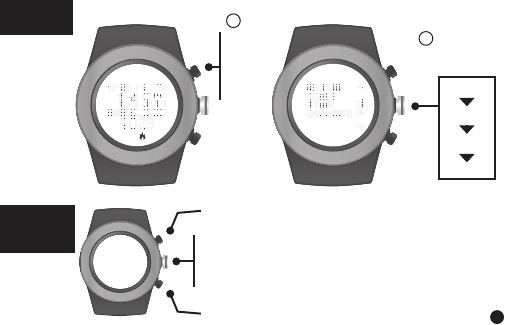
steps
distance
calories
sleep
INSIDE
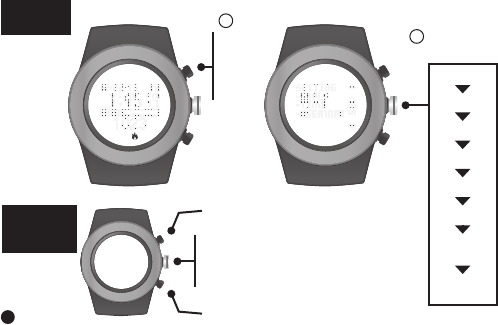
SETTING
MODE
SETTING
GOALS
Increase value
Decrease value
Press to go to next setting
Press & hold to
exit setting mode
Goals can be
adjusted on your
tness tracker or
the LifeTrak App
(via Settings)
Select
GOALS
2
In Time,
hold
MODE
for
3 sec
1
2
3
SETTING
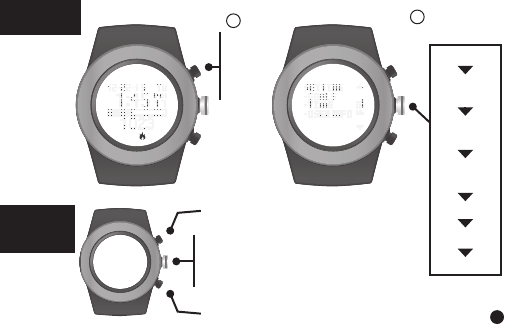
TIME
Time Setup
can be adjusted
on your tness
tracker or the
LifeTrak App
(via Settings)
Select
TIME
2
seconds
minute
hour
year
month
day
month-day
format
12/24 hr
format
INSIDE
SETTING
MODE
Increase value
Decrease value
Press to go to next setting
Press & hold to
exit setting mode
In Time,
hold
MODE
for
3 sec
1
4
SETTING
USER INFO Select
USER INFO
2
gender
birthday
(year)
birthday
(month)
birthday
(day)
unit format
weight
height
User Info can be
adjusted on your
tness tracker or
the LifeTrak App
(via Settings)
INSIDE
SETTING
MODE
Increase value
Decrease value
Press to go to next setting
Press & hold to
exit setting mode
In Time,
hold
MODE
for
3 sec
1
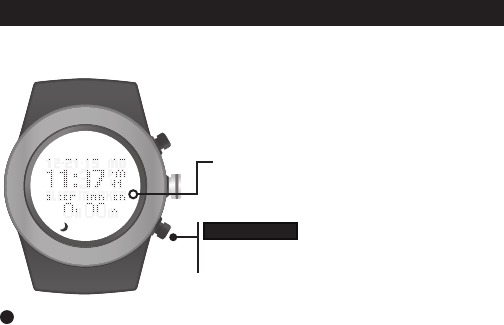
The sleep tracker monitors the duration and quality of sleep. It automatically detects
the beginning and end of your sleep session.
Sleep tracker indicator
(only in manual sleep mode)
START / STOP
Double-click to manually start / stop the sleep
tracker (must be in Time mode)
5
SLEEP TRACKER
For full control, you can also manually
operate the feature by double-clicking
START/ STOP while in Time Mode.
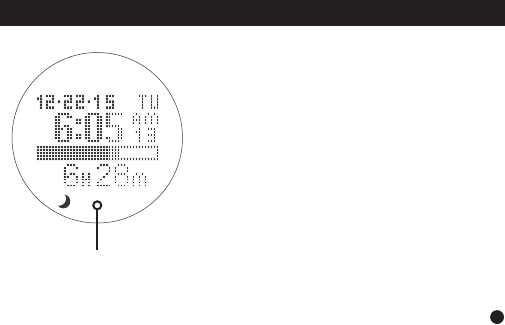
Total sleep time is accumulated during all
sleep sessions that end on a particular day.
For example, if you fell asleep last night and
woke up this morning, your sleep duration will
be added to today’s total sleep time.
However, if you fell asleep last night at 10:00
p.m. and woke up at 11:00 p.m., that hour
of sleep would be added to yesterday’s total
sleep time.
NOTE: Once you wake up, the total sleep time
will update after a brief period.
NOTE: The minimum sleep time for recorded
data is 45 minutes.
total sleep
time
6
SLEEP TRACKER
7
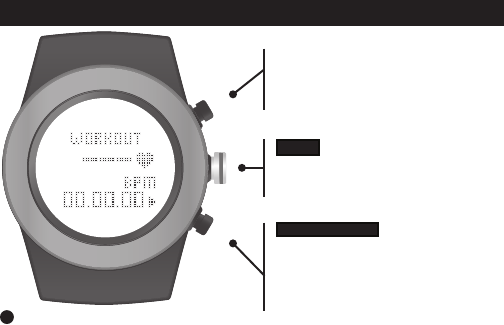
MODES OF OPERATION : WORKOUT
START / STOP
Press to start / stop recording
your workout
Hold to reset and record data
(Workout mode must be stopped)
VIEW
Press to view:
continuous heart rate (via chest belt),
distance, calories, steps
From Time Mode,
press MODE
until you reach
Workout Mode

HEART RATE MONITOR
1. VIA CHEST BELT
The Zone R420 is BLE chest belt compatible (sold separately). This additional
feature lets you record continuous heart rate readings to your watch, so you can
capture complete heart rate and calorie burn data during your workout. To help
you track your results, you can also sync your cardio data to the LifeTrak app after
your workout - so you know if you need to push harder next time.
2. VIA FINGER TOUCH
Don’t want to wear a chest belt, but you want a heart rate reading? Get your
ECG heart rate reading at the press of a button - no chest strap needed!
MEASURE YOUR HEART RATE TWO WAYS
8
Your heart is at the center of everything you do – fueling your life and driving your passions.
Monitoring your heart rate and using it in activity tracking is the most accurate way to set
your tness goals and help you reach them.
Why measure heart rate?
- Taking your heart rate will help you stay in your workout zones and help calculate your
calorie burn more accurately.
9
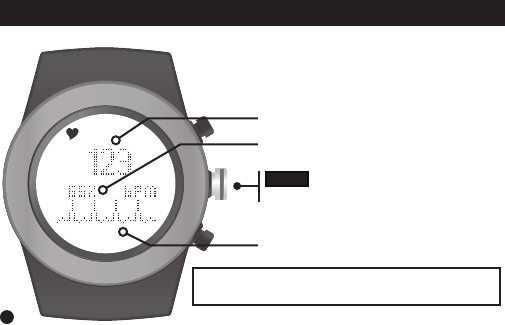
FINGER TOUCH HEART RATE
This feature will NOT be available when you are using
your compatible BLE chest belt in Workout Mode.
VIEW
Press & hold to read your heart rate
Heart Rate (beats per minute)
% of Maximum Heart Rate
Pulse Indicator
1. Wear snugly around your wrist.
2. Gently press and hold VIEW for 3 to 8
seconds until your heart rate appears.
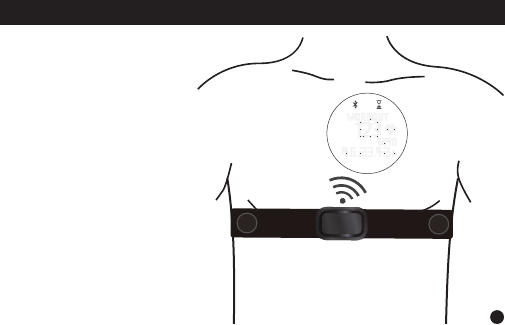
CONTINUOUS HEART RATE (BLE CHEST BELT)
Place your compatible* Bluetooth®
chest belt (chest belt not included)
around your rib cage, just below your
pectoral muscles.
Adjust the elastic strap so it is tight
enough not to move during your
workout, but not so tight that it restricts
breathing.
For optimal results, let the chest belt
‘warm up’ for a few minutes before
starting your workout.
*Please visit the LifeTrak website
www.lifetrakusa.com for a list of com-
patible BLE heart rate chest
belts / transmitters.
10
VIEW
Press & hold to read your heart rate
1. Wear snugly around your wrist.
2. Gently press and hold VIEW for 3 to 8
seconds until your heart rate appears.
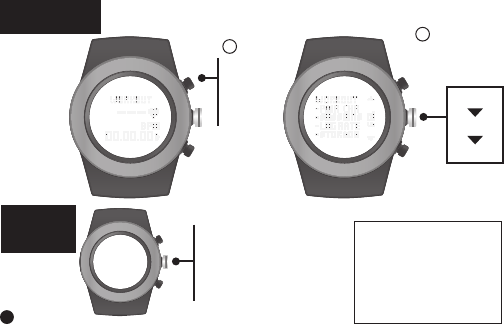
You must be wearing your BLE chest belt to PAIR to your Zone R420
In Workout,
hold
MODE
for
3 sec
Select
PAIR CHR
1
2
Press to start the
pairing process
Press & hold to
exit setting mode
11
INSIDE
SETTING
MODE
PAIR YOUR
CHEST BELT
new
clear*
info*
* Clear and Info will not
appear the rst time you
PAIR your BLE chest belt.
After your BLE chest belt
successfully pairs, you can
then unpair (clear) or view
chest belt (info).
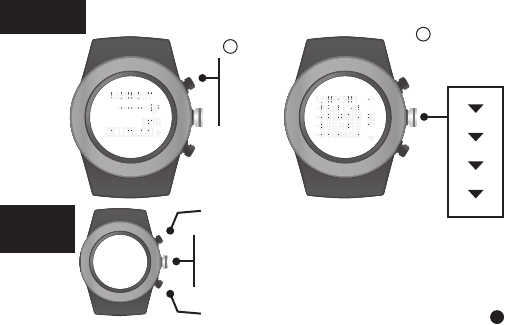
SET HR
LOG RATE
This is how often your heart rate readings will be logged.
Select 1-5 seconds.
12
INSIDE
SETTING
MODE
Increase value
Decrease value
Press to go to next setting
Press & hold to
exit setting mode
In Workout,
hold
MODE
for
3 sec
Select
LOG RATE
1
2
1
2
3
4
5
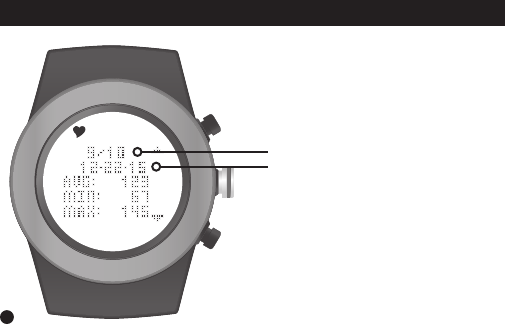
After resetting your workout data, it will be
saved automatically. You can view the last
10 workout sessions on your Zone R420.
All recorded sessions will be available for
review once uploaded to the app.
Date Recorded
Record Number
13
WORKOUT : SESSIONS
Note: Workout is automatically stopped if
there is no steps activity for 30 minutes.
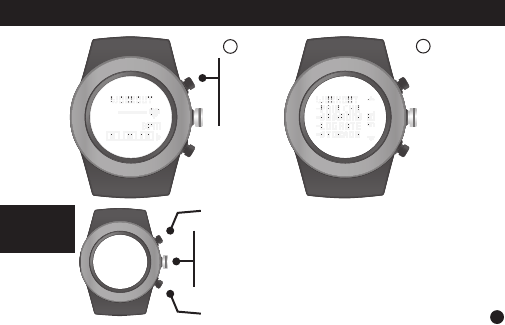
14
INSIDE
SETTING
MODE
Toggle through sessions (1-10)
Toggle through sessions (1-10)
Press to review workout data: Heart Rate,
Exercise Time, Steps, Distance, Calories
Press & hold to exit setting mode
In Workout,
hold
MODE
for
3 sec
Select
SESSIONS
12
WORKOUT : VIEW RECOREDED DATA
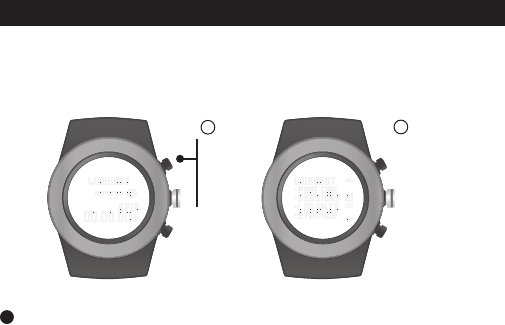
WORKOUT : STORAGE REMAINING
The R420 can store up to 10 recorded workouts. You can review your remaining
workout storage to determine if you need to sync your workouts to the LifeTrak
app & delete data from your watch before your next workout.
15
In Workout,
hold
MODE
for
3 sec
Select
STORAGE
12
Your workout will automatically stop if the memory is full
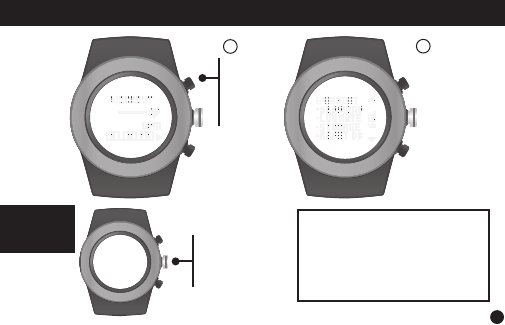
Press to
delete all
recorded
workout
data.
Only your recorded workout
sessions will be deleted from
your watch. Your daily and
weekly information will NOT
be deleted.
16
INSIDE
SETTING
MODE
In Workout,
hold
MODE
for
3 sec
Select
RESET DB
12
WORKOUT : DELETE DATA
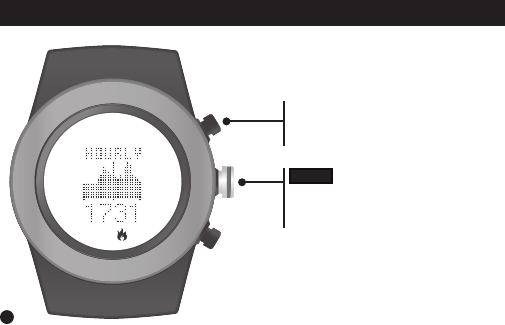
VIEW
Press to view:
sleep, distance, calories, steps
From Time Mode,
press MODE until you reach
Hourly Display
MODES OF OPERATION : HOURLY DISPLAY
Shows your progress throughout the day with
a 24-hour graph. The bars are scaled to t the
data from the 24-hour period.
17
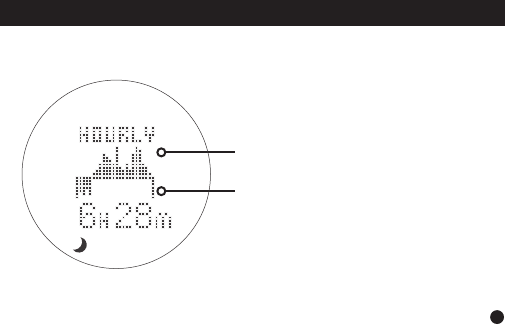
The hourly actigraphy view provides a summary of your sleep and activity levels.
Active: Displays your activity levels while
awake. Bars represent three categories:
Normal, Active and Very Active.
Active graph
Sleep graph
HOURLY DISPLAY : ACTIGRAPHY
Sleep: Displays your sleep levels.
Bars represent three categories:
Light, Medium and Deep Sleep.
18
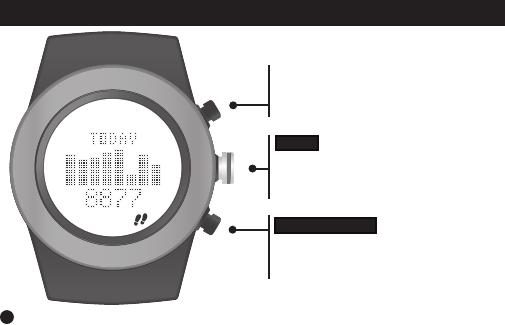
MODES OF OPERATION : WEEKLY DISPLAY
NOTE: Use the LifeTrak app to see trends and insights over weeks, months and years.
START / STOP
Press to browse through the past
7 days
VIEW
Press to view:
distance, calories, steps, sleep
From Time Mode,
Press MODE until you reach
Weekly Display (“Today”)
19
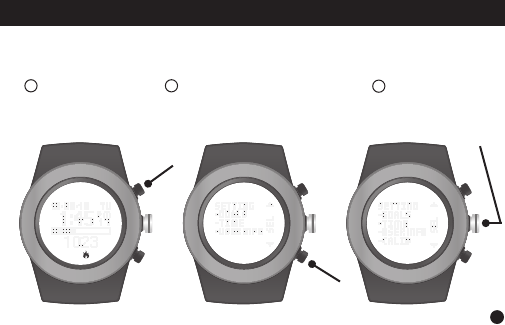
The calibrations are already programmed with ideal settings. But if you must
adjust it, there is a setting option you can access.
In Time Mode,
hold MODE for
3 sec
Press & hold START / STOP
for 3 sec. “CALIB” will appear
in the display.
12Scroll down &
Select CALIB
3
START / STOP
Press to browse through the past
7 days
VIEW
Press to view:
distance, calories, steps, sleep
From Time Mode,
Press MODE until you reach
Weekly Display (“Today”)
20
ADVANCED SETTINGS
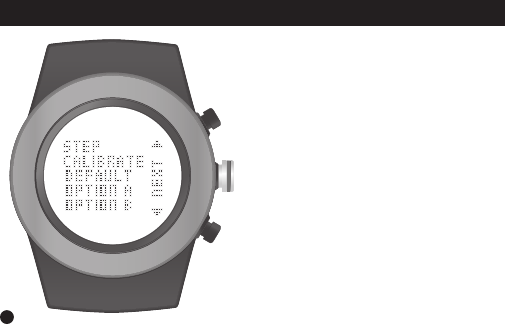
Default: Optimal setting for most
people and conditions. This is the
recommended setting.
Option A: For those with low impact
movements
(e.g., person who treads lightly on
their feet).
Option B: For those with high impact
movements
(e.g., person who treads heavily on
their feet).
21
ADVANCED : STEP CALIBRATION
Advanced Settings can be adjusted on your tness tracker or the
LifeTrak App (via Settings)
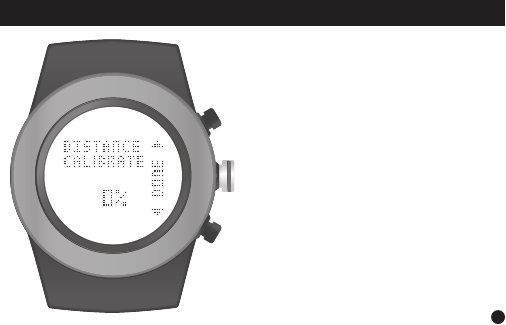
After selecting one of the three STEP
CALIBRATION options (Default, Option
A or Option B), you will also be able to
adjust the distance calibration, if desired.
The DISTANCE CALIBRATION
range is from -25% to +25%.
Adjust as needed and once
complete, press DONE.
22
ADVANCED : DISTANCE CALIBRATION
Advanced Settings can be adjusted on your tness tracker or the
LifeTrak App (via Settings)
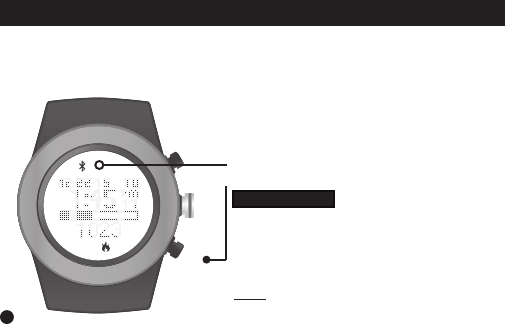
SYNC FITNESS DATA
1. Make sure Bluetooth is active on your smartphone / tablet.
2. Install the LifeTrak App on your compatible smartphone / tablet, then open the app.
3. Follow prompts in the LifeTrak App to connect your device
Activate the Bluetooth on your
LifeTrak Zone R420:
NOTE: For best results, keep your devices within
7 feet / 2 meters of each other when pairing.
START / STOP
From TIME MODE, PRESS & HOLD
to begin pairing. Button can be released once
the Bluetooth icon appears in the display.
Bluetooth Indicator
23
You will need to sync your tness data manually with a simple
two-step process each time you wish to transfer the data.
To transfer your tness data, simply
1. Open your app and click on the reload button in the top-
right corner.
2. Press & Hold START / STOP on your Zone R420 to
activate Bluetooth and start the sync process.
Remember: Bluetooth must be active on your
LifeTrak Zone R420 and your smartphone / tablet
to complete the data transfer (sync).
Indicator
Status
(activity tracker)
Solid: Bluetooth is
on and linking to a
device
No icon: Bluetooth is
off / not working
SYNC FITNESS DATA
24
You can get your Maximum Heart Rate (MHR) from a MHR test (consult your doctor),
or you can estimate it using the following formula:
Women Maximum Heart Rate = 226 - age
Men Maximum Heart Rate = 220 - age
Here are some common Heart Rate Zones:
HELPFUL HINTS ABOUT HEART RATE ZONES
WARNING: Before starting a new exercise routine, please consult your doctor or health
care professional to help you determine your maximum heart rate, upper and lower limits,
exercise frequency and duration appropriate for your age, condition and specic goals.
25
Example based on a 35 year old
male
220 - 35 (age) = 185 (MHR)
To calculate the HR ZONES, multiply
185 (MHR) by the percentages to the
left. This will help you determine the
LO and HI levels of each zone.
For a Medium Intensity (Endurance):
185 x 0.7 = 130 (LO) and
185 x 0.8 = 148 (HI)
50% - 60% MHR
60% - 70% MHR
70% - 80% MHR
80% - 90% MHR
90% - 100% MHR
Light
Fat Burn
Endurance
Performance
Peak

If you are having difculty acquiring your heart rate, try the following:
1. Make sure your LifeTrak tness tracker is snugly strapped to your wrist.
A loose t makes it more difcult to properly measure your heart rate.
2. Upon putting on for the rst time, allow a one-minute “warm up” before trying to
acquire your heart rate.
3. When touching the heart sensor button (VIEW), make sure you are using the soft,
at pads of your ngers, not the tips of your ngers.
4. Touch gently with enough pressure to activate the heart sensor button (VIEW).
Pressing too hard can make it difcult to measure your heart rate.
5. Make sure the back metal plate is lying at on your skin.
6. Make sure your wrist and ngers are clean and free from dirt, oils,
or lotions.
7. Clean the heart sensor button (VIEW) and back metal plate with a mild soap and
water, or similar cleaning solution.
8. Moisten with water the pads of the ngers you are using to contact the heart sensor
button (VIEW).
9. Moisten the surface between the back metal plate and the skin on your wrist with
water.
HELPFUL HINTS ABOUT TOUCH HEART RATE
26

FCC CAUTION
§ 15.19 Labelling requirements
This device complies with part 15 of the FCC Rules.
Operation is subject to the following two conditions:
(1) This device may not cause harmful interference, and
(2) this device must accept any interference received,
including interference that may cause undesired operation.
§ 15.21 Changes or modication warning
Any Changes or modications not expressly approved by the party responsible
for compliance could void the user’s authority to operate the equipment.
*RF warning for Portable device:
The device has been evaluated to meet general RF exposure requirement.
The device can be used in portable exposure condition without restriction.
27

IC CAUTION
This device complies with Industry Canada licence-exempt RSS standard(s).
Operation is subject to the following two conditions:
(1) This device may not cause interference, and
(2) This device must accept any interference,
including interference that may cause undesired operation of the device.
Le présentappareilestconforme aux CNR d’Industrie Canada
applicables aux appareils radio exempts de licence.
L’exploitationestautorisée aux deux conditions suivantes:
(1) l’appareil ne doit pas produire de brouillage, et
(2) l’utilisateur de l’appareildoit accepter tout brouillageradioélectriquesubi,
mêmesi le brouillageest susceptible d’encompromettre le fonctionnement.
This Class [B] digital apparatus complies with Canadian ICES-003.
Cet appareil numérique de la classe [B] est conforme à la norme NMB-003
du Canada.
28

WARNINGS & CAUTIONS
THIS IS NOT A MEDICAL DEVICE.
WARNING: Before starting any exercise program, please visit your doctor for a
complete physical and to discuss your exercise plans.
PLEASE READ all of the information in this instruction manual before using the unit.
Make sure you fully understand the functions and limitations of this product before
using it.
NOTICE TO PEOPLE WEARING PACEMAKERS: While the heart rate monitor
is a passive system and should have no direct effect on a pacemaker, we strongly
recommend anyone tted with such a device contact their physician or cardiologist
before using this product or starting an exercise program.
NEVER expose the heart rate monitor to chemicals or cleaning solvents.
Exposure to insect repellent and sunscreen may also damage the unit.
NOTICE: While the heart rate monitor (watch) is 30M water resistant, IT IS NOT
WATERPROOF. Do NOT press buttons under water - this will cause damage.
Visit our website for more helpful tips: www.lifetrakusa.com
LifeTrak • 39962 Cedar Blvd • Ste 285 • Newark, CA 94560 • 1-855-903-9030
29