Samsung Electronics Co EI-HH10 Heart Rate Monitor User Manual EI HH10 UM STA indb
Samsung Electronics Co Ltd Heart Rate Monitor EI HH10 UM STA indb
User manual
Type STA. A00151
05/2013. Rev.1.0
www.samsung.com
EI-HH10_UM_STA.indb 2 2013-05-16 오후 2:29:54
User manual
Heart Rate Monitor
EI-HH10_UM_STA.indb 3 2013-05-16 오후 2:29:54
EI-HH10_UM_STA.indb 2 2013-05-16 오후 2:29:54
Contents
English ................................................................................................................................1
Español ............................................................................................................................ 13
EI-HH10_UM_STA.indb 3 2013-05-16 오후 2:29:54
EI-HH10_UM_STA.indb 4 2013-05-16 오후 2:29:54
1
English
This manual’s images and content may differ from the product and is subject to change
•
without prior notice.
This product is only a health assisting device. It cannot be used for medical diagnostic
•
purposes.
Safety precautions
Do not use the device for anything other than its intended use
Do not disassemble, modify, or repair the device
Any changes or modifications to the device can void your manufacturer’s warranty.
For service, take the device to a Samsung Service Centre.
When using the device, mind the following:
Humidity and liquids may damage parts or electronic circuits.•
Do not store the device in hot areas. High temperature may cause damage to the device or •
shorten battery life.
Do not drop the device or cause impacts to it.•
English
EI-HH10_UM_STA.indb 1 2013-05-16 오후 2:29:54
2
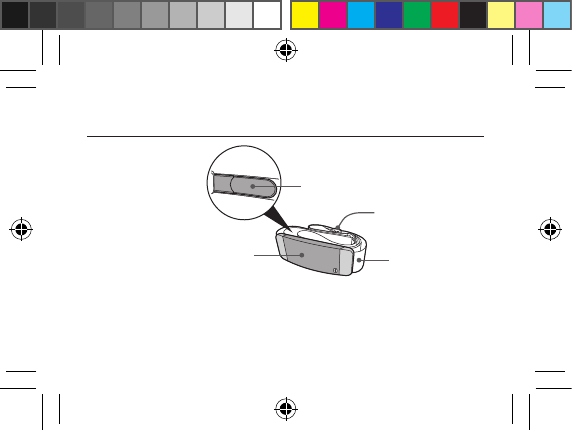
Overview
Adjustment buckle
Bluetooth
heart rate monitor
Electrode transmitter
Chest strap
EI-HH10_UM_STA.indb 2 2013-05-16 오후 2:29:54
3
English
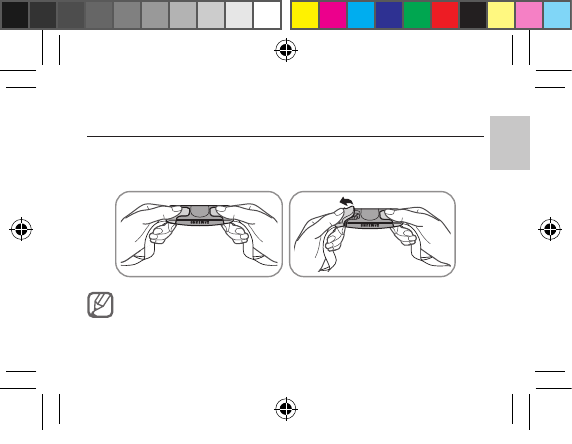
Detaching the chest strap
Firmly hold the Bluetooth heart rate monitor with both hands, and then bend one
side of plastic strap connector downwards. Both strap connectors can be removed
simultaneously.
Do not pull directly on the chest strap’s elastic to detach it from the
Bluetooth heart rate monitor. Doing so may damage the chest strap.
EI-HH10_UM_STA.indb 3 2013-05-16 오후 2:29:54
4
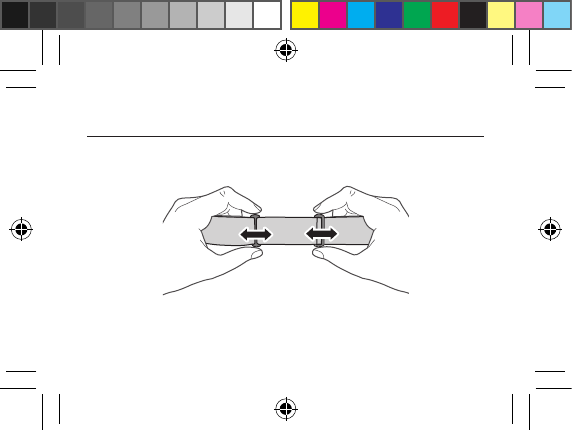
Adjusting the chest strap length
Hold both of the adjustment buckles on the chest strap and move them from side to
side to adjust the length of the elastic.
EI-HH10_UM_STA.indb 4 2013-05-16 오후 2:29:54
5
English
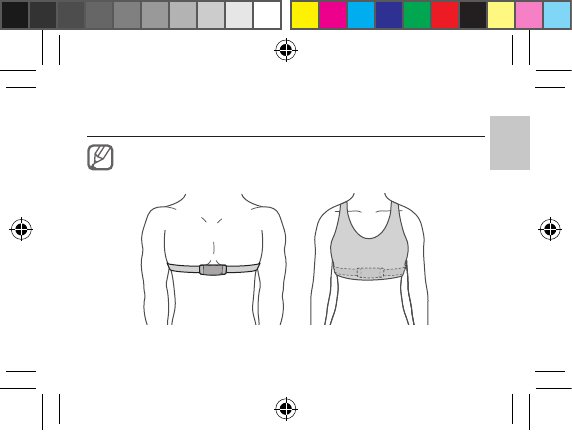
Wearing the Bluetooth heart rate monitor
To get the best results, make sure to wear the Bluetooth heart rate monitor
directly against the skin. Women should wear it under a sports bra.
EI-HH10_UM_STA.indb 5 2013-05-16 오후 2:29:54
6
Detach one snap button from the Bluetooth heart rate monitor.1
Check the R (right) and L (left) symbol imprinted on the Bluetooth heart rate 2
monitor, and align it correctly on the body when wearing it.
Position the chest strap right below the upper chest muscles.
3
Adjust the length of the strap to fit tightly, but comfortably, around the chest.4
To ensure reliable measurement, moisten the electrode transmitter inside
•
the chest strap with clean water or electrode gel before wearing it.
If the heart rate is too weak, the heart rate may not measure correctly.
•
EI-HH10_UM_STA.indb 6 2013-05-16 오후 2:29:54
7
English
Connecting to a smartphone
Download and install the 1 Running pro application from Samsung Apps.
To connect to a smartphone and measure heart rate, the Running pro
application must be installed on the smartphone.
Wear the Bluetooth heart rate monitor, and then launch
2 Running pro on the
smartphone.
Select
3 Setting → Accessory setting. The smartphone searches for the Bluetooth
heart rate monitor automatically.
Select the device from the list of available devices and tap
4 Connect to pair.
EI-HH10_UM_STA.indb 7 2013-05-16 오후 2:29:54
8
Tap and hold a displayed name to modify the name of a device in the list.
•
To set the smartphone to automatically reconnect to a previously paired
•
device, set Auto Connect to On.
Even if the Bluetooth heart rate monitor is paired with the smartphone,
•
users cannot measure heart rate without launching the Running pro
application.
The heart rate may not be measured accurately when the Wi-Fi and
•
Bluetooth features are turned on at the same time.
EI-HH10_UM_STA.indb 8 2013-05-16 오후 2:29:55
9
English
Replacing the battery
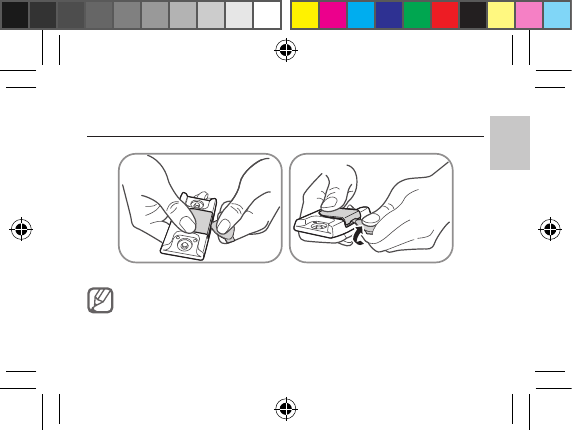
Do not use a fingernail to open the cover. Doing so may damage the
fingernail.
EI-HH10_UM_STA.indb 9 2013-05-16 오후 2:29:55
10
Firmly hold the battery cover of the Bluetooth heart rate monitor with one hand, 1
and insert a coin to twist and open the cover.
Open the cover and remove the battery.
2
Insert a new battery with the positive side facing upwards.3
Close the cover firmly.4
The remaining battery level can be checked on the smartphone.
•
Do not open the battery cover aggressively. Doing so may damage the
•
cover.
The CR2032 battery for the Bluetooth heart rate monitor is sold
•
separately.
When using the Blutooth heart rate monitor for 1 hour a day, the average
•
lifespan of the battery is approximately 1 year.
EI-HH10_UM_STA.indb 10 2013-05-16 오후 2:29:55
11
English
Storage and maintenance
Rinse the chest strap with clean water after every use.•
Do not soak, iron, dry clean or bleach the strap.•
Store the device in a cool, dry place.•
Do not store the device in humid place, or where the device may get wet. Doing so may •
activate the device automatically and drain the battery.
EI-HH10_UM_STA.indb 11 2013-05-16 오후 2:29:55
FCC
This device complies with part 15 of the FCC Rules. Operation is subject to the following two conditions:
(1) This device may not cause harmful interference, and (2) this device must accept any interference received,
including interference that may cause undesired operation.
Users are not permitted to make changes or modify the device in any way.
Changes or modifications not expressly approved by Samsung will void the user’s authority to operate the
equipment.
Recycling Direct
To dispose electronics properly, follow the recycling process regulated in your area or go to Samsung website to find
the nearest recycling location:
www.samsung.com/recyclingdirect
Or call, (877) 278 – 0799.
Samsung Telecommunications America, LLC
1301 E. Lookout Drive
Richardson, Texas 75082
Phone: 1-800-SAMSUNG
Phone: 1-888-987-HELP (4357)
EI-HH10_UM_STA.indb 12 2013-05-16 오후 2:29:55
EI-HH10_UM_STA.indb 25 2013-05-16 오후 2:29:55
EI-HH10_UM_STA.indb 25 2013-05-16 오후 2:29:55
EI-HH10_UM_STA.indb 25 2013-05-16 오후 2:29:55
13
Español
Las imágenes y el contenido que aparecen en este manual pueden diferir del producto y están
•
sujetos a cambios sin previo aviso.
Este producto no constituye un dispositivo médico. No puede utilizarse para efectuar
•
diagnósticos.
Precauciones de seguridad
No lo utilice para ningún fin que no sea aquél para el que se lo diseñó
No desarme, modifique ni repare el dispositivo
Cualquier cambio o modificación en el dispositivo puede anular la garantía del fabricante.
Si necesita mantenimiento, lleve el dispositivo a un Centro de servicios de Samsung.
Cuando use el dispositivo, tenga en cuenta lo siguiente:
La humedad y los líquidos pueden dañar piezas o circuitos electrónicos.•
No almacene el dispositivo en áreas de calor extremo. Las altas temperaturas pueden dañar el •
dispositivo o reducir la vida útil de la batería.
No golpee el dispositivo ni lo deje caer.•
Español
EI-HH10_UM_STA.indb 13 2013-05-16 오후 2:29:55
14
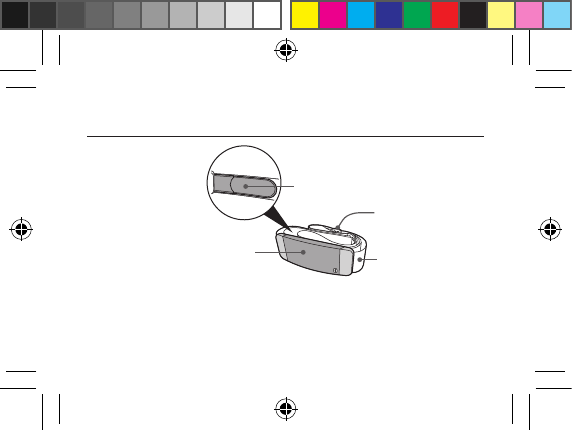
Descripción general
Hebilla de ajuste
Bluetooth monitor
de frecuencia cardíaca Correa para el pecho
Transmisor de electrodo
EI-HH10_UM_STA.indb 14 2013-05-16 오후 2:29:55
15
Español
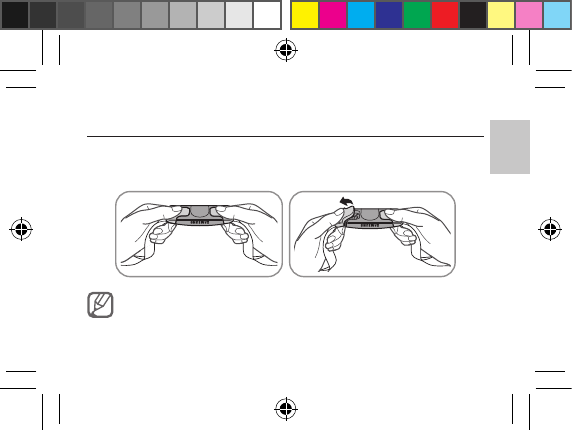
Cómo desconectar la correa para el pecho
Sostenga firmemente el monitor de frecuencia cardíaca Bluetooth con ambas
manos y doble hacia abajo uno de los conectores plásticos de la correa. Es posible
desconectar ambos conectores al mismo tiempo.
No tire directamente del elástico de la correa para desconectarla del
monitor de frecuencia cardíaca Bluetooth. Esto puede dañar la correa.
EI-HH10_UM_STA.indb 15 2013-05-16 오후 2:29:55
16
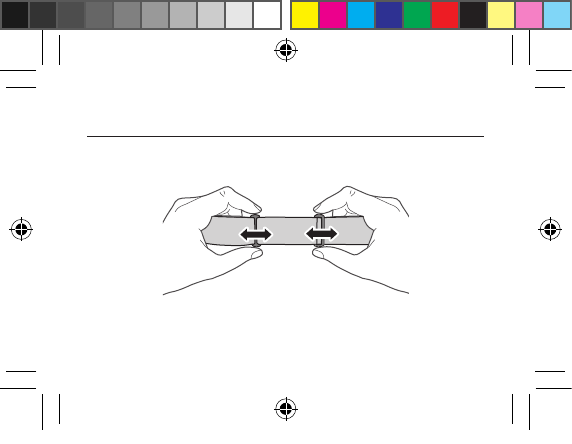
Cómo ajustar la longitud de la correa para el pecho
Sostenga ambas hebillas de ajuste de la correa para el pecho y muévalas de un lado a
otro para ajustar la longitud del elástico.
EI-HH10_UM_STA.indb 16 2013-05-16 오후 2:29:55
17
Español
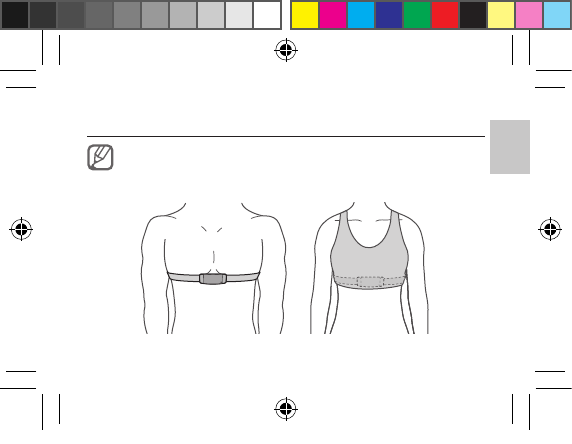
Cómo usar el monitor de frecuencia cardíaca Bluetooth
Para obtener los mejores resultados, asegúrese de usar el monitor de
frecuencia cardíaca Bluetooth directamente sobre la piel. Se recomienda a
las mujeres usarlo debajo de un sostén deportivo.
EI-HH10_UM_STA.indb 17 2013-05-16 오후 2:29:55
18
Desconecte uno de los botones a presión del monitor de frecuencia cardíaca 1
Bluetooth.
Verifique el símbolo R (derecha) y L (izquierda) grabado sobre el monitor de
2
frecuencia cardíaca Bluetooth y ubíquelo en el cuerpo según corresponda.
Coloque la correa para el pecho justo debajo de los músculos de la parte
3
superior del pecho.
Ajuste la longitud de la correa para que quede ajustada pero cómoda alrededor
4
del pecho.
Para garantizar una medición confiable, humedezca el transmisor del
•
electrodo que se encuentra dentro de la correa para el pecho con agua
limpia o gel para electrodos antes de usar el dispositivo.
Si la frecuencia cardíaca es muy baja, es posible que la medición no sea
•
correcta.
EI-HH10_UM_STA.indb 18 2013-05-16 오후 2:29:55
19
Español
Cómo conectarlo a un smartphone
Descargue e instale la aplicación 1 Running pro de Samsung Apps.
Para conectar el dispositivo a un smartphone a fin de que mida la frecuencia
cardíaca, debe tener instalada la aplicación Running pro en su smartphone.
Colóquese el monitor de frecuencia cardíaca Bluetooth e inicie la aplicación
2
Running pro en su smartphone.
Seleccione
3 Setting → Accessory setting. El smartphone busca
automáticamente el monitor de frecuencia cardíaca Bluetooth.
Seleccione el dispositivo en la lista de dispositivos disponibles y toque
4 Connect
para emparejarlos.
EI-HH10_UM_STA.indb 19 2013-05-16 오후 2:29:55
20
Mantenga presionado un nombre de visualización para modificar el
•
nombre de un dispositivo de la lista.
Si desea configurar el smartphone para que se vuelva a conectar
•
automáticamente a un dispositivo emparejado anteriormente, configure
Auto Connect en On.
Incluso si el monitor de frecuencia cardíaca Bluetooth se encuentra
•
emparejado con el smartphone, los usuarios no pueden medir la
frecuencia cardíaca sin iniciar la aplicación Running pro.
Es posible que la frecuencia cardíaca no se mida con exactitud cuando las
•
funciones de Wi-Fi y Bluetooth están encendidas al mismo tiempo.
EI-HH10_UM_STA.indb 20 2013-05-16 오후 2:29:55
21
Español
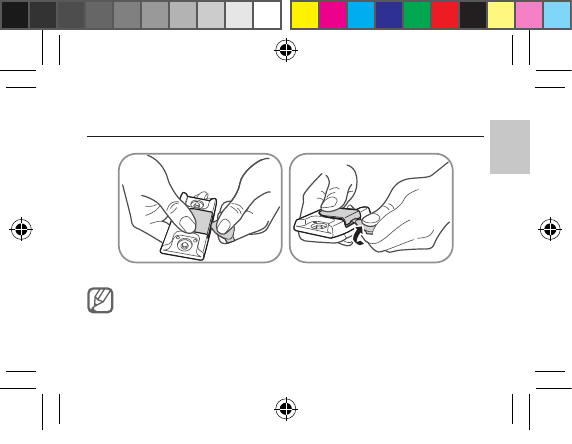
Cómo reemplazar la batería
No abra la cubierta con las uñas. Puede dañarse las uñas.
EI-HH10_UM_STA.indb 21 2013-05-16 오후 2:29:55
22
Sostenga firmemente con una mano la cubierta de la batería del monitor de 1
frecuencia cardíaca Bluetooth e introduzca una moneda para empujar y abrir la
cubierta.
Abra la cubierta y extraiga la batería.
2
Introduzca una batería nueva con el polo positivo hacia arriba.3
Cierre la cubierta firmemente.4
El nivel restante de batería se puede verificar en el smartphone.
•
No fuerce la cubierta de la batería para abrirla. Esto puede dañar la
•
cubierta.
La batería CR2032 para el monitor de frecuencia cardíaca Bluetooth se
•
vende por separado.
Si usa el monitor de frecuencia cardíaca Bluetooth durante una hora por
•
día, la vida útil promedio de la batería será de aproximadamente un año.
EI-HH10_UM_STA.indb 22 2013-05-16 오후 2:29:55
23
Español
Almacenamiento y mantenimiento
Enjuague la correa para el pecho con agua limpia después de cada uso.•
No sumerja, planche, limpie en seco ni blanquee la correa.•
Guarde el dispositivo en un lugar fresco y seco.•
No lo guarde en un lugar húmedo o donde pueda mojarse. Esto puede activar el dispositivo •
automáticamente y agotar la batería.
EI-HH10_UM_STA.indb 23 2013-05-16 오후 2:29:55
FCC
Este dispositivo cumple con la sección 15 de las reglas de la FCC. El funcionamiento esta sujeto a las dos condiciones
siguientes:
(1) Este dispositivo no causa interferencias dañinas y
(2) este dispositivo debe aceptar cualquier interferencia recibida, incluida la interferencia que pudiera causar un
funcionamiento no deseado.
Los usuarios no deben modificar el dispositivo ni realizar cambios en este de manera alguna.
Las modificaciones o los cambios no aprobados expresamente por Samsung, dejarán sin efecto la autoridad del
usuario para operar el equipo.
Reciclaje directo
Para desechar electrónicos correctamente, siga el proceso de reciclaje regulado en su área o visite el sitio web de
Samsung para encontrar el establecimiento de reciclaje más cercano:
www.samsung.com/recyclingdirect
o llame al (877) 278 – 0799.
Samsung Telecommunications America, LLC
1301 E. Lookout Drive
Richardson, Texas 75082
Teléfono: 1-800-SAMSUNG
Teléfono: 1-888-987-HELP (4357)
EI-HH10_UM_STA.indb 24 2013-05-16 오후 2:29:55
EI-HH10_UM_STA.indb 25 2013-05-16 오후 2:29:55