Samsung HW HM45/ZA ZZ01 User Manual SPEAKER Manuals And Guides 1508406L
User Manual: Samsung HW-HM45/ZA-ZZ01 HW-HM45/ZA-ZZ01 SAMSUNG SPEAKER - Manuals and Guides View the owners manual for your SAMSUNG SPEAKER #HWHM45ZAZZ01. Home:Electronics Parts:Samsung Parts:Samsung SPEAKER Manual
Open the PDF directly: View PDF  .
.
Page Count: 26
HWoHM45C
Imagine the possibilities
Thank you for purchasing this Samsung product
To receive more complete service, please register your product at
wwwosamsu r]gocom/register
'This Nanum Gothic Ecofont is provided by NAVER_
I FEAZUH:4ES
FEATURES
rd SoundConnect
TV SoundConnect lets you tisten to audio from ),our TVon ),our Soundbar via a Btuetooth connection and tets
you controt the sound,
HDMI
HDMt transmits video and audio signals simultaneously, and provides a dearer picture_
The unit is atso equipped with the ARC function which lets you listen to sound from ),our TV through the
Soundbar via an HDMt cable, This function isonty avaitaUe if you connect the unit to an ARC compliant TV_
3D SOUND
The 3D SOUND feature adds depth and spaciousnessto ),our listening experience,
Wireless Subwoofer
Samsung's wireless module does away with cables running between the main unit and the subwoofer_
Instead, the subwoofer connects to a compact wireless module that communicates with the main unit,
Special Sound Effects
You can select different Sound Effects - MUSIC/VOICE /SPORTS/CINEMA /STANDARD(Original Sound) -
depending on the type of content you want to enjoy,
Multi_function Remote Control
You can use the supplied remote controt to controt various operations with the simple pressof a button,
USB Host Support
You can connect and play music rites from externat USBstorage devices such as MP3 players, USBflash
memo,3,, etc, using the Soundbar's USBHOSTfunction,
Btuetooth Function
You can connect a BhJetooth device to the Soundbar and enjoy music with high quality stereo sound, att
without wires!
_I DOLBY_
OIGITAL
Manufactured under ticensefrom Dotby Laboratories, Dotby and the double@ symbot are trademarks of
Dolby Laboratories,
2.0 Channel
For DTSpatents, see http:iipatents,dts,com, Manufactured under ticensefrom DTSLicensing Limited, DTS,
the Symbol, & DTSand the Symbol together are registered trademarks, and DTS 2,0 Channel isa trademark of
DTS,Inc_@DTS, tnc, A1tRights Rese_,ed,
H-"IN'I|
The terms HDMt and HDMt HigMDefinition Multimedia Interface, and the HDMt Logo are trademarks or
registered trademarks of HDMt Licensing LLCin the United States and other countries,
2
J
SAFE FY _ F.......I 4 P__''_' £_'hl J_,/l's_Vik'_ _,/ '4
SAFETY INFORMATION
SAFETY WARNINGS
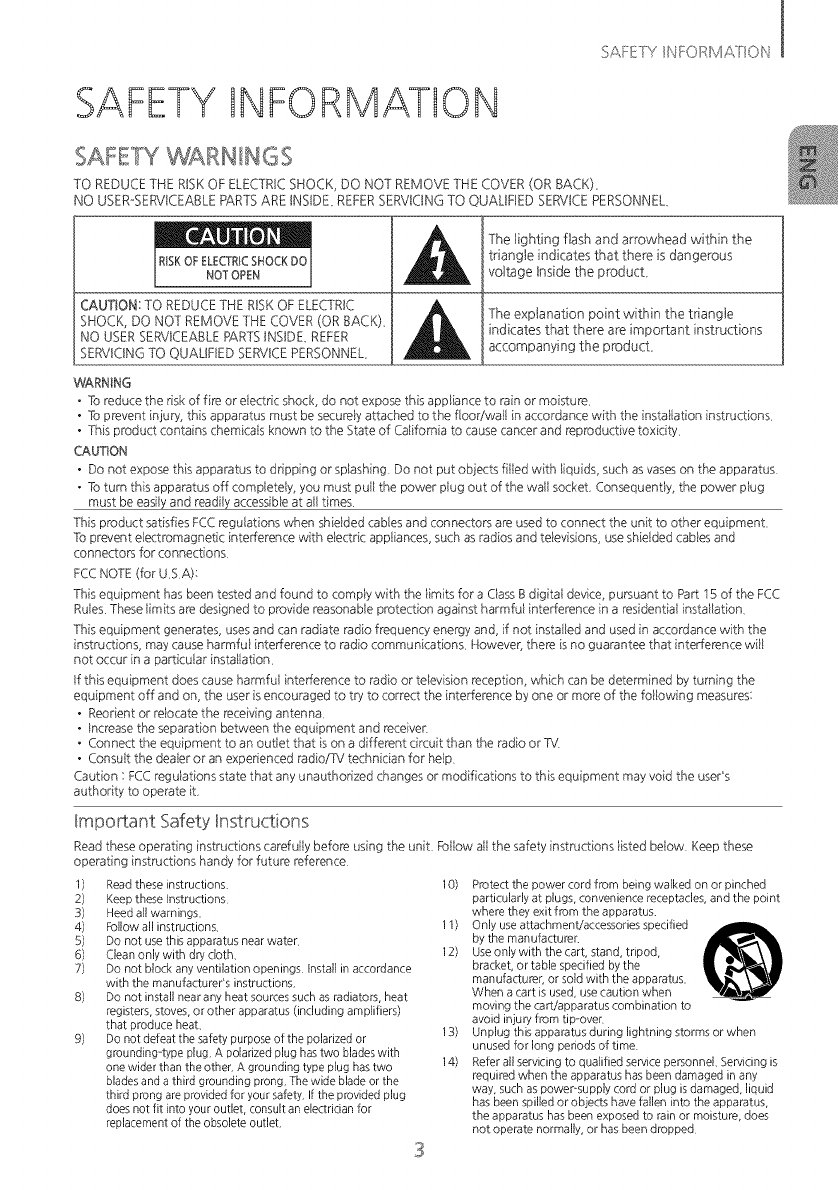
TO REDUCE THE RnSKOF ELECTRtCSHOCK, DO NOT REMOVE THE COVER (OR BACK),
NO USER-SERVICEABLEPARTS ARE INSIDE, REFERSERVtONG TO QUALIFIED SERVICE PERSONNEL
RiSKOFELECTRICSHOCKDO
NOTOPEN
CAUTION: TO REDUCETHE RISK OF ELECTRIC
SHOCK, DO NOT REMOVE THE COVER (OR BACK),
NO USERSERVICEABLERARTSINSIDE, REFER
SERVICING TO QUAUFIED SERVICEPERSONNEL,
The lighting flash and arrowhead within the
triangle indicates that there is dangerous
voltage Inside the product,
The explanation point within the triangle
indicates that there are important instructions
accompanying the product,
WARNING
•To reduce the risk of fire or eiectric shock, do not expose this appliance to rain or moisture
• To prevent injury, this apparatus must be secureiy attached to the floodwail in accordance with the instaiiation instructions
• This product contains chemicais known to the State of California to cause cancer and reproductive toxicity
CAUTION
• Do not expose this apparatus to dripping or splashing Do not put objects fiiled with liquids, such asvaseson the apparatus
• To turn this apparatus off compietely, you must puil the power piug out of the wall socket, Consequentiy, the power piug
must be easiiy and read@ accessibie at ail times
This product satisfies FCCregulations when shieided cablesand connectors are usedto connect the unit to other equipment,
To prevent electromagnetic inter[erence with eiectric appiiances, such asradios and teievisions, use shieided cabies and
connectors for connections
FCCNOTE (for USA):
This equipment has been tested and found to compiy with the iimits for a Ciass Bdigitai device, pursuant to Pad: 15 of the FCC
Ruies These iimits are designed to provide reasonable protection against harmfui intederence in a residentiai instailation,
This equipment generates, usesand can radiate radio frequency energy and, if not instailed and used in accordance with the
instructions, may cause harmfui interference to radio communications NoweveB there is no guarantee that intederence wiil
not occur in a pa_ticuiar installation
If this equipment does cause harmfui inter[erence to radio or television reception, which can be determined by turning the
equipment off and on, the user is encouraged to try to correct the intederence byone or more of the foilowing measures:
• Reorient or reiocate the receiving antenna,
• Increase the separation between the equipment and receiver
• Connect the equipment to an outiet that is on a different circuit than the radio orTv'
•Consuit the deaier or an experienced radio/TV technician for heip
Caution : FCCreguiations state that any unauthorized changes or modifications to this equipment may void the user's
authority to operate it.
Important Safety Instructions
Readthese operating instructions carefuily before using the unit, Foilow
operating instructions handy for future reference
1) Read these instructions. 10)
2) Keep these Instructions
3) Heed all warnings.
4) Follow all instructions. 11)
5) Do not use this apparatus near water
6) Clean only with dry cloth. 12)
7) Do not block any ventilation openings Install in accordance
with the manufacturer's instructions.
8) Do not install near any heat sources such as radiators, heat
registers, stoves, or other apparatus (including amplifiers)
that produce heat. 13)
9) Do not defeat the safety purpose of the polarized or
groundingrtype plug. A polarized plug has two blades with
one wider than the other. A grounding type plug has two 14)
blades and a third grounding prong. The wide blade or the
third prong are provided for your safety. If the provided plug
does not fit into your outlet, consult an electrician for
replacement of the obsolete outlet.
all the safety instructions iisted beiow Keep these
3
Protect the power cord from being walked on or pinched
particularly at plugs, convenience receptacles, and the point
where they exit from the apparatus.
Only use attachment!accessories specified
by the manufacturer
Use only with the cart, stand, tripod,
bracket, or table specified by the
manufacturer or sold with the apparatus.
When a cart is used, use caution when
moving the cart!apparatus combination to
avoid injury from tip over
Unplug this apparatus during lightning storms or when
unused for long periods of time
Refer all servicing to qualified service personnel. Servicing is
required when the apparatus has been damaged in any
way, such as power-supply cord or plug is damaged, liquid
has been spilled or objects have fallen into the apparatus,
the apparatus has been exposed to rain or moisture, does
not operate normally, or has been dropped
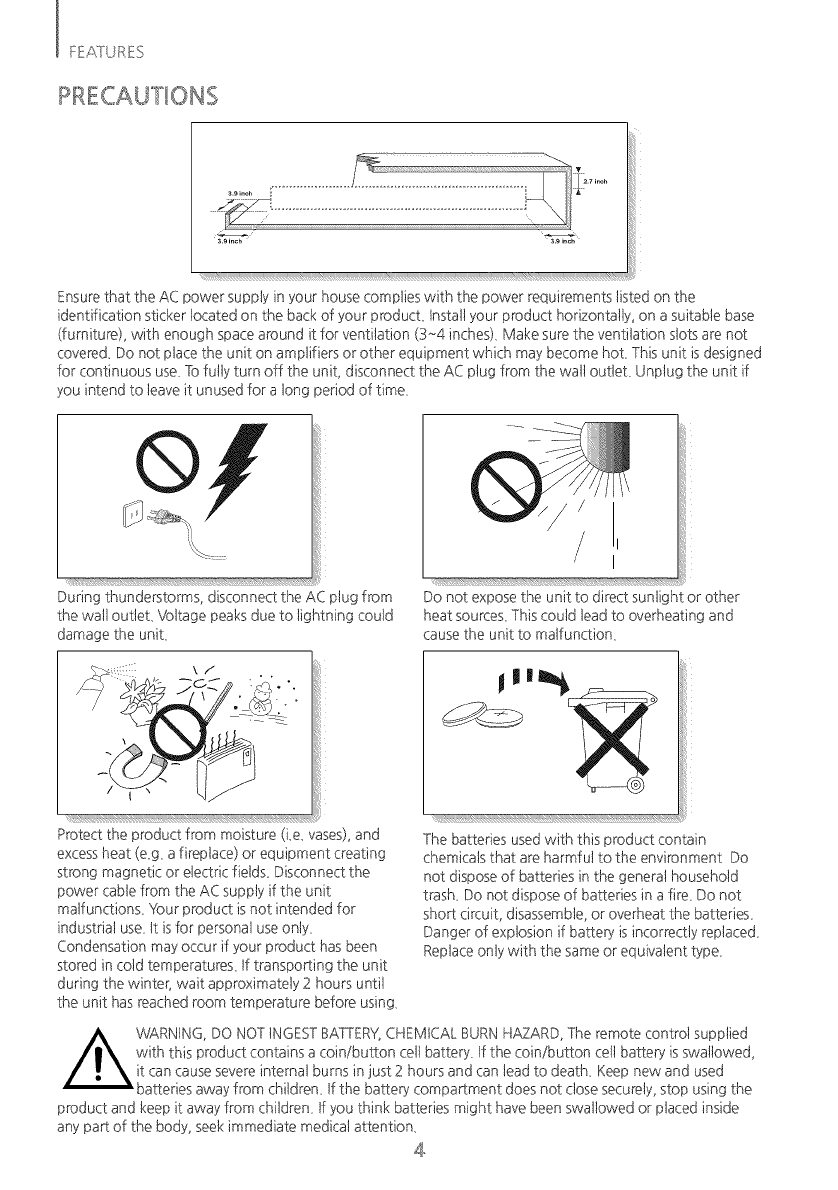
Ensurethat the AC power supply in your house complies with the power requirements listed on the
identification sticker located on the back of your product Install your product horizontally, on a suitable base
(furniture), with enough space around it for ventilation (3~4 inches), Make sure the ventilation slots are not
covered_ Do not place the unit on amplifiers or other equipment which may become hot, This unit is designed
for continuous use_Tofully turn off the unit, disconnect the AC plug from the watt outtet, Unplug the unit if
you intend to leave it unused for a tong period of time,
During thunderstorms, disconnect the AC plug from
the watt outtet, Voltage peaks due to lightning could
damage the unit,
Protect the product from moisture (Le_vases),and
excess heat (e_g, a fireplace) or equipment creating
strong magnetic or electdc field£ Disconnect the
power cable from the AC supply if the unit
matfunction£ 'four product is not intended for
industrial use, tt isfor personal use onty,
Condensation may occur if your product has been
stored in cold temperatures, tf transpoRing the unit
during the winter, wait approximately 2 hours until
the unit has reached room temperature before using,
Do not expose the unit to direct sunlight or other
heat sources,This could tead to overheating and
cause the unit to malfunction,
The batteries used with this product contain
chemicals that are harmful to the environment Do
not dispose of batteries in the genera1household
trash, Do not dispose of batteries in a fire, Do not
shoR circuit, disassemble,or overheat the batteries,
Danger of explosion if batters, is incorrectly replaced,
Replaceonty with the same or equivalent type,
product and keep it away from children, tf you think batteries might have been swallowed or placed inside
any par of the body, seek immediate medical attention,
4
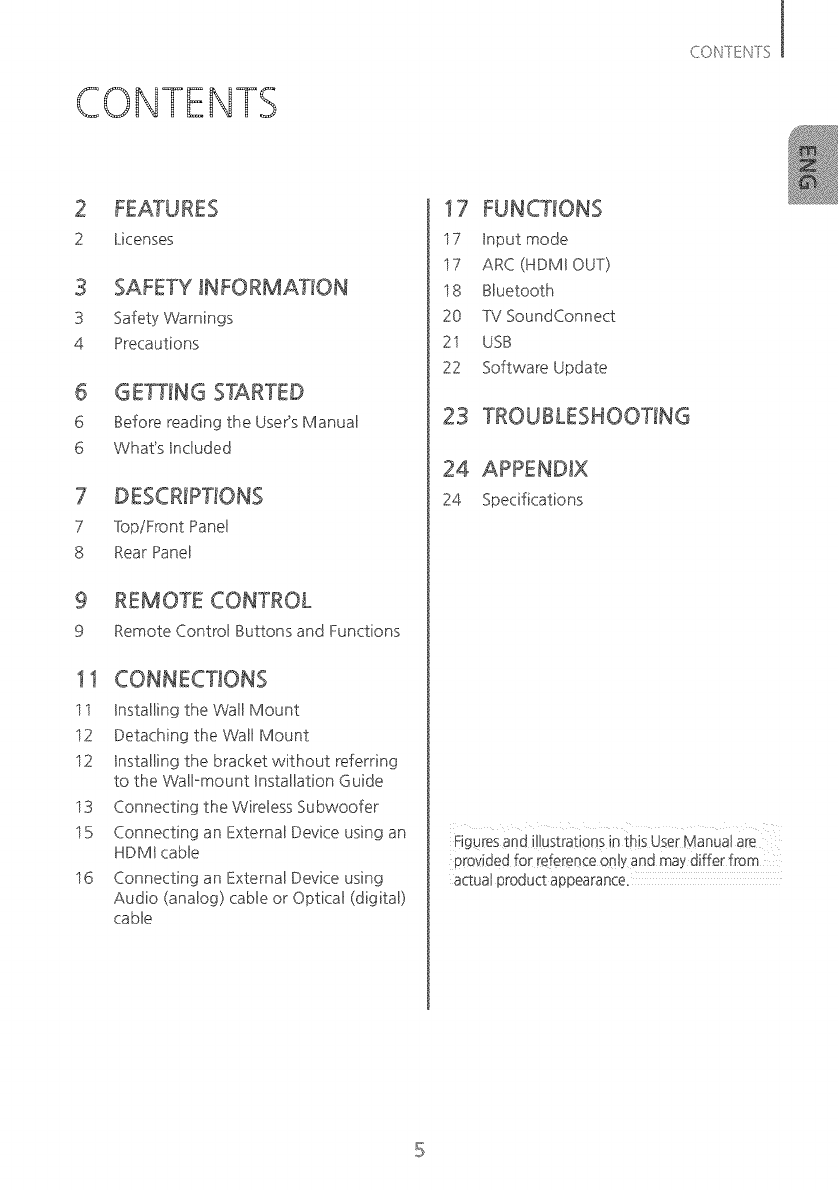
CONTENTS
2 Licenses
3 SAFETY INFORMATION
3 Safety Warnings
4 Precautions
6 GETTING STARTED
6 Before reading the User's Manual
6 What's hduded
7Top/Front Panel
8 Rear Panel
9 REMOTE CONTROL
9 Remote Control Buttons and Functions
11
ii
i2
i2
i3
i5
i6
hstalling the Wall Mount
Detaching the Wall Mount
hstalling the bracket without referring
to the Wall mount Bnstallation Guide
Connecting the Wireless Subwoofer
Connecting an External Device using an
HDMB cable
Connecting an External Device using
Audio (analog) cable or Optical (digital)
cable
17
i7 Input mode
i7 ARC (HDMIOUT)
i8 Bluetooth
20 TV SoundConnect
2i USB
22 Software Update
23 TROUBLESHOOTING
24 APPENDIX
24 Specifications
Figures and i!tustrations in this User Manua! are t
provided for reference on!y and may differ from
actual product appearance_
[ GEf_NGS_}&R_ED
GETTING STARTED
BEFORE READING THE USER'S MANUAL
Note the following terms before reading the user manual,
Icons used in this manual
Safety Instructions and Troubleshooting
t ) Besure to familiarize yourself with the Safety Instructions before using this product, (Seepage 3)
2) tf a problem occurs, check Troubleshooting, (See page 23)
Copyright
@20t 4 Samsung Electronics Co,,Ltd,
Alt rights reserved; no part of this useCsmanual may be reproduced or copied without the prior written
permission of Samsung Electronics Co,,Ltd,
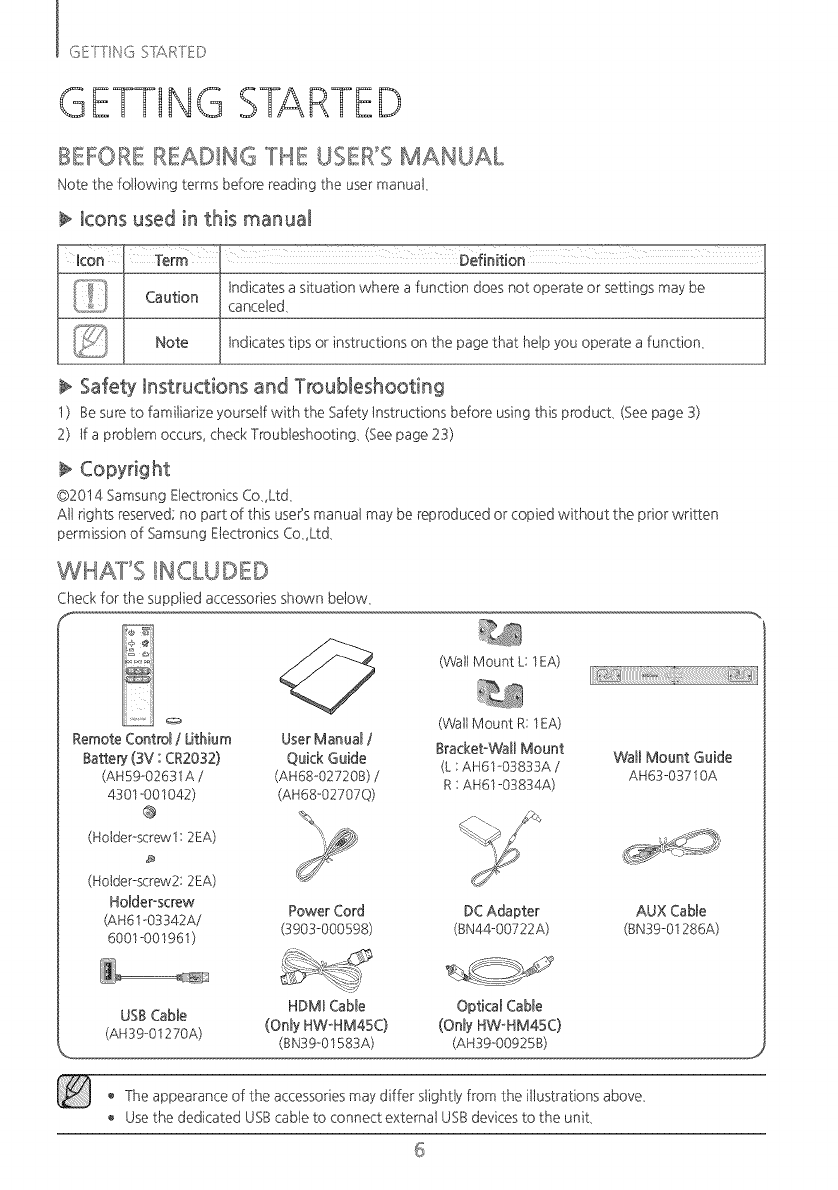
WHAT'S _NCLuDED
Check for the supplied accessoriesshown below,
f
(Wall Mount L: 1EA)
(WallMount R: 1EA)
Remote Control /Lithium User Manual /
Batterj (3V : CR2032) Quick Guide Bracket-Walt Mount Watt Mount Guide
(L :AH61-03833A /AH63-03710A
(AH59-02631A /(AH68-02720B) /R:AH61-03834A)
4301-001042) (AH68-02707Q)
(Holder-screw1:2EA)
(Holder-screw2: 2EA)
Holder-screw Power Cord DC Adapter AUX Cable
(AH61-03342A/ (3903-000598) (BN44-00722A) (BN39-01286A)
6001-001961 )
HDMBCable Optical Cable
USBCable
(AH39-01270A) (Only HW-HM45C) (Only HW-HM45C)
(BN39-01583A) (AH39-00925B)
o The appearance of the accessoriesmay differ slightly from the illustrations above,
Usethe dedicated USBcable to connect external USBdevices to the unit,
6
DESCRIPTIONS
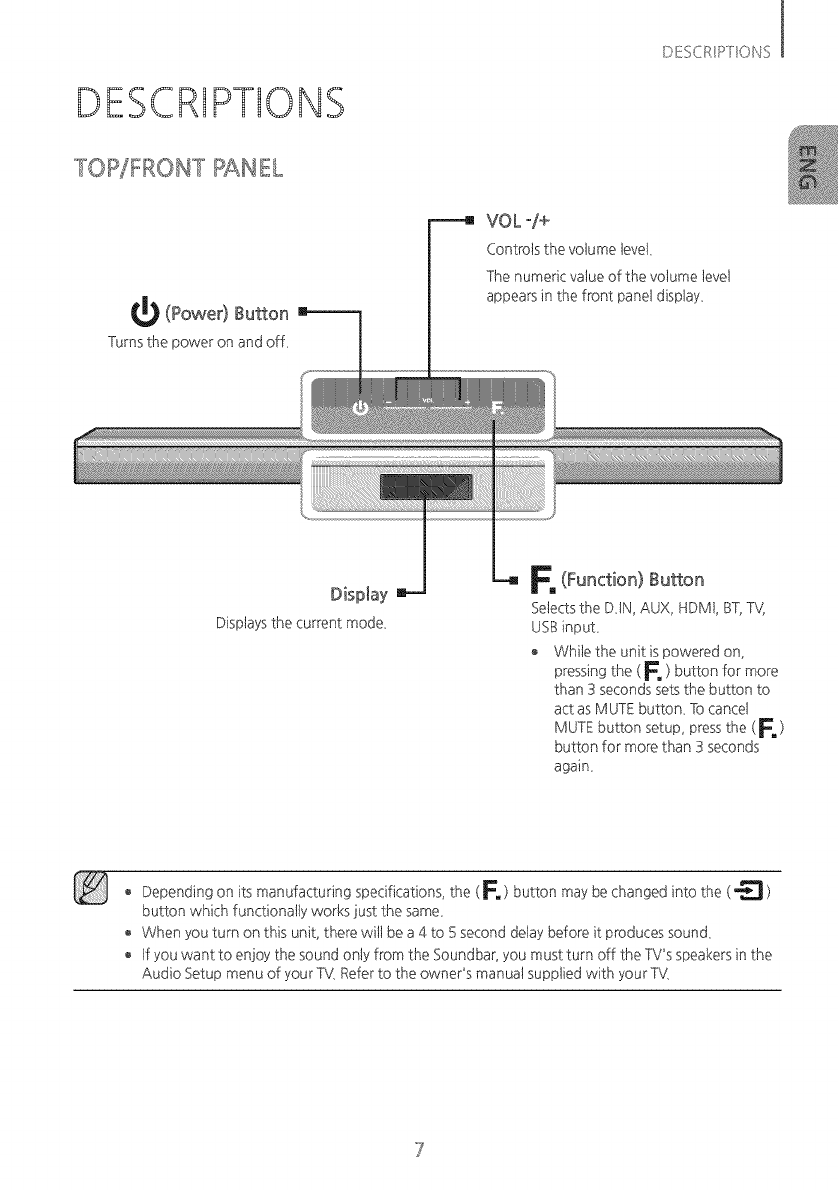
TOP/FRONT PANEL
_ (Power) Button
Turnsthe poweron andoff,
I
Di!u+ E Oi_;S
VOL -/+
Controls the volume level,
The numeric value of the vohJme level
appears in the front panel display,
Displaysthe current mode,
F, (Function) Button
Selectsthe DiN, AUX, HDMt, BT,TV,
USBinput,
+ While the unit is powered on,
pressing the ( F, ) button for more
than 3 seconds sets the button to
act as MUTE button, To cancel
MUTE button setup, pressthe ( E )
button for more than 3 seconds
again,
+Depending on its manufacturing specifications, the ( F', ) button may be changed into the (_ )
button which functionally works just the same,
When you turn on this unit, there wit1be a 4 to 5 second delay before it produces sound,
tf you want to enjoy the sound only from the Soundbar, you must turn off the TV's speakers in the
Audio Setup menu of your TV,Referto the owner's manuat supp%d with your TV,
I C¸",-TT _ _
:sE _:s SIARI/}©
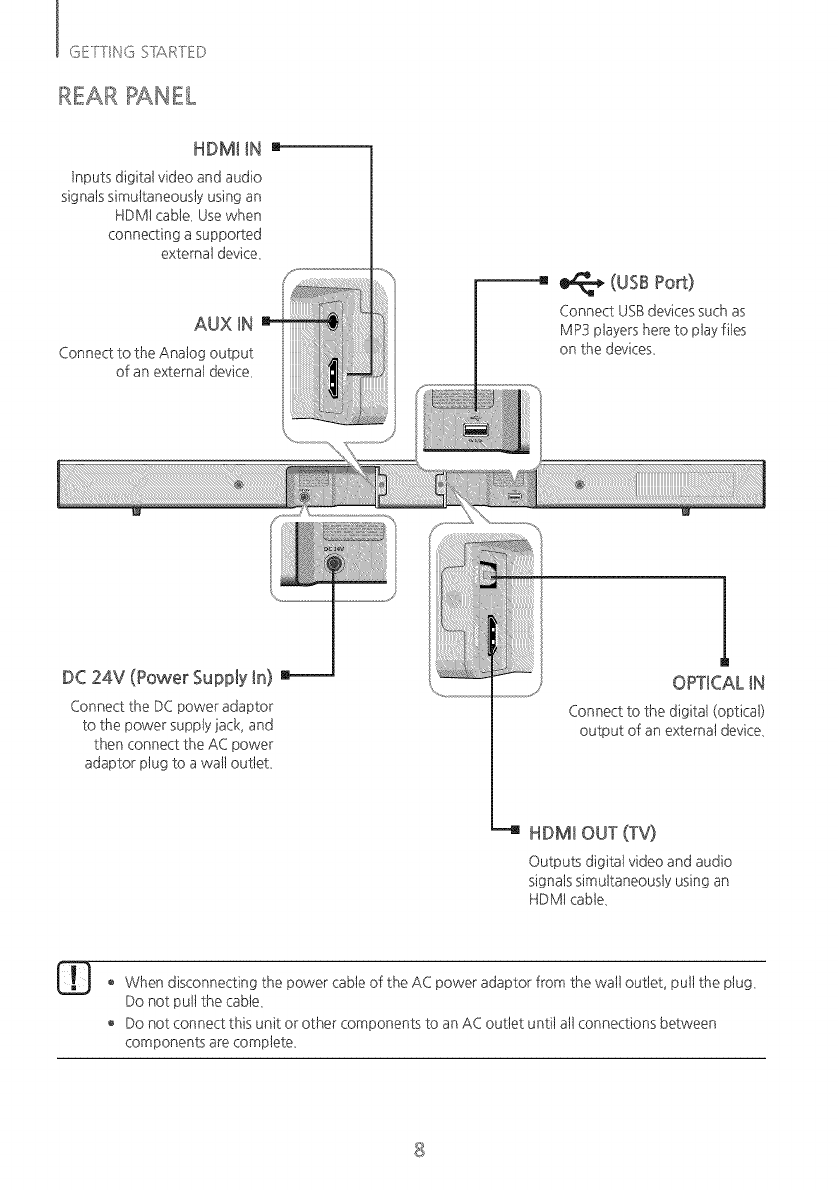
REAR PANEL
HDMI iN I
Inputs digital video and audio
signats simultaneously using an
HDMt cable, Usewhen
connecting a supported
externat device,
AUX iN
Connect to the Anatog output
of an externat device,
(usBPort)
Connect USBdevices such as
MP3 players here to play files
on the devices,
DC 24V (Power Supply in)
Connect the DCpower adaptor
to the power supply jack, and
then connect the AC power
adaptor phJgto a watt outtet,
I|
OPTICAL iN
Connect to the digital (optic@
output of an external device,
--4 HDMI OUT (TV)
Outputs digitat video and audio
signats simultaneously using an
HDMt cable,
When disconnecting the power cable of the AC power adaptor from the watt outtet, pult the plug,
Do not pult the cabte,
o Do not connect this unit or other components to an AC outlet until at1connections between
components are complete,
8
REMOTE CONTROL
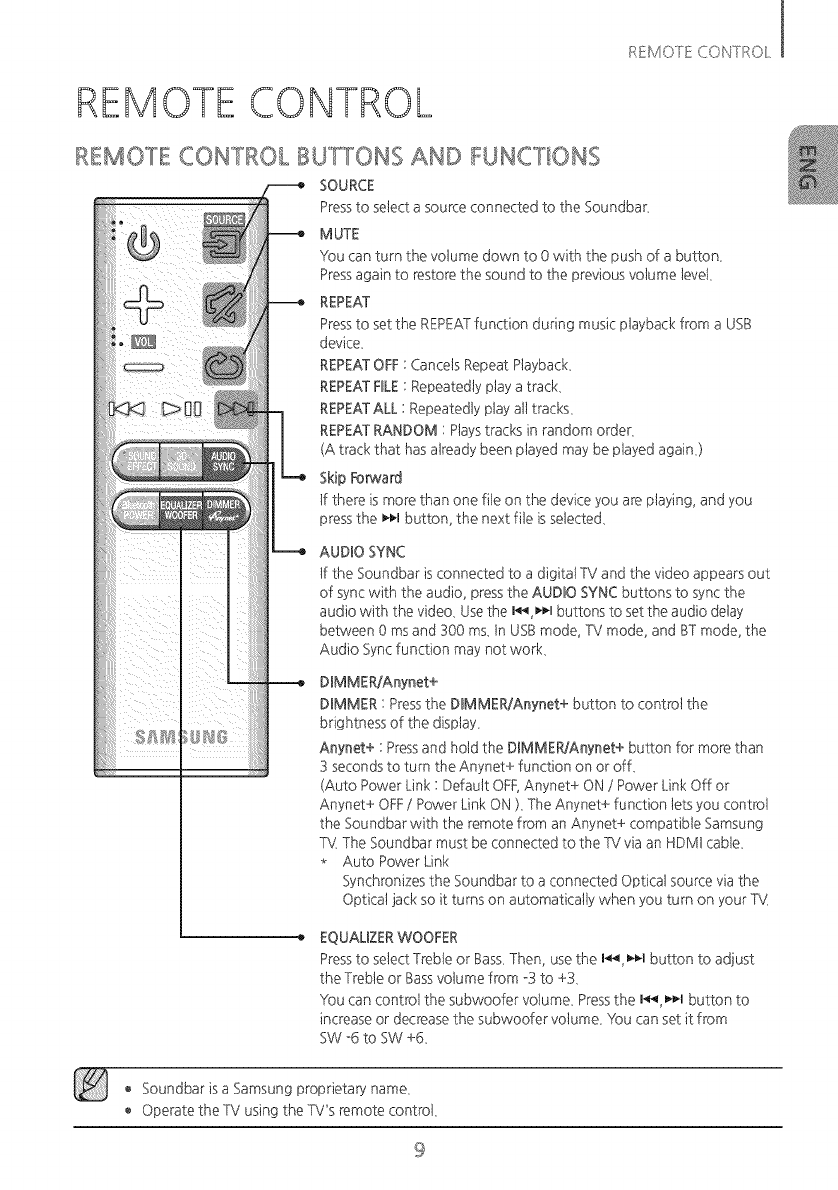
REMOTE CON"TROt BUTTONS AND FUNCTIONS
SOURCE
Pressto select a source connected to the Soundbar,
MUTE
You can turn the volume down to 0 with the push of a button,
Pressagain to restore the sound to the previous volume level,
REPEAT
Pressto set the REPEATfunction during music playback from a USB
device,
REPEATOFE: Cancels Repeat Playback,
REPEATEBLE: Repeatedly play a track,
REPEATALL : Repeatedly play atttracks,
REPEATRANDOM : Playstracks in random order,
(A track that has atready been played may be played again,)
Skip Forward
tf there is more than one rite on the device you are playing, and you
pressthe _1 button, the next rite is selected,
AUDIO SYNC
tf the Soundbar isconnected to a digitat TV and the video appears out
of sync with the audio, pressthe AUDIO SYNC buttons to sync the
audio with the video. Usethe I_t buttons to set the audio delay
between 0 ms and 300 ms. tn USBmode, TV mode, and BTmode, the
Audio Sync function may not work.
DBMMER/Anynet+
DBMMER: Pressthe DIMMER/Anynet+ button to control the
brightness of the display.
Anynet+ : Pressand hotd the D_MMER/Anynet+ button for more than
3 secondsto turn the Anynet+ function on or off.
(Auto Power Link : Default OFF,Anynet+ ON /Power Link Off or
Anynet+ OFF/Power Link ON ). The Anynet+ function lets you controt
the Soundbar with the remote from an Anynet+ compatible Samsung
%( The Soundbar must be connected to the %/via an HDM1cable.
* Auto Power Link
Synchronizes the Soundbar to a connected Opticat source via the
Opticat jack so it turns on automatically when you turn on your Tk4
EQUALIZERWOOEER
Pressto select Treble or Bass.Then, use the I_ _¢.1button to adjust
the Treble or Bassvotume from -3 to +3.
YOucan control the subwoofer volume. Pressthe I_-n button to
increaseor decrease the subwoofer votume. You can set it from
SW -6 to SW +6,
o Soundbar is a Samsung proprieta,5, name.
o Operate the TV using the TV's remote controt.
9
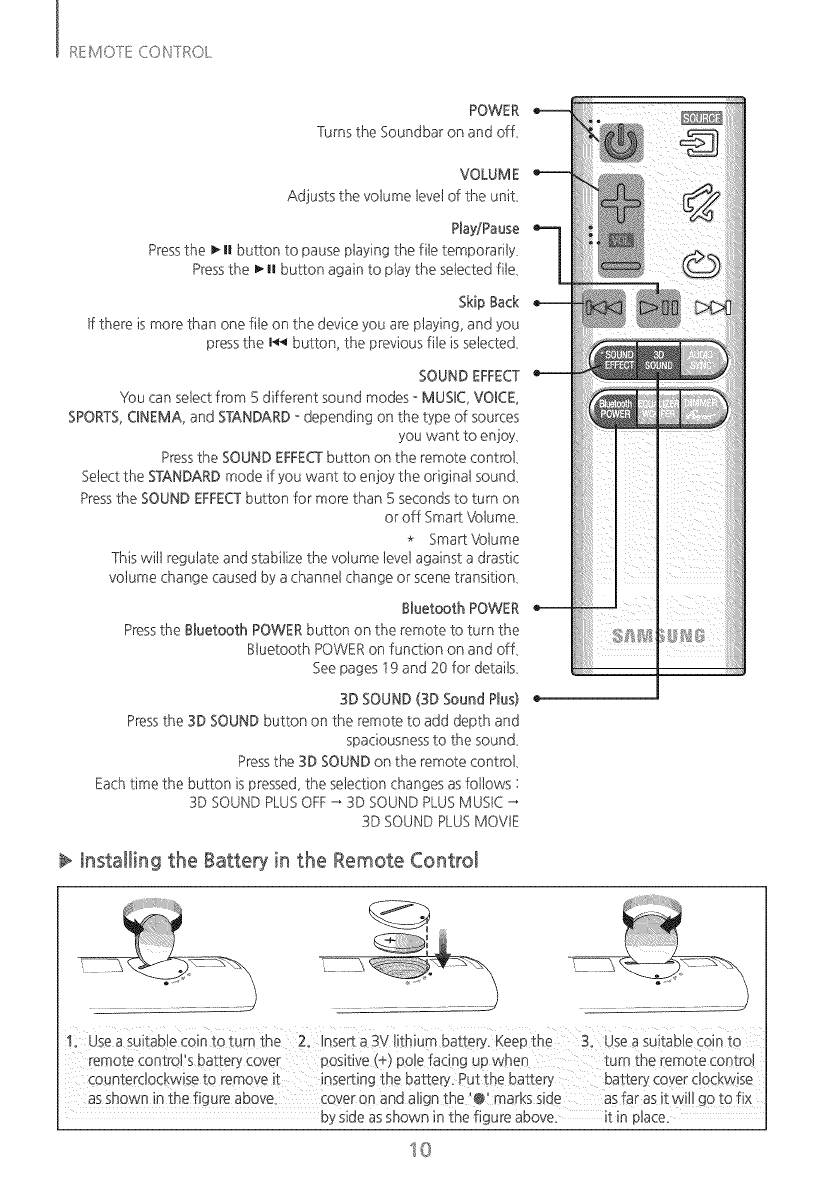
POWER
Turns the Soundbar on and off,
VOLUME
Adjusts the votume 1eve1of the unit,
Play/Pause
Pressthe _n button to pause playing the rite temporarily,
Pressthe _ n button again to play the selected rite,
Skip Back
tf there is more than one rite on the device you are playing, and you
pressthe I_ button, the previous rite isselected,
SOUND EFFECT
You can select from 5 different sound modes - MUSBC,VOBCE,
SPORTS,CBNEMA,and STANDARD- depending on the type of sources
you want to enjoy,
Pressthe SOUND EFFECTbutton on the remote controt,
Selectthe STANDARDmode if you want to enjoy the originat sound,
Pressthe SOUND EFFECTbutton for more than 5 seconds to turn on
or off Sma_ Votume,
* Sma_ Votume
This wit1regulate and stabilize the votume tevel against a drastic
votume change caused by a channel change or scene transition,
Btuetooth POWER
Pressthe Btuetooth POWERbutton on the remote to turn the
Btuetooth POWERon function on and off,
See pages t 9 and 20 for details,
3D SOUND (3D Sound Plus)
Pressthe 3D SOUND button on the remote to add depth and
spaciousnessto the sound,
Pressthe 3D SOUND on the remote controt,
Eachtime the button is pressed, the selection changes as fottows :
3D SOUNDPLUSOFF_ 3D SOUND PLUSMUSIC
3D SOUND PLUSMOVIE
Installing the Battery in the Remote Control
asshown in the figure above. Coveron and atign the i@i marks side asfar as it w!tt go to fix
by side asshown in the figure above, it in _:
I0
CONNECTIONS
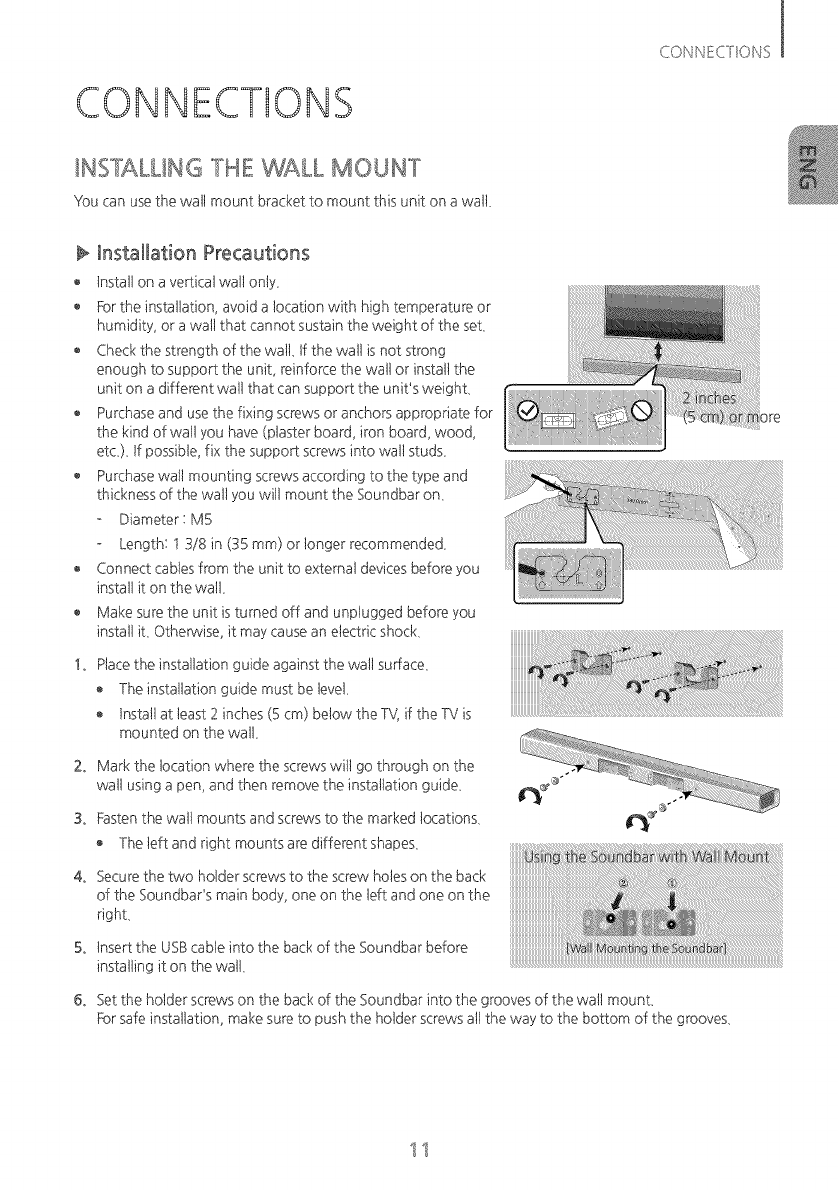
_NSTALUNG 'THE WALL MOUNT
You can usethe watt mount bracket to raount this unit on awatt,
Installation Precautions
tnstatt on a ve_icat watt onty,
For the installation, avoid a tocation with high temperature or
humidity, or a watt that cannot sustain the weight of the set,
Check the strength of the watL tf the watt is not strong
enough to support the unit, reinforce the watt or instatt the
unit on a different watt that can support the unit's weight,
Purchase and use the fixing screws or anchors appropriate for
the kind of wan you have (plaster board, iron board, wood,
etc,), tf possible, fix the suppo¢ screws into watt studs,
o Purchase wan mounting screws according to the type and
thickness of the watt you wit1mount the Soundbar on,
Diameter : M5
Length: t 3/8 in (35 mm) or tonger recommended,
Connect cables from the unit to extemat devices before you
install it on the watt,
Make sure the unit is turned off and unplugged before you
instatt it, Othe_vise, it may cause an electric shock,
!. Placethe installation guide against the watt su,fface,
, The installation guide must be tevel,
tnstattat least 2 inches (5 cm) below the %/, if the TV is
mounted on the watt,
2. Mark the tocation where the screws wit1go through on the
watt using a pen, and then remove the installation guide,
3. Fastenthe watt mounts and screws to the marked locations,
The 1eftand right mounts are different shapes,
4. Securethe two hotder screws to the screw holes on the back
of the Soundbar's main body, one on the 1eftand one on the
right,
5. Insert the USBcable into the back of the Soundbar before
installing it on the watt,
6. Set the hotder screws on the back of the Soundbar into the grooves of the watt mount_
For safe installation, make sure to push the hotder screws attthe way to the bottom of the grooves,
11
DE'TAC_'qING 'T_qEWALL MOUb_T
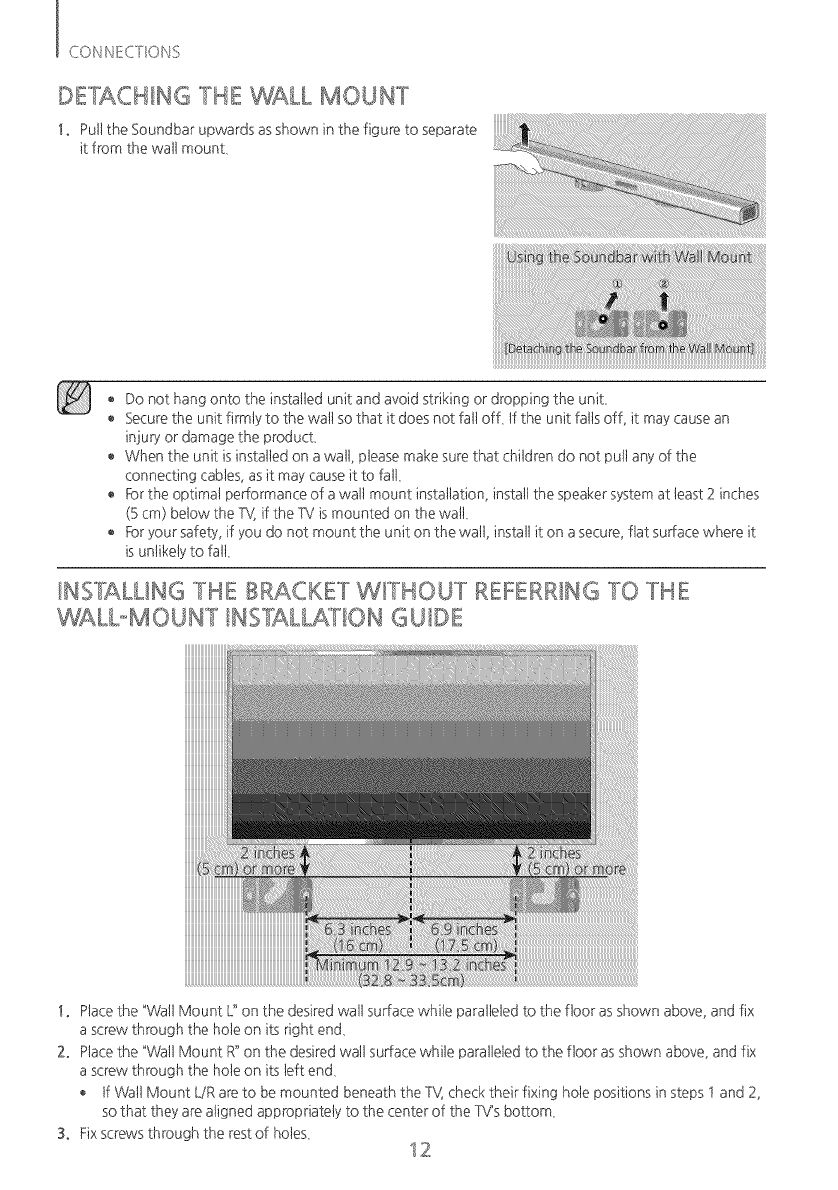
!. Puttthe Soundbar upwards asshown in the figure to separate
it from the watt mount,
iiiiiiiiiiiiiiiiiiiiiiiiiiiiiiiiiiiiiiiiiiiiiiiiiiiiiiiiiiiiiiiiiiiiiiiiiiiiiiiiiiiiiiiiiiiiiiiiiiiiiiiiiiiiiiiiiiiiiiiiiiiiiiiiiiiiiiiiiiiiiiiiiiiiiiiiiiiiiiiiiiiiiiiiiiiiiiiiiiiiiiiiiiiii
____
Do not hang onto the installed unit and avoid striking or dropping the unit,
Securethe unit firmly to the wattso that it does not fat1off, tf the unit fattsoff, it may cause an
injuB, or damage the product,
When the unit isinstalled on a watt, please make sure that chitdren do not pult any of the
connecting cables, as it may cause it to fat1,
® _r the optima1 performance of a walt mount installation, instal1the speaker system at 1east2 inches
(Bcm) below the %/,if the TV ismounted on the wail
For your safety, if you do not mount the unit on the watt, instatt it on a secure, fiat surface where it
is untikely to fat1,
/NS"LALL/NG 'TIDE BRACKET W/'TtqOU'T REFERRING "TO 'TIqE
WALboMOU_T INS']ALLATION GUIDE
!. Ptacethe "Watt Mount L"on the desired watt surface white paralleled to the floor as shown above, and fix
a screw through the hote on its right end,
2. Ptacethe "Watt Mount R"on the desiredwatt surface white paralleled to the floor as shown above, and fix
a screw through the hote on its 1eftend,
tf Watt Mount LiR are to be mounted beneath the TV, check their fixing hote positions in steps t and 2,
so that they are atigned appropriately to the center of the TV's bottom,
S. Fixscrews through the rest of hotes, 12
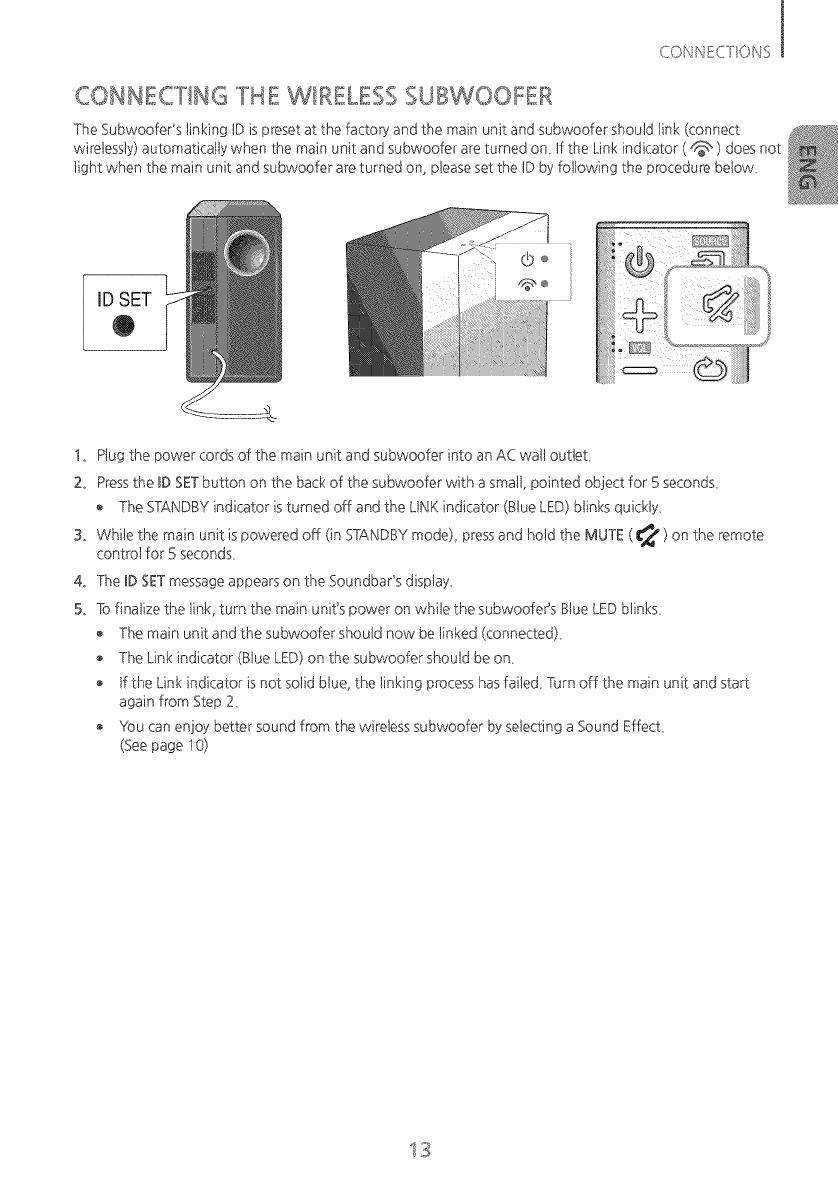
CONNECTING THE WIRELESS SUBWOOFER
The Subwoofer's 1inkingIDis preset at the factoB_and the main unit and subwoofer should 1ink(connect
wirelessly) automatically when the main unit and subwoofer are turned on_ If the Link indicator ( d_, ) doesnot
tight when the main unit and subwoofer are turned on, pteaseset the IDby following the procedure betow_
IDSET
O
@÷
!. Plug the power cords of the main unit and subwoofer into an AC watt outtet,
2. Pressthe BDSETbutton on the back of the subwoofer with a smatt, pointed object for 5 seconds,
The STANDBYindicator is turned off and the LINK indicator (Blue LED) blinks quickly,
3. White the main unit is powered off (in STANDBYmode), pressand hotd the MUTE ( _ ) on the remote
control for 5 seconds,
4. The BDSETmessage appears on the Soundbar's display,
5. Tofinatize the 1ink,turn the main unit's power on white the subwoofePs Btue LEDblinks,
The main unit and the subwoofer should now be 1inked(connected),
The Link indicator (Blue LED)on the subwoofer should be on,
tf the Link indicator is not sotid blue, the 1inkingprocess hasfaited, Turn off the main unit and start
again from Step 2,
Yk)ucan enjoy better sound from the wireless subwoofer by selecting a Sound Effect,
(Seepage t 0)
13
Before moving or installing the product, be sure to turn off the power and disconnect the power
cord.
tf the main unit ispowered off, the wireless subwoofer wit1be in standby mode and the STANDBY
LED on the upper side wit1come on after the Link indicator (Blue LED) blinks for 30 seconds.
tf you use a device that uses the same frequency (2.4GHz) as the Soundbar near the Soundbar,
intederence may cause some sound interruption.
The transmission distance of the wireless signat between the main unit and subwoofer isabout 33
ft. but may va6, depending on your operating environment tf a steel-concrete or metallic watt is
between the main unit and the wireless subwoofer, the system may not operate at att, because the
wireless signat cannot penetrate metat.
tf the main unit doesn't make a wireless connection, fottow steps t -5 to re-set the connection
between the main unit and wireless subwoofer.
_ The wireless receiving antenna is buitt into the wireless subwoofer. Keepthe unit away from water
and moisture.
For optima1 listening performance, make sure that the areaaround the wireless subwoofer tocation
is dear of any obstructions.
14
I
_s_'_ _ _1 _ s_ _ _
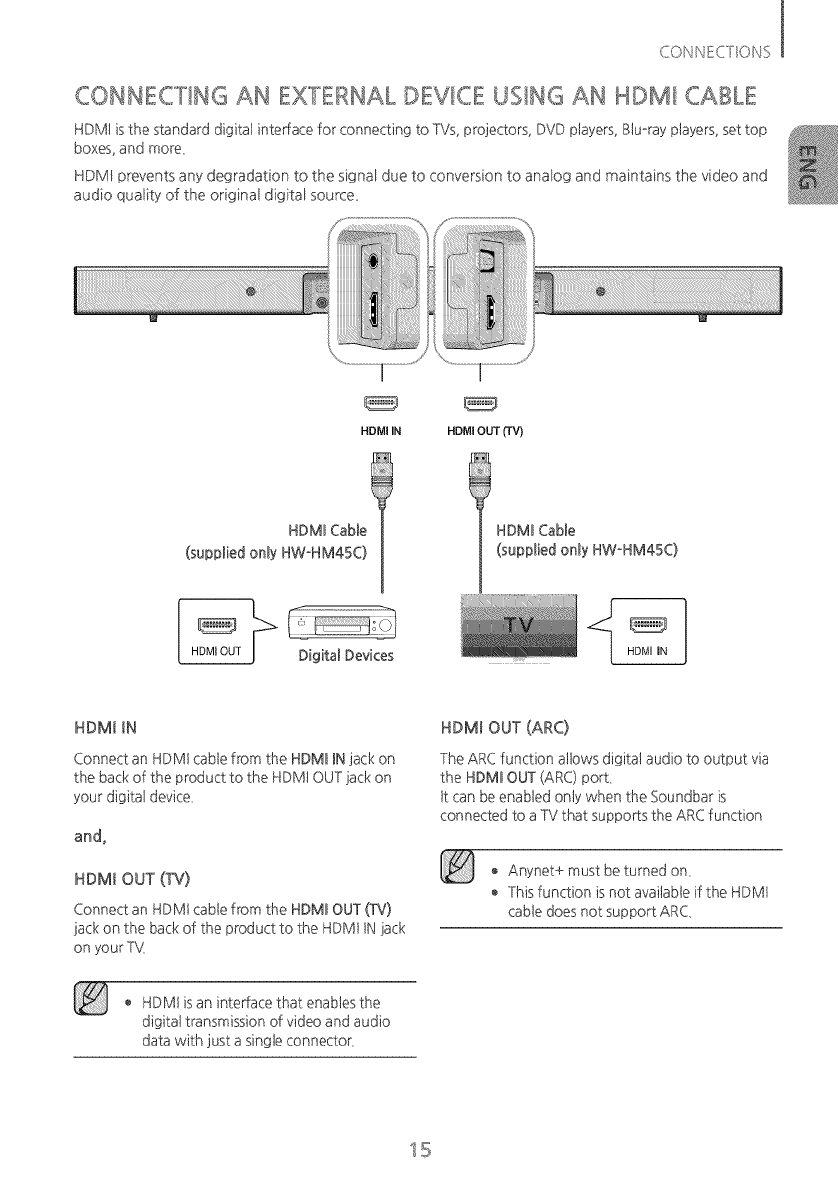
CONNECTING AN EXTERNAL DEVICE USING AN HDMI CABLE
HDMt is the standard digitat interlace for connecting to TVs, projectors, DVD players, Btu-ray players, set top
boxes, and more,
HDMI prevents any degradation to the signal due to conversion to analog and maintains the video and
audio quality of the original digital source
HDMI IN HDMI OUT (TV)
HDMI Cable
(supplied only HW-HM45C)
o'j
Digital Devices
HDMI Cable
(supplied only HW-HM45C)
HDMI IN HDMI OUT (ARC)
Connect an HDMt cable from the HDMI INjack on
the back of the product to the HDMt OUT jack on
your digitat device,
and,
HDMI OUT (TV)
Connect an HDMt cable from the HDMI OUT (TV}
jack on the back of the product to the HDMt tN jack
on your T'_(
The ARC function allows digitat audio to output via
the HDMI OUT (ARC) port,
tt can be enabled only when the Soundbar is
connected to a TV that suppo_s the ARC function
o Anynet+ must be turned on,
This function is not available if the HDMt
cable does not support ARC,
HDMt is an interlace that enables the
digitat transmission of video and audio
data with just a single connector,
15
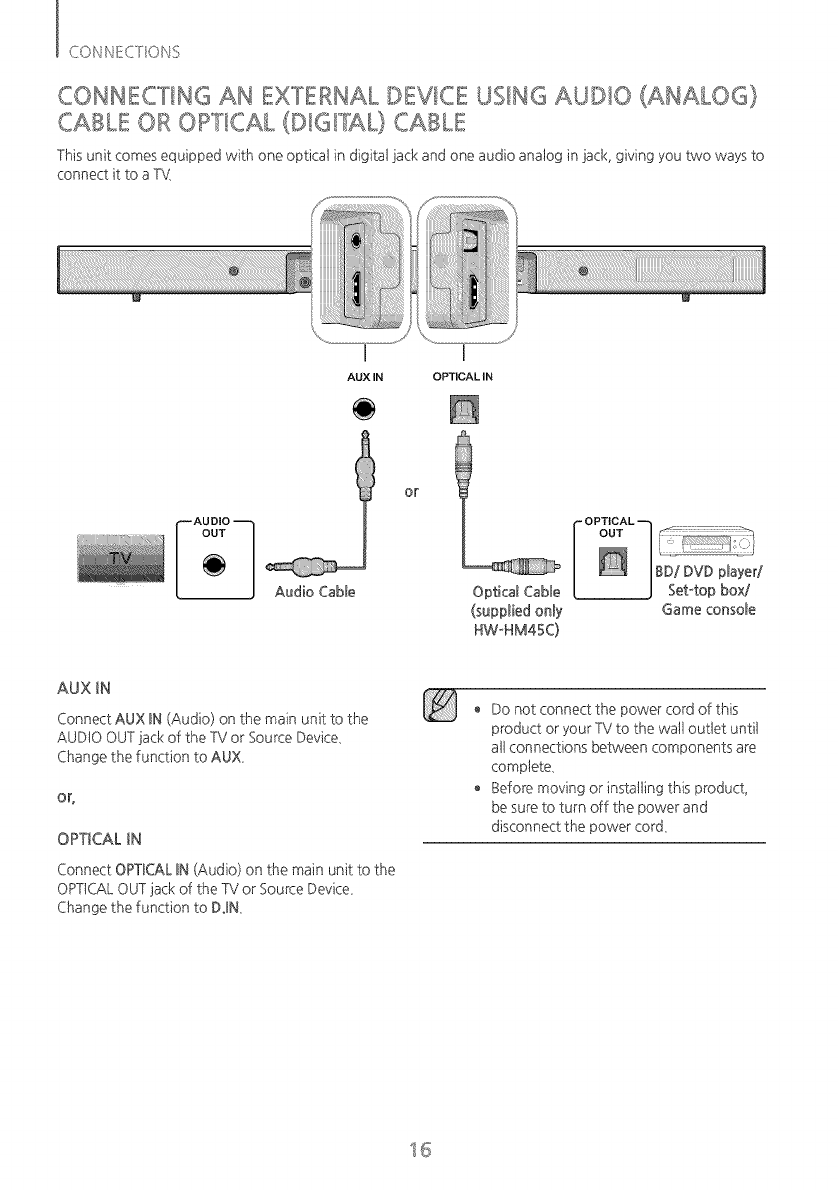
CONNECTING AN EXTERNAL DEVICE USING AUDIO (ANALOG)
_:__° (DIGFAL) CABLE
CABLE OR O_ T,CAL
This unit comes equipped with one opticat in digital jack and one audio analog in jack, giving you two ways to
connect it to a TM
AUX IN OPTICALIN
¢''- AU DIO _ d" OPTICAL "-h
/ OUTIf
/ _/if:
//BD/DVD player/
Audio Cable Optical Cable I J Set-top box/
(supplied only Game console
HW-HM45C)
AUXIN
Connect AUX BN(Audio) on the main unit to the
AUDIO OUT jack of the TV or Source Device,
Change the function to AUX,
OPTICALIN
Connect OPTBCALBN(Audio) on the main unit to the
OPTICALOUTjack of the TV or Source Device,
Change the function to DJN
o Do not connect the power cord of this
product or your TV to the watt outtet untit
att connections between components are
complete,
o Before moving or installing this product,
be sure to turn off the power and
disconnect the power cord,
15
FUNCTIONS
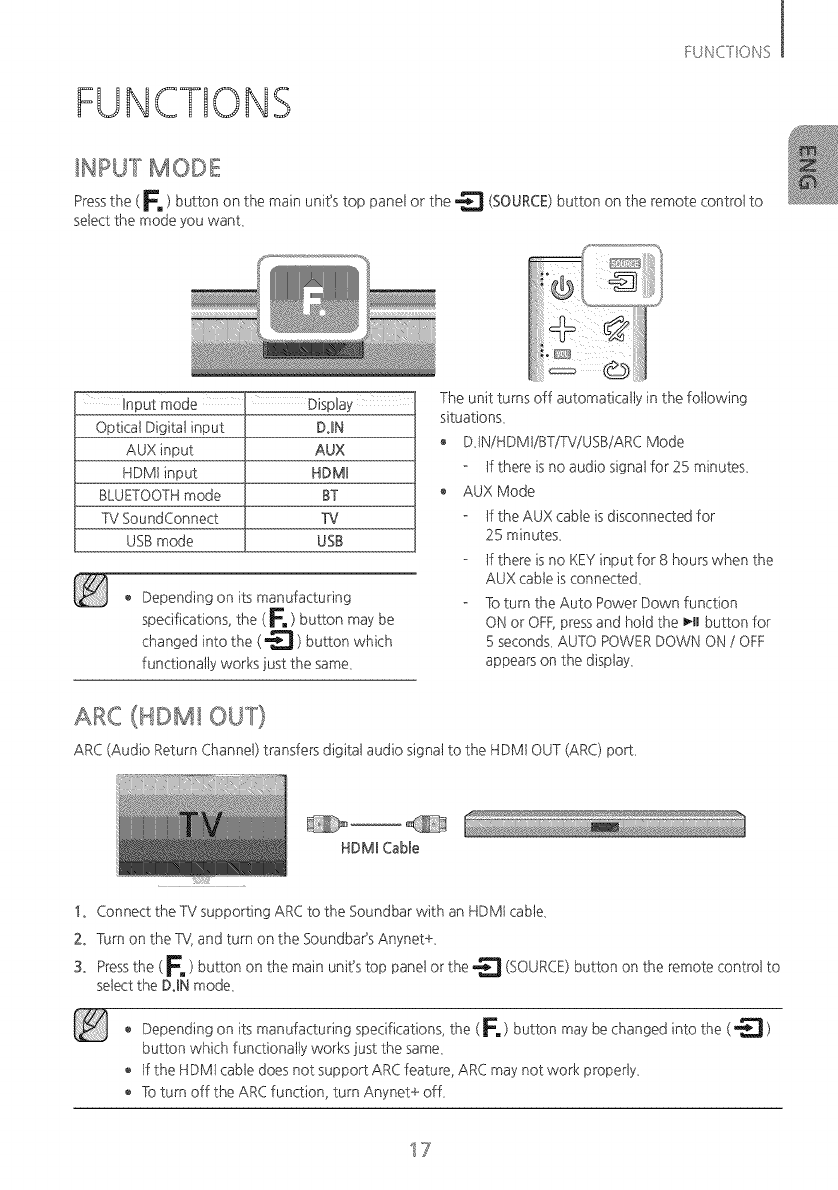
_NPUT MODE
Pressthe (Fm ) button on the main unit's top panel or the _ (SOURCE)button on the remote controt to
select the mode you want,
Optical Digital input DiN
AUX input AUX
HDMt input HDMB
BLUETOOTHmode ST
TV SoundConnect TV
USBmode USB
Depending on its manufacturing
specifications, the (_, ) button may be
changed into the ( _ ) button which
functionally works just the same,
The unit turns off automatically in the following
situations,
DJNiHDMtiBTiTViUSBiARC Mode
tf there is no audio signat for 25 minutes,
AUX Mode
tf the AUX cable is disconnected for
25 minutes,
tf there is no KEY input for 8 hours when the
AUX cable is connected,
To turn the Auto Power Down function
ON or OFF,pressand hotd the _-Hbutton for
5 seconds,AUTO POWER DOWN ON /OFF
appears on the display,
ARC (HDMI OUT)
ARC (Audio Return Channel) transfers digitat audio signat to the HDMt OUT (ARC) po_,
HDMBCable
!° Connect the TV supporting ARC to the Soundbar with an HDMt cable,
2. Turn on the ?4 and turn on the SoundbaPs Anynet+,
S. Pressthe ( F, ) button on the main unit's top panel or the _ (SOURCE)button on the remote controt to
select the DiN mode,
Depending on its manufacturing specifications, the ( _. ) button may be changed into the (_ )
button which functionally works just the same,
o tf the HDMt cabte does not support ARC feature, ARC may not work property,
To turn off the ARC function, turn Anynet+ off,
17
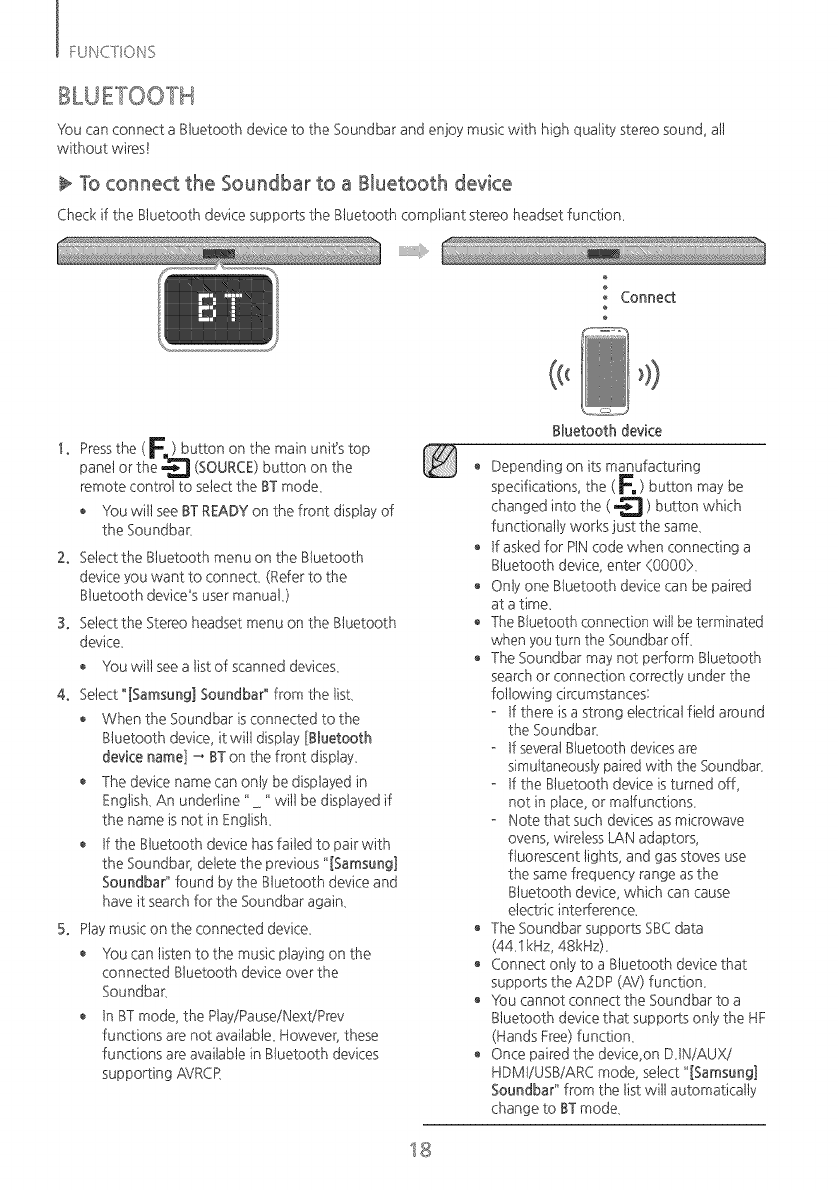
You can connect a Btuetooth device to the Soundbar and enjoy music with high quality stereo sound, att
without wires!
To connect the Soundbar to a Bluetooth device
Check if the Bluetooth device suppo_s the Btuetooth compliant stereo headset function_
o Connect
!. Pressthe ( F. ) button on the main unit's top
panel or the _ (SOURCE)button on the
remote control to select the BT mode,
Y_)uwitt see BT READYon the front display of
the Soundbar,
2. Selectthe Btuetooth menu on the Bluetooth
device you want to connect, (Refer to the
BhJetooth device's user manual,)
3. Selectthe Stereo headset menu on the BhJetooth
device,
Vk)uwitt seea tist of scanned devices,
4. Select "[Samsung] Soundba¢' from the list,
When the Soundbar is connected to the
Btuetooth device, it witt display [Btuetooth
device name] _ BT on the front display,
The device name can onty be displayed in
English, An underline "" witt be displayed if
the name isnot in English,
tf the Btuetooth device hasfailed to pair with
the Soundbar, delete the previous "[Samsung]
Soundbar" found by the Btuetooth device and
have it searchfor the Soundbar again,
5. Ptaymusic on the connected device,
o Yk)ucan listen to the music playing on the
connected Bbetooth device over the
Soundbar,
In BTmode, the Play/Pause/Next/Prey
functions are not avaitabte_However, these
functions are available in Bbetooth devices
supporting AVRCR
Btuetooth device
® Depending on its manufacturing
specifications, the ( F. ) button may be
changed into the (_ ) button which
functionally works just the same,
tf asked for P1Ncode when connecting a
Btuetooth device, enter (0000>,
o Onty one Btuetooth device can be paired
at a time_
TheBhJetoothconnection witl be terminated
when you turn the Soundbarof L
The Soundbar may not perform Btuetooth
search or connection correctly under the
following circumstances:
- tf there isa strong electrical field around
the Soundbar,
If severalStuetooth devicesare
simultaneouslypaired with the Soundbar_
- tf the Btuetooth device is turned off,
not in place, or malfunctions,
- Note that such devices as microwave
ovens, wireless LAN adaptors,
fluorescent lights, and gas stoves use
the same frequency range as the
Btuetooth device, which can cause
electric intefference_
The Soundbar supports SBCdata
(44,1kHz, 48kHz),
o Connect only to a Bbetooth device that
suppo_s the A2DP (AV) function,
¥k)u cannot connect the Soundbar to a
Bluetooth device that suppo_s onty the HF
(Hands Free) function,
Once paired the device,on D,INiAUXi
HDMtiUSBiARC mode, select "[Samsung]
Soundbar" from the list witt automatically
change to BT mode,
18
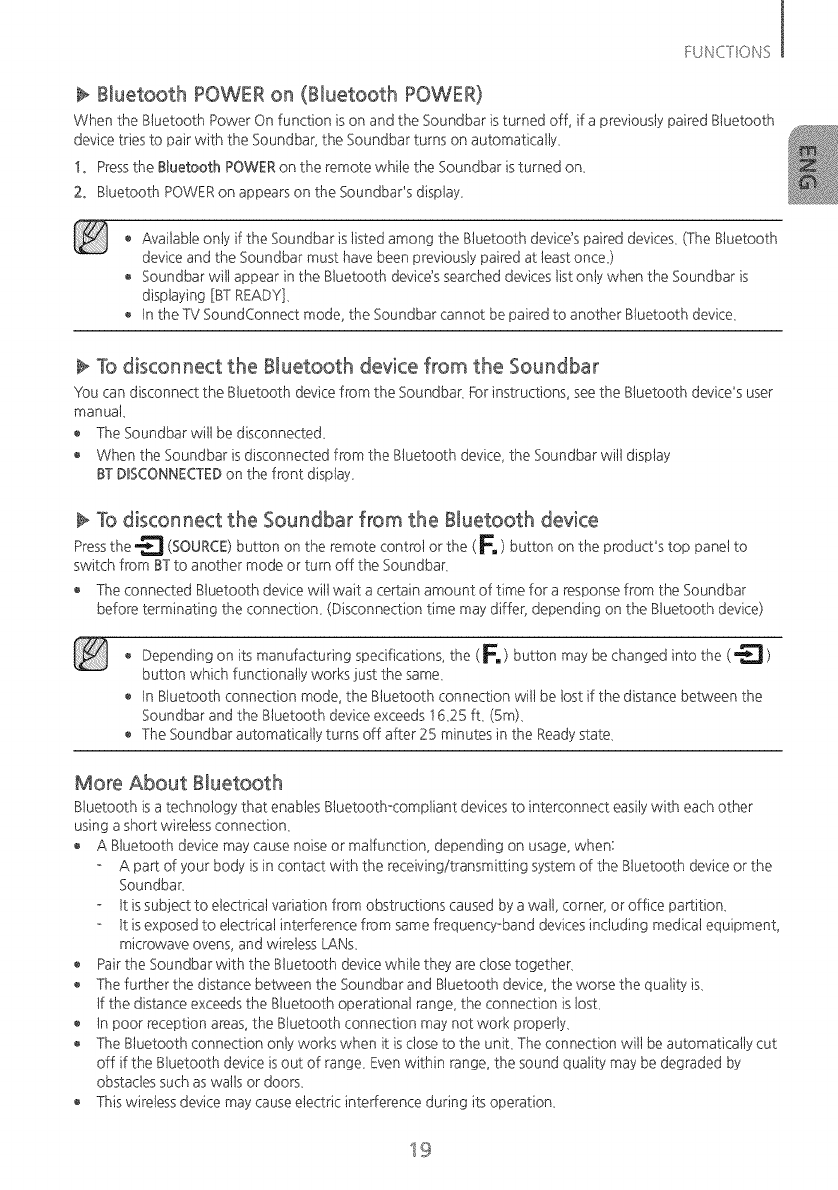
Bluetooth POWER on (Bluetooth POWER)
When the Btuetooth Power On function ison and the Soundbar isturned off, if a previously paired Btuetooth
device tries to pair with the Soundbar, the Soundbar turns on automatically,
!. Pressthe B[uetooth POWERon the remote white the Soundbar is turned on,
2. Btuetooth POWERon appears on the Soundbar's display,
Available only if the Soundbar ististed among the Btuetooth device'spaired devices, (The Btuetooth
device and the Soundbar must have been previously paired at least once}
Soundbar wit1appear in the Btuetooth device's searched devices tist onty when the Soundbar is
displaying [BT READY],
tn the TV SoundConnect mode, the Soundbar cannot be paired to another Btuetooth device,
To disconnect the Bluetooth device from the Soundbar
You can disconnect the Btuetooth device from the Soundbar, For instructions, seethe Btuetooth device's user
manual
The Soundbar wit1be disconnected_
When the Soundbar is disconnected from the Btuetooth device, the Soundbar wit1display
STBBSCONNECTEBon the front display,
To disconnect the Soundbar from the Bluetooth device
Pressthe _ (SOURCE)button on the remote controt or the (E ) button on the product's top panel to
switch from STto another mode or turn off the Soundbar,
The connected Btuetooth device wit1wait a certain amount of time for a response from the Soundbar
before terminating the connection, (Disconnection time may differ, depending on the Btuetooth device)
o Depending on its manufacturing specifications, the (F.) button may be changed into the (_)
button which functionally works just the same,
tn Btuetooth connection mode, the Btuetooth connection wit1be tost if the distance between the
Soundbar and the Bluetooth device exceeds t6,25 ft, (Sin),
The Soundbar automatically turns off after 25 minutes in the Readystate,
More About Bluetooth
Btuetooth isa technology that enables Btuetooth-compliant devices to interconnect easitywith each other
using a short wireless connection,
A Btuetooth device may cause noise or malfunction, depending on usage, when:
A pa_ of your body is in contact with the receiving/transmitting system of the Btuetooth device or the
Soundbar,
tt issubject to electrical variation from obstructions caused by a watt, corner, or office pa¢ition_
tt isexposed to electrical interference from same frequency-band devices including medicat equipment,
microwave ovens, and wireless LANs,
Pair the Soundbar with the Btuetooth device white they are dose together,
The further the distance between the Soundbar and Btuetooth device, the worse the quatity is,
tf the distance exceedsthe Btuetooth operational range, the connection islost,
o tn poor reception areas, the Btuetooth connection may not work property,
The Btuetooth connection onty works when it is close to the unit, The connection wit1be automatically cut
off if the Btuetooth device isout of range, Even within range, the sound quatity may be degraded by
obstacles such as watts or doors,
Thiswireless device may cause electric interference during its operation,
19
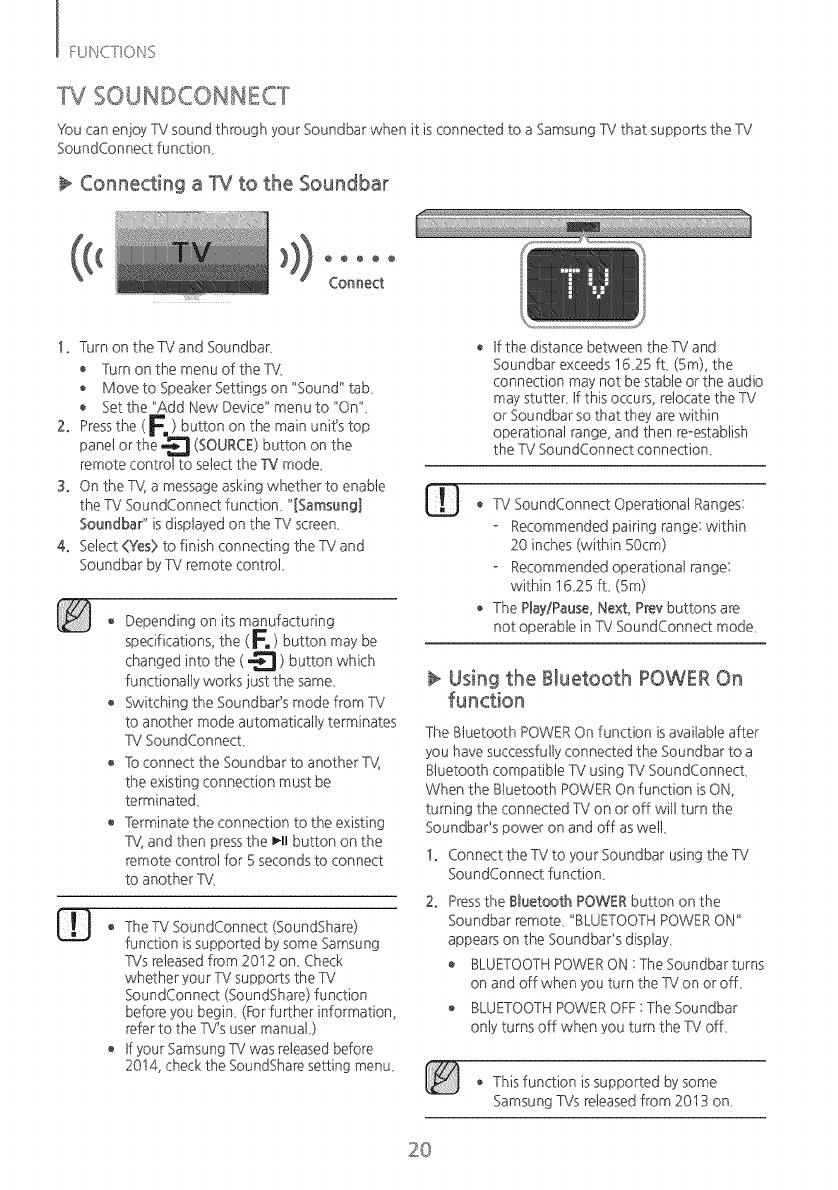
TV SOUNDCONNECT
You can enjoy TV sound through your Soundbar when it is connected to a Samsung TV that suppo_s the TV
SoundConnect function,
Connecting a TV to the Soundbar
Connect
!. Turn on the TV and Soundbar,
Turn on the menu of the -RI,
Move to Speaker Settings on "Sound" tab,
Set the "Add New Device" menu to "On",
2. Pressthe ( F. ) button on the main unit's top
panel or the _--_ (SOURCE)button on the
remote controt to select the TV mode.
3. On the TV, a message asking whether to enable
the TV SoundConnect function, "[Samsung]
Soundbar" isdisplayed on the TV screen,
4. Select<Yes>to finish connecting the TV and
Soundbar by TV remote controt,
® Depending on its manufacturing
specifications, the ( E ) button may be
changed into the (_ ) button which
functionally works just the same,
Switching the Soundbar's mode from TV
to another mode automatically terminates
TV SoundConnect,
Toconnect the Soundbar to another TV,
the existing connection must be
terminated,
Terminate the connection to the existing
TV,and then pressthe I_11button on the
remote control for 5 seconds to connect
to another TV
TheTV SoundConnect (SoundShare)
function issupported by some Samsung
TVs reteasedfrom 2012 on_ Check
whether your TV suppoCs the TV
SoundConnect (SoundShare) function
before you begin, (_r fu_her information,
refer to the TV's user manuaL)
tf your SamsungP,/was releasedbefore
2014, check the SoundShare setting menu_
® If the distance between the TV and
Soundbar exceeds 1625 ft, (5m), the
connection may not be stable or the audio
may stutter, If this occurs, relocate the TV
or Soundbar so that they are within
operational range, and then re-establish
the TV SoundConnect connection_
o TV SoundConnect Operational Ranges:
Recommended pairing range: within
20 inches (within 50cm)
Recommended operational range:
within t6,25 ft, (Sm)
The Play/Pause,Next, Preybuttons are
not operable in TV SoundConnect mode,
Using the Bluetooth POWER On
The Btuetooth POWEROn function isavailable after
you have successfully connected the Soundbar to a
Btuetooth compatible TV using TV SoundConnect,
When the Btuetooth POWEROn function isON,
turning the connected TV on or off wit1turn the
Soundbar's power on and off as welt,
!. Connect the TV to your Soundbar using the TV
SoundConnect function,
2. Pressthe Btuetooth POWERbutton on the
Soundbar remote, "BLUETOOTHPOWERON"
appears on the Soundbar's display,
BLUETOOTHPOWERON :The Soundbar turns
on and off when you turn the TV on or ofL
BLUETOOTHPOWEROFF:The Soundbar
onty turns off when you turn the TV off,
o This function is supported by some
Samsung TVs released from 2013 on,
2O
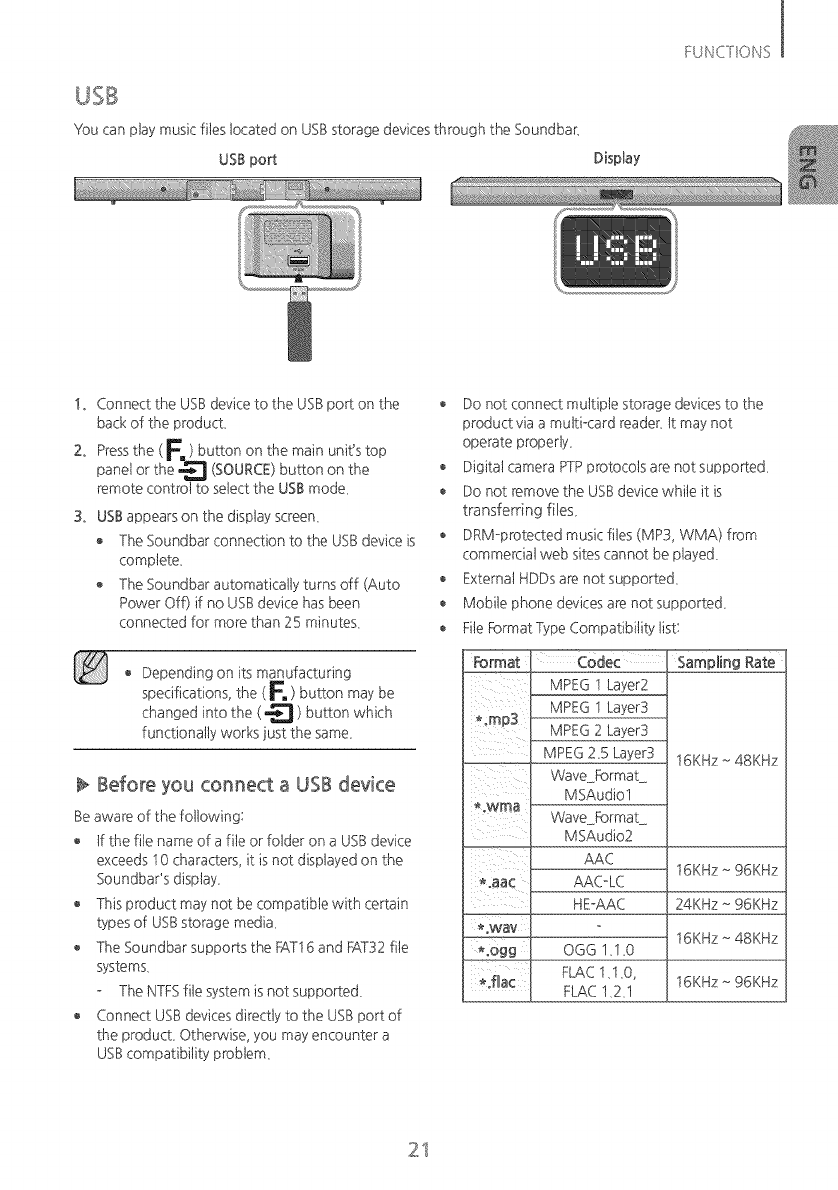
You can play music riteslocated on USBstorage devices through the Soundbar_
USB port Display
!. Connect the USBdevice to the USBpo_ on the
back of the product,
2. Pressthe ( F, ) button on the main unit's top
panel or the "_'__'1(SOURCE)button on the
remote controt to select the USBmode,
3. USBappears on the display screen,
The Soundbar connection to the USBdevice is
complete,
The Soundbar automatically turns off (Auto
Power Off) if no USBdevice has been
connected for more than 25 minutes,
Depending on its manufacturing
specifications, the (E ) button may be
changed into the ( _ ) button which
functionally works just the same,
Before you connect a USB device
Be aware of the following:
o tf the fite name of a fite or folder on a USBdevice
exceeds I 0 characters, it is not displayed on the
Soundbar'sdisplay,
o This product may not be compatible with certain
types of USBstorage media,
The Soundbar suppoRs the FAT16and FAT32file
systems,
The NTFSfile system isnot supported,
Connect USBdevices directly to the USBport of
the product, Otherwise, you may encounter a
USBcompatibility problem,
o Do not connect multiple storage devices to the
product via a multi-card reader, tt may not
operate properly,
o Digital camera PTPprotocols are not suppoRed,
Do not remove the USBdevice while it is
transferring file£
DRM-protected music files (MP3, WMA) from
commercial web sitescannot be played,
o External HDDs are not supported,
Mobile phone devices are not supported,
Fite FormatType Compatibility list:
Format
,;rap3
owma
%way
*°Ogg
*.fla¢
Codec
MPEG I Layer2
MPEG 1 Layer3
MPEG 2 Layer3
MPEG 2_5Layer3
WaveFormat
MSAudiol
WaveFormat
MSAudio2
AAC
AAC-LC
HE-AAC
Sampling Rate
16KHz~ 48KHz
16KHz~ 96KHz
24KHz~ 96KHz
16KHz~ 48KHz
OGG I_IO
FLAC 1,1,0, 16KHz ~ 96KHz
FLAC 1,2,1
21
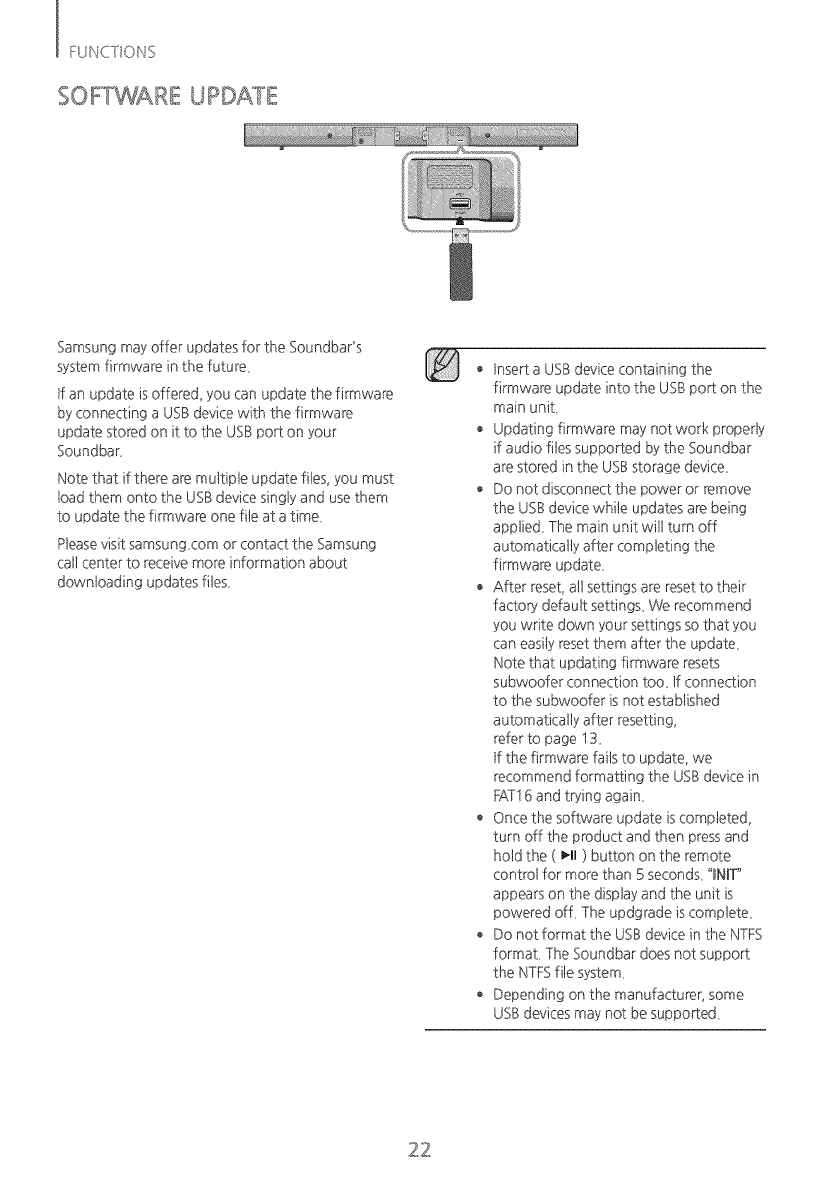
SOFYWARE UPDATE
Samsung may offer updates for the Soundbar's
system firmware in the future.
tf an update isoffered, you can update the firmware
by connecting a USBdevice with the firmware
update stored on it to the USBport on your
Soundbar.
Note that if there are multiple update rites, you must
toad them onto the USBdevice singly and use them
to update the firmware one rite at a time.
Pteasevisit samsung.com or contact the Samsung
cat1center to receive more information about
downloading updates rites.
Insert a USBdevice containing the
firmware update into the USBpo_ on the
main unit.
o Updating firmware may not work properly
if audio files supported by the Soundbar
are stored in the USBstorage device.
o Do not disconnect the power or remove
the USBdevice while updates are being
applied. The main unit will turn off
automatically after completing the
firmware update.
After reset, all settings are reset to their
facto,3, default settings. Wt_recommend
you write down your settings so that you
can easily reset them after the update.
Note that updating firmware resets
subwoofer connection too. tf connection
to the subwoofer is not established
automaticaly after resetting,
refer to page 13.
tf the firmware fails to update, we
recommend formatting the USBdevice in
FAT16and trying again.
Once the software update iscompleted,
turn off the product and then pressand
hold the ( _-II) button on the remote
control for more than 5 seconds. "INIT"
appears on the display and the unit is
powered off. The updgrade iscomplete.
Do not format the USBdevice in the NTFS
format. The Soundbar does not support
the NTFSfile system.
o Depending on the manufacturer, some
USBdevices may not be supposed.
22
m
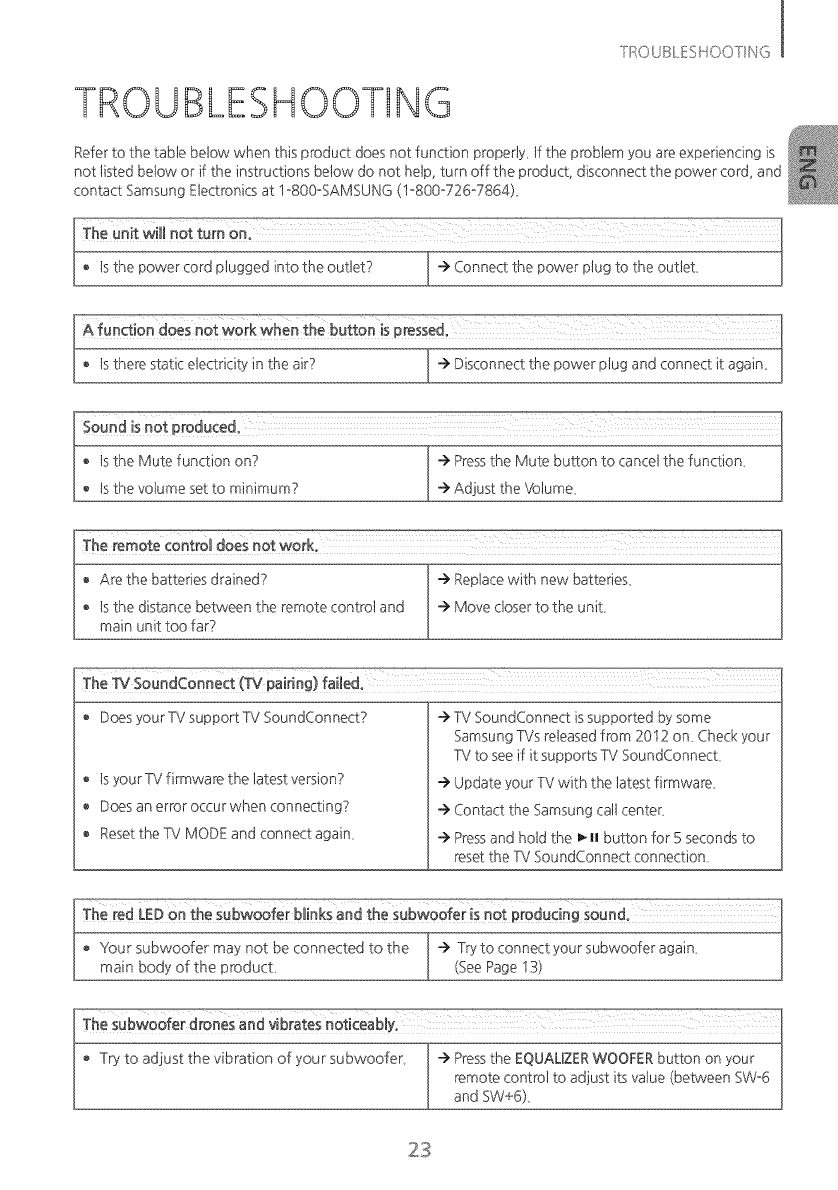
TROUBLESHOOTING
Referto the table below when this product does not function properly_ tf the problem you are experiencing is
not listed below or if the instructions below do not help, turn off the product, disconnect the power cord, and
contact Samsung Elecb-onicsat 1-800oSAMSUNG (I-800o726o7864)_
® tsthe power cord plugged into the outlet? I "> Connect the power plug to the outlet,
A function does not work when the button is pressedo
® tsthere static electricity in the air? ] -> Disconnect the power plug and connect it again_
® tsthe Mute function on? -> Pressthe Mute button to cancel the function,
® tsthe volume set to minimum? -->Adjust the Volume_
o Does yourTV supportTV SoundConnect?
o tsyour TV firmware the tatest version?
o Does an error occur when connecting?
® Resetthe TV MODE and connect again,
-->TV SoundConnect issupported by some
Samsung TVs released from 2012 on, Check your
TV to seeif it supports TV SoundConnect,
-->Update your TV with the tatest firmware,
-->Contact the Samsung cat1center,
-->Pressand hold the _mmbutton for 5 seconds to
reset the TV SoundConnect connection,
f e Try to adjust the vibration of subwoofer -->Pressthe EQUALIZERWOOFERbutton
your on your
remote controt to adjust its vatue (between SW_6
and SW+6),
23
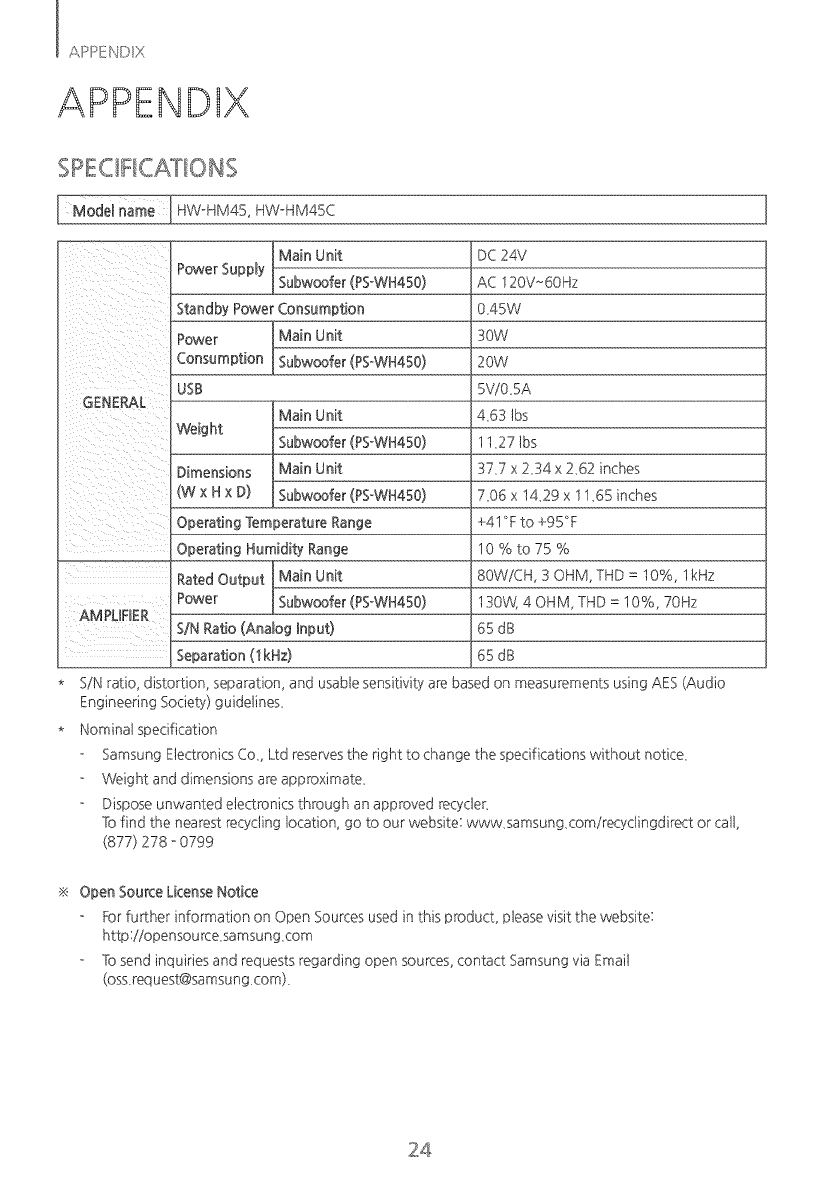
_odel HW_HM45, HW_HM45C
_ Unit
Power Supply I Subwoofer (pSoWH450)
Standby Power Consumption
T
Power I Main Unit
Consumption _Subwoofer (PS°WH450)
USB
unit
Weight (PS°WH450)
Dimensions
(W x Hx D) _woofer (PSxWH450)
Operating Temperature Range
Operating Humidity Range
_ Unit
Rated Output
Power 1 Subwoofer (pSoWH450)
AMPURER
SIN Ratio (Anatog hput)
Separation (1kHz)
DC24V
AC 120V~6OHz
0,45W
30W
20W
5ViO_5A
4,63 lbs
11,27 lbs
37,7 x 2_34x 2_62 inches
7_06 x 1429 x 11_65inches
+41 °Fto +95°F
10%to75%
80WiCH, 30HM, THD = 10%, lkHz
130W} 4 OHM, THD = 10%, 70Hz
65 dB
65 dB
SiN ratio, distortion, separation, and usable sensitivity are based on measurements using AES (Audio
Engineering Society) guidelines,
Nominat specification
Samsung Electronics Co,, Ltd reservesthe right to change the specifications without notice,
Weight and dimensions are approximate,
Dispose unwanted electronics through an approved recycler_
To find the nearest recycling location, go to our website: www,samsung,comirecyclingdirect or cat1,
(877) 278 - 0799
Open SounceLicenseNotice
ForfuCher information on Open Sources used in this product, please visit the website:
http:iiopensource,samsung,com
To send inquiries and requests regarding open sources, contact Samsung via Emait
(oss,request@samsung,com),
24

This SAMSUNG brand product, as supplied and distributed by Samsung Electronics America, tnc. (SAMSUNG)
and delivered new, in the original carton to the originat consumer purchaser, iswarranted by SAMSUNG against
manufacturing defects in materials and workmanship for a limited warranty period of:
One (I} Year Parts and Labor*
(*90 Days Partsand Labor for Commercial Use)
Thislimited warranty begins on the original date of purchase, and isvalidonly on products purchased and used in the
United State£ Toreceivewarranty service,the purchasermust contact SAMSUNGfor problem determination and
serviceprocedure£ Warranty servicecan onlybe performed by a SAMSUNGauthorized servicecenter_Theoriginal
dated bill of salemust be presented upon requestas proof of purchaseto SAMSUNGor SAMSUNG'sauthorized
servicecenter_Transportation of the product to and from the servicecenter isthe responsibility of the purchaser_
SAMSUNG wit1repair or replace this product, at our option and at no charge asstipulated herein, with new or
reconditioned parts or products if found to be defective during the limited warranty period specified above_Alt
replaced parts and products become the property of SAMSUNG and must be returned to SAMSUNG_
Replacement parts and products assume the remaining original warranty, or ninety (90) days, whichever is tonger_
SAMSUNG's obligations with respect to software products distributed by SAMSUNG under the SAMSUNG brand
name are set forth in the applicable end user ticenseagreement. Non-SAMSUNG hardware and software
products, if provided, are on an "AS tS"basis, Non-SAMSUNG mamJfacturers, supp%rs, publishers, and sen,ice
providers may provide their own warranties,
This limited warranty covers manufacturing defects in materials and workmanship encountered in normal, and
except to the extent otherwise expressly provided for in this statement, noncommercial use of this product, and
shall not apply to the following, including, but not limited to: damage which occurs in shipment; deliveB,and
installation; applications and uses for which this product was not intended; altered product or serial numbers;
cosmetic damage or exterior finish; accidents, abuse, neglect, fire, water, lightning or other acts of nature; use of
products, equipment, systems, utilities, services, parts, supplies, accessories, applications, installations, repairs,
external wiring or connectors not supplied and authorized by SAMSUNG, or which damage this product or result
in sen,ice problems; incorrect electrical tine voltage, fluctuations and surges; customer adjustments and failure to
follow operating instructions, cleaning, maintenance and environmental instructions that are covered and
prescribed in the instruction book; product removal or reinsta%tion; reception problems and distortion related to
noise, echo, inte_erence or other signat transmission and delivery problems, SAMSUNG does not warrant
uninterrupted or error-free operation of the product,
THEREARENO EXPRESSWARRANTIESOTHERTHAN THOSELISTEDAND DESCRIBEDABOVE,AND NOWARRANTIES
WHETHEREXPRESSORIMPLIED,INCLUDING,BUTNOTLIMITEDTO, ANY IMPLIEDWARRANTIESOF
MERCHANTABILffYORFITNESSFORA PARTICULARPURPOSE,SHALLAPPLYAFTERTHE EXPRESSWARRANTY
PERIODSSTATEDABOVE,AND NO OTHEREXPRESSWARRANTYORGUARANTYGIVENBYANY PERSON,FIRMOR
CORPORATIONWITH RESPECTTO THISPRODUCTSHALLBEBINDINGON SAMSUNG_SAMSUNGSHALLNOTBE
LIABLEFORLOSSOFREVENUEORPROFITS,FAILURETO REALIZESAVINGSOR OTHERBENEFITS,ORANY OTHER
SPECIAL,INCIDENTALORCONSEQUENTIALDAMAGESCAUSEDBYTHEUSE,MISUSEORINABILITYTO USETHIS
PRODUCT,REGARDLESSOFTHELEGALTHEORYON WHICHTHE CLAIMISBASED,AND EVENIFSAMSUNGHAS
BEENADVISEDOFTHE POSSIBILITYOFSUCHDAMAGEE NORSHALLRECOVERYOFANY KINDAGAINSTSAMSUNG
BEGREATERIN AMOUNTTHANTHEPURCHASEPRICEOFTHE PRODUCTSOLDBYSAMSUNGAND CAUSINGTHE
ALLEGEDDAMAGE WITHOUTLIMITINGTHEFOREGOING,PURCHASERASSUMESALL RISKAND LIABILITYFOR
LOSS,DAMAGEORINJURYTO PURCHASERAND PURCHASER'SPROPERTYAND TO OTHERSAND THEIRPROPERTY
ARISINGOUT OFTHE USE,MISUSEORINABILITYTO USETHISPRODUCTSOLDBYSAMSUNGNOTCAUSEDDIRECTLY
BYTHE NEGLIGENCEOFSAMSUNG_THISLIMITEDWARRANTYSHALLNOTEXTENDTO ANYONEOTHERTHAN THE
ORIGINALPURCHASEROFTHISPRODUCT,ISNONTRANSFERABLEAND STATESYOUREXCLUSIVEREMEDY_
The benefits of this Limited YVarrantyextend onty to the originat purchaser of Samsung products from an
authorized Samsung reseller, THtS LtMtTEDWXRRANTY SHALLNOT APPLYTO ANY SAMSUNG PRODUCTS
PURCHASEDFROM UNAUTHORIZEDRESELLERSOR RETAILERS,EXCEPTtNSTATESWHERE SUCH RESTRICTION
MAY BE PROHIBITED,Fora tist of Samsung authorized retailers, please go to: http:iiwww,samsung,comiusi
peaceofmindia uthorized reselters,htmt
Some states do not allow limitations on how long an implied warranty lasts, or the exclusion or 1imitation of
incidental or consequential damages, so the above limitations or exclusions may not apply to you, This warranty
gives you specific tegat rights, and you may atsohave other rights which vaB,from state to state,
Toobtain warranty hardware service, please contact SAMSUNG customer care center,
QUESTIONS OR COMMENTS?
COU.TR¥__LL oRvusuTuso.u winiVE
1-800-SAMSUNG , , I Samsung Electronics America Inc,
www,samsung,com/us/ I 85 Challenger Road '
support
U,S,A (726°7864) l ] Ridgefield Park, NJ07660
AH68-02720B-03
IIIIIIIIIIIIIIIIIIIIIIIIIIIIIIIIIIIIIIIIIII
AH68-02720B-03
