Samzuk Technology Development Co FWAN20A 10 channel FRS User Manual Samcom English Manual

Guangdong Samzuk Technology Development Co,Ltd 10 channel FRS Samcom English Manual

User manual

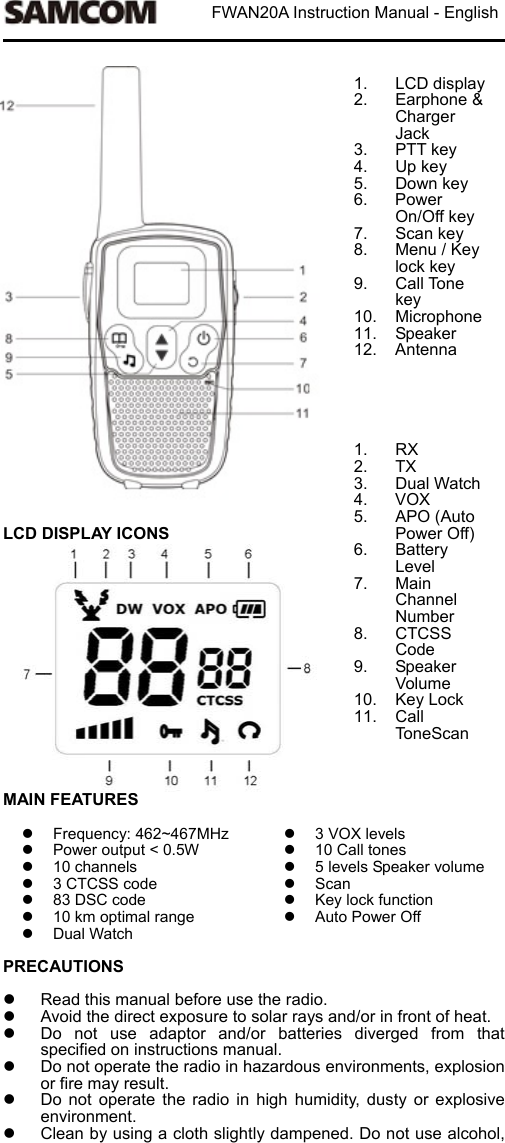
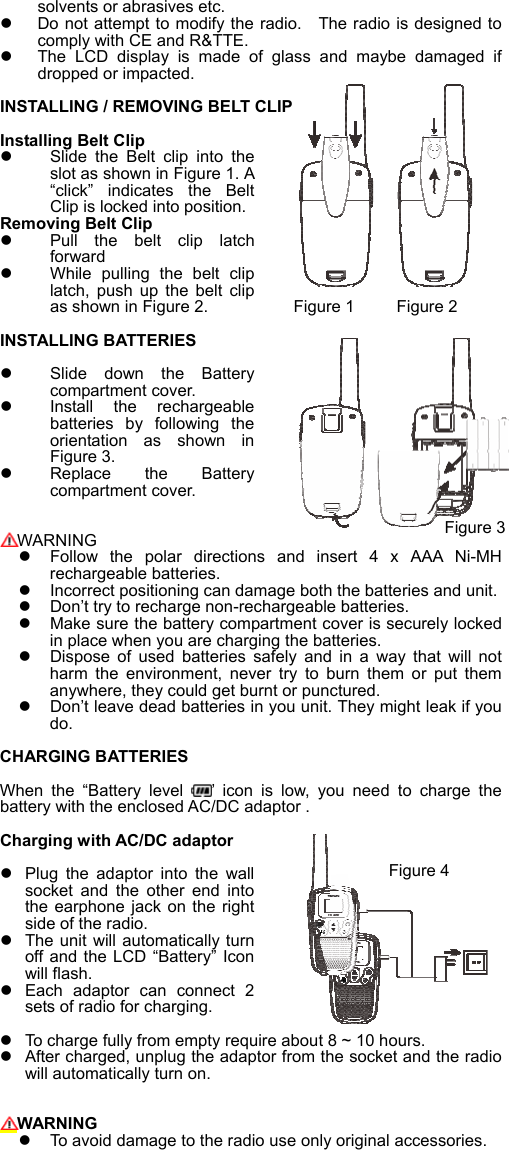
                          FWAN20A Instruction Manual - English                             LCD DISPLAY ICONS               1. LCD display2.  Earphone & Charger Jack 3.  PTT key 4.  Up key 5.  Down key 6.  Power On/Off key 7.  Scan key   8.  Menu / Key lock key 9.  Call Tone key 10.  Microphone11.  Speaker 12.  Antenna      1.  RX 2.  TX 3.  Dual Watch 4.  VOX 5.  APO (Auto Power Off) 6.  Battery Level 7.  Main Channel Number 8.  CTCSS Code 9.  Speaker Volume 10.  Key Lock 11.  Call ToneScan  MAIN FEATURES    Frequency: 462~467MHz  Power output < 0.5W   10 channels   3 CTCSS code   83 DSC code   10 km optimal range   Dual Watch 3 VOX levels  10 Call tones  5 levels Speaker volume  Scan   Key lock function   Auto Power Off PRECAUTIONS    Read this manual before use the radio.     Avoid the direct exposure to solar rays and/or in front of heat.     Do  not  use  adaptor  and/or  batteries  diverged  from  that specified on instructions manual.   Do not operate the radio in hazardous environments, explosion or fire may result.   Do  not  operate  the  radio  in  high  humidity,  dusty  or  explosive environment.     Clean by using a cloth slightly dampened. Do not use alcohol,
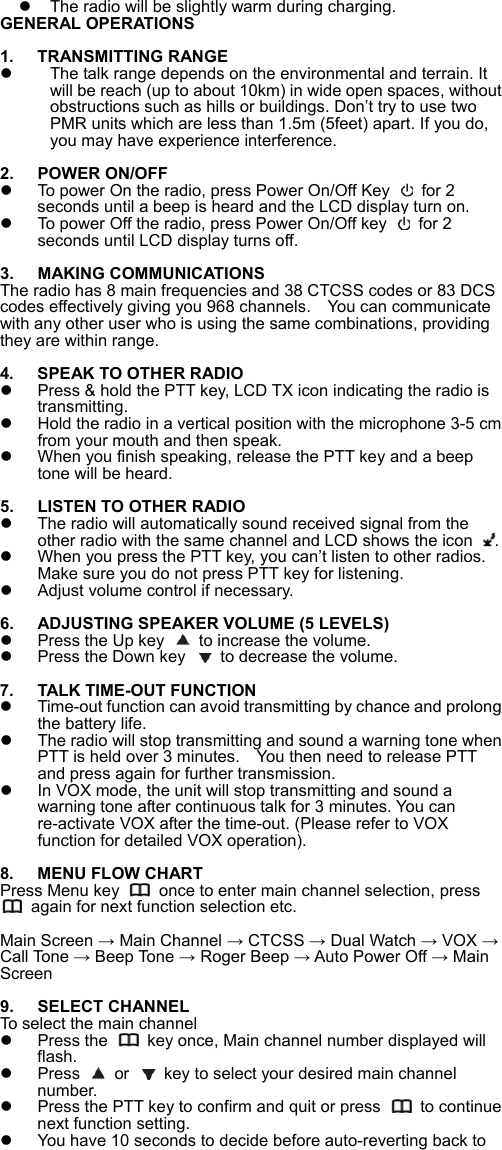
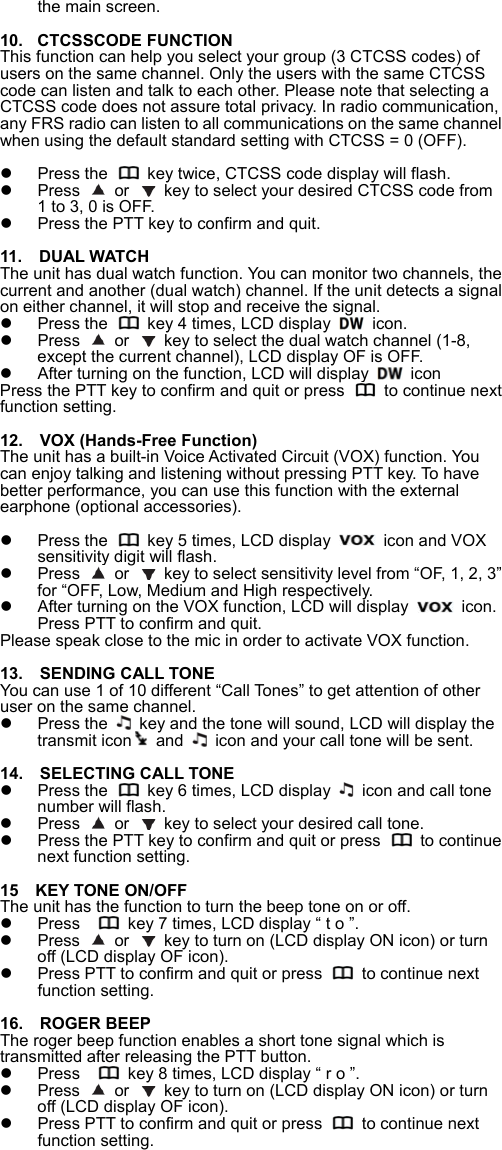
solvents or abrasives etc.     Do not attempt to modify the radio.    The radio is designed to comply with CE and R&TTE.   The  LCD  display  is  made  of  glass  and  maybe  damaged  if dropped or impacted.    INSTALLING / REMOVING BELT CLIP  Installing Belt Clip  Slide  the  Belt  clip  into  the slot as shown in Figure 1. A “click”  indicates  the  Belt Clip is locked into position. Removing Belt Clip   Pull  the  belt  clip  latch forward   While  pulling  the  belt  clip latch,  push  up  the  belt  clip as shown in Figure 2.         Figure 1     Figure 2 INSTALLING BATTERIES Slide  down  the  Battery compartment cover.   Install  the  rechargeable batteries  by  following  the orientation  as  shown  in Figure 3.   Replace  the  Battery compartment cover.          WARNING   Follow  the  polar  directions  and  insert  4  x  AAA  Ni-MH rechargeable batteries.   Incorrect positioning can damage both the batteries and unit.   Don’t try to recharge non-rechargeable batteries.   Make sure the battery compartment cover is securely locked in place when you are charging the batteries.   Dispose  of  used  batteries  safely  and  in  a  way  that  will  not harm  the  environment,  never  try  to  burn  them  or  put  them anywhere, they could get burnt or punctured.   Don’t leave dead batteries in you unit. They might leak if you do.  CHARGING BATTERIES  When  the  “Battery  level  ’  icon  is  low,  you  need  to  charge  the battery with the enclosed AC/DC adaptor .      Charging with AC/DC adaptor   Plug  the  adaptor  into  the  wall socket  and  the  other  end  into the earphone jack on  the right side of the radio.   The unit will automatically turn off and the  LCD “Battery”  Icon will flash.     Each  adaptor  can  connect  2 sets of radio for charging.   To charge fully from empty require about 8 ~ 10 hours.     After charged, unplug the adaptor from the socket and the radio will automatically turn on.     WARNING   To avoid damage to the radio use only original accessories.   Figure 3 Figure 4
  The radio will be slightly warm during charging.   GENERAL OPERATIONS  1.  TRANSMITTING RANGE   The talk range depends on the environmental and terrain. It will be reach (up to about 10km) in wide open spaces, without obstructions such as hills or buildings. Don’t try to use two PMR units which are less than 1.5m (5feet) apart. If you do, you may have experience interference.  2.  POWER ON/OFF   To power On the radio, press Power On/Off Key   for 2 seconds until a beep is heard and the LCD display turn on.   To power Off the radio, press Power On/Off key   for 2 seconds until LCD display turns off.  3.  MAKING COMMUNICATIONS The radio has 8 main frequencies and 38 CTCSS codes or 83 DCS codes effectively giving you 968 channels.    You can communicate with any other user who is using the same combinations, providing they are within range.    4.  SPEAK TO OTHER RADIO   Press & hold the PTT key, LCD TX icon indicating the radio is transmitting.   Hold the radio in a vertical position with the microphone 3-5 cm from your mouth and then speak.     When you finish speaking, release the PTT key and a beep tone will be heard.  5.  LISTEN TO OTHER RADIO   The radio will automatically sound received signal from the other radio with the same channel and LCD shows the icon  .     When you press the PTT key, you can’t listen to other radios. Make sure you do not press PTT key for listening.     Adjust volume control if necessary.    6.  ADJUSTING SPEAKER VOLUME (5 LEVELS)   Press the Up key    to increase the volume.   Press the Down key    to decrease the volume.  7.  TALK TIME-OUT FUNCTION   Time-out function can avoid transmitting by chance and prolong the battery life.     The radio will stop transmitting and sound a warning tone when PTT is held over 3 minutes.    You then need to release PTT and press again for further transmission.       In VOX mode, the unit will stop transmitting and sound a warning tone after continuous talk for 3 minutes. You can re-activate VOX after the time-out. (Please refer to VOX function for detailed VOX operation).  8.  MENU FLOW CHART Press Menu key    once to enter main channel selection, press   again for next function selection etc.  Main Screen → Main Channel → CTCSS → Dual Watch → VOX → Call Tone → Beep Tone → Roger Beep → Auto Power Off → Main Screen   9.  SELECT CHANNEL To select the main channel   Press the    key once, Main channel number displayed will flash.     Press   or    key to select your desired main channel number.   Press the PTT key to confirm and quit or press    to continue next function setting.     You have 10 seconds to decide before auto-reverting back to
the main screen.  10.  CTCSSCODE FUNCTION This function can help you select your group (3 CTCSS codes) of users on the same channel. Only the users with the same CTCSS code can listen and talk to each other. Please note that selecting a CTCSS code does not assure total privacy. In radio communication, any FRS radio can listen to all communications on the same channel when using the default standard setting with CTCSS = 0 (OFF).    Press the    key twice, CTCSS code display will flash.   Press   or    key to select your desired CTCSS code from 1 to 3, 0 is OFF.   Press the PTT key to confirm and quit.  11.  DUAL WATCH The unit has dual watch function. You can monitor two channels, the current and another (dual watch) channel. If the unit detects a signal on either channel, it will stop and receive the signal.   Press the    key 4 times, LCD display    icon.   Press   or    key to select the dual watch channel (1-8, except the current channel), LCD display OF is OFF.   After turning on the function, LCD will display   icon Press the PTT key to confirm and quit or press    to continue next function setting.  12.    VOX (Hands-Free Function) The unit has a built-in Voice Activated Circuit (VOX) function. You can enjoy talking and listening without pressing PTT key. To have better performance, you can use this function with the external earphone (optional accessories).      Press the    key 5 times, LCD display  icon and VOX sensitivity digit will flash.       Press   or    key to select sensitivity level from “OF, 1, 2, 3” for “OFF, Low, Medium and High respectively.   After turning on the VOX function, LCD will display    icon. Press PTT to confirm and quit.   Please speak close to the mic in order to activate VOX function.  13.    SENDING CALL TONE You can use 1 of 10 different “Call Tones” to get attention of other user on the same channel.     Press the    key and the tone will sound, LCD will display the transmit icon and    icon and your call tone will be sent.  14.    SELECTING CALL TONE     Press the    key 6 times, LCD display    icon and call tone number will flash.     Press   or    key to select your desired call tone.     Press the PTT key to confirm and quit or press    to continue next function setting.    15    KEY TONE ON/OFF The unit has the function to turn the beep tone on or off.     Press      key 7 times, LCD display “ t o ”.   Press   or    key to turn on (LCD display ON icon) or turn off (LCD display OF icon).     Press PTT to confirm and quit or press    to continue next function setting.    16.    ROGER BEEP The roger beep function enables a short tone signal which is transmitted after releasing the PTT button.     Press      key 8 times, LCD display “ r o ”.   Press   or    key to turn on (LCD display ON icon) or turn off (LCD display OF icon).     Press PTT to confirm and quit or press    to continue next function setting.
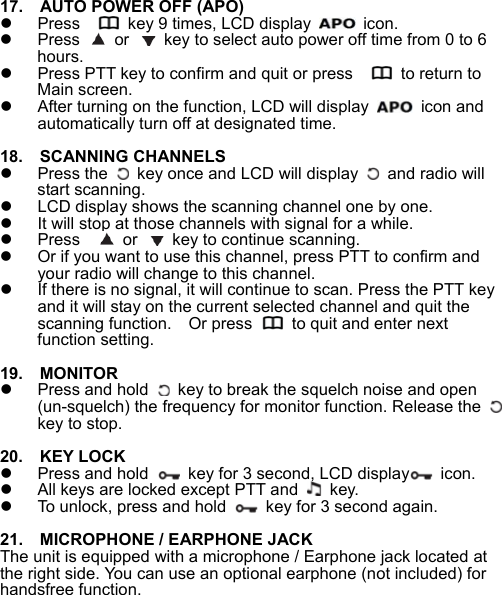
 17.    AUTO POWER OFF (APO)   Press      key 9 times, LCD display    icon.   Press   or    key to select auto power off time from 0 to 6 hours.     Press PTT key to confirm and quit or press      to return to Main screen.     After turning on the function, LCD will display    icon and automatically turn off at designated time.  18.    SCANNING CHANNELS   Press the    key once and LCD will display    and radio will start scanning.     LCD display shows the scanning channel one by one.   It will stop at those channels with signal for a while.   Press     or    key to continue scanning.   Or if you want to use this channel, press PTT to confirm and your radio will change to this channel.   If there is no signal, it will continue to scan. Press the PTT key and it will stay on the current selected channel and quit the scanning function.    Or press    to quit and enter next function setting.    19.    MONITOR   Press and hold    key to break the squelch noise and open (un-squelch) the frequency for monitor function. Release the   key to stop.  20.    KEY LOCK   Press and hold    key for 3 second, LCD display  icon.    All keys are locked except PTT and   key.    To unlock, press and hold    key for 3 second again.   21.    MICROPHONE / EARPHONE JACK The unit is equipped with a microphone / Earphone jack located at the right side. You can use an optional earphone (not included) for handsfree function.
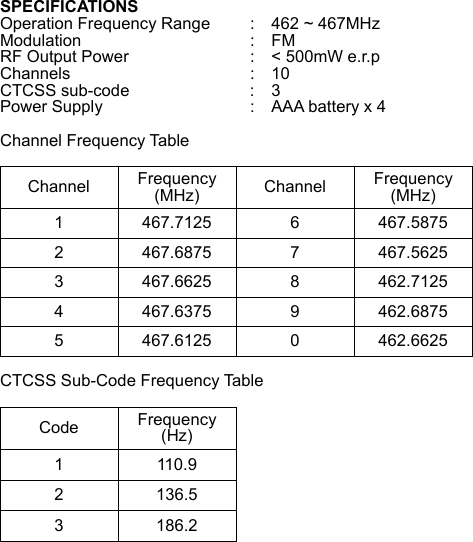
SPECIFICATIONS Operation Frequency Range  :    462 ~ 467MHz Modulation     :  FM RF Output Power      :    < 500mW e.r.p Channels       :  10 CTCSS sub-code      :    3 Power Supply      :    AAA battery x 4  Channel Frequency Table  Channel  Frequency (MHz)  Channel  Frequency (MHz) 1  467.7125  6  467.5875 2  467.6875  7  467.5625 3  467.6625  8  462.7125 4  467.6375  9  462.6875 5  467.6125  0  462.6625 CTCSS Sub-Code Frequency Table  Code  Frequency (Hz) 1  110.9 2  136.5 3  186.2 
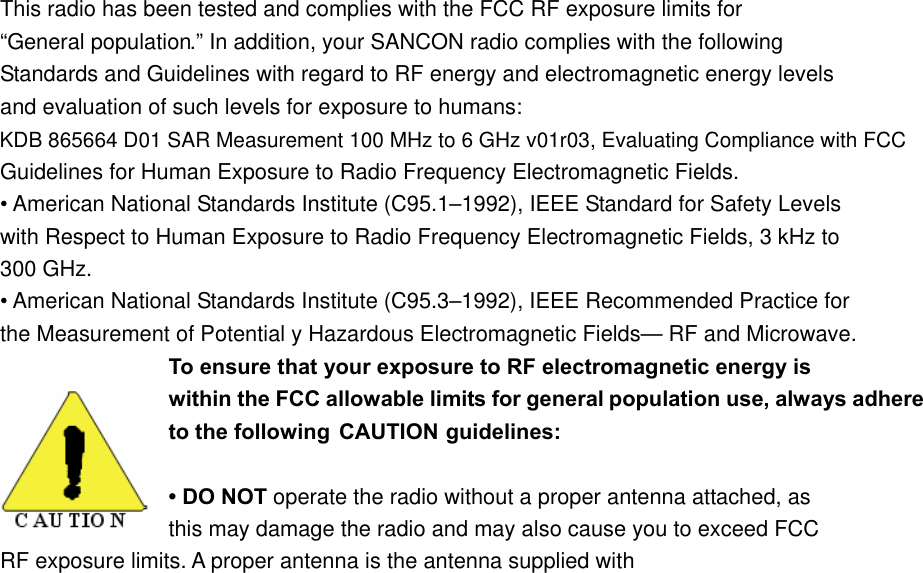
This radio has been tested and complies with the FCC RF exposure limits for “General population.” In addition, your SANCON radio complies with the following Standards and Guidelines with regard to RF energy and electromagnetic energy levels and evaluation of such levels for exposure to humans: Guidelines for Human Exposure to Radio Frequency Electromagnetic Fields. • American National Standards Institute (C95.1–1992), IEEE Standard for Safety Levels with Respect to Human Exposure to Radio Frequency Electromagnetic Fields, 3 kHz to 300 GHz. • American National Standards Institute (C95.3–1992), IEEE Recommended Practice for the Measurement of Potential y Hazardous Electromagnetic Fields— RF and Microwave. To ensure that your exposure to RF electromagnetic energy is within the FCC allowable limits for general population use, always adhere to the following  CAUTION guidelines: • DO NOT operate the radio without a proper antenna attached, as   this may damage the radio and may also cause you to exceed FCC   RF exposure limits. A proper antenna is the antenna supplied with KDB 865664 D01 SAR Measurement 100 MHz to 6 GHz v01r03, Evaluating Compliance with FCC
this radio by the manufacturer or an antenna specifically authorized by the manufacturer for use with this radio. • DO NOT transmit for more than 50% of total radio use time (“50% duty cycle”). Transmitting more than 50% of the time can cause FCC RF exposure compliance requirements to be exceeded. The radio is transmitting when the “TX indicator” lights red. You can cause the radio to transmit by pressing the “PTT” switch. • ALWAYS use SANCON authorized accessories (antennas, batteries, belt clips, speaker/mics, etc). Use of unauthorized accessories can cause the FCC RF exposure compliance requirements to be exceeded. Body-worn operations are restricted to belt-clips, holsters or similar accessories that have no metallic component in the assembly and that provide at least 1.5 cm separation between the device, including its antenna, and the user's body. To provide the recipients of your transmission the best sound quality, hold the antenna at least 5 cm (2 inches) from mouth, and slightly off to one side. The information listed above provides the user with the information needed to make him or her aware of RF exposure, and what to do to assure that this radio operates within the FCC RF exposure limits of this radio. Electromagnetic Interference/Compatibility During transmissions, your SANCON radio generates RF energy that can possibly cause interference with other devices or systems. To avoid such interference, turn off the radio in areas where signs are posted to do so. DO NOT operate the transmitter in areas that are   sensitive to electromagnetic radiation such as hospitals, aircraft, and blasting sites. This device complies with Part 95 of the FCC rules. Operation is subject to the following two conditions: (1) This device may not cause harmful interference, and (2) this device must except any interference received,  including interference that may cause undesired operation. Changesormodificationsnotexpresslyapprovedbythepartyresponsibleforcompliancecouldvoidtheuser’sauthoritytooperatetheequipment. Important: Do not hold down CALL for more than 10 seconds. The FCC does not allow you to send a continuous tone for more than 10 seconds at a time on FRS frequencies.

Navigation menu