Saris Cycling Group RFID1 The Hub User Manual 1000 The Hub

Saris Cycling Group Inc The Hub 1000 The Hub

User Manual

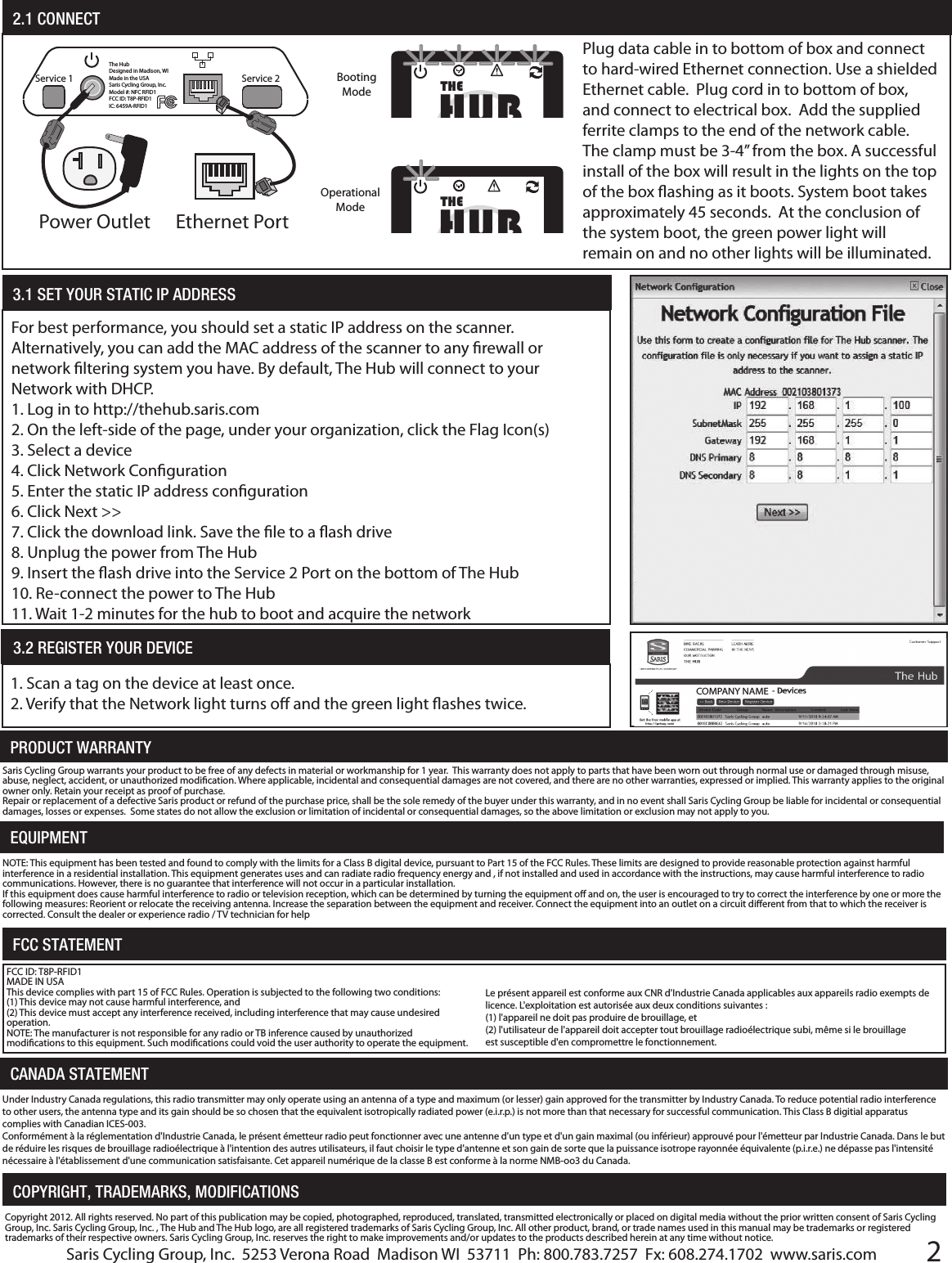
2PRODUCT WARRANTYEQUIPMENTSaris Cycling Group warrants your product to be free of any defects in material or workmanship for 1 year.  This warranty does not apply to parts that have been worn out through normal use or damaged through misuse, abuse, neglect, accident, or unauthorized modication. Where applicable, incidental and consequential damages are not covered, and there are no other warranties, expressed or implied. This warranty applies to the original owner only. Retain your receipt as proof of purchase.Repair or replacement of a defective Saris product or refund of the purchase price, shall be the sole remedy of the buyer under this warranty, and in no event shall Saris Cycling Group be liable for incidental or consequential damages, losses or expenses.  Some states do not allow the exclusion or limitation of incidental or consequential damages, so the above limitation or exclusion may not apply to you.NOTE: This equipment has been tested and found to comply with the limits for a Class B digital device, pursuant to Part 15 of the FCC Rules. These limits are designed to provide reasonable protection against harmful interference in a residential installation. This equipment generates uses and can radiate radio frequency energy and , if not installed and used in accordance with the instructions, may cause harmful interference to radio communications. However, there is no guarantee that interference will not occur in a particular installation. If this equipment does cause harmful interference to radio or television reception, which can be determined by turning the equipment o and on, the user is encouraged to try to correct the interference by one or more the following measures: Reorient or relocate the receiving antenna. Increase the separation between the equipment and receiver. Connect the equipment into an outlet on a circuit dierent from that to which the receiver is corrected. Consult the dealer or experience radio / TV technician for helpFCC STATEMENTFCC ID: T8P-RFID1MADE IN USAThis device complies with part 15 of FCC Rules. Operation is subjected to the following two conditions:(1) This device may not cause harmful interference, and (2) This device must accept any interference received, including interference that may cause undesired operation.NOTE: The manufacturer is not responsible for any radio or TB inference caused by unauthorized modications to this equipment. Such modications could void the user authority to operate the equipment.CANADA STATEMENTCopyright 2012. All rights reserved. No part of this publication may be copied, photographed, reproduced, translated, transmitted electronically or placed on digital media without the prior written consent of Saris Cycling Group, Inc. Saris Cycling Group, Inc. , The Hub and The Hub logo, are all registered trademarks of Saris Cycling Group, Inc. All other product, brand, or trade names used in this manual may be trademarks or registered trademarks of their respective owners. Saris Cycling Group, Inc. reserves the right to make improvements and/or updates to the products described herein at any time without notice.COPYRIGHT, TRADEMARKS, MODIFICATIONS2.1 CONNECTThe HubDesigned in Madison, WIMade in the USASaris Cycling Group, Inc.Model #: NFC RFID1FCC ID: T8P-RFID1IC: 6459A-RFID1Service 2Service 1Power Outlet Ethernet PortPlug data cable in to bottom of box and connect to hard-wired Ethernet connection. Use a shielded Ethernet cable.  Plug cord in to bottom of box, and connect to electrical box.  Add the supplied ferrite clamps to the end of the network cable. The clamp must be 3-4” from the box. A successful install of the box will result in the lights on the top of the box ashing as it boots. System boot takes approximately 45 seconds.  At the conclusion of the system boot, the green power light will remain on and no other lights will be illuminated.   HUBTHEBooting ModeHUBTHEOperational Mode3.2 REGISTER YOUR DEVICE 1. Scan a tag on the device at least once.2. Verify that the Network light turns o and the green light ashes twice.For best performance, you should set a static IP address on the scanner.  Alternatively, you can add the MAC address of the scanner to any rewall or network ltering system you have. By default, The Hub will connect to your Network with DHCP. 1. Log in to http://thehub.saris.com2. On the left-side of the page, under your organization, click the Flag Icon(s)3. Select a device4. Click Network Conguration5. Enter the static IP address conguration6. Click Next >>7. Click the download link. Save the le to a ash drive8. Unplug the power from The Hub9. Insert the ash drive into the Service 2 Port on the bottom of The Hub10. Re-connect the power to The Hub11. Wait 1-2 minutes for the hub to boot and acquire the network3.1 SET YOUR STATIC IP ADDRESS COMPANY NAMESaris Cycling Group, Inc.  5253 Verona Road  Madison WI  53711  Ph: 800.783.7257  Fx: 608.274.1702  www.saris.comLe présent appareil est conforme aux CNR d'Industrie Canada applicables aux appareils radio exempts de licence. L'exploitation est autorisée aux deux conditions suivantes :(1) l'appareil ne doit pas produire de brouillage, et (2) l'utilisateur de l'appareil doit accepter tout brouillage radioélectrique subi, même si le brouillage est susceptible d'en compromettre le fonctionnement.Under Industry Canada regulations, this radio transmitter may only operate using an antenna of a type and maximum (or lesser) gain approved for the transmitter by Industry Canada. To reduce potential radio interference to other users, the antenna type and its gain should be so chosen that the equivalent isotropically radiated power (e.i.r.p.) is not more than that necessary for successful communication. This Class B digitial apparatus complies with Canadian ICES-003.Conformément à la réglementation d'Industrie Canada, le présent émetteur radio peut fonctionner avec une antenne d'un type et d'un gain maximal (ou inférieur) approuvé pour l'émetteur par Industrie Canada. Dans le but de réduire les risques de brouillage radioélectrique à l'intention des autres utilisateurs, il faut choisir le type d'antenne et son gain de sorte que la puissance isotrope rayonnée équivalente (p.i.r.e.) ne dépasse pas l'intensité nécessaire à l'établissement d'une communication satisfaisante. Cet appareil numérique de la classe B est conforme à la norme NMB-oo3 du Canada.
Assembly InstructionsaThe Hub SKU #H1000    PARTS LISTbc1 Scanning BoxDouble-Sided Velcro Mounting Strips1 Power Supplyd150 Scanning CardsRide. Scan. Earn. Rewarding Active Transport.HUBTHEBrought to you by Saris Cycling GroupHUBTHEBrought to you by Saris Cycling GroupSwipe card hereRide. Scan. Earn. Rewarding Active Transport.HUBTHEBrought to you by Saris Cycling GroupPowered by:Ride. Scan. Earn. Rewarding Active Transport.HUBTHEBrought to you by Saris Cycling GroupPowered by:Ride. Scan. Earn. Rewarding Active Transport.HUBTHEBrought to you by Saris Cycling GroupPowered by:ng-Sidr SuRide. Scan. Earn. Rewarding Active Transport.Brought to you by Saris Cycling GroupBrought to you by Saris Cycling Group-Sided Velcro MountingSupplyINITIAL SOFTWARE SET UPRide. Scan. Earn. Rewarding Active Transport.HUBTHEBrought to you by Saris Cycling GroupHUBTHEBrought to you by Saris Cycling GroupSwipe card hereRide. Scan. Earn. Rewarding Active Transport.HUBTHEBrought to you by Saris Cycling GroupHUBTHEBrought to you by Saris Cycling GroupSwipe card hereLIGHT DEFINITIONSPOWER – Green indicates power is successfully running to the boxNETWORK CONNECTION– Amber light pulses during set up. If light is on, no network connection was made. ATTENTION – Red light; if ashing, no connection with card reader.SCAN INDICATION – Green light.  Pulses 2x to indicate successful scan of cardSWIPE CARD HERE- Indicates location of card swipe.  Aim card for this target for successful scanFRONT OF BOXBOTTOM OF BOXHARDWARE SET UPIt is recommended that The Hub scanner box be located as close to your bike parking as possible and mounted at shoulder height.  The box requires an indoor location with access to power (power cord supplied) and Ether-net (data cable NOT supplied) connections.  Standard 110 volt is sucient for the system.  The system will have adhesive strips to be attached to any wall surface, and does not require any hardware drilled into the wall. 11.1 MOUNTINGThe HubDesigned in Madison, WIMade in the USASaris Cycling Group, Inc.Model #: NFC RFID1FCC ID: T8P-RFID1IC: 6459A-RFID1POWER CORD OUTLETETHERNET CORD OUTLETService 2Service 1Ride. Scan. Earn. Rewarding Active Transport.HUBTHEBrought to you by Saris Cycling GroupHUBTHEBrought to you by Saris Cycling GroupSwipe card here4’Power EthernetNETWORK CONFIGURATION ONLYNETWORK CONFIGURATION ONLY     http://thehub.saris.comPrior to installing your Hub hardware, follow the link to http://thehub.saris.com/TheHub/initialSetup.aspxto register your organization and create your administrator log in and prole. e1 Ferrite Clamp

Navigation menu