Schneider Electric Modbus Plus Network Bridge Multiplexer Users Manual
to the manual 418b3fc2-f44a-4275-b921-192155b30018
2015-02-06
: Schneider-Electric Schneider-Electric-Modbus-Plus-Network-Bridge-Multiplexer-Users-Manual-526953 schneider-electric-modbus-plus-network-bridge-multiplexer-users-manual-526953 schneider-electric pdf
Open the PDF directly: View PDF  .
.
Page Count: 110 [warning: Documents this large are best viewed by clicking the View PDF Link!]

Modicon
Modbus Plus Network
BM85 Bridge Multiplexer
User's Guide
890 USE 103 00
31007492.01
February 2007
Preface
31007492 iii
Preface
The data and illustrations found in this book are not binding. We reserve
the right to modify our products in line with our policy of continuous
product development. The information in this document is subject to
change without notice, and should not be construed as a commitment by
Schneider Electric.
Schneider Electric assumes no responsibility for any errors that may
appear in this document. If you have any suggestions for improvements
or amendments or have found errors in this publication, please notify us
by e-mail at techcomm@modicon.com
No part of this document may be reproduced in any form or by any means,
electronic or mechanical, including photocopying, without express written
permission of the Publisher, Schneider Electric.
Caution: All pertinent state, regional, and local safety regulations
must be observed when installing and using this product. For
reasons of safety and to assure compliance with documented
system data, repairs to components should be performed only by
the manufacturer.
MODSOFT is a registered trademark of Schneider Electric. The
following are trademarks of Schneider Electric.
Modbus Modbus Plus BM85 SA85
Modicon 984 BP85 SM85
Borland is a trademark of Borland International, Inc.
PROCOMM is a trademark of Datastorm Technologies, Inc.
DIGITAL and DEC are registered trademarks of Digital Equipment
Corporation.
IBM and IBM AT are registered trademarks and IBM XT is a
trademark of International Business Machines Corporation.
Microsoft and MS-DOS are registered trademarks of Microsoft
Corporation.
Copyright 1995, Schneider Electric
Printed in U.S.A.

Contents
v
Contents
Chapter 1
Introducing the BM85 Bridge/Multiplexers 1. . . . . . . . . . . . . . . . . . . .
-% #!550'/%+'!3!-.*)* 0.'0.
$!* 0.'0.!/2*-&
$!*)* 0.'0.
1!-1%!2*"* !'.
1%''!* !'.
*0)/%)#!/$* .
+!-/%)#*2!-
*)"%#0-/%*)!/$* .
-*#-(('!*-/* !'.
*)"%#0-%)#/$!-*#-(('!* !'.
*"/2-!!1!'*+(!)/**'%/
* 0.*-/* !'.
+!%"%/%*).*2!-* !'.
-% #!0'/%+'!3!-* !'."*-*2!-
*"/2-!!1!'*+(!)/**'%/
!1!'*+(!)/!,0%-!(!)/0++'%! 40./*(!-
+!%"%/%*).*2!-* !'.
-% #!0'/%+'!3!-* !'."*-*2!-
*"/2-!!1!'*+(!)/**'%/
!1!'*+(!)/!,0%-!(!)/0++'%! 40./*(!-
Chapter 2
Device Addressing and Message Routing 17. . . . . . . . . . . . . . . . . . . .
* 0.'0.!..#!*0/%)#/$.
*0/%)#/*-*#-(('!*)/-*''!-.
*0/%)#/**./.! !/2*-& +/!-.
*0/%)#/*-% #!0'/%+'!3!-.
* 0. -!..*)1!-.%*)
*0/%)#3(+'!.
31007492
Contents
vi
Chapter 3
Configuring the Modbus Models 25. . . . . . . . . . . . . . . . . . . . . . . . . . . . .
"#+."+10.0
+!"(/+2"."!&*%&/%,0".
*2".2&"3+#0%"+*#&$1.0&+*.+ "//
"-1&."!-1&,)"*0
+*#&$1.0&+*%" '(&/0
+!1/+.0.)"0"./
*#+.)0&+*+1&((""!
+.04,"
(2""2& "!!."//
+))1*& 0&+*.)"0"./
+.0.&+.&04
&*'&)"+10
+!")++/0".
+!1/!!."//,
+*#&$1.&*$0%"+!1/+.0/
+**" 0&*$+3".#+.0%"+*#&$1.0&+*
"00&*$0%"3&0 %"/
+**" 0&*$0%"".)&*(
+1.+*#&$1.0&+*+))*!/
%""#1(0+*#&$1.0&+*
+1.+*#&$1.0&+* .""*/
*0".&*$+))*!/*0++1. .""*/
.&*0&*$0%"+*#&$1.0&+*
2&*$0%"+*#&$1.0&+*
+1. .""*
+1. .""*4+10
/&*$0%" .""*
+1.*! .""*/
+1.+. .""*4+10
/&*$0%"+. .""*
+1. .""*
+1. .""*4+10
/&*$0%" .""*
"00&*$0%"+!1/(1/!!."//
"00&*$0%"+!"
Contents
31007492 vii
%"*0+"00%"+!"
+30+"00%"+!"
+!1/+.0*!& 0+.+!"/
Chapter 4
Configuring the Programmable Models 57. . . . . . . . . . . . . . . . . . . . . .
"#+."+10.0
+!"(/+2"."!&*%&/%,0".
*2".2&"3+#0%"+*#&$1.0&+*.+ "//
"-1&."!-1&,)"*0
-1&,)"*0#+..&0&*$0%",,(& 0&+*.+$.)
-1&,)"*0+.+3*(+!&*$0%",,(& 0&+*.+$.)
2".2&"3+#0%""2"(+,)"*0+#03."
"2"(+,)"*0+#03."&("/
%"*#+.)0&+*&("
"/0*!")+*/0.0&+*+1. "&("/
1(0&0/'&*$&*+1.,,(& 0&+*
*/0((&*$0%""2"(+,)"*0+#03."
"#1(0.)"0"./
*/0((0&+*0",/
.",.&*$0%"#+.+3*(+!&*$
"00&*$0%"+*#&$1.0&+*3&0 %"/
"00&*$0%"+!1/(1/!!."//
*!& 0+.+!"/1.&*$+3*(+!&*$
+.)(+3*(+!+!"/
..+.+!"/
"00&*$0%"+!"
%"*0+"00%"+!"
+30+"00%"+!"
31007492
Contents
viii
Chapter 5
Installing the BM85 69. . . . . . . . . . . . . . . . . . . . . . . . . . . . . . . . . . . . . . . . .
5.1 Installing the BM85 Hardware 70. . . . . . . . . . . . . . . . . . . . . . . . . . . . . . . . . . . .
5.1.1 Mounting the BM85 70. . . . . . . . . . . . . . . . . . . . . . . . . . . . . . . . . .
5.1.2 Shelf/Panel Mounted Models 70. . . . . . . . . . . . . . . . . . . . . . . . . .
5.1.3 Rack Mounted Models 71. . . . . . . . . . . . . . . . . . . . . . . . . . . . . . . .
5.2 Connecting the Power Cables 74. . . . . . . . . . . . . . . . . . . . . . . . . . . . . . . . . . . . .
5.2.1 Connecting AC Power 74. . . . . . . . . . . . . . . . . . . . . . . . . . . . . . . .
5.2.2 Connecting DC Power 74. . . . . . . . . . . . . . . . . . . . . . . . . . . . . . . .
5.3 Connecting the Network and Serial Cables 76. . . . . . . . . . . . . . . . . . . . . . . . .
5.3.1 Connecting a Single Network Cable 77. . . . . . . . . . . . . . . . . . . .
5.3.2 Connecting Dual Network Cables 77. . . . . . . . . . . . . . . . . . . . . .
5.3.3 Connecting DualĆCable Units on SingleĆCable Networks 77.
5.3.4 Connecting Serial Port Cables 77. . . . . . . . . . . . . . . . . . . . . . . . .
5.4 Reading the Indicators 78. . . . . . . . . . . . . . . . . . . . . . . . . . . . . . . . . . . . . . . . . . .
5.4.1 POWER and READY Indicators 78. . . . . . . . . . . . . . . . . . . . . . .
5.4.2 Modbus and Serial Port Indicators 78. . . . . . . . . . . . . . . . . . . . .
5.4.3 Modbus Plus Port Status Indicators 79. . . . . . . . . . . . . . . . . . . .
5.5 Attaching Identification Labels 80. . . . . . . . . . . . . . . . . . . . . . . . . . . . . . . . . . .
5.5.1 Modbus Plus Port Label 80. . . . . . . . . . . . . . . . . . . . . . . . . . . . . .
5.5.2 Serial Port Parameters Label 81. . . . . . . . . . . . . . . . . . . . . . . . . .
Appendix A
Compatible Devices and Cables 83. . . . . . . . . . . . . . . . . . . . . . . . . . . . .
A.1 Compatible Devices and Cables 84. . . . . . . . . . . . . . . . . . . . . . . . . . . . . . . . . . .
A.1.1 Abbreviations 84. . . . . . . . . . . . . . . . . . . . . . . . . . . . . . . . . . . . . . .
A.1.2 Making `Quick Connections' 84. . . . . . . . . . . . . . . . . . . . . . . . . .
A.1.3 Devices and Cables for Configuring Modbus Ports 85. . . . . . .
A.1.4 Cables for Modbus Master Devices 85. . . . . . . . . . . . . . . . . . . . .
A.1.5 Cables for Modbus Slave Devices 85. . . . . . . . . . . . . . . . . . . . . .
A.2 Modbus/RS232 Cable Wiring Diagrams 86. . . . . . . . . . . . . . . . . . . . . . . . . . . .
A.3 Modbus/RS232 Ports Pinout 87. . . . . . . . . . . . . . . . . . . . . . . . . . . . . . . . . . . . . .
A.4 RS485 Ports Pinout 88. . . . . . . . . . . . . . . . . . . . . . . . . . . . . . . . . . . . . . . . . . . . .
Contents
31007492 ix
Glossary 89. . . . . . . . . . . . . . . . . . . . . . . . . . . . . . . . . . . . . . . . . . . . . . . . . . .
Index 98. . . . . . . . . . . . . . . . . . . . . . . . . . . . . . . . . . . . . . . . . . . . . . . . . . . . . .
Figures
Figure 1ąBM85 Bridge/Multiplexers on Modbus Plus 3. . . . . . . . . . . . . . . . . . . .
Figure 2ąBM85 With Typical RS232/485 Devices 7. . . . . . . . . . . . . . . . . . . . . . . .
Figure 3ąBM85 With Typical Modbus Devices 11. . . . . . . . . . . . . . . . . . . . . . . . . . .
Figure 4ąMessage Frame Routing Path Field 18. . . . . . . . . . . . . . . . . . . . . . . . . . .
Figure 5ąModbus Plus Routing to Single Modbus Slave 19. . . . . . . . . . . . . . . . . .
Figure 6ąModbus Plus Routing to Networked Modbus Slave 19. . . . . . . . . . . . . .
Figure 7ąBridge Multiplexer Address Conversion 20. . . . . . . . . . . . . . . . . . . . . . . .
Figure 8ąRouting Examples 22. . . . . . . . . . . . . . . . . . . . . . . . . . . . . . . . . . . . . . . . . . .
Figure 9ąBM85 Modbus Port Types 30. . . . . . . . . . . . . . . . . . . . . . . . . . . . . . . . . . . .
Figure 10ąBM85 Modbus Models: Port Configuration Switches 40. . . . . . . . . . .
Figure 11ąTypical V1 Screen: Modbus Ports Configuration 46. . . . . . . . . . . . . .
Figure 12ąTypical V2 Screen: Modbus Address Map Entries 48. . . . . . . . . . . . .
Figure 13ąTypical V4 Screen: Save or Initialize the Configuration 50. . . . . . . .
Figure 14ąBM85 Modbus Models: Modbus Plus Address Switches 52. . . . . . . .
Figure 15ąBM85 Programmable Models: Configuration Switches 65. . . . . . . . .
Figure 16ąBM85 Programmable Models: Modbus Plus Address Switches 66. .
Figure 17ąMounting Dimensions: Shelf/Panel Mount Models 72. . . . . . . . . . . . .
Figure 18ąMounting Dimensions: Rack Mount Models 73. . . . . . . . . . . . . . . . . .
Figure 19ąBM85-000 Rear Panel 75. . . . . . . . . . . . . . . . . . . . . . . . . . . . . . . . . . . . .
Figure 20ąBM85C, BM85E, BM85S Rear Panel 75. . . . . . . . . . . . . . . . . . . . . . . . .
Figure 21ąBM85D Rear Panel 75. . . . . . . . . . . . . . . . . . . . . . . . . . . . . . . . . . . . . . . . .
Figure 22ąLayout of the Indicators 78. . . . . . . . . . . . . . . . . . . . . . . . . . . . . . . . . . . .
Figure 23ąModbus Plus Port Label 80. . . . . . . . . . . . . . . . . . . . . . . . . . . . . . . . . . . . .
Figure 24ąSerial Port Parameters Label 81. . . . . . . . . . . . . . . . . . . . . . . . . . . . . . . .
Figure 25ąModbus/RS232 Cable Wiring Diagrams 86. . . . . . . . . . . . . . . . . . . . . . .
Figure 26ąSerial Ports Pinout - Modbus/RS232 87. . . . . . . . . . . . . . . . . . . . . . . . .
Figure 27ąSerial Ports Pinout - RS485 88. . . . . . . . . . . . . . . . . . . . . . . . . . . . . . . .

Introducing the BM85 Bridge/Multiplexers
31007492 1
Chapter 1
Introducing the BM85
Bridge/Multiplexers
V##"
V !
V
V
V
V
V!
V!

Introducing the BM85 Bridge/Multiplexers 31007492
2
1.1 Bridge/Multiplexers on Modbus Plus
1.1.1 The Modbus Plus Network
#)' )'' # &"(+#&'"#&")'(& #"(&#
$$ (#"'"(+#&" '$&#&!! #"(&# &'#'(
#!$)(&'"#(&*'(##!!)"((&#)#)(($&#)(#"
&'#"")'(& $ "((')$$#&(')$(#&'' "#
*'(((&"'&&(#! #"('$&'#"" /
") / "(+#&#")&(#"'&*
'&$$ (#"'" )(&"'&&"#$&#''#"(&# "')$&*'#&-
!'''-$ "(+#&*'" )##"$&#&!!
#"(&# &'((#""((#("(+#&(&#)&($#&(#"(
#"(&# &#&(&#)#!!)"(#"'#$(#"(+#&$(&'
#""('*& (-$'##'(#!$)(&$&#)('(#("(+#&
) ($ "(+#&'"#"(&#)##"& )'"#'
' (('('"#(!/&( $$ (#"'"+
"(+#&!$ #-'#" -(*'&%)&#&( # $&#''
1.1.2 The BM85 on Modbus Plus
&..) ($ ,&#$&(''#)' )'"#"
$&#*'#)&'& $#&('((-#)"#")&'$&( -#&'&
*'"-#)&$$ (#"!# '&* #&'" /
#&) / #)' )'"(+#&'"#&')$$#&(#
#&##"#)''& *'
)&'#+' #&!#(+##)' )'"(+#&'#"
(&#)& )'& *'#!!)"(+((
$$ (#"(&#)(&..) ($ ,&'
Introducing the BM85 Bridge/Multiplexers
31007492 3
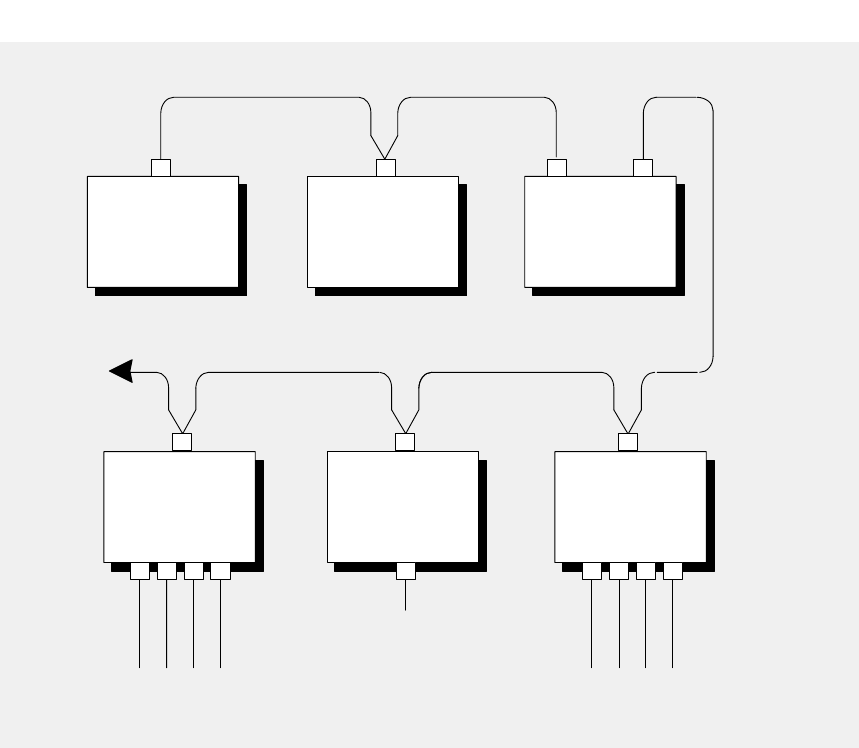
PROGRAMMABLE
CONTROLLER
TO
OTHER
NODES
BP85
BRIDGE
PLUS
HOST DEVICE
NETWORK
ADAPTER
BM85
BRIDGE
MULTIPLEXER
MODBUS MASTER, SLAVE,
OR NETWORKED DEVICES
HOST
COMPUTER
RS232 OR RS485
SERIAL DEVICES
BM85
BRIDGE
MULTIPLEXER
PROGRAMMABLE
CONTROLLER
MODBUS PLUS NETWORK
MODBUS PLUS NETWORK
Figure 1 BM85 Bridge/Multiplexers on Modbus Plus
V
V
V
V
Introducing the BM85 Bridge/Multiplexers 31007492
4
1.2 Overview of BM85 Models
1.2.1 Available Models
$&#)(,!##&(''#!*!&%!%)!%#0#&(+#0#
&+)#+)%*-&(")-!* ,(!*.&)(!#'&(*&%!+(*!&%)
(*(!)*!)&* $&#)(
Part Number Mounting
Method
Operating
Power
(Nominal)
Modbus Plus
Network
Cable Serial
Ports Serial
Protocol
NW–BM85–000 (Note 1) Panel or Shelf 115/230 Vac Single Modbus ASCII or RTU
NW–BM85C002 Panel or Shelf 115/230 Vac or
24 Vdc Single or Dual Modbus ASCII or RTU
NW–BM85D008 19 in Rack 125 Vdc or
24 Vdc Single or Dual Modbus ASCII or RTU
NW–BM85E232 (Note 2) Panel or Shelf 115/230 Vac or
24 Vdc Single or Dual RS232 Programmable,
User Defined
NW–BM85D002 19 in Rack 125 Vdc or
24 Vdc Single or Dual RS232 Programmable,
User Defined
NW–BM85E485 (Note 3) Panel or Shelf 115/230 Vac or
24 Vdc Single or Dual RS485 Programmable,
User Defined
NW–BM85S232 Panel or Shelf 115/230 Vac or
24 Vdc Single or Dual RS232 Programmable,
User Defined
NW–BM85S485 Panel or Shelf 115/230 Vac or
24 Vdc Single or Dual RS485 Programmable,
User Defined
Notes
&# ) % ('# . &(
%-!%)*##*!&%)
&# )% ('# .&(
%-!%)*##*!&%)
&# )%('# . &(
%-!%)*##*!&%)
1.2.2 Mounting Methods
&(* '%#) #$&#)* &**&$)+(!)!**-!* ')
&('#$%*&% &(!/&%*#) #("*)()+''#!&()+(!%
* +%!**&* ) #&(&(** !%!**&,(*!#'%#
"0$&+%*$&#)(&(!%)*##*!&%!%*&)*%(0!% ("

Introducing the BM85 Bridge/Multiplexers
31007492 5
1.2.3 Operating Power
AC/DC Models
# , ') &,+ ,.**&$ 0$-#*)0 +& )!!-'& ("-#!)+
)* +-$)( !+)' )+ ,$("& *#, *)0 +#
& )(( -,-),)% -)(-# + +*( &+).($("$,-#+)."#-#
& # )(-$(,(&$( !., -#-$, ,,$& -)-# ., +
&&)!-# , ') &, 1 *--# (&,))* +- !+)'(
1- +(&,).+ )0 +)(( -,-),)% -)(-# + +*( &
+).($("$,-#+)."#-# & # *)0 +,).+ '.,- !.,
1- +(&&2-)-#
DC/DC Models
# , ') &,)* +- !+)')+,).+ )0 +)(( -,
-)- +'$(&,-+$*)(-# + +*( &"+).($("- +'$(&$,*+)/$
# *)0 +,).+ '.,- !., 1- +(&&2-)-#
1.2.4 Configuration Methods
&&') &,'.,- )(!$".+ $(- +(&&2!)+2).+**&$-$)(
!)+ 2).()(( --# '!)+)* +-$)($(2).+**&$-$)(#$,$,
( ,,+2 ., -# ,$(- +(&)(!$".+-$)(,* $!$ ,#)0 #
, +$&*)+-0$&&)* +-
#') &#,-0), -,)!+ +*( &,0$-# ,( , -,,$"(,-#
).,&.,() + ,,# )-# +, -&&)0,2).-) $-# +)(!$".+
-# .($-)+, -$-$(-)$-,')
Configuring the Modbus Port Models
)+-# ).,, +$&*)+-') &,2).)(!$".+ -# .($-&)&&2-
, +$&- +'$(&)(( - -))( )!$-,*)+-,
Configuring the Programmable Port Models
)+-# *+)"+''& ') &,2).+ - (**&$-$)(*+)"+'
1- +(&&2-)-# (-# ()0(&)$--)-# .($-+),,-#
).,&.,( -0)+%
Setting the RUN Mode
# (2).#/ *+)* +&2)'*& - 2).+)(!$".+-$)()!-# 2).
(, -$-$(-)$-,') !)+)* +-$)($(2).+**&$-$)(
Caution:ąDo not connect the BM85 into your application
environment unless you have set its internal configuration.
Do not connect it to your network or to any device unless you
have set its switches properly for configuring or running.

Introducing the BM85 Bridge/Multiplexers 31007492
6
1.3 Programmable Port Models
Part Number Mounting
Method
Operating
Power
(Nominal)
Modbus Plus
Network
Cable Serial
Ports Serial
Protocol
NW–BM85E232 Panel or Shelf 115/230 Vac or
24 Vdc Single or Dual RS232 Programmable,
User Defined
NW–BM85D002 19 in Rack 125 Vdc or
24 Vdc Single or Dual RS232 Programmable,
User Defined
NW–BM85E485 Panel or Shelf 115/230 Vac or
24 Vdc Single or Dual RS485 Programmable,
User Defined
NW–BM85S232 Panel or Shelf 115/230 Vac or
24 Vdc Single or Dual RS232 Programmable,
User Defined
NW–BM85S485 Panel or Shelf 115/230 Vac or
24 Vdc Single or Dual RS485 Programmable,
User Defined
# !).+, +$&*)+-,)(-# , ') &,+ *+)"+''& 2-# ., +-)
,.**)+-.,-)')+, +$& /$ ,
# , ') &,'.,- )0(&) 0$-#( 1 .-& **&$-$)(
*+)"+'+),,-# ).,&.,( -0)+%# )0(&) $'"
)(-$(,&&)!-# $(- +(&)* +-$(") ., 2-# $(&.$("
)''.($-$)(*+)-))&,!)+-# , +$&*)+-,#(,#%$("*+)-))&
-+(,&-$)( -0 (*)+-,' ,," *%"$(".!! +,* -
)(/ +,$)(( ++)+#(&$("#, +$&*)+-$($-)+$,$($/$.&&2
*+)"+''& -),#)0-# *)+-,,--.,$(-# **&$-$)(
# $'" ()(-$(&&)!-# , +$&*)+-*+' - +,!)+ 1'*&
.+- ,(*+$-2,!$1 *+' - +,&- +(-$/ &2-# $'"
).&*+)/$ &)&*+)-))& !.&-*+' - +,(' (.$("
,2,- '!)+-# ., +-)&)&&2)(!$".+ -# , +$&*)+-,-#+)."#
- +'$(&-)( )!-# *)+-,
($-$)(-),-(+, +$& /$ ,).,',- +)+,&/ /$ ,
).& --# -, +$&*)+-,$!-# ., +4 !$( ) $(&. ,
).,*+)-))&#(& +
).(+ - -# **&$-$)(*+)"+')((33)+
)'*-$& .,$(")$)(,)!-0+ / &)*' (--))&,# , +
/$&& !+)')$)(.,-)' + +/$ (+ ,#$** , *+- &2
!+)'-# -$&,)!-# / &)*' (--))&,+ *+)/$ $(
-$)(
# ()* +- ,!.&&24*+)"+'' *+) ,,)+$(-# ., +
**&$-$)(# .($-(&)&&2'(" *+) ,, ,-$-,, +$&*)+-,
Introducing the BM85 Bridge/Multiplexers
31007492 7
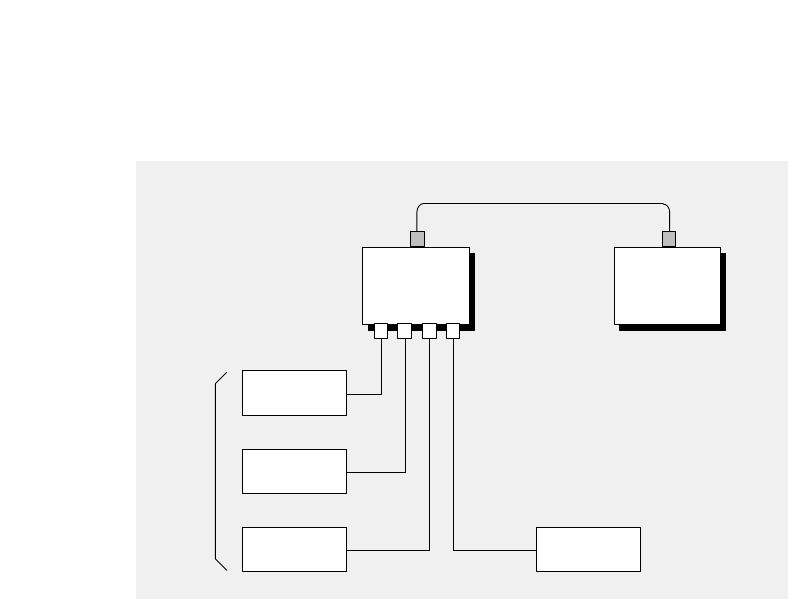
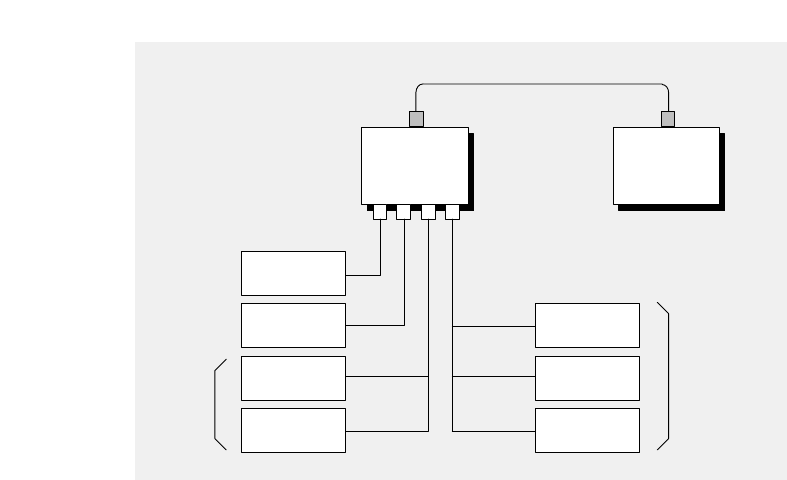
%% ##$! % &$&$$$$$ #
#-'$%%&$#! #% %# ##*&% $#!# '
%' !%$ %(# ##%&%!%$$(%%
$!!% !# # #$$#%#%%%$$
BM85
BRIDGE
MULTIPLEXER
1234
DISPLAY
SCALE
CONTROLLER
DEVICE
MODBUS
MODBUS PLUS
NOTE 3
NOTE 1
NOTE 2
READER
BARCODE
Figure 2 BM85 With Typical RS232/485 Devices
&#$&#+$%%*!* &% '$%%$#! #%$
Notes
# !%'$##"&# #%#$!%'
$'$ %) %$
,, &% $$% '$%!!% $*
%$%# !# #*%&$# ( %
%# $$ &$&$
&$$%# #$''$&$%&$#-
&$ &$!# % #

Introducing the BM85 Bridge/Multiplexers 31007492
8
1.4 Configuring the Programmable Models
Developing the Application
#-$*$#*')*()$"/%'$'""!"$!(-$*"*()
+!$%)#)'%%!)$#(!#)#$,#!$)#)$
)(#!*()$%')#$$'"((#!#
*'!!$)$#%'$)$$!$#+'($##-$*'('!%$')%'")'(
$*#'))%%!)$#%'$'"$##..$'$"%)!
*(#$$#($),'+!$%"#))$$!())'(%%(%')!-
'$")('&*')*($$'!#..+!$%"#)
#+'$#"#),"*()(*%%!-)*('
#)$#)$)(#)'#!$#*')$#)($*(!*(#$
'(("*()((#(($##()$','(,)($#
)''%#!
Downloading the Application
$"%!%%!)$##)#$,#!$)$)*(#
*)!)-(*%%!,))$$#)$$!($,#!$$()#)
("$"%*)')),(*($'+!$%#)%%!)$#$'
(%')$"%*)'
$'$,#!$#)$()"*()$#)#$$#$*(!*(
#),$' %)'$'#$"%)! $() $'$$#
%)'$'#'$##!$"%)!$()#),$'
$##)$#(+!!$')#)+#)-$)$()#$-$*
#$,#!$#*-$*'%%!)$#!$!!-)',(-$*#
$,#!$))$)))(#()!!)$#()
#)*('%%!)$#(#()$'#)),!!
')#-))'%$,'('"$+)%'")'('
$'')$')#)##()!!)$#())*#)#)'#(%$'))$
)()##()!!)',)$*)'$#*')$#
Introducing the BM85 Bridge/Multiplexers
31007492 9
1.4.1 Software Development Tool Kit
'$-.$)"*!!$' --/++'$ $).# *!.1, 0 '*+( ).&$.$-
+,*0$ $) .$*)# 0 '*+( )..**'-$)'/
V *,') 44 ,/).$( -.,./+ ,*/.$)
V)*% .'$,,3*!/.$'$.3,*/.$) -$)'/$)"!/).$*)-!*,
()"$)"(/'.$+' .-&-$).# ++'$.$*)
V*/-'/-..,)-! ,/.$'$.3,*/.$)
V# ,!$' *).$)$)"!/).$*)+,*.*.3+ -
V*(+$' (*)-.,.$*)+,*",(1$.#-*/, * -#*1$)"
2(+' -*!.# /- *!!/).$*)-$).3+$'++'$.$*)
V -./.$'$.$ -$)'/$)"-*/, * .#. 2 ,$- #,1,
V# *1)'*/.$'$.3!*,'*$)".# ++'$.$*).*.#
# 0 '*+( )..**'&$.$--/++'$ *)*(+.$' $-&-
, ,$)"$)!*,(.$*)$-"$0 ) '*1
Contact Telephone
Modicon Customer Service 1–800–468–5342 (North America)
1–508–975–5001 (International)
Part Number Description
SR–BM85–S00 BM85 Software Development Kit (Note 1)
SR–BM85–S0R BM85 Software Support Renewal (Note 2)
Notes
# &$.$)'/ -*/( )..$*) -,$$)" #*1.*
V)-.''.# 0 '*+( ).-*!.1,
V*(+$' )'$)&3*/,++'$.$*)
V*1)'*3*/,++'$.$*).*.#
# &$.$)'/ -3-*!-*!.1, 0 '*+( ).. #)$'
-/++*,.- ,0$ +,*0$ 3*$*)/-.*( , ,0$ # -/++*,.
, ) 1' 2. )- .# -*!.1, 0 '*+( ).
. #)$'-/++*,.- ,0$ 3*).# $)$.$'53+ ,$*

Introducing the BM85 Bridge/Multiplexers 31007492
10
1.5 Modbus Port Models
Part Number Mounting
Method
Operating
Power
(Nominal)
Modbus Plus
Network
Cable Serial
Ports Serial
Protocol
NW–BM85–000 Panel or Shelf 115/230 Vac Single Modbus ASCII or RTU
NW–BM85C002 Panel or Shelf 115/230 Vac or
24 Vdc Single or Dual Modbus ASCII or RTU
NW–BM85D008 19 in Rack 125 Vdc or
24 Vdc Single or Dual Modbus ASCII or RTU
#)&'& $#&('#"('!# '')$$#&(##"#)''&
*''!# '$&#*(#"*&'#"(+"#)'
&'''"(&%)&&''#&!('#&&#)("!'''(#
#(&#)'$#&('#&(##)' )'"#'
#)!)'(#")&('!# '# "#&#""("(!(#
#)' )'#&(#",*'",#)&$$ (#"#)"#(',
#""("'& (&!" (##"$#&('(("'+((# #+
# '()$#($&!(&'"$$ ,"$#+&(#(
'$ ,'!")'#"((&!" #&'((")$(#")&(#"
$#&(''$&( ,#")& #)''"#)&"'#
$&!(&'#&$#&(
V#&( (,$ #)' !'(&' "(!'(&' *#&"(+#&
V&#(##
V#!!)"(#"$&!(&' ) &('(#$('$&(,!#
V&''!$$" #&#"*&'#"(+"#)' &''' "
#)' )'&#)("
"(#"(#('& $#&(#")&(#"'('#)' )'
"#&''!)'(''"''#""'(#&+&
'+('#"(&&$"
"(#")&(#"'"#!$ (("(&" $&!(&'
+ &(",((&$#+&'&!#*($&!(&'
&#&&(()"("(&"'$#&((#("'( (#"'("
"'( (&+(#)(&#")&(#"
Introducing the BM85 Bridge/Multiplexers
31007492 11
BM85
BRIDGE
MULTIPLEXER
1234
MASTER
SLAVE
50
100
NETWORK
SLAVE
NETWORK
SLAVE
CONTROLLER
150
200
NETWORK
SLAVE
NETWORK
SLAVE
NETWORK
MASTER
MODBUS PLUS
NOTE 4
NOTE 1
NOTE 2
NOTE 3
Figure 3 BM85 With Typical Modbus Devices
!!& %%! " !
Notes
$! ""
" #"
!!
$!"""
" #
"!!
$! ## ! ""
%" "
"!!
$! ## "
"" ""
"
!!""%

Introducing the BM85 Bridge/Multiplexers 31007492
12
1.6 Specifications (AC/DC Power Models)
1.6.1 Bridge/Multiplexer Models for AC/DC Power
Description Name BM85 Modbus Plus
Bridge/Multiplexer
Part Number NW–BM85–000, NW–BM85C002
NW–BM85E232, NW–BM85S232
NW–BM85E485, NW–BM85S485
Mounting Method Horizontal Surface Platform or shelf, with included
mounting brackets
Vertical Surface Panel, with included mounting
brackets
Physical
Characteristics Height 2.59 in (66 mm)
Width 11.50 in (292 mm), unit only
14.08 in (358 mm), with mounting
brackets
Depth 8.30 in (211 mm)
Weight 5.5 lbs (2.5 kg) net
6.5 lbs (3.0 kg) shipping
AC Power
(All AC/DC Models) Requirements 115/230 Vac +15%. 47 ... 63 Hz
10 W
Access Rear panel power connector with
ON/OFF switch
Fuse 1.0 A, 3 AG SB, internal
DC Power
(not available on
NW–BM85–000)
Requirements 24 Vdc +15%, 10 W
Access Rear panel power connector
Fuse 1.0 A external, customer supplied
Environmental Temperature 0 ... 60 degrees C, operating
–40 ... +80 degrees C, storage
Humidity 0 ... 95%, non–condensing
Altitude 10,000 ft (3 km), maximum
EMI, Radiated
Susceptibility MIL STD 461B RS03
EMI, Conducted
Susceptibility MIL STD 461B CS03
Network Connections NW–BM85–000 Single-cable network only
NW–BM85C002,
NW–BM85E232,
NW–BM85S232,
NW–BM85E485,
NW–BM85S485
Single- or dual-cable network

Introducing the BM85 Bridge/Multiplexers
31007492 13
Serial Connections All Models Four DB9S
Serial Parameters NW–BM85–000,
NW–BM85C002 Modbus protocol, ASCII/RTU
300–19200 baud
odd/even/no parity
1 or 2 stop bits
NW–BM85E232,
NW–BM85S232 User defined protocol, RS232
50–19200 baud
NW–BM85E485,
NW–BM85S485 User defined protocol, RS485
50–19200 baud
1.6.2 Software Development Tool Kit
Contact Telephone
Modicon Customer Service 1–800–468–5342 (North America)
1–508–975–5001 (International)
Part Number Description
SR–BM85–S00 BM85 Software Development Kit,
3.5 in and 5.25 in HD disks,
Documentation, 90 day Technical Support
SR–BM85–S0R BM85 Software Technical Support Renewal
1.6.3 Development Requirement (Supplied by Customer)
Development System IBM PC/AT Compatible, 486 or higher recommended,
to support Development Environment
Development Environment Borland C/C++ Compiler version 3.1 or higher,
BM85 applications use Large model
Download System IBM PC/AT Compatible host with SA85 Adapter, or
IBM Micro Channel host with SM85 Adapter
486 or higher recommended
4 MB RAM minimum

Introducing the BM85 Bridge/Multiplexers 31007492
14
1.7 Specifications (DC/DC Power Models)
1.7.1 Bridge/Multiplexer Models for DC/DC Power
Description Name BM85 Modbus Plus
Bridge/Multiplexer
Part Number NW–BM85D002, NW–BM85D008
Mounting Method Vertical Standard 19 in Rack
Physical
Characteristics Height 3.47 in (88 mm)
Width 19.00 in (483 mm), mounting panel
18.26 in (464 mm), hole centers
Depth 9.15 in (232 mm)
Weight 5.5 lbs (2.5 kg) net
6.5 lbs (3.0 kg) shipping
Power Requirements 105 to 140 Vdc, or 24 Vdc +15%
Access Rear panel screw terminals
Input Current 0.41 A at 125 V dc
Inrush Current 6 A typical at 125 V dc
Ground Leakage 1 mA at 140 V dc
Fuse External, customer supplied
Environmental Temperature 0 ... 60 degrees C, operating
–40 ... +80 degrees C, storage
Humidity 0 ... 95%, non–condensing
Altitude 10,000 ft (3 km), maximum
EMI, Radiated
Susceptibility 27 ... 500 mHz, 10 V/m
IEC 801–3, level 3
IEEE/ANSI C37.90.2, 1987
Surge Withstand,
Fast Transient ±2 kV (1 kV on I/O), V3300
generator into 50 ohms.
Corresponds to ±4 kV (2 kV on I/O)
into open circuit.
IEC 801–4, level 3
IEEE/ANSI C37.90.1 2.3, 1989
Surge Transients 2 kV
IEC 801–5, level 3
Electrostatic Discharge 8 kV, ten discharges
IEC 801–2, level 3
Surge Withstand,
Oscillatory Wave 2.5 kV
IEEE 472
IEEE/ANSI C37.90.1 2.2, 1989

Introducing the BM85 Bridge/Multiplexers
31007492 15
Network Connections All Models Single- or dual-cable network
Serial Connections All Models Four DB9S
Serial Parameters NW–BM85D008 Modbus ASCII/RTU protocol
300–19200 baud
odd/even/no parity
1 or 2 stop bits
NW–BM85D002 User defined protocol, RS232
50–19200 baud
1.7.2 Software Development Tool Kit
Contact Telephone
Modicon Customer Service 1–800–468–5342 (North America)
1–508–975–5001 (International)
Part Number Description
SR–BM85–S00 BM85 Software Development Kit,
3.5 in and 5.25 in HD disks,
Documentation, 90 day Technical Support
SR–BM85–S0R BM85 Software Technical Support Renewal
1.7.3 Development Requirement (Supplied by Customer)
Development System IBM PC/AT Compatible, 486 or higher recommended,
to support Development Environment
Development Environment Borland C/C++ Compiler version 3.1 or higher,
BM85 applications use Large model
Download System IBM PC/AT Compatible host with SA85 Adapter, or
IBM Micro Channel host with SM85 Adapter
486 or higher recommended
4 MB RAM minimum

Device Addressing and Message Routing
31007492 17
Chapter 2
Device Addressing
and Message Routing
V
V
V
Device Addressing and Message Routing 31007492
18
2.1 Modbus Plus Message Routing Paths
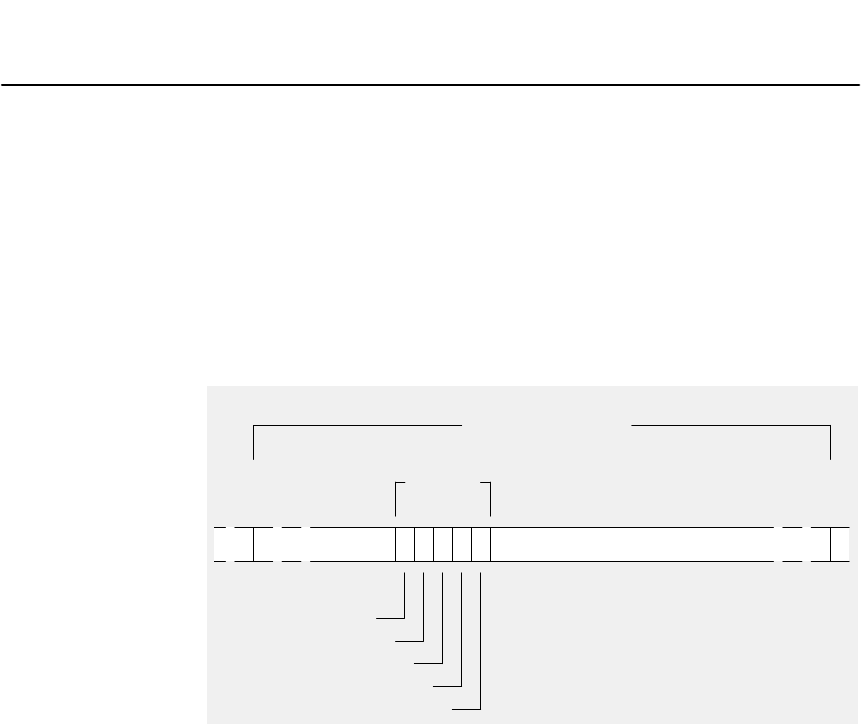
&!"(&(&!'*"%!)(#'"%&&!"
)&*'))!(!$(%&&"'*!!
('#!'*"%&!"!'%"(%(&)&)&
%&&"'%%"&&%(&)&,&#,!%"('!
#'&"),'&*','%#%&!'!!%&&"!'!+'
!'*"%&%"('! '""*&!"&!"'%!'*"%&'"
%&&(#'""(%!'*"%&*,%" '"%!'!!"
%"('!#'& !'"(&(& &&% &'&
&!'%" '"%!'!!"
MESSAGE FRAME
ROUTING
PATH
ROUTING ADDRESS 1
ROUTING ADDRESS 2
ROUTING ADDRESS 3
ROUTING ADDRESS 4
ROUTING ADDRESS 5
MODBUS PLUS
EXAMPLE:
ROUTING ADDRESS 1 = 25
ROUTING ADDRESS 2 = 20
ROUTING ADDRESS 3 = 12
ROUTING ADDRESSES 4, 5 = 0
(NO FURTHER ROUTING)
START END
Figure 4 Message Frame Routing Path Field
(%&!+ #" &&%"('!'"#%"% "!'%"%
'%"('%!'*"%&''%"!,%(&!")&
&&*%&'%"(''"!"%(&"!'"
!'*"%'!""%*%&' &&"!'"%(&'
%&&"!'&"!!'*"%&"!%(&"%*%&'
&&'"'&!&'!'"!!"%&&"!''%!'*"%
-%""!'!'&",'&!&#,!"(%'% &&%"('!
2.1.1 Routing to Programmable Controllers
"%#%"% "!'%"%&'&'!"!-%",'!' &&
%"('!&#&'!'*"%!"%&&"'"!'%"%'"

Device Addressing and Message Routing
31007492 19
2.1.2 Routing to Host Based Network Adapters
!$!%&% &)!$"&$%&+&!!) &"&$%
&)!$ !$%%%"%&% '$&!)&
%%%%% '%#' &+&%$ !&+&"&$
$(!$'%&!'%&!&""&! !$*"!$
%%!' &%!$%&&'% !$&!
2.1.3 Routing to BM85 Bridge/Multiplexers
Routing to Serial Ports on BM85 Programmable Models
!$&"$!$!%&'%$""&! %&!$ &
%&$%% &) !'%'% &%$"!$&%
Routing to a Single Slave Device on BM85 Modbus Models
!$% %((&!'%"!$&&)!+&%$'%&!$%%
& ( *&&!%& ! ,$! +& $%%% & !
%& ! ,$!+&%"%&!'%"!$&
&$!$%"%&% %((
'$%!)% *"!$!'& &!% %((
BP85
ADDRESS
(1 ... 64)
BM85
ADDRESS
(1 ... 64)
BM85
PORT
(1 ... 4)
ZERO ZERO
Figure 5 Modbus Plus Routing to Single Modbus Slave
Routing to a Networked Slave Device on BM85 Modbus Models
!$%((! !'% &)!$&!'%"!$&&$+&%
$'%&!$%%&(&$+&$!&%& ! ,$!
+& $%%% & ! *&&!%& ! ,$!
+&%"%&!'%"!$&%& ! ,$!+&%"%
&!'%$%%!&%((
'$%!)% *"!$!'& &! &)!$%((
BP85
ADDRESS
(1 ... 64)
BM85
ADDRESS
(1 ... 64)
BM85
PORT
(1 ... 4)
ZERO
SLAVE
ADDRESS
(1 ... 247)
Figure 6 Modbus Plus Routing to Networked Modbus Slave

Device Addressing and Message Routing 31007492
20
2.2 Modbus Address Conversion
Programmable Port Models
$&(%&$&""!"$!'()'&%%!($#'($&#(
#'(&''#$#*#($#'($)'(+#('&!%$&('
#$)'!)'%%!($#%&$&"")'(#(&$)(#
(+#'&!%$&(''+!!'(%('($$)'!)'#$'
Modbus Port Models
$&($)'%$&("$!'&''$#*&'$#(+#$)'#
$)'!)'&''''%&$*#(&#!!-''&!$+
,"%!'&'$+##($#
#(&*'"''($)'%$&(($)'
&'''$"%&($##(&#!&''"%$&((%$&(
$)#("%(!)&#-$)&$#)&($#(#$!
)%($$)'&'''%$#(#($*-(&$)(#%(
#((!(*&$)(#%(-('&
%%!($("''(&'(-('#(&#(
"'''&$)($)($#$)'!)'(&'(-('.&$(
"''$'($$)'%$&('%#-((+$((%$&(
''#!'!**(&"##(&-('&.&$'(%$&(
'#(+$& $'!**'-((&'%'('!*&''
RESERVED
RESERVED
0
1
64
65
79
80
255
DIRECT
ATTACH
ADDRESS
MUX ATTACH
ADDRESS
IMPLICIT
ATTACH
ADDRESS
70
71
74
75 RESERVED NOTE:
ALL ADDRESSES 65 ... 79
ARE RESERVED AT ANY
PORT CONFIGURED IN THE
‘SILENT MASTER’ MODE.
Figure 7 Bridge Multiplexer Address Conversion

Device Addressing and Message Routing
31007492 21
&*0%"0(" +*2"./&+*,.+ ""!//&*&$1."
#0%"!!."//&/&*0%".*$"&." 000 %!!."//0%"
)"//$"&/.+10"!0+0%"/," &#& *+!"!!."//+*0%"(+ (
+!1/(1/*"03+.'
#0%"!!."//&/&*0%".*$"00 %!!."//0%"
)"//$"&/.+10"!0+/&*$("!"2& "0+*"+#0%"(+ (+!1/,+.0/
!!."//"//," ,+.0/."/," 0&2"(5
#0%"!!."//&/&*0%".*$"),(& &000 %!!."//&03&((
"!&2&!"!53&0%&*0%"%"-1+0&"*0*!.")&*!".+#0%"
!&2&/&+*3&((" +)"0%"#&./003+50"/+#0%"#&2"50".+10&*$,0%
%&/)"0%+!((+3/03+("2"(/+#+!1/(1/!!."//&*$0%"-1+0&"*0
50"/," &#&"/.&!$"(1/!!."//+*0%"(+ (*"03+.'*!0%"
.")&*!".50"/," &#&"/0%"!"/0&*0&+**+!"+*0%"/" +*!*"03+.'
%"#&*(0%.""50"/&*0%".+10&*$,0%3&(((35/"6".+/
Silent Master Port Addressing
+!1/,+.0 *" +*#&$1."!/&("*0/0".*"03+.',+.0*
0%&/ +*#&$1.0&+*+*"+!1/)/0".!"2& "*!+*"+.)+."/(2"
!"2& "/ *" +**" 0"!0+0%",+.0%")/0".!"2& " *!!."//&0/
+3**"03+.'//(2"!"2& "/!&." 0(50 *(/+!!."//!"2& "/0+0%".
,+.0/+*0%"/)"+.!"2& "/ .+//+!1/(1/
," &( +*/&!".0&+*/."*""!"!#+.!!."//&*$&*0%&/ +*#&$1.0&+*
%"&*0"*0&/0+2+&!!!."// +*#(& 0/"03""*/(2"!!."//"/00%"
(+ (,+.0*!+0%".!!."//"/0%0)5"4&/0"(/"3%"."
%"/(2"!"2& "/+*0%"&("*0/0".,+.0)1/0%2"1*&-1"!!."//"/
%"5)1/0*+0"0%"/)"/*+!"!!."//+*0%"/
(+ (+!1/(1/*"03+.'%"5)1/0(/+*+0"4&/0/"*0.&"/&*0%"
!!."//),,&*$0("/0+."!3&0%&*0%"%"+!1/!!."//"/
&*0%")/0"./-1".&"/0+0%"/(2"!"2& "/)1/0*+0),"5+*!0%"
&("*0/0".,+.0*"&0%".0+*5.+10&*$+*+!1/(1/*+.0+
*+0%".,+.0+*0%"
"/".2"!!!."//"/."0+"1/"!&*1/".,,(& 0&+*/
%"*0%",+.0&/ +*#&$1."!//0".,+.0!!."//"/*!
."."/".2"!!!."//"/."2&(("#+.1/"
%"*0%",+.0&/ +*#&$1."!/&("*0/0".,+.0!!."//"/
."."/".2"!
%".&!$"1(0&,("4".3&((."/,+*!3&0%+!1/"4 ",0&+*."/,+*/"
0+*5)"//$"!!."//"!0+."/".2"!!!."//
Device Addressing and Message Routing 31007492
22
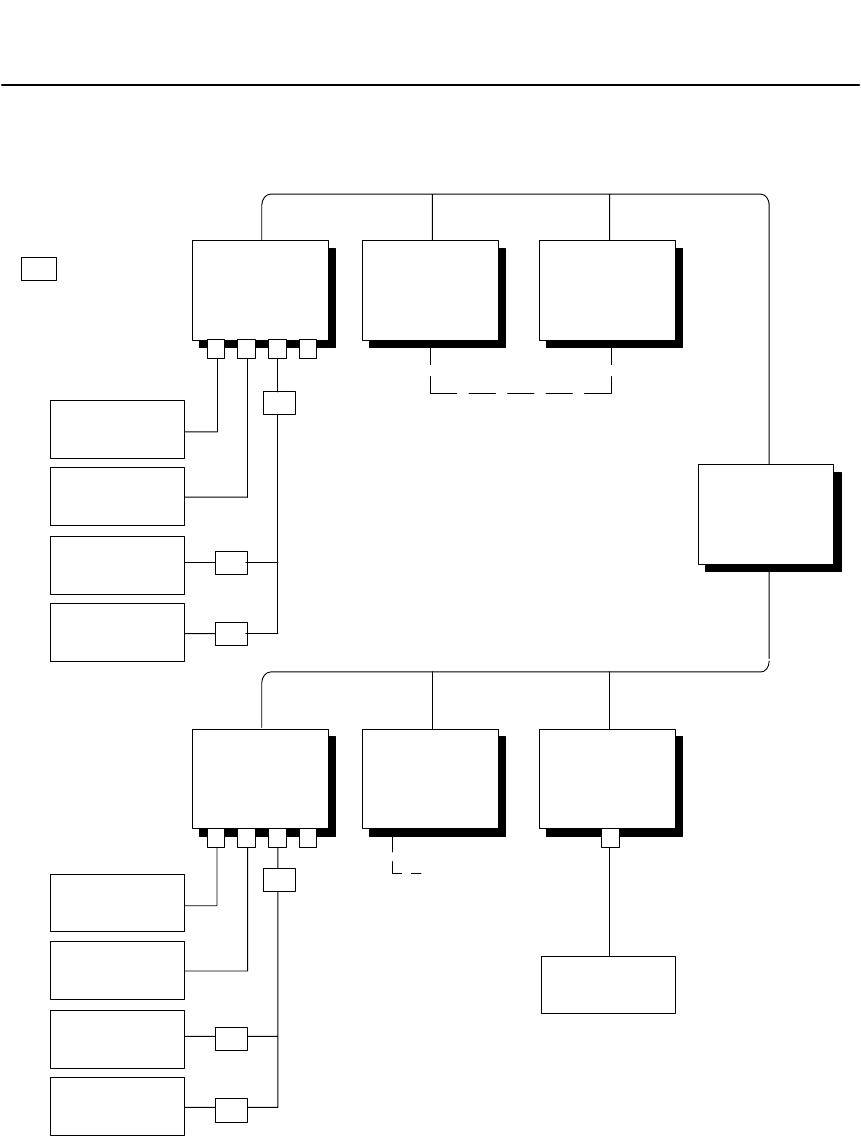
2.3 Routing Examples
MODBUS PLUS NETWORK (UP TO 64 NODES)
CPU BCPU A
BM85
BRIDGE
MULTIPLEXER
1 234
BP85
BRIDGE
PLUS
MODBUS PLUS NETWORK (UP TO 64 NODES)
CPU C
BM85
BRIDGE
MULTIPLEXER
1 234
SA85
NETWORK
ADAPTER
BRIDGE
MODE
MASTER
SLAVE
50
100
150
200
A
BC
MASTER
SLAVE
A
B
MASTER
HOT STANDBY
CONFIGURATION
PRIMARY STANDBY
5840
430 2
25
24
TASKS: 1
2
M
M
M
M
M
M
= MODEM
NETWORK
SLAVE
NETWORK
SLAVE
NETWORK
SLAVE
NETWORK
SLAVE
(NOTE 1)
NOTES:
1. STANDBY UNIT ASSUMES PRIMARY ADDRESS PLUS 32.
M
Figure 8 Routing Examples
Device Addressing and Message Routing
31007492 23
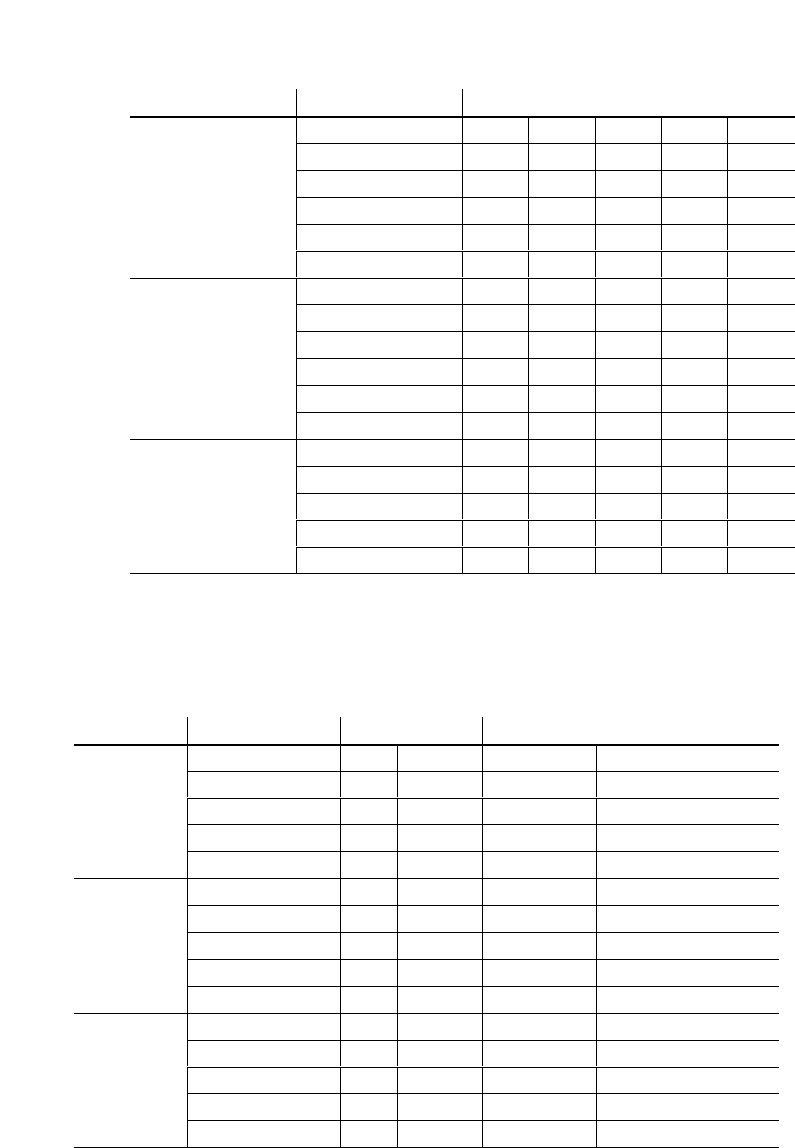
% "!!$ ! ##
From To Routing Path
CPU A (Primary) Slave A 5 2 0 0 0
50 5 3 50 0 0
CPU C 25 2 0 0 0
SA85 (Task 1) 25 30 1 0 0
Slave B 25 4 2 0 0
200 25 4 3 200 0
CPU C SA85 (Task 2) 30 2 0 0 0
Slave B 4 2 0 0 0
200 4 3 200 0 0
CPU A (Primary) 24 8 0 0 0
CPU B (Standby) 24 40 0 0 0
100 24 5 3 100 0
SA85 Slave B 4 2 0 0 0
150 4 3 150 0 0
CPU C 2 0 0 0 0
CPU A (Primary) 24 8 0 0 0
50 24 5 3 50 0
! " !
!&!!!#" # " !!
"!
From To Address Routing Method
Master A CPU A (Primary) 8 Attach Direct 8 0 0 0 0
Slave A 72 Attach MUX Internal Path
CPU C 252 Attach Implicit 252/10 = 25 2 0 0 0
50 50 Attach Mapped 0 3 50 0 0
200 200 Attach Mapped 25 4 3 200 0
Master B CPU C 2 Attach Direct 2 0 0 0 0
Slave B 72 Attach MUX Internal Path
CPU A (Primary) 248 Attach Implicit 248/10 = 24 8 0 0 0
200 200 Attach Mapped 0 3 200 0 0
50 100 Attach Mapped 24 5 3 50 0
Master C CPU A (Primary) 248 Attach Implicit 248/10 = 24 8 0 0 0
CPU B (Standby) 71 Attach Mapped 24 40 0 0 0
Slave A 72 Attach Mapped 24 5 2 0 0
Slave B 73 Attach Mapped 4 2 0 0 0
150 74 Attach Mapped 4 3 150 0 0

Configuring the Modbus Models
31007492 25
Chapter 3
Configuring the
Modbus Models
V"%$"$
V!%"!% $
V%"$#$
V%#"$"$"#
V%"$%#"$#
V%"%"$#
V%"%"$"#
V%""
V%""#
V%""
V$$$%#%#"##
V$$$
V%#"$$"#
Configuring the Modbus Models 31007492
26
3.1 Before You Start
3.1.1 Models Covered in This Chapter
!" $ !"# " !! "%!
Part Number Mounting
Method
Operating
Power
(Nominal)
Modbus Plus
Network
Cable Serial
Ports Serial
Protocol
NW–BM85–000 Panel or Shelf 115/230 Vac Single Modbus ASCII or RTU
NW–BM85C002 Panel or Shelf 115/230 Vac or
24 Vdc Single or Dual Modbus ASCII or RTU
NW–BM85D008 19 in Rack 125 Vdc or
24 Vdc Single or Dual Modbus ASCII or RTU
3.1.2 An Overview of the Configuration Process
# !"!"#" # " " !
"""&#%#!&# "#""!
'$" &""!" !" "# "!$%
"% ! $
##!"!"" "# "!#!! "
%"" #" """ "!
!"$""""#!#!"%
!%"! $"""#""#
"#"! &!"""!!"&## ""
#!"# " "!""#"""!!"
"" ! ""# #"""!"!""
##!"!!""#!#! !!"!"!%"!
"
Caution:ąYou must complete the internal configuration of the
BM85 before making the unit active in your application, both
on the Modbus Plus network and at its serial ports.
If you are installing a BM85 that was previously configured for
another application, another network, or a different node, the
unit will still be retaining its previous configuration setup.
You must not connect the unit into the current application and
apply operating power to the unit until you have reconfigured
it for the current application.

Configuring the Modbus Models
31007492 27
3.2 Required Equipment
))(!$"/, .# )/-*),.*,' . ,-3)/1$&&( $.# ,)!.#
!)&&)1$(" 0$ -
V), +/$0& (.. ,'$(&1$.#)'*.$& - ,$&&
V),), +/$0& (.)'*/. ,*,)/.,/(($("
. ,'$(& '/&.$)(*,)",'-/#-1$.#
)'*.$& - ,$&&
&$-.$(")!)'*.$& . ,'$(&-(& -$-*,)0$ $(** ($2
)' . ,'$(& '/&.$)(*,)",'--/#-&&)1
3)/.)-.), .# % 3-.,)% -3)//- $(.)-,$*.!$& )(3)/,$-%#$-
&&)1-3)/.)/*&$. 3)/,!/./, )(!$"/,.$)(-!,)'.# $-%1$.#)/.
#0$(".)% 3$(.# *,' . ,- ! ,.).# )/' (.-!),3)/,
'/&.$)(*,)",'!),!/,.# , .$&-
!3)/#0 *,$(.$(". ,'$(&),*,$(. ,)(( . .)3)/, '/&.),
3)/(*,$(.#,)*3, ),)!3)/,)(!$"/,.$)(#$-1$&&
# &*!/&$()/' (.$("3)/,)(!$"/,.$)(3*$&&33)/(/-
3)/,. ,'$(&-,$(., (), +/$0& (.% 3.)*,$(..# #,)*3

Configuring the Modbus Models 31007492
28
3.3 Configuration Checklist
$*+(%(&*#$)$#($'$#*'#.$*'
()()"((.$*' !()
1. Select a terminal and cable.')$%%#-$'!()#$
$"%)!)'"#!+(#!(!))'"#!#!
)).$*,!!*($')$#*')$#
2. Determine the Modbus port parameters.')$)$#
Modbus Port Parameters.)'"#)%'")'(.$*,#))$
*($'$*(%$')
h$').%
h!++'((
h$""*#)$#'")'(
h$')'$').
h# "$*)
h$"$$()'
h$*(!*('((!
3. Configure the Modbus ports.*'#$!!%$,')$)
')$)$#Configuring the Modbus Ports.
$##).$*')'"#!)$)%$').$*,!!*($'$#*')$#
)').$*')'"#!##."*!)$#%'$'".$*'*(#
))(,)()$!!$,)$#*')$##%$,'*%)
()$#*')$#('#(# .$')$$#*')*#)
4. Set the Modbus Plus address.')$)$#Setting the
Modbus Plus Address.))''%#!'(((,)()$
)(#$'(($#.$*'$*(!*(#),$'
5. Set the RUN Mode.')$)$#Setting the RUN Mode.
*'#$!!%$,')$)))(''%#!(,))$)
"$$##))*#))$)$*(!*(#),$' #)$
)$*(+())(#()!!)$#()$''%%!.#%$,'

Configuring the Modbus Models
31007492 29
3.4 Modbus Port Parameters
3.4.1 Information You Will Need
You will need the following information for each port that you will use in
your application. Parameters are explained in the sections indicated.
Port Type (see Section 3.4.2)
Modbus Master
Modbus Slave
Modbus Network
Modbus `Silent Master' Network
Slave Device Address (see Section 3.4.3)
1 ... 247
Communication Parameters (see Section 3.4.4)
Baud Rate: 50 ... 19200
Stop Bits: 1 or 2
Parity Mode: Even, Odd, or None
Communication Mode: ASCII or RTU
Note: Models NW-BM85C002 and NW-BM85D008 do not have a
Stop Bits setting. These models default to 8 data bits with 1 Stop Bit.
Port Priority (see Section 3.4.5)
1 ... 4
Link Timeout (see Section 3.4.6)
1 ... 3000 multiples of 100 milliseconds
Modem Booster (see Section 3.4.7)
Yes or No
Modbus Plus Address Table (see Section 3.4.8)
A routing table with up to 64 entries for translating Modbus addresses
to Modbus Plus network routing paths.
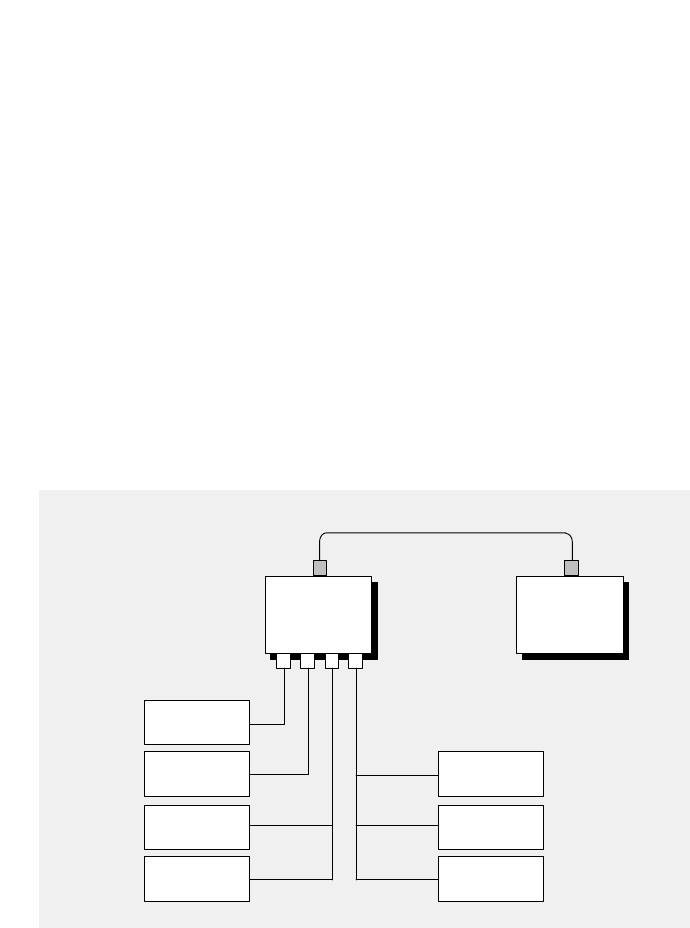
Configuring the Modbus Models 31007492
30
3.4.2 Port Type
Master
" !
#
Slave
" !!
#
Network
" !!
#
Silent Master Network
" !!!
#
BM85
BRIDGE
MULTIPLEXER
1234
MASTER
SLAVE
NETWORK
SLAVE
NETWORK
SLAVE
984–785
CONTROLLER
NETWORK
SLAVE
NETWORK
SLAVE
MASTER
MODBUS PLUS
NETWORK
Figure 9 BM85 Modbus Port Types

Configuring the Modbus Models
31007492 31
3.4.3 Slave Device Address
If the port is to be configured as a Modbus single slave device port, a
slave device address must be assigned to the port in the range 1 ... 247
decimal.
The address is part of the configuration of a port to which a single slave
device is attached. This address is not applicable to Modbus master
devices, as they do not use a device address. It is also not applicable to
Modbus networked devices, as multiple devices can exist on the port.
3.4.4 Communication Parameters
You must set each port's parameters to communicate with the Modbus
device or devices attached to the port. Refer to the documents for your
devices to determine their parameters. Modicon Modbus devices
generally support the following parameters:
VRTU (8-bit binary) mode, 9600 baud, 8 data bits, 1 or 2 stop bits,
even/odd/no parity
VASCII (character) mode, 9600 baud, 7 or 8 data bits, 1 or 2 stop
bits, even/odd/no parity.
Models NW-BM85C002 and NW-BM85D008 do not have a Stop Bits
setting. These models default to 8 data bits with 1 Stop Bit.
3.4.5 Port Priority
The Purpose of the Parameter
The BM85 services the four Modbus ports in a sequence that you can
establish during configuration by setting the Port Priority parameter.
Setting the Parameter
You set the sequence by assigning a priority to each port in the range
1 ... 4, with 1 being the highest priority. The port that is assigned
priority 1 will be the first port that is serviced on power up.

Configuring the Modbus Models 31007492
32
3.4.6 Link Timeout
The Purpose of the Parameter
%!&%$%)&%*!&(!(!#$''%!
#$"! %!! $$&%%!&$$'"!#% *!&#
""%! %%!&%'&$)$''!( ##!#
!(#%&# *%"#!#& %! %% %! %!
%'
%%!&%'&$%!!$!#%$!(#'$* !%'%%!
#$"! !#*%!%#! $#$&% ""# %##!#$%%
'%'&$%!!! '$%!#$"! *!&#
""%! ('%!(%& %%%!&%!&#$!# %
'! %! !#&$ %"!#%
'&$!&$%%! %$!($%'%%"!#%(%!&%
)$$'*'&$!&!!%%$&!%
!!(
V$#!& %! %
V$''"#!$$ %!#)"! %#!#$ %
V"#!$$ %!#"!#%%# $%! $""#!)%*$
Setting the Parameter
!&$%"!#%$%!&%"#%#$'& %#
%!&%'&#"#$ %$&%"$!$! $
!#)""#%#!$"$ %!&%!)$
!#! $!

Configuring the Modbus Models
31007492 33
Timeout Examples
#.#.#/,*##3*-)#/$,./#00'+%0&#)'+(0'*#,102)1#!&'/
/#",+," 1/*#//%#0.+/!0',+,$ 40#/0,0&#-,.0"#2'!#
+" 40#/$.,*0&#"#2'!#
V.*#0#./ 1"/0.0"0+,-.'04/0,-
#.')!,**1+'!0',+0'*#5 '0/*/!&.!0#.
*/$,. 40#/*,"#/#+"/,+#!&.!0#.-#. 40#
)2#!,+0.,))#./!+0'*#*/
0'*#*/
,0)0'*#555555*/
/#)'+(0'*#,102)1#,$*/
V.*#0#./ 1"/0.0"0-.'04/0,-
#.')!,**1+'!0',+0'*#5 '0/*/!&.!0#.
*/535*/$,. 40#/!&./ 40#$,.
)2#!,+0.,))#./!+0'*#*/
0'*#*/
,0)0'*#555555*/
/#)'+(0'*#,102)1#,$*/
V.*#0#./ 1"/0.0"0-.'04/0,-
#.')!,**1+'!0',+0'*#5 '0/*/!&.!0#.
/#!,+"/535/$,. 40#/!&./ 40#$,.
)2#!,+0.,))#./!+0'*#*/
0'*#*/
,0)0'*#/55/555*/555*//
/#)'+(0'*#,102)1#,$*/,./

Configuring the Modbus Models 31007492
34
3.4.7 Modem Booster
How the Parameter Applies to the BM85
#!##'(&$$ '(##)'$#&('((+
#")&'(+#&$#&('#)+ "('"#&!(#"#&"-$#&(
-#)+ )'"'#)'(+#&$#&(
$&!(&#'"#($$ -(#$#&((('"#")&'
'" '(&#& **$#&(#)"-$''("#&!(#"
#+#&"-$#&(-#)+ )'"''" '(&#& *$#&(
The Purpose of the Parameter
#!##'(&$&!(&(&!"'#+(+ "
#)'#!!"'(#"(+#&' **'(#)'$#&(
"(&*'#!!"(('&''(#' **
(#)'"(+#&$#&(&'$#"'',$(&#!(' **
+#!(#'&* #&" "(&'$#"'"-(
)"(#"#"(#!!"'')-(!'(&(+#"'#
#!!"'&
V(('(-$
##!!"(' **+ '"&'$#"'(&(
#!$ ('((#"&%)'("(#!!"!'(&
*+('#&(&'$#"'"(&#&#(&#!!"'#"
(#)'"(+#&""#($&#'')"( (' *'(#"
'"#!$ ("('&'$#"'&*(&(&"'(#"'
"("#&($#&(!)'(&!"$"")"( (((!
#!.#!!"'')''(&("'&#!!"'&#!
##"$&#&!!"$" (#' *#"(&# &#"(
#)'"(+#&"(& (* - #"(!#&$&#''""
(#"(&# &"(&"#'#"'(#!")('
V(('(-$#
#!!"(' *+ '"""#+ !"(#&$(#(
#!!""!)'($# (&-(!'(&*(#
(&!"(&%)'((#"'"#!$ (
#!!""#+ !"(&'(#)'"(+#&#&
$&#''"!'''(##(&*'#"($#&(+
$# (' **$&# -(#(&!"(#!!"
(#"'"#!$ ((+ ("'"(" &'$#"'(#
(#&"("*
#!##'(&$&!(& #+'-#)(#'$-+#((+#
!(#'+ )'((#)'$#&(

Configuring the Modbus Models
31007492 35
Setting the Parameter
)/(- & .)), -!),.# ) '))-. ,*,' . ,.(3
- ,$&*),.# *,' . ,1$&� .# !)&&)1$(" !! .
!3)/- & .)!),.#$-*,' . ,$()'$(")''(-1$.#!/(.$)(
) ),, *-- $, .&3.).# -&0 0$ ..# *),.!.#
)''($-!/(.$)() .# -&0 , -*)(- 1$&& , ./,( .).#
),$"$(.),)!.# )/-)''(!. ,.# -&0 #-)'*& . .#
, +/ -. .$)(),1# ($., ./,(-( 2 *.$)(, -*)(- $($.$("
.#.$.(().)'*& . .# .$)(
& .$(" -/- -.# - )(.3* )!, -*)(- !/(.$)() .)
/- !.# )''(-* $!$ -!/(.$)() .# 1$&&
* ,!),')(0 ,-$)(.)!/(.$)() !), - ($(".# )''(.)
.# -&0 0$ # 1$&&.# (/.)'.$&&3#(& .# *)&&$(")!
.# -&0 0$ /(.$&.# )''(.$)($-)'*& . .1$&&, ./,(
.# !$(&, -*)(- .).# ),$"$(.),)!.# )''(# *)&&$("*,) --
$-#(& 3.# .,(-*, (.&3.).# ),$"$(.),
Modem Booster Example
*,)",''$("*( &)(( . .))/-&/-( .1),%
)(.,)&& ,( ---&0 )(.,)&& ,.#.$-*,.)!)/-( .1),%
.*),.# *( &(, '). &3$(. ,,)". *,)",'(
-.,..# -&0 )(.,)&& ,
!.# ) '))-. ,*,' . ,$-- ..# ($--/ )''(
1$.#!/(.$)() # )(0 ,.-.# !/(.$)() (- (-
.# )(0 ,. )''(.).# -&0 # .# (#(& -*)&&$(")!
.# -&0 , ./,($(", -*)(- .).# 1# (.# -&0 0$ -
.$)($-)'*& .
).# ),$"$(.$(" 0$ .# , -*)(- ** ,--.# )( !,)'.# -&0
!),!/(.$)() /,$(".#$-.$' #)1 0 ,(),'&( .1),%
.,(-.$)(-()(.$(/ .1 ().# , 0$ -$(.# /- ,**&$.$)(
(.# ).# ,-&0 0$ -)(.# *),.-)/-( .1),%
# ) '))-. ,1$&&().
!/(.$)(1$.#)(.,)&& ,-.#., $(') /(.$)()
$-()., )"($4 3.#)- )(.,)&& ,-$(.#.') )/-#)/&
- & ..# ) '))-. ,))*.$)(!),*),..#.1$&�
)(.,)&& ,-)(( . .).#.*),.-)/-( .1),%

Configuring the Modbus Models 31007492
36
3.4.8 Modbus Address Map
# $) $(%*' $)'$"%*('((&)"(%'
'%*) $)%*(#(((' +) )(%*'%*(&%')(
&%')()"))$%"*&)%$)' ()).%*(& .*' $
%$ *') %$
V)"%) %$ $))"), .%*,$))%&")$)'.
V%$.) %*( '(( $)'$ #"
V +.) '%*) $ &)
)"$)'.(& (%,.%*, "",$)%*('((' +
))%*(&%'))%%$+') $)% +.)'%*) $&))%)
() $) %$+ $.%*'&&" ) %$%*) $$#)%
%*("*($%%$)"%"$),%'!%'%$'#%)$),%'!
((($"(%'%*))%+ %$$%)'&%')%)
$%*(#(( (%' $)'%#+ )%$% )(%*(
&%')()('()%*('((&)"%'))&%'))%
$#)),$)#(((%*('(($%*(
'((()%' $))") %$()!$ #) (%*$%'
#) ($%)%*$'(' "%,$%$)%""%, $&(
If a Match is Found
#) (%*$) +.)(%#&&'%*) $'%#))"
$)'., ""&&" )%)#(($ ), ""($)%*)*( $))
'%*) $'' +-#&"(%%,)%*('((&)"
$*()%+"%&'%*) $&)(%'%*(#(((
Table Location Modbus Address Five–Byte Routing Path
01 47 8 0 0 0 0
02 182 20 14 0 0 0
03 27 20 22 5 0 0
04 33 0 3 0 0 0
05 125 0 4 99 0 0
V ($-#&"%'%*) $)%$%%$)"%"
%*("*($),%'!)%*(#((%$) $()
() $) %$'((#) (%*$ $))"
, ""&&".)'%*) $&))%)#((
#(( ()*&%$.)&&" ) %$&'%'# $)+ )
$%'((

Configuring the Modbus Models
31007492 37
V&"+!$ #%#('"'%#(% (&'#
$%#%!! #"'%# %'"#%&&#"&#""'*#%
""!'#%#(&%&&'$$ &'
%#('"$''#'!&&'* &"''#"#
#"'(%%"'#(& (&"'*#%% (&'*
%#(''%#('%'#"##"'&#""'*#%
V&#*&#*'',$#)''&'"'#""
'%!"'%#('"#!&&""!'#%#(&
%&&'$$ &'%#('"$''#'
!&&!&&&&"''#"##"'(%%"'"'*#%
% (&!&&&%#(''%#('%'#"#
#"'"+'"'*#%',$#)'"#'%!"&
#*(%'%%#('"&$$ "#&"#'%% (&
'!&&&%#(''#"##"'%"'*#%."#&
"#%'*#%$'%'!&&&$','
$'%"$#&''#$$ '#"'&%(""""'$'%
V&#*&%#('"'#&" & ))#""#'%$#%'#
'&!""!'#%#(&%&&'
* $$ ,'%#('"$''#'!&&
-%#"'%&','&$&"'%" %#('"'#"#'%#(&
$#%'&#",'&$&$#%'#%'!(&')#" ,
&" & ))#""'&'%!"",'&%-%#&
V&#*&%#('"'#"'*#%& ))#""#'%
$#%'#'&!'#(&!&&#"'"&"
%&&#'%#('"$'&$$ -%#
"'%&','&$&"'%" %#('"'#"#'%#(&$#%'
&#",'&$&$#%''%,'&$&& )
)%&&#"'"'*#%'''$#%'%!""
,'&!(&'#"'"-%#&
If a Match is Not Found
"%&&!'&"#'#(""'' '#(&%&&"'
!&&* #")%','"'#%#('"$'(&"'
!'#&&% #*%&( '"$'"'%'#'
#(& (&"'*#%#%'#&" & ))#""''#"#'%
#(&$#%'#'%( '$ +%
V'!&&#"'"&"%&&"'
%"! '* &"''#'#(& (&"#'
''%&&#"' # #(& (&"'*#%
#%+!$ '!&&#"'"&#(&%&&'*
&"''#'#(& (&)'"#

Configuring the Modbus Models 31007492
38
V# - , -- -, , - ,0 ('/-.
(). /-
V!.# ' --" )(.$(-(, --$(
.# ,(" $.1$&& , -- .)-$("& )/--&0
0$ .)( )!.# )/-*),.-, -- -
-* $!3*),.-, -* .$0 &3
), 2'*& $!.# ' --" )(.$(-, --$.1$&& ,)/.
.).# 0$ .*),.
#)!.# , -- --* $!$ -)(&3-$("& *),.(
((). /- .), --)/-( .1),%)! 0$ -.*),.
), -- 0$ )()/-( .1),%.# )/-, --
*.& '/-. /-
V# - , -- -, , - ,0 ('/-.
(). /-
V!.# ' --" )(.$(-(, --$(
.# ,(" $.1$&& )(0 ,. .),)/.$("*.#-
!)&&)1-
$,-..# , --1$&& $0$ 3# +/).$ (.(
, '$( ,)!.# $0$-$)(1$&& )' .# !$,-..1)3. -)!.# !$0
3. ,)/.$("*.## , '$($(".#, 3. -)!.# ,)/.$("*.#
1$&&&13- 4 ,)-
), 2'*& $!.# ' --" .# , --.# , -/&.$(",)/.$("
*.#1$&& # !$,-.3. $-.# +/).$ (.)!
.# $0$-$)(.# - )(3. $-.# , '$( ,# ' --"
1$&& - (..)() )(.# &)&)/-&/-( .1),%
!.# ' --" , --$-.# , -/&.$(",)/.$("*.#1$&&
# ' --" 1$&& ,)/. .))/-&/-()
, --)(.# &)&( .1),%/,.# ,,)/.$(" * (-/*)(
.# .3* )! 0$ ..#.() , --!() $-,$"
&/-.# ' --" 1$&& ,)/. .#,)/"#.# ,$" .)() )(
.# ( 2.( .1),%!() $-(*. ,.# ' --" 1$&&
*. 3.#. 0$ (*)-. .)$.-**&$.$)(.-%
-$(".#$-' .#)/*.))/-&/-() -( , --
#1$.#() , --!.# - () -, ,$" &/-
0$ -() -(*--' --" -.#,)/"#.)() -)(
- )(( .1),%1$.#+/).$ (.-(, '$( ,-
) (*--' --" -.)() -)(.#.( .1),%

Configuring the Modbus Models
31007492 39
Silent Master Port Considerations
%%$%#! #% &#% &$$%#'
# # &$$''$ %$ &$
%( #%%! #%$ ($%$%#'% #$$%$'
'$#%*$($% #$$ %#'$% %#! #%$ %
$ ## $$ &$&$
%%$%# &#% %$''$ %! #%&$%
'&"&#$$$* &#!!% *&$% %%$
$ #$$ %$ &$&$%( #
*&$%$ %)$%$%#$% &$#$$!%
%%* &$%&!(%%
&$#$$$%$%#$"&#$% %$''$%%
%$%#! #%&$% %!* %! #% %% *# &%
!% &$&$ #% %#! #% %
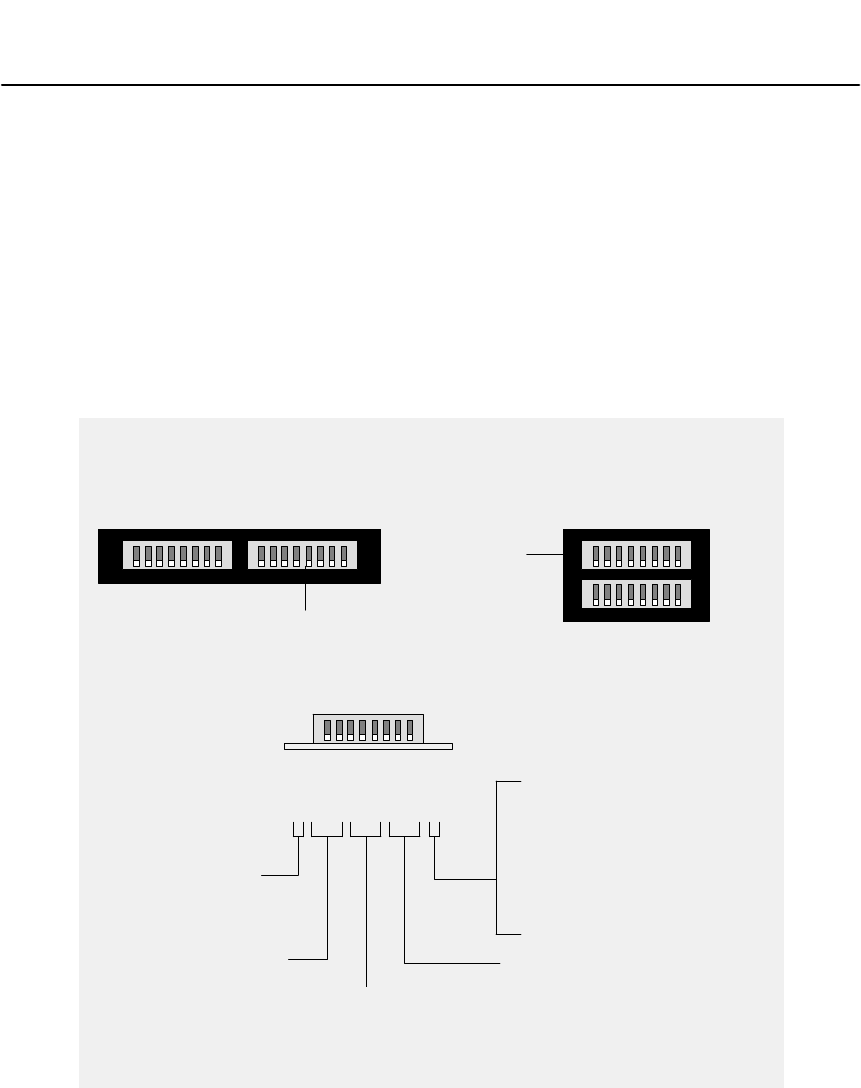
Configuring the Modbus Models 31007492
40
3.5 Configuring the Modbus Ports
3.5.1 Connecting Power for the Configuration
3.5.2 Setting the Switches
12345678
SWITCH POSITION
12345678
PORT MODE:
CONFIGURE
RUN
CONFIGURATION PORT:
PORT 1
PORT 2
PORT 3
PORT 4
PARITY:
DISABLED
EVEN
DISABLED
ODD
BAUD RATE:
9600
2400
1200
300
UP
UP
UP
DOWN
DOWN
DOWN
UP
UP
DOWN
DOWN
UP = 1 DOWN = 2
NW-BM85-000
(Pv02 or earlier)
NW-BM85C002
NW-BM85D008
NW-BM85-000
(PV03 or greater)
USE
UPPER
SWITCHES
USE
RIGHT
SWITCHES
NW-BM85-000 = ST OP BITS:
UP = RUN APPLICATION
NW-BM85C002
rEFENW-BM85D008 = MODE:
(LEAVE IN UP POSITION)
UP
UP
DOWN
DOWN
UP
UP
DOWN
DOWN
UP
UP
DOWN
DOWN
UP
UP
DOWN
DOWN
Figure 10 BM85 Modbus Models: Port Configuration Switches
Refer to the installation chapter in this guide for connecting power to
your BM85. Connect the source of AC or DC power to the BM85. Do
not turn on the power to the BM85 until you set the Modbus port
configuration switches and connect the configuration terminal. The
switch settings will be sensed when power is applied.
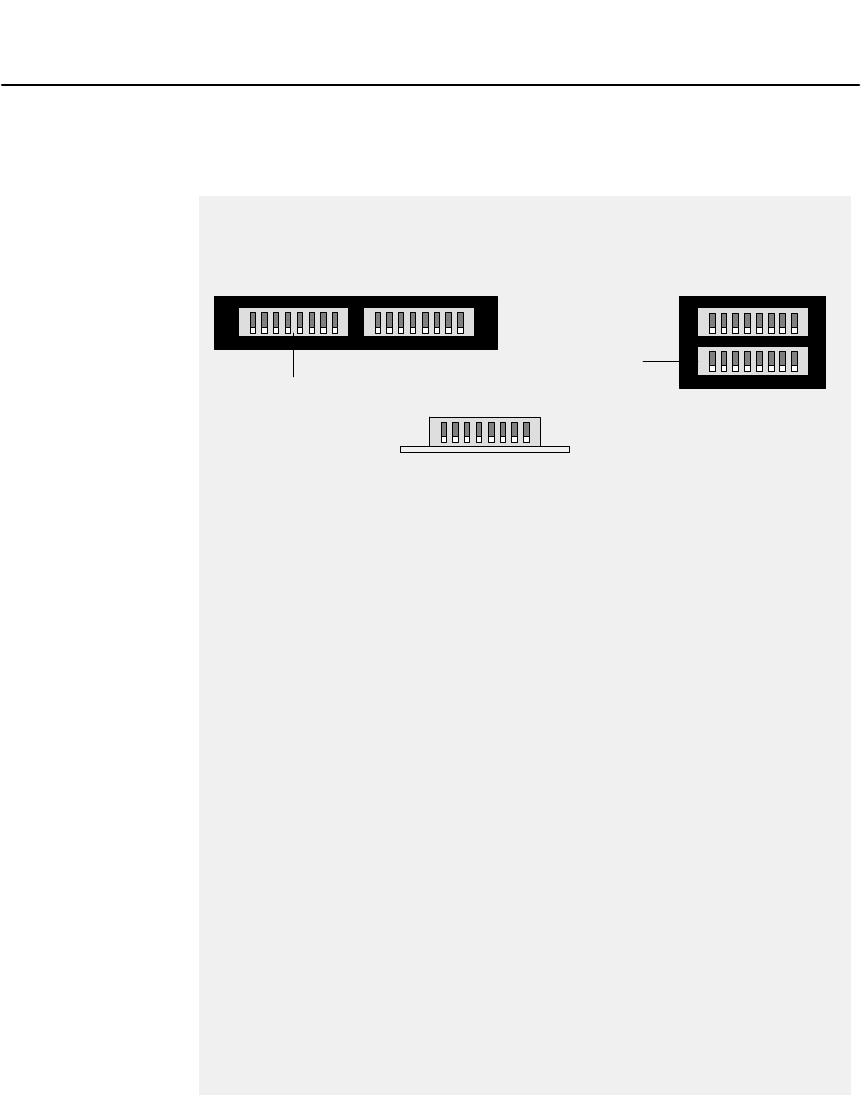
The BM85 power should be set off at this time. Switches are located on the
BM85 rear panel. Figure 10 shows the switch positions and setup.

Configuring the Modbus Models
31007492 41
Set the CONFIGURE Mode
Set switch 1 to the CONFIGURE position (UP).
Define the Configuration Port
Switches 2 and 3 determine the port connector to be used for connecting
the serial terminal. Set them for the port you want to use.
Set the Configuration Port Parameters (NW–BM85–000)
Set switches 4 ... 8 to match the terminal's baud rate, parity mode, and
stop bits. The port always uses 8 data bits for configuration.
Set the Configuration Port Parameters (NW–BM85C002, D008)
Set switches 4 ... 7 to match the terminal's baud rate and parity mode.
The port always uses 8 data bits and 1 stop bit for configuration. Always
leave switch 8 in its RUN (UP) position. The BM85 will not run unless
switch 8 is UP.
3.5.3 Connecting the Terminal
What You Will Need
You will need a serial terminal and cable of the types listed in
, in Appendix A.
Connect the Terminal
The BM85 power should be off at this time. Connect the terminal to the
port you are using for configuration. Set the terminal's communication
parameters to match those of the BM85. Power up your terminal, and
start any emulation program you are using. Your terminal should be
running and ready, before you apply power to the BM85.
Apply Power to the BM85
When you have set the configuration switches, and your terminal is
ready, apply power to the BM85.
The configuration port's indicator should blink at one second intervals,
showing that the configuration mode is active. Your terminal should
display the MODBUS PORTS CONFIGURATION (V1) screen.
Your configuration screens and keyboard commands are described
starting at Section 3.6.

Configuring the Modbus Models 31007492
42
3.6 Your Configuration Commands
&! &!%!&"&!"" $ ""! #
#!" # % !%"
Command Action Range
VSelect a configuration screen or Help screen 1 ... 8
PSelect a port to be configured 1 ... 4
NEnter a Modbus slave device address 1 ... 247
TEnter the port type M = Master
S = Slave
N = Network
X = Silent Master Network
BEnter the baud rate 50, 300, 1200, 1800, 2000, 2400,
3600, 4800, 7200, 9600, 19200
SEnter the stop bits 1 or 2 (Note 1)
REnter the parity mode N = None
O = Odd
E = Even
MEnter the communication mode A = ASCII
R = RTU
YEnter the port priority 1 ... 4
LEnter the link timeout value 1 ... 3000, in multiples of 100 ms
FEnter the modem booster selection Y = Yes
N = No
WWrite the configuration parameters to all four ports
DInitialize all four ports with default parameters
?Display Help for the current configuration screen
EEnter a Modbus address and five–byte routing path into
the Modbus Address Map table on the V2 or V3 screen.
When you use this command, enter the following:
– the E command
– the table location (1 ... 64) for your entry
– the Modbus address (1 ... 255) to be mapped
– the five bytes of routing (1 ... 255 in each byte).
Entry format:
EYY MM XX XX XX XX XX
where:
E = Modbus Address Map command
YY = location (1 ... 64) in the table
MM = Modbus address (1 ... 255)
XX = each byte (1 ... 255) in the path.
Notes
! " $
""!!""!!#""""!%"""
Configuring the Modbus Models
31007492 43
3.6.1 The Default Configuration
Parameter Port 1 Port 2 Port 3 Port 4
Port type Master Slave Slave Slave
Slave device address –– 1 1 1
Baud rate 9600 9600 9600 9600
Stop bits 1 1 1 1
Parity mode Even Even Even Even
Communication mode RTU RTU RTU RTU
Port priority 1 2 3 4
Link timeout value –– 600 600 600
Modem booster –– –– –– ––

Configuring the Modbus Models 31007492
44
3.7 Your Configuration Screens
You have four configuration screens:
V1
Use this screen to display and set the communication parameters for
each port.
V2
Use this screen to display and set locations 1 ... 32 of the Modbus
Address Map table for each port.
V3
Use this screen to display and set locations 33 ... 64 of the Modbus
Address Map table for each port.
V4
Use this screen to Save or Initialize the BM85 configuration.
Help Screens: V5, V6, V7, V8
You have four Help screens that you can access during configuration.
You can select the Help screens by selecting screens V5, V6, V7, or V8.
Pressing the `question mark` ( ) key will display Help for the
configuration screen you are currently using.
3.7.1 Entering Commands Into Your Screens
When the BM85 is initially powered up for configuration, the V1 screen
is shown for port 1. You can begin entering the port 1 parameters
immediately.
The currently active port is always shown at the bottom line of your
screen.
To select another screen for the active port, enter commands V1, V2, V3,
or V4. To select another port, enter commands P1, P2, P3, or P4.
When you enter the configuration commands, you can enter them singly
or as a string. Press ENTER to complete the entry. To correct
keystrokes in an entry, press DELETE. To cancel an entry before
completing it, press ESCAPE.

Configuring the Modbus Models
31007492 45
3.7.2 Printing the Configuration
&$%!#!##&$!#!&$$"&$!!#
!! $%#&#!#!&!!&$!
"!"
3.7.3 Saving the Configuration
#!$!#$"!#""%&$!$!#$"#
"!
Configuring the Modbus Models 31007492
46
3.8 Your V1 Screen
3.8.1 Your V1 Screen Layout
MODICON MODBUS BRIDGE/MUX – Ver. 1.0
Copyright (c) 1989 MODICON, Inc., Industrial Automation Systems Group
<COMMANDS> [OPTIONS]
<P>PORT NUMBER# 1 2 3 4 [1, 2, 3, 4]
<T>PORT TYPE master slave network slave [m, s, n, x]
<N>Slave Dev Addr – 1 – 230 [1–247]
<B>Baud Rate 9600 1200 2400 9600 [50–19200]
<S>Stop Bits 1 2 1 1 [1, 2]
<R>Parity even none even even [n, o, e]
<M>Mode rtu ascii rtu rtu [a, r]
<Y>Priority 1 2 3 4 [1–4]
<L>Link Timeout – 20 10 600 [1–3000]
<F>Modem Booster – yes yes no [y, n]
MODBUS PORTS CONFIGURATION [V1]
Modbus Plus Address = 24
>>Valid Commands:[V1 V2 V3 V4 P T N B S R M Y L F] Keys:[Enter Esc ?–help]
Active Port 1>> __
Figure 11 Typical V1 Screen: Modbus Ports Configuration

Configuring the Modbus Models
31007492 47
3.8.2 Using the V1 Screen
Select the port you want to configure. For example, enter P4 to select
Port 4 and make it the active port.
Your currently selected port is shown on the bottom line of the screen.
Specify the port type by entering T with one of the following types:
M (Master), S (Slave), N (Network), or X (Silent Master). For example,
enter TS to setup the currently active port as a slave port. A Silent
Master port will be labeled `xmaster' on the screen.
Specify the port communication parameters you want to use. For
example, enter B9600 to set the port for 9600 baud.
You can also enter the complete command sequence as a string,
separated by spaces.
Example
To configure Port 4 as a Slave port, Device Address 230, 9600 baud,
1 Stop Bit, Even Parity, RTU, Port Priority 4, 60 seconds Link Timeout,
and No Modem Booster, you would enter the following command string:
P4 TS N230 B9600 S1 RE MR Y4 L600 FN <ENTER>
Configuring the Modbus Models 31007492
48
3.9 Your V2 and V3 Screens
3.9.1 Your V2 or V3 Screen Layout
"
!
"
MODBUS ADDRESS MAP FOR [E1–E32] [V2]
MAPS: Modbus Address to Destination Address [Port Type: Master]
Table Modbus Destination Address Table Modbus Destination Address
Entry Address (5 bytes) Entry Address (5 bytes)
<E1 > [020]= 021 022 023 024 025 <E17> [000]= 000 000 000 000 000
<E2 > [000]= 000 000 000 000 000 <E18> [000]= 000 000 000 000 000
<E3 > [000]= 000 000 000 000 000 <E19> [000]= 000 000 000 000 000
<E4 > [124]= 020 004 000 000 000 <E20> [000]= 000 000 000 000 000
<E5 > [000]= 000 000 000 000 000 <E21> [000]= 000 000 000 000 000
<E6 > [126]= 020 006 000 000 000 <E22> [000]= 000 000 000 000 000
<E7 > [000]= 000 000 000 000 000 <E23> [000]= 000 000 000 000 000
<E8 > [000]= 000 000 000 000 000 <E24> [000]= 000 000 000 000 000
<E9 > [000]= 000 000 000 000 000 <E25> [000]= 000 000 000 000 000
<E10> [000]= 000 000 000 000 000 <E26> [000]= 000 000 000 000 000
<E11> [000]= 000 000 000 000 000 <E26> [000]= 000 000 000 000 000
<E12> [000]= 000 000 000 000 000 <E28> [000]= 000 000 000 000 000
<E13> [000]= 000 000 000 000 000 <E29> [000]= 000 000 000 000 000
<E14> [000]= 000 000 000 000 000 <E30> [000]= 000 000 000 000 000
<E15> [000]= 000 000 000 000 000 <E31> [000]= 000 000 000 000 000
<E16> [000]= 000 000 000 000 000 <E32> [000]= 000 000 000 000 000
>>Valid Commands:[V1 V2 V3 V4 P E] Keys:[Enter Esc ?–help]
Active Port 1>> __
Figure 12 Typical V2 Screen: Modbus Address Map Entries

Configuring the Modbus Models
31007492 49
310074923.9.2 Using the V2 or V3 Screen
+,!+*&'*'&" -*"& &,*"+'*,!+$,('*,
+,!+*&'*'&" -*"& &,*"+'*,!"+('*,
'-&$,*&,,/&,!&+*&+-+"& '%%&+
&
!$&,*1'$-%&"+$"+,"& '$',"'&+"&,!,$',,!,
,!+*,$&,*1$',"'&+&','-+*+++'-%-+,&,*
,!'-+*+++,!,1'-/&,,'%("&,',!+'&'$-%&
!&1'-",,!,$&,*"+1'-'&',!.,''+'"&"&
+)-&'*0%($1'-'&',!.,''&" -*'*
'&" -*"& &',!*&,*1
'-'&',!.,'"$$$$,!,$&,*"+"&,!+*&'*
%#"& &&,*1"&,!+*&1'-/"$$-+&'%'*,!&
&,*"+1'-%" !,"&",'&.&"&,,'#(,!%$$'&'&+*&
Example
'-+,!+*&,$&,*1,'%('-+*++,',!
*'-,"& (,!1'-/'-$&,*,!'$$'/"& +,*"&
'-%1"&",'&.&"&,,'-+'-+*++"& '&.&,"'&,!,
!$(+1'-,'*%%*!'/*+++*%(("&1'-*(($","'&
'*0%($1'-&-+,!'-+*++,'"&%(("& ,'
'-+$-+&'*++/",!*'-,"& ,!*'- !*" $-+,
*++&,!+%'&.&,"'&'-+*++/'-$%(,'
'-+$-+&',!*'- !,!+%*" 0%($+*+!'/&"&
,$&,*"+&
'%(,!*++++!'/&,&1'-/'-$&,*,!
'$$'/"& +,*"& +
Configuring the Modbus Models 31007492
50
3.10 Your V4 Screen
3.10.1 Your V4 Screen Layout
SAVE AND DEFAULT CONFIGURATION [V4]
>>Valid Commands:[V1 V2 V3 V4 W D] Keys:[Enter Esc ?–help]
Active Port 1>> __
STATUS: Configuration parameters –– CHANGED –– since last save
Figure 13 Typical V4 Screen: Save or Initialize the Configuration

Configuring the Modbus Models
31007492 51
3.10.2 Using the V4 Screen
&!#"%#$!#'$%#!###!
#&
#(##!"#$!# !#!"##
#!$#%$"#!#&
####(#$!# !#!""!"#
$"!"" #"!$! !#"#(!"
Configuring the Modbus Models 31007492
52
3.11 Setting the Modbus Plus Address
ADDRESS
SWITCH POSITION
1
2
3
4
5
6
7
8
9
10
11
12
13
14
15
16
17
18
19
20
21
22
23
24
25
26
27
28
29
30
31
32
123456
0
1
0
1
0
1
0
1
0
1
0
1
0
1
0
1
0
1
0
1
0
1
0
1
0
1
0
1
0
1
0
1
0
0
1
1
0
0
1
1
0
0
1
1
0
0
1
1
0
0
1
1
0
0
1
1
0
0
1
1
0
0
1
1
0
0
0
0
1
1
1
1
0
0
0
0
1
1
1
1
0
0
0
0
1
1
1
1
0
0
0
0
1
1
1
1
0
0
0
0
0
0
0
0
1
1
1
1
1
1
1
1
0
0
0
0
0
0
0
0
1
1
1
1
1
1
1
1
0
0
0
0
0
0
0
0
0
0
0
0
0
0
0
0
1
1
1
1
1
1
1
1
1
1
1
1
1
1
1
1
0
0
0
0
0
0
0
0
0
0
0
0
0
0
0
0
0
0
0
0
0
0
0
0
0
0
0
0
0
0
0
0
ADDRESS
SWITCH POSITION
123456
0
1
0
1
0
1
0
1
0
1
0
1
0
1
0
1
0
1
0
1
0
1
0
1
0
1
0
1
0
1
0
1
0
0
1
1
0
0
1
1
0
0
1
1
0
0
1
1
0
0
1
1
0
0
1
1
0
0
1
1
0
0
1
1
0
0
0
0
1
1
1
1
0
0
0
0
1
1
1
1
0
0
0
0
1
1
1
1
0
0
0
0
1
1
1
1
0
0
0
0
0
0
0
0
1
1
1
1
1
1
1
1
0
0
0
0
0
0
0
0
1
1
1
1
1
1
1
1
0
0
0
0
0
0
0
0
0
0
0
0
0
0
0
0
1
1
1
1
1
1
1
1
1
1
1
1
1
1
1
1
33
34
35
36
37
38
39
40
41
42
43
44
45
46
47
48
49
50
51
52
53
54
55
56
57
58
59
60
61
62
63
64
1
1
1
1
1
1
1
1
1
1
1
1
1
1
1
1
1
1
1
1
1
1
1
1
1
1
1
1
1
1
1
1
12345678
USE
LOWER
SWITCHES
USE
LEFT
SWITCHES
NW-BM85-000
NW-BM85C002
NW-BM85D008
1 = UP
0 = DOWN
Figure 14 BM85 Modbus Models: Modbus Plus Address Switches
Before applying power to the BM85, set its rear panel switches to the
unit's Modbus Plus node address. Figure 14 shows the switch locations,
combinations, and addresses. Set the address into switches 1 ... 6.
Switches 7 and 8 are not used.
(PV02 or earlier)
(PV03 or greater)
NW-BM85-000

Configuring the Modbus Models
31007492 53
3.12 Setting the RUN Mode
3.12.1 When to Set the RUN Mode
#####" "# !#!"($%
""#$#!(! !##$"$"
#&!##"$" !#"
#"#"#&#%($!
#""" &!" ##$#
Caution:ąYou must complete the internal configuration of the
BM85 before making the unit active in your application, both
on the Modbus Plus network and at its serial ports.
If you are installing a BM85 that was previously configured for
another application, another network, or a different node, the
unit will still be retaining its previous configuration setup.
You must not connect the unit into the current application and
apply operating power to the unit until you have reconfigured
it for the current application.
3.12.2 How to Set the RUN Mode
!($"##$##%!(##($%"#$ #"
$" !# !#!"$"$"!""""!
#" #!
$! &!##!$# '!"##"$!#
"&### "#!#$!!#$!#
"&##"##
($%"##$!#!!#(!"
"##"#($#!" !##$###"#"##
&"#& &!"! ##
Configuring the Modbus Models 31007492
54
3.13 Modbus Port Indicator Codes
#
#!
!!"
!#
#!!
! #
Indicators Pattern Hexadecimal Digit
4 – 3 – 2 – 1 Steady Upper digit
4 – 3 – 2 – 1 Flashing Lower digit
Hardware Error Codes: 11 ... 19 Hex
Code (Hexadecimal) Meaning
11 PROM checksum error
12 RAM data test error
13 RAM address test error
14 Normal power down event
17 Bad or unexpected interrupt
18 EEPROM checksum error
19 Modbus port loopback error
Modbus Driver Error Codes: 24 ... 2E Hex
Code (Hexadecimal) Meaning
24 Modbus transmit state error
25 Modbus receive state error
26 ASCII transmit communications state error
27 Transmit underflow error
28 RTU transmit communications state error
29 ASCII receive communications state error
2A RTU receive communications state error
2B Transmit communications state error
2C Receive communications state error
Configuring the Modbus Models
31007492 55
2D Modbus state timer event error
2E UART interrupt error
Modbus Plus Processor Interface Error Codes: 34 ... 36 Hex
Code (Hexadecimal) Meaning
34 Modbus Plus Processor interface error
35 Modbus Plus Processor opcode response error
36 Timeout error waiting for Modbus Plus Processor
LLC Layer Error Codes: 81 ... A3 Hex
Code (Hexadecimal) Meaning
81 Master state error
82 Slave state error
83 Unknown routing failure to send
84 ... 8B Port number error
91 Privilege flag not reset
92 Port number error
A2, A3 Unknown function code

Configuring the Programmable Models
31007492 57
Chapter 4
Configuring the
Programmable Models
V #" "
V# #"
V$ $%"$""%
V!""$""%
V " %
V"""# "%"!
V"""#!#! !!
V" !# %
V"""
Configuring the Programmable Models 31007492
58
4.1 Before You Start
4.1.1 Models Covered in This Chapter
! "
Part Number Mounting
Method
Operating
Power
(Nominal)
Modbus Plus
Network
Cable Serial
Ports Serial
Protocol
NW–BM85E232 Panel or Shelf 115/230 Vac or
24 Vdc Single or Dual RS232 Programmable,
User Defined
NW–BM85D002 19 in Rack 125 Vdc or
24 Vdc Single or Dual RS232 Programmable,
User Defined
NW–BM85E485 Panel or Shelf 115/230 Vac or
24 Vdc Single or Dual RS485 Programmable,
User Defined
NW–BM85S232 Panel or Shelf 115/230 Vac or
24 Vdc Single or Dual RS232 Programmable,
User Defined
NW–BM85S485 Panel or Shelf 115/230 Vac or
24 Vdc Single or Dual RS485 Programmable,
User Defined
4.1.2 An Overview of the Configuration Process
"# " #
$!##
!""!
# "
""!
" #
"# "#
"# "
# "
Caution:ąYou must complete the internal configuration of the
BM85 before making the unit active in your application, both
on the Modbus Plus network and at its serial ports.
If you are installing a BM85 that was previously configured for
another application, another network, or different node, the
unit will still be retaining its previous configuration setup.
You must not connect the unit into the current application and
apply operating power to the unit until you have reconfigured
it for the current application.

Configuring the Programmable Models
31007492 59
4.2 Required Equipment
4.2.1 Equipment for Writing the Application Program
First, you must create your BM85 application program. For this you will
need the BM85 Program Development Software Tool Kit. Part numbers
and ordering information are provided in the BM85
Section 1.7.2.
For compatibility with the BM85 development software, your PC
hardware should be an MS-DOS compatible platform with at least 4
Megabytes of RAM.
You will also need the Borland Cā/āC++ compiler at version 3.1 or later,
which should already be installed in your development computer. The
BM85 applications use the Large model. You should ensure that the
Borland Large model libraries are installed.
4.2.2 Equipment For Downloading the Application Program
After you create the BM85 application, you must download it to the
BM85 across Modbus Plus. Your hardware should be an IBM AT
compatible or Micro Channel PC (486 or higher recommended), with at
least 4 Megabytes of RAM. The required equipment is described in the
BM85 Section 1.7.3.
Your download host can be the same PC you used for the application
development, with the addition of a Modicon SA85 or SM85 Network
Adapter. The host could also be a separate PC node on Modbus Plus, in
which you have stored only the application and downloader software.
You might find it more convenient for developing and debugging your
application if you use the same PC for downloading. Downloading can
be performed from within the Borland development environment.
The SA85 connects an ISA (AT) bus host to Modbus Plus. The SM85
connects a Microchannel bus host. Each adapter includes a device driver
program that you will install during your installation of the adapter into
your host computer.
Your BM85 development software includes a download utility that you
can run with either the SA85 or SM85.

Configuring the Programmable Models 31007492
60
4.3 Overview of the Development Software
(%+'+ ,%)'%'#+"%&#$)%),'%%" ) (
&'%+ )%(( ().%*'&"$$ $-#&"('(%,$%')%'"$
$+ '%$#$)%#&")%*#$)) %$ ((*&&" , ))! )
')$*#'($%'' $ $%'#) %$' $)
) %$
%*'(%),' $"*(""%)+"%&#$) "(%'%#& " $
$%,$"% $.%*'&&" ) %$%*"(%+$((%')#$)%
(%*'% "()).%*$*((-#&"(
4.3.1 Development Software Files
%""%, $+"%&#$) "('(*&&"
File Name Purpose
README.DOC Complete BM85 development information text file. View or
print this file for current information about your software.
BM85LOAD.EXE The BM85 download utility
MBPSTIM.EXE Data transfer exerciser. Reads registers and writes a single
register to a controller over Modbus Plus.
BM85.EXE User–compiled demonstration program to be downloaded.
See the descriptions of the test programs below.
BM85.PRJ Borland C++ 3.1 project file to build BM85.EXE
BM85.H Header file containing function prototypes of utility routines
C0BM85.OBJ BM85 startup code
BM85.C Source file for user base demonstration program. Copy the
source for a specific test program into this file and compile it.
Initially supplied as TEST0.C. See the test programs below.
BM85LIB.LIB Library of utility routines
MBPHOST.SYS Device driver for Modbus Plus network adapter
MBPSTAT.EXE Modbus Plus network management and diagnostic utility
BDRESET.EXE Initializes and enables the Modbus Plus adapter
4.3.2 The README.DOC Information File
%*' (!(%$) $$ $%'#) %$)-) " ( "
%$) $() " $%'#) %$%*)+"%& $%#& " $$
%,$"% $.%*'&&" ) %$*( $)%'"$$+ '%$#$))
"(%%$) $($.'$)".*&) $%'#) %$%*).%*'
(%),'%' $()"" $)(%),'.%*(%*"+ ,) ( "%*
#."(%,$))%&' $)%*)'%&.)%*((''$ $+"%& $
.%*'&&" ) %$

Configuring the Programmable Models
31007492 61
4.3.3 Test and Demonstration Source Files
%""%- $ ")&(%, )%+(%.#&")**/%+$+) $
/%+(,"%&#$*/$")%#% $+))*)*&(%(#)
%(.( ) $$*)* $/%+(
File Name Purpose
TEST0.C Displays a code on the BM85 LED indicators
TEST1.C Shows Modbus Plus master and slave operation
TEST2.C Demonstrates multitasking using the BM85 indicators
TEST3.C Demonstrates floating point emulator
TEST4.C Simulates process control with multitasking, C++ conventions
TEST5.C Same as TEST4.C, but uses C conventions
TEST6.C RS232 port loopback test
TEST7.C RS232/RS485 port loopback test, long term
TEST8.C Sample large program (240K) for download testing
Using the Test and Demonstration Source Files
%+)$/ " ()*%&/ **%* "$#*$#% /**
"%(/%+(&&" * %$$%#& " *%-$"%*.+*"
*%*+) $*+* " */%(.#&"*
%-$"%$(+$- * $*%("$$, (%$#$*+) $*
%""%- $)'+$
Key Sequence Purpose
Alt–space Transfer menu
mBM85 download
4.3.4 Multitasking in Your Application
" ((/ $"+)+$* %$)**/%+$+)*%%$)*(+*
(%+* $%()) $ $$%$*(%"" $#+"* &"*)!)%(*()- * $
/%+(&&" * %$+"* *)! $ )$"%$%%&(* ,) )$
* ,*)!(%+* $#+)*#!&( % "")*%$( *(* %$(%+* $
""%- $**(%+* $*% *(%$* $+*"" $*)!%($"
$%*(&$ $*)!
%+(#%$)*(* %$&(%(#)$&(%, )%+(
.#&")%*+)%*" ((/)#+"* *)! $+$* %$) )
% $ )% $%(&(%(##()-%(#%(
# " (- ***"$+

Configuring the Programmable Models 31007492
62
4.4 Installing the Development Software
This overview of the software installation process is supplied to assist
your planning. Complete documentation is provided in the software kit.
Substitute the paths and parameters used in your Borland development
environment wherever applicable.
4.4.1 Default Parameters
The development software is supplied with two default parameters for
downloading to your BM85. One parameter specifies how to access your
SA85ā/āSM85 driver (the default specifies software interrupt vector 5C).
The other parameter is the Modbus Plus node address of the target
BM85 unit for downloading (the default is node address 4).
If your SA85ā/āSM85 driver and BM85 are set to these parameters, your
installation will be easier because you can bypass part of the setup (see
Steps 6 and 7 below).
4.4.2 Installation Steps
If you have already installed the SA85ā/āSM85 Modbus Plus adapter
and its driver, and have edited your CONFIG.SYS file to include a
DEVICE command with driver parameters, you can skip this step.
If you have not installed your adapter and driver, then you should do
so now, before proceeding with the BM85 software installation.
Follow the instructions in the guidebook supplied with your adapter.
Part of the adapter installation procedure requires you to specify a
software interrupt vector, or to accept the default vector 5C. If you
specify a vector other than the default, make a note of the vector.
You will need this information when you install the BM85 software.
Ensure that your Borland Cā/āC++ software is installed on your
computer and is specified in your PATH command. For example, if
the compiler's executable files are in C:ā\āBORLANDCā\āBIN then your
PATH command should specify this path.
Create a working directory for your BM85 development files, and
copy the entire contents of your BM85 development disk into this
directory. A suggested name for the new directory is: C:ā\āMBCP.

Configuring the Programmable Models
31007492 63
Start your Borland compiler development environment as described
in your compiler documentation.
Update the BM85 Project file BM85.PRJ to set the correct directory
paths for your Borland environment. For example, in the Borland
3.1 environment, you can use the following key sequence:
Key Sequence Purpose
Alt–P Project open
BM85.PRJ Project name
Alt–O D Option directories
(paths) Update the paths for your INCLUDE and LIBRARY directories
If either of these parameters is true, continue with Step 7. If
neither is true, skip Step 7 and go to Step 8.
hYour SA85/SM85 interrupt is set to a vector other than 5C
hYour BM85 Modbus Plus node address is other than 4.
Update the BM85LOAD and MBPSTIM command lines in the BM85
project's TRANSFER menu to use the new parameters. In the
Borland 3.1 environment, you can use the following key sequence:
Key Sequence Purpose
Alt–T Transfer menu
Select command line Select the BM85 DOWNLOAD or MBPLUS STIMULATE line
Alt–E Edit
Alt–C Command line
Enter parameters Set the parameters as they are used in your application
Alt–M Modify
Alt–K OK
When you have updated your project file, close the project. In the
Borland 3.1 environment, you can use the following key sequence:
Key Sequence Purpose
Alt–C Project close

Configuring the Programmable Models 31007492
64
4.5 Preparing the BM85 for Downloading
!! "#&"#""&#""#&"#
##! #&!!$ ###&" !%$"'
&#!"#"&#""""$"$"
!""
!'$&'$! #'$$"#"##"&#"#
&#$$"#""##!""#!&##
!"" !#!'$!$"&##&$##' !!
"#!$#"!"###"&#"! !%#"
$&####""##"#$##
!%##%" !$"$"#&!#!#
%#''$!&"## !!#&'
Caution:ąAdding a new node to an active network causes an
increase in the network's token rotation time, reducing the
overall data throughput. Before you connect or disconnect any
device on an active network, you should be aware of its effect
on network timing.
#!#&" ##"&#"$"#"##&
##!$# #"&#"##"!""
&!$
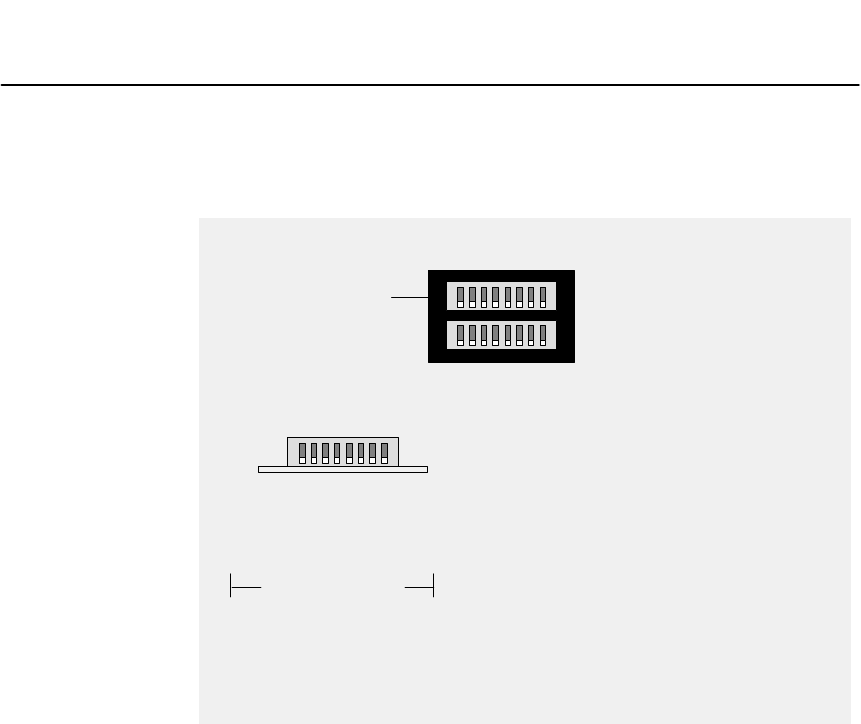
Configuring the Programmable Models
31007492 65
4.6 Setting the Configuration Switches
BM85
USE
UPPER
SWITCHES
SWITCH POSITION
123456 78
U = UP
D = DOWN
X = DON’T CARE
BM85 OPERATION
RUN APPLICATION STORED IN BM85.
SWITCHES 1-7 DEFINED BY USER.
U
USER DEFINED
XXXXXU DD ALLOW DOWNLOAD OF APPLICATION.
XXXXXD DD RUN CONTINUOUS INTERNAL TESTS
SEE INDICATOR CODES IN THIS CHAPTER.
12345678
Figure 15 BM85 Programmable Models: Configuration Switches
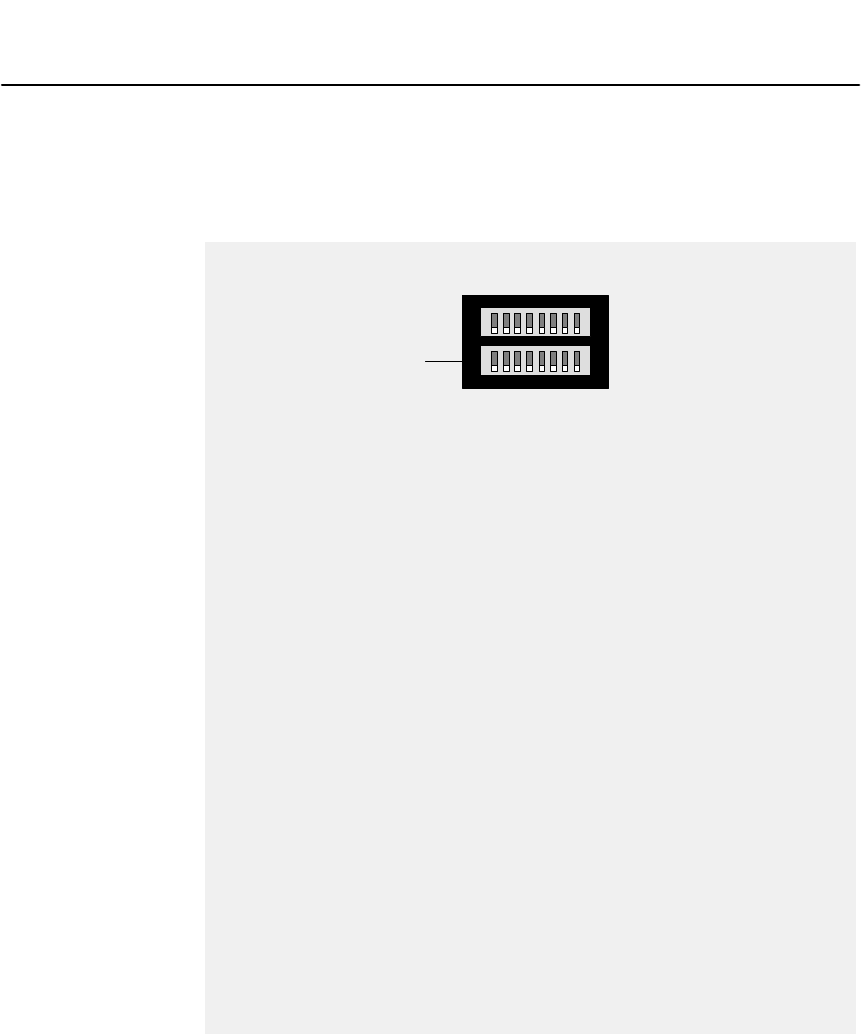
Configuring the Programmable Models 31007492
66
4.7 Setting the Modbus Plus Address
!
ADDRESS
SWITCH POSITION
1
2
3
4
5
6
7
8
9
10
11
12
13
14
15
16
17
18
19
20
21
22
23
24
25
26
27
28
29
30
31
32
123456
0
1
0
1
0
1
0
1
0
1
0
1
0
1
0
1
0
1
0
1
0
1
0
1
0
1
0
1
0
1
0
1
0
0
1
1
0
0
1
1
0
0
1
1
0
0
1
1
0
0
1
1
0
0
1
1
0
0
1
1
0
0
1
1
0
0
0
0
1
1
1
1
0
0
0
0
1
1
1
1
0
0
0
0
1
1
1
1
0
0
0
0
1
1
1
1
0
0
0
0
0
0
0
0
1
1
1
1
1
1
1
1
0
0
0
0
0
0
0
0
1
1
1
1
1
1
1
1
0
0
0
0
0
0
0
0
0
0
0
0
0
0
0
0
1
1
1
1
1
1
1
1
1
1
1
1
1
1
1
1
0
0
0
0
0
0
0
0
0
0
0
0
0
0
0
0
0
0
0
0
0
0
0
0
0
0
0
0
0
0
0
0
ADDRESS
SWITCH POSITION
123456
0
1
0
1
0
1
0
1
0
1
0
1
0
1
0
1
0
1
0
1
0
1
0
1
0
1
0
1
0
1
0
1
0
0
1
1
0
0
1
1
0
0
1
1
0
0
1
1
0
0
1
1
0
0
1
1
0
0
1
1
0
0
1
1
0
0
0
0
1
1
1
1
0
0
0
0
1
1
1
1
0
0
0
0
1
1
1
1
0
0
0
0
1
1
1
1
0
0
0
0
0
0
0
0
1
1
1
1
1
1
1
1
0
0
0
0
0
0
0
0
1
1
1
1
1
1
1
1
0
0
0
0
0
0
0
0
0
0
0
0
0
0
0
0
1
1
1
1
1
1
1
1
1
1
1
1
1
1
1
1
33
34
35
36
37
38
39
40
41
42
43
44
45
46
47
48
49
50
51
52
53
54
55
56
57
58
59
60
61
62
63
64
1
1
1
1
1
1
1
1
1
1
1
1
1
1
1
1
1
1
1
1
1
1
1
1
1
1
1
1
1
1
1
1
BM85
USE
LOWER
SWITCHES
1 = UP
0 = DOWN
Figure 16 BM85 Programmable Models: Modbus Plus Address Switches
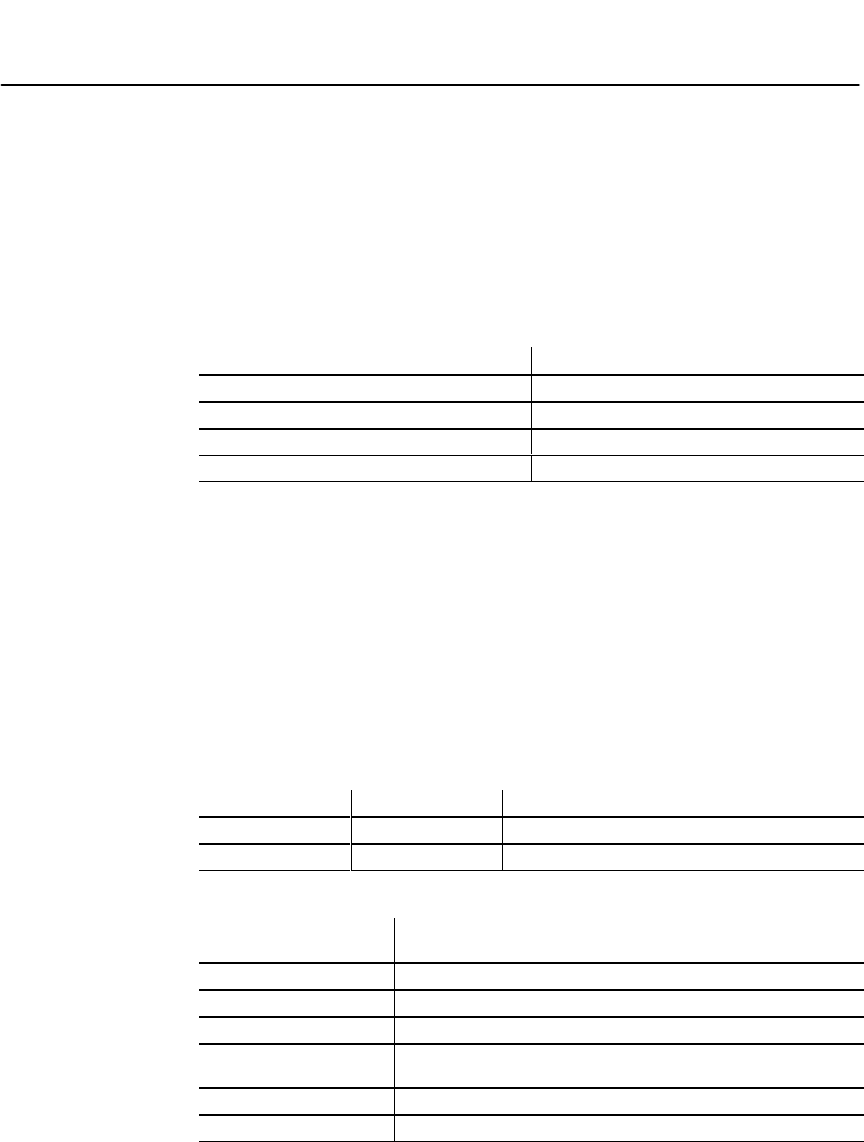
Configuring the Programmable Models
31007492 67
4.8 Indicator Codes During Downloading
# % " "!""# ! "! !
" " ! #!"!%!'!"!""#! !
" '#"! !%#
4.8.1 Normal Download Codes
! # %
Indication Meaning
Port 4 –– Flashing two times per second Ready for downloading
Port 3 –– ON intermittently Receiving download from host
Port 2 –– ON (combined with port 3) Writing to BM85 RAM
Port 1 –– ON (combined with port 3) Erasing BM85 RAM
4.8.2 Error Codes
# !# % "#! !"&"
#""!'! "" "!# " !
"" #!"%"! "%&"!
!""" !!%!"'"" !""
# ""'!%!"" !%""
% ""##!!"" !" " ""$'
"!"!"!""
Indicators Pattern Hexadecimal Digit
4 – 3 – 2 – 1 Steady Upper digit
4 – 3 – 2 – 1 Flashing Lower digit
Error Code
(Hexadecimal) Meaning
F1 BM85 kernel is reloading
F4 Program or task returned to BM85 bootstrap
F8 Program or task called abort()
FD Could not extend heap – program called malloc() or equivalent
and had insufficient memory
FE Could not create heap – not enough memory below code area
FF Not enough memory to copy program to RAM area

Configuring the Programmable Models 31007492
68
4.9 Setting the RUN Mode
4.9.1 When to Set the RUN Mode
"""""!!" " !'#$
!!"#" ' ""#!#!
"% ""!#! "!
"!"!"%"$'#
"!!!% !""#"
Caution:ąYou must complete the internal configuration of the
BM85 before making the unit active in your application, both
on the Modbus Plus network and at its serial ports.
If you are installing a BM85 that was previously configured for
another application, another network, or a different node, the
unit will still be retaining its previous configuration setup.
You must not connect the unit into the current application and
apply operating power to the unit until you have reconfigured
it for the current application.
4.9.2 How to Set the RUN Mode
'#!""#""$ '""'#$!"#"!
#! " " !#!#! !!!!
"!"
# % "" #"& !""!# "
!%"""!" "# "# "
!%""!""
'#$!""# " "' !
!""!"'#" ! ""#"""!"!""
%!"%% ! ""

Installing the BM85
31007492 69
Chapter 5
Installing the BM85
V
V
V
V
V
V
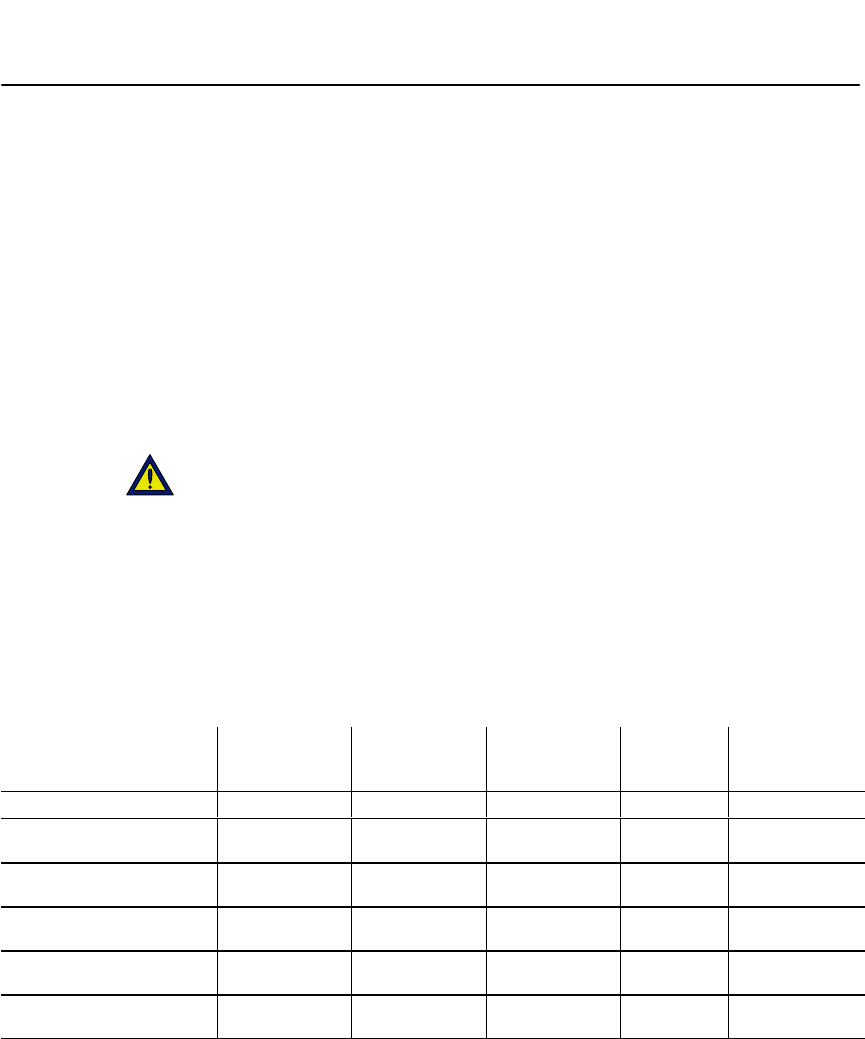
Installing the BM85 31007492
70
5.1 Installing the BM85 Hardware
5.1.1 Mounting the BM85
#%")(, ""%(#%+$* $%$%( /%$*")"%(,(* "
&$"%(%( $)*""* %$ $*%)*$( $(!$)*"".%+(+$ *
+) $*+ " $) $* %$%()"%(&$"#%+$* $%(
%((!#%+$* $
))*% $ *%()*%)%- *)%&(* $)**+)%+(
% %#%+$* $#*%)%+" $"+&(%&())%(%)(, $
*) $ *%()
%+)%+"")%&(%, ))*%*+$ *)((&$"%()** $*
)- *)%$$* $*")$)(, $
Caution:ąDo not connect the BM85 into your application
environment unless you have set its internal configuration.
Do not connect it to your network or to any device unless you
have set its switches properly for configuring or running.
** %$)$%(* ")%+**
%&(* $&%-($, (%$#$*$%$$*%(('+ (#$*)
5.1.2 Shelf/Panel Mounted Models
Part Number Mounting
Method
Operating
Power
(Nominal)
Modbus Plus
Network
Cable Serial
Ports Serial
Protocol
NW–BM85–000 Panel or Shelf 115/230 Vac Single Modbus ASCII or RTU
NW–BM85C002 Panel or Shelf 115/230 Vac or
24 Vdc Single or Dual Modbus ASCII or RTU
NW–BM85E232 Panel or Shelf 115/230 Vac or
24 Vdc Single or Dual RS232 Programmable,
User Defined
NW–BM85E485 Panel or Shelf 115/230 Vac or
24 Vdc Single or Dual RS485 Programmable,
User Defined
NW–BM85S232 Panel or Shelf 115/230 Vac or
24 Vdc Single or Dual RS232 Programmable,
User Defined
NW–BM85S485 Panel or Shelf 115/230 Vac or
24 Vdc Single or Dual RS485 Programmable,
User Defined
%+$* $ #$) %$)%*)#%")()%-$ $ +(

Installing the BM85
31007492 71
Horizontal Mounting
&++&$*,)&+ *$&#*!*!++.!+ '*&)$&,%+!%&%
&)!0&%+#'#+&)$&)* ##+ ,%!++&)#&./#-#+&##&.
-!.!%+ !%!+&)*&,%+!%)"+*)*,''#!.!+ + ,%!+&)
*,)!%!+&%+ &)!0&%+#*,)
Vertical Mounting
&)-)+!#$&,%+!%,*+ )"+**,''#!.!+ + ,%!+&)
&#+!%+&'%# )"+* -+*+ +!%*)+!%+&*#&+*')&-!
&%+ ,%!+*&++&$*,)&!+!&%# ).)!*)(,!)&)
*,)!%+ )"+*+&+ &,.!## -+&,)%!* ).)
&)&#+!%+ ,%!++&/&,)'%#&,)&#+*))(,!)/'!##/
*+%)$$$ !%*).*&)(,!-#%+)*+!*+&)/
%*+##+ ,%!++&)#&./#-#+&##&.-!.!%+ !%!+&)*
5.1.3 Rack Mounted Models
Part Number Mounting
Method
Operating
Power
(Nominal)
Modbus Plus
Network
Cable Serial
Ports Serial
Protocol
NW–BM85D008 19 in Rack 125 Vdc or
24 Vdc Single or Dual Modbus ASCII or RTU
NW–BM85D002 19 in Rack 125 Vdc or
24 Vdc Single or Dual RS232 Programmable,
User Defined
&,%+!%!$%*!&%*&+ *$&#*)* &.%!%!,)
"1$&,%+$&#*)*!%&)!%*+##+!&%!%+&*+%)1!%
)"&,.!## -+&,)%!* ).)&)&#+!%+ ,%!++&/&,)
)"&,)&#+*))(,!)
%$&,%++ ,%!+%*,''&)+!+*#/!+*)&%+$&,%+!%&#+*
+!*#! +%&, !%.! ++ +/&,&%&+ -+&')&-!))*,''&)+
.!+ !%+ )"
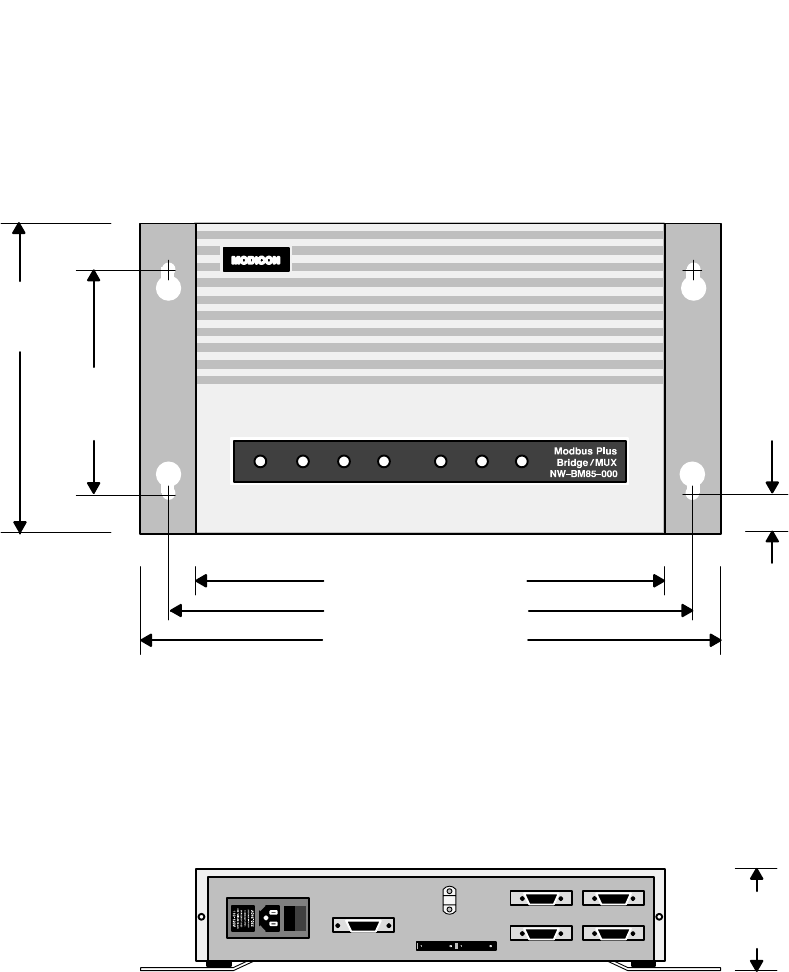
Installing the BM85 31007492
72
1.53 in
(39 mm)
TOP VIEW
REAR PANEL VIEW
14.08 in (358 mm)
12.83 in (326 mm)
11.5 in (292 mm)
5.25 in
(133 mm)
8.3 in
(211 mm)
2.59 in
(66 mm)
Allow 4.0 in (102 mm) rear clearance
for access to switches, cables, and fuse
Figure 17 Mounting Dimensions: Shelf/Panel Mount Models
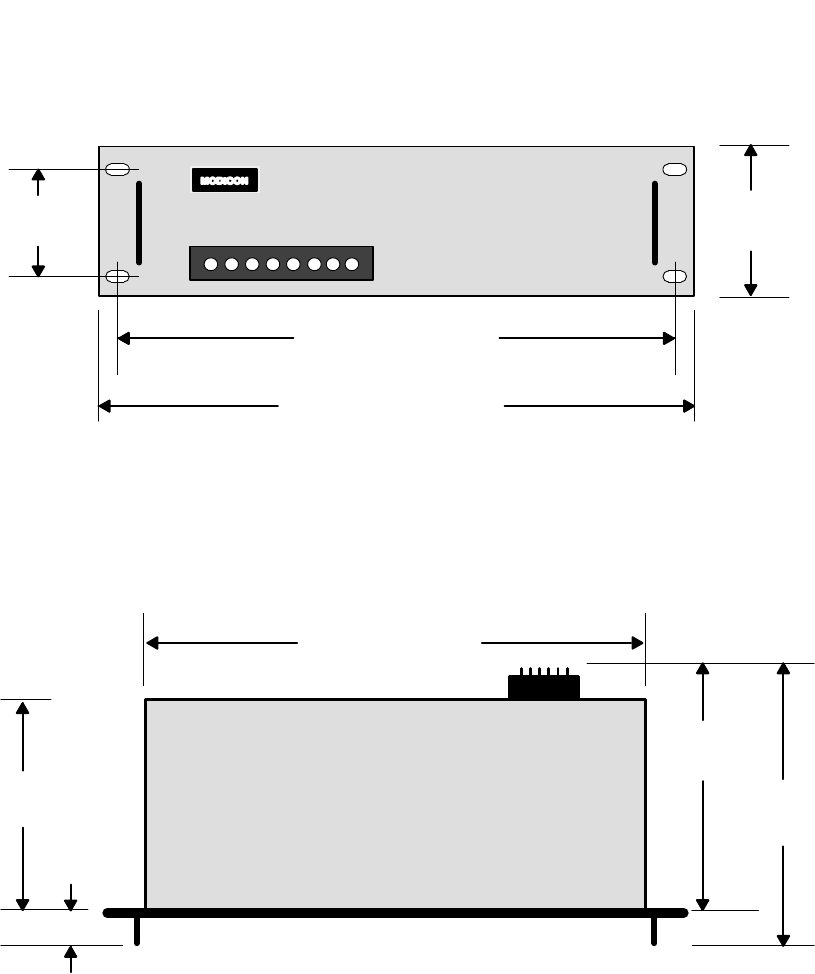
Installing the BM85
31007492 73
31007492OP VIEW
FRONT PANEL VIEW
19.0 in (483 mm)
17.25 in (438 mm)
Allow 4.0 in (102 mm) rear clearance
for access to switches and cables
3.47 in
(88 mm)
18.25 in (464 mm)
10.59 in
(269 mm)
8.48 in
(215 mm)
9.15 in
(232 mm)
3.0 in
(76 mm)
1.44 in
(37 mm)
Figure 18 Mounting Dimensions: Rack Mount Models
Installing the BM85 31007492
74
5.2 Connecting the Power Cables
See Sections 1.6 and 1.7 for details about the BM85
operating power and connector requirements.
Caution:ąYou can connect power cables to the BM85, but
ensure that the power is OFF before connecting the network
or serial cables to the unit.
AC/DC Models
AC/DC models are supplied with a power cable of 6 ft (2 m) length for
operation from 110-120 Vac or 220-240 Vac single-phase power. The
cable connects to a socket on the rear panel. Grounding is through the
cable. The ac line switch is located on the rear panel. The BM85
contains an ac line fuse that is accessible on the rear panel.
All of these models except the BM85-000 can also operate from an
external 24 Vdc source. Power connects to a socket on the rear panel.
Grounding is through the cable. The dc source must be switched and
fused externally to the BM85.
DC/DC Models
DC/DC models operate from a 125 Vdc or 24 Vdc source. Power connects
to a terminal strip on the rear panel. A grounding terminal is provided.
The dc source must be switched and fused externally to the BM85.
5.2.1 Connecting AC Power
Set the BM85 power switch to the `0' (power OFF) position. Connect the
BM85 to the power source. Set the power switch to `ā1ā' (power ON). The
unit's POWER indicator should illuminate.
Before connecting the network cables, set the power switch to the `0'
(power OFF) position. The unit's POWER indicator should not be lit.
5.2.2 Connecting DC Power
Set the external dc power source to OFF. Connect the BM85 to the
source. Set the dc power source to ON. The BM85 unit's POWER
indicator should illuminate.
Before proceeding with the connection of the network cables, set the dc
power source to OFF. The unit's POWER indicator should not be lit.
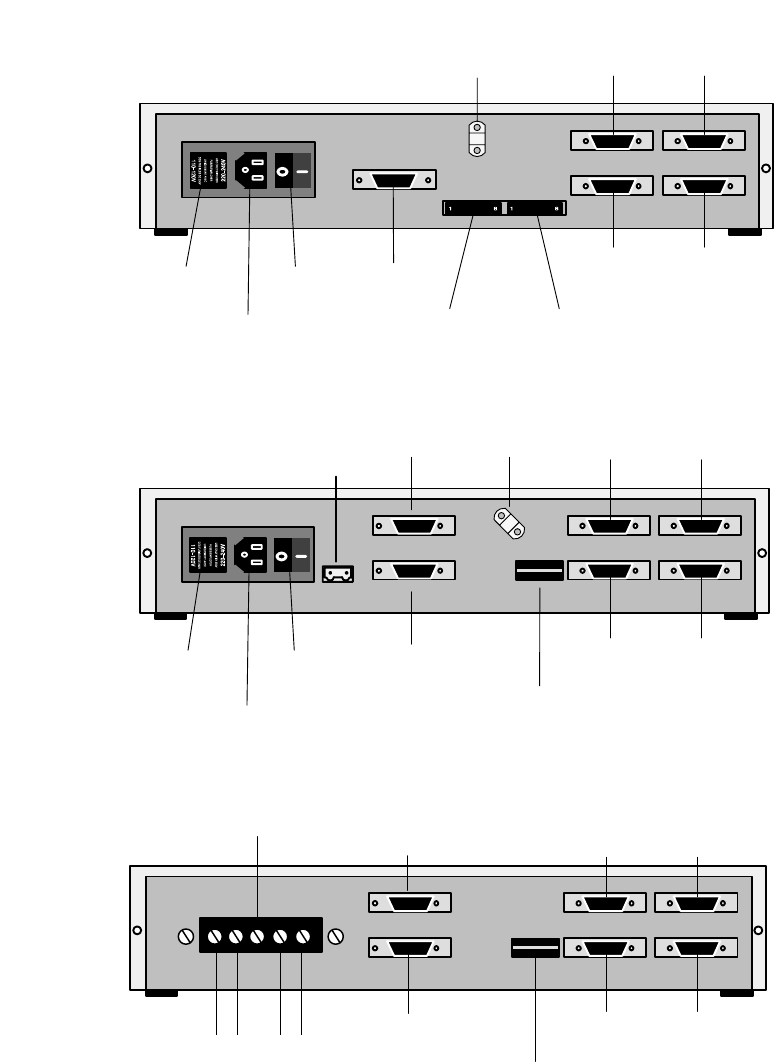
Installing the BM85
31007492 75
AC POWER
CONNECTOR
AC POWER
SWITCH
MODBUS
PLUS
SERIAL
PORT 4
AC POWER
SELECTOR
PLUG
AND FUSE MODBUS PLUS
ADDRESS SWITCHES
SERIAL PORT
SWITCHES
SERIAL
PORT 2
SERIAL
PORT 3
SERIAL
PORT 1
POWER CABLE
STRAIN RELIEF
Figure 19 BM85-000 Rear Panel (PV02 or earlier)
AC POWER
CONNECTOR
AC POWER
SWITCH
MODBUS PLUS
CHANNEL A
SERIA
PORT 4
AC POWER
SELECTOR
PLUG
AND FUSE (UPPER) SERIAL PORT SWITCHES
(LOWER) MODBUS PLUS ADDRESS SWITCHES
SERIAL
PORT 2
SERIAL
PORT 3
SERIAL
PORT 1
POWER CABLE
STRAIN RELIEF
MODBUS PLUS
CHANNEL B
24V DC
+ -
Figure 20 BM85C, BM85E, BM85S Rear Panel, BM85-000 (PV03 or greater)
MODBUS PLUS
CHANNEL A
SERIAL
PORT 4
+ -
125 VDC
(UPPER) SERIAL PORT SWITCHES
(LOWER) MODBUS PLUS ADDRESS SWITCHES
SERIAL
PORT 2
SERIAL
PORT 3
SERIAL
PORT 1
MODBUS PLUS
CHANNEL B
+ -
24 VDC
GROUND
Figure 21 BM85D Rear Panel
Installing the BM85 31007492
76
5.3 Connecting the Network and Serial Cables
%(!# $#! %!#$#!%! %##"
#" '($#"#!' %!!( &#$
V&#
V&#
V&#
%&%! $!(!#! % )%!%
%#! % $&#%! %! )%% %$%(!
$#($
Caution:ąIf you are connecting the unit to the network for the
purpose of communicating in your application, you must first
ensure that you have set the unit's internal configuration for
the specific site at which you are installing the unit. If you
have not done this, you must first configure the unit as
described in this guidebook.
If you are connecting the unit to the network for the purpose
of downloading its configuration from your host computer, you
must set the unit's rear panel switches for downloading . You
must do this before connecting the network cables, and before
applying operating power to the unit.
Caution:ąIf the network is active, communication between the
devices on the network will be affected as you connect the
BM85 to the network. Before connecting any device on an
active network, you should know the affect of connecting that
device.
Caution:ąIf the cables at the installation site are not labeled,
or if you do not have a layout diagram showing how to connect
the cables, obtain that information before proceeding.

Installing the BM85
31007492 77
5.3.1 Connecting a Single Network Cable
#'#!!#(+$& '$##(($)'!)'!($(
$)'!)'$##($&
5.3.2 Connecting Dual Network Cables
#)!!#(+$& '$##($)'!)'!'#($(
$&&($##($&'$#(&&%#! ')&($#(,(
$&&(!'#$##($&'
5.3.3 Connecting Dual-Cable Units on Single-Cable Networks
,$)&#'(!!#)!!)#($##(+$& (('$#!,
'#!!$##((!($(&&%#!$##($&
!)&"#(# $##($& $$# %&( #)"&
#($($##($&
5.3.4 Connecting Serial Port Cables
$##(('&!%$&(*!'($($)&$##($&'$#(&&
%#! ')&($#(,($&&(*!'#$##($&'
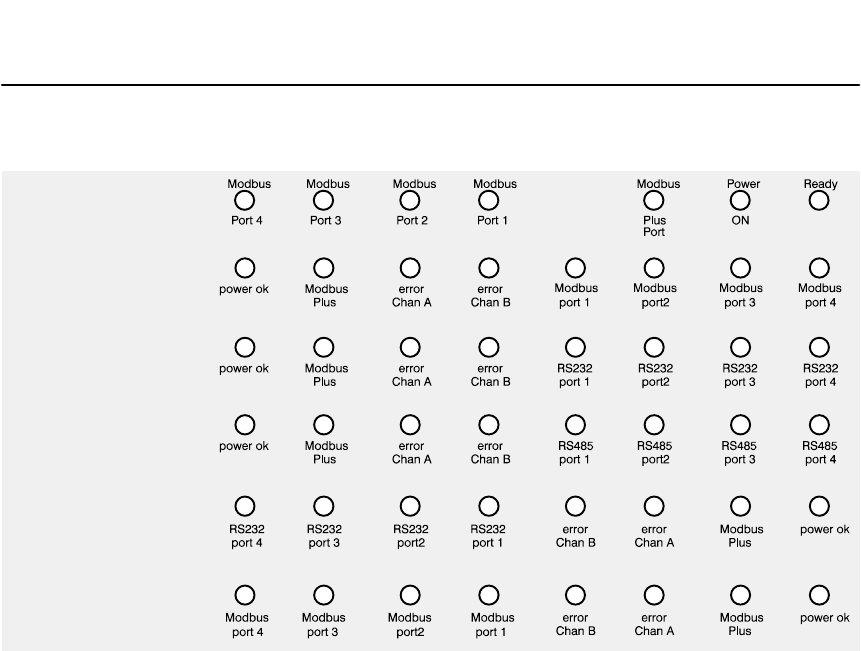
Installing the BM85 31007492
78
5.4 Reading the Indicators
!#/&+*&*!"%"*&()"))!&-%#&-
BM85–000:
BM85E232,
BM85S232:
BM85E485,
BM85S485:
BM85C:
BM85D002:
BM85D008:
Figure 22 Layout of the Indicators
5.4.1 POWER and READY Indicators
!"%"*&("##+$"%*))*"#/-!%*!!)'&-(
(&$*!)&+(%"*)"%*(%#'&-()+''#/")&'(*"% %&($##/
!"%"*&(&%#/"##+$"%*))*"#/-!%*!
!))+))+##/&$'#*"*)"%*(%#" %&)*")
5.4.2 Modbus and Serial Port Indicators
%*!&+)'&(*$&#)!&+)'&(*"%"*&(#)!)-!%
,#"$)) ")(",*"*)'&(*%"%*(%#+#*.")*)%((&(
'**(%")#)!!)&)(#")*"%*"&%
%*!'(& ($$#'&(*$&#)!'&(*"%"*&(")'(& ($$#
*&)!&-)**+)*!*"))'""*&*!''#"*"&%&)(#)!*&
)!&-)**+)+("% &-%#&"% !)&)(#")*"%*"&%

Installing the BM85
31007492 79
5.4.3 Modbus Plus Port Status Indicators
! *'"'",(*+!(/+,!(.*%%(&&-'","('
+,,-+,,!'(/(*"'",(*+(*
'"',"1**(*+(',!,/((-+%-+%
),!+
,!(*"'",(*%"'$+
&(&',*"%1","'",+,!,&++ **(*/+,,(',!
(-+%-+%),!+,1+,,"'",+!*-%,0"+,+
",!*"',!%(*"''(."('',,(",(&&-'","('
"+%(+,('('%),!,!(,!*),!(',"'-+'(*&%%1
!"'",(*%+!+*),",".),,*'+,(+!(/,!
'(+(&&-'","('+,,-+(',!(-+%-+',/(*$!
),,*'+*
Six Flashes per Second
!"+"+,!'(+'(*&%()*,"' +,,%%'(+(',!
',/(*$+!(-%%+!"' ,!"+),,*',!"'",(*"+
(',"'-(-+%1,!"+'(,,*'+&",,"' (',!',/(*$
One Flash per Second
!'("+(%"',*#-+,"' )(/*-)(*,*!*"'
&++ *(&'(,!*'(/",!,!+&',/(*$*++-)%",
*+++*'(,%%(/',!"++,,,!'(&('",(*+,!',/(*$
'-"%+,%(,".'(+,*&"'+"',!"++,,(*".
+('+,!',,&),+,( (,(",+'(*&%()*,"' +,,
Two Flashes, then OFF for Two Seconds
!'("+!*"' ,!,($'"' )++&(' (,!*'(+
-,"+'.**"."' ,!,($'!$,!',/(*$%"'$(*'()'(*
+!(*,"*-",(*,".,*&"',"('
Three Flashes, then OFF for 1.7 Seconds
!'("+'(,!*"' '1(,!*'(+,"+%"&"' ,!,($'
-,"'"' '((,!*'(,(/!"!,()++",!$,!',/(*$%"'$
(*'()'(*+!(*,"*-",(*,".,*&"',"('
Four Flashes, then OFF for 1.4 Seconds
!'(!+!*.%"&++ *(&'(,!*'(,!,"+
-+"' ,!+&*+++,!"+'(!'(*&"'+(%"'"'
,!"++,,+%(' +",(',"'-+,(!*,!-)%",*++,!
-)%",*++"+'(,!*(*".+('+,!'(,!'!' +,(
,!),,*'(('%+!.*1+('

Installing the BM85 31007492
80
5.5 Attaching Identification Labels
&& "$!&&&!!&&"! !"
! ! !#%!
$$!!!"!"
!! !!!!"!
! !!!!!! !"!
! $!% %
5.5.1 Modbus Plus Port Label
! !!" " !$"
%"# !!!! !!!
%!%!"!%"!
" $ !%"!!
Modbus Plus
Network
Node
Figure 23 Modbus Plus Port Label

Installing the BM85
31007492 81
5.5.2 Serial Port Parameters Label
MODBUS PORT 1 PORT 2 PORT 3 PORT 4
MASTER / NTWK /
SLAVE (ADDRESS)
ASCII / RTU
BAUD RATE
STOP BITS / PARITY
TIMEOUT (100’S ms)
MODEM BOOSTER
Figure 24 Serial Port Parameters Label

Compatible Devices and Cables
31007492 83
Appendix A
Compatible Devices
and Cables
V
V
V
V
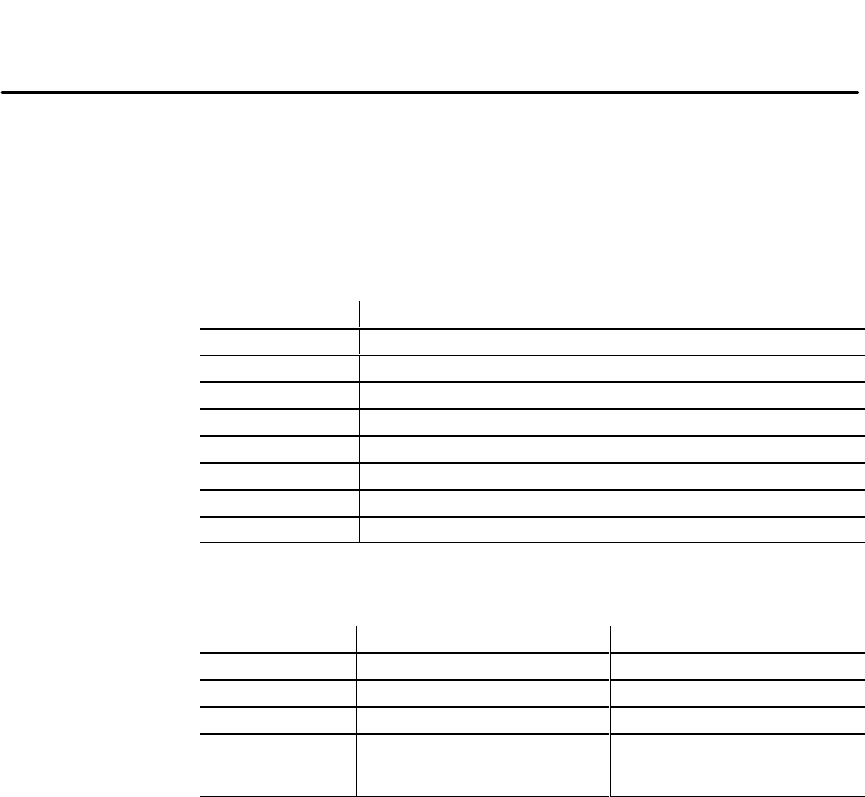
Compatible Devices and Cables
8484 31007492
A.1 Compatible Devices and Cables
A.1.1 Abbreviations
'$0$ !!/$3( 1(-,0 /$20$#(,1'$#$3("$ ,#" !*$*(01(,&,1'$" !*$
. /1,2+!$/0(,#(" 1$01' 1 " !*$*$,&1'-.1(-,(0 3 (* !*$
-,1 "15-2/-#("-,#(01/(!21-/%-/%2/1'$/(,%-/+ 1(-,
Modicon Devices and Cables
Abbreviation Meaning
J375 Modicon Micro 84 Modbus communication option
J474 Modicon 484 Modbus communication option
J478 Modicon Modbus network option
W190 Modicon 584 Modbus cable assembly, AS–W190–XXX
W807 Modicon 884 Modbus cable assembly, AS–W807–XXX
W952 Modicon 984–680 to IBM AT cable assembly, AS–W952–XXX
W953 Modicon 984–680 to P230 cable assembly, AS–W953–XXX
W978 Modicon 984 to Modbus modem cable assembly, AS–W978–XXX
Cable Adapters
Abbreviation Meaning Equivalent Part
9M9M 9–pin male to 9–pin male Jameco GC9M
25F9M 25–pin female to 9–pin male Jameco AD926
25F25F 25–pin female to 25–pin female Jameco GC25F
X25F9M 25–pin female to 9–pin male,
modified Jameco AD926
remove connection between
female pin 8 and male pin 1
# .1$/0 /$ 3 (* !*$%/-+ +$"-*$"1/-,("0'-/$4 5- #
$*+-,1$*$.'-,$
A.1.2 Making ‘Quick Connections’
'$ -#!20 *20 (,*(,$ "-,,$"1-/ -#("-, . /1 (0
02(1 !*$%-/+ )(,&0(+.*$0(,&*$14(01$#. (/.*200'($*#"-,,$"1(-,0
1 0$/( *.-/1
-20$ -#!20 *20 1$/+(, 1(,& "-,,$"1-/ (,
0$/( *" !*$ ..*(" 1(-,

Compatible Devices and Cables
31007492 85
A.1.3 Devices and Cables for Configuring Modbus Ports
,)),4(+&(0 )(01(+&,%",*- 1(!)$#$3("$0 +#" !)$01' 1" +!$20$#
%,/",+%(&2/(+&1'$-,/10,+1'$,#!20*,#$)00$,% +
,/",*-21$//$.2(/$0 1$/*(+ )$*2) 1(,+-/,&/ *02"'
0,/$.2(3 )$+1,/%2/1'$/(+%,/* 1(,+",+1 "1
1 01,/*$"'+,),&($0+",4+$/(3$,)2*!(
$)$-',+$
Device Cable and Adapter Combination
DEC VT100 (direct) BM85 – W953 – 25F25F – VT100
DEC VT100 (modem) BM85 – 25F9M – W978 – modem – modem – W978 – 25F25F
– VT100
IBM AT (direct) BM85 – W952 – IBM AT
IBM AT (modem) BM85 – 25F9M – W978 – modem – modem – W978 – 25F9F
– IBM AT
IBM XT (direct) BM85 – W953 – 25F25F – IBM XT
IBM XT (modem) BM85 – 25F9M – W978 – modem – modem – W978 – 25F25F
– IBM XT
A.1.4 Cables for Modbus Master Devices
Device Cable and Adapter Combination
P230 (direct) BM85 – W953 – P230
P230 (modem) BM85 – 25F9M – W978 – J478 – J478 – P230
P965 BM85 – 25F9M – P965
IBM AT BM85 – W952 – IBM AT
IBM XT BM85 – W953 – 25F25F – IBM XT
Modvue BM85 – W952 – J347 – Modvue
DEC VAX BM85 – 25F9M with following signals crossed: TX/RX, RTS/
CTS, DTR/DSR – VAX
A.1.5 Cables for Modbus Slave Devices
Device Cable and Adapter Combination
984–380/480/680/780 BM85 – 9M9M – W952 – 984
984A/B/X BM85 – W953 – 984
584 BM85 – 25F9M – W190 – 584
884 BM85 – X25F9M – W807 – 884
Micro 84 BM85 – X25F9M – W807 – J375 – Micro 84
484 BM85 – 25F9M – W978 – J478 – J474 – 484
184/384 BM85 – W953 – J347 – 184/384
J478 modem BM85 – 25F9M – W978 – J478 – J478 – Controller
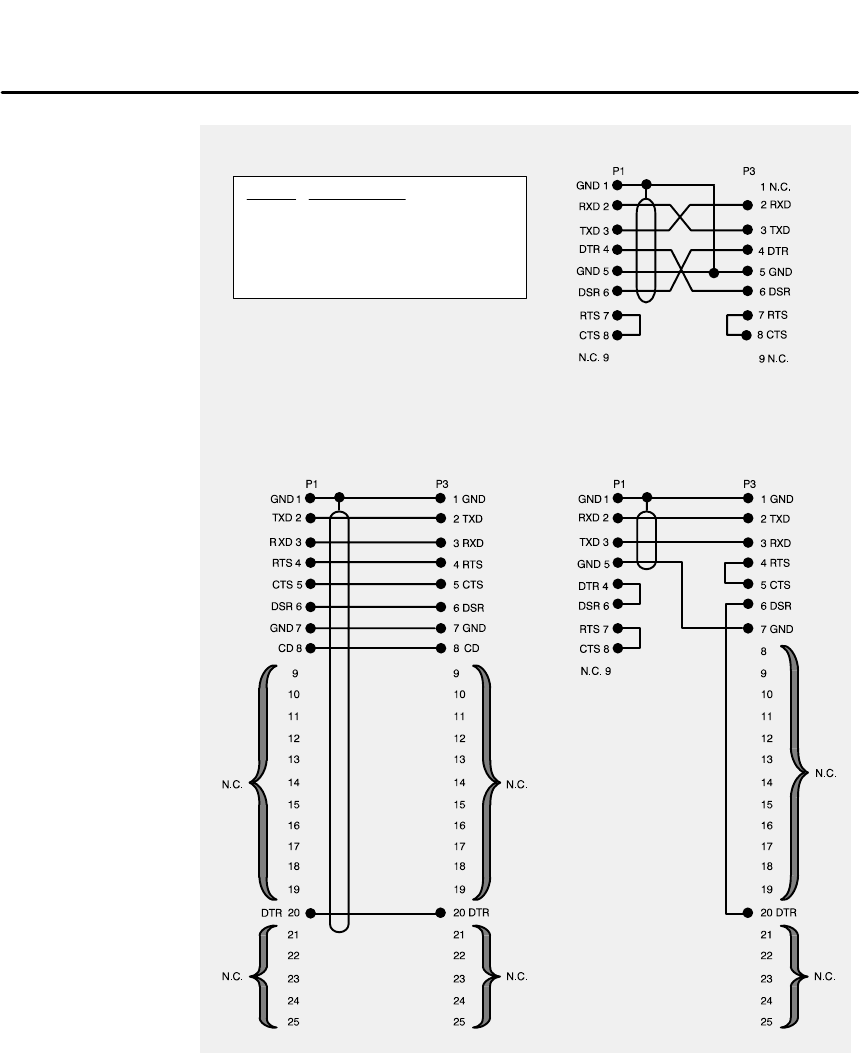
Compatible Devices and Cables
8686 31007492
A.2 Modbus/RS232 Cable Wiring Diagrams
W952
W953W978
CABLE APPLICATION
W978
W952
W953
MODEM
IBM AT
P230, DEC VT100, IBM XT
Figure 25 Modbus/RS232 Cable Wiring Diagrams
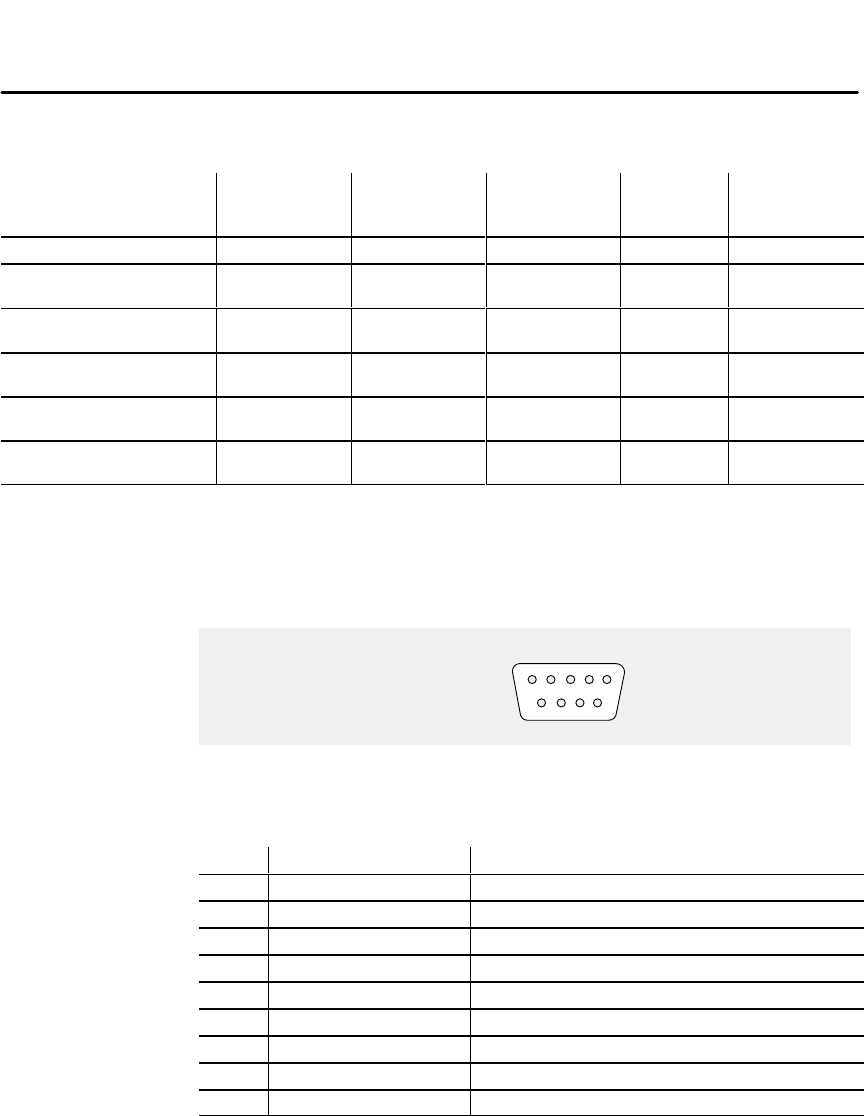
Compatible Devices and Cables
31007492 87
A.3 Modbus/RS232 Ports Pinout
!# ! ! "!!$
Part Number Mounting
Method
Operating
Power
(Nominal)
Modbus Plus
Network
Cable Serial
Ports Serial
Protocol
NW–BM85–000 Panel or Shelf 115/230 Vac Single Modbus ASCII or RTU
NW–BM85C002 Panel or Shelf 115/230 Vac or
24 Vdc Single or Dual Modbus ASCII or RTU
NW–BM85D008 19 in Rack 125 Vdc or
24 Vdc Single or Dual Modbus ASCII or RTU
NW–BM85E232 Panel or Shelf 115/230 Vac or
24 Vdc Single or Dual RS232 Programmable,
User Defined
NW–BM85D002 19 in Rack 125 Vdc or
24 Vdc Single or Dual RS232 Programmable,
User Defined
NW–BM85S232 Panel or Shelf 115/230 Vac or
24 Vdc Single or Dual RS232 Programmable,
User Defined
" $ !"!!" !
! %"! %"!!
! !%
54321
9876
REAR PANEL
SERIAL PORT
CONNECTORS
Figure 26 Serial Ports Pinout – Modbus/RS232
Pin BM85 Direction Purpose
1 –– Chassis ground
2 In Receive data
3 Out Transmit data
4 Out Data Terminal Ready
5 –– Signal ground
6 In Data Set Ready
7 Out Request To Send
8 In Clear To Send
9 –– not used
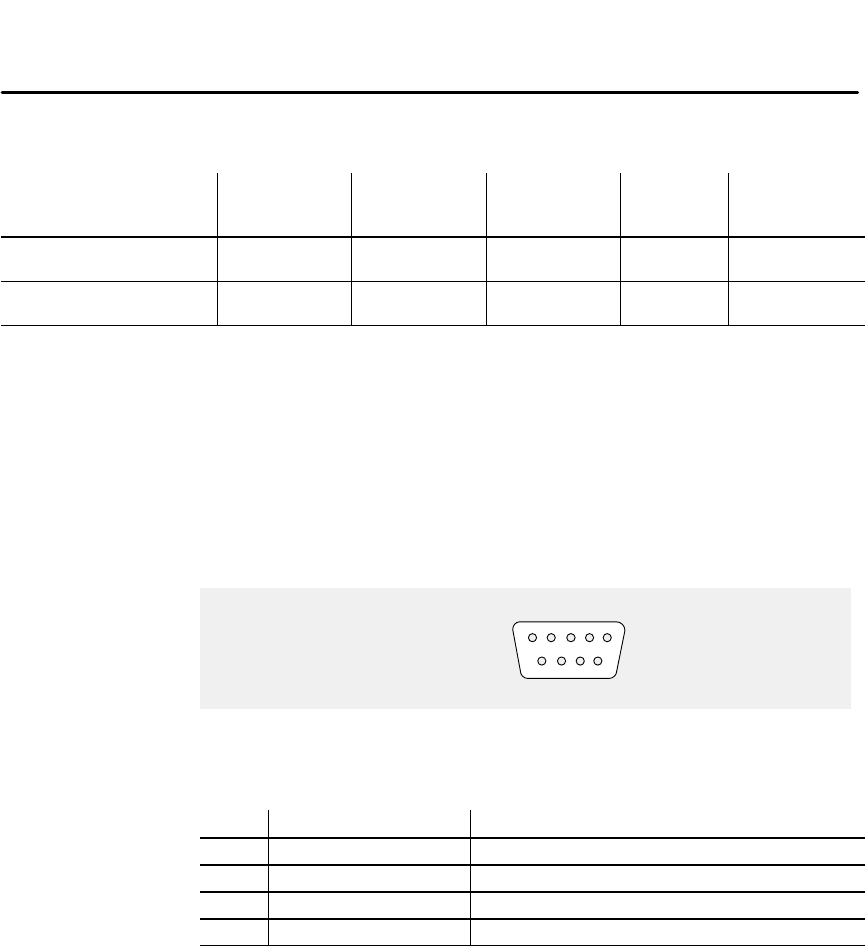
Compatible Devices and Cables
8888 31007492
A.4 RS485 Ports Pinout
!"))*"&%&,()*!)("#'&(*)'"%&+*&(*!&##&-"% $&#)
Part Number Mounting
Method
Operating
Power
(Nominal)
Modbus Plus
Network
Cable Serial
Ports Serial
Protocol
NW–BM85E485 Panel or Shelf 115/230 Vac or
24 Vdc Single or Dual RS485 Programmable,
User Defined
NW–BM85S485 Panel or Shelf 115/230 Vac or
24 Vdc Single or Dual RS485 Programmable,
User Defined
" +()!&-)*!'"%&%" +(*"&%&(*!'&(*&%%*&()
.&+(("*"% #)&(.&+(''#"*"&%*!'%#&%%*&(")
! &+) #+) "%#"% &%%*&( '(* %+$( ") %
'*#)+)*"*+*&(%#&%%*&(&+)
&+) #+) *($"%*"% &%%*&( "% *!")
''#"*"&%
54321
9876
REAR PANEL
SERIAL PORT
CONNECTORS
Figure 27 Serial Ports Pinout – RS485
Pin BM85 Direction Purpose
1 –– Chassis ground
2 In/Out Receive/Transmit A
3 In/Out Receive/Transmit B
4 ... 9 –– not used

Glossary 89
31007492
Glossary
acknowledgement
&*%,!,"&",+,!,,*%!+&*".
'**,$1
address
&&,/'*#,!"&,"","'&'+,,"'&&*%
*'-("& '",+,!,"&,""+,!*%++'-*'*+,"&,"'&
ASCII
%*"&,&*''*&'*%,"'&&,*!& " ",$
'"& '$(!&-%*"&'&,*'$!*,*+++,$"+!1,!
%*"&,"'&$,&*+&+,",-,
baud rate
!+(',,*&+%"++"'&"&+*"$,'%%-&","'&+
((*'0"%,$1)-$,',!&-%*''$%&,+",+(*
+'&
bit
"&*1" ",!+%$$+,-&",',/!"!&,&1,"%"&
'&',/'('++"$+,,+*(*+&,1.$-''*
bridge
.",!,"&,*'&&,+,/''*%'*&,/'*#+
Bridge Multiplexer
'"'&.",!,"&,*'&&,+'-+$-+&,/'*#/",!
-(,''-*'-+."+'*&,/'*#+'*-(,''-*'*
+*"$."+

90 Glossary 31007492
Bridge Plus
% %$, ** $*(%$$*)*-%%+)"+)$*-%(!)
broadband
$*-%(!%##+$ * %$)#*%)+&&%(* $#+"* &"*
*($)# )) %$$$")+) $('+$/ , ) %$#+"* &". $
bus
$"*( "$$"+)*%)$%(( ,*
carrierband
$*-%(!%##+$ * %$)#*% $- $%(#* %$ )
*($)# **+) $) $"*($)# )) %$$$"
channel
%##+$ * %$&*-/*-$*-%%(#%(, )
coaxial cable
*-%%$+*%(" $- $ $$(%$+*%( )*) $"
&*$$%+*(%$+*%( )) " "*( )&(*)*
*-%%$+*%()
Co-Processor
( +"* &".(#%")$)
#%")%$* $+)(0 $&&" * %$&(%(#**$
$&$$*"/%$*(%"&(%)))** (%+()( "&%(*))) $
%+)"+)$%)%$"/)('+ (
CRC
/" +$$/! $$((%(** %$#*% $-
)$ $)** %$%#&+*)#*#* ","+( ,(%#*
(#)%$*$*)$)$) *)$ " $*(#
( , $)** %$(%#&+*)*,"+) *( ,)*(#$
%#&() **%*( ,,"+**-%,"+)('+"*
(# )))+#*%,$( ,- *%+*((%(
data frame
$(#%$* $ $**%*($)((*-$, )
Data Link Layer
$*#%"*"/(**&(%, ))(, )%(*($)(( $
(#)%**-$$%)%$*-%(! $/*
)*$(** )"/()$ $, ))#")* $*%
#))&!*- *()))$ $%(#* %$%(((%(
! $$")*%!$)%()) $*$*-%(!$)$)*
&!**%*/) "/(%(*($)# )) %$*)*-%"% "
$* * )(*$)+"/()$

Glossary 91
31007492
DIO
DIO Drop Adapter
Distributed I/O
%#%#$' "$$ ##$# "'" ! $#$$
"#!)# "+#! $" !%$**%$!%$
&#$" $#$#%#$"!" ##$' "
# " " $" " " %#%#$' "
!$ %$$ !"$##$#$" $" $
$' "$' "# # " "!$"#
!$$" $!$#$#!$ #!"#$
$' "(###%"$!##
$ "#
download
$"#" !" "" &$ $" "(%$
drop cable
%#$ $$' " &$ $! $
$"%" !#"&&" %#$#"
duplicate frame
""&$'%# '$'# #$
end delimiter
$$#$ ##
EIA
$" %#$"### $
field
" %! $% %#$#$$ &)
"$ #%#$#$"$ " ##"##$
""" "
frame
" %! $% %#$# "$"### ##
frame check sequence
$$#%#$ $"'$""'#"&
""$)

92 Glossary 31007492
frame descriptor
)+-( -""(,-(&).-+,. +,-+.-.+-"-%#'$,
-+',&#--(++#/- +&,-())+()+#-)+#(+#-2*..,
+&,+#)-(+,('-#' +&)+&-+, +&,--.,
')(#'-+,
Global Input
-2)( -#').-+#/2'(.,#'!+()-
-+', +,(,.,#'!+()'(' #!.+-(+#/.)-(
4#-0(+,( %(%').-- +(&"( .)-(,(.+
'(,.)-(&1#&.&-(-%( 0(+,'(&#'!- +(&
",(.+'('#'1#'-(.)-(#!"- #%, (+%#/+2
#'-(,)+--,-#'-#(',#'-"+#/#'!'(
Global Output
-2)( -(.-).-,'-2'(.,#'!+()--+', +,
(,.,#'!+()'(' #!.+-(,'.)-(4#-
0(+,( %(%.-).--0"#"#,!%(%%2+(,--(%%
-#/'(,('-"'-0(+$,-#'-#(''(,'(' #!.+
-()-(+#!'(+#'(&#'!- +(&,)# #,(.+'(,
HDLC
#!"4%/%-#'$('-+(%")+-( -"/#-"-)+ (+&,
-")+(-((%, (+ #'#'!-"!#''#'!''( +&
,2'"+('#3#'!-" +&-0','+'+#/+)+(/##'!
++(+"$#'!' #'#'!-")(+-#('( -"+#/
#' (+&-#('-"-#,-("$2-"
host computer
(&).-+0"#"('-+(%,(-"+(&).-+,'/#,''
#'.,-+#%)+(,,0#-"'-0(+$#'!-""(,-(&).-+,)# #,-"
.++'-+*.#+&'-, (+-"()+-#('( +&(-'(,'#,-"
,-#'-#(' (+,.&&+2-+)(+-,(.--")+ (+&'( -"
)+(,,
IEC
'-+'-#('%%-+#%(&&#,,#('
IEEE
',-#-.-( %-+#%'%-+('#,'!#'+,
ISO
'-+'-#('%-'+,+!'#3-#('

Glossary 93
31007492
LAN
"%'*"%!!'%"!!'"!")&!*'&
'%!&%%*'"(''(&"#(" (!'"!&&%)&
"(&(&&!+ #""%"!'%"!! "!'"%!
!(&'%#%"&&&
layer
!'"#"%'"!"'&'%('(%")*
#%")&!&%)&"%''%!&%%!"!"% '"!
!
LLC
"!"!'%"#%'"')''#%"% &'
#%"'""&"%!',!(&%&"'!'*"%!"%#%")!
%% )%,!&'% !!!
" &&&
MAC
( "%&&"!'%"#%'"')''
#%"% &'#%"'""&"%&%!'!'*"%*'"'%)&
!&'$((!!'%!& &&"!""('"!
) &&&%&&%"!'"!"%!" ! &&&!
%&"('"!"&&"!'!'"!&
MAP
!('(%!('" '"!%"'""!'*"%#%"'""''
"*&)&"%&*'!!!(&'%!)%"! !''"
" (!'*'"'%
master
!'*"%)*"!'%"&"'%)&'"*'
"!!'&'!''&'%!&'"!&!&(&!'%!& '&
'&&'"&))
medium
!'%&,&' '!'*"%'#&"!!'"%&!
'% !'"%&
Modbus
!!(&'%!'*"%!&,&' ''(&&&%
&'%-&)" (!'"!&'''%!&%%'&"(#'"
(
Modbus Plus
!!(&'%!'*"%!&,&' ''(&&'"!-#&&!
#%-'"-#%" (!'"!&'''%!&%%'&""! '&
#%&"!!'*"% ( &&'*&'-#%

94 Glossary 31007492
Modbus II
$"#!#&!"("###$""#*""
!*#*!$#"###!"!!#"%#"
!"#&!$"'
modem
$#!$#!%###"##!
#!""""#!#"$#
""!%!##!$""##
network
#!#%""!##
!#!$#$"$"#%""!
#""#!#" $#""!
""""
Network Option Module
!&!$##"$##
##!&#!!#!!$#&##
#!!%!#$#"##
$"$"#&!!%"##!#!
$##&##!!"#!!
#%"##&!
node
%##"!##""#$#"
#&!$"$"(%##"("(#
###&!
OSI Model
("#"#!#!!"#!
"!#! $!!!%"!#
$#!$(##!##!"
!)#
Peer Cop
#!*#*!$##&#&!
%"&#"#!"!!"!##""#"
#&""""####&!"
!""" $$!##!"##
####"#!##"""
$!#'#!##!#"!"#$!!
#!"!""!##!#$!##$
$"!""#(!#%##&!$!
"!$##!"#$!
#"""

Glossary 95
31007492
peer-to-peer communication
#!!)"(#"(+""(+#&*'"+"-*
""((((&"'&!(#)'-*'#"#&!"
(#(# '#(!(#)'#"#)' )'
Physical Layer
"(!# ( -&(($&#*'($-' #""(#"
"'" "!"'(+""#'#"(+#&"-(
'("&
port
,(&" #""(#&#"*(+("(+#& '
((
protocol
'(#&) ')'!)() --(+##&!#&*'(#
#!!)"(
Repeater
##"*(("(&#""('(+#'(#"'##)' )'
"(+#&
routing path
"#)' )'('%)"#*"#&'''(&#)
+!''+ &#)((#('" '("(#"
routing path field
"#)' )'!''&!&#)$#*-('(('$-
(&'''#(*'"(!''&#)("$(
RS232
"'("&(("''" &%)&!"('"
#""(#"'#&'& (#!!)"(#"'&(&.-'"
+&'#&(&"'!((("&*(
RS485
"'("&(("''" &%)&!"('"
#""(#"'#&'& (#!!)"(#"'&(&.-
"$&#+&'#&#((&"'!(("&*(
section
#"()#)'&#)$"# '!"('(#(&+((&"#
*'#""(&( -(##&!'" $(((#'"#($''
(&#)"-$(&!"!)! "(#'(#""
//(//!('!'#"'!"(!,!)! "("
(!"'(#"')$$#&(')$(#"#'

96 Glossary 31007492
segment
#!"(#"##"(")#)' "(#(&)" #""("
$&#($'((+#($'"(&#$ '(+"((+#
($'"(&"#*'"#&!#&'!"('#&!'(#"
#("(+#&"
serial port
"#!!)"(#"$#&((+('(&"'&&#"((
(!
slave
"(+#&*+'#"(&# -"#(&* *
*'#"#("((((&"'(#"'-&'$#"(#
#!!"'#&&%)'('"((-!'(&*
slot time
!#)"(#(!&$&'"("(+#&'('(!"-'((#"
#"("(+#&!)'(+(#&&'$#"'&#!"#(&'((#"('
')$#"(&'$#"'(!#("(+#&'' #+'('((#""
()'$&#$(#" -
Specific Input
(-$#("$)(&*-"#)'"&#$(
(&"'&'#')'"&#$"#")&(#&*)$(#
/(+#&'#$"$)((&#!#)$(#'#)&
"#')$(#!,!)!(#( #+#&'#'"
#")&(#$(#&"#&"#!"(&#!'$'#)&
"#'
Specific Output
(-$#(#)($)('"(-"#)'"&#$((&"'&'
#')'"&#$"#")&(#'")$(#/(
+#&'#$)($)(((##)$(#'("(#""#'
)$(#!,!)!(#( #+#&'
splitter
$''**(( #+' (#&#)("(#!) ($ $('
+(''"( -%) '" !$ ()"$(#()'+(
#)' )'
start delimiter
(("'('(&(#&!#)&&"(&('"
'"(("'-"&#".-(&*""#

Glossary 97
31007492
system
tap
terminator
!
token
!
token bus
transaction
trunk
!
!

Index
31007492 99
Index
A
, --$("
2'*& -
)/-, --)(0 ,-$)(
)()/-&/-
B
0$&& ') &-
$(.,)/.$)(
)/-*),.') &-
*,)",''& ') &-
-* $!$.$)(-
C
& -
!),- ,$&*),.-
( .1),%)(( .$)(-
*)1 ,)(( .$)(-
- ,$&*),.)(( .$)(-
1$,$("$",'-
)(!$"/,.$)(
)(!$"/,.$)()0 ,0$ 1
0 &)*' (.-)!.1,
0$&$&$.3
-,$*.$)(
$(-.&&$("
*,.(/' ,-
!$&
)1(&)$(".)
)/-*),.') &-
)''(-
)''/($.$)(-*,' . ,-
)(!$"/,.$)()0 ,0$ 1
!/&.- ..$("-
0$ -(& -
$(%$' )/.*,' . ,
)/-, --*
) '))-. ,*,' . ,
*),.*,' . ,-
),.,$),$.3*,' . ,
),.3* *,' . ,
')
&0 0$ , --*,' . ,
*,)",''& ') &-
)(!$"/,.$)()0 ,0$ 1
')
, +/$, +/$*' (.
!),)/-*),.') &-
!),*,)",''& ') &-
D
0 &)*' (.-)!.1, )(!$"/,.$)(
$' (-$)(-
,%')/(. ') &-
-# &!*( &') &-
)1(&)$("
,,),) -
(),'&$($.$)(-
*, *,$(".#
E
,,),) -
)/-*),.') &-
*,)",''& *),.') &-
F
!,)(..)*0$ 1
,%')/(.') &-
-# &!*( &')/(.') &-
I
$($.),-
)/-( ,$&),.-../-
)/-&/-( .1),%-../-
)1 ,( 3-../-
L
& &-
!),*),.$ (.$!$.$)(
, +/$, !),& -
31007492
Index
100
M
&+)#+)&$$+%!*!&%
&,(,!-
)**+)!%!*&()
&+)#+)%*-&("(&+*!%'* )
&!&%
+)*&$((,!
$&+%*!%$* &)
&(!/&%#$&+%*!%
&,(,!-
("$&+%*$&#)
) #'%#$&#)
,(*!#$&+%*!%
N
%*-&("#)&%%*!%
O
&'(*!%'&-(
&%%*!&%)
&%%*!%
&%%*&(#.&+*)
&%%*!&%)
&,(,!-
&,(,!-$&#)
P
'(*%+$()
$&#)
#)
,#&'$%*)&*-(
R
(('%#,!-
$&
&+)'&(*$&#)
'(&($$#$&#)
S
)(%)&+)'&(*$&#)
)(%
)(%
)(%
)(!#'&(*#)&%%*!%
)(!#'&(*)
,!)%#)
&+)'!%&+*
'!%&+*
)!#%*$)*('&(*
)'!!*!&%)
$&#)
$&#)
)-!* )*+'
&+)'&(*$&#)
'(&($$#$&#)
T
*&'(&%*,!-
("$&+%*$&#)
) #'%#$&+%*$&#)
