SecureKey Technologies TCL01 RFID USB KEY User Manual SecureKey Token Manual

SecureKey Technologies Inc. RFID USB KEY SecureKey Token Manual

Users Manual

     This document is the property of SecureKey Technologies Inc. (SecureKey).  All information in this document is confidential and proprietary to SecureKey. SecureKey  Technologies  Inc  reserves  the  right  to  make  changes,  without  notice,  to  any  product herein to improve reliability, functionality, or design.  SecureKey Technologies advisesto obtain the latest version of device data sheets to verify, before placing orders, that the information is current.   Information provided by SecureKey Technologies is believed to be accurate and reliable.  However, SecureKey  does  not  assume  any  liability  resulting  from  the  application  or  use  of  any  product described within.  Published by: SecureKey Technologies Inc.36 York Mills Road, Toronto, M2P 2E9  Copyright 2006-2010 SecureKey Technologies Inc.  All rights reserved. USING YOUR SECUREKEY Date Created: January 27, 2010 Author:  Pierre A. Roberge  VVeerrssiioonn  11..44    This document is the property of SecureKey Technologies Inc. (SecureKey).  All information in this document is confidential and proprietary to SecureKey. SecureKey  Technologies  Inc  reserves  the  right  to  make  changes,  without  notice,  to  any  product herein to improve reliability, functionality, or design.  SecureKey Technologies advisesto obtain the latest version of device data sheets to verify, before placing orders, that the information Information provided by SecureKey Technologies is believed to be accurate and reliable.  However, me  any  liability  resulting  from  the  application  or  use  of  any  product SecureKey Technologies Inc. 2010 SecureKey Technologies Inc.  All rights reserved.  This document is the property of SecureKey Technologies Inc. (SecureKey).  All information contained SecureKey  Technologies  Inc  reserves  the  right  to  make  changes,  without  notice,  to  any  product herein to improve reliability, functionality, or design.  SecureKey Technologies advises its customers to obtain the latest version of device data sheets to verify, before placing orders, that the information Information provided by SecureKey Technologies is believed to be accurate and reliable.  However, me  any  liability  resulting  from  the  application  or  use  of  any  product
LAST SAVED ON 12/07/2010  SECUREKEY TOKEN MANUAL   STRICTLY CONFIDENTIAL AND PROPRIETARY TO SECUREKEY TECHNOLOGIES INC.   2 OF 8
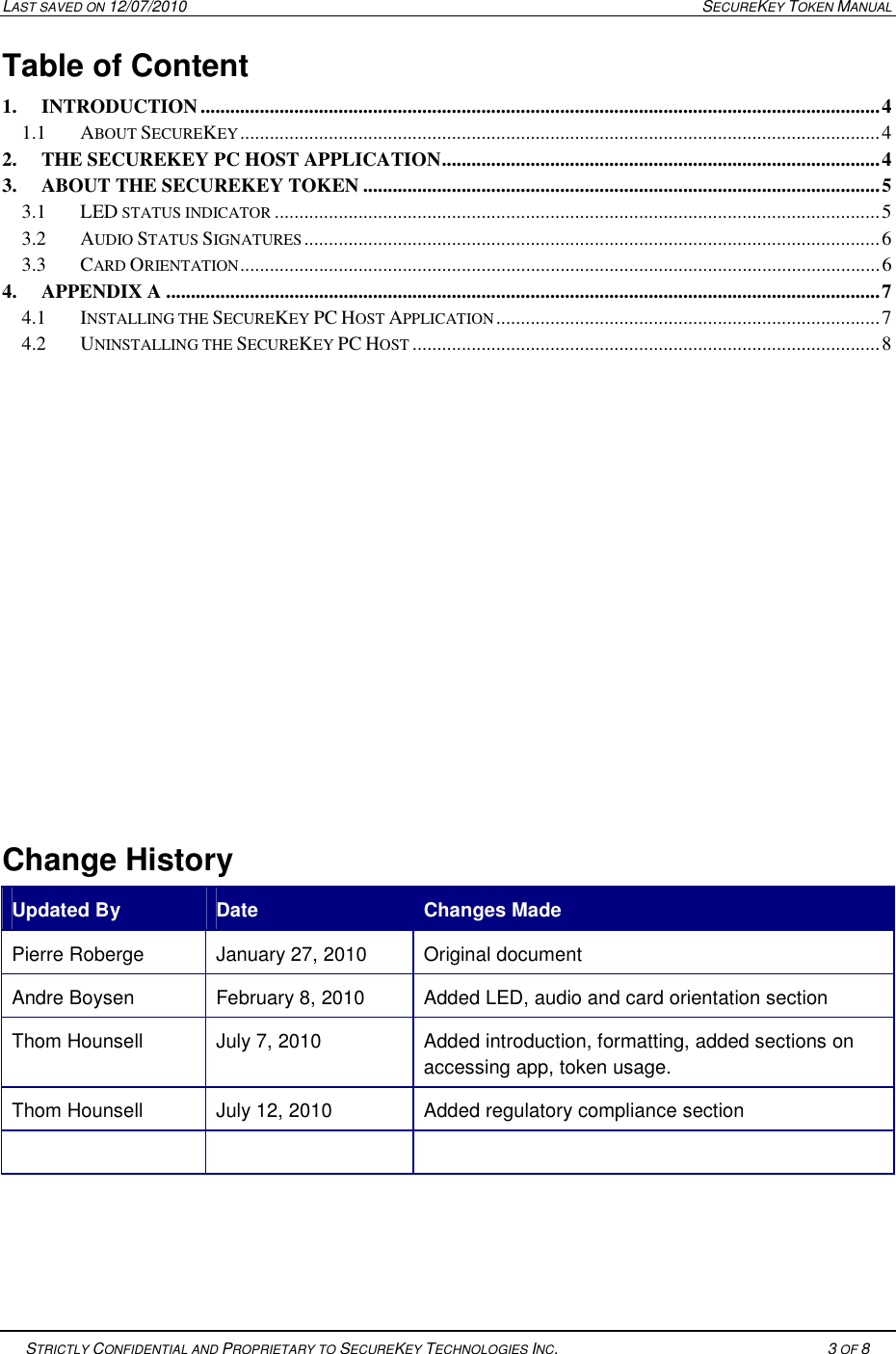
LAST SAVED ON 12/07/2010  SECUREKEY TOKEN MANUAL   STRICTLY CONFIDENTIAL AND PROPRIETARY TO SECUREKEY TECHNOLOGIES INC.   3 OF 8   Table of Content  1. INTRODUCTION .......................................................................................................................................... 4 1.1 ABOUT SECUREKEY .................................................................................................................................. 4 2. THE SECUREKEY PC HOST APPLICATION ......................................................................................... 4 3. ABOUT THE SECUREKEY TOKEN ......................................................................................................... 5 3.1 LED STATUS INDICATOR ........................................................................................................................... 5 3.2 AUDIO STATUS SIGNATURES ..................................................................................................................... 6 3.3 CARD ORIENTATION .................................................................................................................................. 6 4. APPENDIX A ................................................................................................................................................. 7 4.1 INSTALLING THE SECUREKEY PC HOST APPLICATION .............................................................................. 7 4.2 UNINSTALLING THE SECUREKEY PC HOST ............................................................................................... 8            Change History Updated By  Date   Changes Made Pierre Roberge  January 27, 2010  Original document Andre Boysen  February 8, 2010  Added LED, audio and card orientation section Thom Hounsell   July 7, 2010  Added introduction, formatting, added sections on accessing app, token usage. Thom Hounsell  July 12, 2010  Added regulatory compliance section
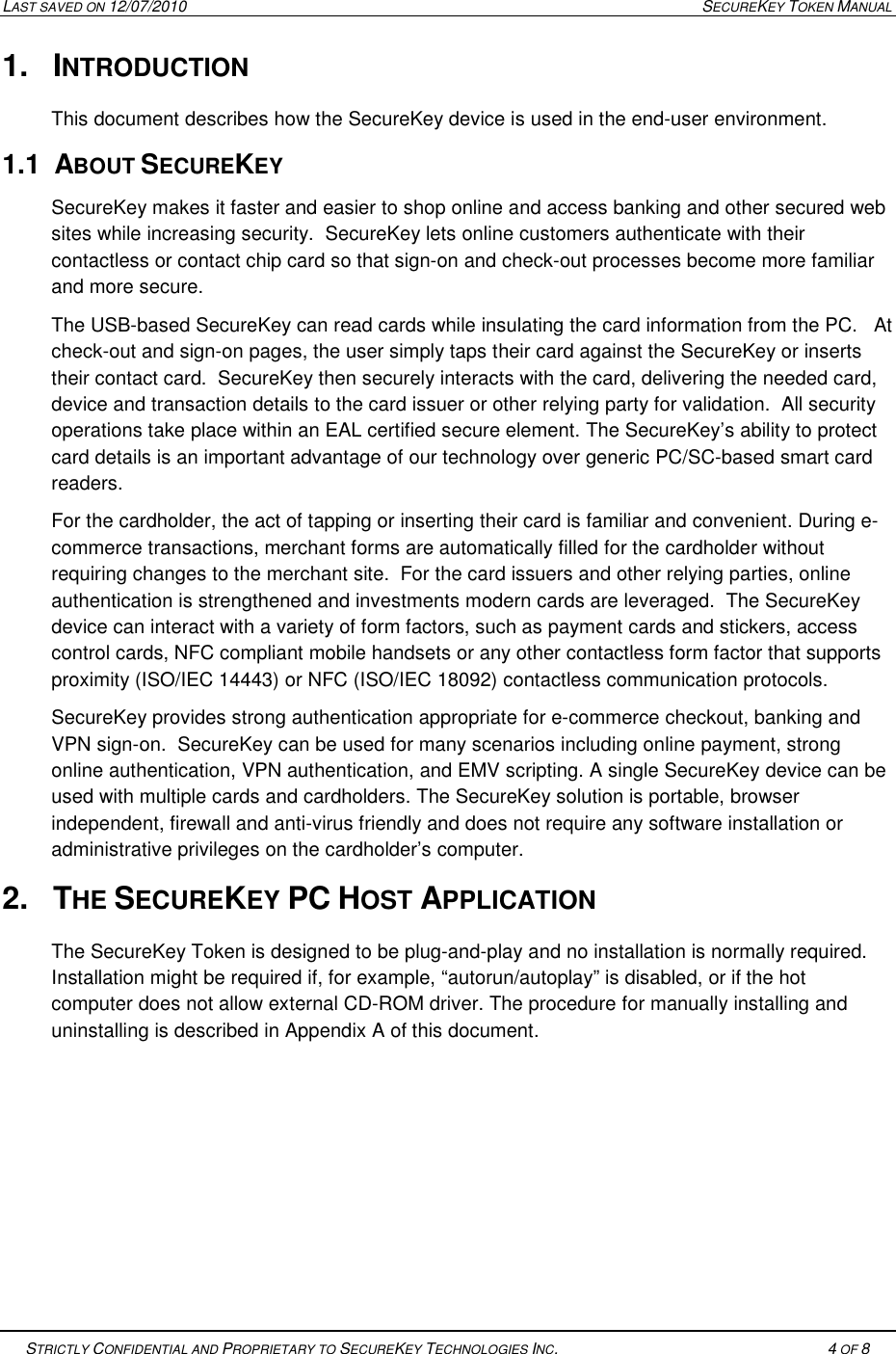
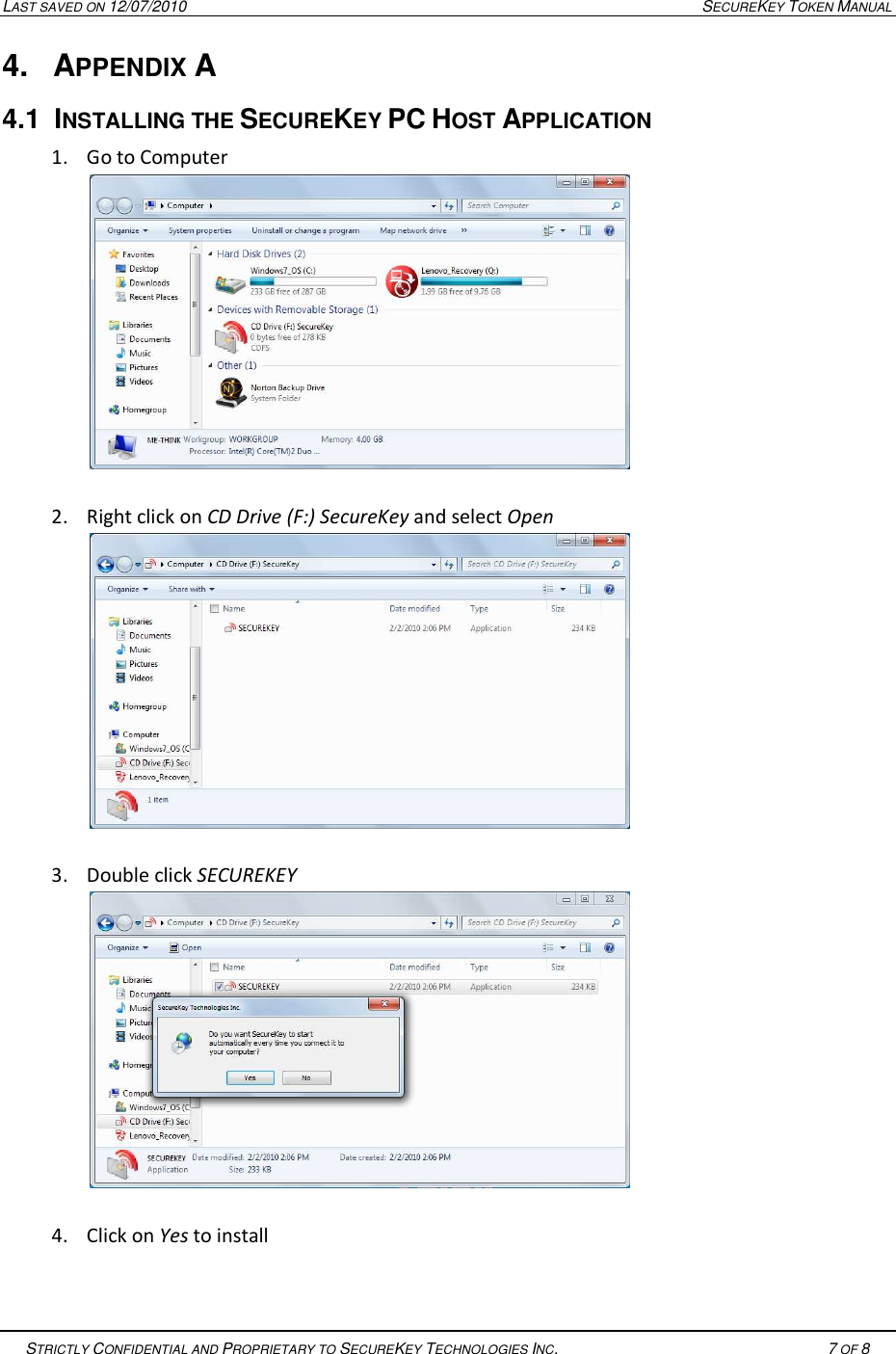
LAST SAVED ON 12/07/2010  SECUREKEY TOKEN MANUAL   STRICTLY CONFIDENTIAL AND PROPRIETARY TO SECUREKEY TECHNOLOGIES INC.   4 OF 8   1.  INTRODUCTION This document describes how the SecureKey device is used in the end-user environment.   1.1  ABOUT SECUREKEY  SecureKey makes it faster and easier to shop online and access banking and other secured web sites while increasing security.  SecureKey lets online customers authenticate with their contactless or contact chip card so that sign-on and check-out processes become more familiar and more secure.  The USB-based SecureKey can read cards while insulating the card information from the PC.   At check-out and sign-on pages, the user simply taps their card against the SecureKey or inserts their contact card.  SecureKey then securely interacts with the card, delivering the needed card, device and transaction details to the card issuer or other relying party for validation.  All security operations take place within an EAL certified secure element. The SecureKey’s ability to protect card details is an important advantage of our technology over generic PC/SC-based smart card readers. For the cardholder, the act of tapping or inserting their card is familiar and convenient. During e-commerce transactions, merchant forms are automatically filled for the cardholder without requiring changes to the merchant site.  For the card issuers and other relying parties, online authentication is strengthened and investments modern cards are leveraged.  The SecureKey device can interact with a variety of form factors, such as payment cards and stickers, access control cards, NFC compliant mobile handsets or any other contactless form factor that supports proximity (ISO/IEC 14443) or NFC (ISO/IEC 18092) contactless communication protocols.   SecureKey provides strong authentication appropriate for e-commerce checkout, banking and VPN sign-on.  SecureKey can be used for many scenarios including online payment, strong online authentication, VPN authentication, and EMV scripting. A single SecureKey device can be used with multiple cards and cardholders. The SecureKey solution is portable, browser independent, firewall and anti-virus friendly and does not require any software installation or administrative privileges on the cardholder’s computer. 2.  THE SECUREKEY PC HOST APPLICATION The SecureKey Token is designed to be plug-and-play and no installation is normally required. Installation might be required if, for example, “autorun/autoplay” is disabled, or if the hot computer does not allow external CD-ROM driver. The procedure for manually installing and uninstalling is described in Appendix A of this document.
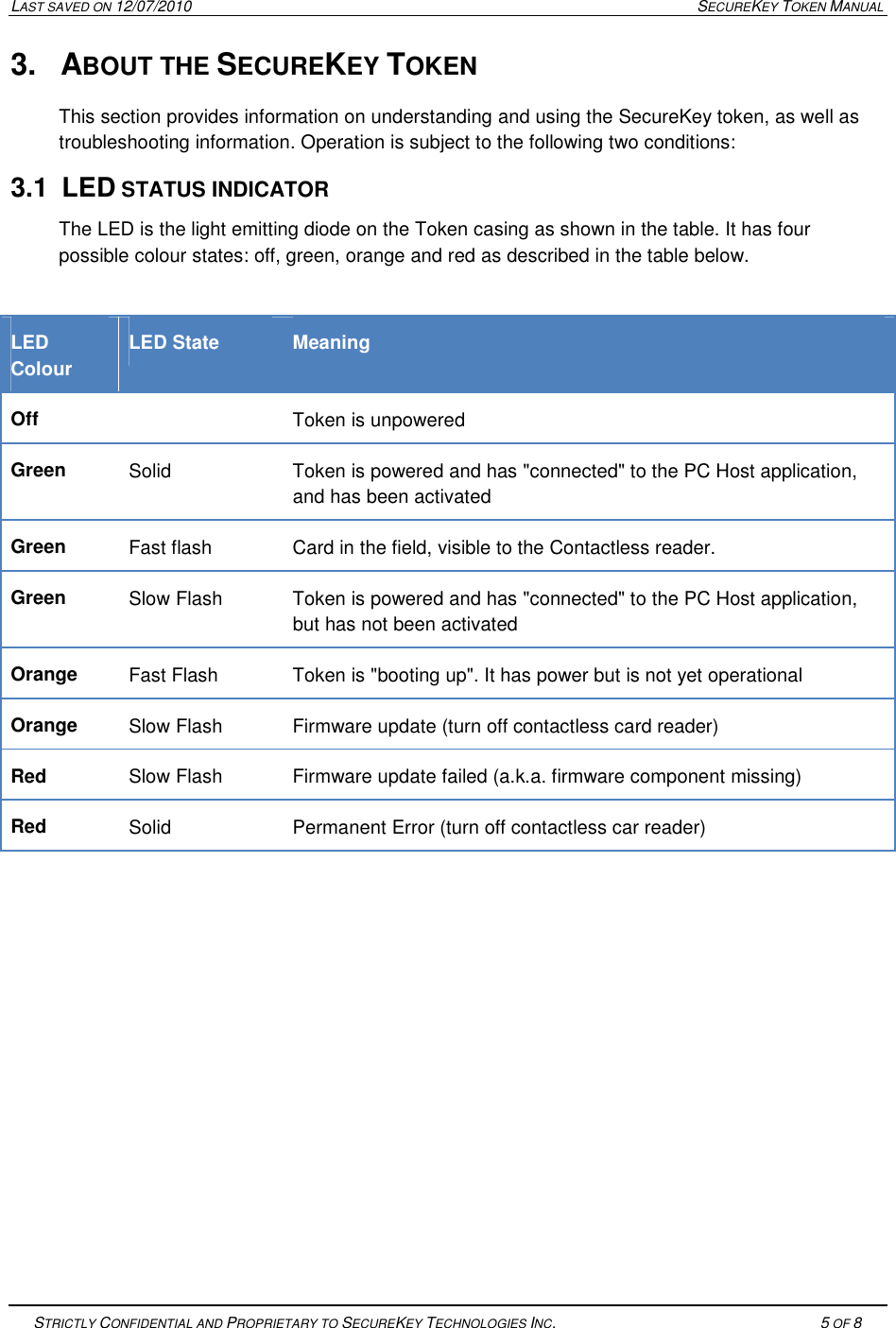
LAST SAVED ON 12/07/2010  SECUREKEY TOKEN MANUAL   STRICTLY CONFIDENTIAL AND PROPRIETARY TO SECUREKEY TECHNOLOGIES INC.   5 OF 8   3.  ABOUT THE SECUREKEY TOKEN This section provides information on understanding and using the SecureKey token, as well as troubleshooting information. Operation is subject to the following two conditions:  3.1  LED STATUS INDICATOR The LED is the light emitting diode on the Token casing as shown in the table. It has four possible colour states: off, green, orange and red as described in the table below.  LED Colour LED State  Meaning Off    Token is unpowered Green  Solid  Token is powered and has "connected" to the PC Host application, and has been activated Green  Fast flash  Card in the field, visible to the Contactless reader. Green  Slow Flash  Token is powered and has "connected" to the PC Host application, but has not been activated Orange  Fast Flash  Token is "booting up". It has power but is not yet operational Orange  Slow Flash  Firmware update (turn off contactless card reader) Red  Slow Flash  Firmware update failed (a.k.a. firmware component missing) Red  Solid  Permanent Error (turn off contactless car reader)
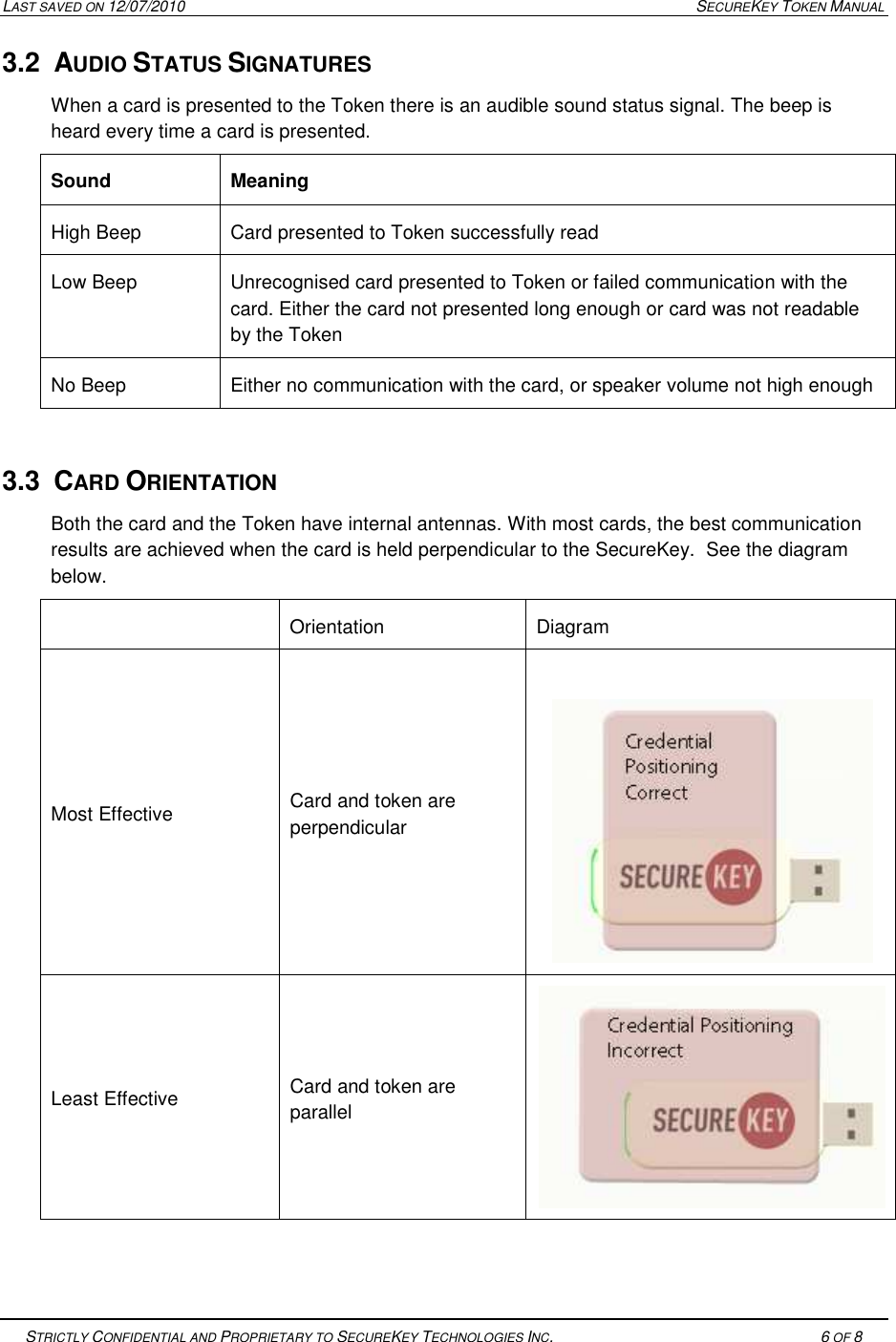
LAST SAVED ON 12/07/2010  SECUREKEY TOKEN MANUAL   STRICTLY CONFIDENTIAL AND PROPRIETARY TO SECUREKEY TECHNOLOGIES INC.   6 OF 8   3.2  AUDIO STATUS SIGNATURES When a card is presented to the Token there is an audible sound status signal. The beep is heard every time a card is presented. Sound  Meaning High Beep  Card presented to Token successfully read Low Beep  Unrecognised card presented to Token or failed communication with the card. Either the card not presented long enough or card was not readable by the Token No Beep  Either no communication with the card, or speaker volume not high enough  3.3  CARD ORIENTATION Both the card and the Token have internal antennas. With most cards, the best communication results are achieved when the card is held perpendicular to the SecureKey.  See the diagram below.   Orientation  Diagram Most Effective  Card and token are perpendicular   Least Effective  Card and token are parallel
LAST SAVED ON 12/07/2010  SECUREKEY TOKEN MANUAL   STRICTLY CONFIDENTIAL AND PROPRIETARY TO SECUREKEY TECHNOLOGIES INC.   7 OF 8   4.  APPENDIX A 4.1  INSTALLING THE SECUREKEY PC HOST APPLICATION  1. Go to Computer   2. Right click on CD Drive (F:) SecureKey and select Open   3. Double click SECUREKEY   4. Click on Yes to install
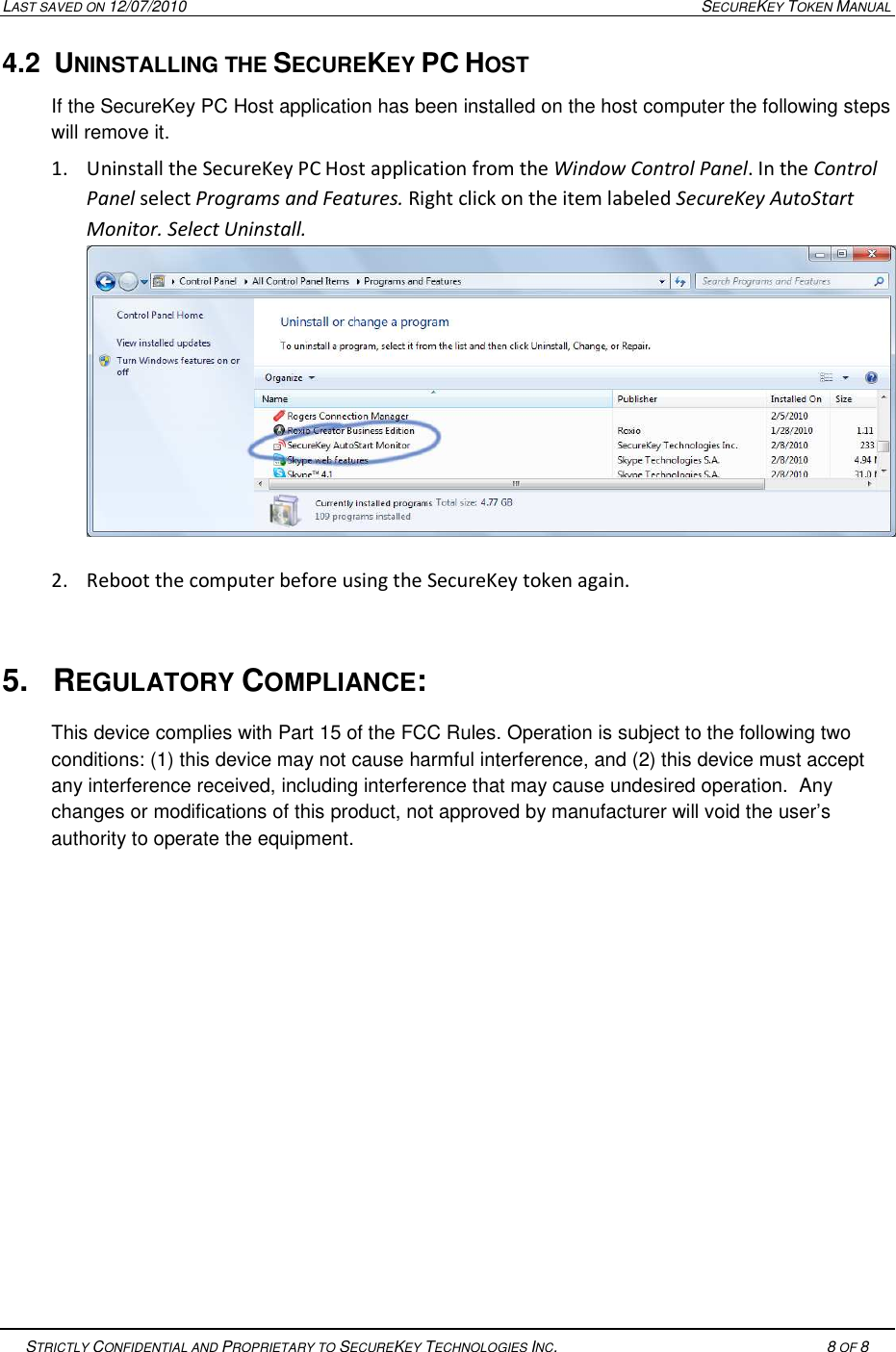
LAST SAVED ON 12/07/2010  SECUREKEY TOKEN MANUAL   STRICTLY CONFIDENTIAL AND PROPRIETARY TO SECUREKEY TECHNOLOGIES INC.   8 OF 8   4.2  UNINSTALLING THE SECUREKEY PC HOST  If the SecureKey PC Host application has been installed on the host computer the following steps will remove it. 1. Uninstall the SecureKey PC Host application from the Window Control Panel. In the Control Panel select Programs and Features. Right click on the item labeled SecureKey AutoStart Monitor. Select Uninstall. 2. Reboot the computer before using the SecureKey token again.  5.  REGULATORY COMPLIANCE: This device complies with Part 15 of the FCC Rules. Operation is subject to the following two conditions: (1) this device may not cause harmful interference, and (2) this device must accept any interference received, including interference that may cause undesired operation.  Any changes or modifications of this product, not approved by manufacturer will void the user’s authority to operate the equipment.

Navigation menu