Users Manual
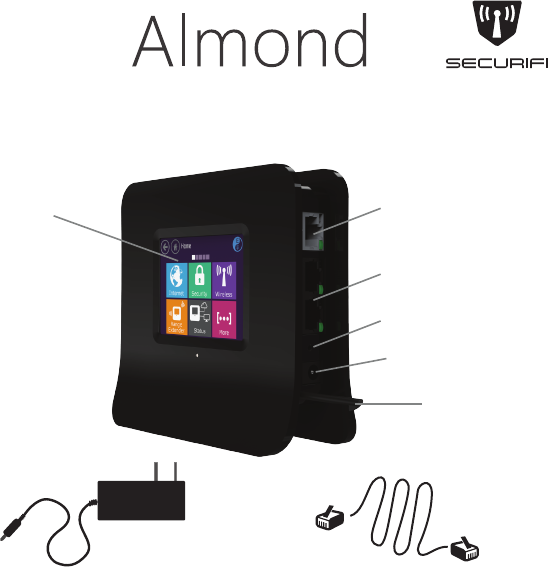
1 WAN
2 LAN
Reset Button
Stylus
Power Connector
Touchscreen LCD
Inside the Box
12V, 1A Power Adapter
Ethernet Cable
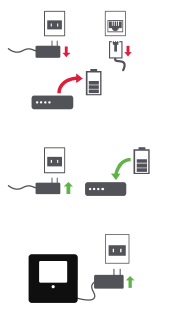
1) Connect Almond to the Internet in “Router” or “Range Extender” mode.
2) Setup your Almond Account to enable remote access for your sensors.
1) Unplug the AC adapter & Ethernet cables of
your Internet modem (Cable, DSL or Fiber).
If your modem has a battery remove it.
2) Wait for 1 minute. If your modem has a battery
re-insert it. Plug the AC adapter of the modem
back into the power outlet.
3) Wait for 1 minute. Plug the AC adapter of
Almond into the power outlet.
4) Follow the on the screen instructions on the
Almond’s Touch Screen.
Router Setup
The setup process consists of a few simple steps:
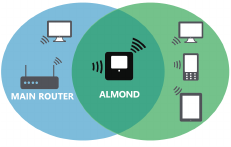
Range Extender
Setup your Almond Account
Follow the on-screen instructions
on the Almond’s Touch Screen.
1. From iTunes or Google Play, download and install the 'Almond' app
from Securifi.
2. Create an Almond account and then login.
3. On your Almond router LCD screen, tap on the 'Almond Account' tile.
4. Tap on the 'Get Code' button on the screen and note down the six letter code
displayed on the screen.
5. On your Almond app tap on the top left menu button to access the side bar,
and then tap on Add.
6. Enter the 6-letter code and tap the 'Link Almond' button.
7. Your Almond is now connected to the mobile app.
1) How can I change the Wireless Network (SSID) name an password?
You can edit these settings in the “Wireless” app on the LCD.
2) I just finished setting up the Range Extender. Why am I not seeing
any improvement in the Range?
Please note that the Range extender by default creates a new wireless
network with Almond appended to your original network’s name.
3) Can I have the same name for the extended network as my
main network?
Yes, you can change the network name in the “Wireless” app on
the LCD.
4) In the range extender mode, Almond was unable to connect
though I am close to the main Router.
Some routers don’t allow you to connect to range extenders. Please
try using the “Wireless WAN” app on the LCD for such routers.
Troubleshooting
Join our Forums
Get the most of your Almond and learn from the Pros in our Forums. We
also have sensor giveaways from time to time.
http://forum.securifi.com
1-855-969-7328 (US & Canada)
+44-800-078-6277 (UK)
+49-800-723-7994 (Deutsch)
+33-805-080-447 (Français)
+971-800035704234 (UAE)
+800-101-3371 (Singapore)
台灣
support@securifi.com
For more Information visit
https://www.securifi.com/qsg/almond
Federal Communication Commission Interference Statement
This equipment has been tested and found to comply with the limits for a Class B digital device,
pursuant to Part 15 of the FCC Rules. These limits are designed to provide reasonable
protection against harmful interference in a residential installation. This equipment generates,
uses and can radiate radio frequency energy and, if not installed and used in accordance with
the instructions, may cause harmful interference to radio communications. However, there is no
guarantee that interference will not occur in a particular installation. If this equipment does cause
harmful interference to radio or television reception, which can be determined by turning the
equipment off and on, the user is encouraged to try to correct the interference by one of the
following measures:
● Reorient or relocate the receiving antenna.
● Increase the separation between the equipment and receiver.
● Connect the equipment into an outlet on a circuit different from that to which the receiver is
connected.
● Consult the dealer or an experienced radio/TV technician for help.
FCC Caution: Any changes or modifications not expressly approved by the party responsible for
compliance could void the user’s authority to operate this equipment.
This device complies with Part 15 of the FCC Rules. Operation is subject to the following two
conditions: (1) This device may not cause harmful interference, and (2) this device must accept
any interference received, including interference that may cause undesired operation.
For product available in the USA/Canada market, only channel 1~11 can be operated. Selection
of other channels is not possible.
This device and its antenna(s) must not be co-located or operation in conjunction with any other
antenna or transmitter.
IMPORTANT NOTE:
FCC Radiation Exposure Statement:
This equipment complies with FCC radiation exposure limits set forth for an uncontrolled
environment. This equipment should be installed and operated with minimum distance 20cm
between the radiator & your body.