Securifi SC1 Almond Click User Manual

Securifi Ltd. Almond Click Users Manual

Users Manual

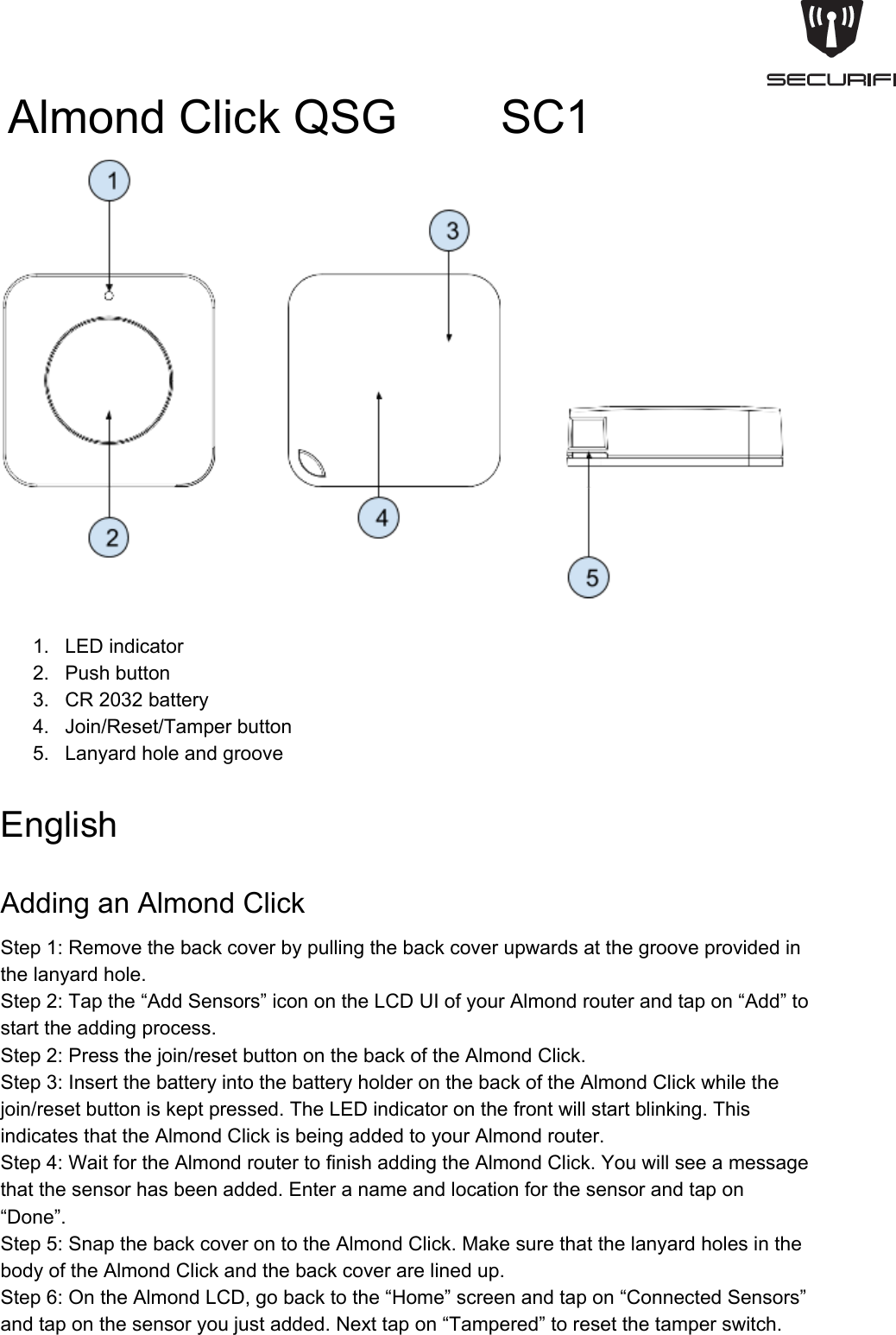
AlmondClickQSG        SC11. LEDindicator2. Pushbutton3. CR2032battery4. Join/Reset/Tamperbutton5. LanyardholeandgrooveEnglishAddinganAlmondClickStep1:Removethebackcoverbypullingthebackcoverupwardsatthegrooveprovidedinthelanyardhole.Step2:Tapthe“AddSensors”iconontheLCDUIofyourAlmondrouterandtapon“Add”tostarttheaddingprocess.Step2:Pressthejoin/resetbuttononthebackoftheAlmondClick.Step3:InsertthebatteryintothebatteryholderonthebackoftheAlmondClickwhilethejoin/resetbuttoniskeptpressed.TheLEDindicatoronthefrontwillstartblinking.ThisindicatesthattheAlmondClickisbeingaddedtoyourAlmondrouter.Step4:WaitfortheAlmondroutertofinishaddingtheAlmondClick.Youwillseeamessagethatthesensorhasbeenadded.Enteranameandlocationforthesensorandtapon“Done”.Step5:SnapthebackcoverontotheAlmondClick.MakesurethatthelanyardholesinthebodyoftheAlmondClickandthebackcoverarelinedup.Step6:OntheAlmondLCD,gobacktothe“Home”screenandtapon“ConnectedSensors”andtaponthesensoryoujustadded.Nexttapon“Tampered”toresetthetamperswitch.
Yoursensorshouldnowbefullyoperational.Clickthepushbuttononceandandtwicetosee“OnePress”and“TwoPress”ontheAlmondLCD.ResettingandAlmondClickToresettheAlmondClick,removethebackcoverandremovethebatteryfromthebatteryholder.Waitfor10seconds,andthenreinsertthebatterywhiletheJoin/Resetswitchispressed.TheLEDindicatoronthefrontoftheAlmondClickwillstartblinking,andtheresetprocesswillbecompleteoncetheLEDstopsblinking.UsingtheAlmondClick1. Youcanpressthepushbuttononcefor“OnePress”andtwicequicklyfor“TwoPress”.2. YoucancontrolotherdeviceslikesmartplugswiththeAlmondClickbycreatingrulesonourfreeAlmondappavailableforAndroidandiOS.Theappsalsohavemoreinformationandhelpaboutcreatingandusingrules.3. YoucanalsousetheAlmond’slocalwebuserinterfaceavailableathttp://10.10.10.254​bydefault,tocreaterulesandcontrolotherdeviceswithAlmondClick.TroubleshootingTheAlmondClickcan’tbeaddedtoanAlmondrouterPleaseresettheDoor/WindowSensorasdescribedintheresetsectionaboveandtrytoadditagain.TheLEDdoesnotflashPleasemakesureyou’veinsertedthebatterythecorrectwaywiththepositivesidefacingyou.Youcouldalsotryusinganotherbatteryiftheoneyouhaveisdead.
FederalCommunicationCommissionInterferenceStatementThisequipmenthasbeentestedandfoundtocomplywiththelimitsforaClassBdigitaldevice,pursuanttoPart15oftheFCCRules.Theselimitsaredesignedtoprovidereasonableprotectionagainstharmfulinterferenceinaresidentialinstallation.Thisequipmentgenerates,usesandcanradiateradiofrequencyenergyand,ifnotinstalledandusedinaccordancewiththeinstructions,maycauseharmfulinterferencetoradiocommunications.However,thereisnoguaranteethatinterferencewillnotoccurinaparticularinstallation.Ifthisequipmentdoescauseharmfulinterferencetoradioortelevisionreception,whichcanbedeterminedbyturningtheequipmentoffandon,theuserisencouragedtotrytocorrecttheinterferencebyoneofthefollowingmeasures:●Reorientorrelocatethereceivingantenna.●Increasetheseparationbetweentheequipmentandreceiver.●Connecttheequipmentintoanoutletonacircuitdifferentfromthattowhichthereceiverisconnected.●Consultthedealeroranexperiencedradio/TVtechnicianforhelp.FCC Caution: Any changes or modifications not expressly approved by the party responsible for             compliancecouldvoidtheuser’sauthoritytooperatethisequipment.ThisdevicecomplieswithPart15oftheFCCRules.Operationissubjecttothefollowingtwoconditions:(1)Thisdevicemaynotcauseharmfulinterference,and(2)thisdevicemustacceptanyinterferencereceived,includinginterferencethatmaycauseundesiredoperation.ForproductavailableintheUSA/Canadamarket,onlychannel1~11canbeoperated.Selectionofotherchannelsisnotpossible.Thisdeviceanditsantenna(s)mustnotbecolocatedoroperationinconjunctionwithanyotherantennaortransmitter.IMPORTANTNOTE:FCCRadiationExposureStatement:ThisequipmentcomplieswithFCCradiationexposurelimitssetforthforanuncontrolledenvironment.Thisequipmentshouldbeinstalledandoperatedwithminimumdistance20cmbetweentheradiator&yourbody.ThisClassBdigitalapparatuscomplieswithCanadianICES003.CetappareilnumériquedelaclasseBconformeálanormeNMB003duCanada.ThisdevicecomplieswithIndustryCanadalicenseexemptRSSstandard(s).Operationissubjecttothefollowingtwoconditions:(1)thisdevicemaynotcauseinterference,and(2)thisdevicemustacceptanyinterference,includinginterferencethatmaycauseundesiredoperationofthedevice.LeprésentappareilestconformeauxCNRd'IndustrieCanadaapplicablesauxappareilsradioexemptsdelicence.L'exploitationestautoriséeauxdeuxconditionssuivantes:(1)l'appareilnedoitpasproduiredebrouillage,et(2)l'utilisateurdel'appareildoitacceptertoutbrouillageradioélectriquesubi,mêmesilebrouillageestsusceptibled'encompromettrelefonctionnement.ForproductavailableintheUSA/Canadamarket,onlychannel1~11canbeoperated.Selectionofotherchannelsisnotpossible.
Thisdeviceanditsantenna(s)mustnotbecolocatedoroperationinconjunctionwithanyotherantennaortransmitter.UnderIndustryCanadaregulations,thisradiotransmittermayonlyoperateusinganantennaofatypeandmaximum(orlesser)gainapprovedforthetransmitterbyIndustryCanada.Toreducepotentialradiointerferencetootherusers,theantennatypeanditsgainshouldbesochosenthattheequivalentisotropicallyradiatedpower(e.i.r.p.)isnotmorethanthatnecessaryforsuccessfulcommunication.IMPORTANTNOTE:ICRadiationExposureStatement:ThisequipmentcomplieswithICRSS102radiationexposurelimitssetforthforanuncontrolledenvironment.Thisequipmentshouldbeinstalledandoperatedwithminimumdistance20cmbetweentheradiator&yourbody.CAUTIONRISK OF EXPLOSION IF BATTERY IS REPLACED BY AN INCORRECT TYPE.DISPOSE OF USED BATTERIES ACCORDING TO THE INSTRUCTIONS.Déclaration d'exposition aux radiations:Cet équipement est conforme aux limites d'exposition aux rayonnements ISEDétablies pour un environnement non contrôlé. Cet équipement doit être installé et utilisé avec un minimum de 20 cm de distance entre la source de rayonnement et votre corps.

Navigation menu