Users Manual
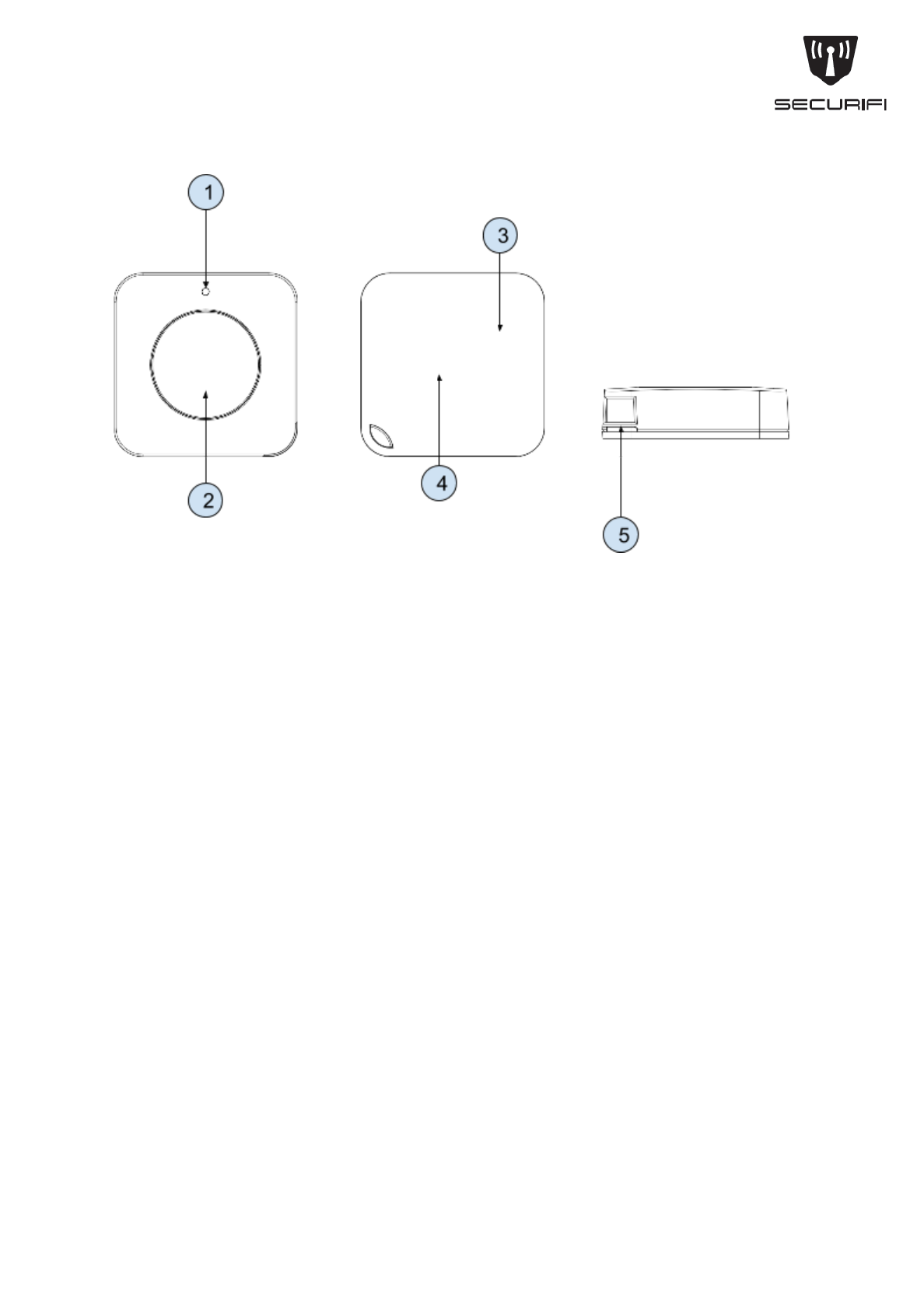
AlmondClickQSG SC1
1. LEDindicator
2. Pushbutton
3. CR2032battery
4. Join/Reset/Tamperbutton
5. Lanyardholeandgroove
English
AddinganAlmondClick
Step1:Removethebackcoverbypullingthebackcoverupwardsatthegrooveprovidedin
thelanyardhole.
Step2:Tapthe“AddSensors”iconontheLCDUIofyourAlmondrouterandtapon“Add”to
starttheaddingprocess.
Step2:Pressthejoin/resetbuttononthebackoftheAlmondClick.
Step3:InsertthebatteryintothebatteryholderonthebackoftheAlmondClickwhilethe
join/resetbuttoniskeptpressed.TheLEDindicatoronthefrontwillstartblinking.This
indicatesthattheAlmondClickisbeingaddedtoyourAlmondrouter.
Step4:WaitfortheAlmondroutertofinishaddingtheAlmondClick.Youwillseeamessage
thatthesensorhasbeenadded.Enteranameandlocationforthesensorandtapon
“Done”.
Step5:SnapthebackcoverontotheAlmondClick.Makesurethatthelanyardholesinthe
bodyoftheAlmondClickandthebackcoverarelinedup.
Step6:OntheAlmondLCD,gobacktothe“Home”screenandtapon“ConnectedSensors”
andtaponthesensoryoujustadded.Nexttapon“Tampered”toresetthetamperswitch.

Yoursensorshouldnowbefullyoperational.Clickthepushbuttononceandandtwiceto
see“OnePress”and“TwoPress”ontheAlmondLCD.
ResettingandAlmondClick
ToresettheAlmondClick,removethebackcoverandremovethebatteryfromthebattery
holder.Waitfor10seconds,andthenreinsertthebatterywhiletheJoin/Resetswitchis
pressed.TheLEDindicatoronthefrontoftheAlmondClickwillstartblinking,andthereset
processwillbecompleteoncetheLEDstopsblinking.
UsingtheAlmondClick
1. Youcanpressthepushbuttononcefor“OnePress”andtwicequicklyfor“Two
Press”.
2. YoucancontrolotherdeviceslikesmartplugswiththeAlmondClickbycreating
rulesonourfreeAlmondappavailableforAndroidandiOS.Theappsalsohave
moreinformationandhelpaboutcreatingandusingrules.
3. YoucanalsousetheAlmond’slocalwebuserinterfaceavailableat
http://10.10.10.254bydefault,tocreaterulesandcontrolotherdeviceswithAlmond
Click.
Troubleshooting
TheAlmondClickcan’tbeaddedtoanAlmondrouter
PleaseresettheDoor/WindowSensorasdescribedintheresetsectionaboveandtrytoadd
itagain.
TheLEDdoesnotflash
Pleasemakesureyou’veinsertedthebatterythecorrectwaywiththepositivesidefacing
you.Youcouldalsotryusinganotherbatteryiftheoneyouhaveisdead.

FederalCommunicationCommissionInterferenceStatement
ThisequipmenthasbeentestedandfoundtocomplywiththelimitsforaClassBdigitaldevice,
pursuanttoPart15oftheFCCRules.Theselimitsaredesignedtoprovidereasonableprotection
againstharmfulinterferenceinaresidentialinstallation.Thisequipmentgenerates,usesandcan
radiateradiofrequencyenergyand,ifnotinstalledandusedinaccordancewiththeinstructions,
maycauseharmfulinterferencetoradiocommunications.However,thereisnoguaranteethat
interferencewillnotoccurinaparticularinstallation.Ifthisequipmentdoescauseharmful
interferencetoradioortelevisionreception,whichcanbedeterminedbyturningtheequipmentoff
andon,theuserisencouragedtotrytocorrecttheinterferencebyoneofthefollowingmeasures:
●Reorientorrelocatethereceivingantenna.
●Increasetheseparationbetweentheequipmentandreceiver.
●Connecttheequipmentintoanoutletonacircuitdifferentfromthattowhichthereceiveris
connected.
●Consultthedealeroranexperiencedradio/TVtechnicianforhelp.
FCC Caution: Any changes or modifications not expressly approved by the party responsible for
compliancecouldvoidtheuser’sauthoritytooperatethisequipment.
ThisdevicecomplieswithPart15oftheFCCRules.Operationissubjecttothefollowingtwo
conditions:(1)Thisdevicemaynotcauseharmfulinterference,and(2)thisdevicemustaccept
anyinterferencereceived,includinginterferencethatmaycauseundesiredoperation.
ForproductavailableintheUSA/Canadamarket,onlychannel1~11canbeoperated.Selectionof
otherchannelsisnotpossible.
Thisdeviceanditsantenna(s)mustnotbecolocatedoroperationinconjunctionwithanyother
antennaortransmitter.
IMPORTANTNOTE:
FCCRadiationExposureStatement:
ThisequipmentcomplieswithFCCradiationexposurelimitssetforthforanuncontrolled
environment.Thisequipmentshouldbeinstalledandoperatedwithminimumdistance20cm
betweentheradiator&yourbody.
ThisClassBdigitalapparatuscomplieswithCanadianICES003.
CetappareilnumériquedelaclasseBconformeálanormeNMB003duCanada.
ThisdevicecomplieswithIndustryCanadalicenseexemptRSSstandard(s).Operationissubject
tothefollowingtwoconditions:(1)thisdevicemaynotcauseinterference,and(2)thisdevicemust
acceptanyinterference,includinginterferencethatmaycauseundesiredoperationofthedevice.
LeprésentappareilestconformeauxCNRd'IndustrieCanadaapplicablesauxappareilsradio
exemptsdelicence.L'exploitationestautoriséeauxdeuxconditionssuivantes:(1)l'appareilne
doitpasproduiredebrouillage,et(2)l'utilisateurdel'appareildoitacceptertoutbrouillage
radioélectriquesubi,mêmesilebrouillageestsusceptibled'encompromettrelefonctionnement.
ForproductavailableintheUSA/Canadamarket,onlychannel1~11canbeoperated.Selectionof
otherchannelsisnotpossible.

Thisdeviceanditsantenna(s)mustnotbecolocatedoroperationinconjunctionwithanyother
antennaortransmitter.
UnderIndustryCanadaregulations,thisradiotransmittermayonlyoperateusinganantennaofa
typeandmaximum(orlesser)gainapprovedforthetransmitterbyIndustryCanada.Toreduce
potentialradiointerferencetootherusers,theantennatypeanditsgainshouldbesochosenthat
theequivalentisotropicallyradiatedpower(e.i.r.p.)isnotmorethanthatnecessaryforsuccessful
communication.
IMPORTANTNOTE:
ICRadiationExposureStatement:
ThisequipmentcomplieswithICRSS102radiationexposurelimitssetforthforanuncontrolled
environment.Thisequipmentshouldbeinstalledandoperatedwithminimumdistance20cm
betweentheradiator&yourbody.
CAUTION
RISK OF EXPLOSION IF BATTERY IS REPLACED BY AN INCORRECT TYPE.
DISPOSE OF USED BATTERIES ACCORDING TO THE INSTRUCTIONS.
Déclaration d'exposition aux radiations:
Cet équipement est conforme aux limites d'exposition aux rayonnements ISEDétablies
pour un environnement non contrôlé. Cet équipement doit être installé et utilisé avec un
minimum de 20 cm de distance entre la source de rayonnement et votre corps.