Shuttle DSA2LS Embedded computer User Manual

Shuttle Inc. Embedded computer Users Manual

Users Manual

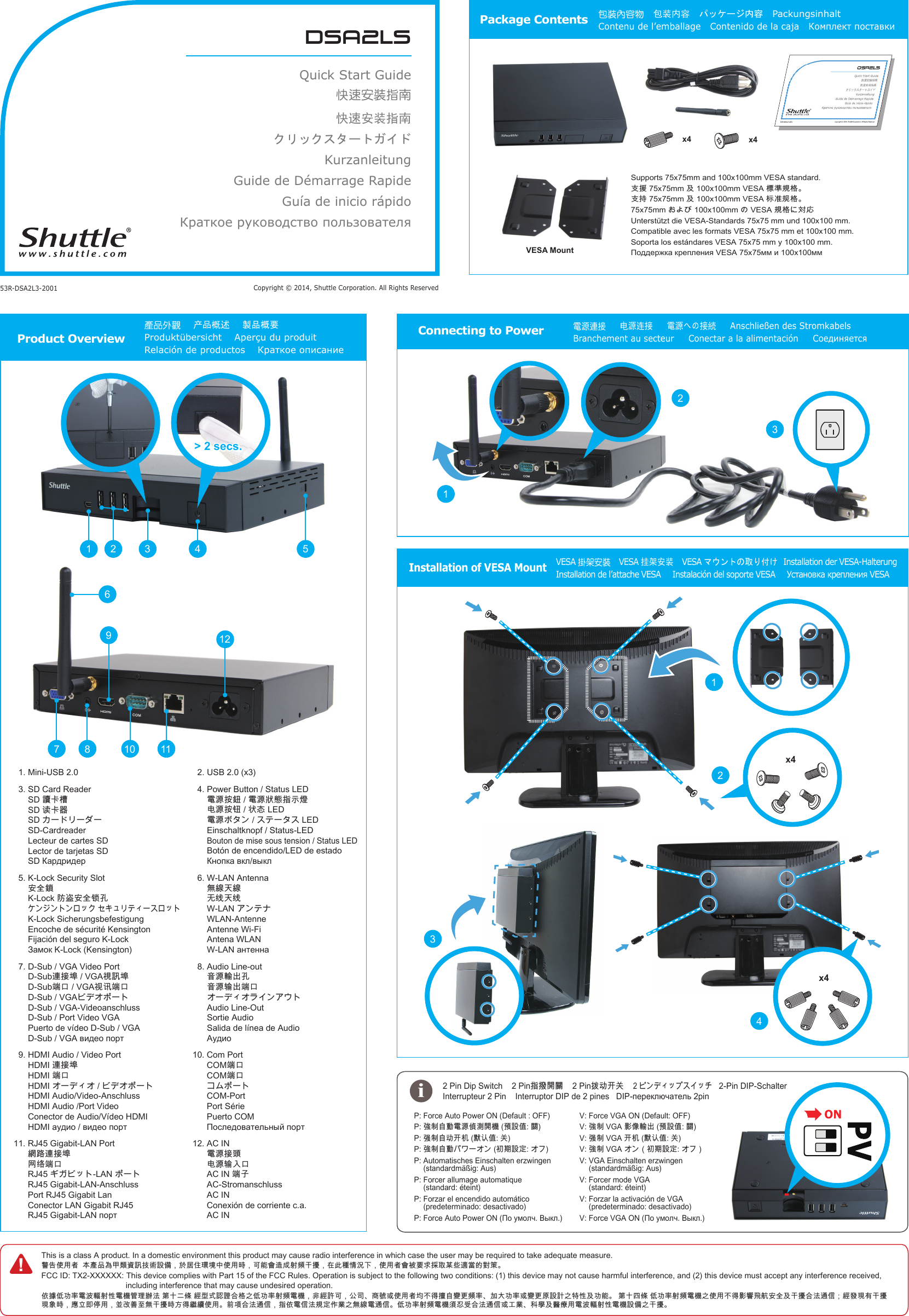
dsa2lsQuick Start Guide快速安裝指南快速安装指南クリックスタートガイド KurzanleitungGuide de Démarrage Rapide Guía de inicio rápidoКраткое руководство пользователяCopyright © 2014, Shuttle Corporation. All Rights Reserved53R-DSA2L3-2001Package Contents 包裝內容物   包装内容   パッケージ内容   Packungsinhalt   Contenu de l’emballage   Contenido de la caja   Комплект поставкиSupports 75x75mm and 100x100mm VESA standard.󱺿󱶄󰵚󲎩󲠦󴌟󲇌󱺿󱲑󰵚󲆗󰭖󴍔󲇌󴌟󲇌󱖎󱥬Unterstützt die VESA-Standards 75x75 mm und 100x100 mm.Compatible avec les formats VESA 75x75 mm et 100x100 mm.Soporta los estándares VESA 75x75 mm y 100x100 mm.x4x4Product Overview產品外觀    产品概述    製品概要    Produktübersicht    Aperçu du produit Relación de productos    Краткое описание!This is a class A product. In a domestic environment this product may cause radio interference in which case the user may be required to take adequate measure.󴓶󰷚󰤏󲺸󳦕󲂼󲺲󰹑󲩊󲻂󵇮󴙗󴎚󱰐󴇣󴎽󰨩󰃩󱽌󱗕󰣟󲹀󱈓󰞽󰤏󲺸󱿒󰃩󰵿󳪍󲂓󴦰󱮠󱖔󵇋󱠂󱺎󰃩󱂸󲓴󳎾󱩕󲙑󰞛󰃩󰤏󲺸󳦕󲂓󴈻󴌑󲗒󱴱󰵦󲅠󰠫󴧹󲼆󳀔󱖝󳓦FCC ID: TX2-XXXXXX:  This device complies with Part 15 of the FCC Rules. Operation is subject to the following two conditions: (1) this device may not cause harmful interference, and (2) this device must accept any interference received,  including interference that may cause undesired operation.󰤭󱹪󰣞󰰯󲴗󵂋󲙲󴣋󱖔󱦷󵂋󲏯󳔱󲶖󴤶󲙥󳒼󰳑󰠜󲈭󳜣󱄛󱢟󴐝󴓙󰶘󲇌󰟛󰣞󰰯󲴗󱖔󵇋󵂋󲏯󰃩󵃮󳜣󴏁󰵿󰃩󰫼󰶈󰻖󳿯󱮦󰤏󲺸󳦕󱃗󰞝󱤧󱹕󳭺󴔚󲂄󵇋󲴗󰰰󱊷󰰯󲴗󱮦󴔚󲂄󰴯󴎽󴎘󰟛󲰉󱦷󰵚󰰯󳪍󳒼󰳑󱁫󲈭󰣞󰰯󲴗󱖔󵇋󵂋󲏯󰟛󰤏󲺸󰞝󱤧󱤁󵆏󵉫󳮺󱔙󰫸󰵚󱠂󱺎󰶘󲙥󴦪󰥱󰃸󳜣󳀌󲶎󲂙󱠂󱺎󲶎󴗱󱿒󰃩󱭙󳑛󰴃󰧬󲺸󰃩󰞶󱻉󰼔󳮃󲪱󱠂󱺎󱿒󱽉󱤧󳠌󳠜󰤏󲺸󰯝󵆕󰶘󲙥󴦪󰥱󰃩󱲗󰤭󵂋󰥱󲙥󴌟󱔪󰣬󲋽󰟛󲪱󳝪󵂋󴦪󰥱󰣞󰰯󲴗󱖔󵇋󵂋󲏯󵆘󱥝󰵧󰶘󲙥󴦪󰥱󱮦󱝵󲋽󳍡󱔈󰵚󴬻󲿒󲺸󵂋󲙲󴣋󱖔󱦷󵂋󲏯󴎽󰨩󰟛󱠂󱺎󱲗󵿃󴼛󶡉󱱸󰰸󱢐󰬃   2-Pin DIP-Schalter    P:  Force Auto Power ON (Default : OFF) P:  󱣇󰯆󳭺󰱥󵂋󲠠󰨅󲞼󴼛󲏯󵆠󴎽󰧌󴽬P:  󱣊󰯆󳭺󰰸󱢐󲃊󵡨󴔴󰧌󰬃P:  󱣇󰯆󳭺󰱥󰮭󲂯󴎽󱔪P:  Automatisches Einschalten erzwingen  (standardmäßig: Aus)P:  Forcer allumage automatique   (standard: éteint)P:  Forzar el encendido automático   (predeterminado: desactivado)P:  Connecting to Power電源連接     电源连接     電源への接続     Anschließen des Stromkabels    Branchement au secteur     Conectar a la alimentación     Соединяется> 2 secs.1 2 543121167 89101.  Mini-USB 2.03.  SD Card Reader 󴔐󰳱󲎍 󴖋󰳱󰿸  SD-Cardreader Lecteur de cartes SD Lector de tarjetas SD 5.  K-Lock Security Slot 󱔙󰫸󴴦 󴿂󳁧󱔙󰫸󴺑󱓤  K-Lock Sicherungsbefestigung Encoche de sécurité Kensington Fijación del seguro K-Lock 7.  D-Sub / VGA Video Port 󴦳󱴵󱅰󴌦󴎚󱅰 󳑿󰵳󴍖󴔿󳑿󰵳  D-Sub / VGA-Videoanschluss D-Sub / Port Video VGA Puerto de vídeo D-Sub / VGA 9.  HDMI Audio / Video Port 󴦳󱴵󱅰 󳑿󰵳  HDMI Audio/Video-Anschluss HDMI Audio /Port Video Conector de Audio/Vídeo HDMI 11.  RJ45 Gigabit-LAN Port 󳝂󴝿󴦳󱴵󱅰 󳣡󳡬󳑿󰵳  RJ45 Gigabit-LAN-Anschluss Port RJ45 Gigabit Lan Conector LAN Gigabit RJ45 2.  USB 2.0 (x3)4.  Power Button / Status LED 󵂋󲠠󱲙󴮥󵂋󲠠󲱐󱫛󱲗󳋊󲭘 󲻅󲠠󱲙󴸾󲱆󱦑 󵂋󲠠 Einschaltknopf / Status-LED Bouton de mise sous tension / Status LED Botón de encendido/LED de estado 6.  W-LAN Antenna 󲪱󳝪󱊹󳝪 󱽰󳡏󱊹󳡏  WLAN-Antenne Antenne Wi-Fi Antena WLAN 8.  Audio Line-out 󵆃󲠠󴣈󰮊󱓤 󵆃󲠠󴤣󰮊󳑿󰵳  Audio Line-Out Sortie Audio Salida de línea de Audio 10.  Com Port 󳑿󰵳 󳑿󰵳  COM-Port Port Série Puerto COM 12.  AC IN 󵂋󲠠󱴵󵆽 󲻅󲠠󴤣󰫵󰵳 󳑿󱓠 AC-Stromanschluss AC IN Conexión de corriente c.a. AC INInstallation of VESA MountVESA 掛架安裝  VESA 挂架安装   VESA マウントの取り付け  Installation der VESA-Halterung   Installation de l’attache VESA     Instalación del soporte VESA     Установка крепления VESA iV:  Force VGA ON (Default: OFF)V:  󱣇󰯆󱤁󰩟󴣈󰮊󵆠󴎽󰧌󴽬V:  󱣊󰯆󱢐󲃊󵡨󴔴󰧌󰬃V:  󱣇󰯆󰃥󰮭󲂯󴎽󱔪󰃦V:  VGA Einschalten erzwingen  (standardmäßig: Aus)V:  Forcer mode VGA  (standard: éteint)V:  Forzar la activación de VGA   (predeterminado: desactivado)V:  x4x41231243VESA Mount
Federal Communication Commission Interference Statement This equipment has been tested and found to comply with the limits for a Class B digital device, pursuant to Part 15 of the FCC Rules. These limits are designed to provide reasonable protection against harmful interference in a residential installation. This equipment generates, uses and can radiate radio frequency energy and, if not installed and used in accordance with the instructions, may cause harmful interference to radio communications. However, there is no guarantee that interference will not occur in a particular installation. If this equipment does cause harmful interference to radio or television reception, which can be determined by turning the equipment off and on, the user is encouraged to try to correct the interference by one of the following measures: . Reorient or relocate the receiving antenna. . Increase the separation between the equipment and receiver. . Connect the equipment into an outlet on a circuit different from that to which the receiver is connected. . Consult the dealer or an experienced radio/TV technician for help. FCC Caution: To assure continued compliance, any changes or modifications not expressly approved by the party responsible for compliance could void the user's authority to operate this equipment. (Example - use only shielded interface cables when connecting to computer or peripheral devices). FCC Radiation Exposure Statement This equipment complies with FCC RF radiation exposure limits set forth for an uncontrolled environment. This equipment should be installed and operated with a minimum distance of 20 centimeters between the radiator and your body. This transmitter must not be co-located or operating in conjunction with any other antenna or transmitter. The antennas used for this transmitter must be installed to provide a separation distance of at least 20 cm from all persons and must not be co-located or operating in conjunction with any other antenna or transmitter.

Navigation menu