Sichuan Changhong Network Technologies IHO-2000I Network Set-Top Box User Manual DVB C 7IR

Sichuan Changhong Network Technologies Co.,Ltd. Network Set-Top Box DVB C 7IR

User manual-revised

1  qwertyuiopasdfghjklzxcvbnmqwertyuiopasdfghjklzxcvbnmqwertyuiopasdfghjklzxcvbnmqwertyuiopasdfghjklzxcvbnmqwertyuiopasdfghjklzxcvbnmqwertyuiopasdfghjklzxcvbnmqwertyuiopasdfghjklzxcvbnmqwertyuiopasdfghjklzxcvbnmqwertyuiopasdfghjklzxcvbnmqwertyuiopasdfghjklzxcvbnmqwertyuiopasdfghjklzxcvbnmqwertyuiopasdfghjklzxcvbnmqwertyuiopasdfghjklzxcvbnmqwertyuiopasdfghjklzxcvbnmqwertyuiopasdfghjklzxcvbnmqwertyuiopasdfghjklzxcvbnmqwertyuiopasdfghjklzxcvbnmqwertyuiopasdfghjklzxcvbnmrtyuiopasdfghjklzxcvbnmqwertyuiopasdfghjklzxcvbnmqwertyuiopasdfghjklzxcvbnmqwertyuiopasdfghjklzxcvbnmqwertyuiopasdfghjklzxcvbnmqwertyuiopasdfghjklzxcvbnmqwertyuiopasdfghjklzxcvbnmqwertyuio   IHO-2000 I USER MANUAL
2  SAFETY INSTRUCTION  IMPORTANT SAFETY INSTRUCTIONS  Read, follow and keep these instructions.  Heed all warnings.  Do not use this apparatus near water.  Clean only with dry cloth.  Do not block any ventilation openings. Install in accordance with the manufacturer’s instructions.  Do not install near any heat sources such as radiators, heat registers, stoves, or other apparatus (including amplifiers) that produce heat.  The parameter of the using power source should be accordance with which indicating on the rear panel; otherwise the machine will work improperly and even be ruined.  Protect  the  power  cord  from  being  walked  on  or  pinched  particularly  at  plugs, convenience receptacles, and the point where they exit from the apparatus.  Only use attachments/accessories specified by the manufacturer.  To prolong the useful life of this machine, the interval of the continuous switch action must be above one minute.  Use only the cart, stand, tripod, bracket, or table specified by the manufacturer, or sold  with  the  apparatus.  When  a  cart  is  used,  use  caution  when  moving  the cart/apparatus combination to avoid injury from tip-over.  Unplug this apparatus during lightning storms or when unused for long periods of time.  Refer all  servicing  to  qualified  service  personnel.  Servicing  is  required  when  the apparatus  has  been  damaged  in  any  way,  such  as  power-supply  cord  or  plug  is damaged,  liquid  has  been  spilled  or  objects  have  fallen  into  the  apparatus,  the apparatus has been exposed to rain or moisture, does not operate normally, or has been dropped.  Warning: This unit should only be serviced by an authorized and properly trained technician. Opening the cover or other attempts by the user to service this unit may result in serious injury or death from electrical shock, and may increase the risk of fire.  The MAINS plug or an appliance coupler of the apparatus is used as the disconnect device, the disconnect device shall remain readily operable.  The signal cable must be earthed to the system.  No naked flame sources, such as lighted candles, should be placed on the apparatus. Note: All the OSD and illustrations in this manual may be somewhat different from the actual situation. Please take the actual RECEIVER as the standard. WARNING: To reduce the risk of fire or electric shock, do not expose this product to rain or moisture. Apparatus shall not be exposed to dripping or splashing and no objects filled  with  liquids,  such  as  vases,  shall  be  placed  on  the  apparatus.  Refer  to  the identification/rating  label  located  on  the  back  panel  of  your  product  for  its  proper operating voltage. Batteries shall not be exposed to excessive heat such as sunshine, fire or the like. For applicable power supplies see user instructions
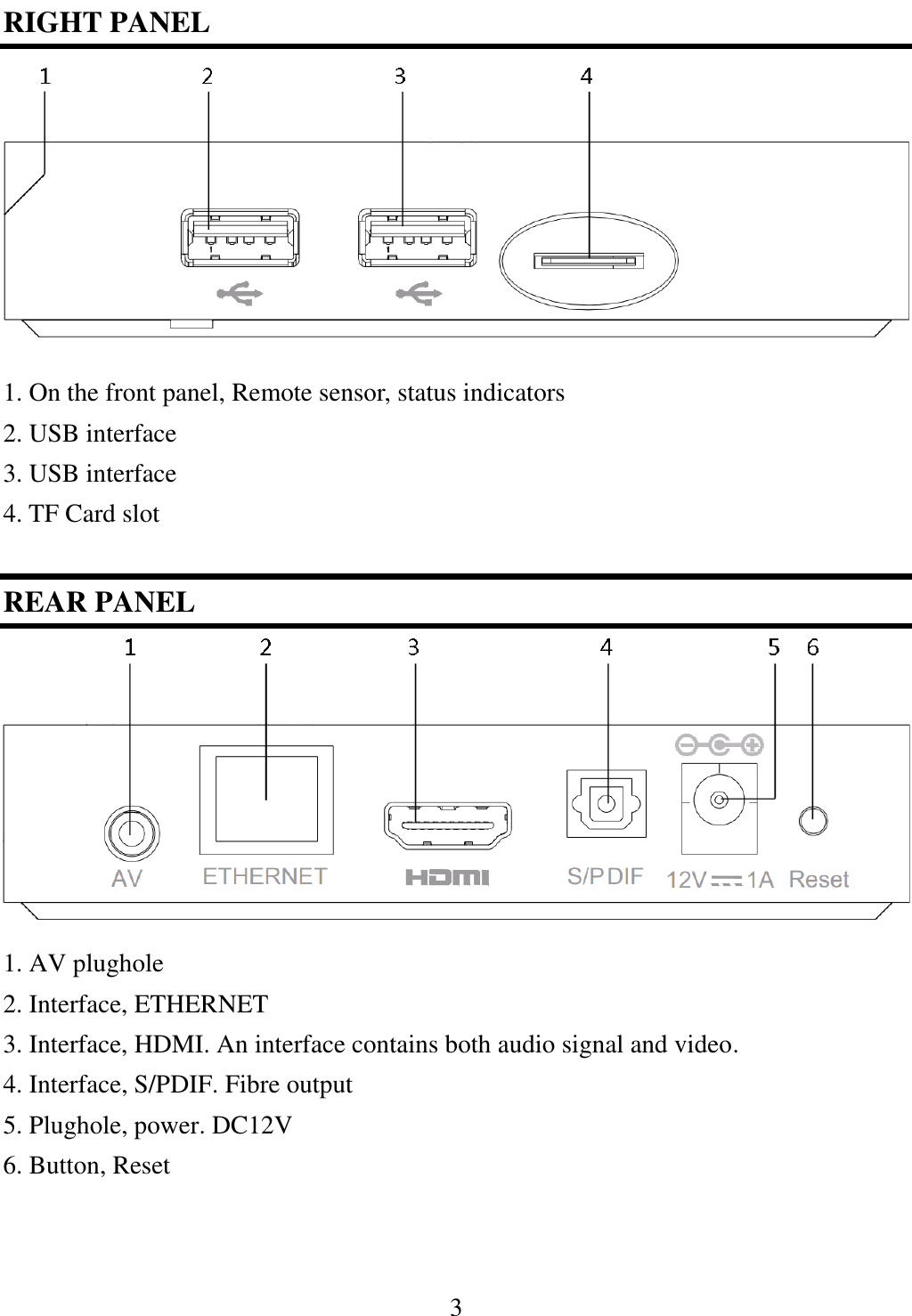
3   RIGHT PANEL         1. On the front panel, Remote sensor, status indicators     2. USB interface 3. USB interface 4. TF Card slot  REAR PANEL         1. AV plughole 2. Interface, ETHERNET   3. Interface, HDMI. An interface contains both audio signal and video. 4. Interface, S/PDIF. Fibre output 5. Plughole, power. DC12V 6. Button, Reset
4  REMOTE                  PRECAUTIONS ABOUT BATTERIES      Improper use of batteries may cause corrosion or fluid leakage. Please observe the following instructions for the safe use of batteries. 1. Do not mistake the polarities of batteries 2. Never leave dead batteries in the remote control 3. Remove batteries from the remote controller it is not going to be used for a certain time 4. Do not attempt to disassemble, short-circuit, heat, recharge or throw the batteries into the fire source 5. Do not use new batteries and old one together, or which is different type 6. Wipe  away  any  electrolyte  fluid  inside  the  remote  controller,  and  insert  new batteries
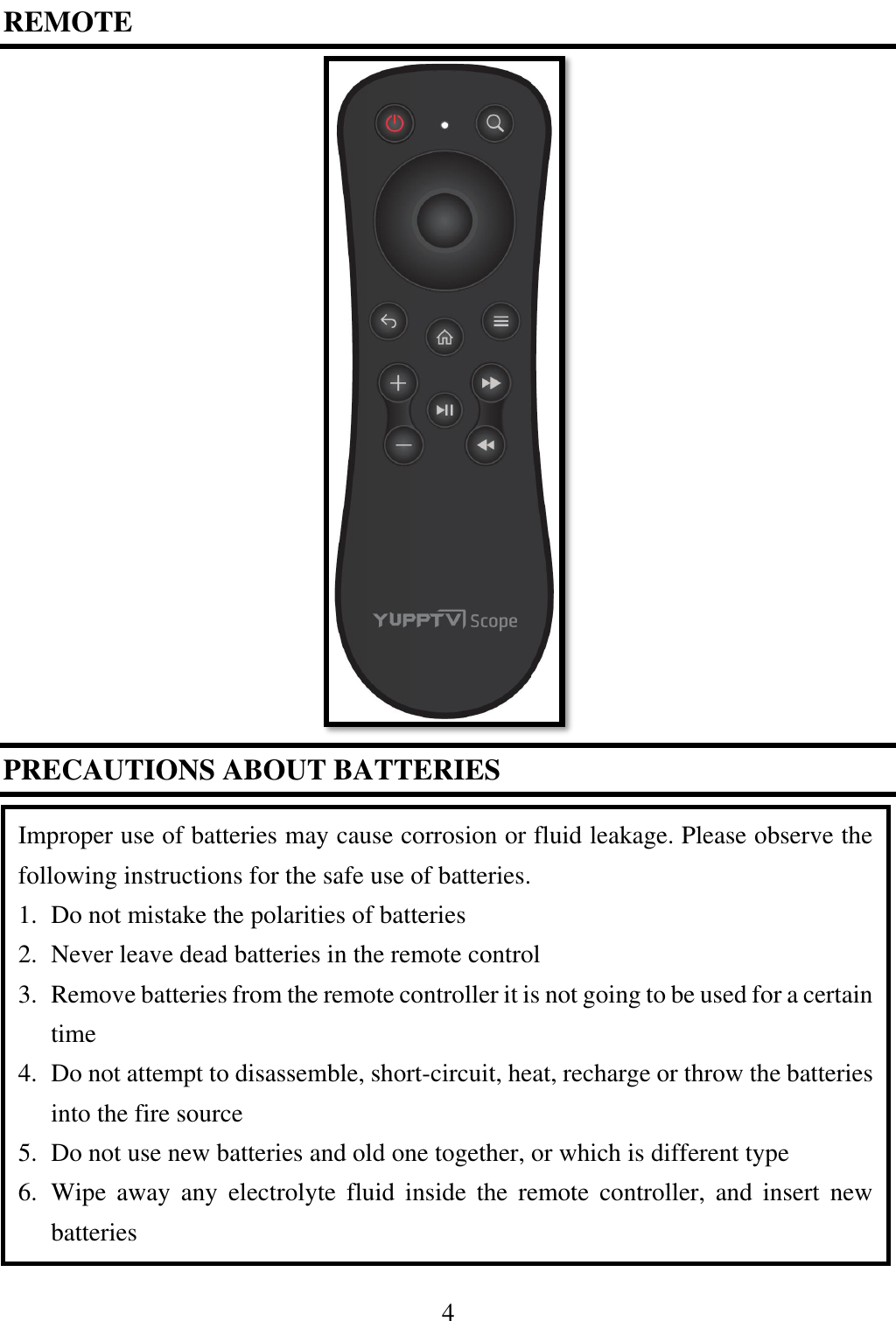
5                                   . Enter Standby mode or program-watching state.  .close or open sound.  Inner circle. Operation confirmation  Outer circle. Direction keys    .Operation return  . Home Page  ≡. Enter menu.    +/-. Adjust volume  ►║. Play or pause program  ►►/ ◄◄. Speed up playing speed forwards or backwards.
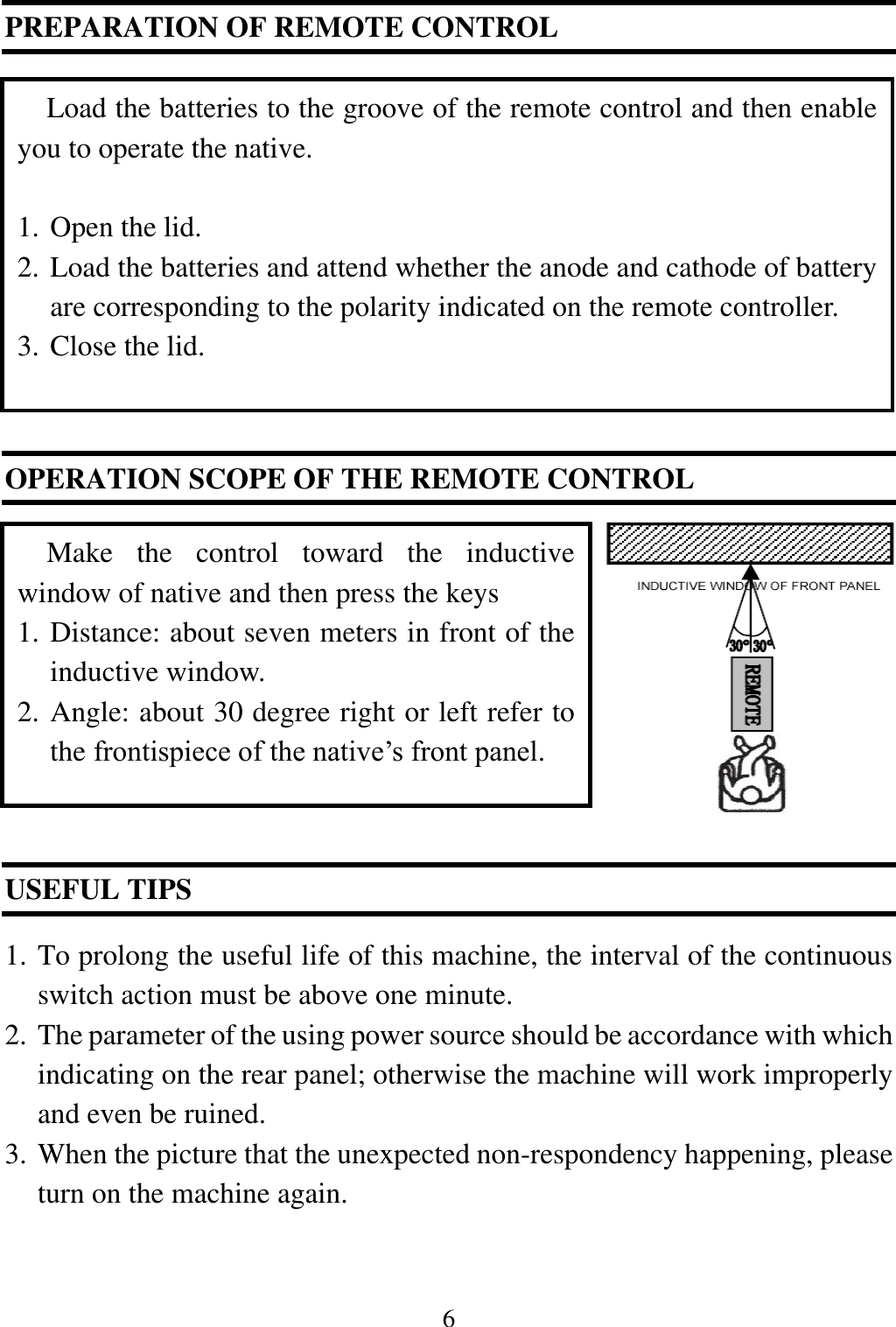
6  PREPARATION OF REMOTE CONTROL           OPERATION SCOPE OF THE REMOTE CONTROL              USEFUL TIPS    1. To prolong the useful life of this machine, the interval of the continuous switch action must be above one minute. 2. The parameter of the using power source should be accordance with which indicating on the rear panel; otherwise the machine will work improperly and even be ruined. 3. When the picture that the unexpected non-respondency happening, please turn on the machine again.  Load the batteries to the groove of the remote control and then enable you to operate the native.  1. Open the lid.   2. Load the batteries and attend whether the anode and cathode of battery are corresponding to the polarity indicated on the remote controller. 3. Close the lid. Make  the  control  toward  the  inductive window of native and then press the keys 1. Distance: about seven meters in front of the inductive window. 2. Angle: about 30 degree right or left refer to the frontispiece of the native’s front panel.
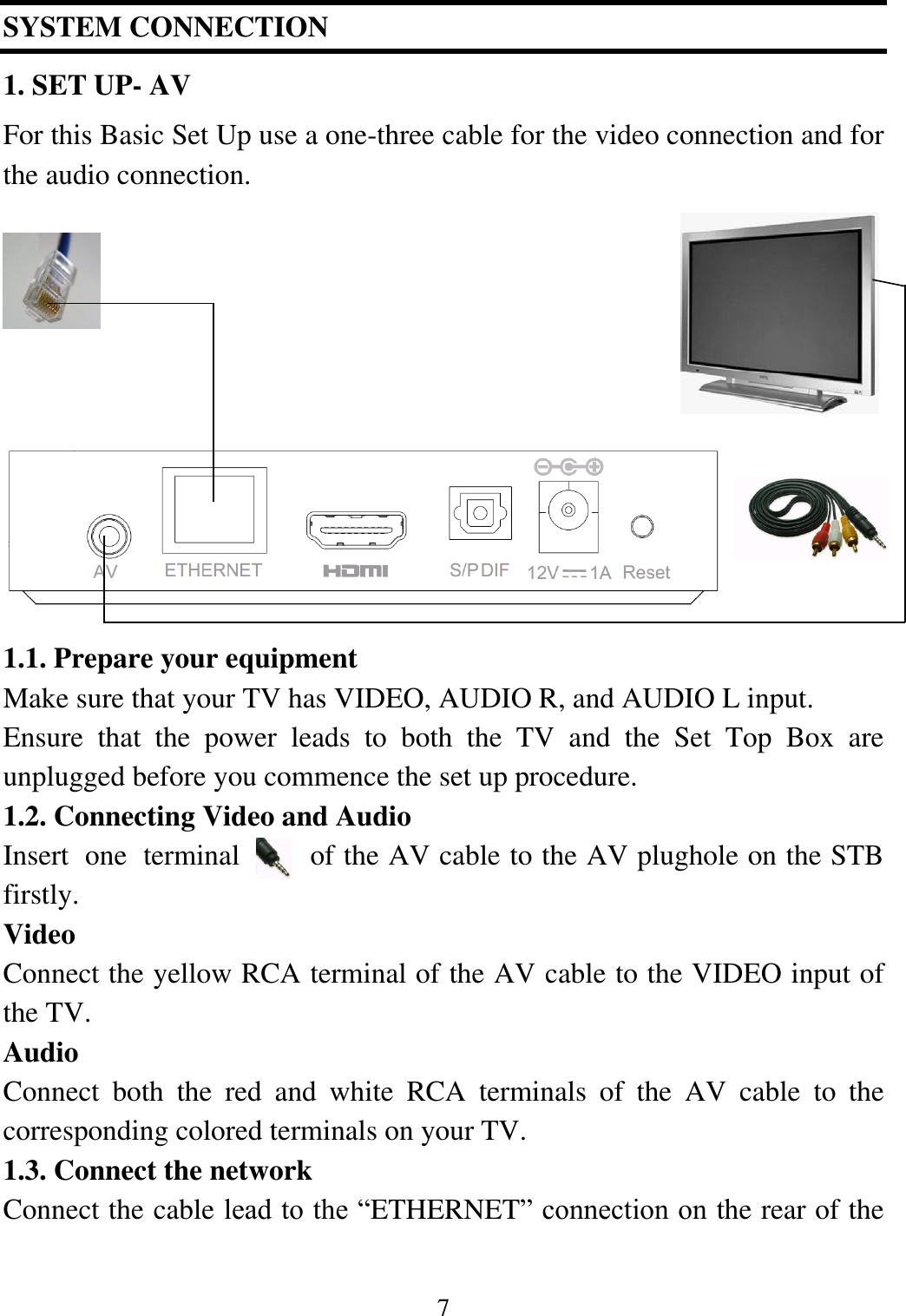
7  SYSTEM CONNECTION 1. SET UP- AV For this Basic Set Up use a one-three cable for the video connection and for the audio connection.               1.1. Prepare your equipment Make sure that your TV has VIDEO, AUDIO R, and AUDIO L input. Ensure  that  the  power  leads  to  both  the  TV  and  the  Set  Top  Box  are unplugged before you commence the set up procedure. 1.2. Connecting Video and Audio Insert  one  terminal  of the AV cable to the AV plughole on the STB firstly.   Video Connect the yellow RCA terminal of the AV cable to the VIDEO input of the TV. Audio Connect  both  the  red  and  white  RCA  terminals  of  the  AV  cable  to  the corresponding colored terminals on your TV. 1.3. Connect the network Connect the cable lead to the “ETHERNET” connection on the rear of the
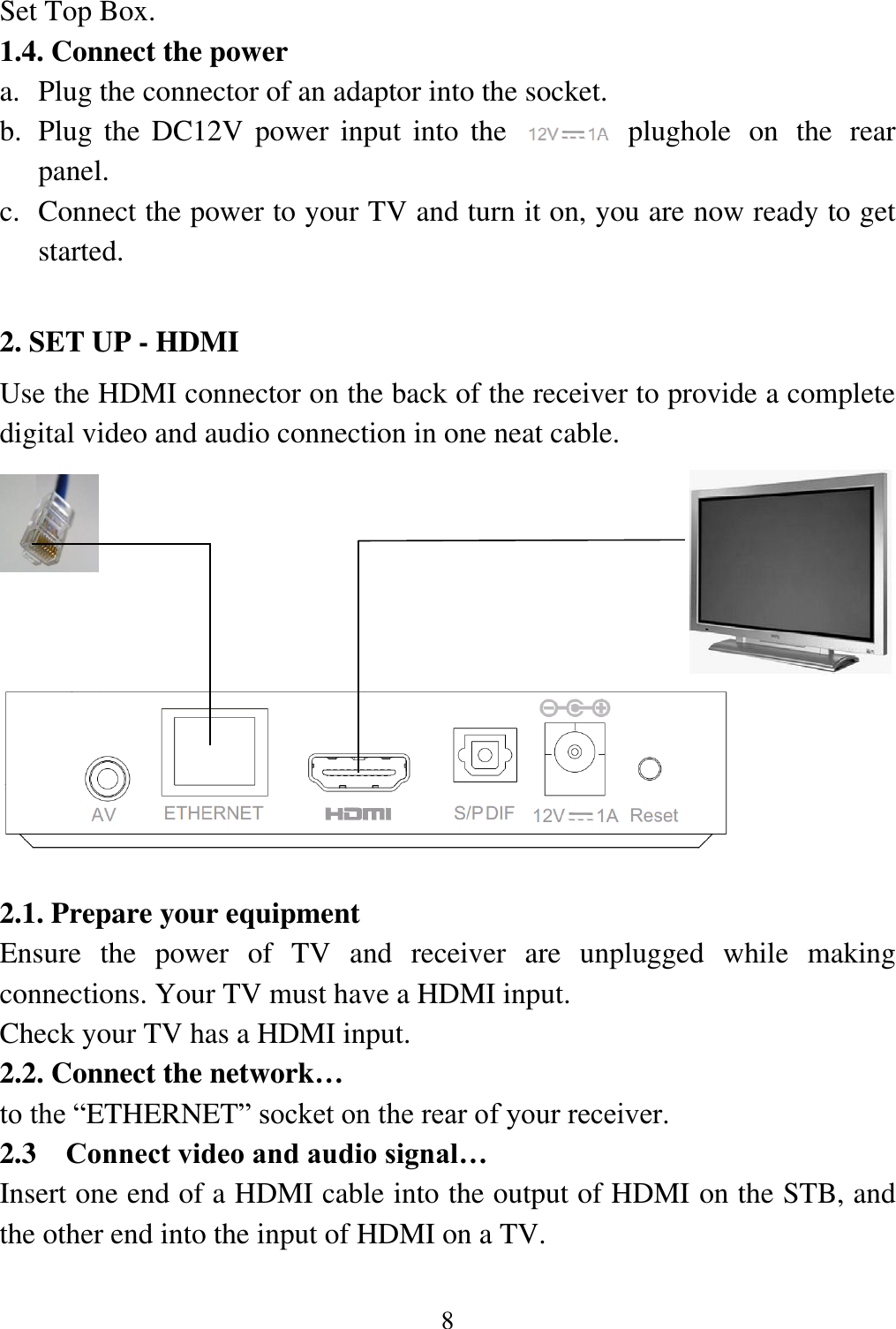
8  Set Top Box. 1.4. Connect the power a. Plug the connector of an adaptor into the socket. b. Plug the DC12V power  input  into  the        plughole  on  the  rear panel. c. Connect the power to your TV and turn it on, you are now ready to get started.  2. SET UP - HDMI     Use the HDMI connector on the back of the receiver to provide a complete digital video and audio connection in one neat cable.             2.1. Prepare your equipment   Ensure  the  power  of  TV  and  receiver  are  unplugged  while  making connections. Your TV must have a HDMI input.  Check your TV has a HDMI input.  2.2. Connect the network…   to the “ETHERNET” socket on the rear of your receiver.  2.3 Connect video and audio signal… Insert one end of a HDMI cable into the output of HDMI on the STB, and the other end into the input of HDMI on a TV.
9  2.4. Connect power… a. Plug the connector of an adaptor into the socket. b. Plug the DC12V power  input  into  the        plughole  on  the  rear panel. c. Connect the power to your TV and turn it on, you are now ready to get started.          Changes  or  modifications  not  expressly  approved  by  the  party  responsible  for compliance could void the user’s authority to operate the equipment. This equipment has been tested and found to comply with the limits for a Class B digital device, pursuant to Part 15 of the FCC Rules. These limits are designed to provide  reasonable  protection  against  harmful  interference  in  a  residential installation. This equipment generates, uses and can radiate radio frequency energy and, if not installed and used in accordance with the instructions, may cause harmful interference  to  radio  communications.  However,  there  is  no  guarantee  that interference will not occur in a particular installation. If this equipment does cause harmful interference to radio or television reception, which can be determined by turning the equipment off and on, the user is encouraged to try to correct the interference by one or more of the following measures: -- Reorient or relocate the receiving antenna. -- Increase the separation between the equipment and receiver. -- Connect the equipment into an outlet on a circuit different from that to which the receiver is connected. -- Consult the dealer or an experienced radio/TV technician for help.
10  This equipment must be installed and operated in accordance with provided instructions and the antenna(s) used for this transmitter must be installed to provide a separation distance of at least 20 cm from all persons and must not be co-located or operating in conjunction with any other antenna or transmitter. End-users  and  installers  must be provided with antenna installation instructions and transmitter operating conditions for satisfying RF exposure compliance.
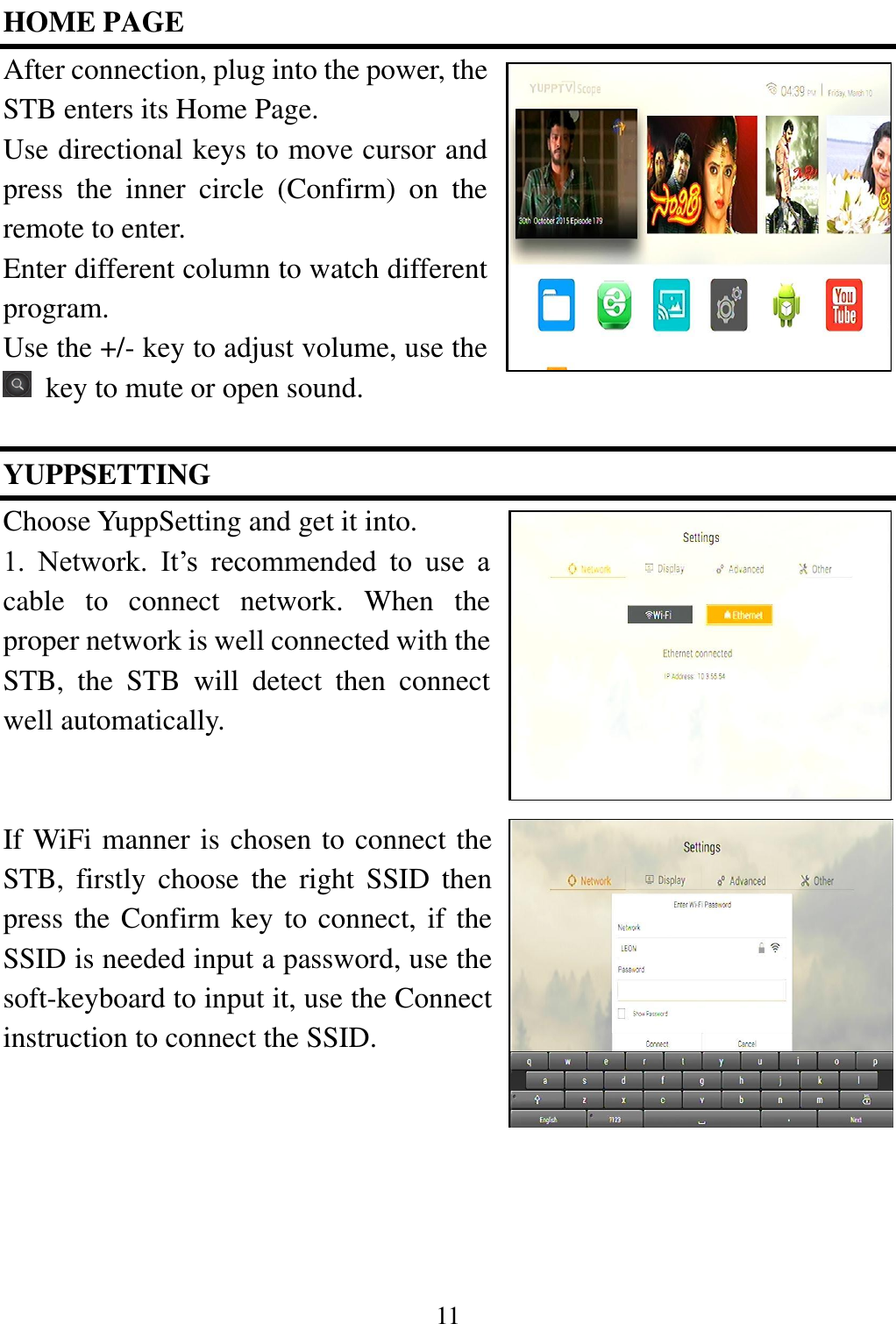
11  HOME PAGE After connection, plug into the power, the STB enters its Home Page.   Use directional keys to move cursor and press  the  inner  circle  (Confirm)  on  the remote to enter.   Enter different column to watch different program.   Use the +/- key to adjust volume, use the   key to mute or open sound.    YUPPSETTING   Choose YuppSetting and get it into.   1.  Network.  It’s  recommended  to  use  a cable  to  connect  network.  When  the proper network is well connected with the STB,  the  STB  will  detect  then  connect well automatically.   If WiFi manner is chosen to connect the STB,  firstly  choose  the  right  SSID  then press the Confirm key to connect, if the SSID is needed input a password, use the soft-keyboard to input it, use the Connect instruction to connect the SSID.

Navigation menu