Siemens Austria SIEMO-S50037 Bluetooth Module SieMo-S50037 User Manual SieMo S50037

Siemens AG Austria Bluetooth Module SieMo-S50037 SieMo S50037

Technical description

SieMo-S50037       Technical Description    PRELIMINARYPage 1/29Technical DescriptionSiemens Bluetooth™ ModuleSieMo-S50037S50037-Q5-*Issued byProgram and System EngineeringProduct and SolutionsRadio Communication DevicesErdberger Laende 26, A-1031 Vienna, AustriaCopyright  Siemens AG 2002 All Rights Reserved.SIEMENS AKTIENGESELLSCHAFT
File Name: SieMo_S50037 Technical Description.doc  Page 2/29Author Part of this Document DepartmentCanbolant D. Regulatory Statements, Bluetooth™ Trademark PSE PRO RCD 3Jatschka T. Technical Clauses PSE PRO RCD 3
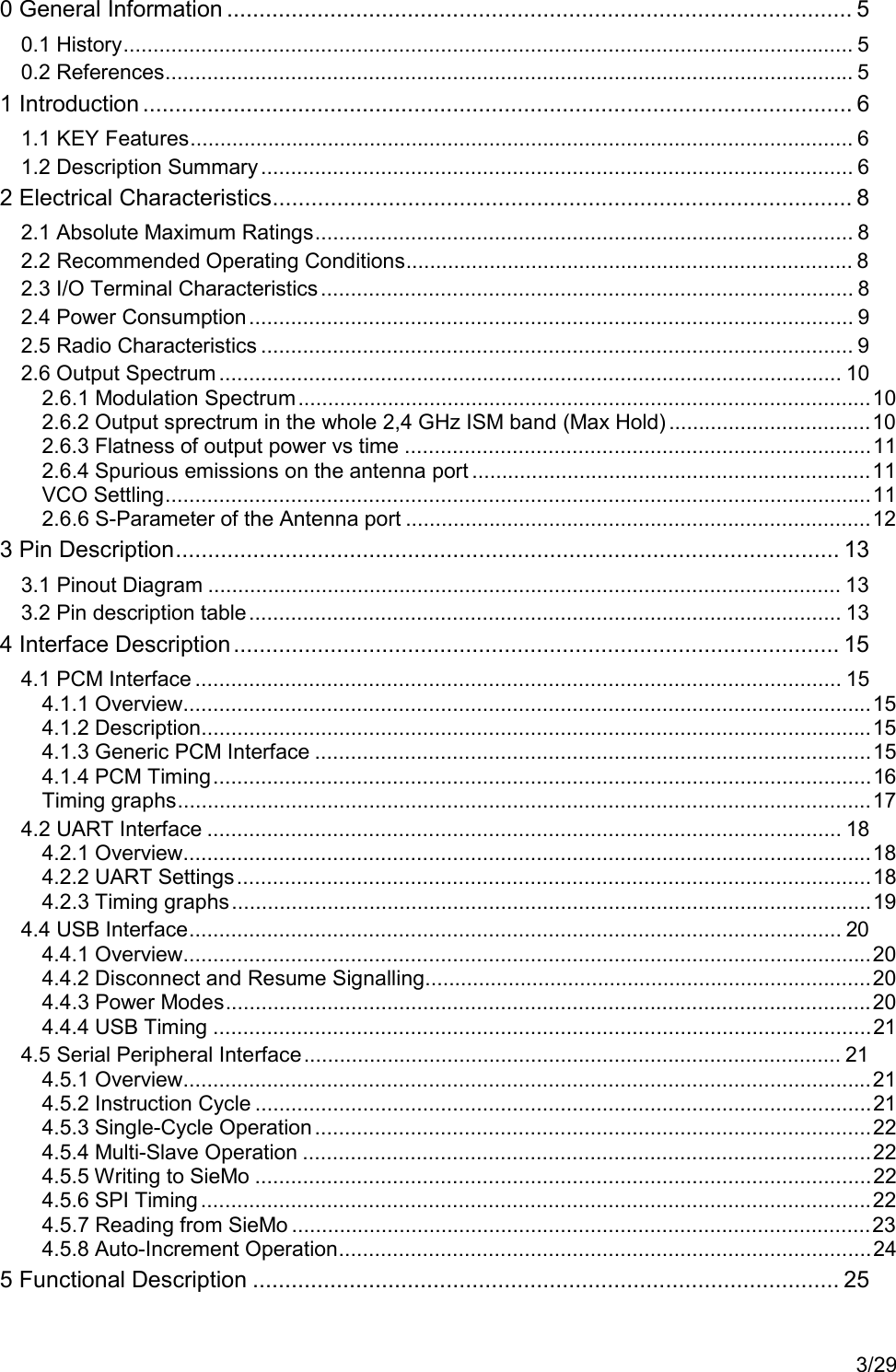
3/290 General Information ................................................................................................. 50.1 History.......................................................................................................................... 50.2 References................................................................................................................... 51 Introduction .............................................................................................................. 61.1 KEY Features............................................................................................................... 61.2 Description Summary ................................................................................................... 62 Electrical Characteristics.......................................................................................... 82.1 Absolute Maximum Ratings.......................................................................................... 82.2 Recommended Operating Conditions........................................................................... 82.3 I/O Terminal Characteristics......................................................................................... 82.4 Power Consumption..................................................................................................... 92.5 Radio Characteristics ................................................................................................... 92.6 Output Spectrum ........................................................................................................ 102.6.1 Modulation Spectrum................................................................................................102.6.2 Output sprectrum in the whole 2,4 GHz ISM band (Max Hold) ..................................102.6.3 Flatness of output power vs time ..............................................................................112.6.4 Spurious emissions on the antenna port ...................................................................11VCO Settling......................................................................................................................112.6.6 S-Parameter of the Antenna port ..............................................................................123 Pin Description....................................................................................................... 133.1 Pinout Diagram .......................................................................................................... 133.2 Pin description table................................................................................................... 134 Interface Description.............................................................................................. 154.1 PCM Interface ............................................................................................................ 154.1.1 Overview...................................................................................................................154.1.2 Description................................................................................................................154.1.3 Generic PCM Interface .............................................................................................154.1.4 PCM Timing..............................................................................................................16Timing graphs....................................................................................................................174.2 UART Interface .......................................................................................................... 184.2.1 Overview...................................................................................................................184.2.2 UART Settings..........................................................................................................184.2.3 Timing graphs...........................................................................................................194.4 USB Interface............................................................................................................. 204.4.1 Overview...................................................................................................................204.4.2 Disconnect and Resume Signalling...........................................................................204.4.3 Power Modes............................................................................................................204.4.4 USB Timing ..............................................................................................................214.5 Serial Peripheral Interface.......................................................................................... 214.5.1 Overview...................................................................................................................214.5.2 Instruction Cycle .......................................................................................................214.5.3 Single-Cycle Operation.............................................................................................224.5.4 Multi-Slave Operation ...............................................................................................224.5.5 Writing to SieMo .......................................................................................................224.5.6 SPI Timing ................................................................................................................224.5.7 Reading from SieMo .................................................................................................234.5.8 Auto-Increment Operation.........................................................................................245 Functional Description ........................................................................................... 25
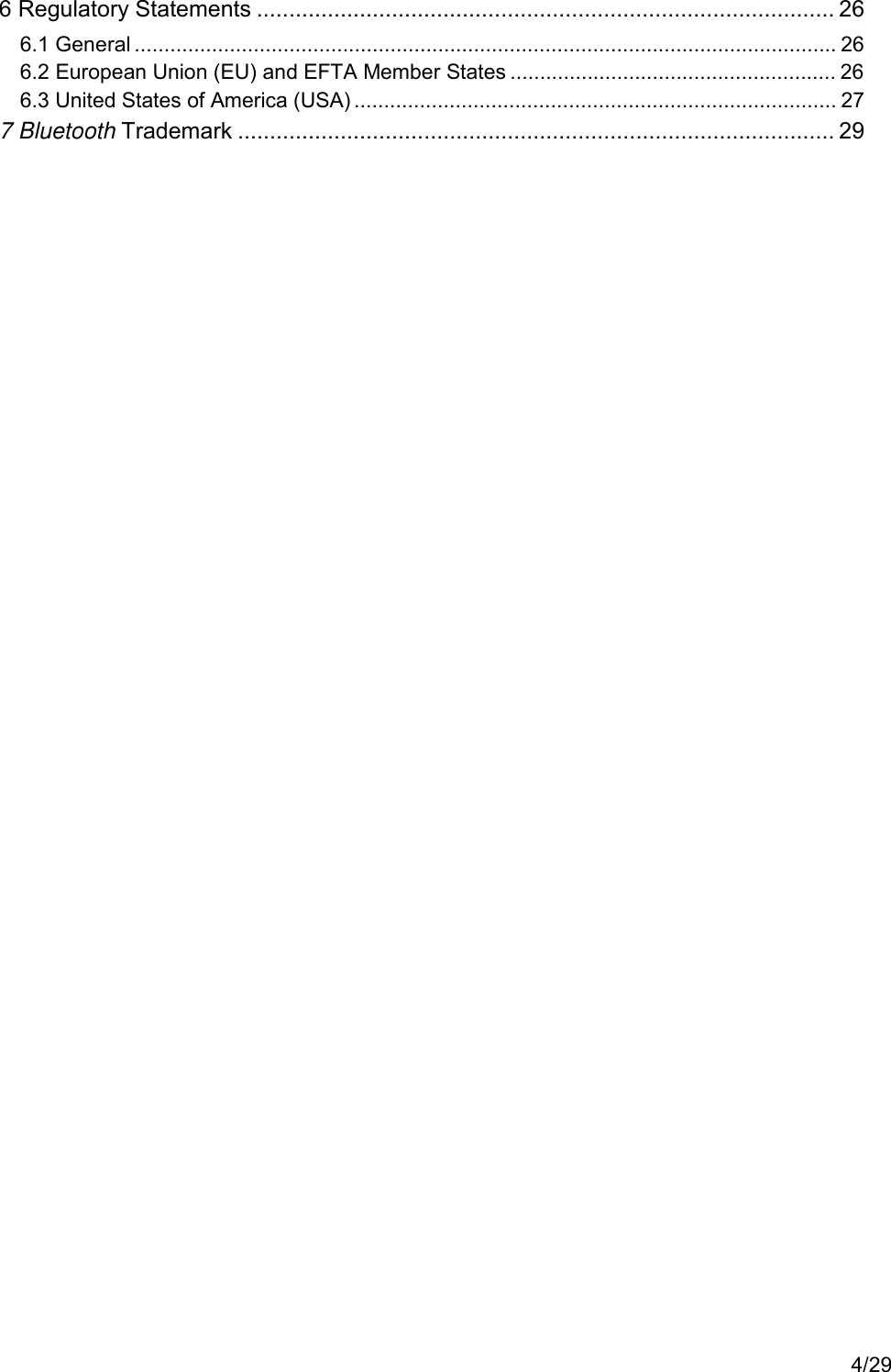
4/296 Regulatory Statements .......................................................................................... 266.1 General ...................................................................................................................... 266.2 European Union (EU) and EFTA Member States ....................................................... 266.3 United States of America (USA) ................................................................................. 277 Bluetooth Trademark ............................................................................................. 29
SieMo-S50037       Technical Description    PRELIMINARYPage 5/290 General Information0.1 HistoryIssue Date Reason for Changes01 2002-02-12 Initial issue02 2002-02-25 Redesign of document structure, inserting of the Clause RegulatoryStatementsTable 1: History0.2 References[1]  http://www.bluetooth.com
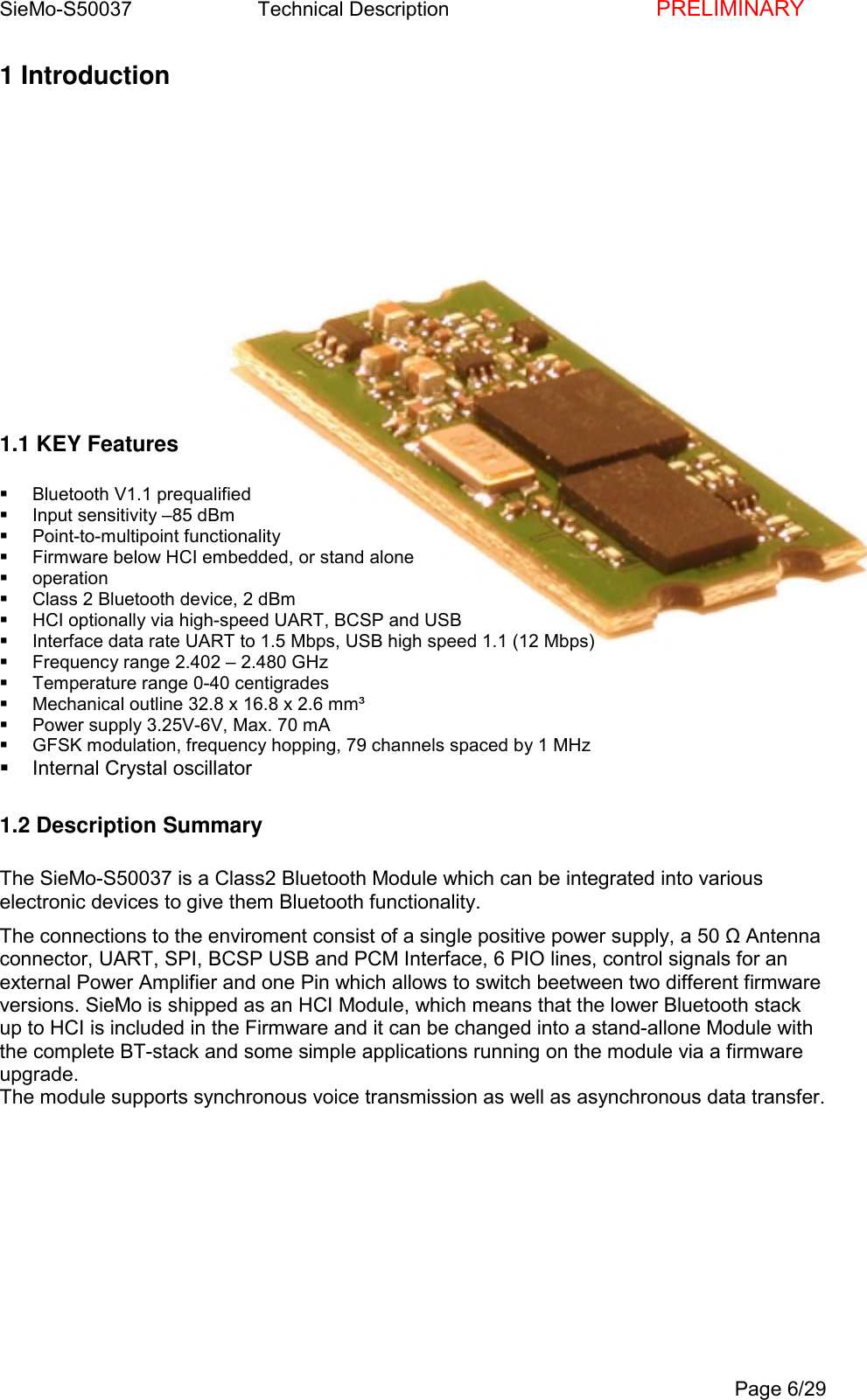
SieMo-S50037       Technical Description    PRELIMINARYPage 6/291 Introduction1.1 KEY Features Bluetooth V1.1 prequalified  Input sensitivity –85 dBm Point-to-multipoint functionality  Firmware below HCI embedded, or stand alone operation  Class 2 Bluetooth device, 2 dBm  HCI optionally via high-speed UART, BCSP and USB  Interface data rate UART to 1.5 Mbps, USB high speed 1.1 (12 Mbps)  Frequency range 2.402 – 2.480 GHz  Temperature range 0-40 centigrades  Mechanical outline 32.8 x 16.8 x 2.6 mm³  Power supply 3.25V-6V, Max. 70 mA  GFSK modulation, frequency hopping, 79 channels spaced by 1 MHz  Internal Crystal oscillator1.2 Description SummaryThe SieMo-S50037 is a Class2 Bluetooth Module which can be integrated into variouselectronic devices to give them Bluetooth functionality.The connections to the enviroment consist of a single positive power supply, a 50 Ω Antennaconnector, UART, SPI, BCSP USB and PCM Interface, 6 PIO lines, control signals for anexternal Power Amplifier and one Pin which allows to switch beetween two different firmwareversions. SieMo is shipped as an HCI Module, which means that the lower Bluetooth stackup to HCI is included in the Firmware and it can be changed into a stand-allone Module withthe complete BT-stack and some simple applications running on the module via a firmwareupgrade.The module supports synchronous voice transmission as well as asynchronous data transfer.
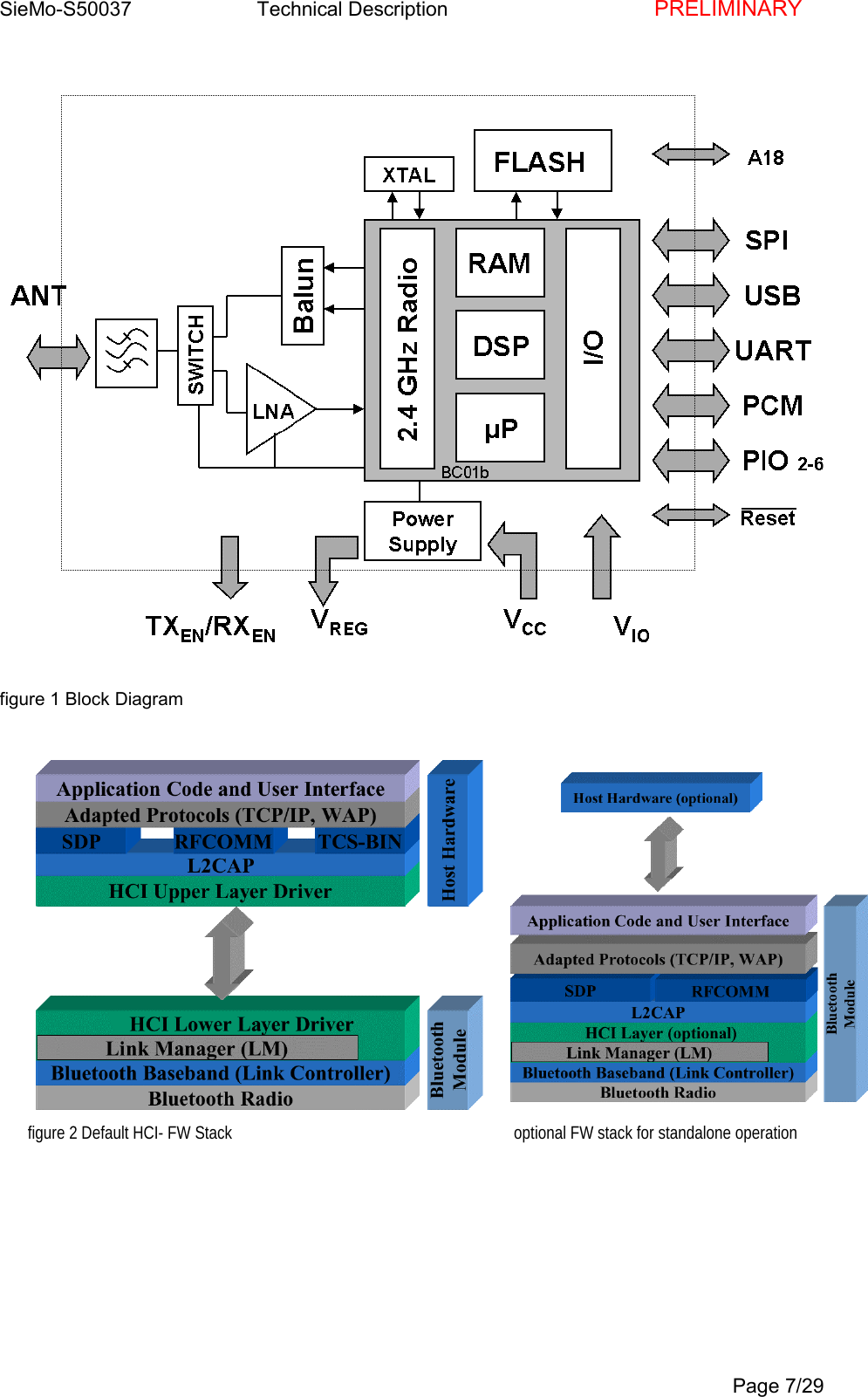
SieMo-S50037       Technical Description    PRELIMINARYPage 7/29figure 1 Block Diagramfigure 2 Default HCI- FW Stack                                                                    optional FW stack for standalone operation
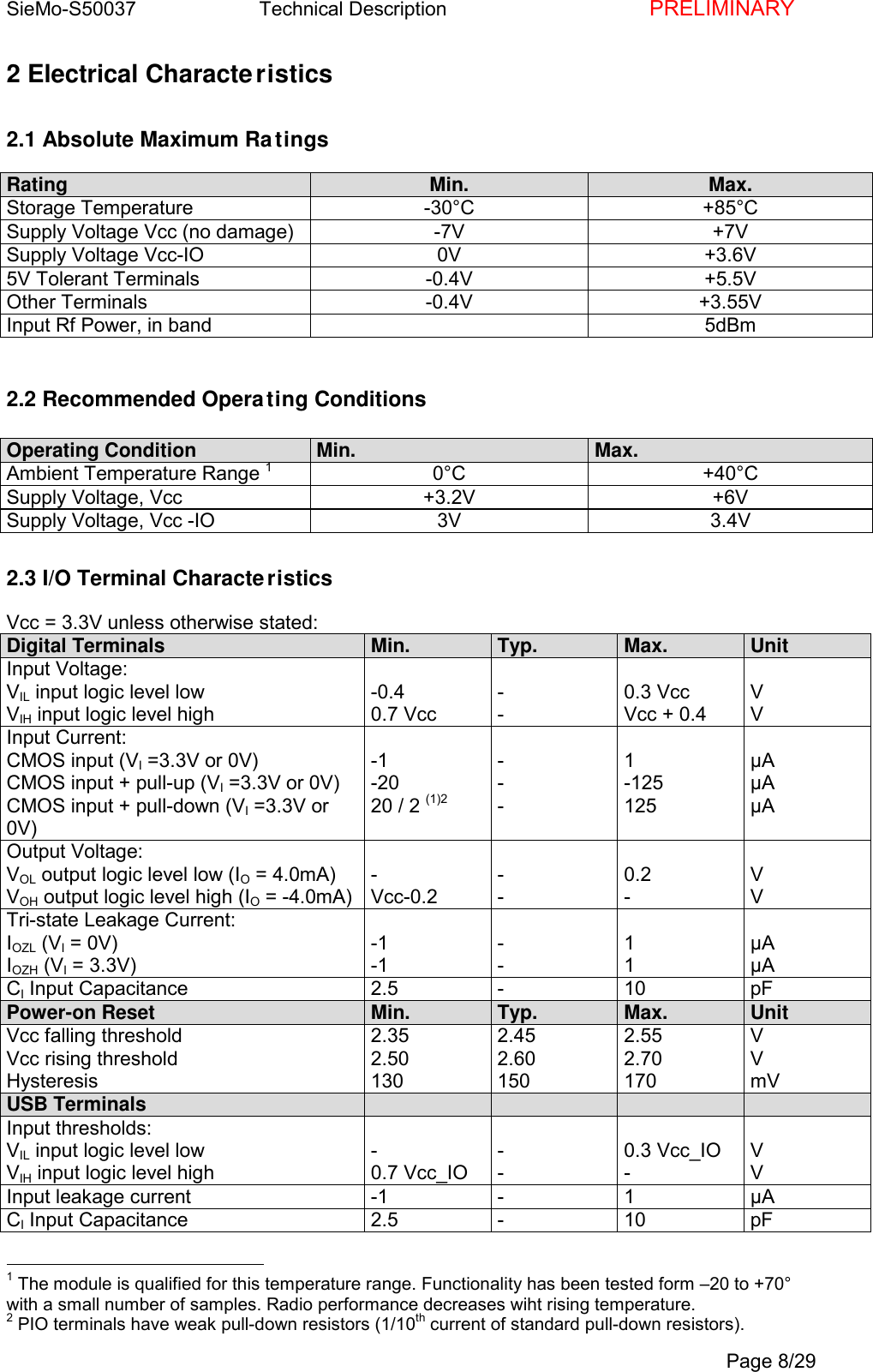
SieMo-S50037       Technical Description    PRELIMINARYPage 8/292 Electrical Characteristics2.1 Absolute Maximum RatingsRating Min. Max.Storage Temperature -30°C +85°CSupply Voltage Vcc (no damage) -7V +7VSupply Voltage Vcc-IO 0V +3.6V5V Tolerant Terminals -0.4V +5.5VOther Terminals -0.4V +3.55VInput Rf Power, in band 5dBm2.2 Recommended Operating ConditionsOperating Condition Min. Max.Ambient Temperature Range 10°C +40°CSupply Voltage, Vcc +3.2V +6VSupply Voltage, Vcc -IO 3V 3.4V2.3 I/O Terminal CharacteristicsVcc = 3.3V unless otherwise stated:Digital Terminals Min. Typ. Max. UnitInput Voltage:VIL input logic level lowVIH input logic level high-0.40.7 Vcc--0.3 VccVcc + 0.4VVInput Current:CMOS input (VI =3.3V or 0V)CMOS input + pull-up (VI =3.3V or 0V)CMOS input + pull-down (VI =3.3V or0V)-1-2020 / 2 (1)2---1-125125µAµAµAOutput Voltage:VOL output logic level low (IO = 4.0mA)VOH output logic level high (IO = -4.0mA)-Vcc-0.2--0.2-VVTri-state Leakage Current:IOZL (VI = 0V)IOZH (VI = 3.3V)-1-1--11µAµACI Input Capacitance 2.5 - 10 pFPower-on Reset Min. Typ. Max. UnitVcc falling thresholdVcc rising thresholdHysteresis2.352.501302.452.601502.552.70170VVmVUSB TerminalsInput thresholds:VIL input logic level lowVIH input logic level high-0.7 Vcc_IO--0.3 Vcc_IO-VVInput leakage current -1 - 1 µACI Input Capacitance 2.5 - 10 pF                                                1 The module is qualified for this temperature range. Functionality has been tested form –20 to +70°with a small number of samples. Radio performance decreases wiht rising temperature.2 PIO terminals have weak pull-down resistors (1/10th current of standard pull-down resistors).
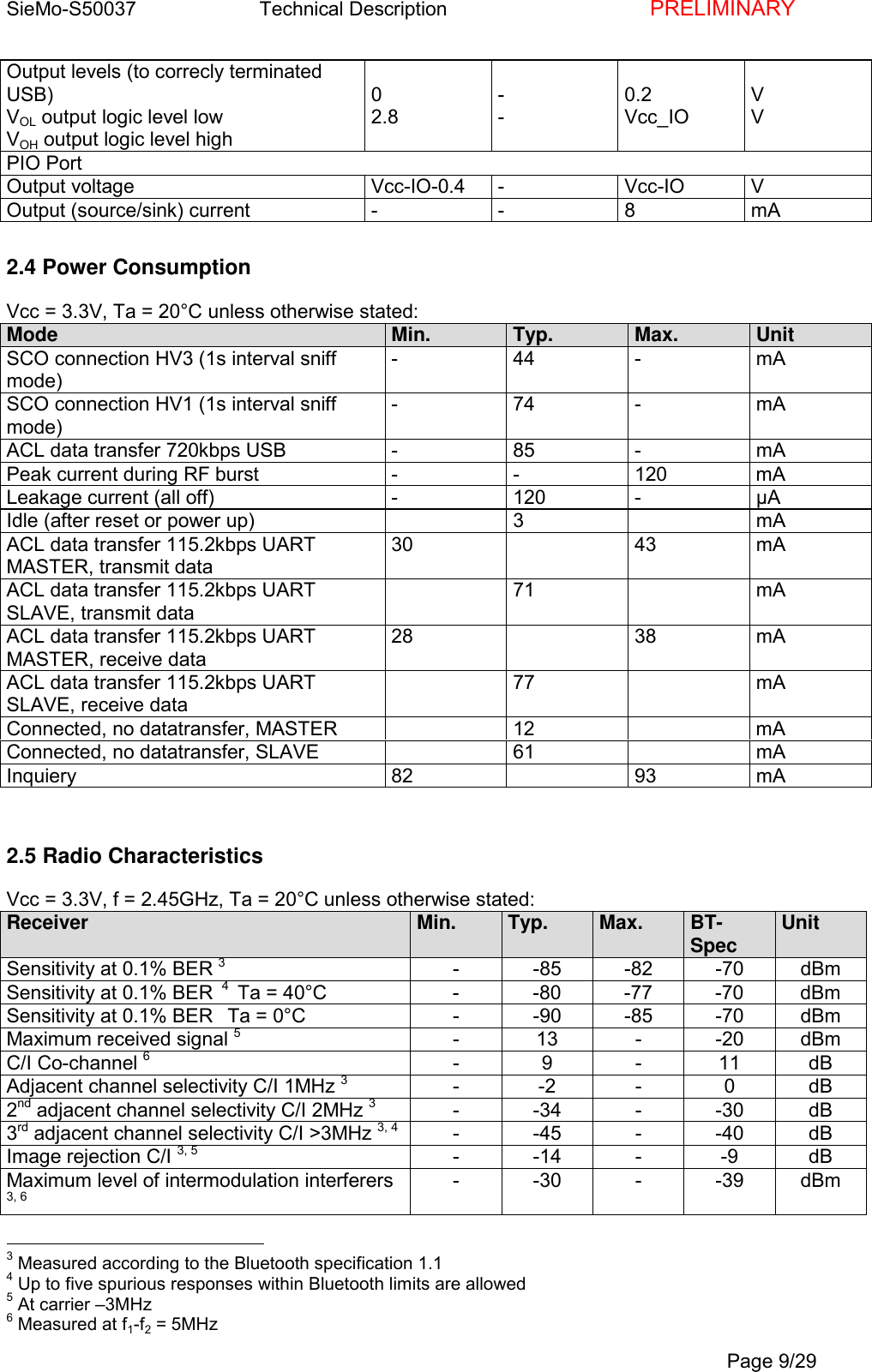
SieMo-S50037       Technical Description    PRELIMINARYPage 9/29Output levels (to correcly terminatedUSB)VOL output logic level lowVOH output logic level high02.8--0.2Vcc_IOVVPIO PortOutput voltage Vcc-IO-0.4 - Vcc-IO VOutput (source/sink) current - - 8 mA2.4 Power ConsumptionVcc = 3.3V, Ta = 20°C unless otherwise stated:Mode Min. Typ. Max. UnitSCO connection HV3 (1s interval sniffmode)-44-mASCO connection HV1 (1s interval sniffmode)-74-mAACL data transfer 720kbps USB - 85 - mAPeak current during RF burst - - 120 mALeakage current (all off) - 120 - µAIdle (after reset or power up) 3 mAACL data transfer 115.2kbps UARTMASTER, transmit data30 43 mAACL data transfer 115.2kbps UARTSLAVE, transmit data71 mAACL data transfer 115.2kbps UARTMASTER, receive data28 38 mAACL data transfer 115.2kbps UARTSLAVE, receive data77 mAConnected, no datatransfer, MASTER 12 mAConnected, no datatransfer, SLAVE 61 mAInquiery 82 93 mA2.5 Radio CharacteristicsVcc = 3.3V, f = 2.45GHz, Ta = 20°C unless otherwise stated:Receiver Min. Typ. Max. BT-Spec UnitSensitivity at 0.1% BER 3- -85 -82 -70 dBmSensitivity at 0.1% BER  4  Ta = 40°C - -80 -77 -70 dBmSensitivity at 0.1% BER   Ta = 0°C - -90 -85 -70 dBmMaximum received signal 5-13--20dBmC/I Co-channel 6-9-11dBAdjacent channel selectivity C/I 1MHz 3--2- 0dB2nd adjacent channel selectivity C/I 2MHz 3- -34 - -30 dB3rd adjacent channel selectivity C/I >3MHz 3, 4 - -45 - -40 dBImage rejection C/I 3, 5 --14- -9dBMaximum level of intermodulation interferers3, 6- -30 - -39 dBm                                                3 Measured according to the Bluetooth specification 1.14 Up to five spurious responses within Bluetooth limits are allowed5 At carrier –3MHz6 Measured at f1-f2 = 5MHz
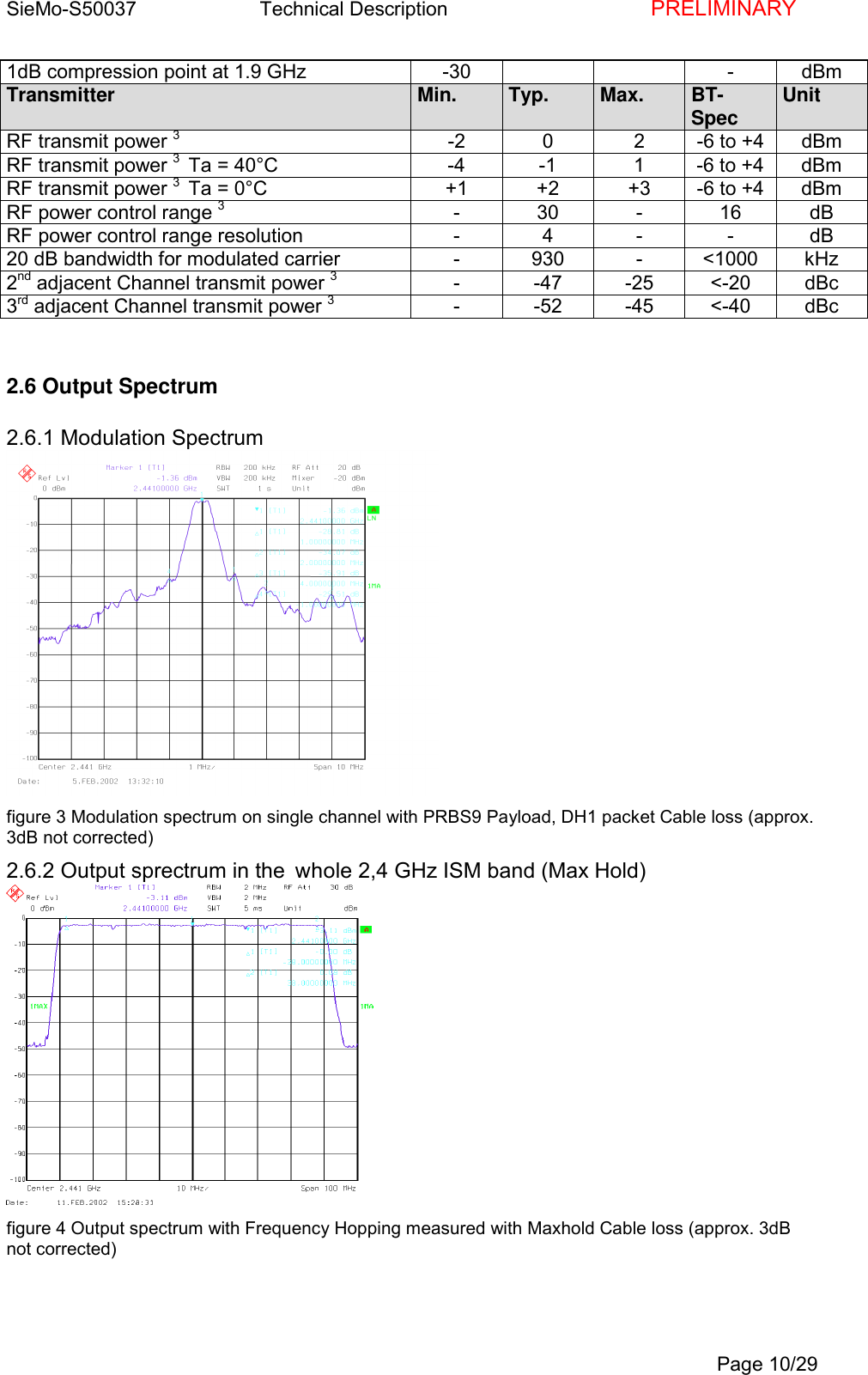
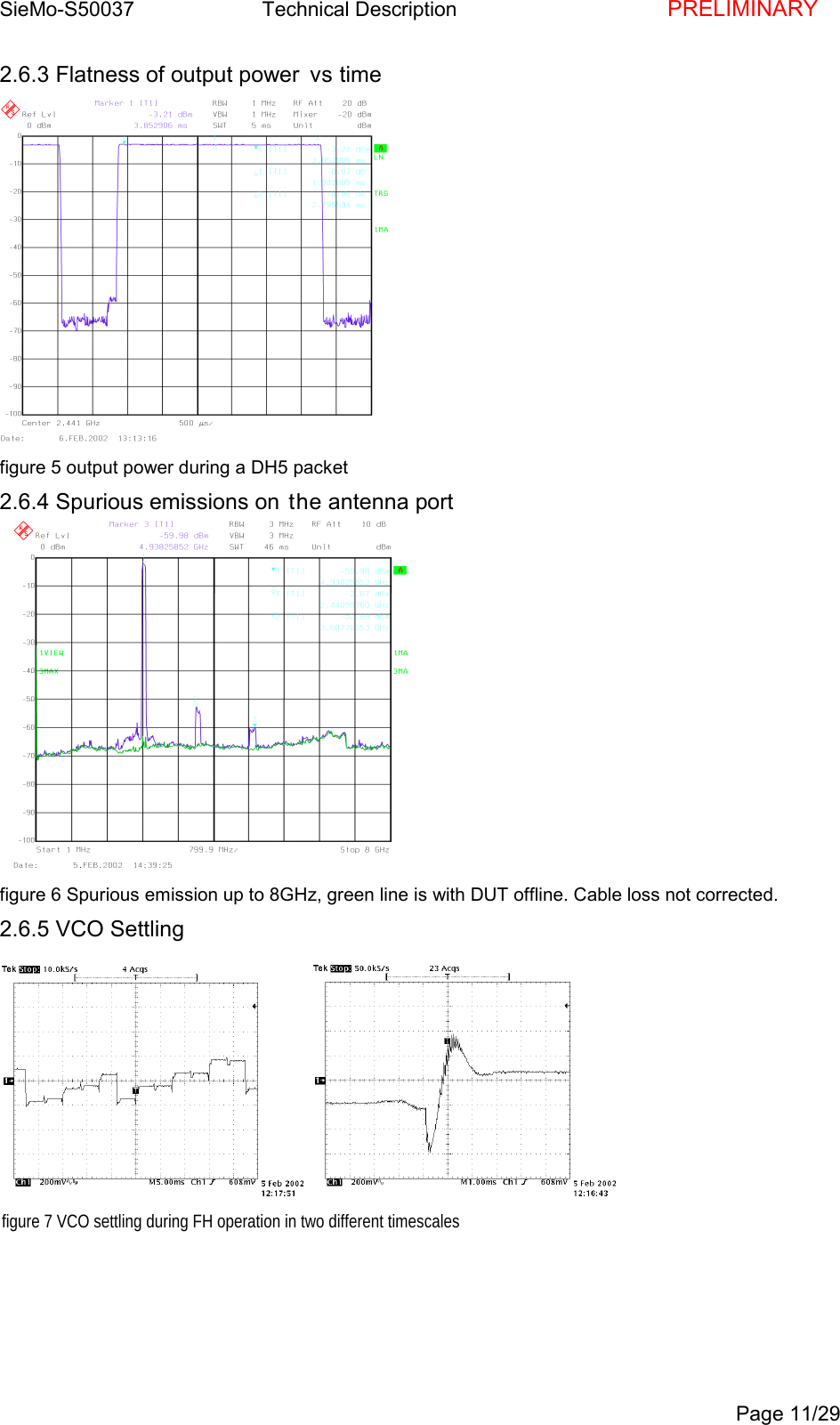
SieMo-S50037       Technical Description    PRELIMINARYPage 10/291dB compression point at 1.9 GHz -30 - dBmTransmitter Min. Typ. Max. BT-Spec UnitRF transmit power 3-2 0 2 -6 to +4 dBmRF transmit power 3  Ta = 40°C -4 -1 1 -6 to +4 dBmRF transmit power 3  Ta = 0°C +1 +2 +3 -6 to +4 dBmRF power control range 3- 30 - 16 dBRF power control range resolution - 4 - - dB20 dB bandwidth for modulated carrier - 930 - <1000 kHz2nd adjacent Channel transmit power 3--47-25<-20dBc3rd adjacent Channel transmit power 3--52-45<-40dBc2.6 Output Spectrum2.6.1 Modulation Spectrumfigure 3 Modulation spectrum on single channel with PRBS9 Payload, DH1 packet Cable loss (approx.3dB not corrected)2.6.2 Output sprectrum in the whole 2,4 GHz ISM band (Max Hold)figure 4 Output spectrum with Frequency Hopping measured with Maxhold Cable loss (approx. 3dBnot corrected)
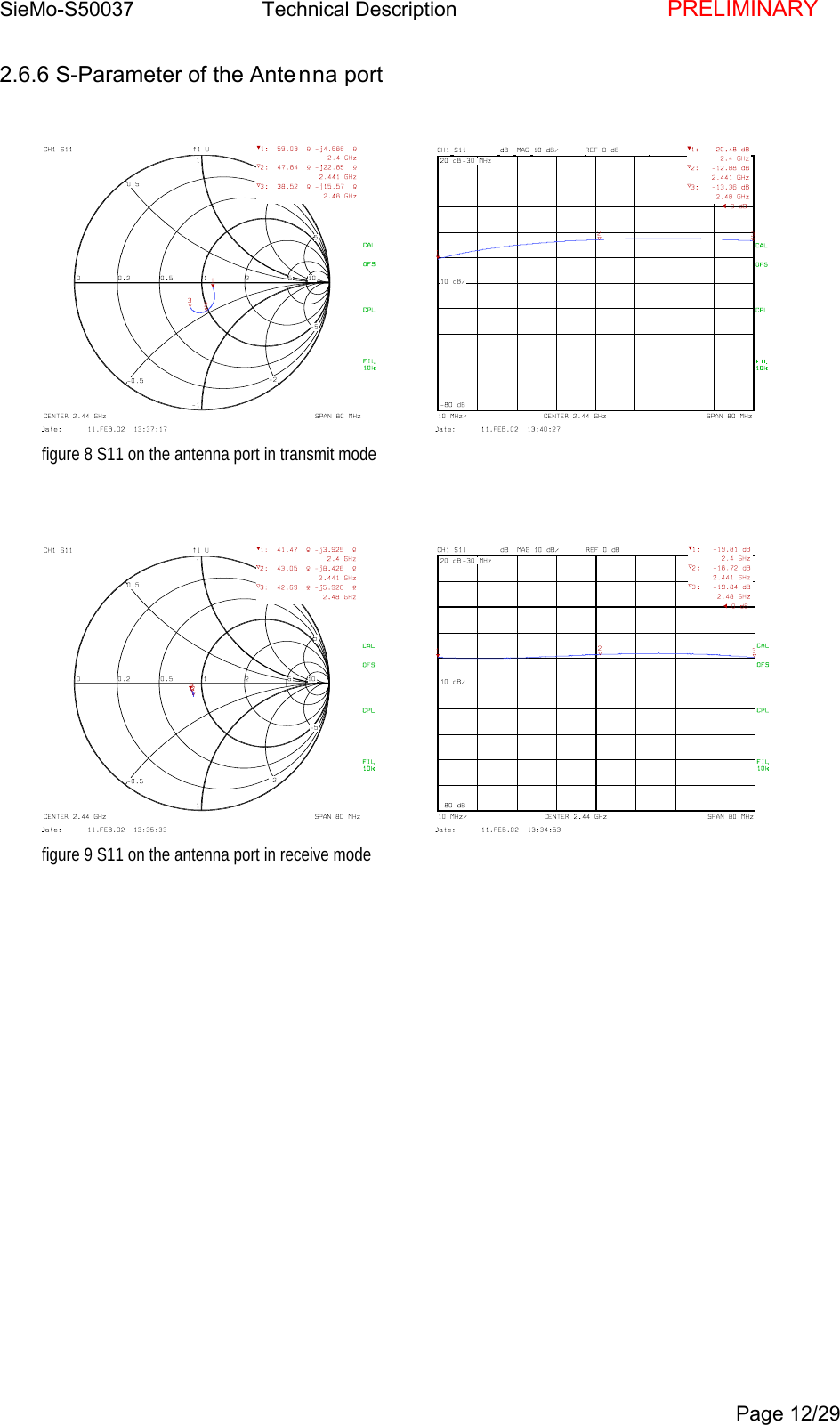
SieMo-S50037       Technical Description    PRELIMINARYPage 11/292.6.3 Flatness of output power vs timefigure 5 output power during a DH5 packet2.6.4 Spurious emissions on the antenna portfigure 6 Spurious emission up to 8GHz, green line is with DUT offline. Cable loss not corrected.2.6.5 VCO Settlingfigure 7 VCO settling during FH operation in two different timescales
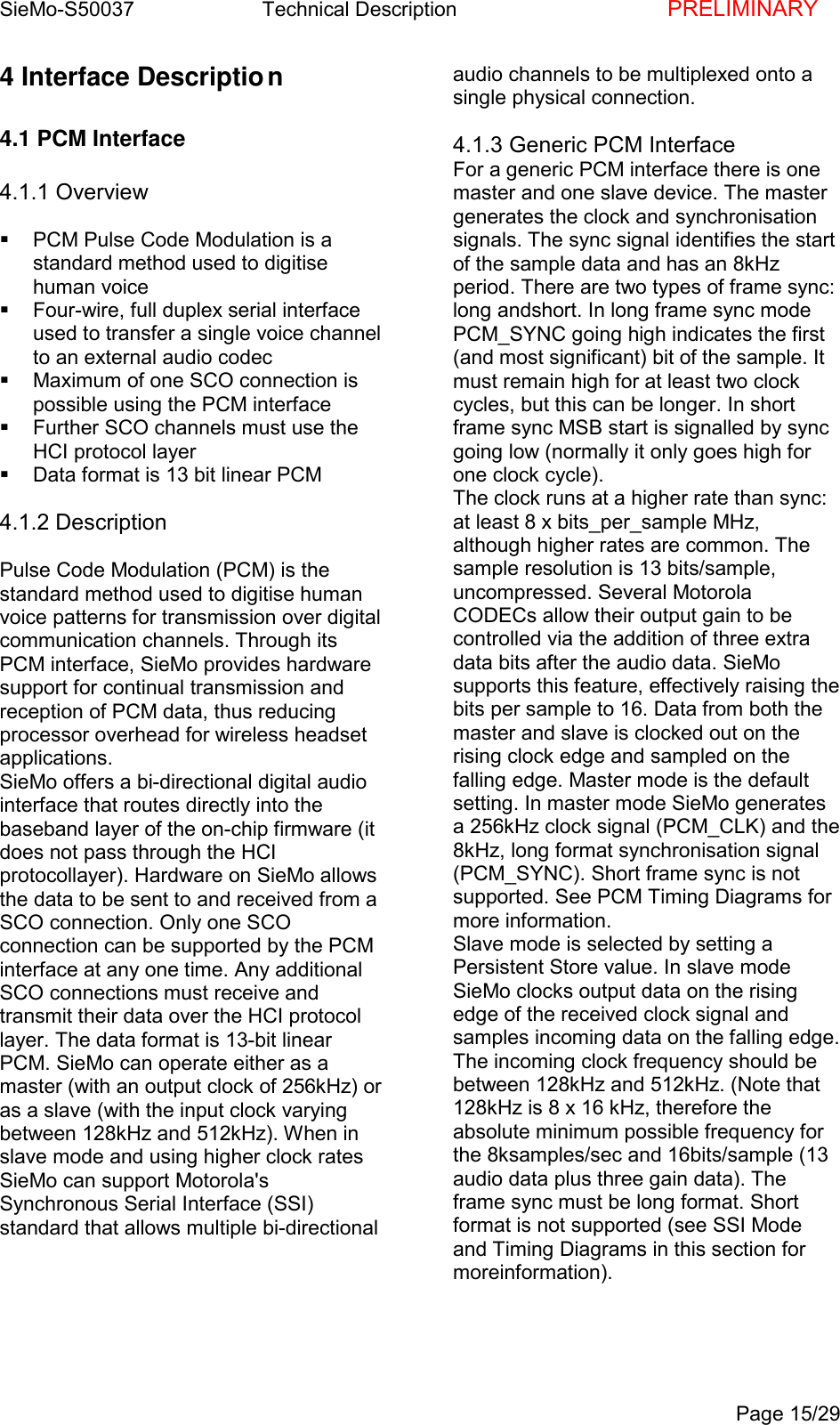
SieMo-S50037       Technical Description    PRELIMINARYPage 12/292.6.6 S-Parameter of the Antenna portfigure 8 S11 on the antenna port in transmit modefigure 9 S11 on the antenna port in receive mode
SieMo-S50037       Technical Description    PRELIMINARYPage 13/293 Pin Description3.1 Pinout Diagramfigure 10 SieMo Pinout, bottom view3.2 Pin description tablePin Name Type Pin DescriptionRFANT Rf in/out T2 Antenna output, 50Ω; unconditionallystable; DC path to GNDTX-EN CMOS output,pulled downF5 Control output for external switch or PARX-EN CMOS outputpulled downF4 Control output for external switch or LNATX-PWR Analog output F6 Ramping control output for external PA,need not be used, ramping is done on themodule.PowerVcc Power C6 Power Supply 3,25-6VVcc-IO Power C4 Power Supply for all IO-Pins, 3.0-3.4VUART-InterfaceTxD CMOS output, 5Vtolerant, pulled downB5 UART data outputRxD CMOS input, 5Vtolerant, pulled downA5 UART data inputRTS CMOS output A6 UART Ready To SendCTS CMOS input B6 UART Clear To SendUSB-InterfaceD+ CMOS bidirectional B1 USB D+D- CMOS bidirectional B2 USB D-USB_PULL_UP/PIO[2]CMOS bidirectional,pulled downD1 USB Pull-up, internally attached to D+, onlyused with corresponding USB-settings.USB_WAKE_UP/PIO[3]CMOS bidirectional,pulled downB4 Output goes high to wake up PC when inUSB mode, only used with corresponding USB-settings.USB_ON/PIO[4]CMOS bidirectional,pulled downD2 USB On (Input. Senses when VBUS is highwakes SieMo), only used with corresponding USB-
SieMo-S50037       Technical Description    PRELIMINARYPage 14/29settings.USB_DETACH/PIO[5]CMOS bidirectional,pulled downC1 Chip detaches from USB when this line ishigh, only used with corresponding USB-settings.PCM-InterfacePCM_IN CMOS inputpulled downA1 Synchronous 8kss-1data inputPCM_OUT CMOS outputpulled downA2 Synchronous 8kss-1data outputPCM_SYNC CMOS bidirectional,pulled downA3 Synchronous data strobePCM_CLK CMOS bidirectional,pulled downA4 Synchronous data clockSPI-InterfaceSPI-CSB CMOS input, 5Vtolerant, pulled upE1 SPI Chip SelectSPI-CLK CMOS input, 5Vtolerant, pulled downE2 SPI ClockSPI-MOSI CMOS input, 5Vtolerant, pulled upE3 SPI Data InputSPI-MISO CMOS output,tristateE4 SPI Data OutputPIO-InterfacePIO[2]/USB_PULL_UPCMOS bidirectional,pulled downD1 Programmable IO linePIO[3]/USB_WAKE_UPCMOS bidirectional,pulled downB4 Programmable IO linePIO[4]/USB_ON CMOS bidirectional,pulled downD2 Programmable IO linePIO[5]/USB_DETACHCMOS bidirectional,pulled downC1 Programmable IO linePIO[6]/ CMOS bidirectional,pulled downD5 Programmable IO linePIO[7]/ CMOS bidirectional,pulled downD6 Programmable IO lineSpecial FunctionsRESET# CMOS inputpulled upR3 Reset# inputSCAN_ENABLE CMOS inputpulled downF1 For Test only, do not connectMODE CMOS inputpulled downD3 Selects second Firmware, if programmed
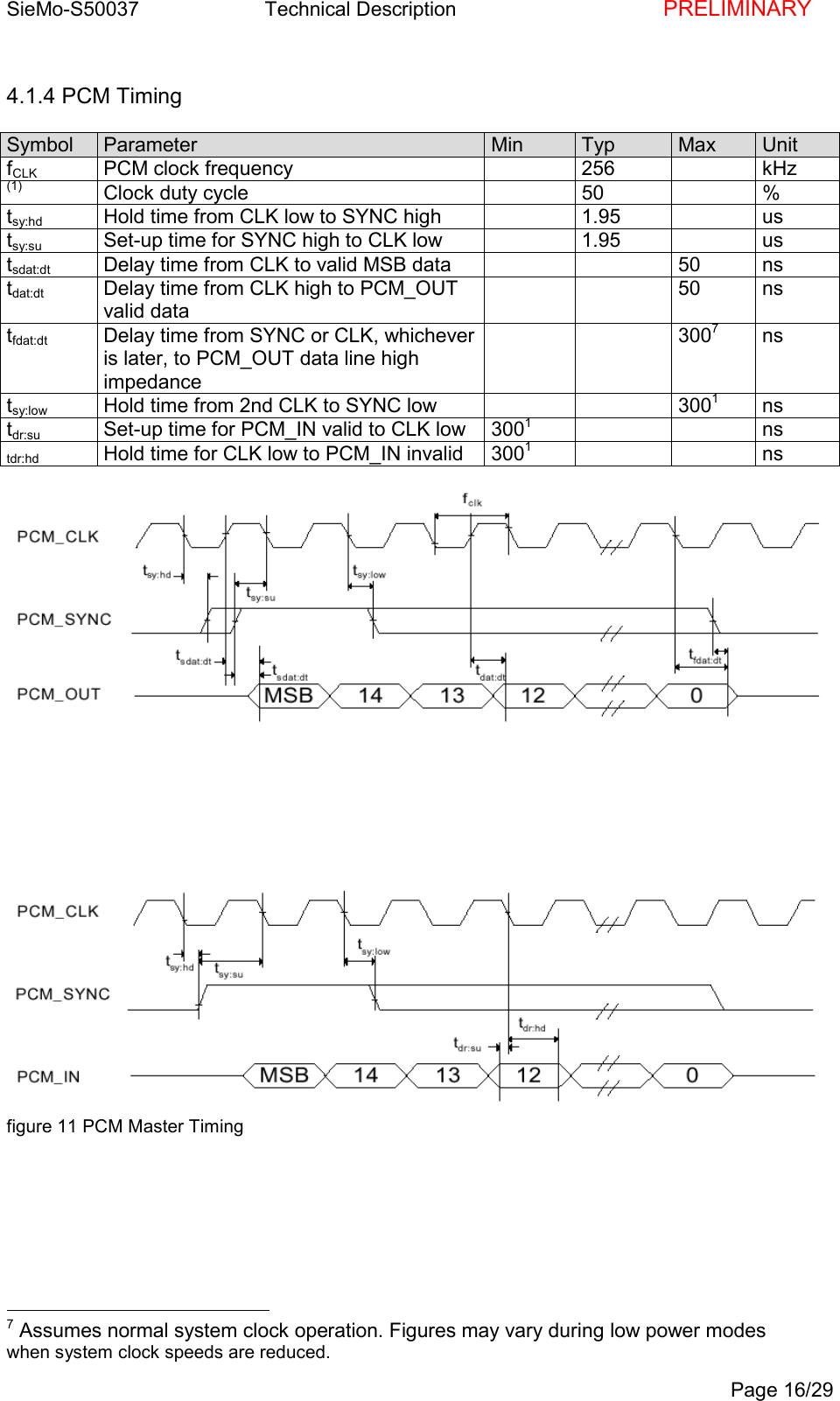
SieMo-S50037       Technical Description    PRELIMINARYPage 15/294 Interface Description4.1 PCM Interface4.1.1 Overview  PCM Pulse Code Modulation is astandard method used to digitisehuman voice  Four-wire, full duplex serial interfaceused to transfer a single voice channelto an external audio codec  Maximum of one SCO connection ispossible using the PCM interface  Further SCO channels must use theHCI protocol layer  Data format is 13 bit linear PCM4.1.2 DescriptionPulse Code Modulation (PCM) is thestandard method used to digitise humanvoice patterns for transmission over digitalcommunication channels. Through itsPCM interface, SieMo provides hardwaresupport for continual transmission andreception of PCM data, thus reducingprocessor overhead for wireless headsetapplications.SieMo offers a bi-directional digital audiointerface that routes directly into thebaseband layer of the on-chip firmware (itdoes not pass through the HCIprotocollayer). Hardware on SieMo allowsthe data to be sent to and received from aSCO connection. Only one SCOconnection can be supported by the PCMinterface at any one time. Any additionalSCO connections must receive andtransmit their data over the HCI protocollayer. The data format is 13-bit linearPCM. SieMo can operate either as amaster (with an output clock of 256kHz) oras a slave (with the input clock varyingbetween 128kHz and 512kHz). When inslave mode and using higher clock ratesSieMo can support Motorola'sSynchronous Serial Interface (SSI)standard that allows multiple bi-directionalaudio channels to be multiplexed onto asingle physical connection.4.1.3 Generic PCM InterfaceFor a generic PCM interface there is onemaster and one slave device. The mastergenerates the clock and synchronisationsignals. The sync signal identifies the startof the sample data and has an 8kHzperiod. There are two types of frame sync:long andshort. In long frame sync modePCM_SYNC going high indicates the first(and most significant) bit of the sample. Itmust remain high for at least two clockcycles, but this can be longer. In shortframe sync MSB start is signalled by syncgoing low (normally it only goes high forone clock cycle).The clock runs at a higher rate than sync:at least 8 x bits_per_sample MHz,although higher rates are common. Thesample resolution is 13 bits/sample,uncompressed. Several MotorolaCODECs allow their output gain to becontrolled via the addition of three extradata bits after the audio data. SieMosupports this feature, effectively raising thebits per sample to 16. Data from both themaster and slave is clocked out on therising clock edge and sampled on thefalling edge. Master mode is the defaultsetting. In master mode SieMo generatesa 256kHz clock signal (PCM_CLK) and the8kHz, long format synchronisation signal(PCM_SYNC). Short frame sync is notsupported. See PCM Timing Diagrams formore information.Slave mode is selected by setting aPersistent Store value. In slave modeSieMo clocks output data on the risingedge of the received clock signal andsamples incoming data on the falling edge.The incoming clock frequency should bebetween 128kHz and 512kHz. (Note that128kHz is 8 x 16 kHz, therefore theabsolute minimum possible frequency forthe 8ksamples/sec and 16bits/sample (13audio data plus three gain data). Theframe sync must be long format. Shortformat is not supported (see SSI Modeand Timing Diagrams in this section formoreinformation).
SieMo-S50037       Technical Description    PRELIMINARYPage 16/294.1.4 PCM TimingSymbol Parameter Min Typ Max UnitfCLK PCM clock frequency 256 kHz(1) Clock duty cycle 50 %tsy:hd Hold time from CLK low to SYNC high 1.95 ustsy:su Set-up time for SYNC high to CLK low 1.95 ustsdat:dt Delay time from CLK to valid MSB data 50 nstdat:dt Delay time from CLK high to PCM_OUTvalid data50 nstfdat:dt Delay time from SYNC or CLK, whicheveris later, to PCM_OUT data line highimpedance3007nstsy:low Hold time from 2nd CLK to SYNC low 3001nstdr:su Set-up time for PCM_IN valid to CLK low 3001nstdr:hd Hold time for CLK low to PCM_IN invalid 3001nsfigure 11 PCM Master Timing                                                7 Assumes normal system clock operation. Figures may vary during low power modeswhen system clock speeds are reduced.
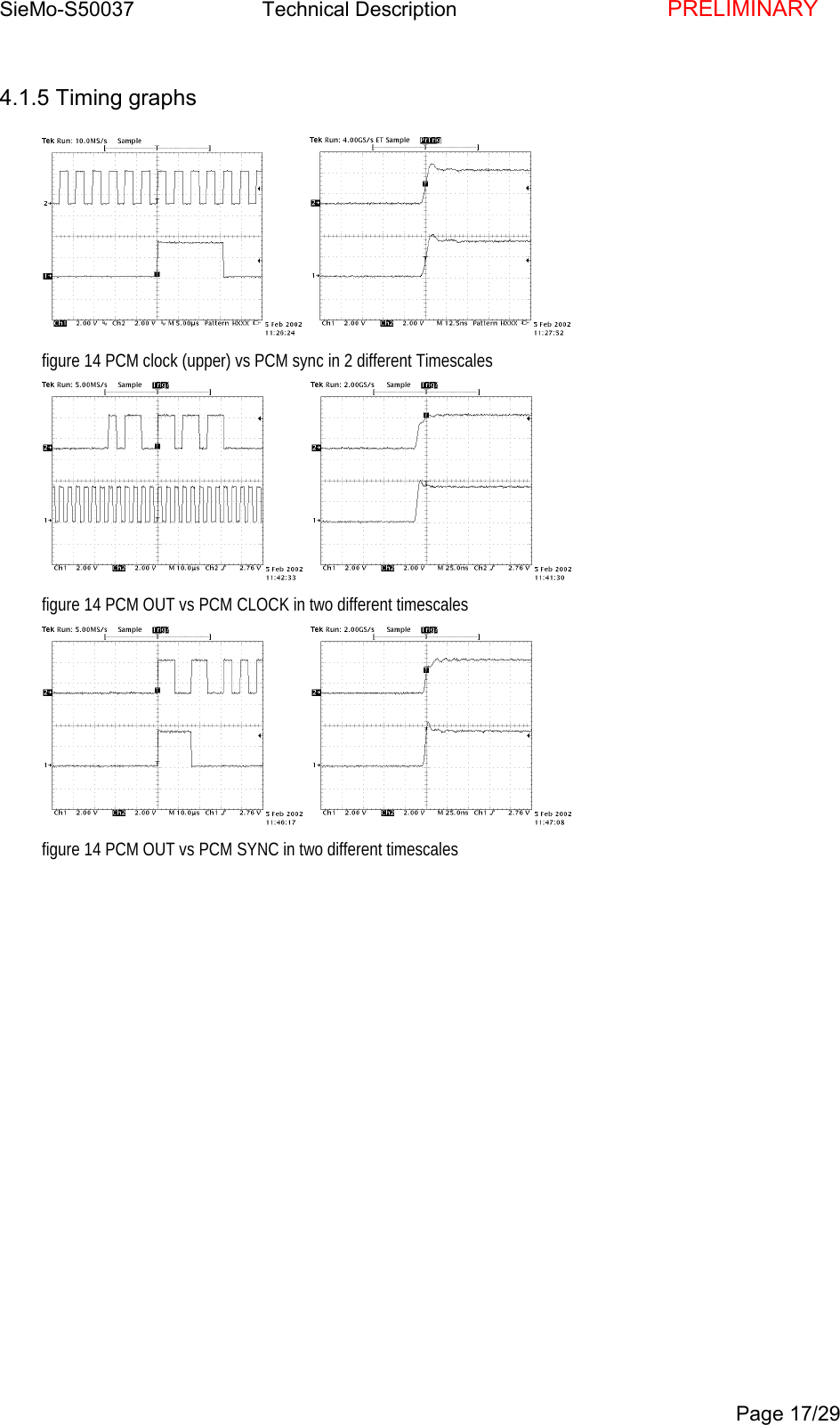
SieMo-S50037       Technical Description    PRELIMINARYPage 17/294.1.5 Timing graphsfigure 14 PCM clock (upper) vs PCM sync in 2 different Timescalesfigure 14 PCM OUT vs PCM CLOCK in two different timescalesfigure 14 PCM OUT vs PCM SYNC in two different timescales
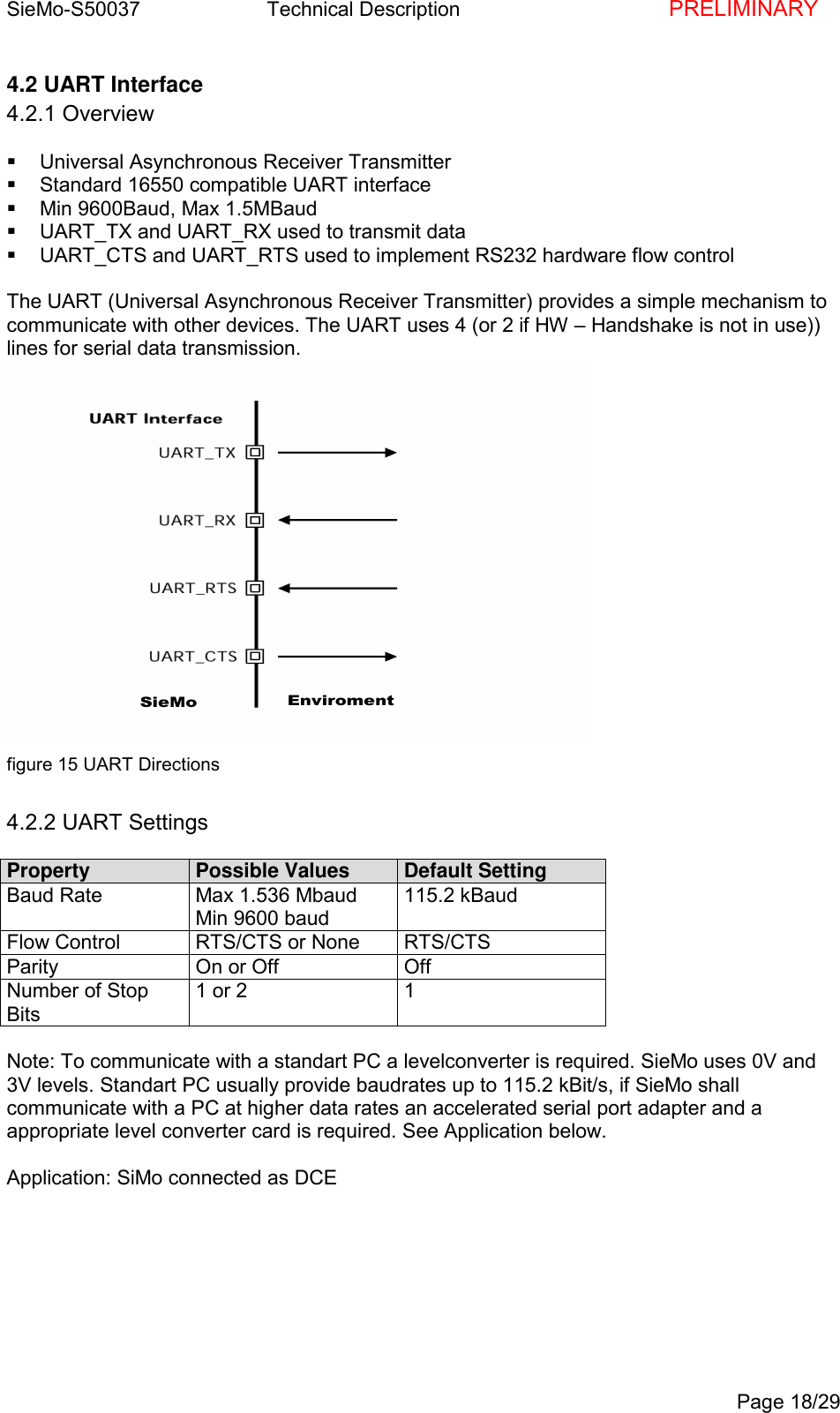
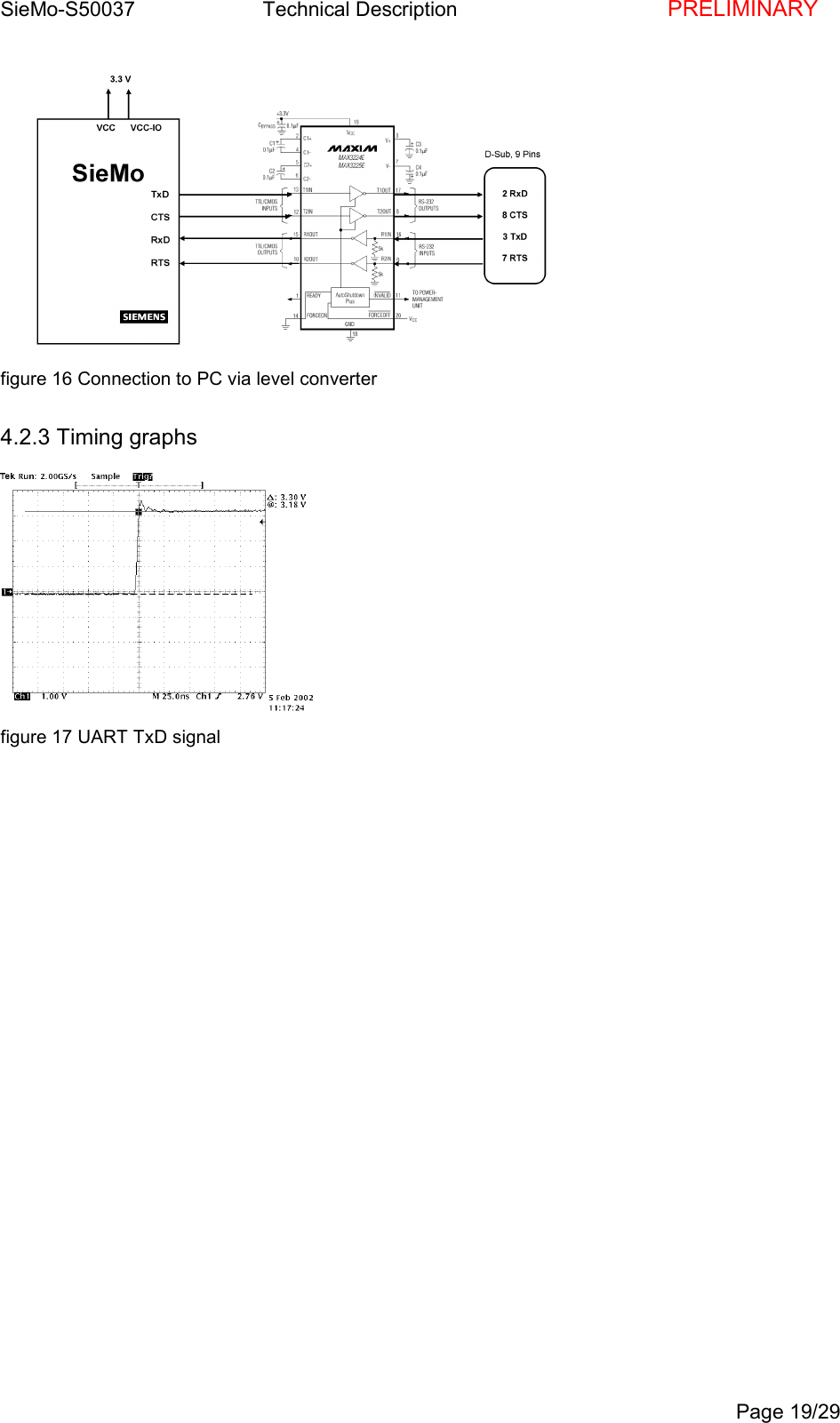
SieMo-S50037       Technical Description    PRELIMINARYPage 18/294.2 UART Interface4.2.1 Overview  Universal Asynchronous Receiver Transmitter  Standard 16550 compatible UART interface  Min 9600Baud, Max 1.5MBaud  UART_TX and UART_RX used to transmit data  UART_CTS and UART_RTS used to implement RS232 hardware flow controlThe UART (Universal Asynchronous Receiver Transmitter) provides a simple mechanism tocommunicate with other devices. The UART uses 4 (or 2 if HW – Handshake is not in use))lines for serial data transmission.figure 15 UART Directions4.2.2 UART SettingsProperty Possible Values Default SettingBaud Rate Max 1.536 MbaudMin 9600 baud115.2 kBaudFlow Control RTS/CTS or None RTS/CTSParity On or Off OffNumber of StopBits1 or 2 1Note: To communicate with a standart PC a levelconverter is required. SieMo uses 0V and3V levels. Standart PC usually provide baudrates up to 115.2 kBit/s, if SieMo shallcommunicate with a PC at higher data rates an accelerated serial port adapter and aappropriate level converter card is required. See Application below.Application: SiMo connected as DCE
SieMo-S50037       Technical Description    PRELIMINARYPage 19/29figure 16 Connection to PC via level converter4.2.3 Timing graphsfigure 17 UART TxD signal
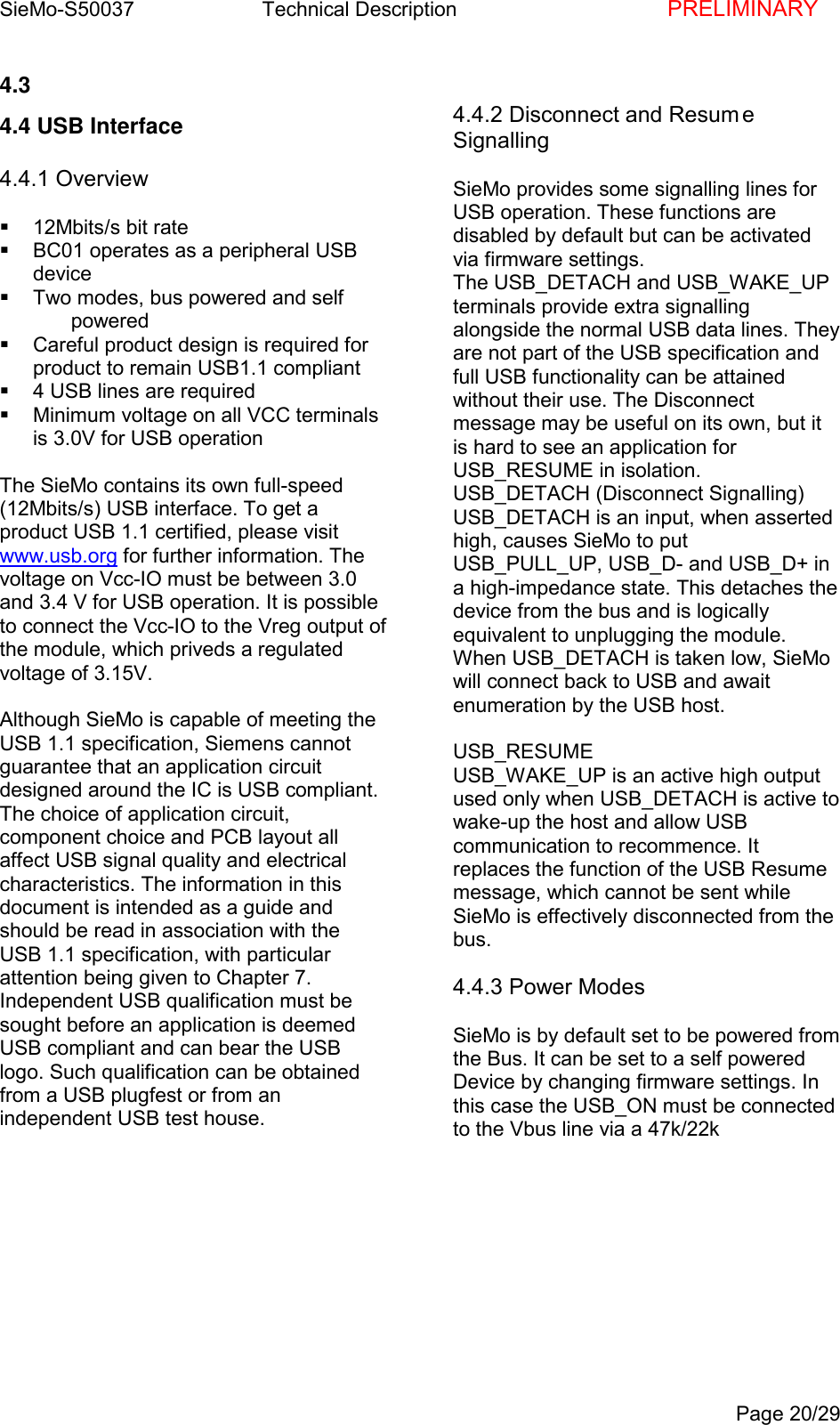
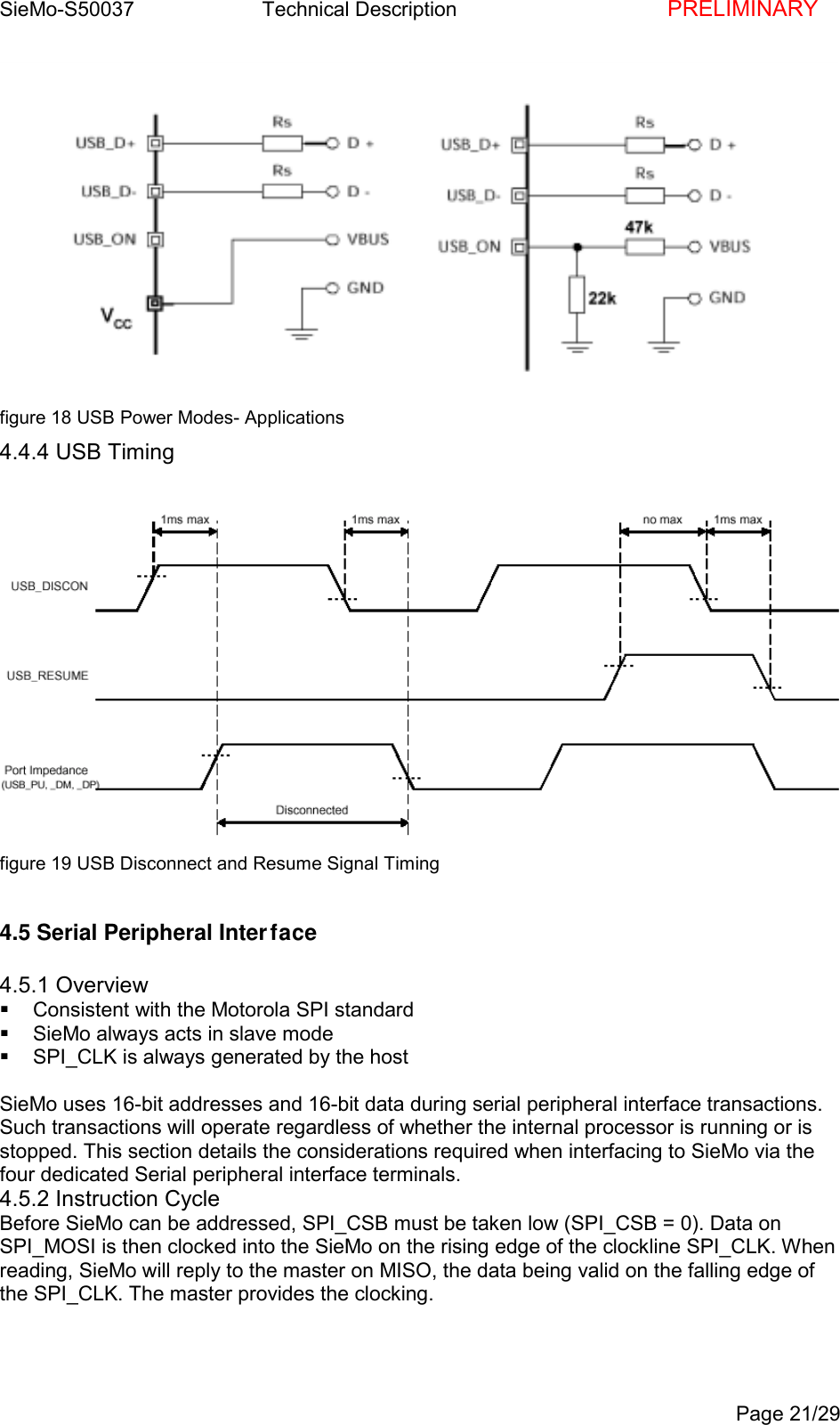
SieMo-S50037       Technical Description    PRELIMINARYPage 20/294.3 4.4 USB Interface4.4.1 Overview  12Mbits/s bit rate  BC01 operates as a peripheral USBdevice  Two modes, bus powered and self powered  Careful product design is required forproduct to remain USB1.1 compliant  4 USB lines are required  Minimum voltage on all VCC terminalsis 3.0V for USB operationThe SieMo contains its own full-speed(12Mbits/s) USB interface. To get aproduct USB 1.1 certified, please visitwww.usb.org for further information. Thevoltage on Vcc-IO must be between 3.0and 3.4 V for USB operation. It is possibleto connect the Vcc-IO to the Vreg output ofthe module, which priveds a regulatedvoltage of 3.15V.Although SieMo is capable of meeting theUSB 1.1 specification, Siemens cannotguarantee that an application circuitdesigned around the IC is USB compliant.The choice of application circuit,component choice and PCB layout allaffect USB signal quality and electricalcharacteristics. The information in thisdocument is intended as a guide andshould be read in association with theUSB 1.1 specification, with particularattention being given to Chapter 7.Independent USB qualification must besought before an application is deemedUSB compliant and can bear the USBlogo. Such qualification can be obtainedfrom a USB plugfest or from anindependent USB test house.4.4.2 Disconnect and Resum eSignallingSieMo provides some signalling lines forUSB operation. These functions aredisabled by default but can be activatedvia firmware settings.The USB_DETACH and USB_WAKE_UPterminals provide extra signallingalongside the normal USB data lines. Theyare not part of the USB specification andfull USB functionality can be attainedwithout their use. The Disconnectmessage may be useful on its own, but itis hard to see an application forUSB_RESUME in isolation.USB_DETACH (Disconnect Signalling)USB_DETACH is an input, when assertedhigh, causes SieMo to putUSB_PULL_UP, USB_D- and USB_D+ ina high-impedance state. This detaches thedevice from the bus and is logicallyequivalent to unplugging the module.When USB_DETACH is taken low, SieMowill connect back to USB and awaitenumeration by the USB host.USB_RESUMEUSB_WAKE_UP is an active high outputused only when USB_DETACH is active towake-up the host and allow USBcommunication to recommence. Itreplaces the function of the USB Resumemessage, which cannot be sent whileSieMo is effectively disconnected from thebus.4.4.3 Power ModesSieMo is by default set to be powered fromthe Bus. It can be set to a self poweredDevice by changing firmware settings. Inthis case the USB_ON must be connectedto the Vbus line via a 47k/22k
SieMo-S50037       Technical Description    PRELIMINARYPage 21/29figure 18 USB Power Modes- Applications4.4.4 USB Timingfigure 19 USB Disconnect and Resume Signal Timing4.5 Serial Peripheral Interface4.5.1 Overview  Consistent with the Motorola SPI standard  SieMo always acts in slave mode  SPI_CLK is always generated by the hostSieMo uses 16-bit addresses and 16-bit data during serial peripheral interface transactions.Such transactions will operate regardless of whether the internal processor is running or isstopped. This section details the considerations required when interfacing to SieMo via thefour dedicated Serial peripheral interface terminals.4.5.2 Instruction CycleBefore SieMo can be addressed, SPI_CSB must be taken low (SPI_CSB = 0). Data onSPI_MOSI is then clocked into the SieMo on the rising edge of the clockline SPI_CLK. Whenreading, SieMo will reply to the master on MISO, the data being valid on the falling edge ofthe SPI_CLK. The master provides the clocking.
SieMo-S50037       Technical Description    PRELIMINARYPage 22/294.5.3 Single-Cycle OperationAfter a serial peripheral interface transaction finishes, the master toggles SPI_CLK withSPI_CSB high to initiate a new transaction. SPI_CSB must be high for at least two SPI_CLKcycles.4.5.4 Multi-Slave OperationSieMo should not be connected in a multi-slave arrangement by simple parallel connection ofslave MISO lines. When SieMo is deselected (SPI_CSB = 1), the SPI_MISO line does notfloat. Instead, SieMo outputs 0 if the processor is running or 1 if it is stopped.4.5.5 Writing to SieMoTo write to the SieMo, the 8-bit write command (00000010) is sent first (C[7:0]  followed by a16-bit address (A[15:0]). 16 bits of data (D:[15:0]) are sent.Terminal Type Description DeviceTerminal PC ParallelConnectorSPI_CSB CMOS input Serial Peripheral Interface ChipSelectE1 2SPI_CLK CMOS input Serial Peripheral Interface SPIClockE2 9SPI_MOSI CMOS input Serial Peripheral Interface SPIData InputE3 8SPI_MISO CMOS output Serial Peripheral Interface SPIData OutputE4 10GND B3 194.5.6 SPI Timingfigure 20  SPI write operation a
SieMo-S50037       Technical Description    PRELIMINARYPage 23/29figure 21 SPI write operation b4.5.7 Reading from SieMoReading is similar to writing, in that an 8-bit read command (00000011) is sent first, followedby the address of the location to be read. The SieMo then outputs the 16-bit contents of thelocation on MISO during bits D[15:0] and a check-word during T[15:0].The check-word iscomposed of {command,  address [15:8]}. The check-word may be used to 'sanity-check' aread operation to a memory location. This overcomes the problem encountered with typicalserial peripheral interface slaves, whereby it is impossible to determine whether the datareturned by a read operation is valid data, or the result ofthe slave device not responding.figure 22 SPI read timing afigure 23 SPI read timing b
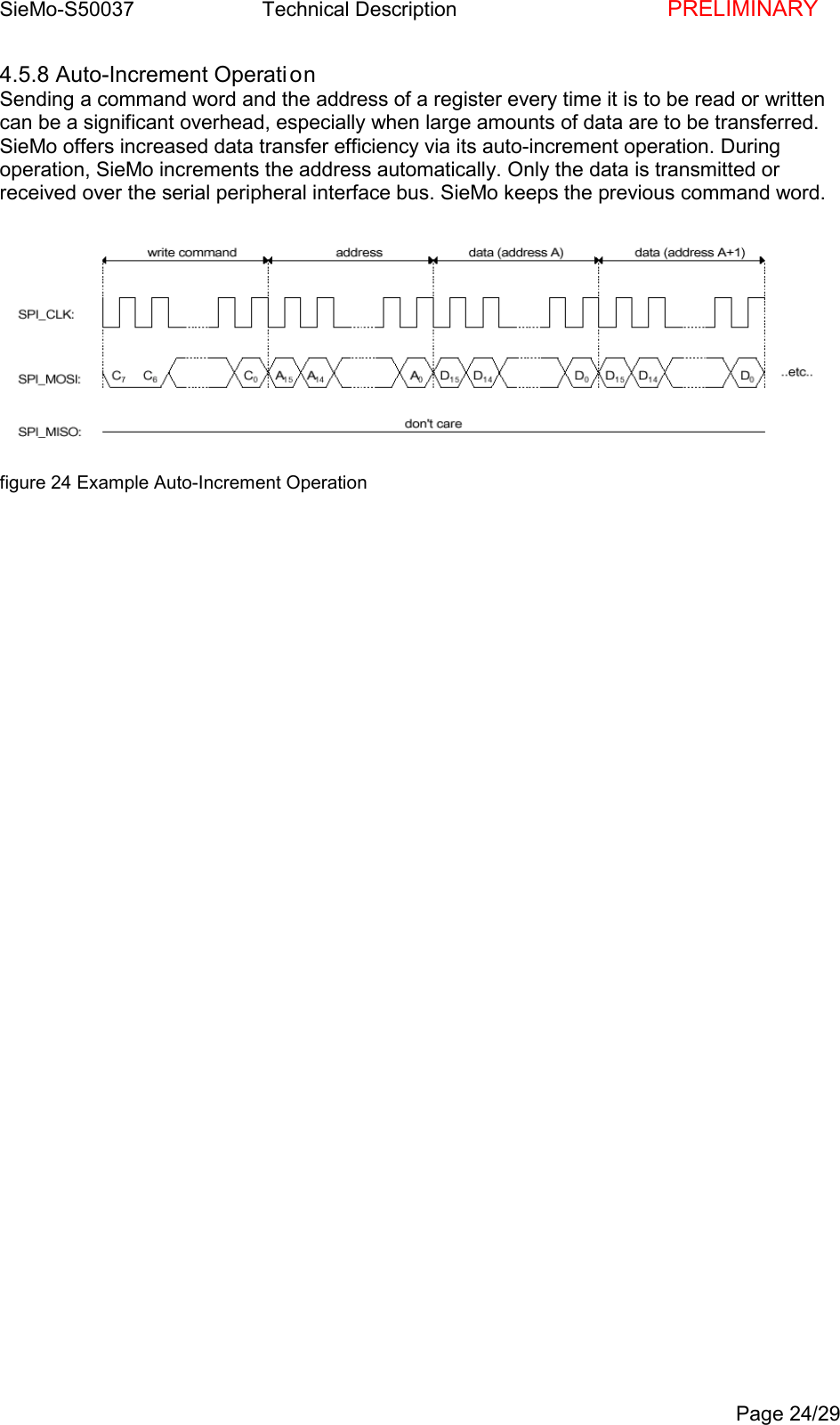
SieMo-S50037       Technical Description    PRELIMINARYPage 24/294.5.8 Auto-Increment Operati onSending a command word and the address of a register every time it is to be read or writtencan be a significant overhead, especially when large amounts of data are to be transferred.SieMo offers increased data transfer efficiency via its auto-increment operation. Duringoperation, SieMo increments the address automatically. Only the data is transmitted orreceived over the serial peripheral interface bus. SieMo keeps the previous command word.figure 24 Example Auto-Increment Operation
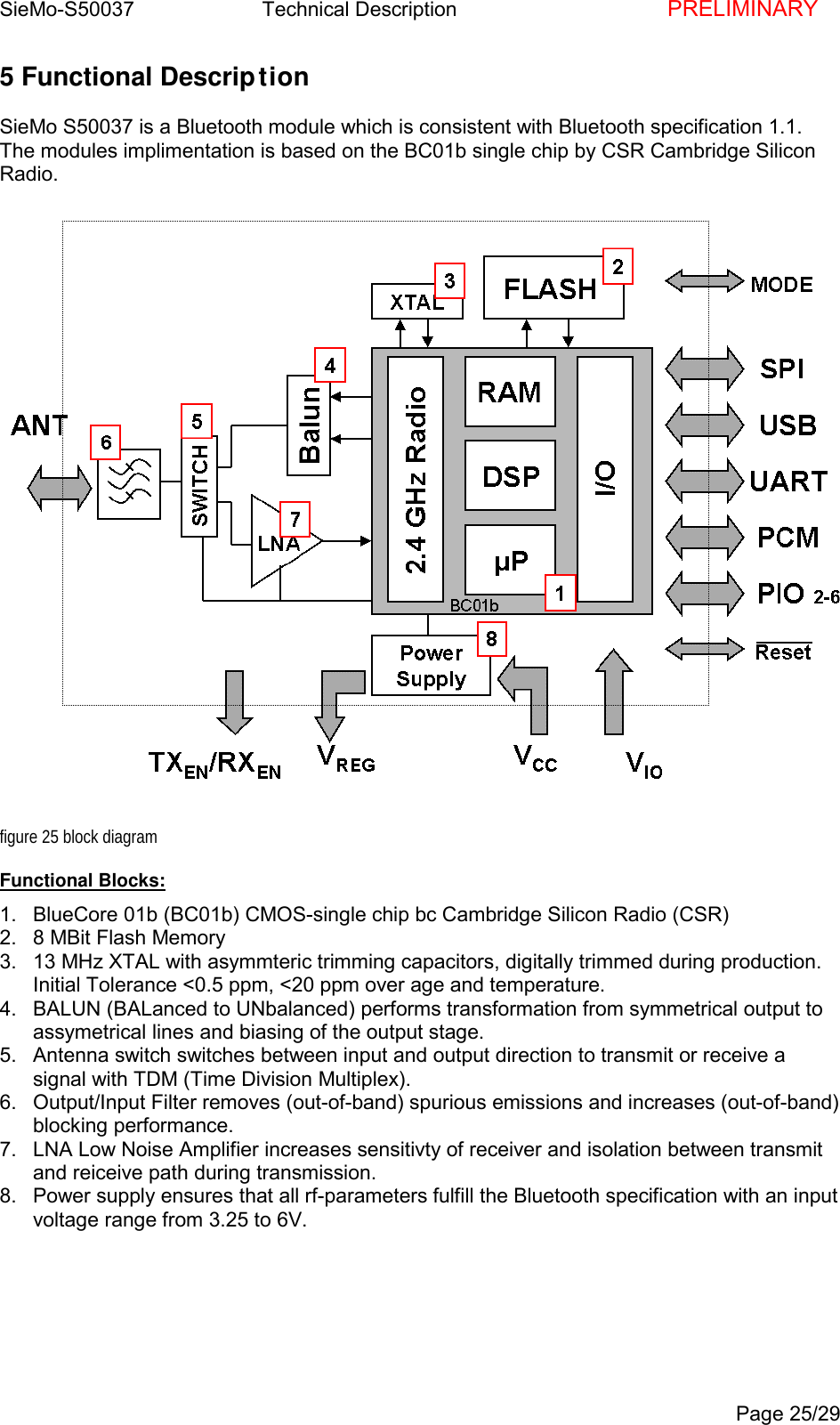
SieMo-S50037       Technical Description    PRELIMINARYPage 25/295 Functional DescriptionSieMo S50037 is a Bluetooth module which is consistent with Bluetooth specification 1.1.The modules implimentation is based on the BC01b single chip by CSR Cambridge SiliconRadio.figure 25 block diagramFunctional Blocks:1.  BlueCore 01b (BC01b) CMOS-single chip bc Cambridge Silicon Radio (CSR)2.  8 MBit Flash Memory3.  13 MHz XTAL with asymmteric trimming capacitors, digitally trimmed during production.Initial Tolerance <0.5 ppm, <20 ppm over age and temperature.4.  BALUN (BALanced to UNbalanced) performs transformation from symmetrical output toassymetrical lines and biasing of the output stage.5.  Antenna switch switches between input and output direction to transmit or receive asignal with TDM (Time Division Multiplex).6.  Output/Input Filter removes (out-of-band) spurious emissions and increases (out-of-band)blocking performance.7.  LNA Low Noise Amplifier increases sensitivty of receiver and isolation between transmitand reiceive path during transmission.8.  Power supply ensures that all rf-parameters fulfill the Bluetooth specification with an inputvoltage range from 3.25 to 6V.
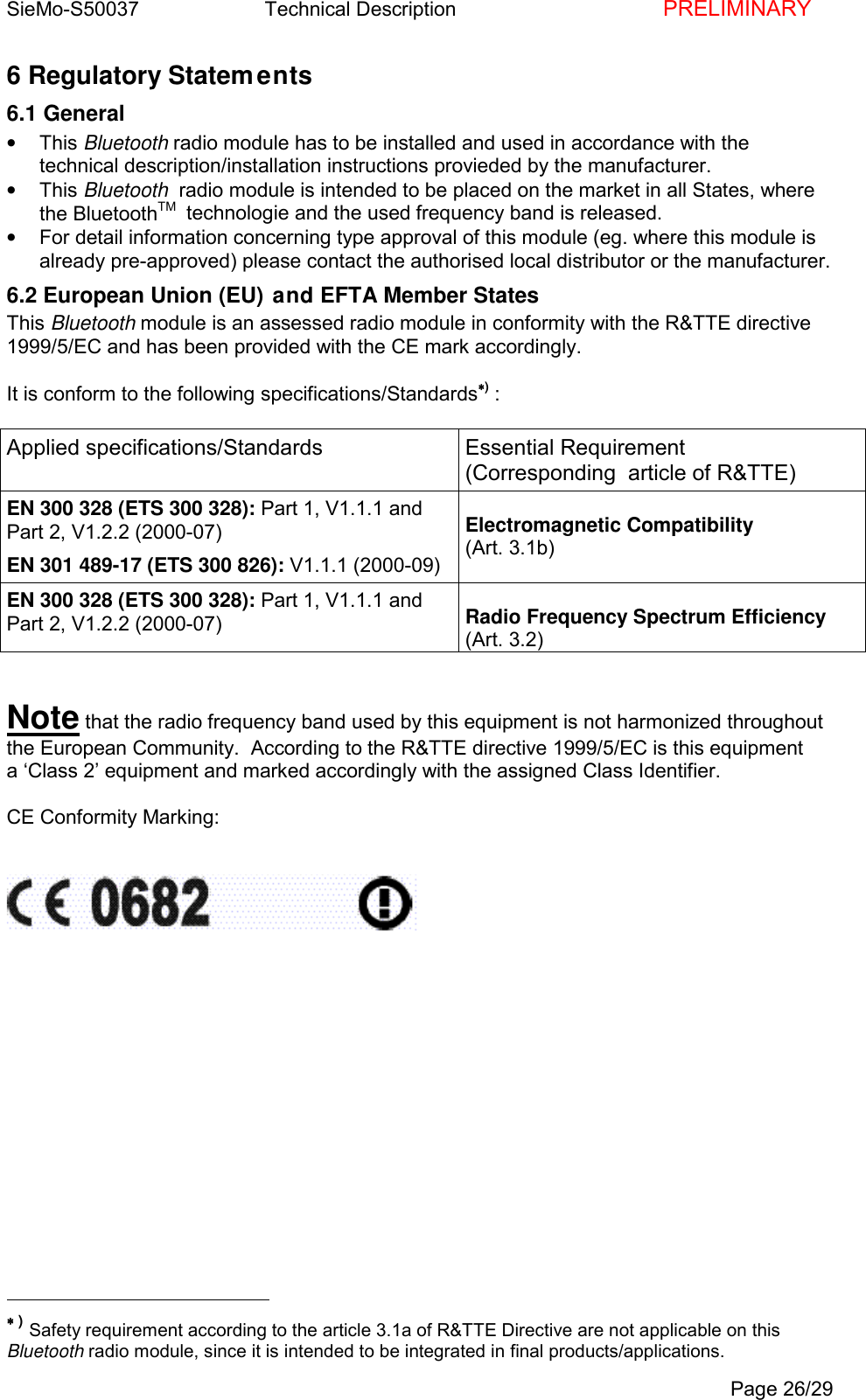
SieMo-S50037       Technical Description    PRELIMINARYPage 26/296 Regulatory Statements6.1 General• This Bluetooth radio module has to be installed and used in accordance with thetechnical description/installation instructions provieded by the manufacturer.• This Bluetooth  radio module is intended to be placed on the market in all States, wherethe BluetoothTM   technologie and the used frequency band is released.•  For detail information concerning type approval of this module (eg. where this module isalready pre-approved) please contact the authorised local distributor or the manufacturer.6.2 European Union (EU) and EFTA Member StatesThis Bluetooth module is an assessed radio module in conformity with the R&TTE directive1999/5/EC and has been provided with the CE mark accordingly.It is conform to the following specifications/Standards∗∗∗∗) :Applied specifications/Standards Essential Requirement(Corresponding  article of R&TTE)EN 300 328 (ETS 300 328): Part 1, V1.1.1 andPart 2, V1.2.2 (2000-07)EN 301 489-17 (ETS 300 826): V1.1.1 (2000-09)Electromagnetic Compatibility(Art. 3.1b)EN 300 328 (ETS 300 328): Part 1, V1.1.1 andPart 2, V1.2.2 (2000-07) Radio Frequency Spectrum Efficiency(Art. 3.2)Note that the radio frequency band used by this equipment is not harmonized throughoutthe European Community.  According to the R&TTE directive 1999/5/EC is this equipmenta ‘Class 2’ equipment and marked accordingly with the assigned Class Identifier.CE Conformity Marking:                                                ∗∗∗∗ ) Safety requirement according to the article 3.1a of R&TTE Directive are not applicable on thisBluetooth radio module, since it is intended to be integrated in final products/applications.
SieMo-S50037       Technical Description    PRELIMINARYPage 27/29Because this Bluetooth™ radio module is very small and intended to be integrated/installedin final products (OEM products/applications) it is not practicable to place the label includingthe CE conformity marking on it. Therefore the required labeling information is placed in thistechnical description/installation manual of this radio module. However the CE conformitymarking reffered to in R&TTE Directiv, Article 12 is displayed on the packaging of the radiomodule in an appropriate form.OEM products/applications, where this Bluetooth™ radio module is integrated/installed in,has to be labeled in accordance with R&TTE Directive, Article 12.An auxiliary label is included in the packaging of this radio module, which can be used forthat purpose and has to be permanently affixed to the OEM product/application or to it`s dataplate and to it`s packaging and to accompanying documents. The label has to be affixedvisibly (label data must be visible from the outside of the equipment enclosure) legibly  andindelibly.Note that in case of using the provieded auxiliary label, additionally following statementhas to be included in the users manual of the final product (OEM product/application):Note that the radio frequency band used by this equipment is not harmonized throughout theEuropean Community.  According to the R&TTE directive 1999/5/EC is this equipmenta ‘Class 2’ equipment and marked accordingly with the assigned Class Identifier.6.3 United States of America (USA)This Bluetooth radio module complies with part 15 of the Federal CommunicationsCommission (FCC) Rules and labeled in accordance with the FCC Rules.FCC ID:  P6L-SieMo-S50037Operation is subject to the following two conditions:(1) This device may not cause harmful interference, and(2) this device must accept any interference received, including interference that may causeundesired operation.Note that any changes or modifications to this equipment not expressly approved by themanufacturer could void the user’s authority to operate this equipment.Because this Bluetooth™ radio module is very small and intended to be integrated/installedin OEM products/applications it is not practicable to place the label including the FCCstatement on it. Therefore the required labeling information is placed in this capter of thetechnical description/installation manual of this radio module. However the FCC identifier isdisplayed on the packaging of the radio module in an appropriate form.OEM products/applications, where this Bluetooth™ radio module is integrated/installed in,has to be labeled in accordance with FCC Rules (section 15.19 and 47 CFR Ch. I: §2.925,§2.926).An auxiliary label is included in the packaging of this radio module, which can be used forthat purpose and has to be permanently affixed to the OEM product/application in a readilyvisible (label data must be visible from the outside of the equipment enclosure) manner (eg.on an exterior surface of the equipment).
SieMo-S50037       Technical Description    PRELIMINARYPage 28/29Note that in case of using the provieded auxiliary label, additionally following statementhas to be included in the users manual of the final product (OEM product/application):This device complies with part 15 of the Federal Communications Commission (FCC) Rules.Operation is subject to the following two conditions:(1) This device may not cause harmful interference, and(2)  this device must accept any interference received, including interference that may causeundesired operation.Note that any changes or modifications to this equipment not expressly approved by themanufacturer could void the user’s authority to operate this equipment.Manufacturer information concerning antenna:The only antenna(s) approved for use with this Bluetooth™ radio module are thosedocumented in this construction file, and must be installed in the manner specified therein. Inall other cases, where the second manufacturer/installer desires to use an antenna with thismodule that has not been previously approved for use with it, then one of the followingprocedures has to be followed in order to ensure the compliance of the new antenna:1.  The Manufacturer of this Bluetooth radio module files a Class II permissive change toapprove the new antenna with the module.2.  The second manufacturer/installer obtains a separate FCC equipment authorization forthe module and the new antenna.
SieMo-S50037       Technical Description    PRELIMINARYPage 29/297 Bluetooth TrademarkBLUETOOTH  is a trademark owned by Bluetooth SIG, Inc., U.S.A, and licensed toSiemens AG.This product is a qualified  BluetoothTM   product and compliant to the BluetoothTMspecifications version 1.1.

Navigation menu