Skylink Technologies ATOM2 Garage Door Opener User Manual MK3 QUICK GUIDE EN Draft X2 outline
Skylink Technologies Inc Garage Door Opener MK3 QUICK GUIDE EN Draft X2 outline
User Manual
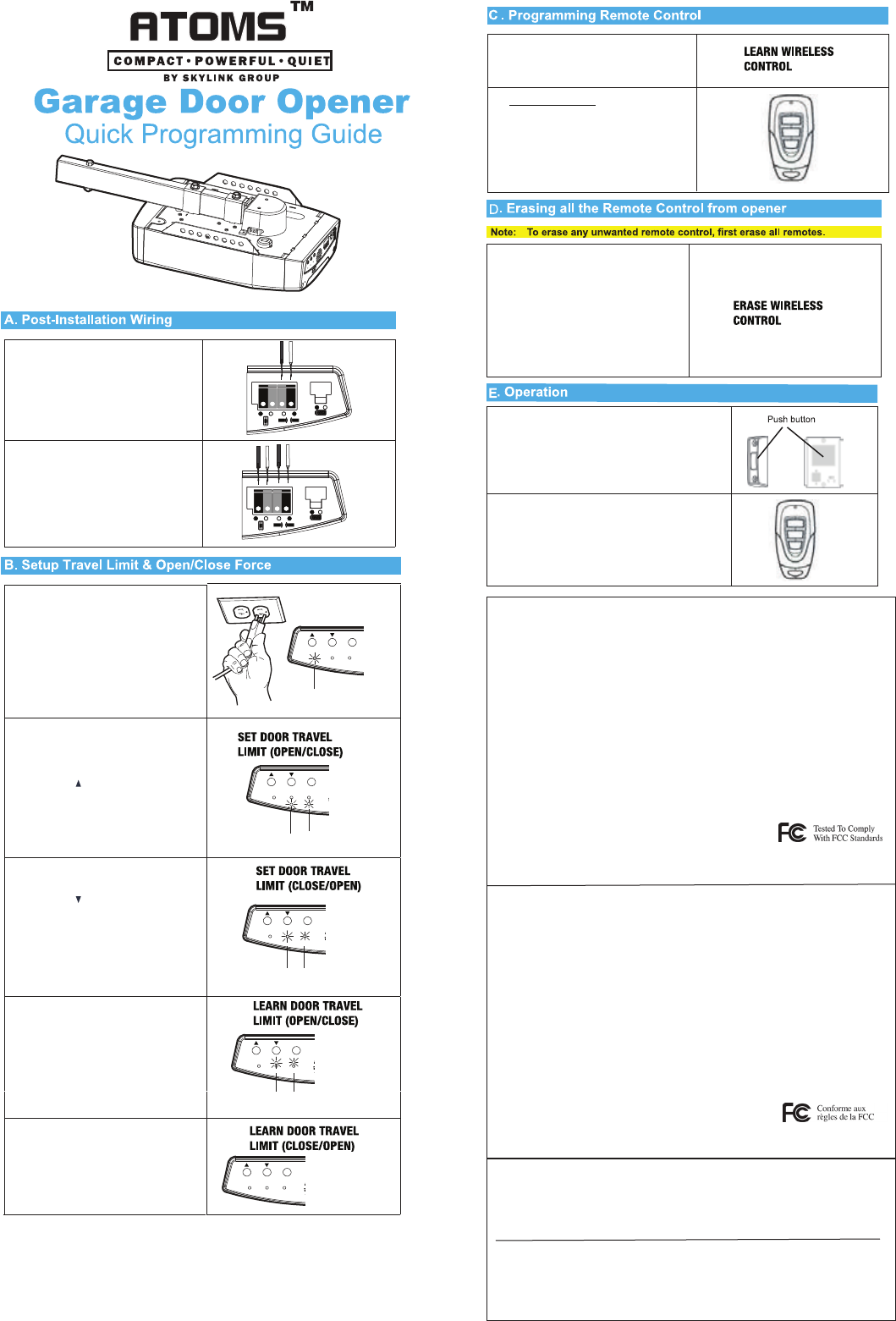
1.
Re-connect the wires of the
safety beam sensor to the Atoms
opener. Push in tab with a flat head
screwdriver and insert the wires.
1.
Re-connect the wires of the wall
console to the Atoms opener. Push
in tab with a flat head screwdriver
and insert the wires.
2.
Press the [Set] button for 15 seconds,
when the blue LED flashes quickly.
Release the [Set] button.
2.
3.
Press the [Set] button again to confirm
erase all the programmed remotes.
The blue LED stays off and emit one
beep indicating the erasing
successfully.
-
+
-
+
-
+
-
+
+ +
+
-
+
-
+
-
+
+ +
+
Press the [Set] button for one second,
and release the button when the blue
LED flashes slowly.
1.
2.
3.
Program a Remote:
Within 30 seconds, press any button
on the remote that you would like to
program to the opener.
Once the button on the remote is
programmed. The blue LED will off
indicating the programming successfully.
1. Connect the opener to an approved
power source. The green LED stays
on.
2. Press and hold [Set] button for 5
seconds until the blue LED stays on,
red LED flashes quickly. Release the
[SET] button.
3. Press the [ ] button until the
door is in fully open position.
4. Press the [Set] button to confirm the
door position.
5. The blue LED stays on, red LED
flashes slowly.
6. Press the [ ] button until the
door is in fully closed position.
7. Press the [Set] button again to confirm.
8. The blue and red LED stay on.
The light will flash 3 times when the
travel limit settings are completed.
9.
10.
Press the Wall button to open the
garage door to its fully open position.
The light will flash 3 times again.11.
12.
13.
Press the Wall button again to close
the garage door to its fully closed
position.
The blue and red LED will turn off. And
emit one beep indicating the
programming successfully.
-
+
SET
1 2 3
-
+
-
+
SET
-
+
1 2 3
Green
LED
Red
LED
Blue
LED
The blue and red LED flash slowly.
-
+
-
+
SET
-
+
1 2 3
Red
LED
Blue
LED
-
+
-
+
SET
-
+
1 2 3
Red
LED
Blue
LED
-
+
-
+
SET
-
+
1 2 3
1. Wall Console
Push the button to open/close the garage
door opener.
2. Remote
To open/close the opener with remote control,
press the button that is programmed to the
opener.
This device complies with Part 15 of the FCC Rules. Operation is subject to the following two conditions:
(1) This device may not cause harmful interference and (2) This device must accept any interference
received, including interference that may cause undesired operation.
FCC
Warning:
Changes or modifications to this unit not expressly approved by the party responsible for compliance
could void the user’s authority to operate the equipment.
Note:
This equipment has been tested and found to comply with the limits for a Class B digital device,
pursuant to Part 15 of the FCC Rules. These limits are designed to provide reasonable protection against
harmful interference in a residential installation. This equipment generates, uses and can radiate radio
frequency energy and, if not installed and used in accordance with the instructions, may cause harmful
interference to radio communications.
However, there is no guarantee that interference will not occur in a particular installation. If this
equipment does cause harmful interference to radio or television reception, which can be determined
by turning the equipment off and on, the user is encouraged to try to correct the interference by one or
more of the following measures:
•Reorient or relocate the receiving antenna.
•Increase the separation between the equipment and receiver.
•Connect the equipment into an outlet on a circuit different from that to which the receiver is
connected.
•Consult the dealer or an experienced radio/TV technician for help.
FCC
Ce dispositif est conforme à la partie 15 des règlements de la FCC. Son fonctionnement est soumis aux
deux conditions suivantes : 1) Il ne doit pas produire d’interférences nuisibles, et 2) II doit accepter toute
interférence reçue, même si celle-ci est susceptible de compromettre son fonctionnement.
AVERTISSEMENT :
Tout changement ou modification, non expressément approuvé par la partie responsable de
la conformité, peut annuler l'autorisation de l'utilisateur à utiliser cet appareil.
Remarque :
Cet équipement a été testé et déclaré conforme aux restrictions prévues dans le cadre de la classe B des
appareils numériques, définies par la section 15 du règlement de la FCC. Ces restrictions visent à garantir
une protection suffisante contre les interférences nuisibles dans une installation à domicile. Cet appareil
outilise et émet de l'énergie de fréquences radio, et s’il n’est pas installé et employé conformément aux
consignes, il peut provoquer des interférences nuisibles aux communications radio.
Il n'existe toutefois aucune garantie que de telles interférences ne se produiront pas dans une installation
particulière. Si cet appareil occasionne des interférences nuisibles aux réceptions radio ou télévisuelles,
ce qui peut être déterminé en mettant l'appareil en arrêt et en marche, l’utilisateur peut corriger cette
interférence de l'une des façons suivantes :
• Réorientez ou déplacez l'antenne de réception.
• Augmentez la distance entre l'appareil et le récepteur.
• Branchez l'appareil sur un circuit électrique différent de celui où le récepteur est branché.
• Consultez le fournisseur ou un technicien radio/télévision expérimenté pour obtenir de l’aide.
CANADA OFFICE
17 Sheard Avenue, Brampton,
Ontario, Canadá L6Y 1J3
E-mail: support@skylinkhome.com
http://www.skylinkhome.com
© 2018 SKYLINK GROUP
US OFFICE
1180-D East Francis Street,
Ontario, CA 91761, USA
Le présent appareil est conforme aux Partie 15 des règlements de la FCC et CNR d'Industrie Canada
applicables aux appareils radio exempts de licence. L'exploitation est autorisée aux deux conditions
suivantes :
(1) l'appareil ne doit pas produire de brouillage, et
(2) l'utilisateur de l'appareil doit accepter tout brouillage radioélectrique subi, même si le brouillage est
susceptible d'en compromettre le fonctionnement.
IC
This device complies with Industry Canada license-exempt RSS standard(s). Operation is subject to the
following two conditions:
(1) this device may not cause interference, and
(2) this device must accept any interference, including interference that may cause undesired operation
of the device.