SmartBridges CLIENT AirClient TOTAL 241(Outdoor AP) User Manual Users manual

SmartBridges Pte Ltd AirClient TOTAL 241(Outdoor AP) Users manual

Users manual

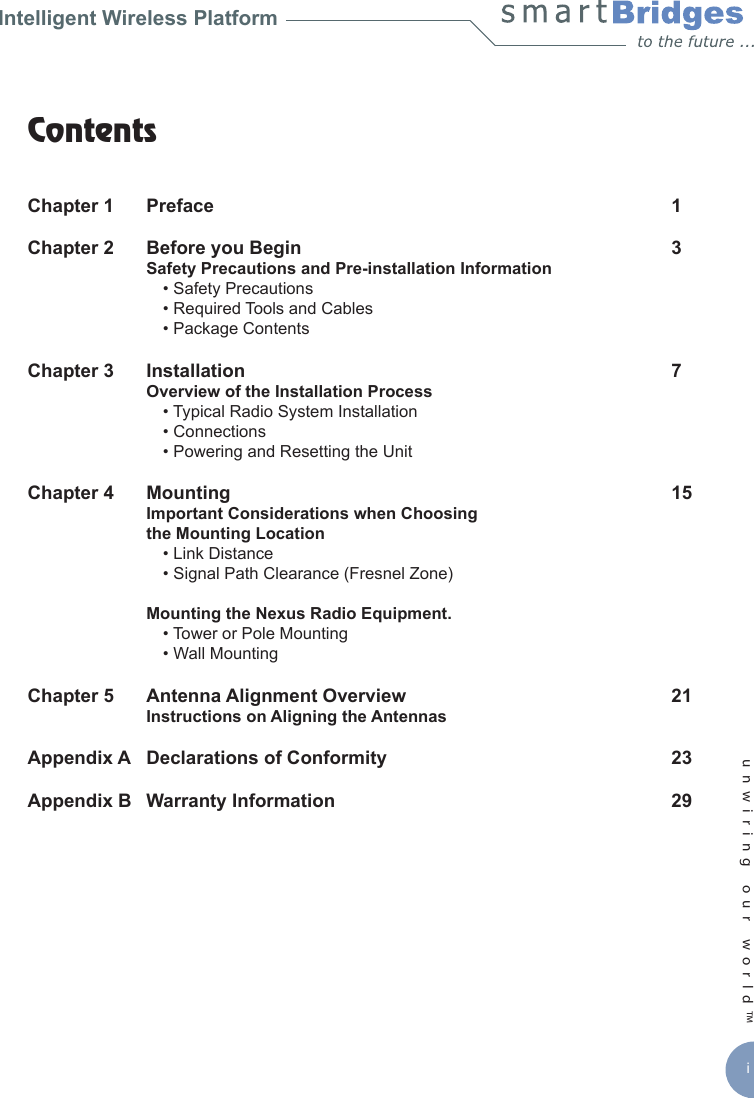
unwiring our world™ iIntelligent Wireless PlatformContents Chapter 1  Preface   1Chapter 2   Before you Begin  3   Safety Precautions and Pre-installation Information        • Safety Precautions    • Required Tools and Cables    • Package ContentsChapter 3   Installation   7   Overview of the Installation Process    • Typical Radio System Installation    • Connections    • Powering and Resetting the UnitChapter 4   Mounting   15   Important Considerations when Choosing   the Mounting Location     • Link Distance    • Signal Path Clearance (Fresnel Zone)  Mounting the Nexus Radio Equipment.    • Tower or Pole Mounting     • Wall Mounting Chapter 5   Antenna Alignment Overview   21   Instructions on Aligning the AntennasAppendix A   Declarations of Conformity   23Appendix B   Warranty Information   29
Intelligent Wireless Nexus Platformunwiring our world™ 1Chapter 1 - PrefaceThis  Installation  Guide  is  for  the  networking  professional  who  installs  and  manages  the smartBridges’ Intelligent Nexus Platform of Wireless Backhauls, Access Points and Client devices.  The  smartBridges’  TOTAL  series  of  products  come  with  an  integrated  antenna contained within the enclosure for simple out-of-the-box installation.  •   airHaul Nexus PRO™ TOTAL   (sB3012)  •  airHaul™ Nexus TOTAL 241  (sB3013)  •  airHaul™ Nexus TOTAL 551  (sB3014)   •  airPoint Nexus PRO™ TOTAL   (sB3212V or H)  •  airPoint™ Nexus TOTAL 241  (sB3213V)  •  airPoint™ Nexus TOTAL 551  (sB3214V)  •  airClient Nexus PRO™ TOTAL  (sB3412)  •  airClient™ Nexus TOTAL 241  (sB3413)  •  airClient™ Nexus TOTAL 551  (sB3414)  •  airClient™ TOTAL 241  (sB3415)The initial hardware installation, setup and mounting of the equipments are explained in this guide. To install smartBridges’ products, you need to have a fundamental understanding of Radio Frequency (RF) and networking.In Chapter 2, you will nd safety precautions as well as a list of the box contents and tools needed for installation. The installation process, which can be completed before mounting the unit in the outdoor environment, is explained in Chapter 3. Chapter 4 describes how to conduct a site survey to choose a suitable mounting location and outlines the mounting process for various congurations. Instructions are also provided on safely grounding the units. Finally in Chapter 5, the antenna alignment process is explained. Related PublicationsThese documents provide complete information about each product in the TOTAL series of radio equipments.  •  User Guide  •  Release Notes  •  Technical SpecicationFor the latest information on the products, please visit our website at http://www.smartbridges.com/
2unwiring our world™ Technical Support CenterComprehensive  technical  support  by  dedicated  smartBridges  engineers  is  available  to all  customers  through  the  smartBridges  support  center  website.  The  website  provides updated tools and documents to help troubleshoot and resolve technical issues related to smartBridges products and technologies. To access the technical support resources, please visit the support center website at http://www.smartbridges.com/support/You will need to register for certain services and downloads on the smartBridges support center website.Chapter 1 - Preface
Intelligent Wireless Nexus Platformunwiring our world™ 3Chapter 2 - Before you BeginThis chapter  provides the  safety precautions  that  you need to  follow while installing  and operating the smartBridges units. It contains the following sections:  •  Safety Precautions  •  Required Tools and Cables  •  Box ContentsSafety PrecautionsFor your safety and to achieve a proper working installation, please read and follow these safety precautions:  1.  Only trained and qualied personnel should install, replace, or service this      product.  2.  Select your installation site with safety and performance in mind. Conduct a      proper site survey before deployment.  3.  Discuss your plans for installation with your power company. Ask them to visit      your proposed installation site.  4.  Plan your installation carefully and completely before you begin. Never perform      the installation alone.  5.  Do not locate the product near overhead power lines, circuits or electrical light      sources or where it can come into contact with them. During installation, take      extreme care not to come into contact with such circuits, as they may cause      serious injury or death. For proper installation and grounding of the equipment,      please refer to national and local codes.            Note:         Electric power lines and telephone lines look alike.   6.  This product must be grounded. Never operate the equipment in the absence of      a suitably installed ground conductor. Contact the appropriate electrical       inspection authority or an electrician if you are uncertain whether suitable      grounding is available.
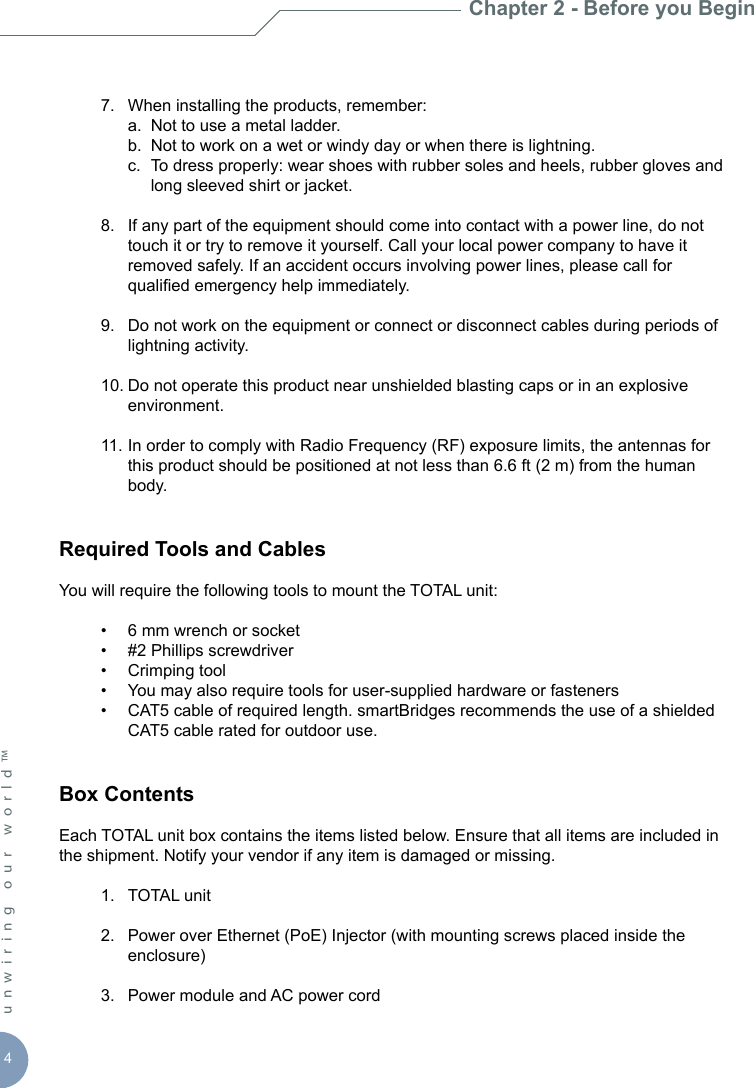
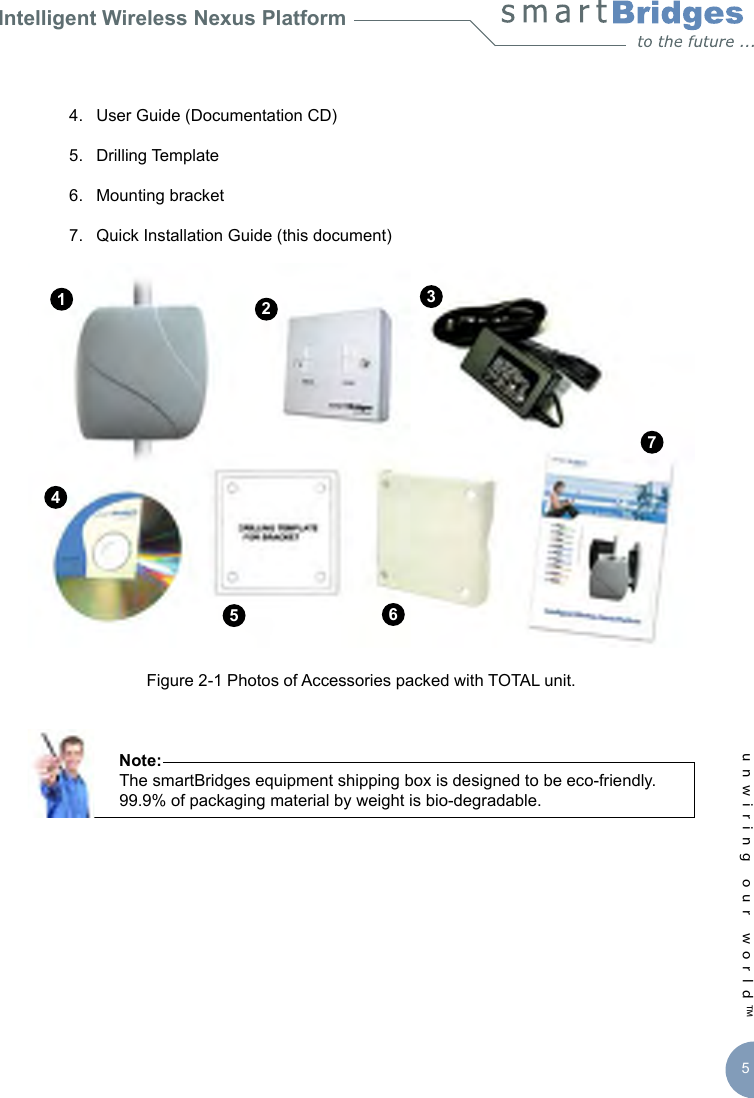
4unwiring our world™   7.  When installing the products, remember:    a.  Not to use a metal ladder.    b.  Not to work on a wet or windy day or when there is lightning.    c.  To dress properly: wear shoes with rubber soles and heels, rubber gloves and        long sleeved shirt or jacket.  8.  If any part of the equipment should come into contact with a power line, do not      touch it or try to remove it yourself. Call your local power company to have it      removed safely. If an accident occurs involving power lines, please call for      qualied emergency help immediately.   9.  Do not work on the equipment or connect or disconnect cables during periods of      lightning activity.  10. Do not operate this product near unshielded blasting caps or in an explosive      environment.  11. In order to comply with Radio Frequency (RF) exposure limits, the antennas for      this product should be positioned at not less than 6.6 ft (2 m) from the human      body.Required Tools and CablesYou will require the following tools to mount the TOTAL unit:   •  6 mm wrench or socket  •  #2 Phillips screwdriver  •  Crimping tool   •  You may also require tools for user-supplied hardware or fasteners  •  CAT5 cable of required length. smartBridges recommends the use of a shielded      CAT5 cable rated for outdoor use.Box ContentsEach TOTAL unit box contains the items listed below. Ensure that all items are included in the shipment. Notify your vendor if any item is damaged or missing.  1.  TOTAL unit   2.  Power over Ethernet (PoE) Injector (with mounting screws placed inside the      enclosure)  3.  Power module and AC power cordChapter 2 - Before you Begin
Intelligent Wireless Nexus Platformunwiring our world™ 5  4.  User Guide (Documentation CD)  5.  Drilling Template   6.  Mounting bracket  7.  Quick Installation Guide (this document) Figure 2-1 Photos of Accessories packed with TOTAL unit.      Note:       The smartBridges equipment shipping box is designed to be eco-friendly.        99.9% of packaging material by weight is bio-degradable.1234765
6unwiring our world™   8.  An accessories pouch that contains the following items:     a.  M8 mm Anchor Hex nuts (4 pieces)    b.  M8 mm Anchor washers (4 pieces)    c.  M8X60 mm Anchor bolts (4 pieces)    d.  M8 mm SS nuts (4 pieces)    e.  M8 mm SS plain washers (4 pieces)    f.  M8 mm SS spring washers (4 pieces)    g.  M8X75 mm SS bolts (4 pieces)Chapter 2 - Before you Beginabcdefg
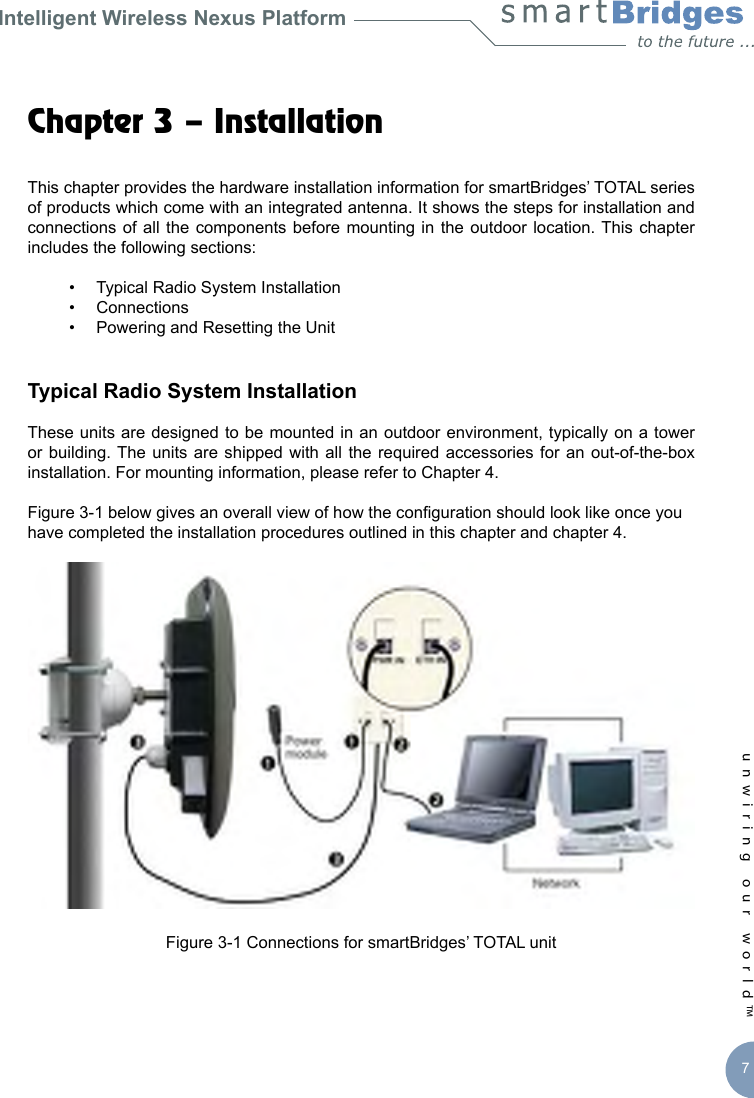
Intelligent Wireless Nexus Platformunwiring our world™ 7Chapter 3 – Installation This chapter provides the hardware installation information for smartBridges’ TOTAL series of products which come with an integrated antenna. It shows the steps for installation and connections of all  the  components before  mounting in  the  outdoor location. This  chapter includes the following sections:  •  Typical Radio System Installation  •  Connections   •  Powering and Resetting the UnitTypical Radio System InstallationThese units are designed to be mounted in an outdoor environment, typically on a tower or building. The  units  are shipped with  all  the required accessories  for  an out-of-the-box installation. For mounting information, please refer to Chapter 4. Figure 3-1 below gives an overall view of how the conguration should look like once you have completed the installation procedures outlined in this chapter and chapter 4. Figure 3-1 Connections for smartBridges’ TOTAL unit
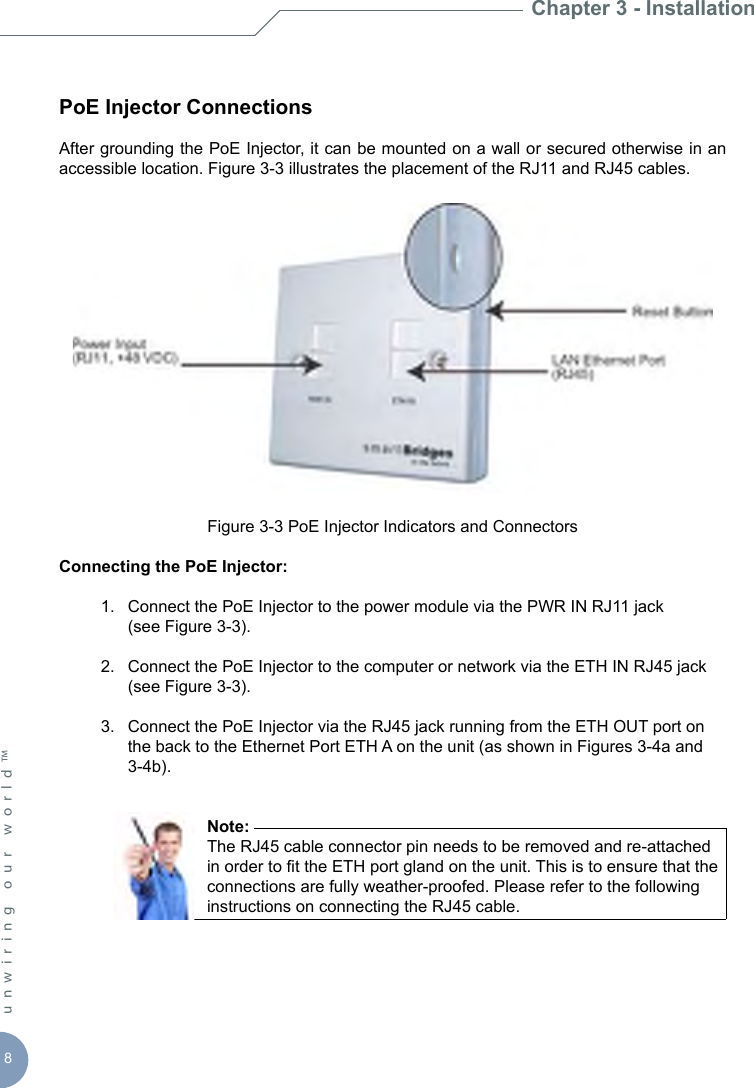
8unwiring our world™ PoE Injector ConnectionsAfter grounding the PoE Injector, it can be mounted on a wall or secured otherwise in an accessible location. Figure 3-3 illustrates the placement of the RJ11 and RJ45 cables. Figure 3-3 PoE Injector Indicators and ConnectorsConnecting the PoE Injector:  1.  Connect the PoE Injector to the power module via the PWR IN RJ11 jack     (see Figure 3-3).  2.  Connect the PoE Injector to the computer or network via the ETH IN RJ45 jack      (see Figure 3-3).  3.  Connect the PoE Injector via the RJ45 jack running from the ETH OUT port on      the back to the Ethernet Port ETH A on the unit (as shown in Figures 3-4a and      3-4b).         Note:         The RJ45 cable connector pin needs to be removed and re-attached          in order to t the ETH port gland on the unit. This is to ensure that the          connections are fully weather-proofed. Please refer to the following          instructions on connecting the RJ45 cable. Chapter 3 - Installation
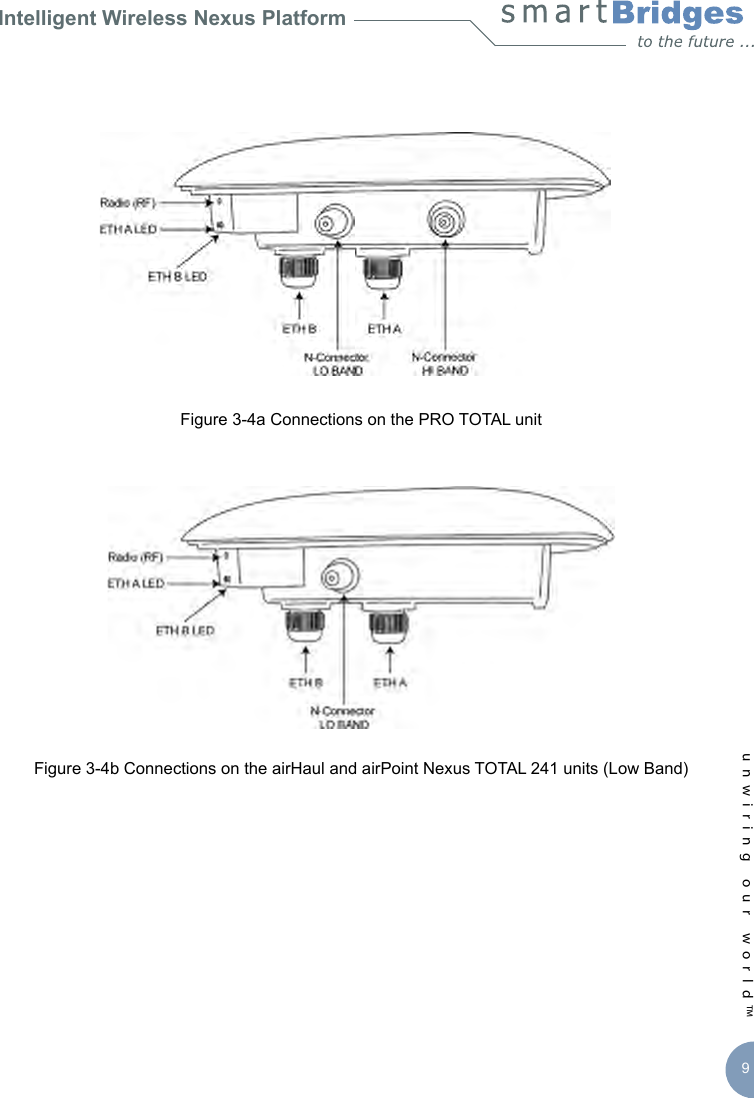
Intelligent Wireless Nexus Platformunwiring our world™ 9Figure 3-4a Connections on the PRO TOTAL unitFigure 3-4b Connections on the airHaul and airPoint Nexus TOTAL 241 units (Low Band)
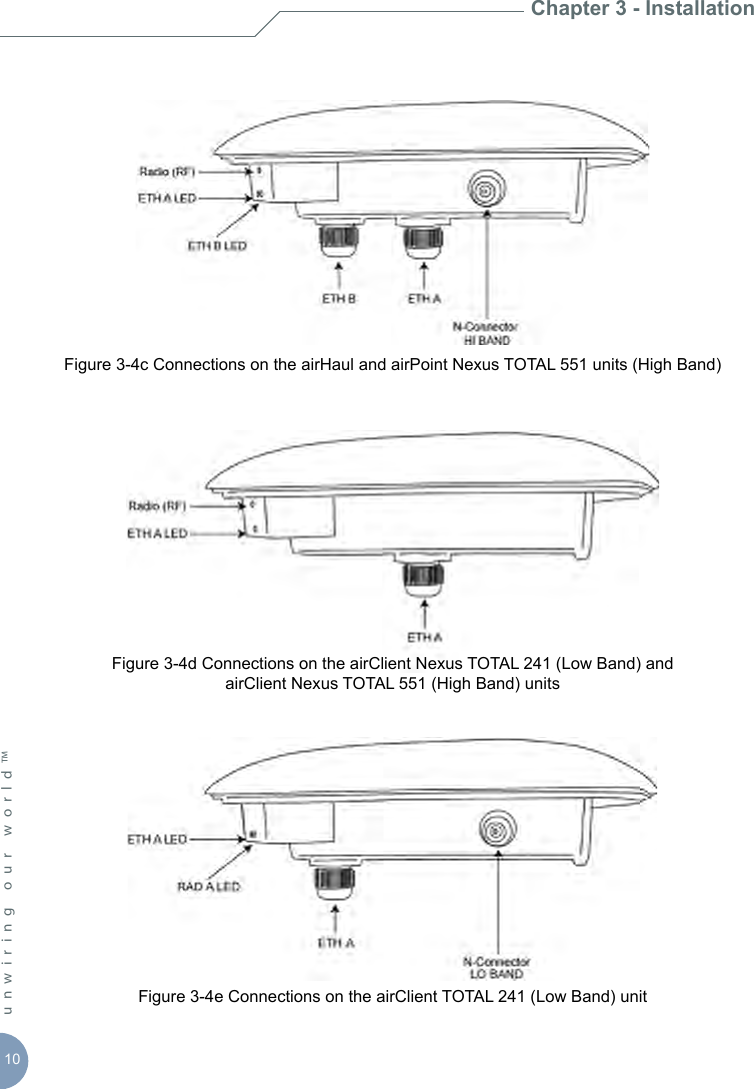
10unwiring our world™ Figure 3-4c Connections on the airHaul and airPoint Nexus TOTAL 551 units (High Band)Figure 3-4d Connections on the airClient Nexus TOTAL 241 (Low Band) and  airClient Nexus TOTAL 551 (High Band) unitsFigure 3-4e Connections on the airClient TOTAL 241 (Low Band) unitChapter 3 - Installation
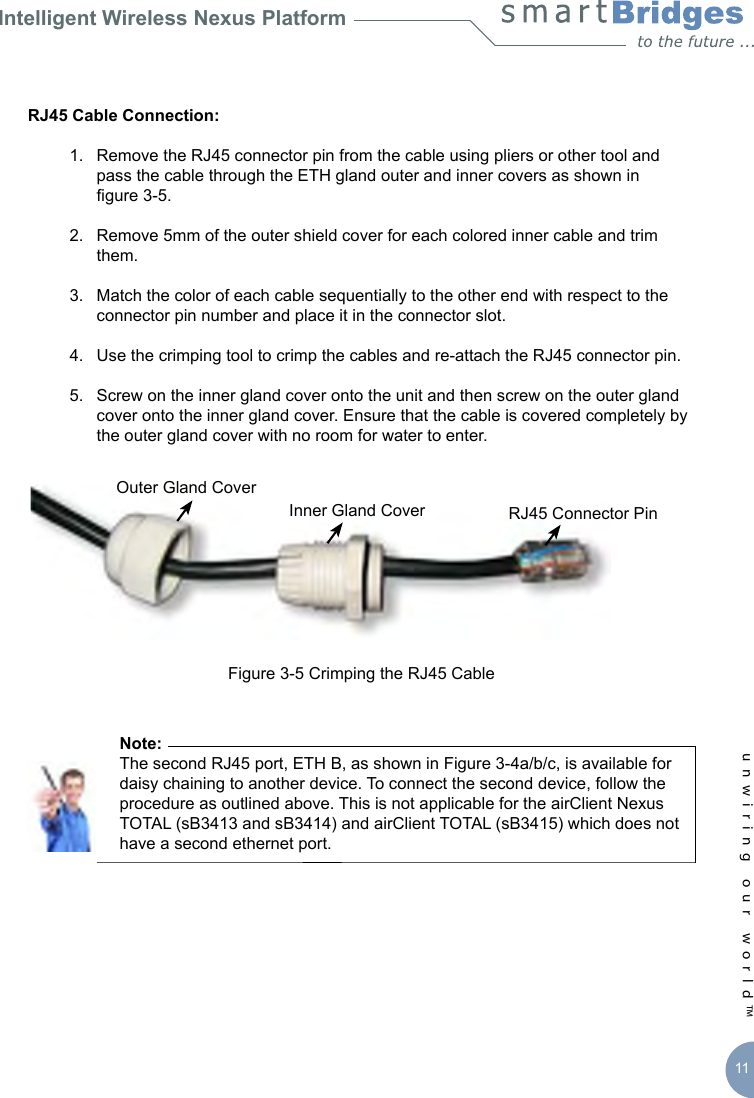
Intelligent Wireless Nexus Platformunwiring our world™ 11RJ45 Cable Connection:   1.  Remove the RJ45 connector pin from the cable using pliers or other tool and      pass the cable through the ETH gland outer and inner covers as shown in     gure 3-5.  2.  Remove 5mm of the outer shield cover for each colored inner cable and trim      them.  3.  Match the color of each cable sequentially to the other end with respect to the      connector pin number and place it in the connector slot.  4.  Use the crimping tool to crimp the cables and re-attach the RJ45 connector pin.  5.  Screw on the inner gland cover onto the unit and then screw on the outer gland      cover onto the inner gland cover. Ensure that the cable is covered completely by      the outer gland cover with no room for water to enter.Figure 3-5 Crimping the RJ45 Cable      Note:       The second RJ45 port, ETH B, as shown in Figure 3-4a/b/c, is available for       daisy chaining to another device. To connect the second device, follow the        procedure as outlined above. This is not applicable for the airClient Nexus        TOTAL (sB3413 and sB3414) and airClient TOTAL (sB3415) which does not        have a second ethernet port. Outer Gland CoverInner Gland Cover RJ45 Connector Pin
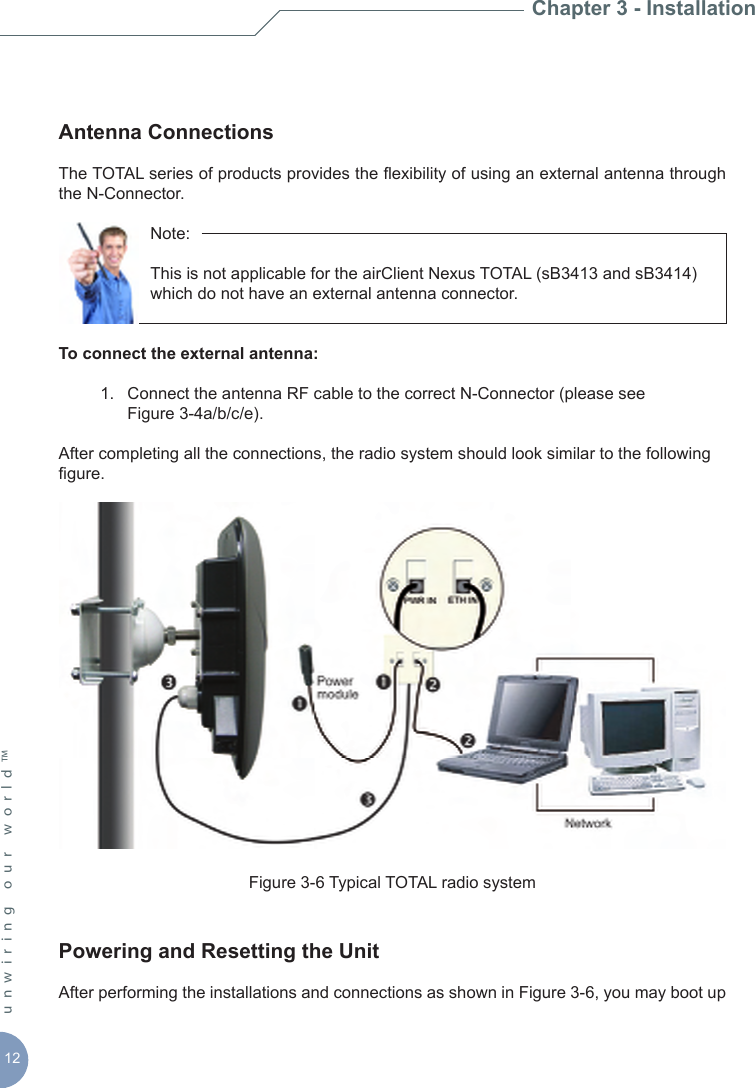
12unwiring our world™ Antenna Connections The TOTAL series of products provides the exibility of using an external antenna through the N-Connector.       Note:           This is not applicable for the airClient Nexus TOTAL (sB3413 and sB3414)        which do not have an external antenna connector.To connect the external antenna:   1.  Connect the antenna RF cable to the correct N-Connector (please see      Figure 3-4a/b/c/e).After completing all the connections, the radio system should look similar to the following gure.Figure 3-6 Typical TOTAL radio system Powering and Resetting the UnitAfter performing the installations and connections as shown in Figure 3-6, you may boot up Chapter 3 - Installation
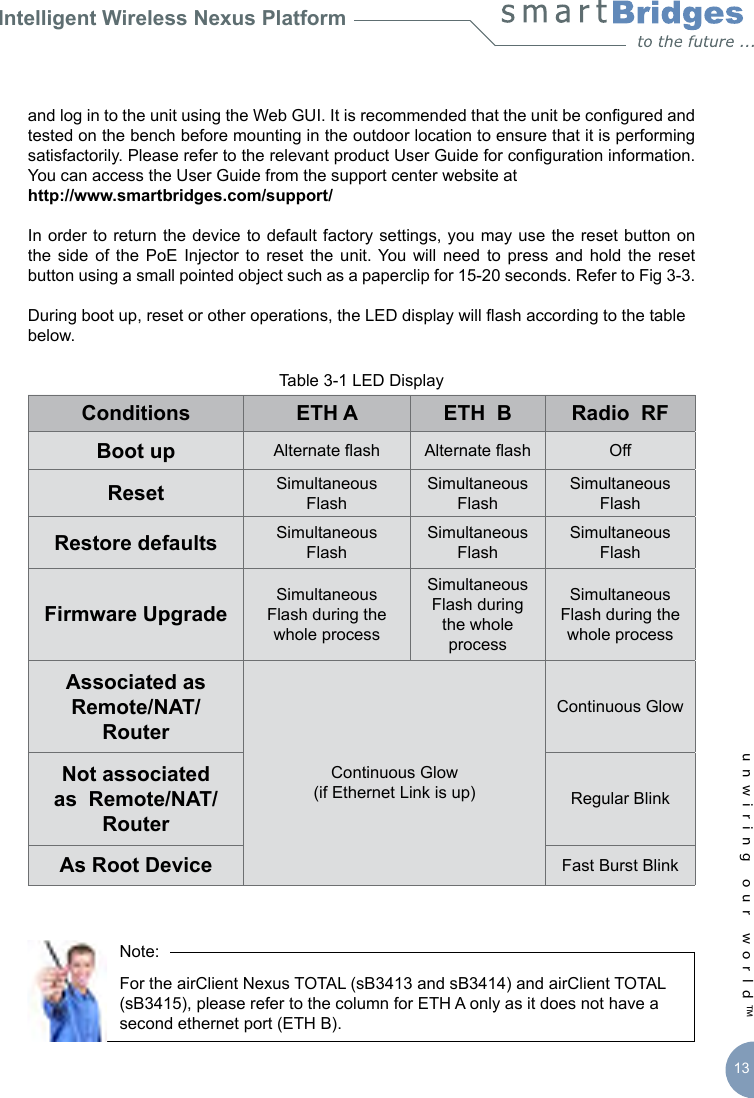
Intelligent Wireless Nexus Platformunwiring our world™ 13and log in to the unit using the Web GUI. It is recommended that the unit be congured and tested on the bench before mounting in the outdoor location to ensure that it is performing satisfactorily. Please refer to the relevant product User Guide for conguration information. You can access the User Guide from the support center website at http://www.smartbridges.com/support/In order to return  the  device  to  default  factory  settings,  you  may  use the reset button on the  side of  the  PoE  Injector  to  reset  the  unit. You will  need  to press  and  hold  the  reset button using a small pointed object such as a paperclip for 15-20 seconds. Refer to Fig 3-3.During boot up, reset or other operations, the LED display will ash according to the table below.Table 3-1 LED DisplayConditions ETH A ETH  B Radio  RFBoot up Alternate ash Alternate ash OffReset Simultaneous FlashSimultaneous FlashSimultaneous FlashRestore defaults Simultaneous FlashSimultaneous FlashSimultaneous FlashFirmware UpgradeSimultaneous Flash during the whole processSimultaneous Flash during the whole processSimultaneous Flash during the whole processAssociated as Remote/NAT/RouterContinuous Glow(if Ethernet Link is up)Continuous GlowNot associated as  Remote/NAT/RouterRegular Blink As Root Device Fast Burst Blink            Note:            For the airClient Nexus TOTAL (sB3413 and sB3414) and airClient TOTAL        (sB3415), please refer to the column for ETH A only as it does not have a        second ethernet port (ETH B).
14unwiring our world™ Chapter 3 - Installation
Intelligent Wireless Nexus Platformunwiring our world™ 15Chapter 4 - Mounting This section describes how to physically mount the smartBridges’ TOTAL series of products on the site. The chapter contains the following sections:  •  Important Considerations when Choosing the Mounting Location     1.  Link Distance    2.  Signal Path Clearance (Fresnel Zone)  •  Mounting the TOTAL Unit    1.  Tower or Pole Mounting     2.  Wall Mounting   •  Changing Antenna PolarizationImportant Considerations when Choosing the Mounting LocationEach  Radio  Frequency  (RF) application  is a  unique installation. A site  survey is  needed to determine the optimum use of the TOTAL unit to optimize link distance, coverage, and network performance. The most important considerations are link length and clearance from obstacles.The following operating and environmental conditions should be taken into account when performing a site survey:  •  Data rates - Sensitivity and range are inversely proportional to data bit rates. The      data rate increases with a decrease in link distance and/or decrease in receiver      sensitivity.   •  Antenna placement - Proper antenna conguration is critical in maximizing radio      range in maximizing radio range. In general, greater heights allow for longer      distances and the avoidance of obstructions. However, do not install the TOTAL      unit at the extreme top of a tower, radio mast or high building to minimize risk of      being directly struck by lightning. It is advisable to install it at least 2 feet below     such heights. Extra height may also increase potential interference from other     unlicensed radio systems.                Note:                Do not install the unit in the proximity of a TV or Radio receiving mast.
16unwiring our world™   •  Physical environment - Clear, open areas provide better radio range than      enclosed, crowded areas. Physical obstructions such as buildings, trees, or hills      can hinder performance of wireless devices. Avoid locating the TOTAL unit     where there is an obstruction between the sending and receiving antennas.1. Link DistanceIf there is no obstacle in the signal path, the maximum link distance depends primarily on the type of antenna and the free space path loss. Ensure that your proposed mounting site is within range of the remote antenna. To help estimate the range, the TOTAL unit has a built-in Link Budget Calculator under Tools in the Web GUI which is accessible upon logging into the unit. Please refer to the product User Guide for more information on this tool. 2. Signal Path Clearance (Fresnel Zone)A  radio beam travels  from one antenna  to another  in a  straight  line. Therefore,  the path between the antennas must be free of major obstacles. The effects of obstacles and terrain, both along and near the path, have a signicant bearing on the propagation of radio signals and can cause both interference and signal cancellation.When choosing a site, consider the effects of the following common obstacles:  •  Trees and large plants - A tree directly in the signal path can completely block the      signal. You can avoid this by leaving sufcient clearance above the treetops.      You may need to leave extra clearance above smaller tress to allow for future      growth into the signal path.   •  Man-made obstacles - A large round building such as a gas storage        reservoir or water tower that is partially in the path may cause some blocking.      These obstacles may also reect RF, which can lead to multi path interference      with other receivers. Objects in or near the path that have rectangular surfaces      can block and diffract signals over and around them.  •  Earth surface - The earth’s curvature may also interfere with the signal if the      antenna is mounted too low. Mount the antenna just high enough to allow      adequate clearance from the ground.        Note:         For tower installations, you may need to climb the tower to verify a          clear signal path to the other antenna.Chapter 4 - Mounting
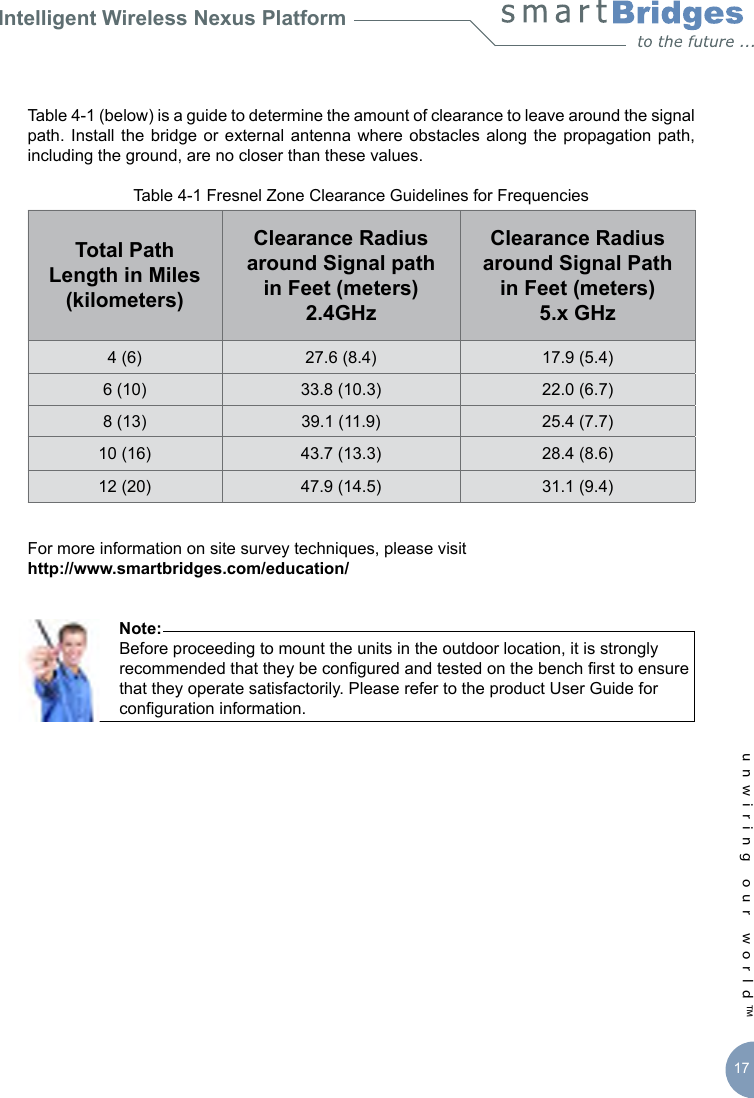
Intelligent Wireless Nexus Platformunwiring our world™ 17Table 4-1 (below) is a guide to determine the amount of clearance to leave around the signal path. Install  the bridge  or external  antenna  where obstacles along  the propagation path, including the ground, are no closer than these values.Table 4-1 Fresnel Zone Clearance Guidelines for FrequenciesTotal Path Length in Miles (kilometers)Clearance Radius around Signal path  in Feet (meters) 2.4GHzClearance Radius around Signal Path in Feet (meters)5.x GHz4 (6) 27.6 (8.4) 17.9 (5.4)6 (10) 33.8 (10.3) 22.0 (6.7)8 (13) 39.1 (11.9) 25.4 (7.7)10 (16) 43.7 (13.3) 28.4 (8.6)12 (20) 47.9 (14.5) 31.1 (9.4) For more information on site survey techniques, please visit http://www.smartbridges.com/education/       Note:       Before proceeding to mount the units in the outdoor location, it is strongly        recommended that they be congured and tested on the bench rst to ensure        that they operate satisfactorily. Please refer to the product User Guide for        conguration information.
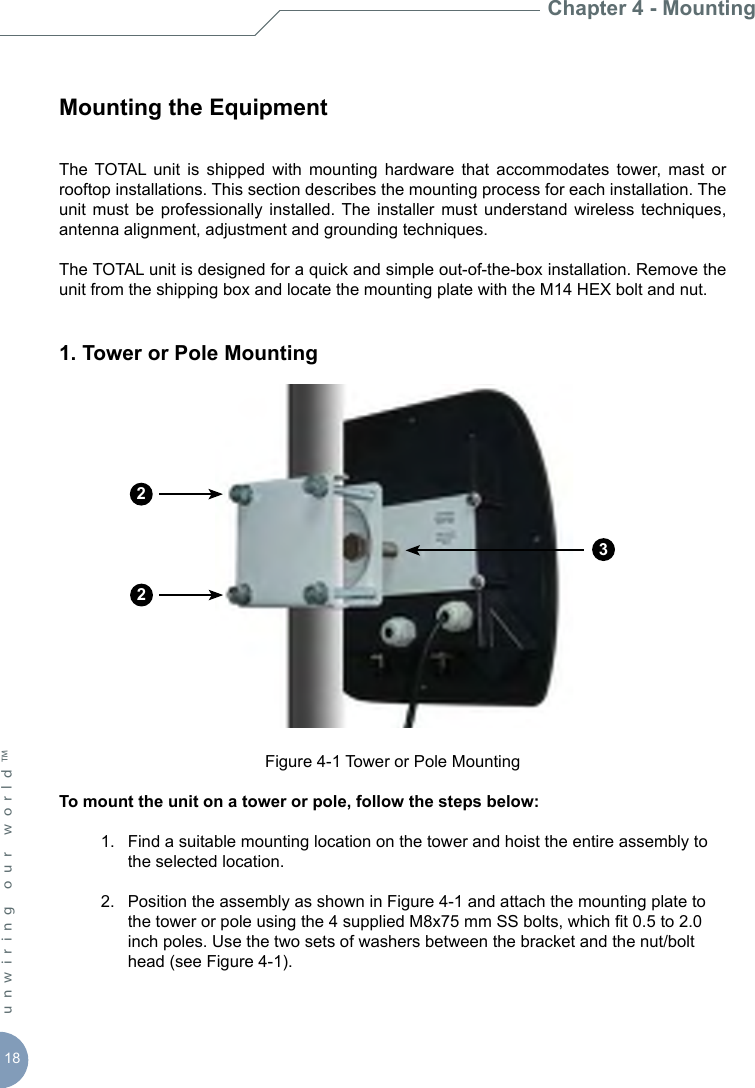
18unwiring our world™ Mounting the EquipmentThe  TOTAL  unit  is  shipped  with  mounting  hardware  that  accommodates  tower,  mast  or rooftop installations. This section describes the mounting process for each installation. The unit  must  be  professionally installed.  The  installer  must understand  wireless techniques, antenna alignment, adjustment and grounding techniques. The TOTAL unit is designed for a quick and simple out-of-the-box installation. Remove the unit from the shipping box and locate the mounting plate with the M14 HEX bolt and nut.1. Tower or Pole Mounting Figure 4-1 Tower or Pole MountingTo mount the unit on a tower or pole, follow the steps below:  1.  Find a suitable mounting location on the tower and hoist the entire assembly to      the selected location.  2.  Position the assembly as shown in Figure 4-1 and attach the mounting plate to      the tower or pole using the 4 supplied M8x75 mm SS bolts, which t 0.5 to 2.0      inch poles. Use the two sets of washers between the bracket and the nut/bolt      head (see Figure 4-1). Chapter 4 - Mounting223
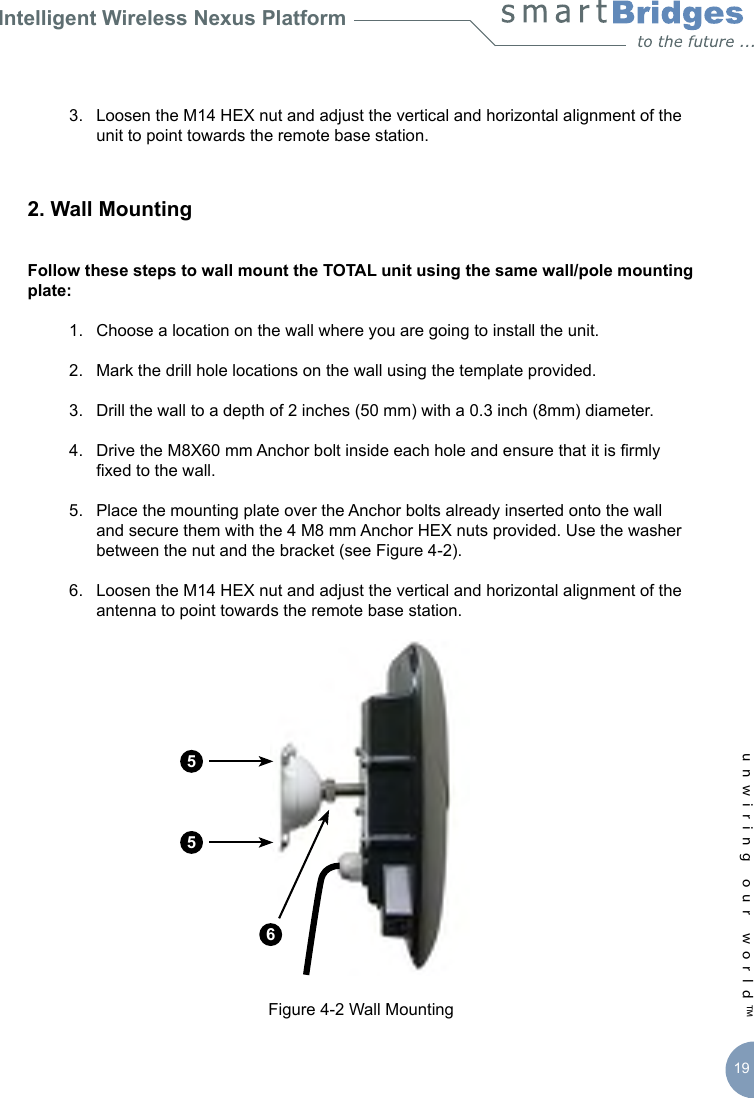
Intelligent Wireless Nexus Platformunwiring our world™ 19  3.  Loosen the M14 HEX nut and adjust the vertical and horizontal alignment of the      unit to point towards the remote base station.2. Wall Mounting Follow these steps to wall mount the TOTAL unit using the same wall/pole mounting plate:  1.  Choose a location on the wall where you are going to install the unit.  2.  Mark the drill hole locations on the wall using the template provided.   3.  Drill the wall to a depth of 2 inches (50 mm) with a 0.3 inch (8mm) diameter.   4.  Drive the M8X60 mm Anchor bolt inside each hole and ensure that it is rmly      xed to the wall.   5.  Place the mounting plate over the Anchor bolts already inserted onto the wall      and secure them with the 4 M8 mm Anchor HEX nuts provided. Use the washer      between the nut and the bracket (see Figure 4-2).  6.  Loosen the M14 HEX nut and adjust the vertical and horizontal alignment of the      antenna to point towards the remote base station.Figure 4-2 Wall Mounting556
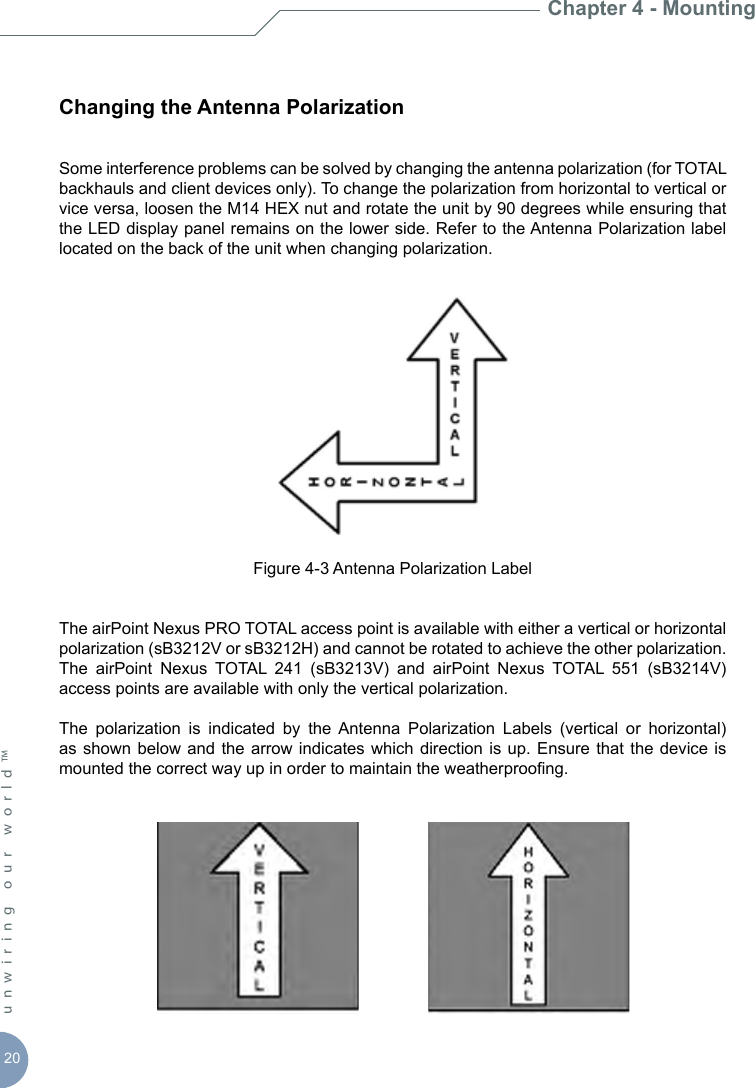
20unwiring our world™ Changing the Antenna PolarizationSome interference problems can be solved by changing the antenna polarization (for TOTAL backhauls and client devices only). To change the polarization from horizontal to vertical or vice versa, loosen the M14 HEX nut and rotate the unit by 90 degrees while ensuring that the LED display panel remains on the lower side. Refer to the Antenna Polarization label located on the back of the unit when changing polarization.Figure 4-3 Antenna Polarization LabelThe airPoint Nexus PRO TOTAL access point is available with either a vertical or horizontal polarization (sB3212V or sB3212H) and cannot be rotated to achieve the other polarization.  The  airPoint  Nexus  TOTAL  241  (sB3213V)  and  airPoint  Nexus  TOTAL  551  (sB3214V) access points are available with only the vertical polarization. The  polarization  is  indicated  by  the  Antenna  Polarization  Labels  (vertical  or  horizontal) as shown below and  the  arrow  indicates which  direction  is  up. Ensure  that  the  device is mounted the correct way up in order to maintain the weatherproong. Chapter 4 - Mounting
Intelligent Wireless Nexus Platformunwiring our world™ 21Chapter 5 - Antenna Alignment This section covers the antenna alignment process to achieve the best radio link performance. The goal when positioning the unit is to align the antenna for maximum signal strength. In addition, TOTAL radio units incorporate RSSI Audio Tone to simplify the antenna alignment process. The RSSI Audio tone is convenient to use and adequate for most installations.A built-in speaker is provided  to monitor the RSSI Audio tone. The TOTAL radios can be aligned to any angle with in a +/- 30 degree span for a given polarization.           Note:       This chapter is not applicable for the TOTAL access points and airClient        TOTAL (sB3415) as they do not have the RSSI Audio Tone feature.Establishing AssociationOn short links where the remote radio is visible, point the unit in the approximate direction and use the site survey tool to nd the radio at the far end and establish a more precise association. The integrated antenna is located on the front side of the enclosure. For longer links where there is no visibility, use the GPS coordinates of the unit at the far end and calculate its compass direction from the near unit. Point the unit along that precise direction. Once the association is established, you can align the antenna using RSSI Audio Tone from the built-in speaker on the unit. The RSSI Audio produces a tone ranging from 523 Hz (low pitch)  to  2093 Hz  (high pitch)  that is  proportional to  the received  signal level. The  RSSI Audio Tone  provides  instantaneous  feedback  as  you  move  the  unit  with  built-in  antenna within the enclosure.
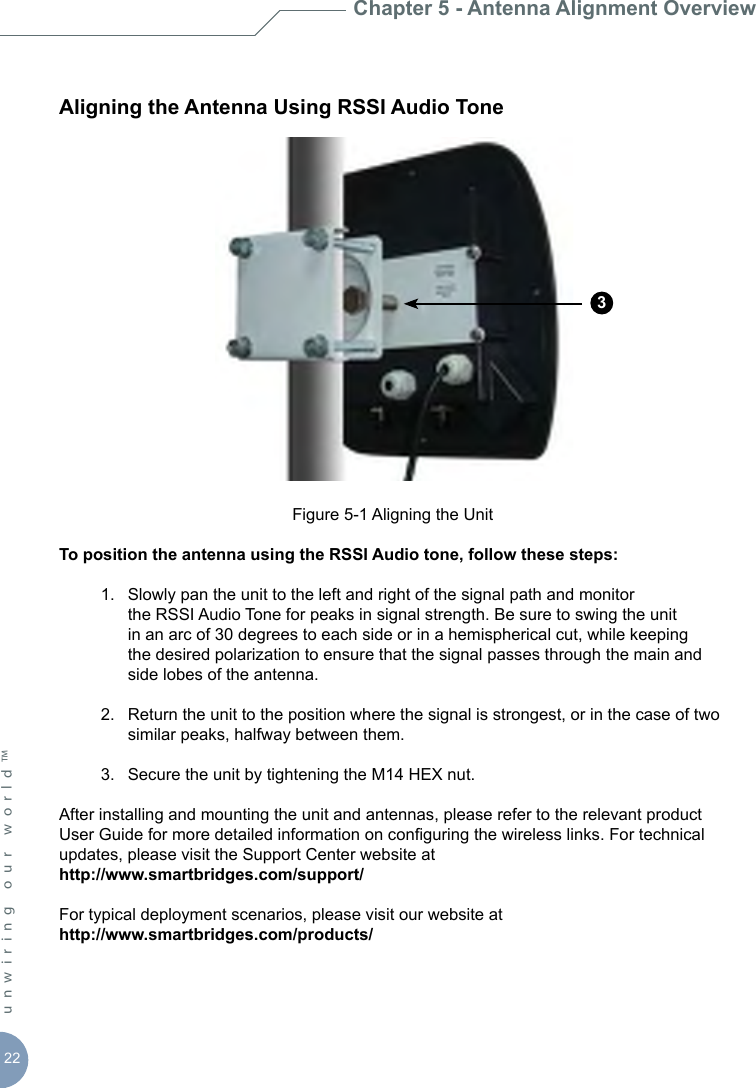
22unwiring our world™ Aligning the Antenna Using RSSI Audio ToneFigure 5-1 Aligning the UnitTo position the antenna using the RSSI Audio tone, follow these steps:  1.  Slowly pan the unit to the left and right of the signal path and monitor        the RSSI Audio Tone for peaks in signal strength. Be sure to swing the unit      in an arc of 30 degrees to each side or in a hemispherical cut, while keeping      the desired polarization to ensure that the signal passes through the main and      side lobes of the antenna.  2.  Return the unit to the position where the signal is strongest, or in the case of two      similar peaks, halfway between them.  3.  Secure the unit by tightening the M14 HEX nut.After installing and mounting the unit and antennas, please refer to the relevant product User Guide for more detailed information on conguring the wireless links. For technical updates, please visit the Support Center website at http://www.smartbridges.com/support/ For typical deployment scenarios, please visit our website athttp://www.smartbridges.com/products/Chapter 5 - Antenna Alignment Overview3
Intelligent Wireless Nexus Platform     Appendix A - Declarations of Conformity   This chapter provides declarations of conformity and regulatory information for smartBridges’ Intelligent Nexus Platform of wireless backhauls, access points and client devices.  This appendix contains the following sections:  •        FCC Declaration of Conformity Statement •        Declaration of Conformity for RF Exposure •        Department of Communications-Canada Declaration of Conformity Statement •        European Community - Declaration of Conformity Statement   FCC Declaration of Conformity Statement  Models  :    sB30  2, sB30  3, sB30  4, sB32  2V/H, sB32  3V, sB32  4V, sB34  2, sB34  3, sB34  4, sB34  5 FCC ID  :    PWG NEXUS    & PWG NEXUS 2  Manufacturer   :    smartBridges Pte Ltd 745, Toa Payoh Lorong 5 #04-0  , Singapore 3  9455  This   device   complies   with   Part-  5   rules.   Operation   is   subject   to   the  following   two conditions:  .    This device may not cause harmful interference, and  2.  This device must accept any interference received, including interference that may cause undesired operation.  This transmitter must not be co-located or operating in conjunction with any other antenna or transmitter. The antennas used for this transmitter must be installed to provide a separation distance of at least 20 cm from all persons and must not be co-located or operating in conjunction with any other antenna or transmitter。  This  equipment  has  been  tested  to  comply  with  the  limits  of  a  Class  B  digital  device, pursuant to Part    5 of the FCC Rules. These limits are designed to provide reasonable protection  against  harmful  interference  when  the  equipment  is  operated   in   a   residential environment. This equipment generates, uses, and radiates radio frequency energy, and if not installed and used in accordance with the instructions, may cause harmful interference. However,   there  is  no   guarantee  that  interference  will  not  occur.  If  this  equipment  does cause  interference  to  radio  or  television  reception,  which  can  be  determined  by  turning the equipment off and on, the user is encouraged to correct the interference by one of the following measures:  •        Reorient or relocate the receiving antenna.  23
Declarations of Conformity      •        Increase separation between the equipment and receiver. •        Connect the equipment to an outlet on a circuit different from which the receiver is connected. •        Consult the dealer or an experienced radio/TV technician.  Note: To meet regulatory restrictions, the TOTAL series of radio equipment uses N type antenna connector and the external antenna must be professionally installed.   Channel  This equipment marketed in USA is restricted by firmware to only operate on 2.4G channel 1-11.  Declaration of Conformity for RF Exposure  The TOTAL series of radio equipment has been found to be compliant with the requirements set forth in CFR 47 Section      .    307 addressing RF Exposure from radio frequency devices as defined in Evaluating Compliance with FCC Guidelines for Human Exposure to Radio Frequency Electromagnetic Fields. The antennas should be positioned more than 7 ft (2 m) from the human body.  The  TOTAL  series  which  includes  the  airHaul  Nexus  TOTAL,  airPoint  Nexus  TOTAL, airClient  Nexus TOTAL and  airClient TOTAL;  the  Nexus  PRO  series  which  includes  the airHaul2  Nexus PRO and airPoint2  Nexus PRO; and the Nexus PRO TOTAL series which includes  the  airHaul™   Nexus  PRO  TOTAL,  airPoint™   Nexus  PRO  TOTAL and  airClient™ Nexus PRO TOTAL are compliant with EN 50835 for RF exposure.  This transmitter may not be located or operating in conjunction with other transmitters or antennas separated by less than 7 ft (2 m).   Department of Communications - Canada  Canadian Compliance Statement  This Class B digital apparatus meets all the requirements of the Canadian Interference- Causing Equipment Regulations.  Cet appareil numerique de la classe B respecte les exigences du Reglement sur le material broilleur du Canada.  This device complies with Class B Limits of Industry Canada. Operation is subject to the following two conditions:  .    This device may not cause harmful interference and
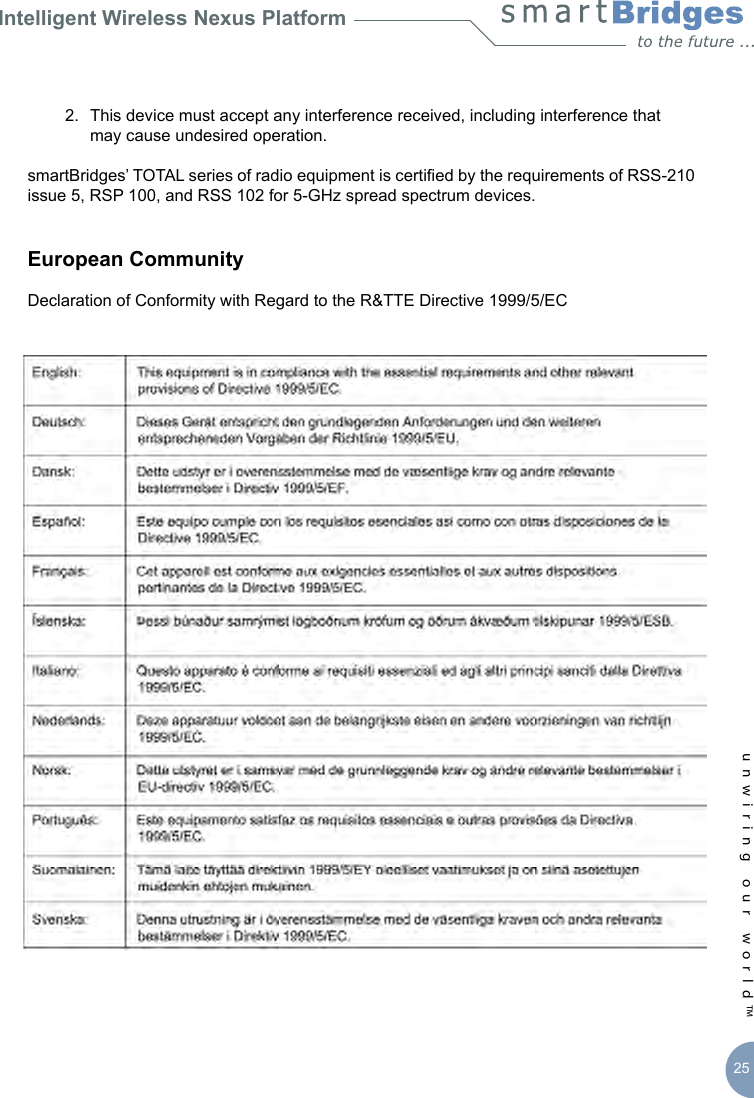
Intelligent Wireless Nexus Platformunwiring our world™ 25  2.  This device must accept any interference received, including interference that      may cause undesired operation.smartBridges’ TOTAL series of radio equipment is certied by the requirements of RSS-210 issue 5, RSP 100, and RSS 102 for 5-GHz spread spectrum devices. European CommunityDeclaration of Conformity with Regard to the R&TTE Directive 1999/5/EC
26unwiring our world™ The following CE mark is afxed to the TOTAL radio equipment.The  following  smartBridges  wireless  LAN  products  use  Coded  Orthogonal  Frequency Division Multiplexing (COFDM) radio technology.airHaul2 Nexus PRO [sB3021]airPoint2 Nexus PRO [sB3221]airHaul Nexus [sB3010] airPoint Nexus [sB3210]airHaul Nexus PRO TOTAL [sB3012]airPoint Nexus PRO TOTAL [sB3212]airClient Nexus PRO TOTAL [sB3412]airHaul Nexus TOTAL 241 [sB3013]airPoint Nexus TOTAL 241 [sB3213]airClient Nexus TOTAL 241 [sB3413]airHaul Nexus TOTAL 551 [sB3014]airPoint Nexus TOTAL 551 [sB3214]airClient Nexus Total 551 [sB3414]These  products  are  designed  for  wireless  point-to-point  and  point-to-multipoint  links conforming to the following standards:Europe - European Union NoticeRadio Products with CE marking comply with R&TTE Directive (1995/5/EC) issued by the Commission of European Community.Compliance  with  this  Directive  implies  conformity  to  the  following  European  norms (corresponding international standards are given in brackets).EN 60950 (IEC 60950) - Product and SafetyEN 301.893 – Technical Requirements of Broadband Radio Access Networks; 5 GHz high performance RLANEN 301.489 – General EMC requirement for radio equipmentEN 55022 (CISPR 22) – Electromagnetic InterferenceEN 301.489 (IEC 61000 – 4 – 2, 3, 4, 5, 6, 8, 11) – Electromagnetic ImmunityDeclarations of Conformity
Intelligent Wireless Nexus Platformunwiring our world™ 27EN 300.328 – General EMC requirements: 2.4 GHz ISM BandCompliance with UK’s regulatory body OFCOM standards – EMI (5.725 to 5.85 GHz) Products containing the radio transmitters are labeled with the CE markingsmartBridges External Multi-band AntennasDish, 29/21 dBi, 24” [sB3802-2921]Panel, 90 degree, 12 dBi, V Pol [sB3802-1290V]Dish, 23/15 dBi, 12” [sB3802-2315]Panel, 90 degree, 12 dBi, H Pol [sB3802-1290H]Panel, 17/15 dBi [sB3802-1715]Caution:During deployment, the RF power should be set so that the total EIRP of the system complies with the power transmission levels set by the local regulatory body.Wireless LAN and your HealthWireless  LAN  products,  like  other  radio  devices,  emit  radio  frequency  electromagnetic energy.  The  level  of  energy  emitted  by  wireless  LAN  devices  is  far  less  compared  to wireless  devices  like  mobile  phones.  Because  wireless  LAN  products  operate  within  the guidelines and recommendations found in radio frequency safety standards, it is understood that wireless  LAN is safe for use by consumers. These standards and  recommendations reect the consensus of the scientic community and result from the deliberations of panels and committees of scientists who continually review and interpret the  extensive research literature.Regulatory InformationThis device must be installed and used in strict accordance with manufacturer’s instructions as described in the user documentation that comes with the product.  For country specic radio  and  telecommunications  approvals,  please  consult  local  authorities.  In  some situations or environments, the use of wireless devices may be restricted by the proprietor of the building or responsible representatives of the organization. These situations may for example include:Using the wireless equipment onboard airplanes, or in any other environment where the risk of interference to other devices or services is perceived or identied as harmful.If you are uncertain of the policy that applies to the use of wireless equipment in a specic organization or environment (e.g. airports), you are required to ask for authorization to use
28unwiring our world™ this device prior to deploying the equipment.The  manufacturer  is  not  responsible  for  any  radio  or  television  interferences  caused  by unauthorized use or modication of the devices included in the manufacturer’s kit, or the substitution or attachment of connecting cables and equipment other than that specied by the manufacturer.The  correction of  interference  caused  by  such unauthorized  modication,  substitution or attachment will be the responsibility of the user.The manufacturer and its authorized resellers or distributors are not liable for any damage  or  violation  of  government  regulations  that  may  arise  from  failing  to  comply  with  these guidelines.Declaration of Compliance – RoHS & WEEEsmartBridges  Pte  Ltd  hereby  declares  that  the  smartBridges  products  listed  above  are RoHS and WEEE compliant, meeting the European Union RoHS (Restriction of Hazardous Substances) and WEEE Directives (Waste Electrical and Electronic Equipment).smartBridges bases its declaration on information provided by its manufacturing partners and/or component  suppliers.  It is  the responsibility of  the  third parties  to ensure that  the proclaimed  compliance  is  truly  adhered.    In  no  event shall  smartBridges  be  held  legally responsible for the declarations of compliance provided by the third parties.   Declarations of Conformity
Intelligent Wireless Nexus Platformunwiring our world™ 29Appendix B – Warranty InformationsmartBridges Limited Warranty, Disclaimer of Warranty, and End User License AgreementCheck latest agreement at URL http://www.smartbridges.com/support/warranty.aspHardwaresmartBridges warrants that  commencing  from the  date of  purchase from  a smartBridges authorized distributor/reseller to Customer and continuing for a period of 12 months or 16 months from the date of manufacture (whichever is earlier), the Hardware will be free from defects in material and workmanship under normal use. This limited warranty extends only to the original user of the Product. Customer’s sole and exclusive remedy and the entire liability of smartBridges and its suppliers under this limited warranty will be, at smartBridges’ option, shipment of a replacement within the warranty period or a refund of the purchase price if the Hardware is returned to the authorized distributor/reseller supplying it to Customer, freight and insurance prepaid. The Customer is to contact their authorized distributor/reseller for all such matters and proof of purchase might be required. smartBridges replacement parts used in Hardware replacement may be new or equivalent to new. smartBridges’ obligations hereunder  are  conditioned  upon  the  return  of  affected  Hardware  in  accordance  with smartBridges’ or its service center’s then-current Return Merchandise Authorization (RMA) procedures. This warranty does not cover accidents, misuse, neglect, unauthorized product modication, or acts of nature.SoftwaresmartBridges warrants that  commencing  from the  date of  purchase from  a smartBridges authorized distributor/reseller to Customer and continuing for a period of 12 months or 16 months from the date of manufacture (whichever is earlier), [a] the media  on which  the Software  is furnished  will be  free of  defects in materials and workmanship under normal use; and [b] the Software substantially conforms to its published specications. This  limited  warranty  extends  only  to  the  original  user  of  the  Software.  Except  for  the foregoing,  the  Software  is  provided  AS  IS.  This  limited  warranty  extends  only  to  the Customer  who  is  the  original  licensee.  Customer’s  sole  and  exclusive  remedy  and  the entire liability of smartBridges and its suppliers and licensors under this limited warranty will be, at smartBridges’ option, repair, replacement, or refund of the Software if reported (or, upon request, returned) to smartBridges or the authorized distributor/reseller supplying the Software to Customer. The Customer is to contact their authorized distributor/reseller for
30unwiring our world™ Warranty Informationall such matters and proof of purchase might be required. In no event does smartBridges warrant that the Software is error free or that Customer will be able to operate the Software without  problems  or  interruptions.  In  addition,  due  to  the  continual  development  of  new techniques for intruding upon and attacking networks, smartBridges does not warrant that the Software or any equipment, system or network on which the Software is used will be free of vulnerability to intrusion or attack.RestrictionsThis warranty does not apply if the Software, Product or any other equipment upon which the Software is authorized to be used (a) has been altered, except by smartBridges or its authorized  representative,  (b)  has  not  been  installed,  operated,  repaired,  or  maintained in  accordance  with  instructions  supplied  by  smartBridges,  or  (c)  has  been  subjected  to abnormal physical or electrical stress, misuse, negligence, or accident.End User License AgreementIMPORTANT:PLEASE READ THIS END USER LICENSE AGREEMENT CAREFULLY. DOWNLOADING, INSTALLING OR USING SMARTBRIDGES’ SOFTWARE CONSTITUTES ACCEPTANCE OF THIS AGREEMENT. SMARTBRIDGES  IS WILLING  TO  LICENSE THE  SOFTWARE TO  YOU  ONLY  UPON  THE  CONDITION  THAT  YOU  ACCEPT  ALL  OF  THE  TERMS CONTAINED  IN  THIS  LICENSE  AGREEMENT.  BY  DOWNLOADING  OR  INSTALLING THE  SOFTWARE,  OR  USING  THE  EQUIPMENT THAT  CONTAINS  THIS  SOFTWARE, YOU ARE BINDING YOURSELF AND THE BUSINESS ENTITY THAT YOU REPRESENT (COLLECTIVELY,  “CUSTOMER”) TO THIS AGREEMENT.  IF YOU  DO  NOT AGREE TO ALL OF THE TERMS OF THIS AGREEMENT, THEN SMARTBRIDGES IS UNWILLING TO LICENSE THE SOFTWARE TO YOU AND (A) DO NOT DOWNLOAD, INSTALL OR USE THE SOFTWARE, AND (B) YOU MAY RETURN THE SOFTWARE FOR A FULL REFUND, OR, IF THE SOFTWARE IS SUPPLIED AS PART OF ANOTHER PRODUCT, YOU MAY RETURN THE ENTIRE  PRODUCT  FOR A FULL REFUND. YOUR  RIGHT TO RETURN AND REFUND EXPIRES 30 DAYS AFTER PURCHASE FROM SMARTBRIDGES OR AN AUTHORIZED  SMARTBRIDGES  RESELLER,  AND  APPLIES  ONLY  IF  YOU  ARE  THE ORIGINAL END USER PURCHASER.The  following  terms  of  this  End  User  License  Agreement  (“Agreement”)  govern Customer’s access and use of the Software, except to the extent (a) there is a separate signed  agreement  between  Customer  and  smartBridges  governing  Customer’s use of  the  Software or (b) the Software includes   a  separate “click-accept” license agreement  as part  of  the installation  and/or  download process.  To  the extent  of  a conict between the provisions of the foregoing documents, the order of precedence shall be (1) the signed agreement, (2) the click-accept agreement, and (3) this End User License Agreement.
Intelligent Wireless Nexus Platformunwiring our world™ 31License.  Conditioned  upon compliance  with the  terms  and conditions  of this Agreement, smartBridges or its subsidiary licensing the Software grants to Customer a nonexclusive and nontransferable license to use for Customer’s internal business purposes the Software and the Documentation for which Customer has paid the required license fees. “Documentation” means  written  information  (whether  contained  in  user  or  technical  manuals,  training materials,  specications  or  otherwise)  specically  pertaining  to  the  Software  and  made available  by  smartBridges  with  the  Software  in  any  manner  (including  on  CD-Rom,  or on-line).  Customer’s license  to use  the Software  shall  be  limited  to,  and  Customer  shall not  use  the  Software  in  excess  of  the  applicable  Purchase  Order  which  has  been  paid to  smartBridges  the  required  license  fee.  Unless  otherwise  expressly  provided  in  the Documentation, Customer shall use the Software solely as embedded in, for execution on, or (where the applicable documentation permits installation on nonsmartBridges equipment) for communication with smartBridges equipment owned or leased by Customer and used for Customer’s internal business purposes.General  Limitations.  This  is  a  license,  not  a  transfer  of  title,  to  the  Software  and Documentation,  and  smartBridges  retains  ownership  of  all  copies  of  the  Software  and Documentation.  Customer  acknowledges  that  the  Software  and  Documentation  contain trade  secrets  of  smartBridges,  its  suppliers  or  licensors,  including  but  not  limited  to  the specic  internal  design  and  structure  of  individual  programs  and  associated  interface information. Accordingly,  except  as  otherwise  expressly  provided  under  this Agreement, Customer shall have no right and Customer specically agrees not to:i.  transfer, assign or sublicense its license rights to any other person or entity,     or use the Software on unauthorized or secondhand smartBridges equipment,    and Customer  acknowledges that any attempted transfer, assignment, sublicense or    use shall be void;ii.  make error corrections to or otherwise modify or adapt the Software or create    derivative works based upon the Software, or permit third parties to do the same;iii.  reverse engineer or decompile, decrypt, disassemble or otherwise reduce the   Software to human readable form, except to the extent otherwise expressly permitted    under applicable law notwithstanding this restriction;iv.  use or permit the Software to be used to perform services for third parties, whether    on a service bureau or time sharing basis or otherwise, without the express written    authorization of smartBridges; orv.  disclose, provide, or otherwise make available trade secrets contained within the    Software and Documentation in any form to any third party without the prior written    consent of smartBridges. Customer shall implement reasonable security measures to    protect such trade secrets.
32unwiring our world™ Warranty InformationTo  the  extent  required  by  law,  and  at  Customer’s  written  request,  smartBridges  shall provide Customer with the interface information needed to achieve interoperability between the  Software  and  another  independently  created  program,  on  payment  of  smartBridges’ applicable fee, if any. Customer shall observe strict obligations of condentiality with respect to such information and shall use such information in compliance with any applicable terms and conditions upon which smartBridges makes such information available.Software,  Upgrades  and  Additional  Copies.  For  purposes  of  this  Agreement,  “Software” shall  include  (and  the  terms  and  conditions  of  this Agreement  shall  apply  to)  computer programs, including rmware, as provided to Customer by smartBridges or an authorized smartBridges reseller, and any upgrades, updates, bug xes or modied versions thereto (collectively,  “Upgrades”)  or  backup  copies  of  the  Software  licensed  or  provided  to Customer by smartBridges or an authorized smartBridges  reseller. NOTWITHSTANDING ANY OTHER  PROVISION  OF THIS AGREEMENT:  (1)  CUSTOMER  HAS NO  LICENSE OR RIGHT TO USE ANY ADDITIONAL COPIES OR UPGRADES UNLESS CUSTOMER, AT THE TIME OF ACQUIRING SUCH COPY OR UPGRADE, ALREADY HOLDS A VALID LICENSE TO THE ORIGINAL SOFTWARE AND HAS PAID THE APPLICABLE FEE FOR THE  UPGRADE  OR  ADDITIONAL  COPIES;  (2)  USE  OF  UPGRADES  IS  LIMITED  TO SMARTBRIDGES EQUIPMENT FOR WHICH CUSTOMER IS THE ORIGINAL END USER PURCHASER OR LESSEE OR WHO OTHERWISE HOLDS A VALID LICENSE TO USE THE SOFTWARE WHICH IS BEING UPGRADED; AND (3) THE MAKING AND USE OF ADDITIONAL COPIES IS LIMITED TO NECESSARY BACKUP PURPOSES ONLY.Proprietary Notices. Customer agrees to maintain and reproduce all copyright and other proprietary notices on all copies, in any form, of the Software in the same form and manner that such copyright and other proprietary notices are included on the Software. Except as expressly authorized in this Agreement, customer shall not make any copies or duplicates of any Software without the prior written permission of smartBridges.Term  and  Termination.  This  Agreement  and  the  license  granted  herein  shall  remain effective until terminated. Customer may terminate this Agreement and the license at any time by destroying all copies of Software and any Documentation. Customer’s rights under this Agreement will terminate immediately without notice from smartBridges if Customer fails to comply with any provision of this Agreement. Upon termination, Customer shall destroy all  copies of  Software  and Documentation  in  its  possession  or  control. All  condentiality obligations  of  Customer  and  all  limitations  of  liability  and  disclaimers  and  restrictions  of warranty  shall  survive  termination  of  this  Agreement.  In  addition,  the  provisions  of  the sections  titled  “U.S.  Government  End  User  Purchasers”  and  “General  Terms  Applicable to the Limited Warranty Statement and End User License” shall survive termination of this Agreement.
Intelligent Wireless Nexus Platformunwiring our world™ 33General  Terms Applicable  to  the  Limited  Warranty  Statement  and End User LicenseDisclaimer  of  Warranty.  EXCEPT  AS  SPECIFIED  IN  THIS  WARRANTY,  ALL EXPRESS  OR  IMPLIED  CONDITIONS,  REPRESENTATIONS,  AND  WARRANTIES INCLUDING,  WITHOUT  LIMITATION,  ANY  IMPLIED  WARRANTY  OR  CONDITION  OF MERCHANTABILITY, FITNESS FOR A PARTICULAR PURPOSE, NON-INFRINGEMENT, SATISFACTORY  QUALITY,  NON-INTERFERENCE, ACCURACY  OF   INFORMATIONAL CONTENT,  OR ARISING  FROM A COURSE  OF  DEALING,  LAW,  USAGE,  OR  TRADE PRACTICE, ARE  HEREBY EXCLUDED  TO THE  EXTENT ALLOWED  BY APPLICABLE LAW AND ARE EXPRESSLY DISCLAIMED BY SMARTBRIDGES, ITS SUPPLIERS AND LICENSORS.  TO  THE  EXTENT  AN  IMPLIED  WARRANTY  CANNOT  BE  EXCLUDED, SUCH WARRANTY IS LIMITED IN DURATION TO THE EXPRESS WARRANTY PERIOD. BECAUSE SOME STATES OR JURISDICTIONS DO NOT ALLOW LIMITATIONS ON HOW LONG AN IMPLIED WARRANTY LASTS, THE ABOVE LIMITATION MAY NOT APPLY. THIS WARRANTY  GIVES  CUSTOMER  SPECIFIC  LEGAL  RIGHTS,  AND  CUSTOMER  MAY ALSO HAVE OTHER RIGHTS WHICH VARY FROM JURISDICTION TO JURISDICTION. This disclaimer and exclusion shall apply even if the express warranty set forth above fails of its essential purpose. Disclaimer  of  Liabilities.  REGARDLESS  WHETHER  ANY  REMEDY  SET  FORTH HEREIN FAILS OF  ITS ESSENTIAL PURPOSE  OR OTHERWISE, IN  NO EVENT WILL SMARTBRIDGES OR ITS SUPPLIERS BE LIABLE FOR ANY LOST REVENUE, PROFIT, OR LOST OR DAMAGED DATA,  BUSINESS  INTERRUPTION, LOSS  OF CAPITAL,  OR FOR SPECIAL, INDIRECT, CONSEQUENTIAL, INCIDENTAL, OR PUNITIVE DAMAGES HOWEVER  CAUSED  AND  REGARDLESS  OF  THE  THEORY  OF  LIABILITY  OR WHETHER ARISING  OUT  OF  THE  USE  OF  OR  INABILITY  TO  USE  SOFTWARE  OR OTHERWISE  AND  EVEN  IF  SMARTBRIDGES  OR  ITS  SUPPLIERS  OR  LICENSORS HAVE  BEEN ADVISED  OF THE  POSSIBILITY  OF  SUCH  DAMAGES.  In  no  event  shall smartBridges’  or its  suppliers’  or  licensors’  liability  to  Customer,  whether  in  contract, tort (including negligence), breach of warranty, or otherwise, exceed the  rice paid by Customer for the Product that gave rise to the claim. BECAUSE SOME STATES OR JURISDICTIONS DO NOT ALLOW LIMITATION OR EXCLUSION OF CONSEQUENTIAL OR INCIDENTAL DAMAGES, THE ABOVE LIMITATION MAY NOT APPLY TO YOU. The Warranty and the End User License shall be governed by and construed in accordance with the laws of the  Singapore,  without  reference to  or  application of  choice  of  law rules or principles. The United Nations Convention on the International Sale of Goods shall not apply. If any portion hereof is found to be void or unenforceable, the remaining provisions of the Agreement shall remain in full force and effect. Except as expressly provided herein, this Agreement constitutes the entire agreement between the parties and supersedes any conicting or additional terms contained in any purchase order or elsewhere, all of which terms  are  excluded. This Agreement  has  been  written  in  the  English  language,  and  the parties agree that the English version will govern.
34unwiring our world™ Warranty InformationCopyright & TrademarksAll  trademarks  and  brand  names  mentioned  in  this  document  are  the  property  of  their respective owners. For detailed product information and demo, visit www.smartbridges.com/products/ Copyright © 1999-2007 smartBridges. All Rights Reserved. The content herein is subject to change without further notice. smartBridges, Nexus, Nexus PRO,  Nexus  PRO  TOTAL,  airHaul,  airPoint,  airClient  and/or  all  other  products  and/or services referenced herein are either registered trademarks, trademarks or service marks of smartBridges Pte Ltd. All other names are/or may be the trademarks of their respective owners.

Navigation menu