Sony Electronics CMZ200DM2 DUAL MODE PORTABLE CELLULAR PHONE (AMPS/CDMA) User Manual
Sony Electronics Inc DUAL MODE PORTABLE CELLULAR PHONE (AMPS/CDMA) Users Manual
Users Manual
Operating Instructions
Digital Portable
Cellular Telephone
3-864-804-11 (1)
CM-Z200
1_CM_Z200 6/8/98, 9:26 AM1
1.2
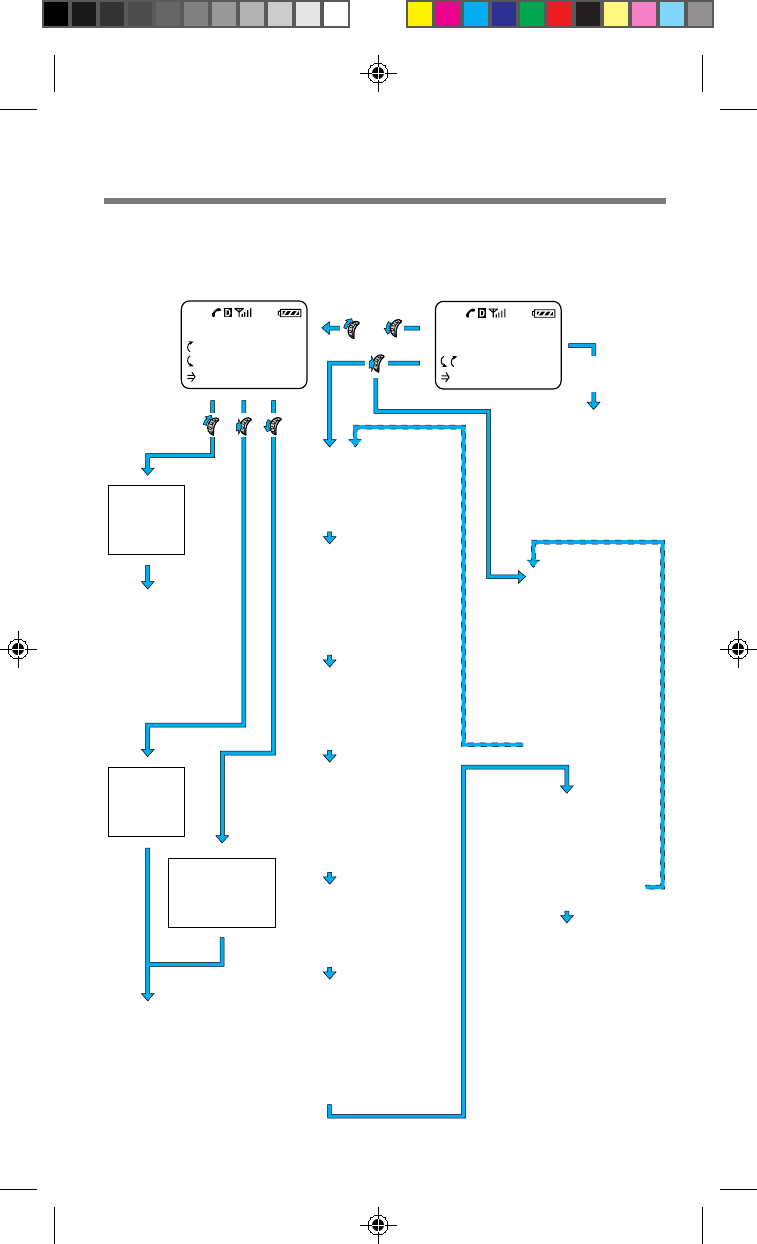
FEATURES
•Message
-Voice*
-New Text*
-Old Text*
-Erase Old*
•Sounds
-Ringer Volume
-Mute/Unmute
-Keybeep Volume
-Earpiece Volume
-Ringer Type
-Key Sound
-Beep Length
•Timers
-All Calls*
-Recent Calls*
-Roam Calls*
-Minute Alert
-Auto-Off
•Directory
-My Number
-Save
-Erase
-Edit
-Find Name
-Phone Book
-Calls List
•Extras
-Key Guard
-Touch Dial
-Auto-Retry
-Auto-Answer
-Scratch Pad
•Security
-Lock Phone
-New Code
-Restrict #
-Restrict All
-Master Reset
-Erase Book
-Erase Calls
-Emergency #
•Options
-Send
-Prefix
-Duration
-Time/Date
-View Number
-Number Tone
-Save
•Options
-Send
-Prefix
-Edit
-Restriction
-View Number
-Number Tone
-Erase
It's a Sony!
12:34P 12/25
:Saved #s
:Features Enter
digits
Standby displaySaved #s display
•Options
-Send
-Save
-Hard Pause
-Time Pause
-Enter Link
-Enter Hyphen
-Find Number
Short
Features
Menu
•Message
-Voice
-New Text
-Old Text
-Erase Old
•Ringer Volume
•My Number
•Saved #s
•Lock Phone
•Long Menu
SAVED #S
:Calls List
:Phone Book
:Find Name
Find
name in
Phone
Book
List
10 most
recent
calls
List up to
99 saved
numbers in
Phone Book
+
+
–
–
•Display
-Banner*
-Backlight
-Auto-hyphen
-Sort Book
-Language*
-Menu Length
-Msg. Format*
•Network
-Roam Alert*
-Drop Alert*
-Priv. Alert*
-Auto-N.A.M.*
-Set-N.A.M.*
-Set System*
-Force Call*
or
*) These features may
be available with
some networks and
service providers.
Welcome to the CM-Z200
Menu map
1_CM_Z200 6/8/98, 9:26 AM2
1.3
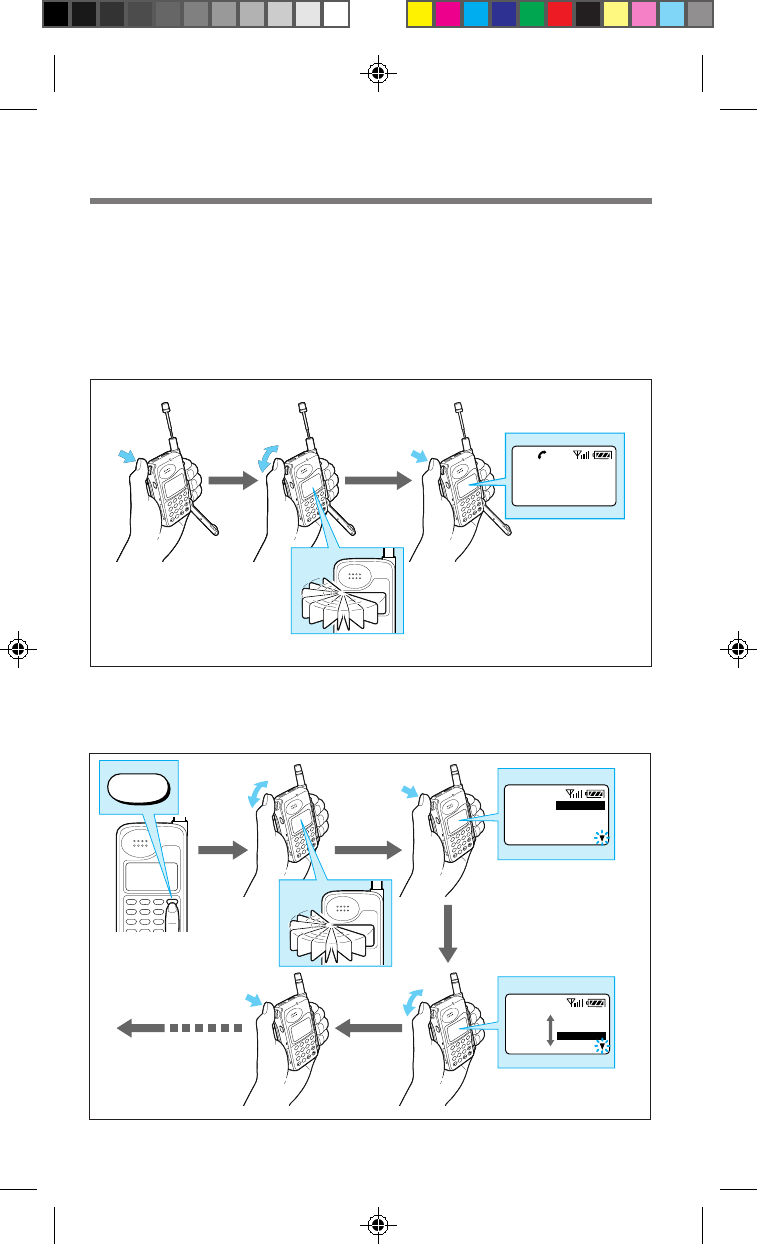
Easy dialing
You can easily make a call using a number from the Phone Book or the Calls List.
First, turn the Jog Dial either up or down one time to search phone numbers. Then
scroll down to view saved numbers in the Phone Bookor scroll up to view your most
recently called numbers in the Calls List. Simply open the arm microphone to call
the number you choose.
Easy menu access
You can easily access your phone’s settings through the Features menu. Press the
Jog Dial again to view the options of each menu item.
2
1
0
ABC
4
GHI
8
TUV
7
PQRS
9
WXYZ
5
JKL
6
MNO
3
DEF
MENU
CLR
2
1
0
ABC
4
GHI
8
TUV
7
PQRS
9
WXYZ
5
JKL
6
MNO
3
DEF
MENU
CLR
2
1
0
ABC
4
GHI
8
TUV
7
PQRS
9
WXYZ
5
JKL
6
MNO
3
DEF
MENU
CLR
2
1
0
ABC
4
GHI
8
TUV
7
PQRS
9
WXYZ
5
JKL
6
MNO
3
DEF
MENU
CLR
2
1
0
ABC
4
GHI
8
TUV
7
PQRS
9
WXYZ
5
JKL
6
MNO
3
DEF
MENU
CLR
No.1
SONY
1234567890123456
2
1
0
ABC
4
GHI
8
TUV
7
PQRS
9
WXYZ
5
JKL
6
MNO
3
DEF
MENU
CLR
2
1
0
ABC
4
GHI
8
TUV
7
PQRS
9
WXYZ
5
JKL
6
MNO
3
DEF
MENU
CLR
2
1
0
ABC
4
GHI
8
TUV
7
PQRS
9
WXYZ
5
JKL
6
MNO
3
DEF
MENU
CLR
2
1
0
ABC
4
GHI
8
TUV
7
PQRS
9
WXYZ
5
JKL
6
MNO
3
DEF
MENU
CLR
MENU
MENU
Clock Alarm
Sleep
Wake Up
Display
Clock Alarm
Sleep
Wake Up
Display
1_CM_Z200 6/8/98, 9:26 AM3
1.4
WARNING
To prevent fire or shock hazard, do not expose the unit to rain or moisture.
To avoid electrical shock, do not open the cabinet. Refer servicing to qualified
personnel only.
FCC CAUTION STATEMENT
You are cautioned that any changes or modifications not expressly approved in this
manual could void your authority to operate this equipment.
Owner’s record
The model number, regulatory number, and serial number are located on a
nameplate inside the battery compartment. Record the serial number in the space
provided below. Refer to these numbers whenever you call your dealer regarding
this product.
Model No.: CM-Z200 Serial No.: ________________________
DISPOSAL OF LITHIUM ION BATTERY
LITHIUM ION BATTERY. DISPOSE OF PROPERLY.
You can return your unwanted lithium ion batteries to your nearest Sony Service
Center or Factory Service Center.
Note: In some areas the disposal of lithium ion batteries in household or
business trash may be prohibited.
For the Sony Service Center nearest you call 1-800-222-SONY (United States only).
For the Sony Factory Service Center nearest you call 416-499-SONY (Canada only).
Before operating the CM-Z200 portable cellular/PCS telephone, please read this
manual thoroughly and retain it for future reference. If your usage includes in-
vehicle operation, it is recommended that you refer to the Installation/Connections/
Operation manual for the optional accessory kits.
1_CM_Z200 6/8/98, 9:26 AM4
1.5
Rules and regulations .......................................................................................................1.6
Safety precautions .............................................................................................................1.7
Getting Started
Unpacking your phone .....................................................................................................2.1
Looking at your phone .....................................................................................................2.2
Charging the battery pack................................................................................................2.4
Basic Calling Operations
Turning the phone on........................................................................................................3.1
Making calls .......................................................................................................................3.2
Receiving calls....................................................................................................................3.3
Advanced Calling Operations
Storing phone numbers in the Phone Book ....................................................................... 4.1
Calling from the Phone Book...........................................................................................4.6
Searching the Phone Book................................................................................................ 4.8
Calling from the Calls List..............................................................................................4.10
Sending DTMF signals from the Phone Book .........................................................................
4.11
Features Menu
About the Features menu .................................................................................................5.1
Messages .............................................................................................................................5.2
Sounds .................................................................................................................................5.7
Timers ................................................................................................................................5.10
Directory ...........................................................................................................................5.12
Extras ................................................................................................................................. 5.16
Security ............................................................................................................................. 5.18
Display .............................................................................................................................. 5.22
Network ............................................................................................................................5.25
Additional Information
Troubleshooting .................................................................................................................6.1
Accessories .........................................................................................................................6.2
Specifications......................................................................................................................6.3
List of menu items .............................................................................................................6.4
Glossary ..............................................................................................................................6.6
Index.................................................................................................................................... 6.8
Table of contents
Advanced Calling Operations
Basic Calling OperationsFeatures Menu Getting StartedAdditional Information
1_CM_Z200 6/8/98, 9:26 AM5
1.6
in the licensing process. If you wish to
use your cellular/PCS telephone on
both sides of the border, please contact
your cellular/PCS carrier (System
Operator).
Equipment modifications — The U.S.
Federal Communications Commission
has type-approved the model of
cellular/PCS telephone which you have
purchased, and has allocated a specific
frequency range for cellular/PCS
service. No changes or adjustments are
to be made to your cellular/PCS
telephone.
The radio equipment shall be made
available for inspection upon request by
representatives of the FCC or licensees.
Denial of service — A cellular/PCS
carrier may deny service temporarily or
terminate service for violation of any
government regulations or violation of
its tariff.
Privacy — As a telephone user, you
have come to assume a certain standard
of privacy when you place or receive a
telephone call via the traditional
wireline systems. However, because
cellular/PCS telephones utilize radio
transmissions to effect calls, the same
standard cannot always be assured.
While it is unlawful for any
unauthorized person to divulge or use
any information obtained from
intercepting or “listening in on”
conversations intended for others, you
should not assume that your
conversation is completely secure.
Commercially available scanning
equipment can permit a third party to
monitor the radio channels used for
cellular/PCS telephone calls.
Interference — No person shall
interfere with, or cause interference to,
any radio communication or signal.
Rules and regulations
The U.S. Federal Communications
Commission and the Industry Canada
regulate cellular/PCS telephone service
in their respective countries. It is
important for you, the cellular/PCS
telephone user, to observe the
applicable regulations when operating
your cellular/PCS telephone in either
country. In addition to these U.S. and
Canadian federal regulations, you may
be bound also by certain state,
provincial, territorial, and local rules
and regulations, as well as by your
cellular/PCS carrier’s tariff (the rates,
terms, and conditions of its service). If
you wish to use your cellular/PCS
telephone in both the U.S. and Canada,
please consult with your System
Operator.
Furthermore, you should remember
that your cellular/PCS telephone is a
radiotelephone, — i.e., it combines both
wireline technology, as used in your
home or office telephone system, and
radio technology — and that the scope
of regulations and precautions is
therefore broader than the scope of
regulations and precautions relating to
wireline-only telephone usage.
Some of the major points of
consideration are set out below. Please
note, however, that these “Rules and
Regulations" and "Safety Precautions”
sections do not constitute legal advice,
and are intended merely for general
information purposes. If you have
specific questions, please contact your
cellular/PCS carrier (System Operator).
License — If your home system is in the
U.S., you do not require a separate
license to operate your cellular/PCS
telephone; obtaining a cellular/PCS
telephone access number is sufficient to
register you as a user. If your home
system is in Canada, a separate license
is required; your carrier will assist you
1_CM_Z200 6/8/98, 9:26 AM6
1.7
Safety precautions
IMPORTANT
For safe and efficient operation of
your phone, observe these
guidelines.
Your dual mode (analog/digital
CDMA) hand-held portable cellular/
PCS telephone uses both analog
frequency modulation (FM) technology
and digital Code Division Multiple
Access (CDMA) technology. CDMA is a
newer radio frequency (RF) technology
than the FM technology that has been
used for radio communications for
decades.
Your dual mode portable cellular/PCS
telephone is a radio transmitter and
receiver. When the phone is ON, it
receives and sends out radio frequency
(RF) energy. The phone operates in the
frequency range of 824 MHz to 894
MHz. When you use your phone, the
cellular/PCS system handling your call
controls the mode of operation (analog
or digital CDMA) and the power level
at which your phone transmits. In the
analog mode, the power is continuously
transmitted at a level that can range
from about 6 mW to about 600 mW. In
the digital CDMA mode, the power is
transmitted as a digitally coded
waveform at a rate varying from 100 Hz
to 800 Hz. The average power can range
from about 0.01 µW to about 500 mW.
Exposure to radio frequency
energy
Research on health effects from RF
energy has focused for many years on
FM radio technology. That research and
studies regarding newer radio
technologies, such as CDMA, have
found no credible scientific evidence
that adverse health effects result from
the use of cellular/PCS telephones.
The Institute of Electrical and
Electronics Engineers (IEEE) in 1991,
and The American National Standards
Institute (ANSI) in 1992, updated the
1982 ANSI Standard for safety levels
with respect to human exposure to RF
energy. Over 120 scientists, engineers,
and physicians from universities,
government health agencies, and
industry, reviewed the available
research and developed this updated
Standard. In March 1993, the U.S.
Federal Communications Commission
(FCC) proposed the adoption of this
updated Standard.
The design of your phone complies
with this updated Standard. Of course,
if you want to limit RF exposure even
further than the updated ANSI
Standard, you may choose to control
the duration of your calls and operate
your phone in the most power efficient
manner.
Efficient phone operation
For your phone to operate at the lowest
power level consistent with satisfactory
call quality, please observe the
following guidelines:
Your phone has an extendable antenna;
extend it fully whenever possible for
maximum efficiency.
Hold the phone as you would any other
telephone. While speaking directly into
the mouthpiece, position the antenna
up and over your shoulder.
Do not hold the antenna when the
phone is in use. Holding the antenna
affects call quality and may cause the
phone to operate at a higher power
level than needed.
1_CM_Z200 6/8/98, 9:26 AM7
1.8
Antenna care and replacement
Do not use the phone with a damaged
antenna. If a damaged antenna comes
into contact with the skin, a minor burn
may result. Replace a damaged antenna
immediately. Take your phone to an
authorized service center for repair.
Use only the supplied or approved
antenna. Unauthorized antennas,
modifications, or attachments could
impair call quality, damage the phone,
and violate FCC regulations.
Driving
Check the laws and regulations on the
use of cellular/PCS telephones in the
areas where you drive. Always obey
them. Also, when using your phone
while driving, please:
• pay full attention to driving;
• use hands-free operation, if available;
• pull off the road and park before
making or answering a call, if driving
conditions so require.
Electronic devices
Most modern electronic equipment is
shielded from RF energy. However, RF
energy from cellular/PCS telephones
may affect some electronic equipment.
RF energy may affect improperly
installed or inadequately shielded
electronic operating and entertainment
systems in motor vehicles. Check with
the manufacturer or its representative
to determine if these systems are
adequately shielded from external RF
energy. You should also check with the
manufacturer of any equipment that
has been added to your vehicle.
Medical devices
Consult the manufacturer of any
personal medical devices (such as
pacemakers, hearing aids, etc.) to
determine if they are adequately
shielded from external RF energy. Your
physician may be able to assist you in
obtaining this information.
Turn your phone OFF in health care
facilities when regulations posted in the
areas instruct you to do so. Hospitals or
health care facilities may be using
equipment that could be sensitive to
external RF energy.
Aircraft
Turn your phone OFF before boarding
any aircraft.
• Use it on the ground only with crew
permission.
• Do not use in the air.
To prevent possible interference with
aircraft systems, U.S. Federal Aviation
Administration (FAA) regulations
require you to have permission from a
crew member to use your phone while
the plane is on the ground. To prevent
interference with aircraft
communication systems, FCC
regulations prohibit using your phone
while the plane is in the air.
Children
Do not allow children to play with your
phone. It is not a toy. Children could
hurt themselves or others (by poking
themselves or others in the eye with the
antenna, for example). Children also
could damage the phone or make calls
that increase your telephone bill.
1_CM_Z200 6/8/98, 9:26 AM8
1.9
Blasting areas
To avoid interfering with blasting
operations, turn your unit OFF when in
a “blasting area” or in areas posted:
“Turn off two-way radio.” Construction
crews often use remote control RF
devices to set off explosives.
Potentially explosive
atmospheres
Turn your phone OFF when in any area
with a potentially explosive
atmosphere. It is rare, but your phone
or its accessories could generate sparks.
Sparks in such areas could cause an
explosion or fire resulting in bodily
injury or even death.
Areas with a potentially explosive
atmosphere are often, but not always,
clearly marked. They include fueling
areas such as gas stations; below deck
on boats; fuel or chemical transfer or
storage facilities; areas where the air
contains chemicals or particles, such as
grain, dust, or metal powders; and any
other area where you would normally
be advised to turn off your vehicle’s
engine.
Do not transport or store flammable
gas, liquid, or explosives in the
compartment of your vehicle which
contains your phone or accessories.
In the United States, vehicles using
liquefied petroleum gas (such as
propane or butane) must comply with
the National Fire Protection Standard
(NFPA-58). For a copy of this standard,
contact the National Fire Protection
Association, One Batterymarch Park,
Quincy, MA 02269, Attn: Publication
Sales Division.
In Canada, vehicles using liquefied
petroleum gas (such as propane or
butane) must comply with the
Canadian Gas Association (CAN/CGS-
B149.2). For a copy of this standard,
contact the Canadian Standards
Association, 178 Rexdale Blvd.,
Etobicoke, ON M9W 1R3, Attn.:
Standard Sales Department.
1_CM_Z200 6/8/98, 9:26 AM9
1.10
(this page intentionally left blank)
1_CM_Z200 6/8/98, 9:26 AM10
2.1
Getting Started
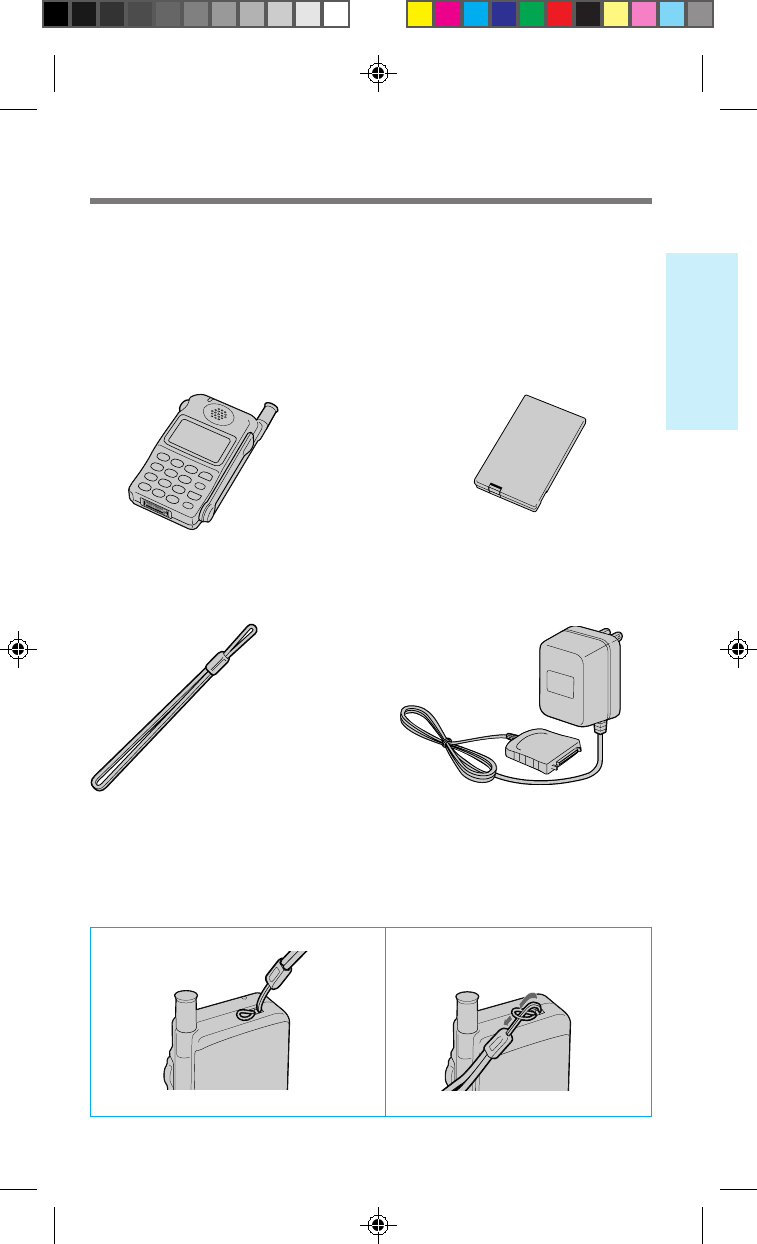
Attaching the hand strap
1 2
Carefully unpack your phone and check the contents using this list.
If there is something missing, please contact your nearest Sony dealer.
CM-Z200 Telephone (1) QN-029BPL Li-Ion Battery Pack (1)
Hand Strap (1) QN-001AC AC Adapter (1)
Note: Different AC adapters may
be provided outside North
America.
Unpacking your phone
2_CM_Z200 6/8/98, 9:26 AM1
2.2
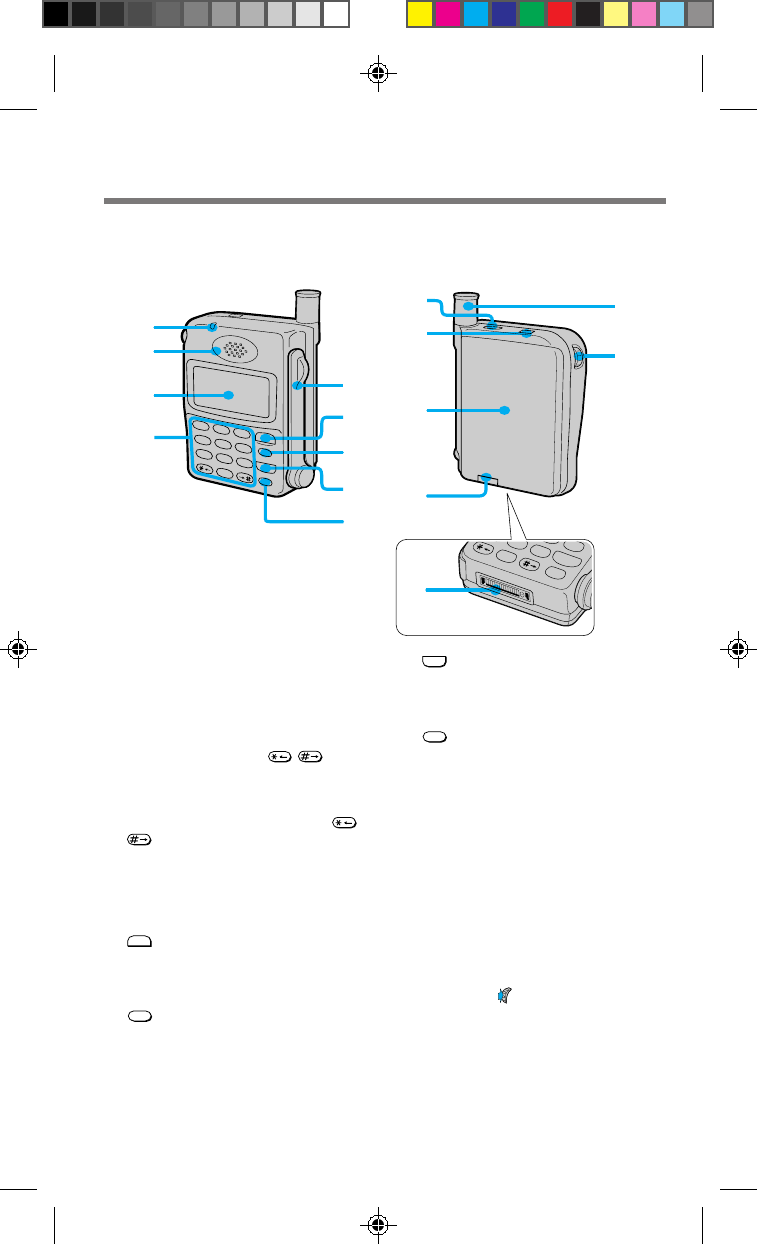
8
END
button (XX)
Press to end calls. Also cancels
operations and returns the phone to
standby mode.
9PWR (power) button (XX)
Press to turn the phone on or off.
0Ringer speaker
Allows ringer sounds to be heard.
!¡ Hand strap attachment (XX)
!™ Battery pack (XX)
!£ Battery pack release tab (XX)
Slide up to remove the battery pack.
!¢ Antenna (XX)
!∞ Jog Dial™ navigator (XX)
Push and turn for menu navigation and
for changing settings on menus. In this
manual, the icon indicates that you
should push the Jog Dial navigator in
towards the center of the phone.
!§ Connector (XX)
Use to connect the phone to either the
AC adapter or to one of the other
accessories available for your phone.
NO
8
TUV
9
PWR
CLR
END
WXY
0
+
!¡
1
2
3
46
7
8
9
5
2
ABC
4
GHI
8
TUV
7
PQRS
9
WXYZ
5
JKL
6
MNO
3
DEF
1
0
+
SEND
END
CLR
PWR
!™
!¢
!∞
!£
!§
!º
Looking at your phone
Telephone
1Call alert indicator (XX)
Lights when there is an incoming call.
2Earpiece
3Display (XX)
4Number buttons and /
buttons (XX, XX, XX)
Use the number buttons to enter letters
and numbers. Press and hold a number
button for touch dialing. Use the /
buttons to move the cursor when
you are entering letters.
5Arm microphone
Open to make/receive a call.
Close to end a call.
6
SEND
button (XX to XX)
Press to make outgoing calls and to
receive incoming calls when the arm
microphone is open.
7CLR (clear) button (XX, XX)
Press to clear the last or all entered
digits on the display, or to exit the
current mode of operation.
For further information, refer to the page numbers indicated in parentheses ( ).
2_CM_Z200 6/8/98, 9:27 AM2
2.3
Getting Started
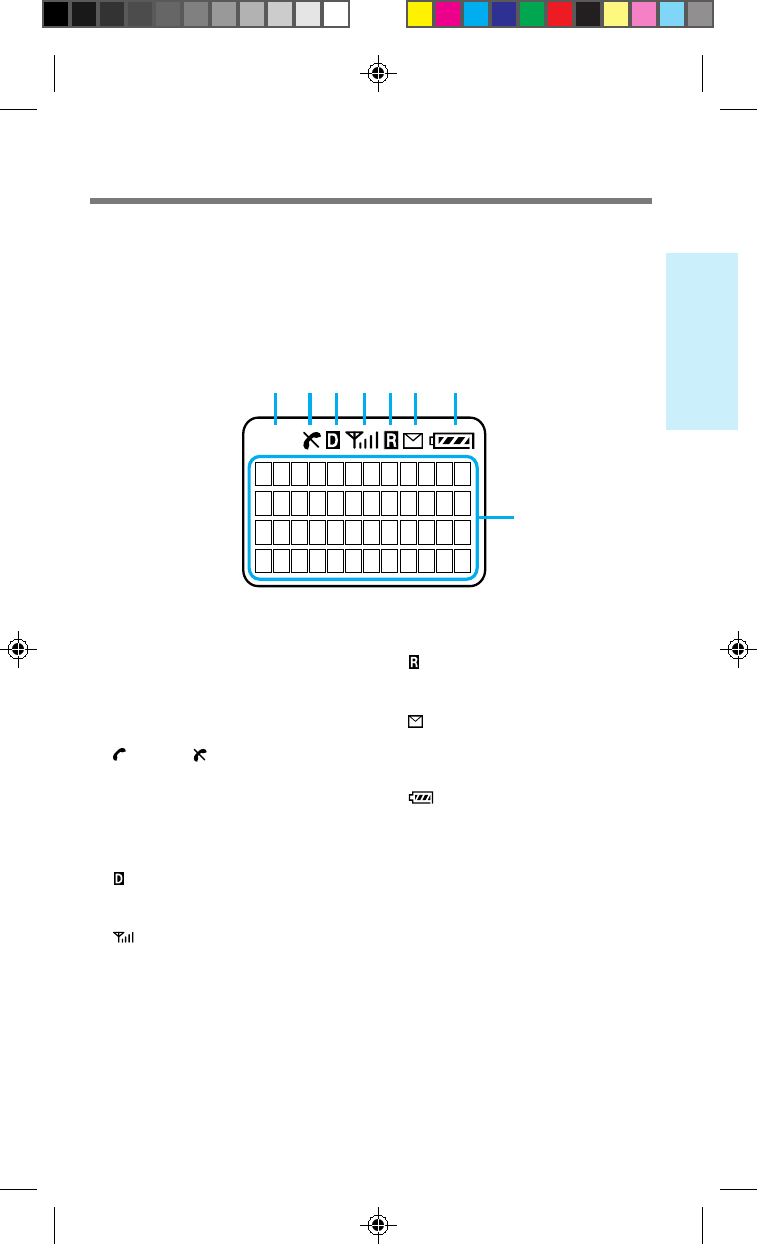
Display
The top row of the display contains icons that inform you of the current status of
your phone. The bottom four rows of the display are for text such as phone numbers,
names, and operational prompts. Each row displays a maximum of 12 characters.
888
1 2 3 4 5 6 7
8
1Short character display
Shows settings such as the number of
the currently displayed Menu, as well
as Phone Book and Calls List memory
locations.
2 (in-use) / (out-of-service) icon
(XX, XX, XX)
The in-use icon appears during a call.
A slash through the in-use icon
appears when no signal is received.
You cannot make or receive calls when
the out-of-service icon is visible.
3 (digital) icon
Appears when your phone is receiving
a digital signal.
4 (signal strength) icon (XX)
Tells you the approximate strength of
the signal being received.
5 (roam) icon (XX)
Appears when you are roaming
outside your home service area.
6 (message) icon (XX)
Appears when you have new text or
voice mail messages pending. The icon
flashes if the new message is urgent.
7 (battery) icon (XX, XX)
Shows the approximate amount of
charge power remaining in the battery
pack. Recharge the battery pack before
it is fully discharged.
8Character display
Prompts various actions, and then
displays the results. It also shows
phone numbers and names.
2_CM_Z200 6/8/98, 9:27 AM3
6.3
Additional Information
Specifications
Frequency range
Transmit:824 to 849 MHz
Receive: 869 to 894 MHz
Dimensions
3.6 × 2.4 × 1.0 inches (h/w/d)
(not including antenna)
(91 × 62 × 26 mm)
Mass (weight)
Approx. 5.3 oz (150 g)
(including battery)
RF power output
CDMA mode:0.01 µW to 500 mW
AMPS mode:6 mW to 600 mW
Operational temperature
–22°F to +140°F
(–30°C to +60°C)
(excluding battery pack)
Design and specifications are subject to change without notice.
6_CM_Z200 6/8/98, 9:28 AM3