Sony Portable Minidisc Player Mz E10 Users Manual
sony_MZ-E10_service_manual sony_MZ-E10_service_manual
MZ-E10 to the manual 0b69e6cf-43b9-486b-bff0-49f398392255
2015-01-23
: Sony Sony-Portable-Minidisc-Player-Mz-E10-Users-Manual-294760 sony-portable-minidisc-player-mz-e10-users-manual-294760 sony pdf
Open the PDF directly: View PDF  .
.
Page Count: 40
- SERVICING NOTE
- GENERAL
- DISASSEMBLY
- TEST MODE
- ELECTRICAL ADJUSTMENTS
- DIAGRAMS
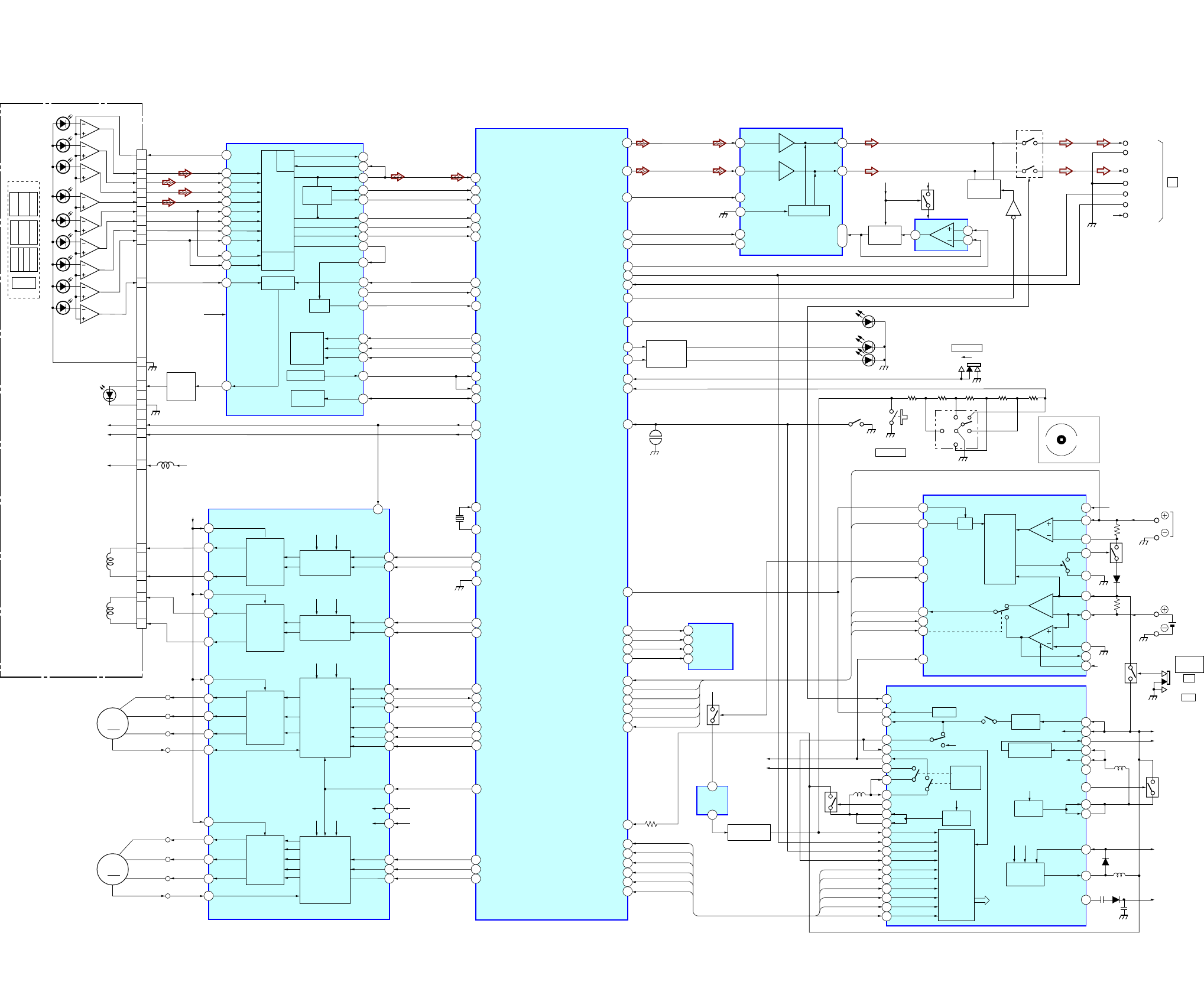
- 6-1. BLOCK DIAGRAMS
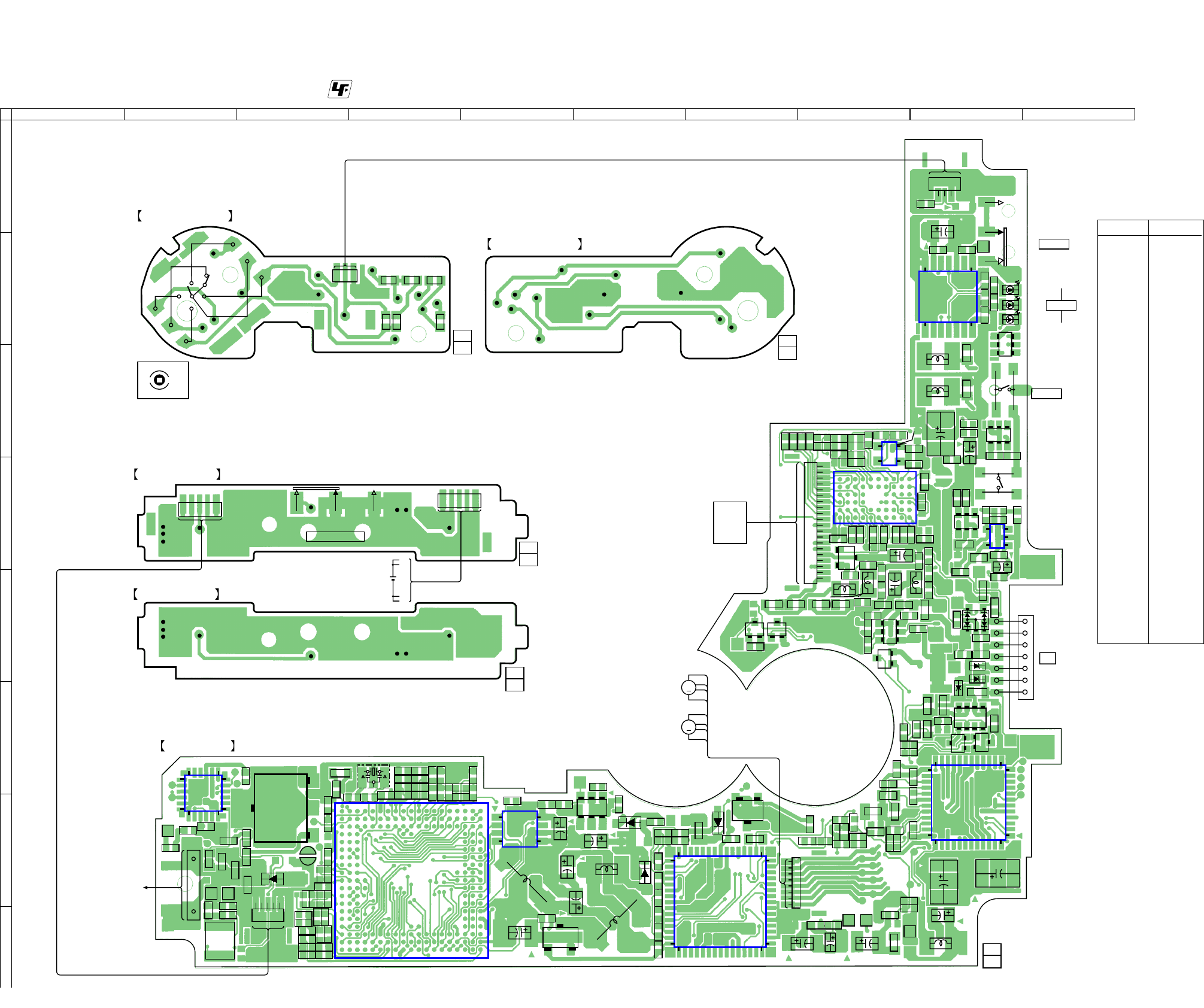
- 6-2. PRINTED WIRING BOARDS – MAIN SECTION (1/2) –
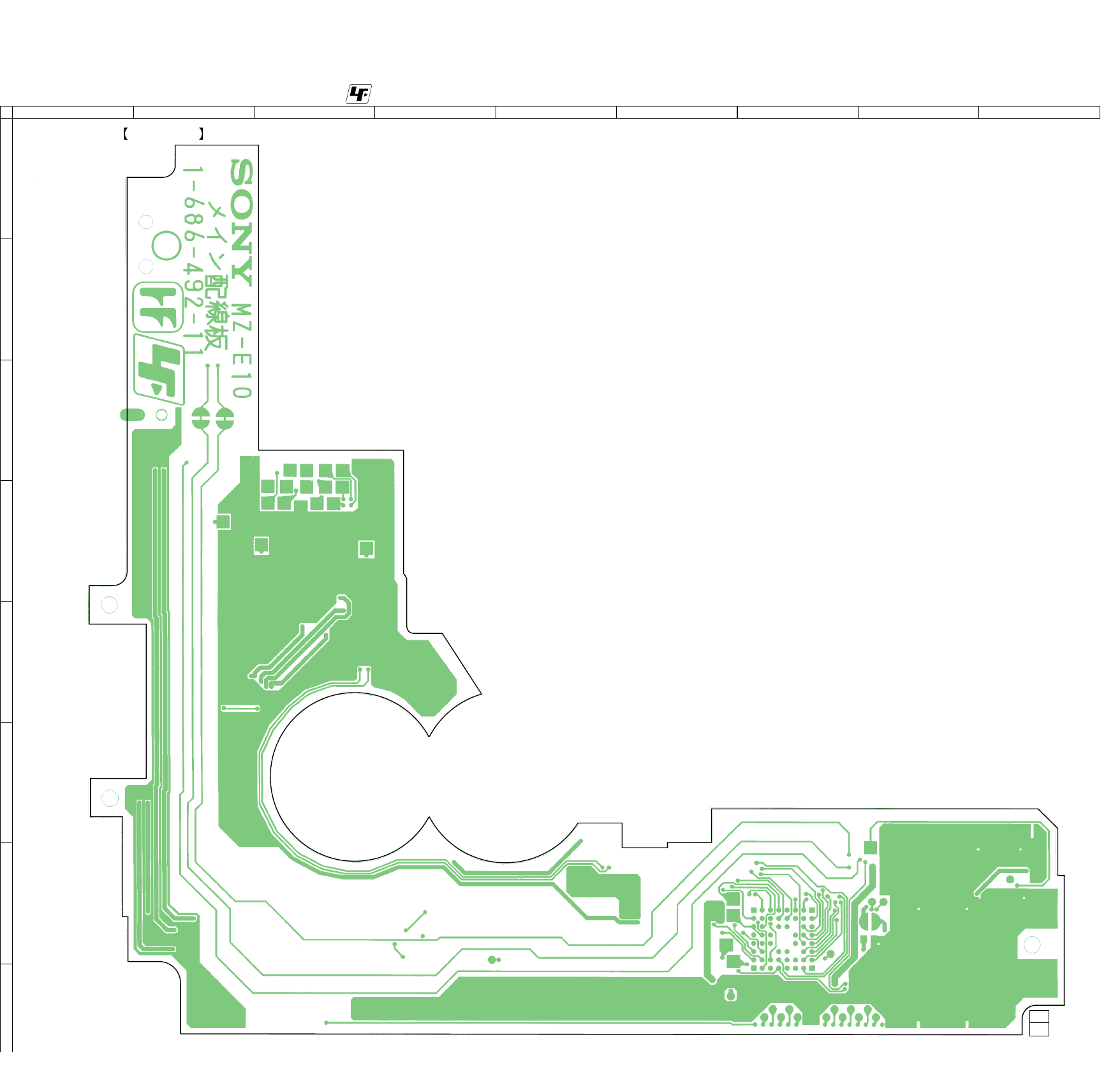
- 6-3. PRINTED WIRING BOARDS – MAIN SECTION (2/2) –
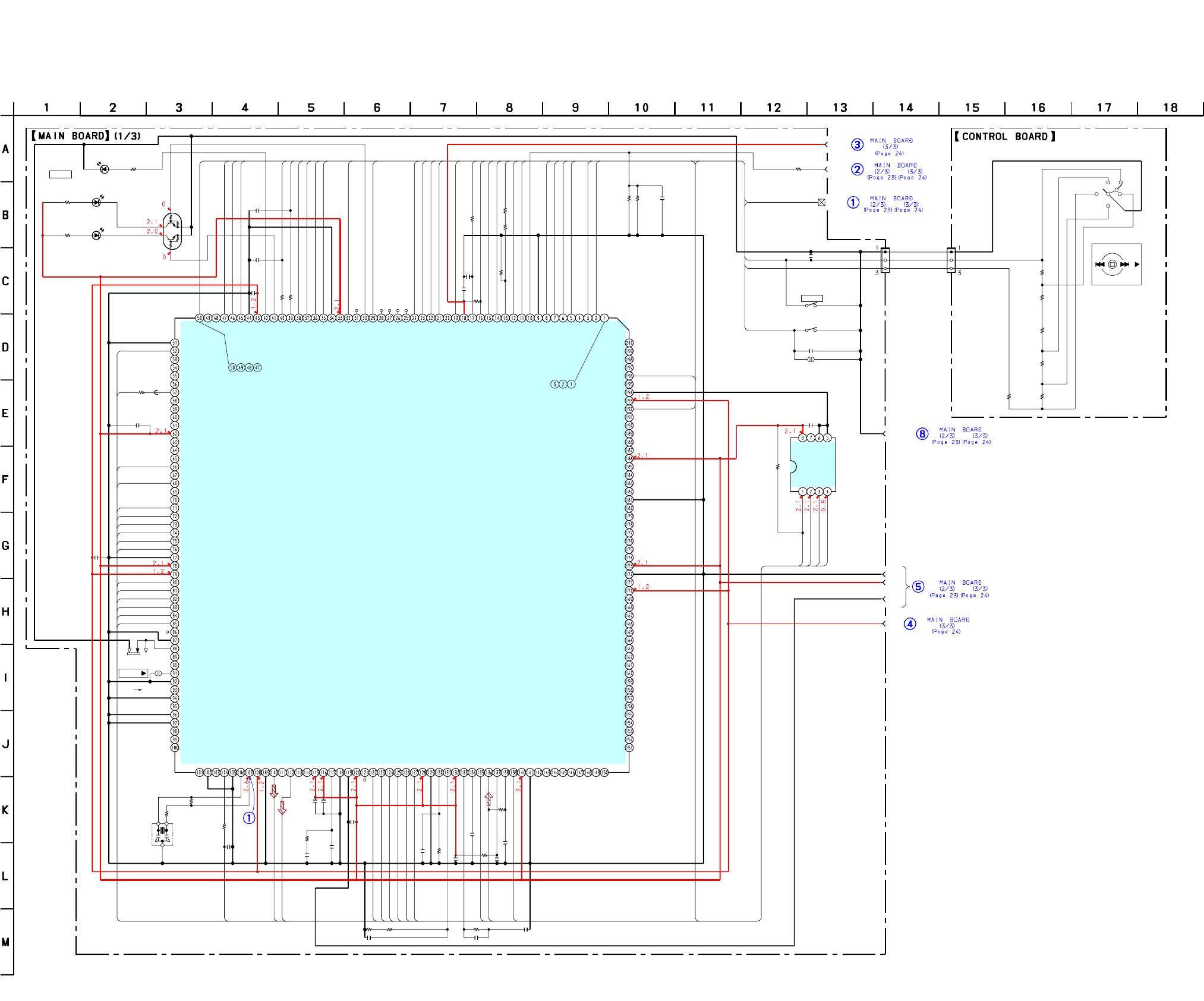
- 6-4. SCHEMATIzC DIAGRAM – MAIN SECTION (1/3) –
- 6-5. SCHEMATIzC DIAGRAM – MAIN SECTION (2/3) –
- 6-6. SCHEMATIzC DIAGRAM – MAIN SECTION (3/3) –
- 6-7. IC PIN FUNCTION DESCRINTION
- 6-8. IC BLOCK DIAGRAMS
- EXPLODED VIEWS
- ELECTRICAL PARTS LIST
Battery life1)
(Unit: Approx. hours) (JEITA2))
Batteries SP Stereo LP2 LP4
(normal) Stereo Stereo
Lithium-ion 23 33 40
built-in
rechargeable
battery3)
1) Measured with the power save function on (see
“ Preserving battery power” ).
2) Measured in accordance with the JEITA (Japan Electronics and
Information Technology Industries Association) standard (using a Sony
MDW-series Mini-disc).
3) With a fully charged battery.
Note
The battery life may be shorter than that specified, depending on the
operating conditions,the temperature of the location.
Dimensions
Approx. 81.9 x 72.2 x 9.9 mm (w/h/d) ( 3 1/4 x 2 7/8 x 13/32 in.)
(not including projecting parts and controls)
Mass
Approx. 55 g (1.6 oz) (including the built-in rechargeable battery)
Supplied accessories
Headphones/earphones with a remote control (1)
Battery charging stand (1)
AC power adaptor (for the supplied battery charging stand) (1)
Headphone adaptor (1)
Carrying pouch (1)
Design and specifications are subject to change without notice.
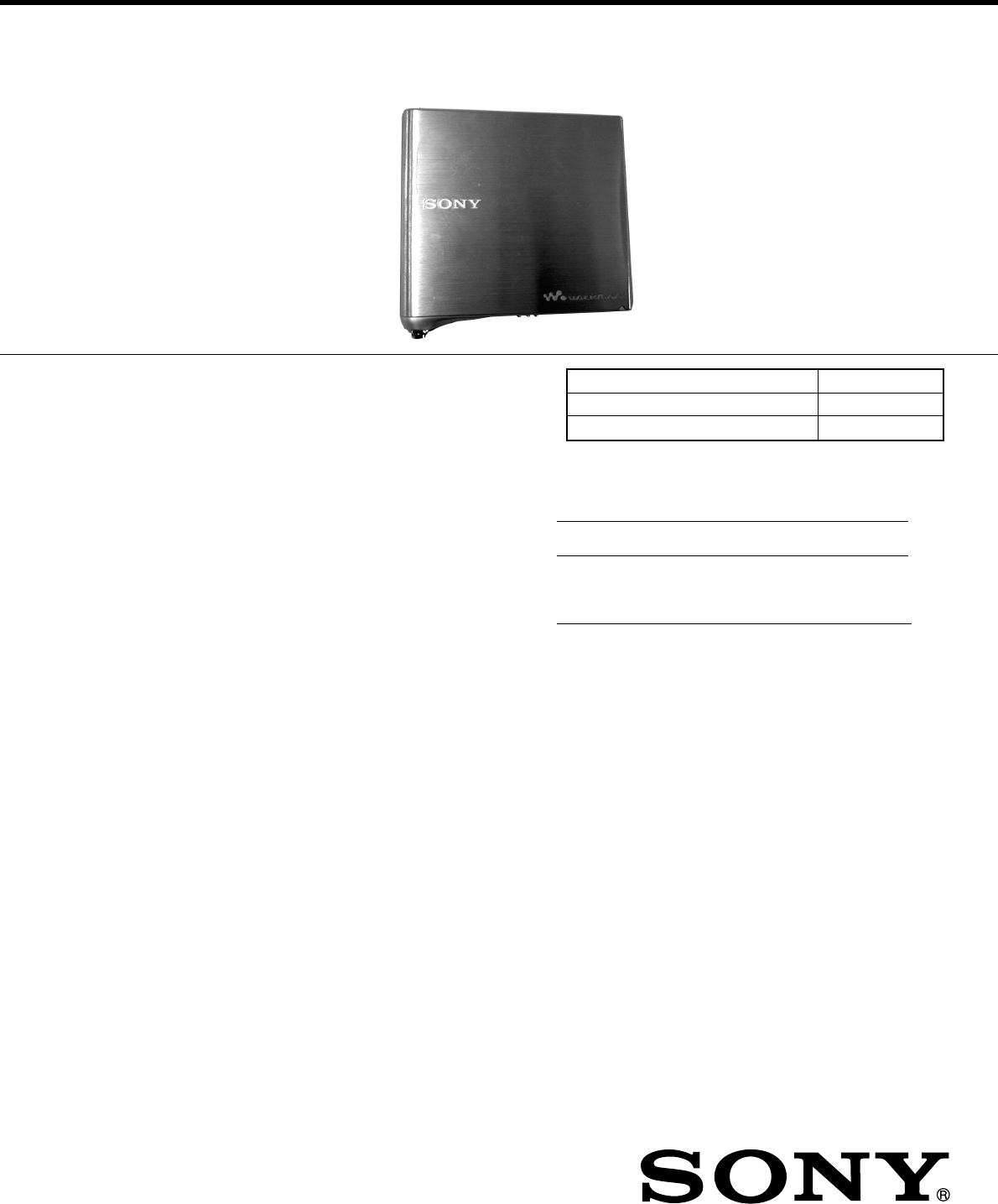
MZ-E10
SERVICE MANUAL
PORTABLE MINIDISC PLAYER
SPECIFICATIONS
US Model
Canadian Model
AEP Model
UK Model
E Model
Tourist Model
Model Name Using Similar Mechanism NEW
MD Mechanism Type MT-MZE10-184
Optical Pick-up Mechanism Type ABX-1ES
US and foreign patents licensed from Dolby
Laboratories Licensing Corporation
Ver 1.0 2002.11
9-874-219-01
2002K0200-1
© 2002.11
Sony Corporation
Personal Audio Company
Published by Sony Engineering Corporation
Audio playing system
MiniDisc digital audio system
Laser diode properties
Material: GaAlAs
Wavelength: λ = 790 nm
Emission duration: continuous
Laser output: less than 44.6 µW*
* This output is the value measured at a distance of 200 mm from the
objective lens surface on the optical pick-up block with 7 mm aperture.
Revolutions
Approx. 300 rpm to 2,700 rpm
Error correction
ACIRC (Advanced Cross Interleave Reed Solomon Code)
Sampling frequency
44.1 kHz
Coding
ATRAC (Adaptive TRansform Acoustic Coding)
ATRAC3: LP2/LP4
Modulation system
EFM (Eight to Fourteen Modulation)
Number of channels
2 stereo channels
1 monaural channel
Frequency response
20 to 20,000 Hz ± 3 dB
Outputs
Headphones/earphones: dedicated headphone/ remote control jack,
output level 5 mW + 5 mW(US model) load impedance 16 ohms,
5 mW + 5 mW (Other models)
load impedance 16 ohms
Power requirements
Lithium-ion rechargeable battery (Built-in: LIP- 3WMB, 3.7 V,
340 mAh, Li-ion)
External power jack (for the battery charging stand): Power rating 6 V
DC

2
MZ-E10
Specifications ........................................................................... 1
1. SERVICING NOTE ...................................................... 3
2. GENERAL
Playing an MD ................................................................... 4
3. DISASSEMBLY
3-1. Panel assy (S), Upper ................................................. 5
3-2. Mechanism Deck (MT-MZE10-184) .......................... 5
3-3. Bracket assy ............................................................... 6
3-4. Power Board, Main Board .......................................... 6
3-5. Control Board ............................................................. 7
3-6. Optical Pick-up assy(ABX-1ES) ................................ 7
4. TEST MODE.................................................................. 8
5. ELECTRICAL ADJUSTMENTS ............................ 11
6. DIAGRAMS
6-1. Block Diagram .......................................................... 19
6-2. Printed Wiring Boards – Main Section (1/2) – ......... 20
6-3. Printed Wiring Boards – Main Section (2/2) – ......... 21
6-4. Schematic Diagram – Main Section (1/3) – ............. 22
6-5. Schematic Diagram – Main Section (2/3) – ............. 23
6-6. Schematic Diagram – Main Section (3/3) – ............. 24
6-7. IC Pin Function Descrintion ..................................... 26
6-8. IC Block Diagrams ................................................... 30
7. EXPLODED VIEWS
7-1. Main Section ............................................................. 33
7-2. Mechanism Deck Section (MT-MZE10-184) ........... 34
8. ELECTRICAL PARTS LIST ................................... 35
SAFETY-RELATED COMPONENT WARNING!!
COMPONENTS IDENTIFIED BY MARK ! OR DOTTED LINE WITH
MARK !ON THE SCHEMATIC DIAGRAMS AND IN THE PARTS
LIST ARE CRITICAL TO SAFE OPERATION.
REPLACE THESE COMPONENTS WITH SONY PARTS WHOSE
PART NUMBERS APPEAR AS SHOWN IN THIS MANUAL OR IN
SUPPLEMENTS PUBLISHED BY SONY.
Flexible Circuit Board Repairing
•Keep the temperature of the soldering iron around 270°C during
repairing.
•Do not touch the soldering iron on the same conductor of the
circuit board (within 3 times).
•Be careful not to apply force on the conductor when soldering or
unsoldering.
Notes on chip component replacement
•Never reuse a disconnected chip component.
•Notice that the minus side of a tantalum capacitor may be dam-
aged by heat.
TABLE OF CONTENTS
*Replacement of SN761058ZQL (IC501) and LC896442-VH4-
16-E (IC601) used in this set requires a special tool.
CAUTION
Use of controls or adjustments or performance of procedures
other than those specified herein may result in hazardous
radiation exposure.
r UNLEADED SOLDER
Boards requiring use of unleaded solder are printed with the
lead-free mark (LF) indicating the solder contains no lead.
(Caution: Some printed circuit boards may not come printed
with the lead free mark due to their particular size.)
: LEAD FREE MARK
Unleaded solder has the following characteristics.
•Unleaded solder melts at a temperature about 40°C higher
than ordinary solder.
Ordinary soldering irons can be used but the iron tip has to
be applied to the solder joint for a slightly longer time.
Soldering irons using a temperature regulator should be set
to about 350°C.
Caution: The printed pattern (copper foil) may peel away if
the heated tip is applied for too long, so be careful!
•Strong viscosity
Unleaded solder is more viscous (sticky, less prone to
flow) than ordinary solder so use caution not to let solder
bridges occur such as on IC pins, etc.
•Usable with ordinary solder
It is best to use only unleaded solder but unleaded solder
may also be added to ordinary solder.
ADVARSEL
Eksplosjonsfare ved feilaktig skifte av batteri.
Benytt samme batteritype eller en tilsvarende type
anbefalt av apparatfabrikanten.
Brukte batterier kasseres i henhold til fabrikantens
instruksjoner.
VARNING
Explosionsfara vid felaktigt batteribyte.
Använd samma batterityp eller en likvärdig typ som
rekommenderas av apparattillverkaren.
Kassera använt batteri enligt gällande föreskrifter.
VAROITUS
Paristo voi räjähtää, jos se on virheellisesti asennettu.
Vaihda paristo ainoastaan laitevalmistajan suosittelemaan
tyyppiin. Hävitä käytetty paristo valmistajan ohjeiden
mukaisesti.
ADVARSEL!
Lithiumbatteri-Eksplosionsfare ved fejlagtig håndtering.
Udskiftning må kun ske med batteri
af samme fabrikat og type.
Levér det brugte batteri tilbage til leverandøren.
CAUTION
Danger of explosion if battery is incorrectly replaced.
Replace only with the same or equivalent type recommended by
the manufacturer.
Discard used batteries according to the manufacturer’s instruc-
tions.
ATTENTION AU COMPOSANT AYANT RAPPORT
À LA SÉCURITÉ!
LES COMPOSANTS IDENTIFÉS PAR UNE MARQUE 0 SUR
LES DIAGRAMMES SCHÉMATIQUES ET LA LISTE DES
PIÈCES SONT CRITIQUES POUR LA SÉCURITÉ DE
FONCTIONNEMENT. NE REMPLACER CES COMPOSANTS
QUE PAR DES PIÈSES SONY DONT LES NUMÉROS SONT
DONNÉS DANS CE MANUEL OU DANS LES SUPPÉMENTS
PUBLIÉS PAR SONY.
3
MZ-E10
SECTION 1
SERVICING NOTE
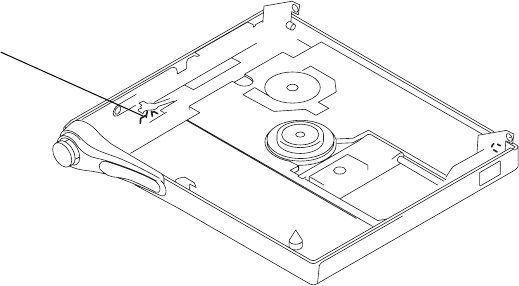
When repairing this device with the power on, if you remove the main board, this device stops working.
In this case, you work without the device stopping by fastening the hook of the Open/Close detection switch (S803).
Open/Close detection switch (S803)
4
MZ-E10 SECTION 2
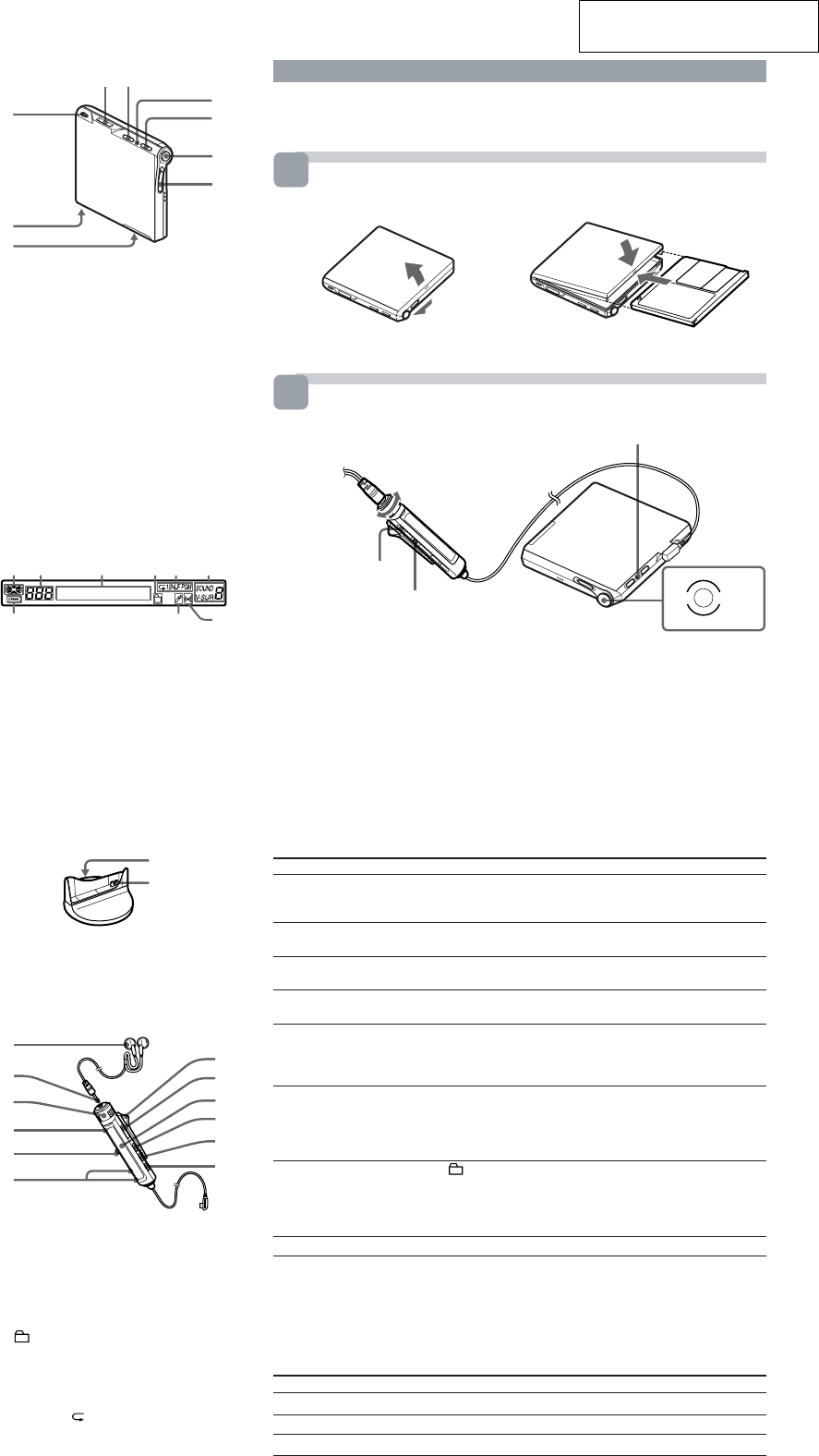
GENERAL This section is extracted from
instruction manual.
The Player
1 2
7
8
9
E
C
D
6
1i (Headphones/earphones) jack
2GROUP button
3“3-color info-LED”
4HOLD (Locking the control) switch
55-way control key ( .•
> N
*
•x•VOL +, –)
6OPEN switch
7BUILT-IN BATTERY switch (at the
bottom)
8Terminals for charging stand (at the
bottom)
9Hand strap hole
Use the hole to attach your strap
*
N
has a tactile dot .
The display window of the remote
control
12 3456
7 9
1Disc indication
2Track number display
3Character information display
4Group play indication
5Play mode indication
6Virtual Surround/6-band equalizer
indications
7Battery level indication
8Bookmark indication
9Alarm indication
The battery charging stand
1
2
1DC IN (6V jack) (at the bottom)
2Terminals for charging
The headphones/earphones with a
remote control
8
9
qa
qs
7
q;
A
B
C
D
5
F
1Headphones/earphones
2Stereo mini plug
3Control VOL +, –
Turn to adjust the volume .
4x (stop) button
5Jog lever (.•
u
/ENT•
>
)
6 (Group) +, – button
7Clip
8HOLD switch
9Display window
q; DISPLAY button
qa P MODE / (play mode/repeat) button
qs SOUND button
8
To
Pause
Cue to the current track
or the previous track
Cue to the next track
Go backwards or
forward while playing
Searching for a specific
position while viewing
a elapsed time
(Time search)
Searching for a specific
track while viewing
track numbers or
track names
(Index search)
Cue to the beginning of
every 10th track
(only during playback of
the disc with no group
settings 1))
Remove the MD
1) For more details, see “Using the group function.”
2) Once you open the lid, the point to start play will change to the beginning of the first track (except
when the disc information has been stored in the personal disc memory).
About the “3-color info-LED”
The LED indicates the current operating mode, charging status, and battery condition. For
details about the charging status, see “Getting started.” For details about the battery condition,
see “When to recharge the built-in battery” on the back page.
LED color
Red
Green
Orange
Do this (Beeps in the headphones/earphones)
Press the jog lever (u) on the remote control (continuous short
beeps).
Press the jog lever (u) again to resume play.
Slide the jog lever towards . on the remote control
(three short beeps). (Press towards . on the player. )
Slide the jog lever towards > on the remote control (two short
beeps). (Press towards > on the player.)
Slide and hold the jog lever towards . or > on the remote
control. (Press and hold towards . or > on the player.)
While the player is paused, slide and hold the jog lever towards
. or > on the remote control.
While the player is stopped, slide and hold the jog lever towards
. or > on the remote control.
Press + or – button.
Press x, and then slide OPEN2).
Playing an MD
Insert an MD.
1
2
3
Play an MD.
x> N.
VOL +
VOL –
x
VOL+
VOL–
1Press the jog lever (u) on the remote control. (Press towards > N on
the player.)
A short beep sounds in the headphones/earphones. The LED lights up.
2Turn the control towards VOL + or – on the remote control to adjust the
volume. (Press towards VOL + or – on the player. )
The volume indicator appears in the display, allowing you to check the
volume level.
To stop play, press x.
A long beep sounds in the headphones/earphones.
Playback starts from the point you last stopped playing. To start playback from the
beginning of the disc, press and hold the jog lever (u) for 2 seconds or more on the
remote control (Press and hold towards > N for 2 seconds or more on the player).
1
2
Insert an MD with the label side facing up, pushing the
MD to the direction of the arrow in the illustration.
1 Slide OPEN to open the lid. 2 Insert an MD. 3 Close the lid.
“3-color info-LED”
Jog lever (.•u/ENT•>)
5-way control key
Bottom side of
the player
Operating status
Playing a disc with no group settings
Playing a disc with group settings
Cueing to the another group (Group Skip)
5
MZ-E10
SECTION 3
DISASSEMBLY
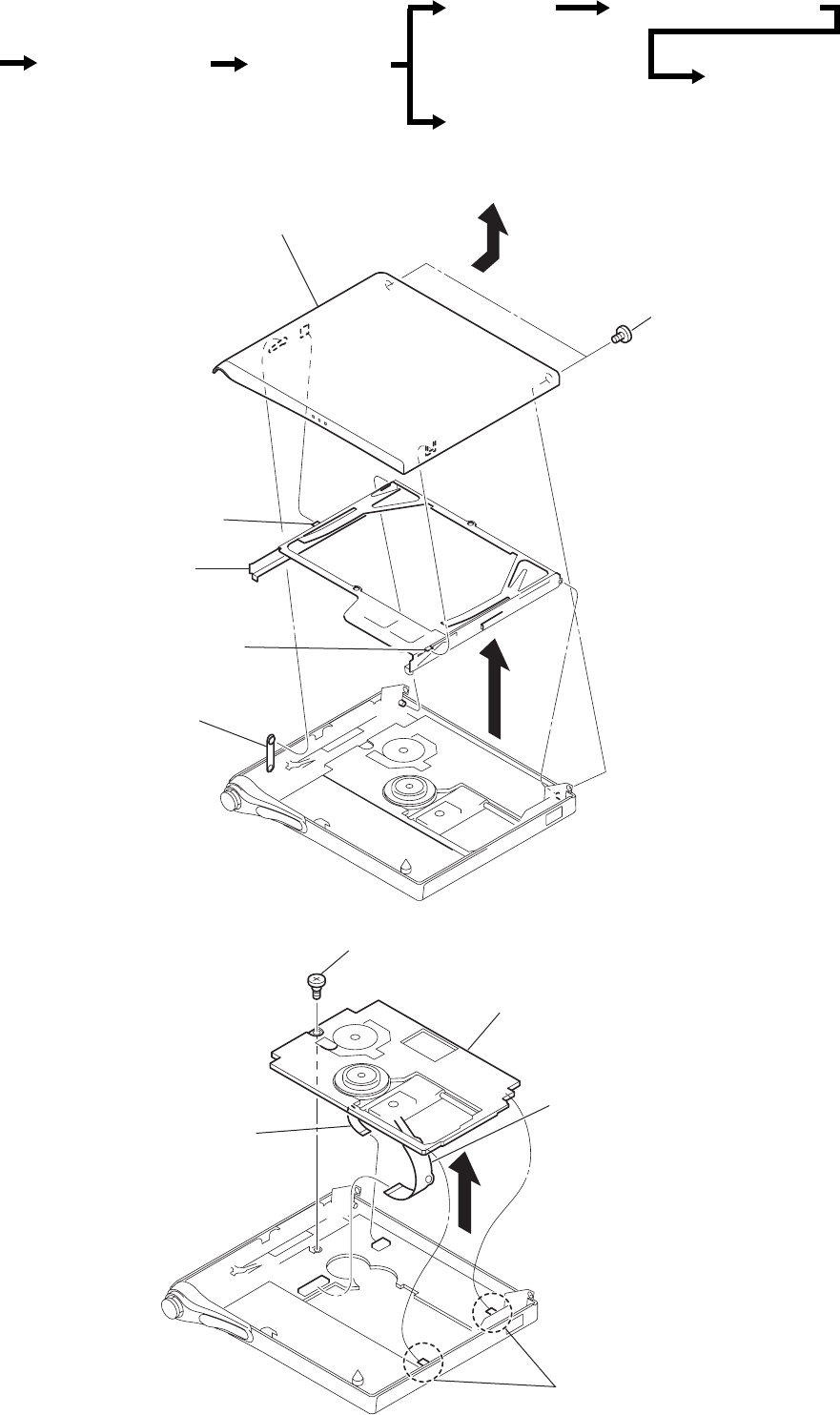
Note : Follow the disassembly procedure in the numerical order given.
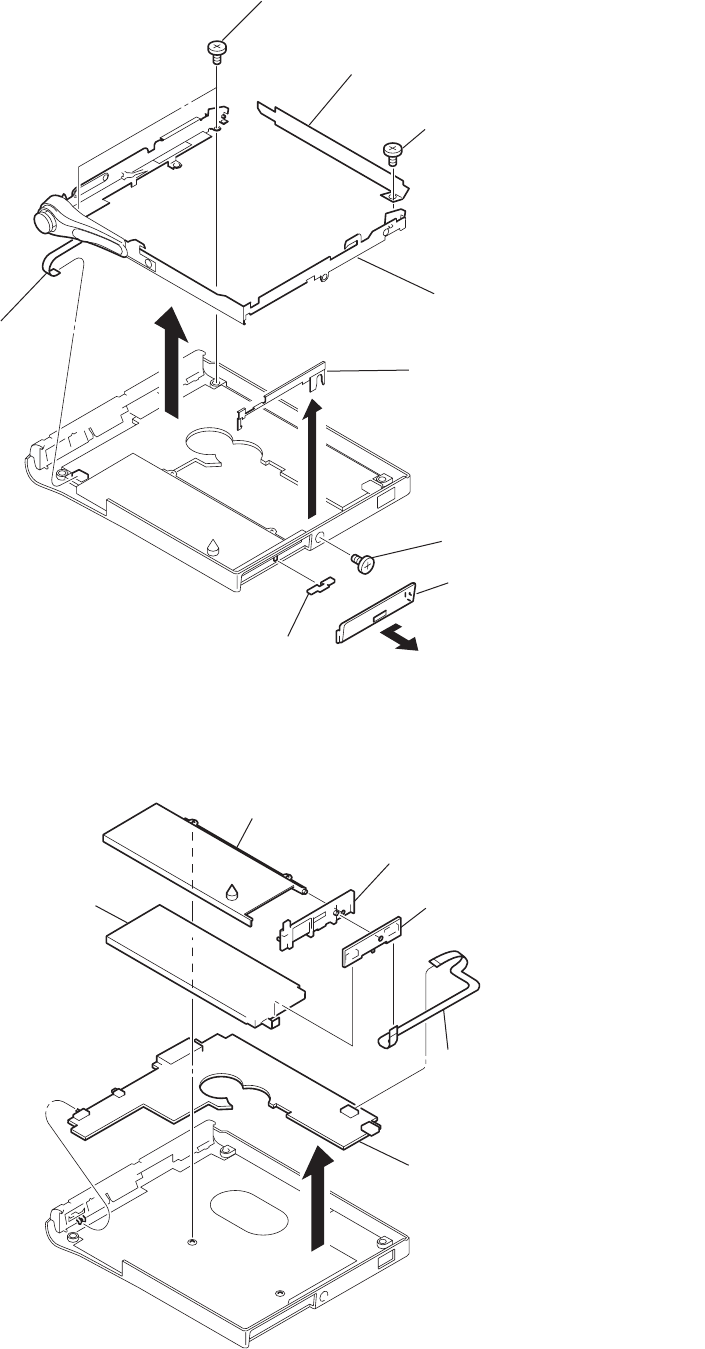
3-1. PANEL ASSY (S), UPPER
r The equipment can be removed using the following procedure.
6
4
1
Two screws (M1.4
)
7
Panel ASSY (S), upper
2
Claw
Holder ASSY
3
Claw
5
Bracket ASSY
Panel ASSY (S), upper
Set
Optical pick-up ASSY
(ABX-1ES)
Mechsnism deck
(MT-MZE10-184)
Bracket ASSY POWER board, MAIN board
CONTROL board
3-2. MECHANISM DECK (MT-MZE10-184)
3
1
Screw, step
6
Mechanism deck
(MT-MZE10-184)
4
OP flexible boar
d
(CN501)
2
Two claws
5
Motor flexible board
(CN551)
6
MZ-E10
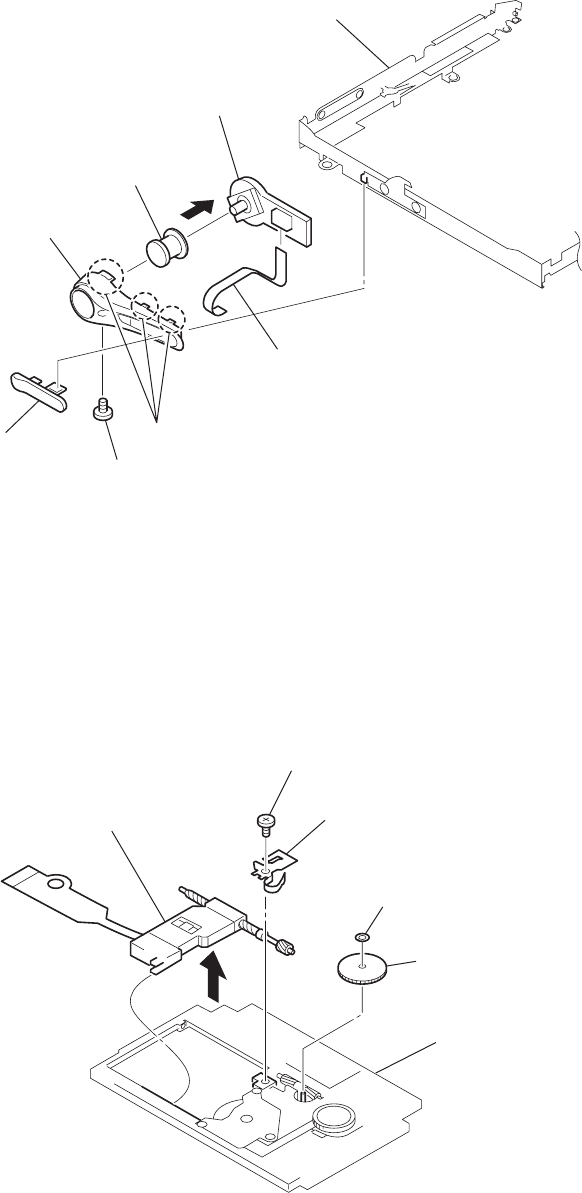
3-3. BRACKET ASSY
3-4. POWER BOARD, MAIN BOARD
8
3
7
Two screws (M1.4)
1
Screw (M1.4)
4
Lid (DC), battery case
5
Konb (power)
9
Switch flexible board
(CN801)
6
Screw (M1.4)
0
Bracket ASSY
Sheet (blind)
2
Plate, retainer
6
1
Case, battery
3
Battery, lithium ion storage
2
Retainer, battery
4
POWER board
5
Power relay flexible board
(CN952, CN953)
7
MAIN board ASSY
7
MZ-E10
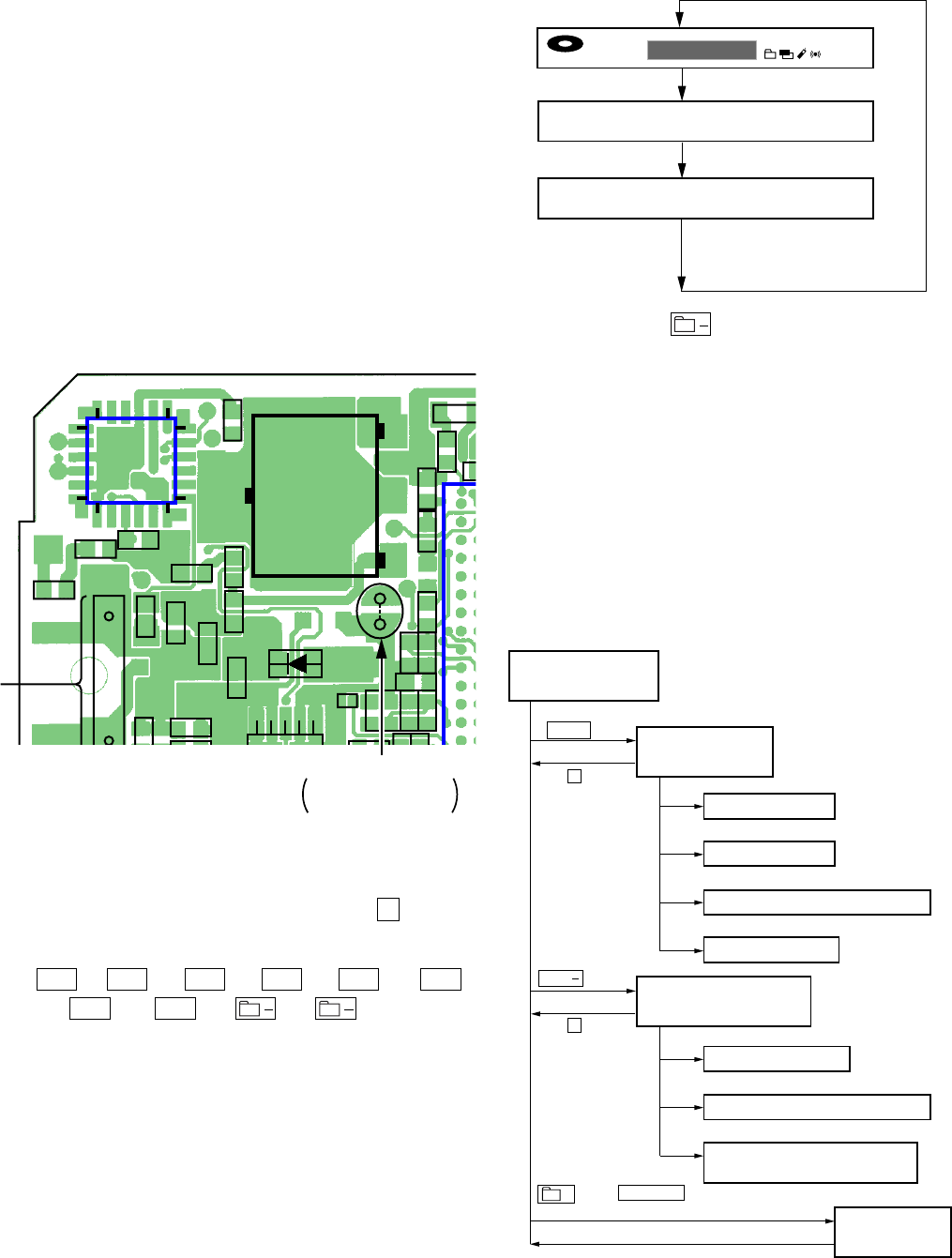
3-5. CONTROL BOARD
7
CONTROL board
Bracket ASSY
6
Button (control)
4
Cover (control)
3
Knob (open)
1
Screw (M1.4)
2
Remove three claws
5
Switch flexible board
(CN801)
3-6. OPTICAL PICK-UP ASSY (ABX-1ES)
52
Gear (SA)
Mechanism deck
(MT-MZE10-184)
1
Washer (0.8-2.5)
4
Spring, thrust detent
3
Screw, tapping
6
Optical pick-up ASSY
(ABX-1ES)
MZ-E10
8
SECTION 4
TEST MODE
Remote control LCD
•Press and hold down to hold the current display while the
key is being pressed.
4-2-3. How to release the TEST MODE
When method 1 was used:
Turn off the power and open the solder bridge on TAP602 on the
main board.
Note: The solder should be removed clean. The remaining solder
may make a short with the chassis and other part.
When method 2 was used:
Turn off the power.
Note: If electrical adjustment (see page 11) has not been finished
completely, always start in the test mode.
4-3. TEST MODE STRUCTURE
4-1. GENERAL
•When entered in the TEST MODE, this set provides the Overall
Adjustment mode which allows CD and MO discs to be auto-
matically adjusted. In the Overall Adjustment mode, the system
discriminates between CD and MO discs, performs adjustments
in sequence automatically, and displays the faulty location if
any fault is found. In the Manual mode, selected adjustments
can be performed automatically.
•The attached remote control is used to operate the TEST MODE.
Unless otherwise specified in the text, the key means that on the
remote control.
4-2. SETTING THE TEST MODE
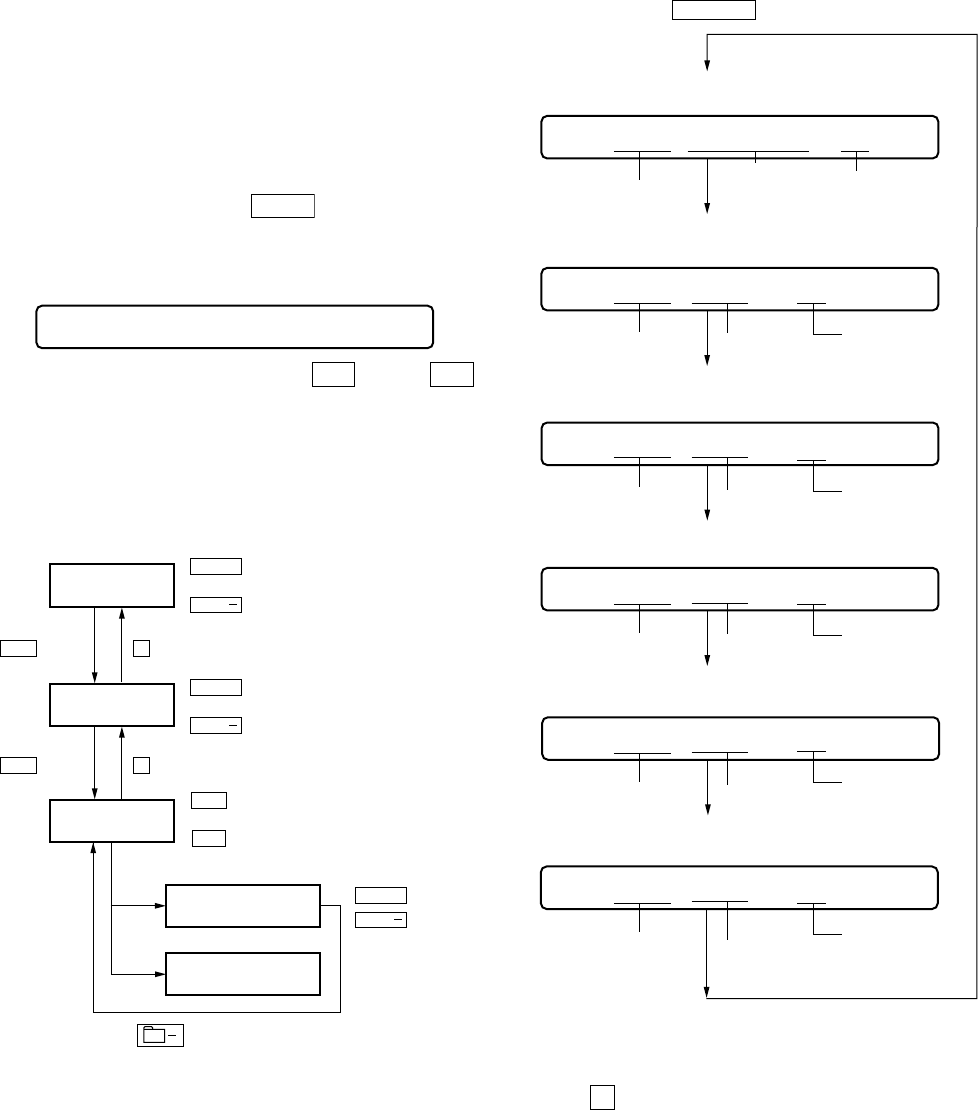
4-2-1. How to set the TEST MODE
To set the TEST MODE, two methods are available.
1Solder bridge and short TAP602 (TEST) on the main board.
Then turn on the power.
MAIN BOARD (SIDE A)
2In the normal mode, operate the keys on the set and those on the
remote control as specified below:
Turn on HOLD switch on the set. Holding down
x
(STOP)
key on the set, press the keys on the remote control in the
following sequence:
>
t
>
t
.
t
.
t
>
t
.
t
>
t
.
t t
4-2-2. Operations when the TEST MODE is set
When the TEST MODE is entered, the system switches to the dis-
play check mode within the TEST MODE. From this mode, the
other Test modes can be accessed.
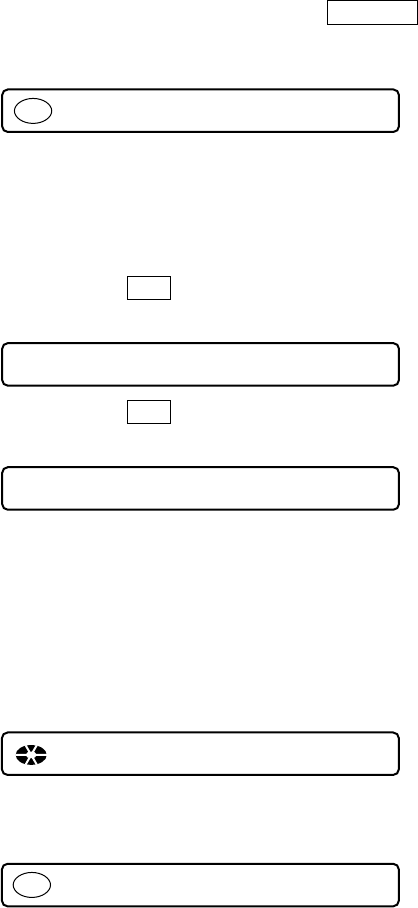
When the TEST MODE is set, the LCD repeats a cycle of the fol-
lowing displays:
001 V1.000
All on
All off
Microprocessor
version
display
000
u
F
1SHUFPGM SOUND
V-SUR
8
Test Mode
(Display Check Mode)
Manual Mode
Servo Adjustment
Audio Adjustment
Power Supply Voltage Adjustment
Charge Adjustment
CD/MO Adjustment
Power Supply Voltage Adjustment
NV Initialize
(Clear the Non-Volatile memory
key
VOL + key
x
x
key
key
Overall Adjustment Mode
Key Check Mode
+ key or DISPLAY key
(Press and hold down about for more than2 sec)
Terminate key checking or open
the top panel.
VOL
Q951
E
IC951
CN951
R
R627
R607R622
R621
R620
R623
R956 R958 R957
R961
R959
8
C606
C954
1
51
1
2
6
18
13
12 7
19 24
C957
C960
C928
R604
R965
R964
C617C612C608
C607
C958
C953
8
9
56
FB601
D951
TAP602
(TEST)
SHORT: TEST MODE
OPEN: NORMAL MODE
TAP602
MZ-E10
9
2. During each test, press and hold down
>
key or
.
key for a while to move the optical pickup on the sled outer or
inner perimeter.
3. Each test item is assigned with a three-digit item number. The
100th place is a major item, 10th place is a middle item, and unit
place is a minor item.
Note: Changes in adjustment item settings are written into the
non-volatile memory.
4-4. MANUAL MODE
4-4-1. Outline of the function
The Manual mode is designed to perform adjustments and
operational checks on the set’s operation according to each
individual function.
The Manual mode is used to clear the memory before
performing automatic adjustments in the Overall Adjustment mode.
4-4-2. How to set the Manual mode
1. Set the TEST MODE and press
VOL +
key to set the Manual
mode.
Remote control LCD display
4. During each test mode, the display is changed from one to
another each time DISPLAY key is pressed.
000 Manual
Change Major
Item
Change Middle
Item
Change Minor
Item
Change Adjustment
Value
Write Adjustment
Value
.
key : 100th place of mode number
increase
+
key : 100th place of mode number
decrease
key : 10th place of mode number
increase
key : 10th place of mode number
decrease
key : Up
key : Down
key : When adjusted value is changed :
Adjusted value is written.
When adjusted value is not changed :
That item is adjusted automatically.
keykey x
key
x
>
key
>
key : Unit place of mode number
increase
key : Unit place of mode number
decrease
>
VOL
VOL
+
VOL
VOL
+
VOL
VOL
011 AAAS 3F
address
mode number
mode number
mode number
mode number
mode number
adjusted value
adjusted value
adjusted value
adjusted value
adjusted value
011 OFFJ 3F
jitter value
011 000B 3F
block error value
011 000A 3F
ADIP error value
011 000F 3F
Focus drive voltage value
• Address & Adjusted Value Display
LCD display
011 Lrefpw 3F
Item title
mode number adjusted value
• Item title Display
LCD display
• Jitter Value & Adjusted Value Display
LCD display
• Block Error Value & Adjusted Value Display
LCD display
• ADIP Error Value & Adjusted Value Display
LCD display
• Focus drive voltage value & Adjusted value
LCD display
Note: In the Power mode, the item title display is only displayed.
5. To terminate the Manual mode and return to the TEST MODE,
press
x
key.
4-5. OVERALL ADJUSTMENT MODE
4-5-1. Outline of the function
This mode is designed to adjust the servo system automatically by
going through all the adjustment items.
Usually, this mode is used to perform automatic adjustments when
servicing the set.
For further information, refer to section 5. ELECTRICAL ADJUST-
MENTS. (See page 11)
MZ-E10
10
4-6. KEY CHECK MODE
4-6-1. Outline of the function
This mode is used to check to make sure that each of the keys
(including the slide switch) on the set operates normally.
4-6-2. Setting the Key Check mode
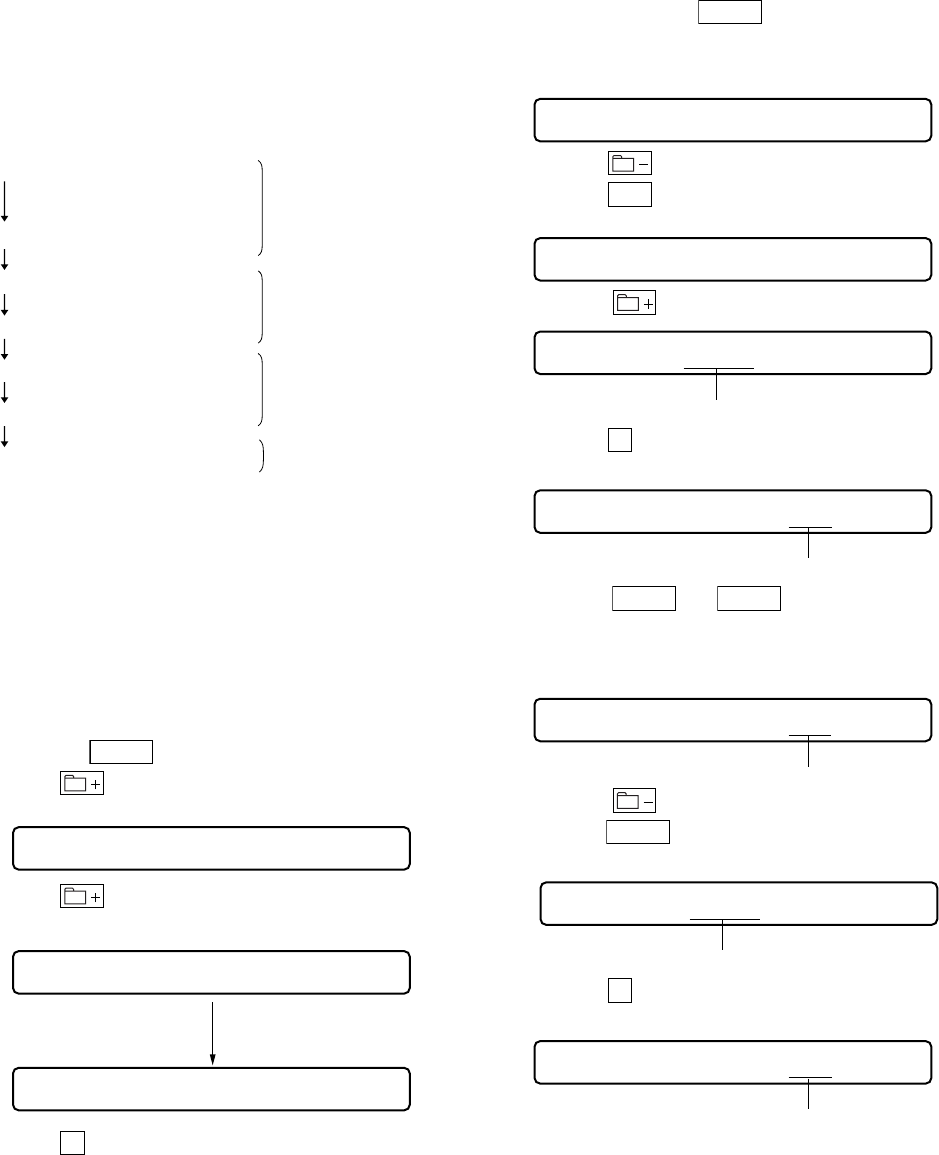
1. Set the TEST MODE. Press and hold down
DISPLAY
key
(for more than 2 sec) to set the Key Check mode.
LCD display
000 XX
2. When each key on the set and on remote control is pressed, its
name is displayed on the LCD. (The operated position is dis-
played for 4 sec after the slide switch is operated. If any other
key is pressed during this display, the LCD switches to its name
display)
Example: When
>
key on the set is pressed:
LCD display
000 FF XX
Example: When
>
key on the remote control is pressed:
LCD display
000 rFF XX
XX: AD value of the remote control key (hexadecimal 00 to FF)
3. When all the keys on the set and on the remote control are con-
sidered as OK, the following displays are shown.
(The key pressed to enter the Key Check mode has been checked
even if it is not pressed in this mode)
Example: When the keys on the set are considered as OK:
LCD display
SET OK XX
Example: When the keys on the remote control are considered
as OK:
LCD display
RMC OK XX
4. When all the key have been checked or when the top panel is
opened during this checking, the system terminates the Key
Check mode and return to the TEST MODE.
Note: Slide switch can checked as OK by ON t OFF t ON
(or reverse) operation.
11
MZ-E10
SECTION 5
ELECTRICAL ADJUSTMENTS
5-1. GENERAL
In this set, CD and MO discs can be automatically adjusted by set-
ting the Overall Adjustment mode within the TEST MODE,
Before performing these automatic adjustments, it is necessary to
clear the memory, adjust the power charge and temperature in the
Manual mode.
5-2. NOTES FOR ADJUSTMENT
5-2-1. Jigs
•CD disc TDYS-1 (part code: 4-963-646-01)
•MO disc PTDM-1 (part code: J-2501-054-A) (recorded)
•Digital voltmeter
•Thermometer
5-2-2. Adjustment sequence
The adjustments should be always performed in the following
sequence:
1 NV Initialize
(Clear the Non-Volatile memory)
2 Power supply voltage adjustment
3 Charge adjustments
4 Temperature adjustment
5 Overall CD adjustments
6 Overall MO adjustments
7 RESUME clear
Overall adjustment mode
Manual mode
Overall adjustment mode
Manual mode
5-2-3. Power
In overall adjustment, the power is supplied from the internal bat-
tery (Li-Ion) and the charging stand simultaneously.
Turn S901 (BUILT-IN BATTERY) to ON.
Note: Be sure to place the set horizontally on the overall
adjustment.
5-3. NV Initialize
(Clear the Non-volatile memory)
5-3-1. How to NV Initialize
1. Set the Test mode.
2. Press the
VOL –
kye and set the Overall adjustment.
3. Press key on the remote control.
LCD display
000 Res OK?
4. Press key on the remote control again.
LCD display
000 Res ***
000 Reset
After initialize is completed.
5. Press
x
key. to terminate the Manual mode and return to the
Overall adjustment mode.
Note: The power, charging and temperature adjustment settings are
not cleared during NV initialize.
5-3-2. Changing Adjustment values
Adjustment settings are cleared when NV initialize is performed.
So right after performing NV initialize you must rewrite the correct
data according to the microcomputer version.
• Adjustment value change method 1
• Adjustment value change method 2
(Perform after the 7 charging adjustment)
5-3-3 Adjustment value change method 1
(when using Version 1.000)
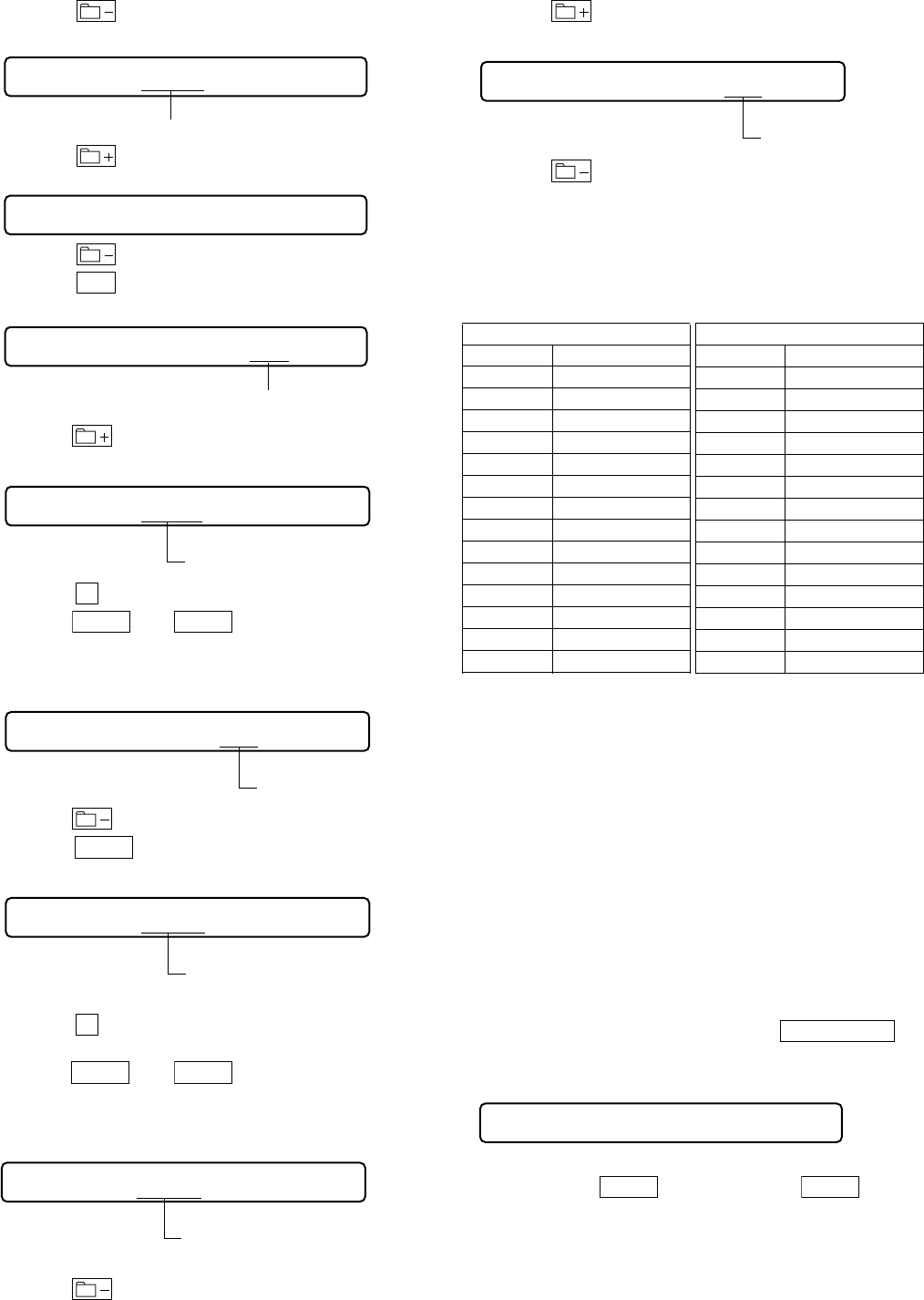
1. In test mode press the
VOL +
key and then switch to Manual
mode.
2. Set 861 as the item number.
LCD display
861 VarB1k 00
3. Press the key.
4. Press the
>
key and set 862 as the item number.
LCD display
862 VarWrt 00
5. Press the key, and set in Adjustment change mode.
862 88C6 FF
This section (address) flashes.
6. Press the
x
key.
LCD display
862 88C6 FF
This section (data) flashes.
7. Press the
VOL +
and
VOL –
keys and set the value in the
flashing data section while referring to the adjustment data change
list.
LCD display
862 88C6 3F
Data value.
8. Press the key. and the address section starts flashing.
9. Press the
VOL +
key and set the next adjustment address.
LCD display
-
862 88C7 FF
This section (address) flashes.
10.Press the
x
key.
LCD display
862 88C7 FF
This section (data) flashes.
11.Repeat the adjustments in items 6 - 9 and set up through address
88D3 while referring to the Adjustment Data Change List.
12
MZ-E10
12.Press the key. (Address section starts flashing.)
LCD display
862 88D3 FC
This section (address) flashes.
13.Press the key to return to Manual mode.
LCD display
862 VarWrt 00
14.Press the key and write in the correction data.
15. Press the
>
key and 862 as the item number.
LCD display
862 VarWrt 01
Data value.
16.Press the key, and set in Adjustment change mode.
LCD display
862 88C6 FF
This section (address) flashes.
17. Press the
x
key . (FF section (data) flashes)
18.Press the
VOL +
and
VOL –
key and set the value in the
flashing data section while referring to the adjustment data change
list.
LCD display
862 88C6 07
Data value.
19.Press the key, and the address section starts flashing.
20.Press the
VOL +
key and set the next adjustment address.
LCD display
862 88C7 FF
This section (address) flashes.
21. Press the
x
key . (FF section (data) flashes)
LCD display
22.Press the
VOL +
and
VOL –
key and set the value in the
flashing data section while referring to the adjustment data change
list.
LCD display
862 88C7 8D
Data value.
23.Press the key, and the address section starts flashing.
24.Press the key to return to Manual mode.
LCD display
862 VarWrt 01
Data value.
25.Press the key and write in the correction data.
26.Turn off the power.
Note: Always turn off the power after changing the adjustment set-
tings.
Adjustment Data Change List
If adjustment data is VarWrt is 00
Version 1.000
Address Adjustment Data
88C6 3F
88C7 03
88C8 D6
88C9 22
88CA C4
88CB 37
88CC C2
88CD 04
88CE E8
88CF 42
88D0 6E
88D1 FC
88D2 71
88D3 FC
5-4. POWER SUPPLY VOLTAGE ADJUSTMENTS
5-4-1. Adjustment sequence
The adjustments should be always performed in the following se-
quence:
1 LEG1 adjustment (item No.:741)
r
2 VC1 adjustment (item No.:742)
r
3 VC2 adjustment (item No.:743)
r
4 Class-D power supply adjustment (item No.:744)
5-4-2. REG1 adjustment method
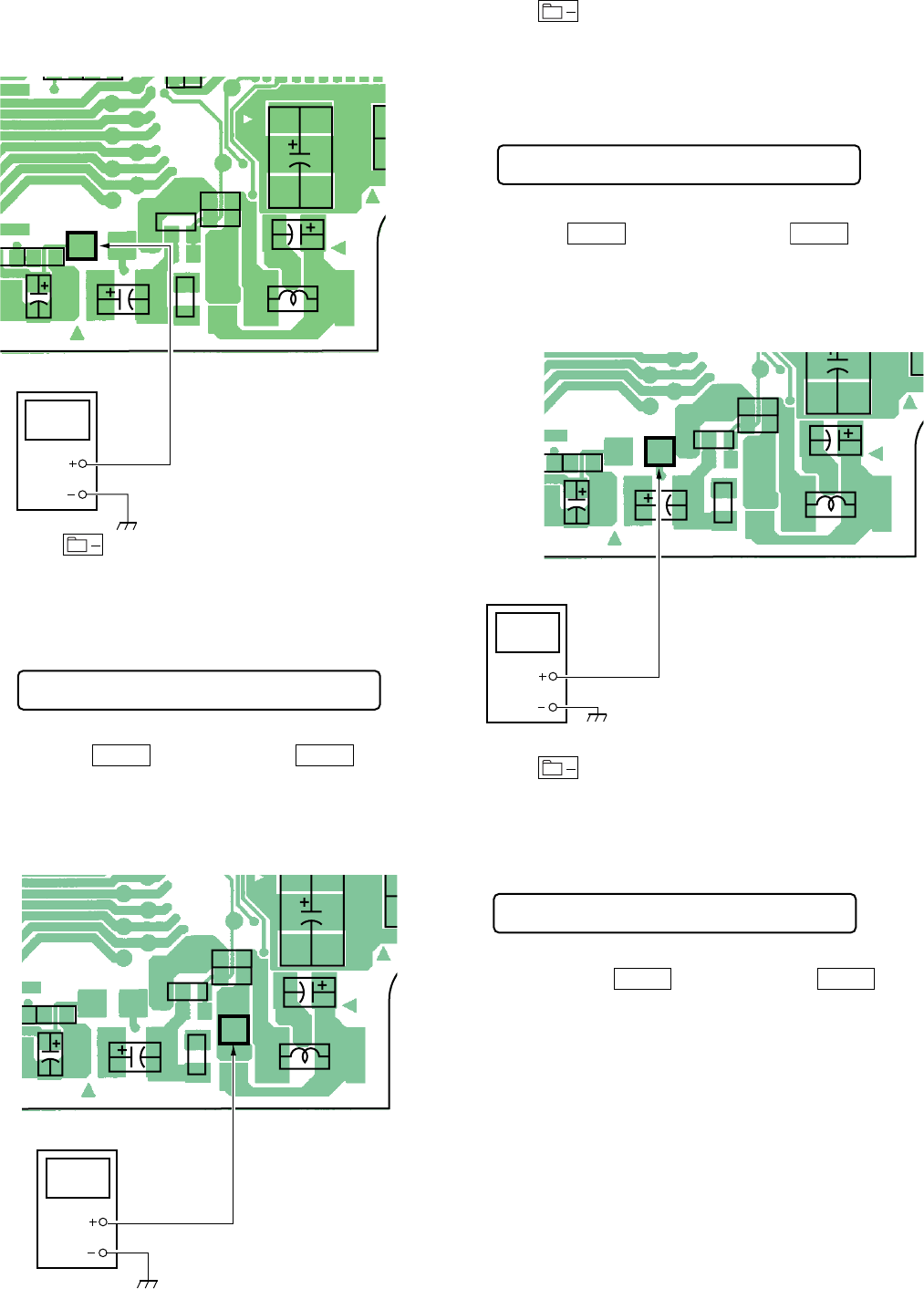
1. Supply power (DC 6.0 volts) from the charging terminal CN951.
2. Set the Test mode.
3. Set the overall adjustment mode and press
P.MODE/F
key, item No. will change to 741.
LCD display
741 Reg1 XX
4. Connect a digital voltmeter to TP908 (REG1) on the main
board and adjust
VOL +
(voltage up) key and
VOL –
(voltage down)key on the remote control.
If adjustment data is VarWrt is 01
Version 1.000
Address Adjustment Data
88C6 07
88C7 8D
88C8 FF
88C9 FF
88CA FF
88CB FF
88CC FF
88CD FF
88CE FF
88CF FF
88D0 FF
88D1 FF
88D2 FF
88D3 FF
13
MZ-E10
Adjustment value:1.05V
Standard value:1.04 to 1.055V
MAIN BOARD (SIDE A)
C908C922
C926
C202
37
L904
C910
C916
C
C
R908
R921
R911
9
12
1-686-492-
TP908
(REG 1)
TP908
(REG1)
digital voltmeter
5. Press key to write the adjustment value, item No.will
change to 742.
5-4-3. VC1 adjustment method
1. Set the overall adjustment mode and set the item No. to 742.
LCD display
742 Vc1 XX
2. Connect a digital voltmeter to TP902 (VC1) on the main board
and adjust
VOL +
key (Voltage up) and
VOL –
key
(Voltage down) on the remote control.
Adjustment value:2.15V
Standard value:2.14 to 2.155V
MAIN BOARD (SIDE A)
C908C922
C926
L904
C910
C916
R908
R921
R911
1
2
1-686-492-
TP902
(VC1)
TP902(VC1)
digital voltmeter
3. Press key to write the adjustment value, item No. will
change to 743.
5-4-4. VC2 adjustment method
1. Set the overall adjustment mode and set the item No. to 743.
LCD display
743 Vc2 XX
2. Connect a digital voltmeter to TP907(VC2) on the main board
and adjust
VOL +
key (Voltage down) and
VOL –
key
(Voltage up) on the remote control.
Adjustment value:1.15V
Standard value:1.15 to 1.18V
MAIN BOARD (SIDE A)
C908C922
C926
L904
C910
C916
R908
R921
R91112
1-686-492-
TP907
(VC2)
TP907(VC2)
digital voltmeter
3. Press key to write the adjustment value, item No. will
change to 744.
5-4-5. Class-D power supply adjustment method
1. Set the overall adjustment mode and set the item No. to 744.
LCD display
744 Cls D XX
2. Connect a digital voltmeter to TP909 (Class-D) on the main
board and adjust
VOL +
key (Voltage up) and
VOL –
key
(Voltage down) on the remote control.
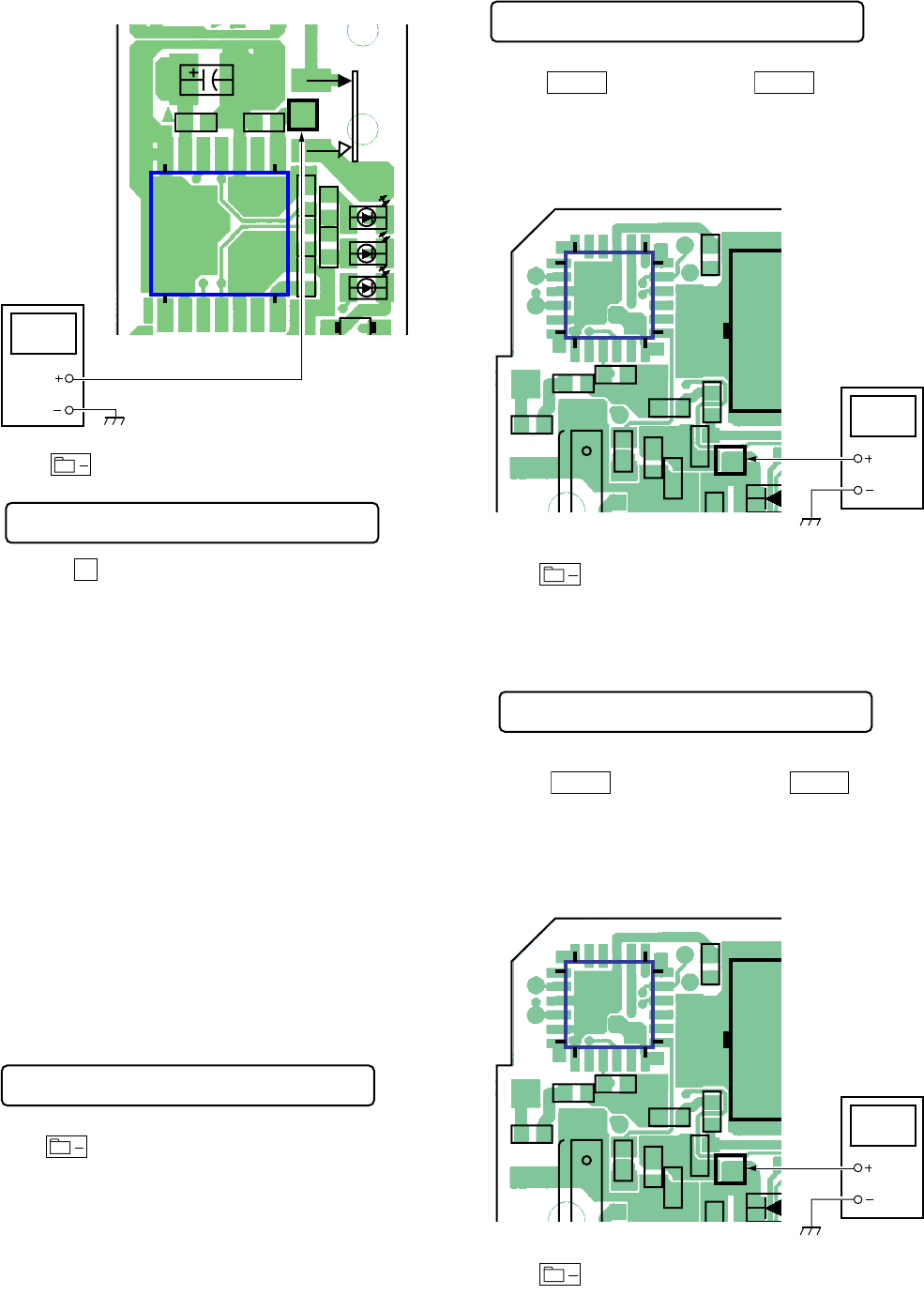
14
MZ-E10
Adjustment value:1.75V
Standard value:1.75 to 1.80V
MAIN BOARD (SIDE A)
C302
E
17
14 8
D
D
D
IC301
C301 C104
C204 R317 R318
R818R819
t
HOLD
TP909(CLASS-D)
TP909
(CLASS-D)
digital voltmeter
3. Press key to write the adjustment value,
LCD display.
000 ADJ OK
4. Press the
x
key and return to the test mode.
LCD display.
5-5. CHARGE ADJUSTMENTS
Note: Always remove the internal battery (Li-Ion) before making
charging adjustments.
5-5-1. Adjustment sequence
The adjustments should be always performed in the following se-
quence:
1 Current amplifier offset adjustment (item No.:751)
r
2 Change voltage (L) adjustment (item No.:754)
r
3 Change voltage (H) adjustment (item No.:755)
r
4 Current Amplifier (L) adjustment (item No.:752)
5-5-2. Current amplifier offset adjustment
1. The power supply of 3V is supplied to TP951 on the main board.
2. Set the Test mode.
3. Set the manualmode, item No.will change to 751.
LCD display
751 ChgIOf XX
4. Press key to write the adjustment value.
5-5-3. Vc PWM Duty (L) adjustment method
1. Set the Test mode.
2. Set the manual mode, item No. will change to 754.
LCD display
754 ChgV L XX
3. Connect a digital voltmeter to TP962 on the main board and
adjust
VOL +
(voltage up) key and
VOL –
(voltage down)
key on the remote control.
Adjustment value:3.40V
Standard value:3.395 to 3.405V
MAIN BOARD (SIDE A)
Q
IC951
CN951
56 R958 R957
R961
R959
C954
1
1
6
18
13
12 7
19 24
C957
R965
R964
C958
C953
D95
TP962
TP962
digital voltmeter
4. Press key to write the adjustment value.
5-5-4. Charge voltage (H) adjustment method
1. Set the Manual mode and set the item No. to 755.
LCD display
755 ChgV H XX
2. Connect a digital voltmeter to TP962 on the main board and
adjust
VOL +
key (Voltage down) and
VOL –
key
(Voltage up) on the remote control.
Adjustment value:4.20V
Standard value:4.2 to 4.21V
MAIN BOARD (SIDE A)
Q
IC951
CN951
56 R958 R957
R961
R959
C954
1
1
6
18
13
12 7
19 24
C957
R965
R964
C958
C953
D95
TP962
TP962
digital voltmeter
3. Press key to write the adjustment value.
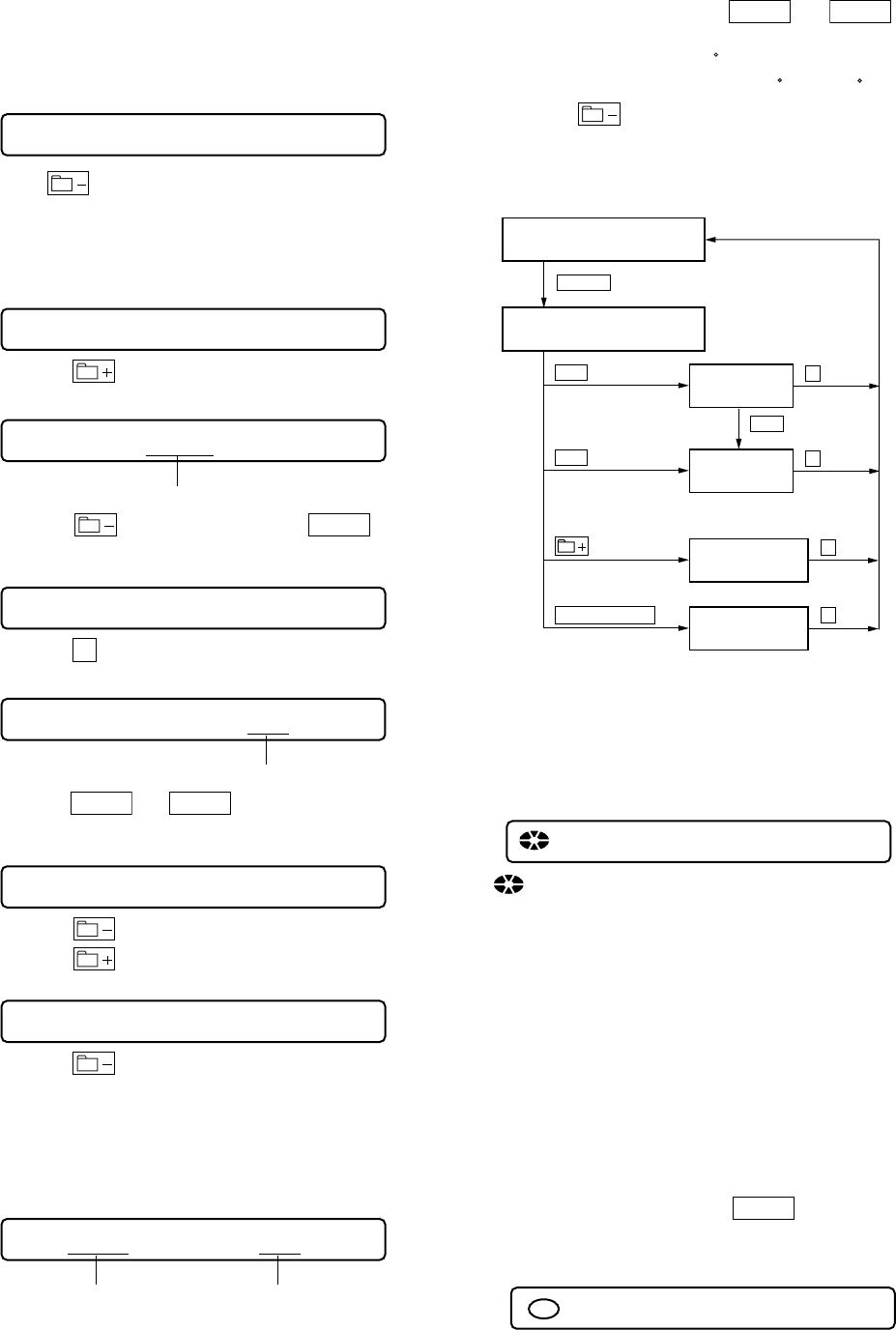
15
MZ-E10
5-5-5.Current Amplifier (L) adjustment method
1. Connect TP953 to TP959 on the main board.
2. Set the test mode.
3. Set the Manual mode and set the item No. to 752.
LCD display
752 ChgI L XX
4. Press key to write the adjustment value.
5-5-6. Adjustment value change method 2
(when using Version 1.000)
1. Set in Manual mode and then set item number 026.
LCD display
026 NvWrt CC
2. Press the key.
LCD display
026 8200 **
This section (address) flashes.
3. Press the key (100th place) and the
VOL +
key (10th
place) and set 828A in the flashing address section.
LCD display
026 828A **
4. Press the
x
key.
LCD display
026 828A **
This section (data) flashes.
5. Press the
VOL +
and
VOL –
keys and set 00 in the flashing
data section.
LCD display
026 828A 00
6. Press the key.
7. Press the key to return to Manual mode.
LCD display
026 NvWrt CC
8. Press the key and write in the adjustment setting.
5-6. TEMPERATURE ADJUSTMENT
[Temperature adjustment method]
1. Set in Test mode.
2. Set in Manual mode and set the item number 014.
LCD display
014 AdjTmp XX
Adjustment settingItem No.
3. Measure the temperature.
4. Adjust with the remote control
VOL +
and
VOL –
keys so
that the temperature value is at room temperature.
Reset value: 19h = 25
C
Adjustment range: 80h to 7Fh = -128
C
to +127
C
5. Press the key and write in the adjustment value.
5-7. OVERALL ADJUSTMENT MODE
5-7-1. Overall adjustment mode structure
TEST MODE
(Display Check Mode)
Overall Adjustment
Title Display(ASSY**)
CD overall
Adjustment
.key
VOL — key
key
x
MO overall
Adjustment
> key
> key
key
x
NV Initialize
key two times key
x
key
x
Power Supply
Adjustment
P.MODE/F key
Note: The overall adjustments should be always performed in the
sequence of CD t MO adjustments.
5-7-2. Total Adjust mode title display
Switching to Total Adjust Mode sets the following All Adjust mode
title display on the LCD.
LCD display
000 Assy **
:Disk mark (outer) lights up when power adjustment is com-
plete.
Disk mark (inner) not used
** : Left side is MO alignment information
F* : MO total alignment is complete
1* : Manual alignment (not part of total adjustment)
0* : Not adjusted
Right side is CD alignment information
F* : CD total alignment is complete
1* : Manual alignment (not part of total adjustment)
0* : Not adjusted
5-7-3. Overall CD and MO adjustment method
1. Set the TEST MODE and press
VOL –
key to set the Overall
Adjustment mode.
LCD display
000 Assy11
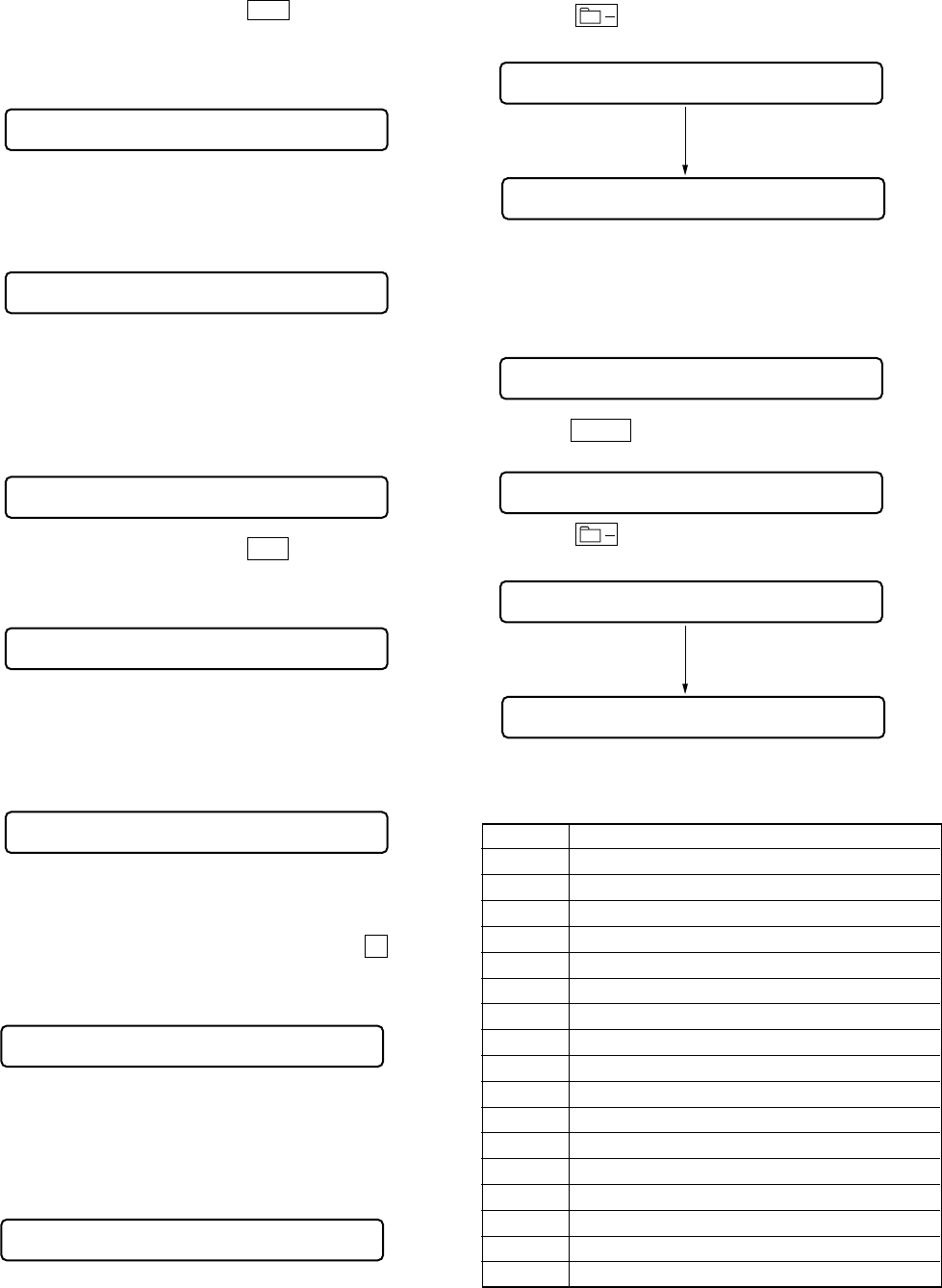
16
MZ-E10
2. Insert CD disc in the set, and press . key to set the Overall
CD Adjustment mode.
Automatic adjustments are made.
LCD display
XXX CD RUN
XXX: Item No. for which an adjustment is being executed.
3. If NG in the overall CD adjustments, return to Reset NV and
perform from the overall CD adjustment again.
LCD display
000 XXX NG YY
XXX: NG item No.
YY: adjusted valive.
4. If OK through the overall CD adjustments, then perform overall
MO adjustments.
LCD display
000 CD OK
5. Insert MO disc in the set, and press
>
key to set the Overall
MO Adjustment mode. Automatic adjustments are made.
LCD display
XXX MO RUN
XXX: Item No. for which an adjustment is being executed.
6. If NG in the overall MO adjustments, return to NV initiale and
perform from the overall CD adjustments again.
LCD display
000 XXX NG YY
XXX: NG item No.
YY: adjusted valive.
7. If OK through the overall MO adjustments, press
x
key to
return to the test mode.
LCD display
000 MO OK
5-7-4.Resume clear method
When the battery exchange isn't being done.
1. Setting the testmode.
2. Set the Manual mode and set the item No.043(RESUME Clear).
LCD display
043 Resume 00
3. Press the key.
043 Res ***
After reset is completed
LCD display
LCD display
043 Res C1r
5-7-5.Resume clear method
When the battery exchange was done.
1. Setting the testmode.
2. Set the Manual mode and set the item No.043(RESUME Clear).
LCD display
043 Resume 00
3. Press the
VOL +
key two times, and set the adjustment value
to 02.
043 Res 02
4. Press the key.
043 Res ***
After reset is completed
LCD display
LCD display
043 Res C1r
5-7-6. Overall CD and MO adjustment items
1. Overall CD adjustment items
Item No. Contents
312 ALFA offsetadjustment
313 IJ offset adjustment
314 FE offset adjustment
320 Focus servo ON
324 TE offset adjustment
321 TE gain adjustment
328 TWPP gain adjustment
824 twpp-gain[H]+4 t twpp-gain[L]
324 TE offset adjustment
330 Tracking servo ON
336 ABCD gain adjustment
337 KF gain adjustment
338 RF gain adjustment
344 CD focus gain adjustment
345 CD tracking gain adjustment
521 CD two-axis sensitivity adjustment (inside)
522 CD two-axis sensitivity adjustment (outside)
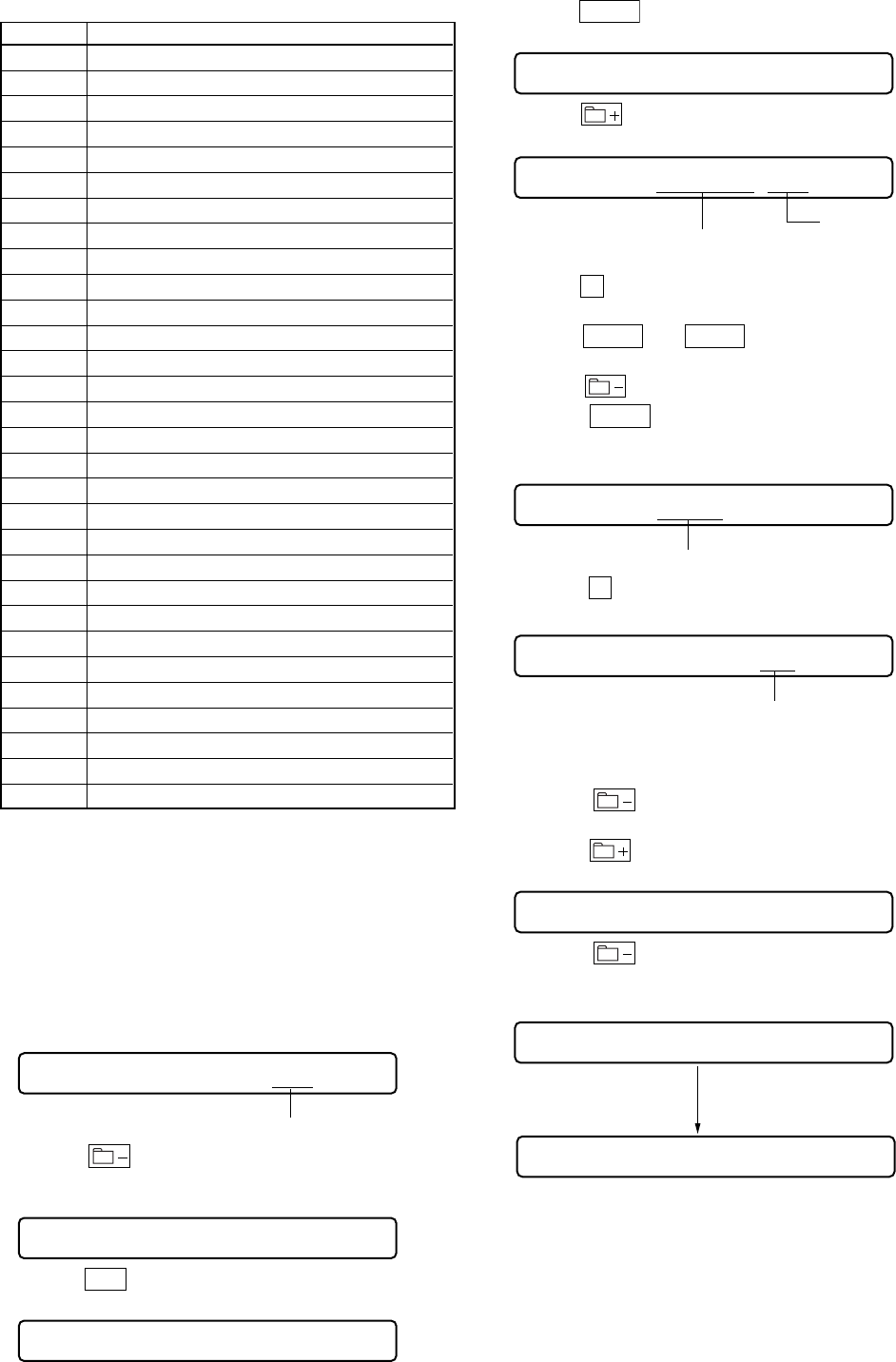
17
MZ-E10
2. Overall MO adjustment items
Item No. Contents
112 ALFA offset adjustment
113 IJ offset adjustment
114 FE offset adjustment
118AW DW OFFSET
224 TE offset adjustment
221 TE gain adjustment
224 TE offset adjustment
236 ABCD gain adjustment
237 KF gain adjustment
238 RF gain adjustment
244 Focus gain adjustment
245 Tracking gain adjustment
120 Focus servo ON
122 TE offset adjustment (TON)
121 TE gain adjustment
122 TE offset adjustment (TON)
123 TE offset adjustment (TEIN)
124 TE offset adjustment (TWPP)
130 Tracking servo ON
131 TE offset adjustment (TWPP/RF)
136 ABCD gain adjustment
137 KF gain adjustment
144 FCS gain adjustment
145 Tracking gain adjustment
139 BPF fo adjustment
134 TWPP gain adjustment
131 TE offset adjustment (TWPP/RF)
132 TE offset adjustment (TWPP/DSP)
138 RF gain adjustment
35 GOD offset correction.
5-8. REWEITING PATCH DATA AFTER REPLACING
THE NONVOLATILE MEMORY
Rewrite the program correction data after replacing the nonvolatile
memory.
5-8-1 Method for rewriting the corrected data
(when using Version 1.000)
1. Set in Test mode.
2. Set in Manual mode and enter the item number 022.
LCD display
022 PatClr CC
Data.
3. Press the key to reset the patch data.
(Writing is complete if the setting changes to DD.)
LCD display
022 PatClr DD
4. Press the
>
key and enter the item number 023.
LCD display
023 Patch 00
5. Press the
VOL +
key and set the adjustment setting to 01.
LCD display
023 Patch 01
6. Press the key.
LCD display
022 PatClr CC
Data.
This section (address) flashes.
7. Press the
x
key.
(The data section flashes.)
8. Press the
VOL +
and
VOL –
keys and set the adjustment
data while referring to the patch data list.
9. Press the key and the address section flashes.
10. Press the
VOL +
keys and set the address value in the next
address for adjustment.
LCD display
023 8922 00
This section (address) flashes.
11. Press the
x
key.
LCD display
023 8922 00
This section (data) flashes.
12. While referring to the patch data table repeat the data correction
write procedure from steps 8 through 11 until the address 899E
is set.
13. Press the key.
(The address value flashes.)
14. Press the key to quit the patch data write mode.
LCD display
023 Patch 01
15. Press the key.
LCD display
023 Patch CC
After finished writing data.
LCD display
LCD display
023 Patch DD
16. Turn off the power.

18
MZ-E10
Varsion 1.000
Address Data
8921 02
8922 F7
8923 F4
8924 02
8925 06
8926 A9
8928 03
8929 2A
892A FD
892B 01
892C 12
892D 06
892E B3
8931 02
8932 15
8933 95
8934 02
8935 0A
8936 66
8938 02
8939 D1
893A B3
893B 02
893C 06
893D BD
8941 81
8942 B2
8943 81
8944 C3
8945 81
8946 E2
8947 E4
8948 90
8949 87
894A 75
894B F0
894C E5
894D 81
894E C3
8951 94
8952 04
8953 F8
8954 76
8955 19
8956 08
8957 76
8958 E9
8959 22
895A C0
895B E0
895C 12
895D 20
895E 7D
8961 8C
Address Data
8962 DE
8963 03
8964 E5
8965 81
8966 C3
8967 94
8968 05
8969 F8
896A 76
896B 2E
896C 08
896D 76
896E FD
8971 D0
8972 E0
8973 B4
8974 02
8975 02
8976 D3
8977 22
8978 C3
8979 22
897A 6C
897B 05
897C 0A
897D 30
897E 1A
8981 02
8982 74
8983 FF
8984 F8
8985 D0
8986 E0
8987 D0
8988 E0
8989 D0
898A E0
898B 74
898C F8
898D C0
898E E0
8991 74
8992 B3
8993 C0
8994 E0
8995 74
8996 02
8997 C0
8998 E0
8999 E8
899A 02
899B 06
899C CF
899E 01
MZ-E10
19 19
6-1. BLOCK DIAGRAMS
• Signal path.
F : Analog
J : Digital
SECTION 6
DIAGRAMS
139
160
21
14
50
46
47
XRF RESET
PDS1
106
XIN
107
XOUT
XDISC DET
XSLPMIR OP
RF TEMP MON
SBUS CLK
SBUS DATA
ADIPW0
D EN2
D EN1
19
RMC DTCK
16
SET KEY
88
HOLD SW
6
NV XCS
SI02 DO
SI02 DI
5
7
8
13
CHG VI MON
29
XCHGI LIMIT
32
CHG AD SEL
38
CHG AMP SEL
39
CHG PWM
17
CHG MON
12
7
•
8
41
3
BEEP DRIVER
EN1
EN2
MCK
IN2
IN1
VDD0
OUT2
OUT1
Q301,302
BOOSTER
Q102,202
MUTE
LED
DRIVER
Q802
3 6
i
J301
R-CH
L-CH
RMC-KEY
D-GND
A-GND
RMC-DTCK
RMC-VDD
VCC-1
ON OFF
S804
S803
(OPEN/CLOSE)
SI02 CLK
XCS
DI
DO
SK
IC301
HEADPHONE AMP
(D CLASS AMP)
76
75
SPPWMR
SPPWMF
66
FF
11
4
14
.
HOLD N
N
S802
GROUP
>
REC KEY
15
OPEN CLS SW
IC601
DIGITAL SIGNAL PROCESSOR,
DIGITAL SERVO SIGNAL PROCESSOR,
EFM/ACIRC ENCODER/DECODER,
SHOCK PROOF MEMORY CONTROLLER,
16M BIT D-RAM, SYSTEM CONTROL
ATRAC ENCODER/DECODER
D/A CONVERTER
IC801
EEPROM
IC551
FOCUS/TRACKING COIL DRIVE,
SPINDLE/SLED MOTOR DRIVE
IC901
DC/DC CONVERTER
IC952
VB DETECT
IC951
CHAGER CONTROL
OPR LED R PWM 42
OPR LED O CTL 30
OPR LED G PWM 41
2
RMC KEY1 12
D VO PWM 40
52
45
136
127
126
125
123
124
104
11
110
112
3
37
196
23
36
35
10
9
48
47
41
43
8
18
32
33
7
56
1
54
55
50
51
52
49
16
15
12 13
LASER
DRIVER
Q501
19
18
20
10
1
11
15
16
14
13
7
6
8
9
5
4
3
2
12
17
TRACKING
COIL
FOCUS
COIL
14
Jx Jy
Jx
Ix Iy
Iy
Ix
Jx
Jy
A
B
C
D
PD
Ix
a
F
b
cd
OPTICAL PICK-UP BLOCK
(ABX-1ES)
LD
VCC VCC
L501
S0
S1
S0
LD-K
LD-A
MON
D
C
B
A
Jy
Jx
Ix
Iy
D
D-C
PD-NI
PD-O
VCC-2
C
B
A
VREF10 NC
VREF
A-C
Jy
Jx
Ix
Iy
S1
RF AMP,
FOCUS
ERROR,
TRACKING
ERROR
TPP/WPP
APC
ADIP
SERIAL
I/F
DVDD
AVCC
RF OUT
37
EFMO
PEAK
BOTM
ABCD
FE
NPPO
19
ADIP IN
TE
PD-NI
VC
23
AFDG
D LPWM+
D RPWM+
S104 DO
PWR STRB
PWR CLK PWM
S104 CLK
PWR SLEEP
PWR EFCLR
CHG VI MON
XCHGI LIMIT
CHG AD SEL
CHG AMP SEL
CHG CTL
CHG MON
S104 DO
PWR STRB
176K
S104 CLK
PWR SLEEP
PWR EFCLR
UNREG MON
SBUS
SCK
S MON
RESET
PEAK
/BOTM
EFM
COMP
EFMIN
PEAK
BOTTOM
ABCD
FE
TE
RFVCMON
LDREF
IC501
RF AMP,FOCUS/TRACKING ERROR AMP
TRK+
VS2
OUT2F
OUT2R
IN2F
IN2R
IN1F
IN1R
SLPWM
SLFG
ISEL1
S1
S2
S3
CLK
SPBR
SPPWM
SPFG
VCC
VG1
VCC-1
VG
VS1
OUT1F
OUT1R
SLVS
SWO
SVO
SUO
SLCOM
SPVS
WOUT
VOUT
UOUT
SPCOM
TRK-
FCS+
FCS-
1
57
F16M
44
80
68
84
74
73
51
3
4
71
72
13
14
19
7
20
21
23
41
40
38
8
22
35
39
PRE
DRIVER
LOGIC
LOGIC
LOGIC
LOGIC
PRE
DRIVER
PRE
DRIVER
PRE
DRIVER
48
47
42
37
TRPWMF
TRPWMR
FOPWMR
SLD2
4M
6
5
83
24 SLD1
85
12 SLD3
SLPWMF
FOPWMF
X601
16.9344MHz
SLDW
SLDV
SLDU
SLDN
CLVW
CLVV
CLVU
CLVN
45
17
26
18
81
9SLPWMR
82
10 SLD0
16
S-MONITOR
35
122
VC
24
AMICE CLK PWM
26
CLK
POWER
SUPPLY
LITHIUM-ION
RECHAGEABLE
BATTERY
Li-ion
1PC, 3.7v
XRESET
D802
D801
D803
STOP
FF/PB
VOL+
VOL-
REW/PB
S801
S801
VOL+
VOL-
RFI 40
192
1
2
3
4
2
20
16
14
6
5
3
4
12
24
17
18
7
8
10
9
8
26
43
44
42
36
32
34
35
23
24
22
11
23
9
CHARGE
CONTROL
SW
55
27
9
3
13 SETUP
DRIVER
14
4
2
62
11
37
38
10
16
58
59
60
63
64
1
RESET
SETUP
DRIVER
SETUP
DC/DC
CONVERTER
SWITCH
CONTROL
LVB
DRIVER
SERIES PASS
REGULATOR
Q953
DIFFERENTIAL
7
D902
L903
D904
L901
L903
Q902
LG
C1L
VG
VG
VC
VG
Q901
VC2
VCC-2
VCC-1
RMC KEY1
SI04 DO
PWR STRB
SI04 CLK
176K
PWR SLEEP
PWR FFCLR
L1
VCI
VC1G
VCIN
VCOUT
VCO1
XWK3
VSTB
LVB
XRST2
MUTE ON
V IN2
AD_SEL
I_SEL
A/D
VG
D951
Q951
I_CTL1
WK DET
CHG_CTL
VI2DET
H
L
L1
XWK1
XWK2
XWK4
SEQSEL
DATA
FFCLR
SLEEP
CLK
SCK
STRB
VB
VB
UNREG
VDD
VG
VGH
VC
CONTROL
L2
L2
VC2G
L2
REGO1
VB
HVB
OUT2
BAT_SEL
IN2-
BUILT-IN
BATTERY
VBAT
VO
GND
NC
S901
Q903
RF1
IN1-
VI
VG
CHG AD SEL
CHG AMP SEL
CHG MON
XCHG I LIMIT
CHG CTL
CHG VI MON
(R)
(O)
(G)
VCC-1 VG
Q303
1
3
8,7
6,5
2,4
IC302
REGULATOR Q304
Q904
TAP603
VCC-2
UNREG
VG1 S/S
S/S
VG1 S/S
VG1 S/S
VG1 S/S
43
M
M
M902
SLED
MOTOR
M901
SPINDLE
MOTOR
42
44
FOR
STAND
CHARGER
5
VB
Q952
4
3
1,2
5,6
ON
OFF
r
1
2
IN
OUT
MZ-E10
20 20
D101 E-9
D201 E-9
D301 F-9
D801 B-9
D802 B-9
D803 B-9
D851 E-9
D902 G-6
D903 G-6
D904 G-7
D951 G-3
IC301 B-9
IC302 D-9
IC501 D-8
IC551 G-9
IC601 G-4
IC801 G-5
IC901 G-7
IC951 F-2
IC952 C-8
Q102 F-9
Q202 F-9
Q301 C-9
Q302 D-9
Q303 F-9
Q304 E-8
Q501 D-8
Q802 C-9
Q901 G-7
Q902 H-5
Q903 G-6
Q904 E-8
Q951 G-3
Q952 E-7
Q953 E-7
6-2. PRINTED WIRING BOARDS – MAIN SECTION (1/2) –
Ref. No. Location
z Semiconductor
Location
C909
C951
C903
C917
C902
C952 C908C922
C926
C202
TP908
(REG1)
TP907
(VC2)
TP902
(VC1)
C102
C511
C510
C305
C308
C310
C302
D201
D301
Q303
D101
Q802
E
E
E
3
4
15
E
E
E
E
E
1
7
1
1
12
36
37 48
24 13
25
4
85
1
13
7
14 8
S802
S803
(OPEN/CLOSE)
D802
D801
D803
L101
L201
L904
L501
L551
L552
L902
L903
L901
Q951
E
IC951
IC801
IC601
IC901
IC551
IC501
IC302
IC952
IC301
C804
CN801
C301 C104
C204
C101C201
C312
C525
C523 C959
C527
C513
C506C526 C805
C520
C518
C512
C507
C503
C501
C515
C803
C536
FB801
FB802
FB201
FB101
FB803
C304
C307
C505
C502
C306
C921
C852
C303C851
C554
C555
C556
C910
C557
C906
C912
C911C907
C923C901
C925
C904
C801
C621
C601
C309 C311
C552
C920
C924
C929
C618
C622
C915 C905C913
C553
C916 C558
C551
R951
R102
R204
R104
R554
R903
R908
R921
R916
R911R912
R914
R516
R563R561R562R564
R953
R305
R303
R302
R301
R310
R509
R510
R514
R513
R311
R315
R952
R511
R802
R804
R803
R309
R312
R306
R304
R506
R507
R501
R502
R504R904
R518
R505
C519
C509
C508
R317 R318
R818R819
CN952
CN951
S804
Q301
Q302
D851
Q904
Q304
BCE
Q952
Q953
BCEBCE
CN501
Q501
ECB
C535
C534
C533
C532
R202
R307
R313
R551R552
R553
R901
R917
R919R909R918
R906
R905
R915
R602
R955
R801
R614
R605R606
R627
R607R622
R621
R620
R623
R956 R958 R957
R961
R959
R628
C616
R610
C614
R609
C603
C606
C954
1
51
1
2
6
18
13
12 7
19 24
C957
C960
C928
C626
R603R967
R617
R618
R965
R964
C604
R601
C613
R611
C611C609
X601
R608
R615
C620
C619
C617C612C608
C607
C958
C953
C628
C956
C955
R817
C605
C610
R613
R902
Q102 Q202
BCE
ECB
CN551
Q901
S
D904
D903
D902
Q903
Q902 S
FB601
MAIN BOARD (SIDE A)
M901
SPINDLE
MOTOR
M902
SLED
MOTOR
M
M
1
7
6
2
3
4
5
8
FOR
STAND CHARGER
OPTICAL
PICK-UP
BLOCK
ABX–1ES
t
B
HOLD
GROUP
GROUP
HOLD
t
ON
OFF
1
2
3
4
J301
i
49
64
1
8
D
G
48
33
1
16
17
32
D
G
5
8
4
1
DDS
DD
G
D951
11
(11)
1-686-492-
POWER BOARD (SIDE B)
CN953 CN954
S901
15
15
1-686-490-
1-686-490-
ON OFF
t
BUILT–IN BATTERY
LITHIUM–ION
RECHARGEABLE
BATTERY
LIP–3WMB
1PC,3.7V 340mAh
Li–ion
1
2
4
5
R814 R813 R816
R815
R812
R811
CN802
S801
B
VOL –
VOL +
>
>
1
3
POWER BOARD (SIDE A)
11
(11)
11
(11)
CONTROL BOARD (SIDE A)
CONTROL BOARD (SIDE B)
11
(11)
1-686-491- 11
(11)
1-686-491-
*
*
TP909
(CLASS-D)
TP959
TP953TP951
TAP602
TEST MODE
23 4 5 6 7 89
A
1
B
C
D
E
F
G
H
10
z See page 25 for Notes. : Uses unleaded solder.
MZ-E10
21 21
23 4 5 6 7 89
A
1
B
C
D
E
F
G
H
MAIN BOARD (SIDE B)
11
(11)
1-686-492-
6-3. PRINTED WIRING BOARDS – MAIN SECTION (2/2) – z See page 25 for Notes. : Uses unleaded solder.
MZ-E10
22 22
6-4. SCHEMATIzC DIAGRAM – MAIN SECTION (1/3) – z See page 25 for Notes. z See page 26 for IC Pin Function Description.
R603
R602
C801
R801
R605
R606
R607
R817
R818
R819
D801
D803
D802
R811
R812
R813
R814
R815
R601
R617 R618 C606
R621
R622
R620
C626
C601
R623
C603
R628
C628
C604
Q802
FB601
R627
C605
C607
R816
TAP602
S803
S802
C804
C805
TAP603
X601
C608
R608
C613
C611
C609
C610 C612
R611
C616
R610
C614
R609
C617
C620
R614
C621
R615
C622
R613
C618
C619
S804
CN801 CN802 S801
2.2k
47k
0.1
1M
1M
0
2.2k
220
2.2
470
TLRE1008A
TLGE1008A
TLOE1008A
2.2k
2.2k
4.7k
4.7k
10k
220k
220k 470k 0.1
100k
10k
10k
0.022
0.1
10k
0.1
22k
0.047
0.1
XP4214-TXE
LED DRIVE
0
0.1
0.1
10k
(OPEN/CLOSE)
470p
0.01
16.9344MHz
0.047
4.7k
0.047
1000p
0.1
0.1 0.1
2.2k
0.1
4.7k
0.1
10k
0.1
4700p
4.7k
0.1
10k
0.047
470
470p
0.1
3P 3P
DGND
AGND
VCC
BUS
VDD
UNREG
OPR GND
VSTB
XD MUTE
SIO2 CLK
NV XCS
SIO2 DO
SIO2 DI
RF VCMON
RMC KEY1
SMON
CHG VI MON
CHG MON
RMC DTCK
SBUS CLK
SBUS DATA
AMICE CLK PWM
CHG AD SEL
PWR FFCLR
PWR SLEEP
PWR STRB
CHG AMP SEL
D VO PWM
D EN1
PD S1
XRF RESET
XSLP MTR OP
D EN2
FG
4M
TRPWMF
TRPWMR
FOPWMF
FOPWMR
SPPWMF
SPPWMR
SLPWMF
SLPWMR
SLD0
SLD2
SLD3
LDREF
D LPWM+
D RPWM+
SMON
FE
TE
ABCD
BOTTOM
PEAK
EFMIN
ADIPWO
NV XCS
SIO2 CLK
SIO2 DO
SIO2 DI
XWK1
SIO4 CLK
SIO4 DO
SET KEY
SET KEY
CHG I LIMIT
SLD1
HFL
XRESET
D CLK
OPEN CLS SW
OPEN CLS SW
176K
CHG PWM
XDISC DET
D EN2
SMON3
SMON2
SMON1
SMON0
MD9
MD10
MD11
VSS
TYPE2
MD12
TYPE3
MD13
XPATCH
XADJUST
MD14
MD15
HOLD SW
VSS
SLPWMF
SLPWMR
SLD0
SLD1
SLD2
SLD3
(LOCAL CHK 3)
(LOCAL CHK 3)
VDD
VCC2
VSS
SPPWMR
SPPWMF
FOPWMR
FOPWMF
TRPWMR
TRPWMF
MD0
MD1
4M
MD2
FG
MECNT1
MECNT0(OPEN:MASK/L:FLASH)
MD3VCC2
MD4
MD5
MD6
MD7
VCC2
F16M
FOEB
FCEB
ADR0
ADR1
ADR2
ADR3
ADR4
ADR5
MCASB
MOEB
VCC2
VSS
VDD
VSS
MAD9
MAD8
ADR6
ADR7
MAD7
ADR8
MAD6
ADR9
ADR10
MAD5
MAD4
ADR11
ADR12
ADR13
ADR14
ADR15
ADR16
ADR17
PCK
DEFECT
DECLK
VCC2
DEDATA
TEST0
TEST1
TEST2
TEST3
XRESET
VDD
VSS
MAD3
MAD2
MAD0
MAD1
MRASB
MSON4
XSLP MTR OP
XRF RESET
PD S1
D EN1
VSS
VDD
OPR LED R PWM
OPR LED G PWM
D VO PWM
CHG PWM
PWR STRB
CHG AMP SEL
PWR SLEEP
PWR FFCLR
VSS
VCC2
CHG AD SEL
(LOCAL CHK1)
OPR LED O CTL
CHG I LIMIT
DRV SLED1 INT
DRV FG INT
DSP WRQB
DSP INTB
AMICE CLK PWM
PWR CLK PWM
SBUS DATA
SBUS CLK
(RMC SPCK)
RMC DTCK
AVDD
CHG MON
SET KEY
OPEN CLS SW
RF TEMP MON
CHG VI MON
RMC KEY1
RF VCMON
UNREG MON
AVSS
SIO2 DI
SIO2 DO
NV XCS
SIO2 CLK
(SIO4 DI)
SIO4 DO
XD MUTE
MWEB
MD8
T1YPE
TYPE0
LDREF
VSS
XIN
XOUT
VDD
DPVSS
D RPWM-
D LPWM-
D RPWM+
D LPWM+
D CPWM
DVPP
VVDD
VPDD
VVSS
AVSS1
AVDD1
AUX
VC
FE
TE
ABCD
BOTTOM
PEAK
AVDD1
VCVSS
ISET
FR
VCVDD
PDO
JITTREC
HFL
EFMIN
SLCISET
SLCO
ADIPWO
VCC2
VSS
FWEB
DATA0
DATA1
DATA2
DATA3
DATA4
DATA5
DATA6
DATA7
IC601
VCC
XBUSY
RST
GND
XCS
SK
DI
DO
IC801
AK6417AL-L
EEPROM
SET KEY
XWK1
SIO4 CLK
HOLD
LC896442-VH4-16-E
GROUP
D801-803
GND
GROUP
VOL+
VOL-
DIGITAL SIGNAL PROCESSOR,
DIGITAL SERVO SIGNAL PROCESSOR,
SYSTEM CONTROL
EFM/ACIRC ENCODER/DECODER,
SHOCK PROOF MEMORY CONTROLLER,
ATRAC ENCODER/DECODER,
D/A CONVERTER,16M BIT D-RAM
CSP(Chip Size Package)
*
ON
OFF
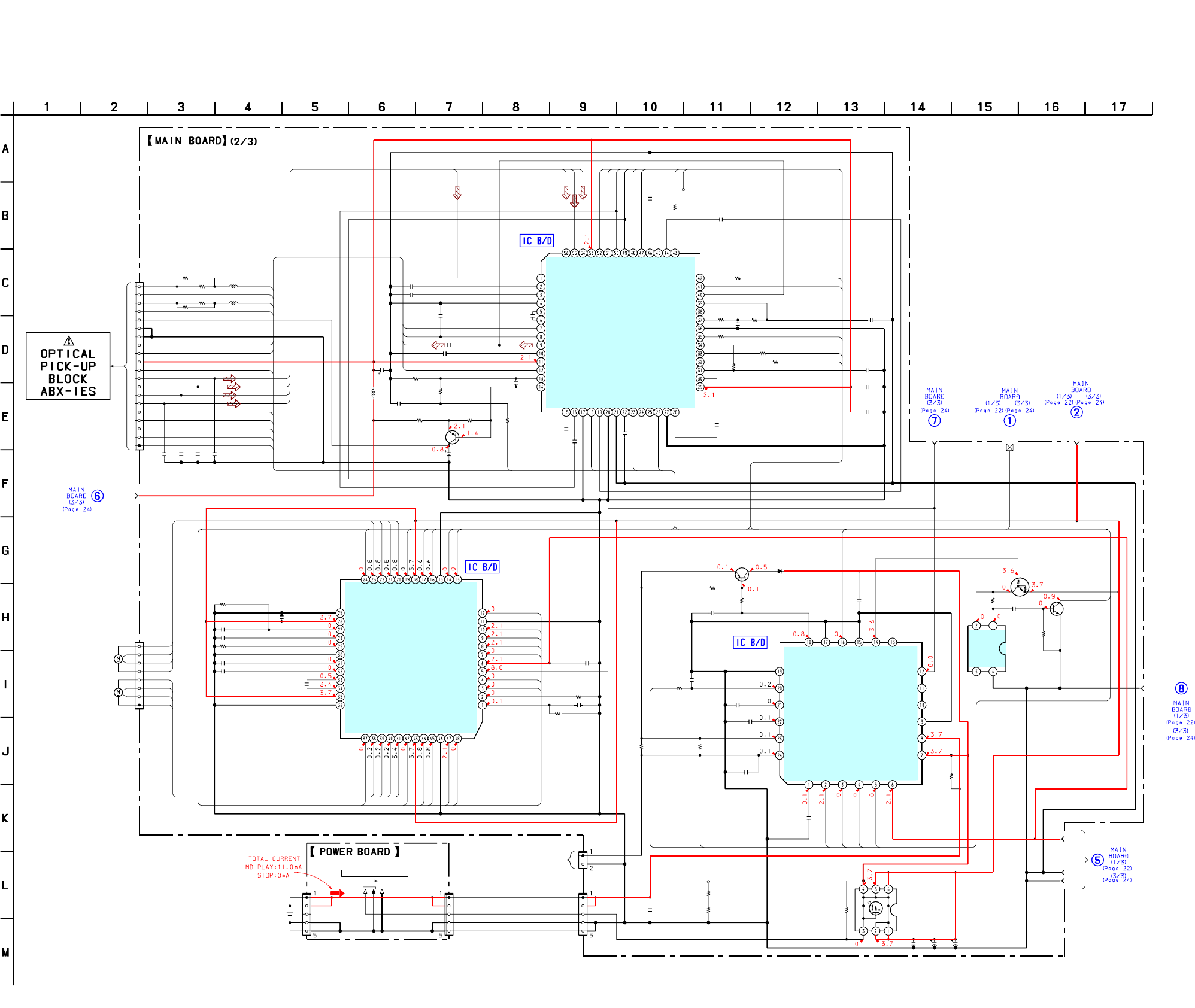
MZ-E10
23 23
6-5. SCHEMATIzC DIAGRAM – MAIN SECTION (2/3) –
C501
C502
C503
C505
C506
C507
C508
R501 R502
R551
R552
R553
R554
C552
C553
C554
C555
C556
C557
C551
CN501
CN551
CN951
Q951
D951
R957
R958
C954
C955
C956
TP511
L501
10µH
R505
R504
C536
C511
C510
R516
C513
C512
C515
C527
R514 C526
R513
R510 C523 R511
R518
R509 C520
C518
C519
C509
C525
C532 C533 C534 C535
R561
R562 R564
L551
47µH
R506
R507
CN952
CN953
C928 R955
C929 C951
C952
R956
TP959
C959
R953
R952
C957
R967
C960
R961
R959
C958
C953
C558
CN954
S901
R964
R965
Q952
Q953
Q501
L552
22µH
R563
10p
10p
2200p
0.1
4700p
0.1
2200p
10k 1k
100k
10k
47k
4.7M
0.1
0.47
470p
0.22
2200p
2.2
0.1
20P
8P
2P
FZT968TA
FT1J3
100
10k
4700p
10
0.1
100k
1
0.047
10
4V
10
6.3V
2.2k
4700p
4700p
0.022
0.1
00.1
0
10k 0.01 10k
0
01
0.047
1
0.1
0.01
22p 22p 22p 22p
22
10 47
0
0
5P
5P
0.1 1M
0.1 47
10V 22
10V
0.022
0.1
47k
47k
0.1
2.2k
0.1
2.2
1
1
0.1
1000p
5P
100
220
UN9113J
2SC4738F
2SA1577-T106-QR
LASER DRIVER
22
BUS
VG1
VCC
AGND
DGND
UNREG
OPR GND
RF VDD
SLDW
SLDV
SLDU
SLDN
C
B
A
D
PEAK
BOTTOM
TE
SBUS CLK
SBUS DATA
XRF RESET
FE
ABCD
ADIPWO
SMON
TRK+
TRK-
FCS+
FCS-
PD S1
A
B
C
D
XSLP MTR OP
FCS+
FCS-
FOPWMR
FOPWMF
TRPWMF
TRPWMR
4M
SLPWMF
SLPWMR
SLD0
SLD3
FG
SPPWMF
TRK+
TRK-
SPPWMR
XSLP MTR OP
CHG AD SEL
CHG AMP SEL
CHG MON
XRESET
CHG VI MON
VREF
RF VCMON
EFMIN
MON
LDREF
AMICE CLK PWM
SLD1
HFL
CLVN
CLVU
CLVV
CLVW
SLD2
CLVN
CLVU
CLVV
CLVW SLDW
SLDV
SLDU
SLDN
CHG PWM
CHG I LIMIT
XWK1
JY
IY
JX
IX
JY
JX
IY
IX
MON
VREF
8
1
1
5
10
15
20
MOTOR
MOTOR
SLED
SPINDLE
M901
M902
FOR STAND CHARGER
HAT1043M-EL
VOUT
VIN
GND
NC
IC952
XC61CN3002NR
GND
PWT
WDT
IN1
VI
VG
OUT2
IN2-
VBAT
VO
RF1
PGND
I CTL1
I CTL2
WK DET
PWR WAKE
CHG CTL BAT SEL
VI2DET
VI2
CAP C LIM
A/D
I SEL
AD SEL
IC951
SC901582EPR2
SPFG
UOUT
SPCOM
VOUT
WOUT
SPPWM
VS2
OUT2F
OUT2R
SPBR
PGND2
S/S
SLFG
SUO
SLCOM
SVO
SWO
SLPWM
VS1
OUT1L
OUT1R
PGND1
IN1R
IN1F
GND
VG2
SPGND
SPVS
SPCIN
SPFIL
SPVCO
SLMAX
SLVCO
SLPD
SLVS
SLGND
SPPD
SPMAX
IN2F
IN2R
VG1
VCC
CLK
S1
S2
S3
SEL2
SEL1
IC551
CXA8125ER-TBM-E
IC501
IX
PS
EQ
AGND
VREF10
VC
RFO
VREF09
AVCC2
DVCC
CP
CPOUT
SCK
SBUS
VGIN
RESET
DGND
EFMO
CIG
ASSY
RFI
ABCD
FE
IY
JY
JX
AVCC
C
B
A
D
PEAK
BOTM
OFTRX
NPPO
TE
OFC C1
OFC C2
PD NI
PD I
PD O
TON C
D
A
AGND
SMON
AGND
AGND
ADFG
CDN
CCSL2
CLK
CPGND
CN
ADIP IN
WPP LPF
SN761058ZQL
ON OFF
BUILT-IN BATTERY
+B
GND
GND
+B
+B
GND
GND
+B
BATTERY
RECHARGEABLE
LIP-3WMB
*
CSP(Chip Size Package)
CHARE CONTROL
SPINDLE/SLED
MOTOR DRIVE
TRACKING/FOCUS
COIL DRIVE,
RF AMP,TRACKING/FOCUS
ERROR AMP
Li-ion
LITHIUM-ION
1PC,3.7V 340mAh
PWR CTL
Q903
SWITCH
VB DETECT
SWITCH
DIFFERENTIAL
SWITCH
z See page 25 for Notes.
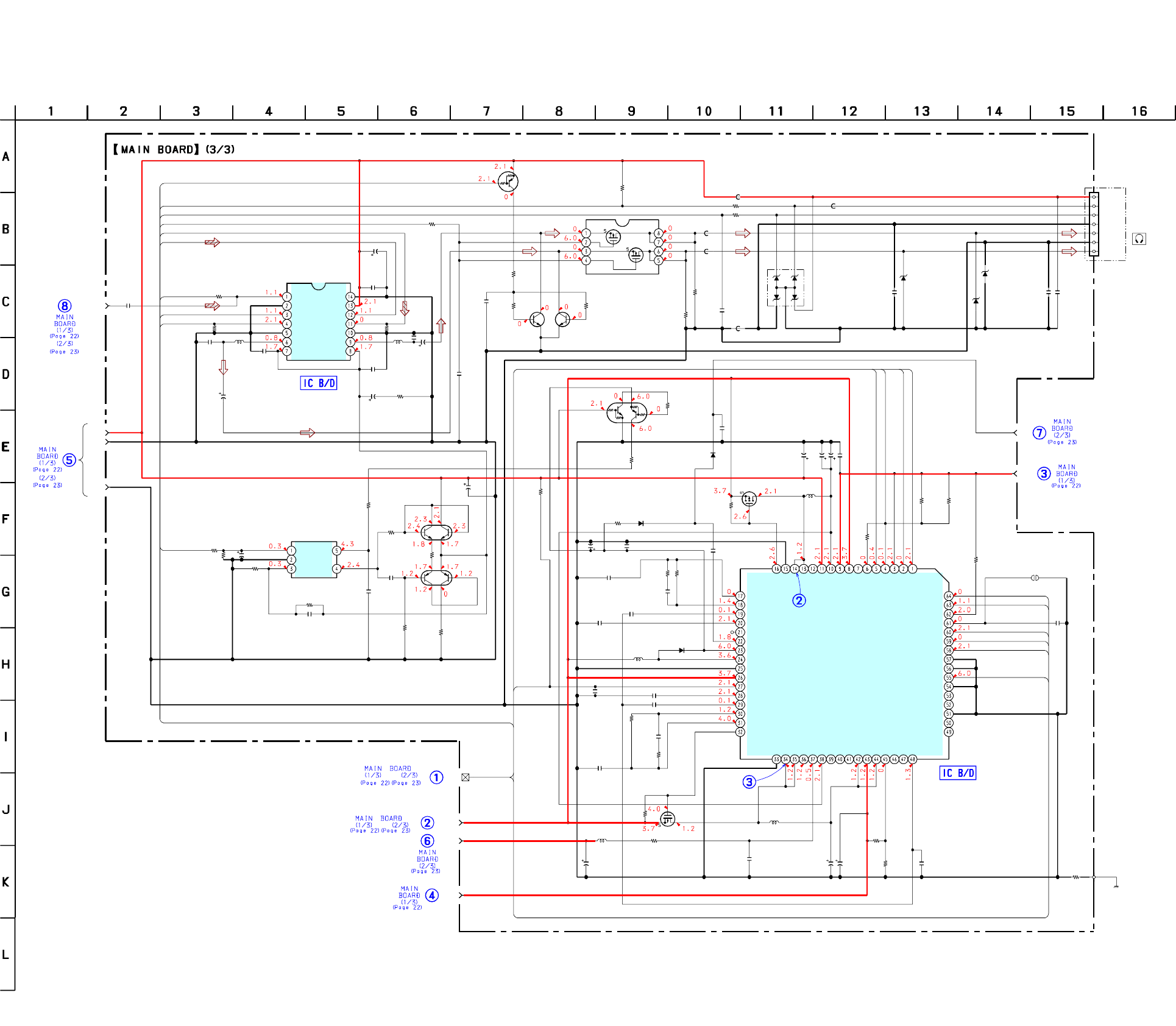
MZ-E10
24 24
6-6. SCHEMATIzC DIAGRAM – MAIN SECTION (3/3) –
TAP901
C905
C907
C920
C901
C908
D902
C923
R901 R902
R903
R104 R204
R802
C803
R803
R804
D851
C852
C303
D301
D101
D201
C851
D903
C925
R915
D904
C307
R306
L903
150µH
C916
R918
R304
C305
R303
R302
C304
R301
R311
R312 R309
C308
Q102 Q202
R313
R917
R904
R914
R305
C306
C312
R317
C201 L201
100µH100µH
C204
C202
C104
L101 C102
C101
R318
C301
C302
R315
R307
C309
R310
C310
C311
FB801
R202
R102
FB101
FB803
FB802
C921
C909
L902
220µH
C906
R906
R905
R908
C913
R909
R919
C915
C911
C912
C910
Q302
Q301
C926
L904
10µH
R921
C917 C922
R912
R911 R951
R916
C902
C903
Q904
Q901
Q902
Q303
Q304
J301
FB201
C924
L901
150µH
C904
0.01
0.01
0.1
0.1
47 6.3V
MA729-TX
1
470k 220k
10k
2.2k 2.2k
1M
470p
100
100
MAZZ068H01S0
0.1
0.1
MAZS027008SO
MAZS027008SO
MAZS027008SO
0.1
MA116
0.1
0
MA116
1
100
1
220k
2.2k
4.7
10V
10k
22k
0.047
10k
1k
22k 10
22
4V
2SC5585TL 2SC5585TL
1k
220k
220k
0
10k
0.47
10p
1M
0.22
0.1
220
2.5V
0.1
220
2.5V
0.22
1M
0.1
47
6.3V
47
47k
0.1
0
220
4V
0.47
4.7k
4.7k
0
1
4.7
16V
1000p
1M
1k
10k
0.047
1k
1M
470p
0.01
0.01
0.1
UMT1N
UMX1N
22
6.3V
0
22
6.3V 22
4V
10k
100k 0
470k
22 6.3V
22
6.3V
XP4313-(TX).SO
XP152A12COMR
MMBF0202PLT1
NTHD5904T1
UN9113J-(TX).SO
INVERTER
0
1
470p
VDD
VCC VG1
BUS
AGND
DGND
UNREG
OPR GND
RF VDD
VSTB
D VO PWM
PWR FFCLR
OPEN CLS SW
RMC KEY1
XWK1
XRESET
MUTE ON
SIO4 DO
PWR STRB
SIO4 CLK
PWR SLEEP
D RPWM+
D EN2
MUTE ON
RMC DTCK
XD MUTE
RMC KEY1
D EN1
D LPWM+
D CLK
176K
IN+
GND
IN-
VCC
OUT
REG
IC301
MCK
VSS
IN1
EN1
VSSO
OUT1
VDDO
BEEP
VDD
IN2
EN2
VSSO
OUT2
VDDO
SLEEP
CLK
SEQSEL
WDT
SCK
STRB
DATA
HPI2
HPI1
MUTEON
GND
VHP1
HP1
PGND
HP2
VHP2
RF1
INM1
DTC1
CRST1
C1L
VG
PGND3
XRST1
LG
VB
XRST2
CRST2
DTC2
INM2
RF2
VC2G
PGND2
L2
L2
VO2
VCO2
REGO3
REGI3
REGO2
VC2
REGC1
VCIN
REGC1
REGI1
REGC2
REGC3
VREF
VC1G
PGND1
L1
L1
VO1
VCO1
VC1
VSTB
HVB
LVB
VRMC
XWK1
XWK2
XWK3
XWK4
FFCLR
IC901
SC901580EPR2
NJU8713V-TE2
LMV301MGX/NOPB
RVDD
RDTCK
RKEY
RGND
IC302
(CHASSIS)
SWITCH
SWITCH
SWITCH
DC-DC
CONVERTER
MUTE
MUTE MUTE
Q301,302
BOOSTER
L-CH
A-GND
R-CH
7
1
(D CLASS AMP)
HEADPHONE AMP
z See page 25 for Notes.
25
MZ-E10
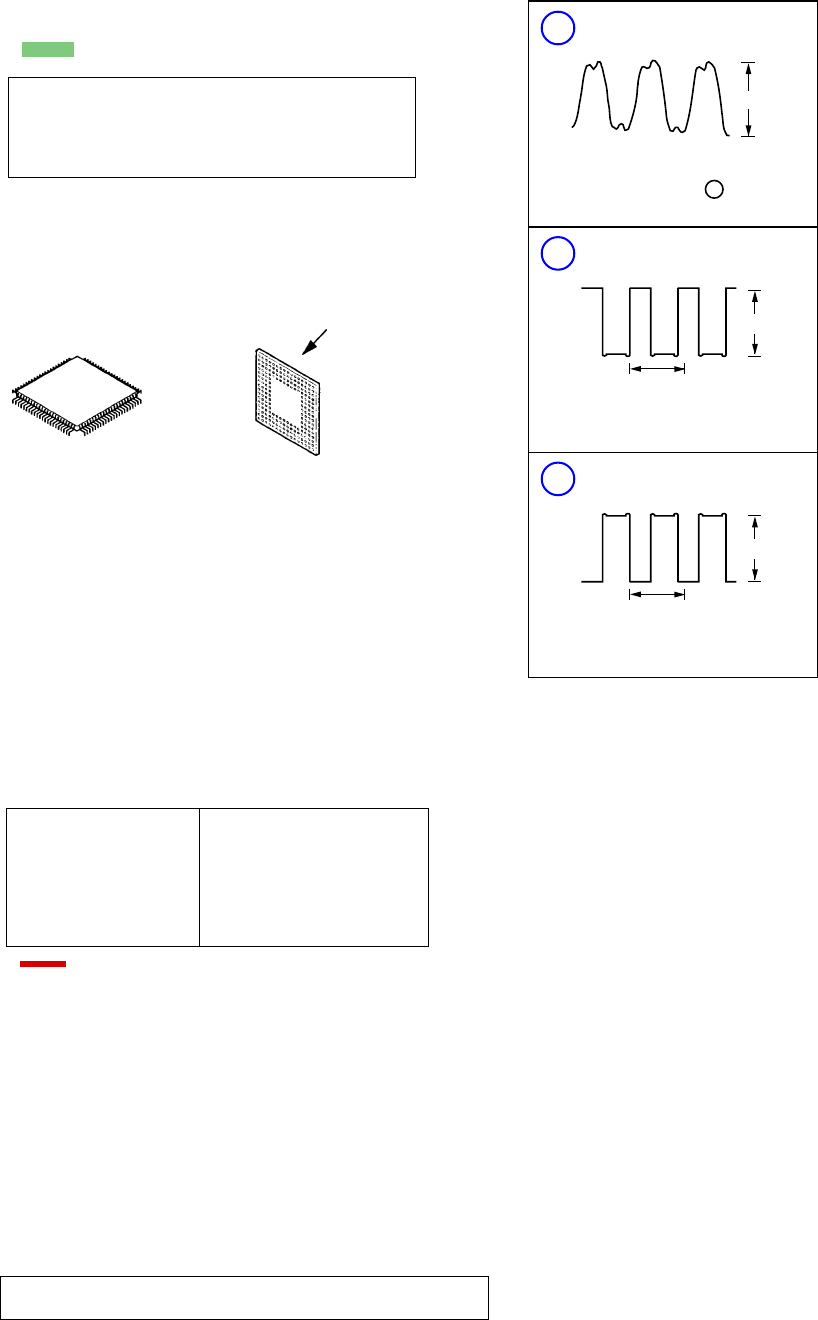
r WAVEFORMS
1
IC601 (R606) XOUT
2
IC901 qdqf L1
Note on Schematic Diagram
•All capacitors are in µF unless otherwise noted. pF: µµF
50 WV or less are not indicated except for electrolytics
and tantalums.
•All resistors are in Ω and 1/4 W or less unless otherwise
specified.
Note on Printed Wiring Boards
•X: parts extracted from the component side.
•z: Through hole.
•: Pattern from the side which enables seeing.
(The other layers' patterns are not indicated.)
Caution:
Pattern face side: Parts on the pattern face side seen from the
(Side B) pattern face are indicated.
Parts face side: Parts on the parts face side seen from the
(Side A) parts face are indicated.
•Main boards is six-layer pritnted board.
However, the patterns of layer 2 to 5 have not been in-
cluded in this diagrams.
•Replacement of IC501 and IC601 used in this set requires
a special tool.
•Lead Layouts
Lead layout of
conventional IC
surface
CSP (chip size package)
1.3 Vp-p
16.9344 MHz
107
3.6 Vp-p
11.3
µ
sec
Note:
The components identi-
fied by mark 0 or dotted
line with mark 0 are criti-
cal for safety.
Replace only with part
number specified.
Note:
Les composants identifiés par
une marque 0 sont critiques
pour la sécurité.
Ne les remplacer que par une
piéce portant le numéro
spécifié.
•: B+ Line.
•Power voltage is dc 3.7V and fed with regulated dc power supply
from connector (CN952).
•Voltages and waveforms are dc with respect to ground under no-
signal conditions.
no mark : PLAY
•Voltages are taken with a VOM (Input impedance 10 MΩ).
Voltage variations may be noted due to normal production toler-
ances.
•Waveforms are taken with a oscilloscope.
Voltage variations may be noted due to normal production toler-
ances.
•Circled numbers refer to waveforms.
•Signal path.
F: Analog
J: Digital
*Replacement of IC501 and IC601 used in this set requires a spe-
cial tool.
•The voltage and waveform of CSP (chip size package) cannot be
measured, because its lead layout is different form that of conven-
tional IC.
3
IC901 efeg L2
3.6 Vp-p
11.3
µ
sec

26
MZ-E10
1MWEB – Not used (open)
2XD_MUTE O Mute signal output to Headphone
3SIO4 DO O Serial data output to DC-DC convertor (SC901580EPR2)
4 (SIO4 DI) I Not used (Connected to ground)
5SIO2 CLK O Serial clock output to EEPROM
6NV XCS O Chip select signal output to EEPROM
7 SIO2 DO O Serial data output to EEPROM
8SIO2 DI I Serial data input from EEPROM
9AVSS – Ground
10 UNREG MON I UNREG voltage monitor input
11 RF VCMON I Reference voltage (VC) input from RF AMP (SN761058ZQL)
12 RMC KEY1 I Remoto control key signal input
13 CHG_VI_MON I AC adapter voltage input
14 RF_TMP_MON I signal monitor input
15 OPEN CLS SW I Cassette lid open/close signal input
16 SET KEY I Key signal input
17 CHG MON I Battery charge ∆V detect and charge current monitor input
18 AVDD – Power supply
19 RMC DTCK I/O Serial data input/output
20 (RMC SPCK) – Not used (open)
21 SBUS CLK O Serial clock output to RF AMP (SN761058ZQL)
22 SBUS DATA I/O Serial data input/output to RF AMP (SN761058ZQL)
23 PWR_CLK_PWM O Clock output to DC-DC converter (SC901580EPR2)
24 AMICE CLK PWM O PWM signal output to RF AMP (SN761058ZQL)
25 DSP INTB – Not used (open)
26 DSP WRQB – Not used (open)
27 DRV FG INT – Not used (open)
28 DRV SLEDI INT – Not used (open)
29 XCHG I LIMIT O Limit charge current control signal
30 OPR_LED_O_CTL O LED (orange) control signal output
31 (LOCAL CHK1) – Not used (open)
32 CHG AD SEL O Monitor control of charge A/D signal
33 VCC2 – Power supply
34 VSS – Ground
35 PWR FFCLR O Latch and clear signal output to DC/DC converter (SC91580EPR2)
36 PWR SLEEP O Sleep signal output to DC/DC converter (SC91580EPR2)
37 PWR STRB O Strobe signal output to DC/DC converter (SC91580EPR2)
38 CHG AMP SEL O Select signal output of charge control
39 CHG PWM O Charge control PWM signal output
40 D_VO_PWM O Power supply control PWM signal output of Headphone AMP (NJU8713V-TE2)
41 OPR LED G PWM O LED (green) control signal output
42 OPR LED R PWM O LED (red) control signal output
43 VDD – Power supply
44 VSS – Ground
45 D_EN1 O Drive control signal output to Headphone AMP (NJU-8713V-TE2)
46 PD S1 O PD-IC mode select signal output to optical pick-up
47 XRF_RESET O Reset signal output to RF AMP (SN761058ZQL)
48 (LOCAL CHK2) – Not used (open)
49 SMON4 – Not used (open)
DescriptionPin Name
Pin No. I/O
• IC601 LC-896442-VH4-16-E (DIGITAL SIGNAL PROCESSOR, DIGITAL SERVO SIGNAL PROCESSOR, EFM/ACIRC
ENCODER/DECODER, SHOCK PROOF MEMORY CONTROLLER, 16M BIT D-RAM, SYSTEM CONTROL)
(MAIN BOARD)
6-7. IC PIN FUNCTION DESCRINTION

27
MZ-E10
50 XSLP MTR OP O Start/stop signal output to motor drive (CXA8125ER-TBM-E)
51 XDISC DET I Not used (connected to ground)
52 D_EN2 O Drive control signal output to Headphone AMP (NJU-8713V-TE2)
53 to 56 SMON 0 to 3 – Not used (open)
57 F16M O Clock (16.9344MHz) output to Headphone AMP (NJU-8713V-TE2)
58 to 61 MD 7 to 4 – Not used (open)
62 VCC2 – Power supply
63 MD3 – Not used (open)
64 MECNT0 I Not used (open)
65 MECNT1 – Not used (open)
66 FG I Spindle FG signal input from motor drive (CXA8125ER-TBM-E)
67 MD2 – Not used (open)
68 4M O Clock output to motor drive (CXA8125ER-TBM-E)
69 MD1 – Not used (open)
70 MD0 – Not used (open)
71 TRPWMF O Tracking PWM signal output to motor drive (CXA8125ER-TBM-E)
72 TRPWMR O Tracking PWM signal output to motor drive (CXA8125ER-TBM-E)
73 FOPWMF O Focus PWM signal output to motor drive (CXA8125ER-TBM-E)
74 FOPWMR O Focus PWM signal output to motor drive (CXA8125ER-TBM-E)
75 SPPWMF O Spindle PWM signal output to motor drive (CXA8125ER-TBM-E)
76 SPPWMR O Spindle PWM signal output to motor drive (CXA8125ER-TBM-E)
77 VSS – Ground
78 VCC2 – Power supply
79 VDD – Power supply
80 SLPWMF O Sled PWM signal output to motor drive (CXA8125ER-TBM-E)
81 SLPWMR O Sled PWM signal output to motor drive (CXA8125ER-TBM-E)
82 SLD0 O Sled stepping control signal output to motor drive (CXA8125ER-TBM-E)
83 SLD1 I Sled FG signal input from motor drive (CXA8125ER-TBM-E)
84 SLD2 O Sled control signal output to motor drive (CXA8125ER-TBM-E)
85 SLD3 O Stepping /DC change signal output to motor drive (CXA8125ER-TBM-E)
86 (LOCAL CHK3) – Not used (open)
87 VSS – Ground
88 HOLD SW I HOLD switch signal input
89 MD15 – Not used
90 MD14 – Not used
91 XADJUST I Test mode set input
92 XPATCH I Not used (connected to ground)
93 MD13 – Not used (open)
94 TYPE3 I Not used (connected to ground)
95 MD12 – Not used (open)
96 TYPE2 I Not used (connected to ground)
97 VSS – Ground
98 to 101 MD11 to 8 – Not used (open)
102 TYPE1 I Not used (connected to ground)
103 TYPE0 I Not used (open)
104 LDREF O Laser control signal output to RF AMP (SN761058ZQL)
105 VSS – Ground
106 XIN I System clock input (16.9344MHz)
107 XOUT O System clock output (16.9344MHz)
108 VDD – Power supply
109 DPVSS – Ground
DescriptionPin Name
Pin No. I/O

28
MZ-E10
110D LPWM+ O L-CH audio signal output
111D PWM– O Not used (open)
112D RPWM+ O R-CH audio signal output
113D RPWM– O Not used (open)
114D CPWM O Not used (open)
115 DPVDD – Power supply
116 VVDD – Power supply
117 VPDO O Not used
118 VVSS – Ground
119AVSS1 – Ground
120 AVDD1 – Power supply
121 AUX I Not used
122 VC I VC monitor input to RF AMP (SN761058ZQL)
123 FE I FE signal input to RF AMP (SN761058ZQL)
124 TE I TE signal input to RF AMP (SN761058ZQL)
125 ABCD I ABCD signal input to RF AMP (SN761068)
126 BOTTOM I RF/ABCD bottom hold signal to RF AMP (SN761058ZQL)
127 PEAK I RF/ABCD peak hold signal to RF AMP (SN761058ZQL)
128 AVDD – Power supply
129 VC VSS – Ground
130 ISET I Bias resistor connect terminal of charge pump
131 FR I Bias resistor connect terminal of oscillator
132 VC VDD – Power supply
133 PDO O Charge pump (VCEC) output
134 JITTERC O Capacitor connect terminal of jitter measurement
135 HFL I Track detect signal input from RF AMP (SN761058ZQL)
136 EFMIN I EFM signal input from RF AMP (SN761058ZQL)
137 SLCISET O Bias resistor connect terminal of slice level amplifier
138 SLCO O Slice level of EFM signal output
139 ADIPWO I ADIP signal input from RF AMP (SN761058ZQL)
140 VCC2 – Power supply
141 VSS – Ground
142 to 149 DATA0 to 7 I/O Not used
150 FWEB – Not used
151 FOEB – Not used
152 FCEB – Not used
153 to 158 ADR 0 to 5 – Not used
159 MCASB – Not used
160 MOEB – Not used
161 MAD9 – Not used
162 MAD8 – Not used
163 ADR6 – Not used
164 ADR7 – Not used
165 MAD7 – Not used
166 MDR8 – Not used
167 MAD6 – Not used
168 ADR9 – Not used
169 ADR10 – Not used
170 VDD – Power supply
171 MAD5 – Not used
172 VSS – Ground
DescriptionPin Name
Pin No. I/O

29
MZ-E10
173 VCC2 – Power supply
174 MAD4 – Not used
175 to 180 ADR11 to 16 – Not used
181 VSS – Ground
182 ADR17 – Not used
183 PCK – Not used (open)
184 DEFECT – Not used (open)
185 DECLK – Not used (open)
186 VCC2 – Ground
187 DEDATA – Not used (open)
188 to 191 TEST0 to 3 I Not used (open)
192 XRESET I System reset signal input
193 VDD – Power supply
194 VSS – Ground
195 MAD3 – Not used
196 SIO4 CLK O System clock output to DC/DC converter (SC901580EPR2)
197 MAD2 – Not used (open)
198 MAD1 – Not used (open)
199 MAD0 – Not used (open)
200 MRASB – Not used (open)
DescriptionPin Name
Pin No. I/O
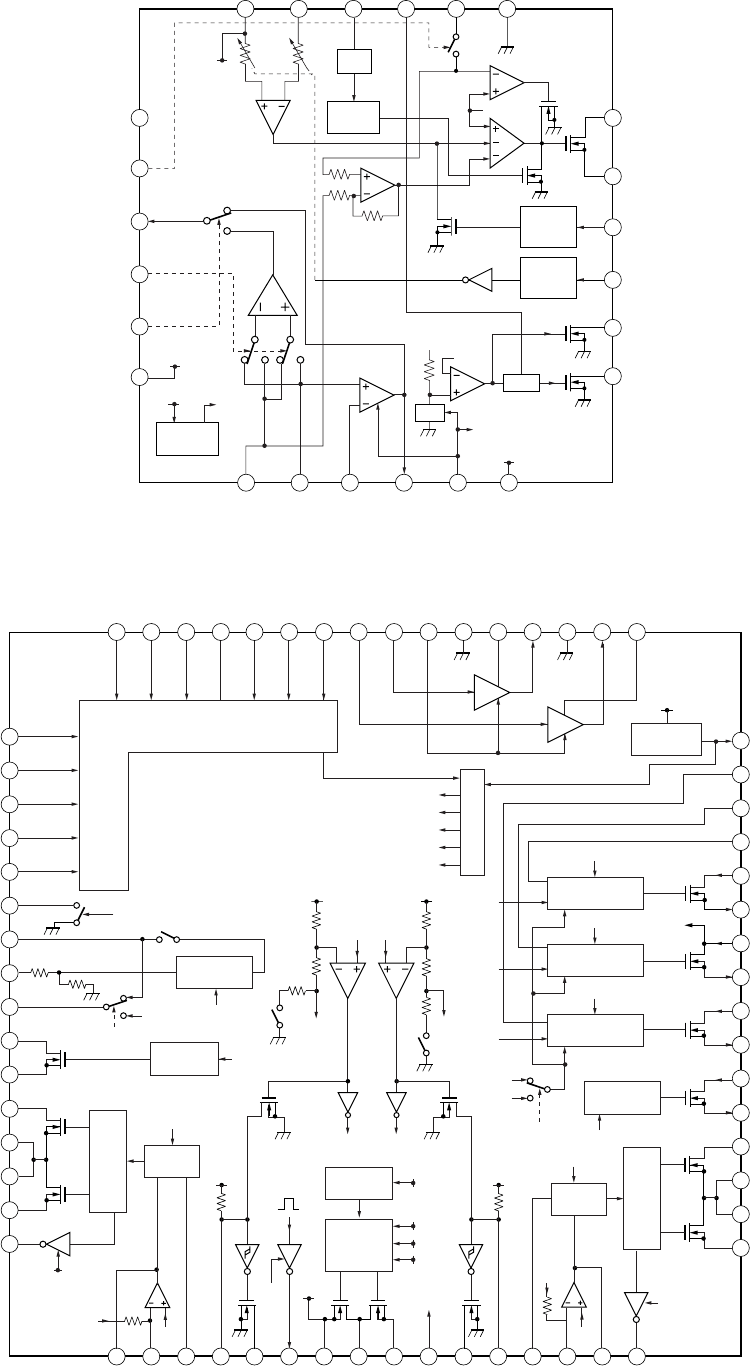
30
MZ-E10
6-8. IC BLOCK DIAGRAMS
IC951 SC901582EPR2
IC901 SC901580EPR2
1
FFCLR1
2
XWK4
3
XWK3
4
XWK2
5
XWK1
6
VRMC
12
VO1
13
L1
14
L1
15
PGND11
16
17
VC1G
RF1
VMODE
REF2
18
INM1
19
DTC1
20
CRST1
21
XRST1
22
CIL
23
VG
24
LG
25
PGND3
VB
26
XRST2
27
CRST2
28
DTC2
29
INM2
30 31
RF2
32
VC2G
7
LVB
8
HVB
9
VSTB
10
VC1
11
VCO1
48 VREF
47 REGC3
46 REGC2
45 REGC1
44 REGI1
43 REGO1
37 VCO2
36 VO2
35 L2
34 L2
33 PGND2
42 VC2
41 REGO2
40 REGI3
39 REGO3
38 CVIN
64
SLEEP
63
CLK
62
SEQSEL
61
WDT
60
SCK
59
STRB
58
DATA
57
HPI2
56
HPI1
55
MUTEON
54
GND
53
VHP1
52
HP1
51
PGND4
50
HP2
49
VHP2
PWM
START-UP
SET-UP
DC/DC
CONVERTOR
SET-UP
PRE DRIVER
SERIES PASS
REGULATOR1
CONTROL BANDGAP
REFERENCE
REF DAC
SERIES PASS
REGULATOR2
SERIES PASS
REGULATOR3
POWER
AWITCH 2
POWER
AWITCH 1
LVB
DRIVER
REF1
REF2
REF3
REF3
REF4
REF5
XRST2
XRST2
FFCLR
XRST1
XRST1
REF4
REF5
VC2
VC
(HP AMP)
AMP1
AM2
VC2
VC2
VF2VF1
VG
XRST2
XRST2XRST1
XRST1
SEQSEL
VG
VG
XRST1
VB
VB
VG
VB
VC
VG
VG
VC
VG
REF2
VF2
PWM
SET-UP
PRE DRIVER
XRST1
VC
VC
VF2
REF1
REF2
(VCC)
(VCC)
1
2
3
4
5
6
7 8 9 10 11 12
18
19
17
16
15
14
24 23 22 21 20 19
DELAY
VCR
TIME
DIVIDER
OSC
LOGIC
SIGNAL
RECEIVER
VOLTAGE
REFERENCE
LOGIC
SIGNAL
RECEIVER
VO
VREF
NSW1
VI2
VI
VG
N3
N2
N1
VI
CAP_C_LIM
VI2DET
A/D
I_SEL
AD_SEL
VI2
RF1
GND
I_CTL1
I_CTL2
WK_DET
PWR_WAKE
VREF
VREF
SW4
SW5
SW6
NSW4
NSW3
BATT
SEL
VO
VBAT
IN2-
OUT2
BAT_SEL
VG
VI
IN1
WDT
PWT
CHG_CTL
GND
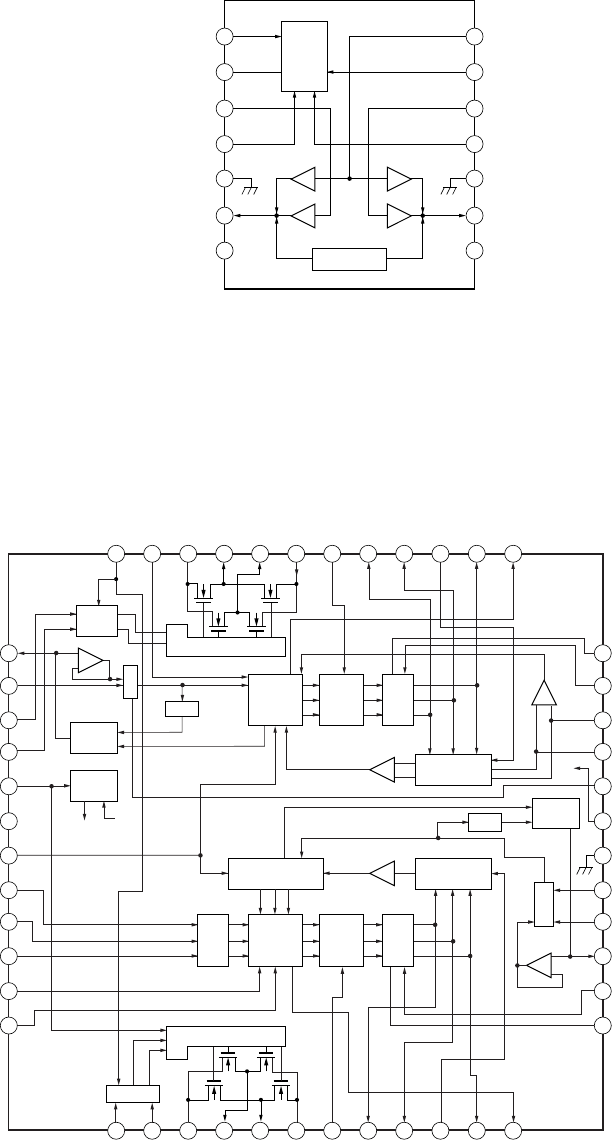
31
MZ-E10
IC551 CXA8125ER-TBM-E
1
SPPD
2
SPMAX
3
IN2F
4
IN2R
5
VG1
6
VCC
7
CLK
8
S1
VG
SINK
PRI DRIVER
9
S2
10
S3
11
SEL2
12
SEL1
13
IN1F
14
IN1R
15
PGND1
16
OUT1R
17
OUT1F
18
VS1
19
SLPWM
20
SWO
21
SVO
22
SLCOM
23
SUO
24
SLFG
48
S/S
47
SP BR
46
PGND2
45
OUT2R
44
OUTF2
43
VS2
42
SPPWM
41
WOUT
40
VOUT
39
SPCOM
38
UOUT
37
SPFG
36 SPGND
35 SPVS
34 SPCIN
33 SPIL
32 SPVCO
31 VG2
30 GND
29 SLMAX
28 SLVCO
27 SLPD
26 SLVS
25 SLGND
LOGIC
PHASE
COMP.
REG.
PHASE
COMP.
LOGIC
SENSORLESS
LOGIC WAVE
MIX
LOGIC
DRIVER
LOGIC
1/N
1/N
VCO
SEL
SLED
PRE
DRIVE
DRIVER
SEL
SLED
PRE
DRIVE
PRE DRIVE
PRE DRIVE
VG
WAVE
MIX
IC301 NJU8713V-TE2
1
2
3
4
7
5
6
14
13
12
11
8
10
9
OUTPUT
CONTROL
BPZ OUTPUT
NCK
VSS
IN1
EN1
VSS 0
OUT 1
VDD 0 VDD
BEEP
VDD
IN2
EN2
VSS 0
OUT 2
VDD 0VDD
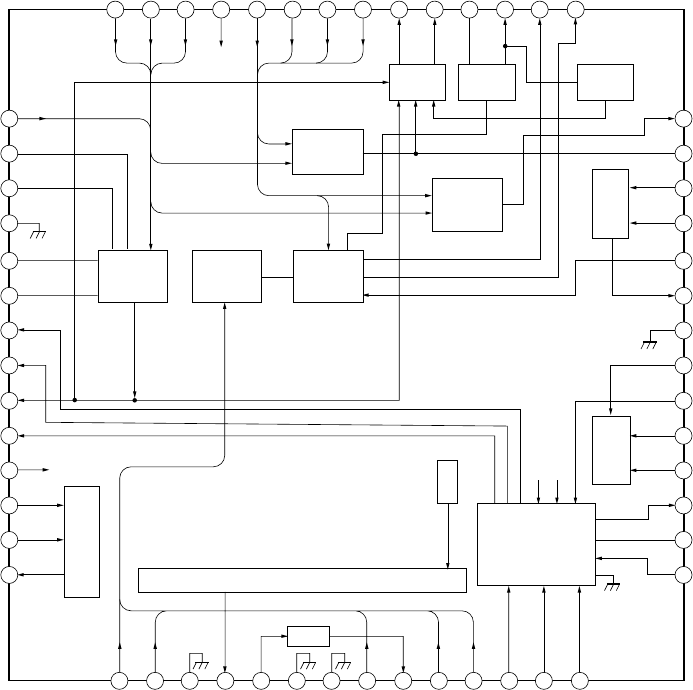
32
MZ-E10
IC501 SN761058ZQL
1
IX
2
PS
3
EQ
4
A GND
5
OFC-C1
6
OFC-C2
7
VREF10
8
VC
9
RFO
10
VREF09
11
AVCC2 AVCC2
AVCC
AVCC2
12
PD-NI
13
PD-I
14
14-O
D-C
A-C
AGND
SMPN
ADIP-IN
AGND
AGND
WPP-LPF
ADFG
CON
CCSL2
CLK
CPGND
NC
56 55 54 53 52 35 50 49 48
PEAK/
BOTM
47 46 45
42 FE
41 ABCD
40 RFI
39 ASSY
37 EFMO
DGND
RESET
34 VGIN
33 SBUS
32 SCK
CPOUT
CP
DVCC
IY
JY
JX
AVCC
AVCC
C
B
A
D
PEAK
BOTM
TON-C
OFTRK
PPON
TE
44 43
15 16 17 18 19 20 21 22 23 24 25 26 27 28
31
30
29
35
36
38 CIG
ABCD
T-ON
EFM
COMP.
SERIAL
I/F
POWER
SUPPLY
SIGNAL MONITOR
OFTRK
FE
TPP/WPPRF
A+B+C+D
I+J
NPP
TON
CSL
AW+DW
TONE PEAK
TON BOTM
ADIP
TE
TWP-P
PK/BTM
AW
CSLO
VREF
A-C
D-C
OFTTH
PD-NI
ADIP-BPF
TEMP
ADIP
APC
TE
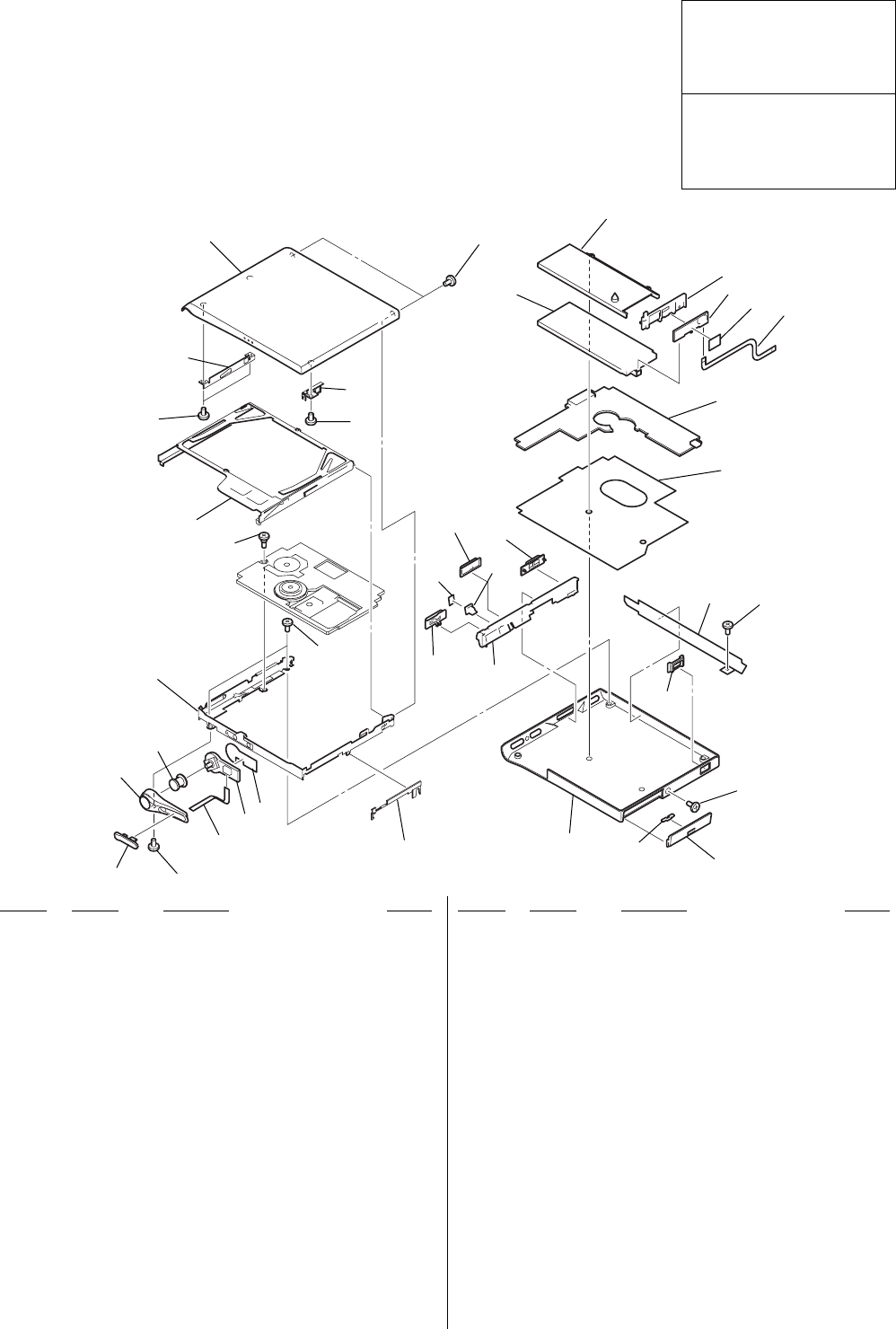
33
MZ-E10
SECTION 7
EXPLODED VIEWS
NOTE :
•-XX, -X mean standardized parts, so they
may have some difference from the original
one.
•Color indication of Appearance Parts
Example :
KNOB, BALANCE (WHITE) ••• (RED)
↑↑
Parts color Cabinet's color
•Items marked “ * ”are not stocked since they
are seldom required for routine service. Some
delay should be anticipated when ordering
these items.
•The mechanical parts with no reference
number in the exploded views are not
supplied.
•Hardware (# mark) list and accessories are
given in the last of this parts list.
Ref. No. Part No. Description Remark Ref. No. Part No. Description Remark
7-1. MAIN SECTION
•Abbreviation
CND : Canadian
HK : Hong Kong
JEW : Tourist
KR : Korean
9
10
11
55
5
12
14
15
16
17
18
19
20
21
22
23
24
25
26
27
28
29
30
31
32
13 5
8
7
65
4
32
1
5
5
33
The components identified by
mark 0 or dotted line with mark
0 are critical for safety.
Replace only with part number
specified.
Les composants identifiés par une
marque 0 sont critiques pour la
sécurité.
Ne les remplacer que par une
piéce portant le numéro spécifié.
13-248-142-01 PLATE, RETAINER
23-246-315-01 SHEET (CONTROL)
*3A-3178-965-A CONTROL BOARD, COMPLETE
41-686-493-11 PWB, SWITCH FLEXIBLE
53-234-449-07 SCREW (M1.4)
63-246-314-01 KNOB (OPEN)
73-246-313-01 COVER (CONTROL)
83-246-312-01 BUTTON (CONTROL)
9X-3382-635-1 BRACKET ASSY
10 3-246-203-01 SCREW, STEP
11 X-3382-636-1 HOLDER ASSY
12 3-246-318-01 BRACKET (STOP)
13 X-3382-787-1 PANEL ASSY (S), UPPER
14 3-246-319-01 BRACKET (R)
15 1-756-318-21 BATTERY, LITHIUM ION STORAGE (US, CND)
15 1-756-318-31 BATTERY, LITHIUM ION STORAGE
(AEP, UK, HK, JEW, KR)
16 3-246-322-01 CASE, BATTERY
17 3-246-323-01 RETAINER, BATTERY
*18 A-3178-966-A POWER BOARD, COMPLETE
19 1-686-494-11 PWB, POWER RELAY FLEXIBLE
*20 A-3178-957-A MAIN BOARD ASSY
21 3-246-305-01 SHEET (INSULATING)
22 3-250-833-01 SHEET (BLIND)
23 3-246-306-01 ESCUTCHEON
24 3-250-169-01 LID (DC), BATTERY CASE
25 3-246-325-01 KNOB (POWER)
26 3-246-304-21 PANEL (LOWER) (JEW,KR)
26 3-246-304-31 PANEL (LOWER) (AEP,UK,HK,US,CND)
27 3-246-310-01 COVER (L)
28 3-246-308-01 KNOB (HOLD)
29 3-249-753-01 SHEET (LED)
30 3-246-307-01 BUTTON (GROUP)
31 3-246-309-01 WINDOW (LED)
32 3-246-311-01 STRAP HOLE
33 3-250-176-01 SHEET (POWER PC BOARD)
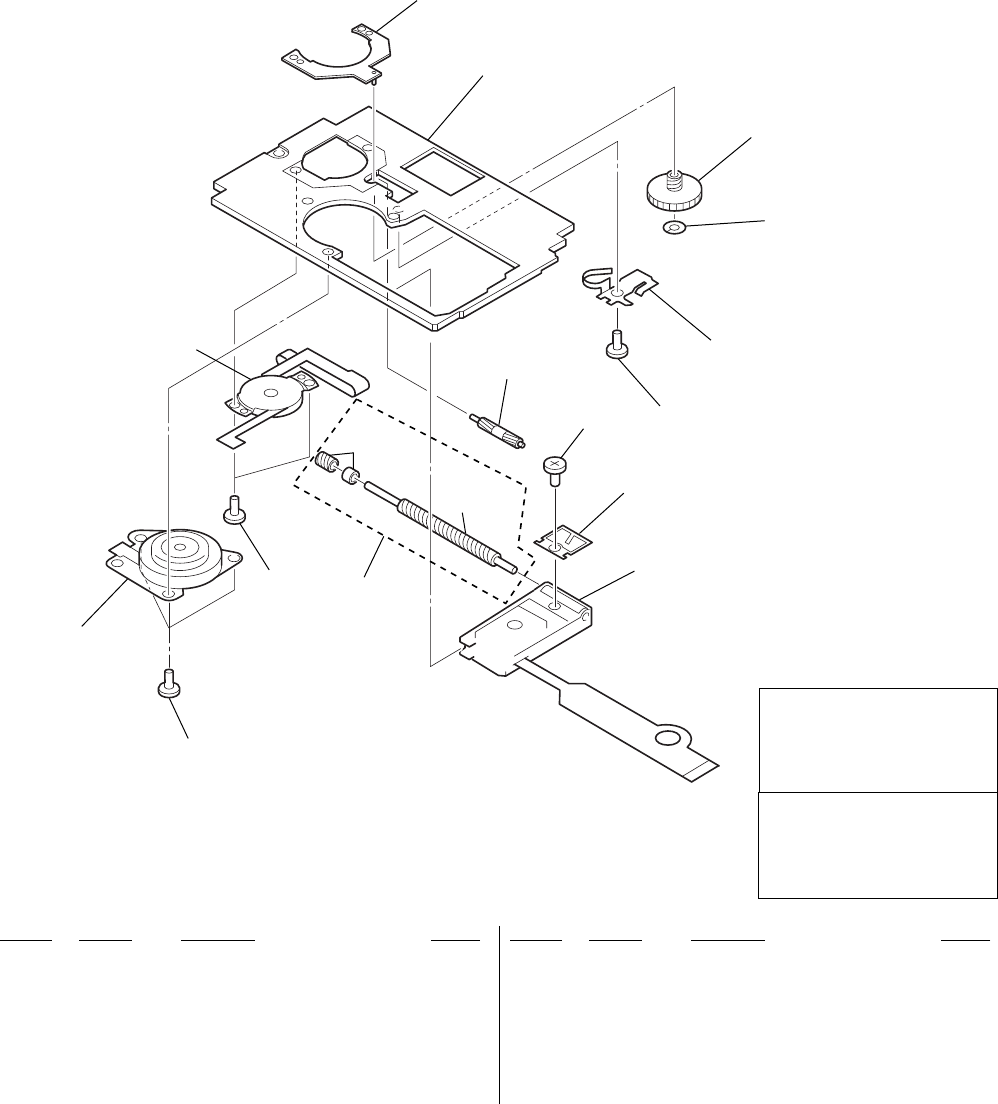
34
MZ-E10
Ref. No. Part No. Description Remark Ref. No. Part No. Description Remark
7-2. MECHANISM DECK SECTION
(MT-MZE10-184)
52 60
53
54
59
52 51
61
58
57
56
55
51
M901
M902
not
supplied
not
supplied
51 3-225-278-02 SCREW, TAPPING
52 3-225-996-17 SCREW (M1.4)(EG),PRECISION PAN
53 X-3382-398-1 BASE ASSY, MOTOR
*54 3-244-870-01 CHASSIS
55 3-244-882-01 GEAR (SA)
56 3-338-645-31 WASHER (0.8-2.5)
57 3-244-880-01 SPRING, THRUST DETENT
058 X-3383-261-1 OPTICAL PICK-UP ASSY (ABX-1ES)
59 3-244-883-01 GEAR (SB)
60 A-3174-607-A SCREW BLOCK ASSY, LEAD
61 3-244-879-01 SPRING, RACK
M901 8-835-782-01 MOTOR, DC SSM18D (SPINDLE)
M902 8-835-783-01 MOTOR, DC SSM21B (SLED)
The components identified by
mark 0 or dotted line with mark
0 are critical for safety.
Replace only with part number
specified.
Les composants identifiés par une
marque 0 sont critiques pour la
sécurité.
Ne les remplacer que par une
piéce portant le numéro spécifié.

35
MZ-E10
NOTE :
•Due to standardization, replacements in the
parts list may be different from the parts
specified in the diagrams or the components
used on the set.
•-XX, -X mean standardized parts, so they
may have some difference from the original
one.
•RESISTORS
All resistors are in ohms
METAL : Metal-film resistor
METAL OXIDE :Metal oxide-film resistor
F : nonflammable
•Items marked “ * ”are not stocked since
they are seldom required for routine service.
Some delay should be anticipated when
ordering these items.
•SEMICONDUCTORS
In each case, u : µ, for example :
uA.... : µA.... , uPA.... : µPA....
uPB.... : µPB.... , uPC.... : µPC....
uPD.... : µPD....
•CAPACITORS
uF : µF
•COILS
uH : µH
When indicating parts by reference num-
ber, please include the board.
SECTION 8
ELECTRICAL PARTS LIST
Ref. No. Part No. Description Remark Ref. No. Part No. Description Remark
MAIN
•Abbreviation
CND : Canadian
HK : Hong Kong
JEW : Tourist
KR : Korean
The components identified by mark 0
or dotted line with mark 0 are critical
for safety.
Replace only with part number speci-
fied.
Les composants identifiés par une
marque 0 sont critiques pour la sécurité.
Ne les remplacer que par une piéce
portant le numéro spécifié.
*A-3178-957-A MAIN BOARD ASSY
**************
1-686-494-11 POWER RELAY FLEXIBLE BOARD
< CAPACITOR >
C101 1-127-715-91 CERAMIC CHIP 0.22uF 10% 16V
C102 1-135-868-91 TANTAL. CHIP 220uF 20% 2.5V
C104 1-107-820-11 CERAMIC CHIP 0.1uF 16V
C201 1-127-715-91 CERAMIC CHIP 0.22uF 10% 16V
C202 1-135-868-91 TANTAL. CHIP 220uF 20% 2.5V
C204 1-107-820-11 CERAMIC CHIP 0.1uF 16V
C301 1-107-820-11 CERAMIC CHIP 0.1uF 16V
C302 1-137-858-11 TANTAL. CHIP 47uF 20% 6.3V
C303 1-107-820-11 CERAMIC CHIP 0.1uF 16V
C304 1-119-923-81 CERAMIC CHIP 0.047uF 10% 10V
C305 1-137-701-11 TANTAL. CHIP 4.7uF 20% 10V
C306 1-125-891-11 CERAMIC CHIP 0.47uF 10% 10V
C307 1-125-837-91 CERAMIC CHIP 1uF 10% 6.3V
C308 1-127-895-91 TANTAL. CHIP 22uF 20% 4V
C309 1-107-826-11 CERAMIC CHIP 0.1uF 10% 16V
C310 1-137-859-11 TANTAL. CHIP 220uF 20% 4V
C311 1-125-891-11 CERAMIC CHIP 0.47uF 10% 10V
C312 1-164-850-11 CERAMIC CHIP 10PF 0.50PF 50V
C501 1-164-850-11 CERAMIC CHIP 10PF 0.50PF 50V
C502 1-164-850-11 CERAMIC CHIP 10PF 0.50PF 50V
C503 1-164-939-11 CERAMIC CHIP 0.0022uF 10% 50V
C505 1-125-777-11 CERAMIC CHIP 0.1uF 10% 10V
C506 1-164-941-11 CERAMIC CHIP 0.0047uF 10% 16V
C507 1-125-777-11 CERAMIC CHIP 0.1uF 10% 10V
C508 1-164-939-11 CERAMIC CHIP 0.0022uF 10% 50V
C509 1-125-777-11 CERAMIC CHIP 0.1uF 10% 10V
C510 1-117-919-11 TANTAL. CHIP 10uF 20% 6.3V
C511 1-137-762-91 TANTALUM 10uF 20% 4V
C512 1-164-941-11 CERAMIC CHIP 0.0047uF 10% 16V
C513 1-164-941-11 CERAMIC CHIP 0.0047uF 10% 16V
C515 1-107-819-11 CERAMIC CHIP 0.022uF 10% 16V
C518 1-119-923-81 CERAMIC CHIP 0.047uF 10% 10V
C519 1-125-837-91 CERAMIC CHIP 1uF 10% 6.3V
C520 1-125-837-91 CERAMIC CHIP 1uF 10% 6.3V
C523 1-164-943-11 CERAMIC CHIP 0.01uF 10% 16V
C525 1-164-943-11 CERAMIC CHIP 0.01uF 10% 16V
C526 1-125-777-11 CERAMIC CHIP 0.1uF 10% 10V
C527 1-125-777-11 CERAMIC CHIP 0.1uF 10% 10V
C532 1-164-858-11 CERAMIC CHIP 22PF 5% 50V
C533 1-164-858-11 CERAMIC CHIP 22PF 5% 50V
C534 1-164-858-11 CERAMIC CHIP 22PF 5% 50V
C535 1-164-858-11 CERAMIC CHIP 22PF 5% 50V
C536 1-119-923-81 CERAMIC CHIP 0.047uF 10% 10V
C551 1-107-820-11 CERAMIC CHIP 0.1uF 16V
C552 1-107-820-11 CERAMIC CHIP 0.1uF 16V
C553 1-125-891-11 CERAMIC CHIP 0.47uF 10% 10V
C554 1-164-935-11 CERAMIC CHIP 470PF 10% 50V
C555 1-127-715-91 CERAMIC CHIP 0.22uF 10% 16V
C556 1-164-939-11 CERAMIC CHIP 0.0022uF 10% 50V
C557 1-125-838-11 CERAMIC CHIP 2.2uF 10% 6.3V
C558 1-164-937-11 CERAMIC CHIP 0.001uF 10% 50V
C601 1-107-820-11 CERAMIC CHIP 0.1uF 16V
C603 1-107-820-11 CERAMIC CHIP 0.1uF 16V
C604 1-125-777-11 CERAMIC CHIP 0.1uF 10% 10V
C605 1-107-820-11 CERAMIC CHIP 0.1uF 16V
C606 1-125-777-11 CERAMIC CHIP 0.1uF 10% 10V
C607 1-107-820-11 CERAMIC CHIP 0.1uF 16V
C608 1-119-923-81 CERAMIC CHIP 0.047uF 10% 10V
C609 1-107-820-11 CERAMIC CHIP 0.1uF 16V
C610 1-107-820-11 CERAMIC CHIP 0.1uF 16V
C611 1-164-937-11 CERAMIC CHIP 0.001uF 10% 50V
C612 1-107-820-11 CERAMIC CHIP 0.1uF 16V
C613 1-119-923-81 CERAMIC CHIP 0.047uF 10% 10V
C614 1-125-777-11 CERAMIC CHIP 0.1uF 10% 10V
C616 1-125-777-11 CERAMIC CHIP 0.1uF 10% 10V
C617 1-107-820-11 CERAMIC CHIP 0.1uF 16V
C618 1-164-935-11 CERAMIC CHIP 470PF 10% 50V
C619 1-125-777-11 CERAMIC CHIP 0.1uF 10% 10V
C620 1-164-941-11 CERAMIC CHIP 0.0047uF 10% 16V
C621 1-125-777-11 CERAMIC CHIP 0.1uF 10% 10V
C622 1-119-923-81 CERAMIC CHIP 0.047uF 10% 10V
C626 1-107-819-11 CERAMIC CHIP 0.022uF 10% 16V
C628 1-119-923-81 CERAMIC CHIP 0.047uF 10% 10V
C801 1-107-820-11 CERAMIC CHIP 0.1uF 16V
C803 1-164-935-11 CERAMIC CHIP 470PF 10% 50V
C804 1-164-935-11 CERAMIC CHIP 470PF 10% 50V
C805 1-164-943-11 CERAMIC CHIP 0.01uF 10% 16V
C851 1-107-820-11 CERAMIC CHIP 0.1uF 16V
C852 1-107-820-11 CERAMIC CHIP 0.1uF 16V
C901 1-125-777-11 CERAMIC CHIP 0.1uF 10% 10V

36
MZ-E10
Ref. No. Part No. Description Remark Ref. No. Part No. Description Remark
MAIN
@ Replacement of IC501 and IC601 used in this set requires a
special tool.
C902 1-135-837-91 TANTAL. CHIP 22uF 20% 6.3V
C903 1-135-837-91 TANTAL. CHIP 22uF 20% 6.3V
C904 1-164-935-11 CERAMIC CHIP 470PF 10% 50V
C905 1-164-943-11 CERAMIC CHIP 0.01uF 10% 16V
C906 1-164-937-11 CERAMIC CHIP 0.001uF 10% 50V
C907 1-164-943-11 CERAMIC CHIP 0.01uF 10% 16V
C908 1-137-858-11 TANTAL. CHIP 47uF 20% 6.3V
C909 1-100-396-91 TANTAL. CHIP 4.7uF 20% 16V
C910 1-125-777-11 CERAMIC CHIP 0.1uF 10% 10V
C911 1-164-943-11 CERAMIC CHIP 0.01uF 10% 16V
C912 1-164-943-11 CERAMIC CHIP 0.01uF 10% 16V
C913 1-119-923-81 CERAMIC CHIP 0.047uF 10% 10V
C915 1-164-935-11 CERAMIC CHIP 470PF 10% 50V
C916 1-100-352-91 CHIP CERAMIC 1uF 16V
C917 1-135-837-91 TANTAL. CHIP 22uF 20% 6.3V
C920 1-125-777-11 CERAMIC CHIP 0.1uF 10% 10V
C921 1-100-352-91 CHIP CERAMIC 1uF 16V
C922 1-165-799-11 TANTAL. CHIP 22uF 20% 4V
C923 1-125-837-91 CERAMIC CHIP 1uF 10% 6.3V
C924 1-127-573-11 CERAMIC CHIP 1uF 10% 16V
C925 1-125-777-11 CERAMIC CHIP 0.1uF 10% 10V
C926 1-135-837-91 TANTAL. CHIP 22uF 20% 6.3V
C928 1-107-820-11 CERAMIC CHIP 0.1uF 16V
C929 1-107-820-11 CERAMIC CHIP 0.1uF 16V
C951 1-137-934-91 TANTAL. CHIP 47uF 20% 10V
C952 1-165-897-11 TANTAL. CHIP 22uF 20% 10V
C953 1-107-820-11 CERAMIC CHIP 0.1uF 16V
C954 1-164-941-11 CERAMIC CHIP 0.0047uF 10% 16V
C955 1-127-692-11 CERAMIC CHIP 10uF 10% 16V
C956 1-107-820-11 CERAMIC CHIP 0.1uF 16V
C957 1-125-777-11 CERAMIC CHIP 0.1uF 10% 10V
C958 1-100-352-91 CHIP CERAMIC 1uF 16V
C959 1-125-777-11 CERAMIC CHIP 0.1uF 10% 10V
C960 1-125-777-11 CERAMIC CHIP 0.1uF 10% 10V
< CONNECTOR >
CN801 1-816-846-21 CONNECTOR, FPC (ZIF)
CN951 1-816-868-21 CONNECTOR (POWER JACK)
CN952 1-816-922-21 CONNECTOR, FPC (ZIF)
< DIODE >
D101 8-719-056-58 DIODE MAZS027008SO
D201 8-719-056-58 DIODE MAZS027008SO
D301 8-719-056-58 DIODE MAZS027008SO
D801 6-500-444-01 DIODE TLRE1008A(T04) (GROUP)
D802 6-500-445-01 DIODE TLOE1008A(T04) (GROUP)
D803 6-500-446-01 DIODE TLGE1008A(T04) (GROUP)
D851 8-719-077-43 DIODE MAZZ068H01S0
D902 8-719-420-51 DIODE MA729
D903 8-719-071-45 DIODE MA116-(TX).SO
D904 8-719-071-45 DIODE MA116-(TX).SO
D951 6-500-369-01 DIODE FT1J3TP
< FERRITE BEAD >
FB101 1-216-864-11 METAL CHIP 0 5% 1/10W
FB201 1-216-864-11 METAL CHIP 0 5% 1/10W
FB601 1-414-227-11 FERRITE 0uH
FB801 1-414-228-11 FERRITE 0uH
FB802 1-414-228-11 FERRITE 0uH
FB803 1-469-082-21 FERRITE 0uH
< IC >
IC301 6-703-631-01 IC NJU8713V-TE2
IC302 6-703-652-01 IC LMV301MGX/NOPB
@IC501 6-702-869-01 IC SN761058ZQL
IC551 8-835-792-01 IC CXA8125ER-TBM-E
@IC601 6-802-226-01 IC LC896442-VH4-16-E
IC801 8-759-680-85 IC AK6417AL-L
IC901 6-702-865-01 IC SC901580EPR2
IC951 6-702-867-01 IC SC901582EPR2
IC952 8-759-824-57 IC XC61CN3002NR
< JACK >
J301 1-816-845-21 JACK 7P (i)
< COIL >
L101 1-412-032-11 INDUCTOR CHIP 100uH
L201 1-412-032-11 INDUCTOR CHIP 100uH
L501 1-469-570-21 INDUCTOR 10uH
L551 1-469-846-11 INDUCTOR 47uH
L552 1-400-353-21 INDUCTOR 22uH
L901 1-424-929-21 INDUCTOR 150uH
L902 1-412-033-11 INDUCTOR CHIP 220uH
L903 1-424-929-21 INDUCTOR 150uH
L904 1-414-398-11 INDUCTOR 10uH
< TRANSISTOR >
Q102 8-729-050-32 TRANSISTOR 2SC5585TL
Q202 8-729-050-32 TRANSISTOR 2SC5585TL
Q301 6-550-376-01 TRANSISTOR UMX1N-TN
Q302 8-729-055-85 TRANSISTOR UMT1N-TN
Q303 6-550-527-01 TRANSISTOR NTHD5904T1
Q304 8-729-037-61 TRANSISTOR UN9113J-(TX).SO
Q501 8-729-922-10 TRANSISTOR 2SA1577-QR
Q802 8-729-427-49 TRANSISTOR XP4214-TXE
Q901 6-550-561-01 TRANSISTOR MMBF0202PLT1
Q902 6-550-561-01 TRANSISTOR MMBF0202PLT1
Q903 8-729-048-92 TRANSISTOR HAT1043M-EL
Q904 8-729-048-77 TRANSISTOR XP4313-(TX).SO
Q951 6-550-326-01 TRANSISTOR FZT968TA
Q952 8-729-037-61 TRANSISTOR UN9113J-(TX).SO
Q953 8-729-042-27 TRANSISTOR 2SD2216J-QR(TX).SO
< RESISTOR >
R102 1-218-961-11 RES-CHIP 4.7K 5% 1/16W
R104 1-218-957-11 RES-CHIP 2.2K 5% 1/16W
R202 1-218-961-11 RES-CHIP 4.7K 5% 1/16W
R204 1-218-957-11 RES-CHIP 2.2K 5% 1/16W
R301 1-218-965-11 RES-CHIP 10K 5% 1/16W
R302 1-218-969-11 RES-CHIP 22K 5% 1/16W
R303 1-218-965-11 RES-CHIP 10K 5% 1/16W
R304 1-218-957-11 RES-CHIP 2.2K 5% 1/16W
R305 1-218-965-11 RES-CHIP 10K 5% 1/16W
R306 1-218-941-81 RES-CHIP 100 5% 1/16W
R307 1-218-973-11 RES-CHIP 47K 5% 1/16W
R309 1-208-635-11 RES-CHIP 10 0.5% 1/16W

37
MZ-E10
Ref. No. Part No. Description Remark Ref. No. Part No. Description Remark
MAIN
R310 1-218-990-11 SHORT CHIP 0
R311 1-218-953-11 RES-CHIP 1K 5% 1/16W
R312 1-218-969-11 RES-CHIP 22K 5% 1/16W
R313 1-218-953-11 RES-CHIP 1K 5% 1/16W
R315 1-218-937-11 RES-CHIP 47 5% 1/16W
R317 1-218-989-11 RES-CHIP 1M 5% 1/16W
R318 1-218-989-11 RES-CHIP 1M 5% 1/16W
R501 1-208-707-11 METAL CHIP 10K 0.5% 1/16W
R502 1-208-683-11 METAL CHIP 1K 0.5% 1/16W
R504 1-242-967-81 RES-CHIP 1 5% 1/16W
R505 1-218-977-11 RES-CHIP 100K 5% 1/16W
R506 1-218-990-11 SHORT CHIP 0
R507 1-218-990-11 SHORT CHIP 0
R509 1-218-990-11 SHORT CHIP 0
R510 1-218-965-11 RES-CHIP 10K 5% 1/16W
R511 1-218-965-11 RES-CHIP 10K 5% 1/16W
R513 1-218-990-11 SHORT CHIP 0
R514 1-218-990-11 SHORT CHIP 0
R516 1-208-691-11 METAL CHIP 2.2K 0.5% 1/16W
R518 1-218-990-11 SHORT CHIP 0
R551 1-218-977-11 RES-CHIP 100K 5% 1/16W
R552 1-218-965-11 RES-CHIP 10K 5% 1/16W
R553 1-218-973-11 RES-CHIP 47K 5% 1/16W
R554 1-243-975-81 METAL CHIP 4.7M 5% 1/16W
R561 1-216-801-11 METAL CHIP 22 5% 1/10W
R562 1-216-797-11 METAL CHIP 10 5% 1/10W
R563 1-216-801-11 METAL CHIP 22 5% 1/10W
R564 1-216-805-11 METAL CHIP 47 5% 1/10W
R601 1-208-943-11 METAL CHIP 220K 0.5% 1/16W
R602 1-218-973-11 RES-CHIP 47K 5% 1/16W
R603 1-218-957-11 RES-CHIP 2.2K 5% 1/16W
R605 1-218-989-11 RES-CHIP 1M 5% 1/16W
R606 1-218-990-11 SHORT CHIP 0
R607 1-208-691-11 METAL CHIP 2.2K 0.5% 1/16W
R608 1-218-961-11 RES-CHIP 4.7K 5% 1/16W
R609 1-218-965-11 RES-CHIP 10K 5% 1/16W
R610 1-218-961-11 RES-CHIP 4.7K 5% 1/16W
R611 1-218-957-11 RES-CHIP 2.2K 5% 1/16W
R613 1-218-949-11 RES-CHIP 470 5% 1/16W
R614 1-218-961-11 RES-CHIP 4.7K 5% 1/16W
R615 1-218-965-11 RES-CHIP 10K 5% 1/16W
R617 1-208-943-11 METAL CHIP 220K 0.5% 1/16W
R618 1-218-985-11 METAL CHIP 470K 0.5% 1/16W
R620 1-218-965-11 RES-CHIP 10K 5% 1/16W
R621 1-218-977-11 RES-CHIP 100K 5% 1/16W
R622 1-218-965-11 RES-CHIP 10K 5% 1/16W
R623 1-218-965-11 RES-CHIP 10K 5% 1/16W
R627 1-218-990-11 SHORT CHIP 0
R628 1-218-969-11 RES-CHIP 22K 5% 1/16W
R801 1-218-989-11 RES-CHIP 1M 5% 1/16W
R802 1-218-989-11 RES-CHIP 1M 5% 1/16W
R803 1-218-941-81 RES-CHIP 100 5% 1/16W
R804 1-218-941-81 RES-CHIP 100 5% 1/16W
R817 1-218-945-11 RES-CHIP 220 5% 1/16W
R818 1-244-161-81 RES-CHIP 2.2 5% 1/16W
R819 1-218-949-11 RES-CHIP 470 5% 1/16W
R901 1-218-985-11 RES-CHIP 470K 5% 1/16W
R902 1-218-981-11 RES-CHIP 220K 5% 1/16W
R903 1-208-707-11 METAL CHIP 10K 0.5% 1/16W
R904 1-218-981-11 RES-CHIP 220K 5% 1/16W
R905 1-218-953-11 RES-CHIP 1K 5% 1/16W
R906 1-218-989-11 RES-CHIP 1M 5% 1/16W
R908 1-218-965-11 RES-CHIP 10K 5% 1/16W
R909 1-218-953-11 RES-CHIP 1K 5% 1/16W
R911 1-218-977-11 RES-CHIP 100K 5% 1/16W
R912 1-218-965-11 RES-CHIP 10K 5% 1/16W
R914 1-218-990-11 SHORT CHIP 0
R915 1-218-990-11 SHORT CHIP 0
R916 1-218-985-11 RES-CHIP 470K 5% 1/16W
R917 1-218-981-11 RES-CHIP 220K 5% 1/16W
R918 1-218-981-11 RES-CHIP 220K 5% 1/16W
R919 1-218-989-11 RES-CHIP 1M 5% 1/16W
R921 1-218-990-11 SHORT CHIP 0
R951 1-218-990-11 SHORT CHIP 0
R952 1-218-973-11 RES-CHIP 47K 5% 1/16W
R953 1-218-973-11 RES-CHIP 47K 5% 1/16W
R955 1-218-989-11 RES-CHIP 1M 5% 1/16W
R956 1-245-454-21 METAL FILM (SMD) 0.022(1608)
R957 1-218-941-81 RES-CHIP 100 5% 1/16W
R958 1-218-965-11 RES-CHIP 10K 5% 1/16W
R959 1-245-456-21 METAL FILM (SMD) 1.0(1608)
R961 1-245-457-21 METAL FILM (SMD) 2.2(1608)
R964 1-218-941-11 METAL CHIP 100 0.5% 1/16W
R965 1-218-945-11 METAL CHIP 220 0.5% 1/16W
R967 1-218-957-11 RES-CHIP 2.2K 5% 1/16W
< SWITCH >
S802 1-786-424-21 SWITCH, TACTILE (GROUP)
S803 1-786-443-21 SWITCH, DETECTION (OPEN/CLOSE)
S804 1-786-425-21 SWITCH, SLIDE (HOLD N )
< VIBRATOR >
X601 1-795-561-21 VIBRATOR, CERAMIC (16.9344MHz)
*****************************************************
*A-3178-966-A POWER BOARD, COMPLETE
*********************
< CONNECTOR >
CN953 1-816-937-21 CONNECTOR, FPC (ZIF)
CN954 1-816-922-21 CONNECTOR, FPC (ZIF)
< SWITCH >
S901 1-786-425-21 SWITCH, SLIDE (BUILT-IN BATTERY)
******************************************************
*A-3178-965-A CONTROL BOARD, COMPLETE
**********************
< CONNECTOR >
CN802 1-816-846-21 CONNECTOR, FPC (ZIF)
< RESISTOR >
R811 1-218-957-11 RES-CHIP 2.2K 5% 1/16W
R812 1-218-957-11 RES-CHIP 2.2K 5% 1/16W
R813 1-218-961-11 RES-CHIP 4.7K 5% 1/16W
POWER CONTROL

38
MZ-E10
Ref. No. Part No. Description Remark
R814 1-218-961-11 RES-CHIP 4.7K 5% 1/16W
R815 1-218-965-11 RES-CHIP 10K 5% 1/16W
R816 1-218-965-11 RES-CHIP 10K 5% 1/16W
< SWITCH >
S801 1-786-401-21 SWITCH, TACTILE
(., > N, x, VOL–, VOL+)
******************************************************
MISCELLANEOUS
*************
41-686-493-11 PWB, SWITCH FLEXIBLE
16 1-756-318-11 BATTERY, LITHIUM ION STORAGE
20 1-686-494-11 PWB, POWER RELAY FLEXIBLE
058 X-3383-261-1 OPTICAL PICK-UP ASSY (ABX-1ES)
M901 8-835-782-01 MOTOR, DC SSM18D (SPINDLE)
M902 8-835-783-01 MOTOR, DC SSM21B (SLED)
******************************************************
ACCESSORIES
************
01-477-536-11 ADAPTOR, AC (JEW,KR)
01-477-537-11 ADAPTOR, AC (UK,HK)
01-477-538-11 ADAPTOR, AC (AEP)
01-477-539-11 ADAPTOR, AC (US,CND)
1-477-585-11 REMOTE CONTROL UNIT (RM-MC33ELU)
01-569-007-11 ADAPTOR, CONVERSION 2P (JEW,KR)
1-756-303-11 STAND, CHARGE
1-816-921-11 ADAPTOR, HEADPHONE PC-WM10
3-220-749-01 CASE, CARRYING
3-247-809-01 MANUAL, INSTRUCTION (JAPANESE)(JEW,KR)
3-247-809-11 MANUAL, INSTRUCTION (ENGLISH)
3-247-809-21 MANUAL, INSTRUCTION (FRENCH)
(AEP,JEW,KR)
3-247-809-41 MANUAL, INSTRUCTION (SPANISH)
(AEP,JEW,KR)
3-247-809-51 MANUAL, INSTRUCTION (DUTCH) (AEP)
3-247-809-61 MANUAL, INSTRUCTION (SWEDISH) (AEP)
3-247-809-71 MANUAL, INSTRUCTION (ITALIAN) (AEP)
3-247-809-81 MANUAL, INSTRUCTION (PORTUGUESE)(AEP)
3-247-809-91 MANUAL, INSTRUCTION (FINNISH) (AEP)
3-247-810-11 MANUAL, INSTRUCTION
(TRADITIONAL CHINESE) (UK,HK,JEW,KR)
3-247-810-21 MANUAL, INSTRUCTION (KOREAN) (JEW,KR)
8-953-218-91 RECEIVER MDR-E838SP
3-252-648-01 CLIP (REMOTE CONTROL)
CONTROL
The components identified by mark 0
or dotted line with mark 0 are critical
for safety.
Replace only with part number speci-
fied.
Les composants identifiés par une
marque 0 sont critiques pour la sécurité.
Ne les remplacer que par une piéce
portant le numéro spécifié.

39
MZ-E10
MEMO

REVISION HISTORY
Clicking the version allows you to jump to the revised page.
Also, clicking the version at the upper right on the revised page allows you to jump to the next revised
page.
Ver. Date Description of Revision
1.0 2002.11 New
MZ-E10
