Sound Crush HR-801 Twist Mini Wireless Speaker User Manual
Sound Crush Company Limited Twist Mini Wireless Speaker
User manual
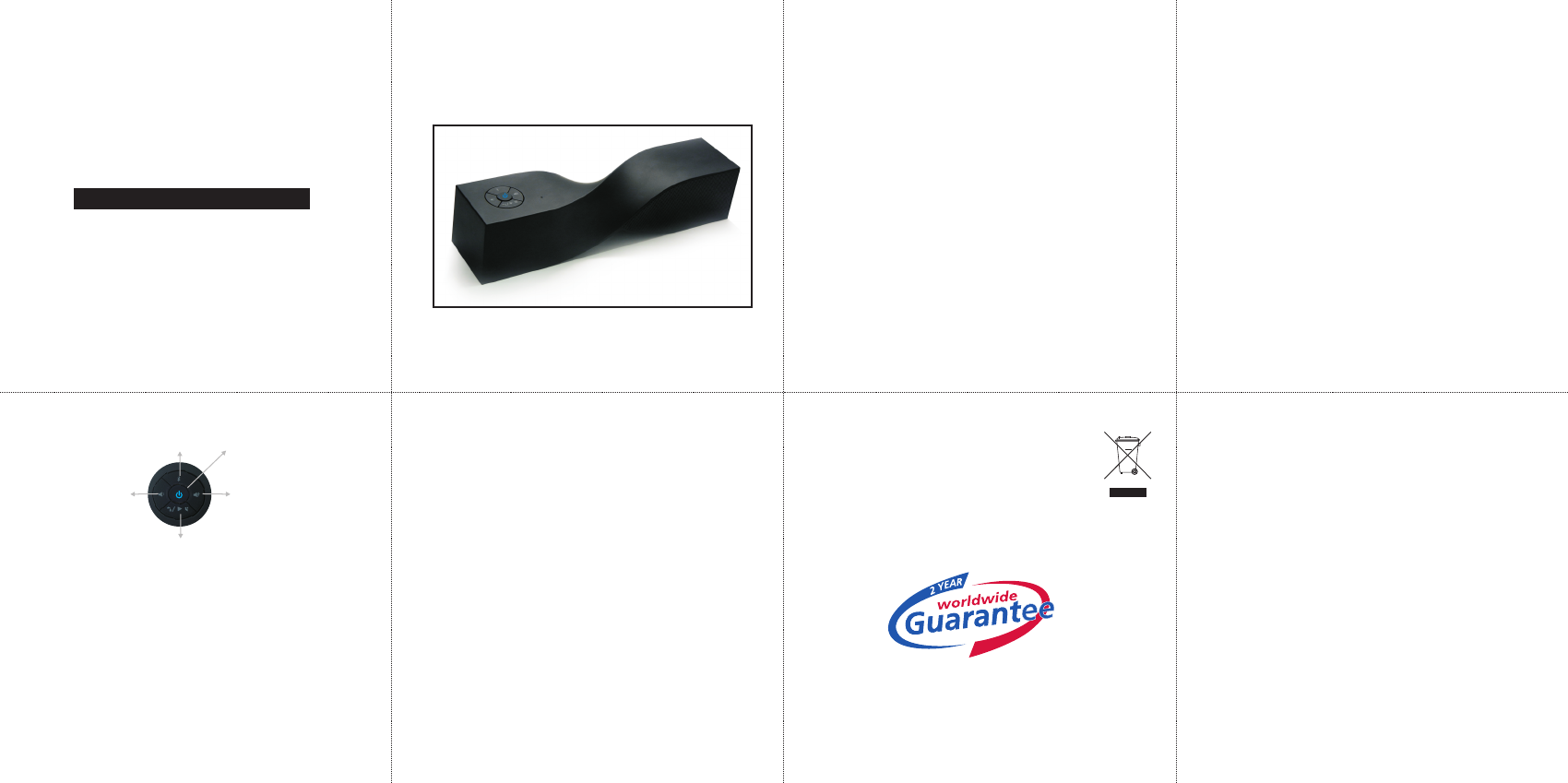
Paring button
Vol controls +
Vol controls-
Play&pause
Hands-free Calling Answer/End button
Power
Hands free Calling
When your phone is connected to th ou can use the speaker a
nds-free device.
To accept a call, push the phone button on the speaker. You can also accept
the call as you usually do on your phone.
Change Volume
Press the volume up or down to adjust to your desired volume. You can also
change the volume on your audio device
Bluetooth button
Press the button to disconnect or reconnect your Bluetooth speaker.
Power LED indicator
When the LED is red the battery is charging.
When the LED is flashing the battery is low.
When the LED is off the battery is charged.
Pause your music
Push the play/pause button to play or pause your music.
Charge the Built-in Li-Ion Battery
Connect the mini USB cable at the back of the speaker. ( USB charging)
Connect the other end of the cable to a USB port or to a USB AC adapter. (
not included)
The red LED indicator will turn red when charging and will turn off when
charging is finished.
Warning
Do not become distracted by this product while driving.
Do not leave the product exposed to a heat source or high temperatures
Do not remove or attempt to remove the Li-Ion battery
How to connect the HR-801 without Bluetooth
1.
2. Turn the speaker on with the main On-Off switch at the back of the speaker.
3. Press the power-mode button on top of the speaker for 3 seconds.
4. The led will turn flash blue-red indicating it is searching , then solid blue
indicating it is in Bluetooth mode. Press the power button once more (short)
the led will turn solid green.
5. Connect the supplied aux cable to the aux input at the back of the speaker.
6. Connect the other end to the headphone output ( 3.5mm) of your
smartphone or other device.
Make sure your speaker is charged ( follow charge instruction)
3. Check the instruction manual of your smartphone or other blue tooth
device and make sure the Bluetooth function is on. Make sure your device is
in search or discover mode.
4. Your device will find u, connect, the led on the speaker will becomes solid
blue.
5. You can now start playing your music.
If at any time in the future you should need to dispose of
thisproduct please note that:
Waste electrical products should not be disposed of with
household waste. Please recycle where facilities exist.
Check with your Local Authority or retailer for recycling
advice. (Waste Electrical and Electronic Equipment Directive)
www.mitone.eu
What's Included:
• Twist Mini Wireless Speaker
• Aux cable 3.5mm
• USB Charging Cable
• User's guide
Specifications
•
• Dimensions (HxWxD ) 18x4.8. x 4.8cm
• Advanced Audio Distribution Profile (A2DP) for wireless music streaming
• Hands-free Audio (HFP) and Headset Profiles (HSP) for hands-free calling
capability
• Range up to 10 meter
• Battery life 4 to 5 hours of playing time depending on volume settings
How to connect th o your Bluetooth device.
1. Make sure your speaker is charged ( follow charge instruction)
2. Press the power-mode button on top of the speaker for 3 seconds.
The led will turn flash blue-red indicating it is searching , then solid blue
indicating it is in Bluetooth mode.
Power Output: 3W
The led indicator is located on the le side of USB charging port of the speaker.
e y
HR-801
sa
h
HR-801
te HR-801
HR-801 Mini
Twist Wireless Speaker
HR-801 Mini
Twist Wireless Speaker
Sound Crush Company Limited
This equipment has been tested and found to comply with the limits for a Class
B digital device, pursuant to part 15 of the FCC Rules. These limits are designed
to provide reasonable protection against harmful interference in a residential
installation. This equipment generates, uses and can radiate radio frequency
energy and, if not installed and used in accordance with the instructions, may
cause harmful interference to radio communications. However, there is no
guarantee that interference will not occur in a particular installation. If this
equipment does cause harmful interference to radio or television reception,
which can be determined by turning the equipment off and on, the user is
encouraged to try to correct the interference by one or more of the following
measures:
• Reorient or relocate the receiving antenna.
• Increase the separation between the equipment and receiver.
• Connect the equipment into an outlet on a circuit different from that to which
the receiver is connected.
• Consult the dealer or an experienced radio/TV technician for help.
Caution: Any changes or modifications to this device not explicitly approved by
manufacturer could void your authority to operate this equipment.
This device complies with part 15 of the FCC Rules. Operation is subject to the
following two conditions: (1) This device may not cause harmful interference,
and (2) this device must accept any interference received, including interference
that may cause undesired operation.
The device has been evaluated to meet general RF exposure requirement. The
device can be used in portable exposure condition without restriction.
This equipment has been tested and found to comply with the limits for a Class B
digital device, pursuant to part 15 of the FCC Rules. These limits are designed to
provide reasonable protection against harmful interference in a residential
installation. This equipment generates, uses and can radiate radio frequency
energy and, if not installed and used in accordance with the instructions, may
cause harmful interference to radio communications. However, there is no
guarantee that interference will not occur in a particular installation. If this
equipment does cause harmful interference to radio or television reception, which
can be determined by turning the equipment off and on, the user is encouraged to
try to correct the interference by one or more of the following measures:
• Reorient or relocate the receiving antenna.
• Increase the separation between the equipment and receiver.
• Connect the equipment into an outlet on a circuit different from that to which
the receiver is connected.
• Consult the dealer or an experienced radio/TV technician for help.
Caution: Any changes or modifications to this device not explicitly approved by
manufacturer could void your authority to operate this equipment.
This device complies with part 15 of the FCC Rules. Operation is subject to the
following two conditions: (1) This device may not cause harmful interference, and
(2) this device must accept any interference received, including interference that
may cause undesired operation.
The device has been evaluated to meet general RF exposure requirement. The
device can be used in portable exposure condition without restriction.