Southco 03103 Wireless RF Keypad User Manual J EA R03 M revC

Southco,. Inc Wireless RF Keypad J EA R03 M revC

Contents

user manual rev

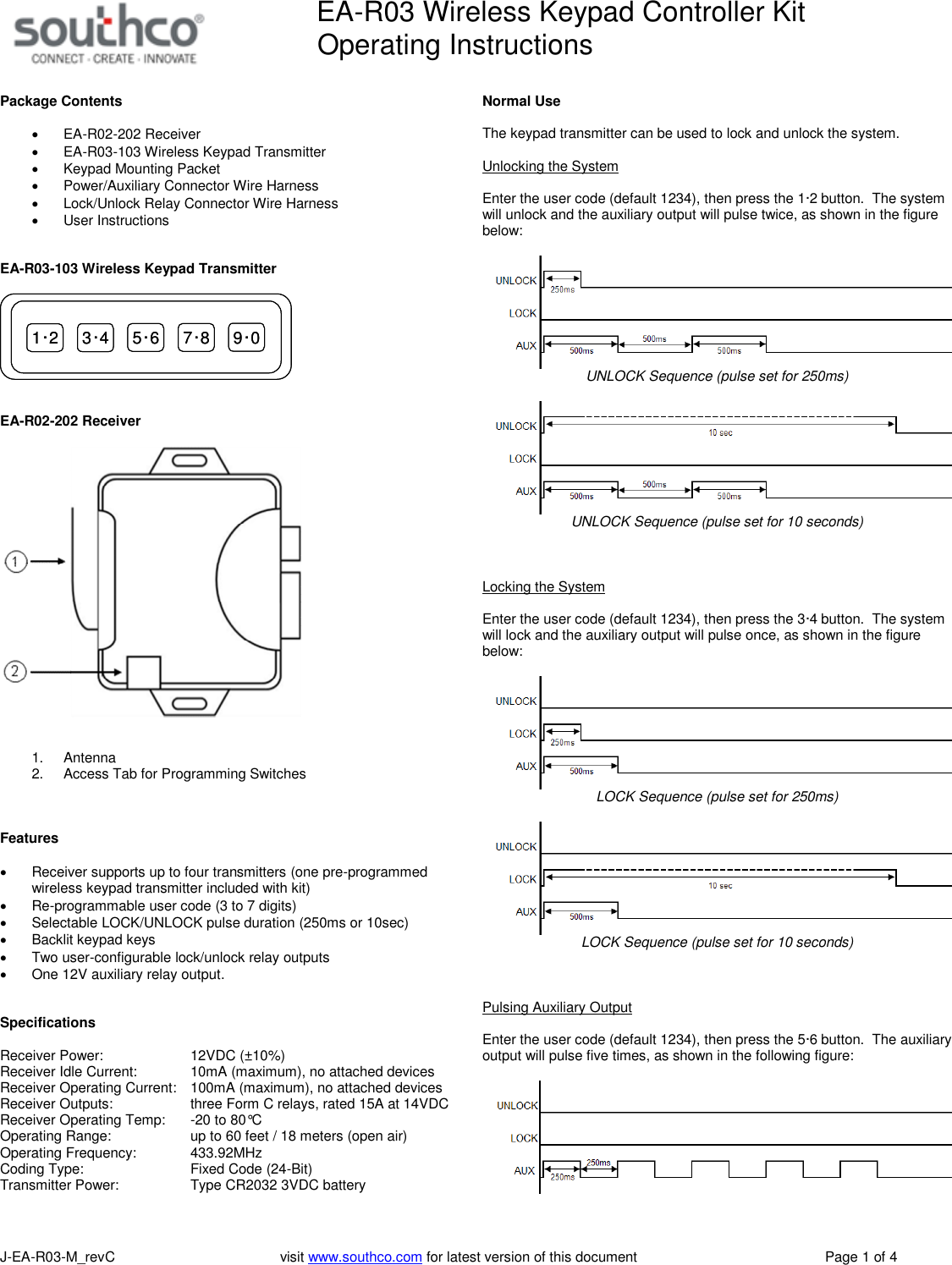
EA-R03 Wireless Keypad Controller KitOperating InstructionsJ-EA-R03-M_revC visit www.southco.com for latest version of this document Page 1 of 4Package ContentsEA-R02-202 ReceiverEA-R03-103 Wireless Keypad TransmitterKeypad Mounting PacketPower/Auxiliary Connector Wire HarnessLock/Unlock Relay Connector Wire HarnessUser InstructionsEA-R03-103 Wireless Keypad Transmitter1·2 3·4 5·6 7·8 9·01·2 3·4 5·6 7·8 9·0EA-R02-202 Receiver1. Antenna2. Access Tab for Programming SwitchesFeaturesReceiver supports up to four transmitters (one pre-programmedwireless keypad transmitter included with kit)Re-programmable user code (3 to 7 digits)Selectable LOCK/UNLOCK pulse duration (250ms or 10sec)Backlit keypad keysTwo user-configurable lock/unlock relay outputsOne 12V auxiliary relay output.SpecificationsReceiver Power: 12VDC (±10%)Receiver Idle Current: 10mA (maximum), no attached devicesReceiver Operating Current: 100mA (maximum), no attached devicesReceiver Outputs: three Form C relays, rated 15A at 14VDCReceiver Operating Temp: -20 to 80°COperating Range: up to 60 feet / 18 meters (open air)Operating Frequency: 433.92MHzCoding Type: Fixed Code (24-Bit)Transmitter Power: Type CR2032 3VDC batteryNormal UseThe keypad transmitter can be used to lock and unlock the system.Unlocking the SystemEnter the user code (default 1234), then press the 1·2 button. The systemwill unlock and the auxiliary output will pulse twice, as shown in the figurebelow:UNLOCK Sequence (pulse set for 250ms)UNLOCK Sequence (pulse set for 10 seconds)Locking the SystemEnter the user code (default 1234), then press the 3·4 button. The systemwill lock and the auxiliary output will pulse once, as shown in the figurebelow:LOCK Sequence (pulse set for 250ms)LOCK Sequence (pulse set for 10 seconds)Pulsing Auxiliary OutputEnter the user code (default 1234), then press the 5·6 button. The auxiliaryoutput will pulse five times, as shown in the following figure:
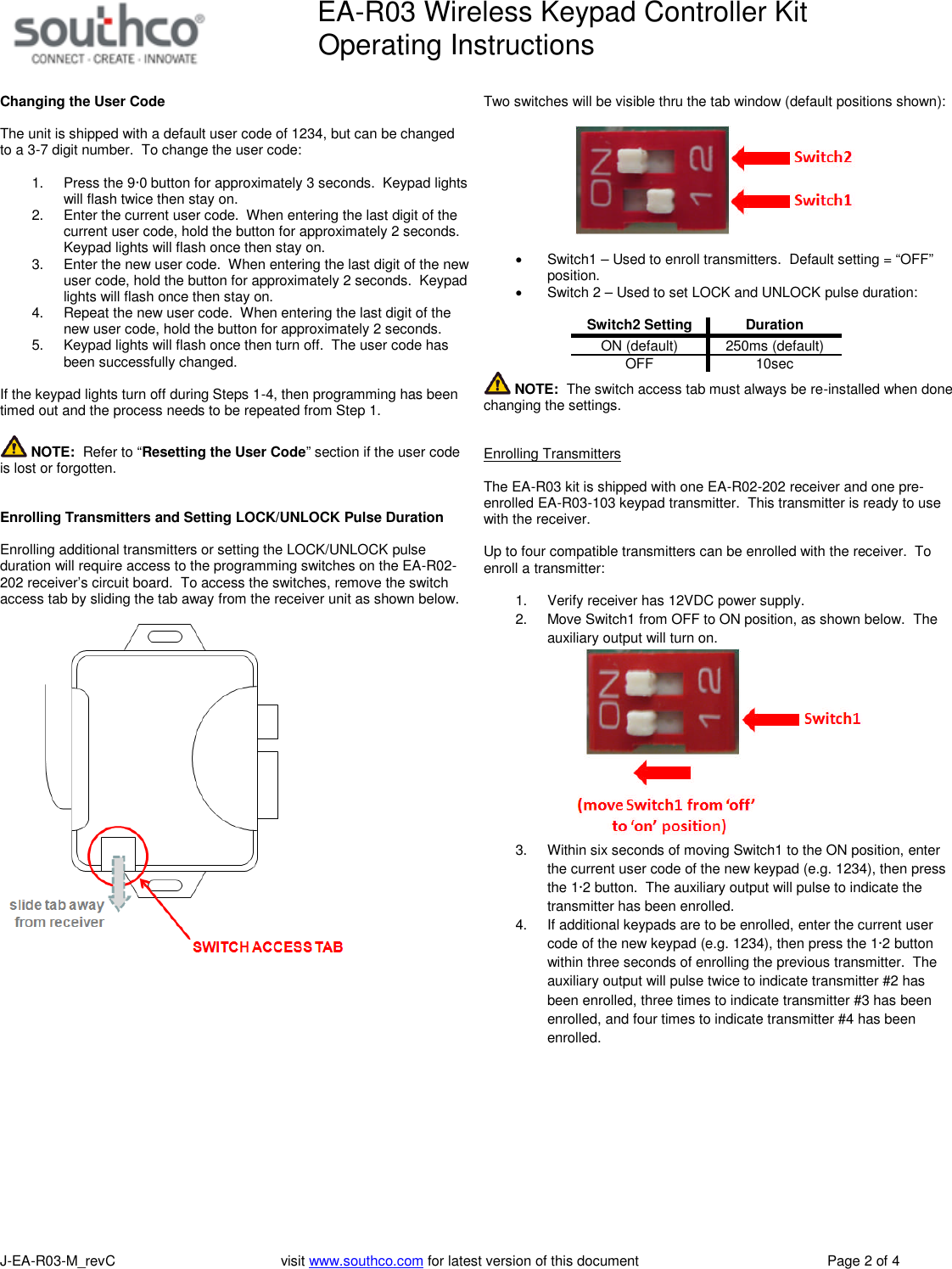
EA-R03 Wireless Keypad Controller KitOperating InstructionsJ-EA-R03-M_revC visit www.southco.com for latest version of this document Page 2 of 4Changing the User CodeThe unit is shipped with a default user code of 1234, but can be changedto a 3-7 digit number. To change the user code:1. Press the 9·0 button for approximately 3 seconds. Keypad lightswill flash twice then stay on.2. Enter the current user code. When entering the last digit of thecurrent user code, hold the button for approximately 2 seconds.Keypad lights will flash once then stay on.3. Enter the new user code. When entering the last digit of the newuser code, hold the button for approximately 2 seconds. Keypadlights will flash once then stay on.4. Repeat the new user code. When entering the last digit of thenew user code, hold the button for approximately 2 seconds.5. Keypad lights will flash once then turn off. The user code hasbeen successfully changed.If the keypad lights turn off during Steps 1-4, then programming has beentimed out and the process needs to be repeated from Step 1.NOTE: Refer to “Resetting the User Code” section if the user codeis lost or forgotten.Enrolling Transmitters and Setting LOCK/UNLOCK Pulse DurationEnrolling additional transmitters or setting the LOCK/UNLOCK pulseduration will require access to the programming switches on the EA-R02-202 receiver’s circuit board. To access the switches, remove the switchaccess tab by sliding the tab away from the receiver unit as shown below.Two switches will be visible thru the tab window (default positions shown):Switch1 – Used to enroll transmitters. Default setting = “OFF”position.Switch 2 – Used to set LOCK and UNLOCK pulse duration:Switch2 SettingDurationON (default) 250ms (default)OFF 10secNOTE: The switch access tab must always be re-installed when donechanging the settings.Enrolling TransmittersThe EA-R03 kit is shipped with one EA-R02-202 receiver and one pre-enrolled EA-R03-103 keypad transmitter. This transmitter is ready to usewith the receiver.Up to four compatible transmitters can be enrolled with the receiver. Toenroll a transmitter:1. Verify receiver has 12VDC power supply.2. Move Switch1 from OFF to ON position, as shown below. Theauxiliary output will turn on.3. Within six seconds of moving Switch1 to the ON position, enterthe current user code of the new keypad (e.g. 1234), then pressthe 1·2 button. The auxiliary output will pulse to indicate thetransmitter has been enrolled.4. If additional keypads are to be enrolled, enter the current usercode of the new keypad (e.g. 1234), then press the 1·2 buttonwithin three seconds of enrolling the previous transmitter. Theauxiliary output will pulse twice to indicate transmitter #2 hasbeen enrolled, three times to indicate transmitter #3 has beenenrolled, and four times to indicate transmitter #4 has beenenrolled.
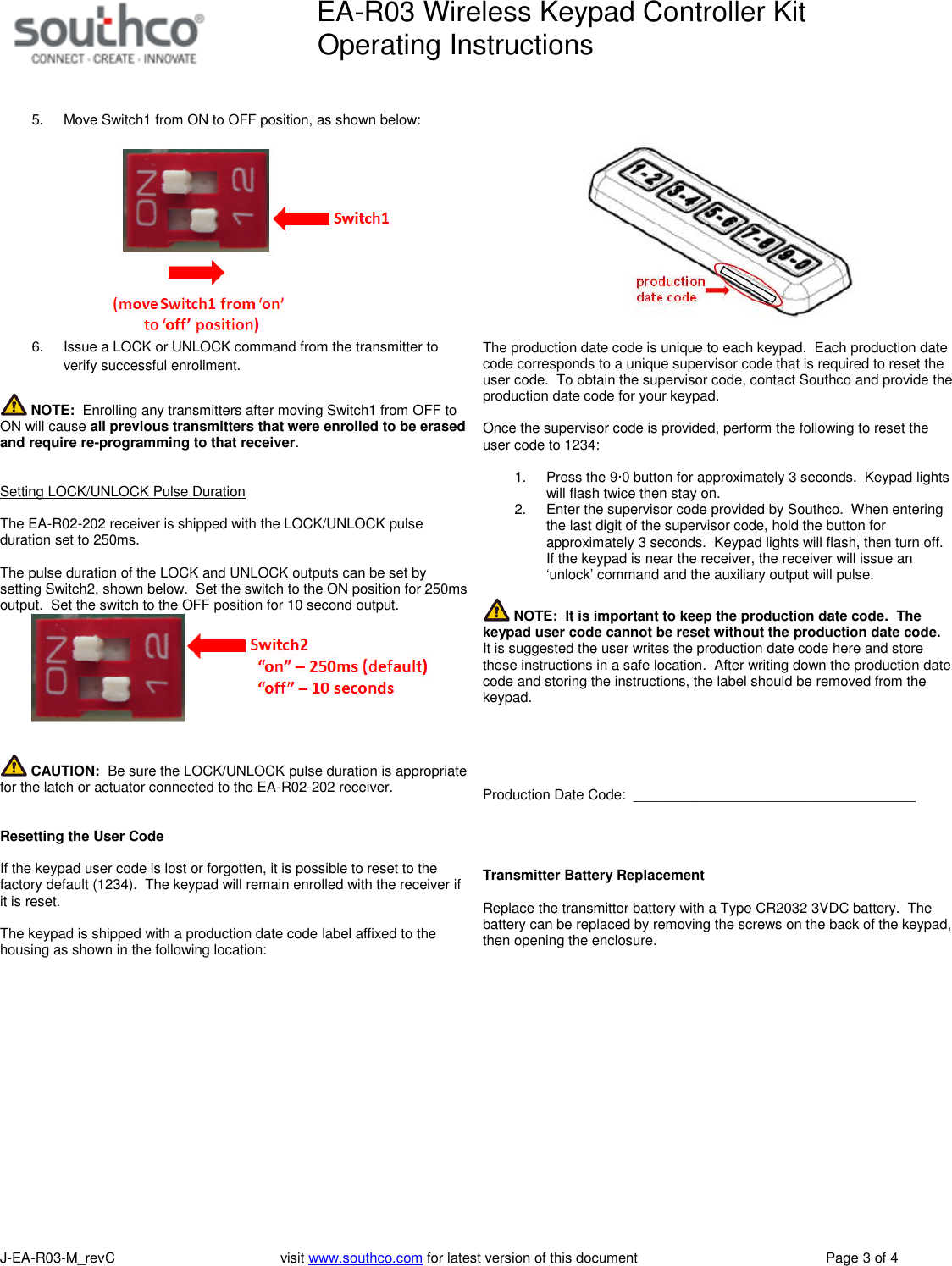
EA-R03 Wireless Keypad Controller KitOperating InstructionsJ-EA-R03-M_revC visit www.southco.com for latest version of this document Page 3 of 45. Move Switch1 from ON to OFF position, as shown below:6. Issue a LOCK or UNLOCK command from the transmitter toverify successful enrollment.NOTE: Enrolling any transmitters after moving Switch1 from OFF toON will cause all previous transmitters that were enrolled to be erasedand require re-programming to that receiver.Setting LOCK/UNLOCK Pulse DurationThe EA-R02-202 receiver is shipped with the LOCK/UNLOCK pulseduration set to 250ms.The pulse duration of the LOCK and UNLOCK outputs can be set bysetting Switch2, shown below. Set the switch to the ON position for 250msoutput. Set the switch to the OFF position for 10 second output.CAUTION: Be sure the LOCK/UNLOCK pulse duration is appropriatefor the latch or actuator connected to the EA-R02-202 receiver.Resetting the User CodeIf the keypad user code is lost or forgotten, it is possible to reset to thefactory default (1234). The keypad will remain enrolled with the receiver ifit is reset.The keypad is shipped with a production date code label affixed to thehousing as shown in the following location:The production date code is unique to each keypad. Each production datecode corresponds to a unique supervisor code that is required to reset theuser code. To obtain the supervisor code, contact Southco and provide theproduction date code for your keypad.Once the supervisor code is provided, perform the following to reset theuser code to 1234:1. Press the 9·0 button for approximately 3 seconds. Keypad lightswill flash twice then stay on.2. Enter the supervisor code provided by Southco. When enteringthe last digit of the supervisor code, hold the button forapproximately 3 seconds. Keypad lights will flash, then turn off.If the keypad is near the receiver, the receiver will issue an‘unlock’ command and the auxiliary output will pulse.NOTE: It is important to keep the production date code. Thekeypad user code cannot be reset without the production date code.It is suggested the user writes the production date code here and storethese instructions in a safe location. After writing down the production datecode and storing the instructions, the label should be removed from thekeypad.Production Date Code: ____________________________________Transmitter Battery ReplacementReplace the transmitter battery with a Type CR2032 3VDC battery. Thebattery can be replaced by removing the screws on the back of the keypad,then opening the enclosure.
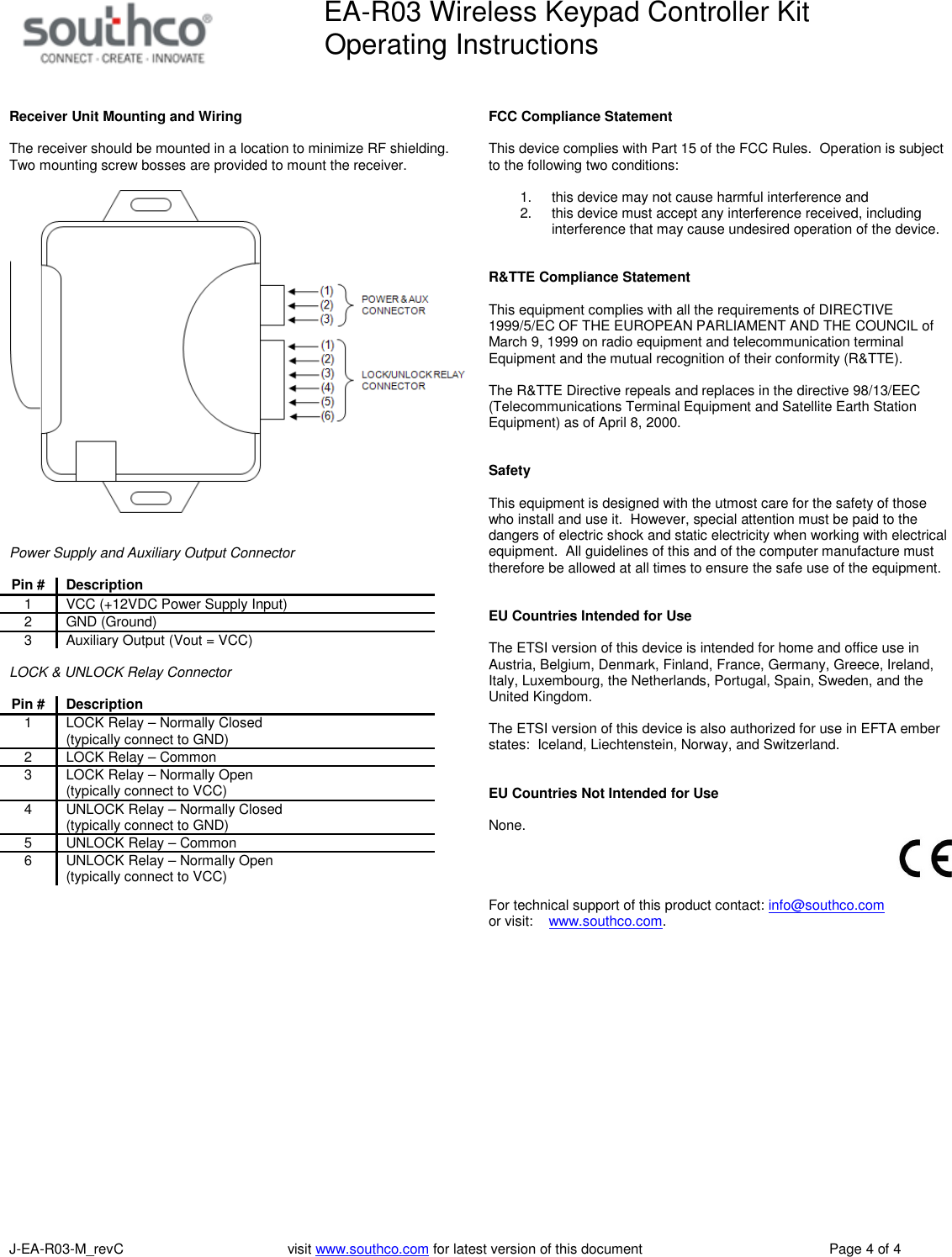
EA-R03 Wireless Keypad Controller KitOperating InstructionsJ-EA-R03-M_revC visit www.southco.com for latest version of this document Page 4 of 4Receiver Unit Mounting and WiringThe receiver should be mounted in a location to minimize RF shielding.Two mounting screw bosses are provided to mount the receiver.Power Supply and Auxiliary Output ConnectorPin #Description1 VCC (+12VDC Power Supply Input)2 GND (Ground)3 Auxiliary Output (Vout = VCC)LOCK & UNLOCK Relay ConnectorPin #Description1 LOCK Relay – Normally Closed(typically connect to GND)2 LOCK Relay – Common3 LOCK Relay – Normally Open(typically connect to VCC)4 UNLOCK Relay – Normally Closed(typically connect to GND)5 UNLOCK Relay – Common6 UNLOCK Relay – Normally Open(typically connect to VCC)FCC Compliance StatementThis device complies with Part 15 of the FCC Rules. Operation is subjectto the following two conditions:1. this device may not cause harmful interference and2. this device must accept any interference received, includinginterference that may cause undesired operation of the device.R&TTE Compliance StatementThis equipment complies with all the requirements of DIRECTIVE1999/5/EC OF THE EUROPEAN PARLIAMENT AND THE COUNCIL ofMarch 9, 1999 on radio equipment and telecommunication terminalEquipment and the mutual recognition of their conformity (R&TTE).The R&TTE Directive repeals and replaces in the directive 98/13/EEC(Telecommunications Terminal Equipment and Satellite Earth StationEquipment) as of April 8, 2000.SafetyThis equipment is designed with the utmost care for the safety of thosewho install and use it. However, special attention must be paid to thedangers of electric shock and static electricity when working with electricalequipment. All guidelines of this and of the computer manufacture musttherefore be allowed at all times to ensure the safe use of the equipment.EU Countries Intended for UseThe ETSI version of this device is intended for home and office use inAustria, Belgium, Denmark, Finland, France, Germany, Greece, Ireland,Italy, Luxembourg, the Netherlands, Portugal, Spain, Sweden, and theUnited Kingdom.The ETSI version of this device is also authorized for use in EFTA emberstates: Iceland, Liechtenstein, Norway, and Switzerland.EU Countries Not Intended for UseNone.For technical support of this product contact: info@southco.comor visit: www.southco.com.

Navigation menu