Southco H3EM68 Electronic Swinghandle User Manual J H3 EM 68 100 M revAx

Southco,. Inc Electronic Swinghandle J H3 EM 68 100 M revAx

User Manual_rev

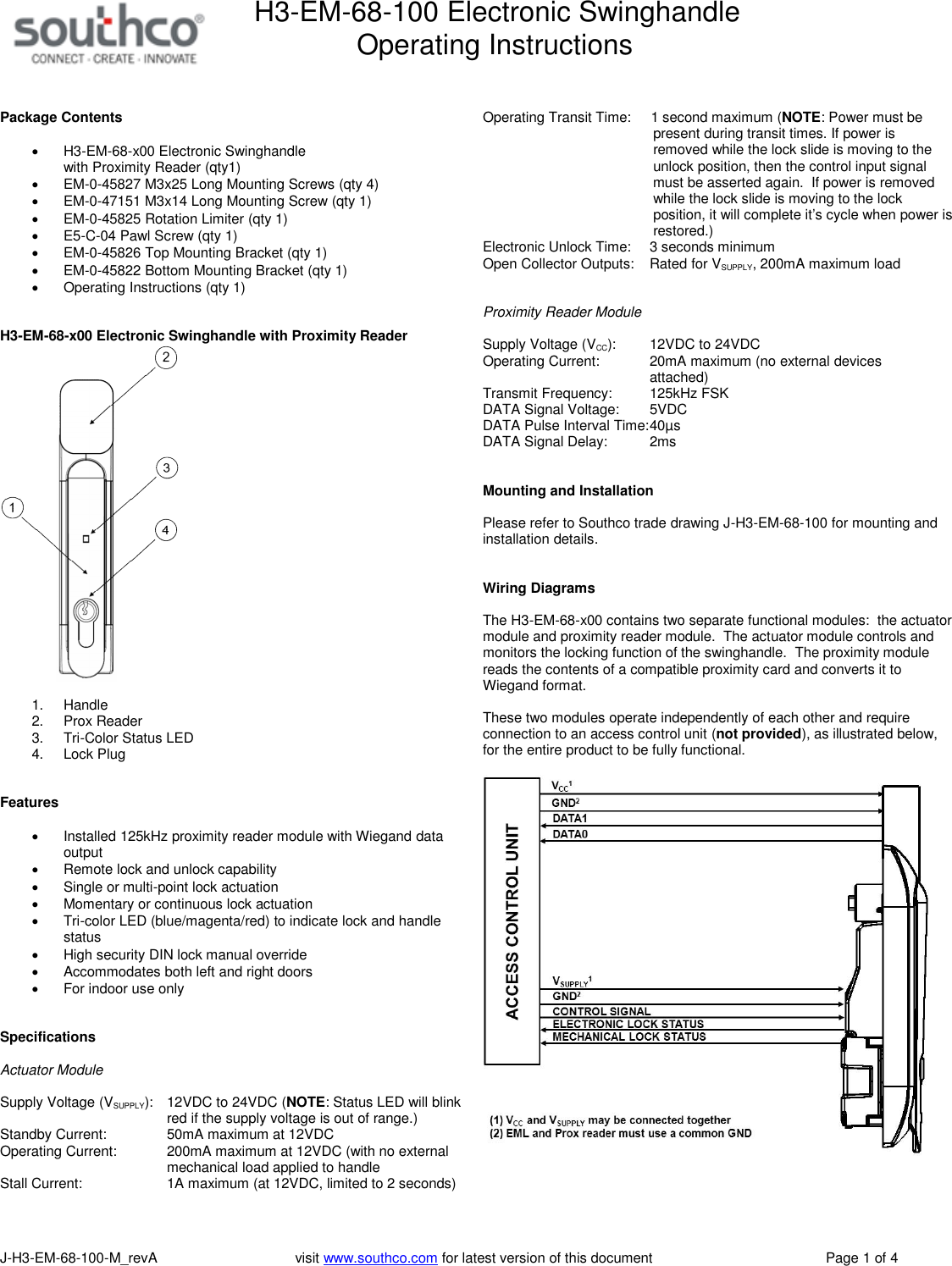
H3-EM-68-100 Electronic SwinghandleOperating InstructionsJ-H3-EM-68-100-M_revA visit www.southco.com for latest version of this document Page 1 of 4Package ContentsH3-EM-68-x00 Electronic Swinghandlewith Proximity Reader (qty1)EM-0-45827 M3x25 Long Mounting Screws (qty 4)EM-0-47151 M3x14 Long Mounting Screw (qty 1)EM-0-45825 Rotation Limiter (qty 1)E5-C-04 Pawl Screw (qty 1)EM-0-45826 Top Mounting Bracket (qty 1)EM-0-45822 Bottom Mounting Bracket (qty 1)Operating Instructions (qty 1)H3-EM-68-x00 Electronic Swinghandle with Proximity Reader1. Handle2. Prox Reader3. Tri-Color Status LED4. Lock PlugFeaturesInstalled 125kHz proximity reader module with Wiegand dataoutputRemote lock and unlock capabilitySingle or multi-point lock actuationMomentary or continuous lock actuationTri-color LED (blue/magenta/red) to indicate lock and handlestatusHigh security DIN lock manual overrideAccommodates both left and right doorsFor indoor use onlySpecificationsActuator ModuleSupply Voltage (VSUPPLY): 12VDC to 24VDC (NOTE: Status LED will blinkred if the supply voltage is out of range.)Standby Current: 50mA maximum at 12VDCOperating Current: 200mA maximum at 12VDC (with no externalmechanical load applied to handleStall Current: 1A maximum (at 12VDC, limited to 2 seconds)Operating Transit Time: 1 second maximum (NOTE: Power must bepresent during transit times. If power isremoved while the lock slide is moving to theunlock position, then the control input signalmust be asserted again. If power is removedwhile the lock slide is moving to the lockposition, it will complete it’s cycle when power isrestored.)Electronic Unlock Time: 3 seconds minimumOpen Collector Outputs: Rated for VSUPPLY, 200mA maximum loadProximity Reader ModuleSupply Voltage (VCC): 12VDC to 24VDCOperating Current: 20mA maximum (no external devicesattached)Transmit Frequency: 125kHz FSKDATA Signal Voltage: 5VDCDATA Pulse Interval Time:40µsDATA Signal Delay: 2msMounting and InstallationPlease refer to Southco trade drawing J-H3-EM-68-100 for mounting andinstallation details.Wiring DiagramsThe H3-EM-68-x00 contains two separate functional modules: the actuatormodule and proximity reader module. The actuator module controls andmonitors the locking function of the swinghandle. The proximity modulereads the contents of a compatible proximity card and converts it toWiegand format.These two modules operate independently of each other and requireconnection to an access control unit (not provided), as illustrated below,for the entire product to be fully functional.
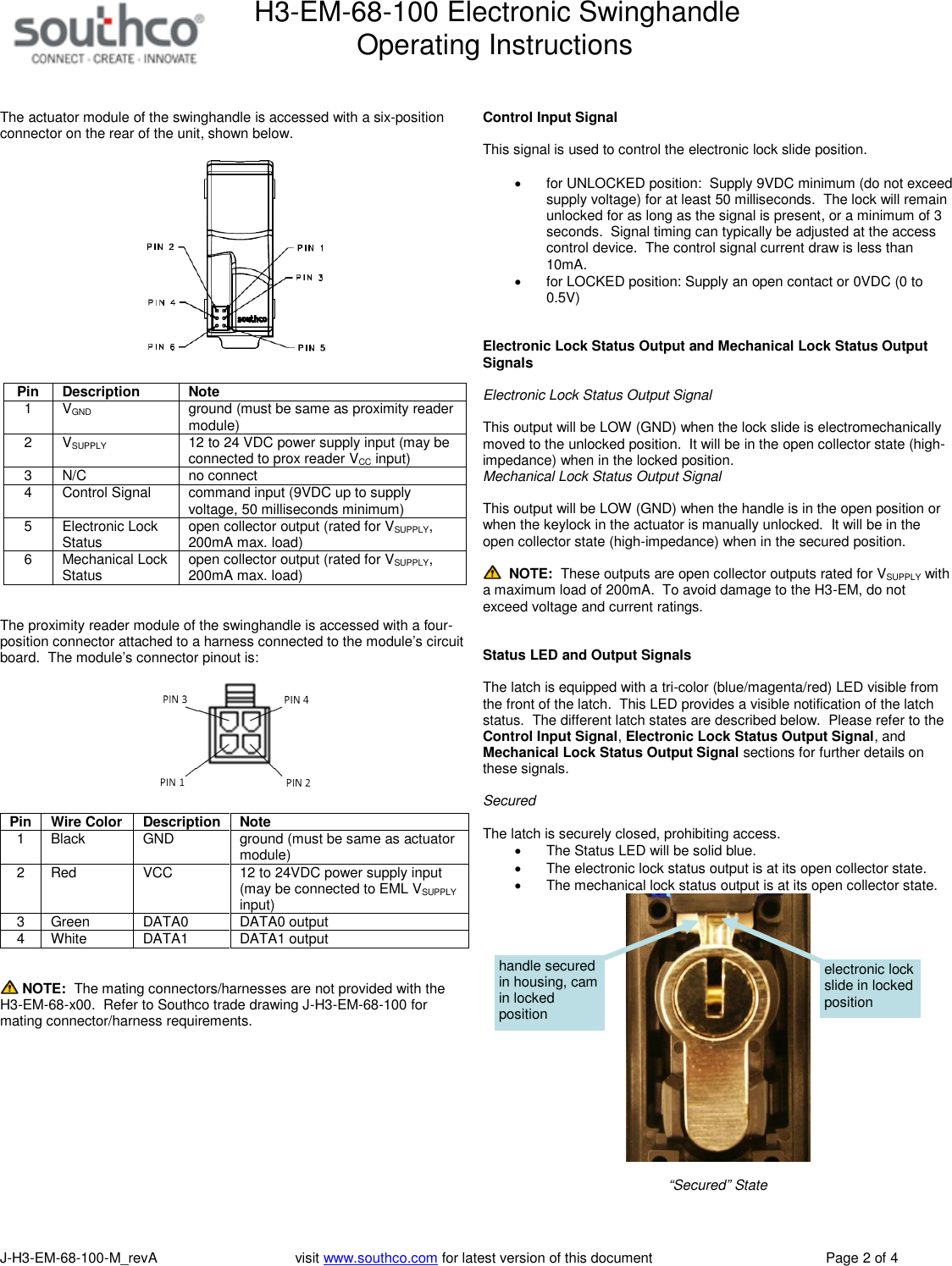
H3-EM-68-100 Electronic SwinghandleOperating InstructionsJ-H3-EM-68-100-M_revA visit www.southco.com for latest version of this document Page 2 of 4The actuator module of the swinghandle is accessed with a six-positionconnector on the rear of the unit, shown below.PinDescriptionNote1 VGND ground (must be same as proximity readermodule)2 VSUPPLY 12 to 24 VDC power supply input (may beconnected to prox reader VCCinput)3 N/C no connect4 Control Signal command input (9VDC up to supplyvoltage, 50 milliseconds minimum)5 Electronic LockStatus open collector output (rated for VSUPPLY,200mA max. load)6 Mechanical LockStatus open collector output (rated for VSUPPLY,200mA max. load)The proximity reader module of the swinghandle is accessed with a four-position connector attached to a harness connected to the module’s circuitboard. The module’s connector pinout is:PinWire ColorDescriptionNote1 Black GND ground (must be same as actuatormodule)2 Red VCC 12 to 24VDC power supply input(may be connected to EML VSUPPLYinput)3 Green DATA0 DATA0 output4 White DATA1 DATA1 outputNOTE: The mating connectors/harnesses are not provided with theH3-EM-68-x00. Refer to Southco trade drawing J-H3-EM-68-100 formating connector/harness requirements.Control Input SignalThis signal is used to control the electronic lock slide position.for UNLOCKED position: Supply 9VDC minimum (do not exceedsupply voltage) for at least 50 milliseconds. The lock will remainunlocked for as long as the signal is present, or a minimum of 3seconds. Signal timing can typically be adjusted at the accesscontrol device. The control signal current draw is less than10mA.for LOCKED position: Supply an open contact or 0VDC (0 to0.5V)Electronic Lock Status Output and Mechanical Lock Status OutputSignalsElectronic Lock Status Output SignalThis output will be LOW (GND) when the lock slide is electromechanicallymoved to the unlocked position. It will be in the open collector state (high-impedance) when in the locked position.Mechanical Lock Status Output SignalThis output will be LOW (GND) when the handle is in the open position orwhen the keylock in the actuator is manually unlocked. It will be in theopen collector state (high-impedance) when in the secured position.NOTE: These outputs are open collector outputs rated for VSUPPLY witha maximum load of 200mA. To avoid damage to the H3-EM, do notexceed voltage and current ratings.Status LED and Output SignalsThe latch is equipped with a tri-color (blue/magenta/red) LED visible fromthe front of the latch. This LED provides a visible notification of the latchstatus. The different latch states are described below. Please refer to theControl Input Signal,Electronic Lock Status Output Signal, andMechanical Lock Status Output Signal sections for further details onthese signals.SecuredThe latch is securely closed, prohibiting access.The Status LED will be solid blue.The electronic lock status output is at its open collector state.The mechanical lock status output is at its open collector state.“Secured” Stateelectronic lockslide in lockedpositionhandle securedin housing, camin lockedposition
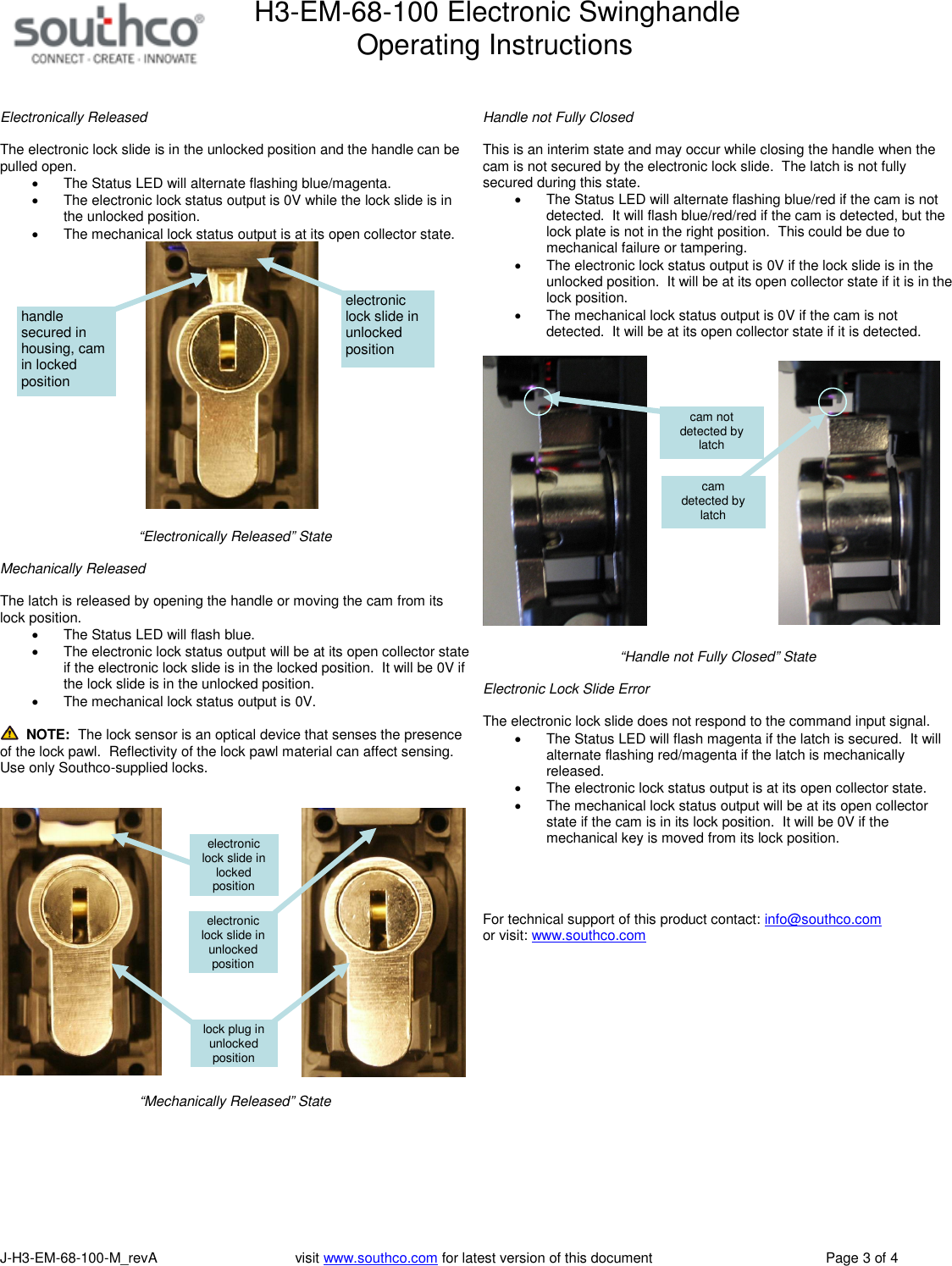
H3-EM-68-100 Electronic SwinghandleOperating InstructionsJ-H3-EM-68-100-M_revA visit www.southco.com for latest version of this document Page 3 of 4Electronically ReleasedThe electronic lock slide is in the unlocked position and the handle can bepulled open.The Status LED will alternate flashing blue/magenta.The electronic lock status output is 0V while the lock slide is inthe unlocked position.The mechanical lock status output is at its open collector state.“Electronically Released” StateMechanically ReleasedThe latch is released by opening the handle or moving the cam from itslock position.The Status LED will flash blue.The electronic lock status output will be at its open collector stateif the electronic lock slide is in the locked position. It will be 0V ifthe lock slide is in the unlocked position.The mechanical lock status output is 0V.NOTE: The lock sensor is an optical device that senses the presenceof the lock pawl. Reflectivity of the lock pawl material can affect sensing.Use only Southco-supplied locks.“Mechanically Released” StateHandle not Fully ClosedThis is an interim state and may occur while closing the handle when thecam is not secured by the electronic lock slide. The latch is not fullysecured during this state.The Status LED will alternate flashing blue/red if the cam is notdetected. It will flash blue/red/red if the cam is detected, but thelock plate is not in the right position. This could be due tomechanical failure or tampering.The electronic lock status output is 0V if the lock slide is in theunlocked position. It will be at its open collector state if it is in thelock position.The mechanical lock status output is 0V if the cam is notdetected. It will be at its open collector state if it is detected.“Handle not Fully Closed” StateElectronic Lock Slide ErrorThe electronic lock slide does not respond to the command input signal.The Status LED will flash magenta if the latch is secured. It willalternate flashing red/magenta if the latch is mechanicallyreleased.The electronic lock status output is at its open collector state.The mechanical lock status output will be at its open collectorstate if the cam is in its lock position. It will be 0V if themechanical key is moved from its lock position.For technical support of this product contact: info@southco.comor visit: www.southco.comcamdetected bylatchcam notdetected bylatchelectroniclock slide inunlockedpositionelectroniclock slide inlockedpositionlock plug inunlockedpositionelectroniclock slide inunlockedpositionhandlesecured inhousing, camin lockedposition
H3-EM-68-100 Electronic SwinghandleOperating InstructionsJ-H3-EM-68-100-M_revA visit www.southco.com for latest version of this document Page 4 of 4FCC Compliance StatementThis equipment has been tested and found to comply with the limits for a Class B digital device, pursuant to part 15 of the FCC rules.These limits are designed to provide reasonable protection against harmful interference in a residential installation. This equipmentgenerates, uses and can radiate radio frequency energy and, if not installed and used in accordance with the instructions, maycause harmful interference to radio communications. However, there is no guarantee that interference will not occur in a particularinstallation. If this equipment does cause harmful interference to radio or television reception, which can be determined by turningthe equipment off and on, the user is encouraged to try to correct the interference by one or more of the following measures:Reorient or relocate the receiving antenna.Increase the separation between the equipment and receiver.Connect the equipment into an outlet on a circuit different from that to which the receiver is connected.Consult the dealer or an experienced radio/TV technician for help.FCC Caution: This device complies with Part 15 of the FCC Rules. Operation is subject to the following two conditions:1) This device may not cause harmful interference and2) This device must accept any interference received, including interference that may cause undesired operation.RF Exposure Warning: The equipment complies with RF exposure limits set forth for an uncontrolled environment. The antenna(s)used for this transmitter must not be co-located or operating in conjunction with any other antenna or transmitter.You are cautioned that changes or modifications not expressly approved by the party responsible for compliance could voidyour authority to operate the equipment.Industry Canada Compliance StatementThis digital apparatus does not exceed the Class B limits for radio noise emissions from digital apparatus as set out in theinterference-causing equipment standard entitled “Digital Apparatus,” ICES-003 of Industry Canada.Cet appareil numérique respecte les limites de bruits radioélectriques applicables aux appareils numériques de Classe B prescritesdans la norme sur le material brouilleur: “Appareils Numériques,” NMB-003 édictée par l’Industrie.

Navigation menu